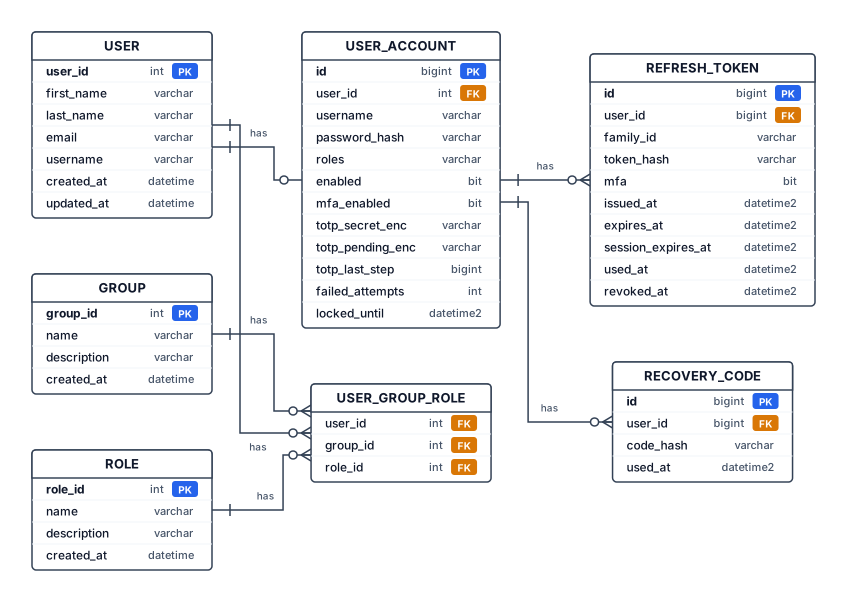
USER user_id: INT, PK first_name: VARCHAR(100) last_name: VARCHAR(100) email: VARCHAR(255) username: VARCHAR(100) created_at: DATETIME updated_at: DATETIME GROUP group_id: INT, PK name: VARCHAR(150) description: VARCHAR(500) created_at: DATETIME ROLE role_id: INT, PK name: VARCHAR(100) description: VARCHAR(500) created_at: DATETIME USER_GROUP_ROLE user_id: INT, PK, FK → USER.user_id group_id: INT, PK, FK → GROUP.group_id role_id: INT, FK → ROLE.role_id USER_ACCOUNT id: BIGINT, PK user_id: INT, FK → USER.user_id username: VARCHAR(100) password_hash: VARCHAR(255) roles: VARCHAR(200) enabled: BIT mfa_enabled: BIT totp_secret_enc: VARCHAR(512) totp_pending_enc: VARCHAR(512) totp_last_step: BIGINT failed_attempts: INT locked_until: DATETIME2(7) REFRESH_TOKEN id: BIGINT, PK user_id: BIGINT, FK → USER_ACCOUNT.id family_id: VARCHAR(36) token_hash: VARCHAR(64) mfa: BIT issued_at: DATETIME2(7) expires_at: DATETIME2(7) session_expires_at: DATETIME2(7) used_at: DATETIME2(7) revoked_at: DATETIME2(7) RECOVERY_CODE id: BIGINT, PK user_id: BIGINT, FK → USER_ACCOUNT.id code_hash: VARCHAR(64) used_at: DATETIME2(7) Relazioni USER (1) — (N) USER_GROUP_ROLE GROUP (1) — (N) USER_GROUP_ROLE ROLE (1) — (N) USER_GROUP_ROLE USER (1) — (0..1) USER_ACCOUNT USER_ACCOUNT (1) — (N) refresh_token USER_ACCOUNT (1) — (N) RECOVERY_CODE
Diagram Examples from Real Visitor Prompts
Browse eligible diagrams shared by FreeDiagram visitors, inspect the exact prompts, and build your own version.
Browse 196 real creationsEr Diagrams
Showing 1–23 of 23. No stock examples or system defaults. Choose a tool, study a real result, then reopen its prompt as your starting point.
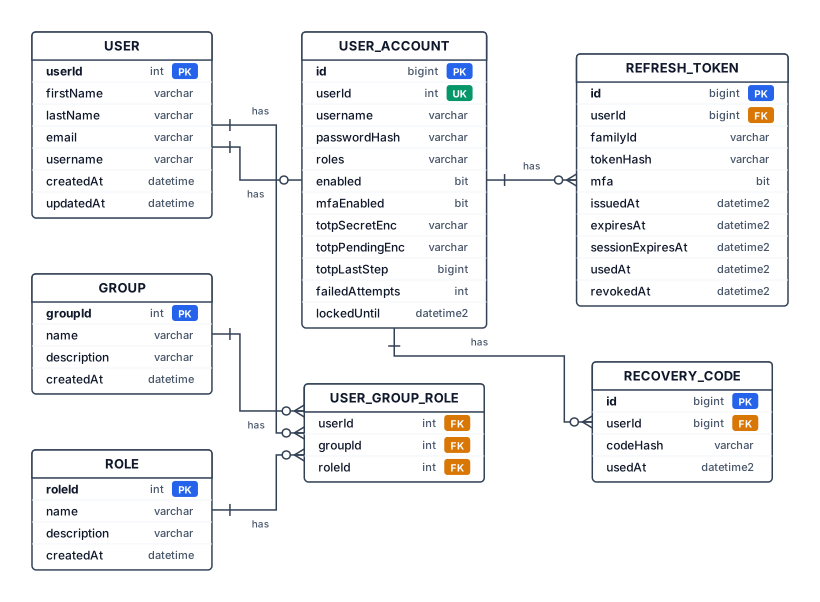
USER userId: INT, PK firstName: VARCHAR(100) lastName: VARCHAR(100) email: VARCHAR(255) username: VARCHAR(100) createdAt: DATETIME updatedAt: DATETIME GROUP groupId: INT, PK name: VARCHAR(150) description: VARCHAR(500) createdAt: DATETIME ROLE roleId: INT, PK name: VARCHAR(100) description: VARCHAR(500) createdAt: DATETIME USER_GROUP_ROLE userId: INT, PK, FK → USER.userId groupId: INT, PK, FK → GROUP.groupId roleId: INT, FK → ROLE.roleId USER_ACCOUNT id: BIGINT, PK userId: INT, FK → USER.userId, UNIQUE username: VARCHAR(100) passwordHash: VARCHAR(255) roles: VARCHAR(200) enabled: BIT mfaEnabled: BIT totpSecretEnc: VARCHAR(512) totpPendingEnc: VARCHAR(512) totpLastStep: BIGINT failedAttempts: INT lockedUntil: DATETIME2(7) REFRESH_TOKEN id: BIGINT, PK userId: BIGINT, FK → USER_ACCOUNT.id familyId: VARCHAR(36) tokenHash: VARCHAR(64) mfa: BIT issuedAt: DATETIME2(7) expiresAt: DATETIME2(7) sessionExpiresAt: DATETIME2(7) usedAt: DATETIME2(7) revokedAt: DATETIME2(7) RECOVERY_CODE id: BIGINT, PK userId: BIGINT, FK → USER_ACCOUNT.id codeHash: VARCHAR(64) usedAt: DATETIME2(7) Relazioni USER (1) — (N) USER_GROUP_ROLE GROUP (1) — (N) USER_GROUP_ROLE ROLE (1) — (N) USER_GROUP_ROLE USER (1) — (0..1) USER_ACCOUNT USER_ACCOUNT (1) — (N) REFRESH_TOKEN USER_ACCOUNT (1) — (N) RECOVERY_CODE
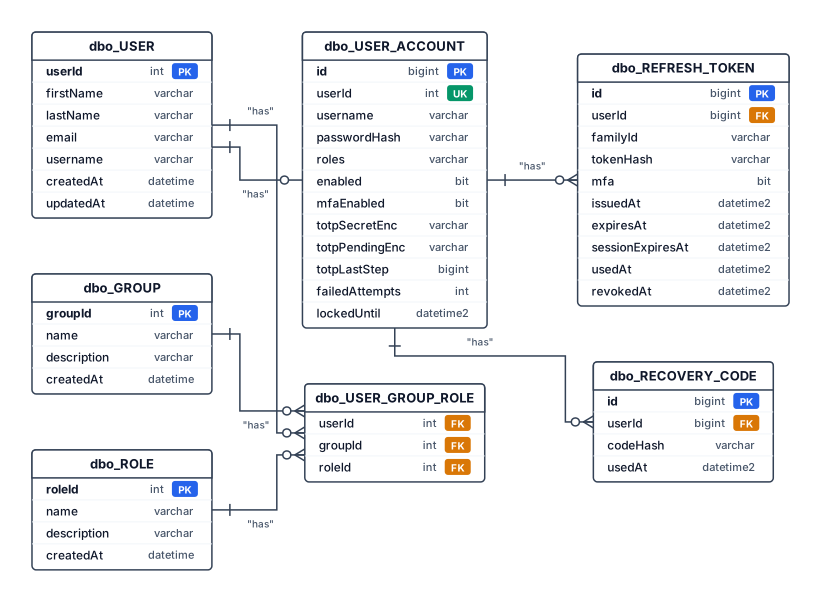
dbo_USER userId: INT, PK firstName: VARCHAR(100) lastName: VARCHAR(100) email: VARCHAR(255) username: VARCHAR(100) createdAt: DATETIME updatedAt: DATETIME dbo_GROUP groupId: INT, PK name: VARCHAR(150) description: VARCHAR(500) createdAt: DATETIME dbo_ROLE roleId: INT, PK name: VARCHAR(100) description: VARCHAR(500) createdAt: DATETIME dbo_USER_GROUP_ROLE userId: INT, PK, FK → dbo_USER.userId groupId: INT, PK, FK → dbo_GROUP.groupId roleId: INT, FK → dbo_ROLE.roleId dbo_USER_ACCOUNT id: BIGINT, PK userId: INT, FK → dbo_USER.userId, UNIQUE username: VARCHAR(100) passwordHash: VARCHAR(255) roles: VARCHAR(200) enabled: BIT mfaEnabled: BIT totpSecretEnc: VARCHAR(512) totpPendingEnc: VARCHAR(512) totpLastStep: BIGINT failedAttempts: INT lockedUntil: DATETIME2(7) dbo_REFRESH_TOKEN id: BIGINT, PK userId: BIGINT, FK → dbo_USER_ACCOUNT.id familyId: VARCHAR(36) tokenHash: VARCHAR(64) mfa: BIT issuedAt: DATETIME2(7) expiresAt: DATETIME2(7) sessionExpiresAt: DATETIME2(7) usedAt: DATETIME2(7) revokedAt: DATETIME2(7) dbo_RECOVERY_CODE id: BIGINT, PK userId: BIGINT, FK → dbo_USER_ACCOUNT.id codeHash: VARCHAR(64) usedAt: DATETIME2(7) Relazioni dbo_USER (1) — (N) dbo_USER_GROUP_ROLE dbo_GROUP (1) — (N) dbo_USER_GROUP_ROLE dbo_ROLE (1) — (N) dbo_USER_GROUP_ROLE dbo_USER (1) — (0..1) dbo_USER_ACCOUNT dbo_USER_ACCOUNT (1) — (N) dbo_REFRESH_TOKEN dbo_USER_ACCOUNT (1) — (N) dbo_RECOVERY_CODE
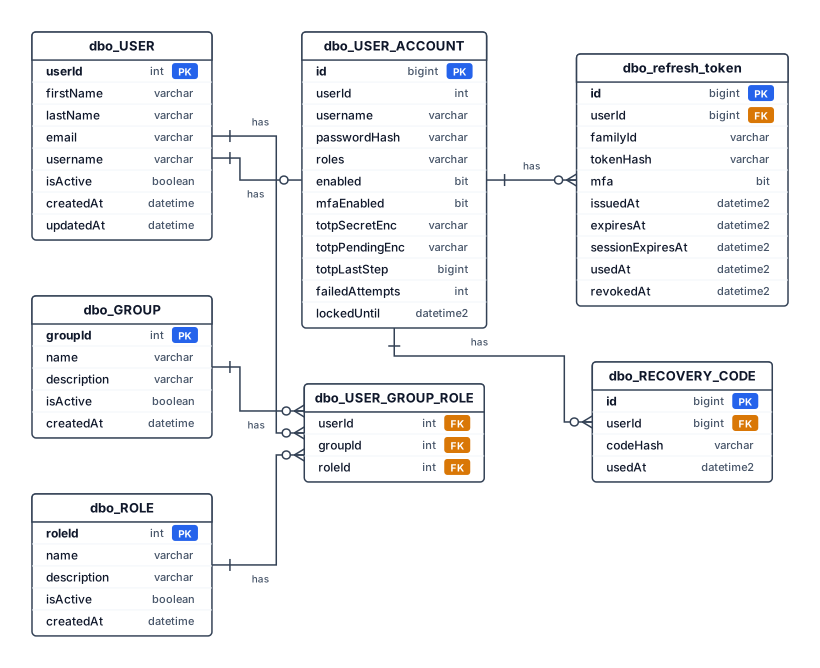
dbo_USER userId: INT, PK firstName: VARCHAR(100) lastName: VARCHAR(100) email: VARCHAR(255) username: VARCHAR(100) isActive: BOOLEAN createdAt: DATETIME updatedAt: DATETIME dbo_GROUP groupId: INT, PK name: VARCHAR(150) description: VARCHAR(500) isActive: BOOLEAN createdAt: DATETIME dbo_ROLE roleId: INT, PK name: VARCHAR(100) description: VARCHAR(500) isActive: BOOLEAN createdAt: DATETIME dbo_USER_GROUP_ROLE userId: INT, PK, FK → dbo_USER.userId groupId: INT, PK, FK → dbo_GROUP.groupId roleId: INT, FK → dbo_ROLE.roleId dbo_USER_ACCOUNT id: BIGINT, PK userId: INT, FK → dbo_USER.userId, UNIQUE username: VARCHAR(100) passwordHash: VARCHAR(255) roles: VARCHAR(200) enabled: BIT mfaEnabled: BIT totpSecretEnc: VARCHAR(512) totpPendingEnc: VARCHAR(512) totpLastStep: BIGINT failedAttempts: INT lockedUntil: DATETIME2(7) dbo_refresh_token id: BIGINT, PK userId: BIGINT, FK → dbo_USER_ACCOUNT.id familyId: VARCHAR(36) tokenHash: VARCHAR(64) mfa: BIT issuedAt: DATETIME2(7) expiresAt: DATETIME2(7) sessionExpiresAt: DATETIME2(7) usedAt: DATETIME2(7) revokedAt: DATETIME2(7) dbo_RECOVERY_CODE id: BIGINT, PK userId: BIGINT, FK → dbo_USER_ACCOUNT.id codeHash: VARCHAR(64) usedAt: DATETIME2(7) Relazioni dbo_USER (1) — (N) dbo_USER_GROUP_ROLE dbo_GROUP (1) — (N) dbo_USER_GROUP_ROLE dbo_ROLE (1) — (N) dbo_USER_GROUP_ROLE dbo_USER (1) — (0..1) dbo_USER_ACCOUNT dbo_USER_ACCOUNT (1) — (N) dbo_refresh_token dbo_USER_ACCOUNT (1) — (N) dbo_RECOVERY_CODE
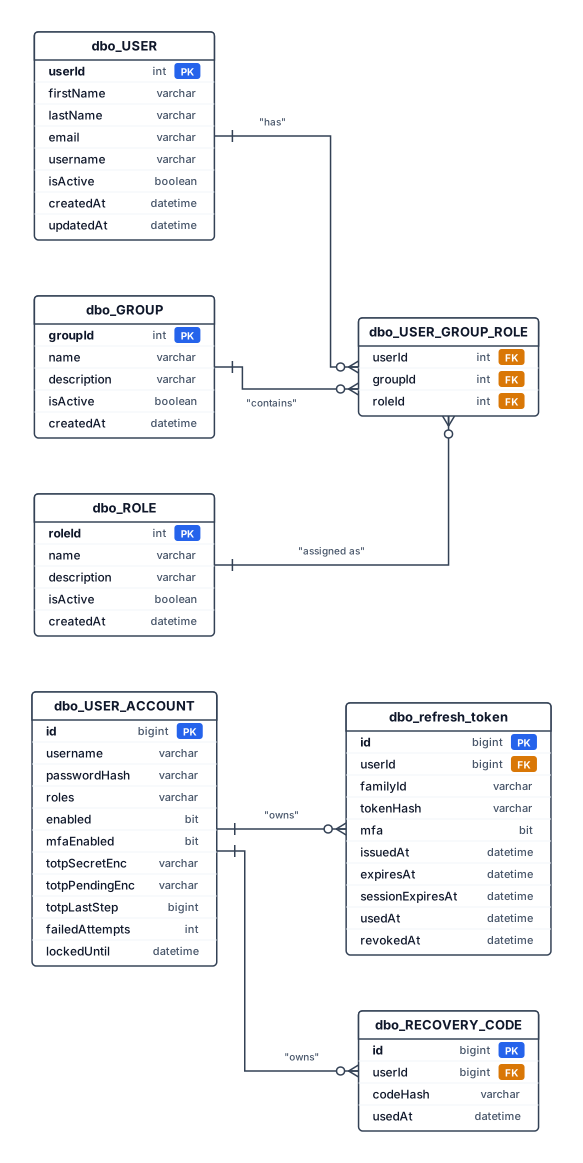
Tabella dbo_USER userId: INT, PK. firstName: VARCHAR(100). lastName: VARCHAR(100). email: VARCHAR(255). username: VARCHAR(100). isActive: BOOLEAN. createdAt: DATETIME. updatedAt: DATETIME. Tabella dbo_GROUP groupId: INT, PK. name: VARCHAR(150). description: VARCHAR(500). isActive: BOOLEAN. createdAt: DATETIME. Tabella dbo_ROLE roleId: INT, PK. name: VARCHAR(100). description: VARCHAR(500). isActive: BOOLEAN. createdAt: DATETIME. Tabella dbo_USER_GROUP_ROLE userId: INT, PK composta e FK verso USER.userId. groupId: INT, PK composta e FK verso GROUP.groupId. roleId: INT, FK verso ROLE.roleId. Tabella dbo_USER_ACCOUNT id: BIGINT, PK. username: VARCHAR(100). passwordHash: VARCHAR(255). roles: VARCHAR(200). enabled: BIT. mfaEnabled: BIT. totpSecretEnc: VARCHAR(512). totpPendingEnc: VARCHAR(512). totpLastStep: BIGINT. failedAttempts: INT. lockedUntil: DATETIME2(7). Tabella dbo_refresh_token id: BIGINT, PK. userId: BIGINT, FK verso USER_ACCOUNT.id. familyId: VARCHAR(36). tokenHash: VARCHAR(64). mfa: BIT. issuedAt: DATETIME2(7). expiresAt: DATETIME2(7). sessionExpiresAt: DATETIME2(7). usedAt: DATETIME2(7). revokedAt: DATETIME2(7). Tabella dbo_RECOVERY_CODE id: BIGINT, PK. userId: BIGINT, FK verso USER_ACCOUNT.id. codeHash: VARCHAR(64). usedAt: DATETIME2(7). Relazioni e cardinalità USER (1) — (N) USER_GROUP_ROLE: un utente può avere zero o più assegnazioni; ogni assegnazione appartiene a un solo utente. GROUP (1) — (N) USER_GROUP_ROLE: un gruppo può contenere zero o più assegnazioni; ogni assegnazione appartiene a un solo gruppo. ROLE (1) — (N) USER_GROUP_ROLE: un ruolo può essere utilizzato in zero o più assegnazioni; ogni assegnazione fa riferimento a un solo ruolo. USER_ACCOUNT (1) — (N) refresh_token: un account può avere zero o più token; ogni token appartiene a un solo account. USER_ACCOUNT (1) — (N) RECOVERY_CODE: un account può avere zero o più codici di recupero; ogni codice appartiene a un solo account.
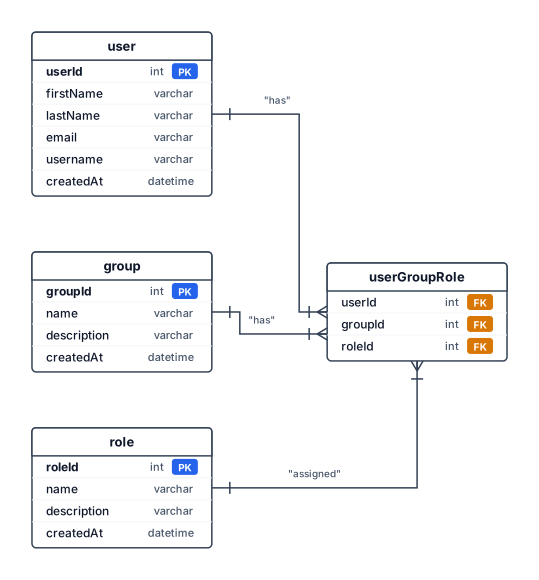
Create an Entity-Relationship (ER) diagram using Crow’s Foot notation with the following tables, attributes, primary keys, foreign keys, and relationships. 1. User UserId — INT, Primary Key FirstName — VARCHAR(50), NOT NULL LastName — VARCHAR(50), NOT NULL Email — VARCHAR(100), NOT NULL Username — VARCHAR(50) CreatedAt — DATETIME, NOT NULL 2. Group GroupId — INT, Primary Key Name — VARCHAR(100), NOT NULL Description — VARCHAR(300) CreatedAt — DATETIME, NOT NULL 3. Role RoleId — INT, Primary Key Name — VARCHAR(100), NOT NULL Description — VARCHAR(300) CreatedAt — DATETIME, NOT NULL 4. UserGroupRole UserId — INT, Primary Key, Foreign Key referencing User.UserId GroupId — INT, Primary Key, Foreign Key referencing Group.GroupId RoleId — INT, NOT NULL, Foreign Key referencing Role.RoleId Composite Primary Key: (UserId, GroupId) Relationships User (1) → (N) UserGroupRole Group (1) → (N) UserGroupRole Role (1) → (N) UserGroupRole Each user can belong to multiple groups and have one role per group. The same role can be assigned to multiple users and groups. A user cannot have multiple roles within the same group. Display all attributes, clearly distinguish primary keys and foreign keys, and show all relationship cardinalities. I nomi degli attributi devono essere camel case, per esempio: FirstName diventa firstName. Non ci devono essere relazioni opzionali
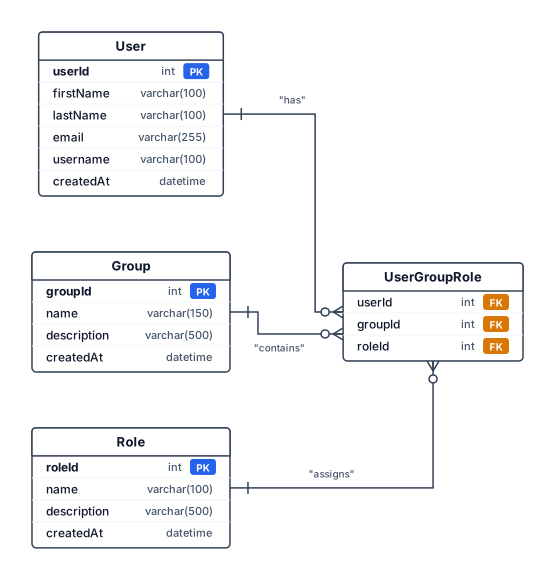
Create an Entity-Relationship (ER) diagram using Crow’s Foot notation with the following tables, attributes, primary keys, foreign keys, and relationships. 1. User UserId — INT, Primary Key FirstName — VARCHAR(100), NOT NULL LastName — VARCHAR(100), NOT NULL Email — VARCHAR(255), NOT NULL, UNIQUE Username — VARCHAR(100), UNIQUE CreatedAt — DATETIME, NOT NULL 2. Group GroupId — INT, Primary Key Name — VARCHAR(150), NOT NULL Description — VARCHAR(500) CreatedAt — DATETIME, NOT NULL 3. Role RoleId — INT, Primary Key Name — VARCHAR(100), NOT NULL Description — VARCHAR(500) CreatedAt — DATETIME, NOT NULL 4. UserGroupRole UserId — INT, Primary Key, Foreign Key referencing User.UserId GroupId — INT, Primary Key, Foreign Key referencing Group.GroupId RoleId — INT, NOT NULL, Foreign Key referencing Role.RoleId Composite Primary Key: (UserId, GroupId) Relationships User (1) → (N) UserGroupRole Group (1) → (N) UserGroupRole Role (1) → (N) UserGroupRole Each user can belong to multiple groups and have one role per group. The same role can be assigned to multiple users and groups. A user cannot have multiple roles within the same group. Display all attributes, clearly distinguish primary keys and foreign keys, and show all relationship cardinalities. I nomi degli attributi devono essere camel case, per esempio: FirstName diventa firstName
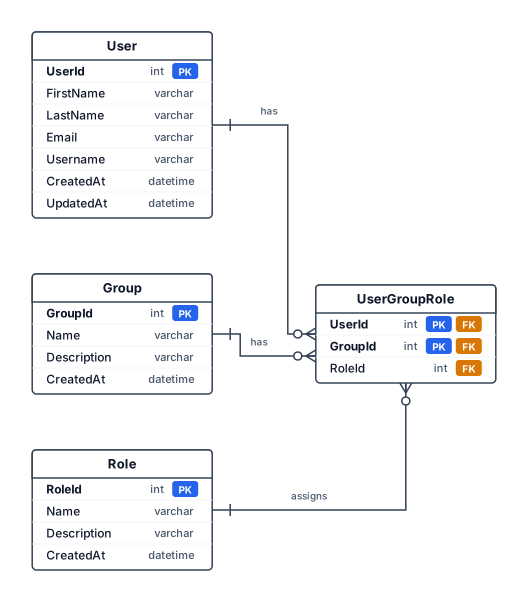
Create an Entity-Relationship (ER) diagram using Crow’s Foot notation with the following tables, attributes, primary keys, foreign keys, and relationships. 1. User UserId — INT, Primary Key FirstName — VARCHAR(100), NOT NULL LastName — VARCHAR(100), NOT NULL Email — VARCHAR(255), NOT NULL, UNIQUE Username — VARCHAR(100), UNIQUE CreatedAt — DATETIME, NOT NULL UpdatedAt — DATETIME 2. Group GroupId — INT, Primary Key Name — VARCHAR(150), NOT NULL Description — VARCHAR(500) CreatedAt — DATETIME, NOT NULL 3. Role RoleId — INT, Primary Key Name — VARCHAR(100), NOT NULL Description — VARCHAR(500) CreatedAt — DATETIME, NOT NULL 4. UserGroupRole UserId — INT, Primary Key, Foreign Key referencing User.UserId GroupId — INT, Primary Key, Foreign Key referencing Group.GroupId RoleId — INT, NOT NULL, Foreign Key referencing Role.RoleId Composite Primary Key: (UserId, GroupId) Relationships User (1) → (N) UserGroupRole Group (1) → (N) UserGroupRole Role (1) → (N) UserGroupRole Each user can belong to multiple groups and have one role per group. The same role can be assigned to multiple users and groups. A user cannot have multiple roles within the same group. Display all attributes, clearly distinguish primary keys and foreign keys, and show all relationship cardinalities. Use camelCase with all attributes
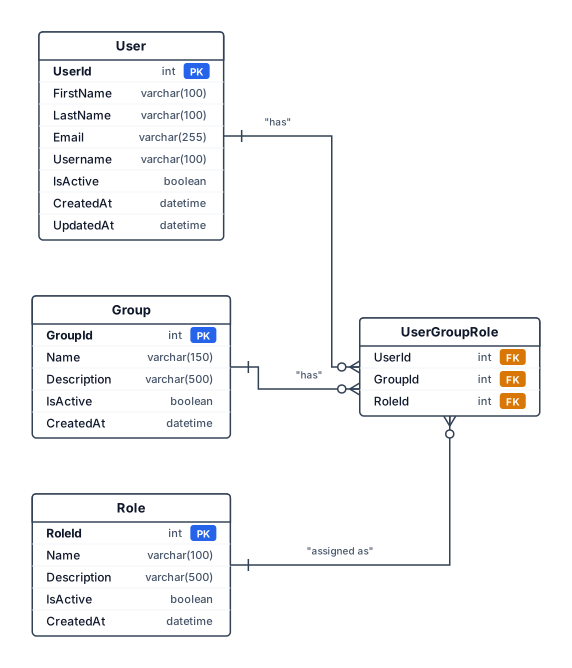
Create an Entity-Relationship (ER) diagram using Crow’s Foot notation with the following tables, attributes, primary keys, foreign keys, and relationships. 1. User UserId — INT, Primary Key FirstName — VARCHAR(100), NOT NULL LastName — VARCHAR(100), NOT NULL Email — VARCHAR(255), NOT NULL, UNIQUE Username — VARCHAR(100), UNIQUE IsActive — BOOLEAN, NOT NULL CreatedAt — DATETIME, NOT NULL UpdatedAt — DATETIME 2. Group GroupId — INT, Primary Key Name — VARCHAR(150), NOT NULL Description — VARCHAR(500) IsActive — BOOLEAN, NOT NULL CreatedAt — DATETIME, NOT NULL 3. Role RoleId — INT, Primary Key Name — VARCHAR(100), NOT NULL Description — VARCHAR(500) IsActive — BOOLEAN, NOT NULL CreatedAt — DATETIME, NOT NULL 4. UserGroupRole UserId — INT, Primary Key, Foreign Key referencing User.UserId GroupId — INT, Primary Key, Foreign Key referencing Group.GroupId RoleId — INT, NOT NULL, Foreign Key referencing Role.RoleId Composite Primary Key: (UserId, GroupId) Relationships User (1) → (N) UserGroupRole Group (1) → (N) UserGroupRole Role (1) → (N) UserGroupRole Each user can belong to multiple groups and have one role per group. The same role can be assigned to multiple users and groups. A user cannot have multiple roles within the same group. Display all attributes, clearly distinguish primary keys and foreign keys, and show all relationship cardinalities.
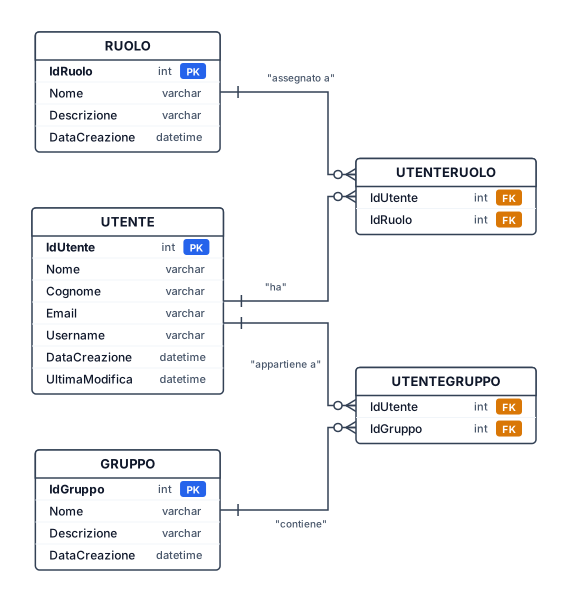
Il diagramma deve rappresentare tre entità: Utente, Ruolo e Gruppo, con i relativi attributi, chiavi primarie, chiavi esterne e cardinalità. 1. Entità UTENTE IdUtente — INT, chiave primaria (PK) Nome — VARCHAR(100) Cognome — VARCHAR(100) Email — VARCHAR(255) Username — VARCHAR(100) DataCreazione — DATETIME UltimaModifica — DATETIME IdRuolo — INT, chiave esterna (FK) verso Ruolo IdGruppo — INT, chiave esterna (FK) verso Gruppo 2. Entità RUOLO IdRuolo — INT, chiave primaria (PK) Nome — VARCHAR(100) Descrizione — VARCHAR(500) DataCreazione — DATETIME 3. Entità GRUPPO IdGruppo — INT, chiave primaria (PK) Nome — VARCHAR(150) Descrizione — VARCHAR(500) DataCreazione — DATETIME 4. Relazioni e cardinalità Relazione Ruolo–Utente Un Ruolo può essere assegnato a più Utenti. Ogni Utente può avere più di un Ruolo. Chiave esterna: Utente.IdRuolo → Ruolo.IdRuolo. Relazione Gruppo–Utente Un Gruppo può contenere più Utenti. Ogni Utente appartiene a più di un Gruppo. Chiave esterna: Utente.IdGruppo → Gruppo.IdGruppo. Devi creare due tabelle associative per gestire le relazioni molti-a-molti (N:M) tra Utente e Ruolo e tra Utente e Gruppo. UtenteRuolo: La chiave primaria è composta da IdUtente e IdRuolo. In questo modo lo stesso ruolo non può essere assegnato due volte allo stesso utente. UtenteGruppo: Anche qui la chiave primaria è composta da entrambi i campi. Le relazioni risultanti sono: Utente ↔ Ruolo: N:M, tramite UtenteRuolo. Utente ↔ Gruppo: N:M, tramite UtenteGruppo.
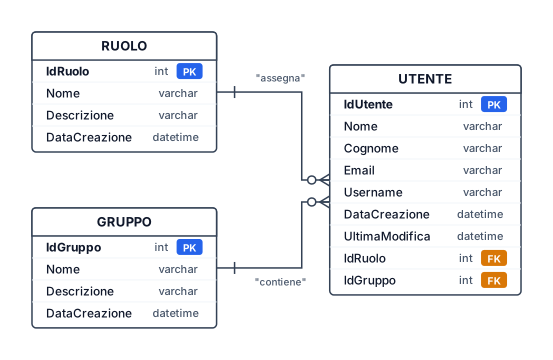
Il diagramma deve rappresentare tre entità: Utente, Ruolo e Gruppo, con i relativi attributi, chiavi primarie, chiavi esterne e cardinalità. 1. Entità UTENTE IdUtente — INT, chiave primaria (PK) Nome — VARCHAR(100) Cognome — VARCHAR(100) Email — VARCHAR(255) Username — VARCHAR(100) DataCreazione — DATETIME UltimaModifica — DATETIME IdRuolo — INT, chiave esterna (FK) verso Ruolo IdGruppo — INT, chiave esterna (FK) verso Gruppo 2. Entità RUOLO IdRuolo — INT, chiave primaria (PK) Nome — VARCHAR(100) Descrizione — VARCHAR(500) DataCreazione — DATETIME 3. Entità GRUPPO IdGruppo — INT, chiave primaria (PK) Nome — VARCHAR(150) Descrizione — VARCHAR(500) DataCreazione — DATETIME 4. Relazioni e cardinalità Relazione Ruolo–Utente Un Ruolo può essere assegnato a più Utenti. Ogni Utente può avere più di un Ruolo. Chiave esterna: Utente.IdRuolo → Ruolo.IdRuolo. Relazione Gruppo–Utente Un Gruppo può contenere più Utenti. Ogni Utente appartiene a più di un Gruppo. Chiave esterna: Utente.IdGruppo → Gruppo.IdGruppo.
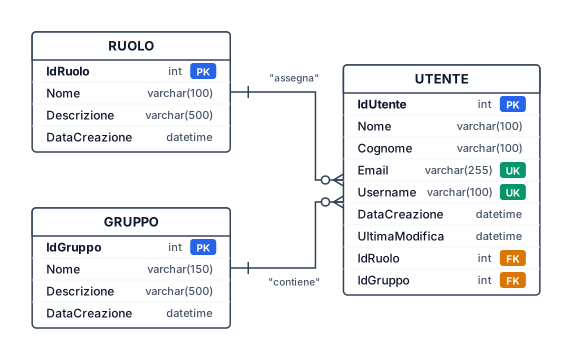
Crea un diagramma Entità/Relazioni (E/R) per un'applicazione aziendale denominata Zucchetti Process Intelligence. Il diagramma deve rappresentare tre entità: Utente, Ruolo e Gruppo, con i relativi attributi, chiavi primarie, chiavi esterne e cardinalità. 1. Entità UTENTE IdUtente — INT, chiave primaria (PK) Nome — VARCHAR(100), obbligatorio Cognome — VARCHAR(100), obbligatorio Email — VARCHAR(255), obbligatorio, univoco Username — VARCHAR(100), univoco DataCreazione — DATETIME UltimaModifica — DATETIME IdRuolo — INT, chiave esterna (FK) verso Ruolo IdGruppo — INT, chiave esterna (FK) verso Gruppo 2. Entità RUOLO IdRuolo — INT, chiave primaria (PK) Nome — VARCHAR(100), obbligatorio Descrizione — VARCHAR(500) DataCreazione — DATETIME 3. Entità GRUPPO IdGruppo — INT, chiave primaria (PK) Nome — VARCHAR(150), obbligatorio Descrizione — VARCHAR(500) DataCreazione — DATETIME 4. Relazioni e cardinalità Relazione Ruolo–Utente Un Ruolo può essere assegnato a zero o più Utenti. Ogni Utente deve avere esattamente un Ruolo. Cardinalità: Ruolo (1) → Utente (N). Chiave esterna: Utente.IdRuolo → Ruolo.IdRuolo. Relazione Gruppo–Utente Un Gruppo può contenere zero o più Utenti. Ogni Utente appartiene a un solo Gruppo. Cardinalità: Gruppo (1) → Utente (N). Chiave esterna: Utente.IdGruppo → Gruppo.IdGruppo.
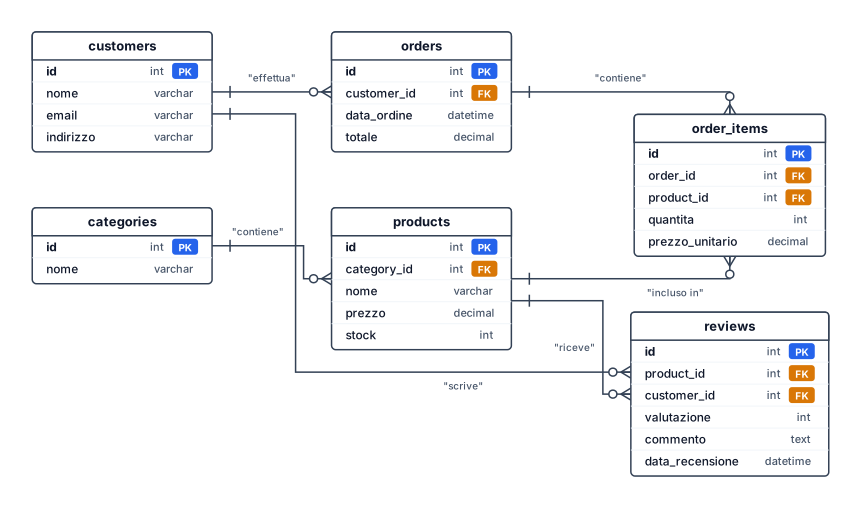
Un diagramma ER per una piattaforma e-commerce con clienti, ordini, prodotti, categorie e recensioni — includi chiavi primarie e relazioni con chiavi esterne
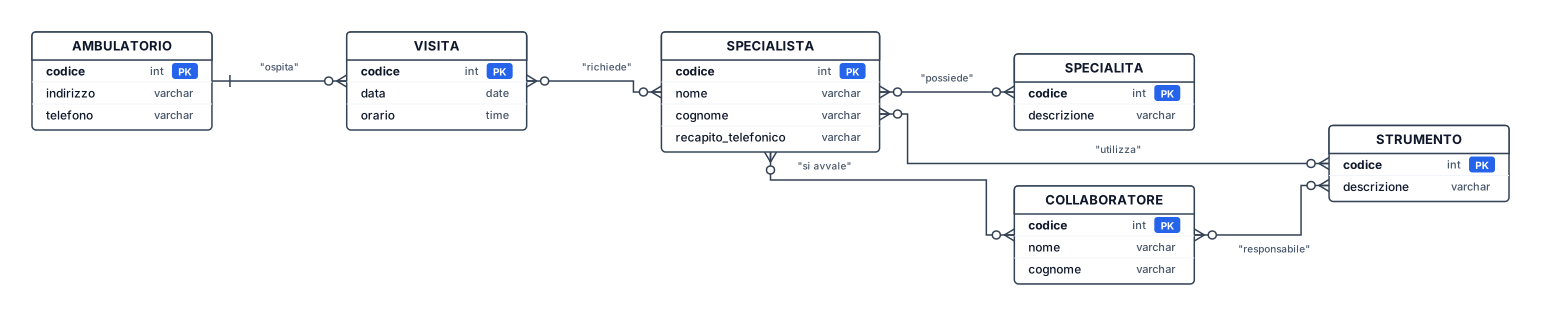
Effettuare la progettazione (diagramma E-R e modello logico con le relazioni logiche esplicitate) per la gestione di visite mediche da svolgersi in diversi ambulatori medici nel rispetto dei seguenti requisiti. 1. Ogni visita è svolta in uno ed un solo ambulatorio avente un codice univoco e caratterizzato da indirizzo e numero di telefono. 2. In un ambulatorio può essere svolta una sola visita alla volta. 3. Ogni visita è svolta in una precisa data ed orario ed è caratterizzata da un codice univoco. 4. Ogni visita richiede la prestazione d'opera di uno o più specialisti. 5. Ogni specialista può svolgere più visite. 6. Ogni specialista è identificato da un codice univoco e prevede l’indicizzazione delle sue specialità, nome, cognome e recapito telefonico. 7. Ogni specialista può avere necessità di un certo insieme di strumenti per i quali è presente un codice univoco ed, eventualmente, una descrizione. 8. Uno strumento è utilizzato da uno o più specialisti. 9. Ogni specialista può avere bisogno di più collaboratori caratterizzati da un codice univoco, nome e cognome. 10. Un collaboratore collabora con almeno uno specialista ed è responsabile dell'utilizzo di almeno uno strumento. 11. Uno strumento può essere sotto la responsabilità di più collaborat non usare stringhe fai diagramma normale usa anche order by, select from t1,t2 where un valore della tabella è uguale a un altro, oppure è maggiore/ minore di un certo numero
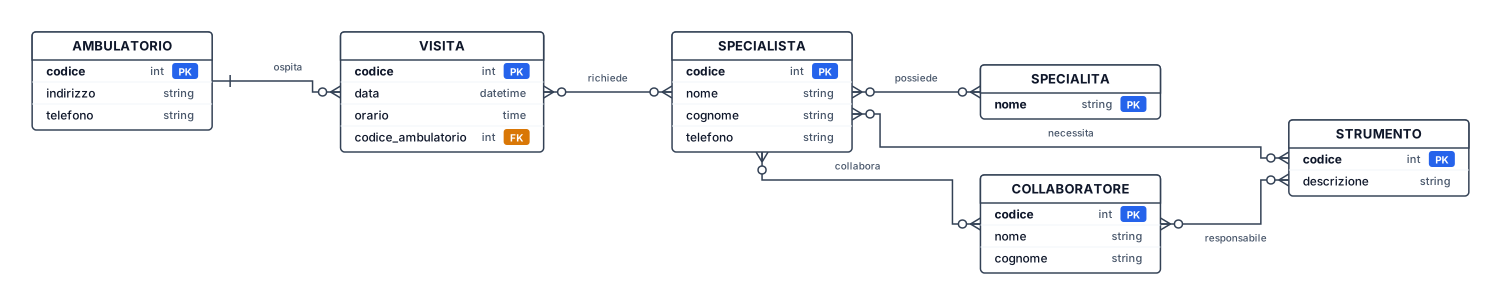
Effettuare la progettazione (diagramma E-R e modello logico con le relazioni logiche esplicitate) per la gestione di visite mediche da svolgersi in diversi ambulatori medici nel rispetto dei seguenti requisiti. 1. Ogni visita è svolta in uno ed un solo ambulatorio avente un codice univoco e caratterizzato da indirizzo e numero di telefono. 2. In un ambulatorio può essere svolta una sola visita alla volta. 3. Ogni visita è svolta in una precisa data ed orario ed è caratterizzata da un codice univoco. 4. Ogni visita richiede la prestazione d'opera di uno o più specialisti. 5. Ogni specialista può svolgere più visite. 6. Ogni specialista è identificato da un codice univoco e prevede l’indicizzazione delle sue specialità, nome, cognome e recapito telefonico. 7. Ogni specialista può avere necessità di un certo insieme di strumenti per i quali è presente un codice univoco ed, eventualmente, una descrizione. 8. Uno strumento è utilizzato da uno o più specialisti. 9. Ogni specialista può avere bisogno di più collaboratori caratterizzati da un codice univoco, nome e cognome. 10. Un collaboratore collabora con almeno uno specialista ed è responsabile dell'utilizzo di almeno uno strumento. 11. Uno strumento può essere sotto la responsabilità di più collaborat non usare stringhe fai diagramma normale

Effettuare la progettazione (diagramma E-R e modello logico con le relazioni logiche esplicitate) per la gestione di visite mediche da svolgersi in diversi ambulatori medici nel rispetto dei seguenti requisiti. 1. Ogni visita è svolta in uno ed un solo ambulatorio avente un codice univoco e caratterizzato da indirizzo e numero di telefono. 2. In un ambulatorio può essere svolta una sola visita alla volta. 3. Ogni visita è svolta in una precisa data ed orario ed è caratterizzata da un codice univoco. 4. Ogni visita richiede la prestazione d'opera di uno o più specialisti. 5. Ogni specialista può svolgere più visite. 6. Ogni specialista è identificato da un codice univoco e prevede l’indicizzazione delle sue specialità, nome, cognome e recapito telefonico. 7. Ogni specialista può avere necessità di un certo insieme di strumenti per i quali è presente un codice univoco ed, eventualmente, una descrizione. 8. Uno strumento è utilizzato da uno o più specialisti. 9. Ogni specialista può avere bisogno di più collaboratori caratterizzati da un codice univoco, nome e cognome. 10. Un collaboratore collabora con almeno uno specialista ed è responsabile dell'utilizzo di almeno uno strumento. 11. Uno strumento può essere sotto la responsabilità di più collaborat
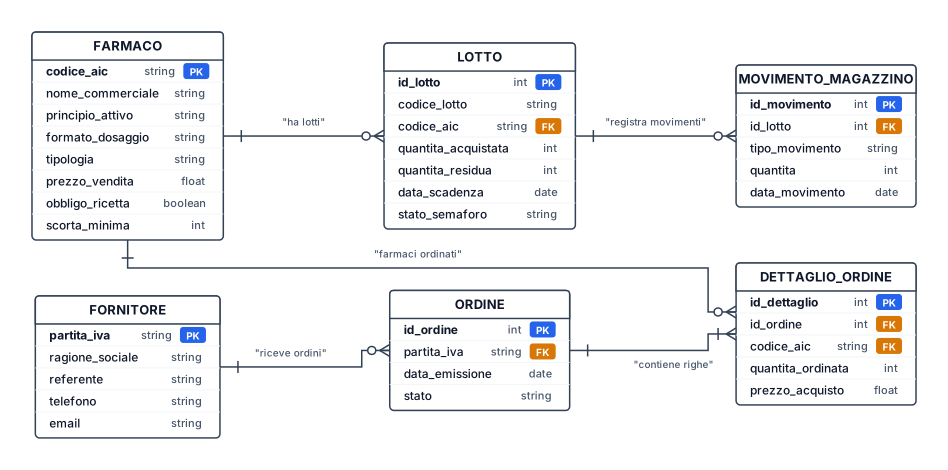
erDiagram FARMACO { string codice_aic PK string nome_commerciale string principio_attivo string formato_dosaggio string tipologia float prezzo_vendita boolean obbligo_ricetta int scorta_minima } LOTTO { int id_lotto PK string codice_lotto string codice_aic FK int quantita_acquistata int quantita_residua date data_scadenza string stato_semaforo } FORNITORE { string partita_iva PK string ragione_sociale string referente string telefono string email } ORDINE { int id_ordine PK string partita_iva FK date data_emissione string stato } DETTAGLIO_ORDINE { int id_dettaglio PK int id_ordine FK string codice_aic FK int quantita_ordinata float prezzo_acquisto } MOVIMENTO_MAGAZZINO { int id_movimento PK int id_lotto FK string tipo_movimento int quantita date data_movimento } %% RELAZIONI CON SIMBOLI MERMAID FARMACO ||--o{ LOTTO : "ha lotti" FORNITORE ||--o{ ORDINE : "riceve ordini" ORDINE ||--|{ DETTAGLIO_ORDINE : "contiene righe" FARMACO ||--o{ DETTAGLIO_ORDINE : "farmaci ordinati"
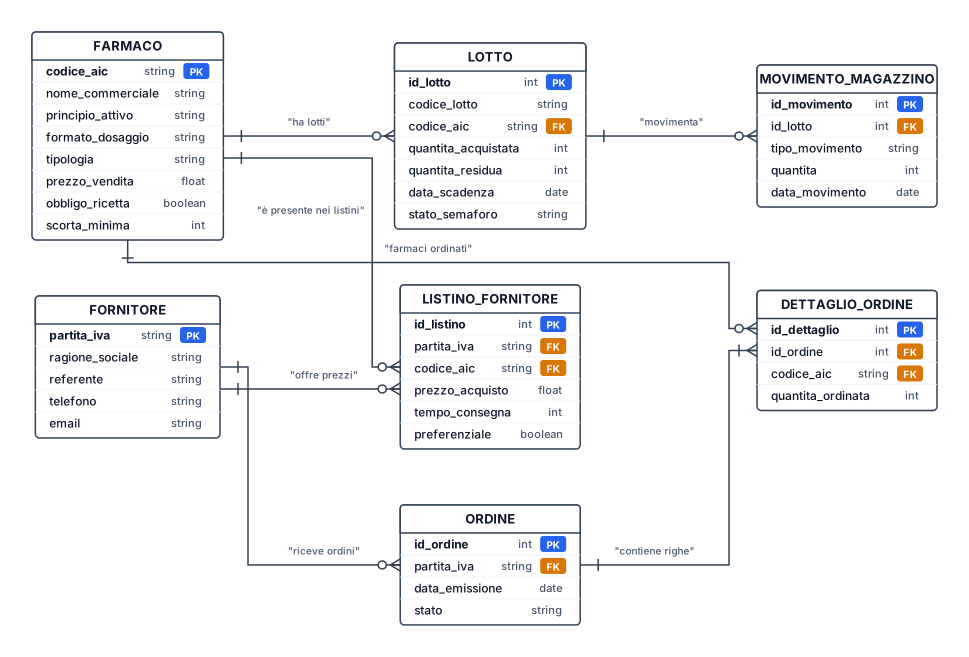
erDiagram FARMACO { string codice_aic PK string nome_commerciale string principio_attivo string formato_dosaggio string tipologia float prezzo_vendita boolean obbligo_ricetta int scorta_minima } LOTTO { int id_lotto PK string codice_lotto string codice_aic FK int quantita_acquistata int quantita_residua date data_scadenza string stato_semaforo } FORNITORE { string partita_iva PK string ragione_sociale string referente string telefono string email } LISTINO_FORNITORE { int id_listino PK string partita_iva FK string codice_aic FK float prezzo_acquisto int tempo_consegna boolean preferenziale } ORDINE { int id_ordine PK string partita_iva FK date data_emissione string stato } DETTAGLIO_ORDINE { int id_dettaglio PK int id_ordine FK string codice_aic FK int quantita_ordinata } MOVIMENTO_MAGAZZINO { int id_movimento PK int id_lotto FK string tipo_movimento int quantita date data_movimento } %% RELAZIONI CON CARDINALITÀ 1..N / 0..N FARMACO "1..1" -- "0..N" LOTTO : "ha lotti" FARMACO "1..1" -- "0..N" LISTINO_FORNITORE : "è presente nei listini" FORNITORE "1..1" -- "0..N" LISTINO_FORNITORE : "offre prezzi" FORNITORE "1..1" -- "0..N" ORDINE : "riceve ordini" ORDINE "1..1" -- "1..N" DETTAGLIO_ORDINE : "contiene righe" FARMACO "1..1" -- "0..N" DETTAGLIO_ORDINE : "farmaci ordinati" LOTTO "1..1" -- "0..N" MOVIMENTO_MAGAZZINO : "movimenta"
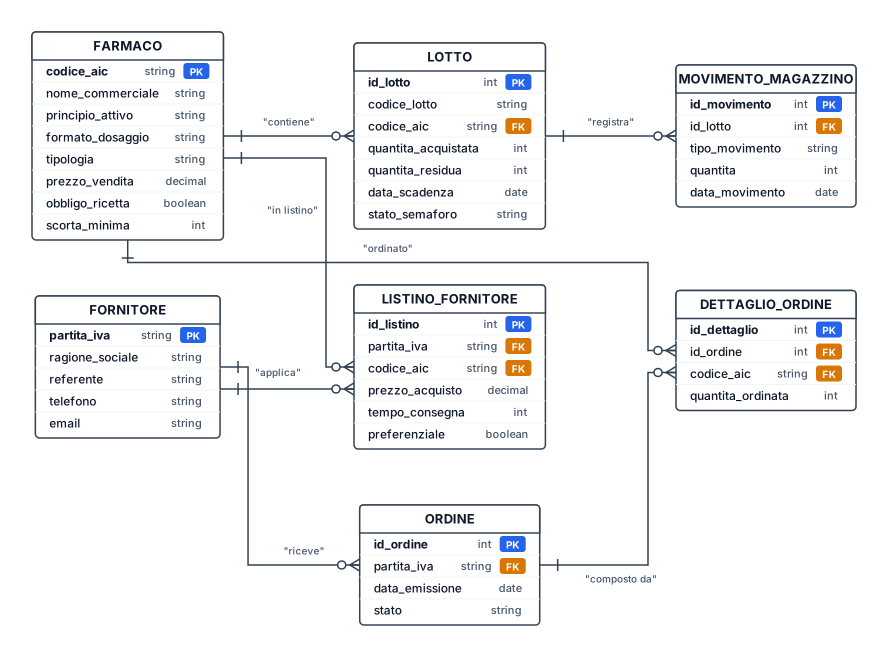
crea diagramma e r • FARMACO: Rappresenta il prodotto farmaceutico o parafarmaceutico gestito dalla farmacia. Attributi: codice aic (PK), nome commerciale, principio attivo, formato/dosaggio, tipologia, prezzo vendita, obbligo ricetta (booleano), scorta minima. • LOTTO: Rappresenta un lotto specifico di un farmaco ricevuto in magazzino. Attributi: id lotto (PK), codice lotto, codice aic (FK), quantità acquistata, quantità residua, data scadenza, stato semaforo (Verde, Giallo, Rosso, Nero). • FORNITORE: Rappresenta l'azienda che rifornisce la farmacia. Attributi: partita iva (PK), ragione sociale, referente, telefono, e-mail. • LISTINO_FORNITORE: Rappresenta il catalogo dei prezzi applicati dai singoli fornitori per ciascun farmaco (gestione listini multipli e tempi di consegna). Attributi: id listino (PK), partita iva (FK), codice aic (FK), prezzo acquisto, tempo consegna, preferenziale (booleano). • ORDINE: Rappresenta l'ordine di acquisto emesso dalla farmacia verso un fornitore. Attributi: id ordine (PK), partita iva (FK), data emissione, stato (Inviato, Consegnato, Annullato). • DETTAGLIO_ORDINE: Rappresenta la riga di dettaglio dell'ordine, indicando quali farmaci e in quale quantità sono stati ordinati. Attributi: id dettaglio (PK), id ordine (FK), codice aic (FK), quantità ordinata. • MOVIMENTO_MAGAZZINO: Registra ogni operazione di carico o scarico (es. vendita, smaltimento, reso) per mantenere aggiornato lo storico e le giacenze. Attributi: id movimento (PK), id lotto (FK), tipo movimento (Carico, Scarico Vendita, Scarico Scaduto/Reso), quantità, data movimento.
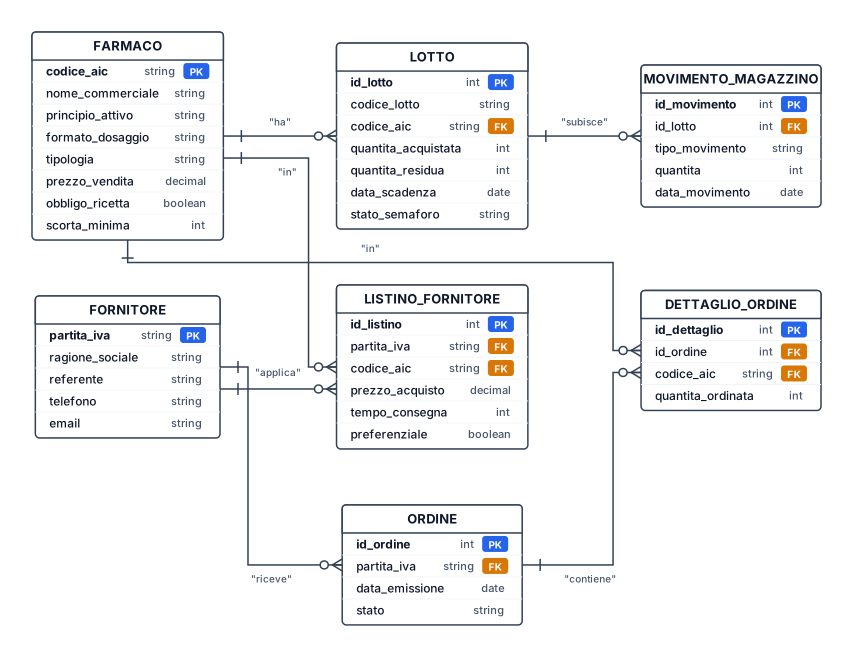
Progettazione Concettuale • FARMACO: Rappresenta il prodotto farmaceutico o parafarmaceutico gestito dalla farmacia. Attributi: codice aic (PK), nome commerciale, principio attivo, formato/dosaggio, tipologia, prezzo vendita, obbligo ricetta (booleano), scorta minima. • LOTTO: Rappresenta un lotto specifico di un farmaco ricevuto in magazzino. Attributi: id lotto (PK), codice lotto, codice aic (FK), quantità acquistata, quantità residua, data scadenza, stato semaforo (Verde, Giallo, Rosso, Nero). • FORNITORE: Rappresenta l'azienda che rifornisce la farmacia. Attributi: partita iva (PK), ragione sociale, referente, telefono, e-mail. • LISTINO_FORNITORE: Rappresenta il catalogo dei prezzi applicati dai singoli fornitori per ciascun farmaco (gestione listini multipli e tempi di consegna). Attributi: id listino (PK), partita iva (FK), codice aic (FK), prezzo acquisto, tempo consegna, preferenziale (booleano). • ORDINE: Rappresenta l'ordine di acquisto emesso dalla farmacia verso un fornitore. Attributi: id ordine (PK), partita iva (FK), data emissione, stato (Inviato, Consegnato, Annullato). • DETTAGLIO_ORDINE: Rappresenta la riga di dettaglio dell'ordine, indicando quali farmaci e in quale quantità sono stati ordinati. Attributi: id dettaglio (PK), id ordine (FK), codice aic (FK), quantità ordinata. • MOVIMENTO_MAGAZZINO: Registra ogni operazione di carico o scarico (es. vendita, smaltimento, reso) per mantenere aggiornato lo storico e le giacenze. Attributi: id movimento (PK), id lotto (FK), tipo movimento (Carico, Scarico Vendita, Scarico Scaduto/Reso), quantità, data movimento.
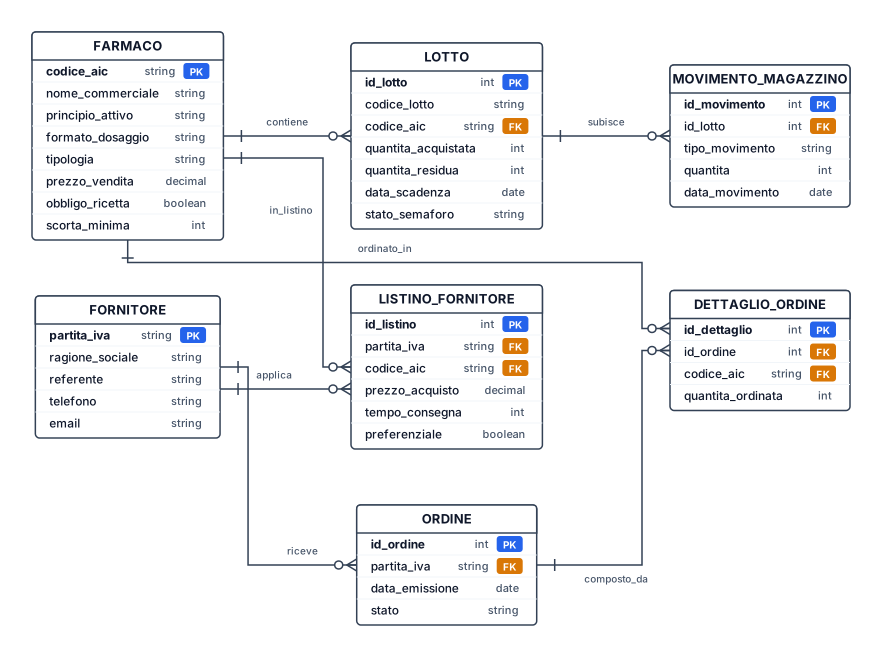
crea er per gestionale farmacia Progettazione Concettuale • FARMACO: Rappresenta il prodotto farmaceutico o parafarmaceutico gestito dalla farmacia. Attributi: codice aic (PK), nome commerciale, principio attivo, formato/dosaggio, tipologia, prezzo vendita, obbligo ricetta (booleano), scorta minima. • LOTTO: Rappresenta un lotto specifico di un farmaco ricevuto in magazzino. Attributi: id lotto (PK), codice lotto, codice aic (FK), quantità acquistata, quantità residua, data scadenza, stato semaforo (Verde, Giallo, Rosso, Nero). • FORNITORE: Rappresenta l'azienda che rifornisce la farmacia. Attributi: partita iva (PK), ragione sociale, referente, telefono, e-mail. • LISTINO_FORNITORE: Rappresenta il catalogo dei prezzi applicati dai singoli fornitori per ciascun farmaco (gestione listini multipli e tempi di consegna). Attributi: id listino (PK), partita iva (FK), codice aic (FK), prezzo acquisto, tempo consegna, preferenziale (booleano). • ORDINE: Rappresenta l'ordine di acquisto emesso dalla farmacia verso un fornitore. Attributi: id ordine (PK), partita iva (FK), data emissione, stato (Inviato, Consegnato, Annullato). • DETTAGLIO_ORDINE: Rappresenta la riga di dettaglio dell'ordine, indicando quali farmaci e in quale quantità sono stati ordinati. Attributi: id dettaglio (PK), id ordine (FK), codice aic (FK), quantità ordinata. • MOVIMENTO_MAGAZZINO: Registra ogni operazione di carico o scarico (es. vendita, smaltimento, reso) per mantenere aggiornato lo storico e le giacenze. Attributi: id movimento (PK), id lotto (FK), tipo movimento (Carico, Scarico Vendita, Scarico Scaduto/Reso), quantità, data movimento.
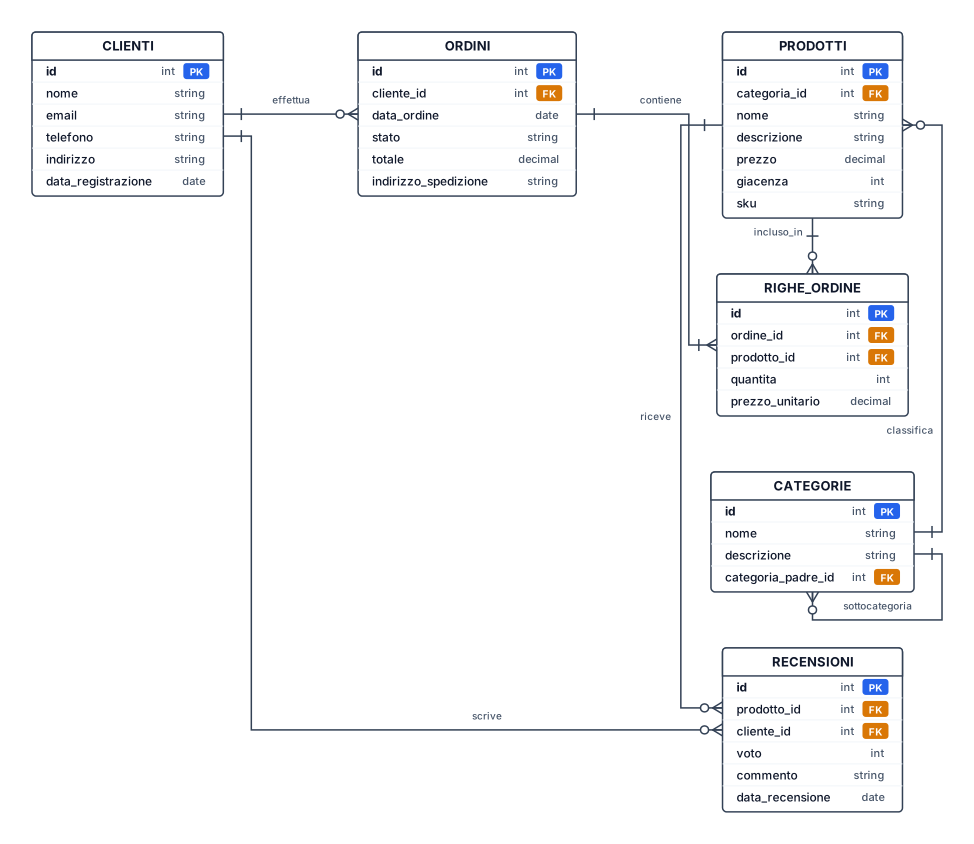
Un diagramma ER per una piattaforma e-commerce con clienti, ordini, prodotti, categorie e recensioni — includi chiavi primarie e relazioni con chiavi esterne
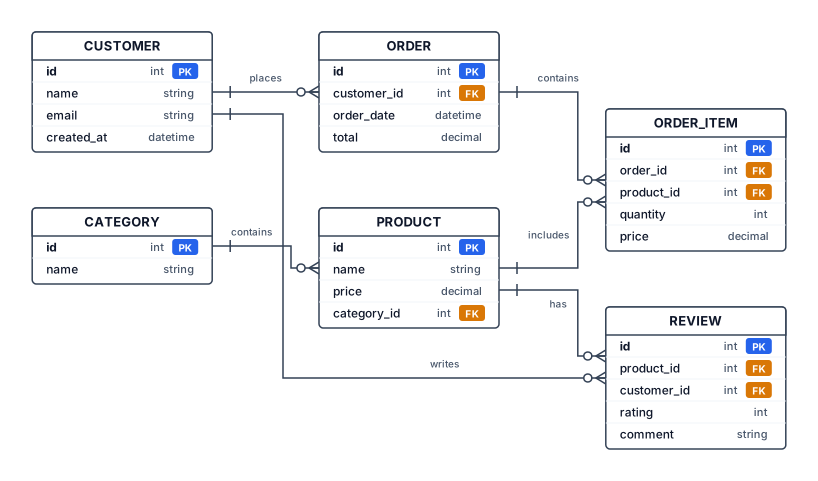
Un diagramma ER per una piattaforma e-commerce con clienti, ordini, prodotti, categorie e recensioni — includi chiavi primarie e relazioni con chiavi esterne