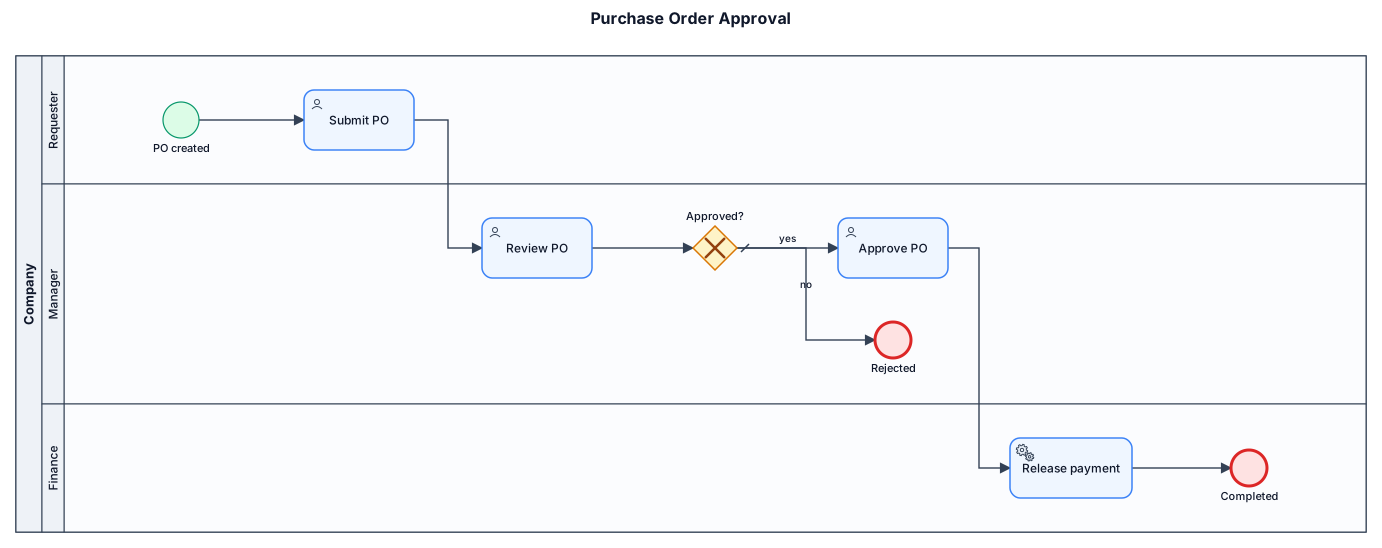
A BPMN diagram of a purchase-order approval process across three lanes: requester submits a PO, manager reviews and approves or rejects, finance releases payment
NODE ARCHIVE · REAL DIAGRAM BRIEFS
Diagram Examples from Real Visitor Prompts
Browse eligible diagrams shared by FreeDiagram visitors, inspect the exact prompts, and build your own version.
Browse 3261 real creationsCOMMUNITY OUTPUTS · EXACT PROMPTS
Bpmn
Showing 1–24 of 50. No stock examples or system defaults. Choose a tool, study a real result, then reopen its prompt as your starting point.
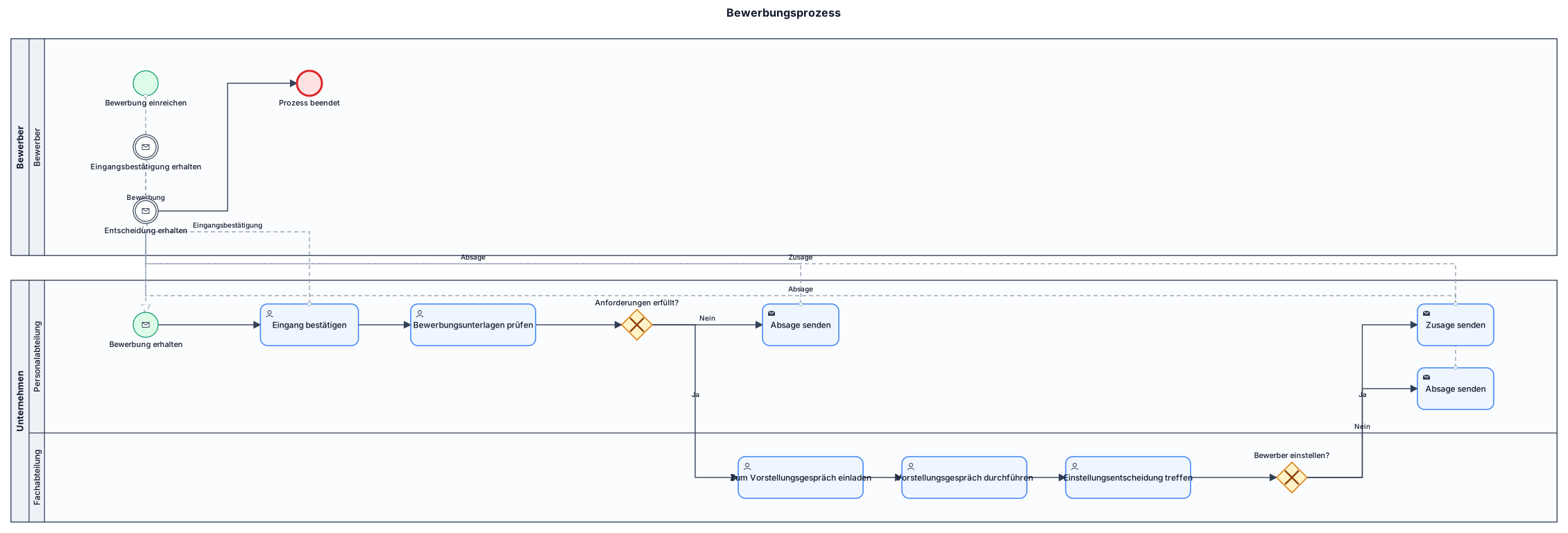
Erstelle ein vollständiges, übersichtliches und bearbeitbares BPMN-2.0-Prozessdiagramm für einen Bewerbungsprozess in einem Unternehmen. Prozessbeschreibung: 1. Ein Bewerber reicht seine Bewerbung ein. 2. Die Personalabteilung erhält die Bewerbung und bestätigt den Eingang. 3. Die Personalabteilung prüft die Bewerbungsunterlagen. 4. Ein exklusives Gateway prüft: „Anforderungen erfüllt?“ Wenn Nein: * Die Personalabteilung sendet eine Absage. * Der Bewerber erhält die Absage. * Der Prozess endet. Wenn Ja: * Die Fachabteilung lädt den Bewerber zum Vorstellungsgespräch ein. * Das Vorstellungsgespräch findet statt. * Die Fachabteilung trifft eine Einstellungsentscheidung. * Ein zweites exklusives Gateway prüft: „Bewerber einstellen?“ * Bei Ja sendet die Personalabteilung eine Zusage. * Bei Nein sendet die Personalabteilung eine Absage. * Der Bewerber erhält die Entscheidung, und der Prozess endet. Anforderungen: * Verwende BPMN-2.0-konforme Symbole. * Verwende passende Startereignisse, Aktivitäten, XOR-Gateways und Endereignisse. * Erstelle einen Pool für den Bewerber und einen Pool für das Unternehmen. * Teile den Unternehmens-Pool in die Lanes „Personalabteilung“ und „Fachabteilung“ auf. * Verwende Sequenzflüsse innerhalb der Pools und Nachrichtenflüsse zwischen den Pools. * Beschrifte die Entscheidungswege mit Ja und Nein. * Achte auf eine logische Reihenfolge und vermeide überlappende Elemente. * Verwende deutsche Beschriftungen. Erstelle das vollständige Diagramm und überprüfe anschließend seine logische Konsistenz.
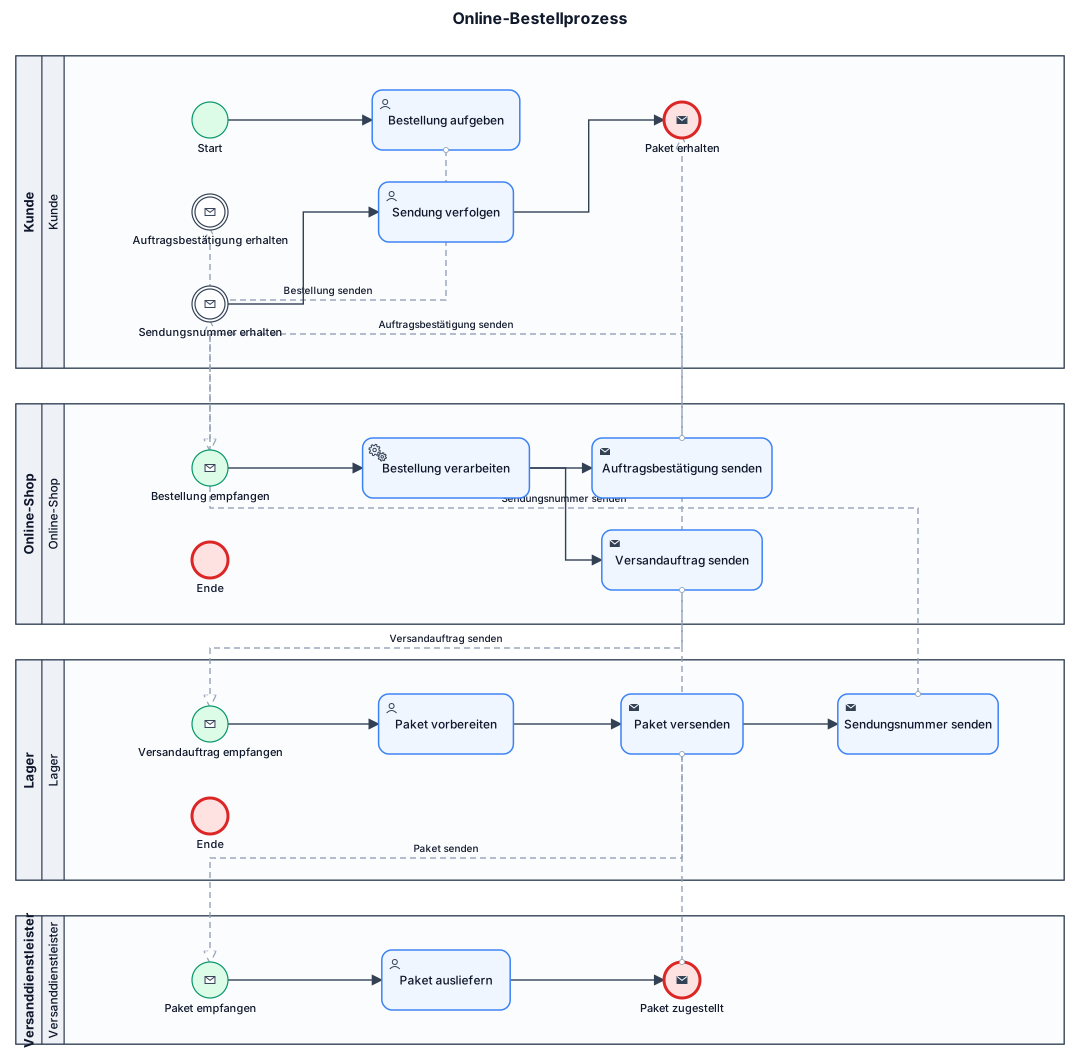
Please correct the existing BPMN 2.0 diagram without deleting the four participants. Fix the following problems: 1. The customer initiates the process. Use a normal start event followed by the task “Bestellung aufgeben”. 2. The online shop receives the order and sends an order confirmation to the customer. 3. The warehouse must receive the shipping order BEFORE preparing and shipping the package. 4. The customer receives the tracking number only after the shipment has been prepared for dispatch. 5. The shipping provider receives the package before delivering it. 6. The customer tracks the shipment and finally receives the package. Use proper BPMN 2.0 semantics: * Separate pools for independent participants. * Sequence flows within pools. * Message flows between pools. * Correct start and end events. * No duplicate or contradictory events. Make sure all activities and connections are visible and logically consistent.
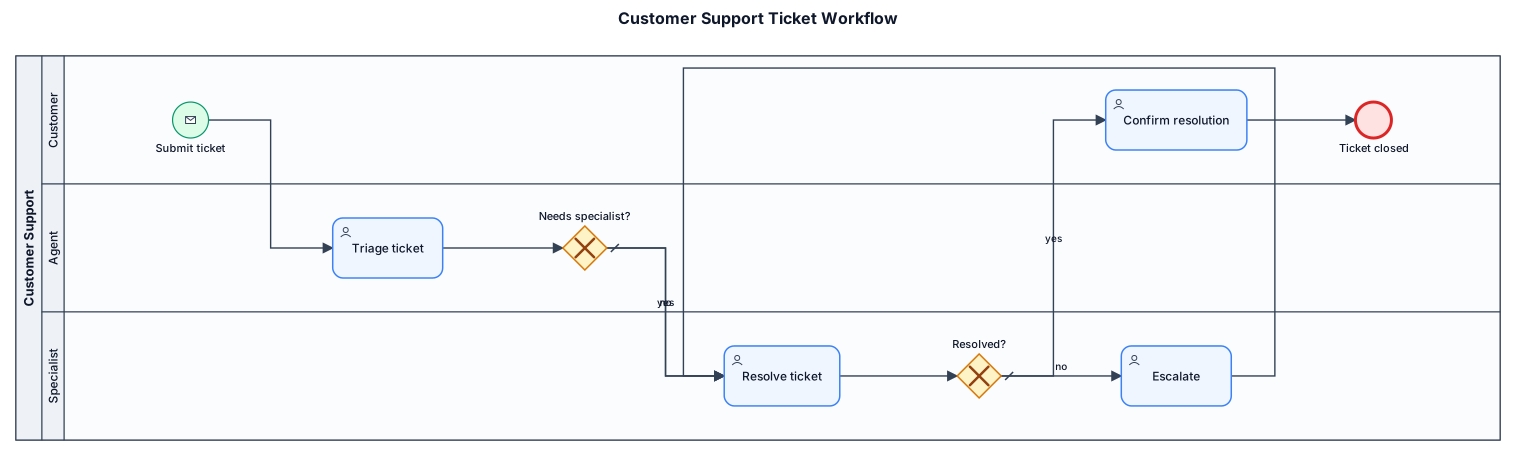
A BPMN diagram of a customer support ticket workflow: customer submits ticket, agent triages, specialist resolves or escalates, customer confirms resolution
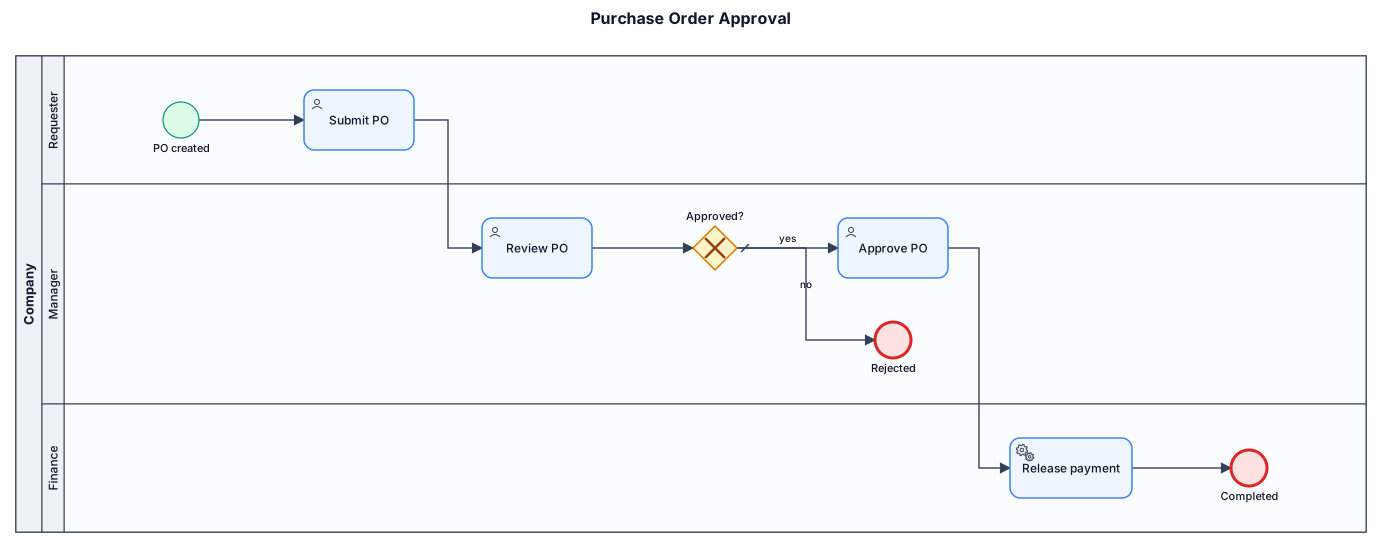
A BPMN diagram of a purchase-order approval process across three lanes: requester submits a PO, manager reviews and approves or rejects, finance releases payment
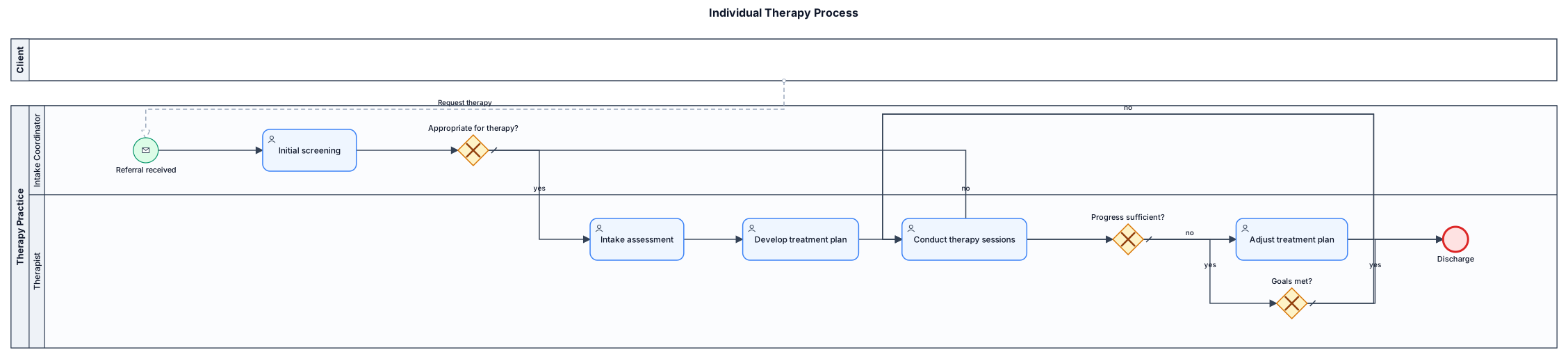
Business process for individual therapy considering decision point, gate way, interface, simple diagram
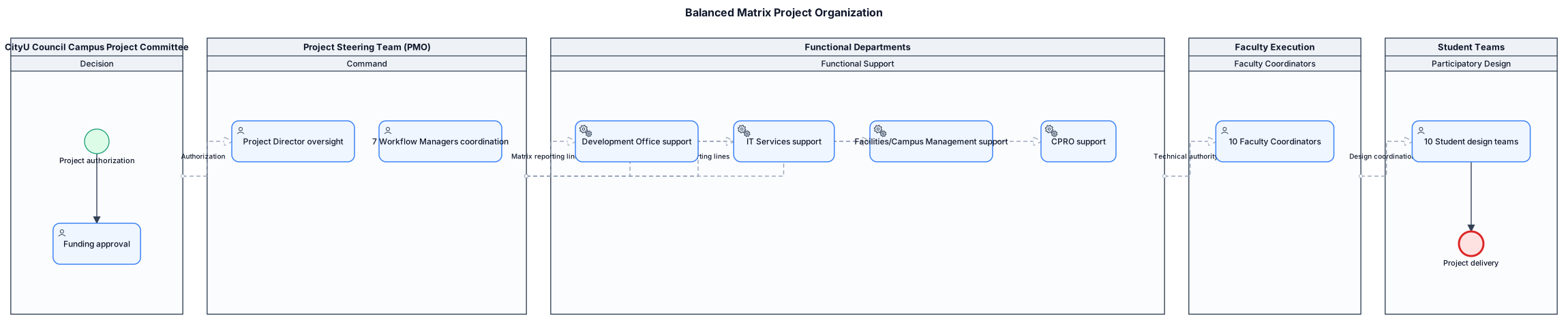
In this balanced matrix structure, the Project Management Office (PMO) controls project progress, scope, and integration horizontally, while various university functional departments retain technical authority and provide personnel support vertically. The project organizational structure is divided into five levels from top to bottom: Decision: CityU Council Campus Project Committee. As the project sponsor, it is responsible for project authorization and funding approval. Command: Project Steering Team (8-person PMO). Composed of 1 Project Director and 7 Workflow Managers. Functional Support: Development Office (DO), IT Services, Facilities/Campus Management, Communications and Public Relations (CPRO). Providing functional resources as matrix reporting lines. Faculty Execution: 10 Faculty Coordinators. One is assigned to each faculty, and is a faculty member or department administrator. Student Teams: 10 participatory design teams. Each team consists of 3-5 students, totaling 30-50 people.
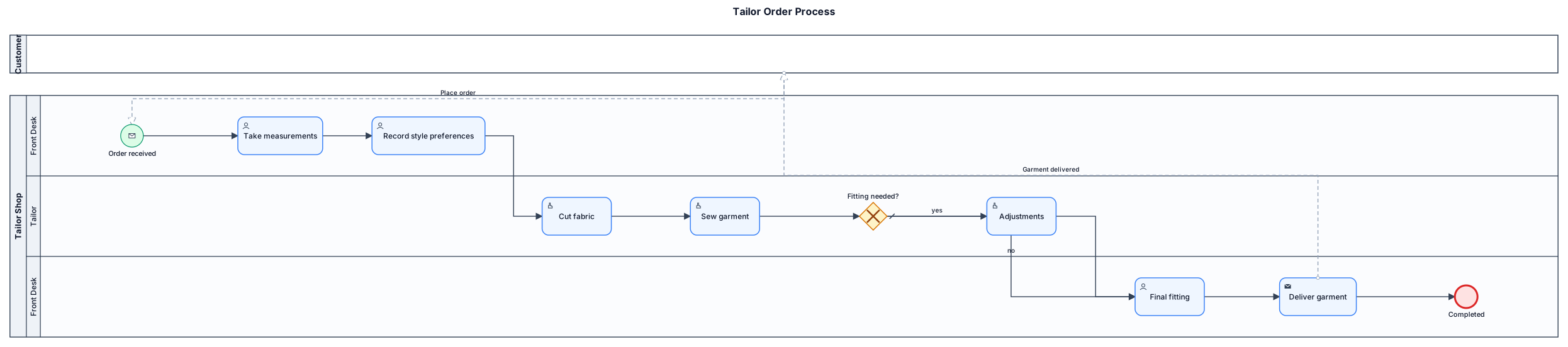
Business process diagram for tailor
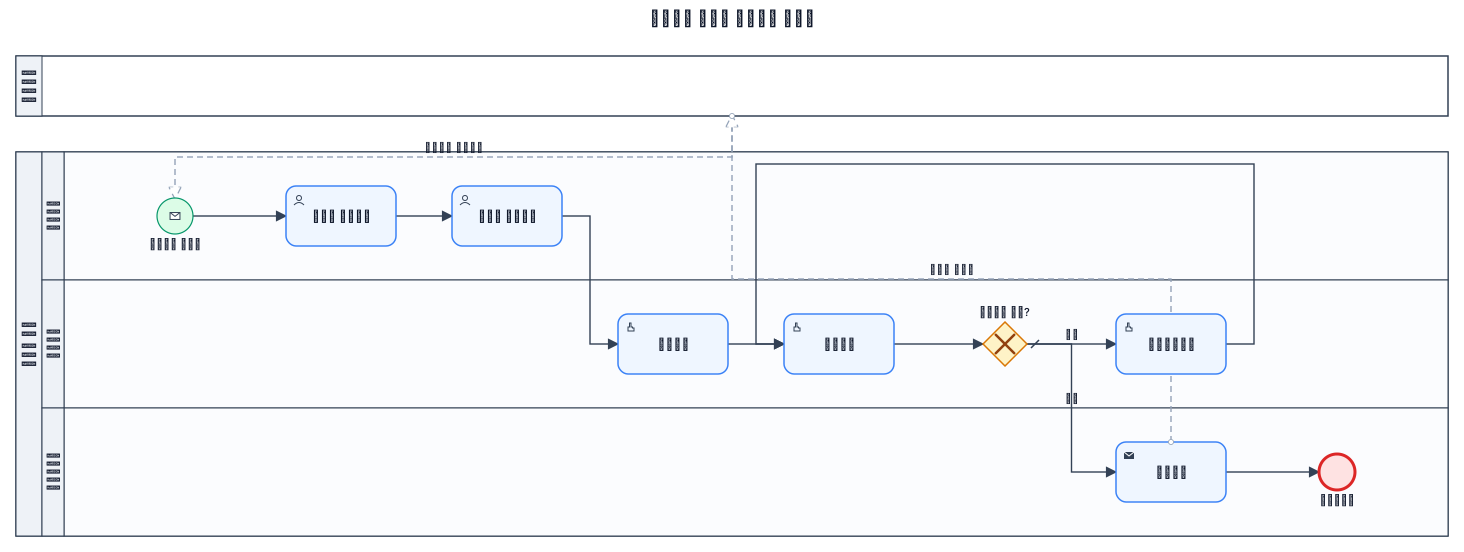
Prepare business process for tailor therapy in Amharic
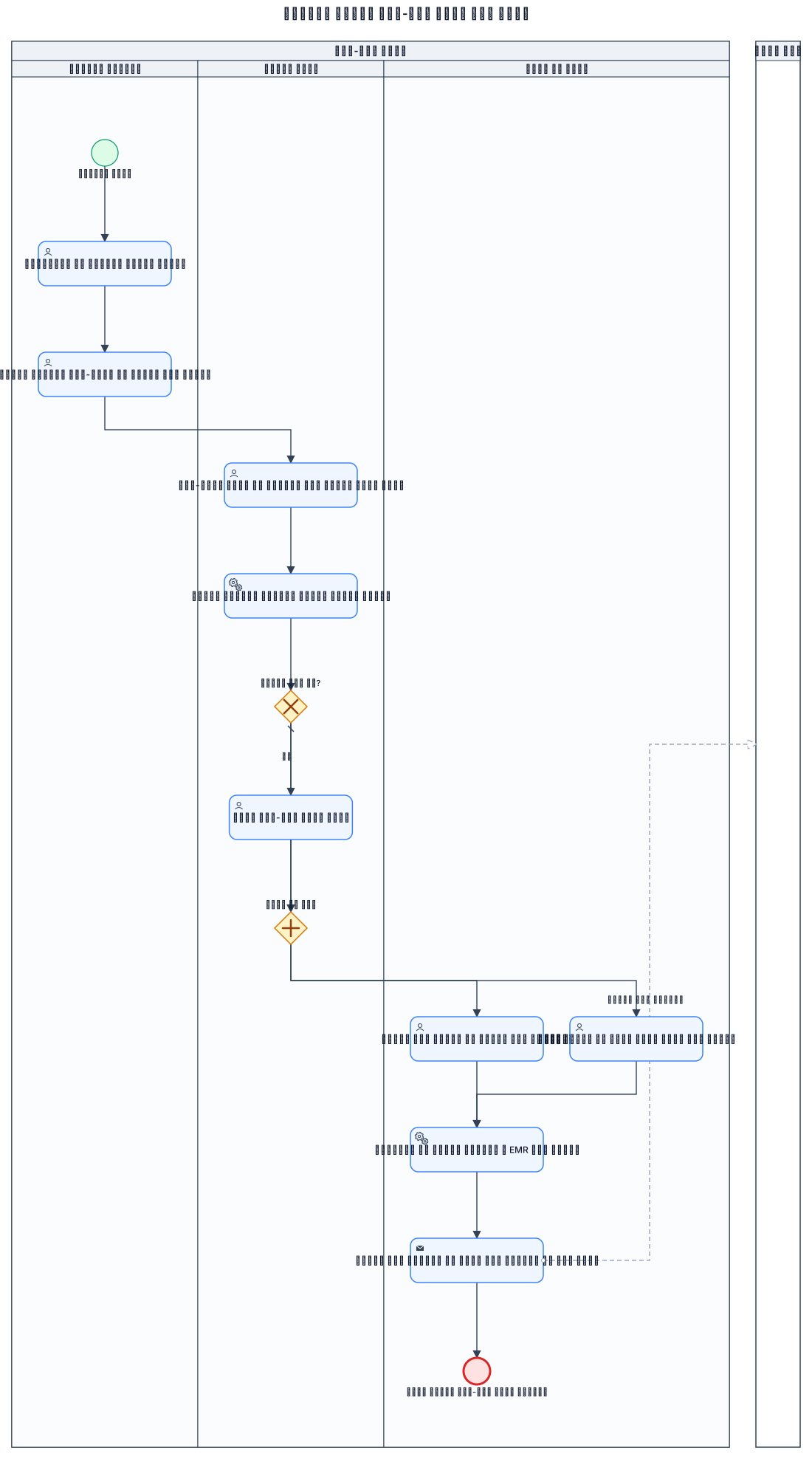
o የተገልጋይ አጠቃላይ የስነ-ልቦና ምርመራ ድጋፍ ፍላጎት • የተገልጋይ መቀበል፣ ሚስጥራዊነትን እና መረጃዎችን በዲጂታል ማረጋገጥ — 7 ደቂቃ • አጠቃላይ የህክምና፣ የስነ-አእምሮ እና የቤተሰብ ታሪክ መሰብሰብ — 13 ደቂቃ • የስነ-ልቦና፣ የስሜት እና የድንገተኛ ሁኔታ ክሊኒካዊ ግምገማ ማድረግ — 17 ደቂቃ • ክሊኒካዊ መረጃዎችን በመተንተን የምርመራ ማጠቃለያ ማዘጋጀት — 10 ደቂቃ • የችግሩን አስቸኳይነት በማየት አፋጣኝ የስነ-ልቦና እርዳታ መስጠት — 8 ደቂቃ • ከታካሚው ወይም ከቤተሰቡ ጋር በምርመራ ውጤት ላይ መወያየት — 10 ደቂቃ • የተሟላ የህክምና እና የጣልቃ ገብነት የቴራፒ እቅድ ማዘጋጀት — 12 ደቂቃ • ምልከታዎችን እና የምርመራ መረጃዎችን በ EMR ውስጥ ማስገባት — 5 ደቂቃ • የህክምና ዕቅድ ማጠናቀቅ፣ ወደ ተገቢው ክፍል ማስተላለፍ እና ቀጠሮ መስጠት — 5 ደቂቃ o አጠቃላይ ጊዜ፡- 75 ደቂቃ (1 ሰዓት ከ15 ደቂቃ) o ውጤት፡- የተሰጠ አጠቃላይ የስነ-ልቦና ምርመራ አገልግሎት prepare considering decision point ,parallel gateway ,interface with department

o የተገልጋይ መቀበልና የመጀመሪያ ማጣሪያ ድጋፍ ፍላጎት • የተገልጋይ መቀበል እና የአስተዳደራዊ መረጃ ማረጋገጥ — 7 ደቂቃ • አጠቃላይ የህክምና፣ የስነ-አእምሮ እና የቤተሰብ ታሪክ መሰብሰብ — 13 ደቂቃ • የስነ-ልቦና፣ የስሜት እና የድንገተኛ ሁኔታ ክሊኒካዊ ግምገማ — 17 ደቂቃ • የማጣሪያ ማጠቃለያ ማዘጋጀት እና የአስቸኳይነት ደረጃ መወሰን — 18 ደቂቃ • ከታካሚ ወይም ከቤተሰብ ጋር ውጤትን መወያየት — 10 ደቂቃ • ክሊኒካዊ መረጃዎችን በ EMR ውስጥ ማስገባት እና ሪፖርት ማድረግ — 5 ደቂቃ • የህክምና እቅድ ማጠናቀቅ፣ ወደ ተገቢው ክፍል ማስተላለፍ እና ቀጠሮ መስጠት — 5 ደቂቃ o አጠቃላይ ጊዜ 75 ደቂቃ (1 ሰዓት ከ15 ደቂቃ) o ውጤት፦ የተከናወነ ተገልጋይን የመቀበል፣ የመመዝገብ እና የመጀመሪያ ማጣሪያ አገልግሎት
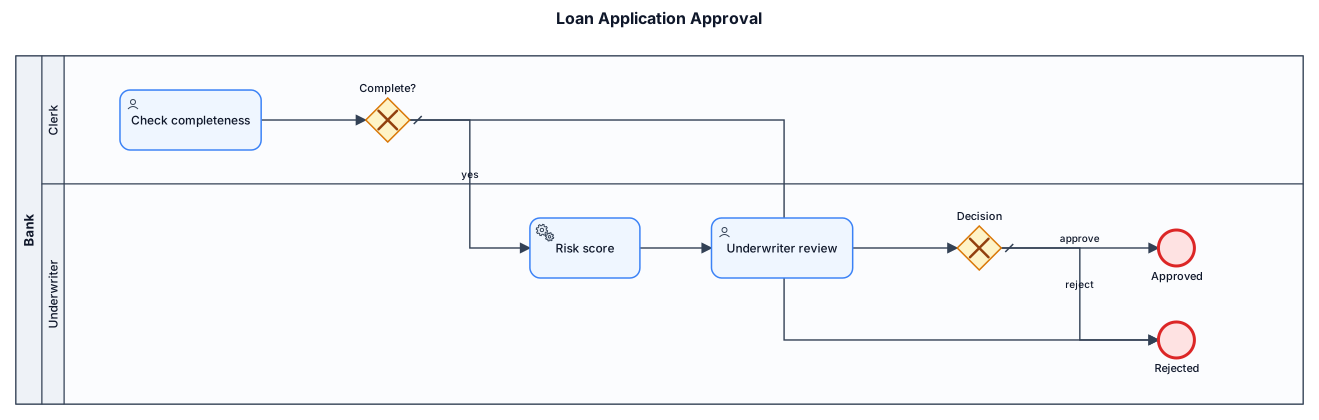
start ereignis wegnehmen
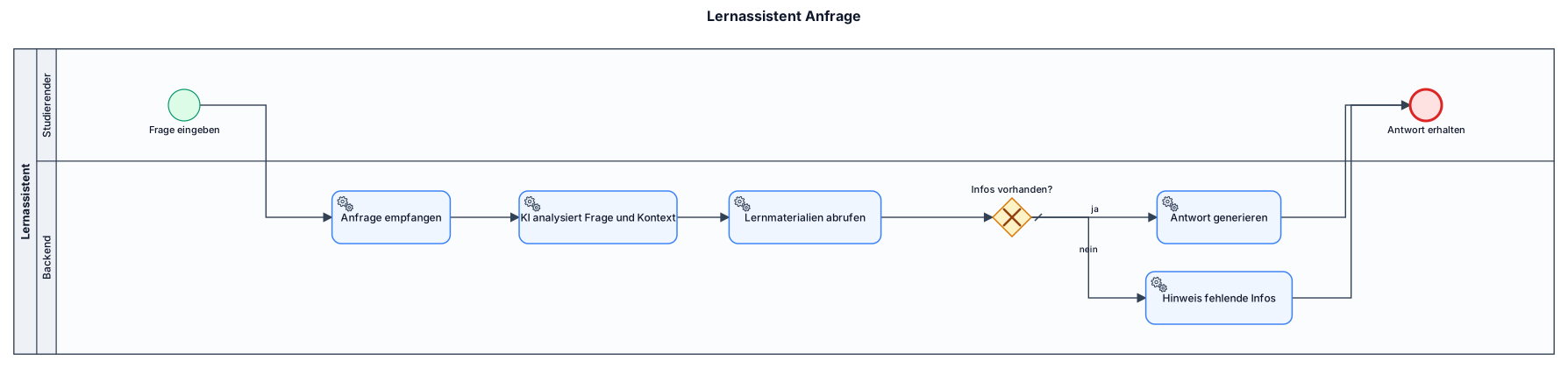
start: der student gibt eine Frage ein. der lern assisstent backend empfängt die Anfrage, KI-Modell analysiert Frage und Kontext,Relevante Lernmaterialien aus der Datenbank abrufen,passende infos vorhanden? ja ; Antwort anhand Lernmaterial generieren und anzeigen, nein ;Hinweis auf fehlende Infos anzeigen, ende : Studierender erhält die Antwort
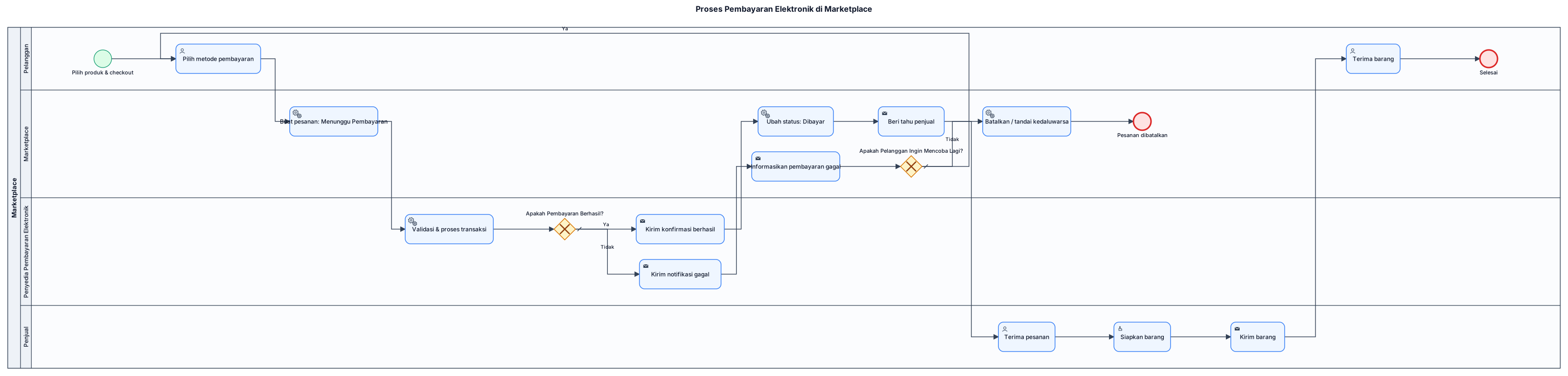
Create a formal BPMN 2.0 diagram for an electronic cashless payment process in an online marketplace. Use one pool with four separate swimlanes: Pelanggan, Marketplace, Penyedia Pembayaran Elektronik, and Penjual. Model the following process: 1. Start when the customer selects products and proceeds to checkout. 2. The customer selects a cashless payment method such as e-wallet, QRIS, or virtual account. 3. The marketplace creates an order with status "Menunggu Pembayaran" and sends a payment request to the payment provider. 4. The payment provider validates the request and processes the transaction. 5. Add an exclusive gateway labeled "Apakah Pembayaran Berhasil?". If YES: * The payment provider sends successful payment confirmation to the marketplace. * The marketplace changes the order status to "Dibayar". * The marketplace notifies the seller. * The seller accepts the order, prepares the goods, and ships them. * The customer receives the goods and the process ends. If NO: * The payment provider sends a failed payment notification to the marketplace. * The marketplace informs the customer that payment failed. * Add another exclusive gateway labeled "Apakah Pelanggan Ingin Mencoba Lagi?". If YES, return to the payment method selection step. If NO, the marketplace cancels the order or marks it as expired, then the process ends. Use proper BPMN 2.0 start and end events, task symbols, exclusive gateways, sequence flows, and message flows where appropriate. Make the diagram readable, with clearly separated swimlanes and labeled YES/NO branches. All labels inside the final diagram must be in Indonesian. Do not create a generic flowchart; generate a BPMN 2.0 process diagram.
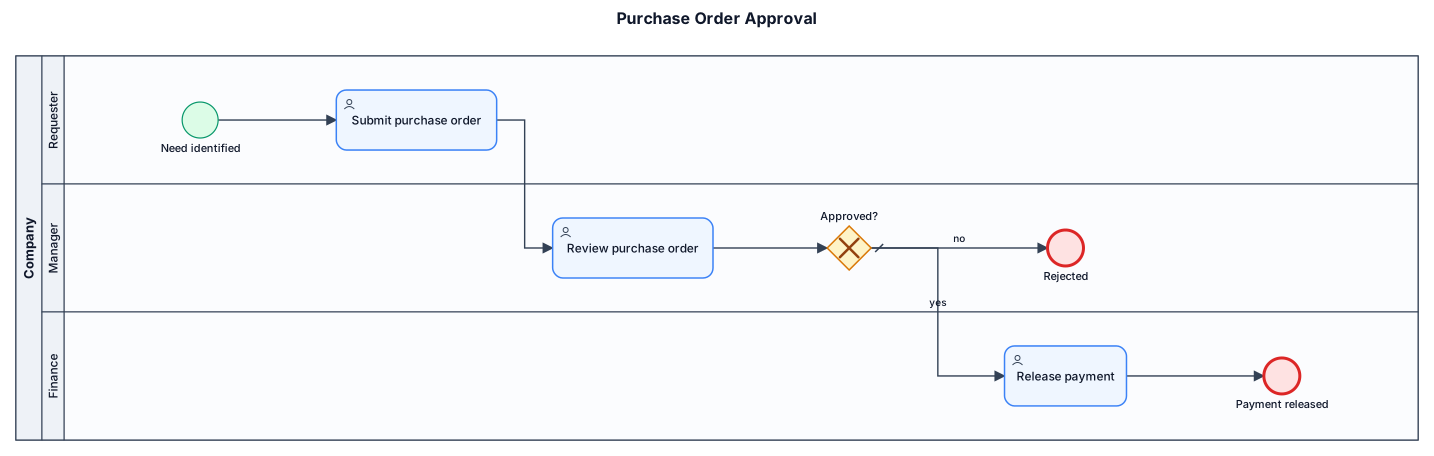
A BPMN diagram of a purchase-order approval process across three lanes: requester submits a PO, manager reviews and approves or rejects, finance releases payment
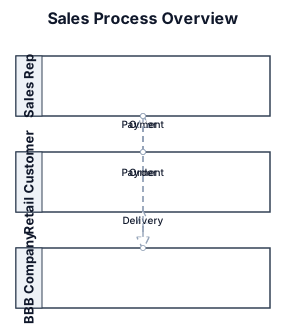
A BPMN diagram of 3 pools, a sales rep, a retail customer and a company called BBB. First I would like empty pools with arrows for orders, deliveries and payments
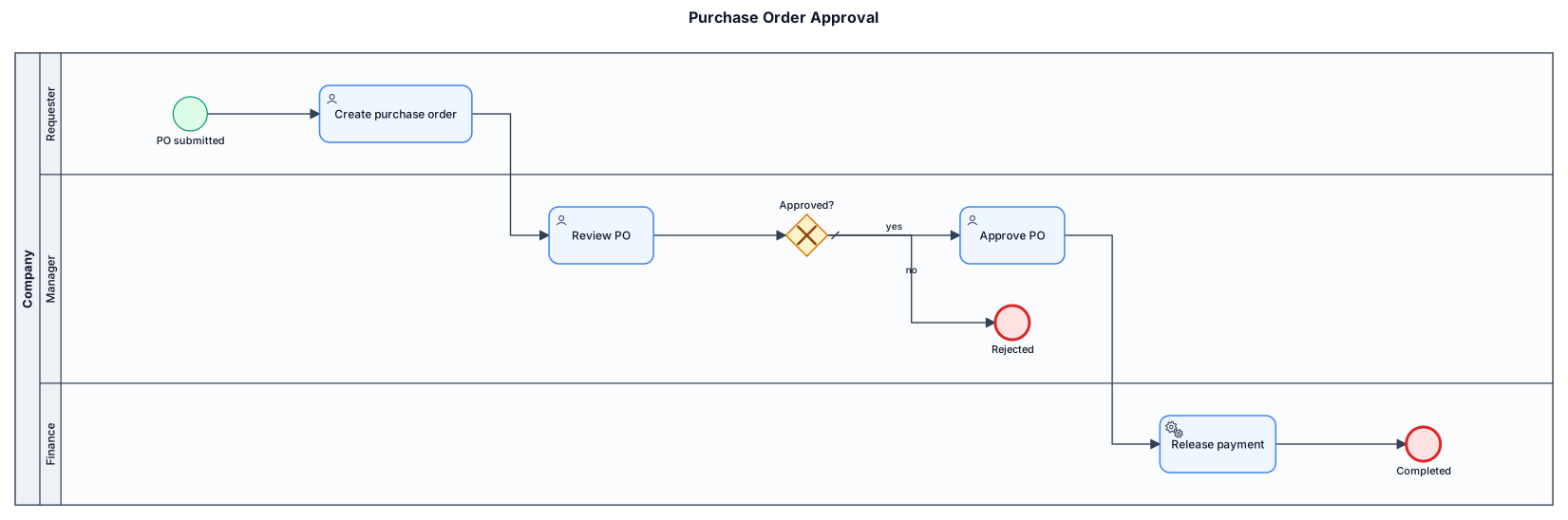
A BPMN diagram of a purchase-order approval process across three lanes: requester submits a PO, manager reviews and approves or rejects, finance releases payment
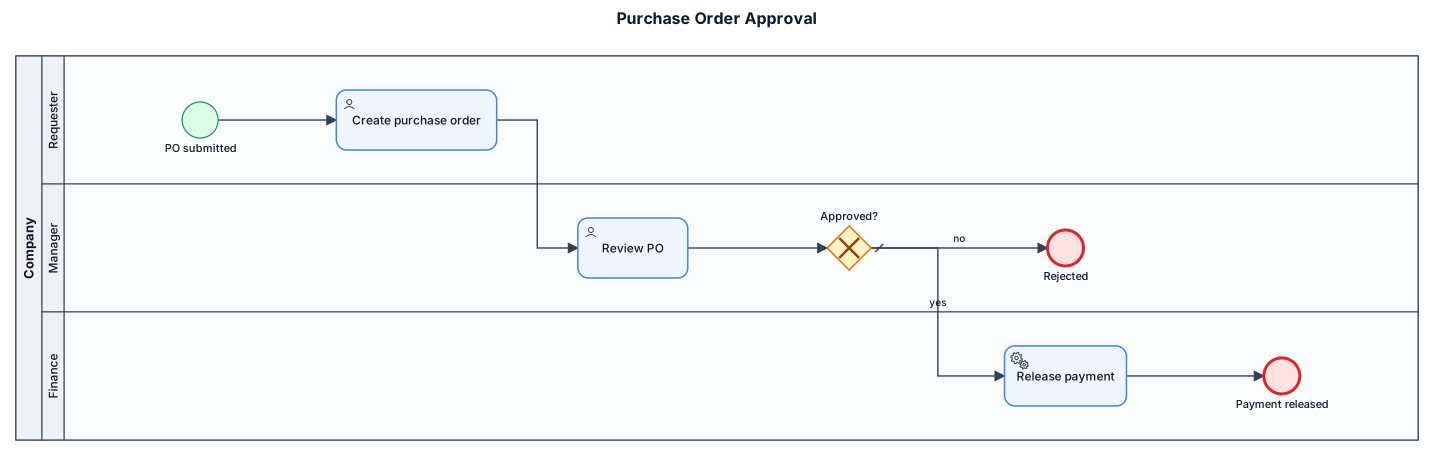
A BPMN diagram of a purchase-order approval process across three lanes: requester submits a PO, manager reviews and approves or rejects, finance releases payment

Ich möchte ein Diagram, dass den Ablageprozess ausgehender Emails beschreibt. Das Verzeichnis gesendete nachrichten wird regelmäßig alle 10 min überprüft. Ist in dem betreff die projektnummer enthalten, wird die enail nachricht in die postliste kopiert und die nachricht wird grün gekennzeichnet als eitco abgelegt

A BPMN diagram of a process Blanking Line Light Automation system: When the operator starts motor and pump for blanking, the lights on each zone from the coil line, press (Die light) to Piller lights WS and DS will automatically turn on. Then at the end of the shift when the operator stop motor and pump the lights will also switch of automatically.
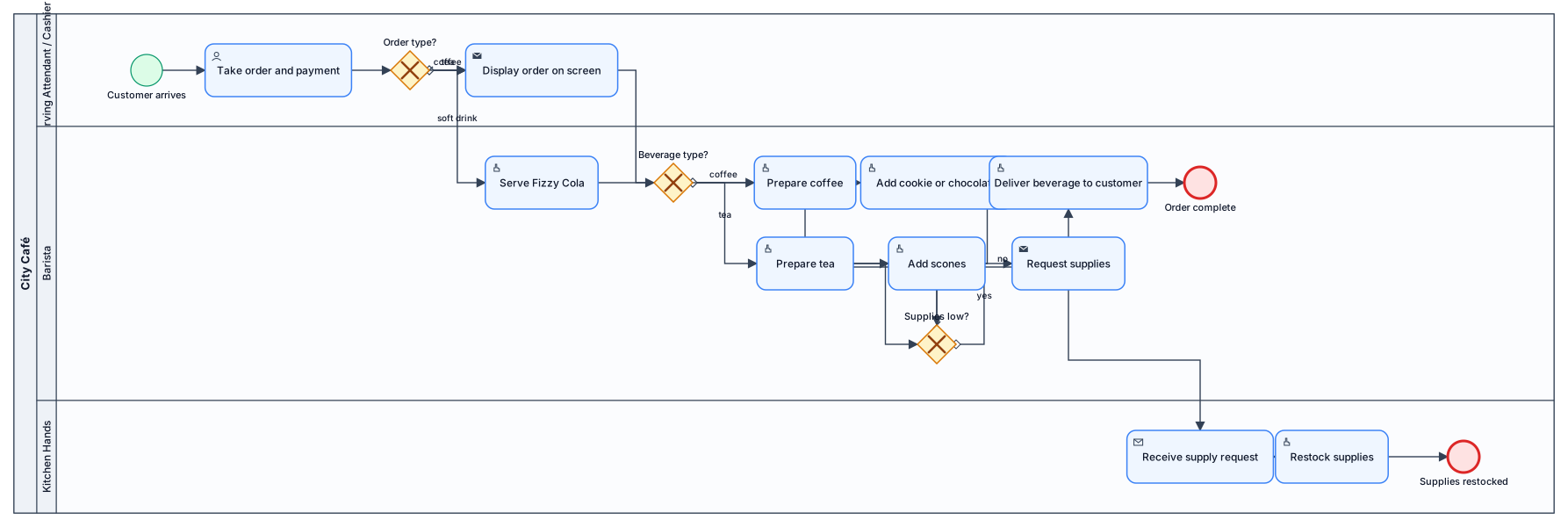
A BPMN diagram with swimlanes based on the following: In a busy city café, customers arrive to order hot drinks or a soft drink. The menu is simple: Coffee options: Cappuccino, Café Latte, Espresso Tea options: English Breakfast, Earl Grey Soft drink option: Fizzy Cola Coffee orders come with a choice of either a cookie or a small chocolate. Tea orders are always served with scones. Fizzy Cola is served directly without preparation. The Serving Attendant / Cashier takes the order and payment, and the order is automatically displayed on a screen for the Barista. The Barista prepares coffee or tea, while Fizzy Cola is handed over immediately. Once ready, the Barista delivers the beverage (with its accompaniment, if applicable) directly to the customer. If the Barista notices that milk or coffee beans are running low, they request supplies from the Kitchen Hands in the storeroom. barista and cashier should be in different swinlanes
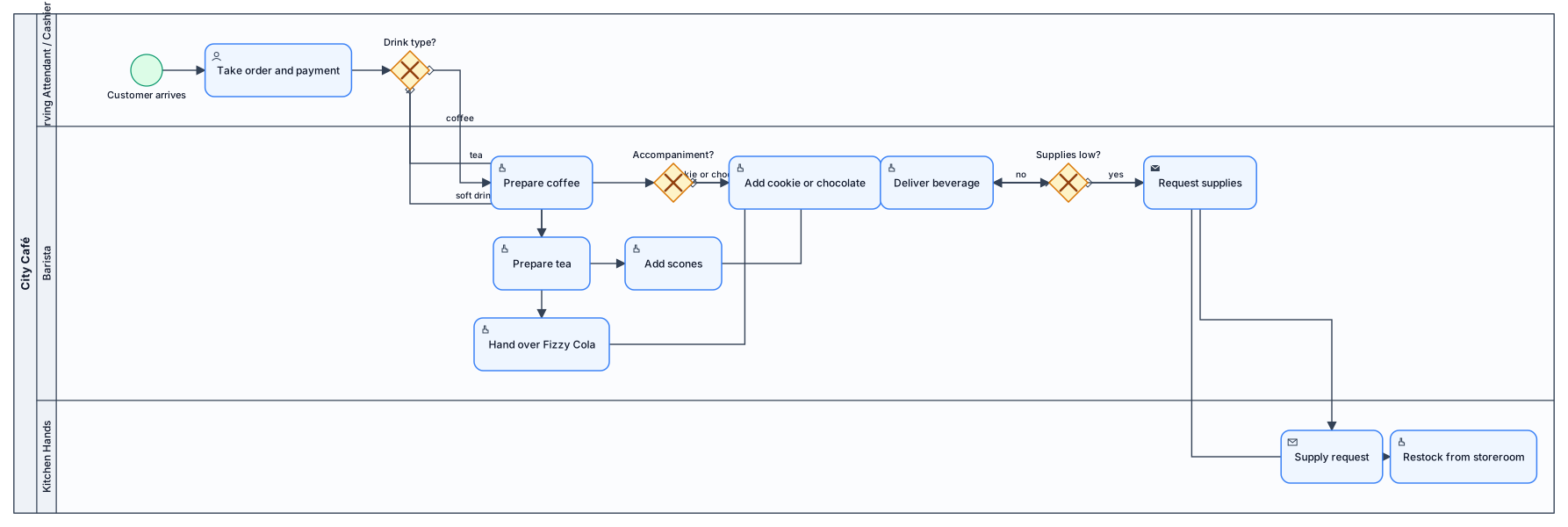
A BPMN diagram with swimlanes based on the following: In a busy city café, customers arrive to order hot drinks or a soft drink. The menu is simple: Coffee options: Cappuccino, Café Latte, Espresso Tea options: English Breakfast, Earl Grey Soft drink option: Fizzy Cola Coffee orders come with a choice of either a cookie or a small chocolate. Tea orders are always served with scones. Fizzy Cola is served directly without preparation. The Serving Attendant / Cashier takes the order and payment, and the order is automatically displayed on a screen for the Barista. The Barista prepares coffee or tea, while Fizzy Cola is handed over immediately. Once ready, the Barista delivers the beverage (with its accompaniment, if applicable) directly to the customer. If the Barista notices that milk or coffee beans are running low, they request supplies from the Kitchen Hands in the storeroom.
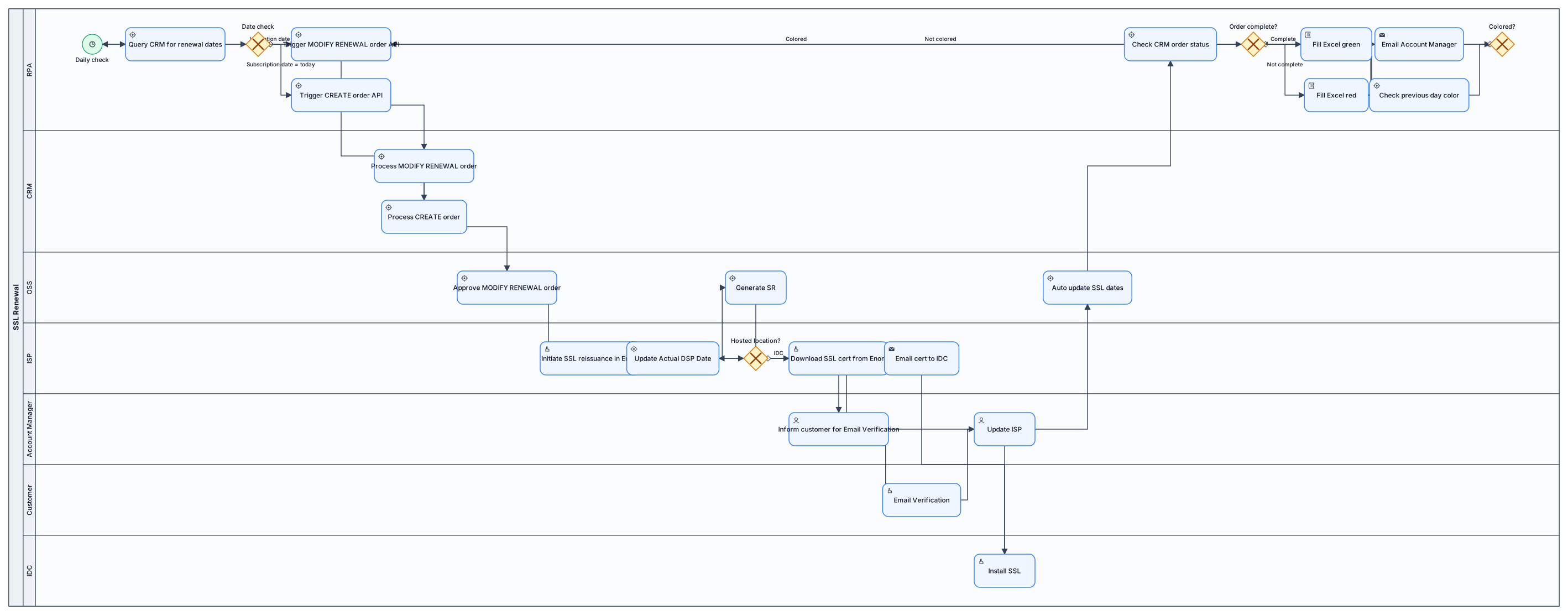
Create a BPMN diagram with Horizontal Swimlanes= Account Manager, RPA, CRM, OSS, ISP, Customer, IDC. Flow is as below;1. RPA check every day at a specific time for 'SSL Validation Renewal Remind Date'= Today's Date. & 'SSL Subscript Renewal Remind Date'= Today's Date. in CRM query 2. If 'SSL Validation Renewal Remind Date'= 'Today's Date' ; RPA trigger MODIFY RENEWAL order API (or RPA steps for Order initiation and submit) in CRM. 3. If 'SSL Subscript Renewal Remind Date'= 'Today's Date' ; RPA trigger CREATE order API (or RPA steps for Order initiation and submit) in CRM. 4. When MODIFY RENEWAL Order approved in OSS, ISP initiate SSL certificate reissuance in Enom portal by submitting same previous CSR. and update 'Actual DSP Date' in OSS. 5. Then SR is generated in OSS to Account Manager to inform customer to do Email Verification. 6. Then Account Manager update ISP. 7. Then ISP update 'Actual DSP Date' . 8. If the 'Hosted Location= IDC' ; ISP download SSL certificate from Enom and email to IDC. 9. IDC install SSL 10. OSS auto update 'SSL Validation Renewal Remind Date' and 'SSL Validation Renewal Date' 11. RPA check for CRM 'Oder status=Complete', if true, fill Excel sheet cell of 'SSL Validation Renewal Remind Date' green. if false, colour in red and send an email to Account Manager to check. 12. Also check whether 'SSL Validation Renewal Remind Date-1'= 'Today's Date-1' is coloured in green or red. if not coloured, retrigger MODIFY RENEWAL Order
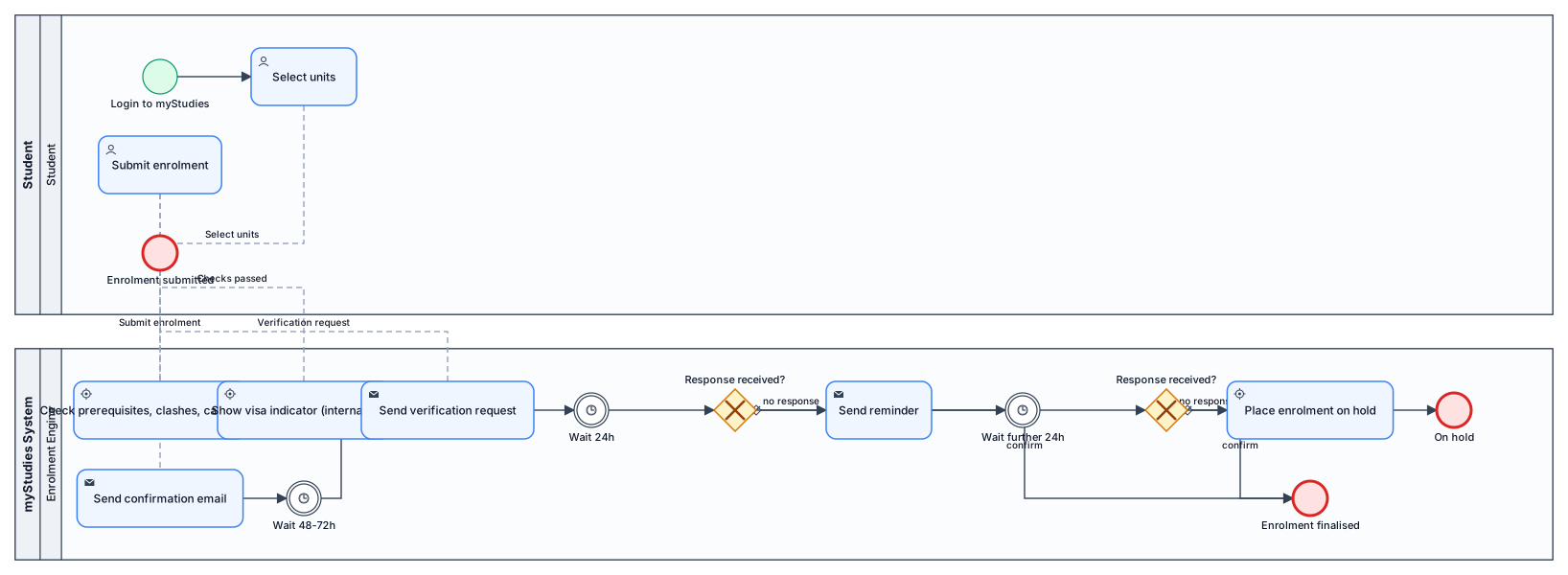
Online Self-Enrolment via the myStudies Portal The myStudies portal is the primary enrolment channel. The student logs in with their university credentials, navigates to the enrolment section, and selects their units for the semester. The system automatically checks for prerequisite compliance, timetable clashes, unit capacity, and load limits. If all checks pass, the student submits the enrolment and receives an automated confirmation email. International students are additionally shown a visa compliance indicator before submitting. Between 48 and 72 hours after submitting, the student receives a confirmation message asking them to verify their enrolment. The student must respond ‘Confirm’ to finalise. If no confirmation is received within 24 hours of the message being sent, the system sends a reminder. If no response is received within a further 24 hours, the enrolment is placed on hold and the student must contact Student Central to resolve it.