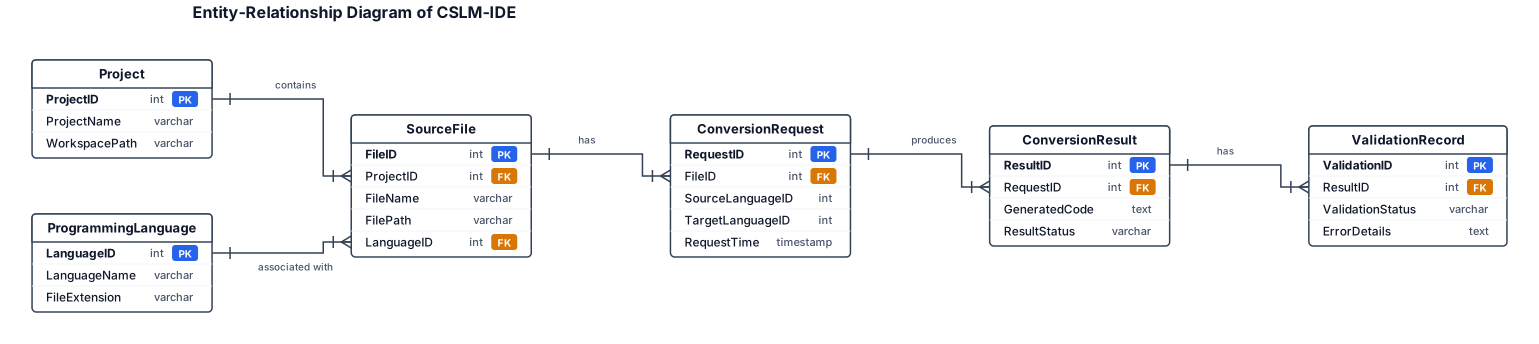
Design a conceptual Entity-Relationship Diagram titled “Entity-Relationship Diagram of CSLM-IDE”. Use standard ERD rectangles, relationship connectors and cardinality labels. Include these conceptual entities and attributes: - Project: ProjectID (PK), ProjectName, WorkspacePath. - SourceFile: FileID (PK), ProjectID (FK), FileName, FilePath, LanguageID (FK). - ProgrammingLanguage: LanguageID (PK), LanguageName, FileExtension. - ConversionRequest: RequestID (PK), FileID (FK), SourceLanguageID, TargetLanguageID, RequestTime. - ConversionResult: ResultID (PK), RequestID (FK), GeneratedCode, ResultStatus. - ValidationRecord: ValidationID (PK), ResultID (FK), ValidationStatus, ErrorDetails. Relationships: one Project contains many SourceFiles; one ProgrammingLanguage can be associated with many SourceFiles; one SourceFile can have multiple ConversionRequests; one ConversionRequest can produce one or more recorded results; each result can have validation records. Use clear primary-key and foreign-key notation. Label this as a proposed conceptual data model, not an assertion that a database with these tables already exists. White background, landscape layout and readable text.
Diagram Examples from Real Visitor Prompts
Browse eligible diagrams shared by FreeDiagram visitors, inspect the exact prompts, and build your own version.
Browse 3261 real creationsEr Diagrams
Showing 1–24 of 36. No stock examples or system defaults. Choose a tool, study a real result, then reopen its prompt as your starting point.
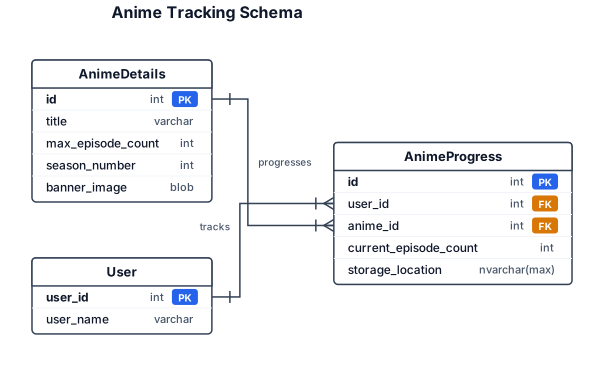
An ER diagram for tracking anime details and individual user lists for their progress. There should be an Anime Details table that has an id as a primary key. It also has title, max episode count, season number, and a banner image stored as a blob. The Anime progress table has an id for the PK and a user id as a FK. It also has the anime id as a FK and the current episode count and a storage location as a nvarchar max. The user table just has a user id and a user name.
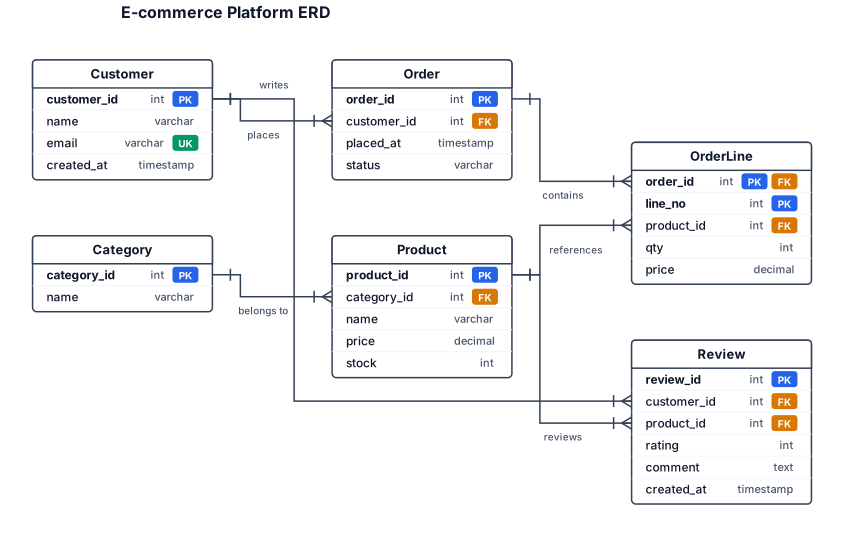
An ER diagram for an e-commerce platform with customers, orders, products, categories, and reviews — include primary keys and foreign key relationships
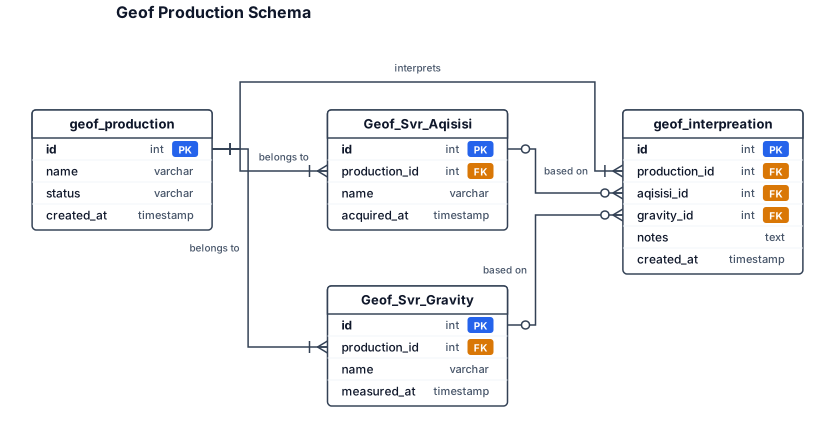
Geof_Svr_Aqisisi, Geof_Svr_Gravity, geof_production, geof_interpreation
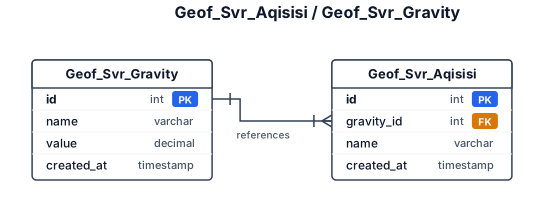
Geof_Svr_Aqisisi, Geof_Svr_Gravity
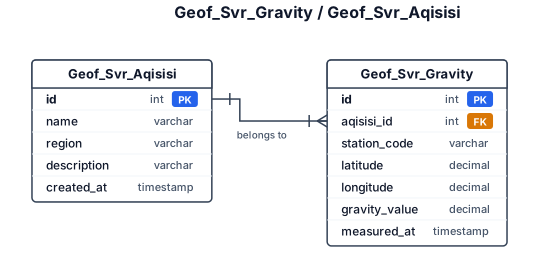
Geof_Svr_Gravity, geof_Svr_Aqisisi
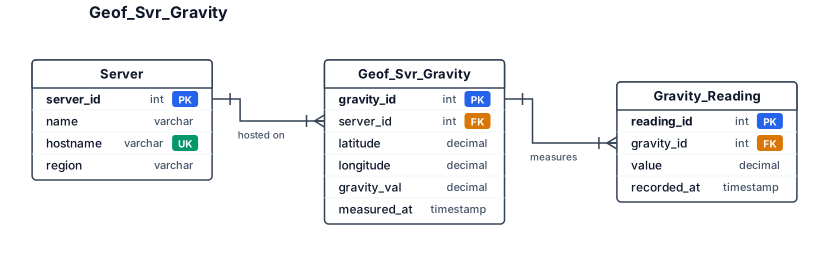
Geof_Svr_Gravity
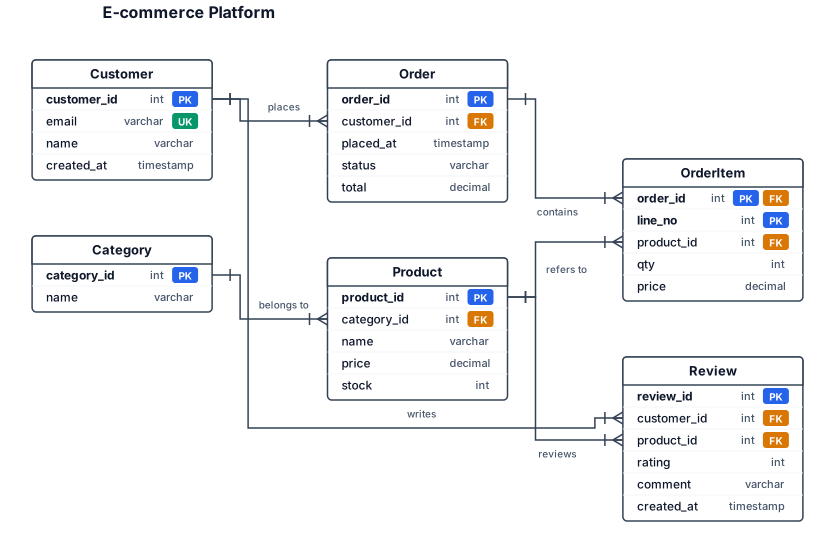
An ER diagram for an e-commerce platform with customers, orders, products, categories, and reviews — include primary keys and foreign key relationships
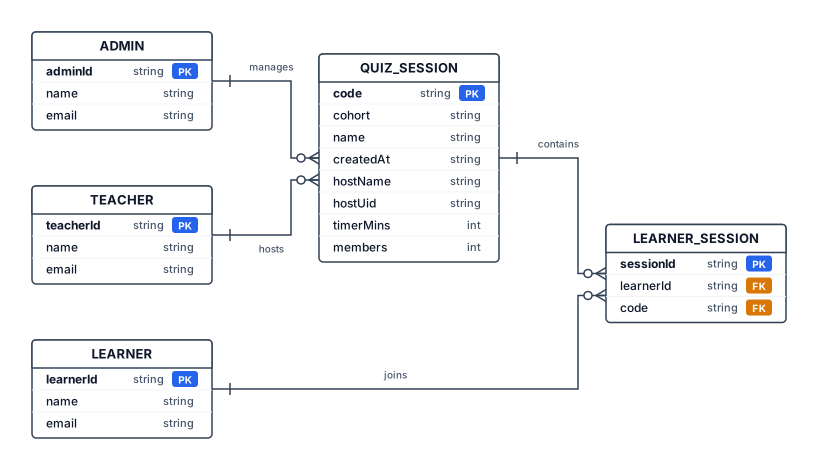
erDiagram ADMIN ||--o{ QUIZ_SESSION : manages TEACHER ||--o{ QUIZ_SESSION : hosts QUIZ_SESSION ||--o{ LEARNER_SESSION : contains LEARNER ||--o{ LEARNER_SESSION : joins ADMIN { string adminId PK string name string email } TEACHER { string teacherId PK string name string email } LEARNER { string learnerId PK string name string email } QUIZ_SESSION { string code PK string cohort string name string createdAt string hostName string hostUid int timerMins int members } LEARNER_SESSION { string sessionId PK string learnerId FK string code FK }
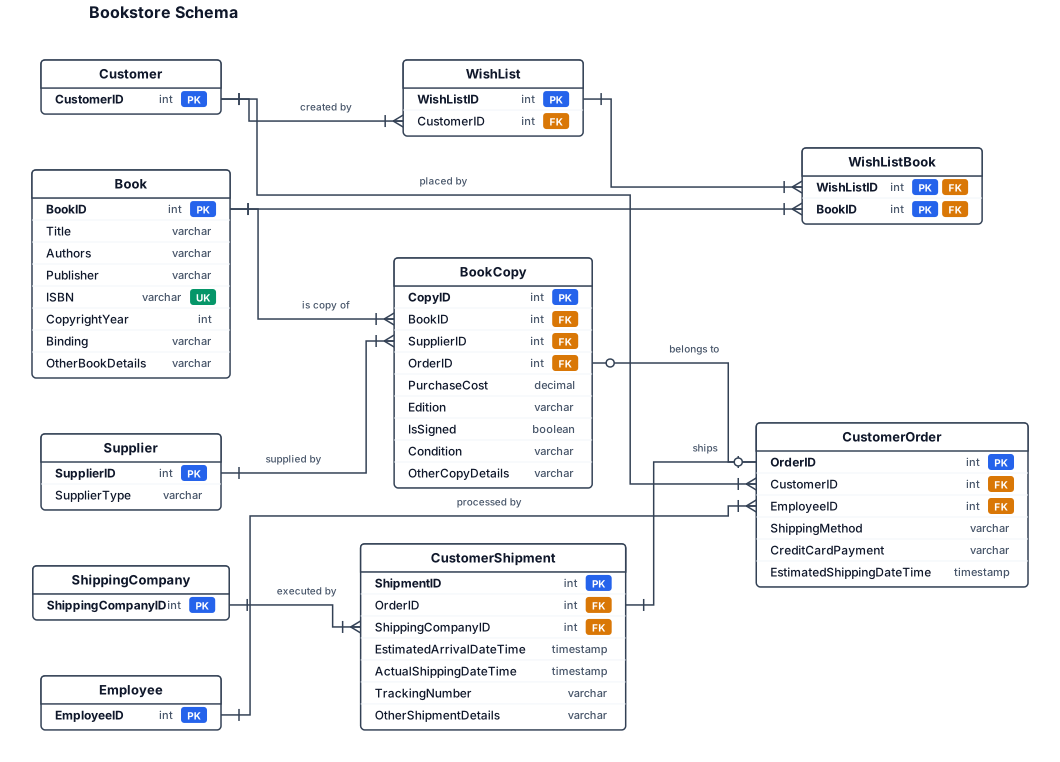
book - book copy=one book can have 0 to N book copies; each copy relates to 1 book supplier - book copy=one supplier can supply 0 to N book copies;each book copy comes from 1 supplier customer - wish list=one customer can create 0 to N wish lists;each wish list belongs to 1 customer wish list - book=a wish list can contain 0 to N books; a book can be on 0 to N wish lists customer - order=one customer can place 0 to N orders;each order belongs to 1 customer order - book copy=each order contains 1 to N book copies;each book copy can belong to 1 order employee - order=one employee can process 0 to N orders;each order is processed by 1 employee order - shipment= one order makes 0 or 1 shipment;each shipment belongs to 1 order shipment - shipping company=one shipping company can do 0 to N shipments;each shipment is executed by 1 shipping company Book=BookID (PK)*, Title, Authors (multivalued), Publisher, ISBN, CopyrightYear, Binding, OtherBookDetails Book Copy=CopyID (PK)*, PurchaseCost, Edition, IsSigned, Condition, OtherCopyDetails Supplier=SupplierID (PK)*, SupplierType (bookstore or individual)* Customer=CustomerID (PK)* Wish List=WishListID (PK)* Customer Order=OrderID (PK)*, ShippingMethod, CreditCardPayment, EstimatedShippingDateTime Employee=EmployeeID (PK)* Customer Shipment=ShipmentID (PK)*, EstimatedArrivalDateTime, ActualShippingDateTime, TrackingNumber, OtherShipmentDetails Shipping Company=ShippingCompanyID (PK)*
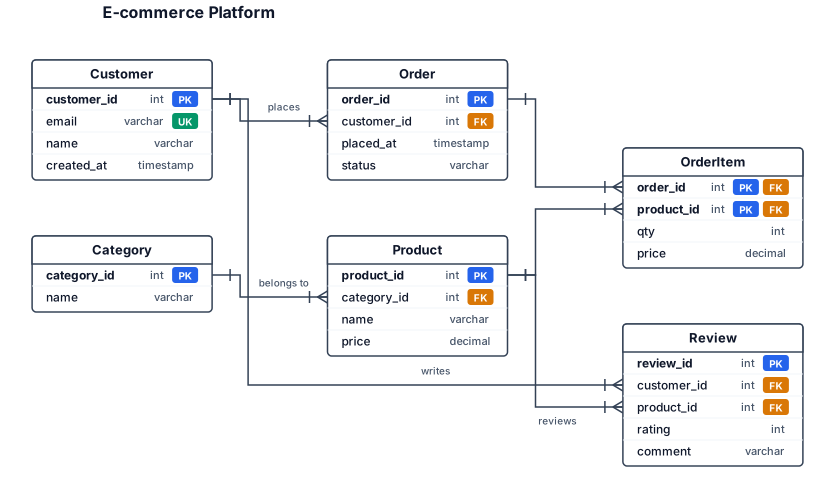
An ER diagram for an e-commerce platform with customers, orders, products, categories, and reviews — include primary keys and foreign key relationships
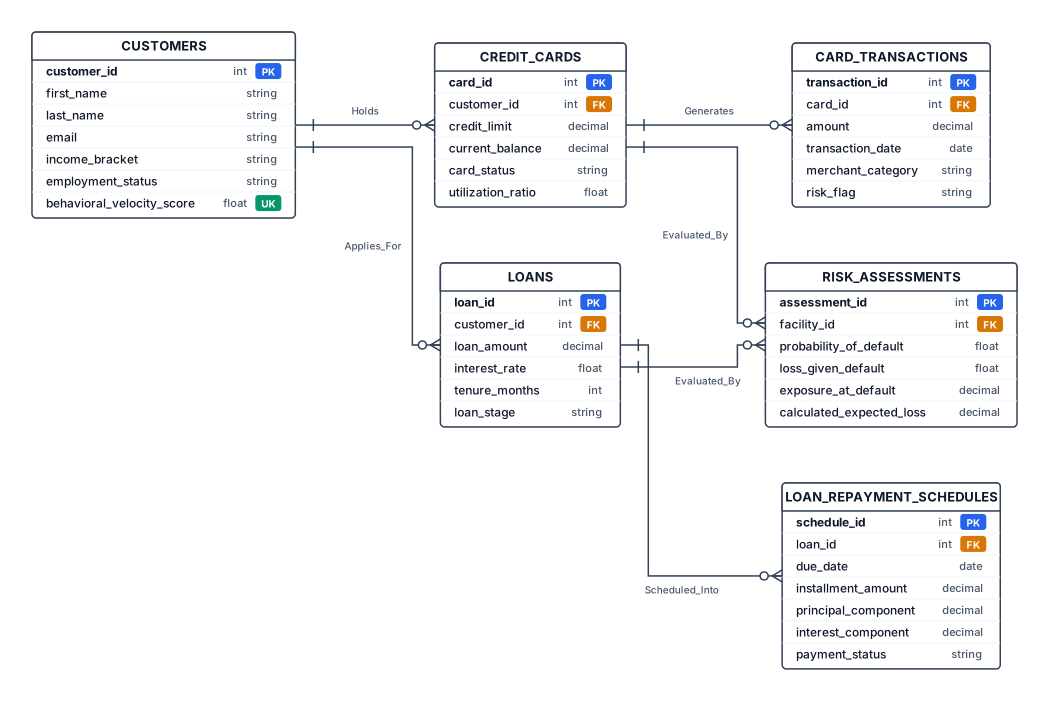
1. Core Entities & Attributes to Draw:Customers (Rectangle)Attributes (Ovals): customer_id (PK), first_name, last_name, email, income_bracket, employment_status, behavioral_velocity_score (Unique Attribute). Credit_Cards (Rectangle)Attributes: card_id (PK), customer_id (FK), credit_limit, current_balance, card_status, utilization_ratio.Card_Transactions (Rectangle)Attributes: transaction_id (PK), card_id (FK), amount, transaction_date, merchant_category, risk_flag.Loans (Rectangle)Attributes: loan_id (PK), customer_id (FK), loan_amount, interest_rate, tenure_months, loan_stage (Stage 1/2/3).Loan_Repayment_Schedules (Rectangle)Attributes: schedule_id (PK), loan_id (FK), due_date, installment_amount, principal_component, interest_component, payment_status.Risk_Assessments (Rectangle)Attributes: assessment_id (PK), facility_id (FK), probability_of_default (PD), loss_given_default (LGD), exposure_at_default (EAD), calculated_expected_loss (EL).2. Cardinality & Relationships (Diamond Shapes):Customers $\longleftrightarrow$ Credit_Cards: One-to-Many (1 to N) with relationship label "Holds".Customers $\longleftrightarrow$ Loans: One-to-Many (1 to N) with relationship label "Applies_For".Credit_Cards $\longleftrightarrow$ Card_Transactions: One-to-Many (1 to N) with relationship label "Generates".Loans $\longleftrightarrow$ Loan_Repayment_Schedules: One-to-Many (1 to N) with relationship label "Scheduled_Into".Loans / Credit_Cards $\longleftrightarrow$ Risk_Assessments: One-to-Many (1 to N) with relationship label "Evaluated_By".
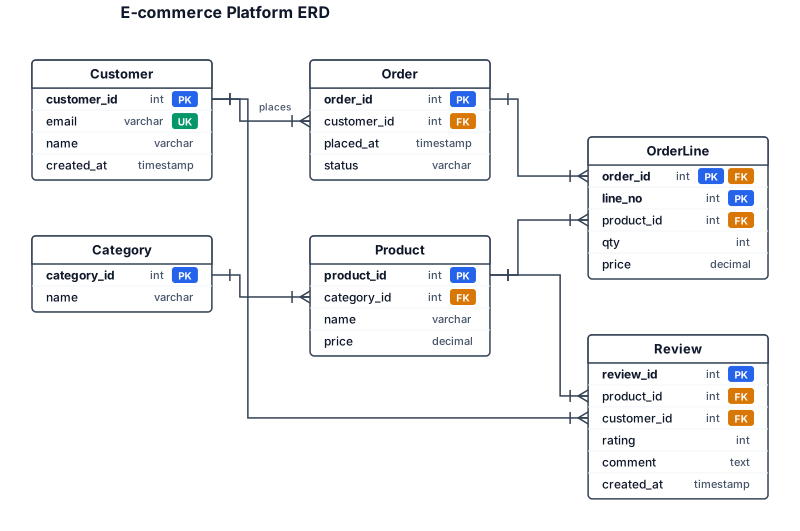
An ER diagram for an e-commerce platform with customers, orders, products, categories, and reviews — include primary keys and foreign key relationships
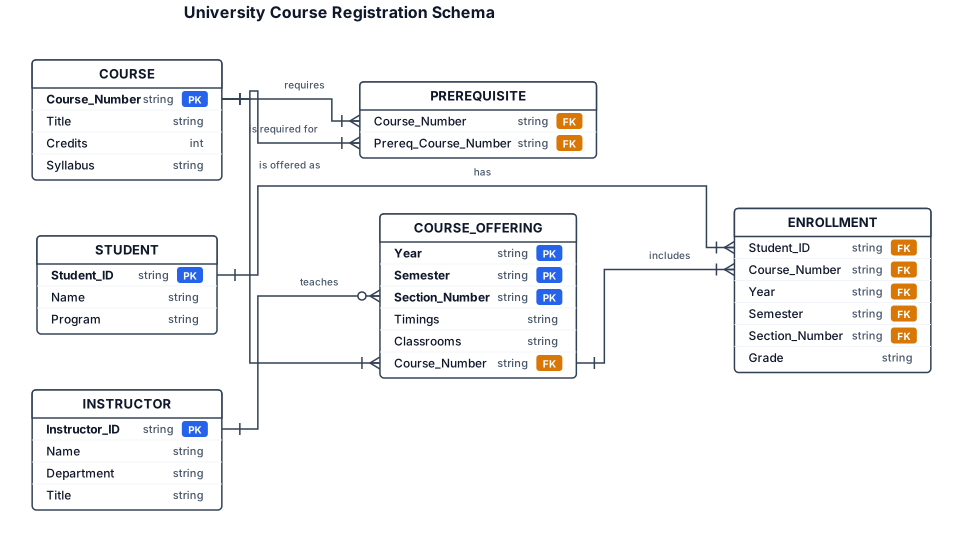
erDiagram COURSE { string Course_Number PK string Title int Credits string Syllabus } COURSE_OFFERING { string Year PK string Semester PK string Section_Number PK string Timings string Classrooms string Course_Number FK "Identifying relationship" } STUDENT { string Student_ID PK string Name string Program } INSTRUCTOR { string Instructor_ID PK string Name string Department string Title } ENROLLMENT { string Student_ID FK string Course_Number FK string Year FK string Semester FK string Section_Number FK string Grade "Relationship Attribute" } PREREQUISITE { string Course_Number FK string Prereq_Course_Number FK } %% Relationships COURSE ||--o{ COURSE_OFFERING : "is offered as" COURSE ||--o{ PREREQUISITE : "requires" COURSE ||--o{ PREREQUISITE : "is required for" INSTRUCTOR }|--o{ COURSE_OFFERING : "teaches" STUDENT ||--o{ ENROLLMENT : "has" COURSE_OFFERING ||--o{ ENROLLMENT : "includes"
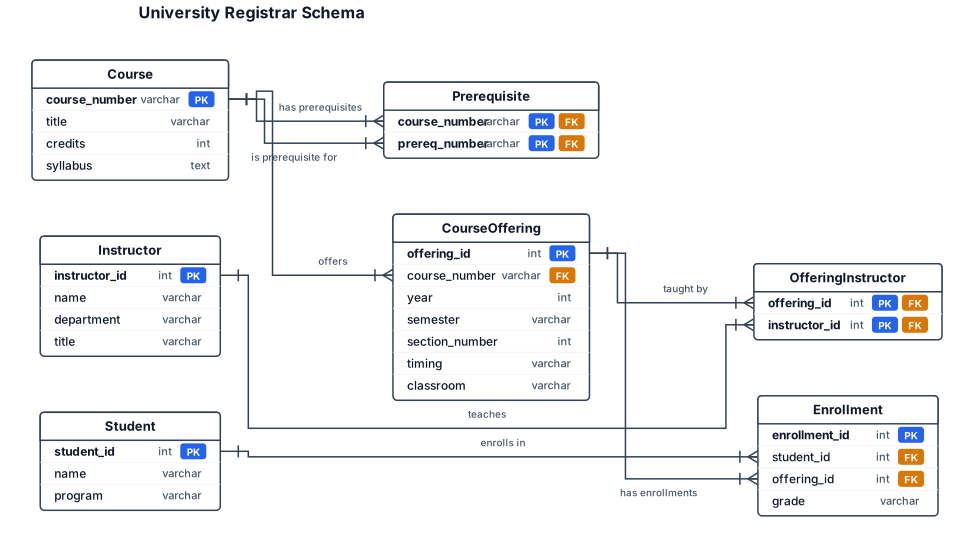
A university registrar's office maintains data about the following entities: c. courses, including number, title, credits, syllabus, and prerequisites; d. course offerings, including course number, year, semester, section number, instructors), timings and classrooms; e. students, including student-id, name, and program; and f. instructors, including identification number, name, department, and title. Further, the enrolment of students in courses and grades awarded to students in each course they are enrolled for must be appropriately modeled. Construct an E-R diagram for the registrar's office. Document all assumptions that you make about the mapping constraints
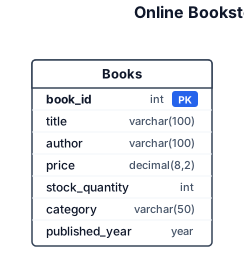
Create an Entity Relationship Diagram (ERD) for an Online Bookstore Inventory. There is one entity called Books. Books has the following attributes: - book_id: INT, Primary Key - title: VARCHAR(100) - author: VARCHAR(100) - price: DECIMAL(8,2) - stock_quantity: INT - category: VARCHAR(50) - published_year: YEAR Show Books as the main entity and display all its attributes. Clearly mark book_id as the Primary Key. There are no foreign keys and no relationships with other entities because this database contains only one table.
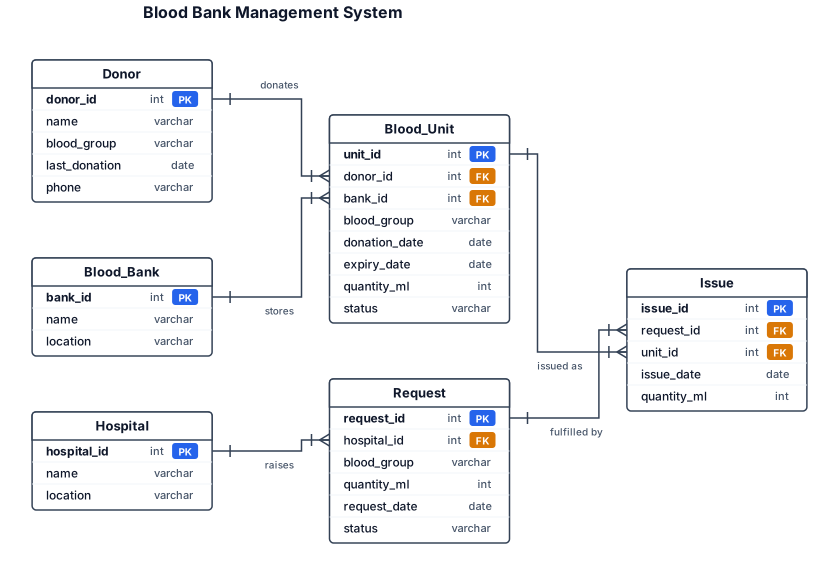
Blood Bank Management System Design a database tracking Donors (with Blood_Group, last donation date) who make Donations (date, quantity) stored as Blood_Units in a Blood_Bank inventory categorized by blood group and expiry date. Hospitals raise Requests for specific blood groups/quantities, fulfilled by matching available units — track Issue records linking a request to specific unit(s)
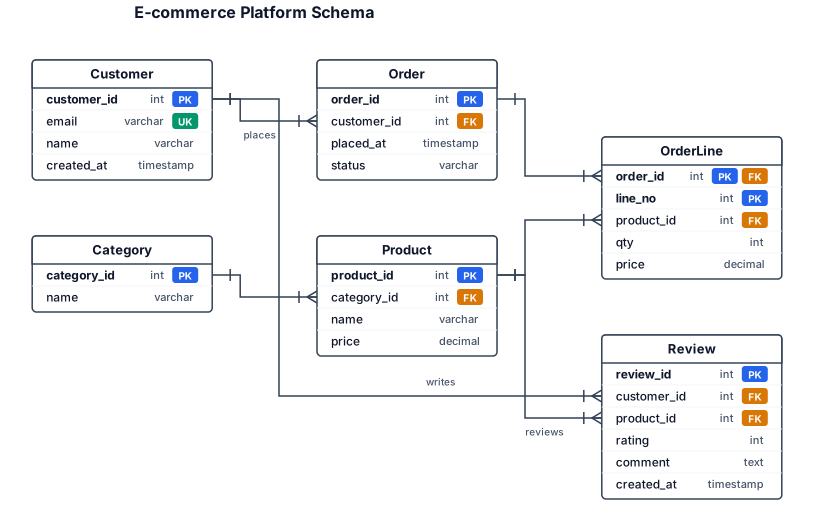
An ER diagram for an e-commerce platform with customers, orders, products, categories, and reviews — include primary keys and foreign key relationships
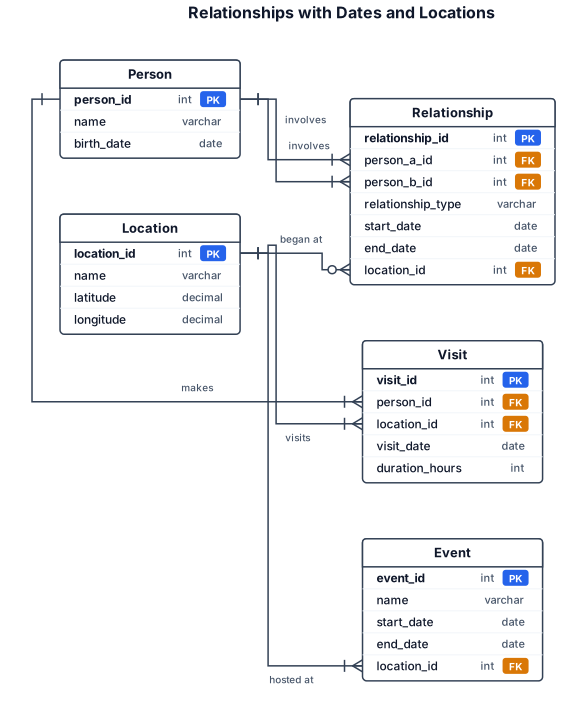
Relationships with dates and locations
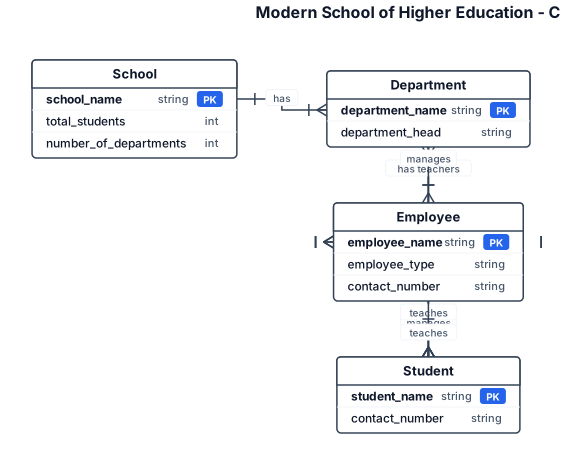
Create a Chen notation Entity Relationship Diagram for a Modern School of Higher Education. Entities: School Department Employee Student School attributes: School Name Total Students Number of Departments Department attributes: Department Name Department Head Teachers Employee attributes: Employee Name Employee Type Contact Number Student attributes: Student Name Department Contact Number Employee types include: Principal HOD Teacher Administrative Staff Relationships: School has Departments. Department has Students. Department has Teachers. HOD manages Teachers. HOD manages Students. HOD reports to Principal. Principal manages Departments. Principal teaches Students. Teachers teach Students. Principal manages Administrative Staff. Use proper Chen notation: - Rectangles for entities - Ovals for attributes - Diamonds for relationships - Straight connecting lines Do not use table-style boxes.
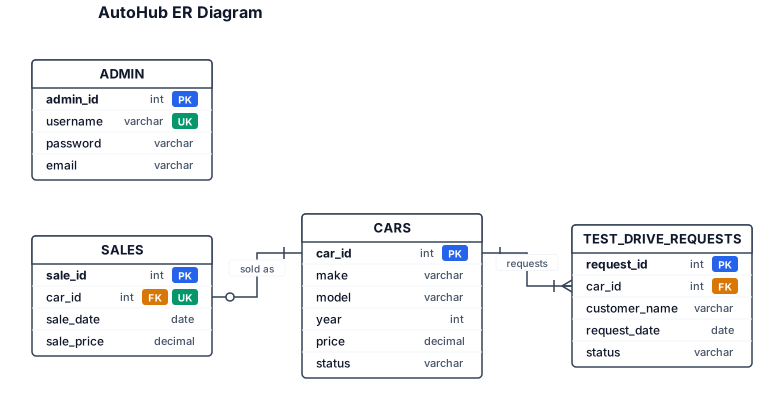
Create an ER diagram for AutoHub using exactly four tables: ADMIN, CARS, TEST_DRIVE_REQUESTS, and SALES. CARS has a 1-to-many relationship with TEST_DRIVE_REQUESTS through car_id. CARS has a 1-to-zero-or-one relationship with SALES through car_id because SALES.car_id is UNIQUE. ADMIN is standalone. Use the exact fields from the provided database schema and do not add any other tables.
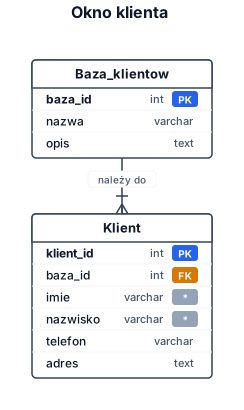
Utwórz okno klient. Dla klienta zapisywane są Imię, Nazwisko, Telefon, adres Klienta podłącz do Baza klientów
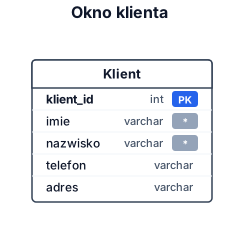
Utwórz okno klient. Dla klienta zapisywane są Imię, Nazwisko, Telefon, adres
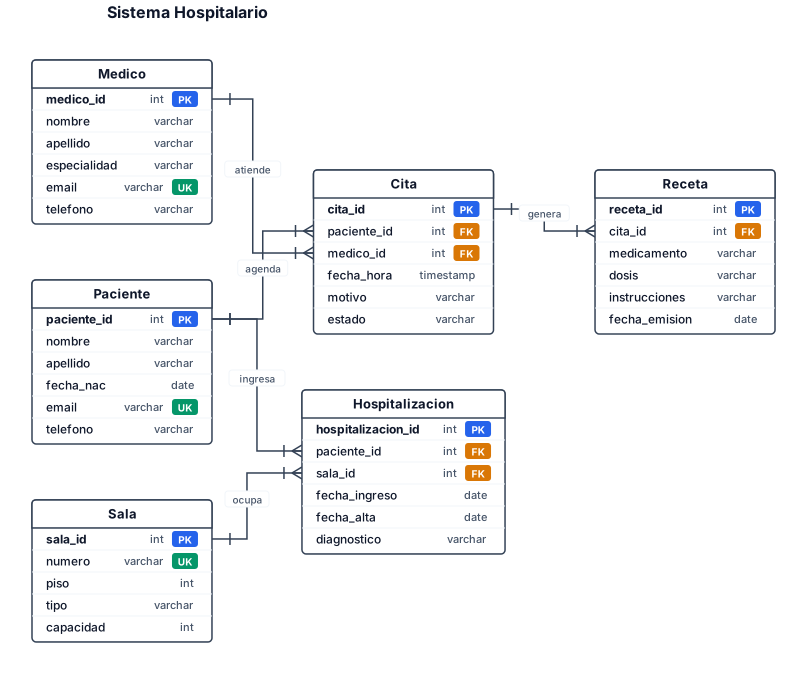
Un sistema hospitalario con pacientes, médicos, citas, recetas y salas de hospitalización.