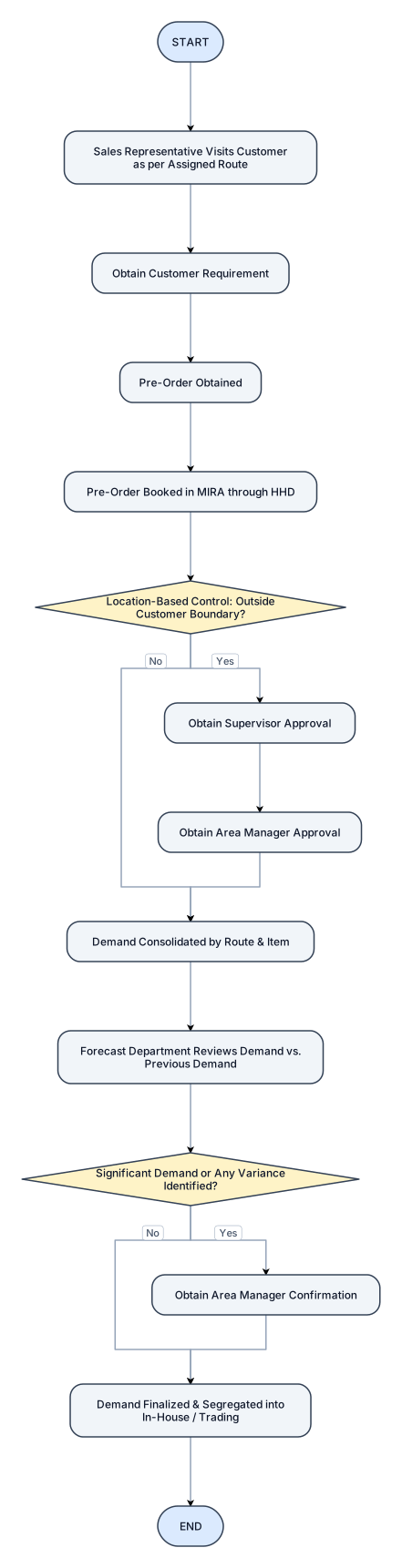
START, Sales Representative Visits Customer as per Assigned Route, obtain Customer Requirement, Pre-Order Obtained, Pre-Order Booked in MIRA through HHD, (Location-Based Control), Outside Customer, Boundary?, No │ Yes, Obtian Supervisor Approval, Obtain Area Manager Approval, Demand Consolidated by Route & Item, Forecast Department Reviews Demand vs. Previous Demand, IF Significant Demand or Any Variance Identified ?, Obtain Area Manager Confirmation, Demadn Finalized & Segregated into In-House / Trading.
NODE ARCHIVE · REAL DIAGRAM BRIEFS
Diagram Examples from Real Visitor Prompts
Browse eligible diagrams shared by FreeDiagram visitors, inspect the exact prompts, and build your own version.
Browse 3323 real creationsCOMMUNITY OUTPUTS · EXACT PROMPTS
All visitor creations
Showing 2713–2736 of 3323. No stock examples or system defaults. Choose a tool, study a real result, then reopen its prompt as your starting point.
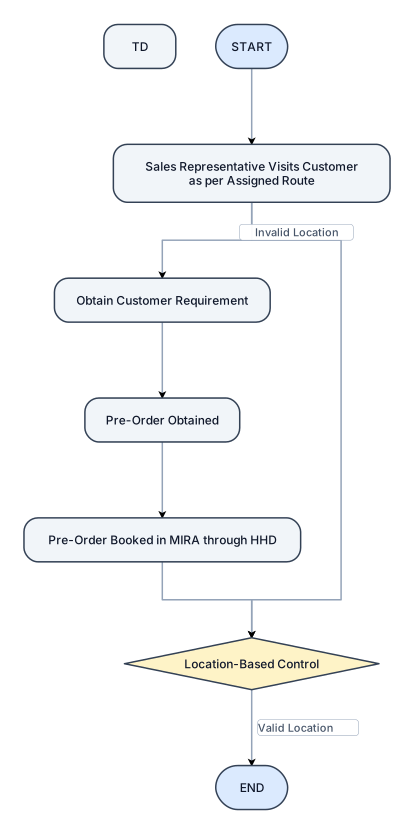
START, Sales Representative Visits Customer as per Assigned Route, obtain Customer Requirement, Pre-Order Obtained, Pre-Order Booked in MIRA through HHD, (Location-Based Control).
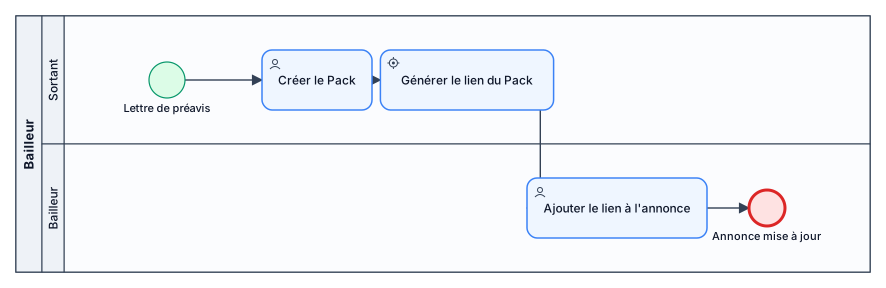
Lettre de préavis -> Le sortant créer le Pack ->génération du lien du Pack à ajouter à l'annonce par le bailleur
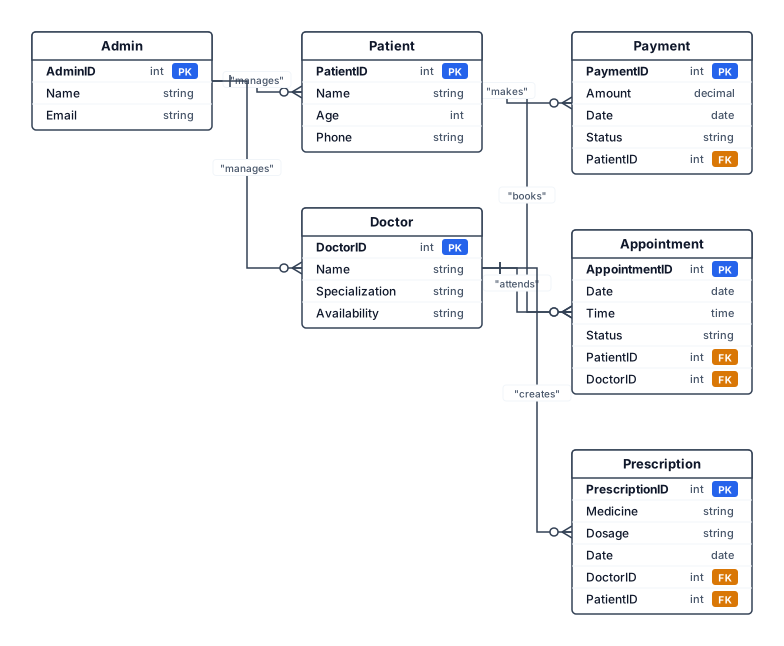
Patient – PatientID, Name, Age, Phone Doctor – DoctorID, Name, Specialization, Availability Appointment – AppointmentID, Date, Time, Status Prescription – PrescriptionID, Medicine, Dosage, Date Payment – PaymentID, Amount, Date, Status Admin – AdminID, Name, Email Patient books Appointment. Doctor attends Appointment. Doctor creates Prescription. Patient makes Payment. Admin manages Patients and Doctors.
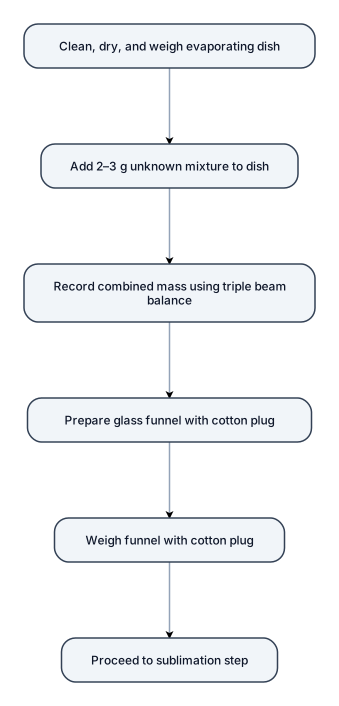
The first evaporating dish was cleaned, dried, and weighed. Approximately 2–3 g of the unknown mixture was placed into the dish, and the combined mass was recorded using triple beam balance. A glass funnel with a cotton plug was then prepared and weighed for the sublimation step.
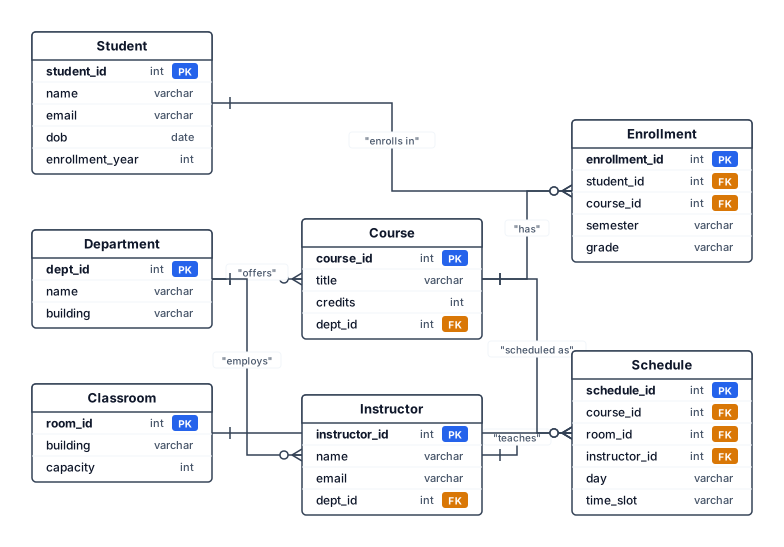
Er diagram for college management system
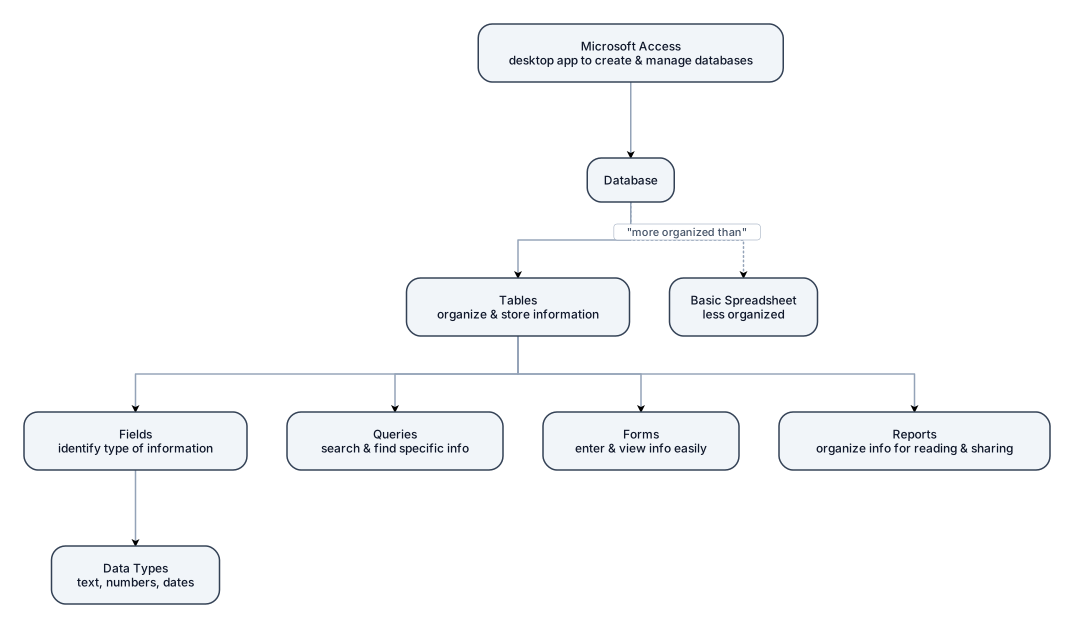
a flowchart: prisma flow with short explanations using this info: A database is made up of tables that are used to organize and store information. Microsoft Access is a desktop application used to create and manage databases. In Access, tables contain fields that identify the type of information being stored, while data types tell Access what kind of information can be entered, such as text, numbers, or dates. Queries are used to search for and find specific information in a database. Forms make it easier to enter and view information, while reports organize the information into a format that is easy to read and share. Overall, Microsoft Access can be used to store, manage, and search through large amounts of information in a more organized way than a basic spreadsheet.
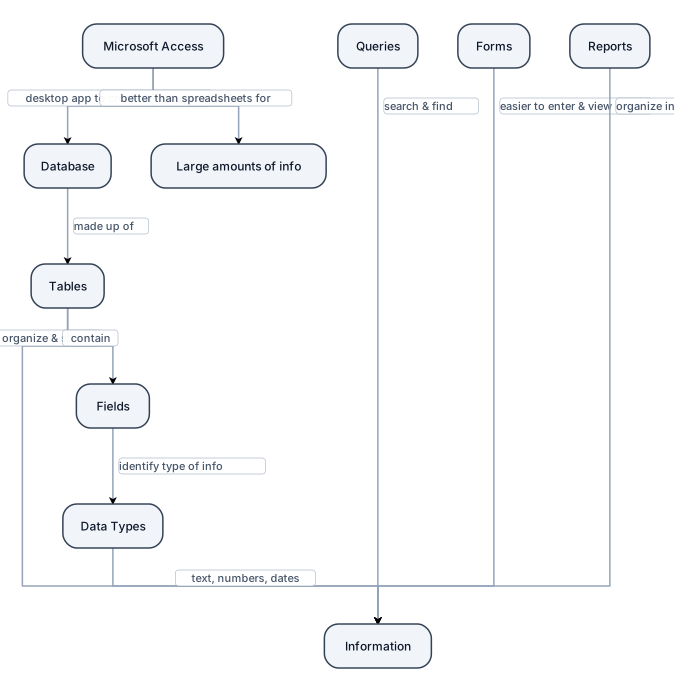
flowchart with short blurbs and explanations using this info: A database is made up of tables that are used to organize and store information. Microsoft Access is a desktop application used to create and manage databases. In Access, tables contain fields that identify the type of information being stored, while data types tell Access what kind of information can be entered, such as text, numbers, or dates. Queries are used to search for and find specific information in a database. Forms make it easier to enter and view information, while reports organize the information into a format that is easy to read and share. Overall, Microsoft Access can be used to store, manage, and search through large amounts of information in a more organized way than a basic spreadsheet.
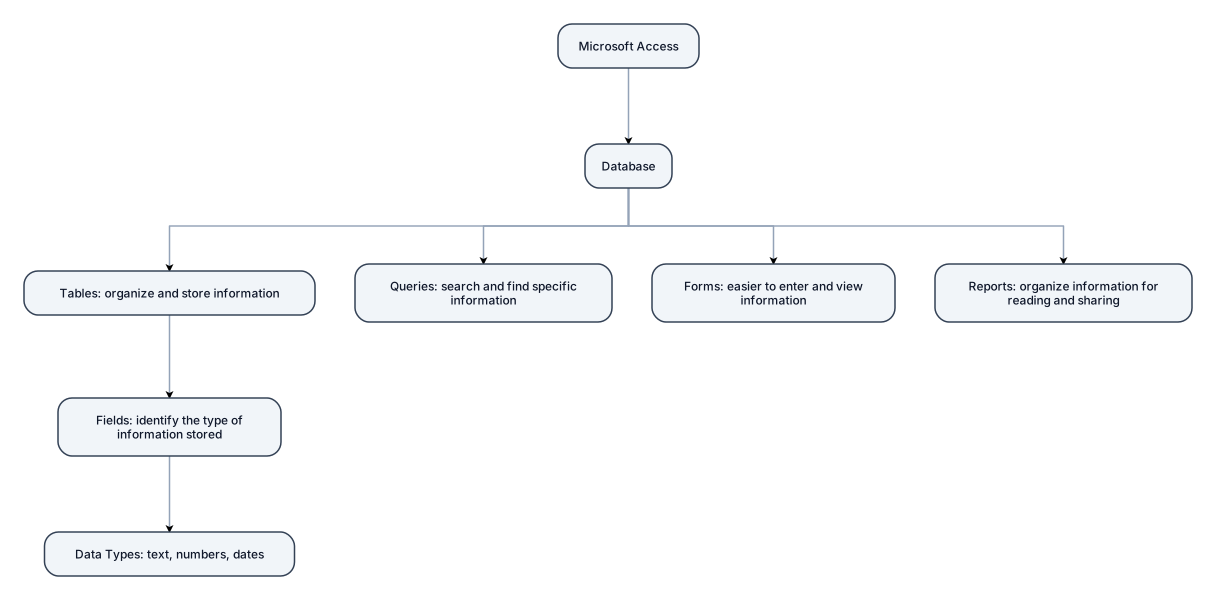
flowchart with short blurbs using this info: A database is made up of tables that are used to organize and store information. Microsoft Access is a desktop application used to create and manage databases. In Access, tables contain fields that identify the type of information being stored, while data types tell Access what kind of information can be entered, such as text, numbers, or dates. Queries are used to search for and find specific information in a database. Forms make it easier to enter and view information, while reports organize the information into a format that is easy to read and share. Overall, Microsoft Access can be used to store, manage, and search through large amounts of information in a more organized way than a basic spreadsheet.
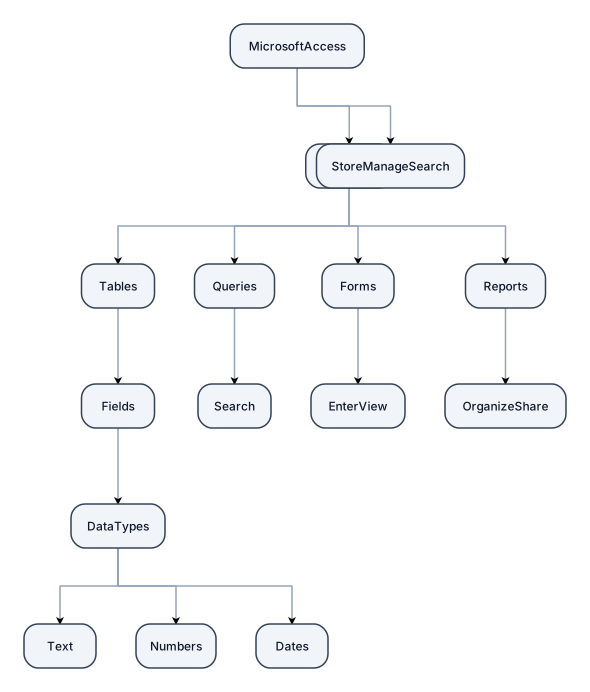
flowchart using this info: A database is made up of tables that are used to organize and store information. Microsoft Access is a desktop application used to create and manage databases. In Access, tables contain fields that identify the type of information being stored, while data types tell Access what kind of information can be entered, such as text, numbers, or dates. Queries are used to search for and find specific information in a database. Forms make it easier to enter and view information, while reports organize the information into a format that is easy to read and share. Overall, Microsoft Access can be used to store, manage, and search through large amounts of information in a more organized way than a basic spreadsheet.
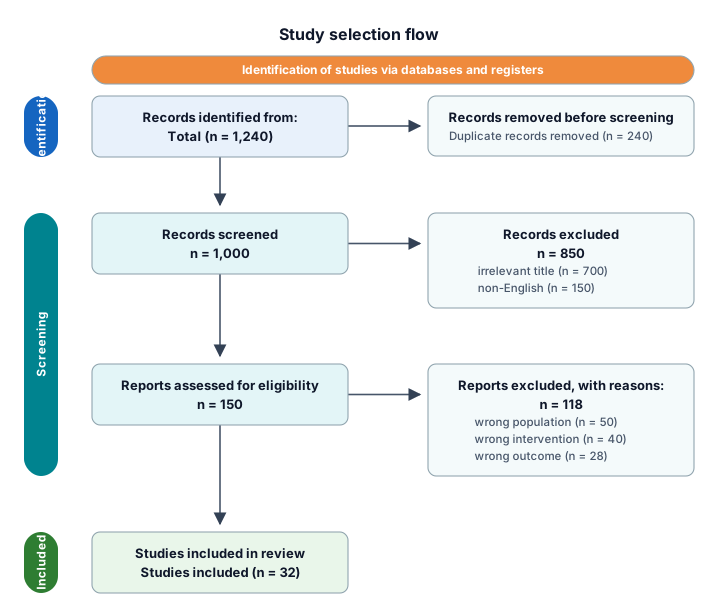
A PRISMA study-selection flow from 1,240 identified records through deduplication, screening, eligibility, and 32 included studies
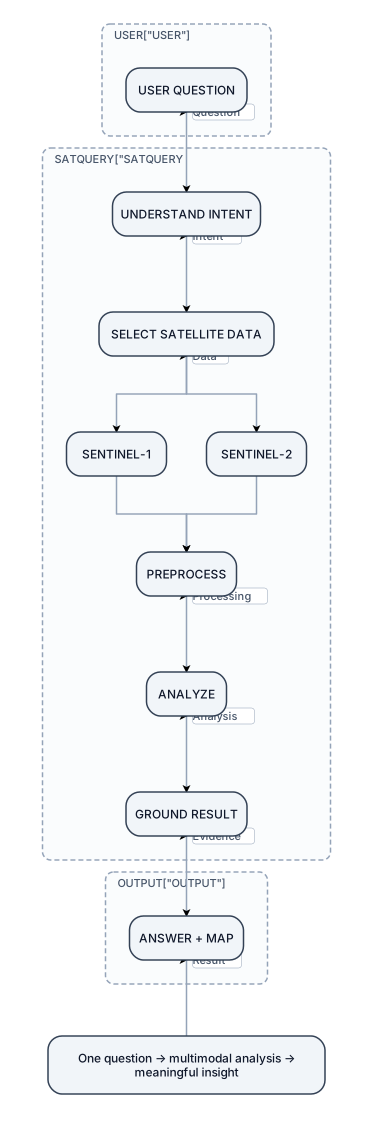
This should become your "What happens when I use SatQuery?" slide. Make the entire slide one large workflow USER QUESTION ↓ UNDERSTAND INTENT ↓ SELECT SATELLITE DATA ↓ SENTINEL-1 + SENTINEL-2 ↓ PREPROCESS ↓ ANALYZE ↓ GROUND RESULT ↓ ANSWER + MAP Don't explain each box with paragraphs. Instead, put tiny labels/icons underneath: Question ↓ Intent ↓ Data ↓ Processing ↓ Analysis ↓ Evidence ↓ Result At the bottom: A single sentence: One question → multimodal analysis → meaningful insight This is already aligned with the SatQuery positioning in your deck. make it as human as possible. It shouldn't look AI generated. I want a very structured architectural diagram not a basic flow chart.
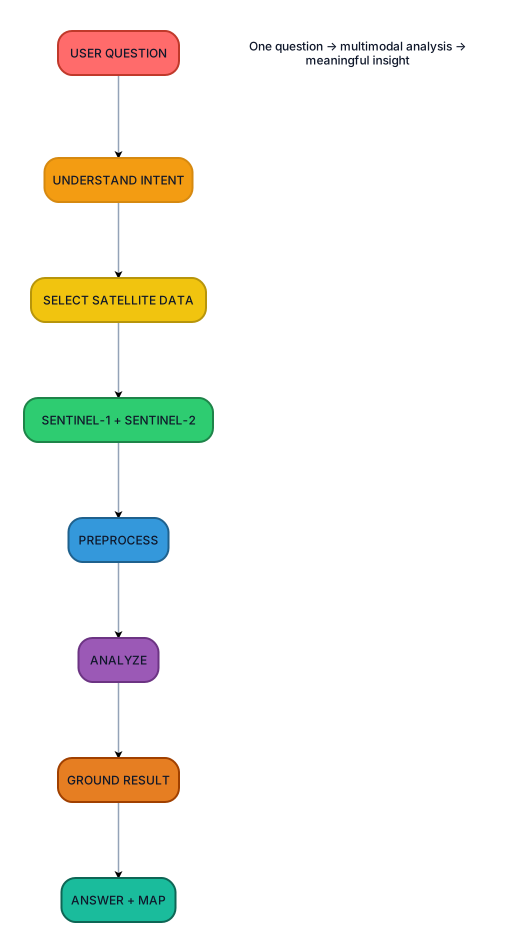
This should become your "What happens when I use SatQuery?" slide. Make the entire slide one large workflow USER QUESTION ↓ UNDERSTAND INTENT ↓ SELECT SATELLITE DATA ↓ SENTINEL-1 + SENTINEL-2 ↓ PREPROCESS ↓ ANALYZE ↓ GROUND RESULT ↓ ANSWER + MAP Don't explain each box with paragraphs. Instead, put tiny labels/icons underneath: Question ↓ Intent ↓ Data ↓ Processing ↓ Analysis ↓ Evidence ↓ Result At the bottom: A single sentence: One question → multimodal analysis → meaningful insight This is already aligned with the SatQuery positioning in your deck. make it as human as possible. It shouldn't look AI generated

Water/Sugar & Ingredients→ CMC MIXER →Juice Blending Tanks → UHT → Juice Storage/Buffer Tank → Cup & Bottle Fillers → CIP/Drain, A Piping and Instrumentation Diagram Showing both fillers, cup and bottle fillers, CIP system, Simple syrup system, Divert Panels, Utility connections to UHT and Filler, water storage tank and its UV filtration setup

Water/Sugar & Ingredients→ CMC MIXER →Juice Blending Tanks → UHT → Juice Storage/Buffer Tank → Cup & Bottle Fillers → CIP/Drain

Create a nursing concept map showing dehydration → decreased circulating volume → hypovolemia → decreased tissue perfusion → complications.
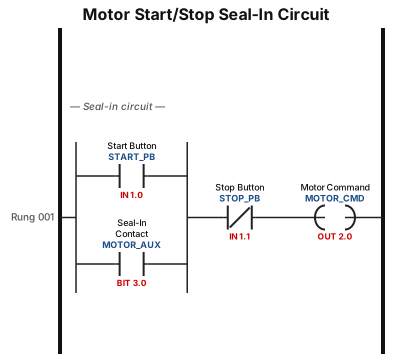
A motor start/stop seal-in circuit with a normally open start button, a normally closed stop button, and a seal-in contact around the start button
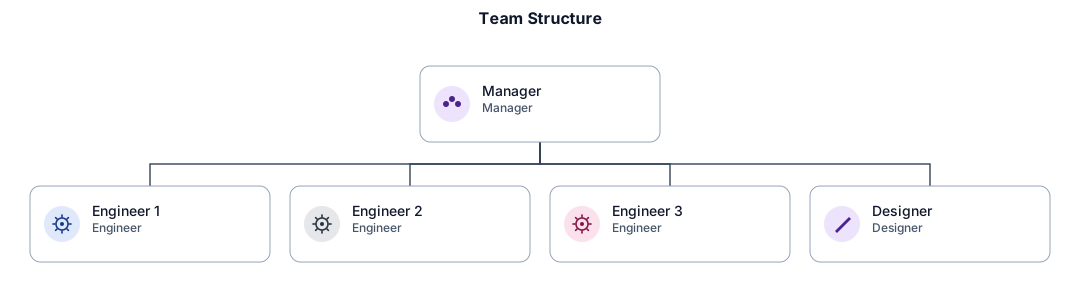
قصة اصحاب السبت An org chart for a small team with a manager, three engineers, and a designer
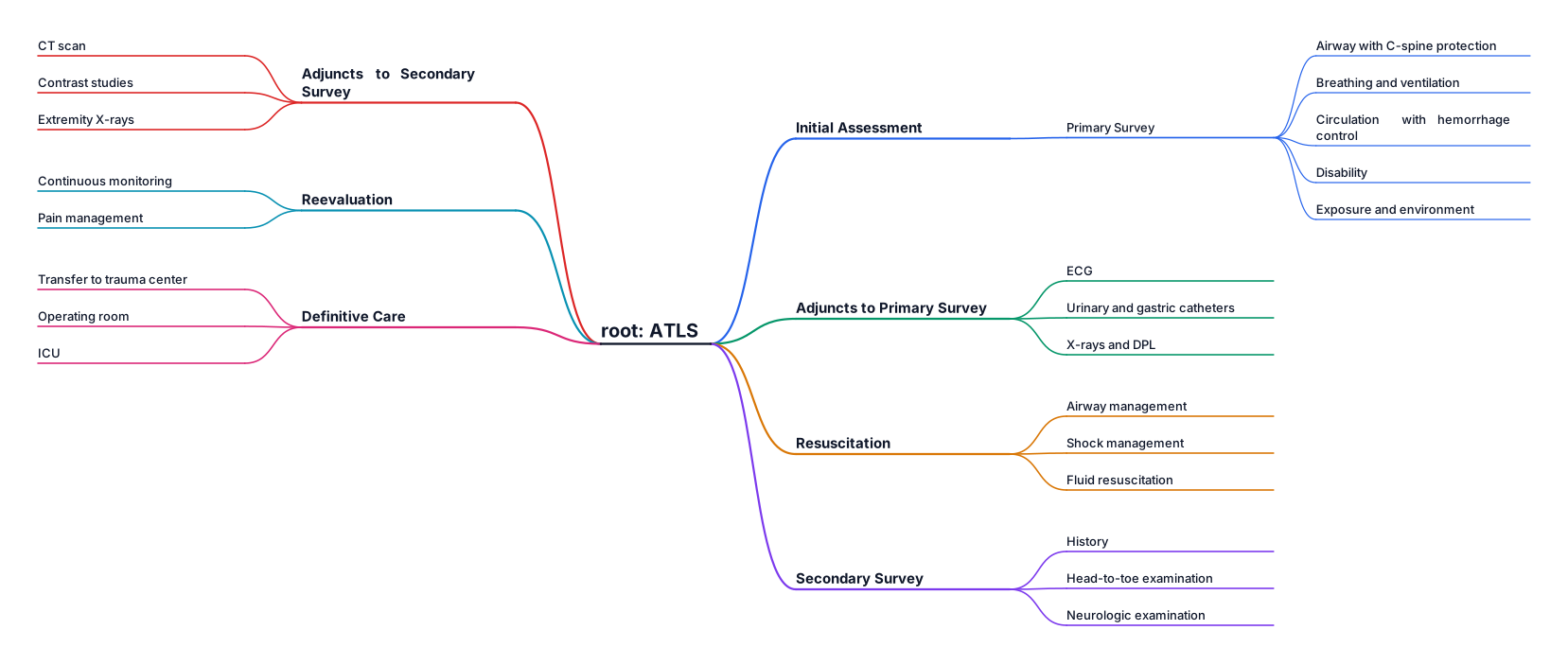
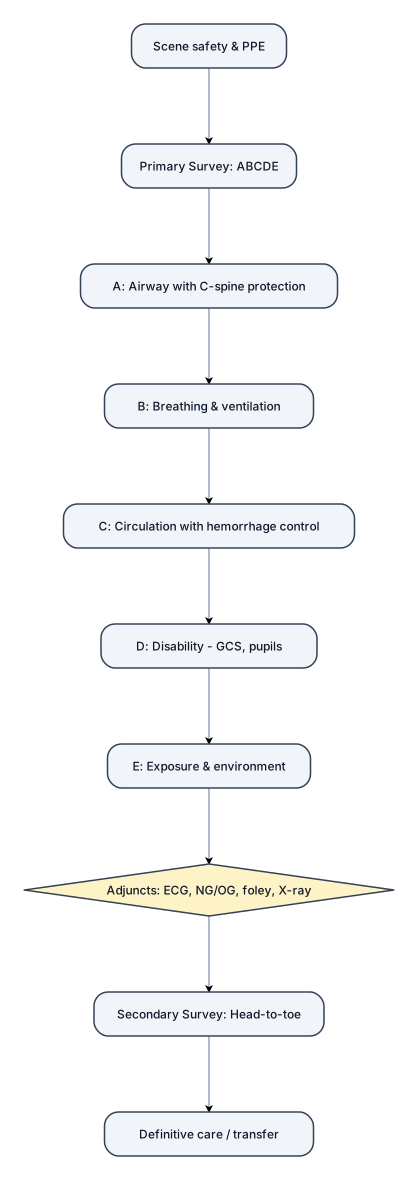
A mind map for Atls
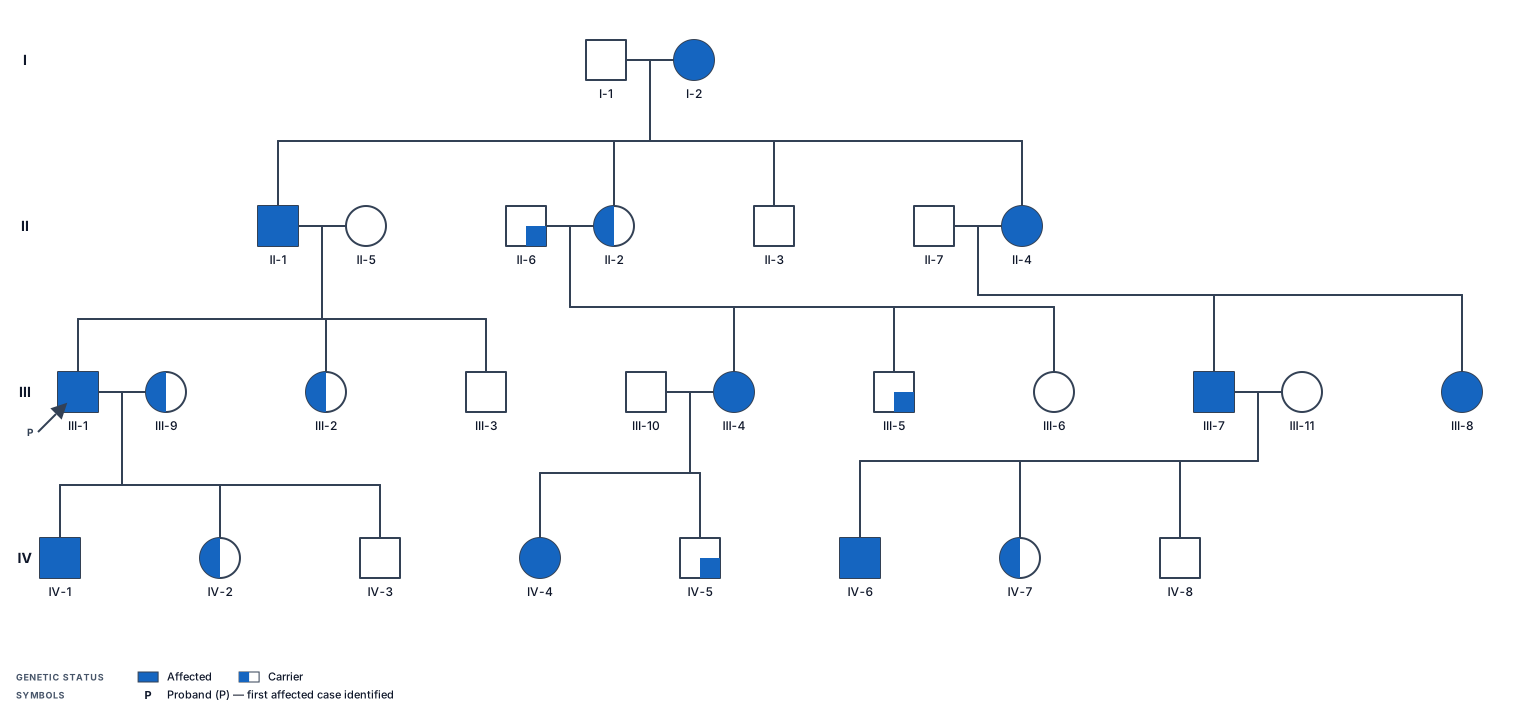
a big pedigree char
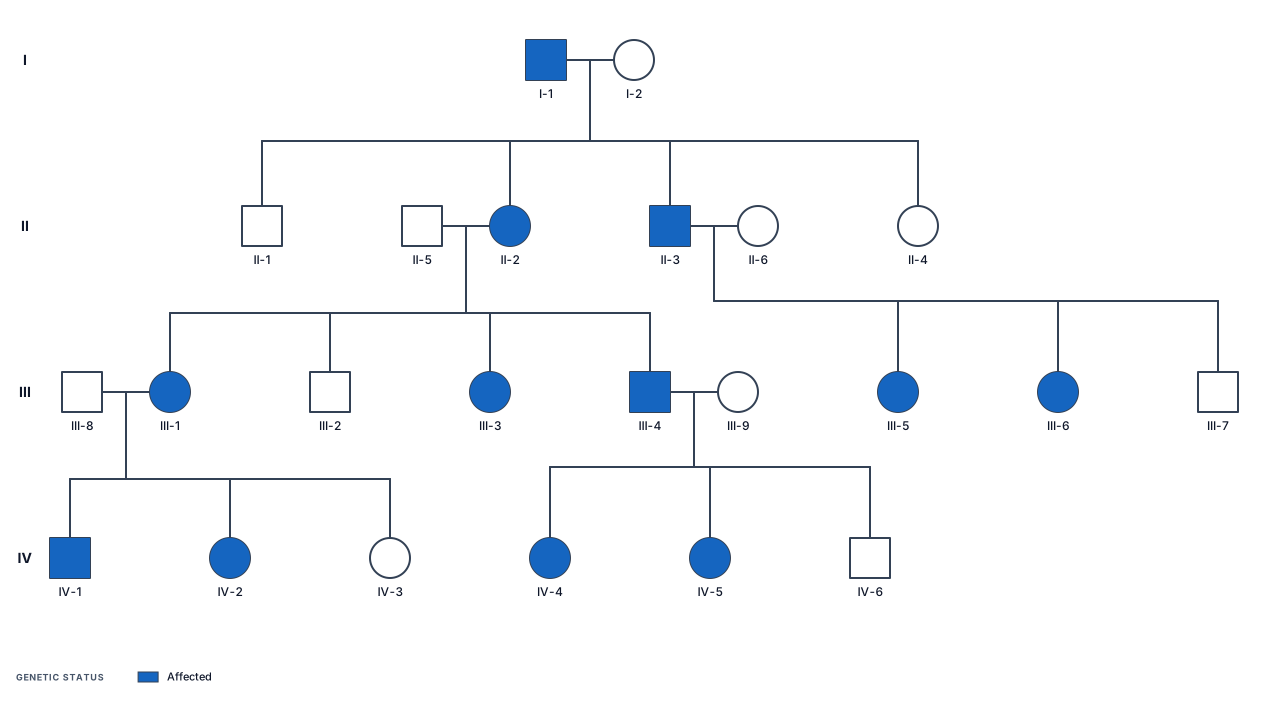
a big pedigree chart x linked dominant
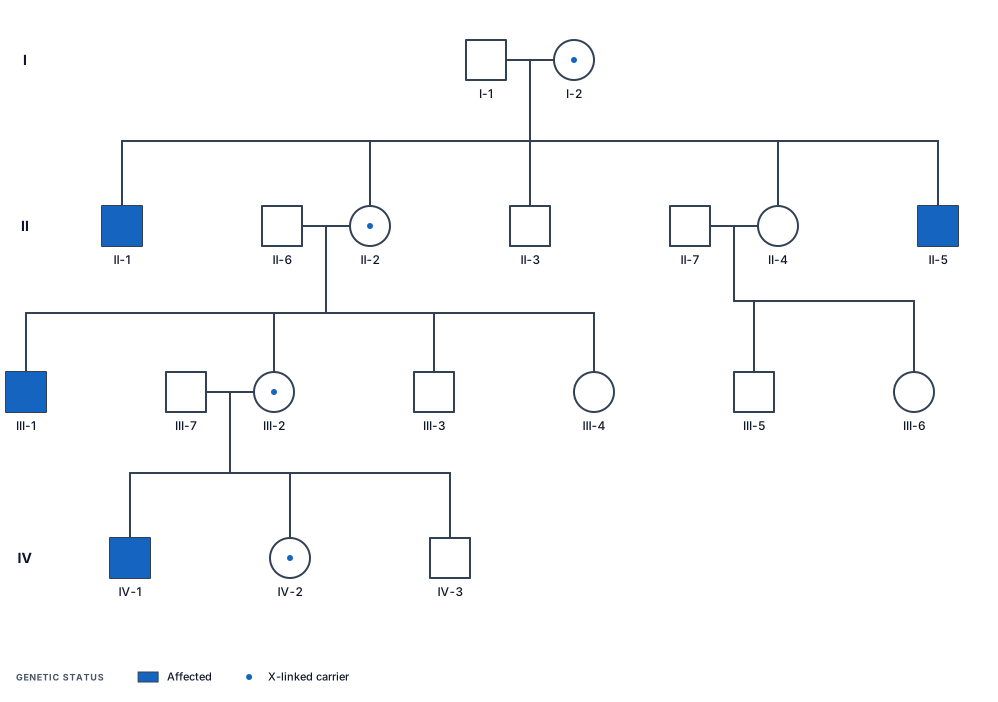
a big pedigree chart x linked recessive
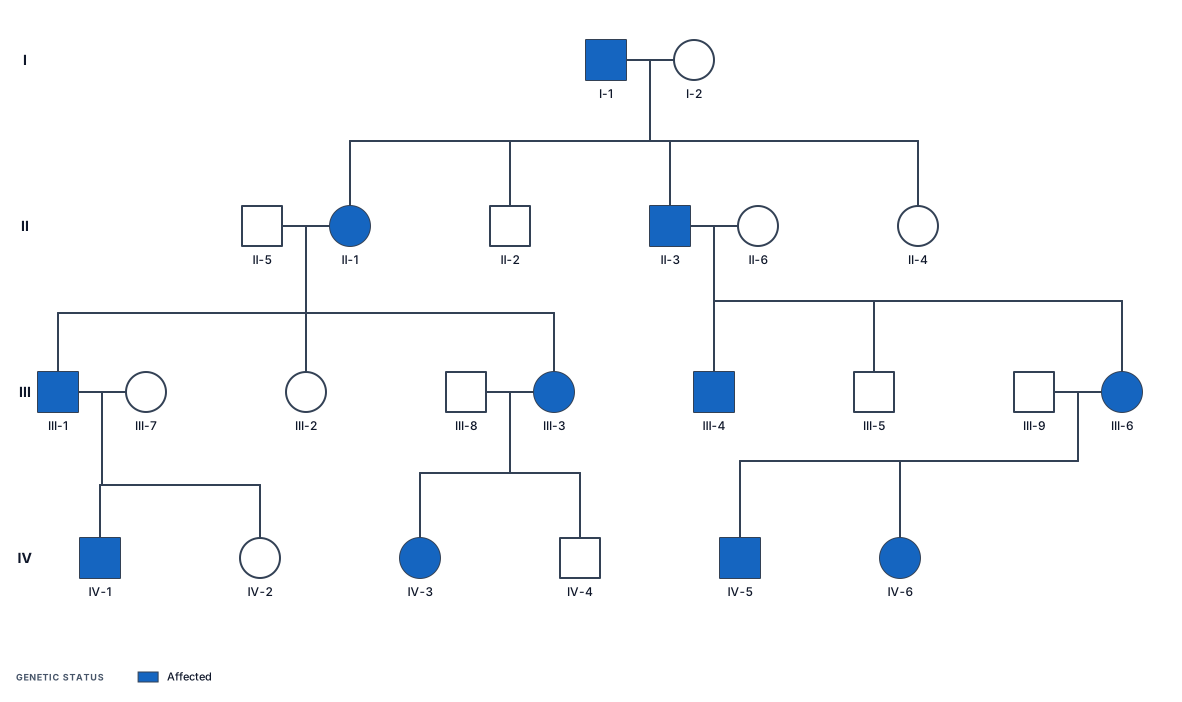
a big pedigree chart autosomal dominant