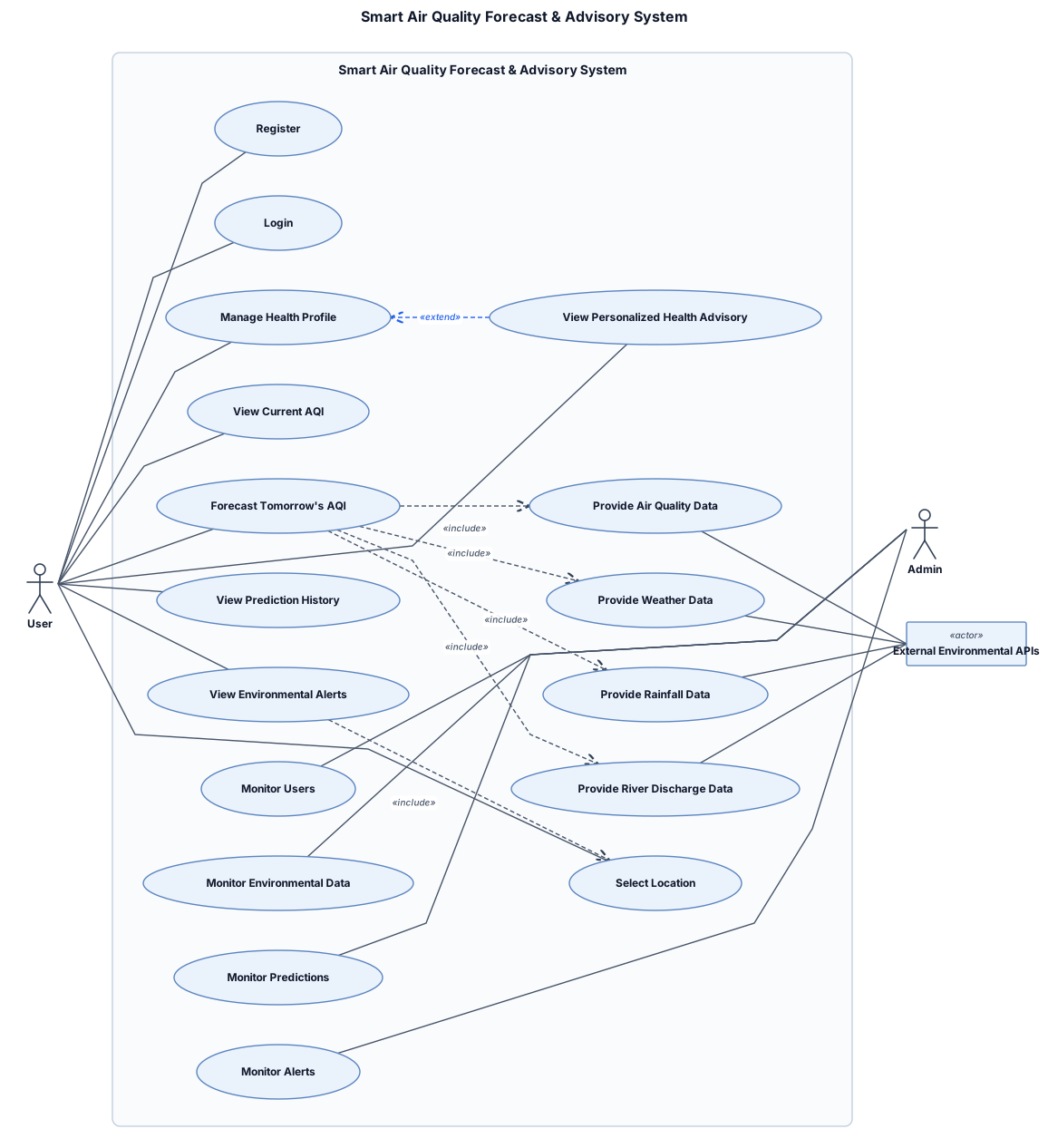
Create a UML Use Case Diagram for a Smart Air Quality Forecast and Advisory System. Actors: User, Admin, and External Environmental APIs. User can Register, Login, Manage Health Profile, Select Location, View Current AQI, Forecast Tomorrow's AQI, View Personalized Health Advisory, View Prediction History, and View Environmental Alerts. External APIs provide Air Quality, Weather, Rainfall, and River Discharge data. Admin can monitor users, environmental data, predictions, and alerts. Use standard UML notation with actors outside the system boundary and use cases as ovals inside the system boundary.
NODE ARCHIVE · REAL DIAGRAM BRIEFS
Diagram Examples from Real Visitor Prompts
Browse eligible diagrams shared by FreeDiagram visitors, inspect the exact prompts, and build your own version.
Browse 3266 real creationsCOMMUNITY OUTPUTS · EXACT PROMPTS
Main diagram studio
Showing 265–288 of 1258. No stock examples or system defaults. Choose a tool, study a real result, then reopen its prompt as your starting point.
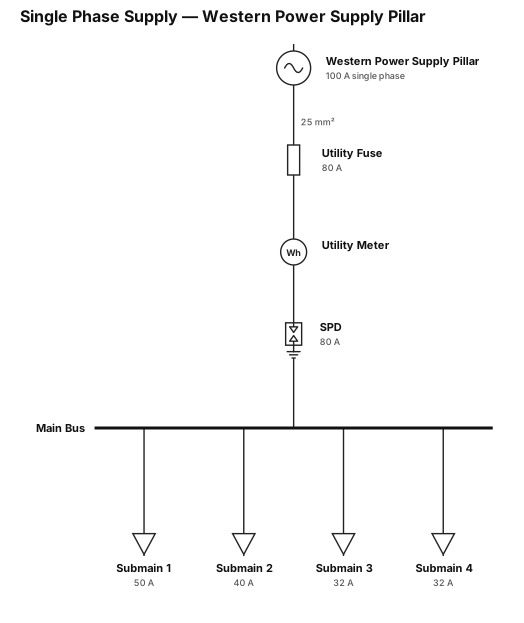
A Single phase supply 100amps from power utility, followed by 80amp utility fuse, followed by a single phase utility meter, followed by an 80amp SPD, supplying 4 x individual submains at 1 x50amps, 1 x 40amp, 2 x 32amp Change utility to Western Power Supply Pillar. After the pillar- mark cable as 25mm2.
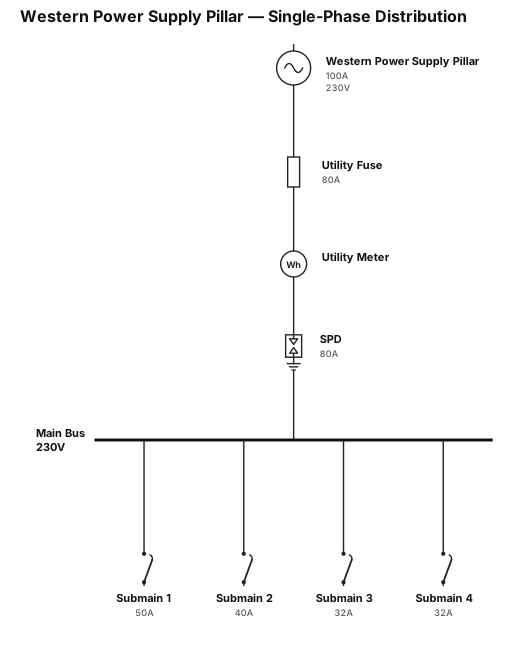
A Single phase supply 100amps from power utility, followed by 80amp utility fuse, followed by a single phase utility meter, followed by an 80amp SPD, supplying 4 x individual submains at 1 x50amps, 1 x 40amp, 2 x 32amp Change utility to Western Power Supply Pillar.
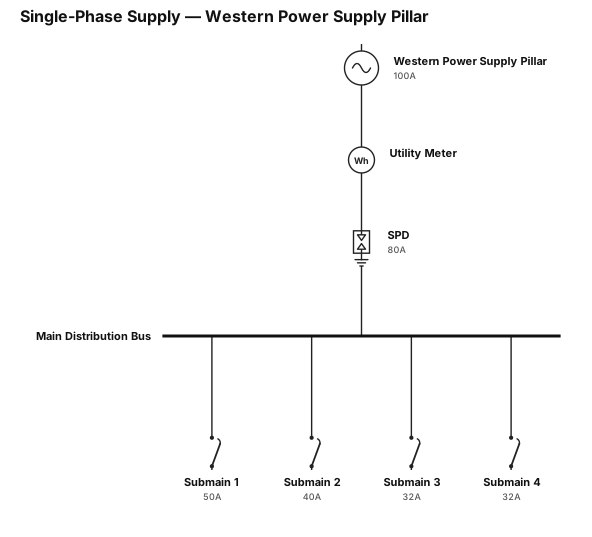
A Single phase supply 100amps from power utility, followed by a single phase utility meter, followed by an 80amp SPD, supplying 4 x individual submains at 1 x50amps, 1 x 40amp, 2 x 32amp Change utility to Western Power Supply Pillar.
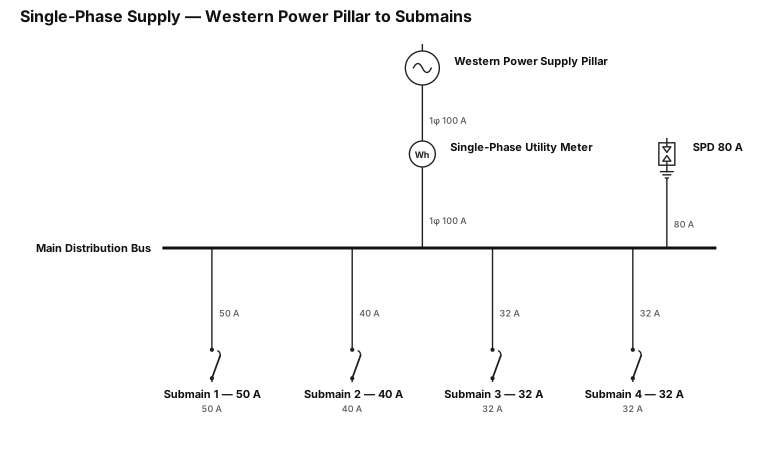
A Single phase supply 100amps from power utility, via a single phase utility meter, then an 80amp SPD, supplying 4 x individual submains at 1 x50amps, 1 x 40amp, 2 x 32amp Change utility to Western Power Supply Pillar.
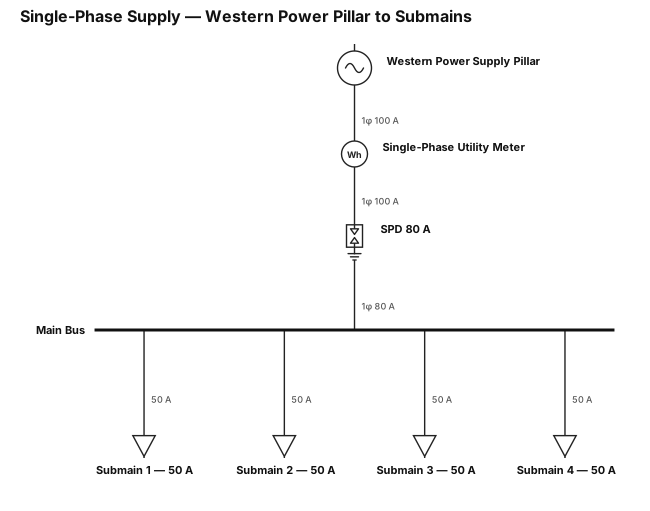
A Single phase supply 100amps from power utility, via a single phase utility meter, then an 80amp SPD, supplying 4 x individual submains at 50amps each. Change utility to Western Power Supply Pillar.
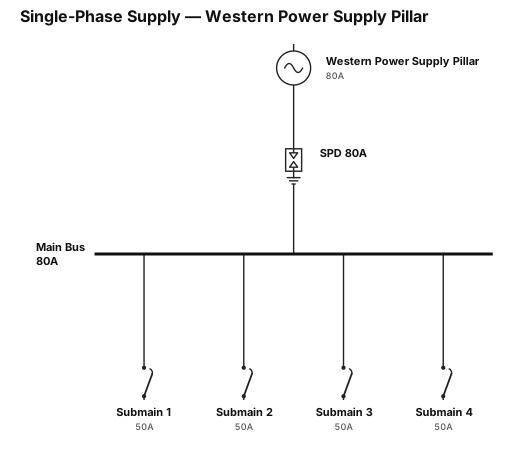
A Single phase supply 80amps from power utility, run through a 80amp SPD, supplying 4 x individual submains at 50amps each. Change utility to Western Power Supply Pillar.
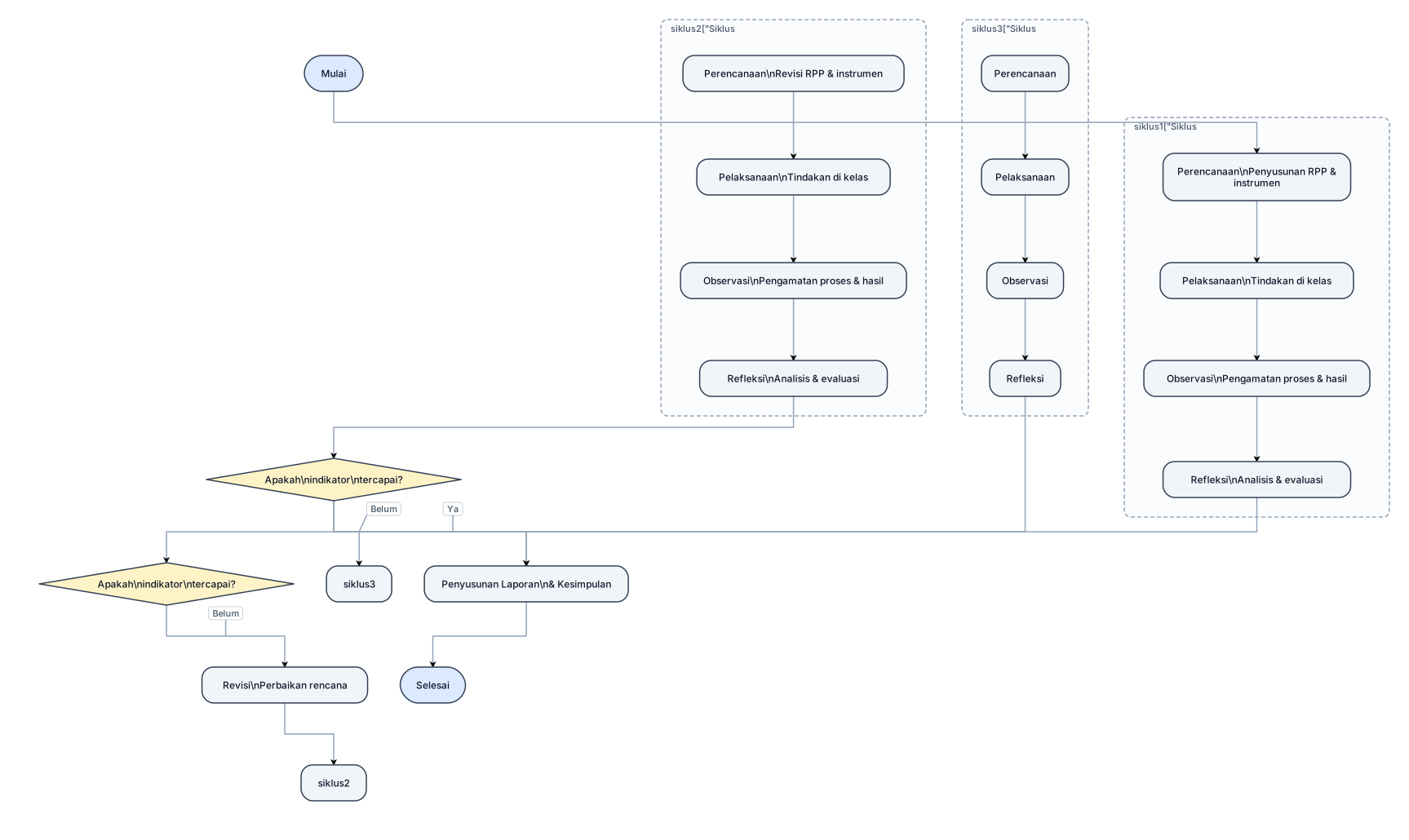
tolong bantu saya buatkan bagas seperti siklus di proposal PTK
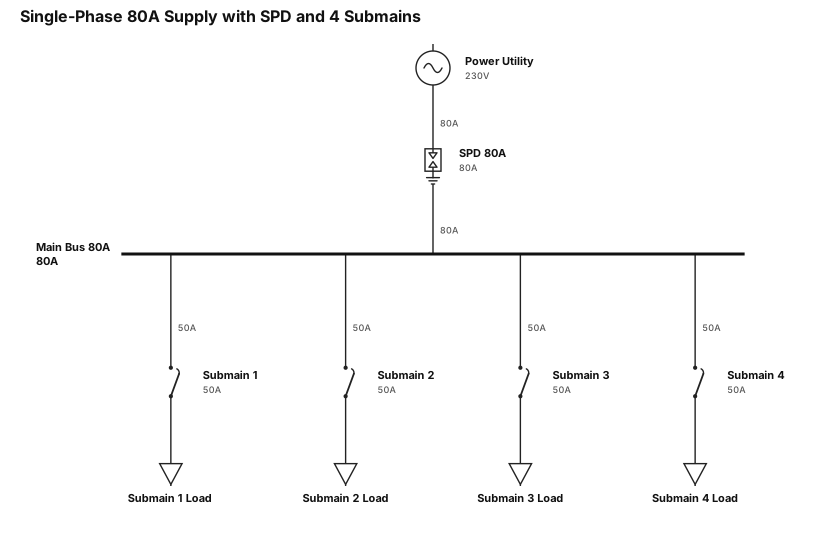
A Single phase supply 80amps from power utility, run through a 80amp SPD, supplying 4 x individual submains at 50amps each
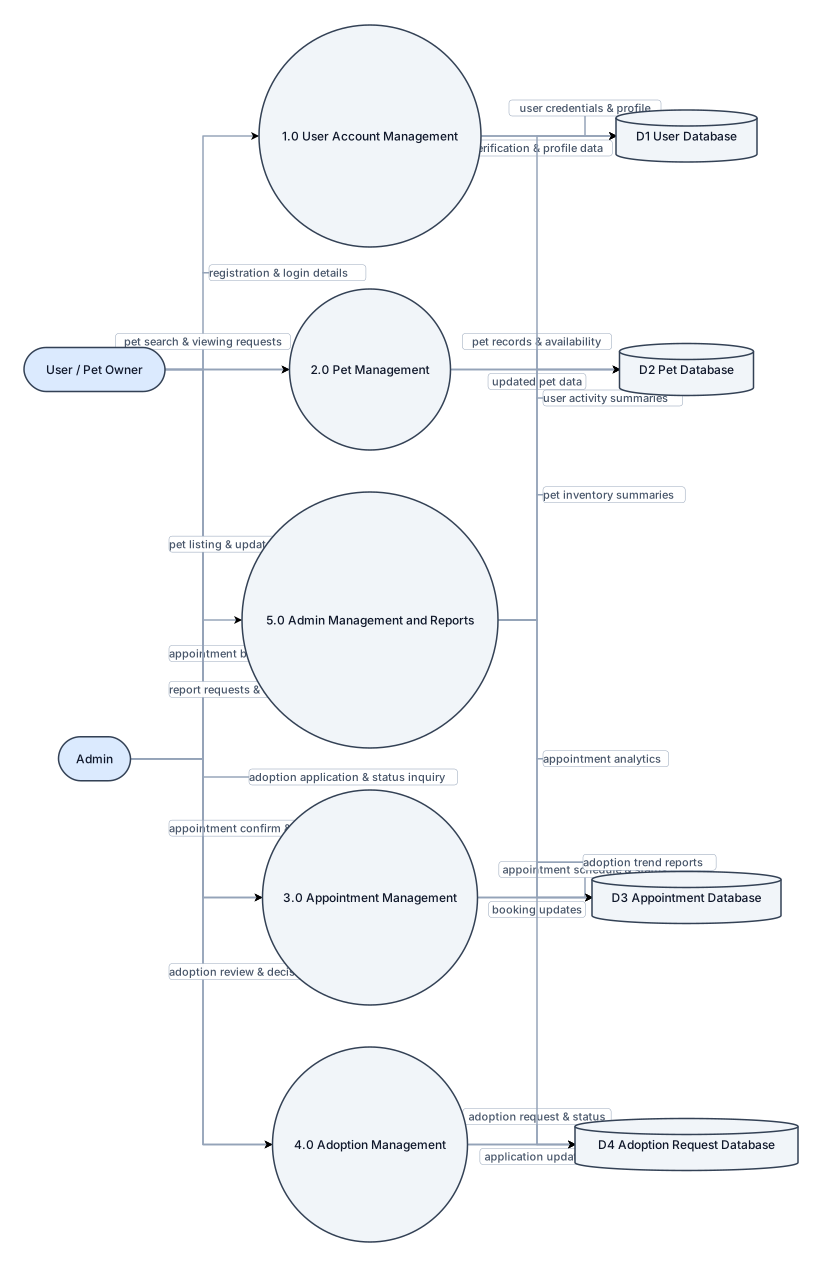
Create a traditional academic Data Flow Diagram Level 1 for PawPoint Pet Appointment and Adoption System. The diagram must have a strict three-column layout: external entities ONLY on the LEFT, processes ONLY in the CENTER, and data stores ONLY on the RIGHT. Do not overlap any shapes. Do not place databases in the center. Do not place processes on the far left or far right. Use clear horizontal data-flow arrows whenever possible and minimize crossing lines. External entities are User/Pet Owner and Admin. Center processes are 1.0 User Account Management, 2.0 Pet Management, 3.0 Appointment Management, 4.0 Adoption Management, and 5.0 Admin Management and Reports. Right-side data stores are D1 User Database, D2 Pet Database, D3 Appointment Database, and D4 Adoption Request Database. Connect User/Pet Owner to User Account Management, Pet Management, Appointment Management, and Adoption Management. Connect Admin to Pet Management, Appointment Management, Adoption Management, and Admin Management and Reports. Connect each process to its appropriate database using clearly labeled data flows. Use standard DFD symbols: rectangles for external entities, rounded circles for processes, and database/data-store symbols for data stores. Make the diagram wide rather than tall. Keep all labels readable. Keep every process, entity, and database fully visible. This must look like a formal college thesis DFD, not a flowchart, UML diagram, or software architecture diagram.
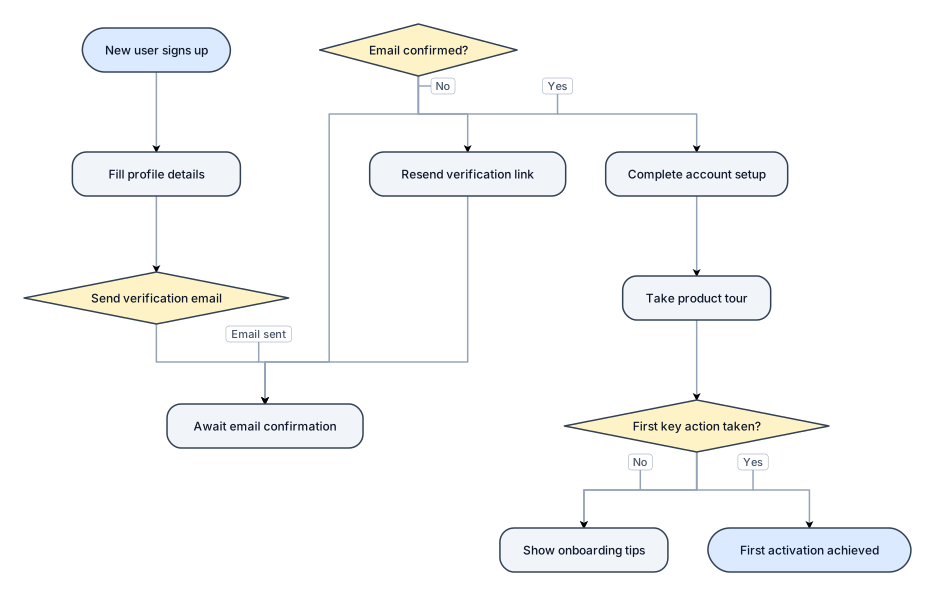
A flowchart of a new-user onboarding flow from signup to first activation, with a verification branch
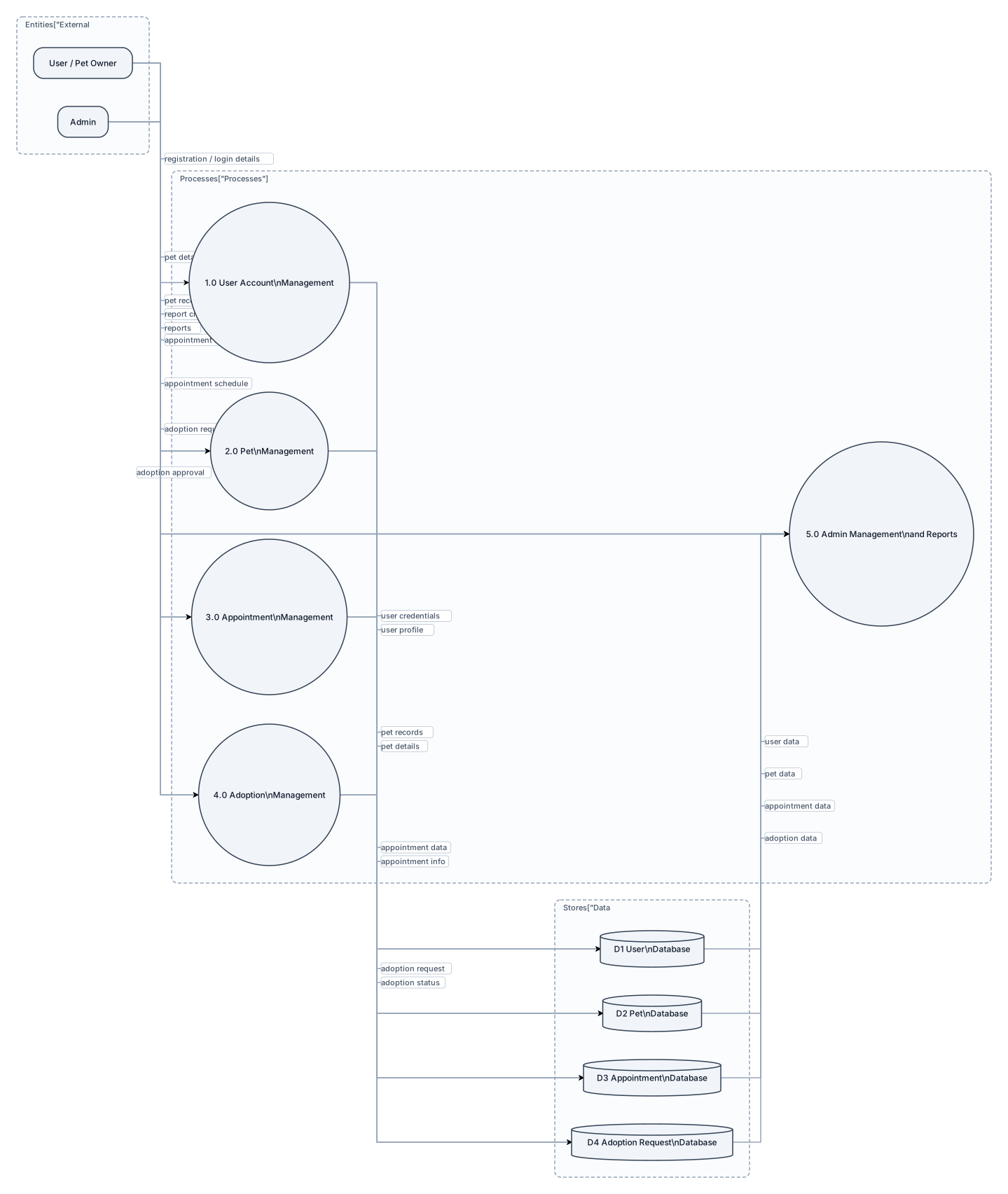
Create a traditional academic Data Flow Diagram Level 1 for PawPoint Pet Appointment and Adoption System. The diagram must have a strict three-column layout: external entities ONLY on the LEFT, processes ONLY in the CENTER, and data stores ONLY on the RIGHT. Do not overlap any shapes. Do not place databases in the center. Do not place processes on the far left or far right. Use clear horizontal data-flow arrows whenever possible and minimize crossing lines. External entities are User/Pet Owner and Admin. Center processes are 1.0 User Account Management, 2.0 Pet Management, 3.0 Appointment Management, 4.0 Adoption Management, and 5.0 Admin Management and Reports. Right-side data stores are D1 User Database, D2 Pet Database, D3 Appointment Database, and D4 Adoption Request Database. Connect User/Pet Owner to User Account Management, Pet Management, Appointment Management, and Adoption Management. Connect Admin to Pet Management, Appointment Management, Adoption Management, and Admin Management and Reports. Connect each process to its appropriate database using clearly labeled data flows. Use standard DFD symbols: rectangles for external entities, rounded circles for processes, and database/data-store symbols for data stores. Make the diagram wide rather than tall. Keep all labels readable. Keep every process, entity, and database fully visible. This must look like a formal college thesis DFD, not a flowchart, UML diagram, or software architecture diagram.
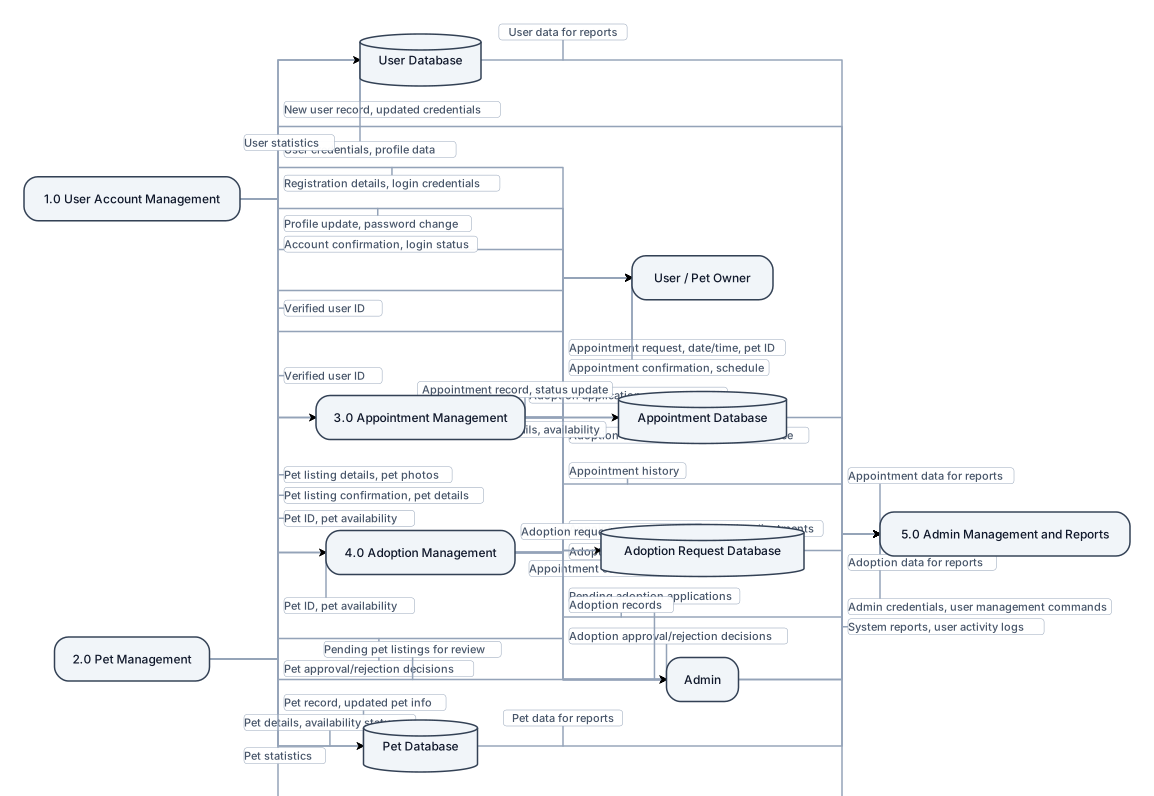
Create a detailed academic-style Level 1 Data Flow Diagram for PawPoint, a web-based Pet Appointment and Adoption System. Place external entities User/Pet Owner and Admin on the left, major system processes in the center, and databases on the right. Use five major processes: 1.0 User Account Management, 2.0 Pet Management, 3.0 Appointment Management, 4.0 Adoption Management, and 5.0 Admin Management and Reports. Place User Database, Pet Database, Appointment Database, and Adoption Request Database on the right. Show many clearly labeled data-flow arrows between the external entities, processes, and databases. Use standard DFD notation with rectangles for external entities, circles for processes, database symbols for data stores, and arrows for data flows. Make it look like a professional college thesis DFD, similar to a traditional detailed system analysis diagram, with an organized left-to-right layout.
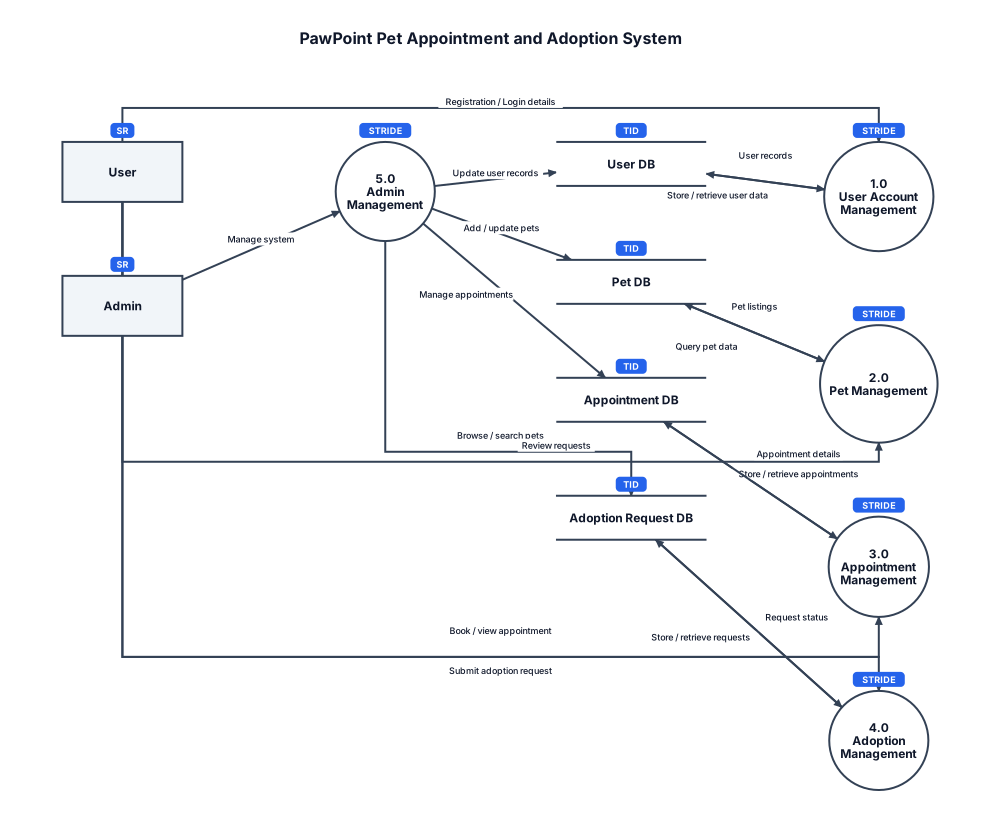
Create a Level 1 Data Flow Diagram for PawPoint, a web-based Pet Appointment and Adoption System, showing User and Admin as external entities, processes for User Account Management, Pet Management, Appointment Management, Adoption Management, and Admin Management, with User, Pet, Appointment, and Adoption Request databases and clearly labeled data flows between them.
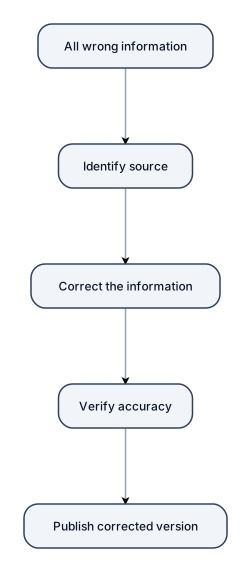
all wrong information
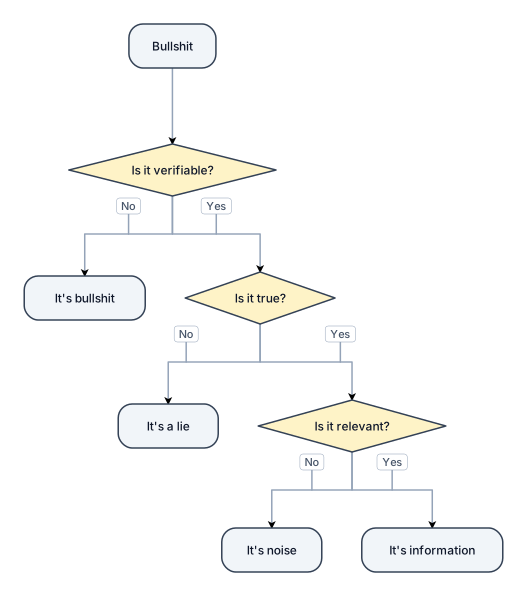
bullshit
"Arduino Pro Micro with SHT31 I2C sensor at 0x44, 16x2 LCD I2C at 0x27, SSR on pin 4, three buttons with pull-ups on pins 5-7, NPN transistor driver for 24V SSR control"
استخدام مصفا بدون اي اسلاك كاهيكل وا ايضا المطاط للحصول علي افضل خدمه وا قناصه
Arduino Pro Micro MCU, SHT31 temperature/humidity sensor on I2C bus (SDA pin A4, SCL pin A5, address 0x44), 16x2 I2C LCD display (address 0x27), solid-state relay on digital pin 4 with NPN transistor driver (2N2222, 1kΩ base resistor, 10kΩ base-GND), three tactile push buttons on pins 5, 6, 7 wired to GND with internal pull-ups, 5V and GND rails shared across I2C bus.
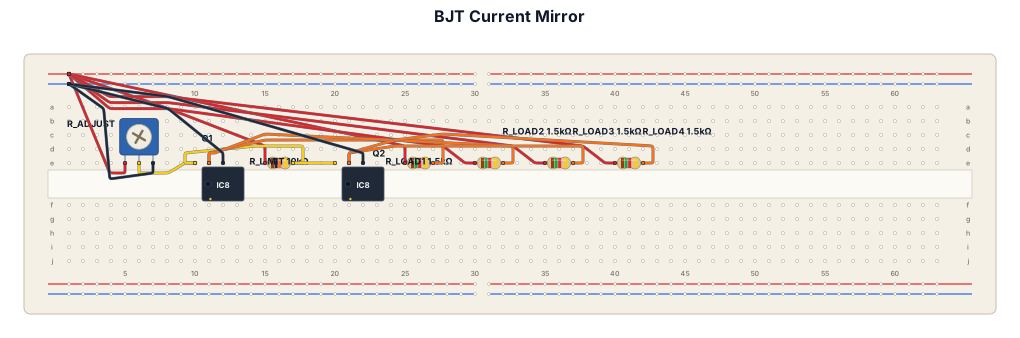
Simple BJT current mirror circuit with two NPN transistors, two 10k resistors, three 1.5k load resistors, one 10k variable resistor, and five test points. Show the components arranged neatly on a simple breadboard. Label Q1, Q2, R_adjust, R_limit, R_load1, R_load2, R_load3, R_load4, TP1, TP2, TP3, TP4, TP5, V+ and GND.
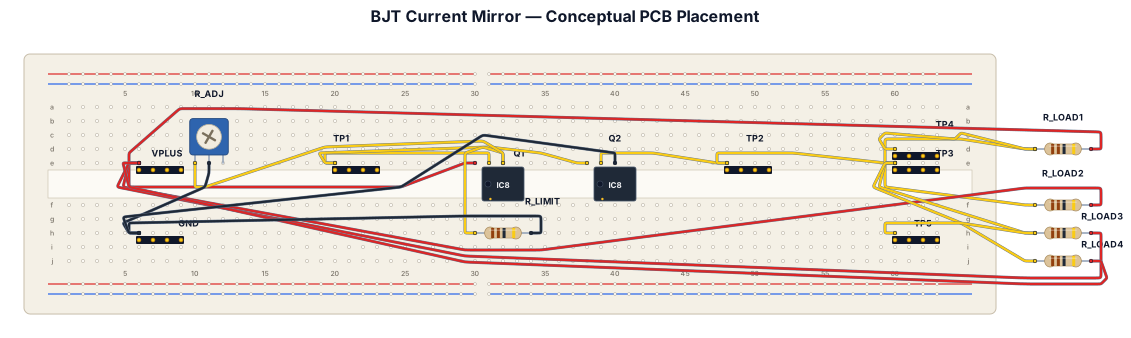
Create a simple academic conceptual PCB placement diagram for a BJT Current Mirror circuit. Use a rectangular PCB outline and show the approximate physical placement of Q1, Q2, R_adjust 10 kΩ variable resistor, R_limit 10 kΩ, R_load1 1.5 kΩ, R_load2 1.5 kΩ, R_load3 1.5 kΩ, R_load4 10 kΩ, TP1, TP2, TP3, TP4, TP5, V+ and GND. Place Q1 and Q2 close together. Place R_adjust near the edge of the PCB for easy adjustment. Arrange the load resistors neatly in sequence and place TP1–TP5 along the measurement path. Make it look like a simple student engineering PCB planning sketch, clean black lines, white background, minimal labels, no decorative elements, no realistic 3D rendering, no unnecessary components. Do not assume transistor model, package, footprint, or PCB dimensions. This is a conceptual PCB placement plan, not a final PCB design.
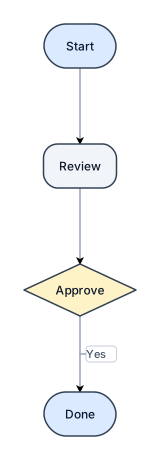
Create a flowchart: Start → Review → Approve → Done. Keep these four labels exactly.
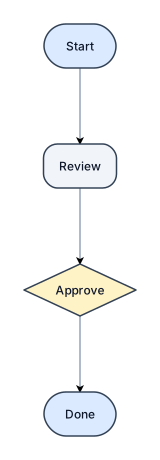
Create a flowchart: Start → Review → Approve → Done. Keep these four labels exactly.
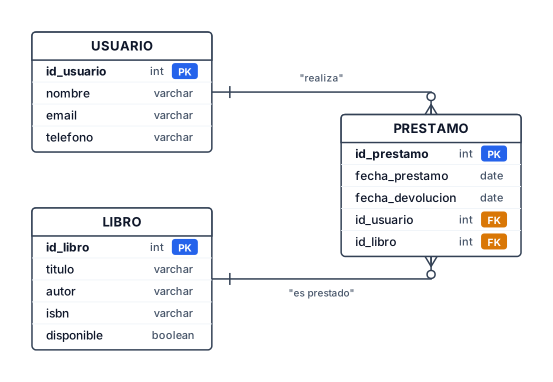
dame un diagrama que sea sobre entidad relacion de MYSQL y que sea de una bibloteca donde tegas que prestar, leer un libro y que sea sencillo