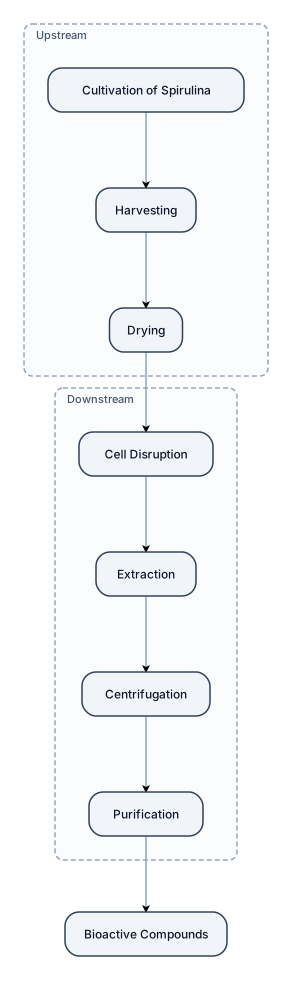
Create a scientific workflow showing the extraction of bioactive compounds from Spirulina: cultivation → harvesting → drying → cell disruption → extraction → centrifugation → purification.
NODE ARCHIVE · REAL DIAGRAM BRIEFS
Diagram Examples from Real Visitor Prompts
Browse eligible diagrams shared by FreeDiagram visitors, inspect the exact prompts, and build your own version.
Browse 3275 real creationsCOMMUNITY OUTPUTS · EXACT PROMPTS
Main diagram studio
Showing 409–432 of 1259. No stock examples or system defaults. Choose a tool, study a real result, then reopen its prompt as your starting point.
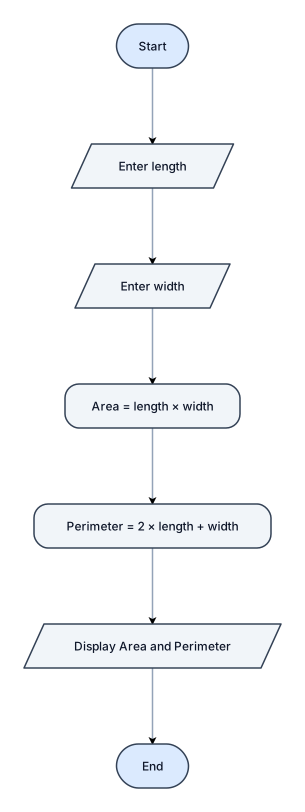
Create a simple and clear flowchart for calculating the area and perimeter of a rectangle. Start with "Start". Then ask the user to enter the rectangle's length. Then ask the user to enter the rectangle's width. Calculate the area using: Area = length × width. Calculate the perimeter using: Perimeter = 2 × (length + width). Display both results: "Area" and "Perimeter". Finish with "End". Use standard flowchart symbols: - Oval for Start and End - Parallelogram for input and output - Rectangle for calculations - Arrows showing the correct order Make the flowchart clean, visual, and easy to understand for a high school student.
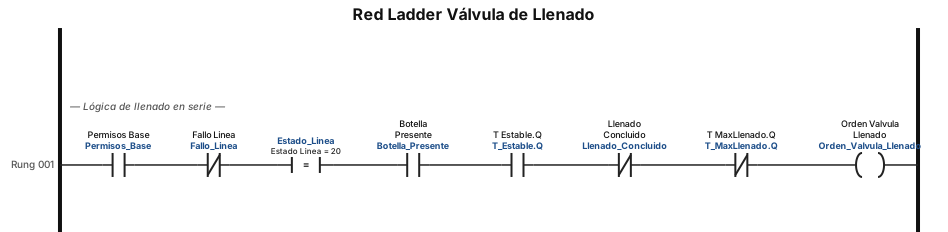
Red Ladder de la Válvula de Llenado Realiza un diagrama Ladder que decodifique la salida de la válvula. Dibuja una línea continua (sin derivaciones en paralelo) que contenga los siguientes elementos conectados en serie de izquierda a derecha: Un contacto normalmente abierto "Permisos_Base". Un contacto normalmente cerrado "Fallo_Linea". Un bloque de comparación o contacto etiquetado "Estado_Linea = 20". Un contacto normalmente abierto "Botella_Presente". Un contacto normalmente abierto "T_Estable.Q". Un contacto normalmente cerrado "Llenado_Concluido". Un contacto normalmente cerrado "T_MaxLlenado.Q". Al final de esta línea en serie, conecta una bobina ordinaria etiquetada "Orden_Valvula_Llenado".
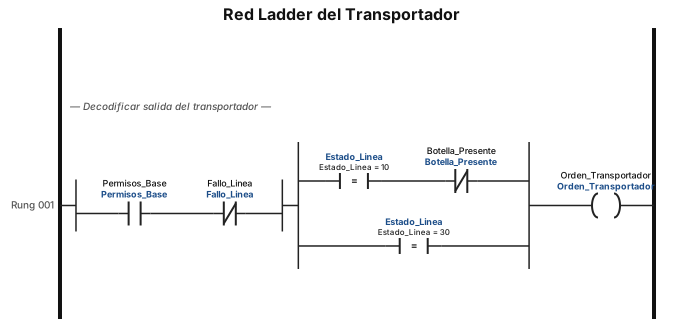
Red Ladder del Transportador Realiza un diagrama Ladder que decodifique la salida del transportador. Comienza la línea principal con dos contactos en serie: primero un contacto normalmente abierto "Permisos_Base", seguido de un contacto normalmente cerrado "Fallo_Linea". Inmediatamente después, abre una derivación con dos ramas paralelas. En la rama superior, coloca un bloque de comparación o contacto etiquetado "Estado_Linea = 10" en serie con un contacto normalmente cerrado "Botella_Presente". En la rama inferior de esta derivación, coloca únicamente un bloque de comparación o contacto etiquetado "Estado_Linea = 30". Ambas ramas deben cerrarse y unirse para conectarse finalmente a una bobina ordinaria etiquetada "Orden_Transportador" al lado derecho.

Business Analysis from start to finish
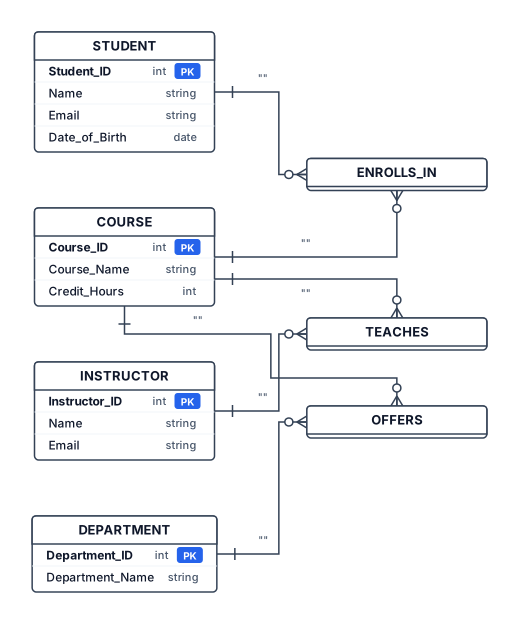
Create a clean, simple academic Entity-Relationship (ER) diagram for a University Course Registration System. Use traditional ER diagram notation: - Rectangles for entities - Diamonds for relationships - Ovals for attributes - Underline primary key attributes - Simple black/white or very light colors - No 3D effects, gradients, illustrations, icons, decorative elements, or modern infographic styling - Make it look like a university student's database presentation diagram. Entities and attributes: STUDENT - Student_ID (primary key) - Name - Email - Date_of_Birth COURSE - Course_ID (primary key) - Course_Name - Credit_Hours INSTRUCTOR - Instructor_ID (primary key) - Name - Email DEPARTMENT - Department_ID (primary key) - Department_Name Relationships: STUDENT — ENROLLS IN — COURSE The ENROLLS IN relationship has these attributes: - Enrollment_Date - Grade - Semester INSTRUCTOR — TEACHES — COURSE DEPARTMENT — OFFERS — COURSE Arrange the diagram neatly and symmetrically so that COURSE is near the center, STUDENT is on the left, INSTRUCTOR is above or right of COURSE, and DEPARTMENT is below or left of COURSE. Keep all text readable and avoid crossing connecting lines. Title at the top: "Complete ER Model — University Course Registration System" The result should look like a genuine academic ER model used in a DBMS class, not an AI-generated infographic.
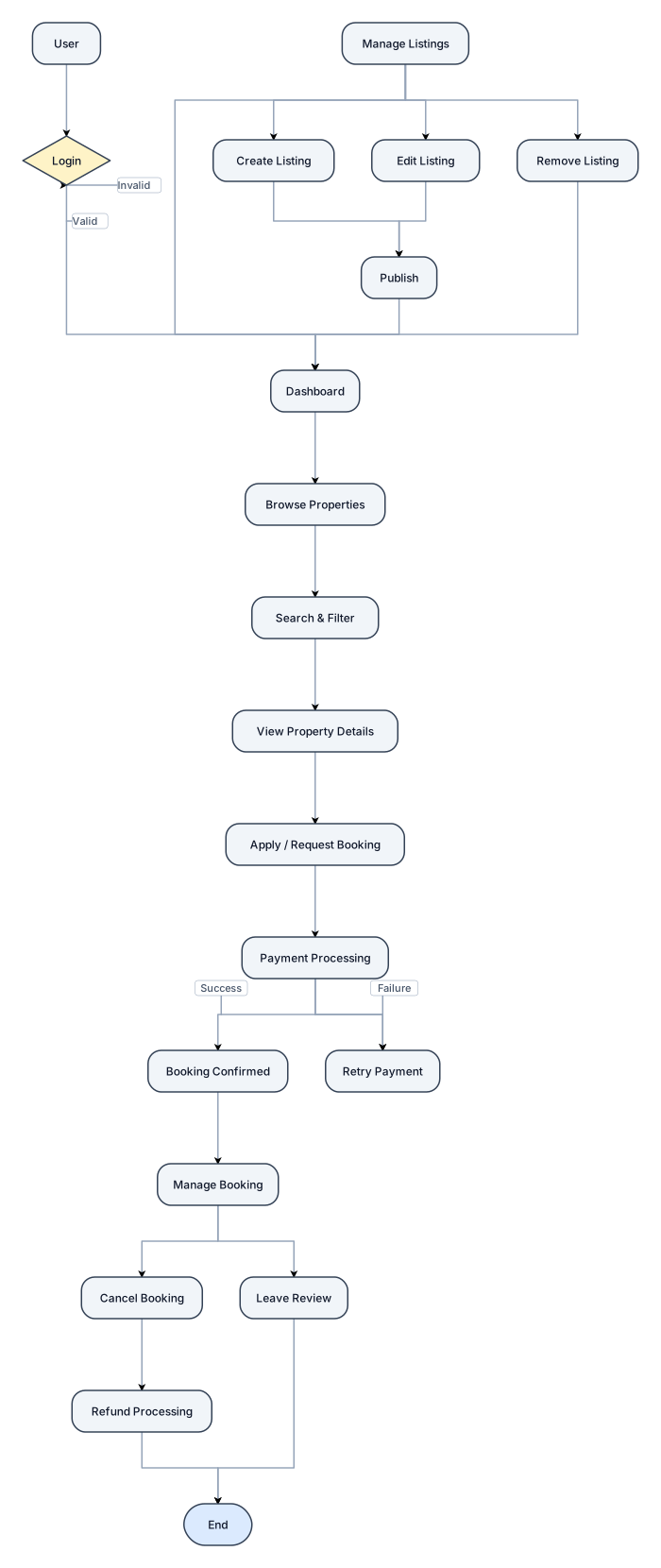
A rental management app workflow complete
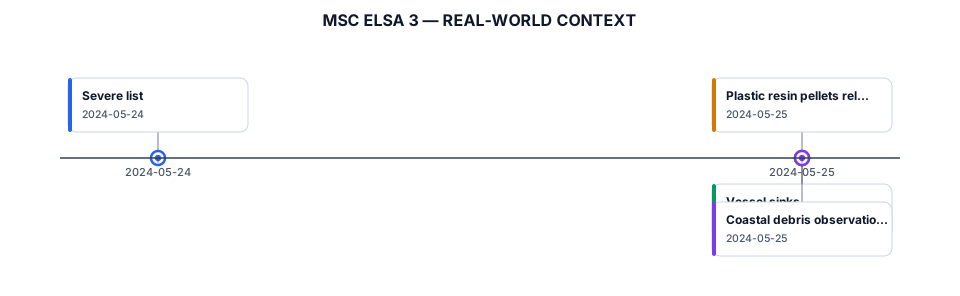
Create a clean vertical timeline for a professional environmental research presentation. Title: MSC ELSA 3 — REAL-WORLD CONTEXT 24 MAY — Severe list 25 MAY — Vessel sinks Plastic resin pellets released Coastal debris observations Style: dark navy and white, minimal, elegant, scientific, thin connecting line, subtle ocean-inspired details, large readable typography, no cartoon icons, no bright colors, no 3D effects.
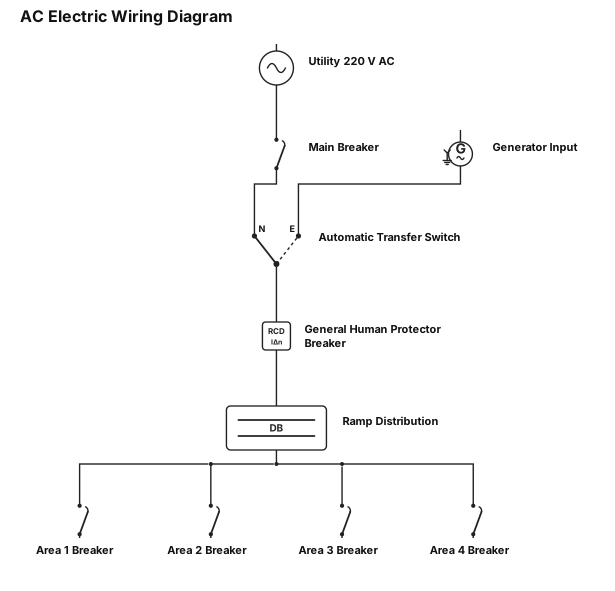
AC electric wiring diagram, imput 220 AC from company -> Main breaker -> Automatic transfer Switch two imputs single output -> general human protector breaker -> ramp with 4 areas brakers ( one per area )
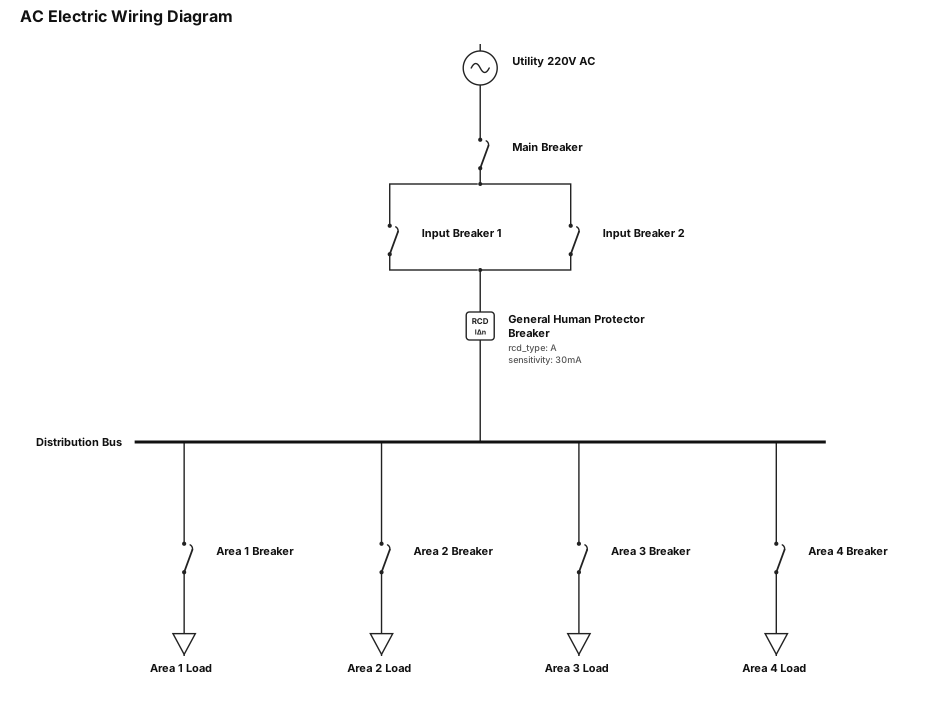
AC electric wiring diagram, imput 220 AC from company -> Main breaker -> two imput breaker with single output -> general human protector breaker -> ramp with 4 areas brakers ( one per area )
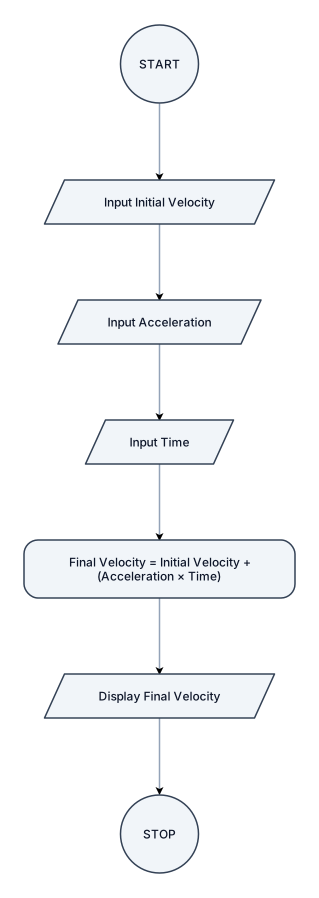
Create a simple standard flowchart for calculating Final Velocity. Start/Stop: Terminator (oval) Inputs: Parallelograms Process: Rectangle Flow: START ↓ Input Initial Velocity ↓ Input Acceleration ↓ Input Time ↓ Final Velocity = Initial Velocity + (Acceleration × Time) ↓ Display Final Velocity ↓ STOP Use standard flowchart shapes and arrows.

Create a professional visual sitemap diagram for a tourism website about Sandanski, Bulgaria. Title at the top: “Карта на сайта – Сандански” Create a clear hierarchical website structure, like a UX/UI sitemap or website architecture diagram. Place a large central box: “НАЧАЛО” Connect it with clean lines to these main sections: 1. “За Сандански” - История - Природа и климат - Култура и традиции - Сандански през сезоните 2. “Забележителности” - Археологически музей - Епископска базилика - Градски парк „Свети Врач“ - Роженски манастир - Мелник - Роженски пирамиди - Попина лъка - Други интересни места 3. “Какво да правим” - Разходки - Туристически маршрути - СПА и минерални извори - Природни маршрути - Културен туризъм - Вино и дегустации 4. “Къде да отседнем” - Хотели - Къщи за гости - Апартаменти - СПА хотели 5. “Къде да хапнем” - Ресторанти - Механи - Кафенета - Местна кухня 6. “Събития” - Предстоящи събития - Фестивали - Концерти - Празници - Архив 7. “Практична информация” - Как да стигнем - Паркиране - Транспорт - Туристически информационен център - Полезни телефони - Карта на района 8. “Галерия” - Снимки - Видео - 360° разходки 9. “Блог” - Туристически маршрути - Идеи за уикенд - Места, които си заслужават - Новини 10. “Контакти” - Форма за контакт - Адрес - Телефон - Социални мрежи Visual style: modern professional UX/UI sitemap, clean infographic, white background, green and blue accents inspired by nature, mountains and mineral springs, rounded rectangular cards, thin connecting lines, clear hierarchy, excellent spacing, minimalistic design, readable typography, symmetrical composition, landscape 16:9. IMPORTANT: Use EXACTLY the Bulgarian text provided above. Do not translate the Bulgarian labels. Do not invent additional sections. Do not use photographs. The result must look like a real website sitemap presentation for a school/university web design project. High resolution, clean vector infographic style.
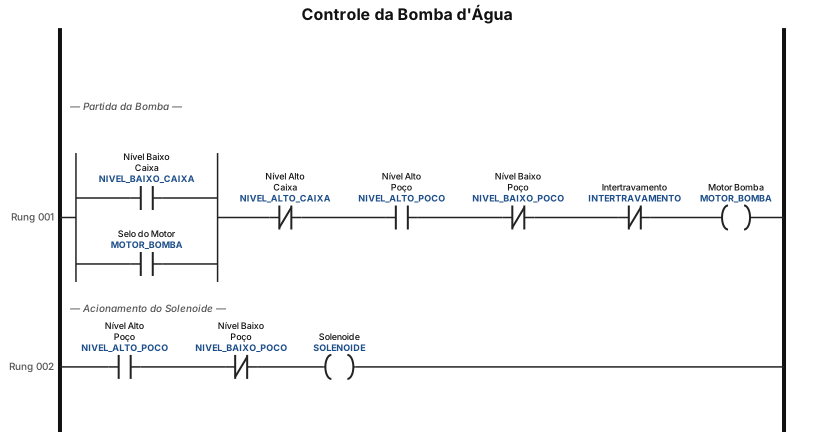
Programa em LADER para funcionamento de uma bomba da agua, liga o motor quando a caixa da agua estiver no nivel baixo, e desliga quando chegar no nivel alto, aciona o selenoide quando o poço estiver no nivel alto e nao pode ligar se o poço estiver com nivel baixo. precisa conter intertravamento e o motor é analogico
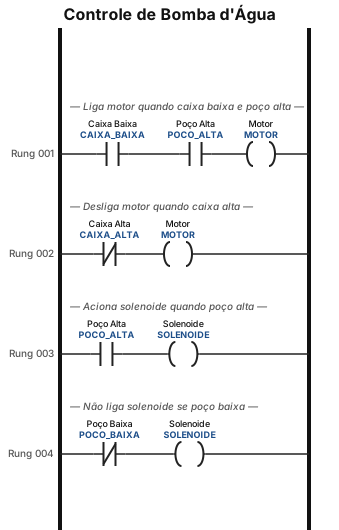
Programa em LADER para funcionamento de uma bomba da agua, liga o motor quando a caixa da agua estiver no nivel baixo, e desliga quando chegar no nivel alto, aciona o selenoide quando o poço estiver no nivel alto e nao pode ligar se o poço estiver com nivel baixo
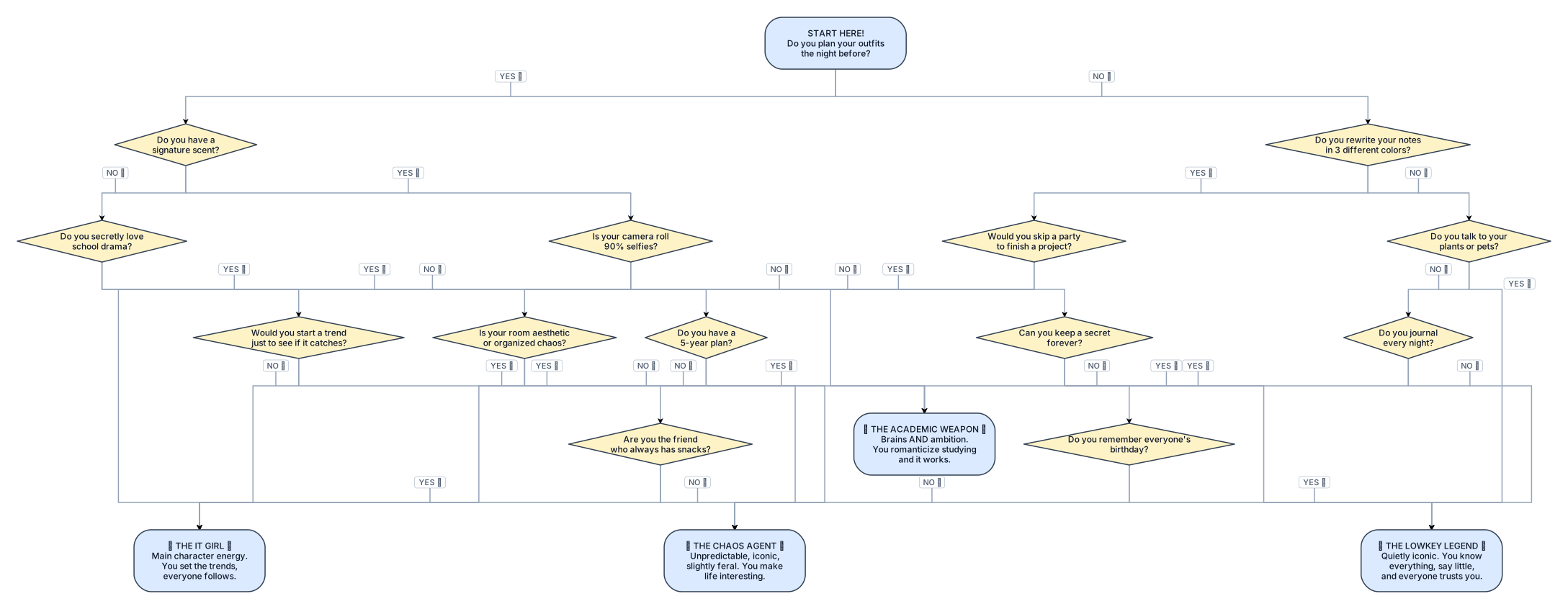
Create a one-page branching personality quiz in the style of a colorful 2000s teen magazine. Title: “What’s Your Star Style?” Use YES/NO questions. Every YES and NO answer must connect to a different next question or to one of 4 final results. Use colorful curved arrows and rounded question boxes. Put the four personality results along the bottom. Make it visually dense and playful, with pink, blue, orange and green paths, bubbly retro typography, stars, hearts and magazine-style decorations. Portrait page layout. personalities are:THE IT GIRL, , THE CHAOS AGENT,, THE ACADEMIC WEAPON, THE LOWKEY LEGEND

Erstelle ein Prozessdiagramm für den Linux-Serverbestellprozess mit folgenden Prozessphasen: Phase 1: Bedarf und Anforderung - Bedarf entsteht - Fachlicher/technischer Zweck wird beschrieben - Anwendung, Umgebung und Terminbedarf werden erfasst Phase 2: Anforderungsanalyse - Technische Anforderungen werden aufgenommen - Betriebssystem, CPU, RAM, Storage und Mountpoints werden definiert - Netzwerksegment, Firewall-Kommunikation und Berechtigungen werden geklärt - Cluster-, Hochverfügbarkeits- und K-Fall-Anforderungen werden geprüft - Herstellerfreigabe und Kompatibilität werden bewertet Phase 3: Finanzierung und Freigabe - Projektkostenstelle, Folgekostenstelle oder Innenauftrag werden geklärt - Projektleitung bzw. Kostenstellenverantwortliche prüfen die Kostenübernahme - Kostenfreigabe wird dokumentiert Phase 4: Bestellung - Vollständige Anfrage wird an das Unix-/Linux-Team übermittelt - Unix-/Linux-Team prüft technische Umsetzbarkeit - Bestellübersicht / Excel mit Spezifikationen und Kosten wird erstellt - Abstimmung mit FI-TS erfolgt - Finale Freigabe durch Projektleitung wird eingeholt - Bestellung wird bei FI-TS ausgelöst Phase 5: Nachverfolgung und Übergabe - Bestell- oder Ticketreferenz wird dokumentiert - SLA-Frist von 25 Bankarbeitstagen wird berücksichtigt - Status wird aktiv nachverfolgt - Offene Punkte werden geklärt - Übergabe an den Serverbereitstellungsprozess erfolgt Bitte stelle das Diagramm als Swimlane-Diagramm mit den Rollen Anforderer, Projektleitung/Kostenstelle, Unix-/Linux-Team, FI-TS und Serverbereitstellung dar. Verwende Entscheidungspunkte für Vollständigkeit der Anforderungen, Herstellerfreigabe, Kostenfreigabe und finale Freigabe.
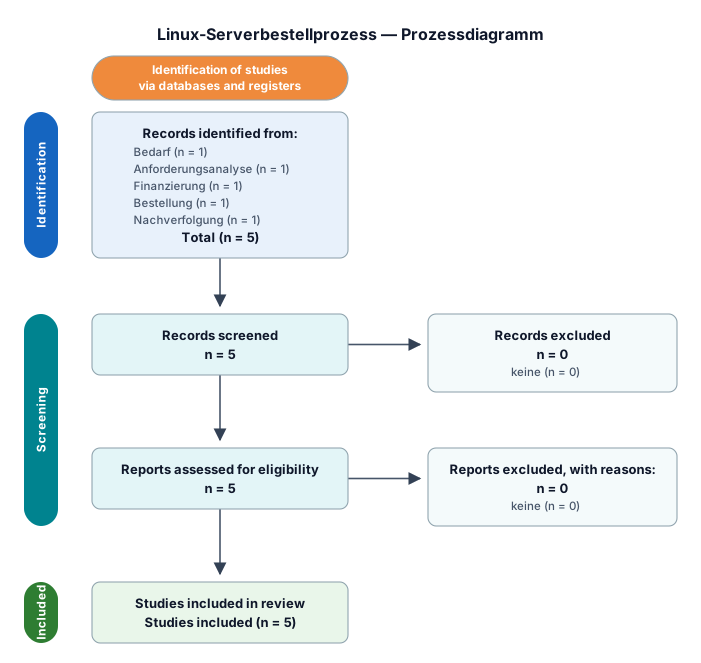
Erstelle ein Prozessdiagramm für den Linux-Serverbestellprozess mit folgenden Prozessphasen: Phase 1: Bedarf und Anforderung - Bedarf entsteht - Fachlicher/technischer Zweck wird beschrieben - Anwendung, Umgebung und Terminbedarf werden erfasst Phase 2: Anforderungsanalyse - Technische Anforderungen werden aufgenommen - Betriebssystem, CPU, RAM, Storage und Mountpoints werden definiert - Netzwerksegment, Firewall-Kommunikation und Berechtigungen werden geklärt - Cluster-, Hochverfügbarkeits- und K-Fall-Anforderungen werden geprüft - Herstellerfreigabe und Kompatibilität werden bewertet Phase 3: Finanzierung und Freigabe - Projektkostenstelle, Folgekostenstelle oder Innenauftrag werden geklärt - Projektleitung bzw. Kostenstellenverantwortliche prüfen die Kostenübernahme - Kostenfreigabe wird dokumentiert Phase 4: Bestellung - Vollständige Anfrage wird an das Unix-/Linux-Team übermittelt - Unix-/Linux-Team prüft technische Umsetzbarkeit - Bestellübersicht / Excel mit Spezifikationen und Kosten wird erstellt - Abstimmung mit FI-TS erfolgt - Finale Freigabe durch Projektleitung wird eingeholt - Bestellung wird bei FI-TS ausgelöst Phase 5: Nachverfolgung und Übergabe - Bestell- oder Ticketreferenz wird dokumentiert - SLA-Frist von 25 Bankarbeitstagen wird berücksichtigt - Status wird aktiv nachverfolgt - Offene Punkte werden geklärt - Übergabe an den Serverbereitstellungsprozess erfolgt Bitte stelle das Diagramm als Swimlane-Diagramm mit den Rollen Anforderer, Projektleitung/Kostenstelle, Unix-/Linux-Team, FI-TS und Serverbereitstellung dar. Verwende Entscheidungspunkte für Vollständigkeit der Anforderungen, Herstellerfreigabe, Kostenfreigabe und finale Freigabe.
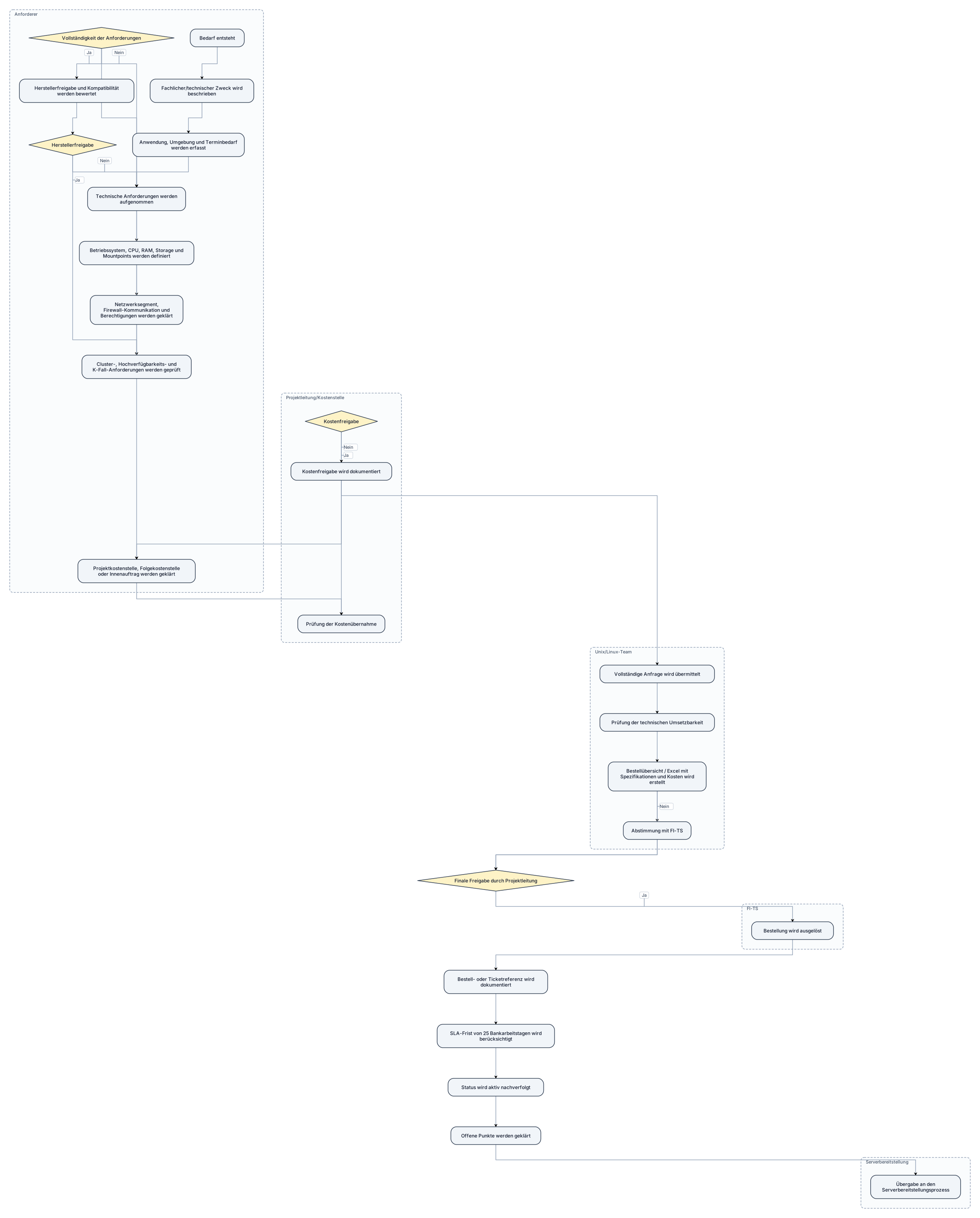
gib mir dafür den Mermaid Code aber erstelle das Diagramm nicht: ein Prozessdiagramm für den Linux-Serverbestellprozess mit folgenden Prozessphasen: Phase 1: Bedarf und Anforderung - Bedarf entsteht - Fachlicher/technischer Zweck wird beschrieben - Anwendung, Umgebung und Terminbedarf werden erfasst Phase 2: Anforderungsanalyse - Technische Anforderungen werden aufgenommen - Betriebssystem, CPU, RAM, Storage und Mountpoints werden definiert - Netzwerksegment, Firewall-Kommunikation und Berechtigungen werden geklärt - Cluster-, Hochverfügbarkeits- und K-Fall-Anforderungen werden geprüft - Herstellerfreigabe und Kompatibilität werden bewertet Phase 3: Finanzierung und Freigabe - Projektkostenstelle, Folgekostenstelle oder Innenauftrag werden geklärt - Projektleitung bzw. Kostenstellenverantwortliche prüfen die Kostenübernahme - Kostenfreigabe wird dokumentiert Phase 4: Bestellung - Vollständige Anfrage wird an das Unix-/Linux-Team übermittelt - Unix-/Linux-Team prüft technische Umsetzbarkeit - Bestellübersicht / Excel mit Spezifikationen und Kosten wird erstellt - Abstimmung mit FI-TS erfolgt - Finale Freigabe durch Projektleitung wird eingeholt - Bestellung wird bei FI-TS ausgelöst Phase 5: Nachverfolgung und Übergabe - Bestell- oder Ticketreferenz wird dokumentiert - SLA-Frist von 25 Bankarbeitstagen wird berücksichtigt - Status wird aktiv nachverfolgt - Offene Punkte werden geklärt - Übergabe an den Serverbereitstellungsprozess erfolgt Bitte stelle das Diagramm als Swimlane-Diagramm mit den Rollen Anforderer, Projektleitung/Kostenstelle, Unix-/Linux-Team, FI-TS und Serverbereitstellung dar. Verwende Entscheidungspunkte für Vollständigkeit der Anforderungen, Herstellerfreigabe, Kostenfreigabe und finale Freigabe.
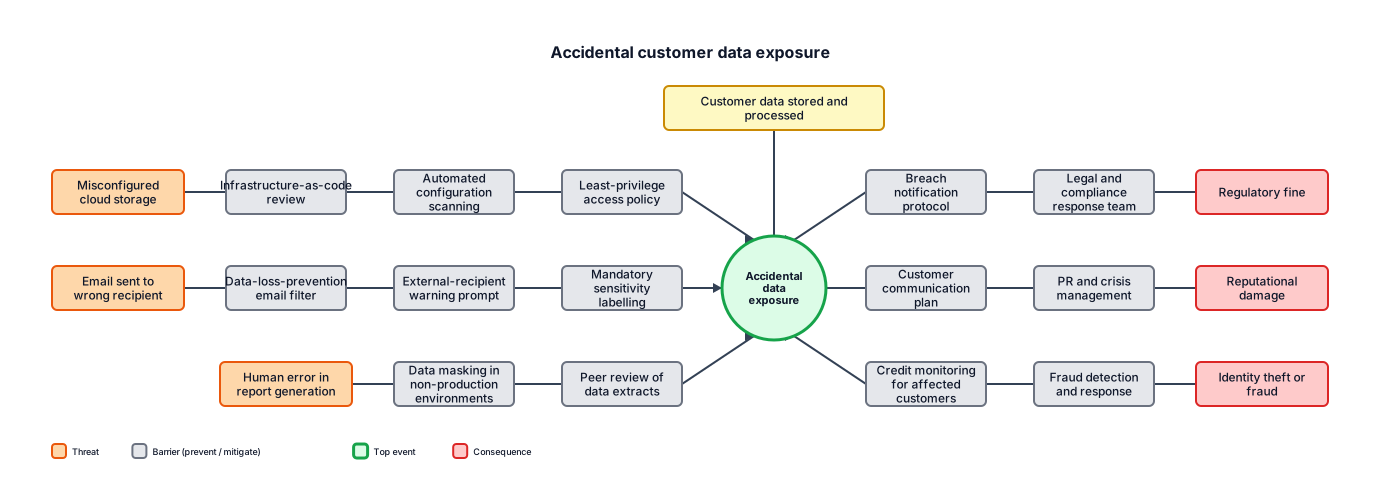
A bowtie analysis for accidental customer data exposure, including preventive controls, consequences, and recovery controls
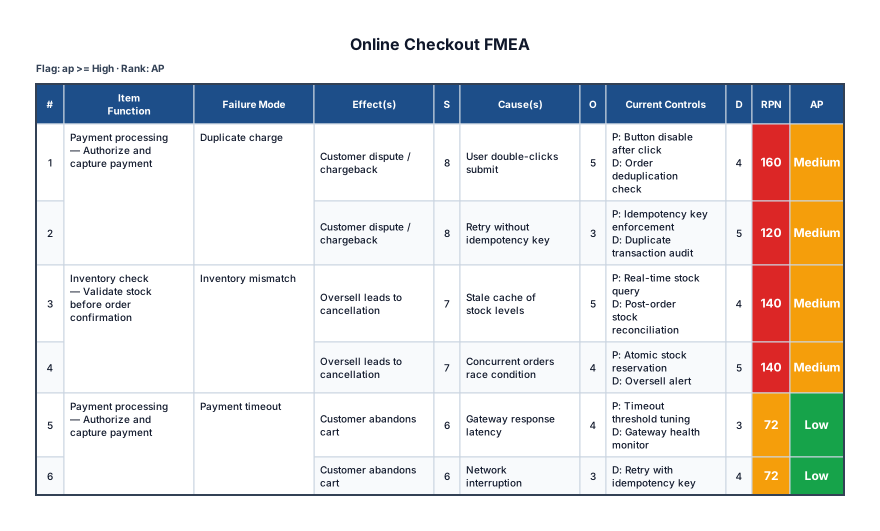
An FMEA for an online checkout covering payment timeout, inventory mismatch, duplicate charge, severity, occurrence, and detection
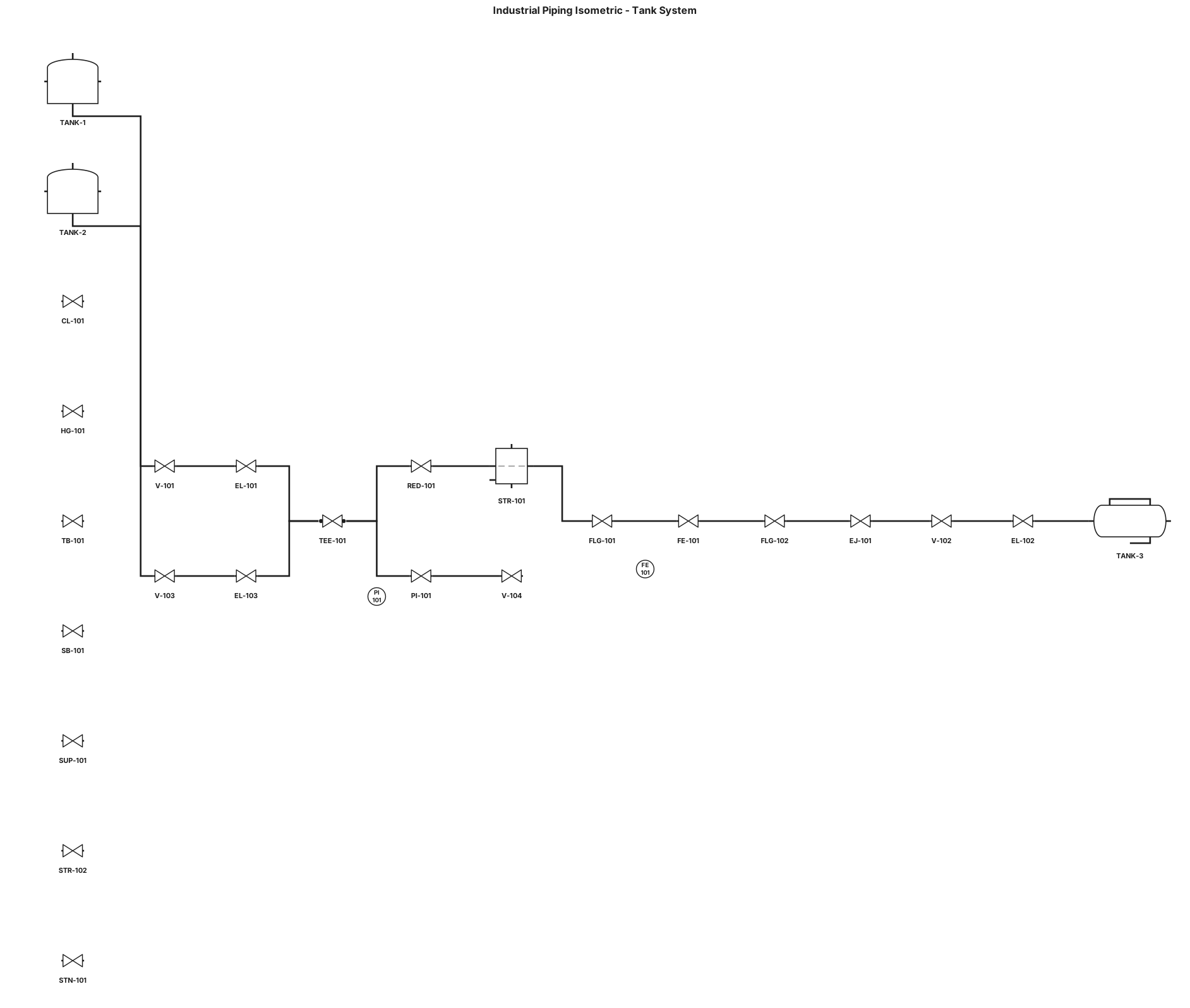
Create a detailed industrial piping isometric diagram showing a piping system connecting three main tanks. TANK-1: vertical tank located at the lower left. TANK-2: vertical tank located at the upper left. TANK-3: horizontal tank located at the lower right. Connect the tanks with clearly labeled industrial pipes. Main piping components: - Manual VALVE - ELBOW for changing pipe direction - TEE for splitting the flow - REDUCER for reducing pipe diameter - STRAINER for filtering the fluid - FLANGE connections - FLOW METER installed between two ORIFICE FLANGES - EXPANSION JOINT - Additional VALVE before TANK-3 Instrumentation: - PRESSURE GAUGE connected to the upper pipe section - FLOW METER installed in the main pipeline Pipe routing: TANK-1 → VALVE → ELBOW → TEE → REDUCER → STRAINER → FLANGE → FLOW METER → FLANGE → EXPANSION JOINT → VALVE → ELBOW → TANK-3. TANK-2 should connect through a pipe with a VALVE and ELBOW into the main TEE. The upper branch from the TEE should contain a PRESSURE GAUGE and a VALVE. Add realistic piping supports and hangers: - CLAMP attached to the pipe - HANGER supporting the pipe from above - TURN-BUCKLE connected to the hanger - SPRING BOX supporting the pipe and absorbing vertical movement - SUPPORT underneath the pipe - STRUT as an angled wall support - STANCHION as a vertical ground support near the pipe leading to TANK-3 Make the diagram look like a professional industrial engineering ISOMETRIC PIPING DIAGRAM used in an oil and gas plant. Use clear engineering labels for every component. Show pipe direction with arrows. Use realistic industrial piping symbols. Keep the diagram clean, organized, and easy to understand. Do not omit any component.
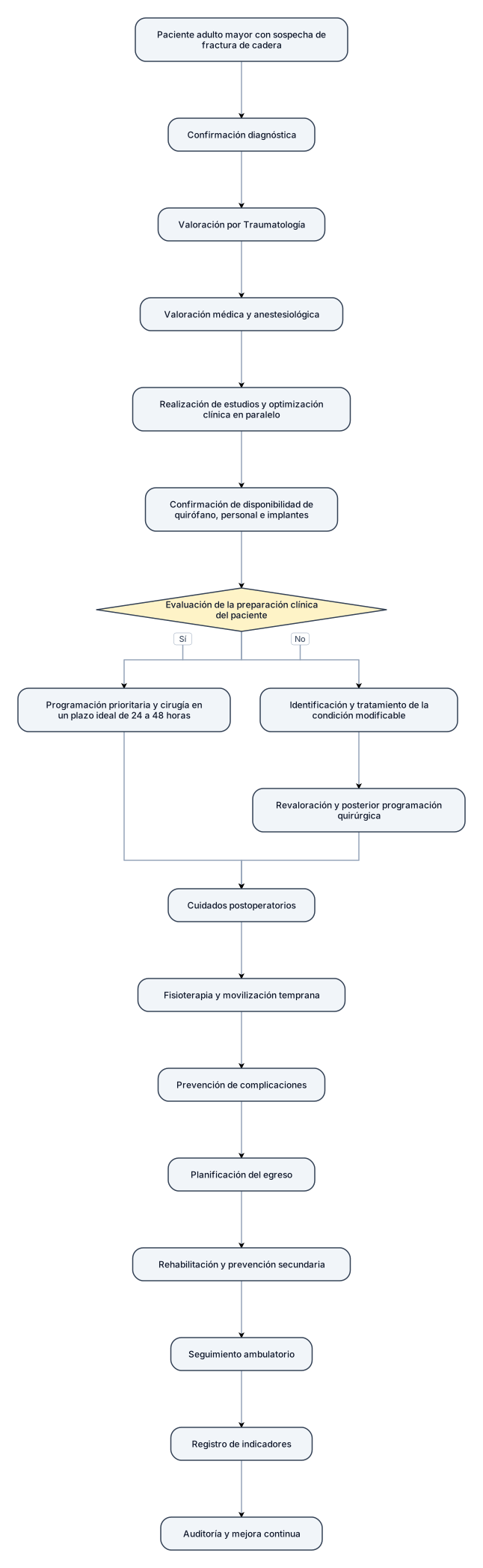
puedes hacer el siguiente flujograma con las flechas mas pequeñas, de manera que quepa en una hoja tamaño cara: Paciente adulto mayor con sospecha de fractura de cadera. Confirmación diagnóstica. Valoración por Traumatología. Valoración médica y anestesiológica. Realización de estudios y optimización clínica en paralelo. Confirmación de disponibilidad de quirófano, personal e implantes. Evaluación de la preparación clínica del paciente: Sí: programación prioritaria y cirugía en un plazo ideal de 24 a 48 horas. No: identificación y tratamiento de la condición modificable, revaloración y posterior programación quirúrgica. Cuidados postoperatorios. Fisioterapia y movilización temprana. Prevención de complicaciones. Planificación del egreso. Rehabilitación y prevención secundaria. Seguimiento ambulatorio. Registro de indicadores. Auditoría y mejora continua. La cirugía dentro de las primeras 24–48 horas debe realizarse siempre que el estado clínico del paciente lo permita y de acuerdo con la valoración del equipo tratante.
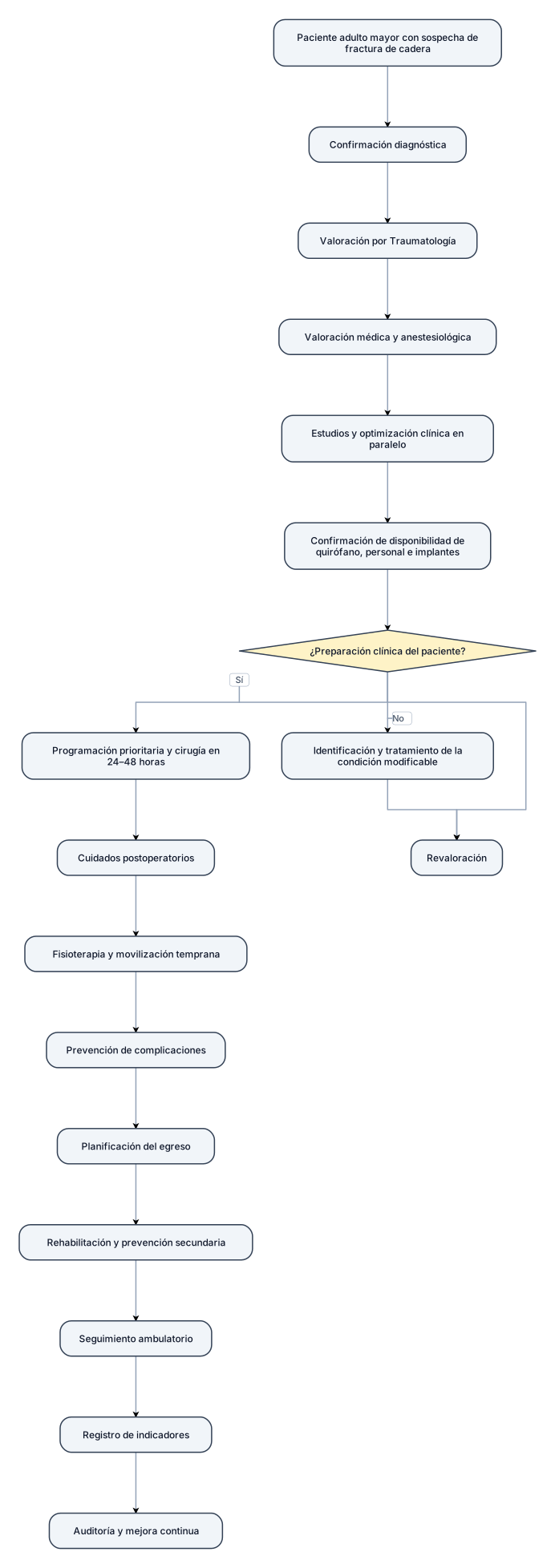
Secuencia resumida Paciente adulto mayor con sospecha de fractura de cadera. Confirmación diagnóstica. Valoración por Traumatología. Valoración médica y anestesiológica. Realización de estudios y optimización clínica en paralelo. Confirmación de disponibilidad de quirófano, personal e implantes. Evaluación de la preparación clínica del paciente: Sí: programación prioritaria y cirugía en un plazo ideal de 24 a 48 horas. No: identificación y tratamiento de la condición modificable, revaloración y posterior programación quirúrgica. Cuidados postoperatorios. Fisioterapia y movilización temprana. Prevención de complicaciones. Planificación del egreso. Rehabilitación y prevención secundaria. Seguimiento ambulatorio. Registro de indicadores. Auditoría y mejora continua. La cirugía dentro de las primeras 24–48 horas debe realizarse siempre que el estado clínico del paciente lo permita y de acuerdo con la valoración del equipo tratante.
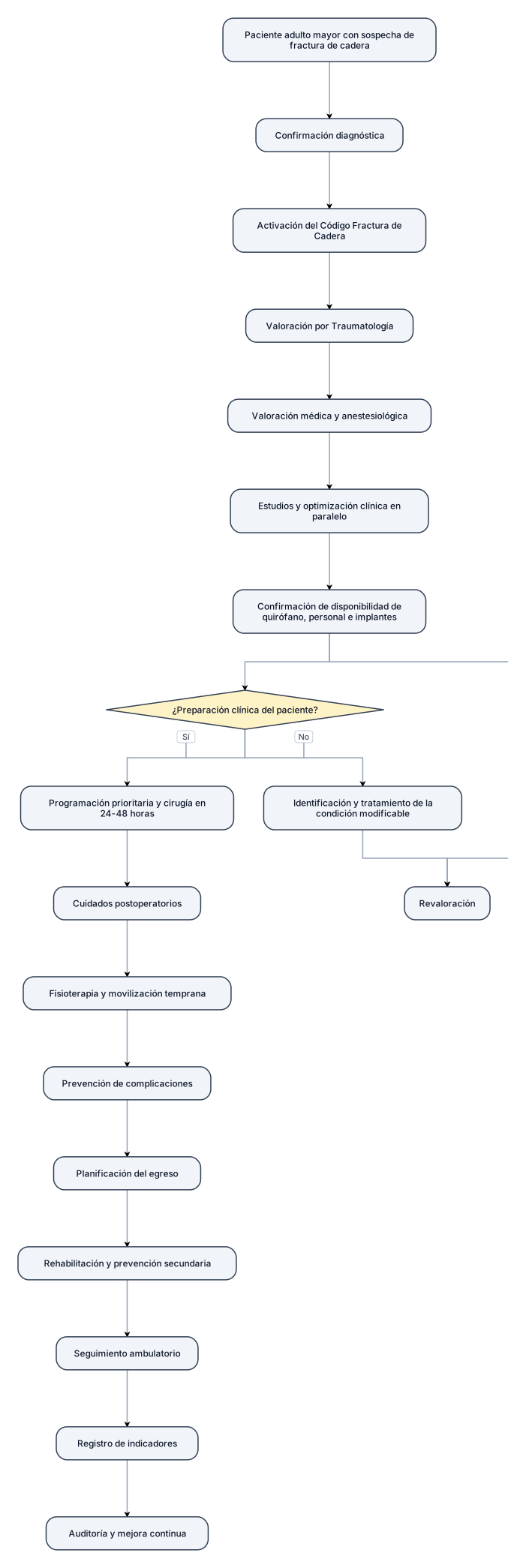
Secuencia resumida Paciente adulto mayor con sospecha de fractura de cadera. Confirmación diagnóstica. Activación del Código Fractura de Cadera. Valoración por Traumatología. Valoración médica y anestesiológica. Realización de estudios y optimización clínica en paralelo. Confirmación de disponibilidad de quirófano, personal e implantes. Evaluación de la preparación clínica del paciente: Sí: programación prioritaria y cirugía en un plazo ideal de 24 a 48 horas. No: identificación y tratamiento de la condición modificable, revaloración y posterior programación quirúrgica. Cuidados postoperatorios. Fisioterapia y movilización temprana. Prevención de complicaciones. Planificación del egreso. Rehabilitación y prevención secundaria. Seguimiento ambulatorio. Registro de indicadores. Auditoría y mejora continua. La cirugía dentro de las primeras 24–48 horas debe realizarse siempre que el estado clínico del paciente lo permita y de acuerdo con la valoración del equipo tratante.