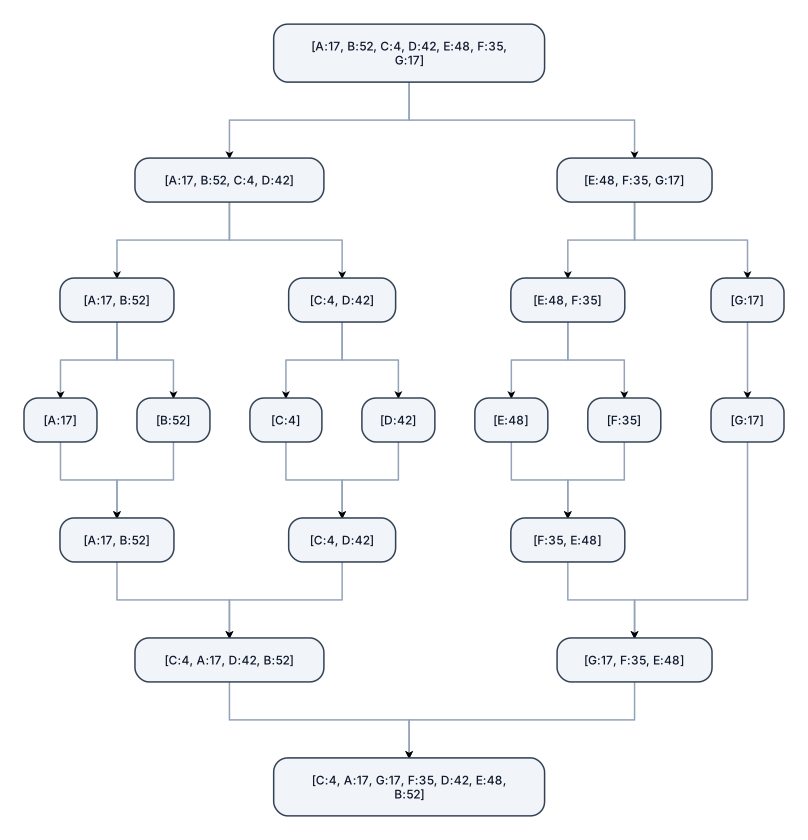
Create a merge sort tree for this list of receptors: A: 17 B: 52 C: 4 D: 42 E: 48 F: 35 G: 17 The tree must show the complete merge sort process. Start with: [A:17, B:52, C:4, D:42, E:48, F:35, G:17] Show the complete split phase first. Divide the list into two smaller lists, then continue dividing each list until every receptor is a separate element. After the split phase, show the complete merge phase. Merge the single elements back together in sorted order. Every merge must clearly show both input sublists and the resulting sorted sublist. Keep the receptor letters attached to their values at every step. The split should be: [A:17, B:52, C:4, D:42, E:48, F:35, G:17] → [A:17, B:52, C:4, D:42] and [E:48, F:35, G:17] → [A:17, B:52] and [C:4, D:42] and [E:48, F:35] and [G:17] → [A:17] [B:52] [C:4] [D:42] [E:48] [F:35] [G:17] Then show every merge: [A:17] + [B:52] → [A:17, B:52] [C:4] + [D:42] → [C:4, D:42] [E:48] + [F:35] → [F:35, E:48] [A:17, B:52] + [C:4, D:42] → [C:4, A:17, D:42, B:52] [F:35, E:48] + [G:17] → [G:17, F:35, E:48] Finally: [C:4, A:17, D:42, B:52] + [G:17, F:35, E:48] → [C:4, A:17, G:17, F:35, D:42, E:48, B:52] The final sorted order must be: C:4, A:17, G:17, F:35, D:42, E:48, B:52 Use a clear top-to-bottom tree layout. Do not skip any split or merge step. Make all text readable. This is for a university assignment, so keep the diagram clean and academic. Do not add unrelated information.
Diagram Examples from Real Visitor Prompts
Browse eligible diagrams shared by FreeDiagram visitors, inspect the exact prompts, and build your own version.
Browse 3276 real creationsMain diagram studio
Showing 457–480 of 1260. No stock examples or system defaults. Choose a tool, study a real result, then reopen its prompt as your starting point.
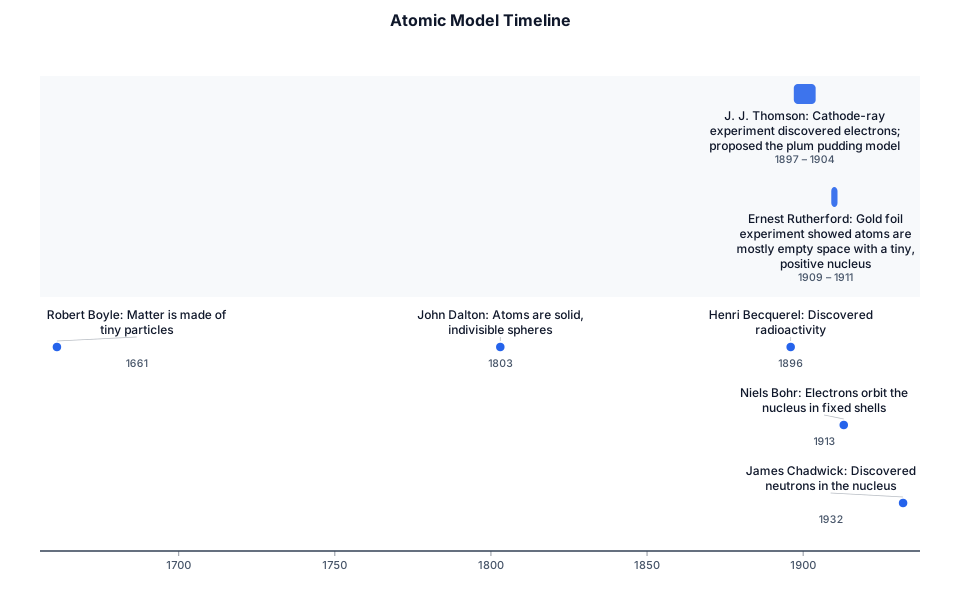
How learning Due date 22 September 2026 Construct a timeline showing the developing ideas of the atom using the scientist shown below. Include the experiments done by J. J Thomson and Ernest Rutherford. Atomic Model Timeline ● 1661 – Robert Boyle: Matter is made of tiny particles. ● 1803 – John Dalton: Atoms are solid, indivisible spheres. ● 1896 – Henri Becquerel: Discovered radioactivity. ● 1897–1904 – J. J. Thomson: Cathode-ray experiment discovered electrons; proposed the plum pudding model. ● 1909–1911 – Ernest Rutherford: Gold foil experiment showed atoms are mostly empty space with a tiny, positive nucleus. ● 1913 – Niels Bohr: Electrons orbit the nucleus in fixed shells. ● 1932 – James Chadwick: Discovered neutrons in the nucleus. What is a timeline? A timeline is a way to show events in the order they happened. You can draw it as a line (horizontal or vertical) and put dates, names, and events along it so it’s easy to see the sequence. What each scientist thought the atom looked like ● Robert Boyle (1661): Matter is made of tiny particles. ● John Dalton (1803): A solid, indivisible sphere. ● Henri Becquerel (1896): No atomic model; discovered radioactivity. ● J. J. Thomson (1904): Positive sphere with negative electrons embedded inside (plum pudding). ● Ernest Rutherford (1911): Tiny, positive nucleus surrounded by mostly empty space. ● Niels Bohr (1913): Nucleus with electrons in fixed shells. ● James Chadwick (1932): Nucleus containing protons and neutrons, with electrons in shells around it.
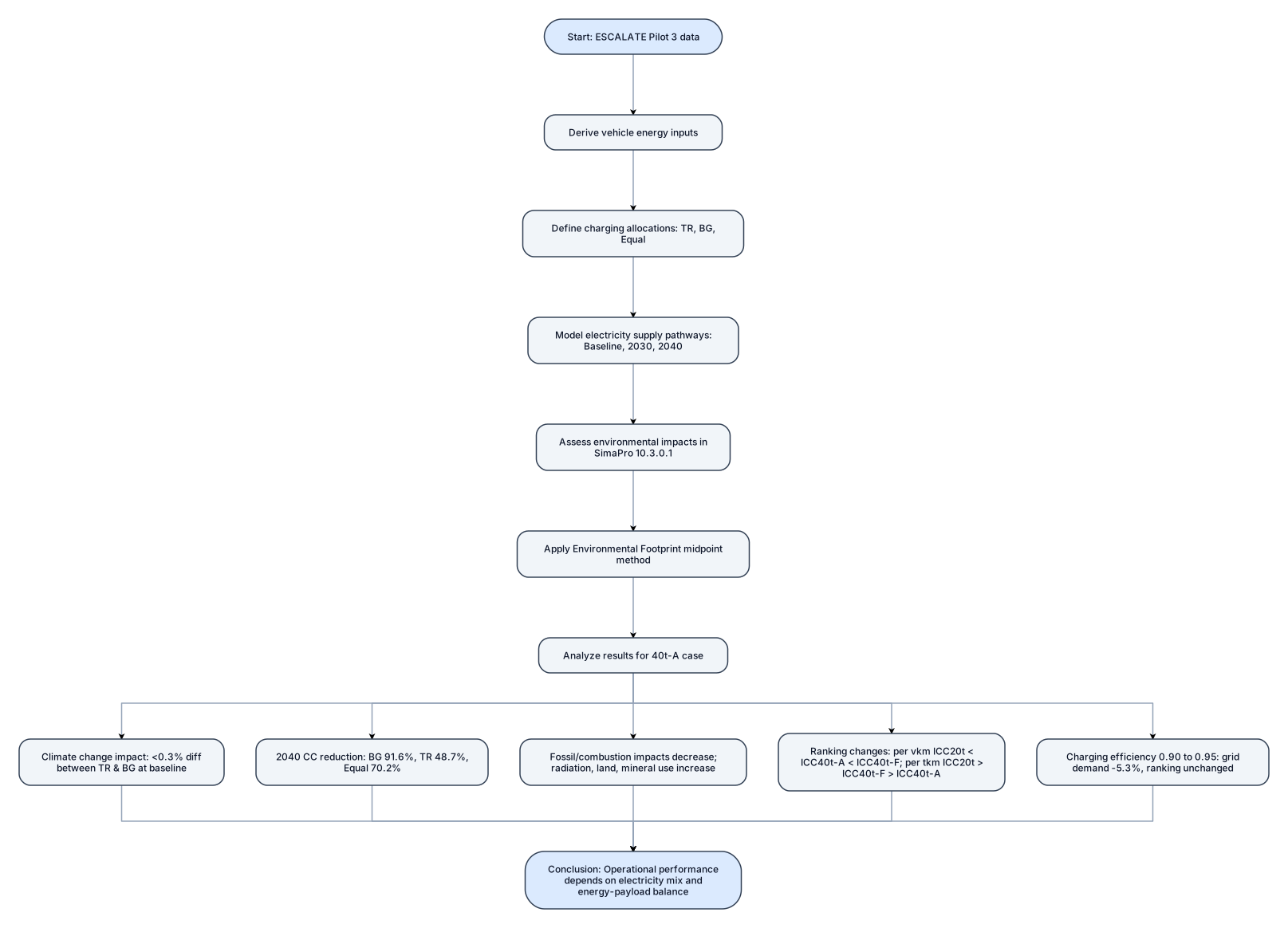
Abstract This study provides an operational environmental performance assessment of battery electric long haul freight transport in a cross border Türkiye-Bulgaria context, using the Istanbul-Sofia corridor as a case study. The analysis considered vehicle operating conditions, charging allocations, baseline and projected electricity supply pathways for 2030 and 2040, and charging efficiency assumptions. Vehicle energy inputs were derived from ESCALATE Pilot 3 data, and environmental impacts were assessed in SimaPro 10.3.0.1 using the Environmental Footprint midpoint method. For the 40t-A case, baseline climate change impacts differed by less than 0.3% between the Türkiye and Bulgaria charging allocations. By 2040, climate change impacts decreased by 91.6% for BG, 48.7% for TR, and 70.2% for Equal TR-BG relative to baseline. Fossil and combustion related impacts generally decreased, while ionising radiation, land use, and mineral and metal resource use became more prominent in selected 2040 pathways. The functional basis changed the comparative climate change ranking from ICC, 20t < ICC, 40t-A < ICC, 40t-F on a vehicle kilometre basis to ICC, 20t > ICC, 40t-F > ICC, 40t-A on a tonne kilometre basis. Increasing charging efficiency from 0.90 to 0.95 reduced grid side electricity demand by 5.3% without changing the ranking. The results show that operational performance depends strongly on electricity supply composition and the balance between energy demand and payload capacity.
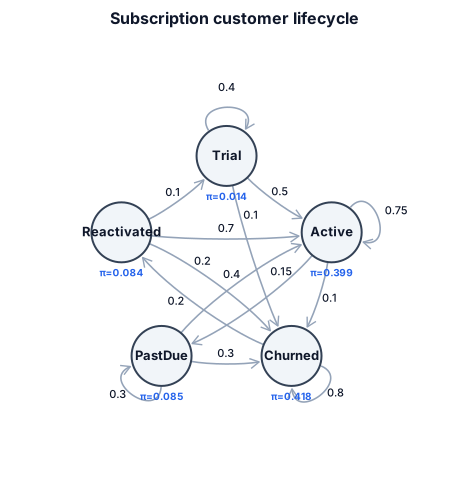
A Markov chain for subscription customers moving between trial, active, past due, churned, and reactivated states
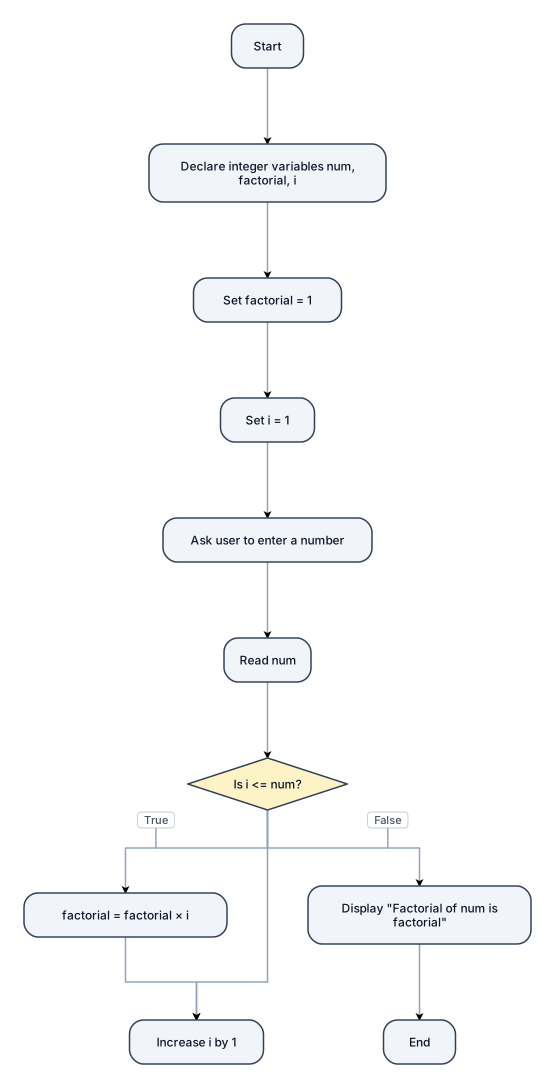
Create a flowchart for a C++ program that calculates the factorial of an integer using a while loop. Start → Declare integer variables num, factorial, and i → Set factorial = 1 → Set i = 1 → Ask the user to enter a number → Read num → Decision: Is i <= num? If True → Calculate factorial = factorial × i → Increase i by 1 → Return to "Is i <= num?" If False → Display "Factorial of num is factorial" → End. Use standard flowchart symbols. Label the decision branches clearly as True and False.
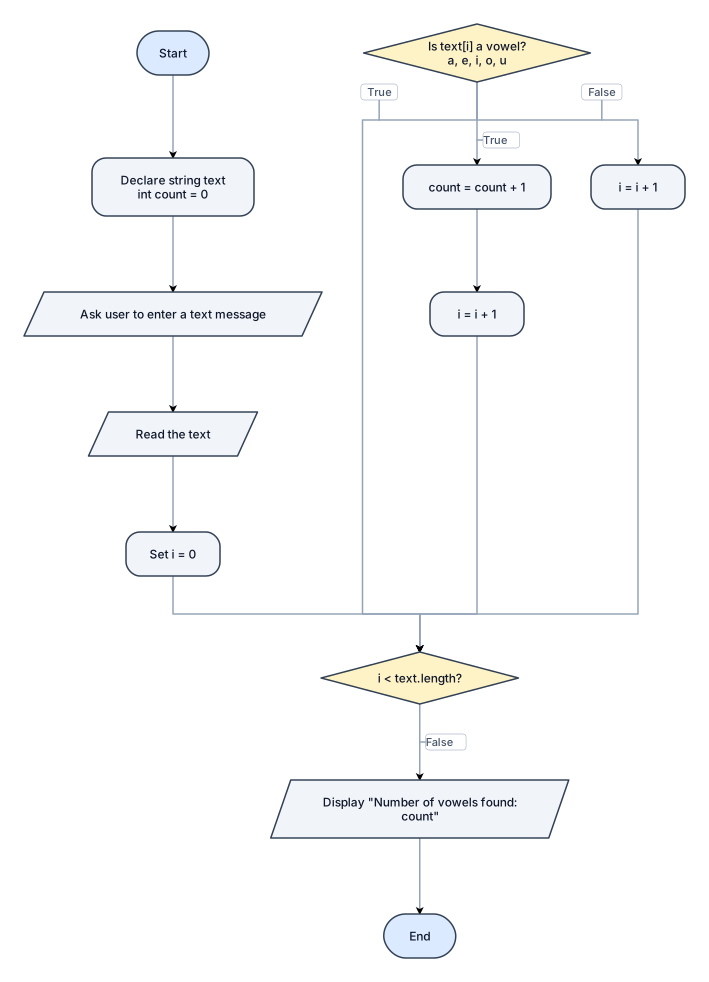
Create a flowchart for a C++ Vowel Counter program. Start → Declare string text and integer count = 0 → Ask the user to enter a text message → Read the text → Set i = 0. Decision 1: Is i < text.length()? * True → Go to Decision 2. * False → Display "Number of vowels found: count" → End. Decision 2: Is text[i] a vowel (a, e, i, o, or u)? * True → count = count + 1 → i = i + 1 → Return to Decision 1. * False → i = i + 1 → Return to Decision 1. Use standard flowchart symbols: oval for Start/End, parallelogram for input/output, rectangle for processing, and diamond for decisions. Label every decision branch clearly as True or False. make it like the diagrams in apps diagrams, make the diamonds and other shapes sharp corners and the diamond is symmetrical vertical and horizontal, still follow the format like in apps.diagrams make the rectangles have sharp corners.
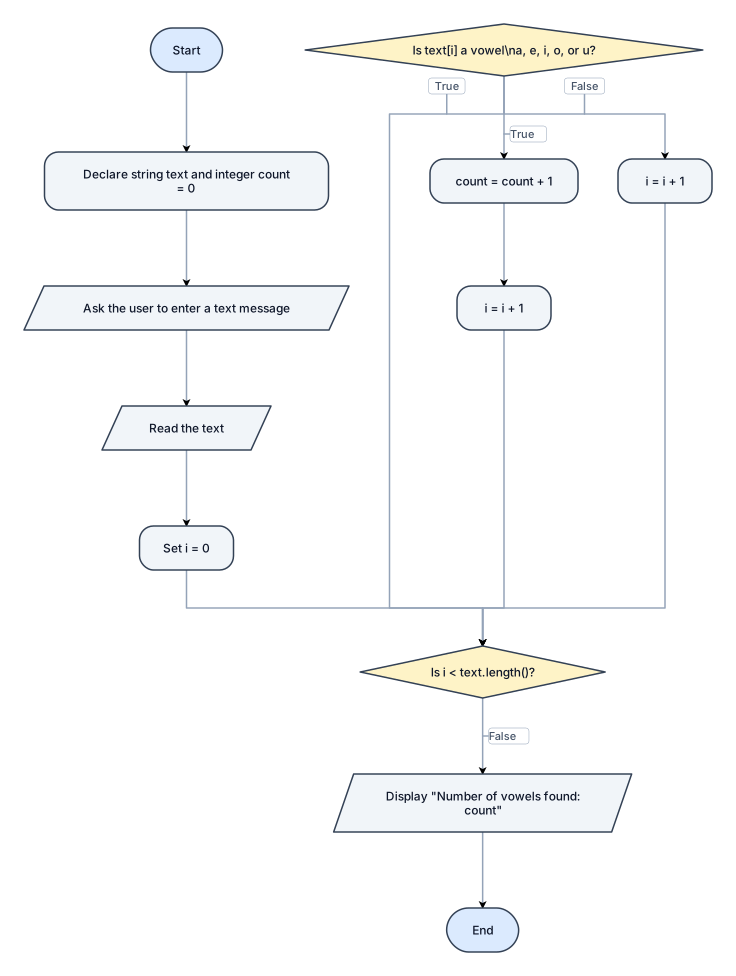
Create a flowchart for a C++ Vowel Counter program. Start → Declare string text and integer count = 0 → Ask the user to enter a text message → Read the text → Set i = 0. Decision 1: Is i < text.length()? * True → Go to Decision 2. * False → Display "Number of vowels found: count" → End. Decision 2: Is text[i] a vowel (a, e, i, o, or u)? * True → count = count + 1 → i = i + 1 → Return to Decision 1. * False → i = i + 1 → Return to Decision 1. Use standard flowchart symbols: oval for Start/End, parallelogram for input/output, rectangle for processing, and diamond for decisions. Label every decision branch clearly as True or False. make it like the diagrams in apps diagrams, make the diamonds and other shapes sharp corners and the diamond is symmetrical vertical and horizontal, still follow the format like in apps.diagrams
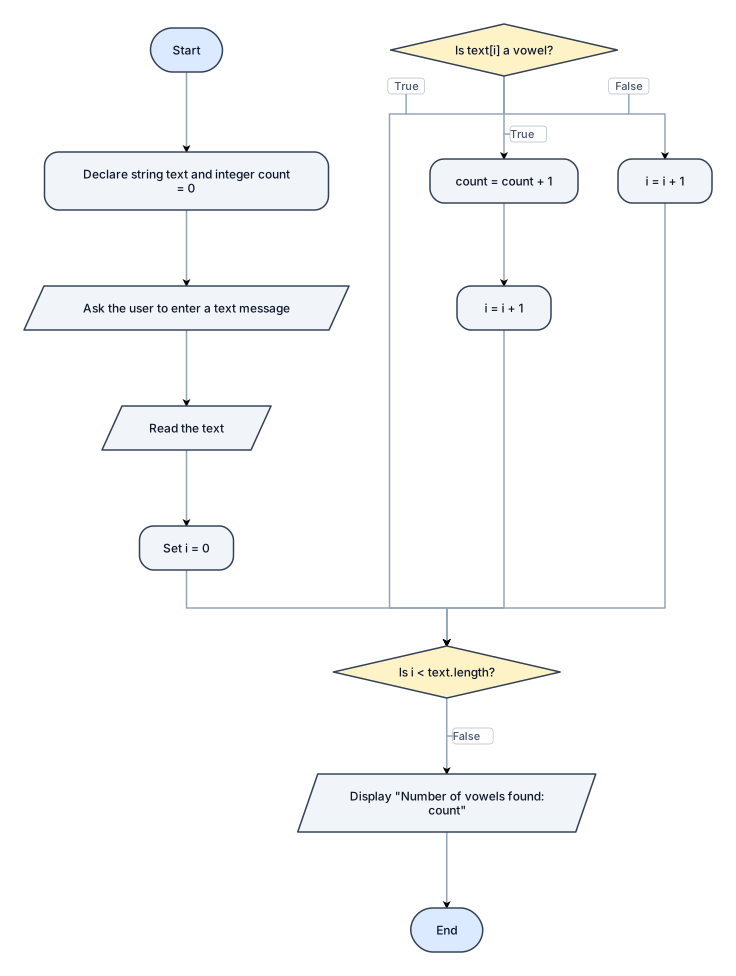
Create a flowchart for a C++ Vowel Counter program. Start → Declare string text and integer count = 0 → Ask the user to enter a text message → Read the text → Set i = 0. Decision 1: Is i < text.length()? * True → Go to Decision 2. * False → Display "Number of vowels found: count" → End. Decision 2: Is text[i] a vowel (a, e, i, o, or u)? * True → count = count + 1 → i = i + 1 → Return to Decision 1. * False → i = i + 1 → Return to Decision 1. Use standard flowchart symbols: oval for Start/End, parallelogram for input/output, rectangle for processing, and diamond for decisions. Label every decision branch clearly as True or False. make it like the diagrams in apps diagrams, make the diamonds and other shapes sharp corners and the diamond is symmetrical vertical and horizontal
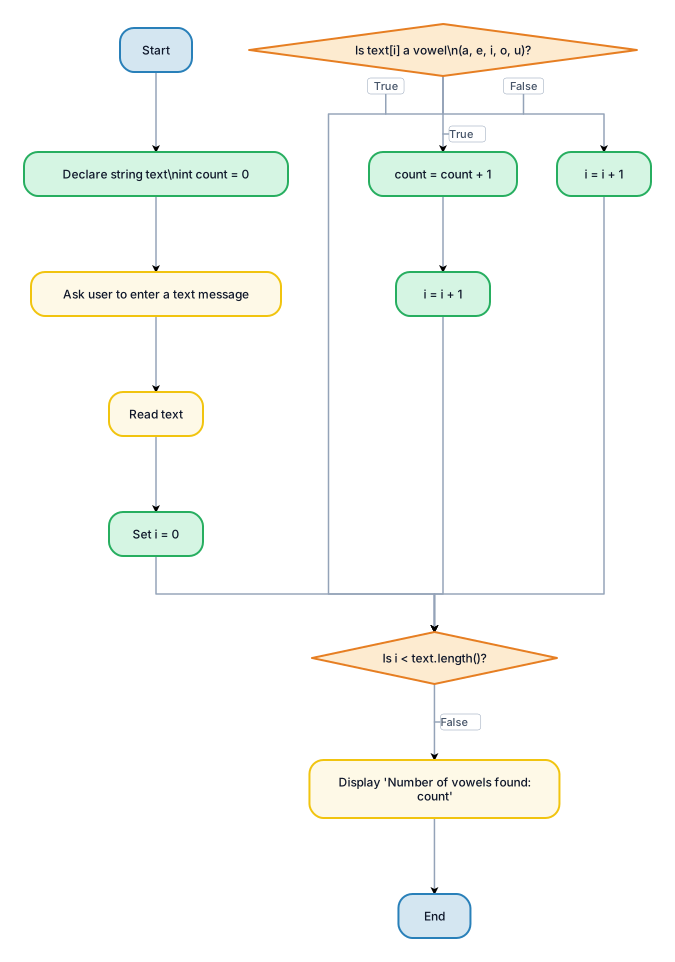
Create a flowchart for a C++ Vowel Counter program. Start → Declare string text and integer count = 0 → Ask the user to enter a text message → Read the text → Set i = 0. Decision 1: Is i < text.length()? * True → Go to Decision 2. * False → Display "Number of vowels found: count" → End. Decision 2: Is text[i] a vowel (a, e, i, o, or u)? * True → count = count + 1 → i = i + 1 → Return to Decision 1. * False → i = i + 1 → Return to Decision 1. Use standard flowchart symbols: oval for Start/End, parallelogram for input/output, rectangle for processing, and diamond for decisions. Label every decision branch clearly as True or False. make it like the diagrams in apps diagrams
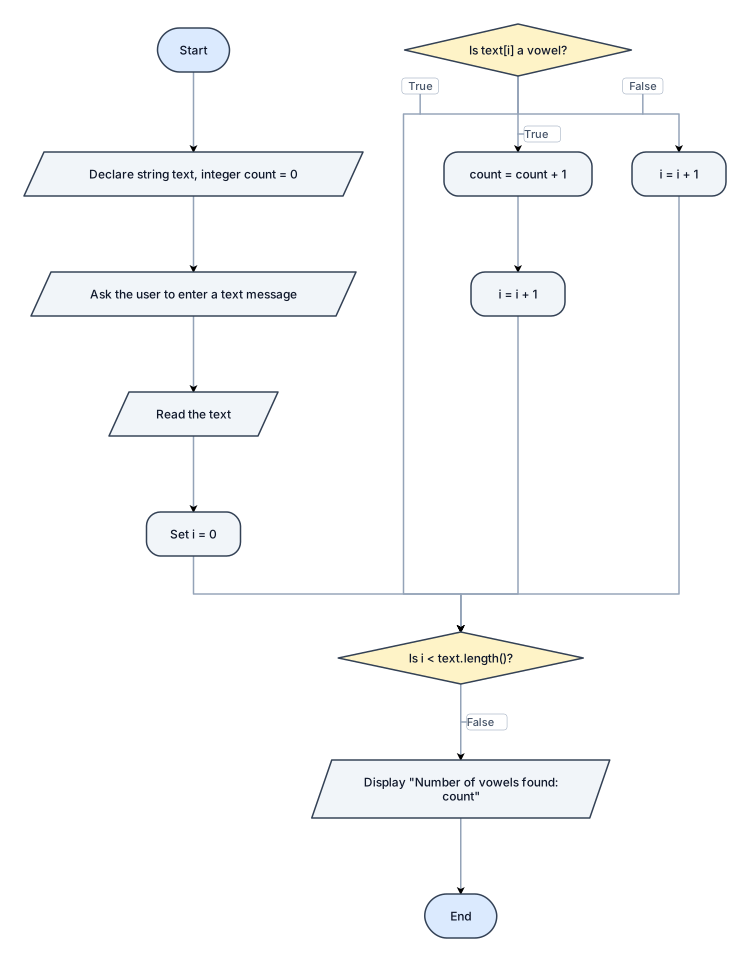
Create a flowchart for a C++ Vowel Counter program. Start → Declare string text and integer count = 0 → Ask the user to enter a text message → Read the text → Set i = 0. Decision 1: Is i < text.length()? * True → Go to Decision 2. * False → Display "Number of vowels found: count" → End. Decision 2: Is text[i] a vowel (a, e, i, o, or u)? * True → count = count + 1 → i = i + 1 → Return to Decision 1. * False → i = i + 1 → Return to Decision 1. Use standard flowchart symbols: oval for Start/End, parallelogram for input/output, rectangle for processing, and diamond for decisions. Label every decision branch clearly as True or False.
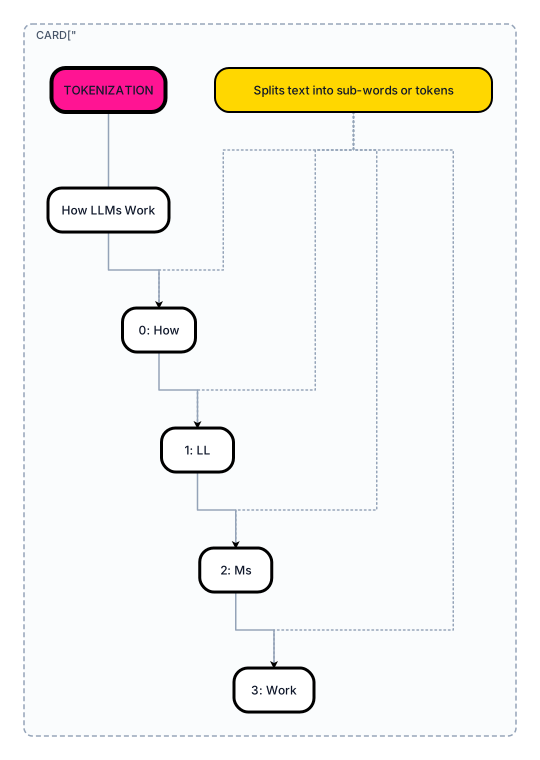
"Create a rounded rectangle card with a bright pink solid background and bold black border, similar to an infographic tutorial card. Bold black heading at top: 'Tokenization'. Below it, show a sentence like 'How LLMs Work' breaking down into individual word/sub-word boxes, each numbered (0,1,2,3...). Add a small yellow sticky-note style callout box pointing to the tokens saying 'Splits text into sub-words or tokens'. Use simple flat icons, clean sans-serif font, playful tutorial-carousel design style." "Make the background of the whole diagram solid bright pink/magenta color, not white. Make the heading 'Tokenization' bigger and bold. Style all boxes with black thick borders and white fill."
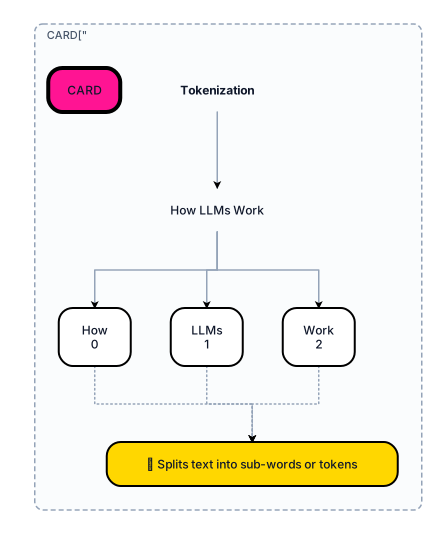
"Create a rounded rectangle card with a bright pink solid background and bold black border, similar to an infographic tutorial card. Bold black heading at top: 'Tokenization'. Below it, show a sentence like 'How LLMs Work' breaking down into individual word/sub-word boxes, each numbered (0,1,2,3...). Add a small yellow sticky-note style callout box pointing to the tokens saying 'Splits text into sub-words or tokens'. Use simple flat icons, clean sans-serif font, playful tutorial-carousel design style."
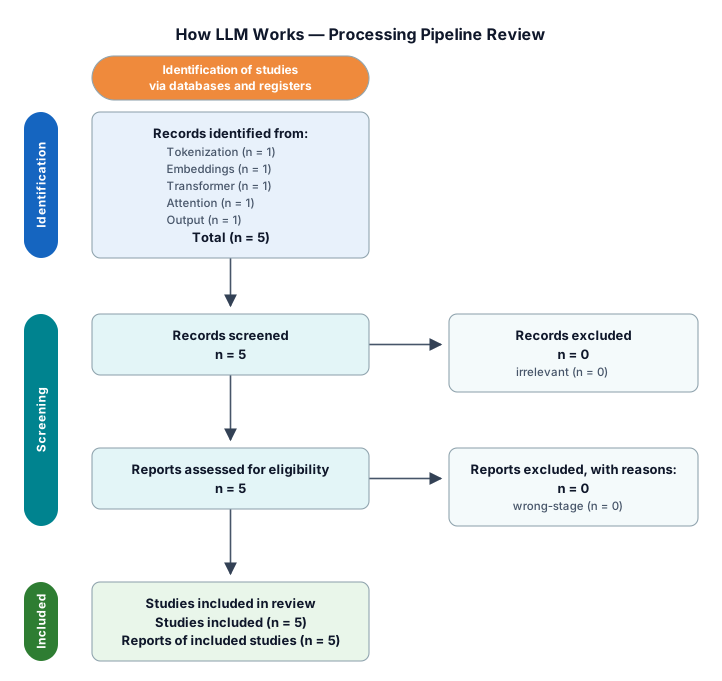
Create a colorful infographic-style diagram on a teal/green background, explaining 'How LLM Works', divided into 4-5 rounded rectangle cards placed side by side (like a horizontal card layout), each card with a different bright solid color (pink, blue, green, orange/yellow, purple). Each card should have: A bold black heading at the top (large, sans-serif font) Icons and simple illustrations related to the content Sticky-note style yellow/highlighted boxes with short annotations pointing to specific parts (like callouts) Small labeled diagrams inside (boxes, arrows, numbered steps) Card 1 (Pink) – 'Tokenization': Show a sentence breaking into tokens with numbered boxes, sticky note explaining 'sub-word splitting' Card 2 (Blue) – 'Embeddings & Vectors': Show tokens converting into number arrays/vectors, small grid/matrix illustration Card 3 (Green) – 'Transformer Architecture': Show a flow of Self-Attention → Feed Forward → Multiple Layers stacked, with numbered steps and arrows connecting boxes, icons for each step Card 4 (Orange/Yellow) – 'Attention Mechanism': Show a mind-map style diagram with 'ATTENTION' in center and connected nodes like 'Query', 'Key', 'Value', 'Context', 'Weights', 'Relevance' branching out with connecting lines Card 5 (Purple) – 'Output Generation': Show a class-diagram style box structure with 'Probability Distribution' → 'Sampling' → 'Next Token' → loop arrow back to start Use bold black borders around each card, rounded corners, playful icons (emojis or flat illustration style), consistent bright color-blocking, and a clean modern infographic look similar to tech-tutorial carousel designs used on LinkedIn/Instagram."
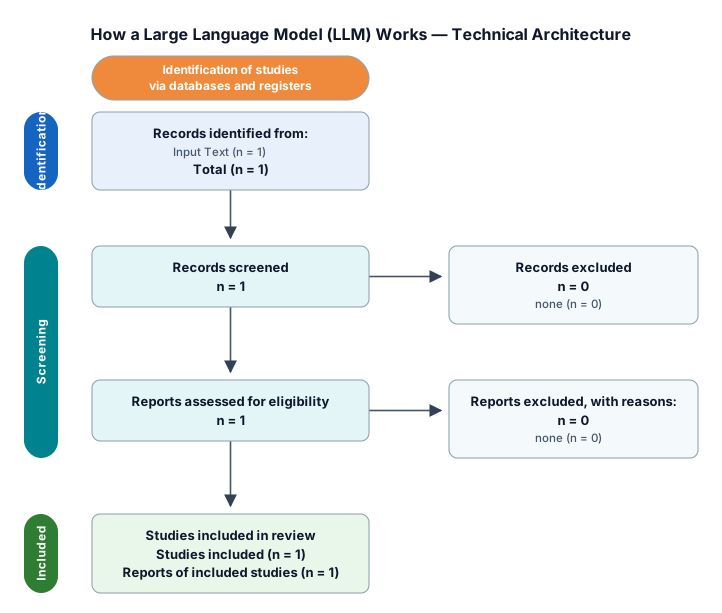
Create a clean, professional flow diagram explaining 'How a Large Language Model (LLM) Works' end-to-end. Show the following stages in sequence, left to right or top to bottom: Input Text – user's raw prompt/query Tokenization – breaking text into tokens (sub-words/words) Embedding Layer – converting tokens into numerical vectors Transformer Architecture – showing: Self-Attention mechanism (how tokens relate to each other) Multiple Transformer blocks/layers stacked Feed-forward neural network inside each block Positional Encoding – added alongside embeddings to preserve word order Probability Distribution – model predicts next token probabilities Decoding/Sampling – selecting next token (greedy/top-k/temperature) Output Generation – repeating the loop token-by-token to form the final response Use arrows to show the flow direction, group related components in boxes/containers, use a modern tech color scheme (blues, purples, or dark theme), and label each stage clearly. Make it look like a technical architecture diagram suitable for a tech blog or educational content."
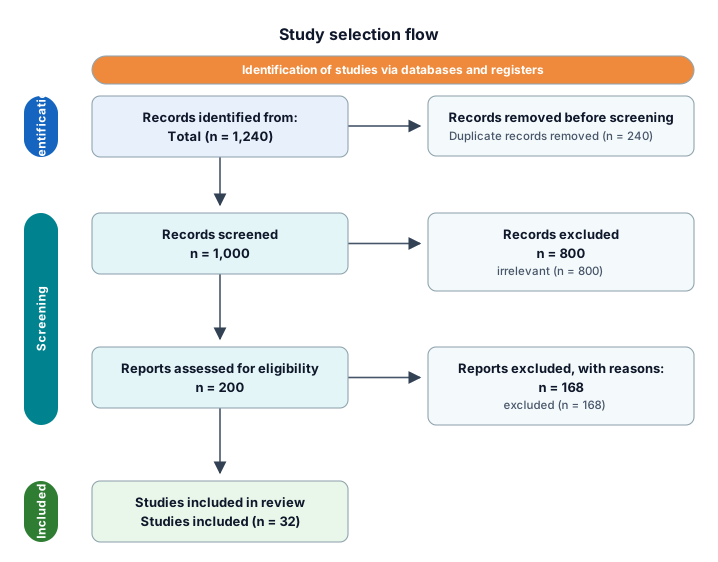
A PRISMA study-selection flow from 1,240 identified records through deduplication, screening, eligibility, and 32 included studies
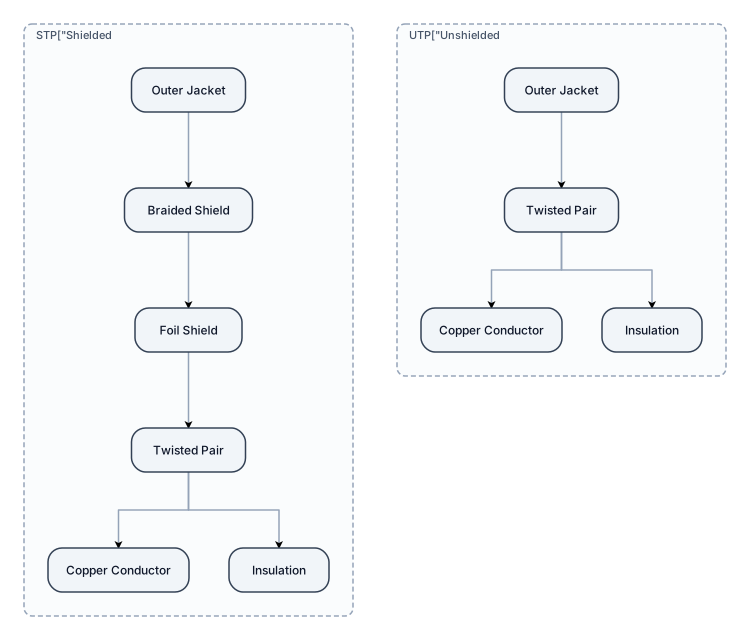
Draw a twisted pair cable shielded and unshielded and well labelled for chart project I have submitted in college

Draw a twist pear cable shireded and unsued or a chart and well labelled for chart project I have submitted in college
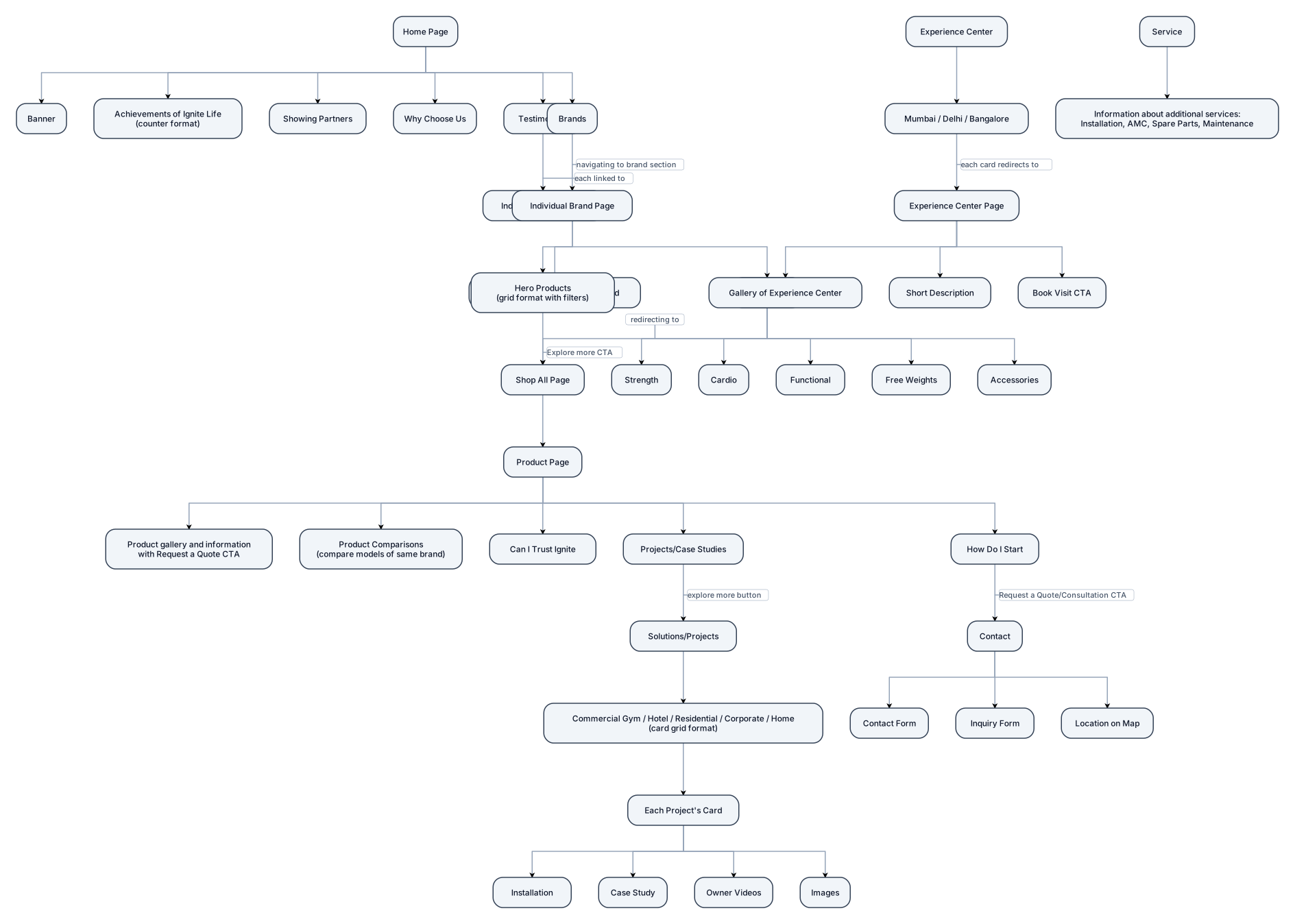
create flow diagram for this website flow Home Page Banner Achievements of Ignite Life in counter format Showing partners Why choose us Testimonials - each testimonial linked to individual case study Brands - navigating to our brand section on home page Individual Brand Page Banner highlighting USP of brand Hero Products showing in grid format with filters Explore more CTA redirecting to shop all page Equipments - redirecting to Shop all page Strength Cardio Functional Free Weights Accessories Product Page Product gallery and information with “Request a Quote” CTA Product Comparisons - compare product’s different models of same brand Can I trust Ignite Projects/Case Studies – explore more button at bottom redirecting to solutions/projects page. How do I start “Request a Quote”/Consultation CTA redirection - redirecting to contact us page Solutions/Projects: Commercial Gym/Hotel/Residential/Corporate/Home - card grid format Each project’s card Installation Case Study Owner videos Images Experience Center: Mumbai/Delhi/Bangalore - each card redirecting to separate page which shows gallery of experience center, short description and “book visit” CTA Service: Information about all additional service required with purchasing the equipments such as installation, amc , spare parts, maintenance. Contact Contact form Inquiry form Location on map
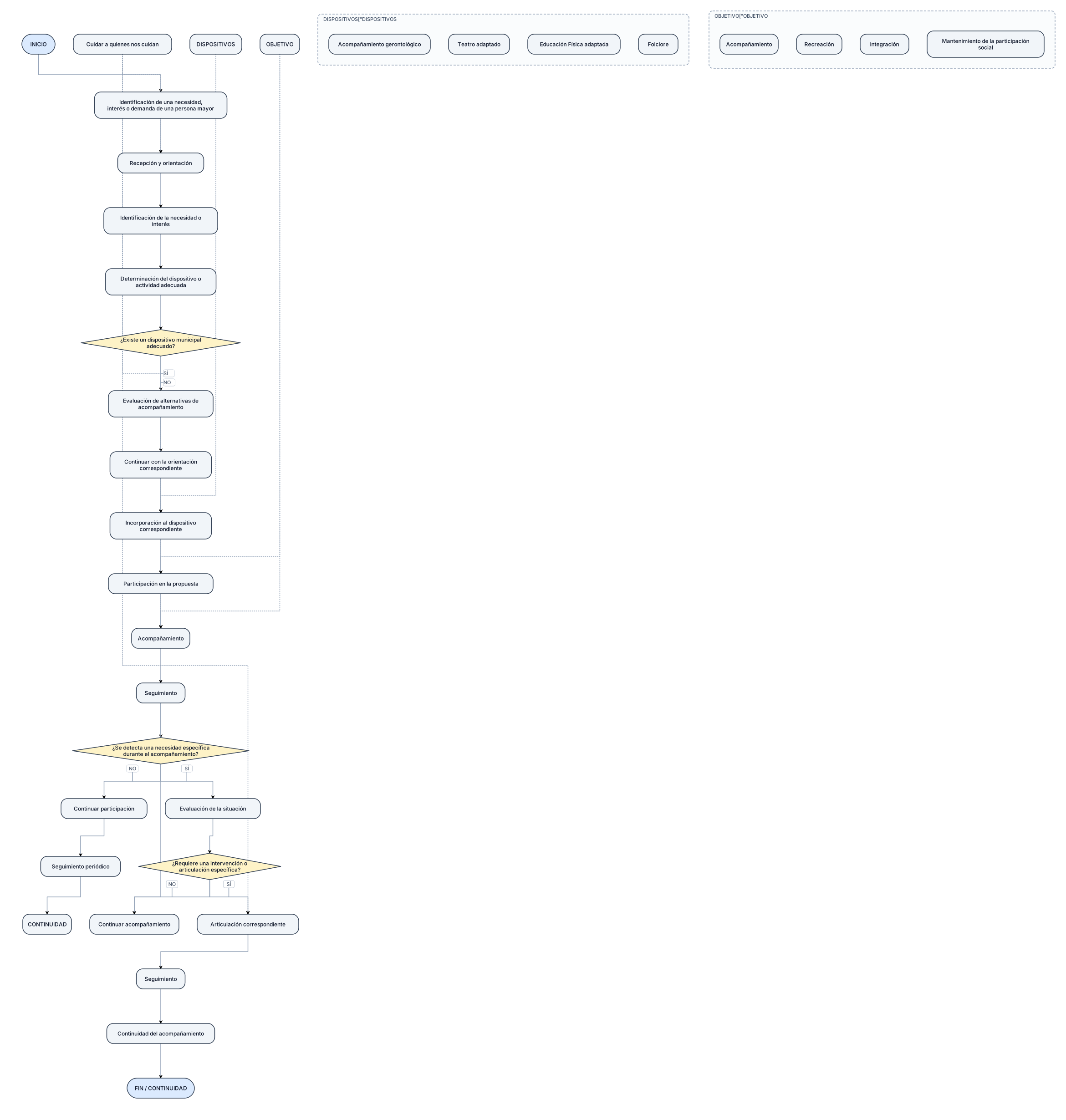
Crear un DIAGRAMA DE FLUJO VERTICAL Y PROFESIONAL sobre el proceso de ACOMPAÑAMIENTO Y PARTICIPACIÓN DE ADULTOS MAYORES de la Municipalidad de Plaza Huincul. Representar exclusivamente el funcionamiento ACTUAL (AS-IS) relevado. INICIO ↓ Identificación de una necesidad, interés o demanda de una persona mayor ↓ Recepción y orientación ↓ Identificación de la necesidad o interés ↓ Determinación del dispositivo o actividad adecuada ↓ ¿Existe un dispositivo municipal adecuado? SÍ ↓ Incorporación al dispositivo correspondiente NO ↓ Evaluación de alternativas de acompañamiento ↓ Continuar con la orientación correspondiente ↓ Participación en la propuesta ↓ Acompañamiento ↓ Seguimiento ↓ ¿Se detecta una necesidad específica durante el acompañamiento? NO ↓ Continuar participación ↓ Seguimiento periódico ↓ CONTINUIDAD SÍ ↓ Evaluación de la situación ↓ ¿Requiere una intervención o articulación específica? NO ↓ Continuar acompañamiento SÍ ↓ Articulación correspondiente ↓ Seguimiento ↓ Continuidad del acompañamiento ↓ FIN / CONTINUIDAD DISPOSITIVOS RELEVADOS: - Acompañamiento gerontológico. - Teatro adaptado. - Educación Física adaptada. - Folclore. INCORPORAR COMO PRINCIPIO TRANSVERSAL: “Cuidar a quienes nos cuidan”. El diagrama debe transmitir que el objetivo del proceso no es únicamente la participación en actividades, sino también el acompañamiento, la recreación, la integración y el mantenimiento de la participación social de las personas mayores. No inventar procedimientos de inscripción, derivación o evaluación que no hayan sido relevados.
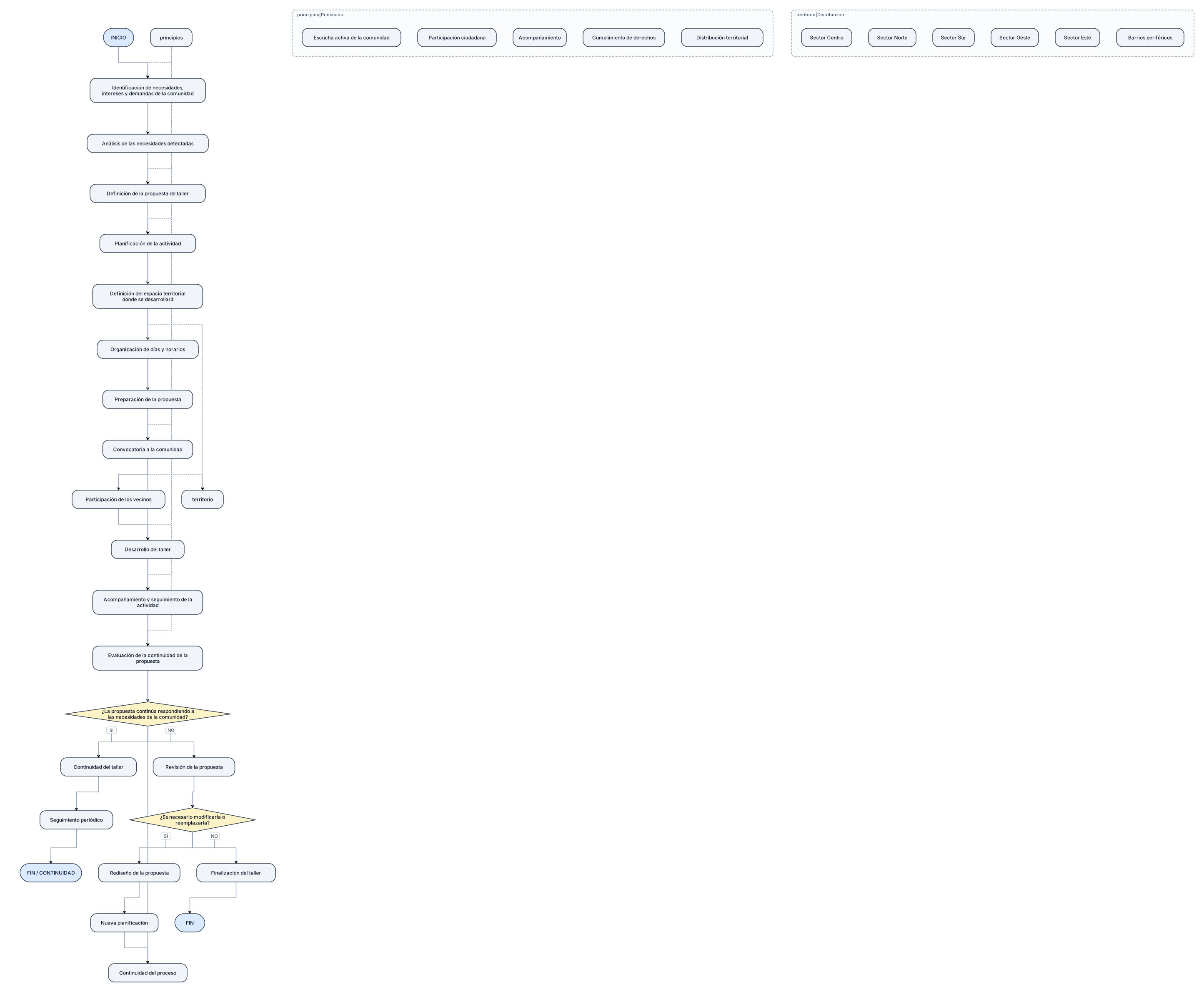
Crear un DIAGRAMA DE FLUJO VERTICAL Y PROFESIONAL sobre el proceso de PLANIFICACIÓN, ORGANIZACIÓN Y DESARROLLO DE TALLERES de la Dirección de Talleres de la Municipalidad de Plaza Huincul. Representar exclusivamente el funcionamiento ACTUAL (AS-IS) relevado. INICIO ↓ Identificación de necesidades, intereses y demandas de la comunidad ↓ Análisis de las necesidades detectadas ↓ Definición de la propuesta de taller ↓ Planificación de la actividad ↓ Definición del espacio territorial donde se desarrollará ↓ Organización de días y horarios ↓ Preparación de la propuesta ↓ Convocatoria a la comunidad ↓ Participación de los vecinos ↓ Desarrollo del taller ↓ Acompañamiento y seguimiento de la actividad ↓ Evaluación de la continuidad de la propuesta ↓ ¿La propuesta continúa respondiendo a las necesidades de la comunidad? SÍ ↓ Continuidad del taller ↓ Seguimiento periódico ↓ FIN / CONTINUIDAD NO ↓ Revisión de la propuesta ↓ ¿Es necesario modificarla o reemplazarla? SÍ ↓ Rediseño de la propuesta ↓ Nueva planificación ↓ Continuidad del proceso NO ↓ Finalización del taller ↓ FIN INCORPORAR COMO PRINCIPIOS TRANSVERSALES DEL PROCESO: - Escucha activa de la comunidad. - Participación ciudadana. - Acompañamiento. - Cumplimiento de derechos. - Distribución territorial. REPRESENTAR VISUALMENTE LA DISTRIBUCIÓN TERRITORIAL COMO UN ELEMENTO CENTRAL DEL PROCESO, DESTACANDO QUE LOS TALLERES SE DISTRIBUYEN EN DISTINTOS SECTORES DE PLAZA HUINCUL PARA ACERCAR LAS PROPUESTAS A LA COMUNIDAD. Utilizar: Óvalo = Inicio / Fin Rectángulo = Actividad Rombo = Decisión Flecha = Secuencia No crear un organigrama. No inventar procedimientos administrativos no relevados.
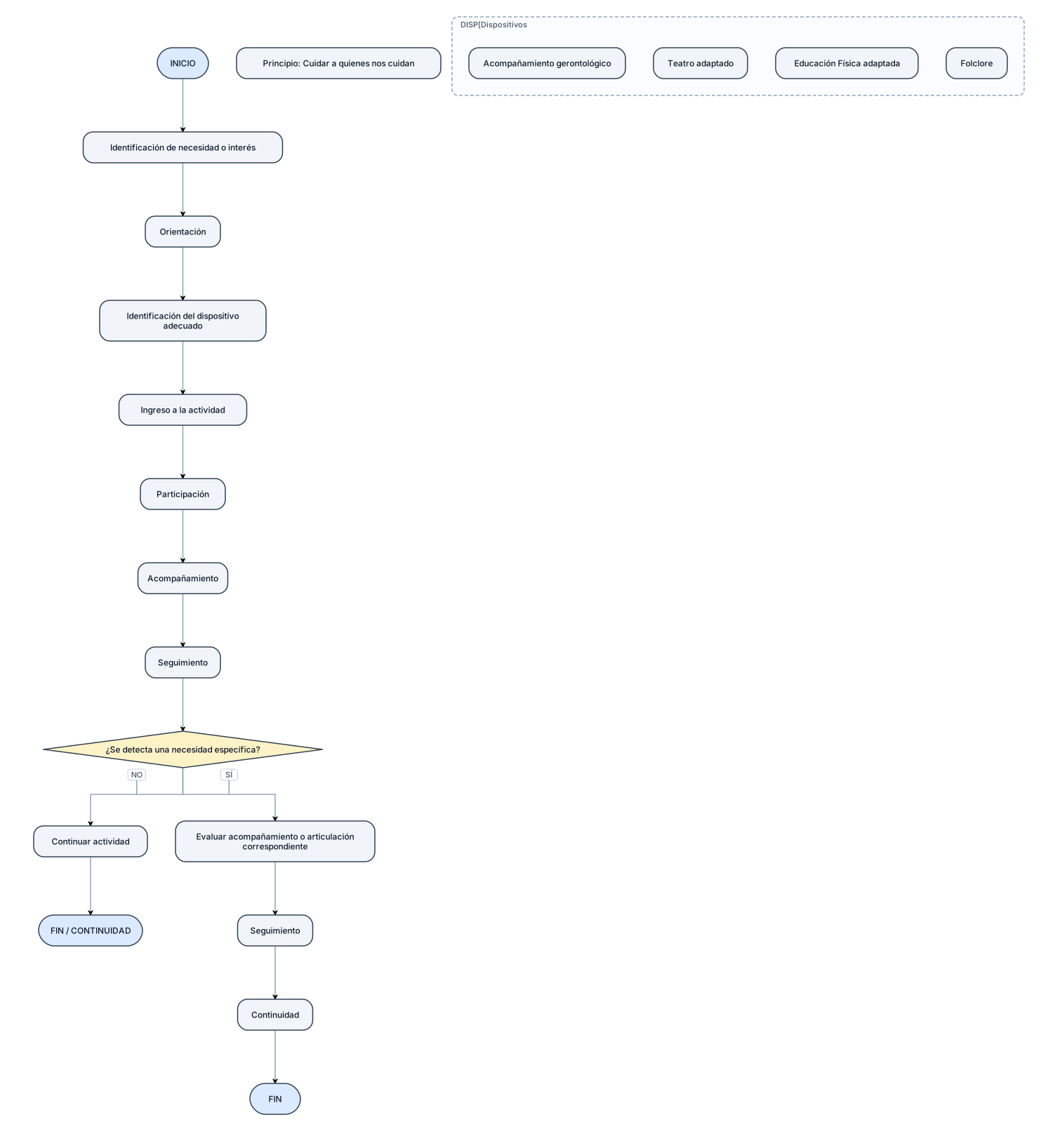
Crear un DIAGRAMA DE FLUJO vertical sobre el proceso de acompañamiento y participación de ADULTOS MAYORES. INICIO ↓ Identificación de necesidad o interés ↓ Orientación ↓ Identificación del dispositivo adecuado ↓ Ingreso a la actividad ↓ Participación ↓ Acompañamiento ↓ Seguimiento ↓ ¿Se detecta una necesidad específica? NO ↓ Continuar actividad ↓ FIN / CONTINUIDAD SÍ ↓ Evaluar acompañamiento o articulación correspondiente ↓ Seguimiento ↓ Continuidad ↓ FIN Dispositivos relevados: - Acompañamiento gerontológico - Teatro adaptado - Educación Física adaptada - Folclore Mantener como principio: “Cuidar a quienes nos cuidan”.
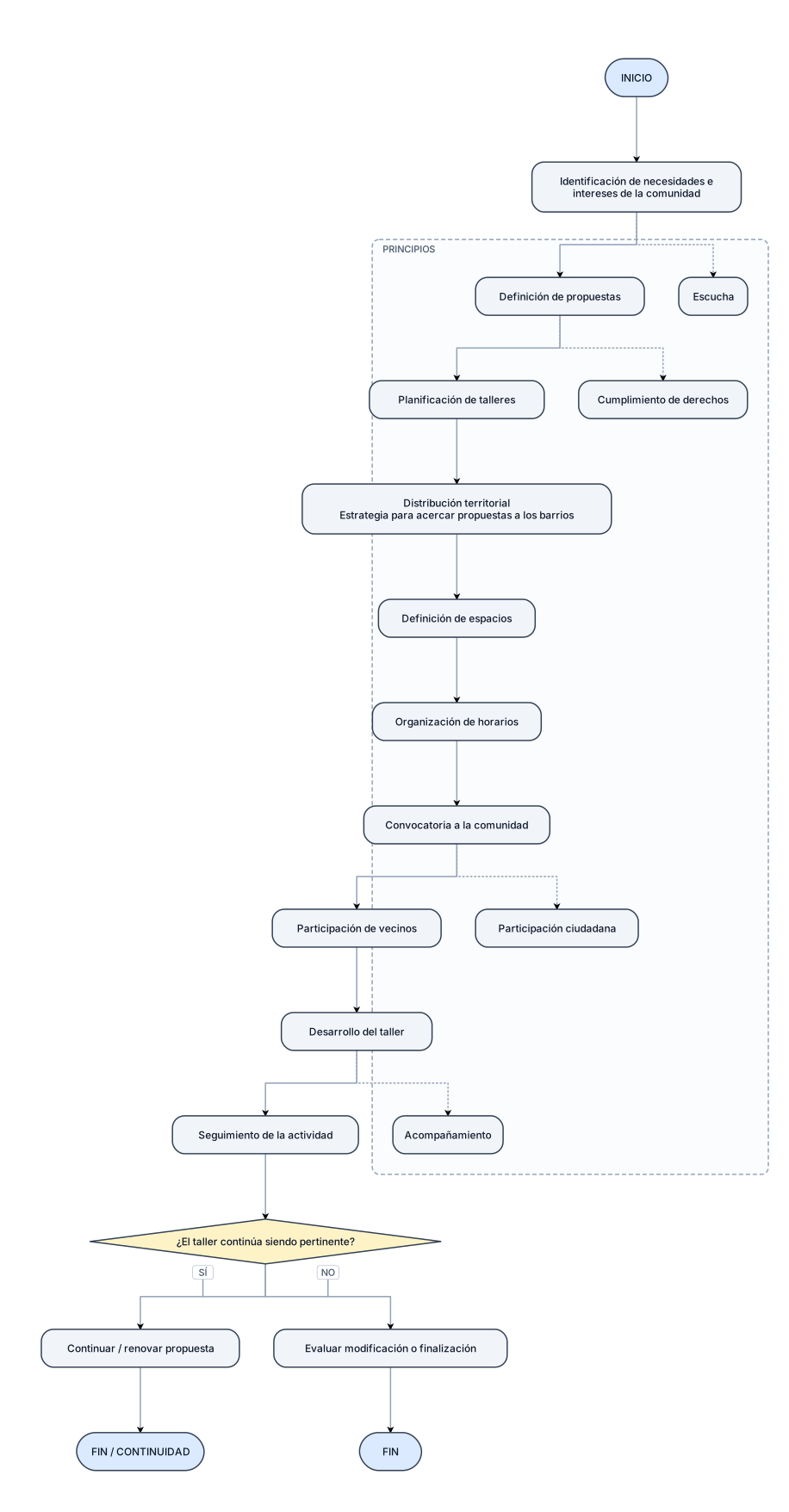
Crear un DIAGRAMA DE FLUJO vertical sobre el proceso de PLANIFICACIÓN Y DESARROLLO DE TALLERES de la Dirección de Talleres de la Municipalidad de Plaza Huincul. INICIO ↓ Identificación de necesidades e intereses de la comunidad ↓ Definición de propuestas ↓ Planificación de talleres ↓ Distribución territorial ↓ Definición de espacios ↓ Organización de horarios ↓ Convocatoria a la comunidad ↓ Participación de vecinos ↓ Desarrollo del taller ↓ Seguimiento de la actividad ↓ ¿El taller continúa siendo pertinente? SÍ ↓ Continuar / renovar propuesta ↓ FIN / CONTINUIDAD NO ↓ Evaluar modificación o finalización ↓ FIN Incluir visualmente como principios: - Escucha - Participación ciudadana - Acompañamiento - Cumplimiento de derechos Representar la distribución territorial como una estrategia para acercar las propuestas a distintos barrios de Plaza Huincul.
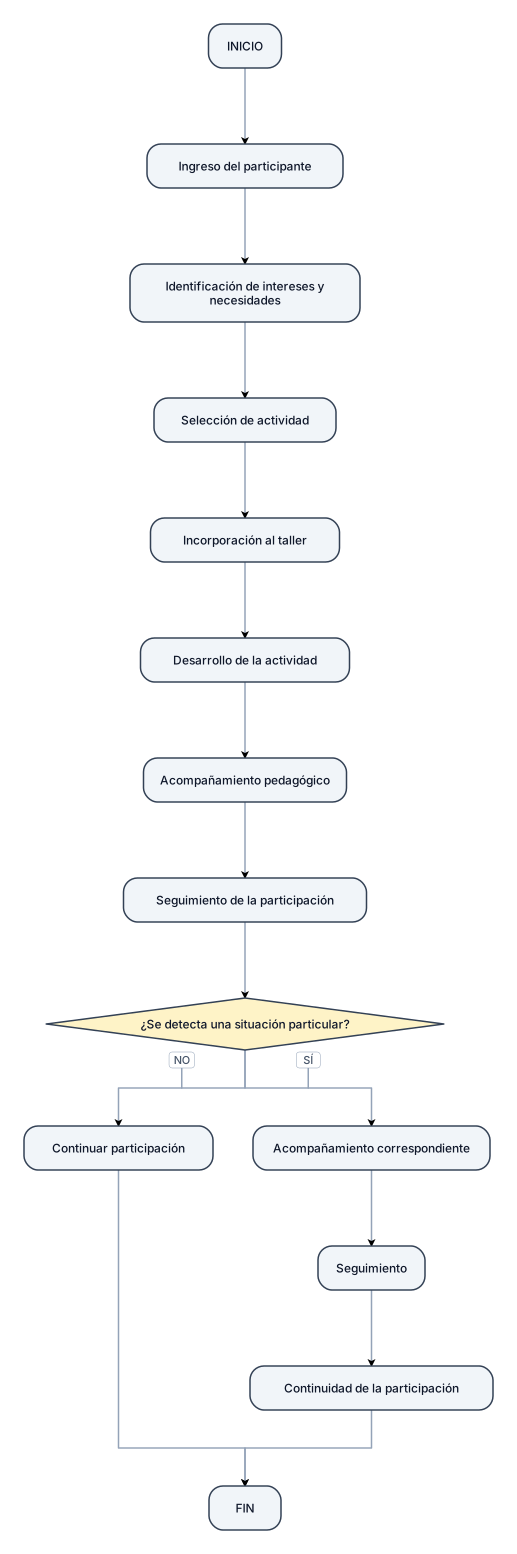
Crear un DIAGRAMA DE FLUJO vertical sobre el proceso de participación en los talleres destinados a Niñez y Adolescencia. INICIO ↓ Ingreso del participante ↓ Identificación de intereses y necesidades ↓ Selección de actividad ↓ Incorporación al taller ↓ Desarrollo de la actividad ↓ Acompañamiento pedagógico ↓ Seguimiento de la participación ↓ ¿Se detecta una situación particular? NO ↓ Continuar participación SÍ ↓ Acompañamiento correspondiente ↓ Seguimiento ↓ Continuidad de la participación ↓ FIN Los talleres relevados incluyen: - Tu Mejor Versión - Inglés - Uñas - Lanaterapia - Educación Física
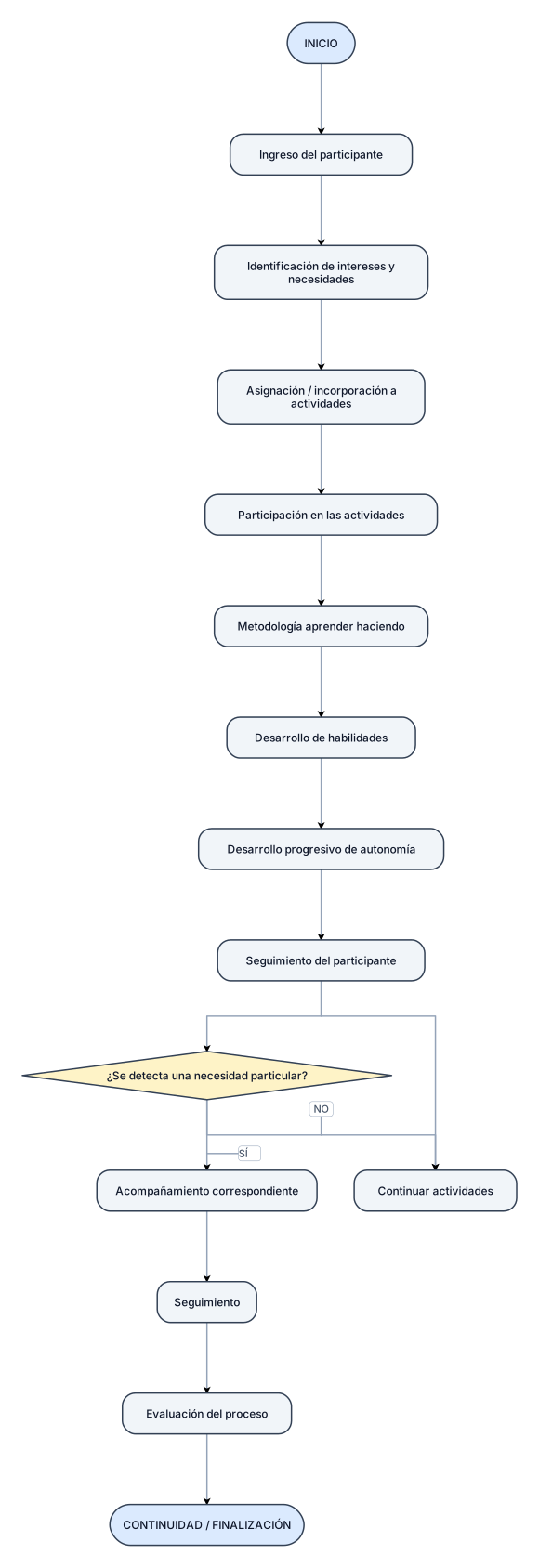
Crear un DIAGRAMA DE FLUJO vertical sobre el funcionamiento del dispositivo JUGARTE de la Subsecretaría de Institucionales. INICIO ↓ Ingreso del participante ↓ Identificación de intereses y necesidades ↓ Asignación / incorporación a actividades ↓ Participación en las actividades ↓ Metodología “aprender haciendo” ↓ Desarrollo de habilidades ↓ Desarrollo progresivo de autonomía ↓ Seguimiento del participante ↓ ¿Se detecta una necesidad particular? NO ↓ Continuar actividades SÍ ↓ Acompañamiento correspondiente ↓ Seguimiento ↓ Evaluación del proceso ↓ CONTINUIDAD / FINALIZACIÓN Representar como proceso de acompañamiento y formación. No inventar mecanismos de inscripción ni evaluación que no hayan sido relevados.