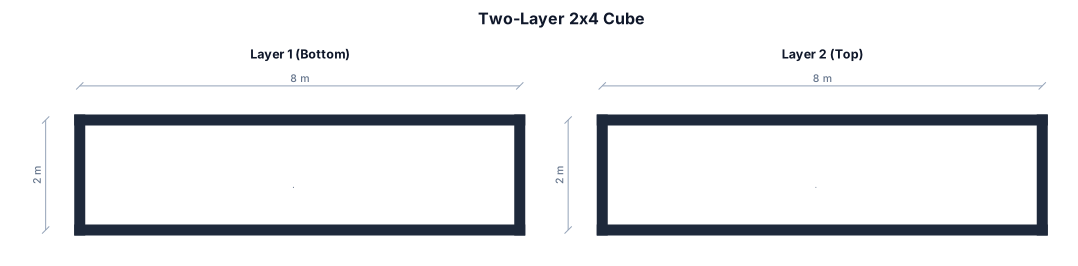
請幫我設計兩層 每層2*4的正方體
NODE ARCHIVE · REAL DIAGRAM BRIEFS
Diagram Examples from Real Visitor Prompts
Browse eligible diagrams shared by FreeDiagram visitors, inspect the exact prompts, and build your own version.
Browse 3276 real creationsCOMMUNITY OUTPUTS · EXACT PROMPTS
Main diagram studio
Showing 505–528 of 1260. No stock examples or system defaults. Choose a tool, study a real result, then reopen its prompt as your starting point.
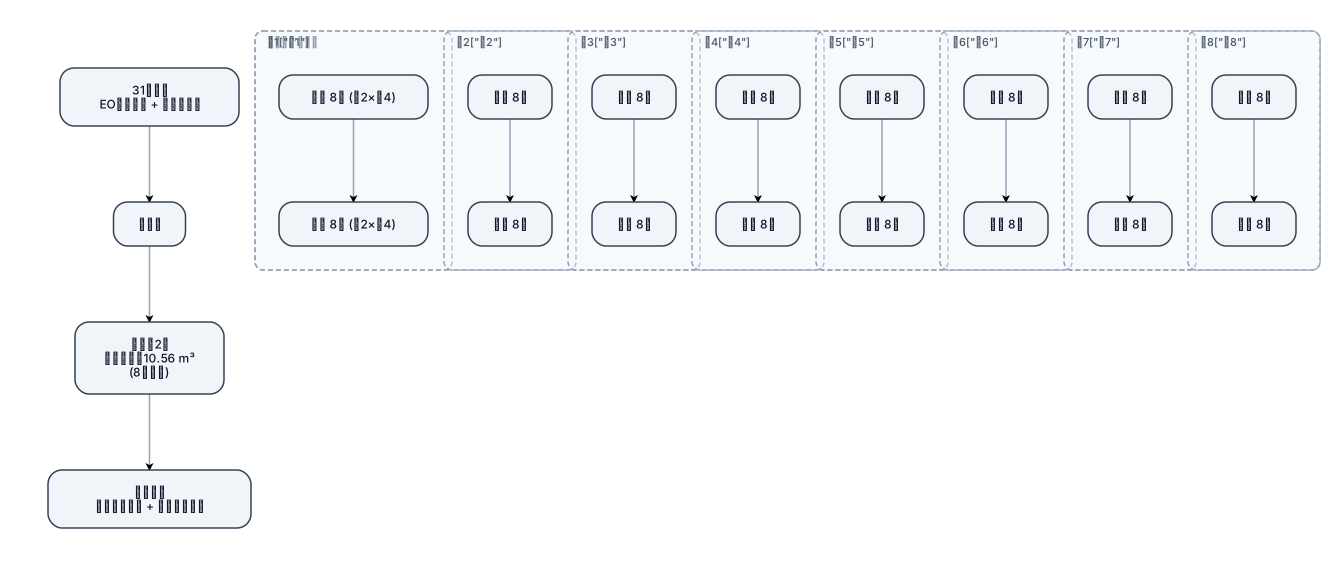
7.4.3.1 共31個點位放置EO指示標籤及生物指示劑,每一層體積為0.66 m3,共8台車,每台車2層產品體積約為10.56m3至少評估,此次執行滲透驗證包含8台車滿載,點位包含四周上下點位及每台車中心點,共計31個點位。 箱體為寬2個*長4個 兩層
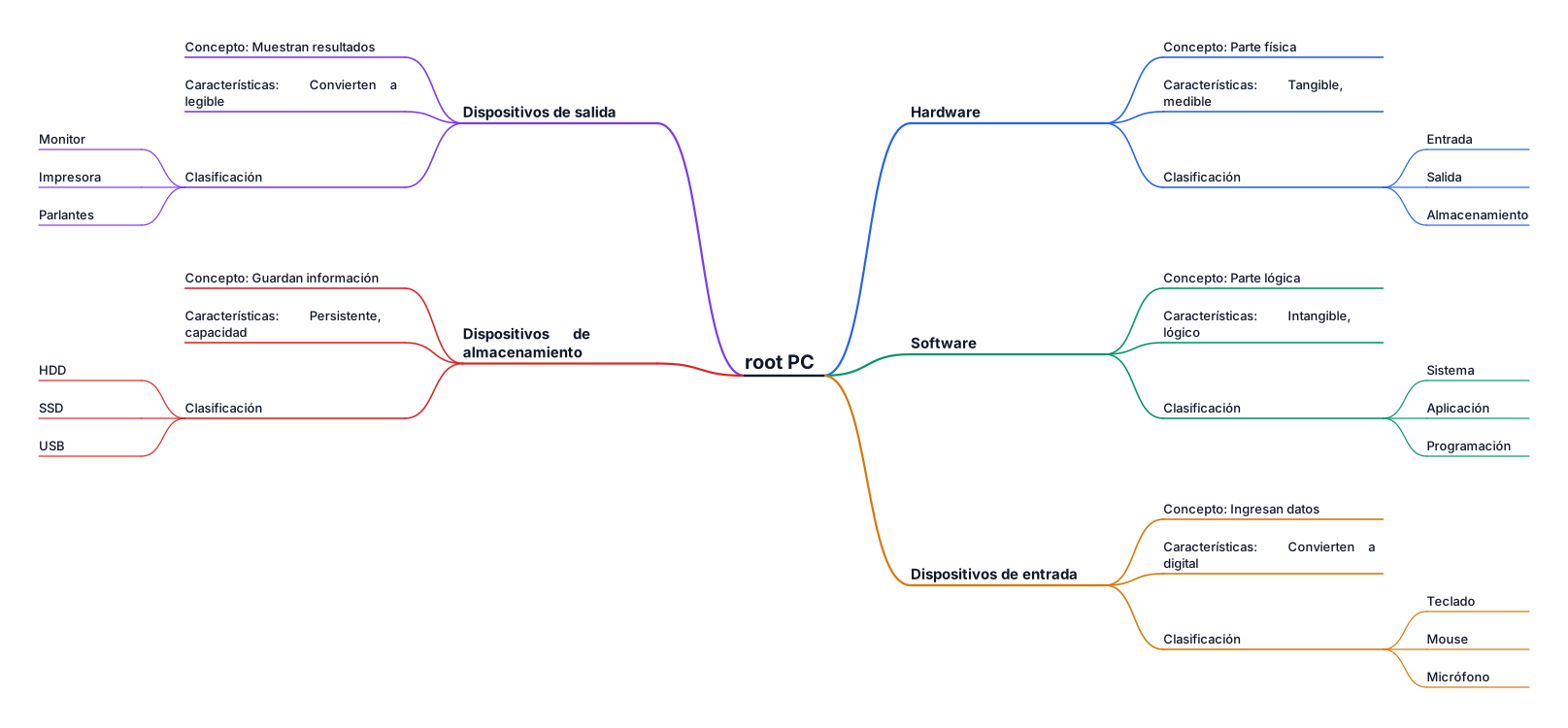
Crea un mapa mental sobre Hardware y Software. La idea central debe ser PC. Incluye Hardware, Software, dispositivos de entrada, salida y almacenamiento. Para cada uno incluye concepto, características y clasificación. Usa pocas palabras, colores diferentes por rama y un diseño apropiado para una tarea universitaria.
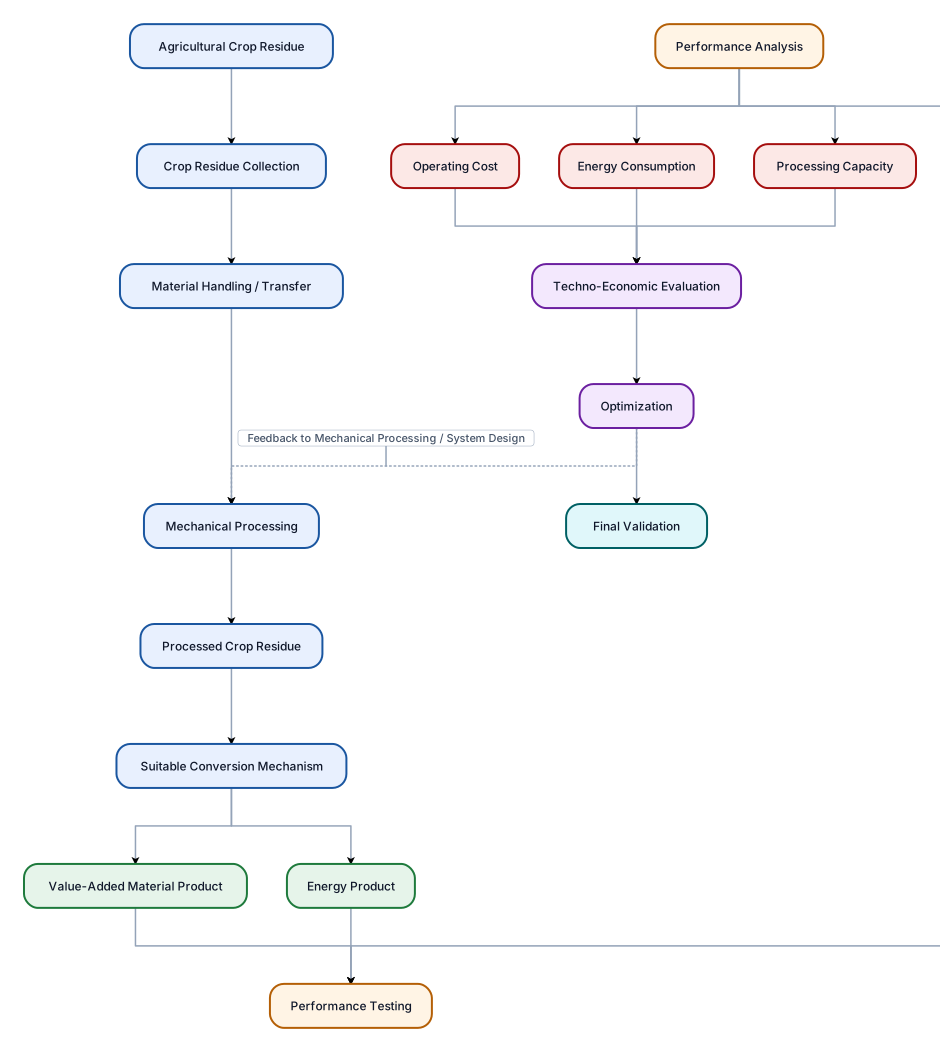
Create one large professional vertical flowchart for a Mechanical Engineering project about an integrated cost-effective mechanical system for collection, processing and conversion of agricultural crop residues into a useful energy or value-added product. The flow should be: Agricultural Crop Residue ↓ Crop Residue Collection ↓ Material Handling / Transfer ↓ Mechanical Processing ↓ Processed Crop Residue ↓ Suitable Conversion Mechanism ↓ Useful Energy / Value-Added Product ↓ Performance Testing ↓ Performance Analysis ↓ Techno-Economic Evaluation ↓ Optimization ↓ Final Validation After “Suitable Conversion Mechanism”, create two simple branches: 1. Energy Product 2. Value-Added Material Product Both branches should continue to Performance Testing. Under Performance Analysis, show three smaller connected boxes: - Processing Capacity - Energy Consumption - Operating Cost Show a feedback arrow from Optimization back toward the Mechanical Processing/System Design stage. Use a clean white background, dark readable text, light professional colours, rectangular boxes, clear arrows, and a neat academic engineering style. Make it a single large flowchart suitable for a college patent/project document. Do not add IoT, sensors, chemical treatment, ammonia extraction, hydrogen fuel cells, gasification, or other technologies not mentioned above. Do not assume that briquetting or pelletizing is the final conversion method.

An org chart for a 30-person startup with engineering, product, sales, and operations teams
![Main diagram studio: flowchart TB A["HEAT EXCHANGERS SYMBOLS"] B["A heat exchanger is an equipment which ensures heat transfer from one medium to another."] C["FIGURE 1.14](https://psvtykrtciekraoilfux.supabase.co/storage/v1/object/public/gallery-assets/freediagram/feed/f4c8356b-30a9-42d4-8398-f7f3baea9693.svg)
flowchart TB A["HEAT EXCHANGERS SYMBOLS"] B["A heat exchanger is an equipment which ensures heat transfer from one medium to another."] C["FIGURE 1.14 - HEAT EXCHANGERS SYMBOLS"] C --> H["Heat Exchanger Name"] C --> S["Symbol"] C --> P["Picture"] H --> H1["Shell and Tube Heat Exchanger"] S --> S1(("◎")) P --> P1["Shell and Tube Heat Exchanger"] H --> H2["Electrical Heater"] S --> S2(("⚡")) P --> P2["Electrical Heater"] H --> H3["Air Cooled Heat Exchanger"] S --> S3(("▥")) P --> P3["Air Cooled Heat Exchanger"] H --> H4["Furnace or Fired Heater"] S --> S4(("🔥")) P --> P4["Furnace or Fired Heater"] A --> B A --> C
![Main diagram studio: flowchart TB A["STORAGE TANKS SYMBOLS"] B["Storage tanks are vessels of different shapes used to store raw materials and final products in oil and gas](https://psvtykrtciekraoilfux.supabase.co/storage/v1/object/public/gallery-assets/freediagram/feed/7f4dffd3-b971-4b4d-8b91-3409d73cd6d8.svg)
flowchart TB A["STORAGE TANKS SYMBOLS"] B["Storage tanks are vessels of different shapes used to store raw materials and final products in oil and gas plants."] C["FIGURE 1.13 - STORAGE TANKS SYMBOLS"] C --> H["Tank Type Name"] C --> S["Symbol"] C --> P["Picture"] H --> H1["Horizontal Drum"] S --> S1(("━")) P --> P1["Horizontal Drum"] H --> H2["Horizontal Drum with Boot"] S --> S2(("━┻")) P --> P2["Horizontal Drum with Boot"] H --> H3["Vertical Drum"] S --> S3(("○")) P --> P3["Vertical Drum"] H --> H4["Sphere Tank"] S --> S4(("●")) P --> P4["Sphere Tank"] H --> H5["Cone Roof Tank"] S --> S5(("△")) P --> P5["Cone Roof Tank"] H --> H6["Floating Roof Tank"] S --> S6(("▱")) P --> P6["Floating Roof Tank"] A --> B A --> C
![Main diagram studio: flowchart TB A["COMPRESSORS SYMBOLS"] B["A compressor is a mechanical device that increases the pressure of a gas by reducing its volume."] C["FIGURE](https://psvtykrtciekraoilfux.supabase.co/storage/v1/object/public/gallery-assets/freediagram/feed/a3fdf30a-7f4a-4767-aa11-44b6fcfe7b06.svg)
flowchart TB A["COMPRESSORS SYMBOLS"] B["A compressor is a mechanical device that increases the pressure of a gas by reducing its volume."] C["FIGURE 1.12 - COMPRESSORS SYMBOLS"] C --> H["Compressor Type"] C --> S["Symbol"] C --> N["Compressor Name"] C --> P["Compressor Picture"] H --> H1["Centrifugal Compressor"] S --> S1(("◉")) N --> N1["Centrifugal Compressor"] P --> P1["Centrifugal Compressor"] H --> H2["Reciprocating Compressor<br/>With electric motor driver"] S --> S2(("↔")) N --> N2["Reciprocating Compressor"] P --> P2["Reciprocating Compressor<br/>+ Electric Motor"] H --> H3["Screw Compressor<br/>With electrical motor driver"] S --> S3(("⚙")) N --> N3["Screw Compressor"] P --> P3["Screw Compressor<br/>+ Electric Motor"] A --> B A --> C
![Main diagram studio: flowchart TB R["ROTATING EQUIPMENT SYMBOLS"] D["FIGURE 1.10 - DRIVERS SYMBOLS"] D --> DM["Electrical Motor"] DM --> MS(("M")) D --> ST["Steam Turbine"](https://psvtykrtciekraoilfux.supabase.co/storage/v1/object/public/gallery-assets/freediagram/feed/5d2a5646-82b5-4024-83ed-981f10f36b9a.svg)
flowchart TB R["ROTATING EQUIPMENT SYMBOLS"] D["FIGURE 1.10 - DRIVERS SYMBOLS"] D --> DM["Electrical Motor"] DM --> MS(("M")) D --> ST["Steam Turbine"] ST --> TS(("T")) P["FIGURE 1.11 - PUMPS SYMBOLS"] P --> CP["Centrifugal Pump"] CP --> CPS(("◯")) P --> PDP["Positive Displacement Pump"] PDP --> PDPS(("◉")) P --> SP["Sump Pump"] SP --> SPS(("○")) R --> D R --> P

Create a clean professional engineering worksheet titled "Rotating Equipment Symbols". Create TWO separate tables. FIGURE 1.10 — DRIVERS SYMBOLS Create a table with 3 columns: 1. Driver Name 2. Driver Symbol 3. Picture Add these rows: 1. Electrical Motor - Draw the standard P&ID/process engineering electrical motor symbol. - Add a simple technical picture of an electrical motor. 2. Steam Turbine - Draw the standard P&ID/process engineering steam turbine symbol. - Add a simple technical picture of a steam turbine. Label below the table: "Figure 1.10 Drivers Symbols" FIGURE 1.11 — PUMPS SYMBOLS Create a second table with 3 columns: 1. Pump Type Name 2. Pump Symbol 3. Pump Picture Add these rows: 1. Centrifugal Pump - Draw the standard P&ID/process engineering centrifugal pump symbol. - Add a simple technical picture of a centrifugal pump. 2. Positive Displacement Pump - Draw the standard P&ID/process engineering positive displacement pump symbol. - Add a simple technical picture of a positive displacement pump. 3. Sump Pump - Draw the standard P&ID/process engineering sump pump symbol. - Add a simple technical picture of a sump pump. Label below the table: "Figure 1.11 Pumps Symbols" STYLE: - Black and white only - White background - Professional process engineering textbook style - Accurate P&ID symbols - Thin clean black lines - Clear readable English text - Straight table borders - Center all symbols and pictures inside their cells - No colors - No decorative graphics - No 3D artistic effects - Make the layout suitable for copying into Microsoft Paint
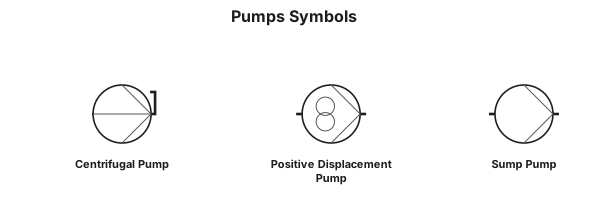
Draw Figure 1.11 "Pumps Symbols" as a professional black-and-white P&ID engineering diagram. Show these three pump types vertically: 1. Centrifugal Pump 2. Positive Displacement Pump 3. Sump Pump For each pump, draw its standard P&ID pump symbol next to the name. Use accurate engineering symbols, thin black lines, white background, centered layout, and clear labels. No colors, no 3D effects, no artistic style.

periodic table of elements
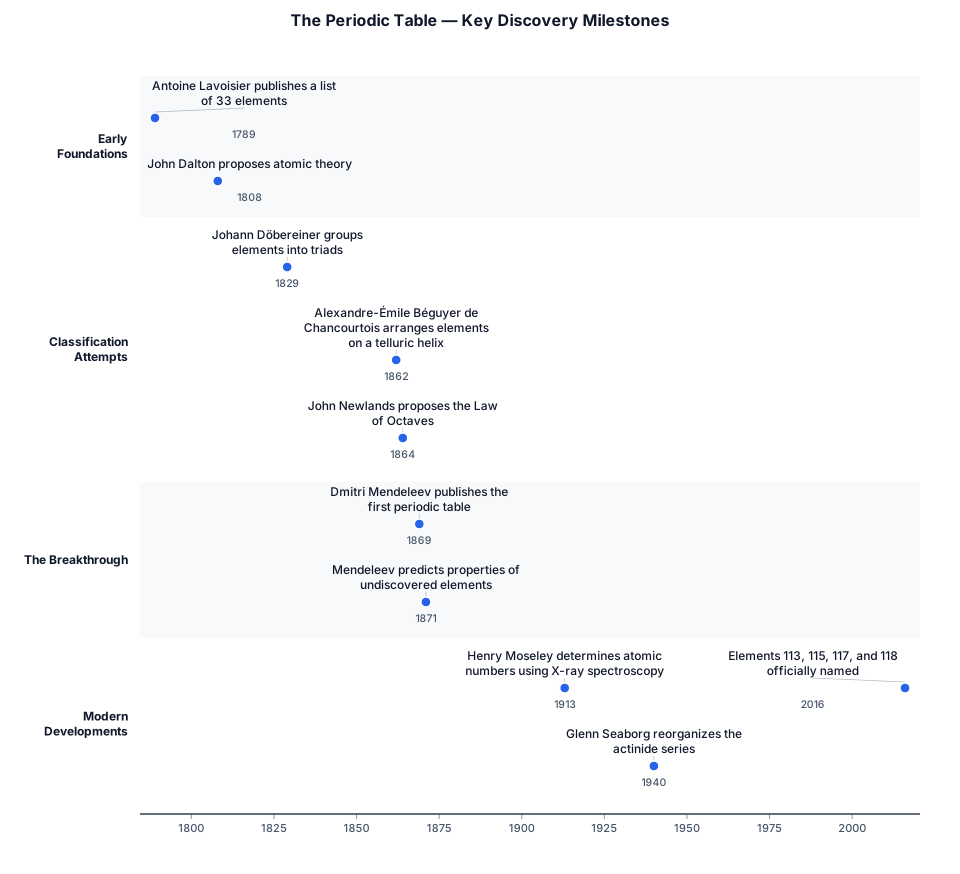
periodic table
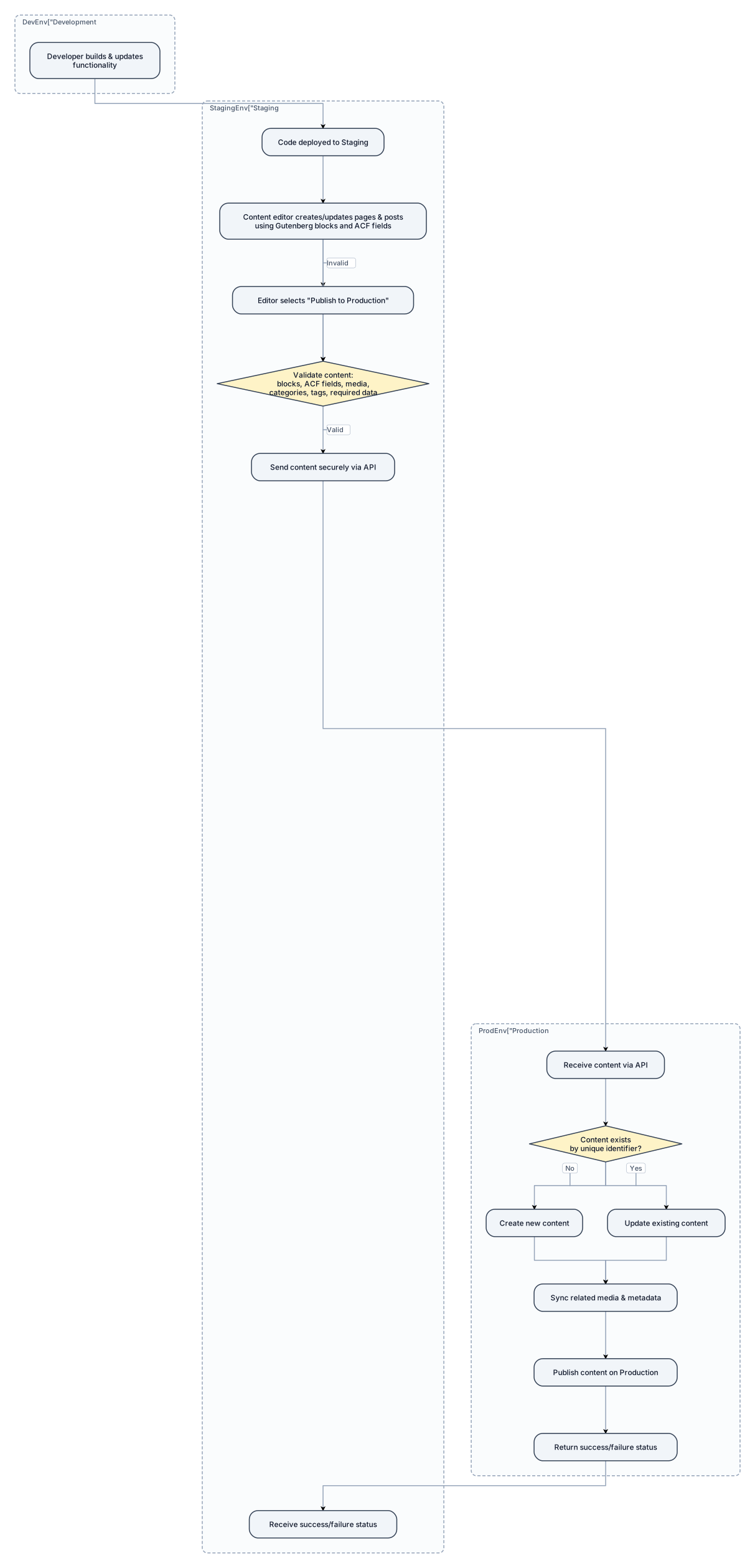
Create a simple, professional system flow diagram for a WordPress website built using ACF (Advanced Custom Fields) and Gutenberg blocks. The website has three environments: * Development * Staging * Production Show the typical content publishing workflow: 1. Developer builds and updates WordPress functionality in Development. 2. Code changes are deployed from Development to Staging. 3. Content editors create or update pages/posts in Staging using Gutenberg blocks and ACF fields. 4. The content editor selects a "Publish to Production" action. 5. The system validates the content, including Gutenberg blocks, ACF fields, featured images, media, categories, tags, and other required data. 6. The system securely sends the content to the Production WordPress website through an API. 7. Production checks whether the content already exists using a unique identifier. 8. If the content does not exist, create it. 9. If the content already exists, update it. 10. Sync related media and required metadata. 11. Publish the content on Production. 12. Return a success or failure status to the Staging environment. Clearly separate the Development, Staging, and Production environments. Show that code deployment and content publishing are two separate flows. Keep the diagram simple and understandable for both technical and non-technical stakeholders.
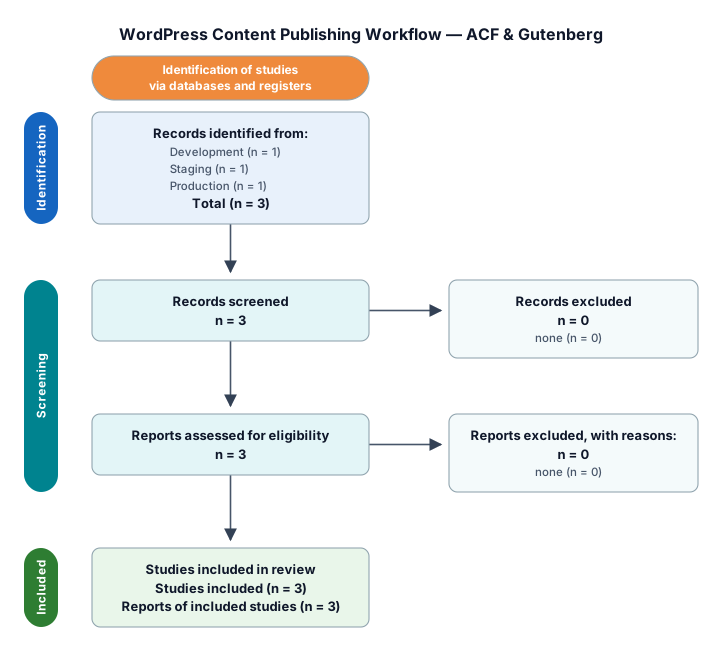
Create a simple, professional system flow diagram for a WordPress website built using ACF (Advanced Custom Fields) and Gutenberg blocks. The website has three environments: * Development * Staging * Production Show the typical content publishing workflow: 1. Developer builds and updates WordPress functionality in Development. 2. Code changes are deployed from Development to Staging. 3. Content editors create or update pages/posts in Staging using Gutenberg blocks and ACF fields. 4. The content editor selects a "Publish to Production" action. 5. The system validates the content, including Gutenberg blocks, ACF fields, featured images, media, categories, tags, and other required data. 6. The system securely sends the content to the Production WordPress website through an API. 7. Production checks whether the content already exists using a unique identifier. 8. If the content does not exist, create it. 9. If the content already exists, update it. 10. Sync related media and required metadata. 11. Publish the content on Production. 12. Return a success or failure status to the Staging environment. Clearly separate the Development, Staging, and Production environments. Show that code deployment and content publishing are two separate flows. Keep the diagram simple and understandable for both technical and non-technical stakeholders.
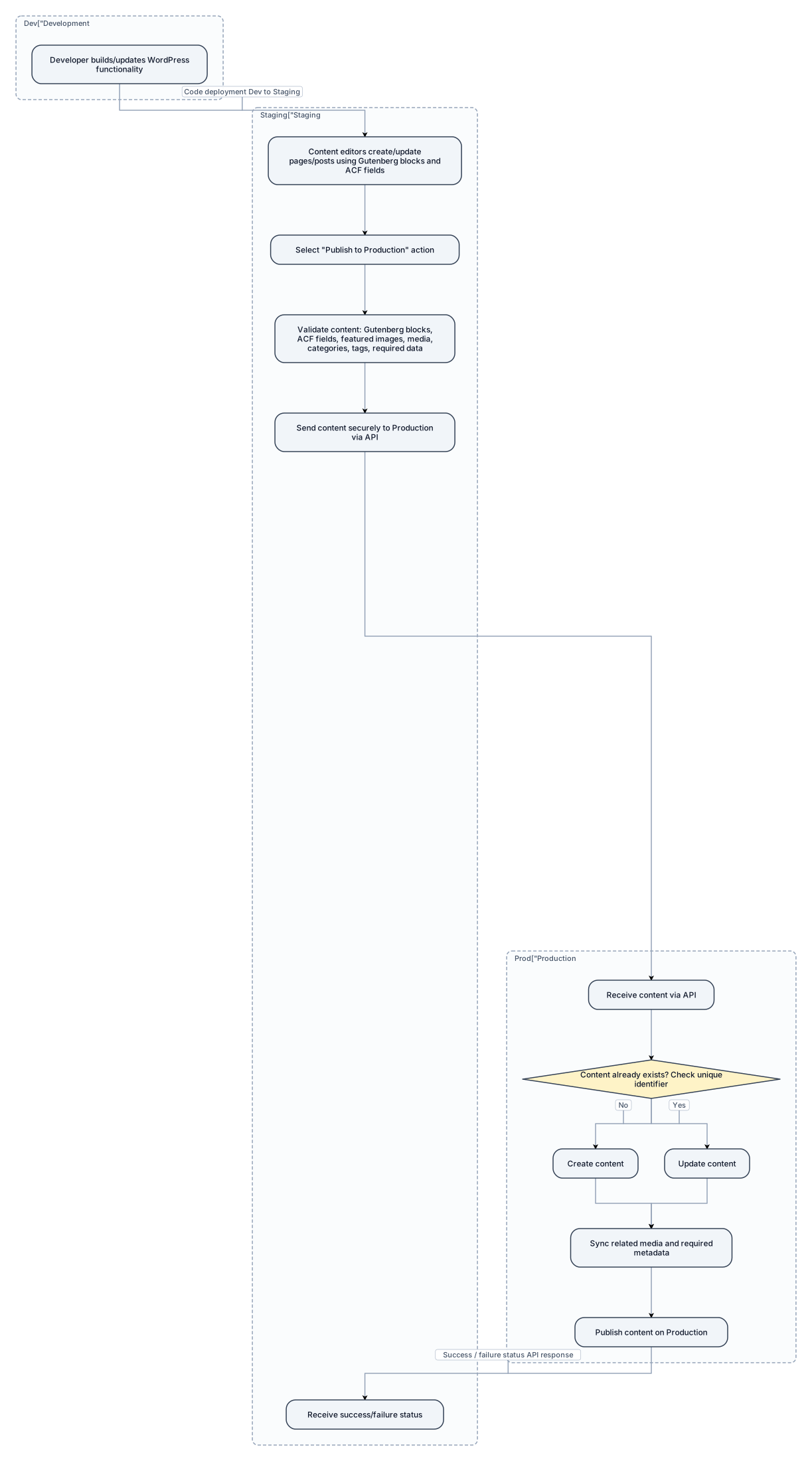
Create a simple, professional system flow diagram for a WordPress website built using ACF (Advanced Custom Fields) and Gutenberg blocks. The website has three environments: * Development * Staging * Production Show the typical content publishing workflow: 1. Developer builds and updates WordPress functionality in Development. 2. Code changes are deployed from Development to Staging. 3. Content editors create or update pages/posts in Staging using Gutenberg blocks and ACF fields. 4. The content editor selects a "Publish to Production" action. 5. The system validates the content, including Gutenberg blocks, ACF fields, featured images, media, categories, tags, and other required data. 6. The system securely sends the content to the Production WordPress website through an API. 7. Production checks whether the content already exists using a unique identifier. 8. If the content does not exist, create it. 9. If the content already exists, update it. 10. Sync related media and required metadata. 11. Publish the content on Production. 12. Return a success or failure status to the Staging environment. Clearly separate the Development, Staging, and Production environments. Show that code deployment and content publishing are two separate flows. Keep the diagram simple and understandable for both technical and non-technical stakeholders.

Create a clean technical engineering drawing on a white background showing these pipe fitting symbols: 1. Union 2. Cross 3. Plug 4. Cap 5. 90° Elbow 6. 45° Elbow 7. Reducer 8. Flange in pipeline 9. Duplex inline strainer 10. Y-type strainer 11. Spectacle Blind – Open 12. Spectacle Blind – Closed Use simple black lines only, like a hand-drawn Microsoft Paint technical drawing. Each symbol must be clearly separated and labeled with its exact name. No colors, no 3D effects, no artistic styling. Make the symbols technically recognizable as standard process piping / P&ID fitting symbols. Arrange them neatly in rows.
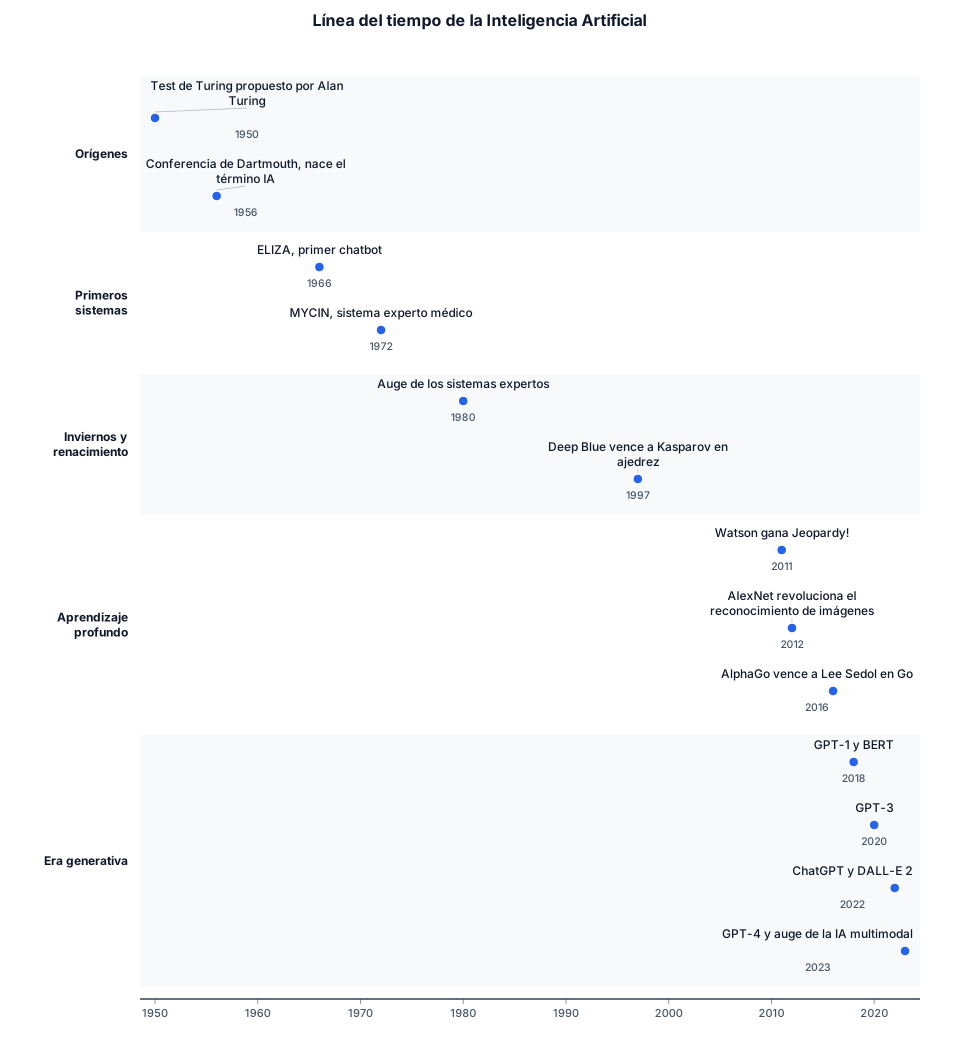
Quiero una línea del tiempo de la inteligencia artificial
Create a professional academic layered conceptual framework. Title: Layered Model: AI-Assisted Legal Reasoning and Human Review Create exactly three large horizontal layers stacked vertically. TOP LAYER: Human Judicial Review & Normative Justification MIDDLE LAYER: Explainable AI (XAI) Interface Divide the middle layer into three sections: 1. Feature Importance 2. Counterfactual Reasoning 3. Post-hoc Justification At the bottom of the middle layer show: Jurisdiction | Counterfactual | Procedural Fairness BOTTOM LAYER: Distributed AI Systems & Global Data Inside the bottom layer show: Multi-local Data Dispersion Algorithmic Legal Pluralism ARROWS: Three upward arrows must go from the bottom layer to: 1. Jurisdiction 2. Counterfactual 3. Procedural Fairness One upward arrow must connect: Explainable AI (XAI) Interface to Human Judicial Review & Normative Justification Add a small note near the top: Connecting Factors (domicile, place of harm) Use a clean academic style with navy blue, gold, grey and light blue. Use rectangular horizontal layers. Keep all text editable and clearly readable. The final output must be suitable for a research paper and exportable as SVG.
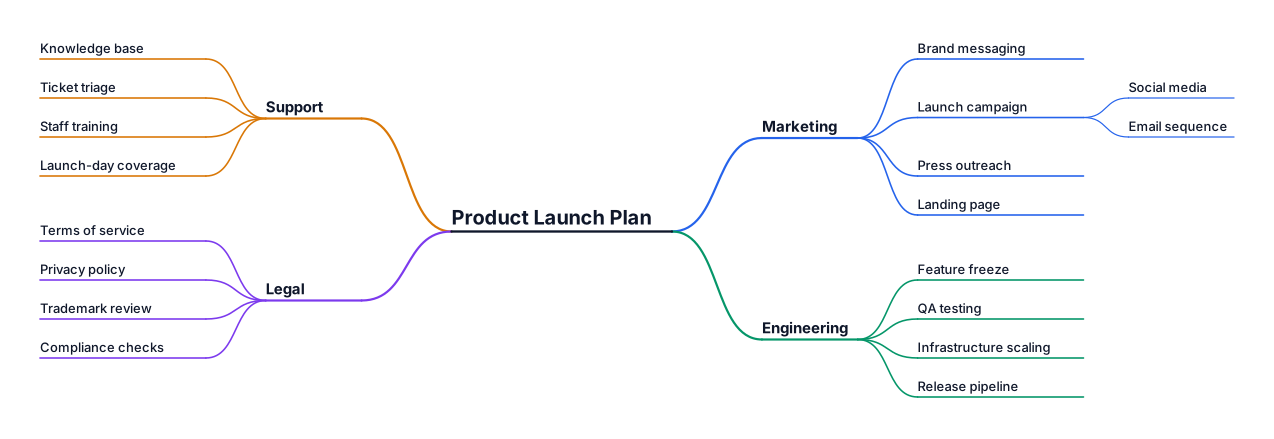
A mind map for planning a product launch, branching into marketing, engineering, support, and legal
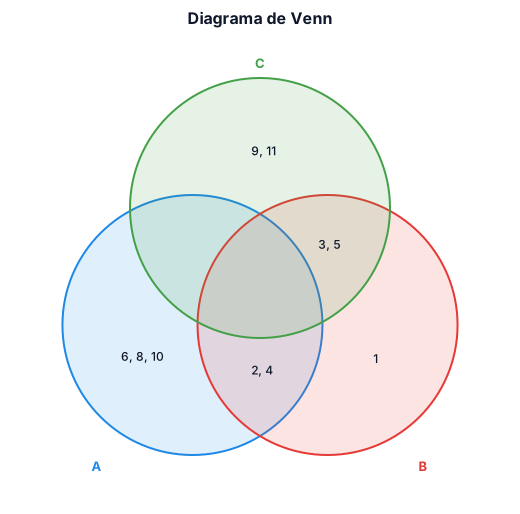
Crea un diagrama de Venn con los siguientes conjuntos A = {2,4,6,8,10} B = {1,2,3,4,5} C = {3,5,9,11}
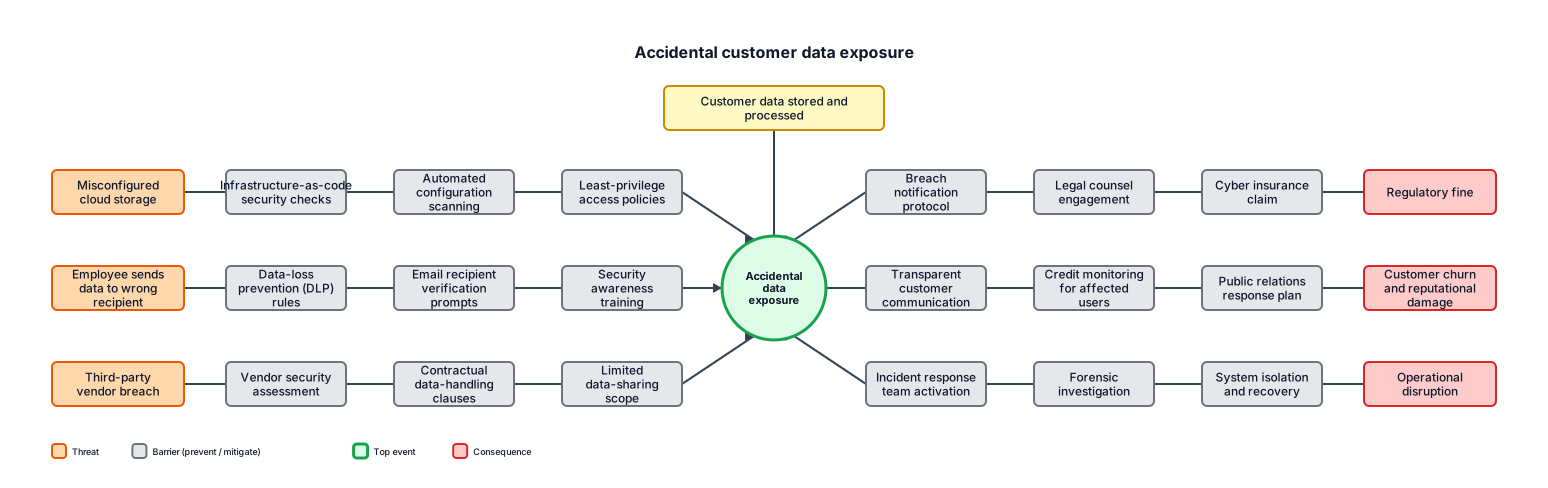
A bowtie analysis for accidental customer data exposure, including preventive controls, consequences, and recovery controls las 8 etapas del proceso de compra industrial al 2026.
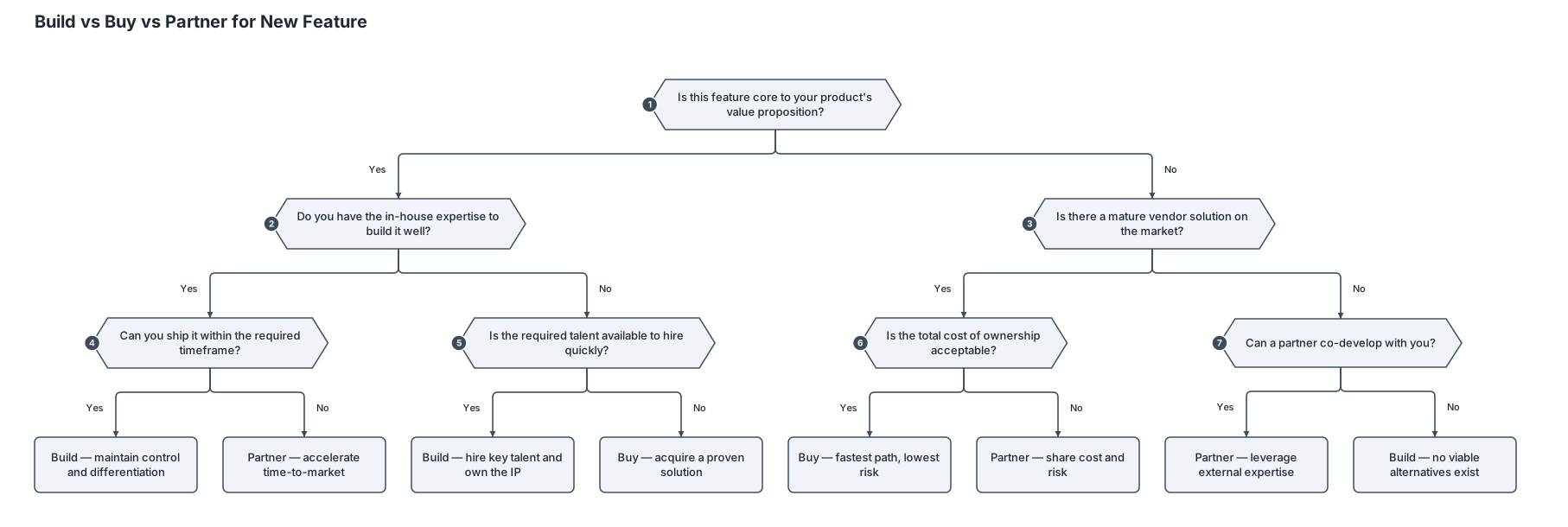
A decision tree for whether a startup should build, buy, or partner for a new feature
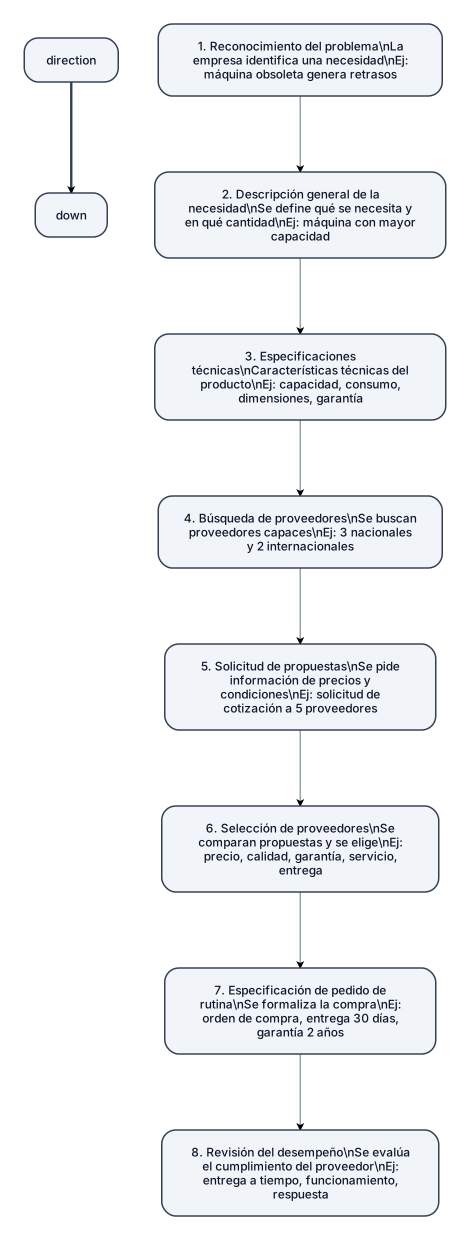
Haz un gráfico de “las 8 etapas del proceso de compra industrial al 2026” 1. Reconocimiento del problema: La empresa identifica una necesidad que debe resolver mediante una compra. Ejemplo 2026: una fábrica detecta que una máquina de producción está quedando obsoleta y genera retrasos. 2. Descripción general de la necesidad: Se define qué se necesita y en qué cantidad. Ejemplo: la empresa determina que necesita una máquina con mayor capacidad para aumentar su producción. 3. Especificaciones técnicas: Se establecen las características técnicas que debe cumplir el producto. Ejemplo: capacidad de producción, consumo eléctrico, dimensiones, materiales, garantía y nivel de automatización. 4. Búsqueda de proveedores: La empresa busca proveedores capaces de ofrecer el producto requerido. Actualmente puede utilizar directorios empresariales, contactos comerciales e Internet. Ejemplo: identifica tres proveedores nacionales y dos internacionales. 5. Solicitud de propuestas: Se solicita a los proveedores información sobre precios, características, entrega y condiciones de venta. Ejemplo: la empresa envía una solicitud de cotización a los cinco proveedores seleccionados. 6. Selección de proveedores: Se comparan las propuestas y se elige el proveedor o proveedores que cumplen con los requisitos establecidos. Ejemplo: se comparan precio, calidad, garantía, servicio técnico y tiempo de entrega. 7. Especificación de pedido de rutina: Se formaliza la compra indicando cantidades, especificaciones, precio, fecha de entrega, garantía y condiciones acordadas. Ejemplo: se emite una orden de compra por una máquina, estableciendo entrega en 30 días y garantía de dos años. 8. Revisión del desempeño: Después de la compra, la empresa evalúa si el proveedor cumplió con lo acordado. Ejemplo: se revisa si la máquina llegó a tiempo, funciona correctamente y si el proveedor respondió adecuadamente ante cualquier inconveniente.