
Parasitic infections can be transmitted through: Oral transmission Skin transmission Vector transmission Direct transmission Vertical transmission Iatrogenic transmission
NODE ARCHIVE · REAL DIAGRAM BRIEFS
Diagram Examples from Real Visitor Prompts
Browse eligible diagrams shared by FreeDiagram visitors, inspect the exact prompts, and build your own version.
Browse 3278 real creationsCOMMUNITY OUTPUTS · EXACT PROMPTS
Main diagram studio
Showing 577–600 of 1260. No stock examples or system defaults. Choose a tool, study a real result, then reopen its prompt as your starting point.
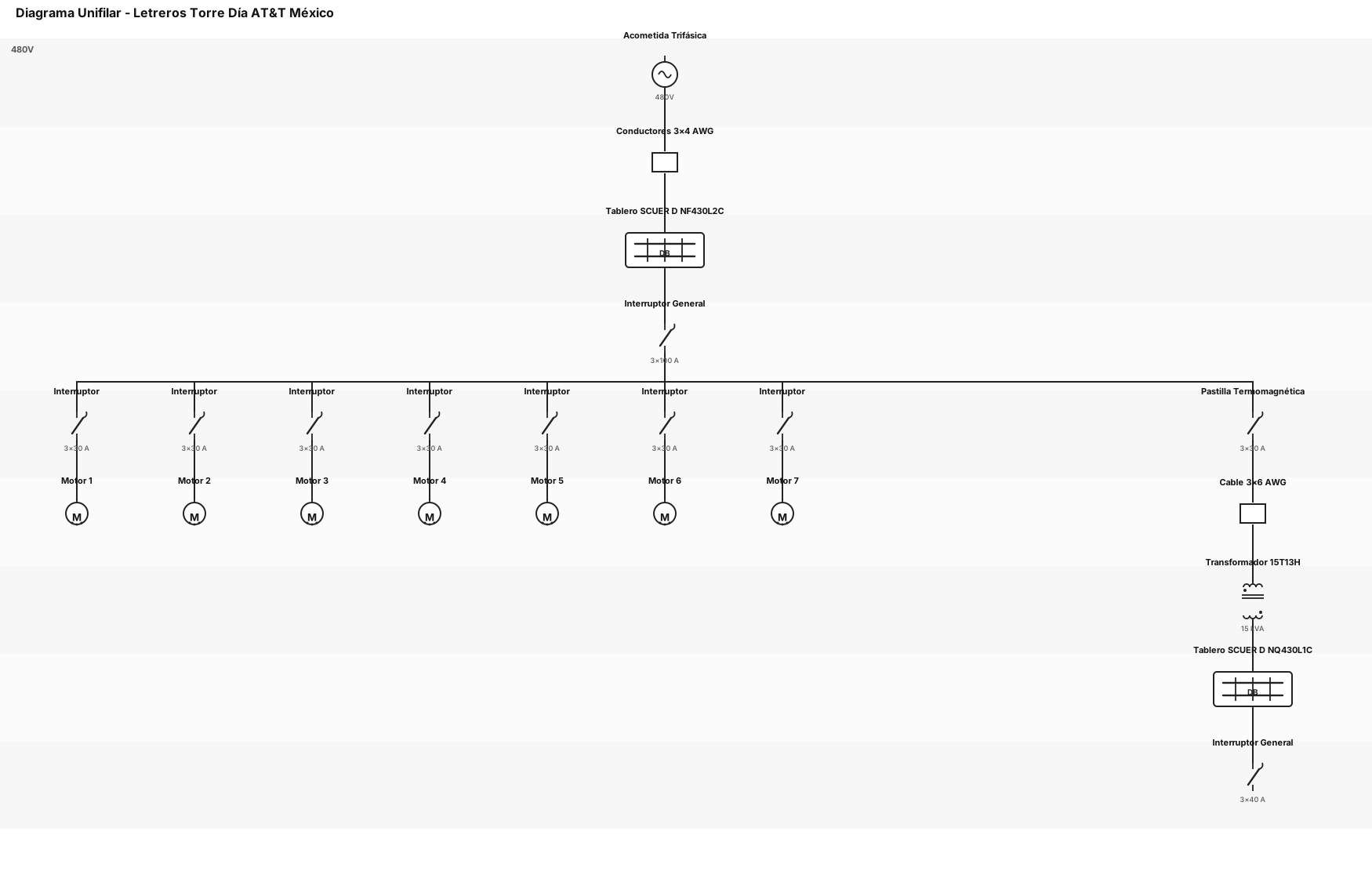
DIAGRAMA UNIFILAR DE LOS LETREROS DEL DE TORRE DIA AT&T MEXICO: SE ALIMENTA CON UN SISTEMA TRIFASICO A 480V CON UN CONDUCTOS DE 3X4AWG, ALIMENTA UN TABLERO DE DISTRIBUCION SCUER D MODELO NF430L2C. CON UN INTERRUPTOR GENERAL DE 3X100 A, CON 8 CIRCUTOS 7 DE ELLOS ALIMENTA MOTORES CON INTERRUPTORES DE 3X30A Y UNO ALIMENTA UN TRASFORMADOR MODELO 15T13H DE UNA CAPACIDAD DE 15KVA, CON UNA PASTILLA TERMOMAGNETICA DE 30AMPERES CON CABLE 3X6AWG, EL SECUNDARIO DEL TRASFORMADOR ALIMENTA UN TABLARO DE DISTRIBUCION SCUER D MODELO NQ430L 1C, CON INTERRUPTOR GENERAL DE 3X40AMPERES
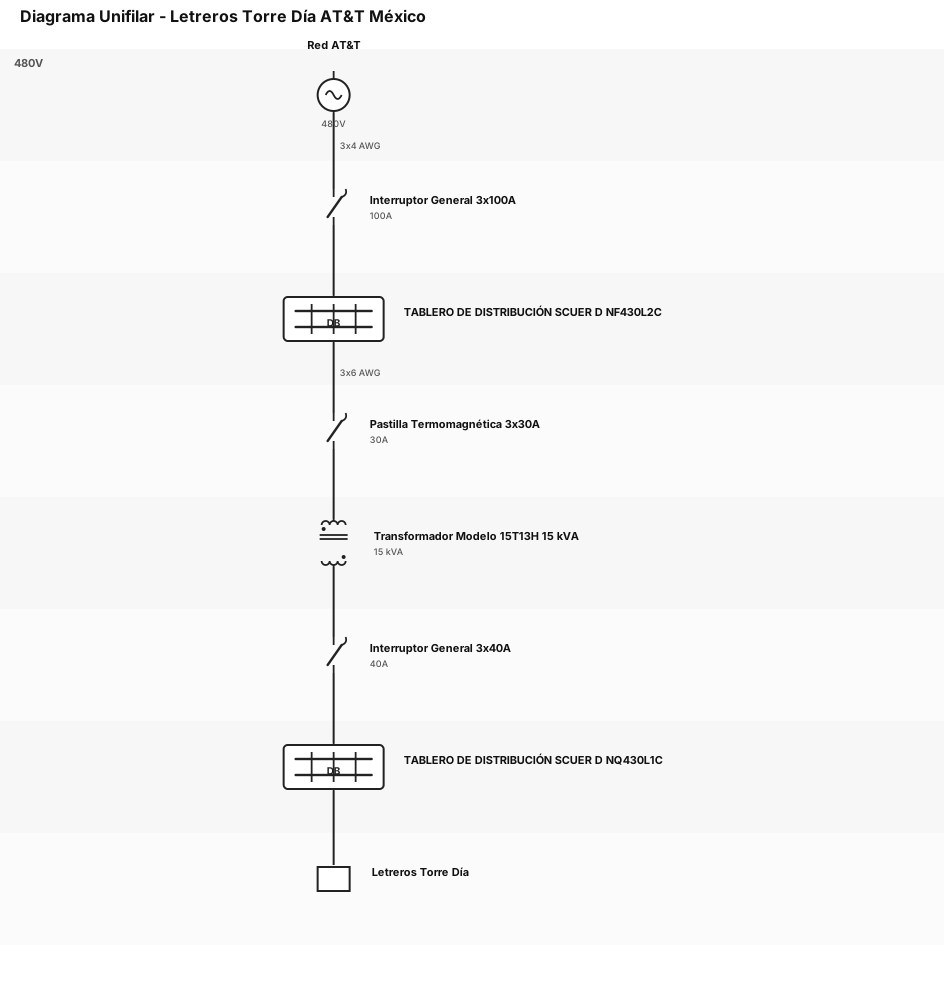
DIAGRAMA UNIFILAR DE LOS LETREROS DEL DE TORRE DIA AT&T MEXICO: SE ALIMENTA CON UN SISTEMA TRIFASICO A 480V CON UN CONDUCTOS DE 3X4AWG, ALIMENTA UN TABLERO DE DISTRIBUCION SCUER D MODELO NF430L2C. CON UN INTERRUPTOR GENERAL DE 3X100 A Y DE AHI SE ALIMENTA UN TRASFORMADOR MODELO 15T13H DE UNA CAPACIDAD DE 15KVA, CON UNA PASTILLA TERMOMAGNETICA DE 30AMPERES CON CABLE 3X6AWG, EL SECUNDARIO DEL TRASFORMADOR ALIMENTA UN TABLARO DE DISTRIBUCION SCUER D MODELO NQ430L 1C, CON INTERRUPTOR GENERAL DE 3X40AMPERES
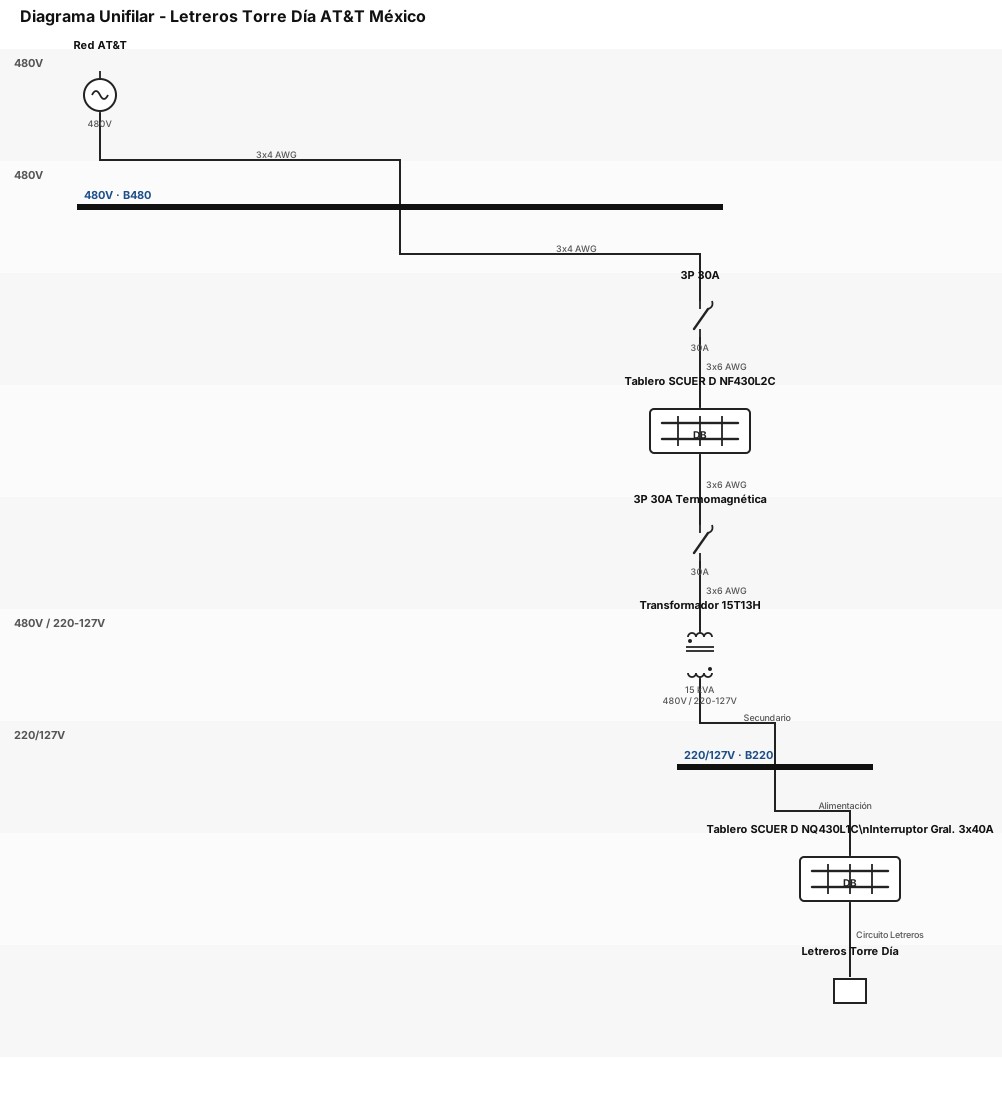
DIAGRAMA UNIFILAR DE LOS LETREROS DEL DE TORRE DIA AT&T MEXICO: SE ALIMENTA CON UN SISTEMA TRIFASICO A 480V CON UN CONDUCTOS DE 3X4AWG, ALIMENTA UN TABLERO DE DISTRIBUCION SCUER D MODELO NF430L2C. DE AHI SE ALIMENTA UN TRASFORMADOR MODELO 15T13H DE UNA CAPACIDAD DE 15KVA, CON UNA PASTILLA TERMOMAGNETICA DE 30AMPERES CON CABLE 3X6AWG, EL SECUNDARIO DEL TRASFORMADOR ALIMENTA UN TABLARO DE DISTRIBUCION SCUER D MODELO NQ430L 1C, CON INTERRUPTOR GENERAL DE 3X40AMPERES
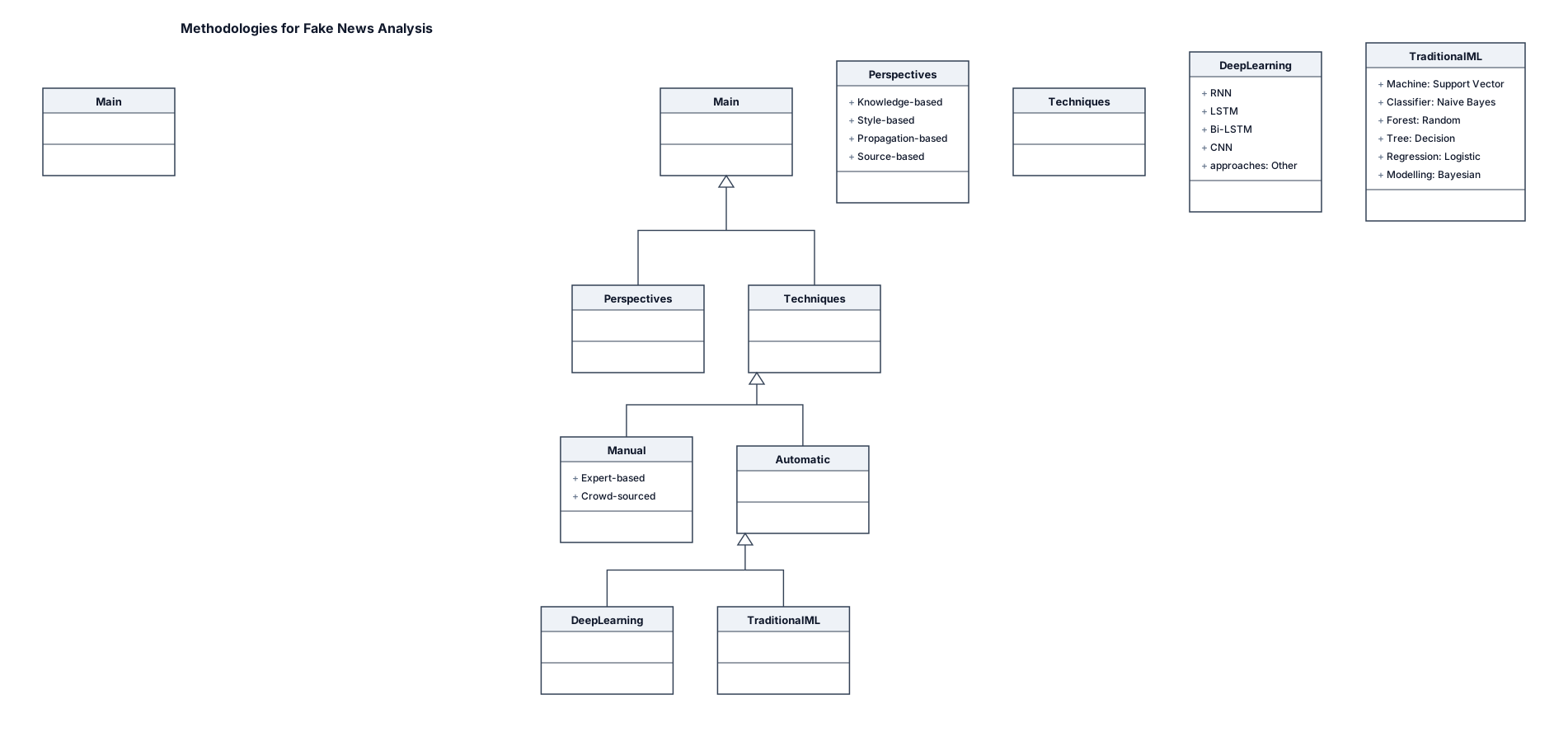
A UML class diagram for an Create a clean academic research-paper classification flowchart titled “Methodologies for Fake News Analysis”. Use a simple black-and-white academic style, similar to a research paper figure. Use rectangular boxes, thin black borders, short connecting lines and downward arrows. Keep the layout compact, organized and hierarchical. At the top, place one main box: “Methodologies for Fake News Analysis”. From this box, create two main branches: 1. Perspectives to Study Fake News Knowledge-based Style-based Propagation-based Source-based 2. Techniques to Detect Fake News Divide this into: Manual Expert-based Crowd-sourced Automatic Divide Automatic into: Deep Learning-based RNN LSTM Bi-LSTM CNN Other approaches Traditional Machine Learning-based Support Vector Machine Naive Bayes Classifier Random Forest Decision Tree Logistic Regression Bayesian Modelling Arrange the branches exactly like a tree/classification diagram, with the main title at the top and categories below it. Keep all text clearly readable. Do not use 3D effects, icons, illustrations, gradients, decorative graphics or unnecessary colors. Make it look like a professional academic research-paper figure suitable for a PowerPoint presentation. Ensure that every label is spelled correctly and no content is omitted or added.
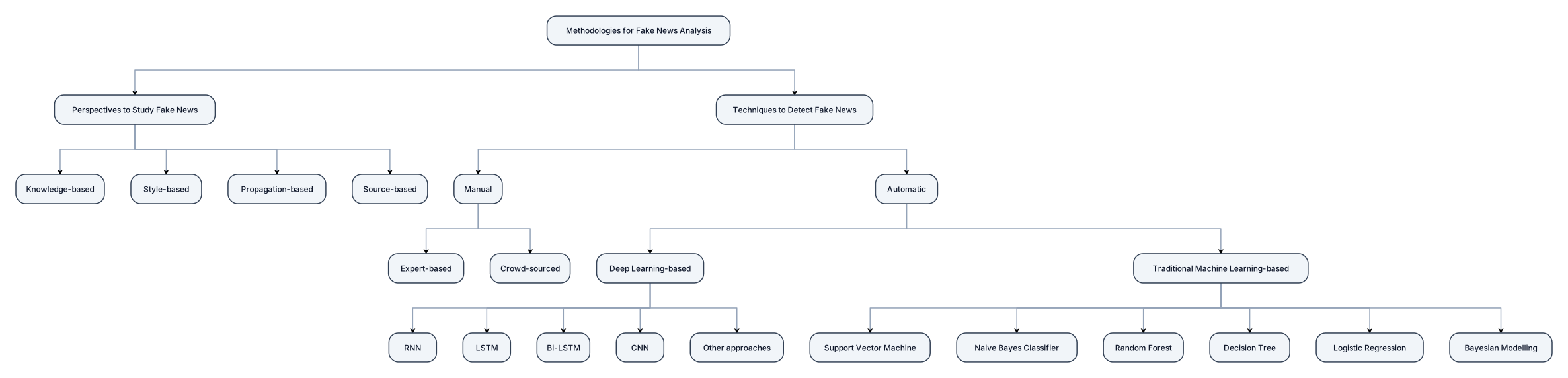
Create a clean academic research-paper classification flowchart titled “Methodologies for Fake News Analysis”. Use a simple black-and-white academic style, similar to a research paper figure. Use rectangular boxes, thin black borders, short connecting lines and downward arrows. Keep the layout compact, organized and hierarchical. At the top, place one main box: “Methodologies for Fake News Analysis”. From this box, create two main branches: 1. Perspectives to Study Fake News Knowledge-based Style-based Propagation-based Source-based 2. Techniques to Detect Fake News Divide this into: Manual Expert-based Crowd-sourced Automatic Divide Automatic into: Deep Learning-based RNN LSTM Bi-LSTM CNN Other approaches Traditional Machine Learning-based Support Vector Machine Naive Bayes Classifier Random Forest Decision Tree Logistic Regression Bayesian Modelling Arrange the branches exactly like a tree/classification diagram, with the main title at the top and categories below it. Keep all text clearly readable. Do not use 3D effects, icons, illustrations, gradients, decorative graphics or unnecessary colors. Make it look like a professional academic research-paper figure suitable for a PowerPoint presentation. Ensure that every label is spelled correctly and no content is omitted or added.
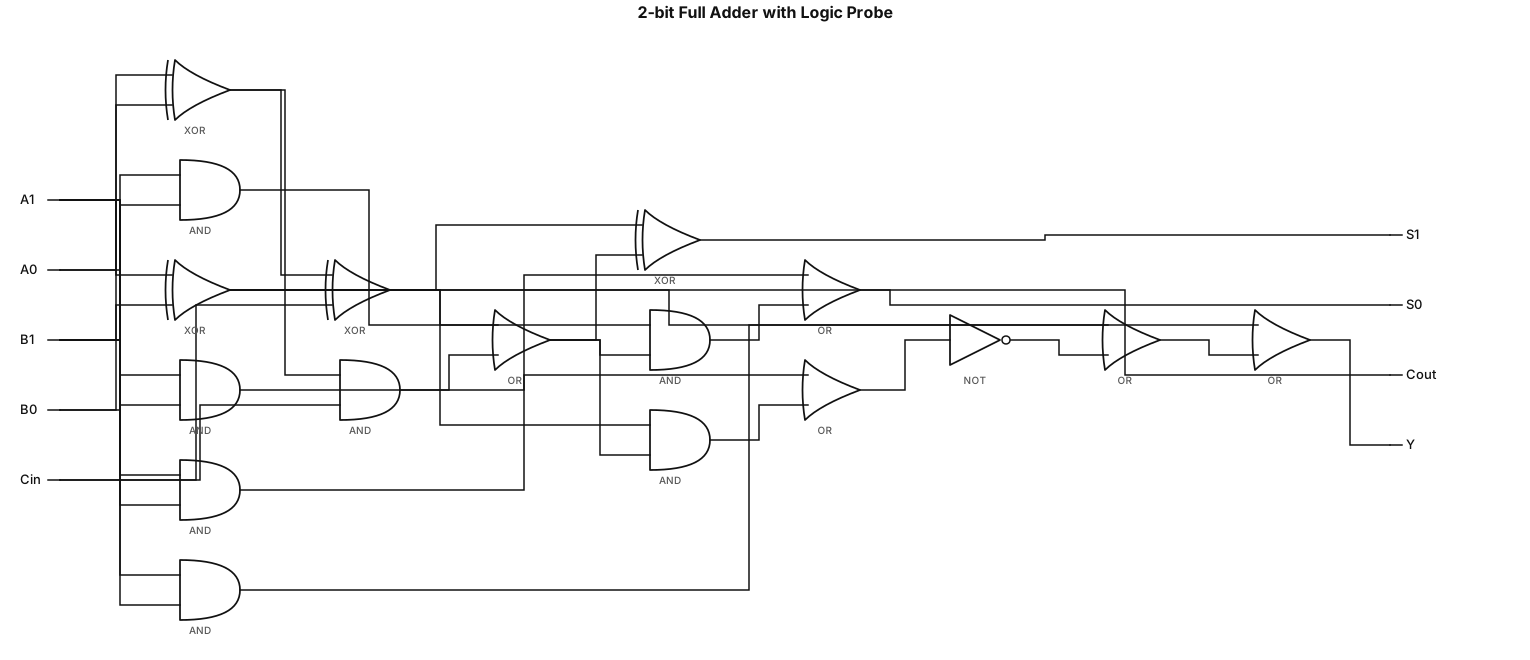
A logic gate circuit for a 2-bit full adder using AND, OR, and XOR gates, LOGICPROBE y = x₁·x₂ + overline(x₃ + overline(x₂·x₃) + x₁·x₂)

Top level: Environmental Sustainability Criteria Main criteria: Six main criteria must be arranged in a single horizontal row directly below the top-level box: GHG (Greenhouse Gases) Emissions (C1) Energy (C2) Waste (C3) Water (C4) Workplaces & Ecosystems (C5) Management (C6) CRITICAL LAYOUT REQUIREMENT: Each main criterion must have its own vertical stack of subcriteria directly underneath it. Do NOT place all subcriteria in one horizontal row. Do NOT align subcriteria from different main criteria with each other. Each subcriterion must remain within the column of its corresponding main criterion. C1 column: Emissions Inventory Reporting (C11) Operational Emissions Reduction and Compensation (C12) Decarbonizing the Supply Chain (C13) C2 column: Reducing Energy Consumption (C21) Energy Efficiency (C22) Renewable Energy Integration (C23) C3 column: Effective Waste Diversion (C31) Data Center Hardware (C32) C4 column: Water Consumption for Resource Conservation (C41) Water Discharge (C42) C5 column: Green Building Certifications (C51) Sustainable Commuting Infrastructure (C52) C6 column: ISO 14001 (Environmental Management System) Compliance (C61) ISO 50001 (Energy Management System) Compliance (C62) The hierarchy must visually follow this exact pattern: Environmental Sustainability Criteria ↓ Six main criteria arranged horizontally ↓ Each main criterion has its own independent vertical column of subcriteria Use straight, thin connector lines. The connector from each main criterion should branch downward to its own subcriteria. Keep each column clearly separated from the neighboring columns.

Follow the reference image EXACTLY for the layout, box positions, hierarchy, connector lines, spacing, and overall composition. Top level: Environmental Sustainability Criteria Six main criteria in one horizontal row: GHG (Greenhouse Gases) Emissions (C1) Energy (C2) Waste (C3) Water (C4) Workplaces & Ecosystems (C5) Management (C6) Subcriteria: C1: Emissions Inventory Reporting (C11) Operational Emissions Reduction and Compensation (C12) Decarbonizing the Supply Chain (C13) C2: Reducing Energy Consumption (C21) Energy Efficiency (C22) Renewable Energy Integration (C23) C3: Effective Waste Diversion (C31) Data Center Hardware (C32) C4: Water Consumption for Resource Conservation (C41) Water Discharge (C42) C5: Green Building Certifications (C51) Sustainable Commuting Infrastructure (C52) C6: ISO 14001 (Environmental Management System) Compliance (C61) ISO 50001 (Energy Management System) Compliance (C62) Use one top-center box → six horizontally aligned main-criterion boxes → vertically aligned subcriterion boxes, exactly as shown in the reference image. Use straight, thin, perfectly aligned connector lines. Center all text horizontally and vertically. Use clean rectangular boxes, consistent proportions, academic colors, lighter shades for subcriteria, white background, thin borders, and no icons, shadows, or decorative elements. Preserve the exact wording, criterion codes, hierarchy, relationships, and layout of the reference image. Do not add, remove, rename, or reinterpret any element. The final figure should look like a professional Adobe Illustrator/Inkscape vector figure prepared for direct insertion into an SCI Q1 journal manuscript.

Shoulder Complex Assessment Physiotherapy Notes Highly Detailed
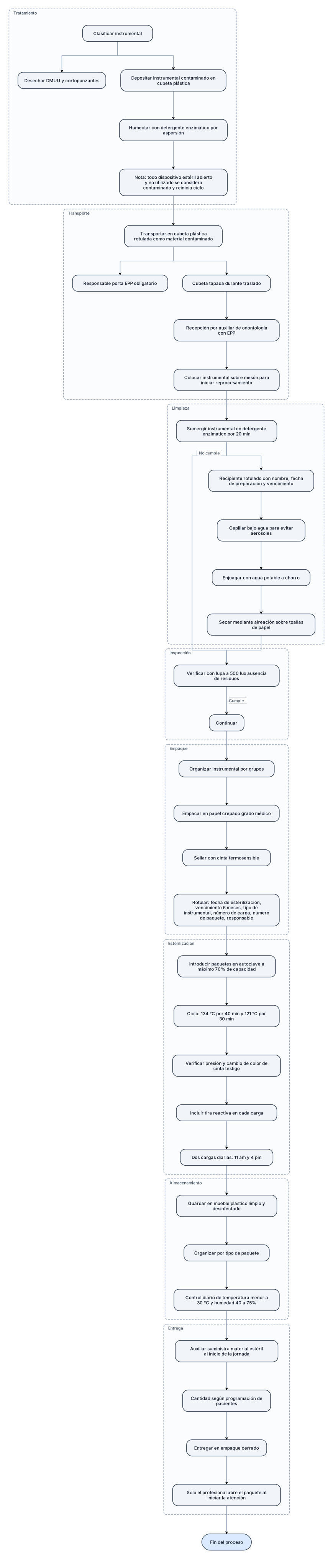
Tratamiento en el punto de uso Clasificar instrumental. Desechar DMUU y cortopunzantes. Depositar instrumental contaminado en cubeta plástica. Humectar con detergente enzimático (aspersión). Nota: todo dispositivo estéril abierto y no utilizado → considerado contaminado → reinicia ciclo. ↓ Transporte y recepción Transportar en cubeta plástica rotulada como “material contaminado”. Responsable porta EPP obligatorio. Cubeta tapada durante traslado. Recepción por auxiliar de odontología con EPP. Colocar instrumental sobre mesón para iniciar reprocesamiento. ↓ Limpieza y descontaminación Sumergir instrumental en detergente enzimático (20 min). Recipiente rotulado con nombre, fecha de preparación y vencimiento. Cepillar bajo agua para evitar aerosoles. Enjuagar con agua potable a chorro. Secar mediante aireación sobre toallas de papel. ↓ Inspección Verificar con lupa (500 lux) ausencia de residuos. Si cumple → continuar. Si no cumple → devolver a limpieza y descontaminación. ↓ Empaque y etiquetado Organizar instrumental por grupos. Empacar en papel crepado grado médico. Sellar con cinta termosensible. Rotular: fecha de esterilización, fecha de vencimiento (6 meses), tipo de instrumental, número de carga, número de paquete, responsable. ↓ Esterilización Introducir paquetes en autoclave (≤70% capacidad). Ciclo: 134 °C / 40 min y 121 °C / 30 min. Verificar presión y cambio de color de cinta testigo. Incluir tira reactiva en cada carga. Dos cargas diarias: 11 am y 4 pm. ↓ Almacenamiento Guardar en mueble plástico limpio y desinfectado. Organizar por tipo de paquete. Control diario de temperatura (<30 °C) y humedad (40–75%). ↓ Entrega Auxiliar suministra material estéril al inicio de la jornada. Cantidad según programación de pacientes. Entregar en empaque cerrado. Solo el profesional abre el paquete al iniciar la atención. ↓ → Fin del proceso
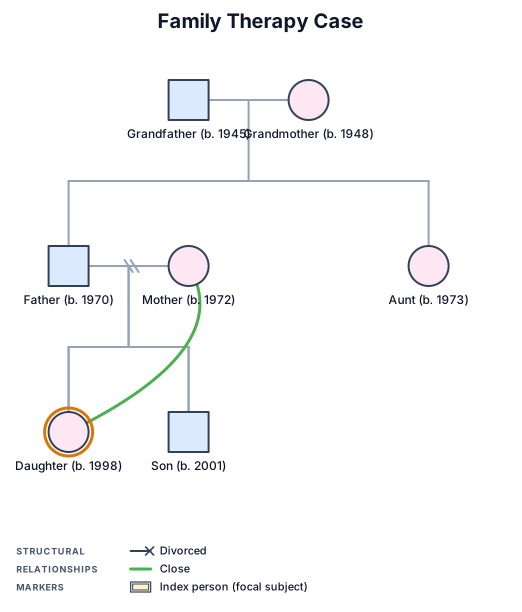
A three-generation genogram for a family therapy case with a divorce and a close mother-daughter bond┌──────────────────────────────┐ │ Publicly Available │ │ Agricultural Dataset │ └──────────────┬───────────────┘ ↓ ┌──────────────────────────────┐ │ Data Preprocessing │ │ • Missing values │ │ • Cleaning │ │ • Feature preparation │ └──────────────┬───────────────┘ ↓ ┌──────────────────────────────┐ │ Feature Selection │ │ Identify relevant parameters │ └──────────────┬───────────────┘ ↓ ┌──────────────────────────────┐ │ Machine Learning Models │ │ DT | RF | SVM | XGBoost │ └──────────────┬───────────────┘ ↓ ┌──────────────────────────────┐ │ Data-Availability Experiments│ │ 100% → 75% → 50% → 25% → 10%│ └──────────────┬───────────────┘ ↓ ┌──────────────────────────────┐ │ Performance Evaluation │ │ Accuracy | F1 | Precision │ │ Recall | ROC-AUC │ └──────────────┬───────────────┘ ↓ ┌──────────────────────────────┐ │ Explainability Analysis │ │ Feature Importance / SHAP │ └──────────────────────────────┘
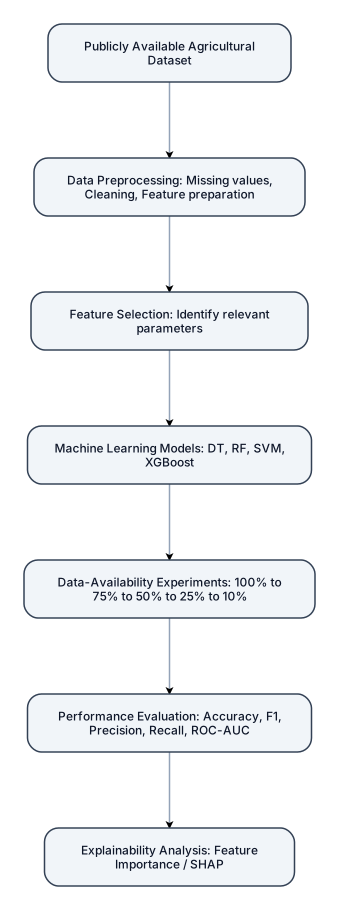
┌──────────────────────────────┐ │ Publicly Available │ │ Agricultural Dataset │ └──────────────┬───────────────┘ ↓ ┌──────────────────────────────┐ │ Data Preprocessing │ │ • Missing values │ │ • Cleaning │ │ • Feature preparation │ └──────────────┬───────────────┘ ↓ ┌──────────────────────────────┐ │ Feature Selection │ │ Identify relevant parameters │ └──────────────┬───────────────┘ ↓ ┌──────────────────────────────┐ │ Machine Learning Models │ │ DT | RF | SVM | XGBoost │ └──────────────┬───────────────┘ ↓ ┌──────────────────────────────┐ │ Data-Availability Experiments│ │ 100% → 75% → 50% → 25% → 10%│ └──────────────┬───────────────┘ ↓ ┌──────────────────────────────┐ │ Performance Evaluation │ │ Accuracy | F1 | Precision │ │ Recall | ROC-AUC │ └──────────────┬───────────────┘ ↓ ┌──────────────────────────────┐ │ Explainability Analysis │ │ Feature Importance / SHAP │ └──────────────────────────────┘
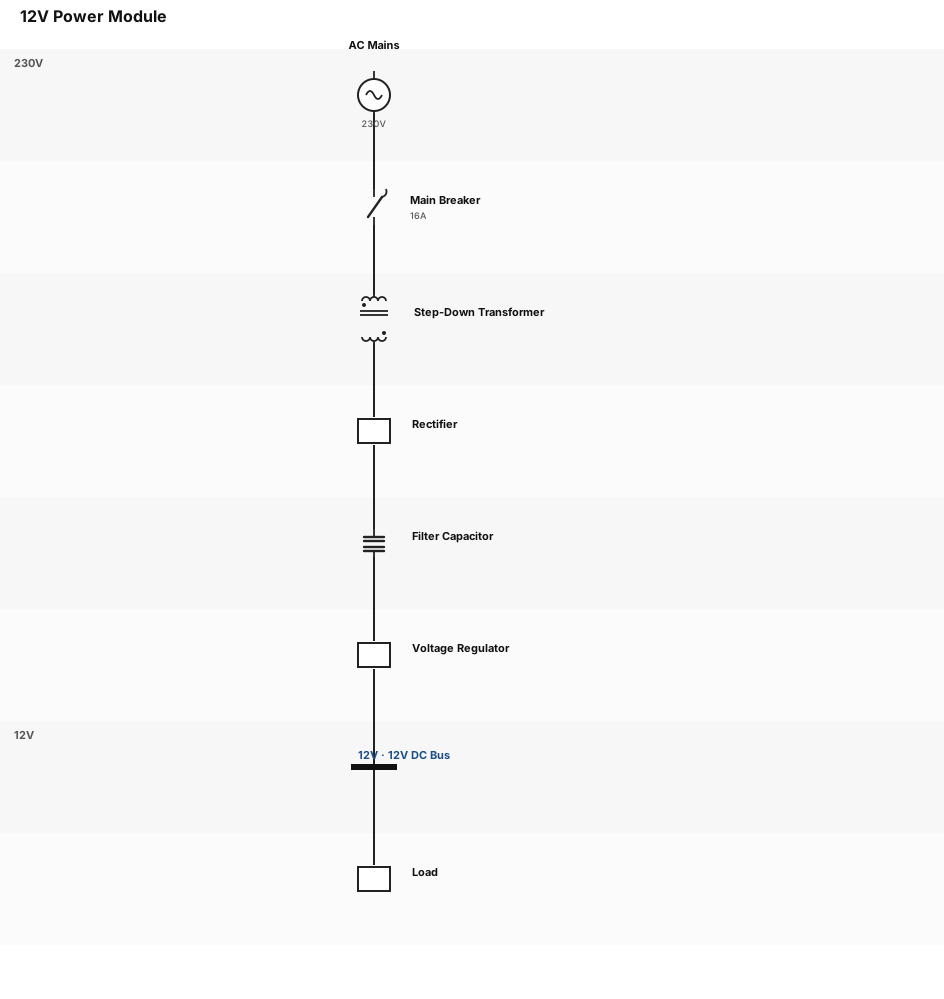
greate a schematic of a power module 12v
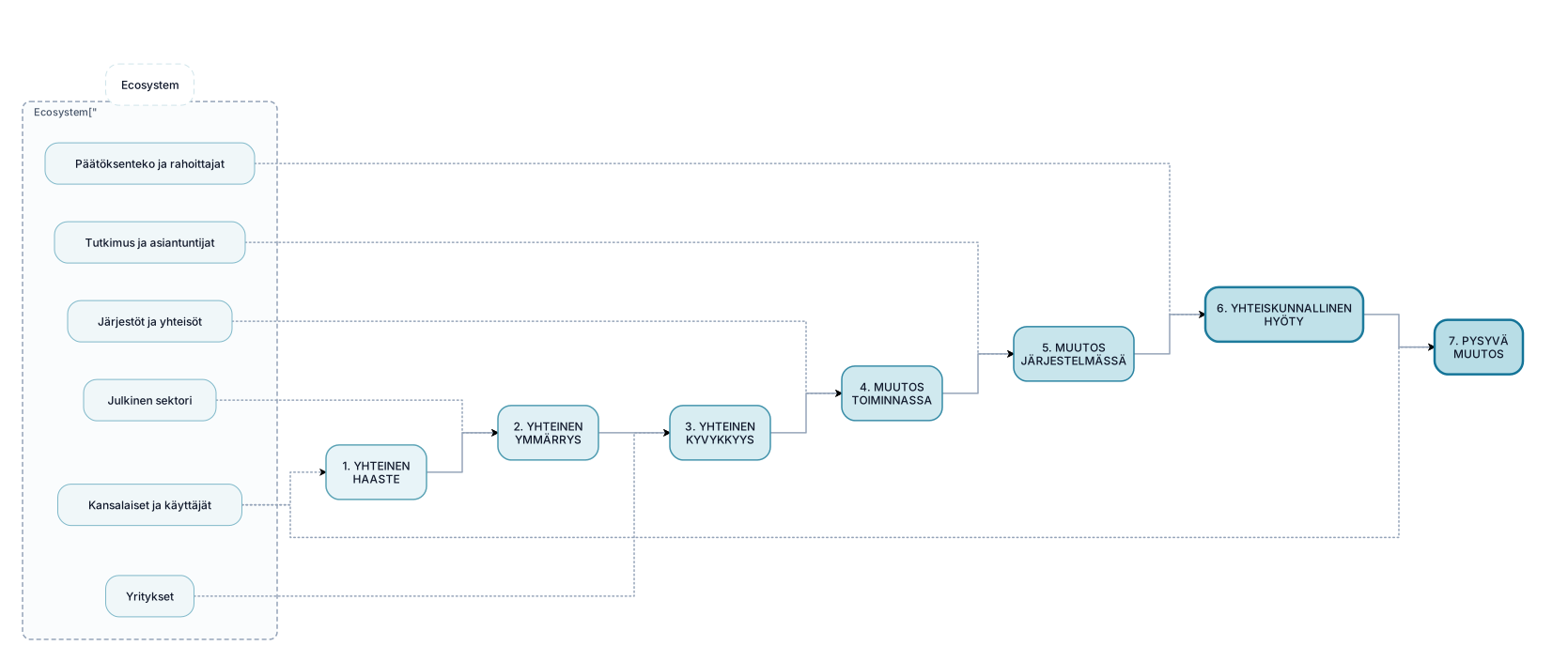
Create a polished, modern Finnish presentation infographic titled: "Yhteiskunnallinen vaikuttavuuspolku ekosysteemissä" The visual should communicate how a societal project creates impact together with an ecosystem. Design a simple, elegant horizontal pathway with 7 large connected stages: 1. YHTEINEN HAASTE 2. YHTEINEN YMMÄRRYS 3. YHTEINEN KYVYKKYYS 4. MUUTOS TOIMINNASSA 5. MUUTOS JÄRJESTELMÄSSÄ 6. YHTEISKUNNALLINEN HYÖTY 7. PYSYVÄ MUUTOS The pathway should flow from left to right with subtle arrows. Around the pathway, visually show the ecosystem as a soft circular or organic surrounding structure. Include these actors: - Kansalaiset ja käyttäjät - Julkinen sektori - Yritykset - Järjestöt ja yhteisöt - Tutkimus ja asiantuntijat - Päätöksenteko ja rahoittajat The ecosystem should visually interact with the entire pathway. Do NOT make the ecosystem a separate list. Emphasize that the project itself does not directly produce societal impact. Instead, the project enables change through collaboration, learning, new capabilities and changes in practices and systems. Visual style: - Scandinavian / Nordic - sophisticated public-sector and research presentation style - minimal and clean - white or very light background - blue, teal and green as the main colors - subtle color progression from left to right - rounded shapes - thin elegant lines - generous whitespace - clear hierarchy - professional sans-serif typography - no 3D effects - no photographs - no decorative illustrations - no unnecessary icons Make "YHTEISKUNNALLINEN HYÖTY" and "PYSYVÄ MUUTOS" slightly more visually prominent than the other stages. 16:9 landscape presentation format. The result should look like a professionally designed PowerPoint slide for a Finnish research, innovation or public-sector organization, not like a generic AI-generated flowchart.
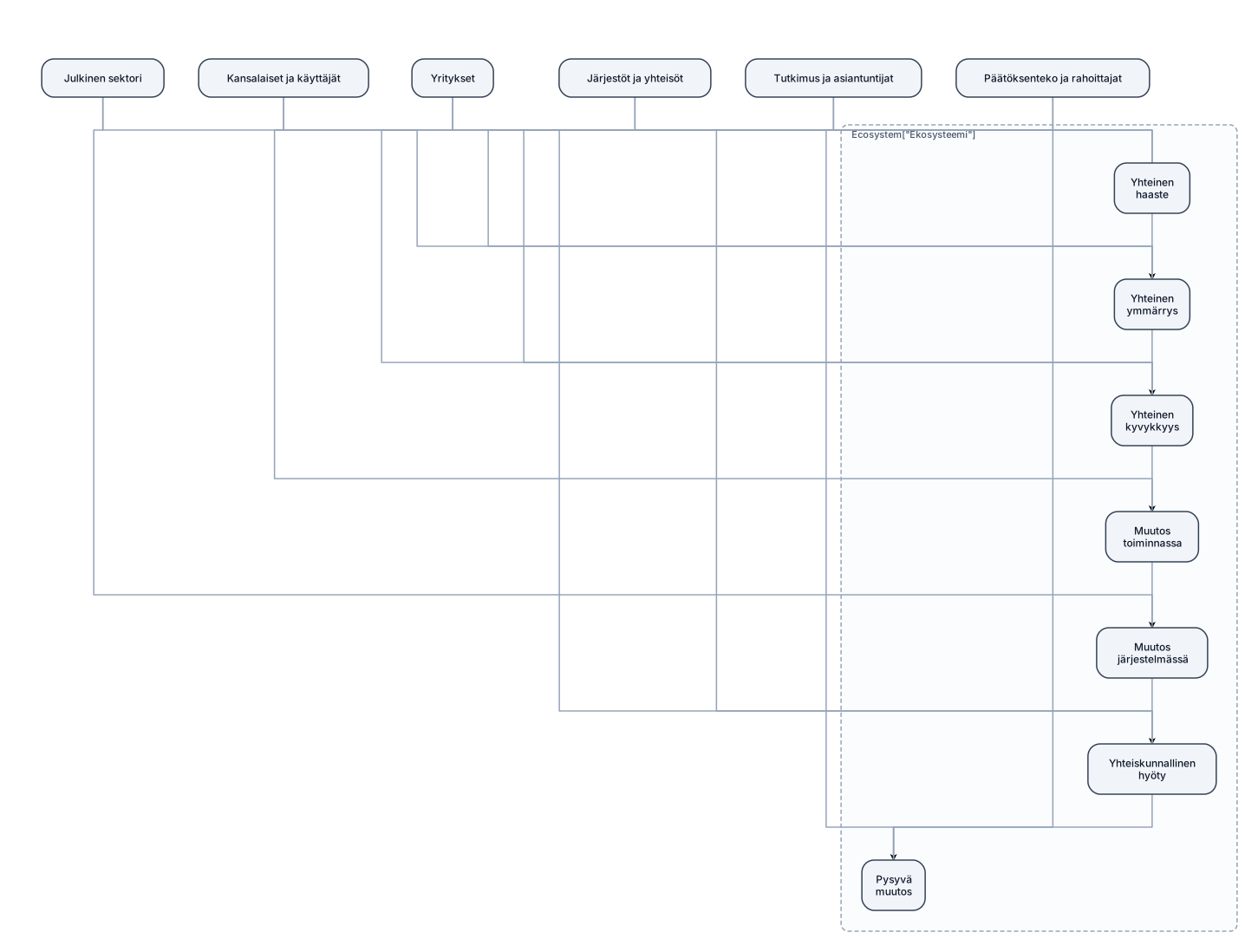
Create a clean, professional infographic showing a societal impact pathway within an ecosystem. The main pathway has seven sequential stages: Yhteinen haaste Yhteinen ymmärrys Yhteinen kyvykkyys Muutos toiminnassa Muutos järjestelmässä Yhteiskunnallinen hyöty Pysyvä muutos Show the seven stages as large connected boxes in the center, with arrows between them. Surround the pathway with ecosystem actors: Kansalaiset ja käyttäjät, Julkinen sektori, Yritykset, Järjestöt ja yhteisöt, Tutkimus ja asiantuntijat, Päätöksenteko ja rahoittajat. The ecosystem actors should surround and interact with the entire pathway rather than appear as a separate linear step.

Nano catalysts offer high surface area, which provides more active sites for dealing with pollutant. It also enhances catalytic activity of decomposition reaction. It is having less size, so increase contact between catalyst and harmful pollutant. It helps in generation of highly reactive hydroxyl ion and superoxide radicals. It can be regenerate and reuse. Few nanocatalyst can utilize light energy to decompose organic matter.

Create a system context diagram titled "SRS High-Level Context Diagram" for a two-sided service marketplace called the Service Request System (SRS). Center box (highlighted/dark blue, bold): "Service Request System (SRS) — Web Portal + Mobile App (Android/iOS)" Surround it with these external entities, connected to the center box with labeled bidirectional arrows: Customer (Service Requester) — top left, green box. Arrow to SRS labeled "Register/Login, Place Service Request, Rate Provider." Arrow back labeled "Bid Results, Confirmations." Service Provider (Vendor) — bottom left, green box. Arrow to SRS labeled "Register, Submit Bid, Accept Request." Arrow back labeled "Job Notifications, Payout." Company Admin (App Owner) — top right, green box. Arrow to SRS labeled "Set Commission %, Manage Categories." Arrow back labeled "Reports, Analytics." Payment Gateway (e.g., Stripe) — middle right, orange box. Arrow to SRS labeled "Charge / Payout Request." Arrow back labeled "Payment Confirmation." Google Maps Platform API — lower right, orange box. Arrow to SRS labeled "Distance / Directions Request." Arrow back labeled "Location / Route Data." Push Notification Service (e.g., Firebase Cloud Messaging) — bottom center, orange box. One-way arrow from SRS labeled "Send Alerts." Style: rounded rectangles, clean modern flat design, green boxes for human actors, orange boxes for external systems/APIs, dark blue for the central system. Use curved or angled arrows so labels don't overlap. make it look aesthetically pleasing and make sure to space out everything so they arent overlapping

Create a system context diagram titled "SRS High-Level Context Diagram" for a two-sided service marketplace called the Service Request System (SRS). Center box (highlighted/dark blue, bold): "Service Request System (SRS) — Web Portal + Mobile App (Android/iOS)" Surround it with these external entities, connected to the center box with labeled bidirectional arrows: Customer (Service Requester) — top left, green box. Arrow to SRS labeled "Register/Login, Place Service Request, Rate Provider." Arrow back labeled "Bid Results, Confirmations." Service Provider (Vendor) — bottom left, green box. Arrow to SRS labeled "Register, Submit Bid, Accept Request." Arrow back labeled "Job Notifications, Payout." Company Admin (App Owner) — top right, green box. Arrow to SRS labeled "Set Commission %, Manage Categories." Arrow back labeled "Reports, Analytics." Payment Gateway (e.g., Stripe) — middle right, orange box. Arrow to SRS labeled "Charge / Payout Request." Arrow back labeled "Payment Confirmation." Google Maps Platform API — lower right, orange box. Arrow to SRS labeled "Distance / Directions Request." Arrow back labeled "Location / Route Data." Push Notification Service (e.g., Firebase Cloud Messaging) — bottom center, orange box. One-way arrow from SRS labeled "Send Alerts." Style: rounded rectangles, clean modern flat design, green boxes for human actors, orange boxes for external systems/APIs, dark blue for the central system. Use curved or angled arrows so labels don't overlap.
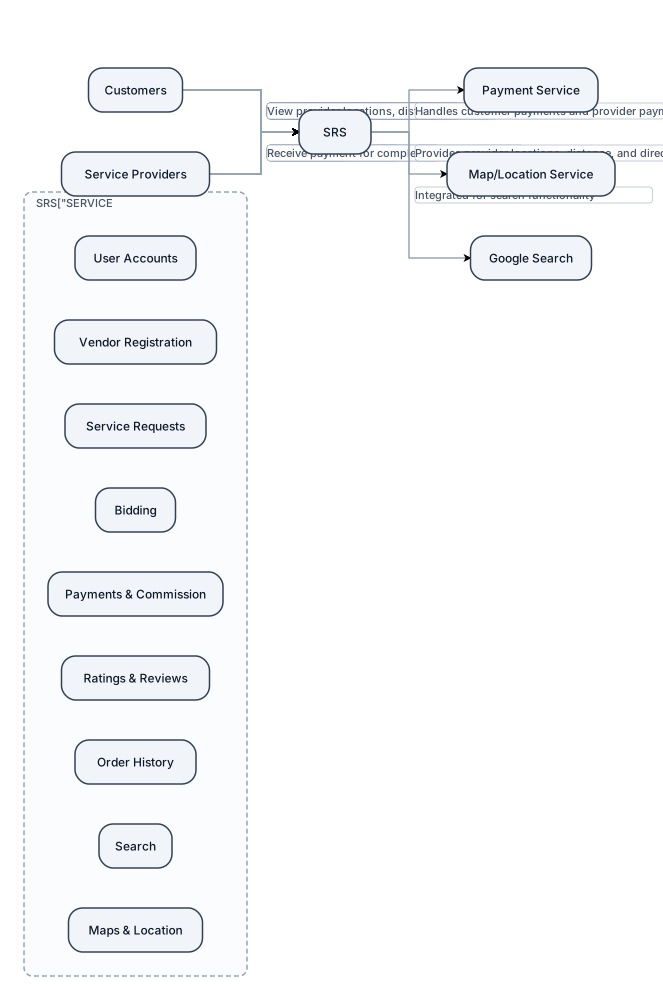
Create a simple **Project Context Diagram** for a software project called **Service Request System (SRS)**. Place **SERVICE REQUEST SYSTEM (SRS)** as the main system in a large box in the center. On the **left**, place an external actor labeled **Customers**. Draw arrows between Customers and the SRS showing that customers can: * Register and log in * Place service requests * Review service provider bids * Select a service provider * Make payments * Cancel or change service requests * Rate and review completed services * View order history * Search for service providers * View provider locations, distance, and directions On the **right**, place an external actor labeled **Service Providers**. Draw arrows between Service Providers and the SRS showing that providers can: * Register as vendors * Select service categories * View service requests * Submit bids * Receive payment for completed services Below the SRS, place three external systems/services: 1. **Payment Service** – handles customer payments and provider payments. 2. **Map/Location Service** – provides provider locations, distance, and directions. 3. **Google Search** – integrated with the system for search functionality. Connect the SRS to each of these external services with arrows. Inside the SRS box, show the major system functions: * User Accounts * Vendor Registration * Service Requests * Bidding * Payments & Commission * Ratings & Reviews * Order History * Search * Maps & Location Keep the diagram **simple and high-level**. This is a project context diagram for a college software project, so do not include detailed databases, classes, code, APIs, servers, or technical architecture. Use a clean academic style with clear labels and arrows. The overall layout should be: **Customers → SRS ← Service Providers** with **Payment Service, Map/Location Service, and Google Search** underneath the SRS.
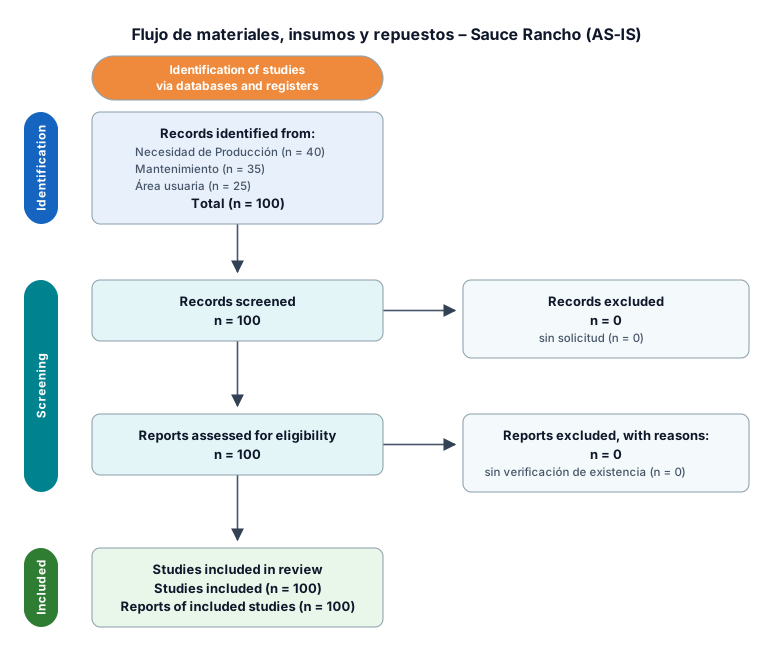
Flujo de materiales, insumos y repuestos – Sauce Rancho Flujo AS-IS Necesidad de Producción / Mantenimiento / área usuaria ↓ Solicitud de material ↓ Verificación de existencia ↓ ¿Existe stock? Sí → Autorización de salida ↓ Preparación del material ↓ Entrega al usuario ↓ Registro manual en cuaderno ↓ Regularización en Expertus ↓ Actualización del consumo No → Solicitud a Vinto Chico / Compras ↓ Recepción en Sauce Rancho ↓ Verificación de cantidad, peso y estado ↓ Ubicación ↓ Disponibilidad para uso
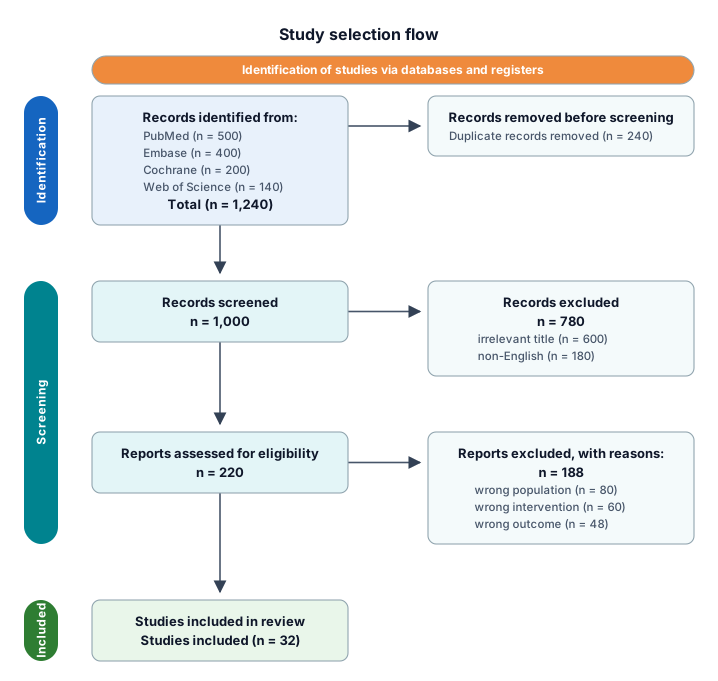
A PRISMA study-selection flow from 1,240 identified records through deduplication, screening, eligibility, and 32 included studies
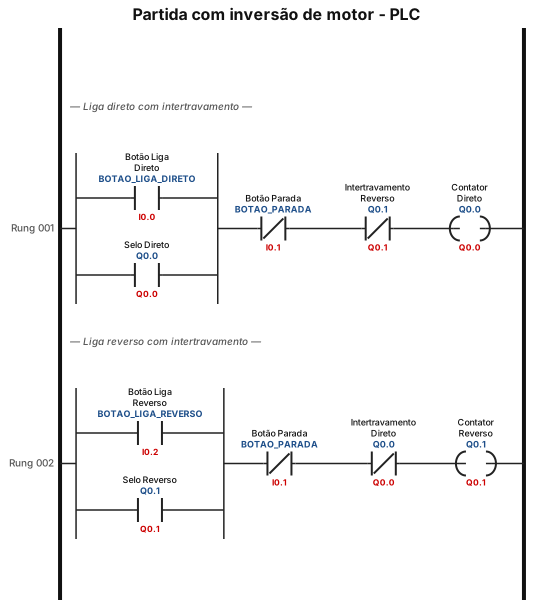
faz um diagrama de partida com inversão no clp
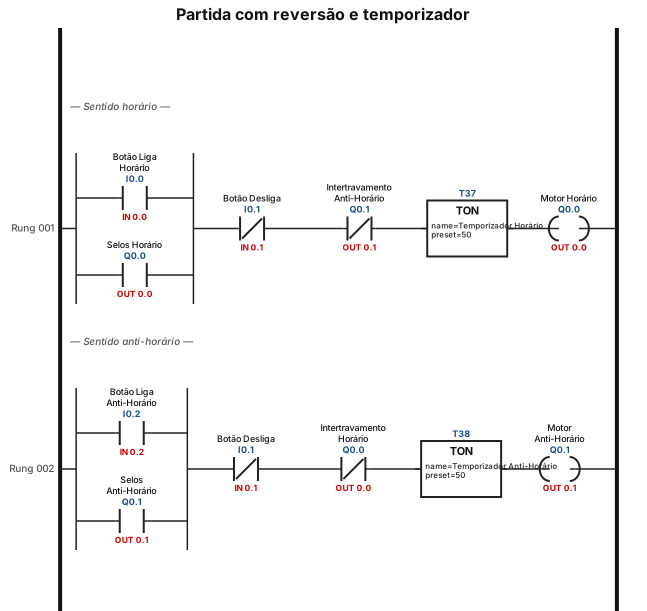
quero um diagrama de CLP com partida com reversão e um temporizador controlando quando o motor vai ser ativado