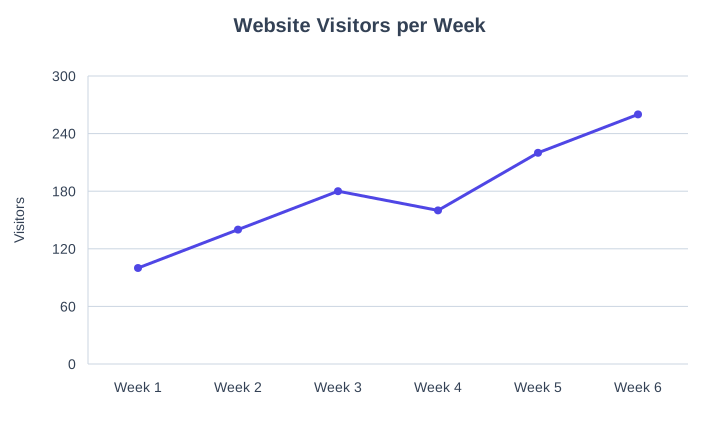
line graph of website visitors per week: 100, 140, 180, 160, 220, 260
NODE ARCHIVE · REAL DIAGRAM BRIEFS
Diagram Examples from Real Visitor Prompts
Browse eligible diagrams shared by FreeDiagram visitors, inspect the exact prompts, and build your own version.
Browse 3257 real creationsCOMMUNITY OUTPUTS · EXACT PROMPTS
Main diagram studio
Showing 49–72 of 1256. No stock examples or system defaults. Choose a tool, study a real result, then reopen its prompt as your starting point.
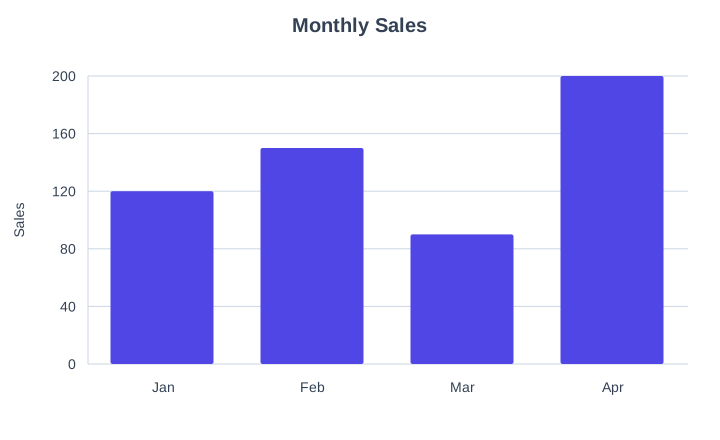
bar graph of monthly sales Jan 120, Feb 150, Mar 90, Apr 200
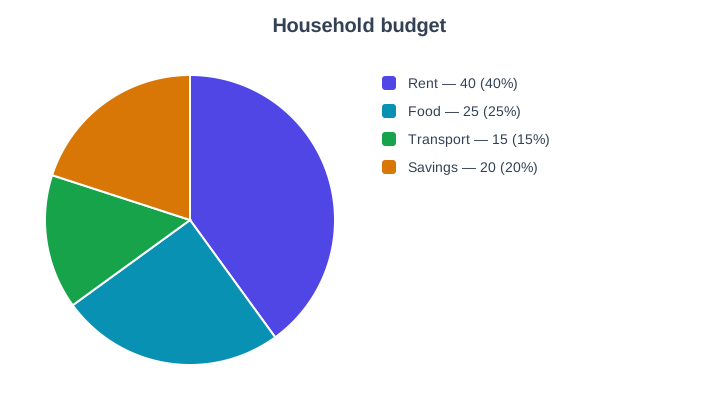
pie chart of household budget: rent 40%, food 25%, transport 15%, savings 20%
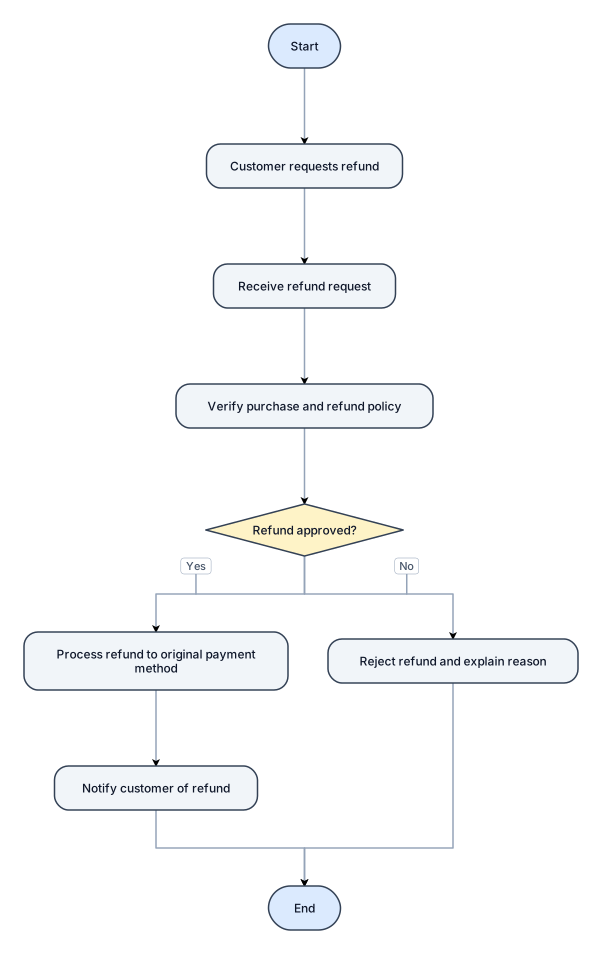
flowchart of a customer refund process
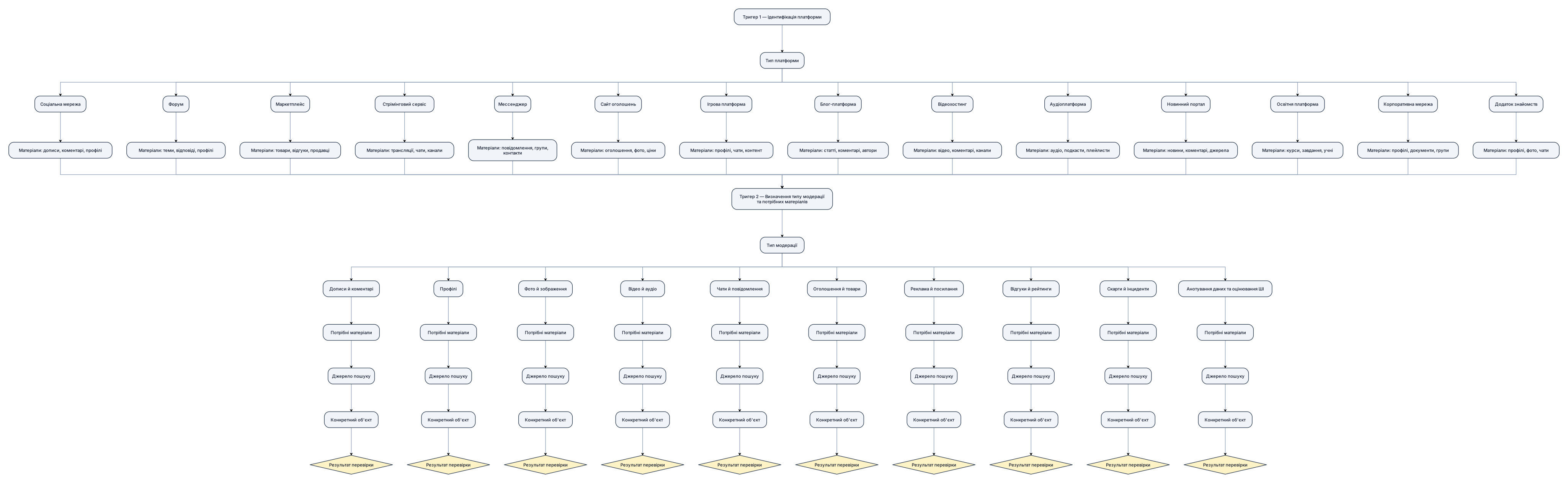
Перебудуй наявний граф системи модерації. **1. Напрямок і структура** - Основний напрямок графа — зверху вниз. - Головний вузол: `Тригер 1 — Ідентифікація платформи`. - На кожному рівні розміщуй максимум 2 основні блоки поруч. - Дочірні вузли розташовуй компактними гілками під відповідними батьківськими вузлами. - Не розміщуй усі вузли в одному рядку або в довгих горизонтальних рядах. - Не перетворюй граф на радіальну схему. **2. Послідовність вузлів** `Тригер 1 → Тип платформи → Матеріали платформи → Тригер 2 → Тип модерації → Потрібні матеріали → Джерело пошуку → Конкретний об’єкт → Результат перевірки` - Тригер 1 веде до 14 типів платформ. - Кожен тип платформи пов’язаний зі своїми матеріалами для перевірки. - Матеріали ведуть до Тригера 2 — `Визначення типу модерації та потрібних матеріалів`. - Тригер 2 пов’язаний із 10 типами модерації: дописи й коментарі; профілі; фото й зображення; відео й аудіо; чати й повідомлення; оголошення й товари; реклама й посилання; відгуки й рейтинги; скарги й інциденти; анотування даних та оцінювання ШІ. - Кожен тип модерації веде до відповідних матеріалів, пошуку конкретного об’єкта та перевірки доступності. **3. Оформлення** - Прямокутники — процеси, платформи, матеріали й типи модерації. - Ромби — логічні рішення. - Стрілки — реальні зв’язки між вузлами. - Короткі назви, однакові відступи, вирівнювання та компактні секції. - Не допускай накладання блоків, перетину стрілок і зайвих порожніх просторів. **4. Обмеження** - Не створюй вузол `Афіна`. - Не додавай текстові пояснення поза графом. - Не створюй дублікати вузлів. - Не змінюй наявний зміст без необхідності. - Не додавай рівні ролей, дозволи чи інструменти. **Результат:** організований ієрархічний граф зверху вниз, із компактними гілками та максимум двома основними блоками поруч на одному рівні.
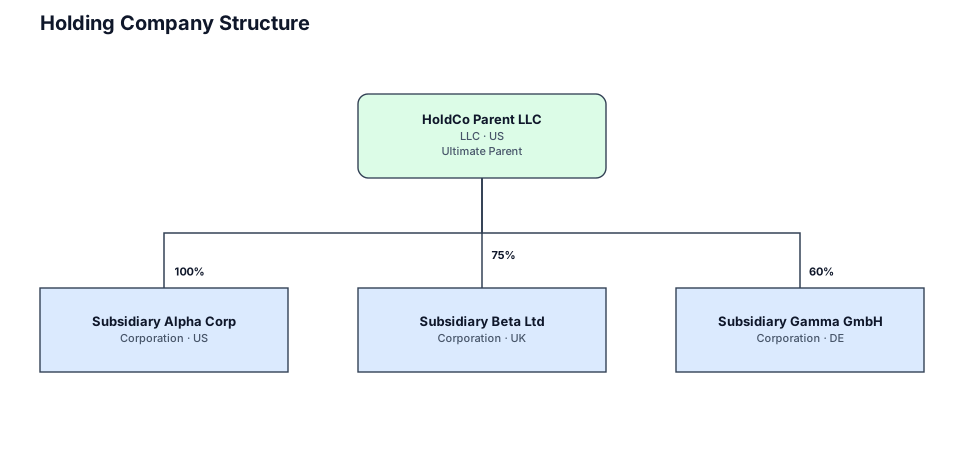
A legal entity structure for a holding company owning three operating subsidiaries with ownership percentages
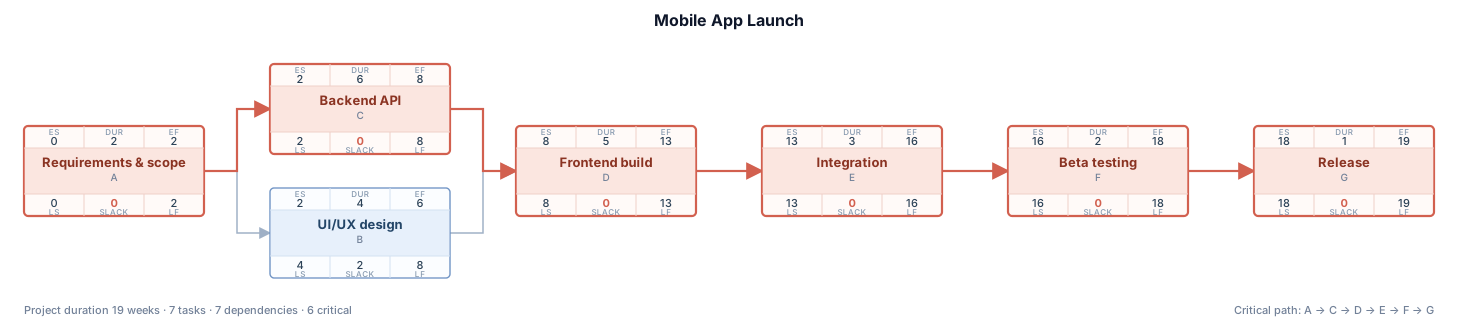
A PERT chart for launching a mobile app, with design and backend work in parallel before integration, beta, and release

i want 3 big blocks make them big and the 4 small blocks under them and color them with bright colors

i want 3 big blocks and 4 small blocks
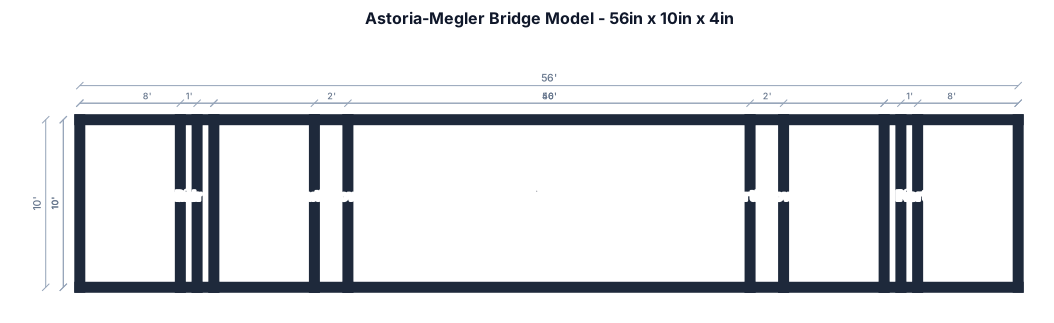
56 inch long 10 inch tall 4 inch wide model of Astoria Megler bridge

Create a colorful, well-organized academic mind map on “Decidable and Undecidable Problems” for Theory of Computation. Central topic: Decidable and Undecidable Problems. Main branches: 1. Decidable Problems — definition, recursive languages, DFA acceptance, DFA emptiness, DFA equivalence. 2. Undecidable Problems — definition, Halting Problem, Post Correspondence Problem (PCP), CFG ambiguity. 3. Halting Problem — meaning, Turing Machine, why it is undecidable. 4. Comparison — whether an algorithm exists, whether it always halts, examples. 5. Importance — limits of computation, algorithm analysis, program verification. Use short keywords, clear sub-branches, different colors, readable labels, connecting lines, and a landscape layout. Make it suitable for a college assignment and export as a high-quality PNG.
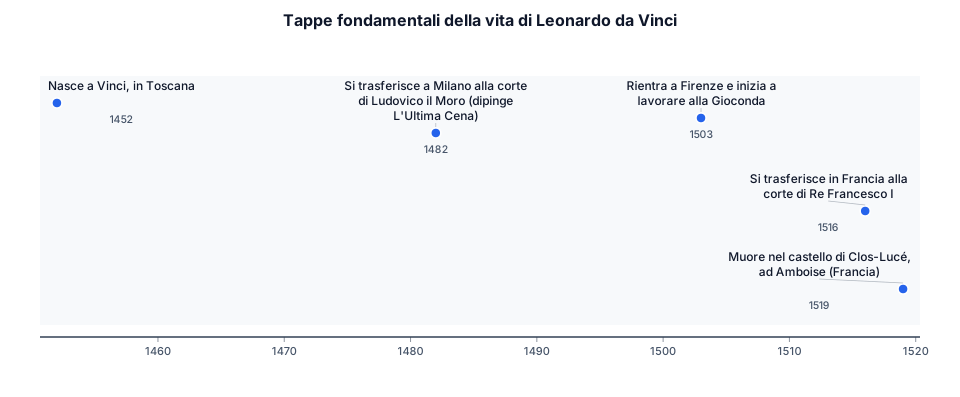
timeline title Tappe fondamentali della vita di Leonardo da Vinci 1452 : Nasce a Vinci, in Toscana 1482 : Si trasferisce a Milano alla corte di Ludovico il Moro (dipinge L'Ultima Cena) 1503 : Rientra a Firenze e inizia a lavorare alla Gioconda 1516 : Si trasferisce in Francia alla corte di Re Francesco I 1519 : Muore nel castello di Clos-Lucé, ad Amboise (Francia)
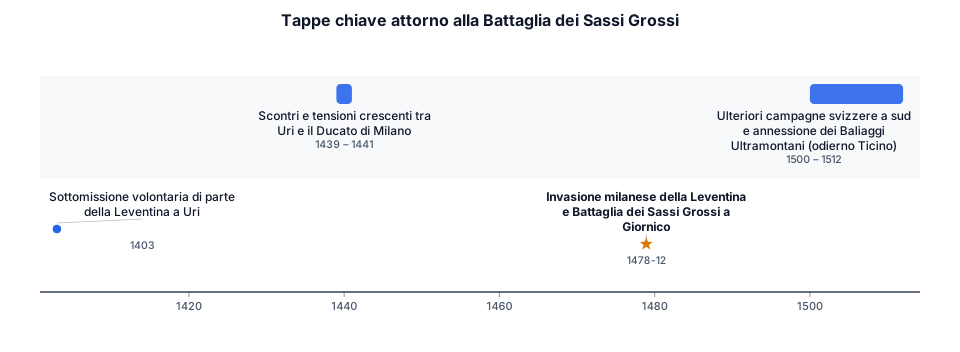
timeline title Tappe chiave attorno alla Battaglia dei Sassi Grossi 1403 : Sottomissione volontaria di parte della Leventina a Uri 1439 - 1441 : Scontri e tensioni crescenti tra Uri e il Ducato di Milano 1478 (Dicembre) : Invasione milanese della Leventina e Battaglia dei Sassi Grossi a Giornico 1500 - 1512 : Ulteriori campagne svizzere a sud e annessione dei Baliaggi Ultramontani (odierno Ticino)
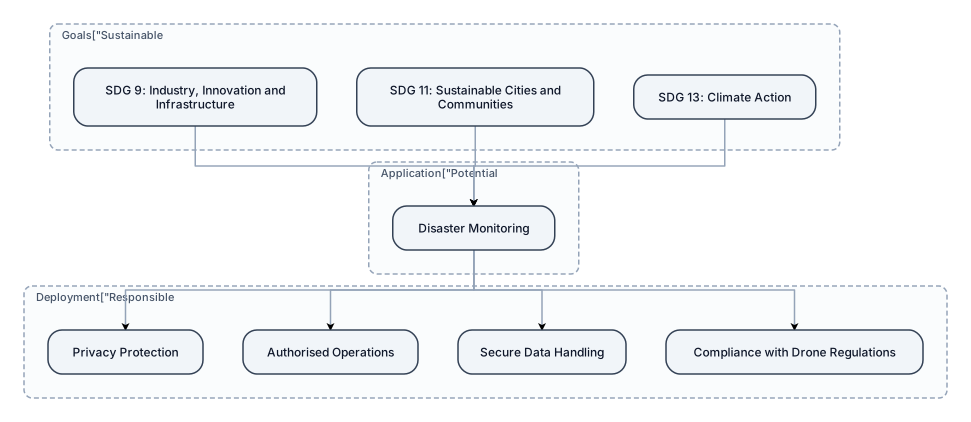
Sustainable Development Goals SDG 9: Industry, Innovation and Infrastructure SDG 11: Sustainable Cities and Communities SDG 13: Climate Action — potential application in disaster monitoring Responsible Deployment: Privacy protection, authorised operations, secure data handling and compliance with applicable drone regulations. cereate a flow diagram for this

Challenges in Conventional Surveillance Continuous manual monitoring of live video feeds is time-consuming. Important events may be missed during prolonged surveillance. Internet-dependent AI systems may fail in low-connectivity areas. Limited battery life and payload capacity restrict mission duration. Conventional drones generally provide footage without intelligent, real-time analysis. Need: An intelligent, reliable and cost-conscious surveillance solution that converts live video into actionable information.
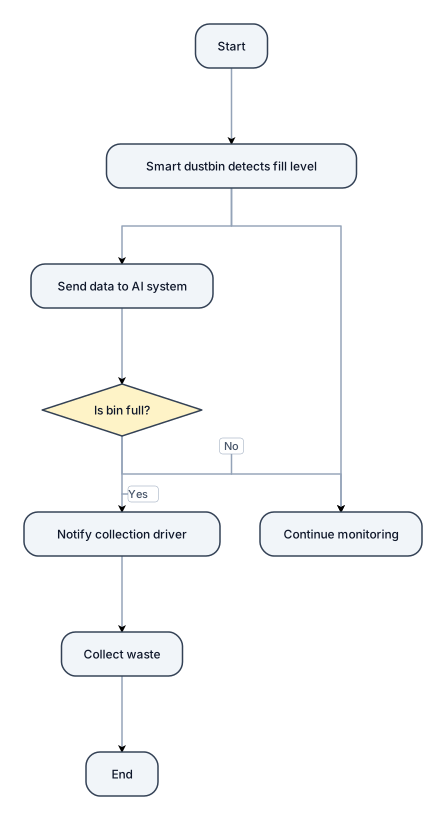
Create a simple flowchart for an AI-based smart waste management system. Show how a smart dustbin detects its fill level, sends data to an AI system, and decides whether waste collection is needed. If the bin is full, notify the collection driver and collect the waste. If it is not full, continue monitoring. Use clear shapes, arrows, and Yes/No labels.
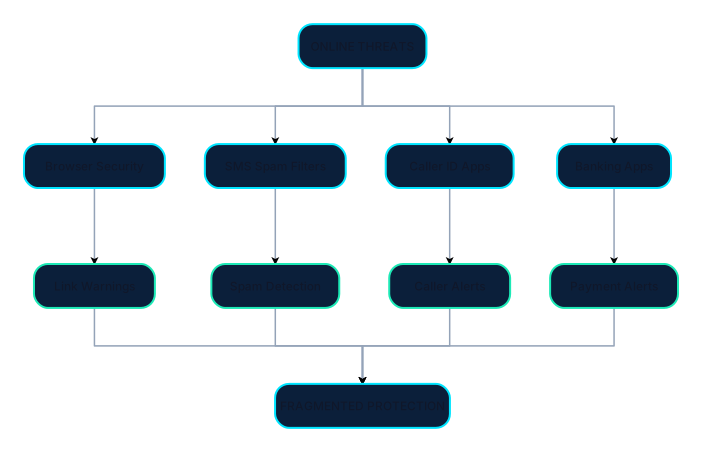
Create a clean, professional cybersecurity flow diagram titled **“EXISTING SOLUTIONS”** for a hackathon presentation. Show this exact visual flow: TOP: “ONLINE THREATS” ↓ Four parallel branches: 1. Browser Security → Link Warnings 2. SMS Spam Filters → Spam Detection 3. Caller ID Apps → Caller Alerts 4. Banking Apps → Payment Alerts Bring all four branches together at the bottom: “FRAGMENTED PROTECTION” Design requirements: - Use only diagrams, arrows, icons, and short labels. - No paragraphs or explanatory text. - Dark navy background, cyan and teal accents, white labels. - Use a neat top-to-bottom flowchart with four evenly spaced branches. - Use simple editable Canva shapes and line icons. - Keep all elements aligned, readable, and uncluttered. - 16:9 landscape canvas. - Make the diagram visually explain that existing tools protect different areas separately.

Create a professional engineering block diagram for a Triple-Tap Activated Smart Safety Ring for Emergency Alert and Location Sharing. Show these blocks connected with directional arrows: 1. Triple-tap input 2. Accelerometer / tap sensor 3. Microcontroller with tap-count and timing validation 4. Bluetooth Low Energy (BLE) communication 5. Smartphone companion application 6. Smartphone GPS / location services 7. Trusted emergency contacts receiving an SOS alert with location 8. LED and vibration motor for confirmation 9. Rechargeable battery and USB charging circuit powering the ring Show the main emergency signal flow clearly. Separate the power supply path from the data communication path. Use standard engineering block-diagram symbols, clean labels, a white background, neat arrows, and a professional academic project style. Do not invent components or show a direct police connection as a guaranteed feature. Label it as a conceptual prototype diagram.

Gannt chart I plan to finish the whole project in about 7 weeks, including the project proposal and the final report. This is a realistic and predictable time frame. The table below shows my plan.I plan to finish the whole project in about 8 weeks, including the project proposal and the final report. This is a realistic and predictable time frame. The table below shows my plan.
![Main diagram studio: 1. Importance of Storages in Chemical Processing Units, Associated Safety Aspects & Accident Reduction [5 Marks] 1. Operational Importance: Bulk chemi](https://psvtykrtciekraoilfux.supabase.co/storage/v1/object/public/gallery-assets/freediagram/feed/2cc86c68-db08-4696-b214-0f3d238a0633.svg)
1. Importance of Storages in Chemical Processing Units, Associated Safety Aspects & Accident Reduction [5 Marks] 1. Operational Importance: Bulk chemical storage serves as the vital operational buffer in processing plants, stabilizing raw material feed rates and absorbing output surges. 2. Associated Storage Hazards: Bulk containment concentrates massive chemical potential energy, presenting severe risks of BLEVE (Boiling Liquid Expanding Vapor Explosion), VCE (Vapor Cloud Explosion), pool fires, and toxic gas release. 3. Inherent Safety Design: Selection of tank type dictated by True Vapour Pressure (TVP < 1.5 psia = Fixed Cone Roof; 1.5 to 11.1 psia = Floating Roof; > 11.1 psia = Pressure Vessels/Bullets). 4. Engineering Safeguards: 110% net dyke secondary containment, PVRVs (+2.5/-0.5 mbar), Nitrogen blanketing (O2 < 5%), High-High Level Switches (LAHH @ 95% interlocked to ESDVs), and earthing clamps (R < 10 Ohms). 5. Accident Reduction: Implementing automated interlocks, non-destructive testing (NDT), and strict Permit-to-Work (PTW) protocols reduces chemical storage accidents by over 90%.

Molecular basis of inheritance

Create a Level 1 Data Flow Diagram titled “Code Conversion Data Flow Diagram Level 1 in CSLM-IDE”. Use standard DFD notation and numbered processes. External entity: Developer. Processes: 1.0 Receive Source Code. 2.0 Select Source and Target Languages. 3.0 Prepare Conversion Request. 4.0 Generate Converted Code through the AI Conversion Service. 5.0 Display and Review Result. 6.0 Validate Output, if validation tools are available. Data stores: Workspace Files and Conversion History, only if implemented or explicitly proposed. Show the Developer supplying code and language choices, the conversion coordinator preparing a request, the AI service returning generated code, and the IDE presenting the result. Show validation feedback returning to the developer. Distinguish the AI service from data stores. Label all arrows. White background, neat landscape layout, no crossing arrows where avoidable.

Draw a formal Data Flow Diagram Level 0 titled “Data Flow Diagram Level 0 of CSLM-IDE”. Use standard DFD notation: one central process bubble numbered 0, an external entity rectangle, and labelled arrows. External entity: Developer. Central process: CSLM-IDE. Show these data flows: - Developer → CSLM-IDE: Source Code, Language Selection, Conversion Request, File Commands. - CSLM-IDE → Developer: Converted Code, AI Assistance, Validation Messages, Execution Output. - CSLM-IDE ↔ Local File System: Open, Read, Save and Update Files. Keep the diagram simple and uncluttered. Use standard DFD conventions, a white background and readable labels. Do not include internal subprocesses at Level 0 or depict the AI model as a separate Level 0 process. Include only the data flows relevant to the proposed system.

USB CHARGER VBUS 5V/9V │ ▼ ┌─────────────────┐ │ INPUT PROTECTION│ │ ESD / OVP / CAP │ └────────┬────────┘ ▼ ┌─────────────────┐ │ CHARGER IC │ │ BUCK CONTROLLER │ └────────┬────────┘ │ MOSFET ON/OFF ▼ SW NODE PWM WAVEFORM │ ▼ ┌────────┐ │INDUCTOR│ └───┬────┘ ▼ OUTPUT CAPACITOR │ ▼ VPH / VSYS ~4V ┌──┴───┐ ▼ ▼ PMIC VBAT │ │ ▼ ▼ CPU/RAM BATTERY