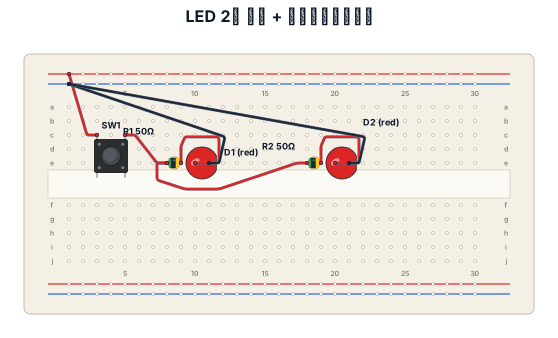
ブレットボード 1枚 この上に LED 赤 2 抵抗 50Ω 2 プッシュスイッチ 1 電源は別の電池ボックス1.5V 2 LEDはブレッドボード上で並列つなぎ 電池は電池ボックス内で直列つなぎ この条件で図を生成 もっと配線をシャープに生成 このブレッドボード配線を回路図で生成 抵抗は横配列ではなく縦配列 もっとシャープに配線をして ブレッドボードは2列ではなく1列のみ使用 プッシュスイッチ 4足 c3 c5 e3 e5 LED 1 アノードe10 カソードe11 LED 2 アノードe20 カソードe21 抵抗 1 e8e9 抵抗 2 e18e19 バッテリー 1.5v 直列つなぎ ブレッドボードの+ ー それぞれの極性に接続 必要に応じてジャンプワイヤーを使用 電源は片側だけ
NODE ARCHIVE · REAL DIAGRAM BRIEFS
Diagram Examples from Real Visitor Prompts
Browse eligible diagrams shared by FreeDiagram visitors, inspect the exact prompts, and build your own version.
Browse 3261 real creationsCOMMUNITY OUTPUTS · EXACT PROMPTS
Breadboard Wiring
Showing 49–72 of 102. No stock examples or system defaults. Choose a tool, study a real result, then reopen its prompt as your starting point.
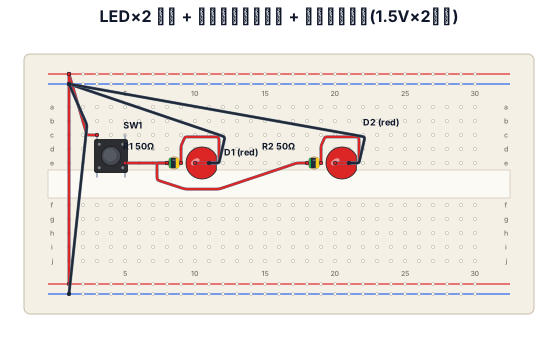
ブレットボード 1枚 この上に LED 赤 2 抵抗 50Ω 2 プッシュスイッチ 1 電源は別の電池ボックス1.5V 2 LEDはブレッドボード上で並列つなぎ 電池は電池ボックス内で直列つなぎ この条件で図を生成 もっと配線をシャープに生成 このブレッドボード配線を回路図で生成 抵抗は横配列ではなく縦配列 もっとシャープに配線をして ブレッドボードは2列ではなく1列のみ使用 プッシュスイッチ 4足 c3 c5 e3 e5 LED 1 アノードe10 カソードe11 LED 2 アノードe20 カソードe21 抵抗 1 e8e9 抵抗 2 e18e19 バッテリー 1.5v 直列つなぎ ブレッドボードの+ ー それぞれの極性に接続 必要に応じてジャンプワイヤーを使用
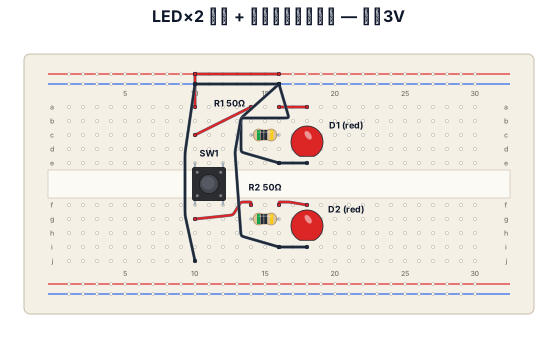
ブレットボード 1枚 この上に LED 赤 2 抵抗 50Ω 2 プッシュスイッチ 1 電源は別の電池ボックス1.5V 2 LEDはブレッドボード上で並列つなぎ 電池は電池ボックス内で直列つなぎ この条件で図を生成 もっと配線をシャープに生成 このブレッドボード配線を回路図で生成 抵抗は横配列ではなく縦配列 もっとシャープに配線をして ブレッドボードは2列ではなく1列のみ使用
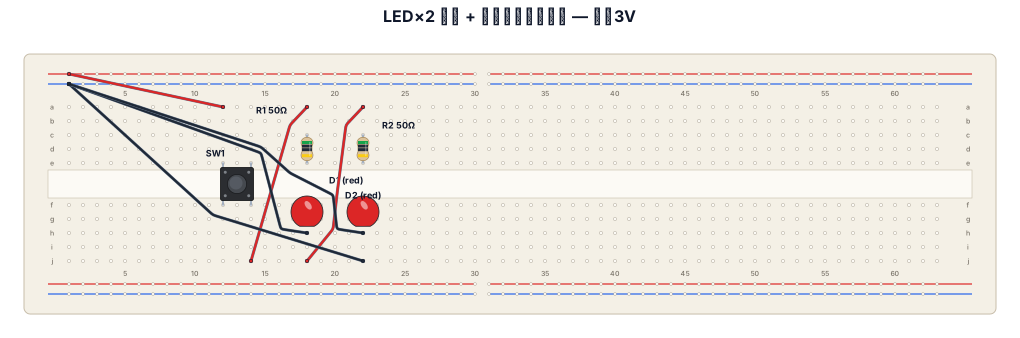
ブレットボード 1枚 この上に LED 赤 2 抵抗 50Ω 2 プッシュスイッチ 1 電源は別の電池ボックス1.5V 2 LEDはブレッドボード上で並列つなぎ 電池は電池ボックス内で直列つなぎ この条件で図を生成 もっと配線をシャープに生成 このブレッドボード配線を回路図で生成 抵抗は横配列ではなく縦配列 もっとシャープに配線をして
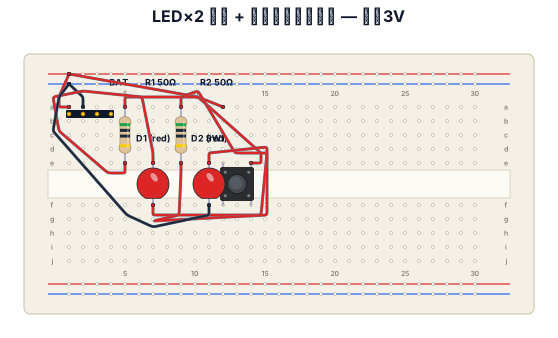
ブレットボード 1枚 この上に LED 赤 2 抵抗 50Ω 2 プッシュスイッチ 1 電源は別の電池ボックス1.5V 2 LEDはブレッドボード上で並列つなぎ 電池は電池ボックス内で直列つなぎ この条件で図を生成 もっと配線をシャープに生成 このブレッドボード配線を回路図で生成 抵抗は横配列ではなく縦配列
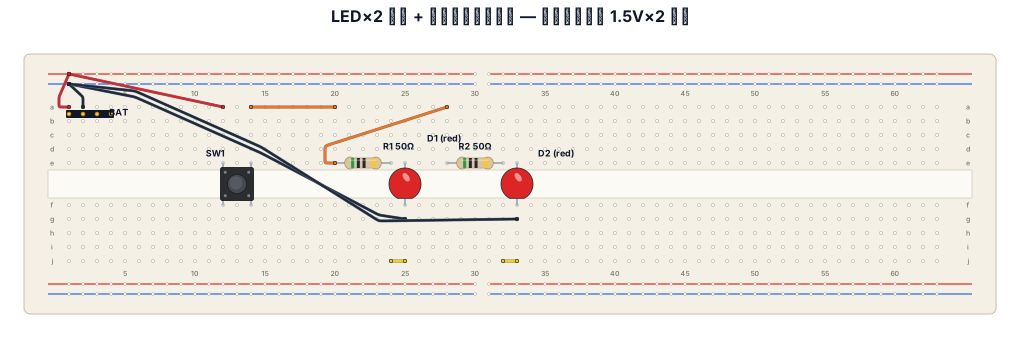
ブレットボード 1枚 この上に LED 赤 2 抵抗 50Ω 2 プッシュスイッチ 1 電源は別の電池ボックス1.5V 2 LEDはブレッドボード上で並列つなぎ 電池は電池ボックス内で直列つなぎ この条件で図を生成 もっと配線をシャープに生成 このブレッドボード配線を回路図で生成
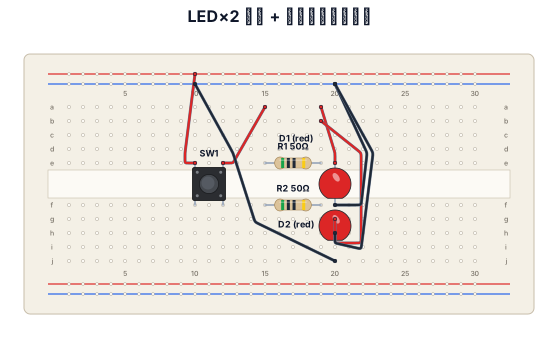
ブレットボード 1枚 この上に LED 赤 2 抵抗 50Ω 2 プッシュスイッチ 1 電源は別の電池ボックス1.5V 2 LEDはブレッドボード上で並列つなぎ 電池は電池ボックス内で直列つなぎ この条件で図を生成 もっと配線をシャープに生成
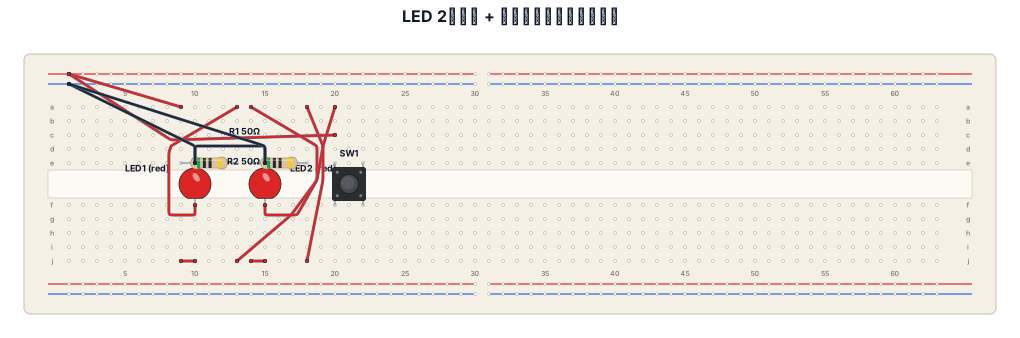
ブレットボード 1枚 この上に LED 赤 2 抵抗 50Ω 2 プッシュスイッチ 1 電源は別の電池ボックス1.5V 2 LEDはブレッドボード上で並列つなぎ 電池は電池ボックス内で直列つなぎ この条件で図を生成
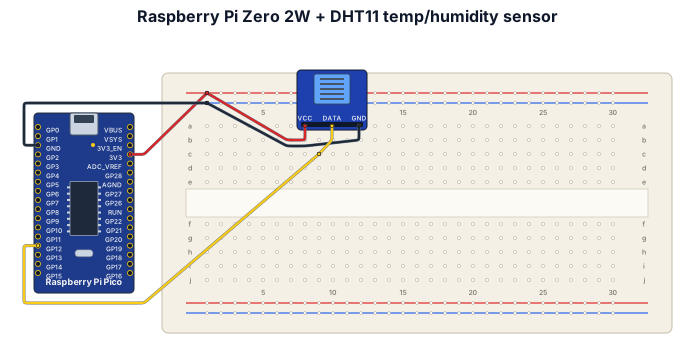
A raspberry pi zero 2w (not pico) connected to a humidity /temp sensor seed studio with GND on pin34, signal on pin 32 (gpio12) and 3.3v on pin 1
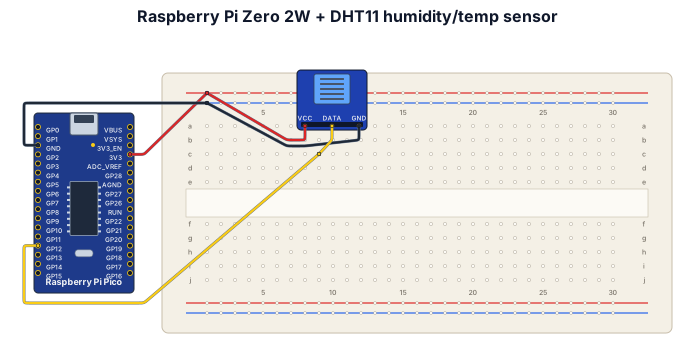
A raspberry pi zero 2w connected to a humidity /temp sensor seed studio with GND on pin34, signal on pin 32 (gpio12) and 3.3v on pin 1
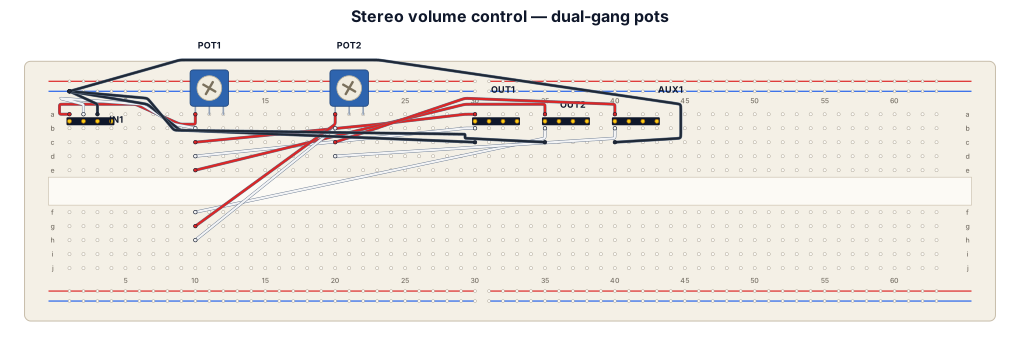
"I have one stereo audio input with L, R and GND. I have two B100K dual-gang potentiometers, two large 3.5mm output ports and one small AUX output. Pot 1 should control the volume of both large ports together. Pot 2 should control only the AUX port. All outputs share audio ground. Show the physical wiring clearly, with each potentiometer's six pins labelled."
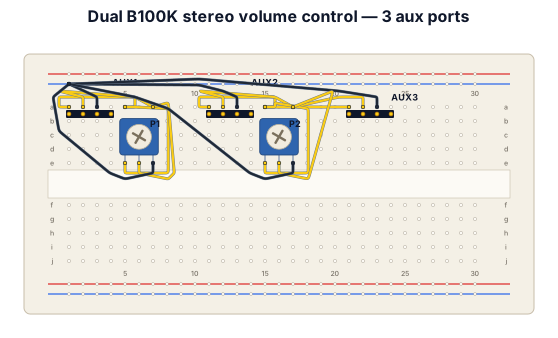
Two B100k stero volume control pot One pot control the volume of one aux port And one volume pot control two aux port
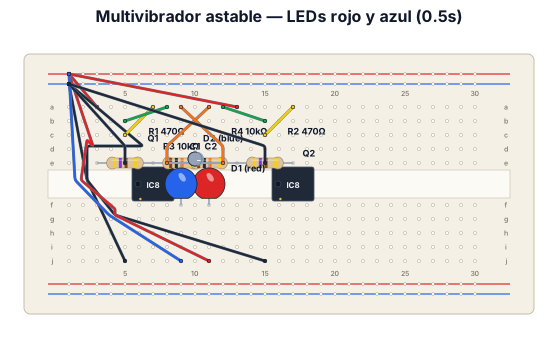
has un sistema multivibrador astable de dos leds rojo y azul, que cuando uno se prenda el otro se apague y esto dure 0.5s cada uno. usar transistores 2n2222a solo usar resistencias, transistores leds y una bateria de 9v
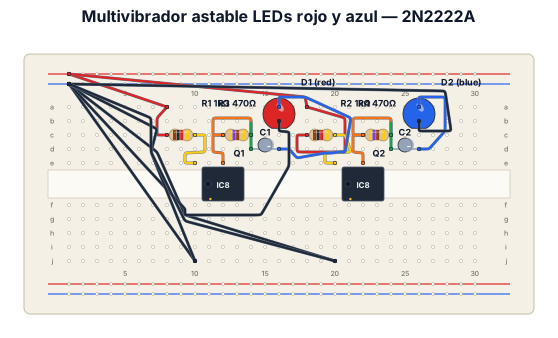
has un sistema multivibrador astable de dos leds rojo y azul, que cuando uno se prenda el otro se apague y esto dure 0.5s cada uno. usar transistores 2n2222a
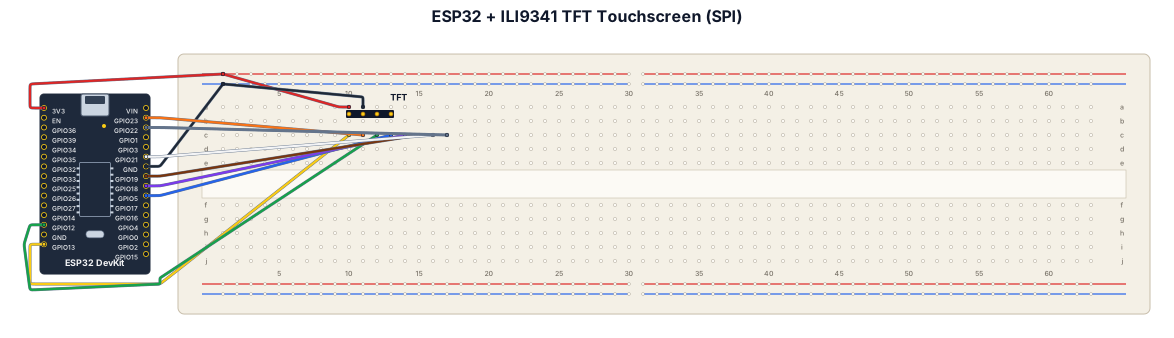
esp 32 + F260301 ILI9341 TFT touchscreen. Display SPI: SCK D13, MOSI D11, MISO D12, CS D10, DC D9, RESET D8. Touch SPI: T_CLK D13, T_DIN D11, T_DO D12, T_CS D7, T_IRQ D2.
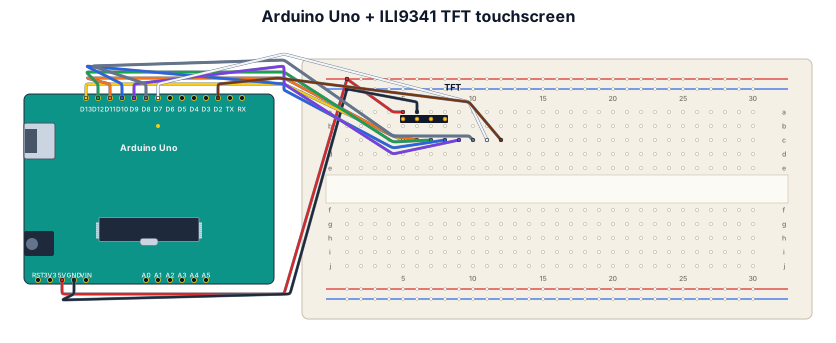
Arduino Uno + F260301 ILI9341 TFT touchscreen. Display SPI: SCK D13, MOSI D11, MISO D12, CS D10, DC D9, RESET D8. Touch SPI: T_CLK D13, T_DIN D11, T_DO D12, T_CS D7, T_IRQ D2.
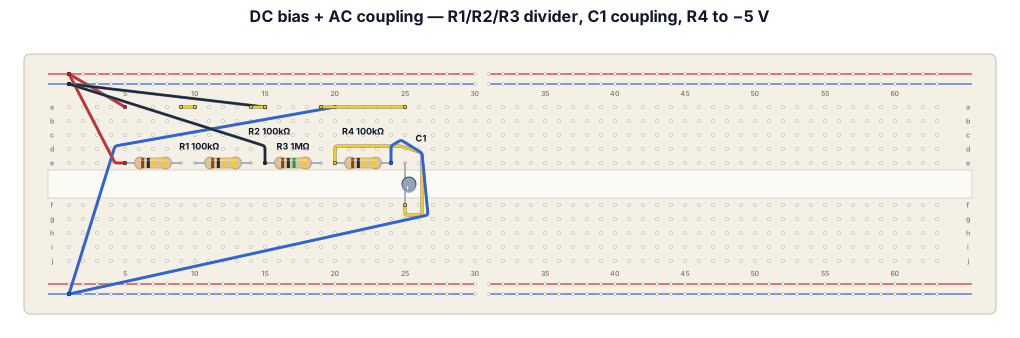
This circuit combines DC biasing with an AC signal and then couples that signal through a capacitor. The two power supplies create three rails: +10 V, 0 V (common ground), and −5 V. The signal generator is referenced to the 0 V rail and sends its AC signal through R2 = 100 kΩ to node A. R1 = 100 kΩ connects node A to +10 V, while R3 = 1 MΩ connects A to 0 V. These resistors provide a DC bias for node A. C1 = 1 nF is connected between A and B. It acts as a coupling capacitor: it blocks the DC voltage at A but allows changing/AC signals to pass to B. R4 = 100 kΩ connects node B to −5 V, setting the DC level on the B side of the capacitor. Node C is simply the −5 V rail. So, in simple terms: the signal generator causes node A to vary around a positive DC bias; C1 transfers the AC variation to node B while separating the two DC levels; node B therefore varies around a DC level determined by the −5 V supply and R4. For a logbook, you could write: The circuit uses R1, R2 and R3 to bias the input signal at node A. The AC component is coupled through the 1 nF capacitor C1 to node B, while DC is blocked. R4 connects node B to the −5 V supply, establishing a different DC operating level on the output side. All equipment uses the same 0 V reference.
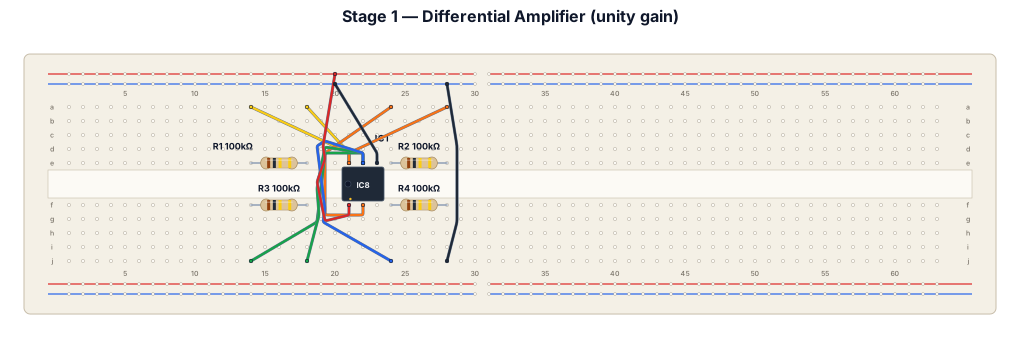
3. Stage 1 — Differential Amplifier Computes (setpoint − feedback) with unity gain. All four resistors: 100 kΩ. From To Component Feedback signal (sensor) IC1 pin 2 (−) via R1 (100kΩ) IC1 pin 6 (output) IC1 pin 2 (−) via R2 (100kΩ) — feedback Setpoint signal IC1 pin 3 (+) via R3 (100kΩ) IC1 pin 3 (+) Ground via R4 (100kΩ) IC1 pin 7 +15V rail IC1 pin 4 −15V rail
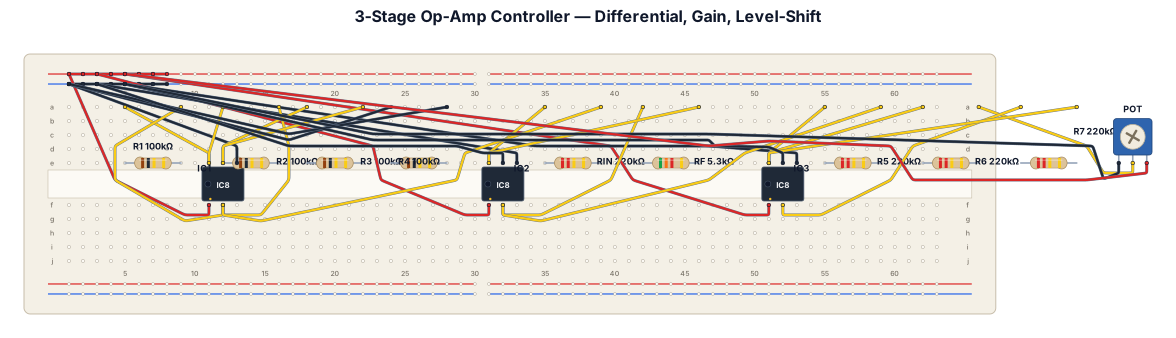
3. Stage 1 — Differential Amplifier Computes (setpoint − feedback) with unity gain. All four resistors: 100 kΩ. From To Component Feedback signal (sensor) IC1 pin 2 (−) via R1 (100kΩ) IC1 pin 6 (output) IC1 pin 2 (−) via R2 (100kΩ) — feedback Setpoint signal IC1 pin 3 (+) via R3 (100kΩ) IC1 pin 3 (+) Ground via R4 (100kΩ) IC1 pin 7 +15V rail IC1 pin 4 −15V rail 4. Stage 2 — Gain Amplifier (Kc) Inverting amplifier, Kc = Rf/Rin ≈ 0.0241. From To Component IC1 pin 6 (Stage 1 output) IC2 pin 2 (−) via Rin (220kΩ) IC2 pin 6 (output) IC2 pin 2 (−) via Rf (~5.3kΩ) — feedback IC2 pin 3 (+) Ground direct IC2 pin 7 +15V rail IC2 pin 4 −15V rail 5. Stage 3 — Level-Shift Summing Amplifier Adds the hover offset back in (double inversion from Stages 2+3 restores the correct sign). From To Component IC2 pin 6 (Stage 2 output) IC3 pin 2 (−) via R (220kΩ) Potentiometer wiper (tuned to −2.4565V) IC3 pin 2 (−) via R (220kΩ) IC3 pin 6 (output) IC3 pin 2 (−) via R (220kΩ) — feedback IC3 pin 3 (+) Ground direct IC3 pin 7 +15V rail IC3 pin 4 −15V rail Potentiometer: one end −15V rail Potentiometer: other end Ground 6. Assembly Order 1) Wire +15V, −15V, and a common ground bus across the whole board before placing any IC. 2) Insert and wire Stage 1 completely; verify with a multimeter before continuing. 3) Insert and wire Stage 2, feeding from Stage 1's output. 4) Insert and wire Stage 3, feeding from Stage 2's output and the potentiometer reference. 5) With the board powered but NOT yet connected to the DAQ, tune the potentiometer wiper to exactly −2.4565V using a multimeter. 6) Ground both Stage 1 inputs (setpoint and feedback) and confirm the final output reads close to +2.4565V — this validates the whole chain end-to-end. 7) Only once this checks out, connect Stage 1's inputs to the DAQ's ADC channels (setpoint, feedback) and Stage 3's output to the DAC channel feeding the kitticopter simulation.
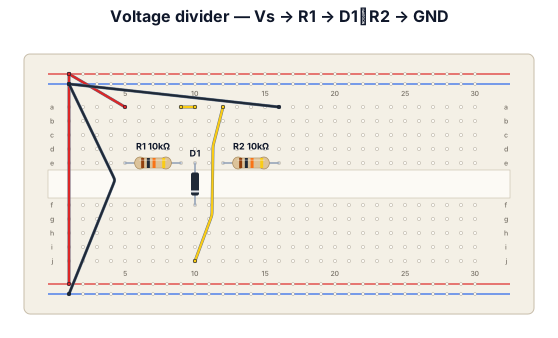
Vs -> R1 -> D1//R2 -> GND R1 = 10kΩ, R2 = 10kΩ 2) Function generator를 이용하여 다음 조건으로 Vs를 인가한다. Sine, 1kHz, VHI = 10V, VLOW = -2V, Phase = 0 3) Oscilloscope를 이용하여 입력에 대한 Vout을 측정한다. 4) 측정한 Data로 Vs - Vout 그래프를 작성한다.
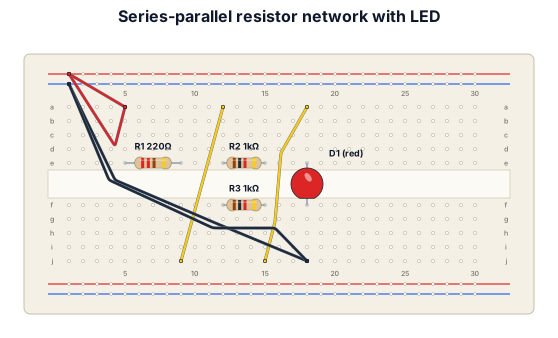
A breadboard in series with a resistor then it converges into parallel with a resistor on each branch, then goes back to a single led
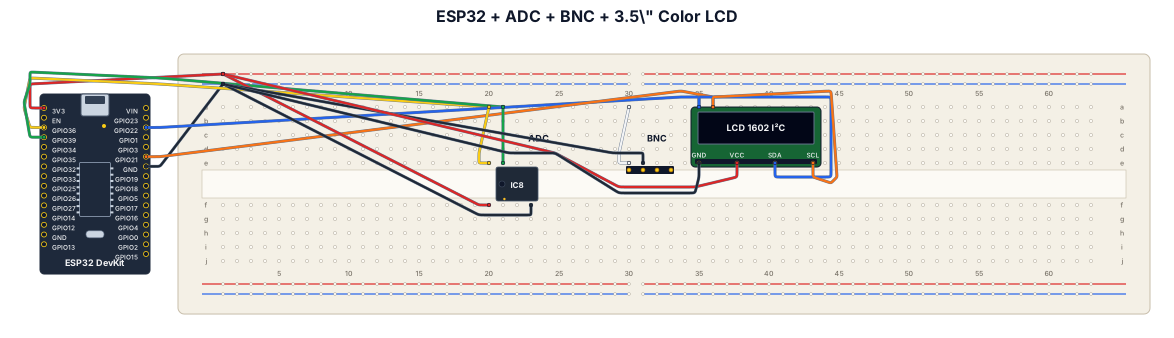
Create a wiring diagram for a esp32 a digital to analog adc and a bnc module with a 3.5 color lcd screen
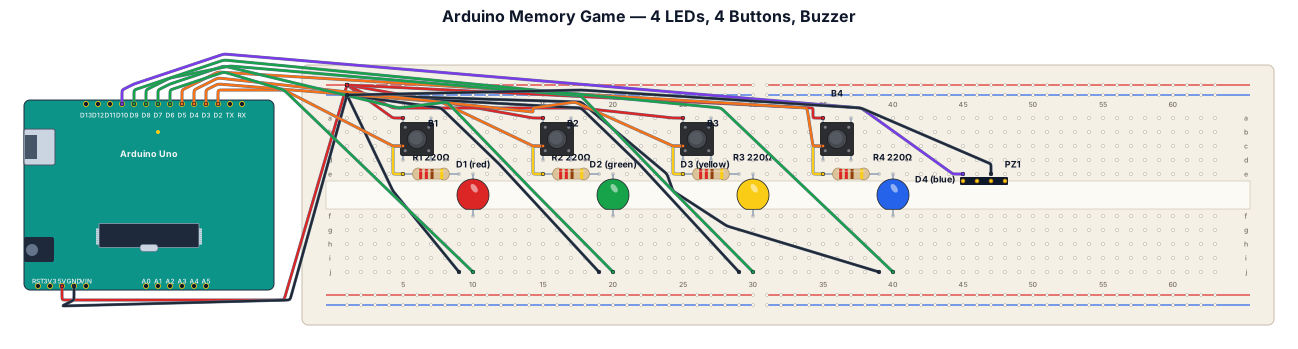
Create a 2D breadboard wiring diagram for an Arduino Memory Game. Use: * 1 Arduino Uno * 1 breadboard * 4 LEDs * 4 push buttons * 4 resistors (220 ohms) * 1 buzzer * Jumper wires Connect the 4 LEDs and 4 buttons to the Arduino so that each button controls one LED. The buzzer should be connected to the Arduino. The game should work as a memory game: the Arduino shows a sequence using the LEDs, and the player repeats the sequence using the buttons. Show all components, pins, and wire connections clearly in a simple top-down 2D breadboard layout.
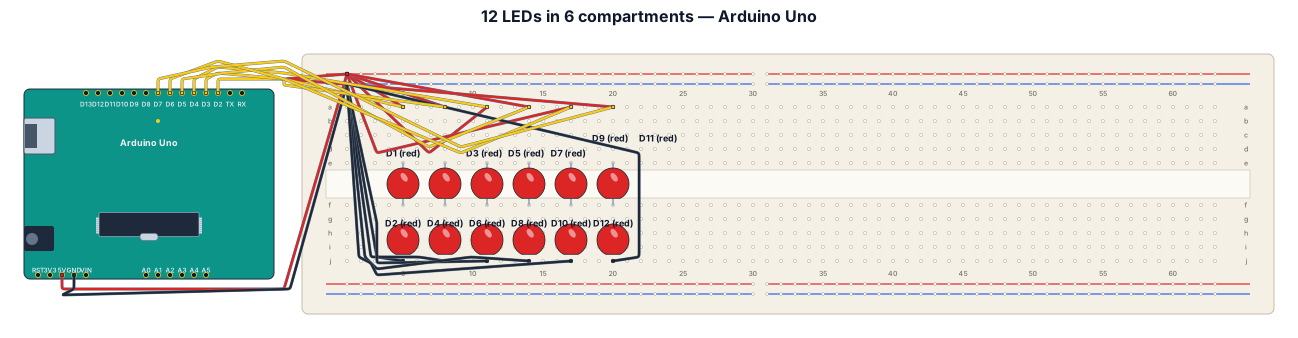
An Arduino breadboard with 12 LEDs connected to it, which are in turn connected to the main Arduino board. These LEDs are arranged in a column, with 2 LEDs in each compartment, and the distance between the compartments is 2.