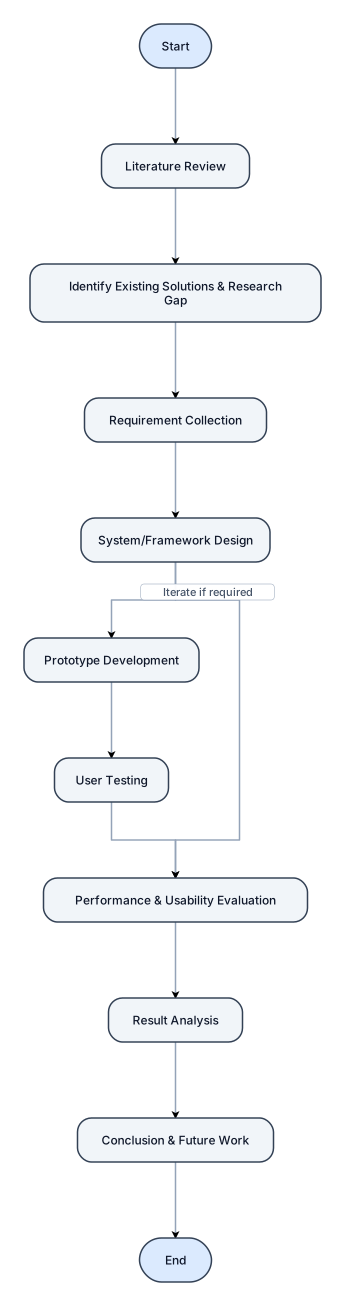
Create a professional academic flowchart titled “Research Methodology Flowchart” for a project on “Digital Support Framework for Alzheimer’s Patients and Caregivers.” Show these steps in order with arrows: Start → Literature Review → Identify Existing Solutions & Research Gap → Requirement Collection → System/Framework Design → Prototype Development → User Testing → Performance & Usability Evaluation → Result Analysis → Conclusion & Future Work → End. Add a feedback arrow from Evaluation back to Framework Design labeled “Iterate if required.” Use a clean white background, simple academic design, readable text, professional colors, and no unnecessary decoration.
NODE ARCHIVE · REAL DIAGRAM BRIEFS
Diagram Examples from Real Visitor Prompts
Browse eligible diagrams shared by FreeDiagram visitors, inspect the exact prompts, and build your own version.
Browse 3280 real creationsCOMMUNITY OUTPUTS · EXACT PROMPTS
Main diagram studio
Showing 769–792 of 1261. No stock examples or system defaults. Choose a tool, study a real result, then reopen its prompt as your starting point.
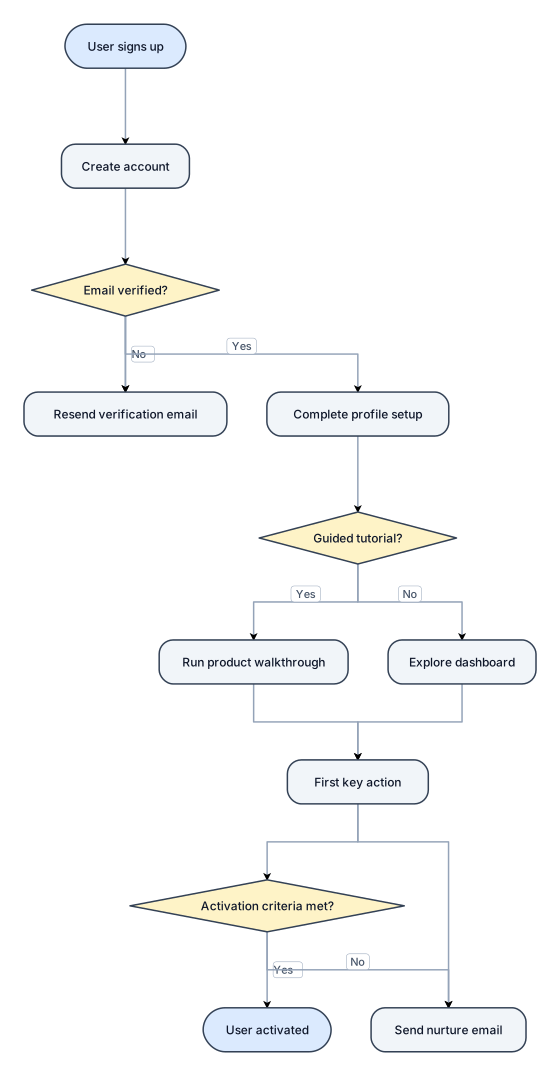
A flowchart of a new-user onboarding flow from signup to first activation, with a verification branch
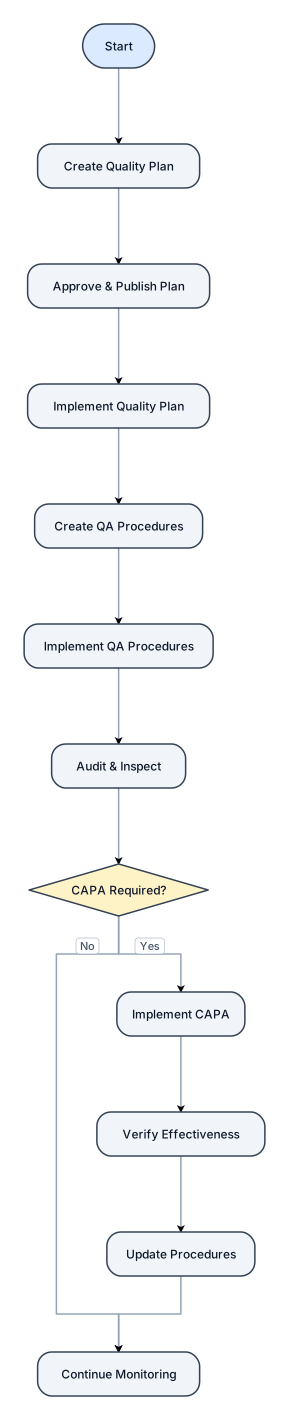
START ↓ Create Quality Plan ↓ Approve & Publish Plan ↓ Implement Quality Plan ↓ Create QA Procedures ↓ Implement QA Procedures ↓ Audit & Inspect ↓ CAPA Required? ├── No → Continue Monitoring └── Yes → Implement CAPA ↓ Verify Effectiveness ↓ Update Procedures ↓ Continue Monitoring
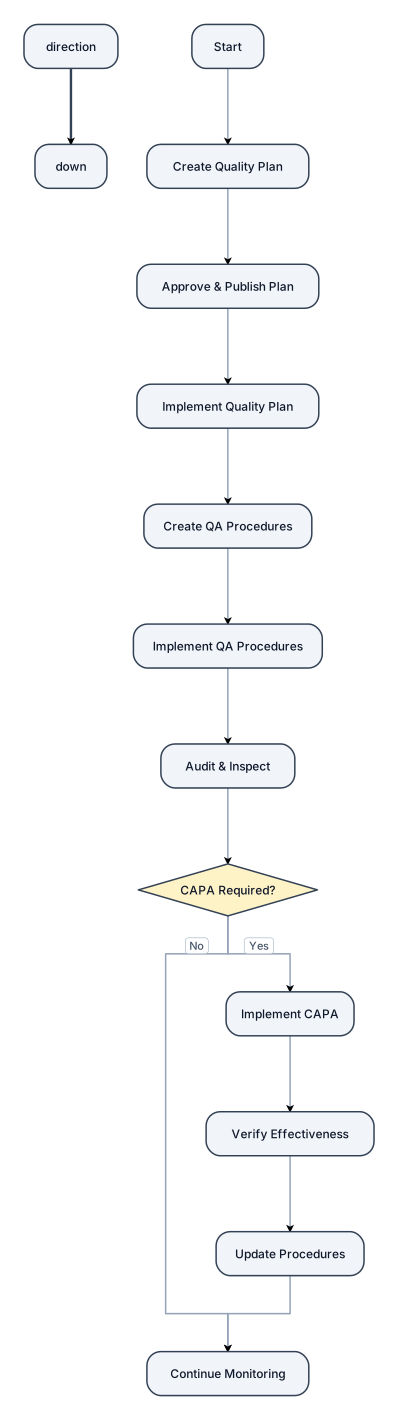
START ↓ Create Quality Plan ↓ Approve & Publish Plan ↓ Implement Quality Plan ↓ Create QA Procedures ↓ Implement QA Procedures ↓ Audit & Inspect ↓ CAPA Required? ├── No → Continue Monitoring └── Yes → Implement CAPA ↓ Verify Effectiveness ↓ Update Procedures ↓ Continue Monitoring
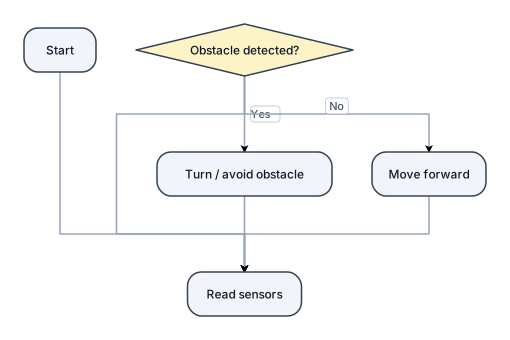
I want to make a robot 🤖
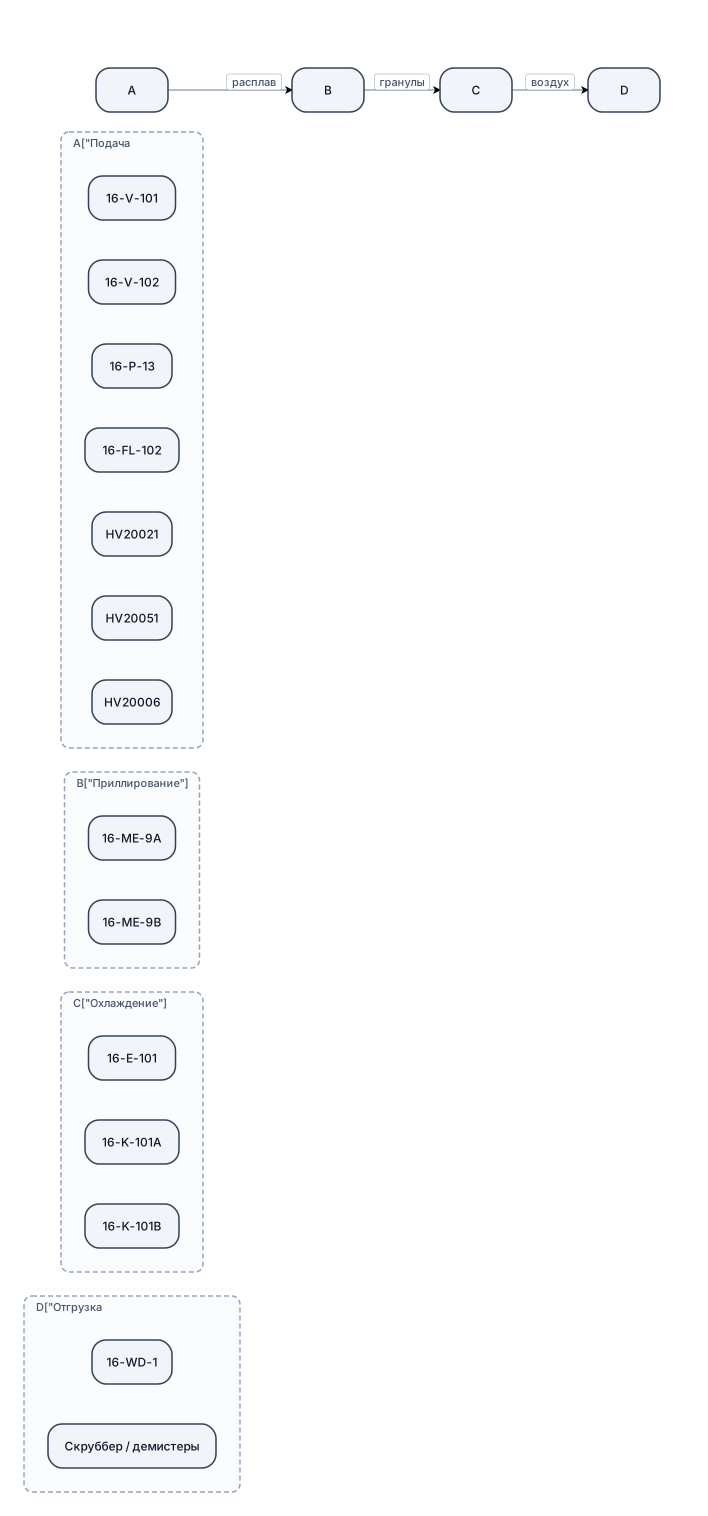
Сгенерируй простую блок-схему (flowchart) узла приллирования карбамида для импорта/адаптации в draw.io. Используй только базовые фигуры: прямоугольники для оборудования, цилиндры для ёмкостей, ромбы для клапанов. Раздели схему на 4 логических блока (подпиши заголовки): «Подача расплава», «Приллирование», «Охлаждение», «Отгрузка и очистка». В каждый блок помести соответствующие позиции: — Подача: 16‑V‑101, 16‑V‑102, 16‑P‑13, 16‑FL‑102, HV20021/051/006. — Приллирование: 16‑ME‑9A/B. — Охлаждение: 16‑E‑101, 16‑K‑101A/B. — Отгрузка: 16‑WD‑1, скруббер/демистеры. Соедини блоки стрелками, показывающими направление потоков (расплав → гранулы → воздух). Сделай схему горизонтальной (слева направо), чтобы она легко вписывалась в слайд. Стиль — минималистичный, монохромный, высокая читаемость текста.
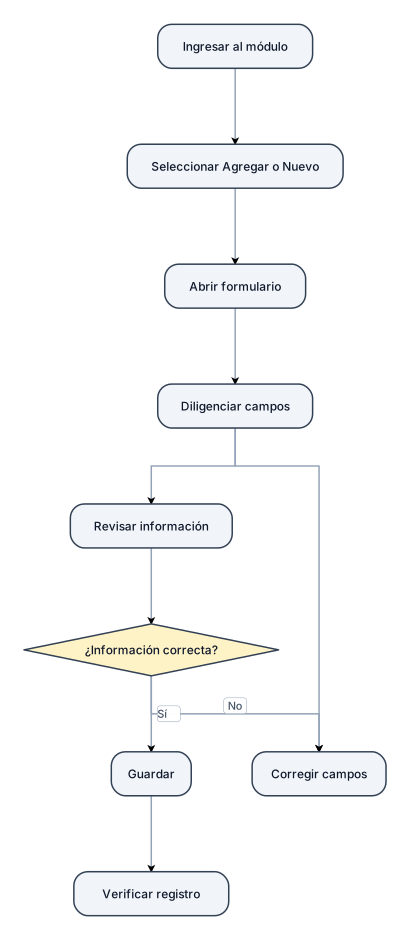
Ingresar al módulo ↓ Seleccionar "Agregar" o "Nuevo" ↓ Abrir formulario ↓ Diligenciar campos ↓ Revisar información ↓ ¿Información correcta? / \ Sí No │ │ │ └── Corregir campos │ ▼ Guardar │ ▼ Verificar registro
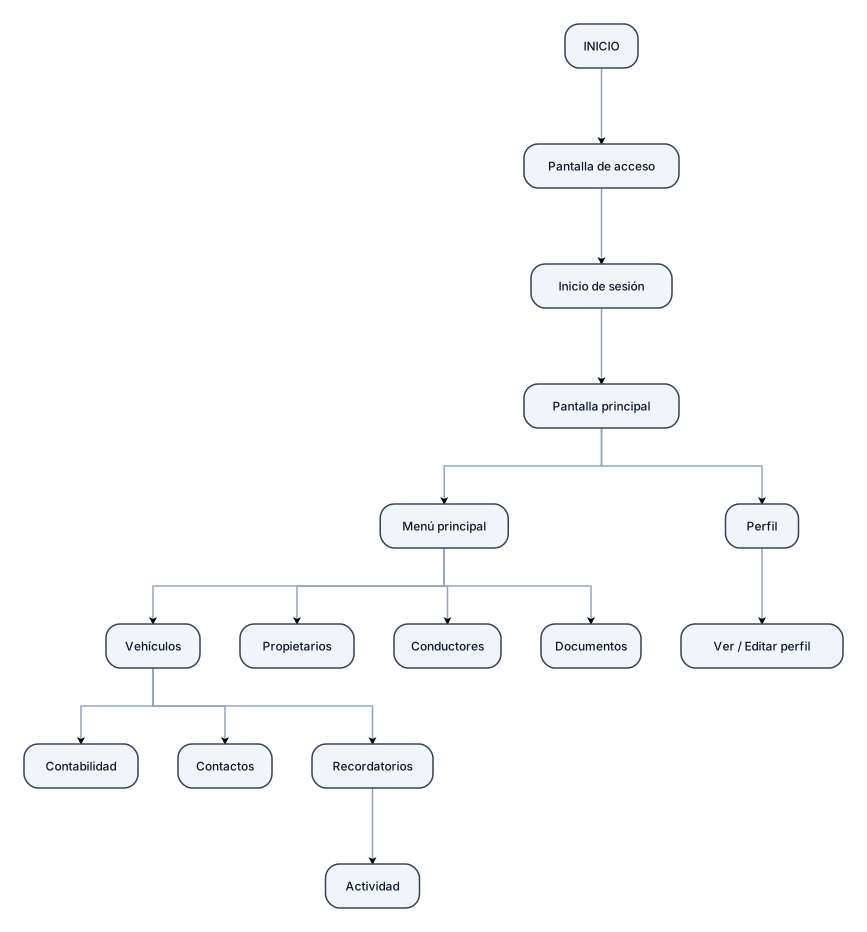
INICIO │ ▼ Pantalla de acceso │ ▼ Inicio de sesión │ ▼ Pantalla principal │ ┌────────┴────────┐ │ │ ▼ ▼ Menú principal Perfil │ │ │ ▼ │ Ver / Editar perfil │ ┌───────┼────────┬────────┬─────────┐ ▼ ▼ ▼ ▼ ▼ Vehículos Propietarios Conductores Documentos │ ├───────────────┬─────────────┐ ▼ ▼ ▼ Contabilidad Contactos Recordatorios │ ▼ Actividad
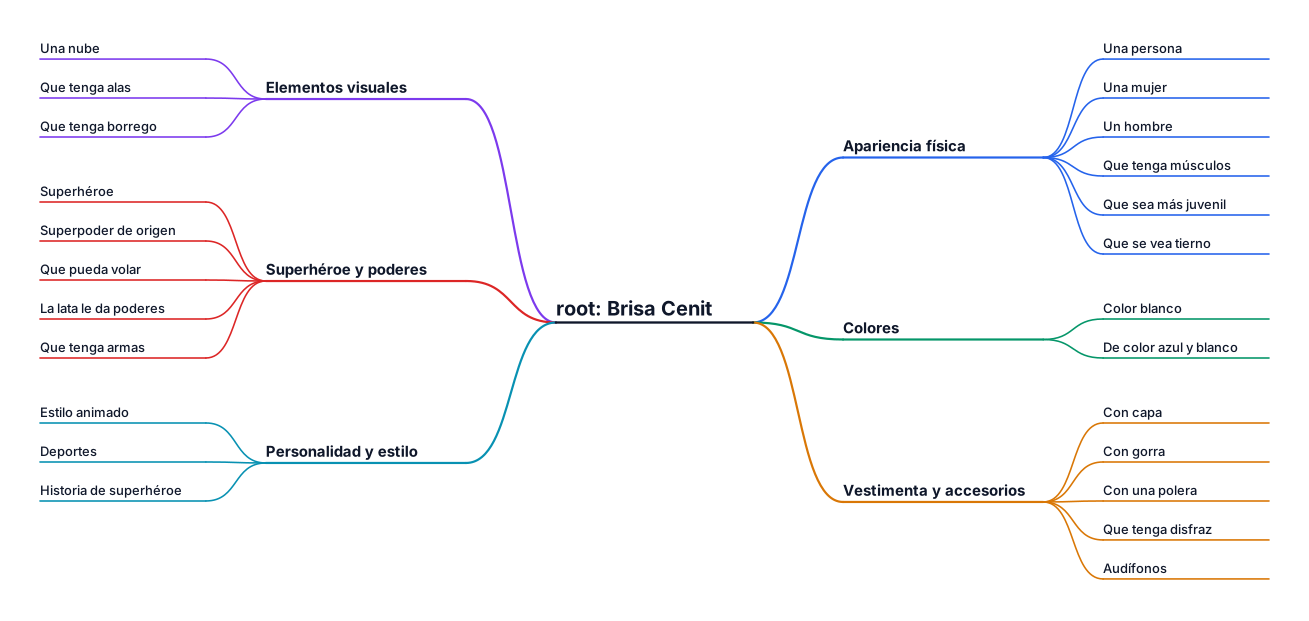
Necesito que hagas un mapa mental, como titulo central tiene que ser "Brisa Cenit" y de ella salen ramas de los siguientes grupos 1. Apariencia física Una persona Una mujer Un hombre Que tenga músculos Que sea más juvenil Que se vea tierno 2. Colores Color blanco De color azul y blanco 3. Vestimenta y accesorios Con capa Con gorra Con una polera Que tenga disfraz Audífonos 4. Elementos visuales Una nube Que tenga alas Que tenga borrego 5. Superhéroe y poderes Superhéroe Superpoder de origen Que pueda volar La lata le da poderes Que tenga armas 6. Personalidad y estilo Estilo animado Deportes Historia de superhéroe
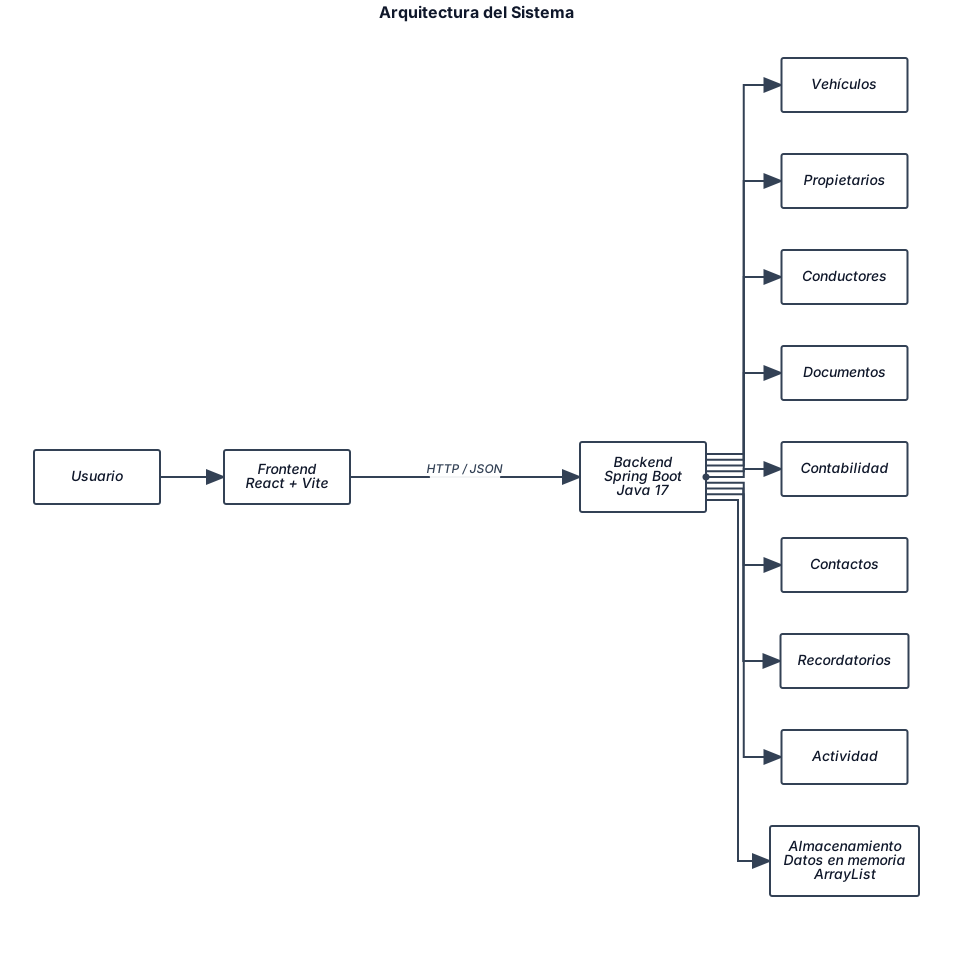
┌───────────────────────┐ │ USUARIO │ └───────────┬───────────┘ │ ▼ ┌───────────────────────┐ │ FRONTEND │ │ │ │ React + Vite │ └───────────┬───────────┘ │ │ HTTP / JSON ▼ ┌───────────────────────┐ │ BACKEND │ │ │ │ Spring Boot │ │ Java 17 │ └───────────┬───────────┘ │ ┌──────┼───────┬──────────┐ │ │ │ │ ▼ ▼ ▼ ▼ Vehículos Propietarios Conductores Documentos │ ├──────── Contabilidad ├──────── Contactos ├──────── Recordatorios └──────── Actividad │ ▼ ┌───────────────────────┐ │ ALMACENAMIENTO │ │ │ │ Datos en memoria │ │ ArrayList │ └───────────────────────┘
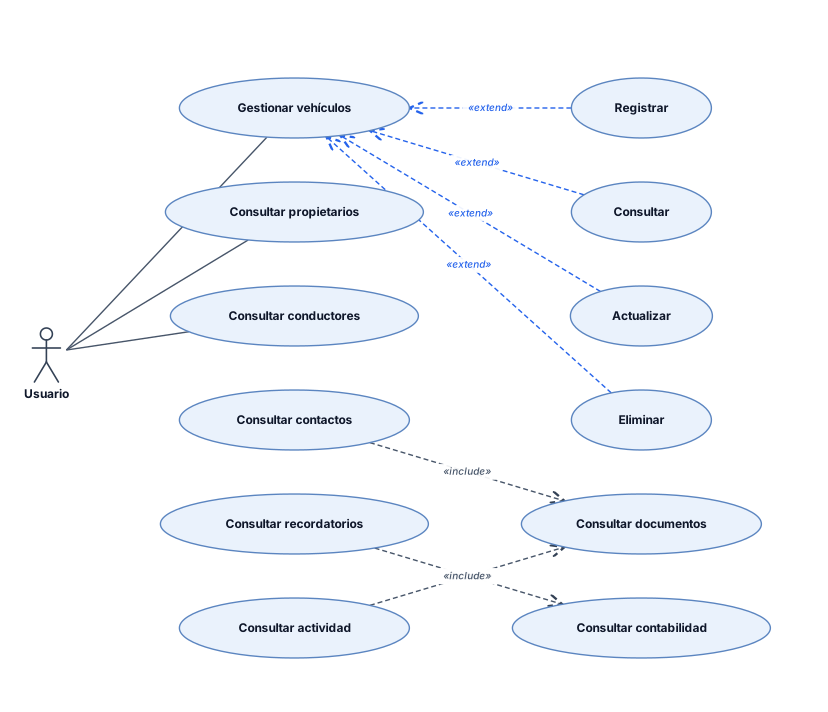
┌──────────────────────┐ │ USUARIO │ └──────────┬───────────┘ │ ┌──────────────────────┼──────────────────────┐ │ │ │ ▼ ▼ ▼ Gestionar vehículos Consultar propietarios Consultar conductores │ ├── Registrar ├── Consultar ├── Actualizar └── Eliminar ┌────────────────────────────────────────────┐ │ │ ▼ ▼ Consultar documentos Consultar contabilidad │ │ ▼ ▼ Consultar contactos Consultar recordatorios │ ▼ Consultar actividad
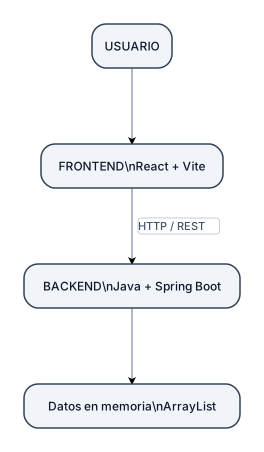
USUARIO │ ▼ ┌──────────────────┐ │ FRONTEND │ │ React + Vite │ └────────┬─────────┘ │ HTTP / REST │ ▼ ┌──────────────────┐ │ BACKEND │ │ Java + Spring │ │ Boot │ └────────┬─────────┘ │ ▼ ┌──────────────────┐ │ Datos en memoria │ │ ArrayList │ └──────────────────┘
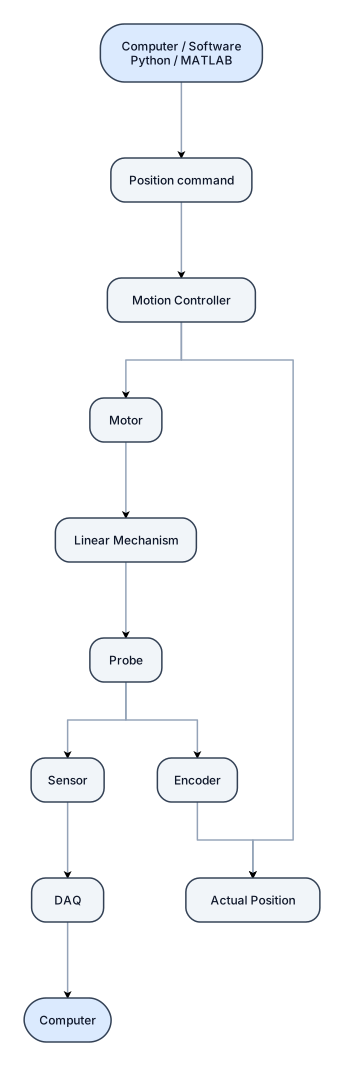
┌──────────────────────┐ │ COMPUTER / SOFTWARE │ │ Python / MATLAB │ └──────────┬───────────┘ │ Position command ▼ ┌──────────────────────┐ │ MOTION CONTROLLER │◄──────────────┐ └──────────┬───────────┘ │ │ │ ▼ │ MOTOR │ │ │ ▼ │ LINEAR MECHANISM │ │ │ ▼ │ PROBE │ / \ │ ▼ ▼ │ ENCODER SENSOR │ │ │ │ │ ▼ │ │ DAQ ─────────► COMPUTER │ │ │ └──── ACTUAL POSITION ────────────┘ writ his process in text for ai freedgiram to make state diagrma
┌──────────────────────┐ │ COMPUTER / SOFTWARE │ │ Python / MATLAB │ └──────────┬───────────┘ │ Position command ▼ ┌──────────────────────┐ │ MOTION CONTROLLER │◄──────────────┐ └──────────┬───────────┘ │ │ │ ▼ │ MOTOR │ │ │ ▼ │ LINEAR MECHANISM │ │ │ ▼ │ PROBE │ / \ │ ▼ ▼ │ ENCODER SENSOR │ │ │ │ │ ▼ │ │ DAQ ─────────► COMPUTER │ │ │ └──── ACTUAL POSITION ────────────┘
┌──────────────────────┐ │ COMPUTER / SOFTWARE │ │ Python / MATLAB │ └──────────┬───────────┘ │ Position command ▼ ┌──────────────────────┐ │ MOTION CONTROLLER │◄──────────────┐ └──────────┬───────────┘ │ │ │ ▼ │ MOTOR │ │ │ ▼ │ LINEAR MECHANISM │ │ │ ▼ │ PROBE │ / \ │ ▼ ▼ │ ENCODER SENSOR │ │ │ │ │ ▼ │ │ DAQ ─────────► COMPUTER │ │ │ └──── ACTUAL POSITION ────────────┘ w
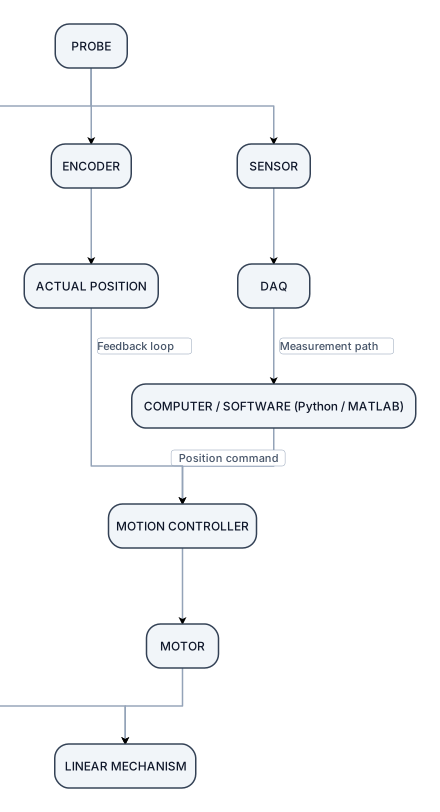
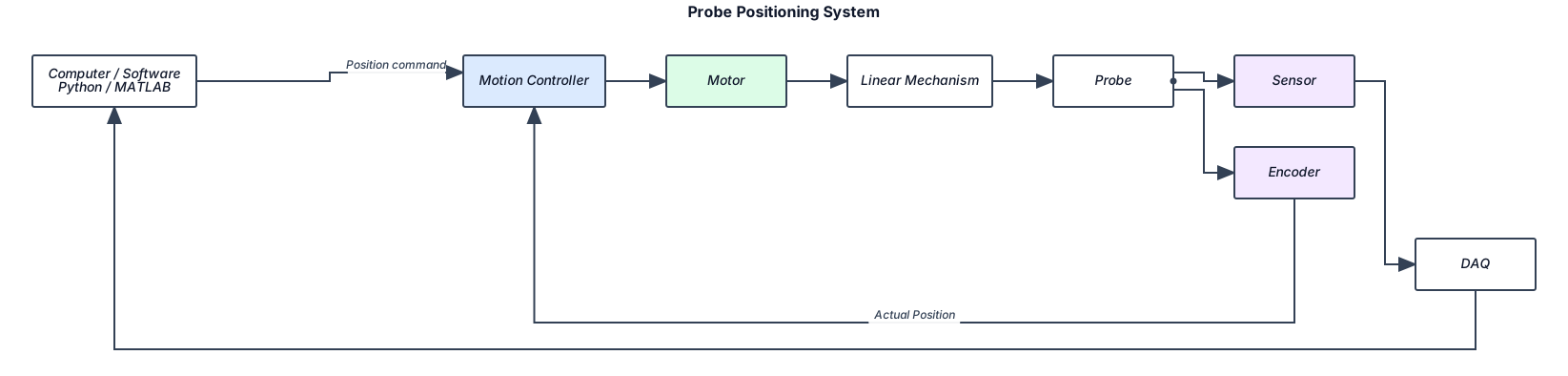
Create a simple flowchart with these exact connections and directions: COMPUTER / SOFTWARE (Python / MATLAB) ↓ Position command MOTION CONTROLLER ↓ MOTOR ↓ LINEAR MECHANISM ↓ PROBE From PROBE: → ENCODER → ACTUAL POSITION → back to MOTION CONTROLLER Also from PROBE: → SENSOR → DAQ → COMPUTER Show the encoder path as a feedback loop. Show the sensor/DAQ path as a separate measurement path. Do not connect DAQ to Motion Controller. Keep it clean, simple, and suitable for a first engineering team meeting.
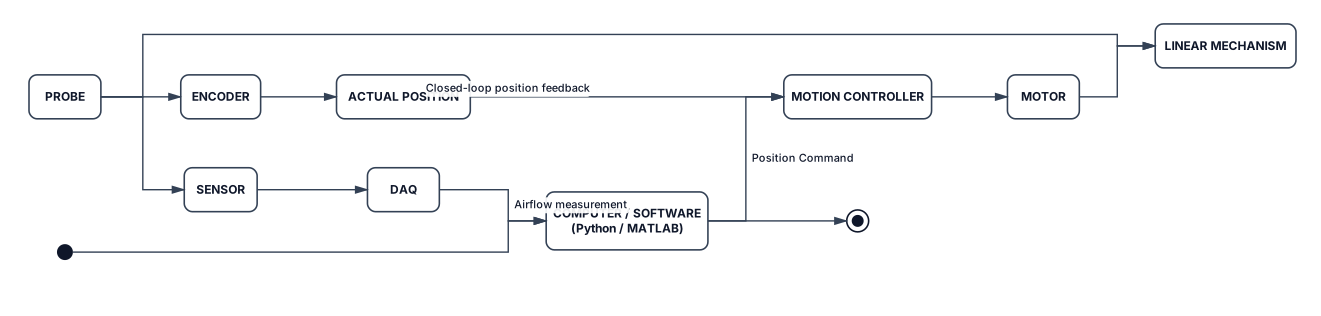
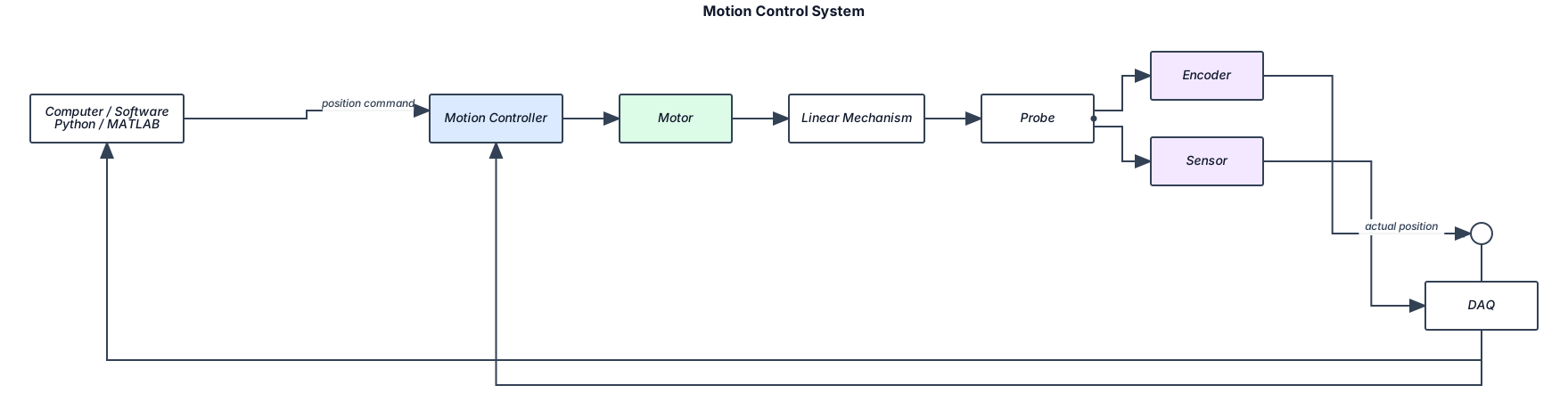
Create a simple engineering system flowchart showing how an automated wind-tunnel probe system is connected. Start with: COMPUTER / SOFTWARE (Python / MATLAB) → Position Command → MOTION CONTROLLER → MOTOR → LINEAR MECHANISM → PROBE From the PROBE, split into two paths: PROBE → ENCODER → ACTUAL POSITION → MOTION CONTROLLER This is the closed-loop position feedback path. At the same time: PROBE → SENSOR → DAQ → COMPUTER / SOFTWARE This is the airflow measurement path. The overall system therefore has two connected loops: 1. CONTROL LOOP: Computer → Motion Controller → Motor → Linear Mechanism → Probe → Encoder → Actual Position → Motion Controller 2. MEASUREMENT LOOP: Probe → Sensor → DAQ → Computer Make the diagram simple and clean. Show the Encoder feedback arrow returning to the Motion Controller. Show the DAQ measurement arrow returning to the Computer. Do NOT connect the DAQ directly to the Motion Controller. The main idea is: the computer tells the probe where to move, the motor and linear mechanism move the probe, the encoder tells the controller the actual position, while the sensor and DAQ measure the airflow and send the measurement back to the computer.

┌──────────────────────┐ │ COMPUTER / SOFTWARE │ │ Python / MATLAB │ └──────────┬───────────┘ │ Position command ▼ ┌──────────────────────┐ │ MOTION CONTROLLER │◄──────────────┐ └──────────┬───────────┘ │ │ │ ▼ │ MOTOR │ │ │ ▼ │ LINEAR MECHANISM │ │ │ ▼ │ PROBE │ / \ │ ▼ ▼ │ ENCODER SENSOR │ │ │ │ │ ▼ │ │ DAQ ─────────► COMPUTER │ │ │ └──── ACTUAL POSITION ────────────┘
┌──────────────────────┐ │ COMPUTER / SOFTWARE │ │ Python / MATLAB │ └──────────┬───────────┘ │ Position command ▼ ┌──────────────────────┐ │ MOTION CONTROLLER │◄──────────────┐ └──────────┬───────────┘ │ │ │ ▼ │ MOTOR │ │ │ ▼ │ LINEAR MECHANISM │ │ │ ▼ │ PROBE │ / \ │ ▼ ▼ │ ENCODER SENSOR │ │ │ │ │ ▼ │ │ DAQ ─────────► COMPUTER │ │ │ └──── ACTUAL POSITION ────────────┘
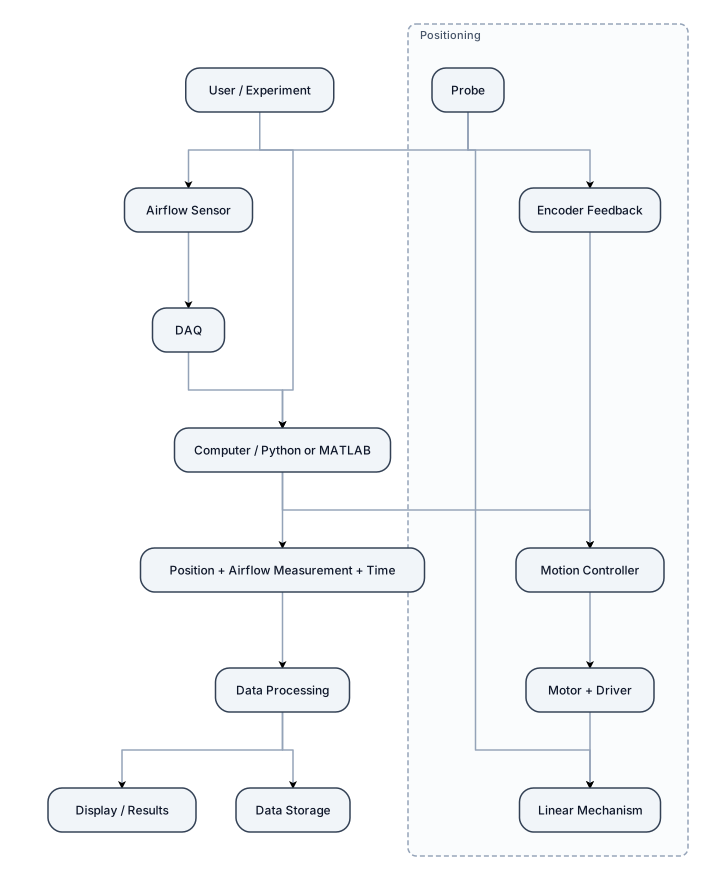
Create a simple engineering flowchart showing the overall connection of an automated wind-tunnel probe traversing system. USER / EXPERIMENT ↓ COMPUTER / PYTHON OR MATLAB ↓ ┌──────────────────────┐ │ POSITIONING SYSTEM │ │ Motion Controller │ │ ↓ │ │ Motor + Driver │ │ ↓ │ │ Linear Mechanism │ │ ↓ │ │ Probe │ │ ↑ │ │ Encoder Feedback │ └──────────────────────┘ At the same time: PROBE ↓ AIRFLOW SENSOR ↓ DAQ ↓ COMPUTER Then show: POSITION + AIRFLOW MEASUREMENT + TIME ↓ DATA PROCESSING ↓ DISPLAY / RESULTS ↓ DATA STORAGE Make it a clean, simple block diagram for a first engineering team meeting. Clearly show that the computer controls the positioning system, the encoder provides position feedback, and the DAQ sends measurement data to the computer. Do not include detailed component specifications, communication protocols, or complicated interfaces. Use simple rectangular blocks and clear arrows.
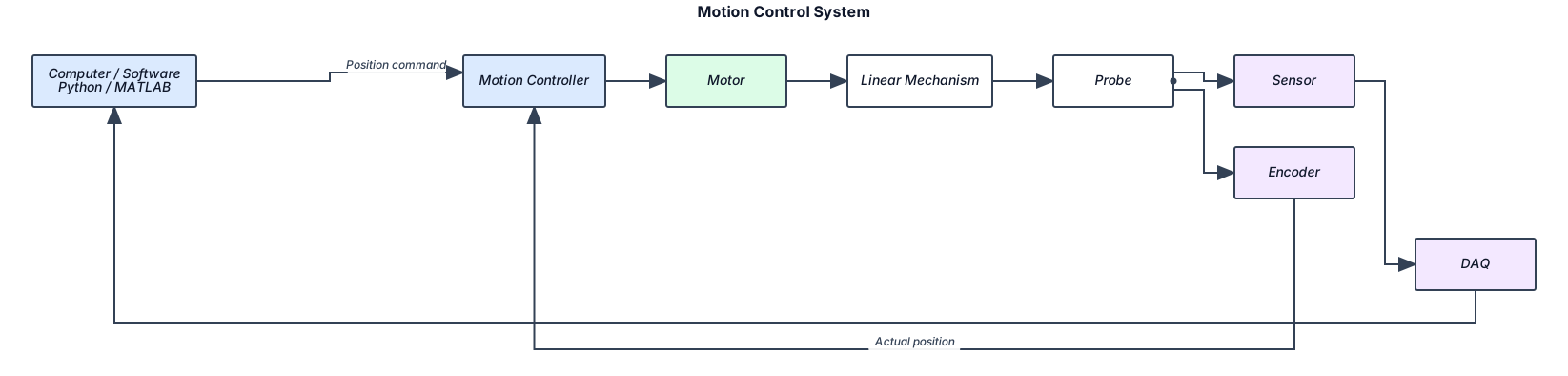
┌──────────────────────┐ │ COMPUTER / SOFTWARE │ │ Python / MATLAB │ └──────────┬───────────┘ │ Position command ▼ ┌──────────────────────┐ │ MOTION CONTROLLER │◄──────────────┐ └──────────┬───────────┘ │ │ │ ▼ │ MOTOR │ │ │ ▼ │ LINEAR MECHANISM │ │ │ ▼ │ PROBE │ / \ │ ▼ ▼ │ ENCODER SENSOR │ │ │ │ │ ▼ │ │ DAQ ─────────► COMPUTER │ │ │ └──── ACTUAL POSITION ────────────┘
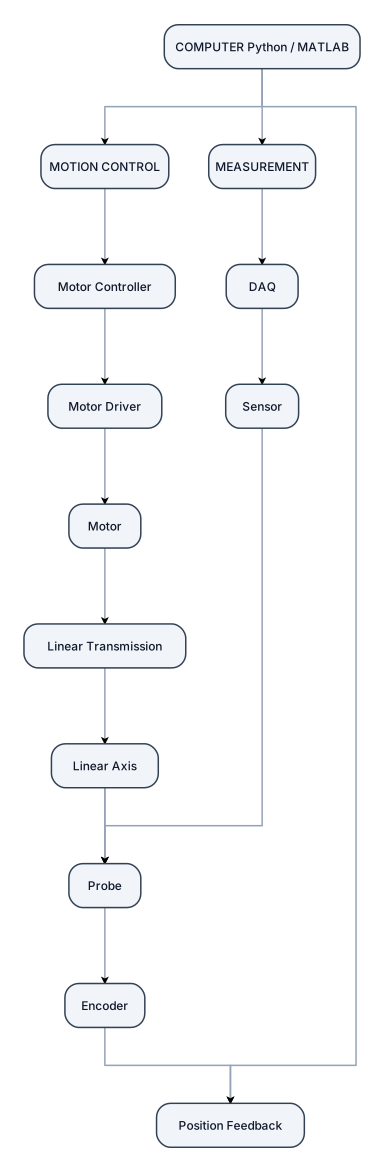
COMPUTER Python / MATLAB │ ┌─────────┴─────────┐ ↓ ↓ MOTION CONTROL MEASUREMENT │ │ Motor Controller DAQ │ ↑ Motor Driver │ │ │ Motor Sensor │ ↑ Linear Transmission Probe │ ↑ Linear Axis ←────────────┘ │ Probe │ Encoder │ └──────→ Position Feedback
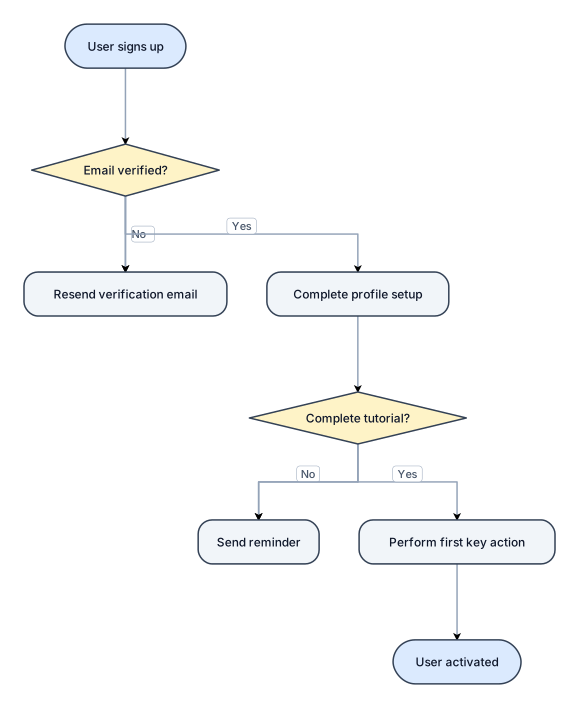
A flowchart of a new-user onboarding flow from signup to first activation, with a verification branch COMPUTER Python / MATLAB │ ┌─────────┴─────────┐ ↓ ↓ MOTION CONTROL MEASUREMENT │ │ Motor Controller DAQ │ ↑ Motor Driver │ │ │ Motor Sensor │ ↑ Linear Transmission Probe │ ↑ Linear Axis ←────────────┘ │ Probe │ Encoder │ └──────→ Position Feedback
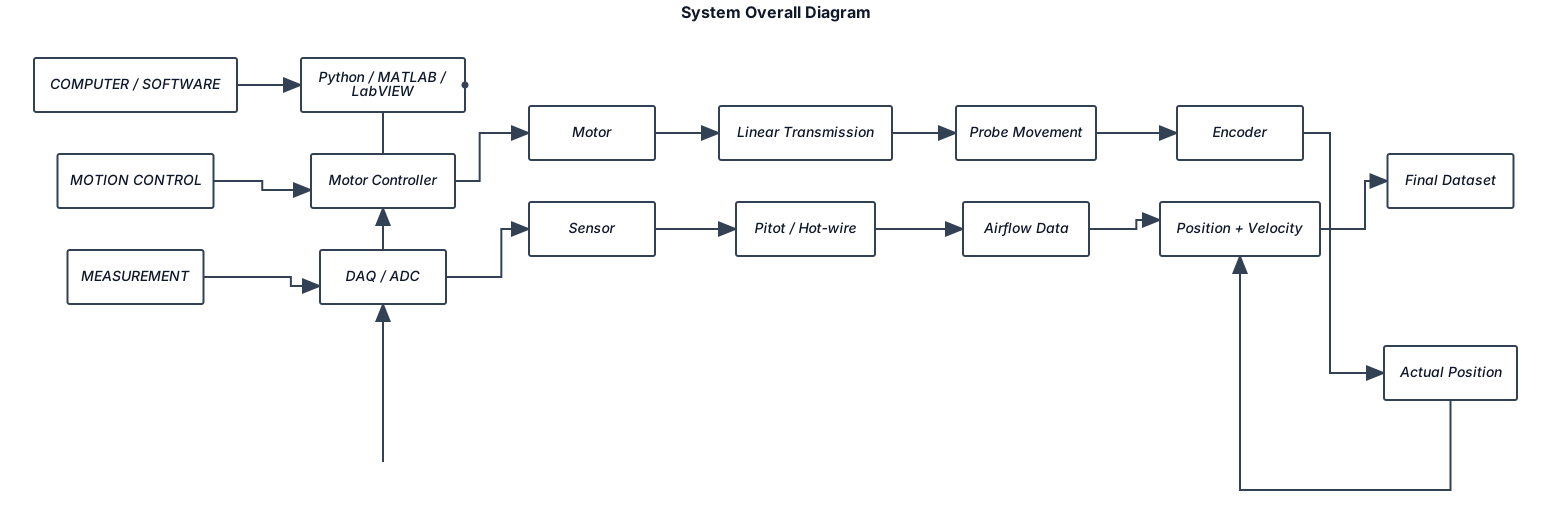
make system overall diagram imagel like this below COMPUTER / SOFTWARE Python / MATLAB / LabVIEW │ ┌────────┴────────┐ │ │ MOTION CONTROL MEASUREMENT │ │ Motor Controller DAQ / ADC │ │ Motor Sensor │ │ Linear Transmission Pitot / Hot-wire │ │ Probe Movement Airflow Data │ │ Encoder ───────────────┘ │ Actual Position │ └────→ Position + Velocity ↓ Final Dataset