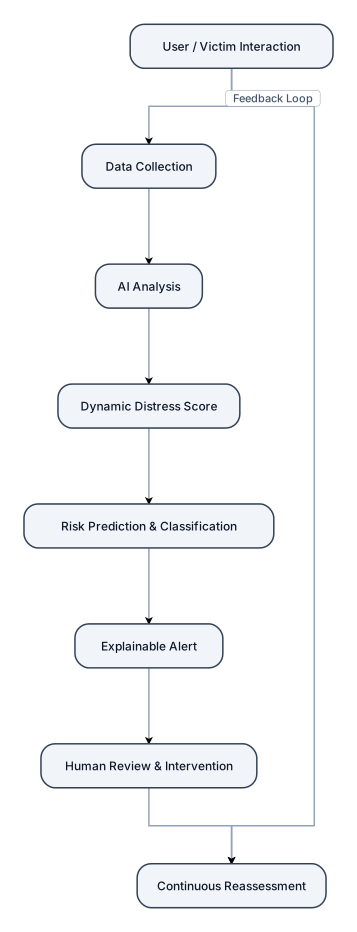
FLOW: 1. User / Victim Interaction Mobile App / Chat / Voice / Check-in ↓ 2. Data Collection Mood + Text + Voice + Behaviour + Interaction History ↓ 3. AI Analysis NLP + Sentiment + Emotion + Behaviour Analysis ↓ 4. Dynamic Distress Score Combine current signals with historical patterns ↓ 5. Risk Prediction & Classification Low / Moderate / High Risk ↓ 6. Explainable Alert Show key contributing risk factors ↓ 7. Human Review & Intervention Counsellor / Authorized Staff review and recommend appropriate support ↓ 8. Continuous Reassessment Follow-up → New interaction → Updated risk assessment Add a feedback arrow from “Continuous Reassessment” back to “User Interaction” to show the continuous monitoring loop. Design requirements: Minimal and uncluttered Professional SIH presentation style Blue/white theme with subtle accent colors Rounded rectangular boxes Clear directional arrows Very little text inside each box Use simple modern icons No paragraphs No unnecessary technology stack No separate architecture layers No excessive sub-processes Make it fit cleanly on one 16:9 PowerPoint slide Clearly emphasize the journey: Input → AI Analysis → Risk Assessment → Human Intervention → Continuous Monitoring AI should be shown as decision support, not diagnosis Human review must remain the final intervention/decision stage.
Diagram Examples from Real Visitor Prompts
Browse eligible diagrams shared by FreeDiagram visitors, inspect the exact prompts, and build your own version.
Browse 3281 real creationsMain diagram studio
Showing 865–888 of 1261. No stock examples or system defaults. Choose a tool, study a real result, then reopen its prompt as your starting point.
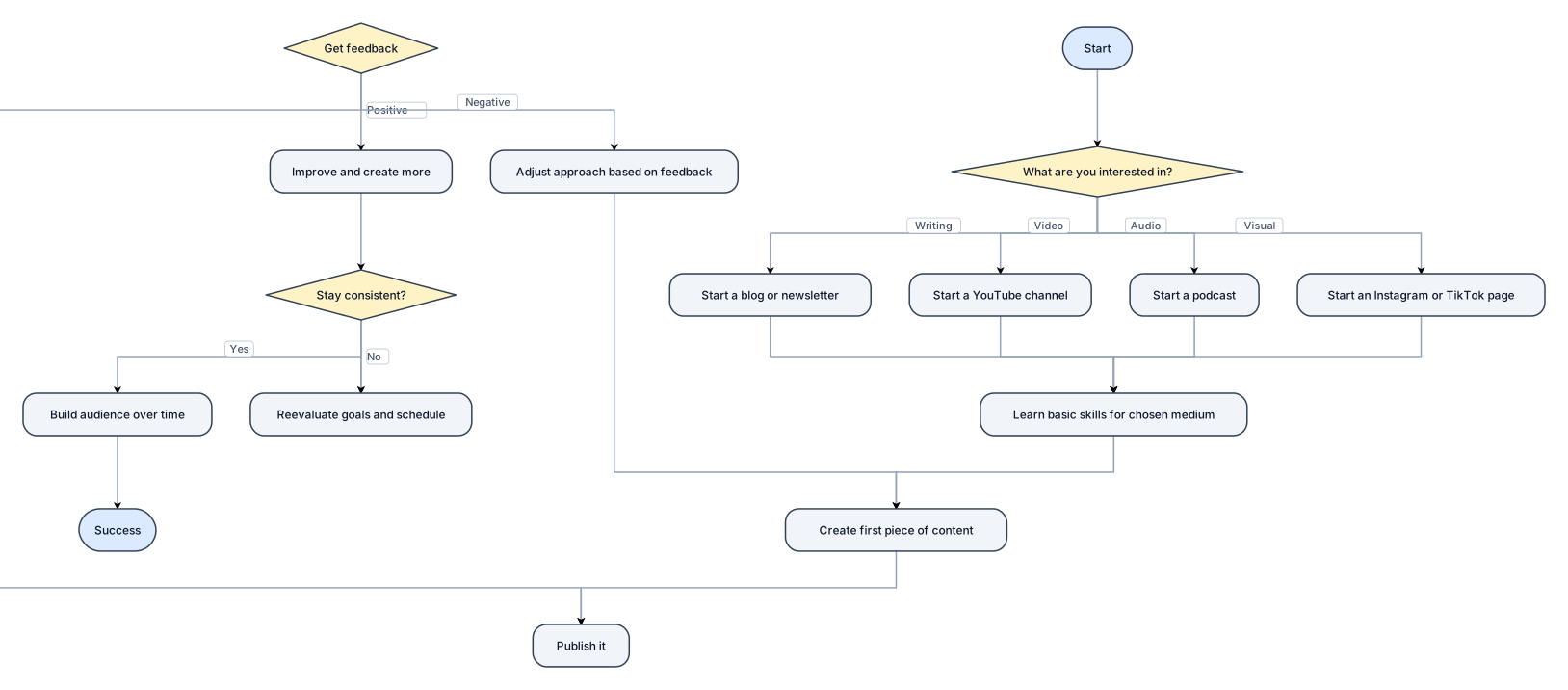
Create a flowchart showing how a student can start content creation.
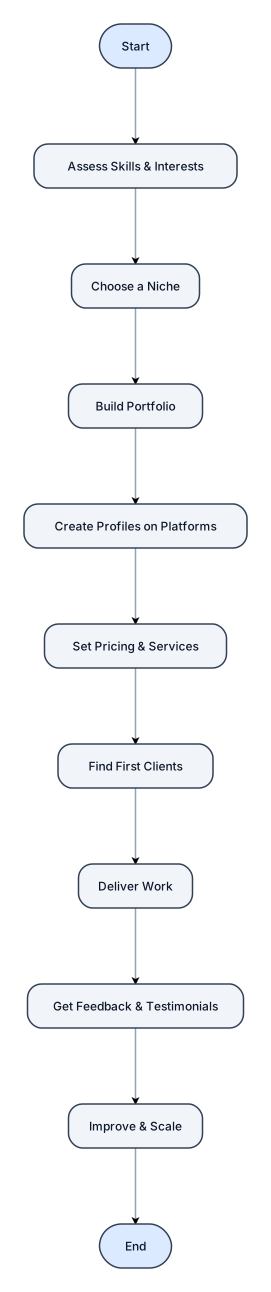
Create a flowchart showing how a student can start freelancing.
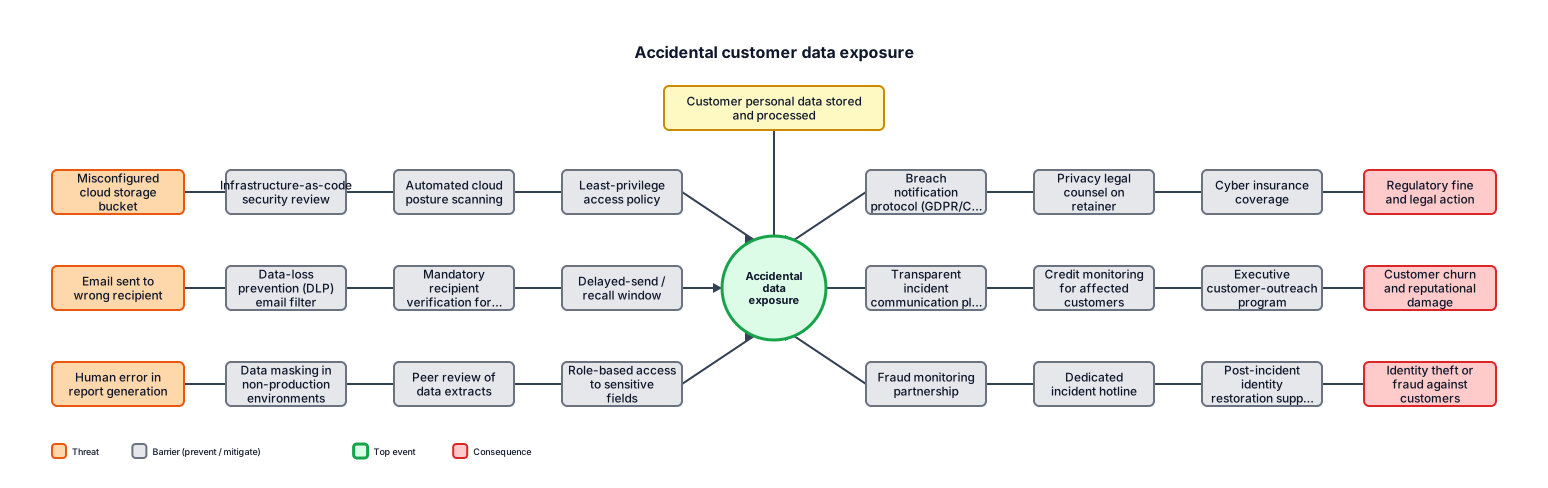
A bowtie analysis for accidental customer data exposure, including preventive controls, consequences, and recovery controls
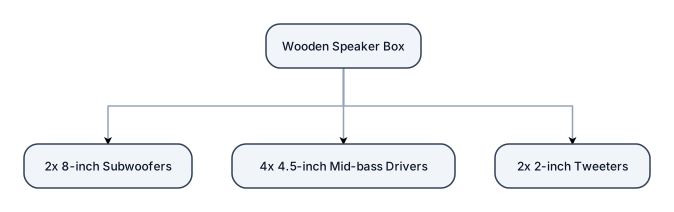
I want a speaker box made of wood for two 8 inch subwoofer, four 4.5 inch mid-bass and two 2 inch tweeter.
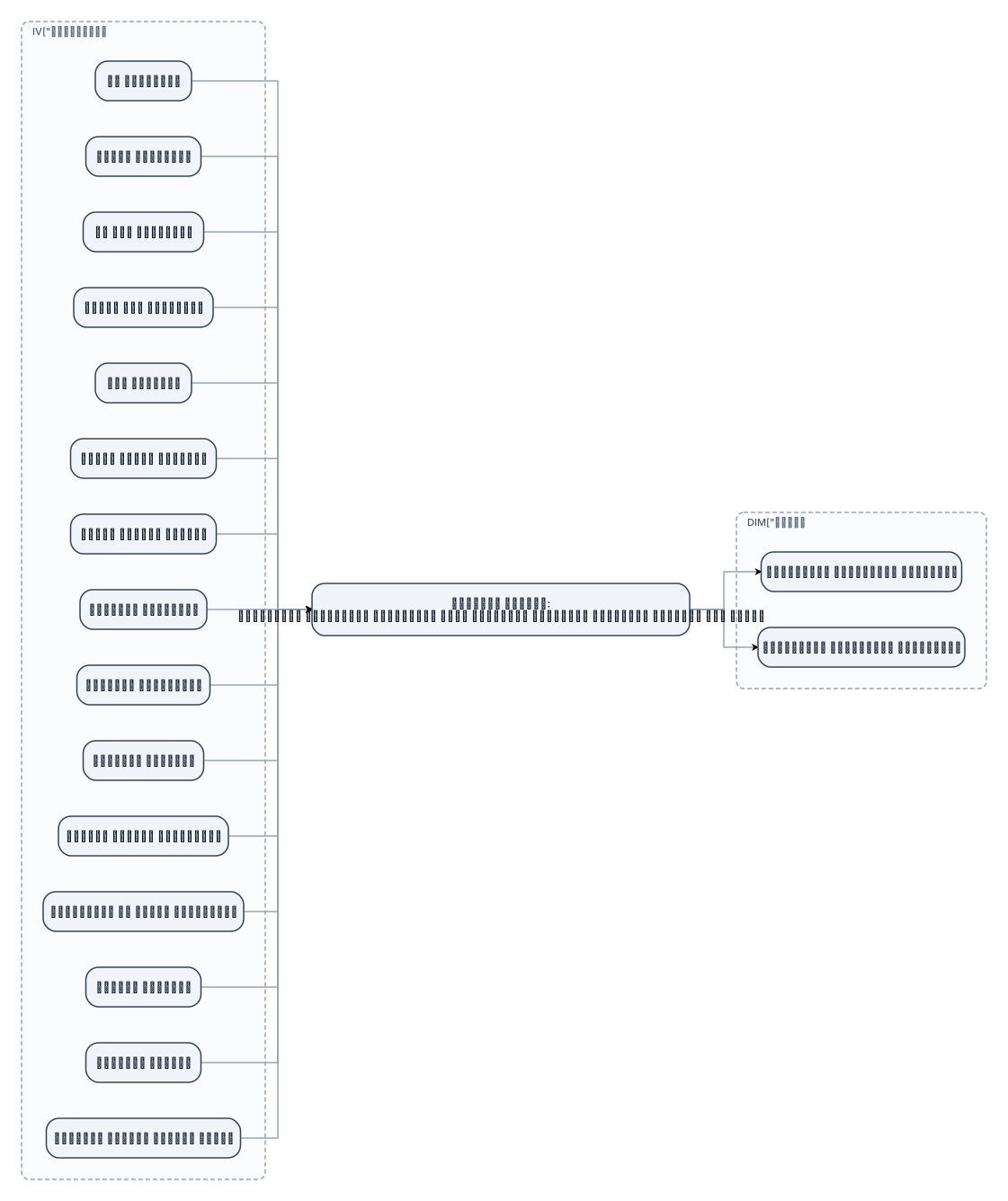
الإطار التصوري لمتغيرات الدراسة المتغيرات المستقلة: سن المبحوثة تعليم المبحوثة سن زوج المبحوثة تعليم زوج المبحوثة عدد الأبناء متوسط تعليم الأبناء الدخل الشهري الأسري الحيازة الزراعية الحيازة الحيوانية الحيازة الداجنة التعرض لمصادر المعلومات الاستفادة من مصادر المعلومات دافعية الإنجاز التماسك الأسري التقدير الذاتي لقيادة الرأي ↓ المتغير التابع: المتطلبات الإرشادية للمبحوثات ببعض الصناعات الغذائية المنزلية بمحافظة كفر الشيخ ↙ ↘ المتطلبات الإرشادية المعرفية المتطلبات الإرشادية التنفيذية صمم المعلومات السابقة في صورة مخطط مفاهيمي أكاديمي واضح ومناسب لرسالة دكتوراه. ضع المتغيرات المستقلة الخمسة عشر في صناديق منفصلة، دون تجميعها أو تقسيمها إلى مجموعات. اجعلها في الجانب الأيسر، والمتغير التابع في الجانب الأيمن، مع أسهم واضحة من المتغيرات المستقلة نحو المتغير التابع. اجعل البعدين المعرفي والتنفيذي يتفرعان من المتغير التابع. استخدم تصميمًا رأسيًا منظمًا، وخلفية بيضاء، وألوانًا أكاديمية هادئة، وخطًا عربيًا واضحًا. لا تضف أي متغيرات أو معلومات غير موجودة في النص.
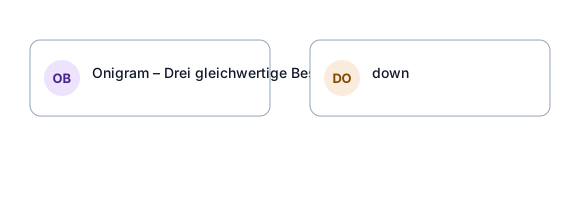
erstelle ein onigram wir sind drei gleichwertige besitzer einer ist zuständig für personal und finanzen und archiv der andere ist zustänig für mission control und der letzte ist zuständig für kommunikation der verantwortliche für personal hat auch noch ein team namens RedHounds und der zuständige für mission control hat ein team namens AOD
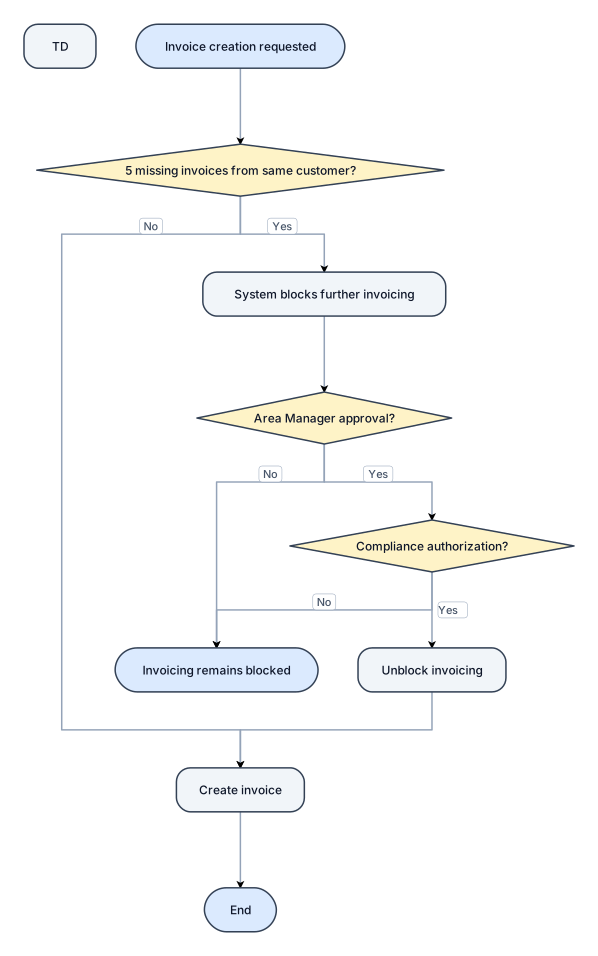
There is a control that after 5 missing invoices from same customer, system blocks the further invoicing, to make futher invoicing, Area Manager Approval and Compliance Authorization Required. End

START, Sales Representative Visits Customer as per Assigned Route, obtain Customer Requirement, Pre-Order Obtained, Pre-Order Booked in MIRA through HHD, (Location-Based Control), Outside Customer, Boundary?, No │ Yes, Obtian Supervisor Approval, Obtain Area Manager Approval, Demand Consolidated by Route & Item, Forecast Department Reviews Demand vs. Previous Demand, IF Significant Demand or Any Variance Identified ?, Obtain Area Manager Confirmation, Demand Finalized & Segregated into In-House / Trading. Trading goes to Warehouse department and they will check the available inventory, if In-House than goes to production department and they will review the inventory and production requirement, make production order and execute the production, After production items transferred to relevant wareouse, Warehouse Storekeeper Updates Forecast in MIRA & Issues Stock in Oracle, Dispatch Team reconcile physical stock vs Forecast, If items are unreconclied, forecast reviews and update, forecaster approves and finalized, forecast than uploaded into the HDD as per route, Dispatch team loads inventory onto the vehicle, physical loadding will be reflected into HHD, Sales Representative Reconciles Loaded Stock with HHD, If Discrepancy Identified?, Compliance Dept. will investigate and make adjustement in MIRA system, Inventory loaded and available for sale, Customer Delivery, Invoice generated through HHD, If cash sales, Deliver items, provide invoice and collect payment, but if credit sale, deliver items, provide invoice and obtain signed & stamped copy, submit copy to accounts/cashier. There is a control that after 5 missing invoices from same customer, system blocks the further invoicing, to make futher invoicing, Area Manager Approval and Compliance Authorization Required. End

START, Sales Representative Visits Customer as per Assigned Route, obtain Customer Requirement, Pre-Order Obtained, Pre-Order Booked in MIRA through HHD, (Location-Based Control), Outside Customer, Boundary?, No │ Yes, Obtian Supervisor Approval, Obtain Area Manager Approval, Demand Consolidated by Route & Item, Forecast Department Reviews Demand vs. Previous Demand, IF Significant Demand or Any Variance Identified ?, Obtain Area Manager Confirmation, Demand Finalized & Segregated into In-House / Trading. Trading goes to Warehouse department and they will check the available inventory, if In-House than goes to production department and they will review the inventory and production requirement, make production order and execute the production, After production items transferred to relevant wareouse, Warehouse Storekeeper Updates Forecast in MIRA & Issues Stock in Oracle, Dispatch Team reconcile physical stock vs Forecast, If items are unreconclied, forecast reviews and update, forecaster approves and finalized, forecast than uploaded into the HDD as per route, Dispatch team loads inventory onto the vehicle, physical loadding will be reflected into HHD, Sales Representative Reconciles Loaded Stock with HHD, If Discrepancy Identified?, Compliance Dept. will investigate and make adjustement in MIRA system, Inventory loaded and available for sale, Customer Delivery, Invoice generated through HHD, If cash sales, Deliver items, provide invoice and collect payment, but if credit sale, deliver items, provide invoice and obtain signed & stamped copy, submit copy to accounts/cashier, There is a control that after 5 missing invoices from same customer, system blocks the further invoicing, to make futher invoicing, Area Manager Approval and Compliance Authorization Required. End
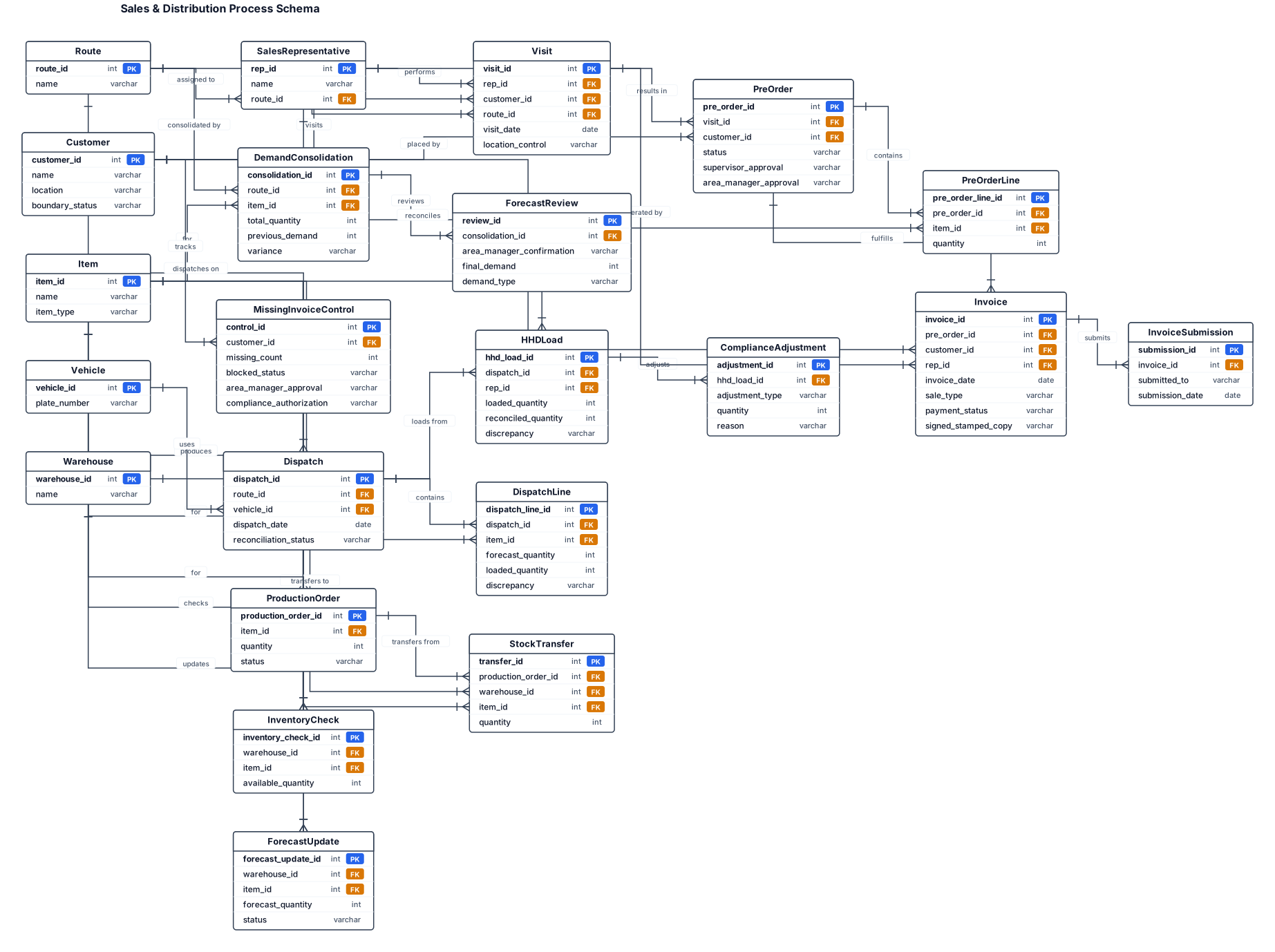
START, Sales Representative Visits Customer as per Assigned Route, obtain Customer Requirement, Pre-Order Obtained, Pre-Order Booked in MIRA through HHD, (Location-Based Control), Outside Customer, Boundary?, No │ Yes, Obtian Supervisor Approval, Obtain Area Manager Approval, Demand Consolidated by Route & Item, Forecast Department Reviews Demand vs. Previous Demand, IF Significant Demand or Any Variance Identified ?, Obtain Area Manager Confirmation, Demand Finalized & Segregated into In-House / Trading. Trading goes to Warehouse department and they will check the available inventory, if In-House than goes to production department and they will review the inventory and production requirement, make production order and execute the production, After production items transferred to relevant wareouse, Warehouse Storekeeper Updates Forecast in MIRA & Issues Stock in Oracle, Dispatch Team reconcile physical stock vs Forecast, If items are unreconclied, forecast reviews and update, forecaster approves and finalized, forecast than uploaded into the HDD as per route, Dispatch team loads inventory onto the vehicle, physical loadding will be reflected into HHD, Sales Representative Reconciles Loaded Stock with HHD, If Discrepancy Identified?, Compliance Dept. will investigate and make adjustement in MIRA system, Inventory loaded and available for sale, Customer Delivery, Invoice generated through HHD, If cash sales, Deliver items, provide invoice and collect payment, but if credit sale, deliver items, provide invoice and obtain signed & stamped copy, submit copy to accounts/cashier, There is a control that after 5 missing invoices from same customer, system blocks the further invoicing, to make futher invoicing, Area Manager Approval and Compliance Authorization Required. End
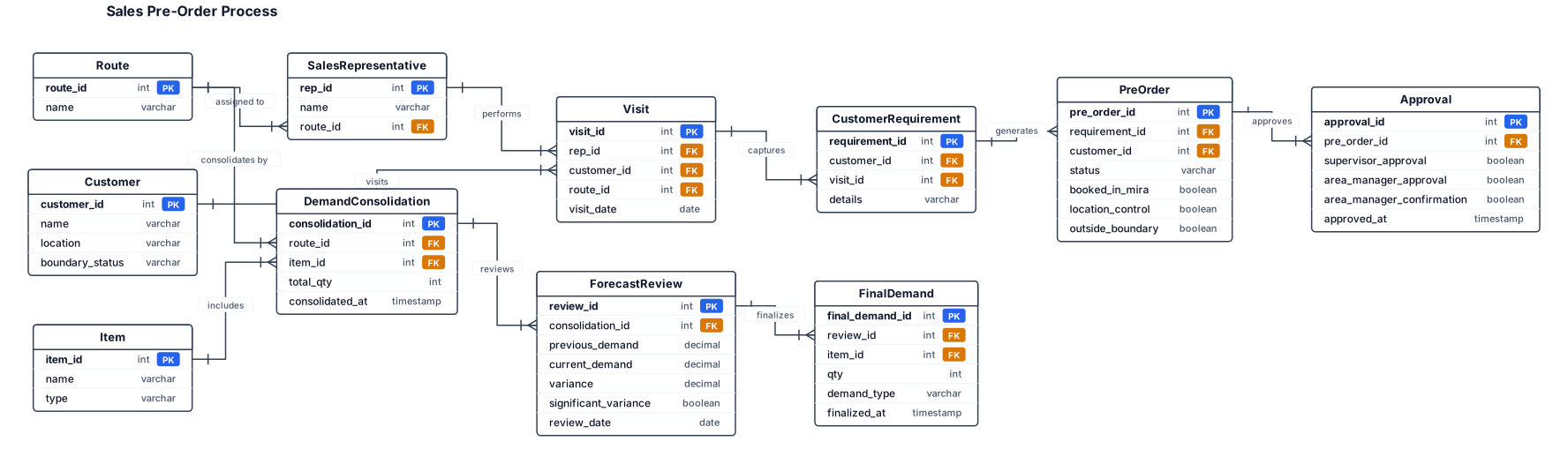
START, Sales Representative Visits Customer as per Assigned Route, obtain Customer Requirement, Pre-Order Obtained, Pre-Order Booked in MIRA through HHD, (Location-Based Control), Outside Customer, Boundary?, No │ Yes, Obtian Supervisor Approval, Obtain Area Manager Approval, Demand Consolidated by Route & Item, Forecast Department Reviews Demand vs. Previous Demand, IF Significant Demand or Any Variance Identified ?, Obtain Area Manager Confirmation, Demadn Finalized & Segregated into In-House / Trading.
START, Sales Representative Visits Customer as per Assigned Route, obtain Customer Requirement, Pre-Order Obtained, Pre-Order Booked in MIRA through HHD, (Location-Based Control), Outside Customer, Boundary?, No │ Yes, Obtian Supervisor Approval, Obtain Area Manager Approval, Demand Consolidated by Route & Item, Forecast Department Reviews Demand vs. Previous Demand, IF Significant Demand or Any Variance Identified ?, Obtain Area Manager Confirmation, Demadn Finalized & Segregated into In-House / Trading.
START, Sales Representative Visits Customer as per Assigned Route, obtain Customer Requirement, Pre-Order Obtained, Pre-Order Booked in MIRA through HHD, (Location-Based Control), Outside Customer, Boundary?, No │ Yes, Obtian Supervisor Approval, Obtain Area Manager Approval, Demand Consolidated by Route & Item, Forecast Department Reviews Demand vs. Previous Demand, IF Significant Demand or Any Variance Identified ?, Obtain Area Manager Confirmation, Demadn Finalized & Segregated into In-House / Trading.
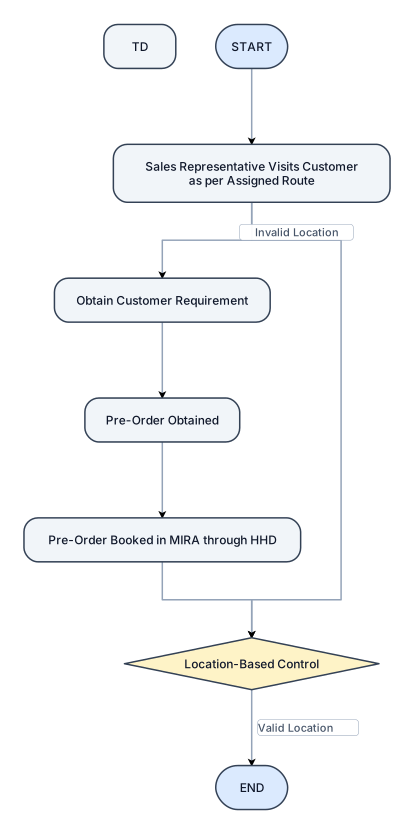
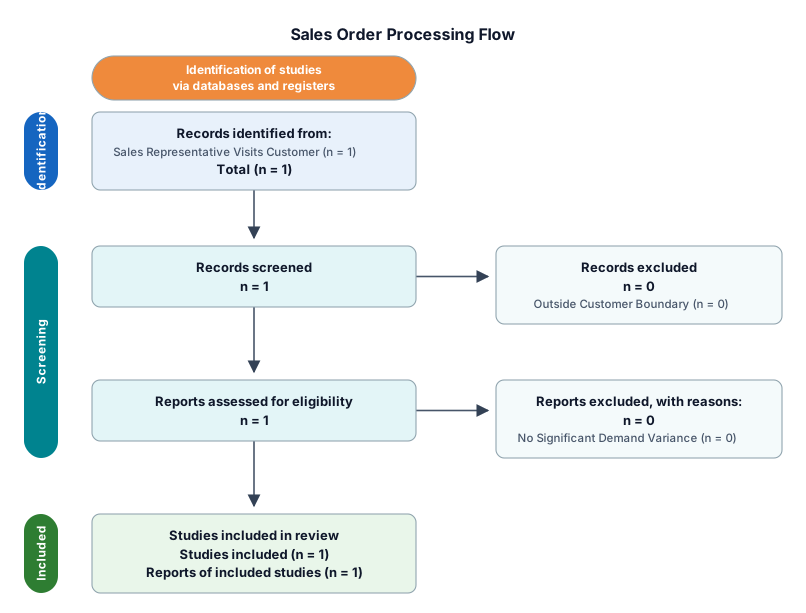
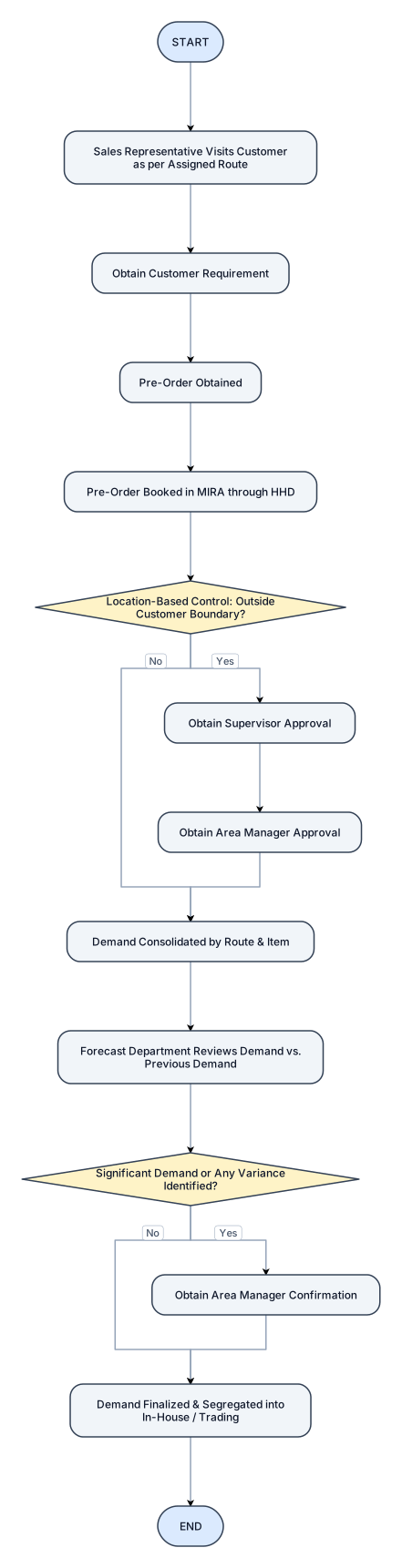
START, Sales Representative Visits Customer as per Assigned Route, obtain Customer Requirement, Pre-Order Obtained, Pre-Order Booked in MIRA through HHD, (Location-Based Control).
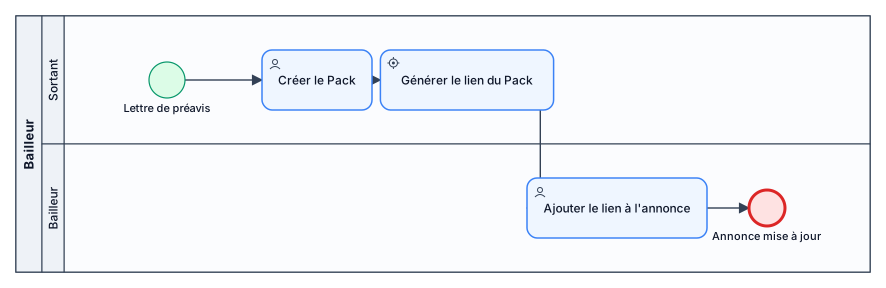
Lettre de préavis -> Le sortant créer le Pack ->génération du lien du Pack à ajouter à l'annonce par le bailleur
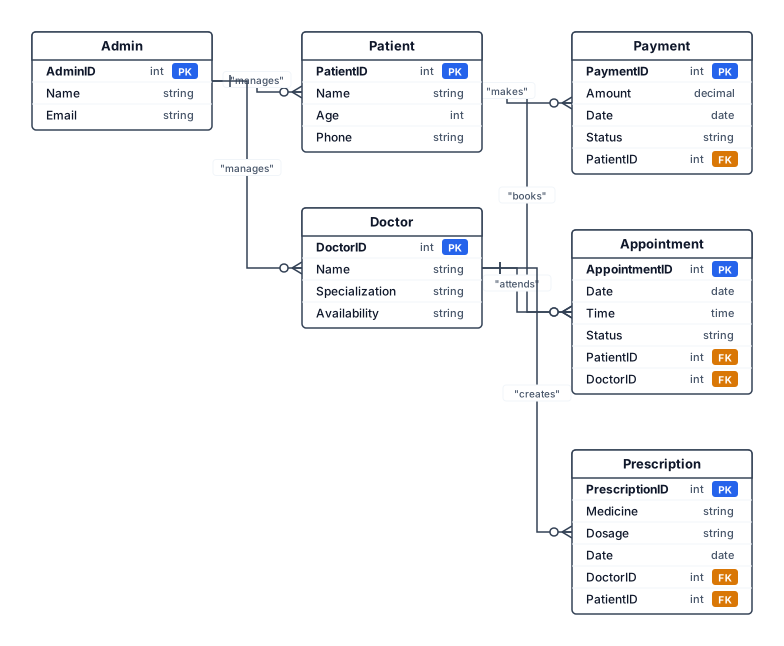
Patient – PatientID, Name, Age, Phone Doctor – DoctorID, Name, Specialization, Availability Appointment – AppointmentID, Date, Time, Status Prescription – PrescriptionID, Medicine, Dosage, Date Payment – PaymentID, Amount, Date, Status Admin – AdminID, Name, Email Patient books Appointment. Doctor attends Appointment. Doctor creates Prescription. Patient makes Payment. Admin manages Patients and Doctors.
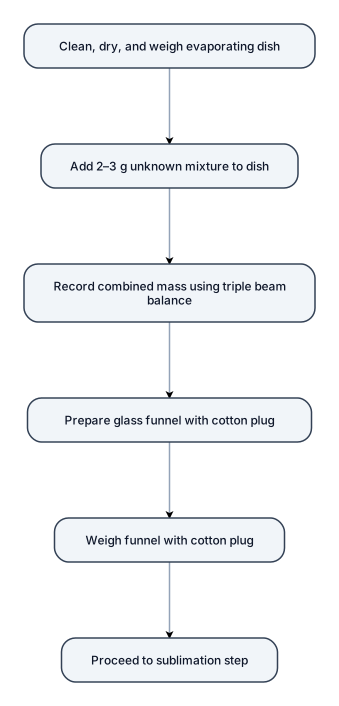
The first evaporating dish was cleaned, dried, and weighed. Approximately 2–3 g of the unknown mixture was placed into the dish, and the combined mass was recorded using triple beam balance. A glass funnel with a cotton plug was then prepared and weighed for the sublimation step.
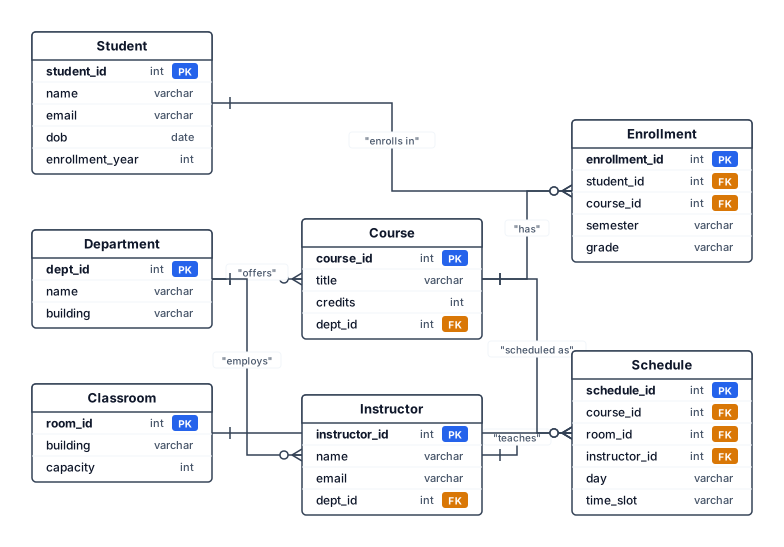
Er diagram for college management system
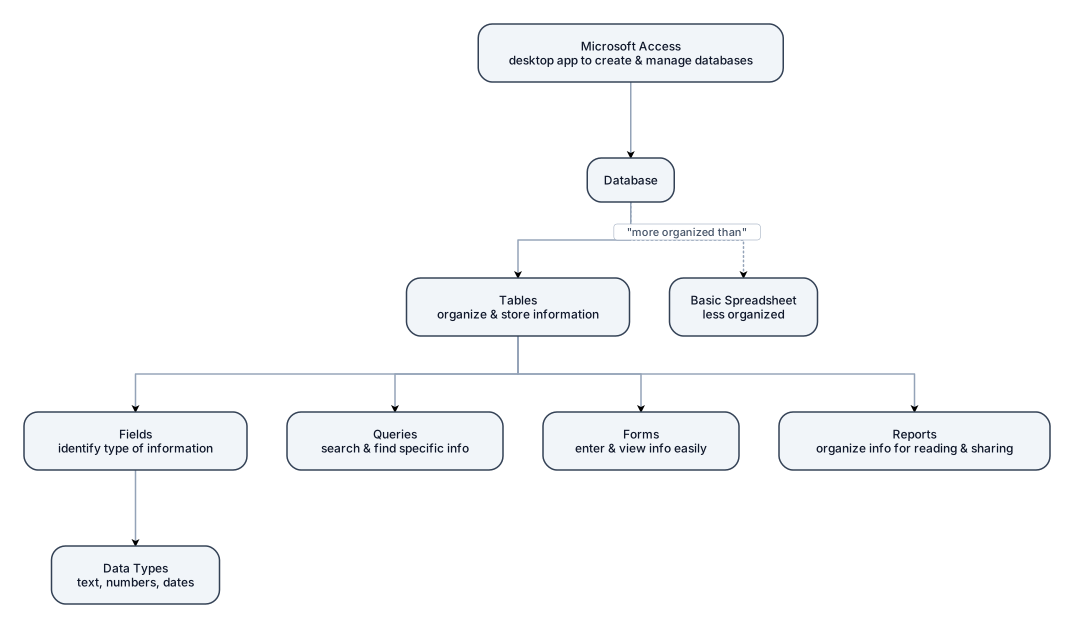
a flowchart: prisma flow with short explanations using this info: A database is made up of tables that are used to organize and store information. Microsoft Access is a desktop application used to create and manage databases. In Access, tables contain fields that identify the type of information being stored, while data types tell Access what kind of information can be entered, such as text, numbers, or dates. Queries are used to search for and find specific information in a database. Forms make it easier to enter and view information, while reports organize the information into a format that is easy to read and share. Overall, Microsoft Access can be used to store, manage, and search through large amounts of information in a more organized way than a basic spreadsheet.
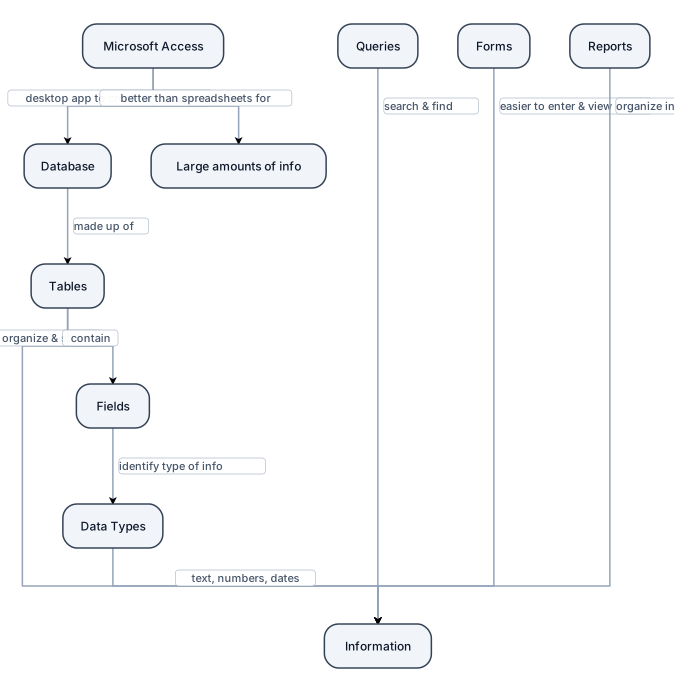
flowchart with short blurbs and explanations using this info: A database is made up of tables that are used to organize and store information. Microsoft Access is a desktop application used to create and manage databases. In Access, tables contain fields that identify the type of information being stored, while data types tell Access what kind of information can be entered, such as text, numbers, or dates. Queries are used to search for and find specific information in a database. Forms make it easier to enter and view information, while reports organize the information into a format that is easy to read and share. Overall, Microsoft Access can be used to store, manage, and search through large amounts of information in a more organized way than a basic spreadsheet.
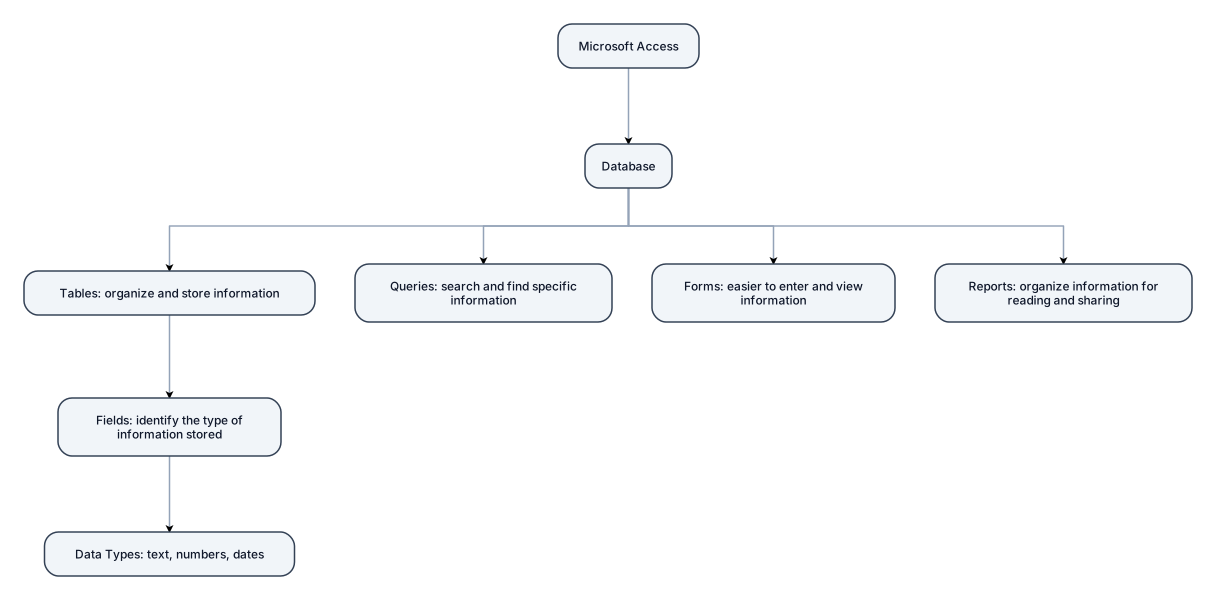
flowchart with short blurbs using this info: A database is made up of tables that are used to organize and store information. Microsoft Access is a desktop application used to create and manage databases. In Access, tables contain fields that identify the type of information being stored, while data types tell Access what kind of information can be entered, such as text, numbers, or dates. Queries are used to search for and find specific information in a database. Forms make it easier to enter and view information, while reports organize the information into a format that is easy to read and share. Overall, Microsoft Access can be used to store, manage, and search through large amounts of information in a more organized way than a basic spreadsheet.
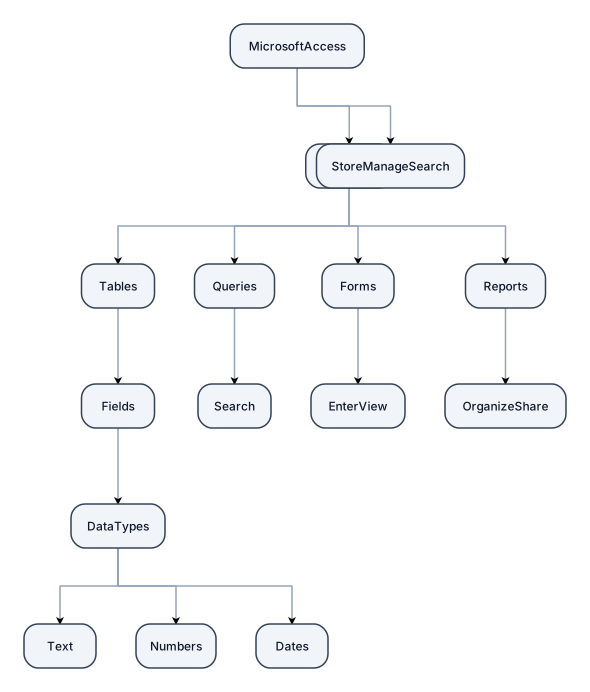
flowchart using this info: A database is made up of tables that are used to organize and store information. Microsoft Access is a desktop application used to create and manage databases. In Access, tables contain fields that identify the type of information being stored, while data types tell Access what kind of information can be entered, such as text, numbers, or dates. Queries are used to search for and find specific information in a database. Forms make it easier to enter and view information, while reports organize the information into a format that is easy to read and share. Overall, Microsoft Access can be used to store, manage, and search through large amounts of information in a more organized way than a basic spreadsheet.
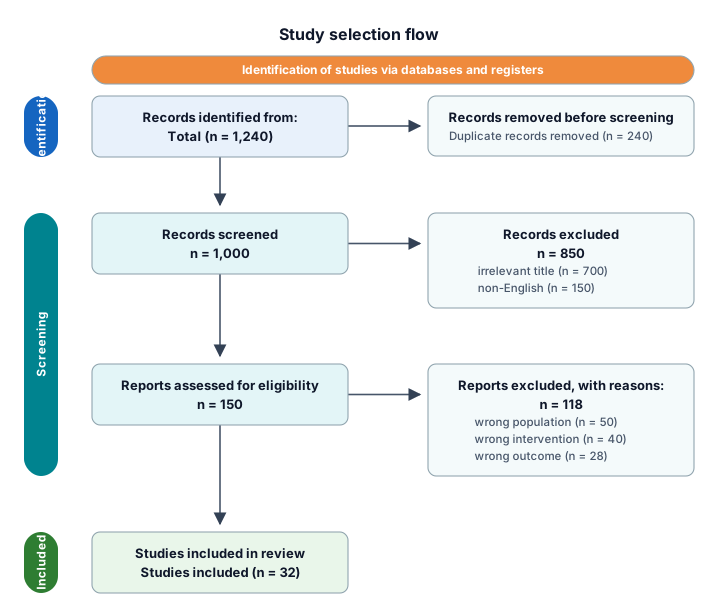
A PRISMA study-selection flow from 1,240 identified records through deduplication, screening, eligibility, and 32 included studies