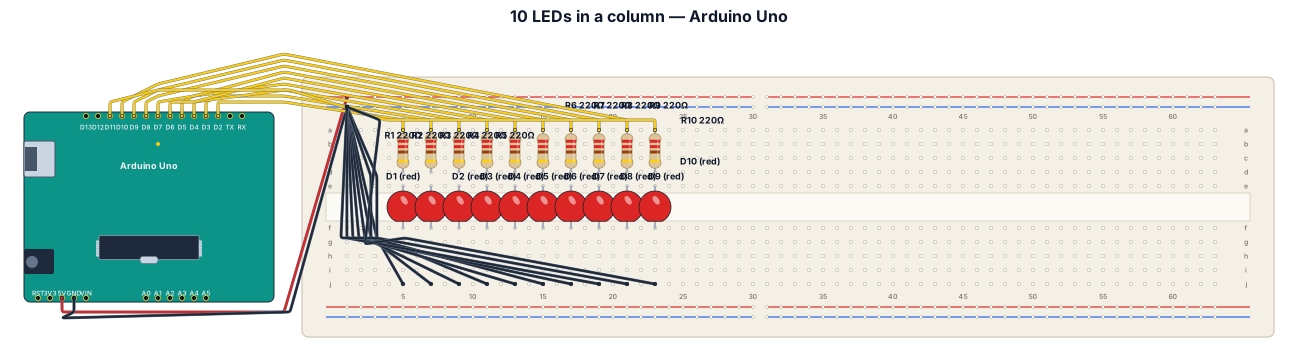
An Arduino breadboard with 10 LEDs connected to it, which are connected to the main Arduino board. These LEDs are arranged in a column.
NODE ARCHIVE · REAL DIAGRAM BRIEFS
Diagram Examples from Real Visitor Prompts
Browse eligible diagrams shared by FreeDiagram visitors, inspect the exact prompts, and build your own version.
Browse 3261 real creationsCOMMUNITY OUTPUTS · EXACT PROMPTS
Breadboard Wiring
Showing 73–96 of 102. No stock examples or system defaults. Choose a tool, study a real result, then reopen its prompt as your starting point.
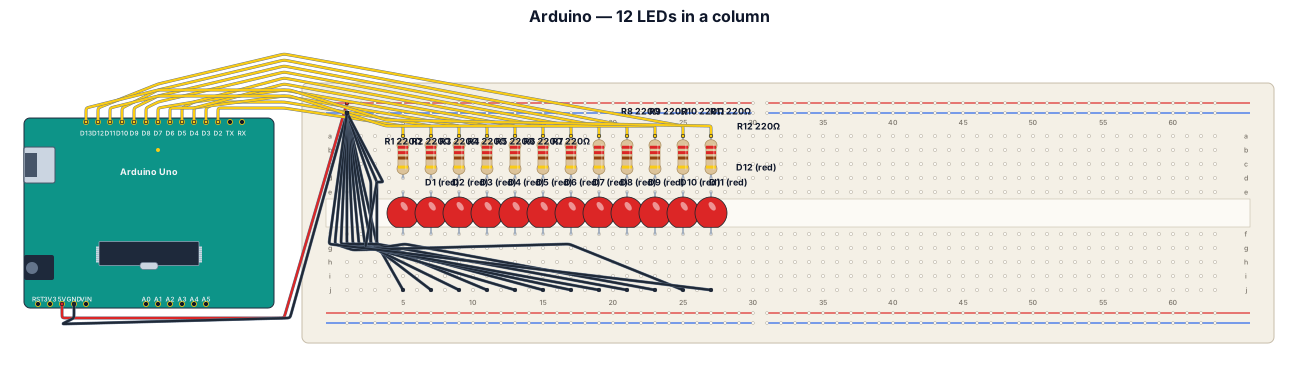
An Arduino breadboard with 12 LEDs connected to it, which are connected to the main Arduino board. These LEDs are arranged in a column.
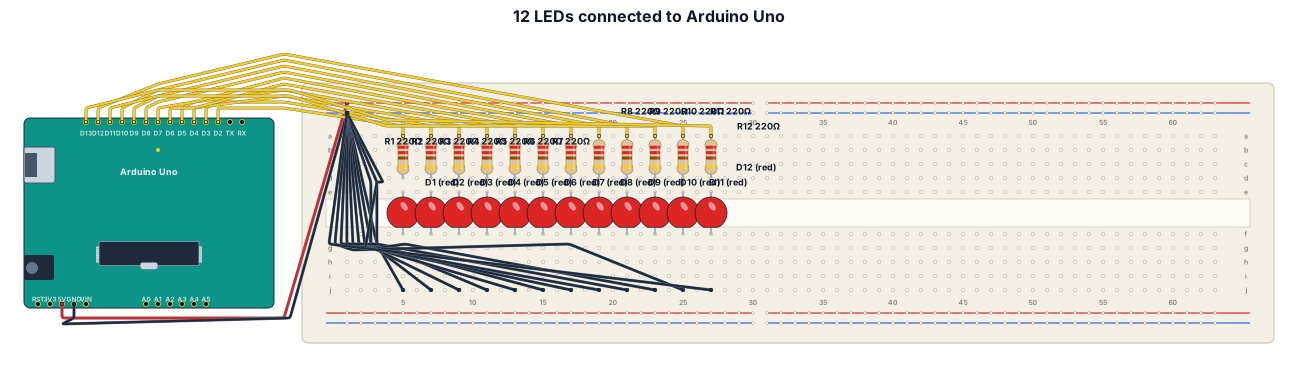
An Arduino breadboard with 12 LEDs connected to it, which are in turn connected to the main Arduino board.
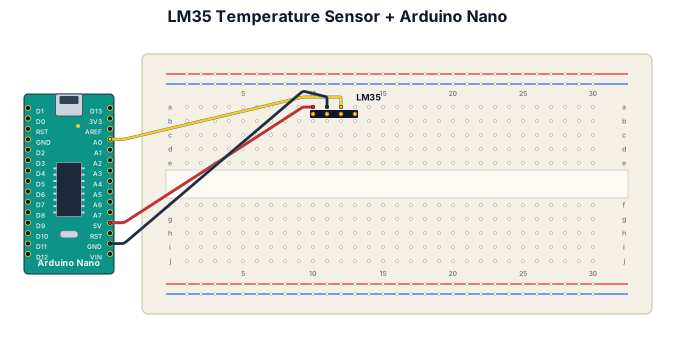
A breadboard wiring diagram for an Arduino nano detecting the room temperature with an LM35: connect +5 pin of LM35 to a 5V terminal of Arduino, connect right pin of LM35 to A0 terminal of Arduino, connect middle pin from LM35 to Arduino GND, also place LM35 onto breadboard. The LM35 has three pins
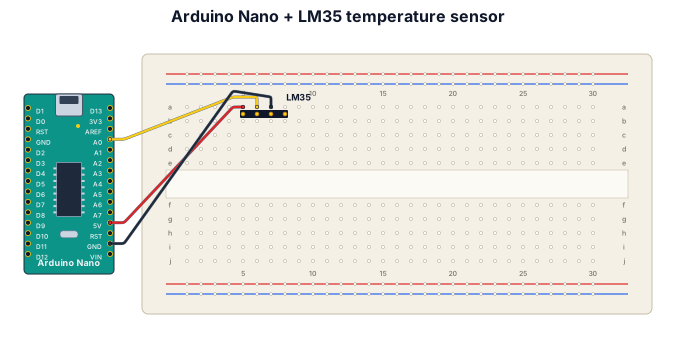
A breadboard wiring diagram for an Arduino nano detecting the room temperature with an LM35: connect +5 pin of LM35 to a 5V terminal of Arduino, connect Vout pin of LM35 to A0 terminal of Arduino, connect GND pin from LM35 to Arduino, also place LM35 onto breadboard. The LM35 has three pins
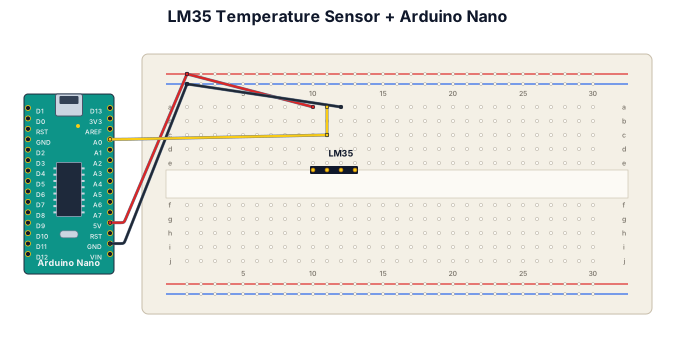
A breadboard wiring diagram for an Arduino nano detecting the room temperature with an LM35: connect +5 pin of LM35 to a 5V terminal of Arduino, connect Vout pin of LM35 to A0 terminal of Arduino, connect GND pin from LM35 to Arduino, also place LM35 onto breadboard
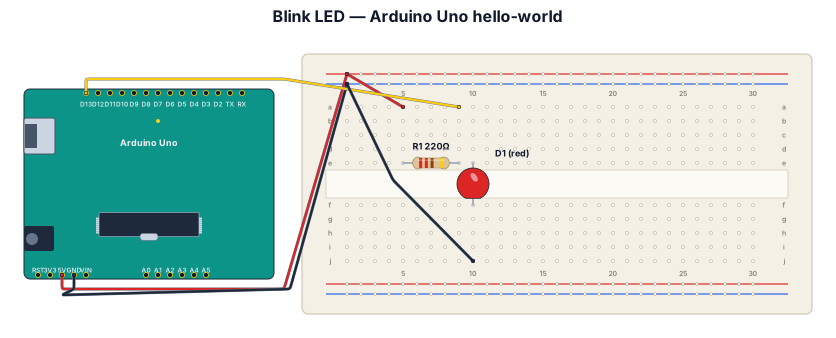
Blink LED hello-world on Arduino Uno with 220-ohm resistor
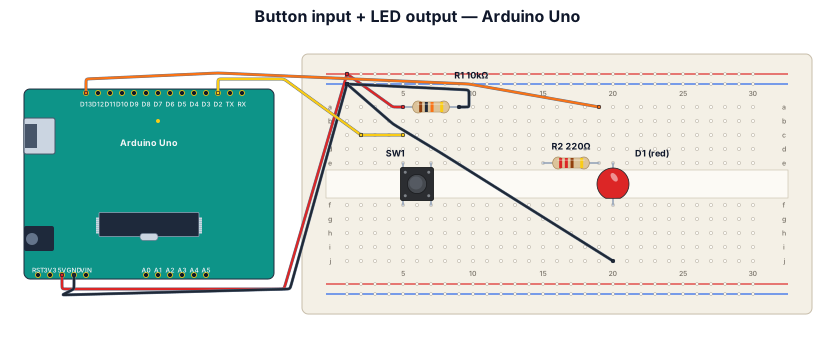
A breadboard wiring diagram for an Arduino Uno reading a button press and lighting an LED: button with pull-down resistor on D2, LED with 220-ohm resistor on D13

A breadboard wiring diagram for this boolean expression ((((M' · A')' + (A + E)')' + (((M' · A') + (E' · C'))' + E)')' + (M · C')')
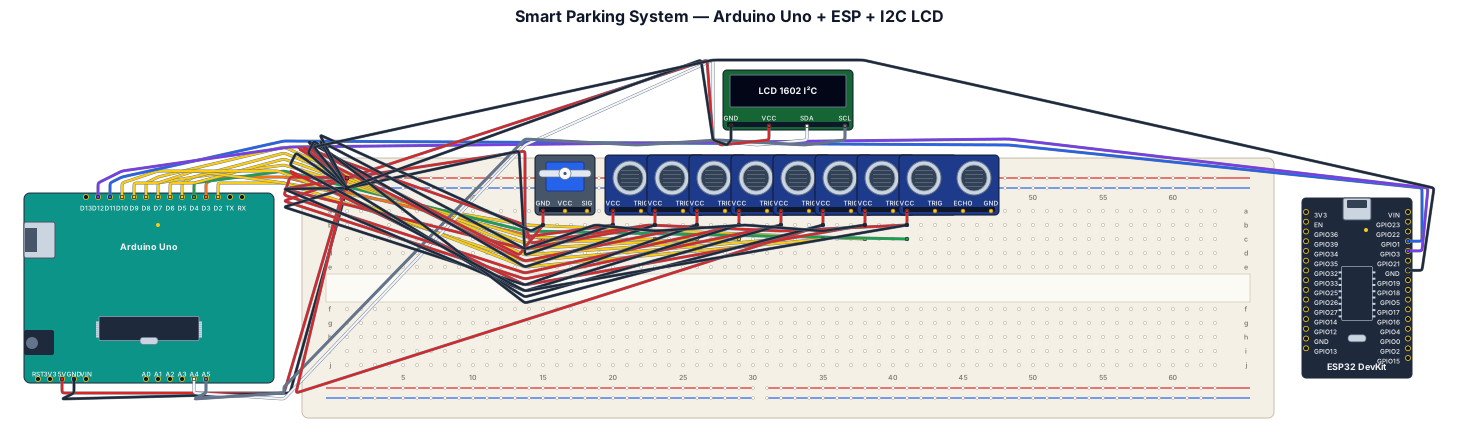
The Smart Parking System has two parking areas with three slots each (S1–S6). An Entry IR sensor (D2) detects incoming vehicles, the servo motor (D3) controls the gate, and an Exit IR sensor (D4) detects vehicles leaving. The Arduino Uno processes all sensor inputs, updates the 20×4 I2C LCD, and communicates with the ESP module. Connections Component Arduino Pin Entry IR Sensor D2 Servo Motor D3 Exit IR Sensor D4 Parking IR Sensor 1 D5 Parking IR Sensor 2 D6 Parking IR Sensor 3 D7 Parking IR Sensor 4 D8 Parking IR Sensor 5 D9 Parking IR Sensor 6 D10 ESP TX D11 ESP RX D12 LCD SDA A4 LCD SCL A5 Power Connections 5V → All IR sensors, Servo, and LCD. GND → All IR sensors, Servo, LCD, and ESP (common ground
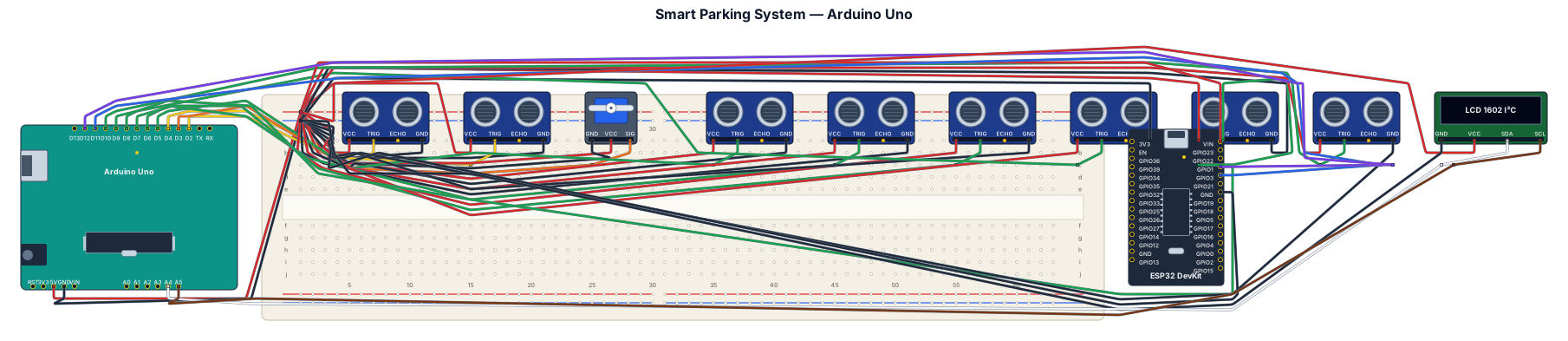
The Arduino Uno is the main controller that connects all sensors and modules. All IR sensors share a common 5V and GND supply, while their OUT pins connect to the assigned digital pins. The Entry IR sensor is connected to D2, the Servo motor signal to D3, and the Exit IR sensor to D4. The six parking slot sensors are connected sequentially from D5 to D10 for Slots 1–6. The ESP module communicates with the Arduino using SoftwareSerial, where Arduino D11 (TX) connects to ESP RX, Arduino D12 (RX) connects to ESP TX, and GND is common between both devices. The 20×4 I2C LCD uses A4 for SDA, A5 for SCL, along with 5V and GND for power. Pin Summary Component Arduino Pin Entry IR Sensor D2 Servo Signal D3 Exit IR Sensor D4 Parking Sensor 1 D5 Parking Sensor 2 D6 Parking Sensor 3 D7 Parking Sensor 4 D8 Parking Sensor 5 D9 Parking Sensor 6 D10 ESP TX D11 ESP RX D12 LCD SDA A4 LCD SCL A5 Power Distribution: Connect 5V from the Arduino to all IR sensors, the LCD, and the servo (or an external 5V supply for the servo if needed), and connect all GNDs together to ensure a common ground throughout the circuit.
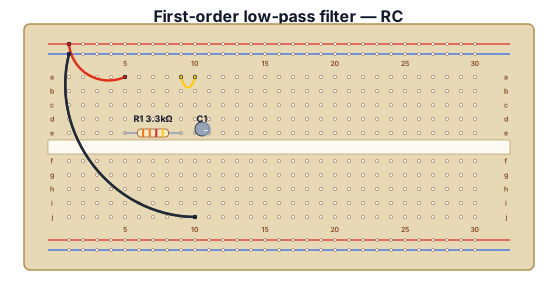
A first-order low-pass filter with a 3.3kOhm resistor and a 0.33uF capacitor.
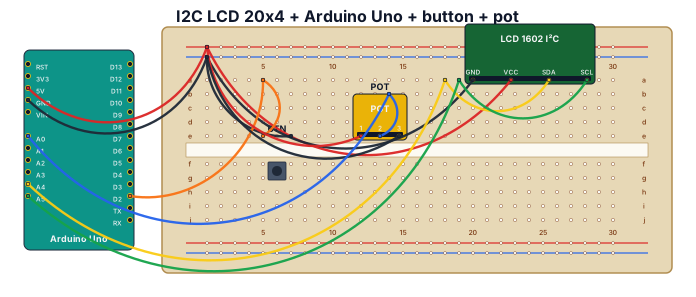
Connect I2C LED 20x4, Arduino Uno and push button, 10 Kohm pot between Arduino rails and its output to A0.
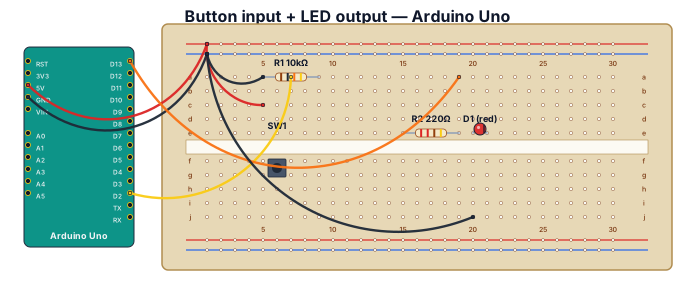
A breadboard wiring diagram for an Arduino Uno reading a button press and lighting an LED: button with pull-down resistor on D2, LED with 220-ohm resistor on D13
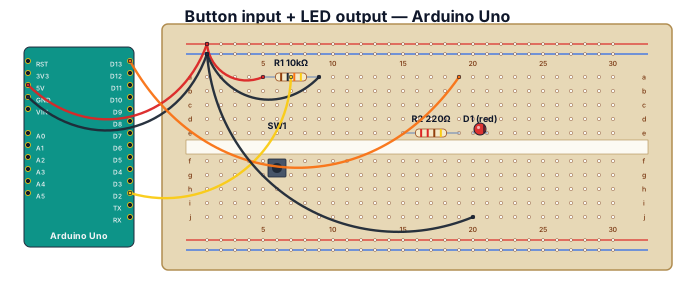
A breadboard wiring diagram for an Arduino Uno reading a button press and lighting an LED: button with pull-down resistor on D2, LED with 220-ohm resistor on D13
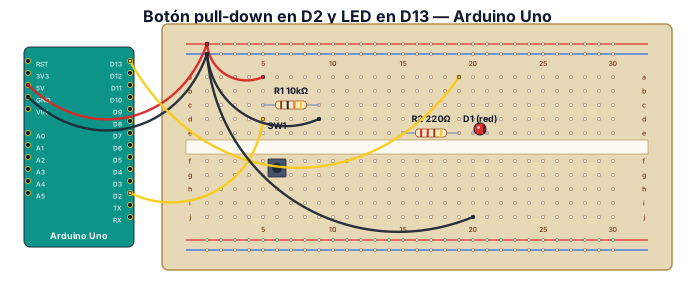
Diagrama de cableado de una placa de prototipos para un Arduino Uno que lee la pulsación de un botón y enciende un LED: botón con resistencia pull-down en D2, LED con resistencia de 220 ohmios en D13.
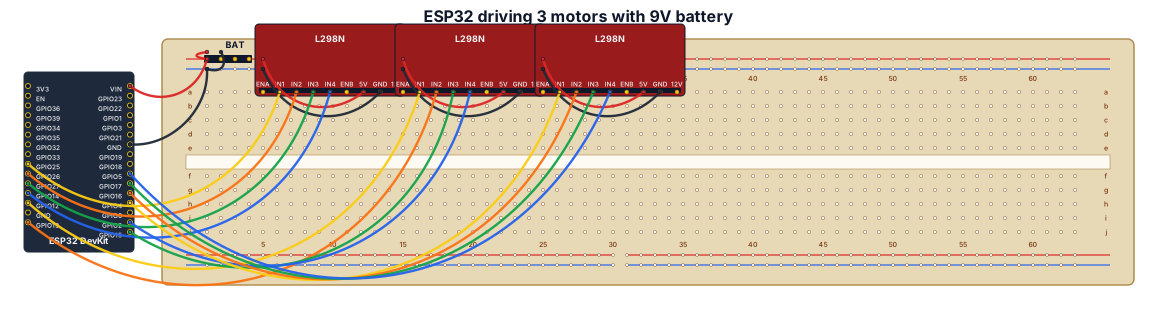
A breadboard wiring diagram for an ESP32 that drives a motor to spin 3 different wheels. All powered by a 9-volt battery
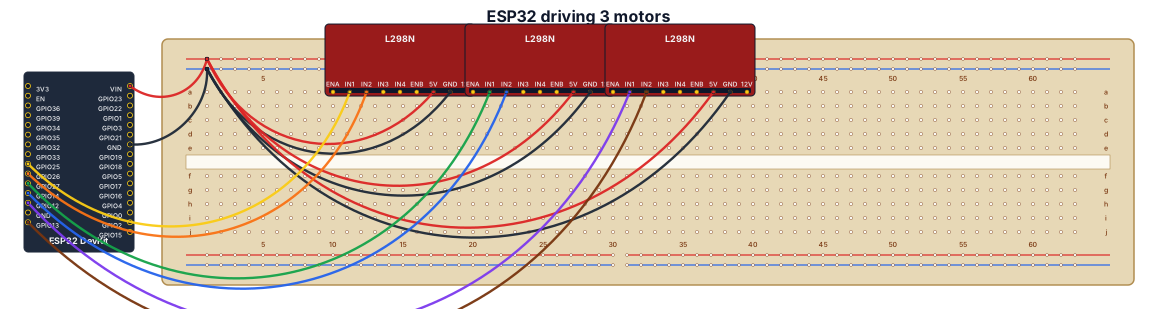
A breadboard wiring diagram for an ESP32 that drives a motor to spin 3 different wheels
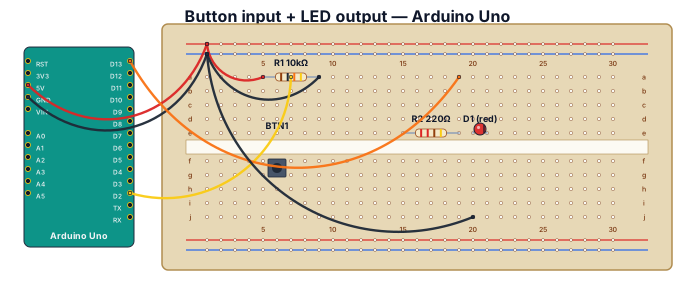
A breadboard wiring diagram for an Arduino Uno reading a button press and lighting an LED: button with pull-down resistor on D2, LED with 220-ohm resistor on D13
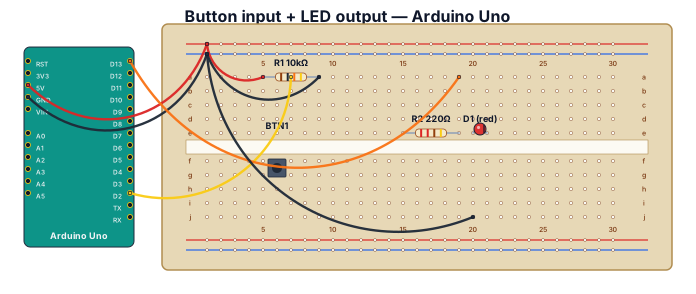
A breadboard wiring diagram for an Arduino Uno reading a button press and lighting an LED: button with pull-down resistor on D2, LED with 220-ohm resistor on D13
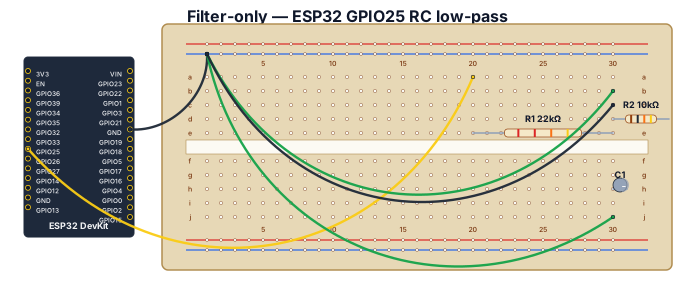
Create a FILTER-ONLY Fritzing-style breadboard close-up. Show one generic ESP32 DevKit on the left and one breadboard. Do NOT include the potentiometer or LCD. Exact placement and wiring: connect ESP32 GND to the breadboard blue ground rail. Connect ESP32 GPIO25 with a yellow jumper to breadboard row 20 on the a-e side. Place R1, 22 kOhm, from row 20 to row 30 on the a-e side, so it is in series with GPIO25. Row 30 is the OUT node. Place R2, 10 kOhm, from row 30 to the blue GND rail. Place C1, polarized electrolytic 10 uF, from row 30 to the blue GND rail, with its positive (+) lead in row 30 and negative (-) lead in the GND rail. Add a clearly labeled green OUT / DUT SIGNAL jumper from row 30. Add DUT GND to the blue ground rail. Use labels GPIO25 PWM, R1 22k, OUT, R2 10k, C1 10uF, capacitor + and -, DUT SIGNAL, DUT GND. Include a red warning label: NEVER CONNECT DUT DIRECTLY TO GPIO25. Ensure every connection follows breadboard row connectivity and do not add any other components or wires.
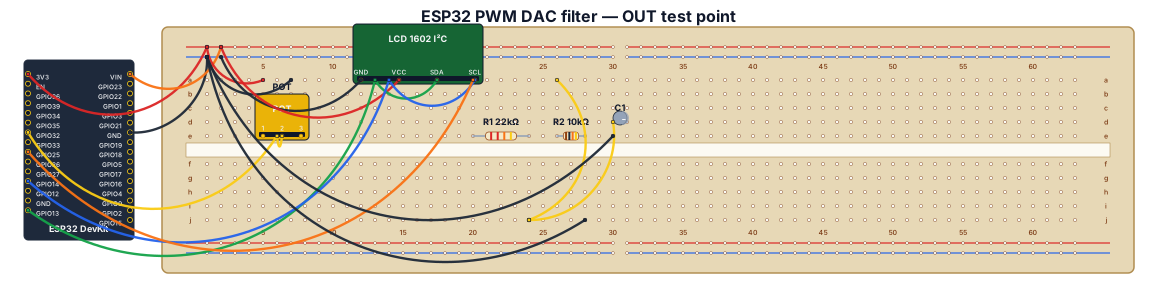
Create a clear Fritzing-style breadboard wiring diagram for a Freenove ESP32 WROVER CAM board (a generic ESP32 DevKit representation is acceptable), a 10k potentiometer, an I2C LCD1602, two resistors, and one polarized electrolytic capacitor. Exact connections: potentiometer outer pins to ESP32 3.3V and GND, center wiper to GPIO32. LCD1602 GND to GND, VCC to 5V, SDA to GPIO13, SCL to GPIO14. Filtered PWM output: GPIO25 connects ONLY to one end of R1 22k ohm; the other end of R1 is the OUT node. From the OUT node connect R2 10k ohm to GND. Also connect C1 10uF electrolytic from OUT to GND, with capacitor positive (+) at OUT and negative (-) at GND. Label OUT as the DUT analog input/test point and connect DUT ground to the common GND rail. Clearly show a common ground rail, resistor values, capacitor polarity, GPIO labels, and emphasize that the DUT must connect to OUT after R1, never directly to GPIO25.
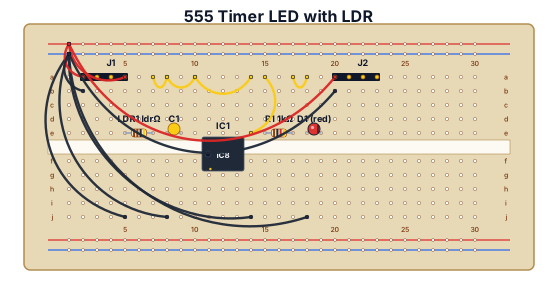
A breadboard wiring diagram with a LDR, 104 capacitor, chip 555 , a led and two jumpers
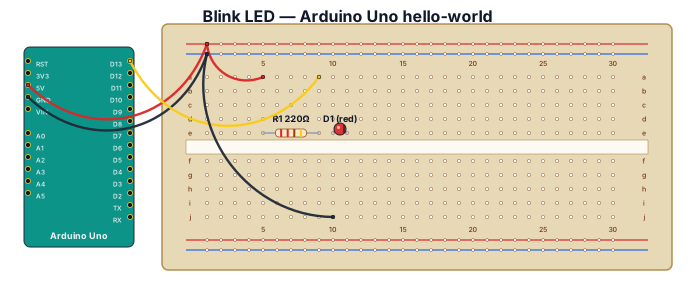
Blink LED hello-world on Arduino Uno with 220-ohm resistor