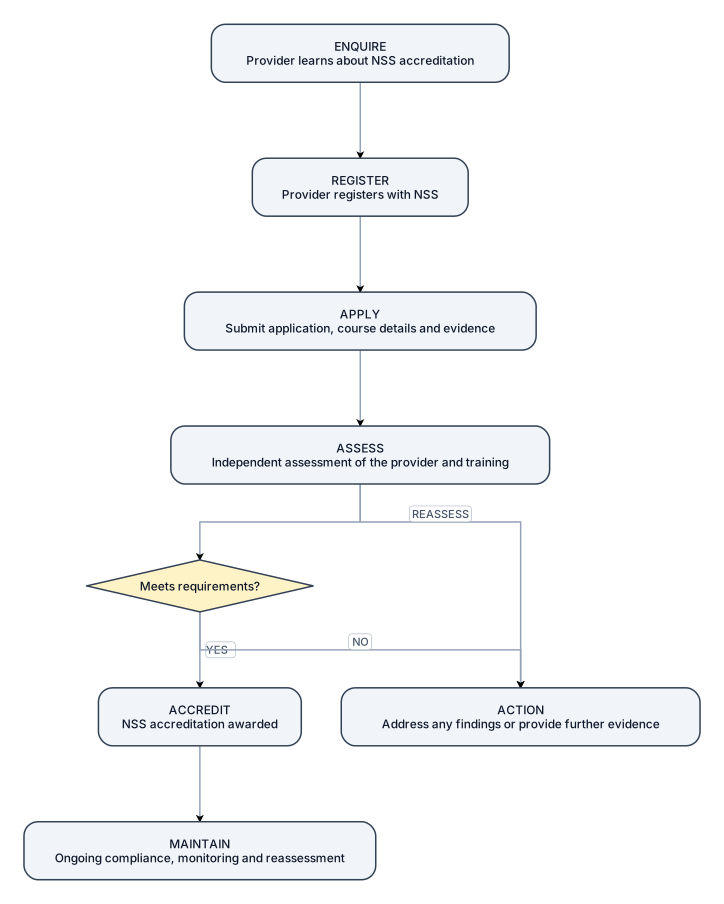
Create a simple, clean one-page landscape flowchart titled: “Education & Training Provider Accreditation Journey” Show these 7 stages as large boxes connected by arrows: 1. ENQUIRE Provider learns about NSS accreditation ↓ 2. REGISTER Provider registers with NSS ↓ 3. APPLY Submit application, course details and evidence ↓ 4. ASSESS Independent assessment of the provider and training ↓ 5. ACTION Address any findings or provide further evidence ↓ 6. ACCREDIT NSS accreditation awarded ↓ 7. MAINTAIN Ongoing compliance, monitoring and reassessment After ASSESS, show a simple decision: Meets requirements? YES → ACCREDIT NO → ACTION → REASSESS Use a professional certification-scheme style with large boxes, clear arrows, minimal text, simple icons and generous white space. Avoid complex branching or detailed explanations.
Diagram Examples from Real Visitor Prompts
Browse eligible diagrams shared by FreeDiagram visitors, inspect the exact prompts, and build your own version.
Browse 3282 real creationsMain diagram studio
Showing 937–960 of 1261. No stock examples or system defaults. Choose a tool, study a real result, then reopen its prompt as your starting point.

Create a simple, clean one-page landscape flowchart titled: “Client / Framework Mandating Journey” Show these 6 stages as large boxes connected by arrows: 1. DEFINE Confirm scope and NSS requirements ↓ 2. AGREE Agree implementation and procurement approach ↓ 3. MANDATE Sign NSS Client Mandating Agreement ↓ 4. IMPLEMENT Add NSS requirements to procurement and contracts ↓ 5. COMMUNICATE Notify contractors and supply chain ↓ 6. ASSURE Monitor accreditation and site compliance At DEFINE, show two simple decisions: Organisation Accreditation? → Already accredited / Must achieve accreditation Site Assessment? → Required / Not required Use a professional certification-scheme style with large boxes, clear arrows, minimal text, simple icons and generous white space. Keep the diagram straightforward and avoid complex branching or detailed explanations.

Create a simple, clean one-page landscape flowchart titled: “Site Registration & Assessment Journey” Show these 7 stages as large boxes connected by arrows: 1. REGISTER SITE Register the site with NSS ↓ 2. CONFIRM SCOPE Confirm assessment requirements and assessment date ↓ 3. PREPARE Site prepares required evidence and documentation ↓ 4. ASSESS Independent assessor visits / reviews the site ↓ 5. OUTCOME Assessment score and outcome determined ↓ 6. RECOGNISE Site receives its NSS Site Recognition outcome ↓ 7. MAINTAIN Maintain performance and complete reassessment After OUTCOME, show a simple branch: Meets requirements? YES → SITE RECOGNITION NO → ACTION REQUIRED → REASSESS Show the possible Site Recognition outcomes: Conforming | Commended | Excellent | Outstanding Use a professional certification-scheme style with large boxes, clear arrows, minimal text, simple icons and generous white space. Avoid complex branching or additional information.
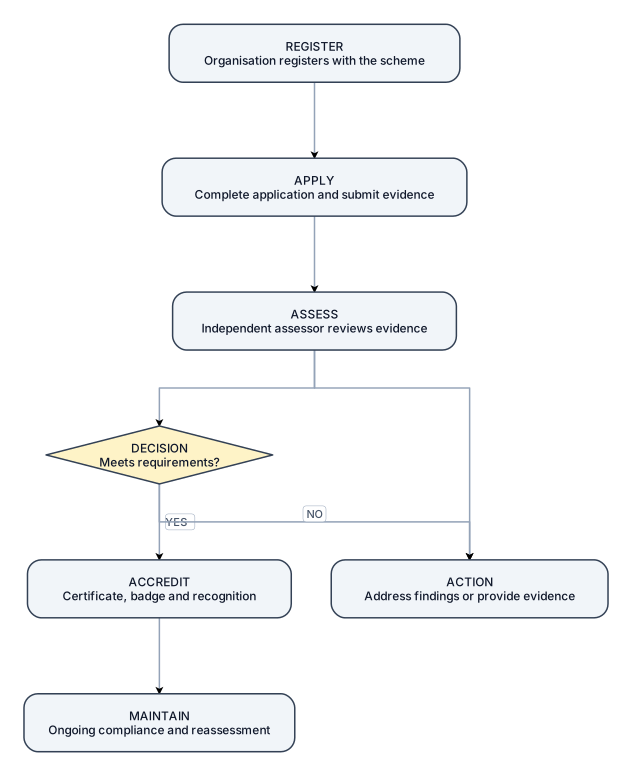
Create a simple, clean one-page landscape flowchart titled: “Contractor Accreditation Journey” Show these 7 stages as large boxes connected by arrows: 1. REGISTER Organisation registers with the scheme ↓ 2. APPLY Complete application and submit required evidence ↓ 3. ASSESS Independent assessor reviews evidence / conducts assessment ↓ 4. ACTION Address any findings or provide additional evidence ↓ 5. DECISION Accreditation decision made ↓ 6. ACCREDIT Certificate, badge and public recognition awarded ↓ 7. MAINTAIN Ongoing compliance, monitoring and reassessment After DECISION, show a simple branch: Meets requirements? YES → ACCREDIT NO → ACTION → REASSESS Use a professional certification-scheme style. Keep the wording very short, use large boxes, clear arrows and plenty of white space. Avoid paragraphs, complex branching or additional information.
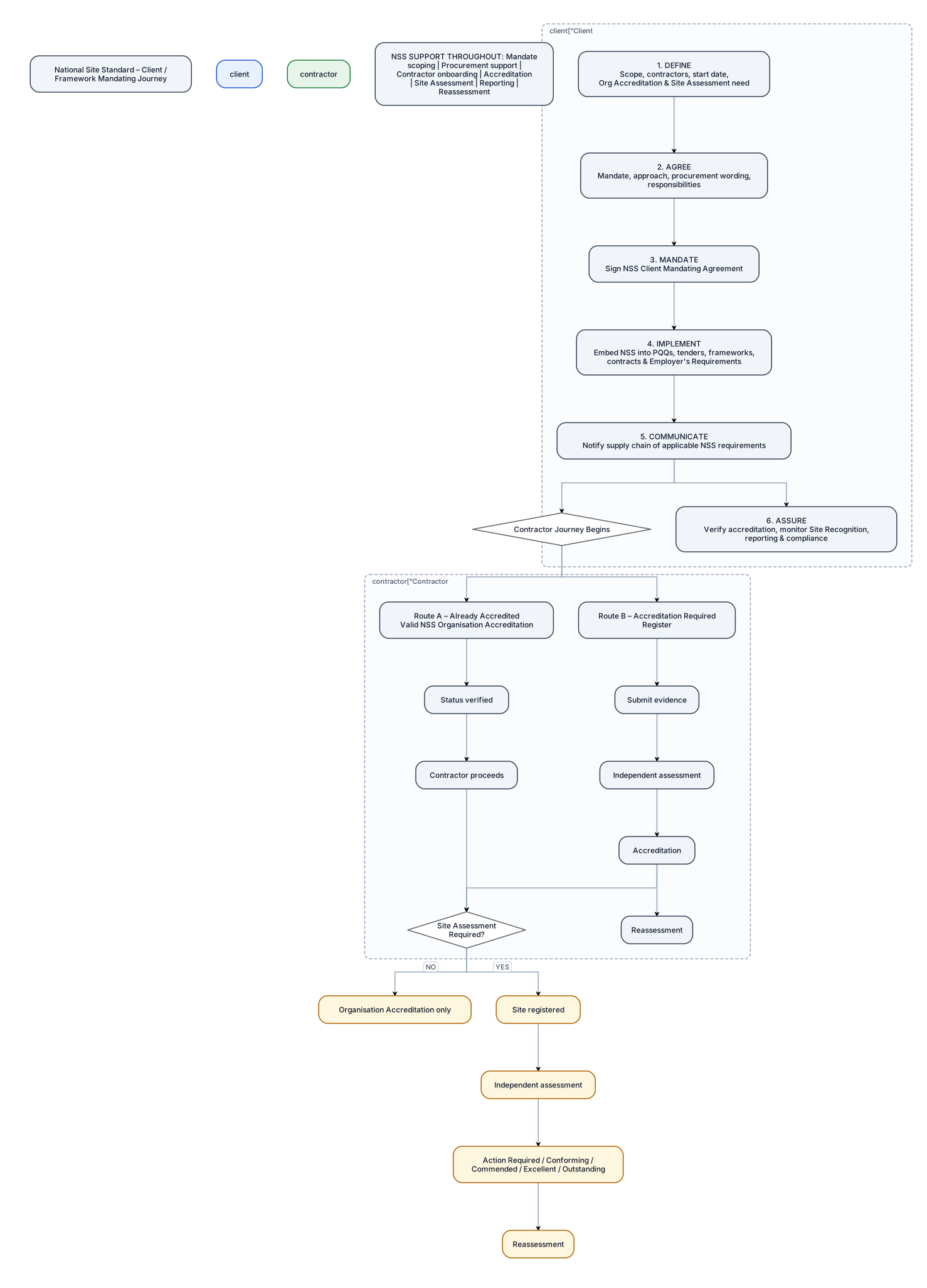
Create a professional one-page landscape process map titled “National Site Standard – Client / Framework Mandating Journey”. Show the main client journey as six clear stages: 1. DEFINE Confirm scope, contractors, start date, Organisation Accreditation requirement and whether Site Assessment is required. 2. AGREE Agree the mandate, implementation approach, procurement wording and responsibilities. 3. MANDATE Complete and sign the NSS Client Mandating Agreement. 4. IMPLEMENT Embed NSS requirements into existing PQQs, tenders, frameworks, contracts and Employer’s Requirements. Brief relevant internal teams. 5. COMMUNICATE Notify the supply chain and explain which NSS requirements apply. 6. ASSURE Verify contractor accreditation, monitor Site Recognition where required, manage reporting and maintain ongoing compliance. At COMMUNICATE, show a clear branch labelled “Contractor Journey Begins”. Show two contractor routes: Route A – Already Accredited Valid NSS Organisation Accreditation → Status verified → Contractor proceeds. Route B – Accreditation Required Register → Submit evidence → Independent assessment → Accreditation → Reassessment. From the contractor journey, show a separate decision: Site Assessment Required? YES: Site registered → Independent assessment → Action Required / Conforming / Commended / Excellent / Outstanding → Reassessment. NO: Organisation Accreditation only. Add a simple footer: NSS SUPPORT THROUGHOUT: Mandate scoping | Procurement support | Contractor onboarding | Accreditation | Site Assessment | Reporting | Reassessment Use a clean corporate style, minimal text, clear arrows and decision points, strong visual hierarchy, generous white space, and distinct colours for the Client, Contractor and Site Assessment journeys. The finished diagram should be understandable at a glance and suitable for inclusion in an NSS client guide.
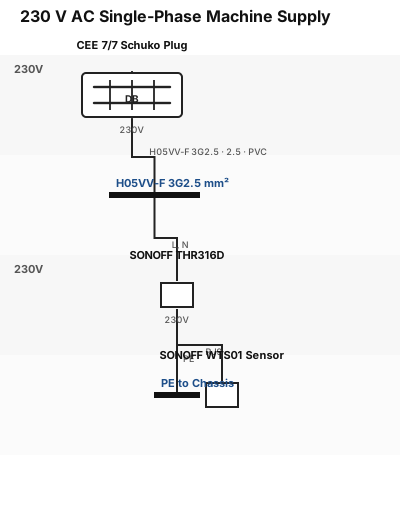
Create an IEC-style electrical schematic for a 230 V AC single-phase machine. Power supply through a CEE 7/7 Schuko plug -X1 and H05VV-F 3G2.5 mm² cable -W1. Show L, N and PE separately. The circuit feeds a SONOFF THR316D temperature controller -K1. A SONOFF WTS01 temperature sensor -BT1 is connected to the THR316D with its original RJ9 cable. Include protective earth connection to the metallic chassis. Use IEC electrical symbols and component reference designations.
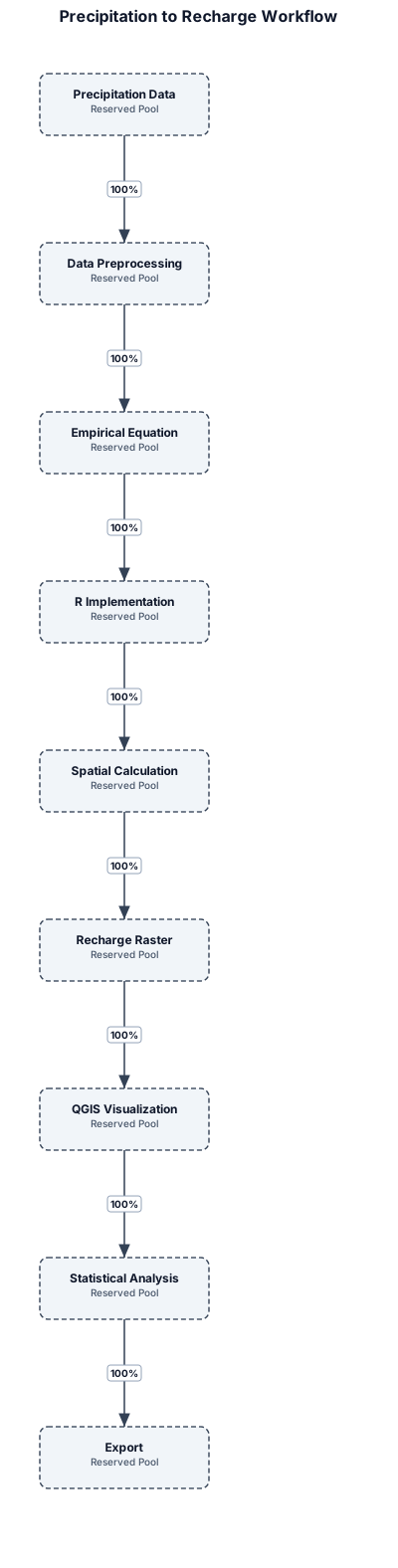
Precipitation data → Data preprocessing → Empirical equation → R implementation → Spatial calculation → Recharge raster → QGIS visualization → Statistical analysis → Export
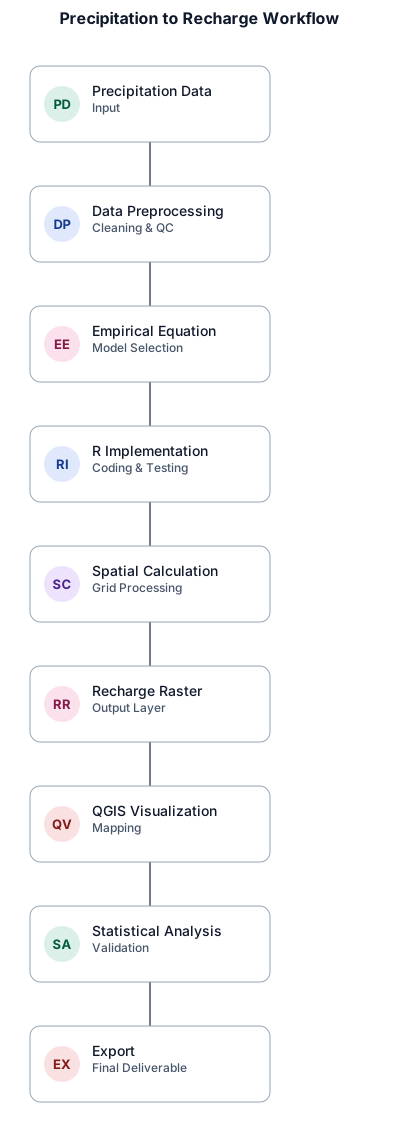
Precipitation data → Data preprocessing → Empirical equation → R implementation → Spatial calculation → Recharge raster → QGIS visualization → Statistical analysis → Export,please make itb that fits in pargarph of word docuemnt in A4 size,please make it horizontal or that best fits and increase teh fonts
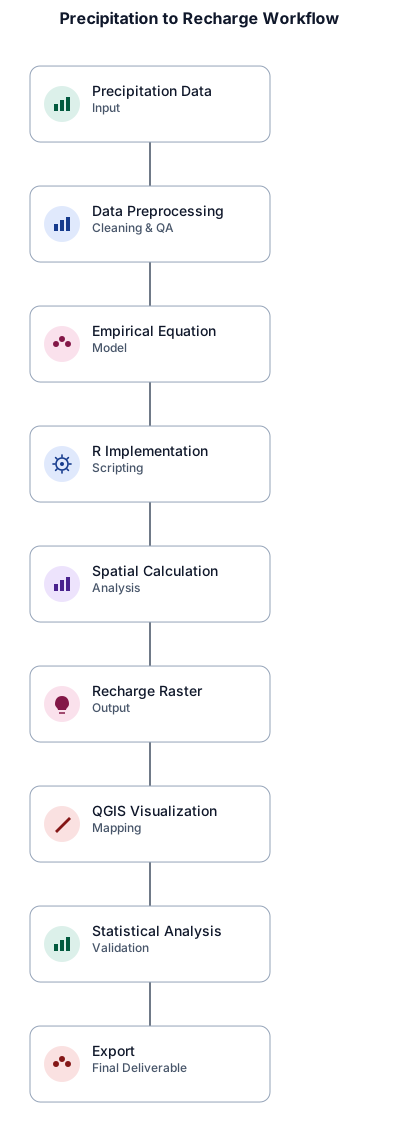
Precipitation data → Data preprocessing → Empirical equation → R implementation → Spatial calculation → Recharge raster → QGIS visualization → Statistical analysis → Export,please make itb that fits in pargarph of word docuemnt in A4 size
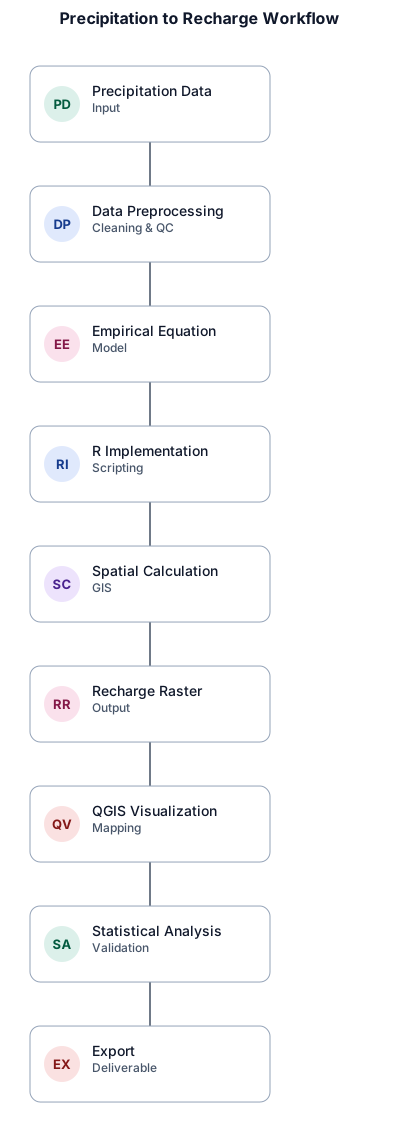
Precipitation data → Data preprocessing → Empirical equation → R implementation → Spatial calculation → Recharge raster → QGIS visualization → Statistical analysis → Export

An org chart for a 30-person startup with engineering, product, sales, and operations teams
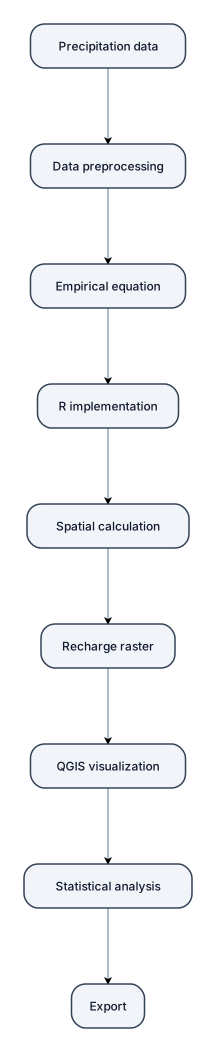
please generate or develope flow chart :Precipitation data → Data preprocessing → Empirical equation → R implementation → Spatial calculation → Recharge raster → QGIS visualization → Statistical analysis → Export
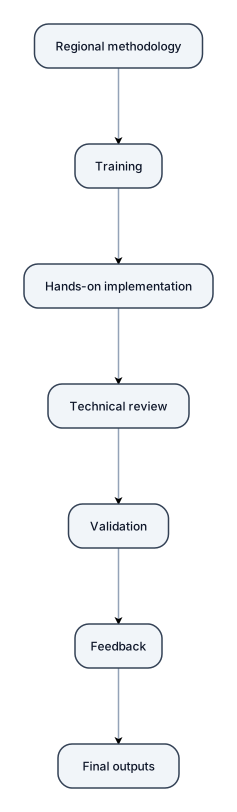
Regional methodology → Training → Hands-on implementation → Technical review → Validation → Feedback → Final outputs
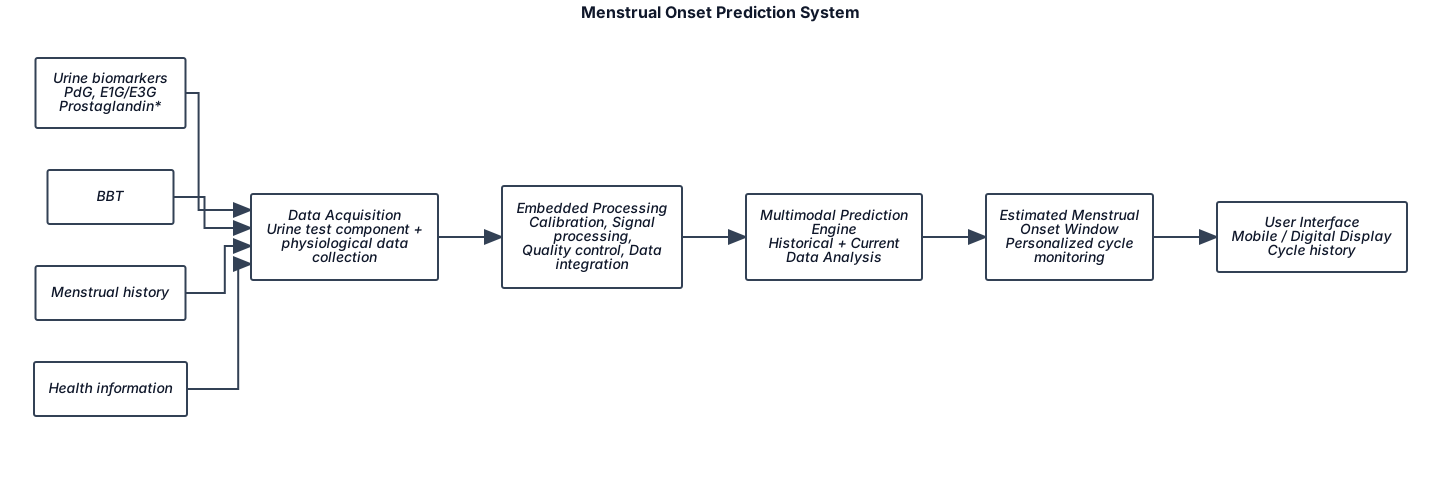
┌─────────────────────┐ │ DATA INPUTS │ │ │ │ • Urine biomarkers │ │ PdG, E1G/E3G │ │ Prostaglandin* │ │ • BBT │ │ • Menstrual history │ │ • Health information│ └──────────┬──────────┘ ↓ ┌─────────────────────┐ │ DATA ACQUISITION │ │ │ │ Urine test component│ │ + physiological │ │ data collection │ └──────────┬──────────┘ ↓ ┌─────────────────────┐ │ EMBEDDED PROCESSING │ │ │ │ • Calibration │ │ • Signal processing │ │ • Quality control │ │ • Data integration │ └──────────┬──────────┘ ↓ ┌─────────────────────┐ │ MULTIMODAL │ │ PREDICTION ENGINE │ │ │ │ Historical + Current│ │ Data Analysis │ └──────────┬──────────┘ ↓ ┌─────────────────────┐ │ ESTIMATED MENSTRUAL │ │ ONSET WINDOW │ │ │ │ Personalized cycle │ │ monitoring │ └──────────┬──────────┘ ↓ ┌─────────────────────┐ │ USER INTERFACE │ │ │ │ Mobile / Digital │ │ Display │ │ Cycle history │ └─────────────────────┘ * Prostaglandin – exploratory biomarker i need block diagram
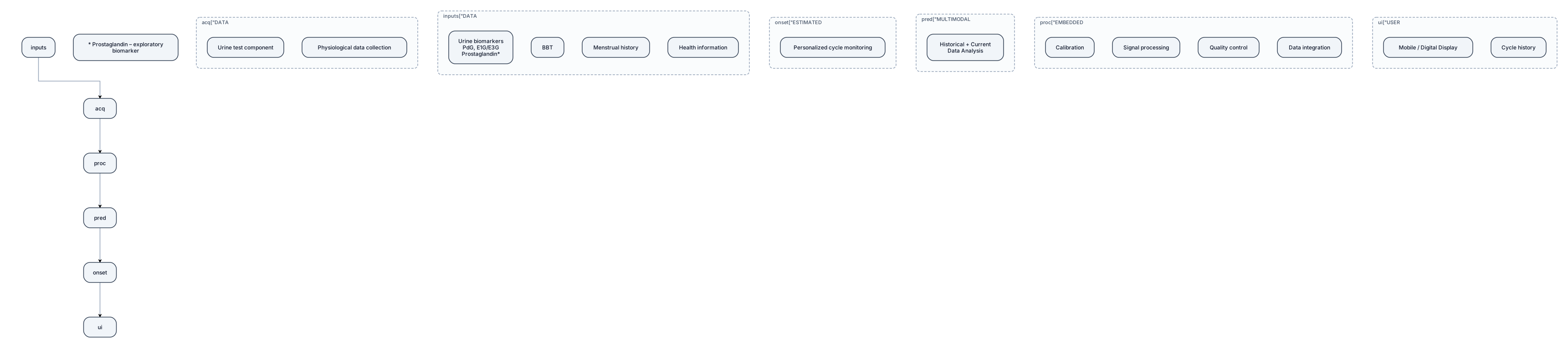
┌─────────────────────┐ │ DATA INPUTS │ │ │ │ • Urine biomarkers │ │ PdG, E1G/E3G │ │ Prostaglandin* │ │ • BBT │ │ • Menstrual history │ │ • Health information│ └──────────┬──────────┘ ↓ ┌─────────────────────┐ │ DATA ACQUISITION │ │ │ │ Urine test component│ │ + physiological │ │ data collection │ └──────────┬──────────┘ ↓ ┌─────────────────────┐ │ EMBEDDED PROCESSING │ │ │ │ • Calibration │ │ • Signal processing │ │ • Quality control │ │ • Data integration │ └──────────┬──────────┘ ↓ ┌─────────────────────┐ │ MULTIMODAL │ │ PREDICTION ENGINE │ │ │ │ Historical + Current│ │ Data Analysis │ └──────────┬──────────┘ ↓ ┌─────────────────────┐ │ ESTIMATED MENSTRUAL │ │ ONSET WINDOW │ │ │ │ Personalized cycle │ │ monitoring │ └──────────┬──────────┘ ↓ ┌─────────────────────┐ │ USER INTERFACE │ │ │ │ Mobile / Digital │ │ Display │ │ Cycle history │ └─────────────────────┘ * Prostaglandin – exploratory biomarker
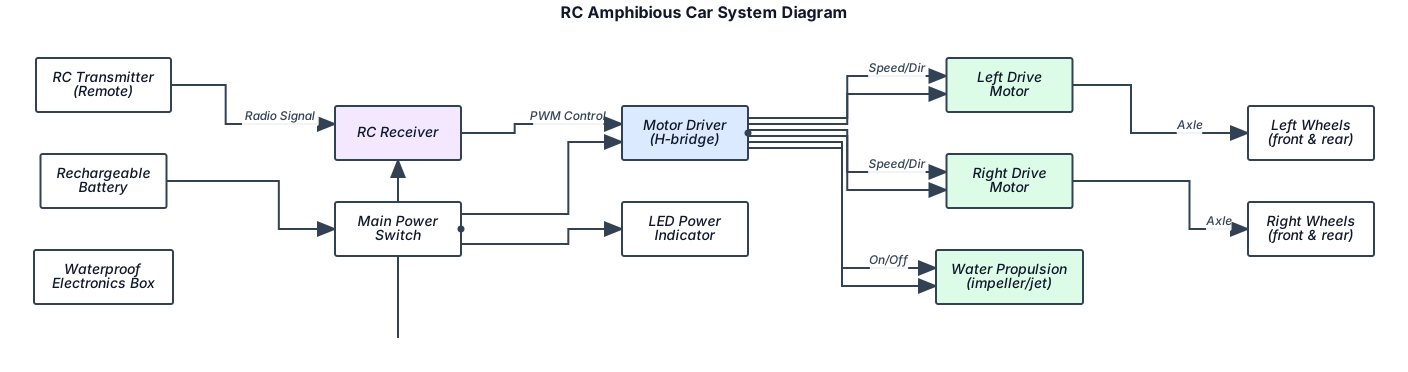
Create a clear visual system diagram for a small remote-controlled amphibious car that can travel on land and float/move on water. Show the actual components as labeled blocks and draw arrows/wires between them. Include: - RC transmitter/remote - RC receiver - Rechargeable battery - Main power switch - Motor driver - Two left/right drive motors - Four wheels - Water propulsion mechanism - Waterproof electronics box - Steering/control system - LED power indicator Show exactly how the signal flows: Remote → Receiver → Motor Driver → Motors Show the power flow: Battery → Main Switch → Motor Driver → Motors Place the waterproof electronics box in the center of the vehicle and show the physical arrangement of the major components around it. Create a clean, easy-to-understand illustrated system diagram with arrows, labels, component icons and a simple side/top view of the vehicle. Do NOT only write instructions. DRAW THE SYSTEM DIAGRAM.
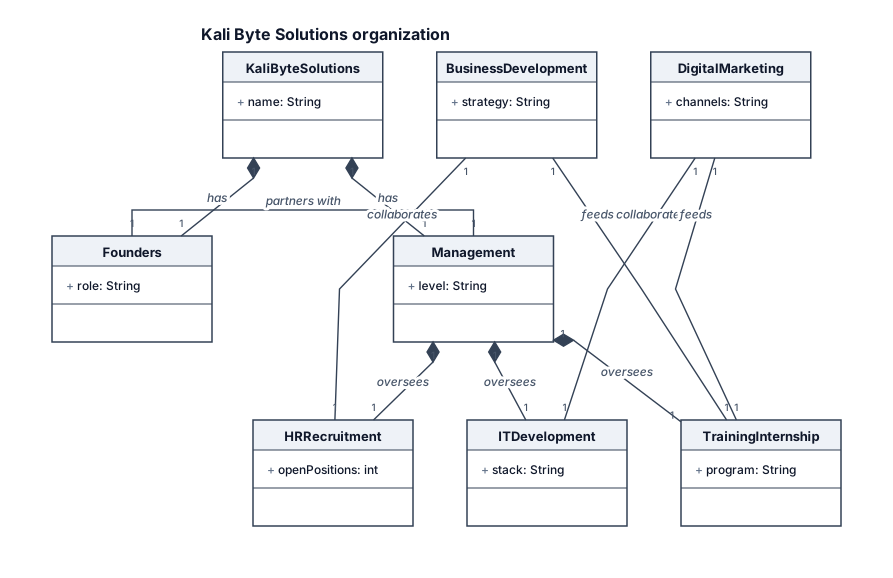
KALI BYTE SOLUTIONS │ ┌─────────────┴─────────────┐ │ │ FOUNDERS MANAGEMENT │ │ └─────────────┬─────────────┘ │ ┌────────────────────────┼────────────────────────┐ │ │ │ HR & IT DEVELOPMENT TRAINING & RECRUITMENT INTERNSHIP │ │ │ └────────────────────────┼────────────────────────┘ │ ┌─────────────┴─────────────┐ │ │ BUSINESS DEVELOPMENT DIGITAL MARKETING
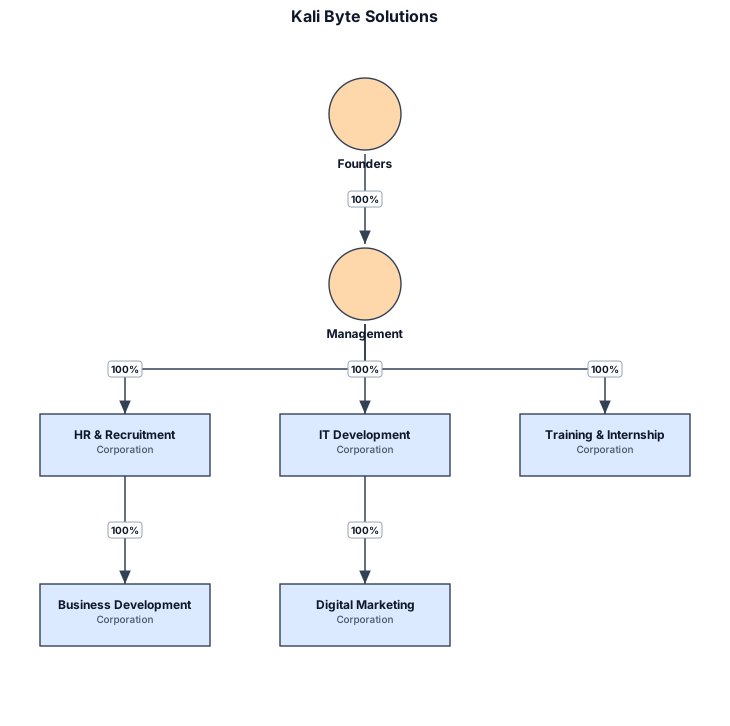
KALI BYTE SOLUTIONS │ ┌─────────────┴─────────────┐ │ │ FOUNDERS MANAGEMENT │ │ └─────────────┬─────────────┘ │ ┌────────────────────────┼────────────────────────┐ │ │ │ HR & IT DEVELOPMENT TRAINING & RECRUITMENT INTERNSHIP │ │ │ └────────────────────────┼────────────────────────┘ │ ┌─────────────┴─────────────┐ │ │ BUSINESS DEVELOPMENT DIGITAL MARKETING
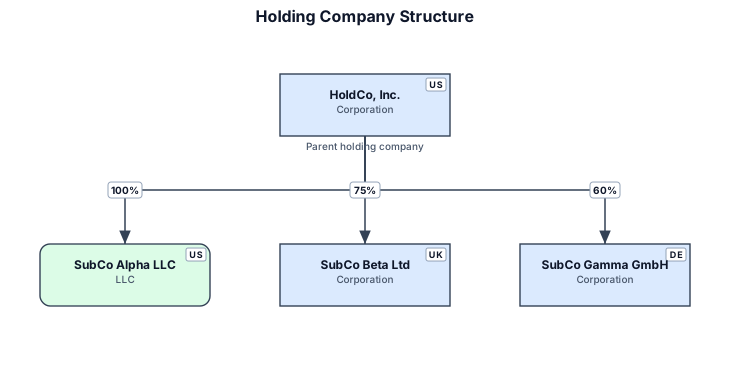
A legal entity structure for a holding company owning three operating subsidiaries with ownership percentages
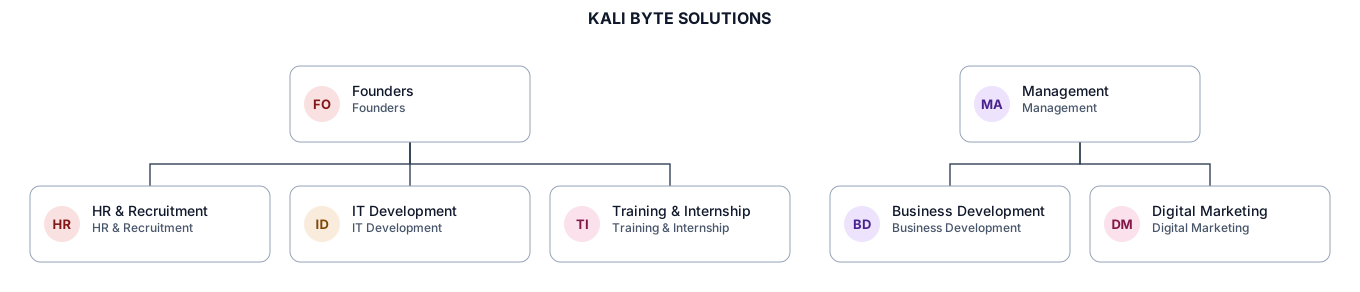
KALI BYTE SOLUTIONS │ ┌─────────────┴─────────────┐ │ │ FOUNDERS MANAGEMENT │ │ └─────────────┬─────────────┘ │ ┌────────────────────────┼────────────────────────┐ │ │ │ HR & IT DEVELOPMENT TRAINING & RECRUITMENT INTERNSHIP │ │ │ └────────────────────────┼────────────────────────┘ │ ┌─────────────┴─────────────┐ │ │ BUSINESS DEVELOPMENT DIGITAL MARKETING
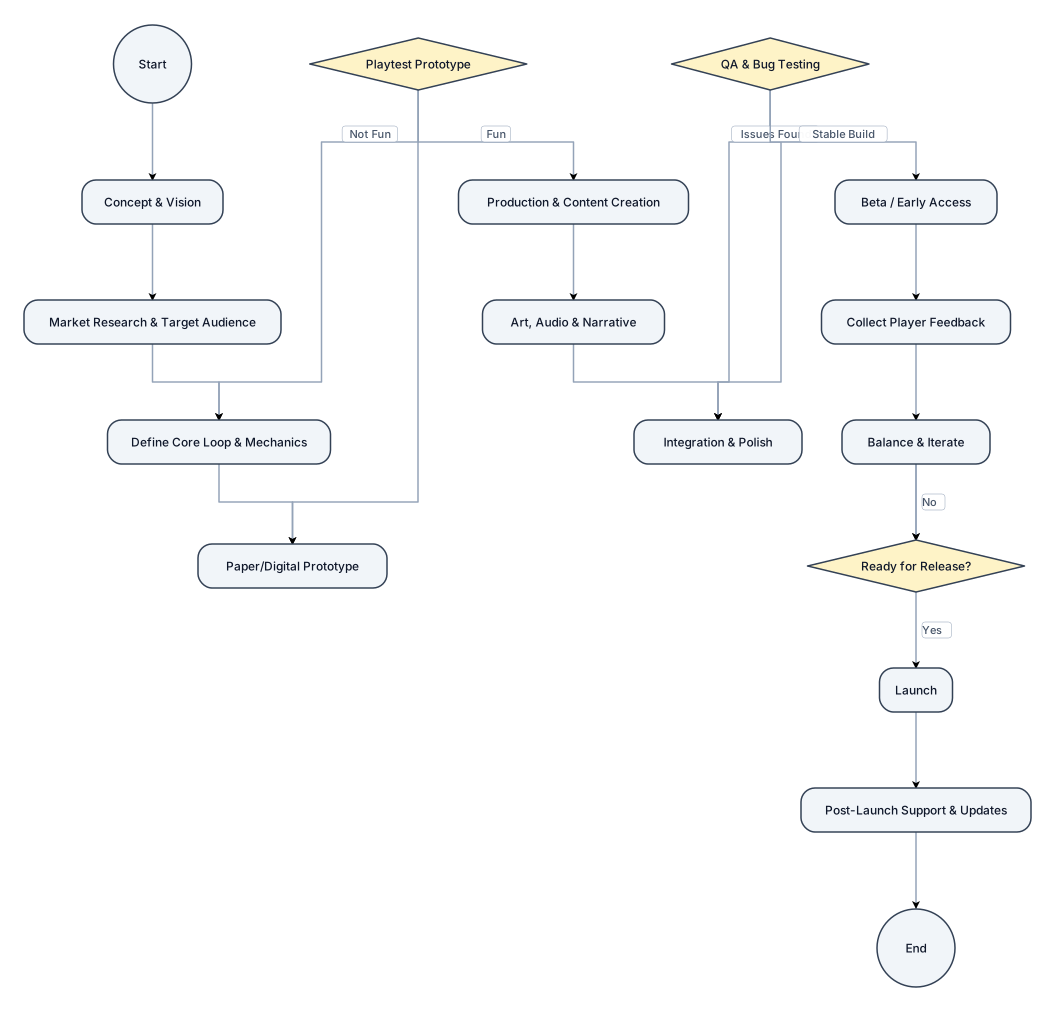
create a flowchart explaining a game design process
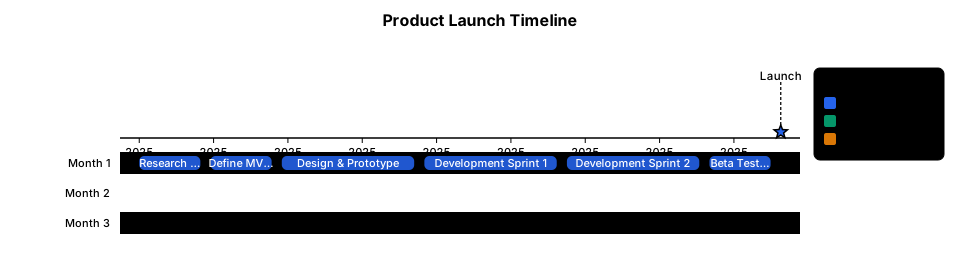
A timeline of the steps to launch a new product over three months Stakeholder Description Travelers Search destinations, create trips, and manage travel plans. Tourists Explore new places and get recommendations. Students Plan affordable trips according to budget. Families Search family-friendly destinations and facilities. Business Professionals Find travel solutions for business purposes. Travel Agencies Provide packages and travel services. Hotel Owners Manage hotel information and availability. Transport Providers Provide transportation details. System Administrator Controls users, content, and system operations. 5. Assumptions
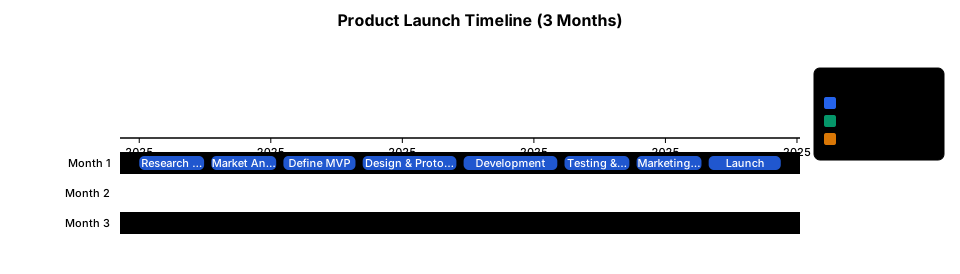
A timeline of the steps to launch a new product over three months
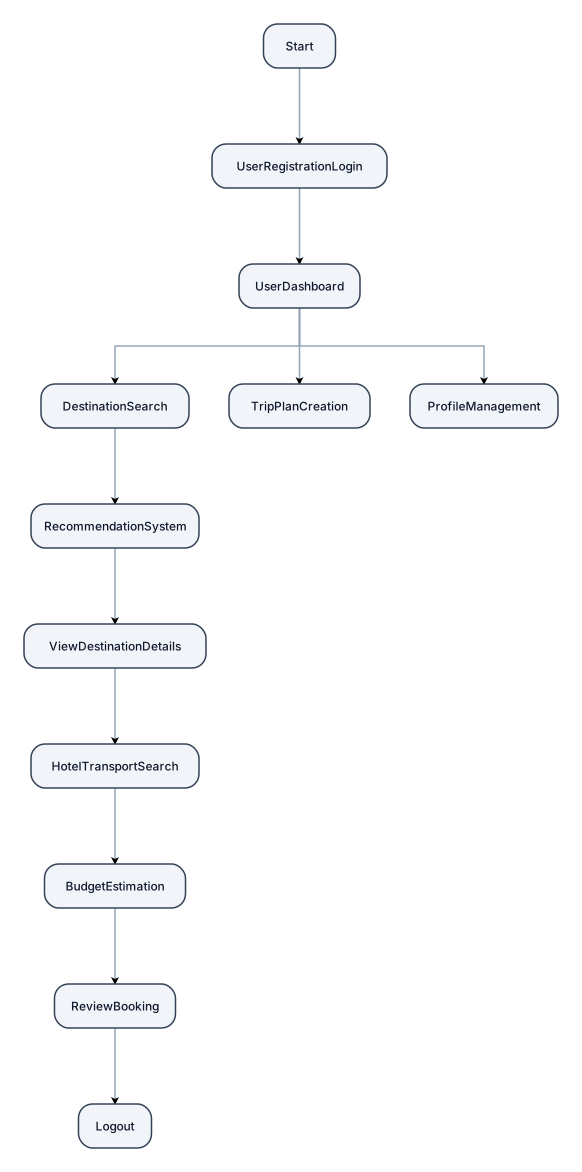
Start | ↓ User Registration/Login | ↓ User Dashboard | ----------------------- | | | ↓ ↓ ↓ Destination Trip Plan Profile Search Creation Management | ↓ Recommendation System | ↓ View Destination Details | ↓ Hotel & Transport Search | ↓ Budget Estimation | ↓ Review / Booking | ↓ Logout