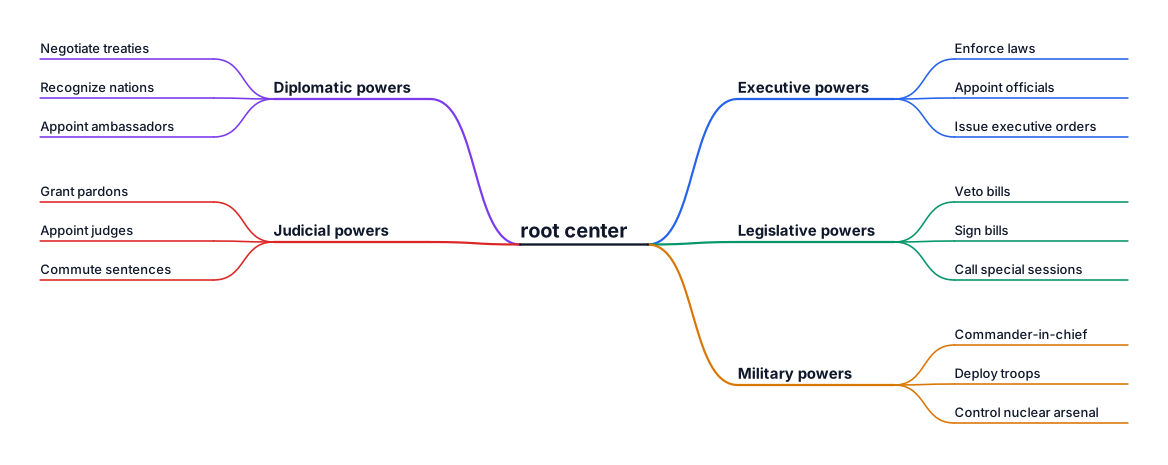
Power of president
NODE ARCHIVE · REAL DIAGRAM BRIEFS
Diagram Examples from Real Visitor Prompts
Browse eligible diagrams shared by FreeDiagram visitors, inspect the exact prompts, and build your own version.
Browse 3284 real creationsCOMMUNITY OUTPUTS · EXACT PROMPTS
Main diagram studio
Showing 1009–1032 of 1261. No stock examples or system defaults. Choose a tool, study a real result, then reopen its prompt as your starting point.

I need a horizontal diagram that covers years from 2017 to 2026
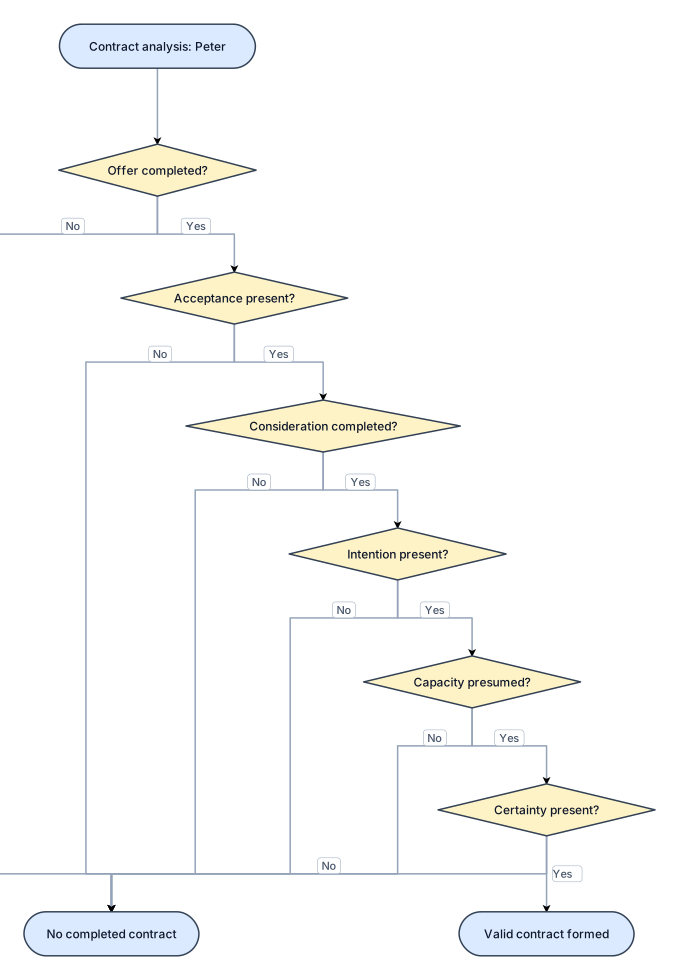
Peter's six contract elements: Offer – not yet completed; Acceptance – absent; Consideration – not completed; Intention – present; Capacity – presumed; Certainty – present; Result – no completed contract.
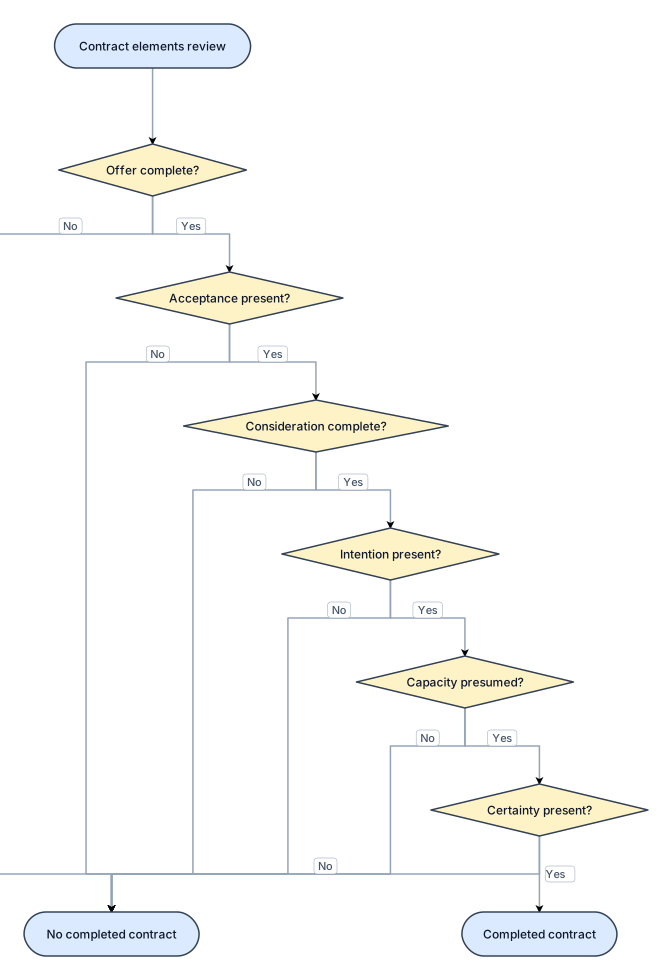
A flowchart of Peter's six contract elements: Offer – not yet completed; Acceptance – absent; Consideration – not completed; Intention – present; Capacity – presumed; Certainty – present; Result – no completed contract.
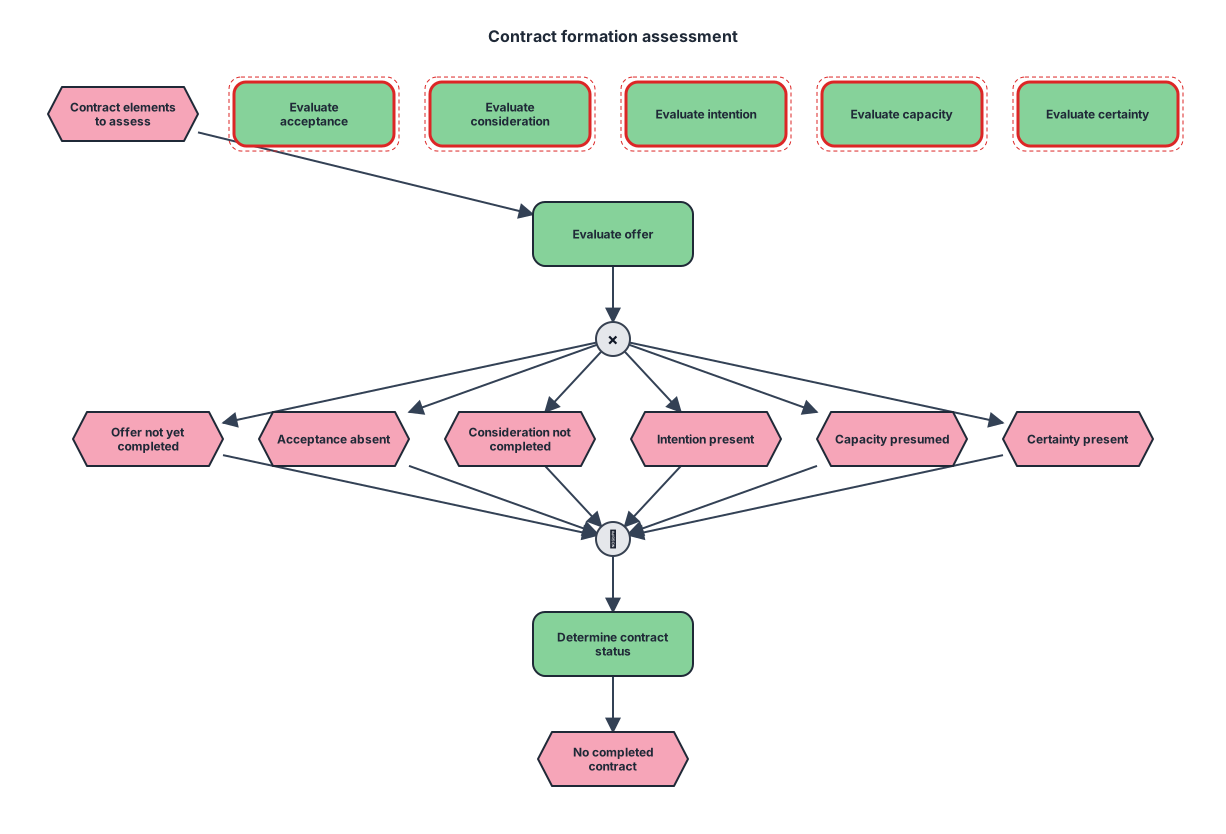
Peter's six contract elements: Offer – not yet completed; Acceptance – absent; Consideration – not completed; Intention – present; Capacity – presumed; Certainty – present; Result – no completed contract.
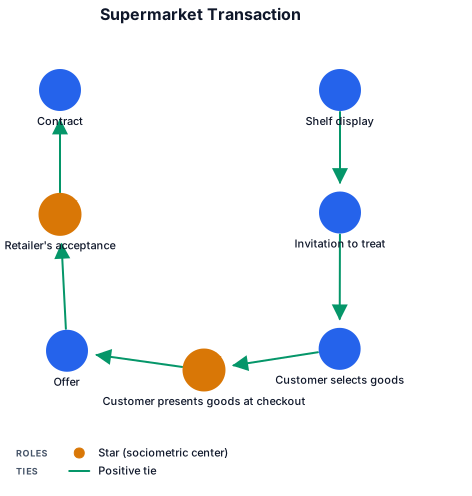
A sociogram of a Supermarket transaction: Shelf display → Invitation to treat → Customer selects goods → Customer presents goods at checkout → Offer → Retailer's acceptance → Contract.
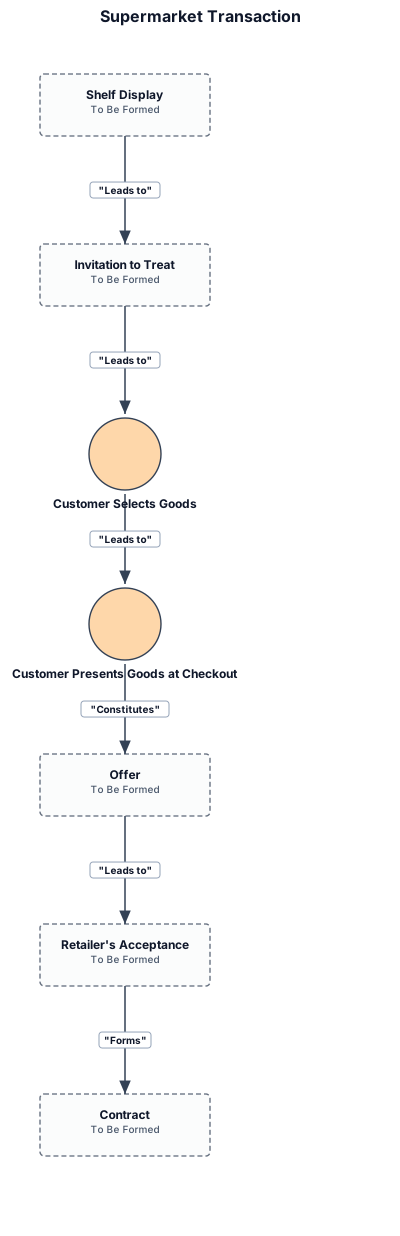
Supermarket transaction: Shelf display → Invitation to treat → Customer selects goods → Customer presents goods at checkout → Offer → Retailer's acceptance → Contract.
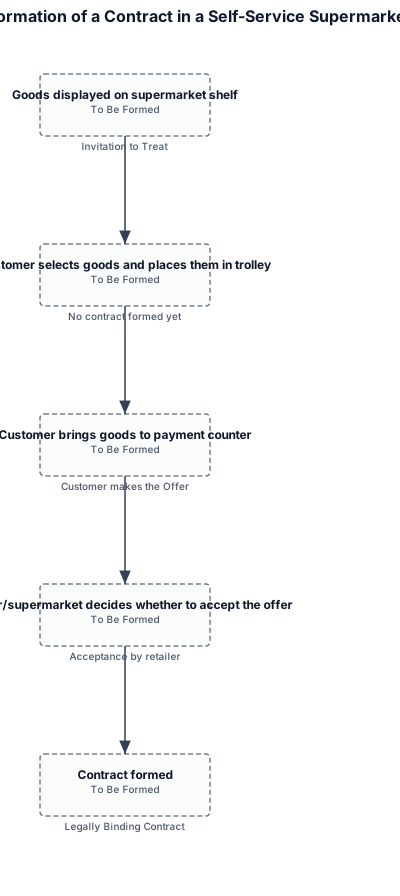
Create a clean, professional academic flowchart for a university Business Law assignment explaining the formation of a contract in a self-service supermarket. Use a simple left-to-right or top-to-bottom sequence with arrows. Show these exact stages: 1. Goods displayed on supermarket shelf Label: “Invitation to Treat” ↓ 2. Customer selects goods and places them in trolley Label: “No contract formed yet” ↓ 3. Customer brings goods to payment counter Label: “Customer makes the Offer” ↓ 4. Cashier/supermarket decides whether to accept the offer Label: “Acceptance by retailer” ↓ 5. Contract formed Label: “Legally Binding Contract” Add a small note below the diagram: “Based on Pharmaceutical Society of Great Britain v. Boots Cash Chemists (Southern) Ltd. [1953] 1 Q.B. 401.”

Create a clean, professional academic flowchart for a university Business Law assignment explaining the formation of a contract in a self-service supermarket. Use a simple left-to-right or top-to-bottom sequence with arrows. Show these exact stages: 1. Goods displayed on supermarket shelf Label: “Invitation to Treat” ↓ 2. Customer selects goods and places them in trolley Label: “No contract formed yet” ↓ 3. Customer brings goods to payment counter Label: “Customer makes the Offer” ↓ 4. Cashier/supermarket decides whether to accept the offer Label: “Acceptance by retailer” ↓ 5. Contract formed Label: “Legally Binding Contract” Add a small note below the diagram: “Based on Pharmaceutical Society of Great Britain v. Boots Cash Chemists (Southern) Ltd. [1953] 1 Q.B. 401.”

A fishbone diagram that shows Six elements of a valid contract: 1 Offer → 2 Acceptance → 3 Consideration → 4 Intention → 5 Capacity → 6 Certainty ,then it becomes Legally binding contract.

A fishbone diagram that shows Six elements of a valid contract: Offer → Acceptance → Consideration → Intention → Capacity → Certainty → Legally binding contract.
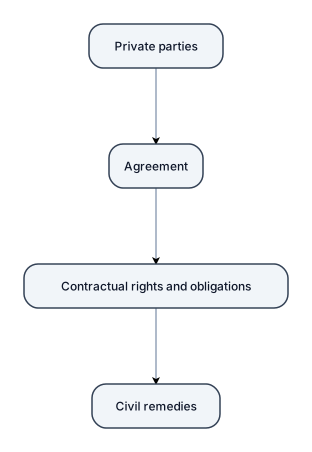
Figure 1. Contract law as private law: Private parties → Agreement → Contractual rights and obligations → Civil remedies.
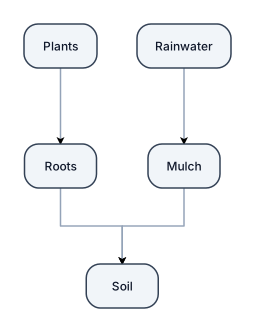
Simple school science sketch of a soil erosion prevention design. Show a side view of soil with small plants growing above it, roots visible underground, and mulch covering the soil. Add arrows and labels for Plants, Roots, Mulch, Soil, and Rainwater. Black and white hand-drawn worksheet style. Make it look like a student science diagram, not a logo, poster, advertisement, or front design.
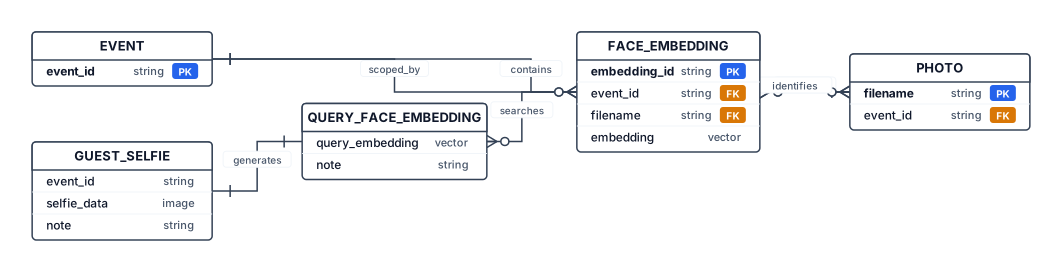
Create a professional academic Logical Data Model / ER-style Diagram for: "ClickMe – AI Event Photo Retrieval System Using Face Recognition" Important: The actual implementation uses ChromaDB, not a relational database. Therefore, represent the logical relationships rather than traditional relational database tables. Show these main components: EVENT - event_id PHOTO - filename - event_id FACE EMBEDDING - embedding_id - event_id - filename - embedding vector GUEST SELFIE / QUERY - event_id - query face embedding Relationships: EVENT contains PHOTO. PHOTO produces or is associated with FACE EMBEDDING. GUEST SELFIE is temporarily processed to generate a QUERY FACE EMBEDDING. QUERY FACE EMBEDDING searches stored FACE EMBEDDINGS. Matching FACE EMBEDDINGS identify matching PHOTOS. Clearly indicate that the guest selfie and query embedding are temporary and are not permanently stored. Use clean academic diagram notation, white background, rectangular entities, arrows showing relationships, minimal colors, readable labels, suitable for a university project report. Do not show PostgreSQL, MySQL or any relational database.
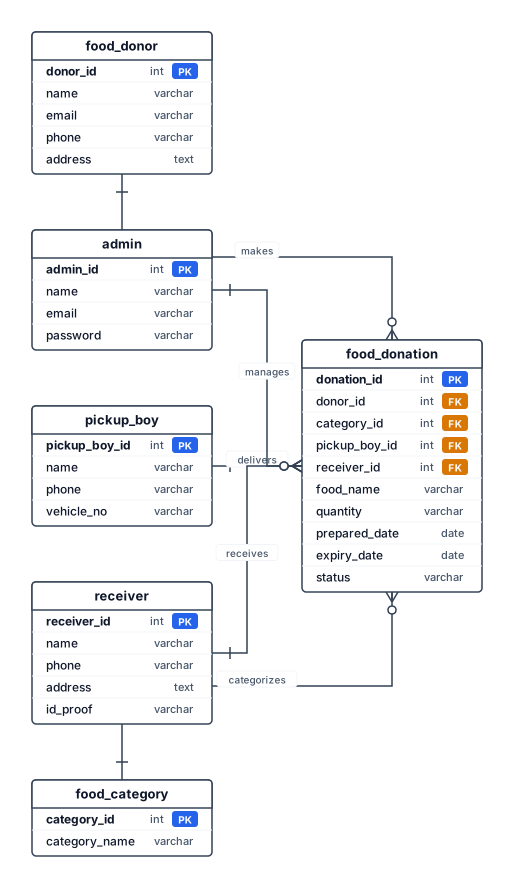
Entity relationship diagram for food donation system. ER diagram . food donation,food donor,admin,pick-up boy,receiver,food category,ER diagram generate
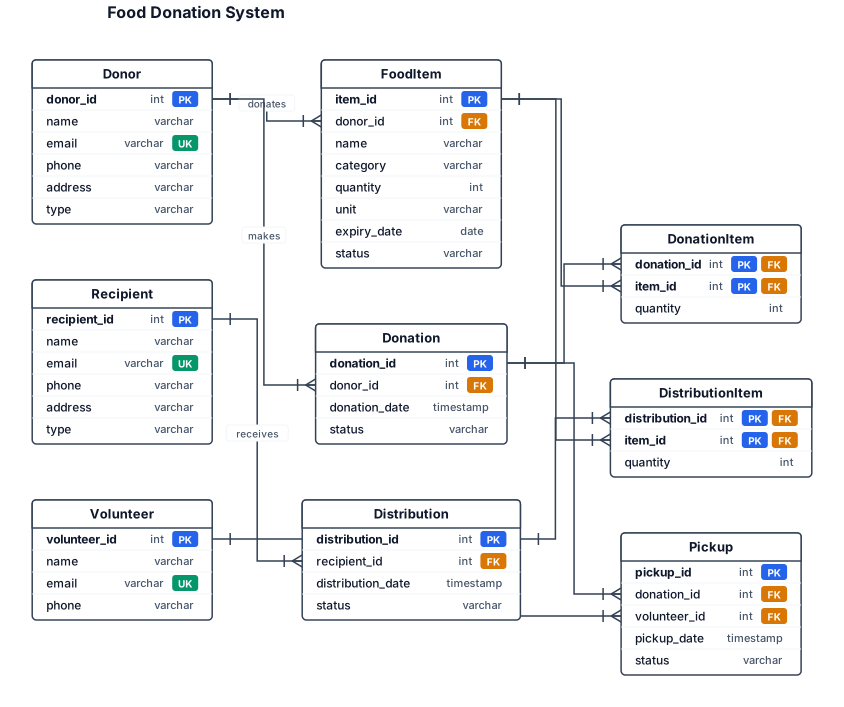
An entity-relationship diagram for the topic is food donation system relationship between entity
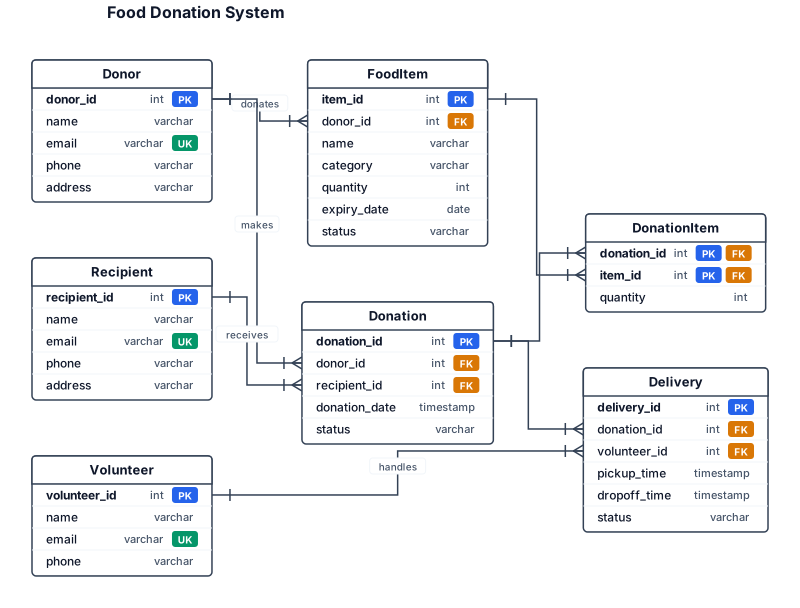
An entity-relationship diagram for the topic is food donation system relationship between entitys
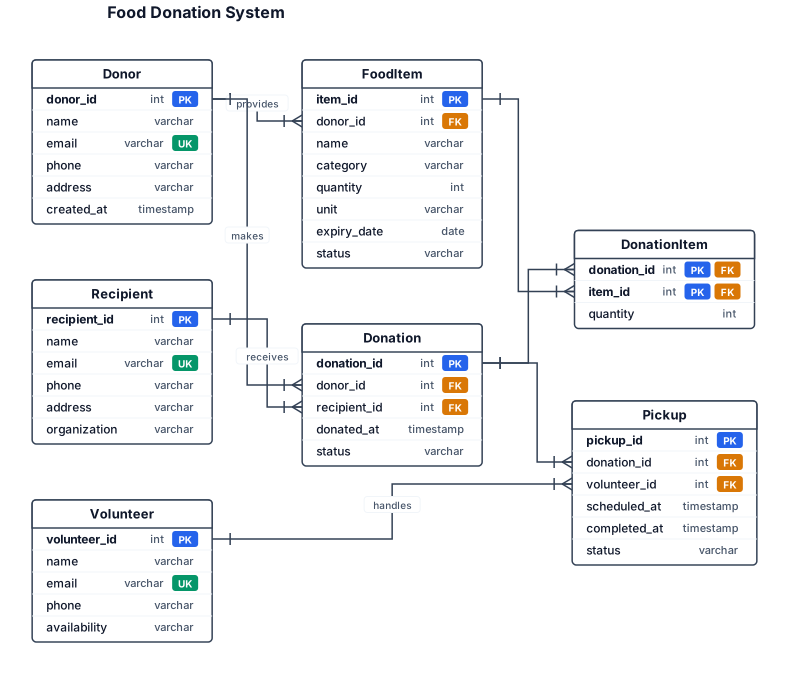
An entity-relationship diagram for the topic is food donation system
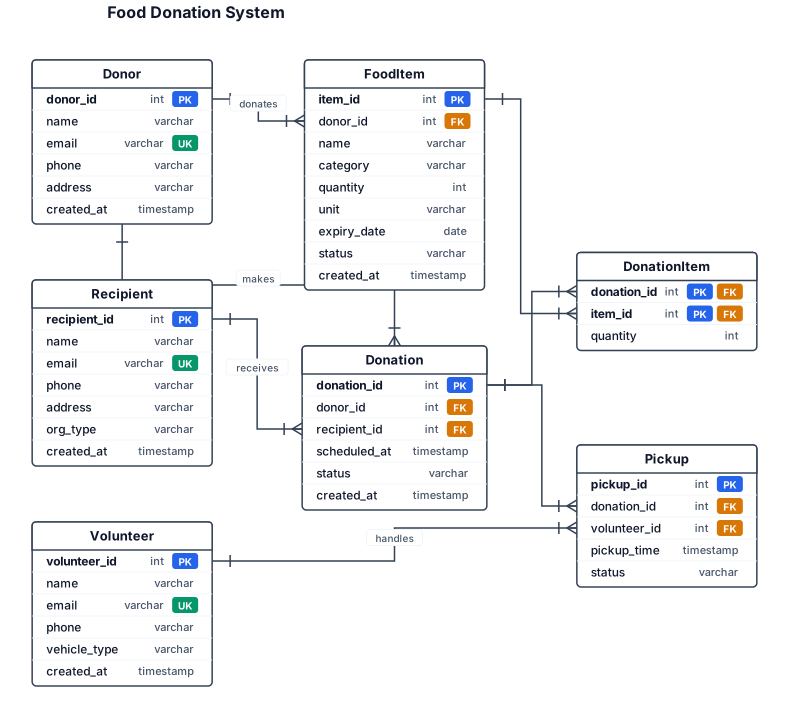
An entity-relationship diagram for a SaaS app the topic is food donation system
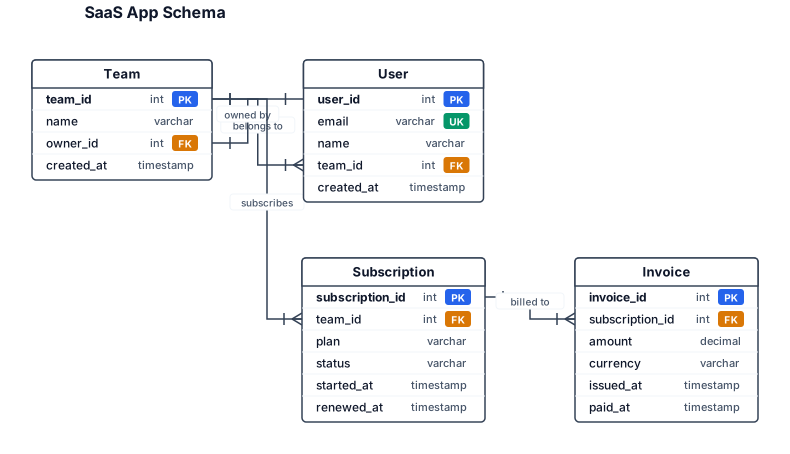
An entity-relationship diagram for a SaaS app with users, teams, subscriptions, and invoices
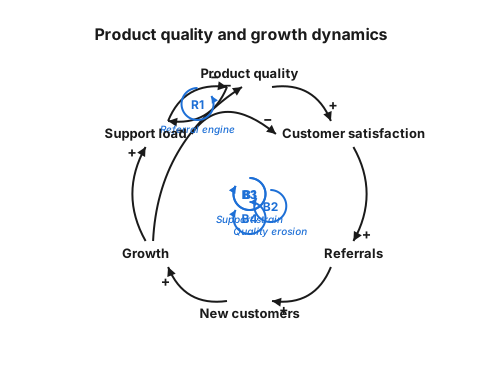
A causal loop diagram showing how product quality, customer satisfaction, referrals, growth, and support load reinforce or balance each other

Create a clean academic 0-Level DFD for: “ClickMe – AI Event Photo Retrieval System” LAYOUT: Use a wide landscape layout with plenty of empty space. Do NOT make the diagram compact or crowded. Place the elements like this: LEFT: Rectangle: PHOTOGRAPHER CENTER: One large process box: (ClickMe – AI Event Photo Retrieval System) RIGHT: Rectangle: GUEST ARROWS: PHOTOGRAPHER → CLICKME Label: Event Photos + Event ID GUEST → CLICKME Label: Selfie + Event ID CLICKME → GUEST Label: Matching Photographs IMPORTANT: - Exactly 2 external entities: Photographer and Guest - Exactly 1 central process: ClickMe - No other boxes - No internal processes - No ChromaDB - No Face Detection - No Face Embedding - No Similarity Search - No extra text - No icons - No decoration - Do not stack the elements vertically - Do not overlap arrows or labels - Keep large spacing between all elements - Use clear directional arrows - Use black text and black lines on white background - Professional college-project style - Landscape orientation - High resolution The final diagram should be visually simple: PHOTOGRAPHER → CLICKME → GUEST ↑ │ GUEST → CLICKME Caption: Figure 5.3.1: 0-Level DFD of ClickMe

Create a clean and professional academic 0-Level Data Flow Diagram (DFD) for a college project titled: “ClickMe – AI Event Photo Retrieval System” Use standard DFD notation. IMPORTANT: This is a 0-Level DFD, so show the complete ClickMe application as ONE single central process. Do NOT show internal processes such as face detection, face embedding generation, similarity search, ChromaDB, OpenCV, InsightFace, Docker, or any other internal component. Include exactly TWO external entities: 1. PHOTOGRAPHER 2. GUEST Include exactly ONE central process: “ClickMe – AI Event Photo Retrieval System” Data flows: 1. PHOTOGRAPHER → ClickMe System Label the arrow: “Event Photos + Event ID” 2. GUEST → ClickMe System Label the arrow: “Selfie + Event ID” 3. ClickMe System → GUEST Label the arrow: “Matching Photographs” The diagram should clearly show that the photographer provides event photographs and Event ID to the system, while the guest provides a selfie and Event ID to search for photographs. The system returns matching photographs to the guest. Use: - Standard DFD symbols - External entities as rectangles - The complete ClickMe system as one process - Clearly labelled directional arrows - Black and white academic style - White background - Clean rectangular shapes - Simple professional typography - Landscape orientation - No decorative graphics - No icons - No photographs - No unnecessary text - No extra entities - No extra processes Make the diagram suitable for direct insertion into a college project report. Title/caption should be: “Figure 5.3.1: 0-Level DFD of ClickMe”
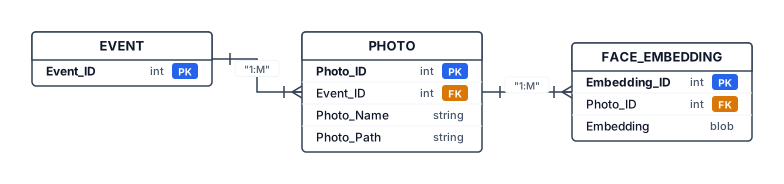
Create a clean academic ER diagram for my AI Event Photo Retrieval System called ClickMe. The system stores event photographs and facial embeddings for selfie-based photo retrieval. Use three main database entities: EVENT, PHOTO, and FACE_EMBEDDING. EVENT contains PK Event_ID. PHOTO contains PK Photo_ID, FK Event_ID, Photo_Name, and Photo_Path. FACE_EMBEDDING contains PK Embedding_ID, FK Photo_ID, and facial Embedding. Show a one-to-many relationship between EVENT and PHOTO because one event contains many photographs. Show a one-to-many relationship between PHOTO and FACE_EMBEDDING because one photograph may contain multiple detected faces and therefore multiple facial embeddings. Show a separate Guest Selfie input outside the database entities. The Guest Selfie is processed to generate a facial embedding and is used for similarity search against the stored facial embeddings in ChromaDB; it is not a permanent database entity. Mention ChromaDB as the vector database used to store and search facial embeddings, but do not represent ChromaDB as an entity. Use standard ERD notation, clear rectangles, PK/FK labels, cardinality 1:M, black-and-white academic style, white background, landscape layout, no unnecessary decoration, suitable for a college project report.