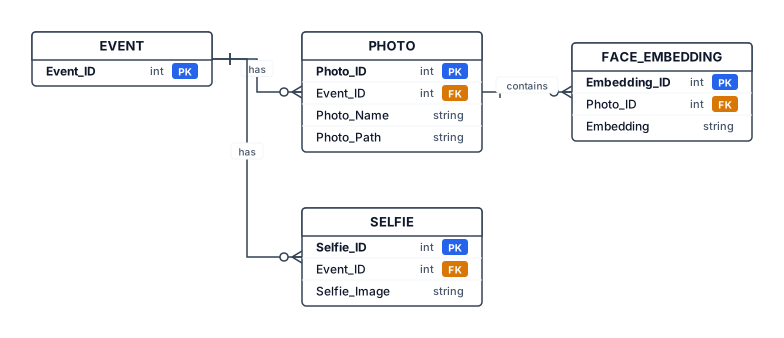
Create a clean academic Entity Relationship Diagram (ERD) for an AI Event Photo Retrieval System called ClickMe. Include four entities: EVENT, PHOTO, FACE_EMBEDDING, and SELFIE. EVENT has Event_ID as the primary key. PHOTO has Photo_ID as the primary key, Event_ID as a foreign key, and Photo_Name/Photo_Path. FACE_EMBEDDING has Embedding_ID as the primary key, Photo_ID as a foreign key, and Embedding. SELFIE has Selfie_ID as the primary key, Event_ID as a foreign key, and Selfie_Image. Show these relationships: one EVENT can have many PHOTOS; one PHOTO can contain multiple FACE_EMBEDDINGS; one EVENT can have multiple SELFIES. Use standard ERD notation, clear rectangles, primary key and foreign key labels, simple black-and-white academic style, no unnecessary decoration, white background, landscape layout, suitable for a college project report.
Diagram Examples from Real Visitor Prompts
Browse eligible diagrams shared by FreeDiagram visitors, inspect the exact prompts, and build your own version.
Browse 3285 real creationsMain diagram studio
Showing 1033–1056 of 1261. No stock examples or system defaults. Choose a tool, study a real result, then reopen its prompt as your starting point.
Me entiendes si escribo mi solicitud en español?
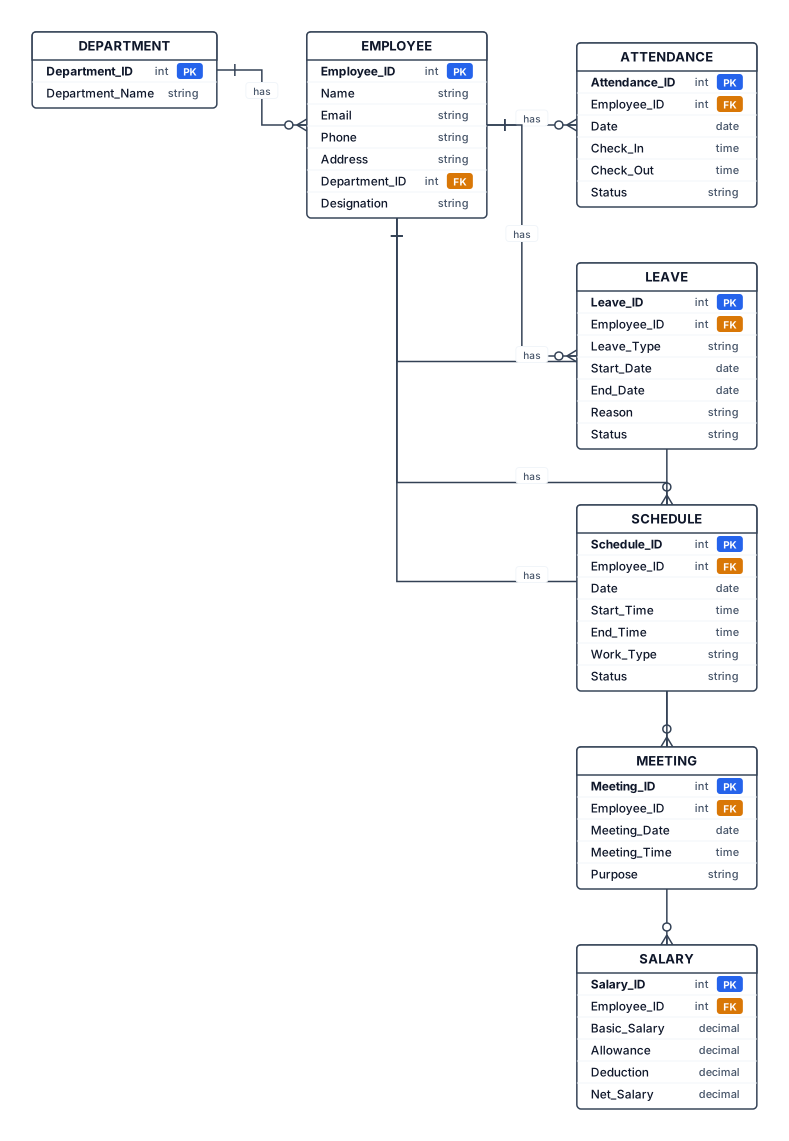
Create a simple, professional black-and-white ER (Entity Relationship) diagram for an Employee Management System college project. Use exactly these 7 entities: 1. EMPLOYEE 2. DEPARTMENT 3. ATTENDANCE 4. LEAVE 5. SCHEDULE 6. MEETING 7. SALARY EMPLOYEE attributes: Employee_ID (PK), Name, Email, Phone, Address, Department_ID (FK), Designation DEPARTMENT attributes: Department_ID (PK), Department_Name ATTENDANCE attributes: Attendance_ID (PK), Employee_ID (FK), Date, Check_In, Check_Out, Status LEAVE attributes: Leave_ID (PK), Employee_ID (FK), Leave_Type, Start_Date, End_Date, Reason, Status SCHEDULE attributes: Schedule_ID (PK), Employee_ID (FK), Date, Start_Time, End_Time, Work_Type, Status MEETING attributes: Meeting_ID (PK), Employee_ID (FK), Meeting_Date, Meeting_Time, Purpose SALARY attributes: Salary_ID (PK), Employee_ID (FK), Basic_Salary, Allowance, Deduction, Net_Salary Relationships: DEPARTMENT has many EMPLOYEES (1:M). EMPLOYEE has many ATTENDANCE records (1:M). EMPLOYEE can have many LEAVE records (1:M). EMPLOYEE can have many SCHEDULE records (1:M). EMPLOYEE can attend many MEETINGS (1:M). EMPLOYEE can have many SALARY records (1:M). Use standard ER diagram notation: - Rectangles for entities - Ovals for attributes - Diamonds for relationships - Clearly mark primary keys (PK) and foreign keys (FK) - Show cardinalities 1:M - Use clean straight connecting lines - Keep EMPLOYEE as the central entity - Arrange the diagram neatly with no overlapping lines - White background, black text and borders - Make all labels large, clear and readable - Suitable for a BCA college project documentation DO NOT include Dashboard, Task, Task Scheduler, or Training. Do not add any extra entities or attributes.
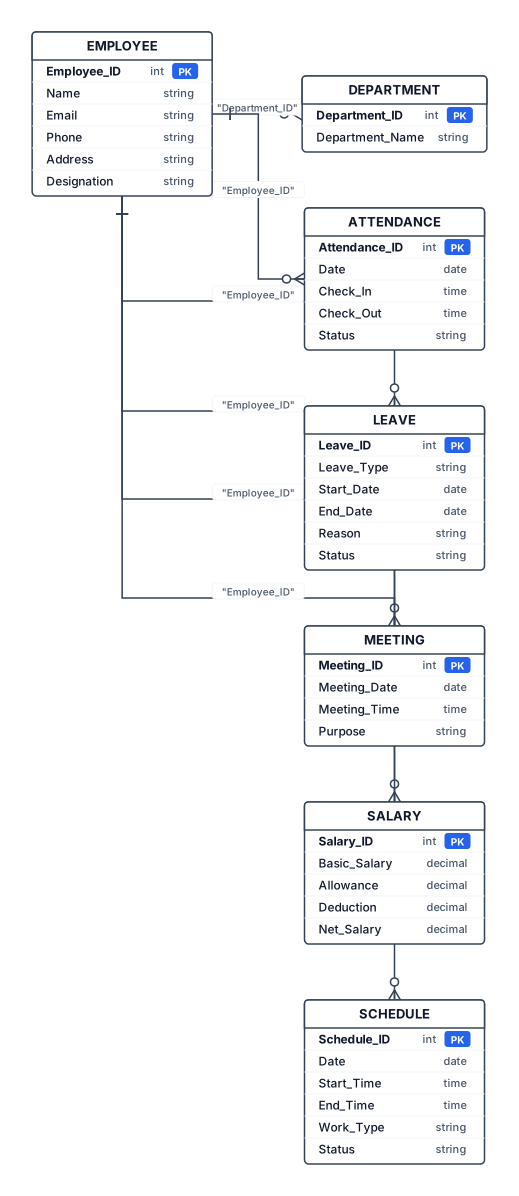
Entities & important attributes EMPLOYEE Employee_ID (PK) Name Email Phone Address Department_ID (FK) Designation DEPARTMENT Department_ID (PK) Department_Name ATTENDANCE Attendance_ID (PK) Employee_ID (FK) Date Check_In Check_Out Status LEAVE Leave_ID (PK) Employee_ID (FK) Leave_Type Start_Date End_Date Reason Status MEETING Meeting_ID (PK) Employee_ID (FK) Meeting_Date Meeting_Time Purpose SALARY Salary_ID (PK) Employee_ID (FK) Basic_Salary Allowance Deduction Net_Salary SCHEDULE Schedule_ID (PK) Employee_ID (FK) Date Start_Time End_Time Work_Type Status

Crea un DIAGRAMA JERÁRQUICO sobre la CLASIFICACIÓN DE VEHÍCULOS. TEMA CENTRAL: VEHÍCULOS PRIMER NIVEL: 1. VEHÍCULOS LIGEROS 2. VEHÍCULOS PESADOS 3. VEHÍCULOS DE CONSTRUCCIÓN 4. VEHÍCULOS DE AGRICULTURA SEGUNDO NIVEL: VEHÍCULOS LIGEROS: - Sedán - Hatchback - Coupé - Station Wagon - SUV - Pick Up - VAN - Peso bruto vehicular: hasta 3500 kg. VEHÍCULOS PESADOS: - Transporte de personas - Transporte de carga VEHÍCULOS DE CONSTRUCCIÓN: - Utilizados en arquitectura e ingeniería - Actividades de construcción VEHÍCULOS DE AGRICULTURA: - Utilizados en sembrío - Utilizados en cosecha DISEÑO: - Formato de árbol jerárquico. - "VEHÍCULOS" debe estar arriba o al centro. - Las 4 categorías deben salir directamente de "VEHÍCULOS". - Cada categoría debe conectarse con sus subcategorías. - Usar cuadros conectados con líneas. - Diseño académico y profesional. - Texto corto y legible. - No inventar nuevas categorías. - No eliminar ninguna subcategoría. - Todo debe estar escrito en español.

Please create a fish bone diagram.
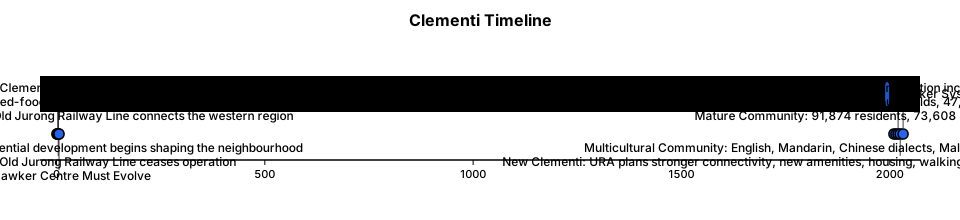
A historical timeline of: 1960s RAILWAY + INDUSTRIAL CLEMENTI Old Jurong Railway Line connects the western region. ↓ 1970s HDB CLEMENTI Large-scale residential development begins shaping the neighbourhood. ↓ 1970s CLEMENTI 2 MARKET Market + cooked-food centre becomes neighbourhood infrastructure. ↓ 1989–1998 HAWKER SYSTEM UNDER PRESSURE Government-market/hawker-centre stalls fall from 5,613 to 3,614 nationally. ↓ 1990s RAILWAY DISAPPEARS Old Jurong Railway Line ceases operation. ↓ 2010 MATURE COMMUNITY 91,874 residents 73,608 HDB-related population. ↓ 2015 MULTICULTURAL COMMUNITY English, Mandarin, Chinese dialects, Malay and Tamil remain major home languages. ↓ 2020 STABLE BUT CHANGING 91,990 residents 33,609 households 47,609 employed residents 15,910 students. ↓ 2020s AGEING INFRASTRUCTURE Clementi 2 identified as eligible for HUP 2.0. ↓ 2025 NEW CLEMENTI URA plans stronger connectivity, new amenities, housing, walking/cycling infrastructure and heritage/ecological connections. ↓ 2032 CROSS ISLAND LINE Planned Clementi station increases future connectivity. ↓ FUTURE THE HAWKER CENTRE MUST EVOLVE
A mind mapof a historical timeline for 1960s RAILWAY + INDUSTRIAL CLEMENTI Old Jurong Railway Line connects the western region. ↓ 1970s HDB CLEMENTI Large-scale residential development begins shaping the neighbourhood. ↓ 1970s CLEMENTI 2 MARKET Market + cooked-food centre becomes neighbourhood infrastructure. ↓ 1989–1998 HAWKER SYSTEM UNDER PRESSURE Government-market/hawker-centre stalls fall from 5,613 to 3,614 nationally. ↓ 1990s RAILWAY DISAPPEARS Old Jurong Railway Line ceases operation. ↓ 2010 MATURE COMMUNITY 91,874 residents 73,608 HDB-related population. ↓ 2015 MULTICULTURAL COMMUNITY English, Mandarin, Chinese dialects, Malay and Tamil remain major home languages. ↓ 2020 STABLE BUT CHANGING 91,990 residents 33,609 households 47,609 employed residents 15,910 students. ↓ 2020s AGEING INFRASTRUCTURE Clementi 2 identified as eligible for HUP 2.0. ↓ 2025 NEW CLEMENTI URA plans stronger connectivity, new amenities, housing, walking/cycling infrastructure and heritage/ecological connections. ↓ 2032 CROSS ISLAND LINE Planned Clementi station increases future connectivity. ↓ FUTURE THE HAWKER CENTRE MUST EVOLVE
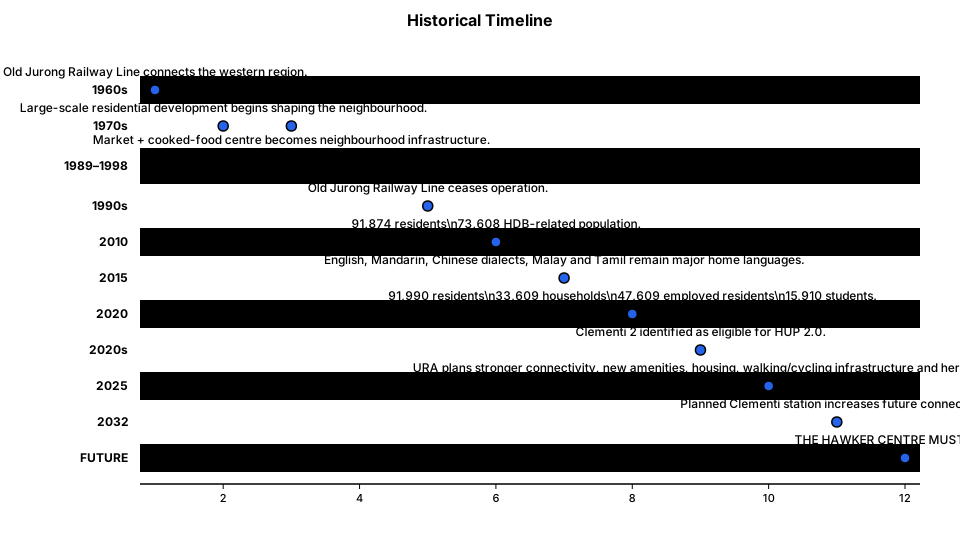
timeline of Historical Timeline: 1960s RAILWAY + INDUSTRIAL CLEMENTI Old Jurong Railway Line connects the western region. ↓ 1970s HDB CLEMENTI Large-scale residential development begins shaping the neighbourhood. ↓ 1970s CLEMENTI 2 MARKET Market + cooked-food centre becomes neighbourhood infrastructure. ↓ 1989–1998 HAWKER SYSTEM UNDER PRESSURE Government-market/hawker-centre stalls fall from 5,613 to 3,614 nationally. ↓ 1990s RAILWAY DISAPPEARS Old Jurong Railway Line ceases operation. ↓ 2010 MATURE COMMUNITY 91,874 residents 73,608 HDB-related population. ↓ 2015 MULTICULTURAL COMMUNITY English, Mandarin, Chinese dialects, Malay and Tamil remain major home languages. ↓ 2020 STABLE BUT CHANGING 91,990 residents 33,609 households 47,609 employed residents 15,910 students. ↓ 2020s AGEING INFRASTRUCTURE Clementi 2 identified as eligible for HUP 2.0. ↓ 2025 NEW CLEMENTI URA plans stronger connectivity, new amenities, housing, walking/cycling infrastructure and heritage/ecological connections. ↓ 2032 CROSS ISLAND LINE Planned Clementi station increases future connectivity. ↓ FUTURE THE HAWKER CENTRE MUST EVOLVE
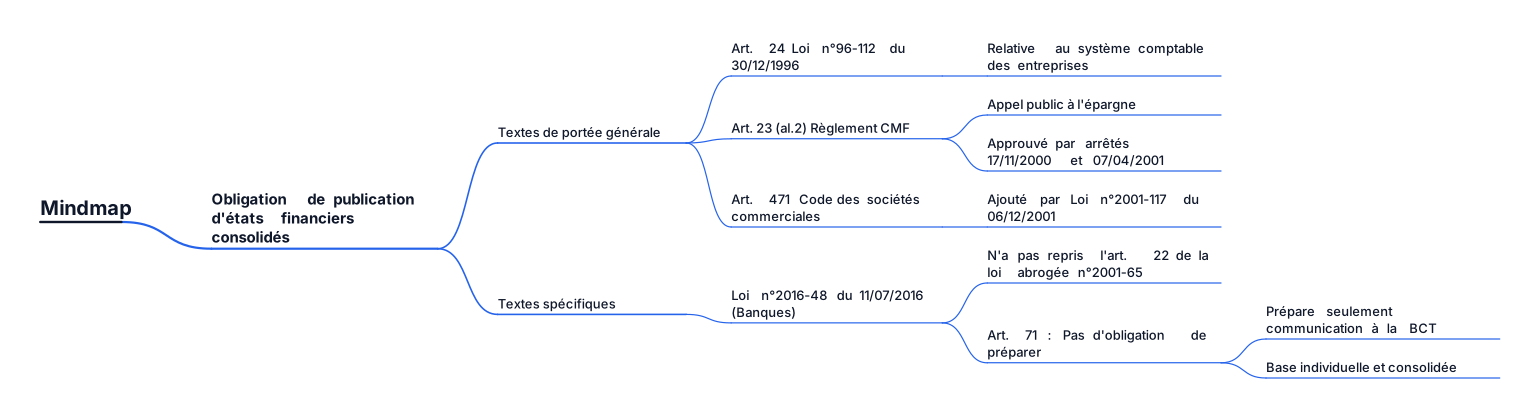
Quelssont lestextesédictantuneobligationdepublicationd’étatsfinanciers consolidés? Textesdeportéegénérale: • Article24delaloin°96-112du30 décembre1996relativeausystème comptabledesentreprises. • Article23(alinéa2)duRèglement du CMF relatif à l’appel public à l’épargne tel qu’approuvé par les arrêtésduministredes financesdu 17 novembre 2000 et du 7 Avril 2001. • Article 471 du code des sociétés commerciales, ajouté par la loi n°2001-117du6décembre2001. Textesspécifiques: • La loi n° 2016-48 du 11 juillet 2016 relative aux banques et aux établissements financiers n’a pas repris les dispositions de l’article 22de la loi abrogée n° 2001-65 du 10 juillet 2001 relativeauxétablissementsdecrédit. • L’article71de la loi n° 2016-48du11 juillet 2016 relativeauxbanqueset aux établissements financiers, n’édicte pas une obligation de préparer des états financiers consolidés mais prévoit seulementlacommunicationàlaBCTdes données sur la situation comptable sur baseindividuelleetconsolidée
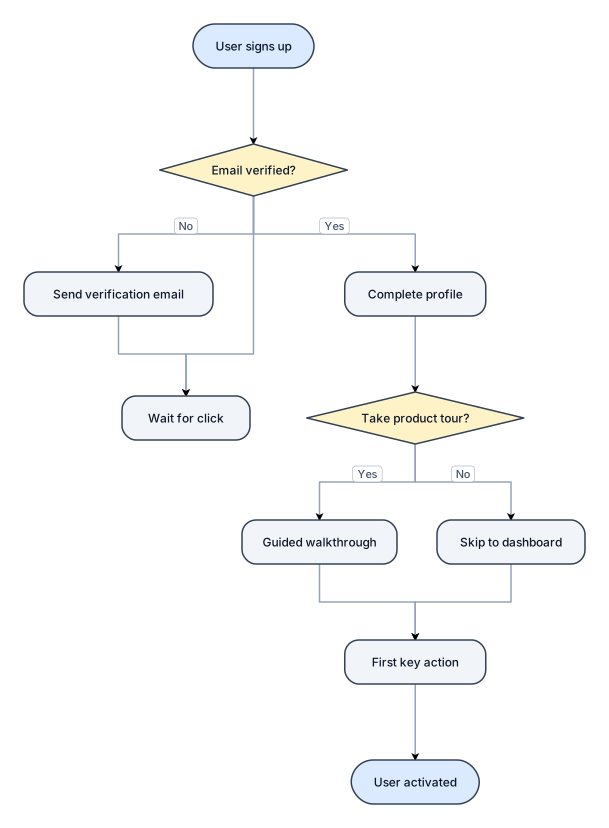
A flowchart of a new-user onboarding flow from signup to first activation, with a verification branch
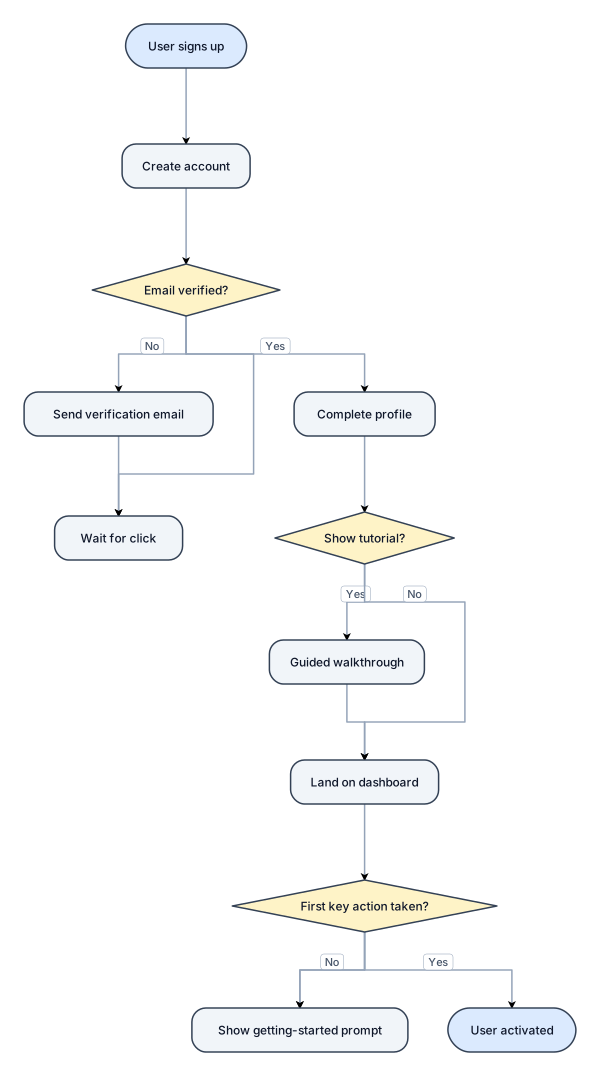
A flowchart of a new-user onboarding flow from signup to first activation, with a verification branch
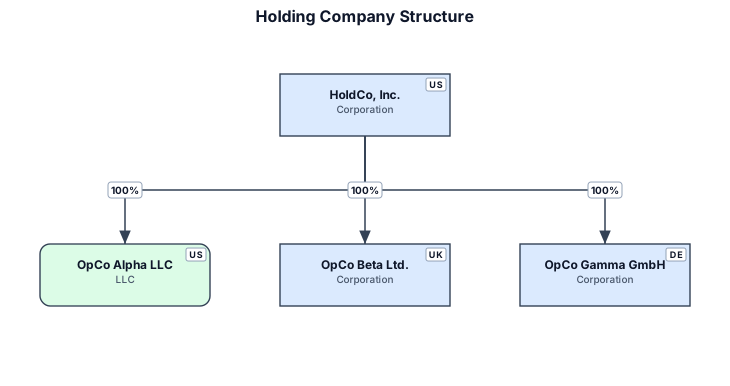
A legal entity structure for a holding company owning three operating subsidiaries with ownership percentages
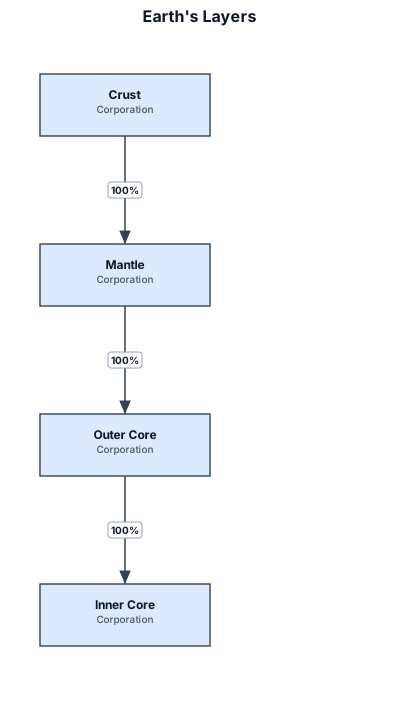
Earth's layers diagrame

Earth's layers diagram

Earth's layers
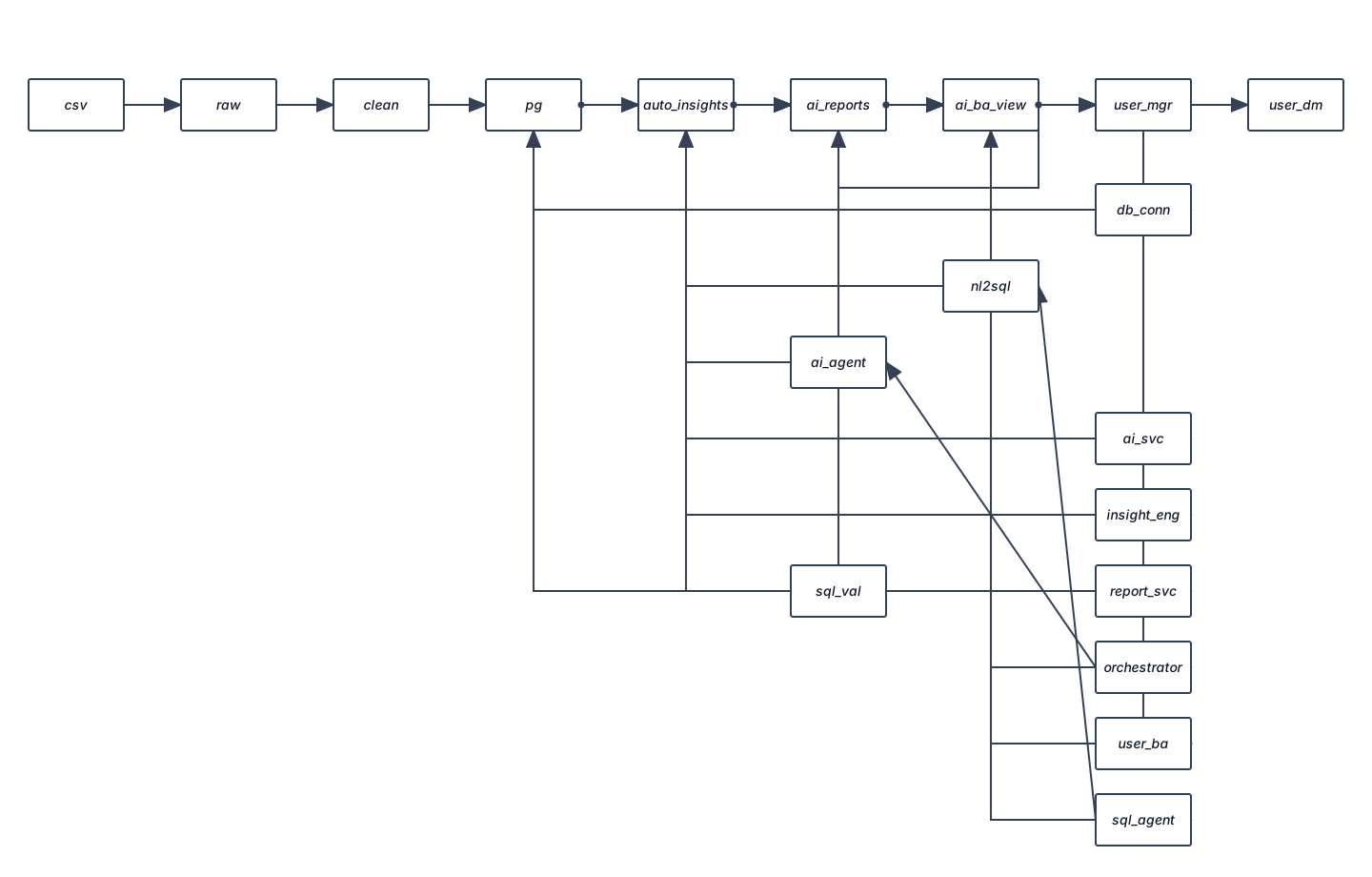
Create a professional system architecture diagram for an AI-Assisted Retail Intelligence System built using the Dunnhumby Complete Journey dataset. Use a clean enterprise architecture style with clear layers and directional arrows. LAYERS: 1. DATA LAYER - Dunnhumby Complete Journey CSV files - Raw Data - Cleaned Data - PostgreSQL Database 2. ANALYTICS LAYER - SQL Analytics - Revenue Analytics - Customer Analytics - Product & Sales Analytics - Marketing & Promotion Analytics - RFM Segmentation - Promotion Effectiveness 3. AI / INTELLIGENCE LAYER - Gemini AI - Natural Language → SQL - SQL Validation / Read-Only Security - AI Business Analyst - Automated Business Insights - AI Business Analyst Agent - Automated Analysis Pipeline - AI Business Reports 4. BACKEND LAYER - FastAPI - Database Connection - AI Service - SQL Agent - Insight Engine - Report Service - Analysis/Agent Orchestrator 5. FRONTEND LAYER - Executive Overview - Customer Intelligence - Product & Sales - Marketing & Promotions - AI Business Analyst 6. USER LAYER - Business Manager - Business Analyst - Retail Decision Maker SHOW THESE MAIN FLOWS: Dunnhumby Dataset → PostgreSQL → Analytics Layer → FastAPI Backend → Frontend User Question → AI Business Analyst → Gemini → SQL Generation → SQL Validation → PostgreSQL → Results → Gemini Business Explanation → Frontend PostgreSQL Analytics → Automated Insight Engine → AI Agent → Recommendations → Dashboard / Business Report Use arrows to clearly indicate data flow. Keep the diagram readable and suitable for a university capstone report and professional presentation. Do not add technologies that are not specified.
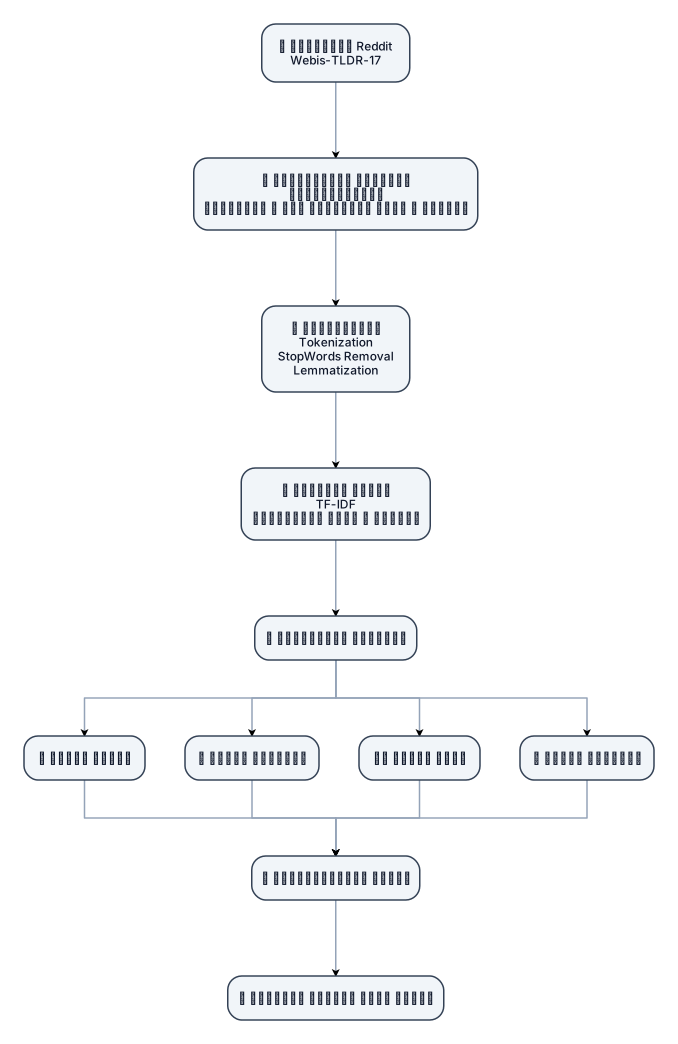
یک دیاگرام حرفهای و مینیمال برای اسلاید دفاع پایاننامه طراحی کن با عنوان «معماری کلی پژوهش». ساختار دیاگرام به صورت یک جریان مرحلهای باشد: دادههای Reddit Webis-TLDR-17 ↓ آمادهسازی دادهها نمونهبرداری پاکسازی و حذف دادههای ناقص و تکراری ↓ پیشپردازش Tokenization StopWords Removal Lemmatization ↓ استخراج ویژگی TF-IDF ویژگیهای متنی و رفتاری ↓ تحلیلهای چندبعدی این بخش به چهار شاخه تقسیم شود: • تحلیل محتوا • تحلیل کاربران • تحلیل گراف • تحلیل احساسات ↓ یکپارچهسازی نتایج ↓ پروفایل رفتاری جامع کاربر طراحی مناسب ارائه دانشگاهی و دفاع پایاننامه باشد. چیدمان منظم، ساده و خوانا باشد. از باکسهای مدرن، فلشهای واضح و آیکونهای ساده استفاده شود. متنها کوتاه باشند و از شلوغی جلوگیری شود. تمرکز اصلی روی مسیر «داده → پردازش → تحلیل → پروفایل رفتاری» باشد.
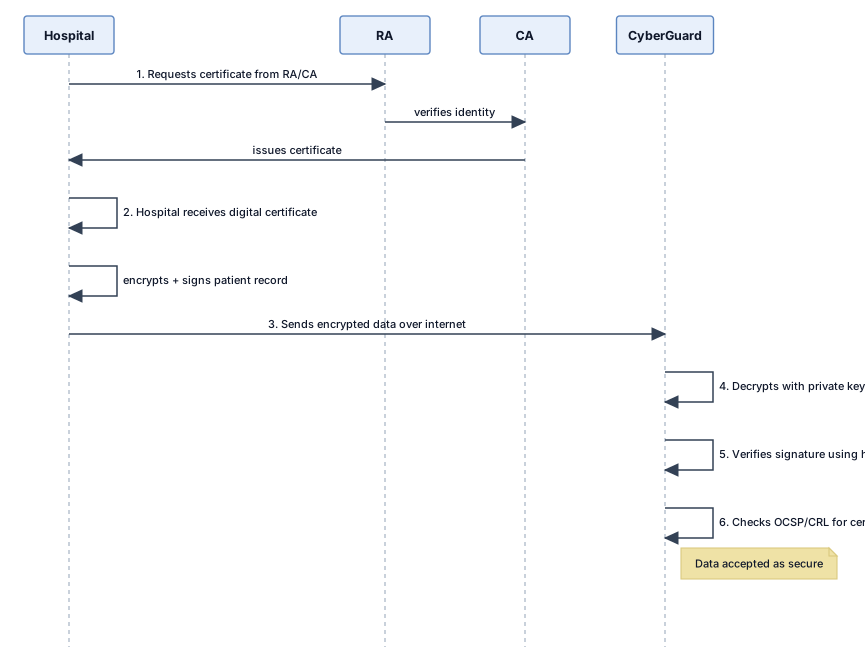
Hospital (sender) | | 1. Requests certificate from RA/CA v RA (verifies identity) --> CA (issues certificate) | | 2. Hospital receives digital certificate v Hospital encrypts + signs patient record | | 3. Sends encrypted data over the internet v CyberGuard (receiver) | | 4. Decrypts with private key | 5. Verifies signature using hospital's public key | 6. Checks OCSP/CRL for certificate status v Data accepted as secure
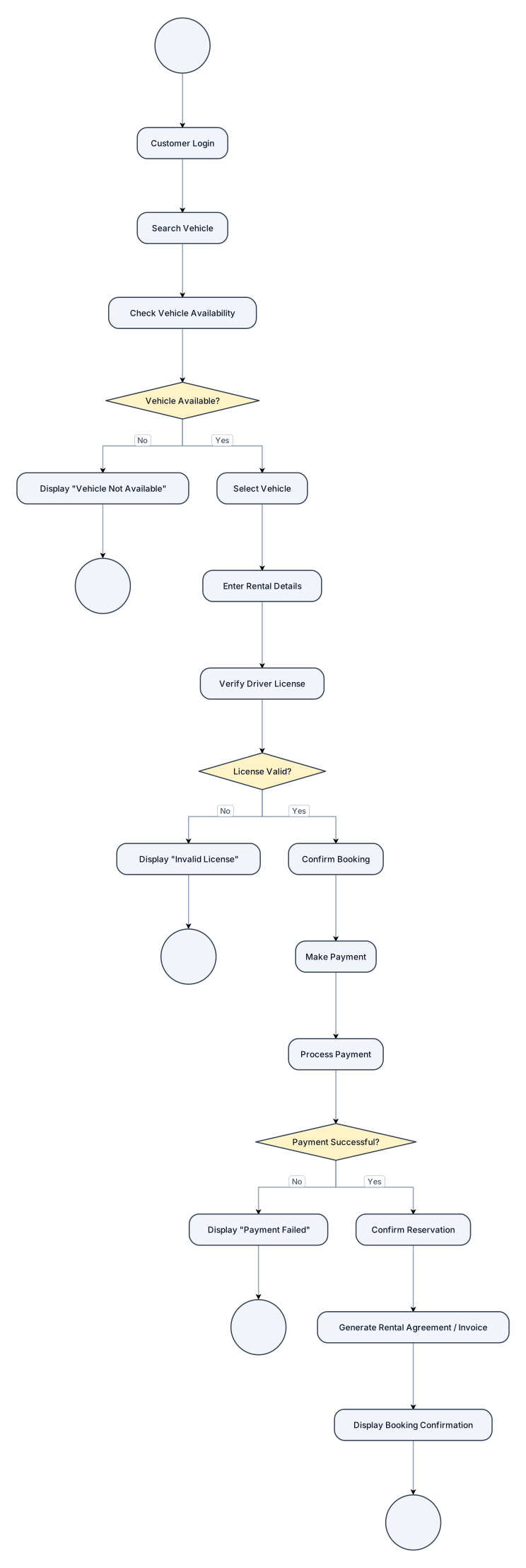
Create a simple UML Activity Diagram for a Vehicle Rental System. Title: Vehicle Booking Process Show ONLY this workflow: START ↓ Customer Login ↓ Search Vehicle ↓ Check Vehicle Availability ↓ [Vehicle Available?] NO → Display "Vehicle Not Available" → END YES → Select Vehicle ↓ Enter Rental Details ↓ Verify Driver License ↓ [License Valid?] NO → Display "Invalid License" → END YES → Confirm Booking ↓ Make Payment ↓ Process Payment ↓ [Payment Successful?] NO → Display "Payment Failed" → END YES → Confirm Reservation ↓ Generate Rental Agreement / Invoice ↓ Display Booking Confirmation ↓ END Use standard UML Activity Diagram notation: - Initial node - Rounded rectangle activity nodes - Diamond decision nodes - Directional arrows - [Yes] and [No] decision guards - Final node IMPORTANT: Keep the diagram simple and compact. Do not add any activities other than those listed. Do not add registration, cancellation, vehicle return, vehicle inspection, refunds, late fees, maintenance, reports, fleet management, notifications, or database activities. Do not create a Use Case Diagram. Do not use actor stick figures or use-case ellipses. Do not expand any activity into additional steps.
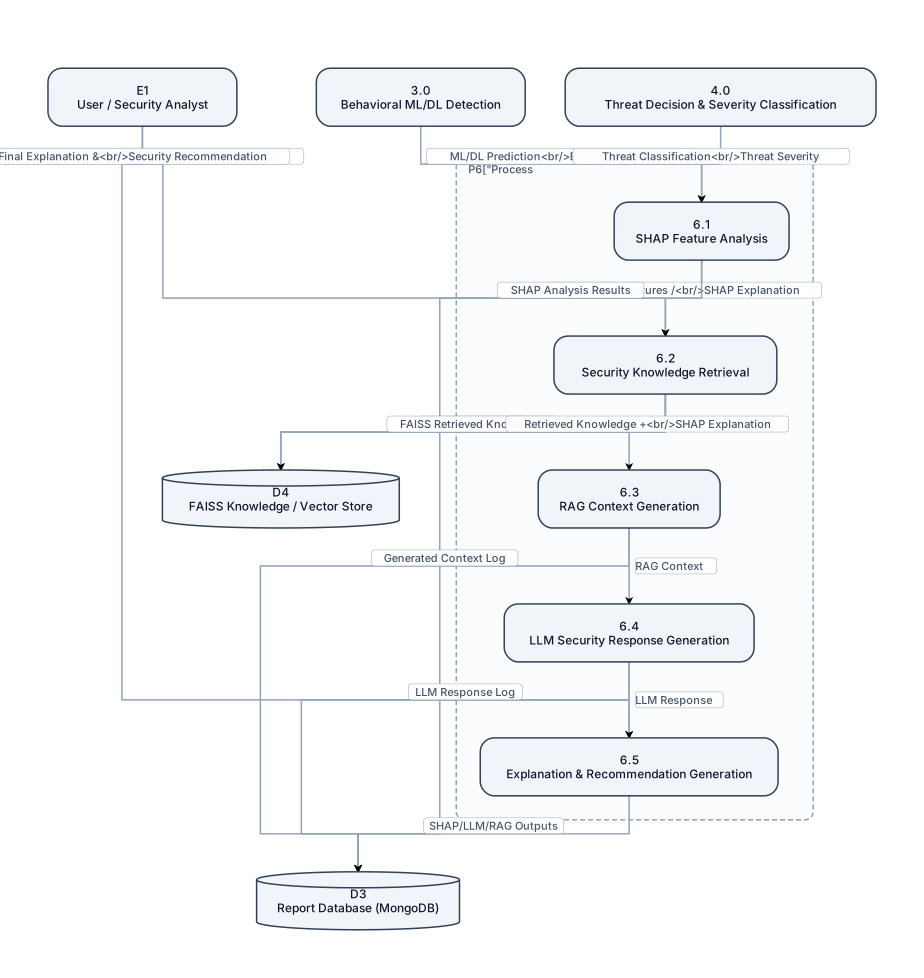
Create a detailed academic DFD Level 2 by decomposing Process 6.0 – LLM + RAG Security Assistant and SHAP Explainability from the Level 1 DFD of the Ransomware Detection and Autonomous Response System. Use standard DFD notation and include E1 User/Security Analyst, 3.0 Behavioral ML/DL Detection and 4.0 Threat Decision & Severity Classification as inputs. Decompose 6.0 into 6.1 SHAP Feature Analysis, 6.2 Security Knowledge Retrieval, 6.3 RAG Context Generation, 6.4 LLM Security Response Generation, and 6.5 Explanation & Recommendation Generation. Include D4 FAISS Knowledge/Vector Store and D3 Report Database (MongoDB). Show flows such as ML/DL Prediction, Behavioral Features, Threat Classification, Threat Severity → SHAP Analysis → Important Features/SHAP Explanation → Knowledge Retrieval → FAISS Retrieved Knowledge → RAG Context → LLM Response → Final Explanation & Security Recommendation → User. Also show User Security Query/Explanation Request entering the system and SHAP/LLM/RAG outputs being stored in MongoDB. Make it large, detailed, readable, professionally arranged, and suitable for a final-year engineering Review 1 PPT. Do not omit SHAP, LLM, RAG, FAISS, MongoDB, user interaction, detection information, explanations, and recommendations.
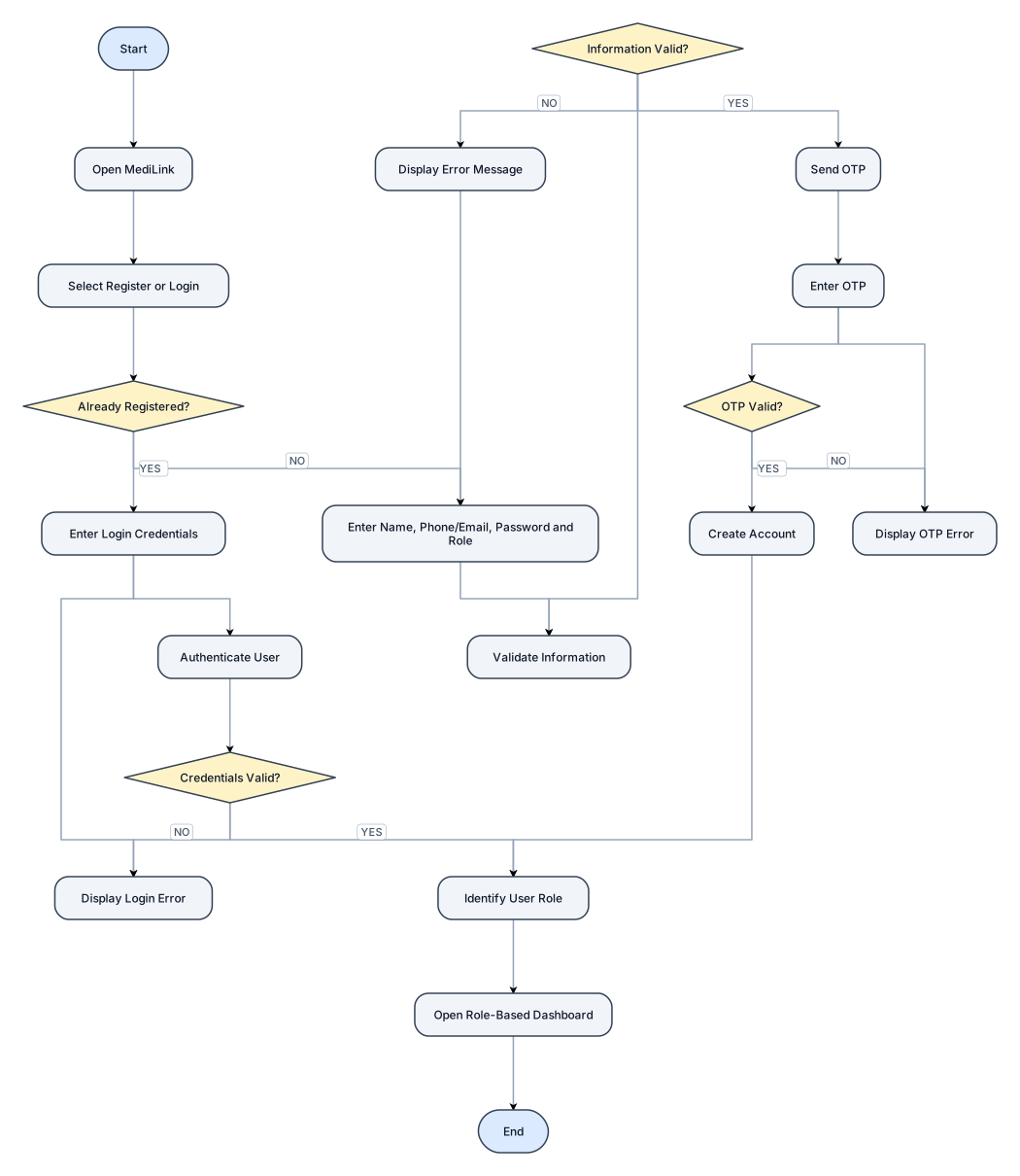
Create a flowchart titled: "Figure 5.1: MediLink User Registration and Login Flowchart" Show the complete authentication workflow. Flow: START → Open MediLink → Select Register or Login → Decision: "Already Registered?" If NO: → Enter Name, Phone/Email, Password and Role → Validate Information → Decision: "Information Valid?" → If NO: Display Error Message → Return to Enter Information → If YES: Send OTP → Enter OTP → Decision: "OTP Valid?" → If NO: Display OTP Error → Return to Enter OTP → If YES: Create Account If YES: → Enter Login Credentials → Authenticate User → Decision: "Credentials Valid?" → If NO: Display Login Error → Return to Login → If YES: Identify User Role Both successful registration and successful login must continue to: → Identify User Role → Open Role-Based Dashboard → END Use standard flowchart symbols and clearly label every YES and NO decision branch.
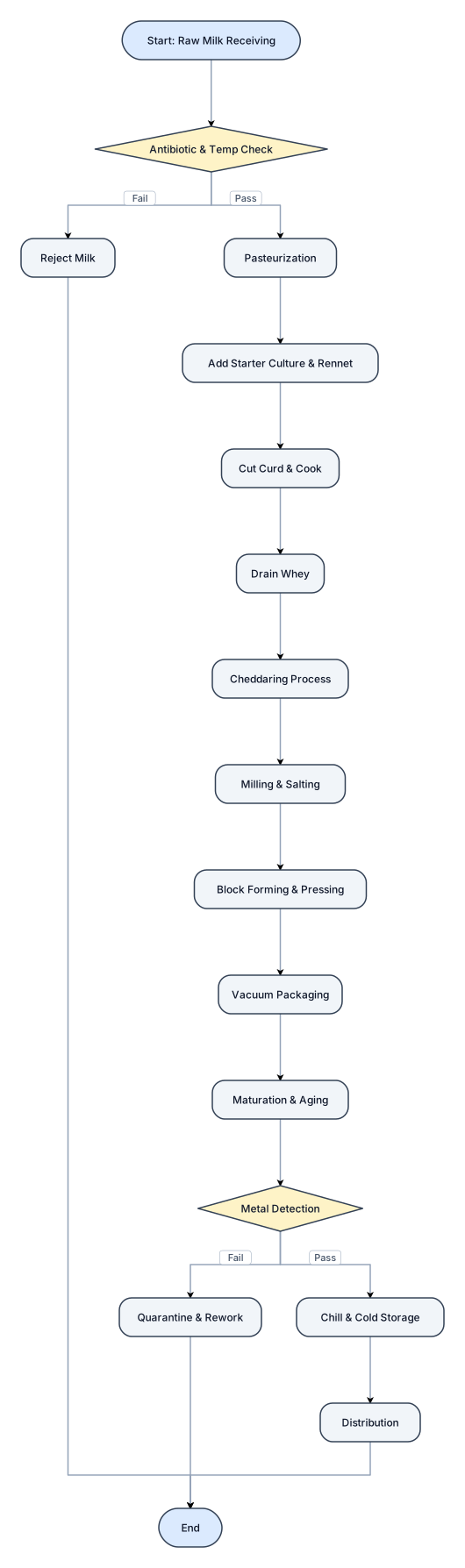
A flowchart of a Chadder Cheese HAcCP

A flowchart for chaddef cheese HACCP