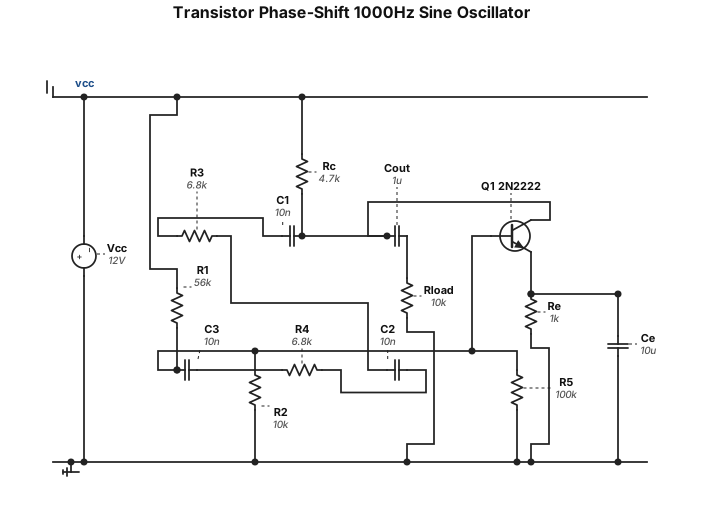
Bir tane transistörlü direnç ve kapasitör kullanan faz kaydırmalı 1000hz sinüs sinyal jeneratörü şeması çiz. Güzel çizmişsin yalnız bu şemada hatalar ve yanlışlar var onları düzelt
NODE ARCHIVE · REAL DIAGRAM BRIEFS
Diagram Examples from Real Visitor Prompts
Browse eligible diagrams shared by FreeDiagram visitors, inspect the exact prompts, and build your own version.
Browse 3261 real creationsCOMMUNITY OUTPUTS · EXACT PROMPTS
Circuit Diagrams
Showing 121–144 of 270. No stock examples or system defaults. Choose a tool, study a real result, then reopen its prompt as your starting point.
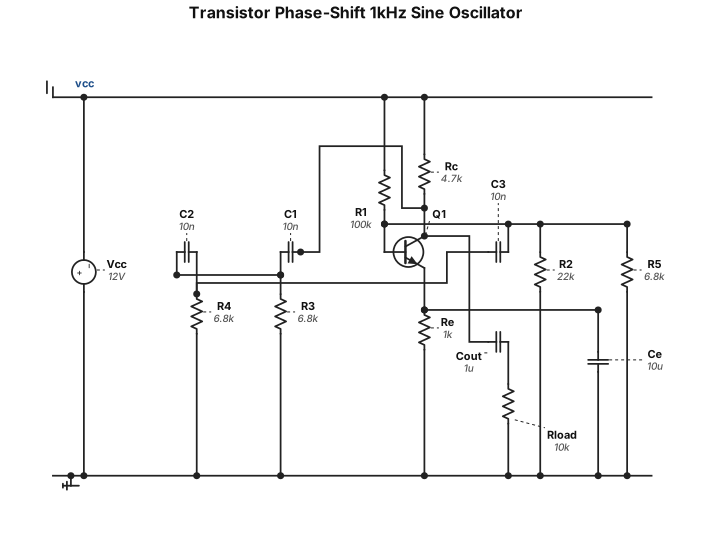
Bir tane transistörlü direnç ve kapasitör kullanan faz kaydırmalı 1000hz sinüs sinyal jeneratörü şeması çiz
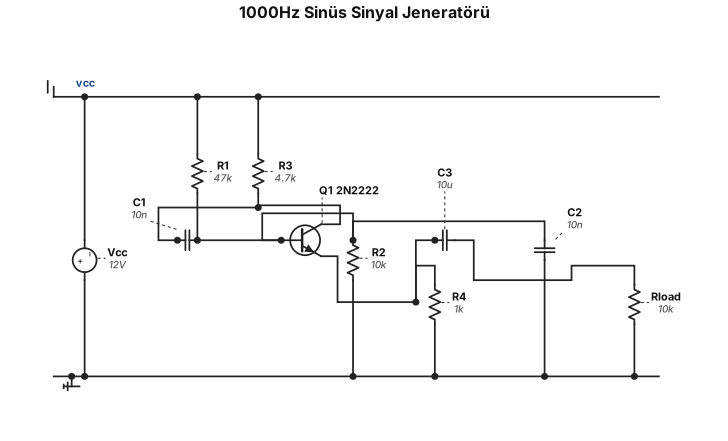
Bir tane transistörlü direnç ve kapasitör kullanan 1000hz sinüs sinyal jeneratörü şeması çiz
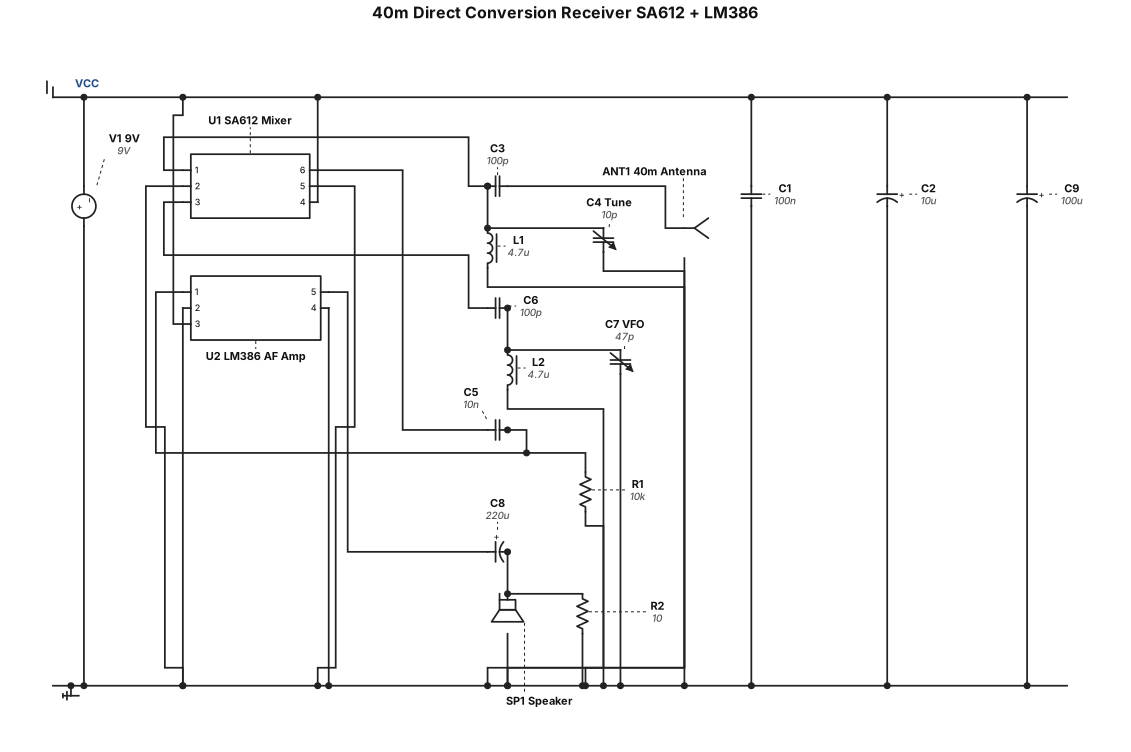
Sa612 ve lm386 kullanan 40 metre bandında direkt konversiyon alıcı radyo şeması çiz
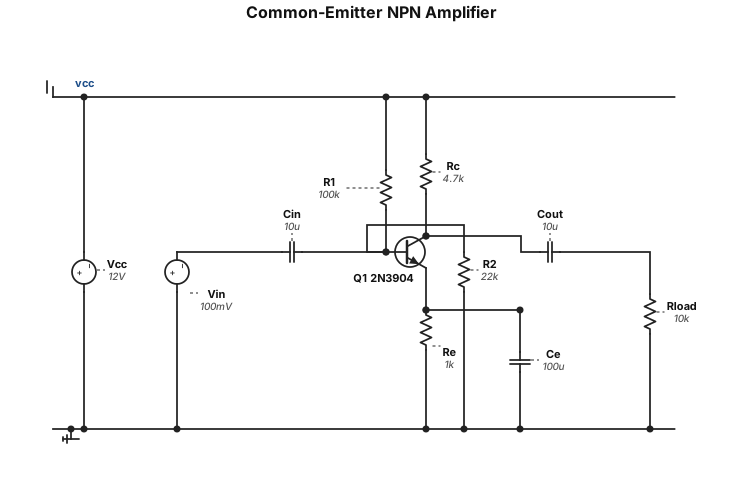
A common-emitter NPN transistor amplifier circuit
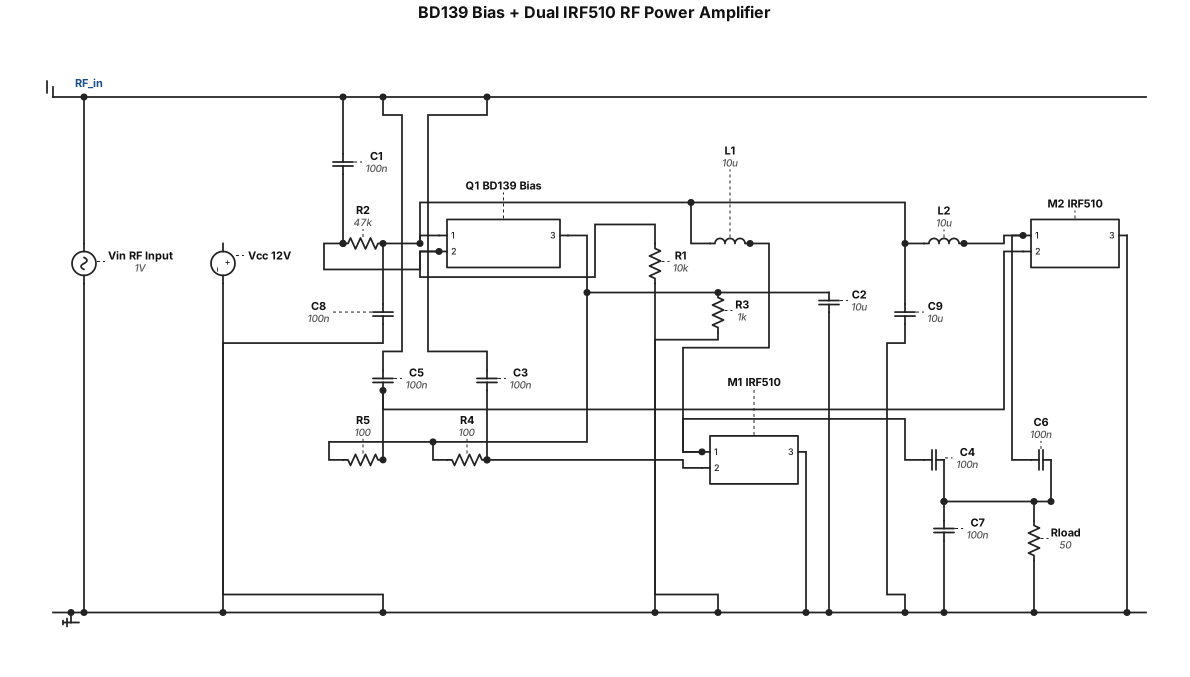
Bana BD139 transistörlü ve 2 mosfet IRF510 MOSFET'li, bias bloklu bir RF güç amplifikatörü şeması çiz şema düzgün olsun öncekine benzemesin
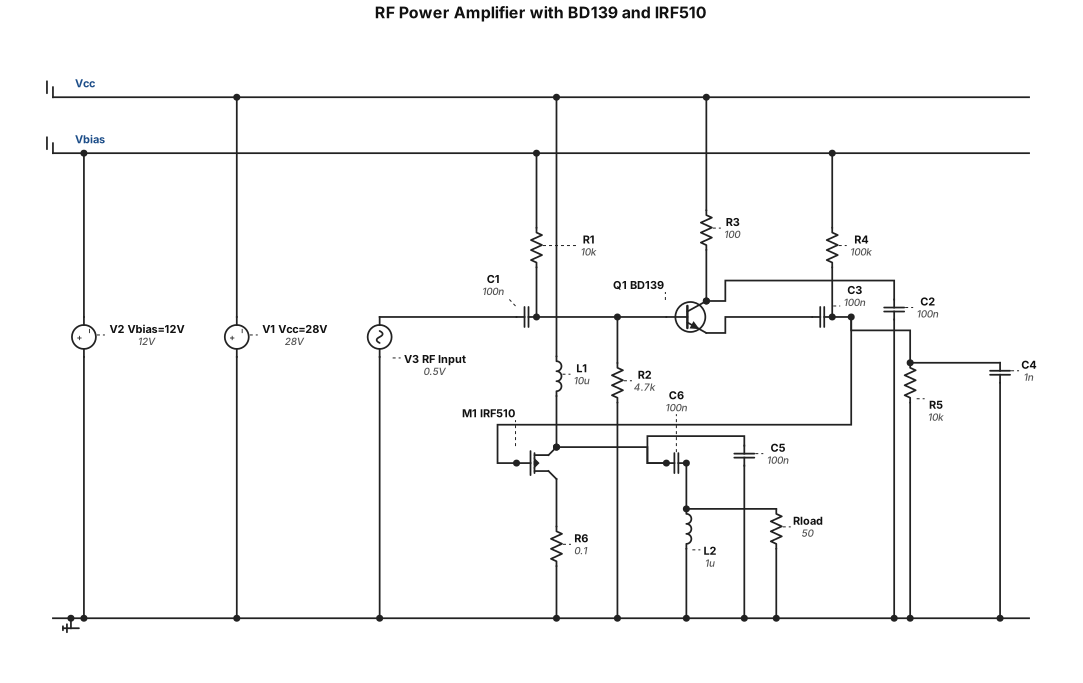
Bana BD139 transistörlü ve IRF510 MOSFET'li, bias bloklu bir RF güç amplifikatörü şeması çiz
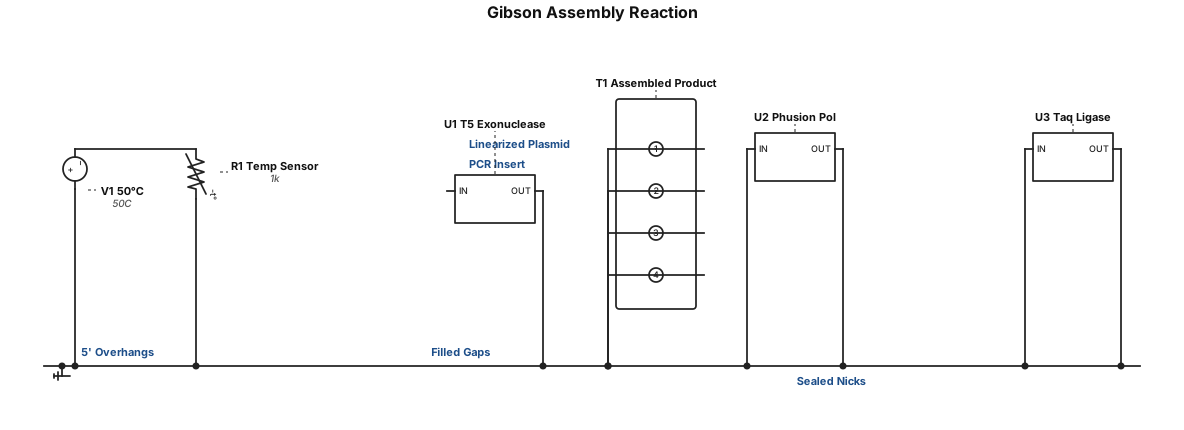
Homology-Based Cloning: Gibson Assembly First described by Dr. Daniel Gibson and colleagues, 2009 Requires homology between neighbouring fragments created via PCR 25–40 bp homology region required Reaction: master mix + PCR insert + linearized plasmid 50 °C, 15–60 min Mechanism: (1) exonuclease chews back 5′ ends → (2) complementary single-stranded overhangs anneal → (3) DNA polymerase fills gaps → (4) DNA ligase seals nicks Commonly performed with NEB (New England Biolabs) enzymes
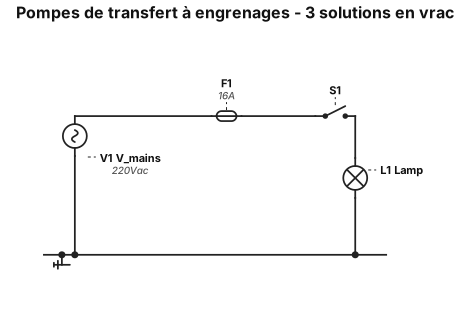
Trois pompes de transfert de type à engrenages sont situées sur un collecteur commun et un bloc de montage à l'avant du tiroir des solutions en vrac. Chaque pompe est dédiée à l'une des solutions en vrac. Les connexions comportent une indication de sens sur le bloc de montage et un code couleur par solution. Une vanne de régulation pour chaque solution en vrac est montée sur un autre collecteur afin d'empêcher les liquides de s'écouler des bouteilles du client à travers les pompes avant le transfert souhaité. Ces vannes sont parfois appelées « vannes de haute altitude », car la pression interne des bouteilles de solutions en vrac expédiées vers des altitudes plus élevées aurait tendance à forcer le liquide à travers les pompes avant le début normal du transfert. Lorsque la pompe fonctionne, la vanne de régulation s'ouvre et permet au liquide de circuler librement dans le système entre la bouteille du client et le réservoir intégré. Le collecteur de la pompe comprend des points de montage pour chaque pompe, des joints pour l'entrée et la sortie de la pompe, ainsi que des récepteurs filetés pour chacun des raccords de tubes d'entrée et de sortie. Il n'y a aucune interconnexion entre les solutions. Bien que le bloc de montage de la pompe soit qualifié de « collecteur » ou de système à passages multiples, il ne contient en réalité que six passages directs entre les raccords de tubes et l'entrée et la sortie de la pompe.
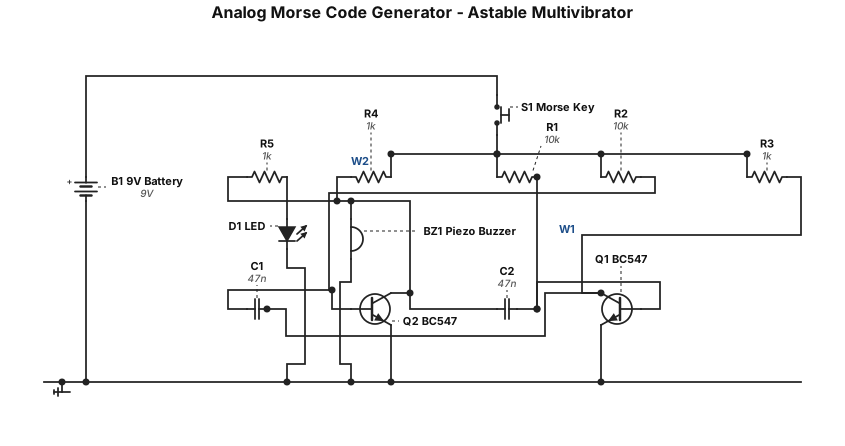
Generate a complete, accurate electronic schematic for a simple Analog Morse Code Generator using a two-transistor collector-coupled astable multivibrator. Use two BC547 NPN transistors, a 9V DC battery, two 10kΩ base resistors, two 1kΩ collector resistors, two 47nF timing capacitors, one push button to enable/disable the oscillator, one passive piezo buzzer for audio output, and one LED with a 1kΩ current-limiting resistor as a visual indicator. Clearly show the BC547 collector, base, and emitter pins and label every component value. Show the cross-coupling connections between the collector of Q1 and the base of Q2 through C1, and the collector of Q2 and the base of Q1 through C2. Connect both emitters to ground and the resistor networks to +9V. The push button should control the oscillator/output. Use standard electronic schematic symbols, clearly labeled +9V and GND rails, and make every electrical connection explicit. Do not use Arduino, microcontrollers, IC timers, or sensors. This is for a college Analog Electronics mini-project and the schematic must be suitable for breadboard construction.
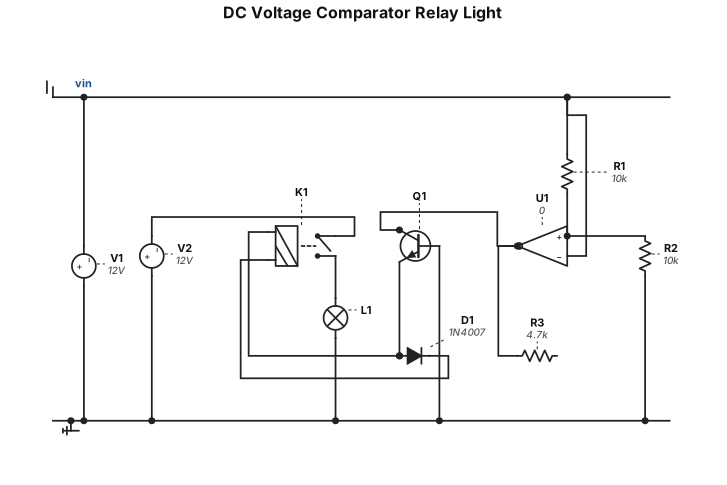
dc voltage comparator relay to turn on light
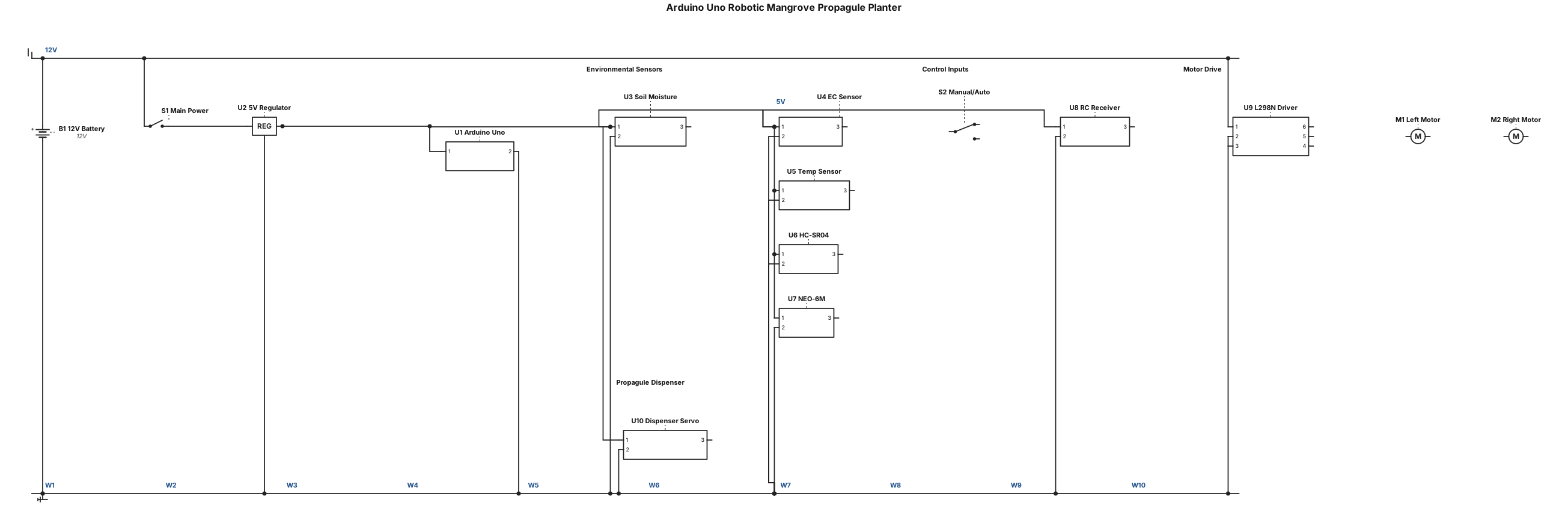
An Arduino Uno-based robotic mangrove propagule planter circuit using a 12 V battery supply regulated to 5 V for the Arduino and sensors, with a soil moisture sensor, EC sensor, temperature sensor, HC-SR04 ultrasonic obstacle sensor, NEO-6M GPS module, RC receiver for manual control, SPDT manual/automatic mode switch, L298N motor driver controlling two 12 V DC geared motors, and a servo motor controlling the mangrove propagule dispensing mechanism, with common ground connections and the Arduino Uno serving as the main controller for environmental sensing, obstacle detection, robot movement, GPS location logging, and automatic propagule dispensing.
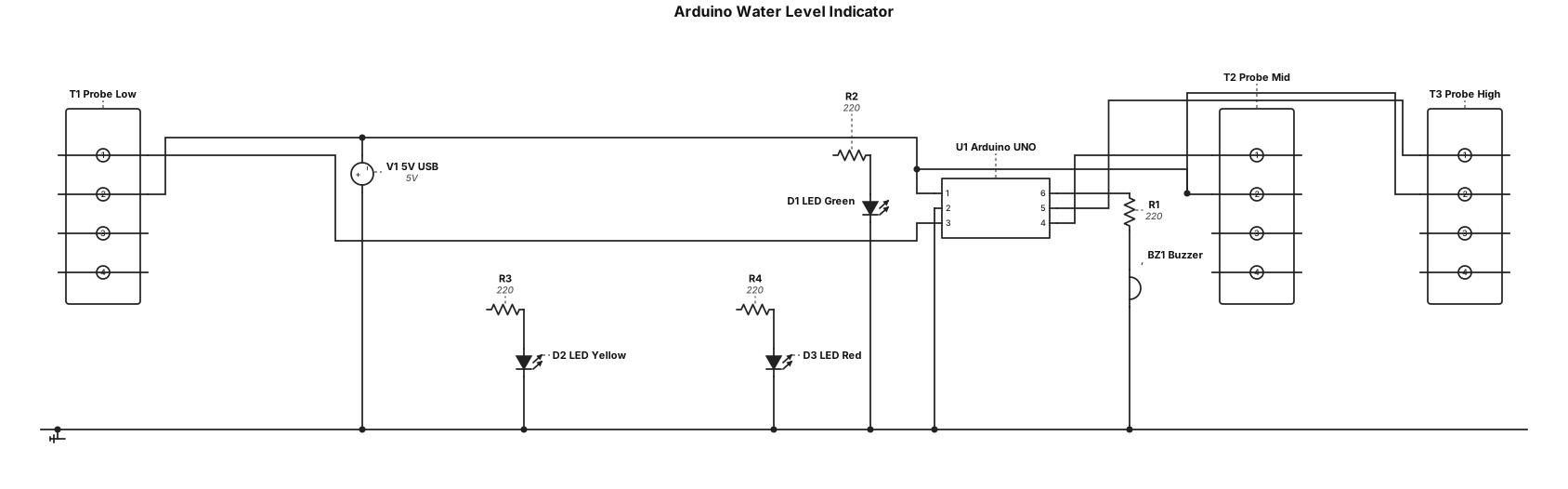
Sl. No. Component Quantity 1 Arduino UNO 1 2 LED - Green 1 3 LED - Yellow 1 4 LED - Red 1 5 220 \(\Omega \) Resistor 3 6 Water-level sensor probes/wires 3 7 Buzzer 1 8 Breadboard 1 9 Jumper wires As required 10 5V USB cable 1 Water level indicator

Encoder converter with 6N137 for A/-A, B/-B and Z/-Z from 24v level HTL to 5V level TTL. A optocupler channel for each input signal.
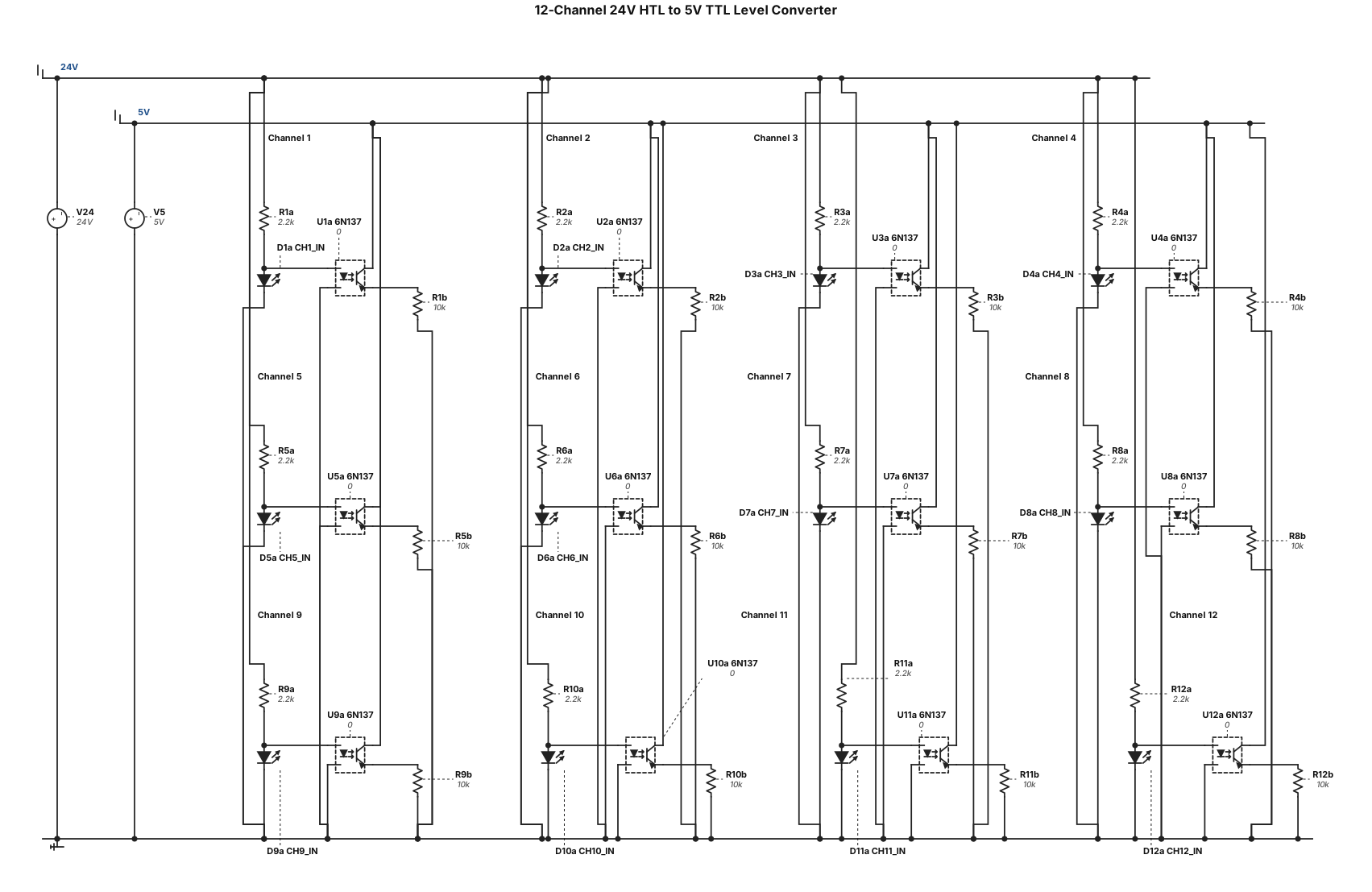
12 channel level converter signal (HTL) from 24V to 5V (TTL) with 6n137 in each channel
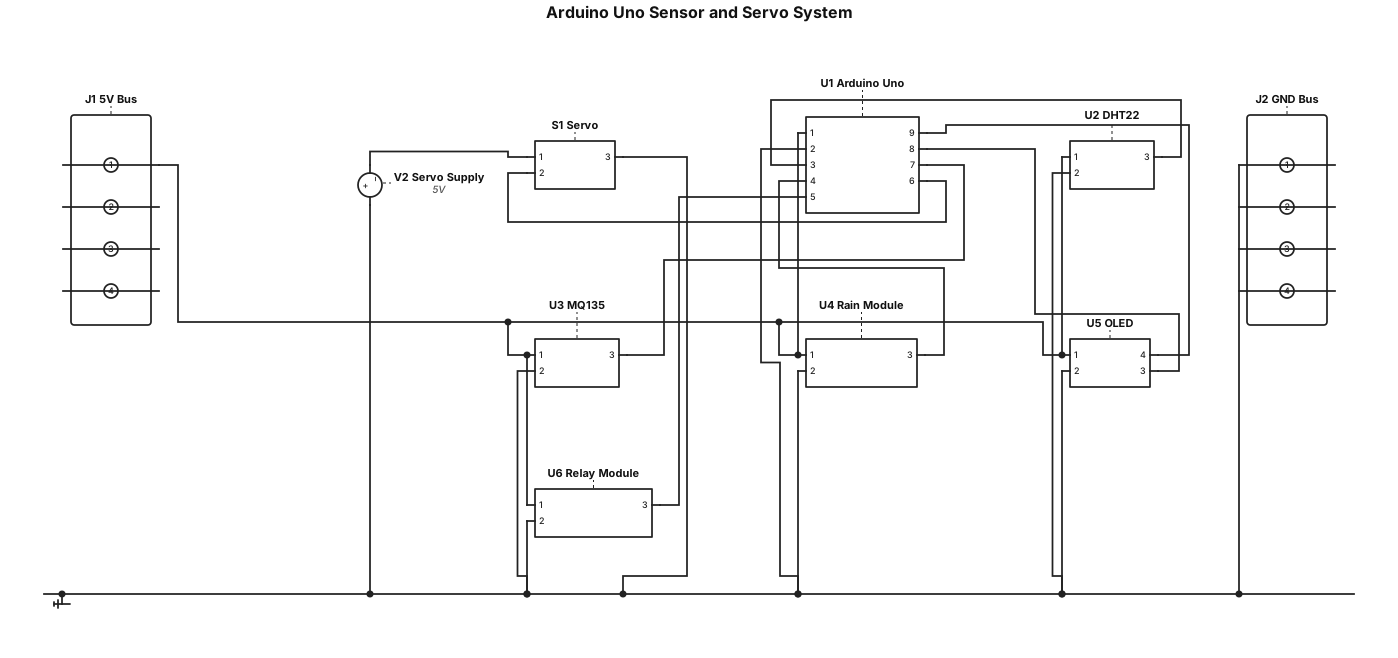
Arduino and sensors Power the Uno from USB. Use separate 5V and GND terminal buses for the low-voltage modules: Component pin Connect to Uno 5V 5V bus Uno GND GND bus DHT22 VCC, GND, DATA 5V bus, GND bus, Uno D2 MQ135 VCC, GND, AO 5V bus, GND bus, Uno A0 Rain module VCC, GND, DO 5V bus, GND bus, Uno D3 OLED VCC, GND, SDA, SCL 5V bus, GND bus, Uno A4, Uno A5 Relay module VCC, GND, IN 5V bus, GND bus, Uno D8 For this Uno setup, the MQ135 analog output can connect to A0 directly if the module is powered at 5V and its output does not exceed 5V. The resistor divider discussed earlier is generally for lower-voltage microcontroller inputs, not needed for a 5V Uno in that case. Servo Servo wire Connect to Red (+) Separate regulated 5V supply + Brown/black (GND) Separate supply − and Uno GND Orange/yellow (signal) Uno D9
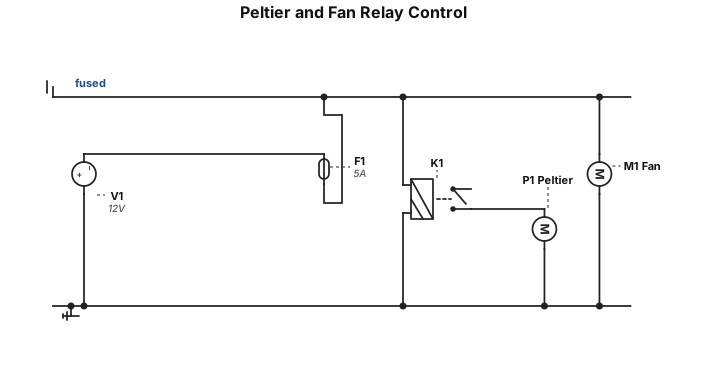
12V supply + -> fuse -> split | +-> relay COM | relay NO -> Peltier + | +-> Fan + 12V supply - ---------------> Peltier - \--------------> Fan -
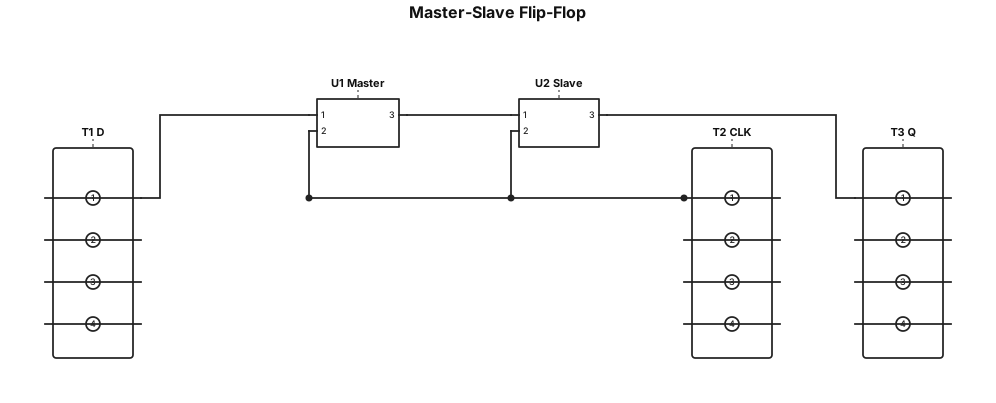
Master-Slave Flip-Flop “A neat circuit diagram of a Master-Slave flip-flop configuration showing the Master flip-flop, Slave flip-flop, clock input and output Q, with proper connections and labels
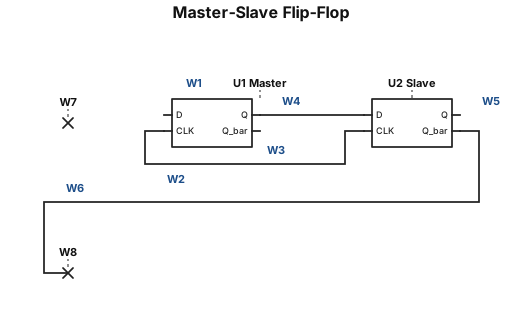
Master-Slave Flip-Flop “A neat circuit diagram of a Master-Slave flip-flop configuration showing the Master flip-flop, Slave flip-flop, clock input and output Q, with proper connections and labels Draw the circuit diagram exactly in an exam-friendly textbook format, with clear labels, proper connections and no unnecessary components. Make it neat and easy to copy by hand.”
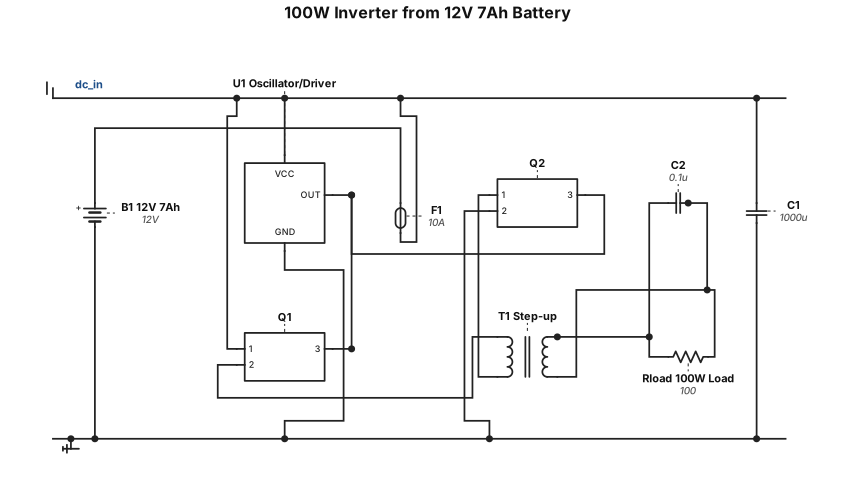
generate a 100w inverter that use 12v 7Ah battery
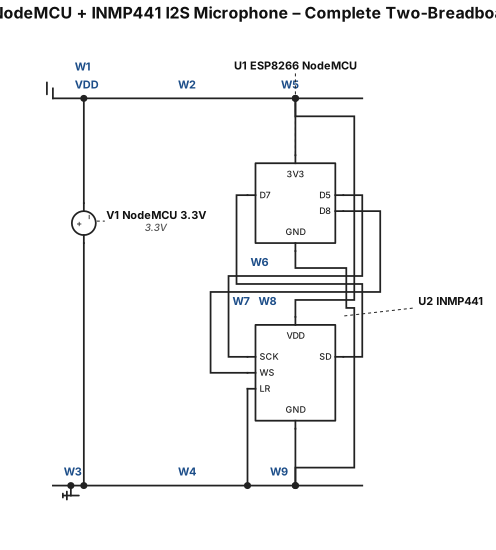
Create a realistic, detailed physical breadboard wiring diagram for an ESP8266 NodeMCU connected to an INMP441 I2S digital MEMS microphone using TWO solderless breadboards placed side-by-side. COMPONENT PLACEMENT: * Breadboard 1: place the ESP8266 NodeMCU across the center gap. * Breadboard 2: place the INMP441 microphone module. * Place both breadboards directly next to each other. * Connect the power and ground rails of both breadboards. * Show realistic jumper wires and clearly labeled pins. * Make the diagram suitable for a beginner to physically reproduce. EXACT INMP441 TO ESP8266 CONNECTIONS: 1. INMP441 VDD → NodeMCU 3.3V 2. INMP441 GND → NodeMCU GND 3. INMP441 SCK → NodeMCU D5 / GPIO14 4. INMP441 WS → NodeMCU D8 / GPIO15 5. INMP441 SD → NodeMCU D7 / GPIO13 6. INMP441 L/R → NodeMCU GND POWER: * Use ONLY the NodeMCU 3.3V output for INMP441 VDD. * Do NOT connect INMP441 VDD to 5V or VIN. * Make one common GND between both breadboards. * Connect the GND rails of both breadboards together. * Connect INMP441 GND and L/R to the common GND rail. LABELS: Clearly label: * NodeMCU 3.3V * NodeMCU GND * D5 / GPIO14 * D8 / GPIO15 * D7 / GPIO13 * INMP441 VDD * INMP441 GND * INMP441 SCK * INMP441 WS * INMP441 SD * INMP441 L/R IMPORTANT: Show the actual physical breadboard holes and jumper-wire connections, not just a symbolic circuit schematic. Use different wire paths so every connection is easy to follow. Do not add any extra components. Title: "ESP8266 NodeMCU + INMP441 I2S Microphone – Complete Two-Brea
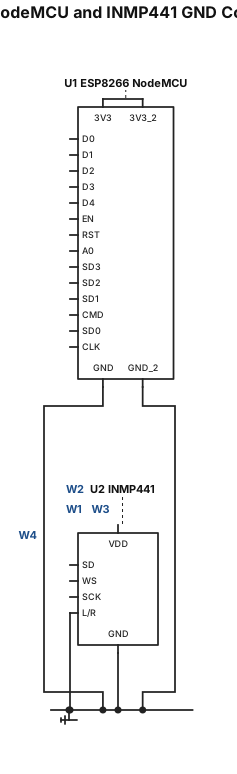
Create a realistic, detailed breadboard wiring diagram showing ONLY the GND connections for an ESP8266 NodeMCU and an INMP441 I2S microphone using TWO solderless breadboards placed side-by-side. Breadboard arrangement: * Breadboard 1 contains the ESP8266 NodeMCU. * Breadboard 2 contains the INMP441 microphone. * Place the two breadboards directly beside each other. * Clearly show the long negative/ground power rail on both breadboards. * Label the negative rail clearly as "GND / –". GND connections: 1. Connect a NodeMCU GND pin to the GND/– rail of Breadboard 1. 2. Connect the GND/– rail of Breadboard 1 to the GND/– rail of Breadboard 2 with a jumper wire. 3. Connect the INMP441 GND pin to the GND/– rail of Breadboard 2. 4. Connect the INMP441 L/R pin to the GND/– rail of Breadboard 2. Show the connections clearly with realistic jumper wires and arrows. Do NOT connect 3.3V, 5V, VDD, SCK, WS, or SD yet. This image must show ONLY the ground connections. Make it a realistic physical breadboard view, NOT a symbolic circuit schematic. Use large clear labels so a beginner can reproduce the connections on a real breadboard.
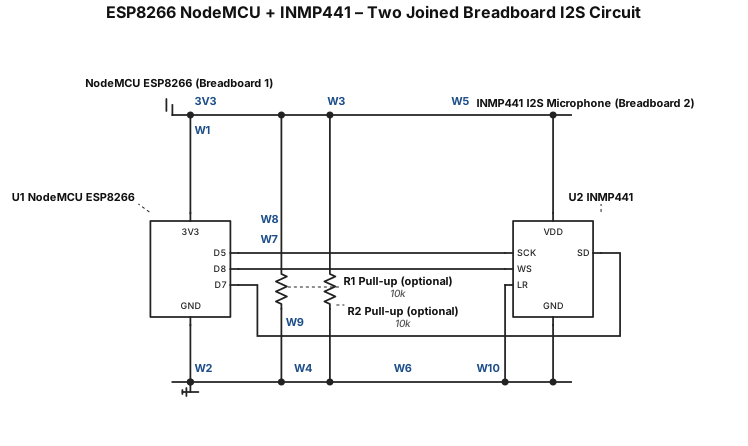
Create a realistic breadboard wiring diagram for an ESP8266 NodeMCU and INMP441 digital MEMS microphone using TWO solderless breadboards placed side-by-side and physically joined together. Components: * 1 × NodeMCU ESP8266 * 1 × INMP441 I2S microphone * 2 × small solderless breadboards * Jumper wires Breadboard arrangement: * Place the two breadboards directly next to each other. * Treat them as one combined working area. * Place the NodeMCU on the first breadboard. * Place the INMP441 module on the second breadboard. * Connect the power rails of both breadboards together using jumper wires. * Connect GND rails of both breadboards together. * Connect the 3.3V rail from the NodeMCU breadboard to the 3.3V rail of the microphone breadboard. * Clearly show that both breadboards share the same common GND. INMP441 → NodeMCU ESP8266: * VDD → 3.3V * GND → GND * SCK → GPIO14 (D5) * WS → GPIO15 (D8) * SD → GPIO13 (D7) * L/R → GND Make the wiring neat, realistic, and easy for a beginner to reproduce on a real breadboard. Use different wire paths so no connections overlap confusingly. Clearly label every pin and wire. Do NOT connect the INMP441 to 5V. Title the diagram: "ESP8266 NodeMCU + INMP441 – Two Joined Breadboard I2S Circuit"
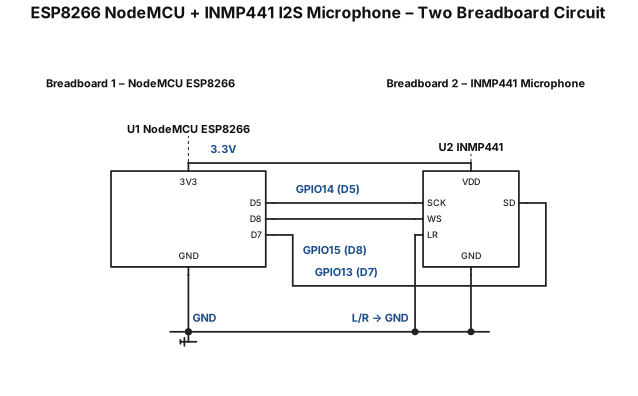
Create a clear, beginner-friendly circuit connection diagram using TWO small breadboards. Components: 1. NodeMCU ESP8266 development board 2. INMP441 digital MEMS microphone 3. Two small solderless breadboards 4. Jumper wires Project: Connect the INMP441 microphone to the NodeMCU ESP8266 using I2S and prepare the circuit for reading audio data in Arduino IDE. Use these exact connections: INMP441 → NodeMCU ESP8266 * VDD → 3.3V * GND → GND * SCK → GPIO14 (D5) * WS → GPIO15 (D8) * SD → GPIO13 (D7) * L/R → GND Breadboard arrangement: * Use the first breadboard mainly for the NodeMCU ESP8266. * Use the second breadboard mainly for the INMP441 microphone. * Connect the power rails between the two breadboards. * Clearly show 3.3V and GND connections. * Do not connect the microphone to 5V. * Show every wire from the correct NodeMCU pin to the correct INMP441 pin. * Label every connection with both the GPIO number and NodeMCU pin name. * Make the diagram physically realistic for a small breadboard. * Keep wires separated and easy to follow. * Include a clear title: "ESP8266 NodeMCU + INMP441 I2S Microphone – Two Breadboard Circuit". * Do not add extra sensors or components. * Make the final diagram suitable for a beginner to reproduce on a real breadboard.