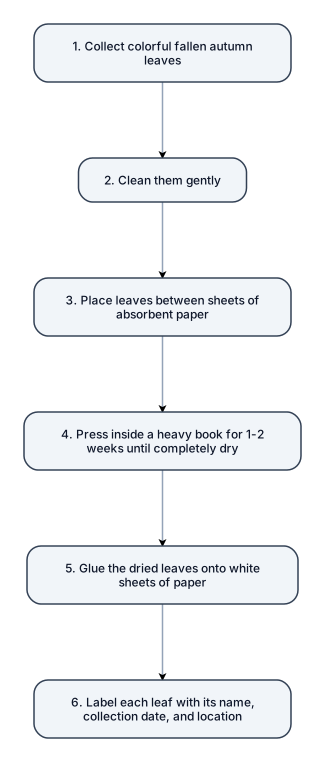
Illustrated step-by-step guide on how to make a herbarium with autumn leaves. Show the different stages with simple drawings, arrows, and short captions: 1. Collect colorful fallen autumn leaves. 2. Clean them gently. 3. Place the leaves between sheets of absorbent paper. 4. Press them inside a heavy book for 1–2 weeks until completely dry. 5. Glue the dried leaves onto white sheets of paper. 6. Label each leaf with its name, collection date, and location. Arrange everything in a simple, beautiful educational infographic with warm autumn colors (orange, yellow, red, and brown), a white background, a clean layout, and a hand-drawn botanical illustration style. Suitable for primary school children.
NODE ARCHIVE · REAL DIAGRAM BRIEFS
Diagram Examples from Real Visitor Prompts
Browse eligible diagrams shared by FreeDiagram visitors, inspect the exact prompts, and build your own version.
Browse 3257 real creationsCOMMUNITY OUTPUTS · EXACT PROMPTS
Main diagram studio
Showing 169–192 of 1256. No stock examples or system defaults. Choose a tool, study a real result, then reopen its prompt as your starting point.
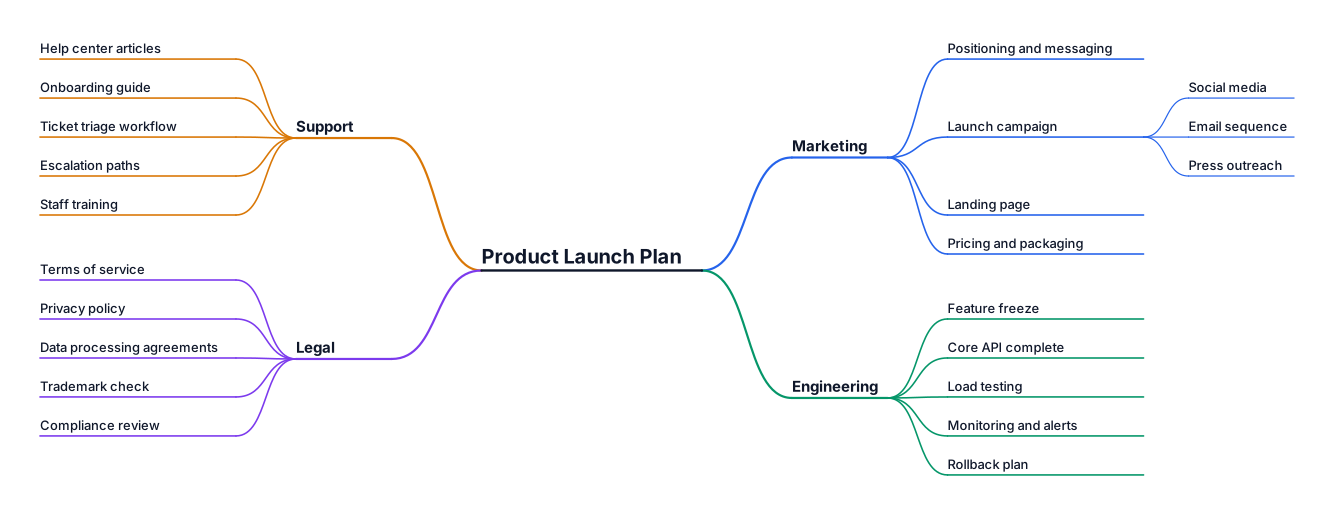
A mind map for planning a product launch, branching into marketing, engineering, support, and legal Fundamental rights
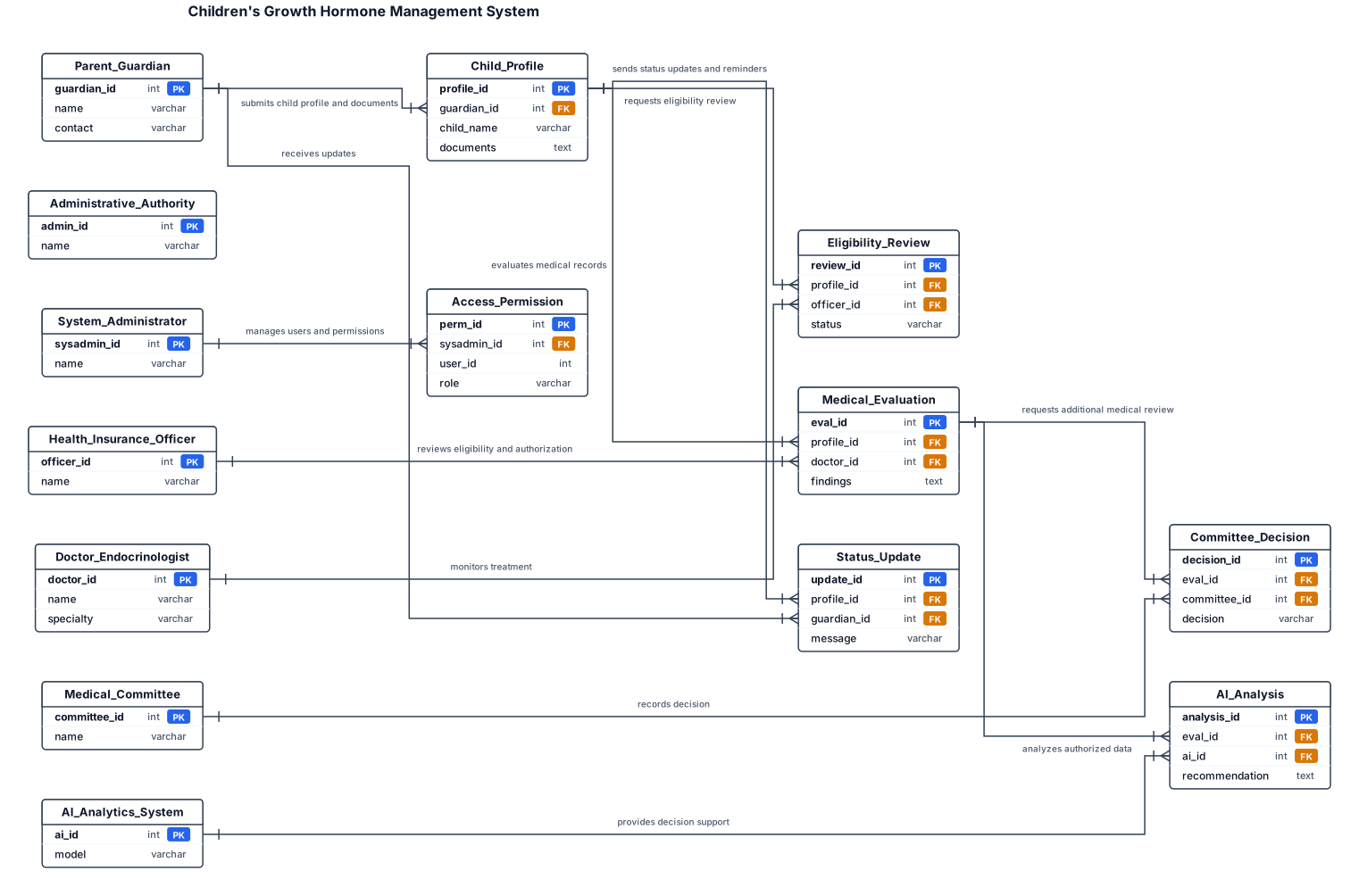
An entity-relationship diagram for a SaaS app with users, teams, subscriptions, and invoices Create a visual people-and-relationships diagram for a Children's Growth Hormone Management System. Draw each person or department as a separate labeled box with arrows connecting them. Include: 1. Parent / Guardian 2. Administrative Authority 3. Health Insurance Officer 4. Doctor / Endocrinologist 5. Medical Committee 6. System Administrator 7. AI Analytics System Connect them to show: Guardian submits child profile and documents to the administrative authority. The authority checks documents and requests missing information when necessary. The insurance officer reviews eligibility and authorization. The doctor evaluates the child's medical records and monitors treatment. The medical committee reviews cases when required and records its decision. The guardian receives status updates and appointment reminders. The administrator manages users and permissions. The AI system analyzes authorized data and provides decision support to clinicians. Use directional arrows labeled with the information or request being transferred. Show return arrows for missing documents and additional medical review. Keep medical decisions separate from insurance decisions. Use a clean, colorful, easy-to-understand diagram.
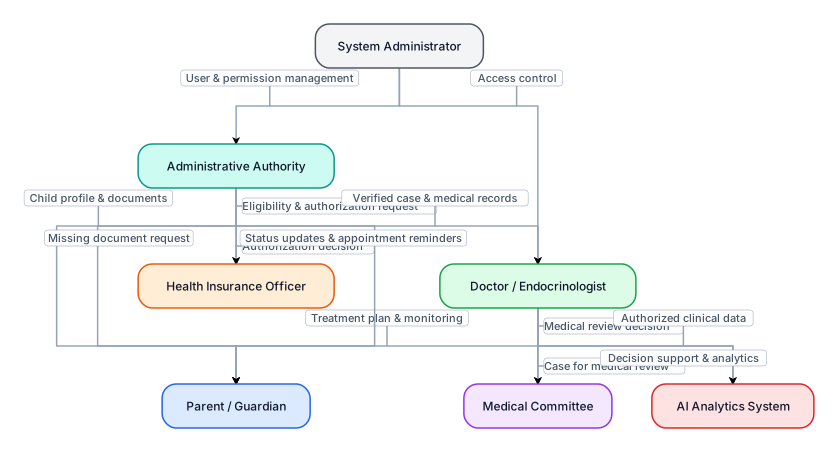
Create a visual people-and-relationships diagram for a Children's Growth Hormone Management System. Draw each person or department as a separate labeled box with arrows connecting them. Include: 1. Parent / Guardian 2. Administrative Authority 3. Health Insurance Officer 4. Doctor / Endocrinologist 5. Medical Committee 6. System Administrator 7. AI Analytics System Connect them to show: Guardian submits child profile and documents to the administrative authority. The authority checks documents and requests missing information when necessary. The insurance officer reviews eligibility and authorization. The doctor evaluates the child's medical records and monitors treatment. The medical committee reviews cases when required and records its decision. The guardian receives status updates and appointment reminders. The administrator manages users and permissions. The AI system analyzes authorized data and provides decision support to clinicians. Use directional arrows labeled with the information or request being transferred. Show return arrows for missing documents and additional medical review. Keep medical decisions separate from insurance decisions. Use a clean, colorful, easy-to-understand diagram.
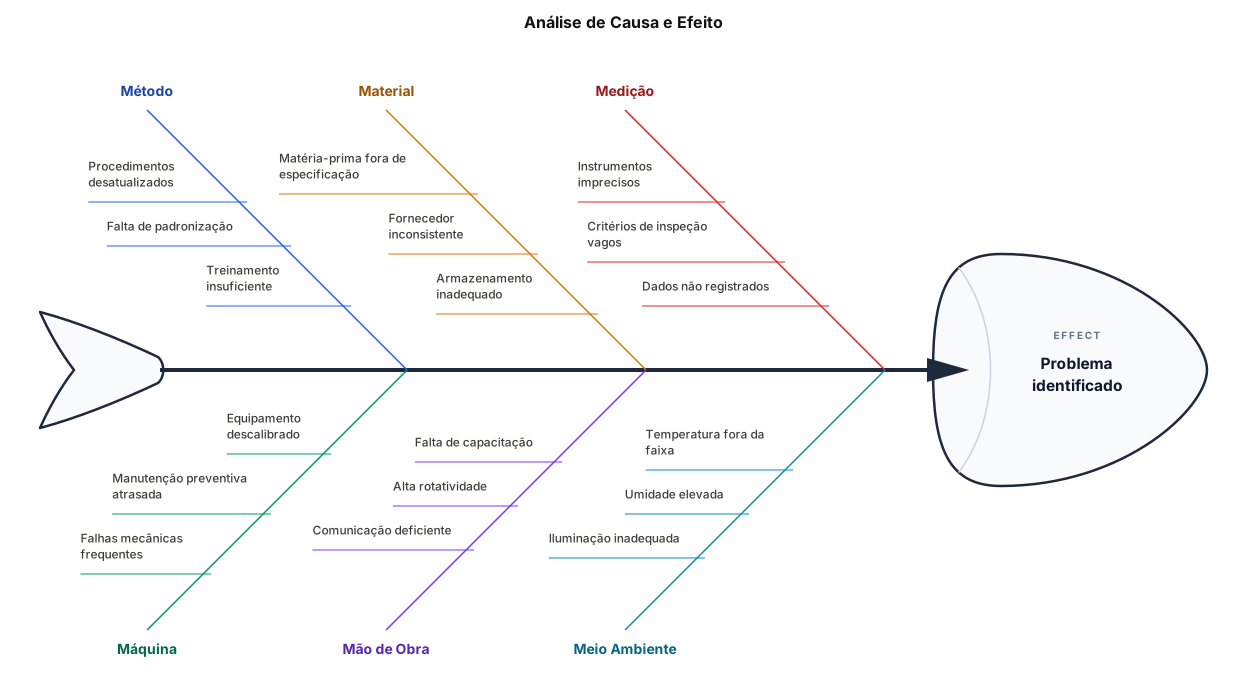
espinha de peixe
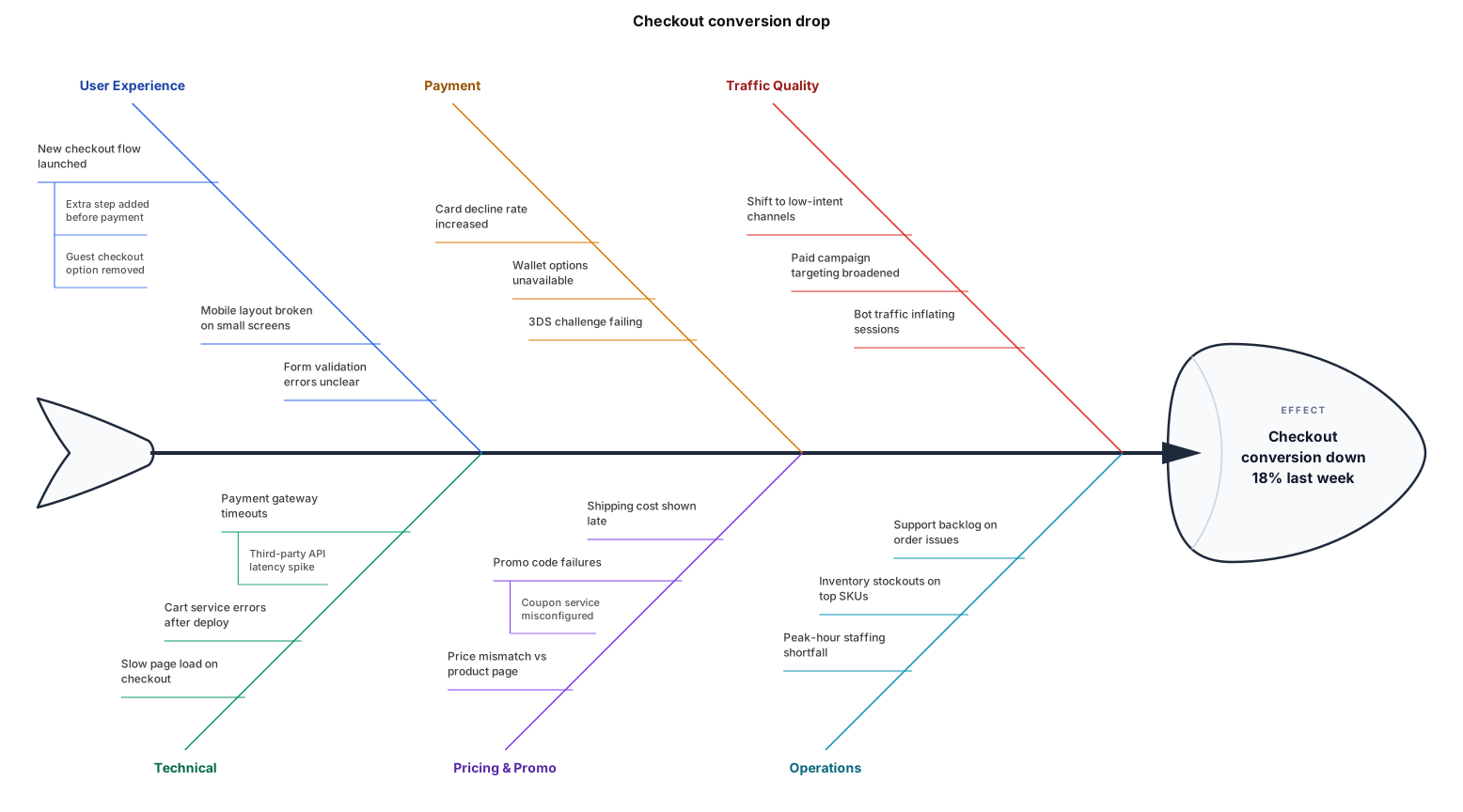
A fishbone diagram analysing why our checkout conversion dropped 18% last week
create a circle with red color
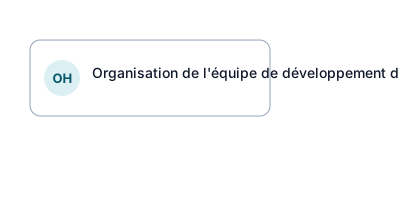
Crée un organigramme professionnel intitulé « Organisation de l’équipe de développement du projet HetsOne ». Contexte : HetsOne est une plateforme SaaS de gestion d’événements et de billetterie, développée dans le cadre d’un projet informatique. Organise les éléments suivants dans un organigramme clair et hiérarchique : 1. Encadrement du projet - Encadrant de stage / Responsable du suivi - Rôle : accompagnement et suivi du travail du stagiaire. 2. Équipe de développement backend - Backend 1 - Responsabilités : authentification, utilisateurs, organisations, rôles et permissions, événements, lieux, catégories de billets et contrôle d’accès. - Backend 2 — Stagiaire - Responsabilités : commandes, réservations temporaires, paiements, participants, équipes, notifications, abonnements SaaS, facturation, administration globale, journalisation et webhooks. 3. Développement frontend - Responsabilités : développement de l’interface utilisateur et intégration avec l’API backend. Présentation souhaitée : - Format paysage, fond blanc. - Style académique adapté à un rapport de stage de Licence 3 Informatique. - Couleurs sobres : bleu foncé, bleu clair et gris. - Rectangles alignés, textes lisibles et connecteurs bien visibles. - Hiérarchie facile à comprendre en quelques secondes. - Aucun personnage décoratif, aucun effet 3D. - Image en haute résolution, adaptée à une page A4 dans Microsoft Word. - Tous les textes en français, sans fautes d’orthographe. Ne crée aucun nom de personne et n’invente pas de poste supplémentaire. Si la hiérarchie exacte entre l’encadrant, les développeurs backend et le frontend n’est pas déterminable, représente les groupes séparément sous un même cadre de projet au lieu d’inventer des liens hiérarchiques.
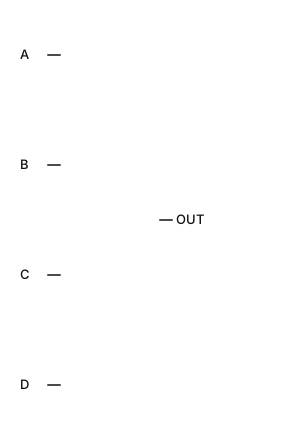
Create a logic gate circuit diagram for the expression: Output = (NOT A AND B AND NOT C) OR (C AND D AND (NOT A OR NOT B)). Use standard logic gate symbols with input lines for A, B, C, and D, and use NOT gates for the inverted inputs. Combine the terms using AND gates and OR gates to produce the final output.
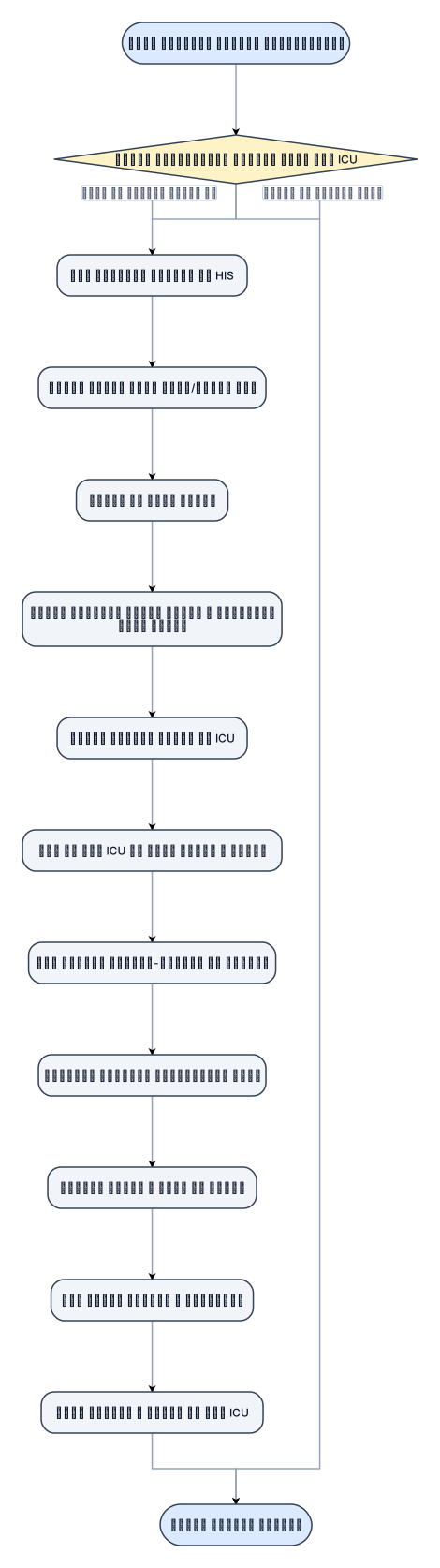
فرآیند انجام مشاوره غیراورژانسی در بخشicu
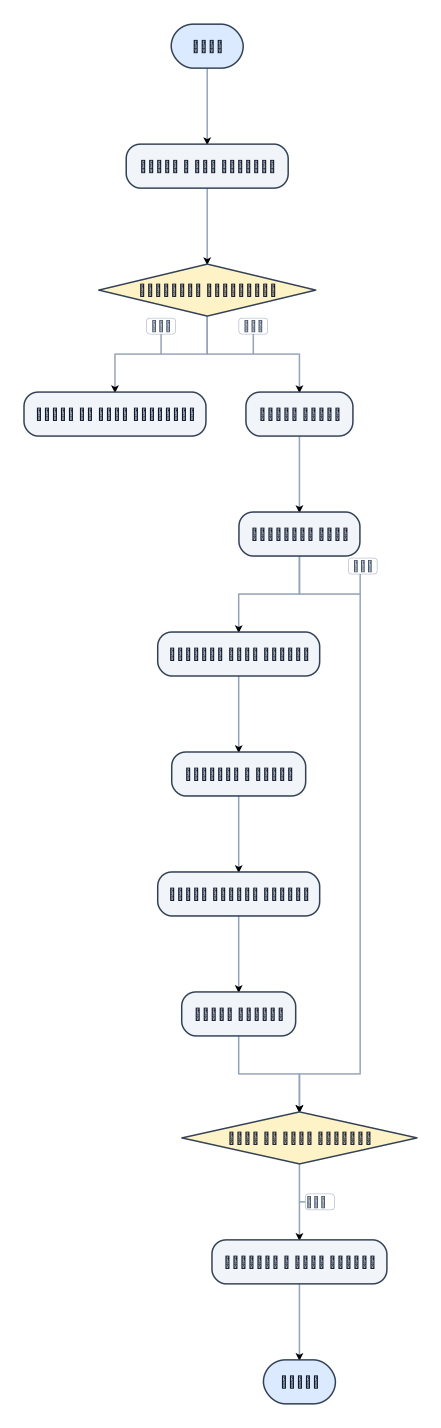
فرایند مشاوره غیر اورژانسی
Les plantes sont des êtres vivants appartenant au monde végétal qui se sont adaptés à la vie fixée sur un substrat. Quels sont alors les différentes innovations génétiques à l’origine de leur adaptation à la vie fixée, des schémas correctement légendés et des accès par sont attendus.

Design a 5V dual-vehicle counter circuit. The power supply uses an LM7805 voltage regulator. The input consists of two tactile push buttons: 'S1' (Low Sensor) and 'S2' (High Sensor), both tied to ground with 10k pull-down resistors. The combinational logic stage uses an SN74HC04N (Hex Inverter) and an SN74HC08N (Quad 2-Input AND gate). Route S2 into the SN74HC04N to invert it. Route S1 and the inverted S2 signal into an AND gate on the SN74HC08N; connect this output to the clock pin (Pin 1) of the first CD4026BE IC (Car Counter). Route S1 and the original non-inverted S2 signal into a second AND gate on the SN74HC08N; connect this output to the clock pin (Pin 1) of the second CD4026BE IC (Truck Counter). For both CD4026BE ICs: tie Pin 2 (Clock Inhibit) and Pin 8 (GND) to common ground. Tie Pin 16 (VCC) to 5V. Tie Pin 15 (Reset) to ground. Connect the outputs (a-g) of each CD4026BE to its own single-digit common-cathode 7-segment display, placing 330-ohm current-limiting resistors on all segment lines. Connect the common pins of both displays to ground. Ensure the VCC and GND pins of the SN74HC04N and SN74HC08N are correctly routed to the 5V and ground nets.
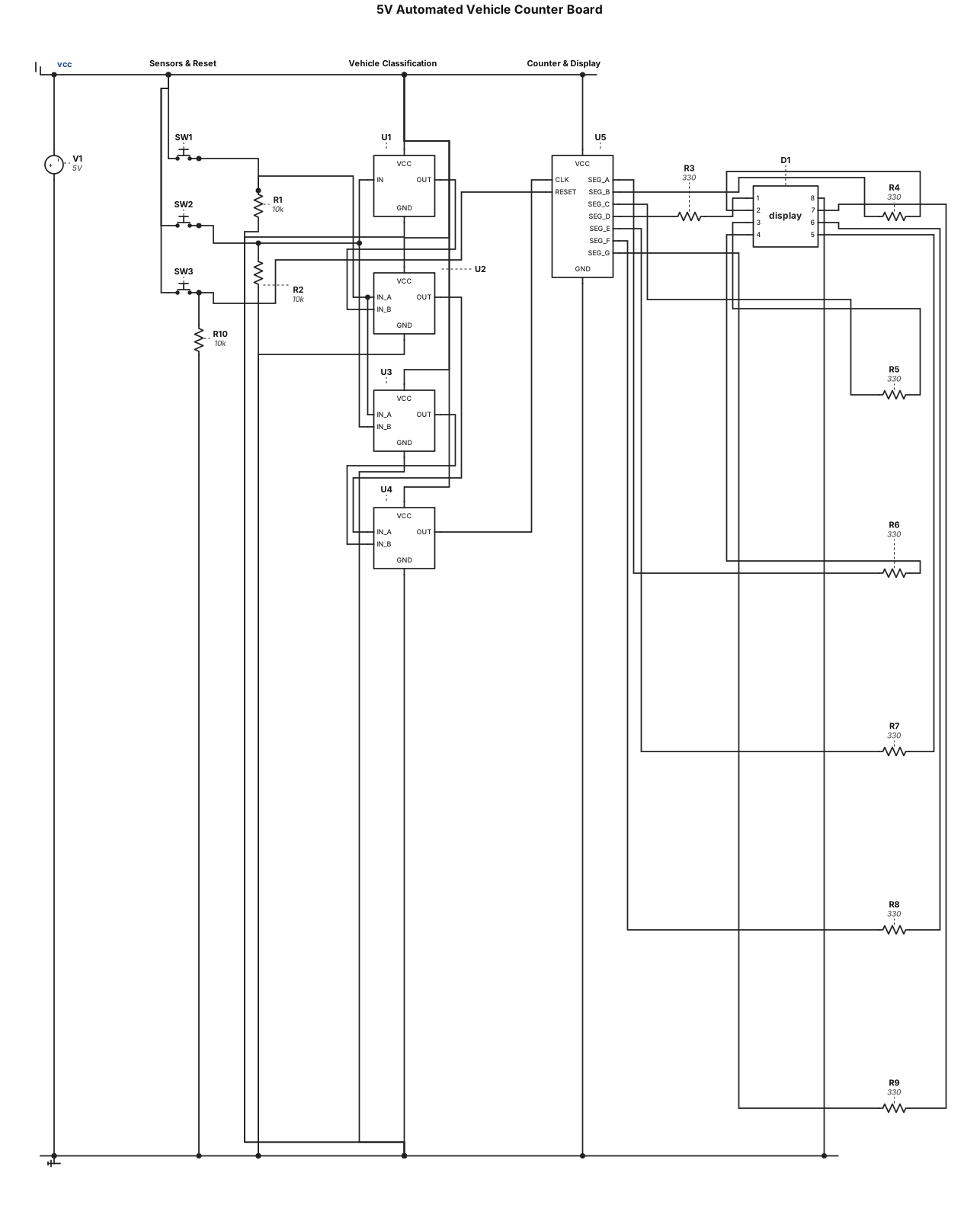
"Design a 5V automated vehicle counter board using exactly one CD4026BE decade counter/decoder IC driving a single-digit common-cathode 7-segment display (with 330-ohm series resistors). The input stage uses two sensors (simulated by push buttons): 'Sensor 1' (Low height) and 'Sensor 2' (High height). Route these signals through a combinational logic circuit using discrete CMOS gates: route Sensor 2 through a NOT gate (CD4069), then AND that output with Sensor 1 using an AND gate (CD4081) to classify a Car. Feed Sensor 1 and Sensor 2 into another AND gate to classify a Truck. Finally, route the outputs of both AND gates into a 2-input OR gate (CD4071). Connect the output of this OR gate to the clock input (Pin 1) of the CD4026BE. Add a master 'Reset' push button with a 10k pull-down resistor connected to the CD4026BE reset pin (Pin 15). Power the board via a USB-C connector.
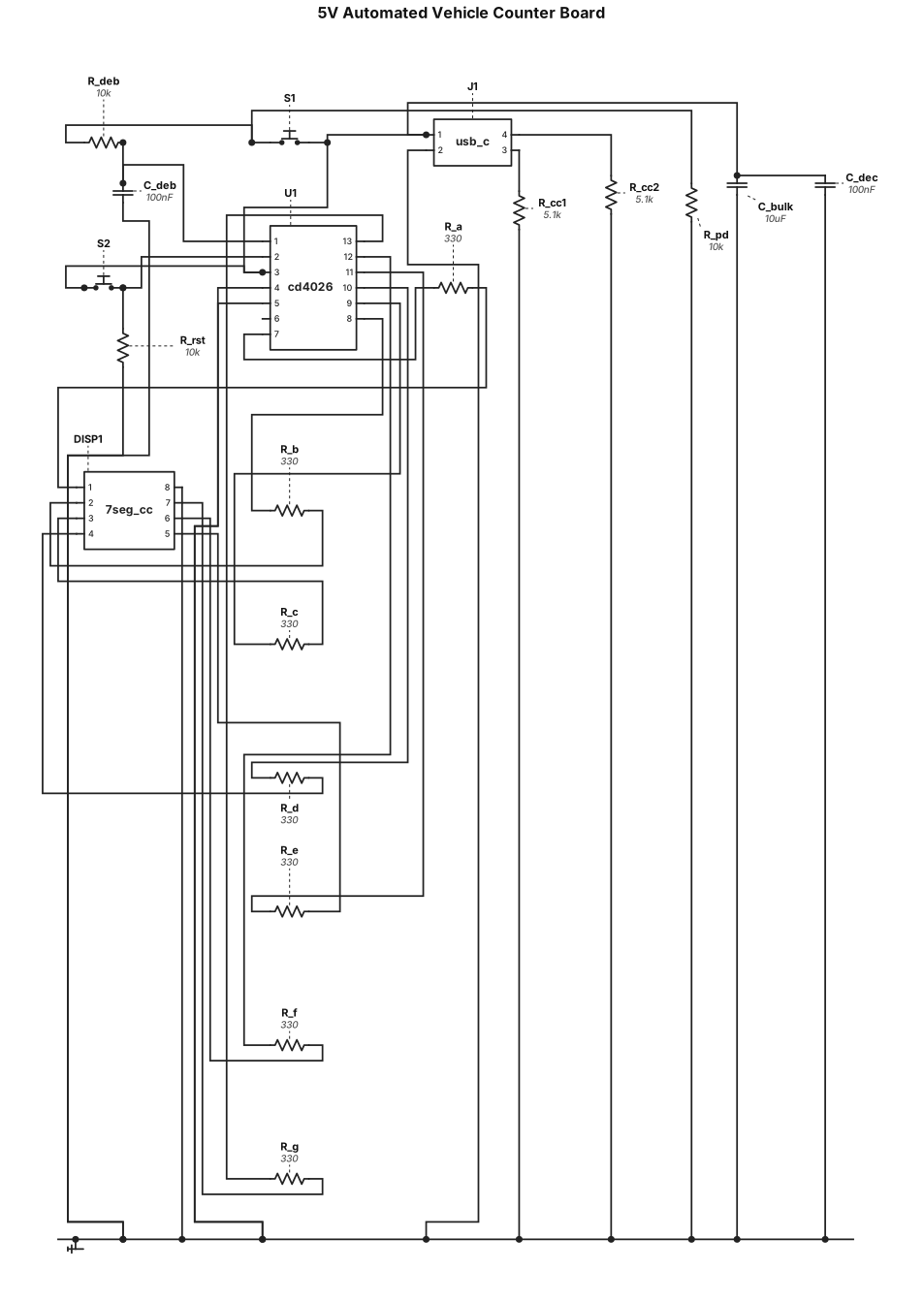
"Design a 5V automated vehicle counter board. The main component is a CD4026BE decade counter/decoder IC driving a single-digit common-cathode 7-segment display. Include 330-ohm current-limiting resistors between the IC and the display segments. Add two tactile push buttons: one for 'Vehicle Entry' connected to the clock input of the CD4026BE, and one for 'Reset' connected to the IC's reset pin. Include a hardware RC debounce circuit on the 'Entry' button to prevent multiple counts from switch bounce. Power the entire board via a simple USB-C connector.

Draw a SMALL, COMPACT, PORTRAIT block diagram. Maximum 6 boxes. Arrange every box in ONE vertical column, directly below the previous box. Do not use a landscape layout. ESP32-CAM ↓ Wi-Fi: images Laptop (YOLO) ↓ Bluetooth: commands ESP32 DevKit ↓ Motor Driver ↓ 4WD Motors Add “GPS → Pothole Map” as a tiny box beside the Laptop. White background, thin black arrows, simple blue rectangular boxes, short text. No icons, illustrations, extra text, large margins or decorative elements. The final diagram must be tall and narrow, not wide.
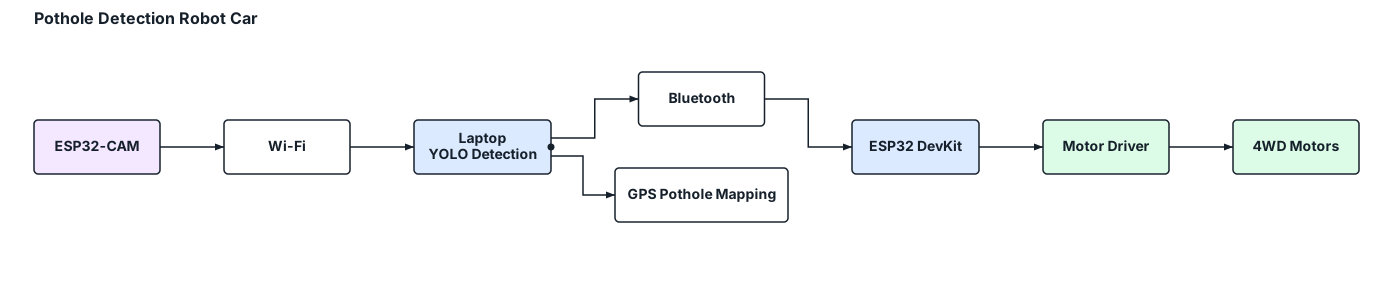
Create a compact vertical block diagram for a pothole detection robot car. Use a portrait layout (4:5 ratio), with small rectangular blocks stacked vertically and minimal spacing. ESP32-CAM → Wi-Fi → Laptop (YOLO pothole detection) → Bluetooth → ESP32 DevKit → Motor Driver → 4WD Motors. Add a small side branch from the laptop to GPS-based pothole mapping. Use short labels, thin arrows, a white background and professional blue-and-grey styling. Fit everything into one compact diagram. No illustrations, explanations, decorative elements or wide horizontal layouts.

Create a simple, professional block diagram showing only the command and data flow for a pothole detection robot car. Blocks and connections: 1. ESP32-CAM → Wi-Fi → Laptop (road images) 2. Laptop running YOLO → Bluetooth → ESP32 DevKit (movement commands) 3. ESP32 DevKit → Motor Driver → 4WD Motors (movement control) 4. Laptop → GPS Coordinates → Pothole Map (location mapping) Use rectangular blocks, clear directional arrows, short labels, a white background and a clean engineering-report style. Landscape layout. No extra details or illustrations.

Create a professional engineering block diagram for a low-cost, ESP32-based pothole detection and road condition mapping robot car. Include these components and connections: 1. A 4WD robot car with four DC motors, a motor driver and an ESP32 DevKit V1 for movement control. 2. An ESP32-CAM with an OV2640 camera to capture road images. 3. Wi-Fi communication from the ESP32-CAM to a laptop. 4. The laptop runs Python, OpenCV and a YOLO pothole detection model. 5. GPS coordinates are obtained from a smartphone or GPS module and associated with pothole detections. 6. Detected pothole information is stored in an SQLite database, including coordinates, detection confidence and severity estimate. 7. A Flask web dashboard with a map displays pothole locations and reports. 8. The laptop sends movement commands over Bluetooth to the ESP32 DevKit V1, which controls the motor driver and car movement. 9. Road image frames are deleted after processing, with no permanent image storage. Use clear rectangular blocks, directional arrows, labelled Wi-Fi and Bluetooth connections, a clean white background, professional blue and grey colours, readable text and a landscape layout suitable for a college engineering project report. Ensure every connection is technically accurate.
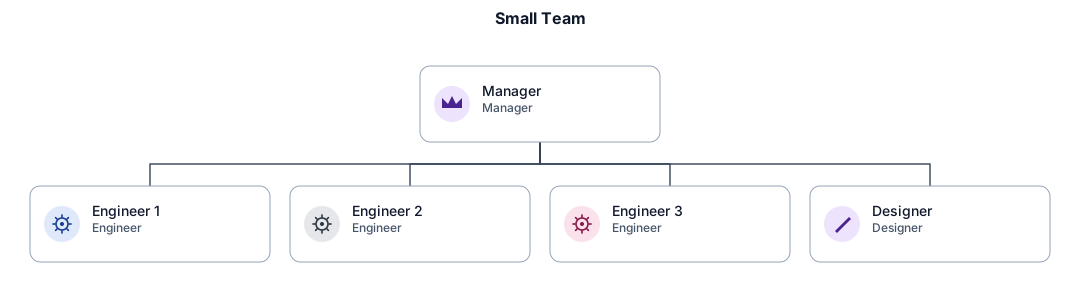
An org chart for a small team with a manager, three engineers, and a designer
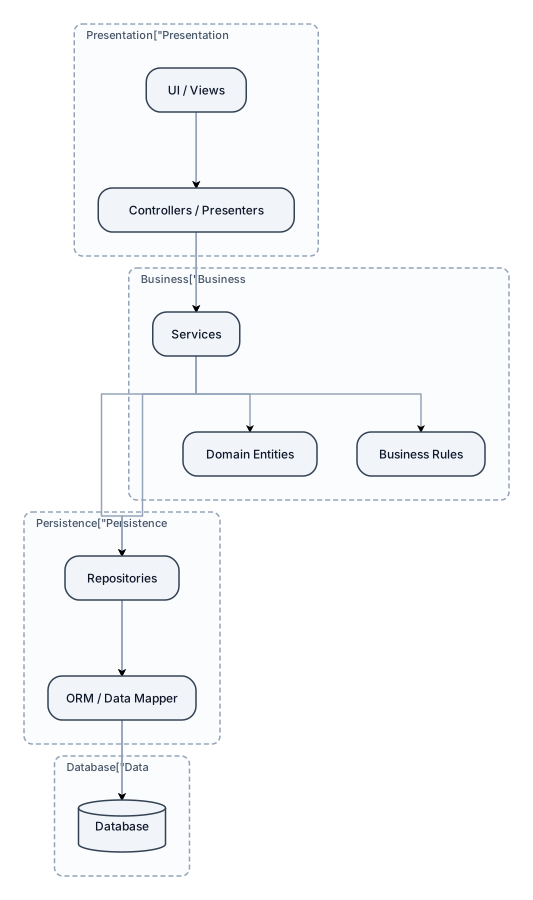
Explain the software engineering layered approach with a suitable diagram.
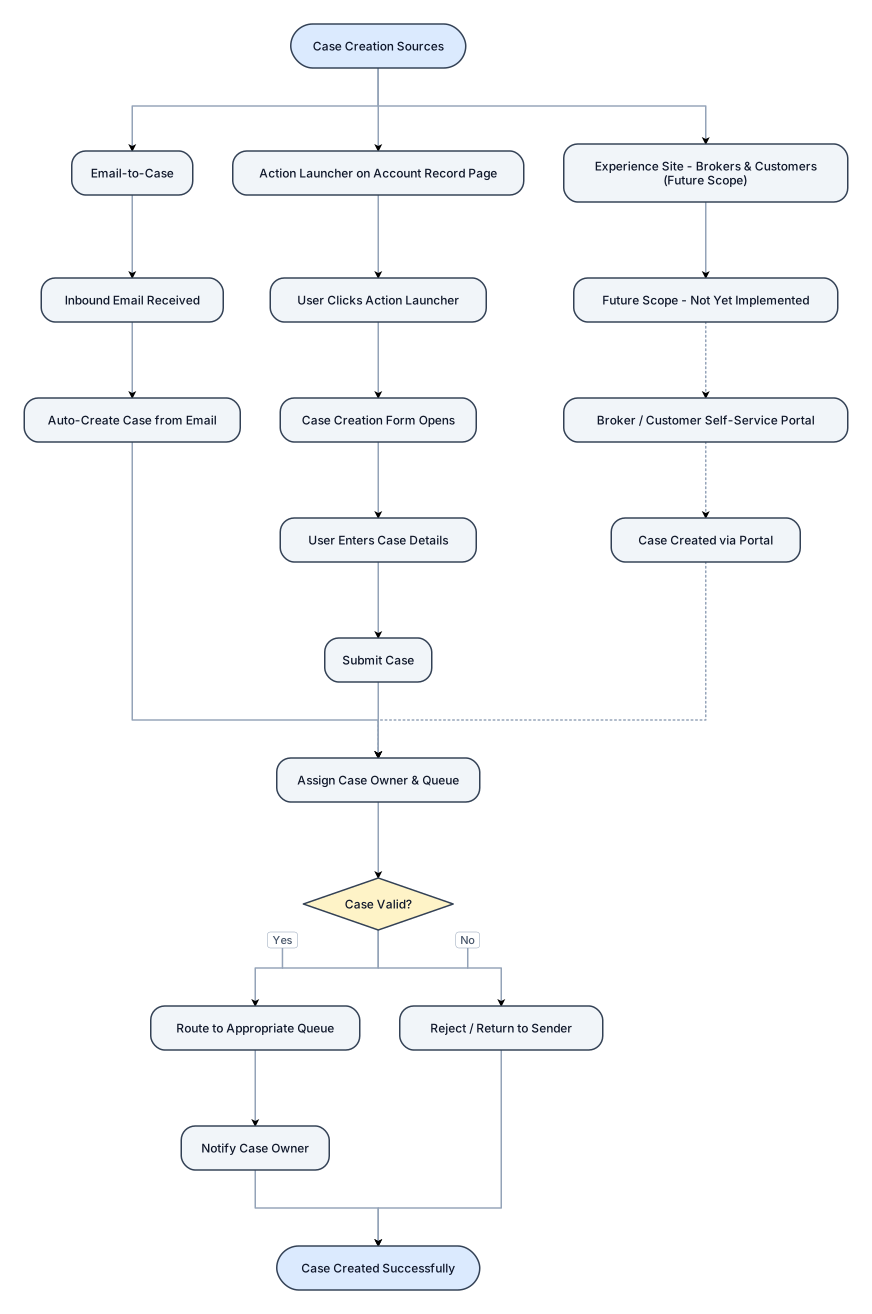
Design a flowchat for salesforce case creation , 1. Case creation sources - Email to case , user clicks on "Action Launcher" on Account Record Page , Experience site (Brokers and Customers)[ future scope ]
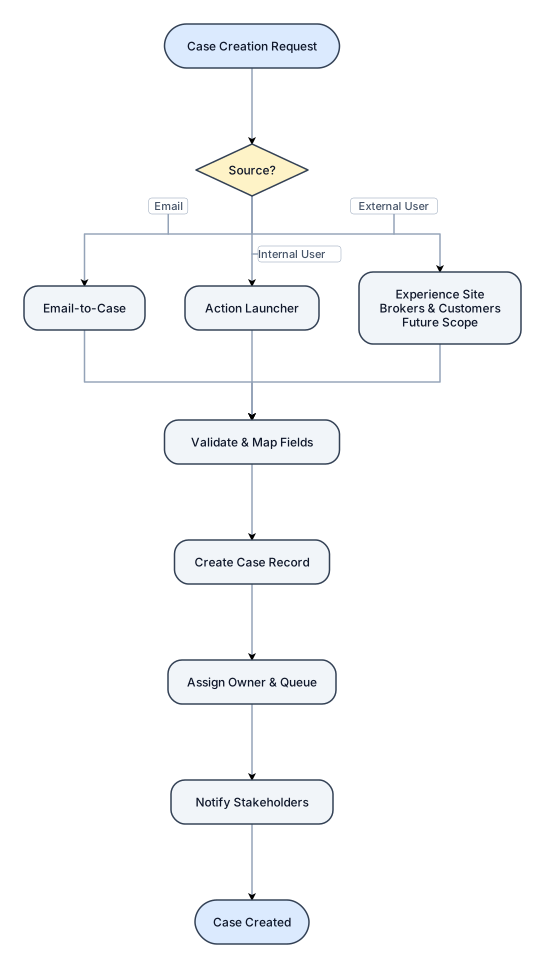
Design a flowchat for salesforce case creation , 1. Case creation sources - Email to case , user clicks on "Action Launcher" , Experience site (Brokers and Customers)[ future scope ]
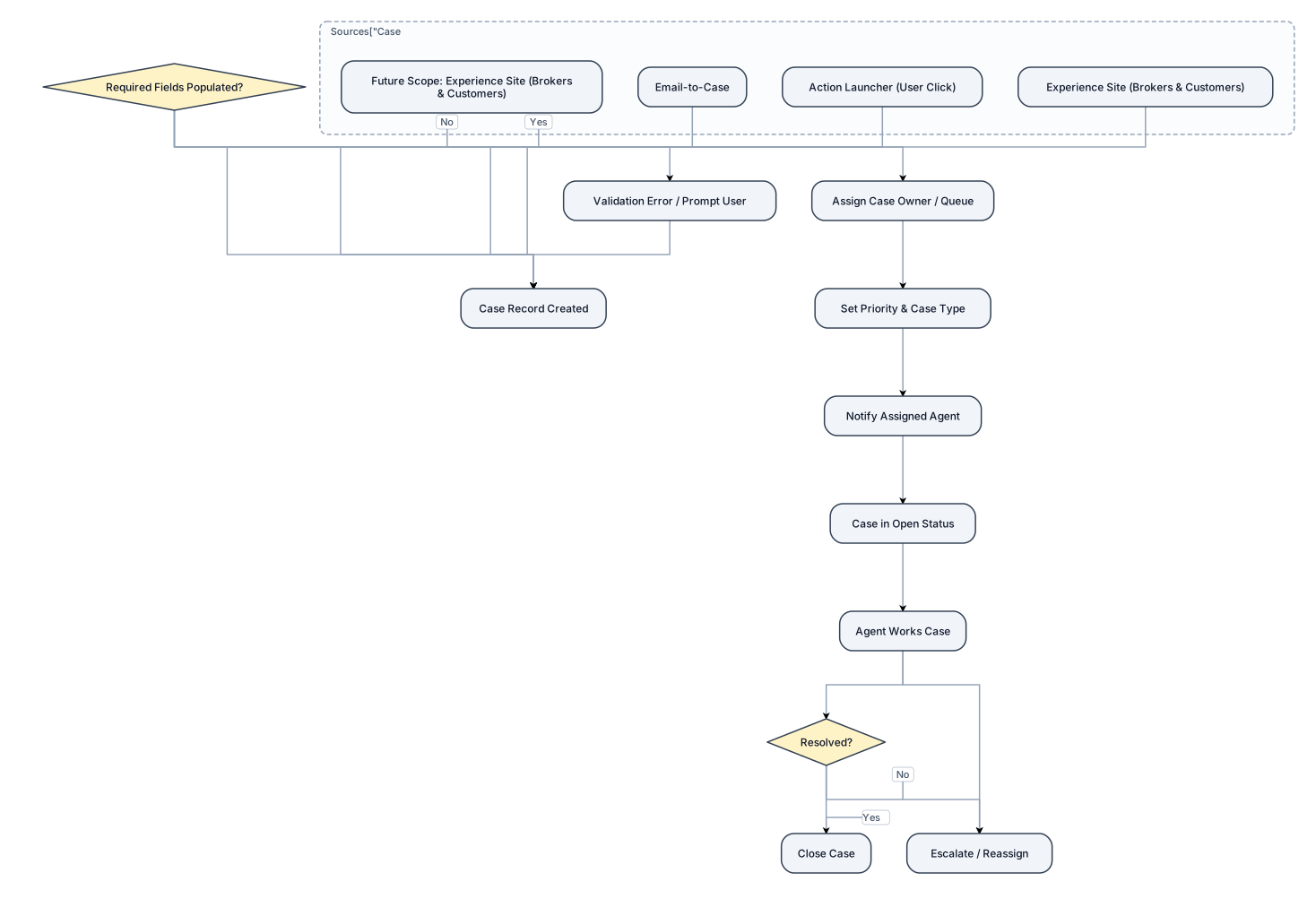
Design a flowchat for salesforce case creation , 1. Case creation sources - Email to case , user clicks on "Action Launcher" , Experience site (Brokers and Customers)[ mention as future scope on top of the block]