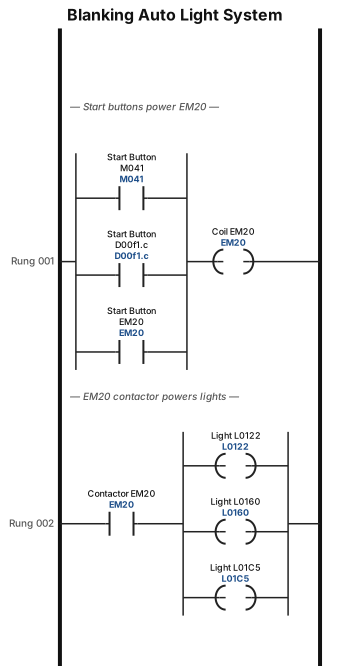
A ladder logic program for a Blanking Auto light system: start buttons (M041, D00f1.c, EM20) powering a coil (EM20), on the second rung we have a normal open contactor (EM20) powering coil (L0122, L0160 & L01C5)
NODE ARCHIVE · REAL DIAGRAM BRIEFS
Diagram Examples from Real Visitor Prompts
Browse eligible diagrams shared by FreeDiagram visitors, inspect the exact prompts, and build your own version.
Browse 3313 real creationsCOMMUNITY OUTPUTS · EXACT PROMPTS
All visitor creations
Showing 2161–2184 of 3313. No stock examples or system defaults. Choose a tool, study a real result, then reopen its prompt as your starting point.
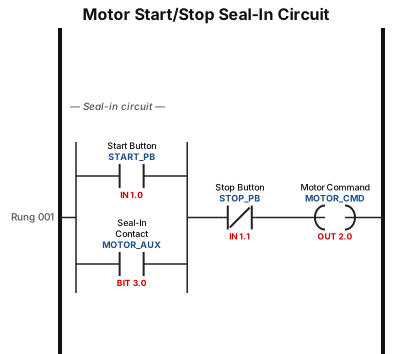
A motor start/stop seal-in circuit with a normally open start button, a normally closed stop button, and a seal-in contact around the start button

A mind map for planning a Please can you complete the Osc die setting and make a document similar to the SL setting sheet. Eventually this must go on SOPMS
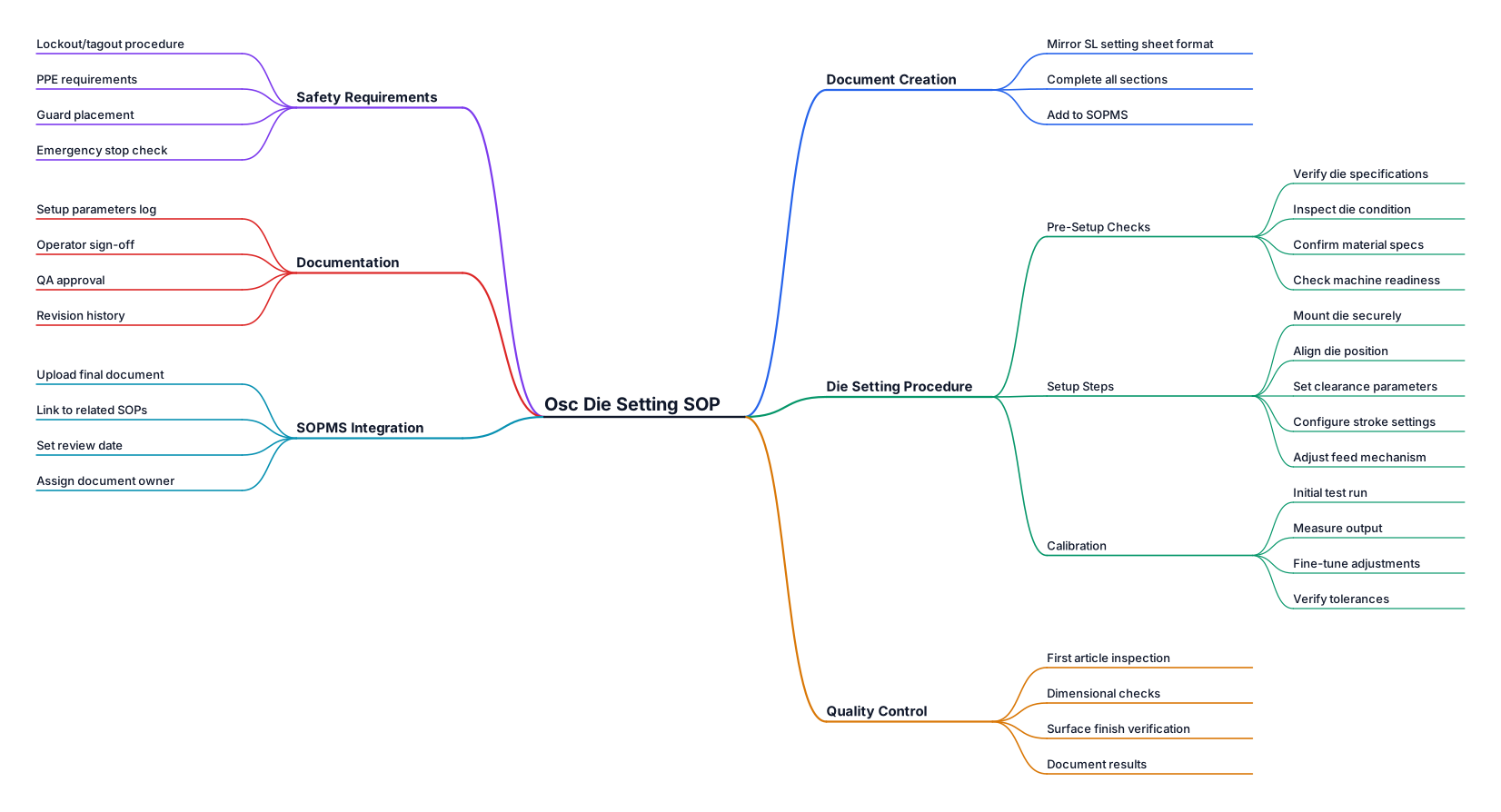
A mind map for planning a Please can you complete the Osc die setting and make a document similar to the SL setting sheet. Eventually this must go on SOPMS
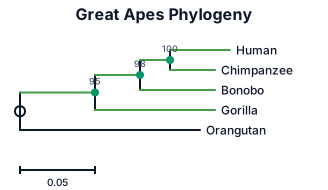
A phylogenetic tree of the great apes: humans, chimpanzees, bonobos, gorillas, and orangutans, with branch lengths and bootstrap support values
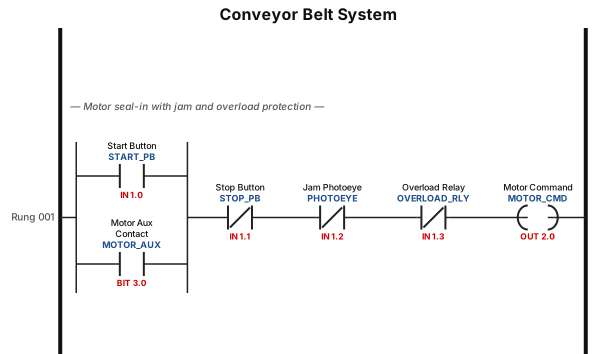
A ladder logic program for a conveyor belt system: start button seals in the motor, a photoeye stops the belt when a jam is detected, and an overload relay trips the circuit
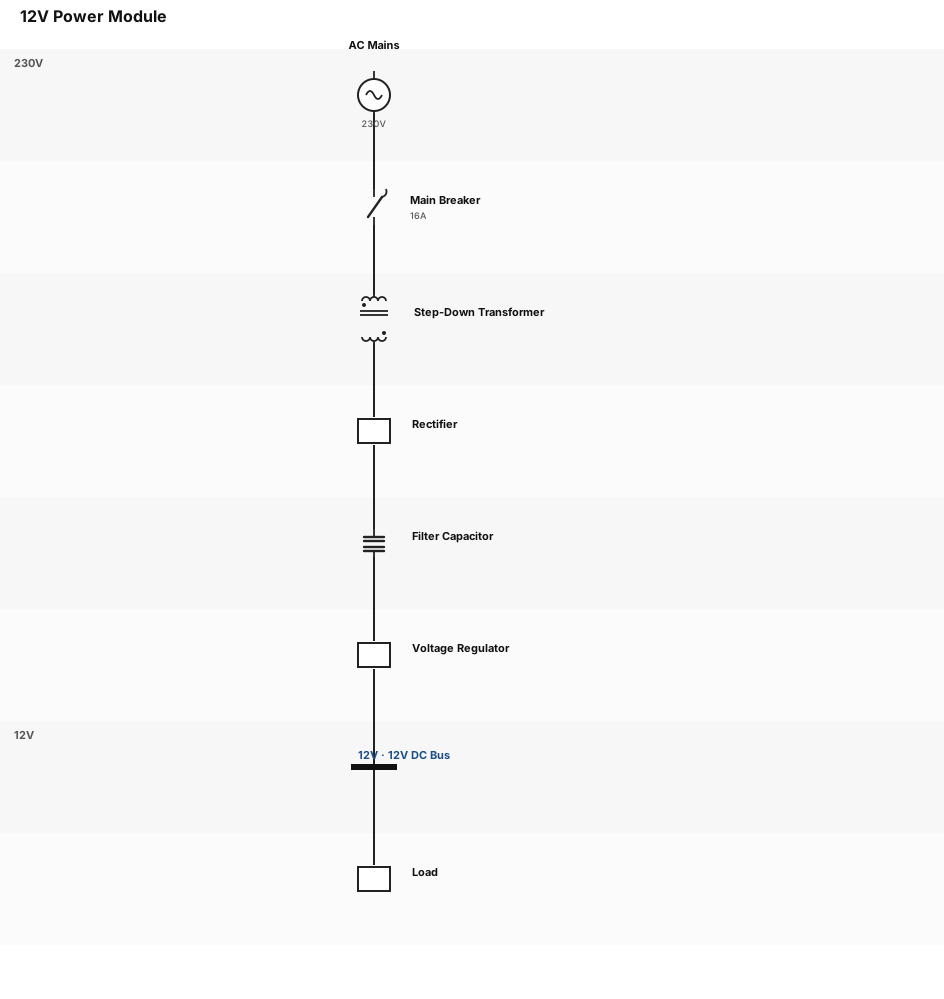
greate a schematic of a power module 12v
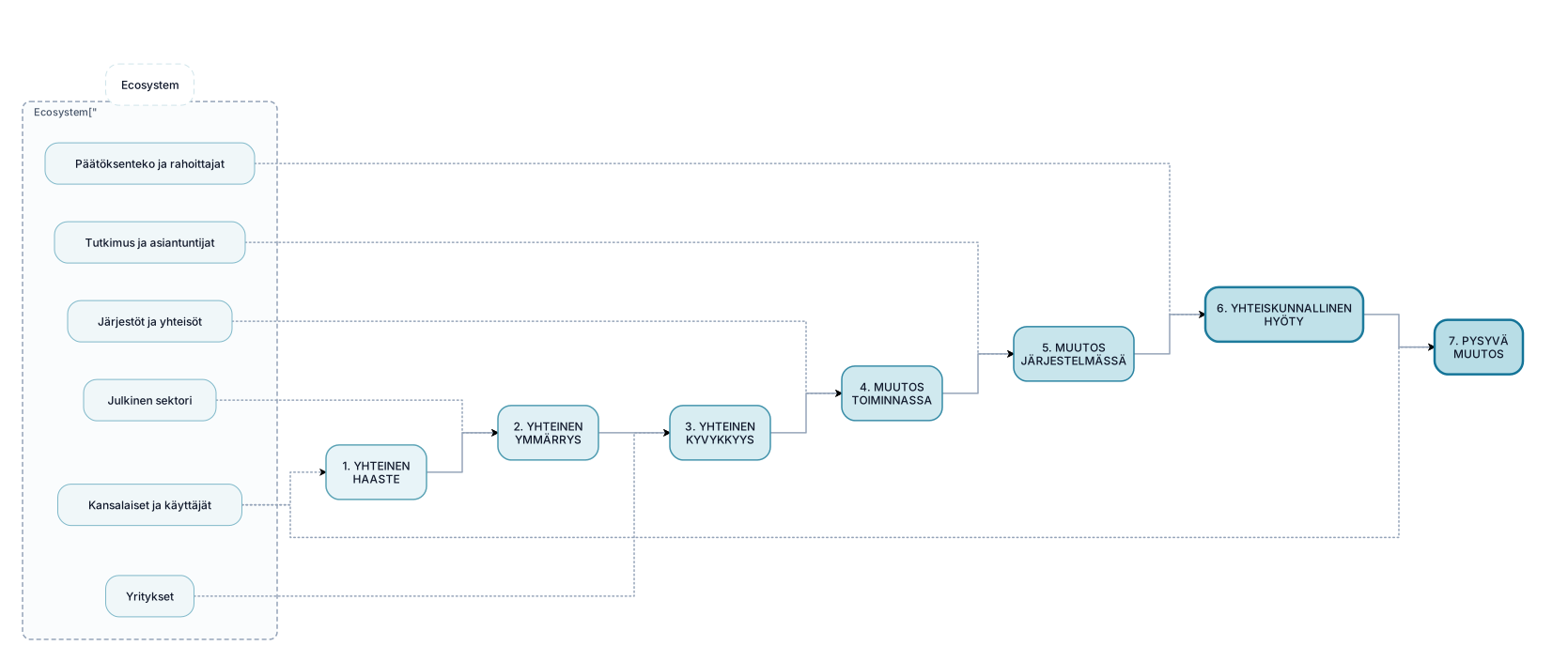
Create a polished, modern Finnish presentation infographic titled: "Yhteiskunnallinen vaikuttavuuspolku ekosysteemissä" The visual should communicate how a societal project creates impact together with an ecosystem. Design a simple, elegant horizontal pathway with 7 large connected stages: 1. YHTEINEN HAASTE 2. YHTEINEN YMMÄRRYS 3. YHTEINEN KYVYKKYYS 4. MUUTOS TOIMINNASSA 5. MUUTOS JÄRJESTELMÄSSÄ 6. YHTEISKUNNALLINEN HYÖTY 7. PYSYVÄ MUUTOS The pathway should flow from left to right with subtle arrows. Around the pathway, visually show the ecosystem as a soft circular or organic surrounding structure. Include these actors: - Kansalaiset ja käyttäjät - Julkinen sektori - Yritykset - Järjestöt ja yhteisöt - Tutkimus ja asiantuntijat - Päätöksenteko ja rahoittajat The ecosystem should visually interact with the entire pathway. Do NOT make the ecosystem a separate list. Emphasize that the project itself does not directly produce societal impact. Instead, the project enables change through collaboration, learning, new capabilities and changes in practices and systems. Visual style: - Scandinavian / Nordic - sophisticated public-sector and research presentation style - minimal and clean - white or very light background - blue, teal and green as the main colors - subtle color progression from left to right - rounded shapes - thin elegant lines - generous whitespace - clear hierarchy - professional sans-serif typography - no 3D effects - no photographs - no decorative illustrations - no unnecessary icons Make "YHTEISKUNNALLINEN HYÖTY" and "PYSYVÄ MUUTOS" slightly more visually prominent than the other stages. 16:9 landscape presentation format. The result should look like a professionally designed PowerPoint slide for a Finnish research, innovation or public-sector organization, not like a generic AI-generated flowchart.
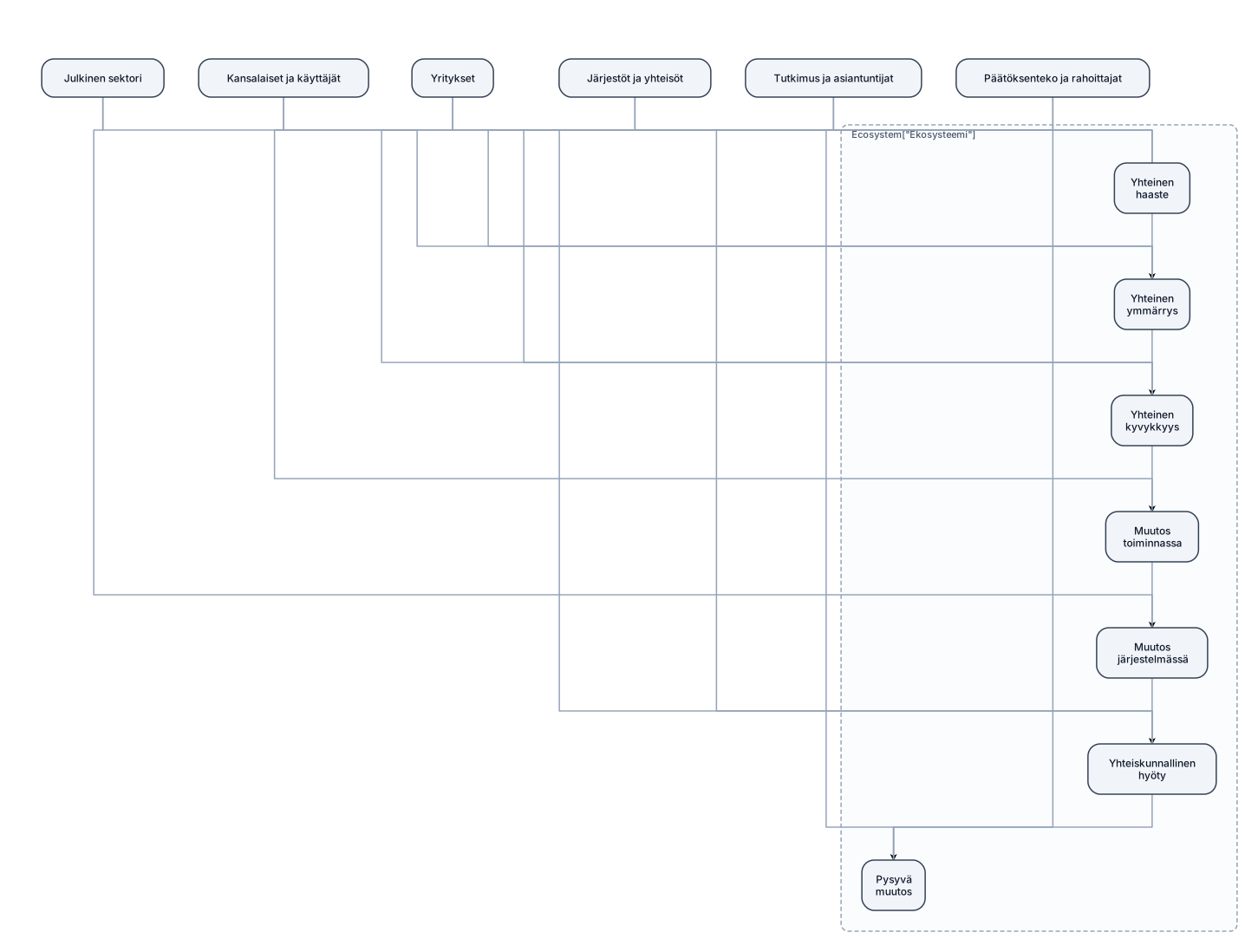
Create a clean, professional infographic showing a societal impact pathway within an ecosystem. The main pathway has seven sequential stages: Yhteinen haaste Yhteinen ymmärrys Yhteinen kyvykkyys Muutos toiminnassa Muutos järjestelmässä Yhteiskunnallinen hyöty Pysyvä muutos Show the seven stages as large connected boxes in the center, with arrows between them. Surround the pathway with ecosystem actors: Kansalaiset ja käyttäjät, Julkinen sektori, Yritykset, Järjestöt ja yhteisöt, Tutkimus ja asiantuntijat, Päätöksenteko ja rahoittajat. The ecosystem actors should surround and interact with the entire pathway rather than appear as a separate linear step.

Nano catalysts offer high surface area, which provides more active sites for dealing with pollutant. It also enhances catalytic activity of decomposition reaction. It is having less size, so increase contact between catalyst and harmful pollutant. It helps in generation of highly reactive hydroxyl ion and superoxide radicals. It can be regenerate and reuse. Few nanocatalyst can utilize light energy to decompose organic matter.
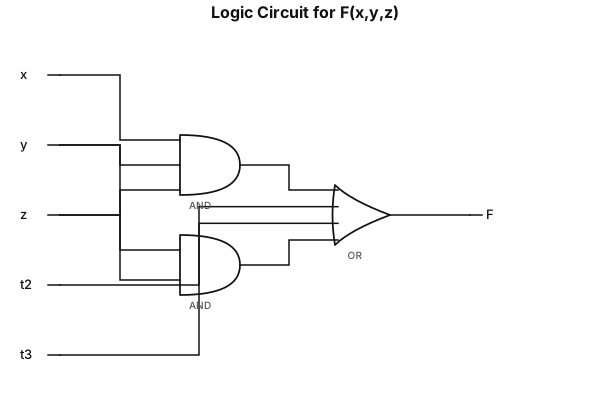
Draw the logic circuit for the following expression, assuming two-input gates: F(x, y, z) = xyz + xy' + x'y'z + yz Draw and label the circuit clearly. Show the gate structure needed to implement each product term and the final OR operation.

Create a system context diagram titled "SRS High-Level Context Diagram" for a two-sided service marketplace called the Service Request System (SRS). Center box (highlighted/dark blue, bold): "Service Request System (SRS) — Web Portal + Mobile App (Android/iOS)" Surround it with these external entities, connected to the center box with labeled bidirectional arrows: Customer (Service Requester) — top left, green box. Arrow to SRS labeled "Register/Login, Place Service Request, Rate Provider." Arrow back labeled "Bid Results, Confirmations." Service Provider (Vendor) — bottom left, green box. Arrow to SRS labeled "Register, Submit Bid, Accept Request." Arrow back labeled "Job Notifications, Payout." Company Admin (App Owner) — top right, green box. Arrow to SRS labeled "Set Commission %, Manage Categories." Arrow back labeled "Reports, Analytics." Payment Gateway (e.g., Stripe) — middle right, orange box. Arrow to SRS labeled "Charge / Payout Request." Arrow back labeled "Payment Confirmation." Google Maps Platform API — lower right, orange box. Arrow to SRS labeled "Distance / Directions Request." Arrow back labeled "Location / Route Data." Push Notification Service (e.g., Firebase Cloud Messaging) — bottom center, orange box. One-way arrow from SRS labeled "Send Alerts." Style: rounded rectangles, clean modern flat design, green boxes for human actors, orange boxes for external systems/APIs, dark blue for the central system. Use curved or angled arrows so labels don't overlap. make it look aesthetically pleasing and make sure to space out everything so they arent overlapping

Create a system context diagram titled "SRS High-Level Context Diagram" for a two-sided service marketplace called the Service Request System (SRS). Center box (highlighted/dark blue, bold): "Service Request System (SRS) — Web Portal + Mobile App (Android/iOS)" Surround it with these external entities, connected to the center box with labeled bidirectional arrows: Customer (Service Requester) — top left, green box. Arrow to SRS labeled "Register/Login, Place Service Request, Rate Provider." Arrow back labeled "Bid Results, Confirmations." Service Provider (Vendor) — bottom left, green box. Arrow to SRS labeled "Register, Submit Bid, Accept Request." Arrow back labeled "Job Notifications, Payout." Company Admin (App Owner) — top right, green box. Arrow to SRS labeled "Set Commission %, Manage Categories." Arrow back labeled "Reports, Analytics." Payment Gateway (e.g., Stripe) — middle right, orange box. Arrow to SRS labeled "Charge / Payout Request." Arrow back labeled "Payment Confirmation." Google Maps Platform API — lower right, orange box. Arrow to SRS labeled "Distance / Directions Request." Arrow back labeled "Location / Route Data." Push Notification Service (e.g., Firebase Cloud Messaging) — bottom center, orange box. One-way arrow from SRS labeled "Send Alerts." Style: rounded rectangles, clean modern flat design, green boxes for human actors, orange boxes for external systems/APIs, dark blue for the central system. Use curved or angled arrows so labels don't overlap.
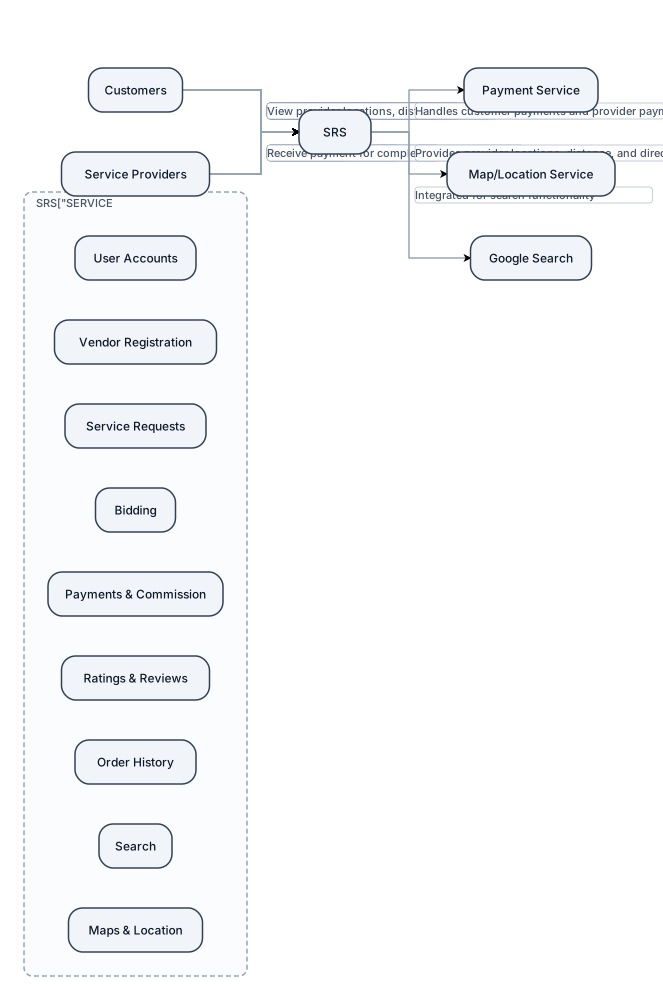
Create a simple **Project Context Diagram** for a software project called **Service Request System (SRS)**. Place **SERVICE REQUEST SYSTEM (SRS)** as the main system in a large box in the center. On the **left**, place an external actor labeled **Customers**. Draw arrows between Customers and the SRS showing that customers can: * Register and log in * Place service requests * Review service provider bids * Select a service provider * Make payments * Cancel or change service requests * Rate and review completed services * View order history * Search for service providers * View provider locations, distance, and directions On the **right**, place an external actor labeled **Service Providers**. Draw arrows between Service Providers and the SRS showing that providers can: * Register as vendors * Select service categories * View service requests * Submit bids * Receive payment for completed services Below the SRS, place three external systems/services: 1. **Payment Service** – handles customer payments and provider payments. 2. **Map/Location Service** – provides provider locations, distance, and directions. 3. **Google Search** – integrated with the system for search functionality. Connect the SRS to each of these external services with arrows. Inside the SRS box, show the major system functions: * User Accounts * Vendor Registration * Service Requests * Bidding * Payments & Commission * Ratings & Reviews * Order History * Search * Maps & Location Keep the diagram **simple and high-level**. This is a project context diagram for a college software project, so do not include detailed databases, classes, code, APIs, servers, or technical architecture. Use a clean academic style with clear labels and arrows. The overall layout should be: **Customers → SRS ← Service Providers** with **Payment Service, Map/Location Service, and Google Search** underneath the SRS.
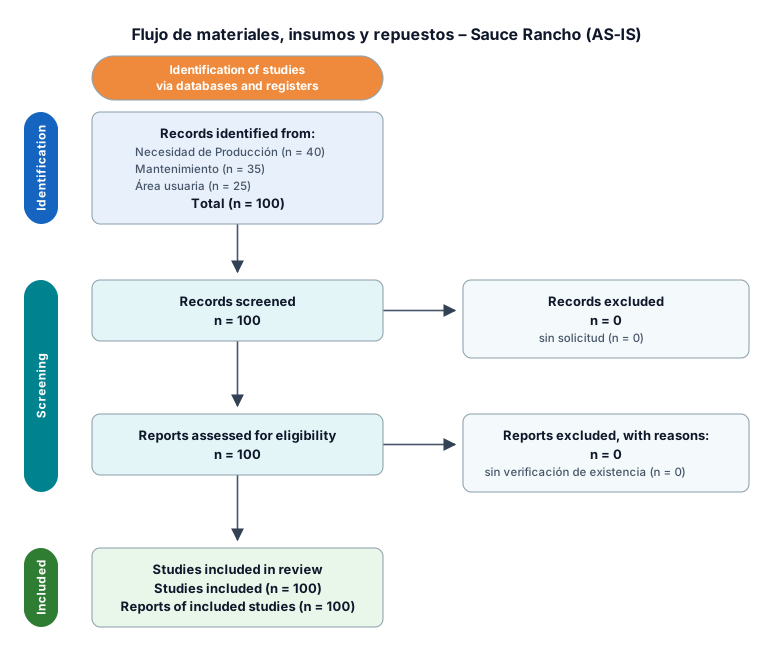
Flujo de materiales, insumos y repuestos – Sauce Rancho Flujo AS-IS Necesidad de Producción / Mantenimiento / área usuaria ↓ Solicitud de material ↓ Verificación de existencia ↓ ¿Existe stock? Sí → Autorización de salida ↓ Preparación del material ↓ Entrega al usuario ↓ Registro manual en cuaderno ↓ Regularización en Expertus ↓ Actualización del consumo No → Solicitud a Vinto Chico / Compras ↓ Recepción en Sauce Rancho ↓ Verificación de cantidad, peso y estado ↓ Ubicación ↓ Disponibilidad para uso
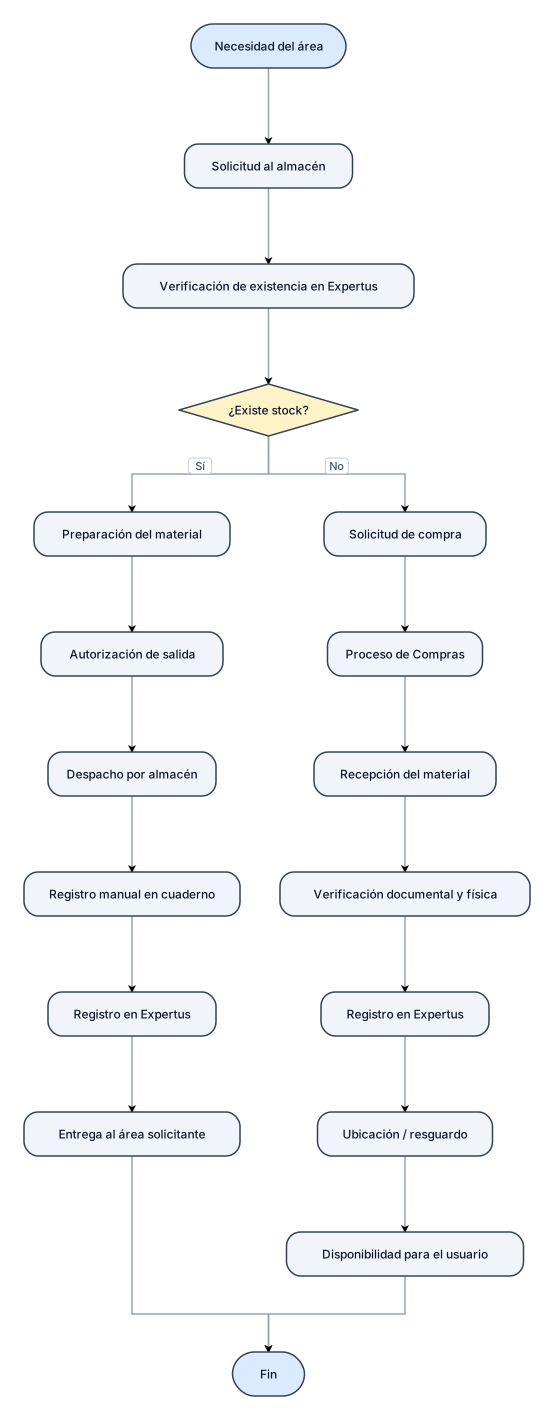
Flujo de materiales, insumos y repuestos – Vinto Chico Flujo AS-IS Necesidad del área ↓ Solicitud al almacén ↓ Verificación de existencia en Expertus ↓ ¿Existe stock? Sí → Preparación del material ↓ Autorización de salida ↓ Despacho por almacén ↓ Registro manual en cuaderno ↓ Registro en Expertus ↓ Entrega al área solicitante No → Solicitud de compra ↓ Proceso de Compras ↓ Recepción del material ↓ Verificación documental y física ↓ Registro en Expertus ↓ Ubicación / resguardo ↓ Disponibilidad para el usuario
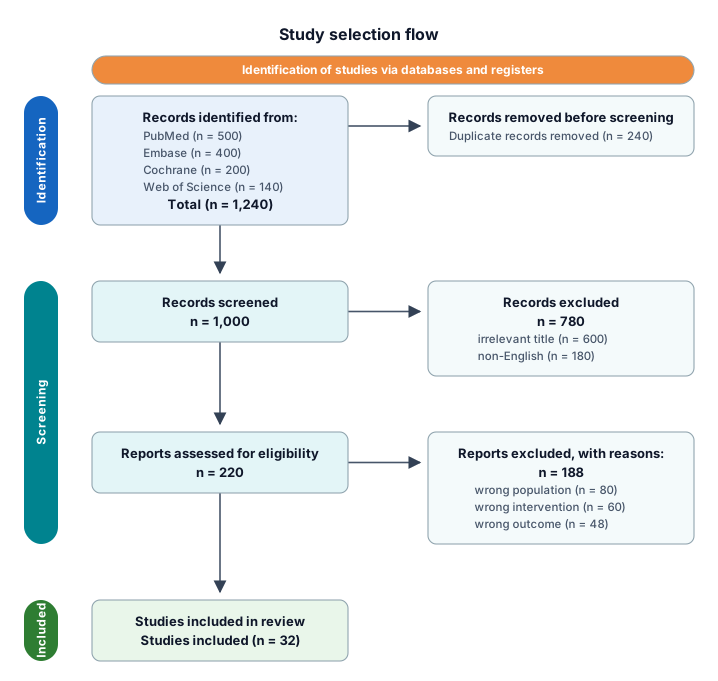
A PRISMA study-selection flow from 1,240 identified records through deduplication, screening, eligibility, and 32 included studies
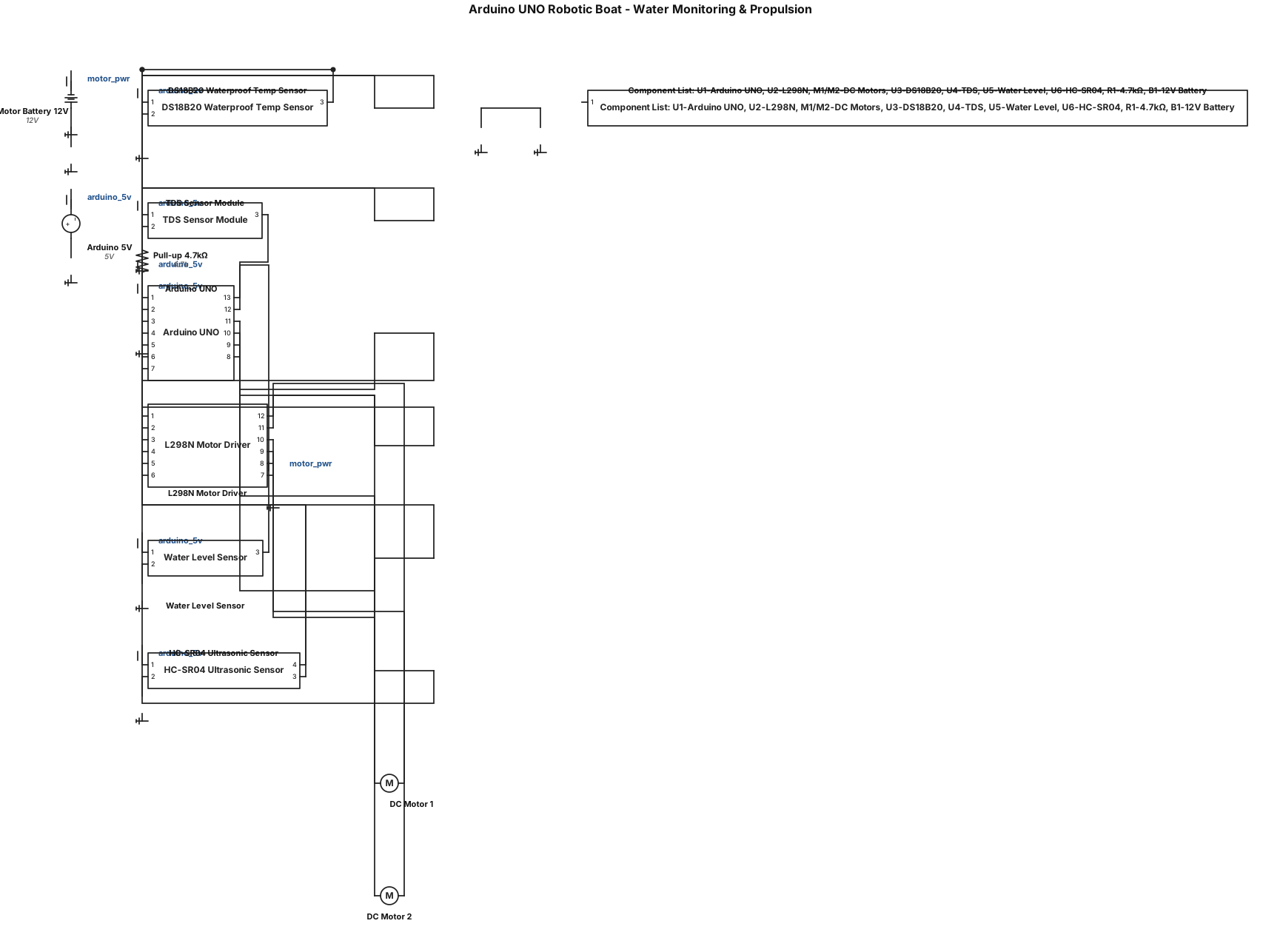
Create a clean, accurate circuit/wiring diagram for an Arduino UNO based robotic boat for water monitoring and propulsion. Components - Arduino UNO - L298N dual H-bridge motor driver - 2 × DC geared motors - DS18B20 waterproof temperature sensor - TDS sensor module - Water level sensor - HC-SR04 ultrasonic sensor - External battery/power supply Exact connections Arduino UNO → L298N - D5 → ENA - D8 → IN1 - D9 → IN2 - D10 → IN3 - D11 → IN4 - D6 → ENB - OUT1 + OUT2 → DC Motor 1 - OUT3 + OUT4 → DC Motor 2 - External battery positive → L298N motor power (+12V/Vs as appropriate) - Battery negative → L298N GND - Arduino GND → L298N GND Arduino UNO → DS18B20 - D2 → DATA - 5V → VCC - GND → GND - Add a 4.7 kΩ pull-up resistor between DATA and 5V Arduino UNO → TDS Sensor - A0 → TDS analog output - 5V → VCC - GND → GND Arduino UNO → Water Level Sensor - A1 → Signal - 5V → VCC - GND → GND Arduino UNO → HC-SR04 - D3 → TRIG - D4 → ECHO - 5V → VCC - GND → GND Diagram requirements - Use standard electronic symbols and clearly labelled components. - Show Arduino UNO pins exactly as specified above. - Show the two motors connected ONLY through the L298N motor driver. - Do not power the motors directly from the Arduino. - Clearly show the external motor battery. - Show common ground between Arduino and L298N. - Show the 4.7 kΩ DS18B20 pull-up resistor. - Clearly distinguish power, ground, sensor and motor connections. - Keep wires neat with minimal crossing. - Use a white background and readable labels. - Arrange the components logically. - Make the diagram suitable for A4 printing and inclusion in a college project synopsis. - Include a small component list/legend. - Do not add unnecessary components or change the specified Arduino pin assignments.
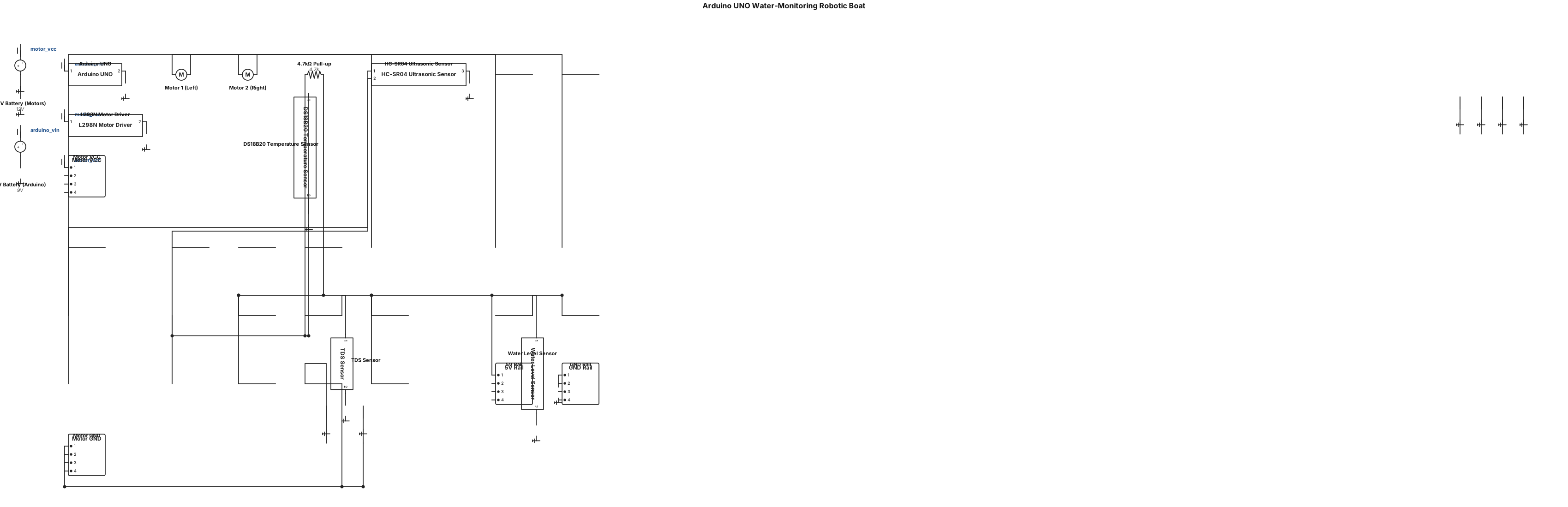
Generate a professional A4 landscape circuit diagram for an Arduino UNO water-monitoring robotic boat. Show these exact connections: Arduino UNO → L298N: D5→ENA, D8→IN1, D9→IN2, D10→IN3, D11→IN4, D6→ENB. L298N OUT1/OUT2→Motor 1 and OUT3/OUT4→Motor 2. Arduino UNO → DS18B20: D2→DATA, 5V→VCC, GND→GND, with 4.7kΩ pull-up from DATA to 5V. Arduino UNO → TDS sensor: A0→Analog Output, 5V→VCC, GND→GND. Arduino UNO → Water Level Sensor: A1→Signal, 5V→VCC, GND→GND. Arduino UNO → HC-SR04: D3→TRIG, D4→ECHO, 5V→VCC, GND→GND. Use an external battery for the DC motors through the L298N. Do not connect motors directly to Arduino. Connect Arduino GND and L298N GND together. Make all connections clearly labelled and visually organized. Use standard schematic symbols, readable pin names, clean wiring, minimal crossings, and a white background. Add a component list at the bottom. The final image must be suitable for printing and inserting into a college project synopsis.
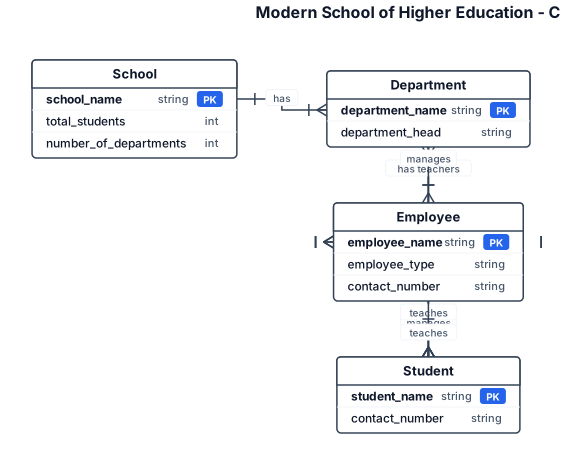
Create a Chen notation Entity Relationship Diagram for a Modern School of Higher Education. Entities: School Department Employee Student School attributes: School Name Total Students Number of Departments Department attributes: Department Name Department Head Teachers Employee attributes: Employee Name Employee Type Contact Number Student attributes: Student Name Department Contact Number Employee types include: Principal HOD Teacher Administrative Staff Relationships: School has Departments. Department has Students. Department has Teachers. HOD manages Teachers. HOD manages Students. HOD reports to Principal. Principal manages Departments. Principal teaches Students. Teachers teach Students. Principal manages Administrative Staff. Use proper Chen notation: - Rectangles for entities - Ovals for attributes - Diamonds for relationships - Straight connecting lines Do not use table-style boxes.
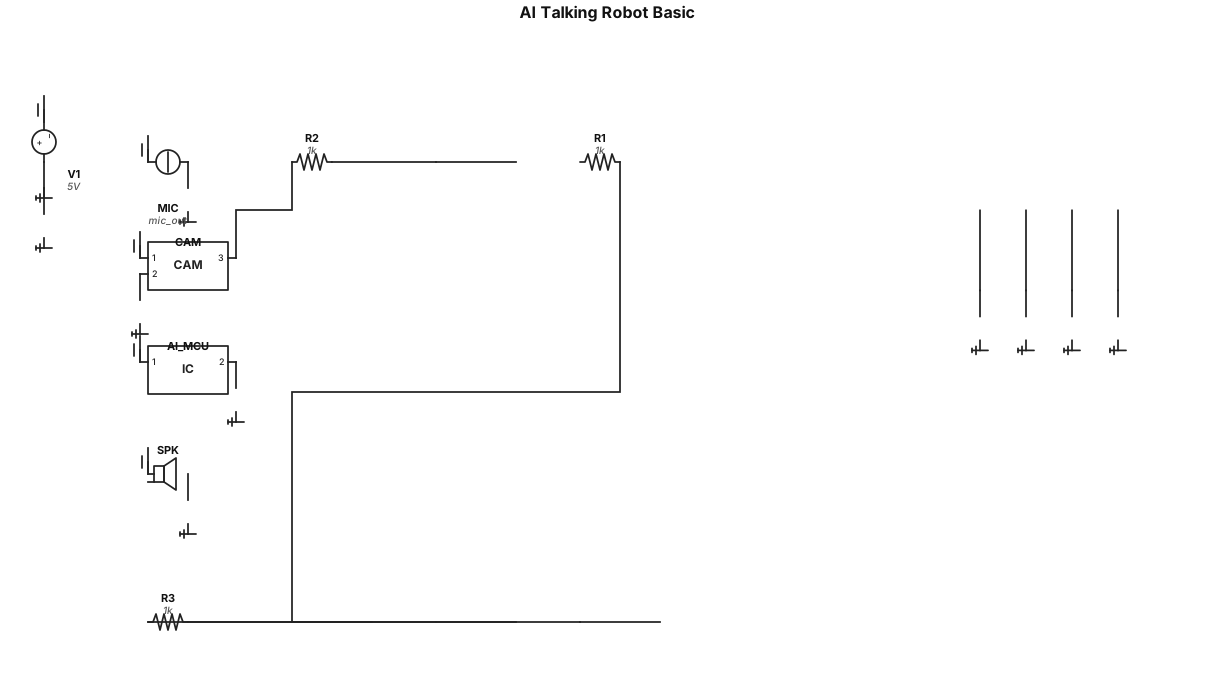
Create me an circuit about an *AI* talking robot which can see me listen me and answer me a basic version

grupo de 5 empresas tendo um diretor 7 coordenações sendo 5 delas pedagogicas
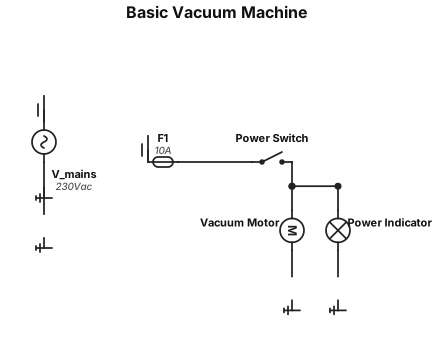
I need an basic *vacuum* machine
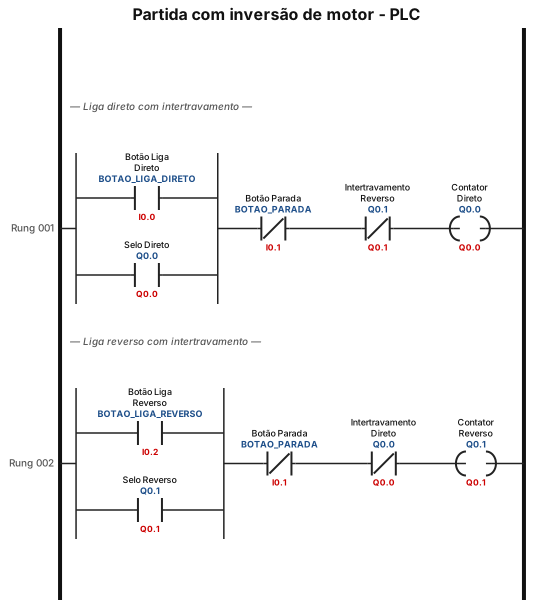
faz um diagrama de partida com inversão no clp