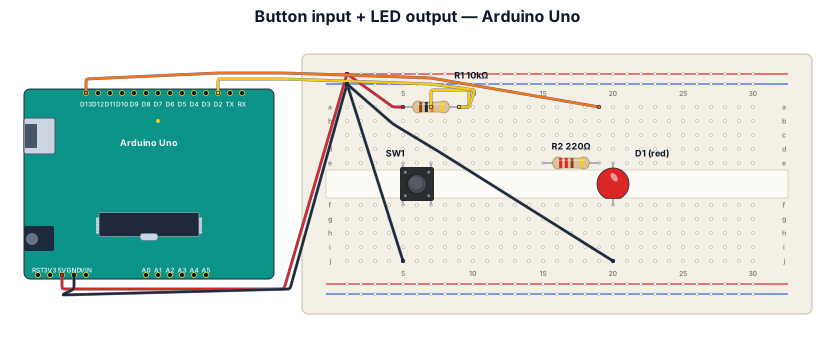
A breadboard wiring diagram for an Arduino Uno reading a button press and lighting an LED: button with pull-down resistor on D2, LED with 220-ohm resistor on D13
NODE ARCHIVE · REAL DIAGRAM BRIEFS
Diagram Examples from Real Visitor Prompts
Browse eligible diagrams shared by FreeDiagram visitors, inspect the exact prompts, and build your own version.
Browse 3261 real creationsCOMMUNITY OUTPUTS · EXACT PROMPTS
Breadboard Wiring
Showing 1–24 of 102. No stock examples or system defaults. Choose a tool, study a real result, then reopen its prompt as your starting point.
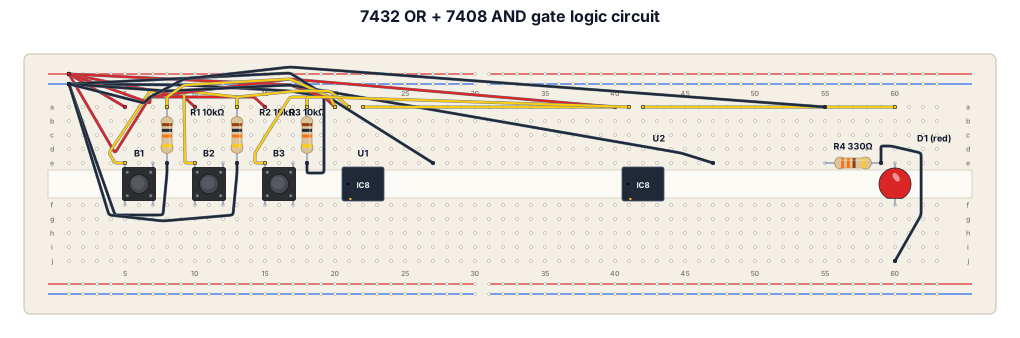
input of a 5V breadboard power module. Placing and Powering the ICs Insert the 7432 (OR gate) and 7408 (AND gate) ICs across the middle trench of the breadboard. Connect Pin 14 (top right) of both ICs to the 5V red rail. Connect Pin 7 (bottom left) of both ICs to the Ground negative rail. Wiring the Three Push Buttons Place the three buttons (Sensor A, Sensor B, and Enable) across the middle trench. Connect one leg of all three buttons directly to the 5V red rail. Connect the opposite leg of all three buttons to the Ground rail using 10kΩ resistors. The point between the button and this resistor is your signal output. Wiring the Logic Gates Connect Sensor A's signal to Pin 1 of the 7432 (OR gate). Connect Sensor B's signal to Pin 2 of the 7432. Connect a short wire from Pin 3 of the 7432 directly to Pin 1 of the 7408 (AND gate). Connect the Enable button's signal to Pin 2 of the 7408. Wiring the Output LED Connect a wire from Pin 3 of the 7408 to the long leg (anode) of your single LED. Connect the short leg (cathode) of the LED to the Ground rail using a 220Ω or 330Ω resistor.
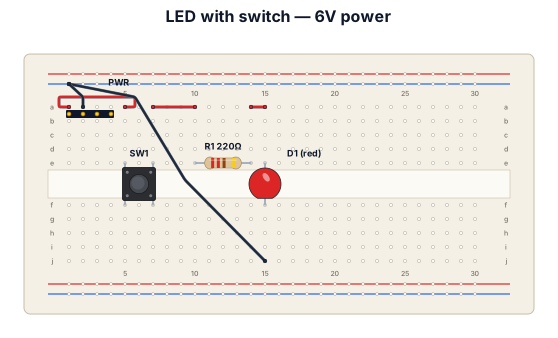
basic bread board with an led and switch used to tuen on the led 6v power to be used
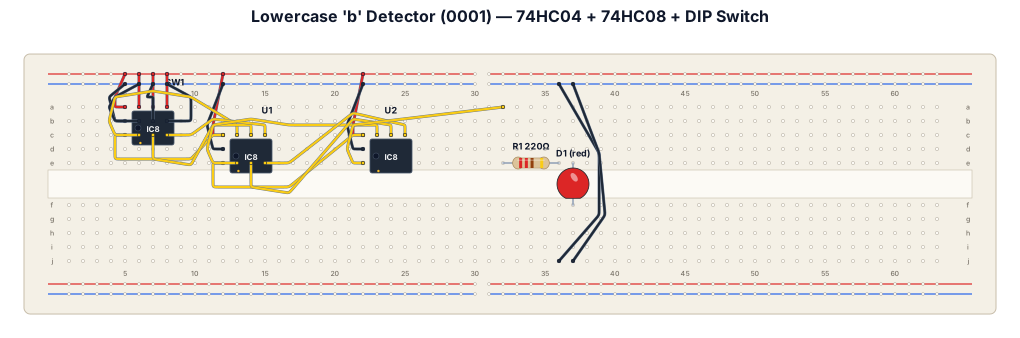
# TINKERCAD CIRCUIT: LOWERCASE LETTER “b” DETECTOR USING ONE LED Create a technically accurate Tinkercad Circuits breadboard project using TWO breadboards, one 74HC04 NOT-gate IC, exactly one 74HC08 AND-gate IC, a four-position DIP switch, and ONLY ONE physical LED as the output indicator. The purpose of the circuit is to detect the four-bit input code assigned to lowercase letter “b.” The single LED must turn ON only when the input is 0001 and remain OFF for all other input combinations. Do not use seven LEDs or a seven-segment display. Do not use an Arduino or a microcontroller. Use physical NOT and AND logic gates.
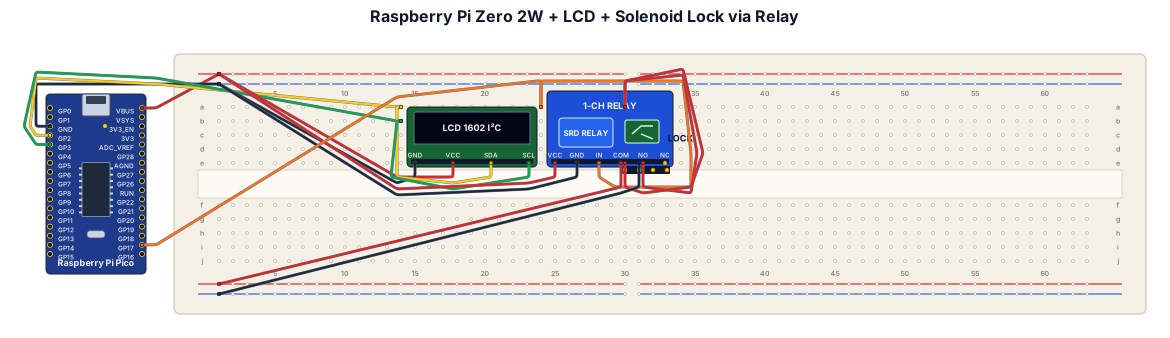
i need a wiring diagram for a breadboard containing a raspberry pi zero 2w, lcd screen and a solenoid lock with digital relay. These are being powered by 12v mains plug
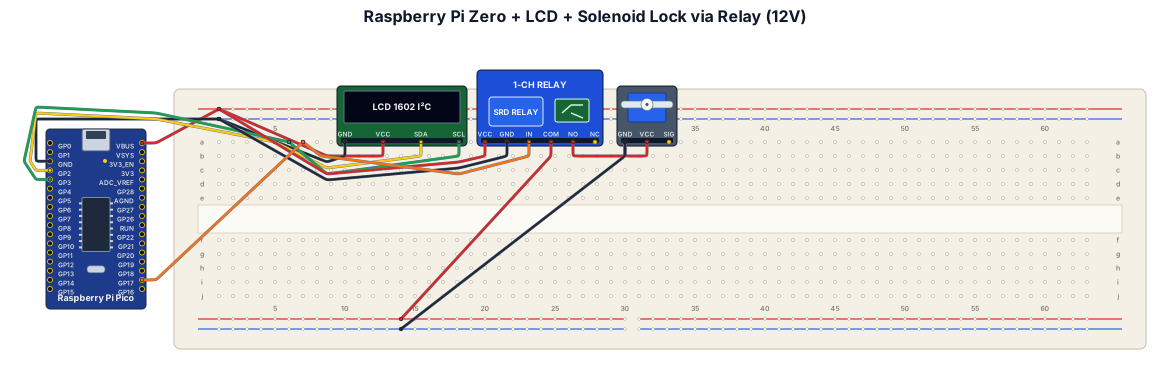
i need a wiring diagram for a breadboard containing a raspberry pi zero, lcd screen and a solenoid lock with digital relay. These are being powered by 12v mains plug
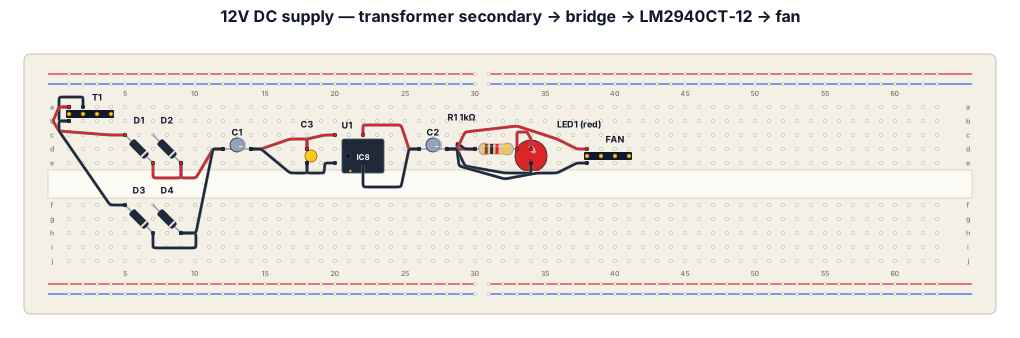
Create a clear, labeled breadboard wiring diagram for a 12V DC power supply to run an Intel PC fan rated at 12V DC, 600mA. The circuit must have these stages in order: 1. Transformer secondary: isolated 12V AC output, using only the two low-voltage secondary wires. Label the AC inputs AC1 and AC2. 2. Full-wave bridge rectifier using four individual 1N5408 diodes arranged in a diamond configuration. Label the positive DC output RAW+ and the negative output GND. Clearly show each diode's band and correct orientation. 3. Main filter capacitor C1: 6800uF, 35V electrolytic capacitor, with positive connected to RAW+ and negative connected to GND. 4. Fixed 12V regulator U1: LM2940CT-12 in a TO-220 package. Label the input, ground, output, and ground-connected metal tab correctly using the manufacturer's datasheet. 5. Input bypass capacitor: 0.47uF between regulator input and GND. 6. Output capacitor C2: 22uF electrolytic capacitor, connected between regulated +12V and GND. Show correct polarity and note that its ESR must meet the LM2940CT-12 datasheet requirements. 7. Power indicator: one red LED in series with a 1k ohm, 1/4W resistor across the regulated output, with correct polarity. 8. Output load: a 12V DC PC fan rated at 600mA, connected between +12V OUT and GND. Clearly label all nodes, component values, diode bands, capacitor polarity, regulator pins, and the positive and negative fan connections. Show the circuit stages from left to right in the order transformer secondary, bridge rectifier, filter capacitor, voltage regulator, and fan output. IMPORTANT: Show only the isolated low-voltage circuit. Do not include or expose 220V AC mains wiring on the breadboard. Do not invent connections if the software cannot represent a component correctly. Indicate that the finished circuit must be checked against the component datasheets and tested under supervision before connecting the fan.
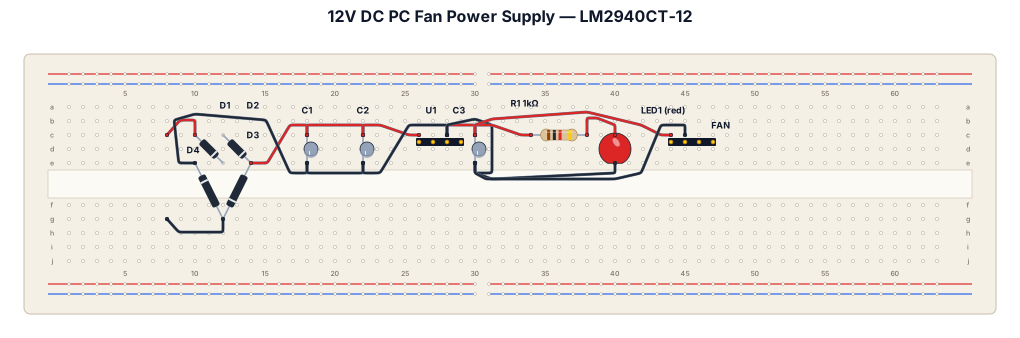
Create a breadboard wiring diagram for a 12V DC, 600mA PC fan power supply using these components: an isolated 12V AC transformer secondary, four 1N5408 diodes in a full-wave bridge rectifier, a 6800uF 35V electrolytic filter capacitor, an LM2940CT-12 fixed 12V voltage regulator, a 0.47uF input capacitor, a 22uF output capacitor with the required ESR, a red LED, and a 1k ohm 1/4W resistor. Connect the two 12V AC secondary wires to the two AC inputs of the four-diode bridge. Connect the bridge's positive output to RAW+ and its negative output to GND. Connect the 6800uF capacitor positive lead to RAW+ and negative lead to GND. Connect the LM2940CT-12 input pin to RAW+, its ground pin to GND, and its output pin to +12V OUT. Connect the 0.47uF input capacitor between regulator input and GND, and the 22uF output capacitor between +12V OUT and GND, respecting polarity and the regulator datasheet's ESR requirements. Connect the red LED and 1k ohm resistor in series across +12V OUT and GND. Connect the PC fan positive wire to +12V OUT and its negative wire to GND. Label every component, value, connection, diode band, capacitor polarity, and regulator pin. Show the four diodes as a diamond-shaped bridge rectifier. This circuit has no microcontroller. Show only the isolated low-voltage side, not the 220V AC mains wiring.
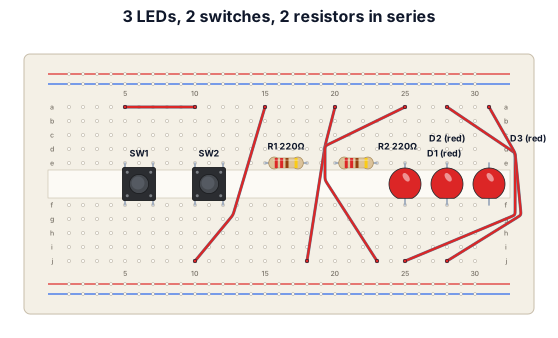
a breadboard of 3 leds two stwict 2 ereistor connected in series use only 3 wieres
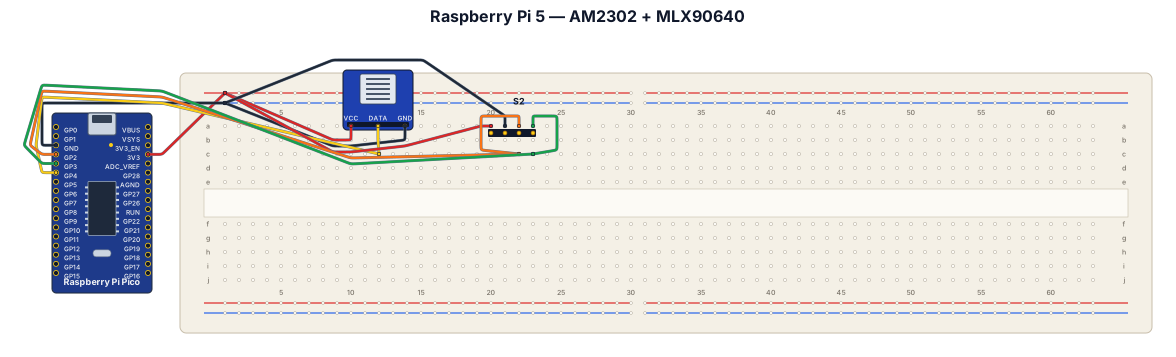
A breadboard wiring diagram for a raspberry pi 5, using an asair am2302 and adafruit mlx90640
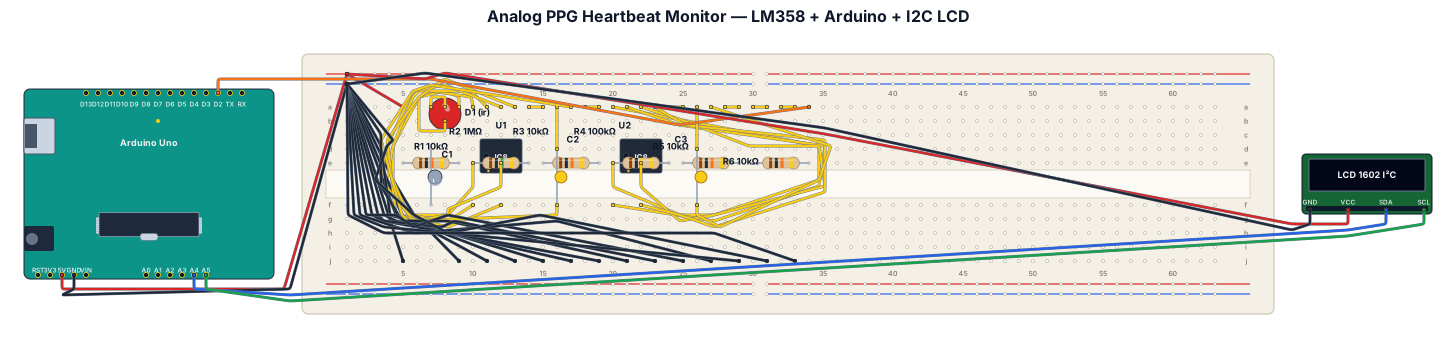
This project presents an analog opto-electronic heartbeat monitor designed using core Analog Integrated Circuit principles.It acquires micro-volt capillary blood volume variations through a non-invasive optical Photoplethysmography (PPG) sensor front-end.A passive RC high-pass network eliminates massive static DC offsets originating from ambient illumination and tissue reflection.An LM358 operational amplifier active inverting stage provides a controlled voltage gain of $40\text{ dB}$.A parallel feedback capacitor implements an active low-pass filter to suppress $50\text{ Hz}$ power line hum and high-frequency noise.A second LM358 op-amp configured as a non-inverting Schmitt trigger uses positive feedback for clean pulse shaping.Adjustable hysteresis prevents false double-triggering caused by motion artifacts or light flicker.An Arduino microcontroller measures time intervals between pulse rising edges using external interrupts.The system computes real-time Beats Per Minute (BPM) and displays live biomedical telemetry on an I2C LCD screen.This hybrid analog-digital system successfully bridges core college circuit analysis theory with a practical, low-cost biomedical device.
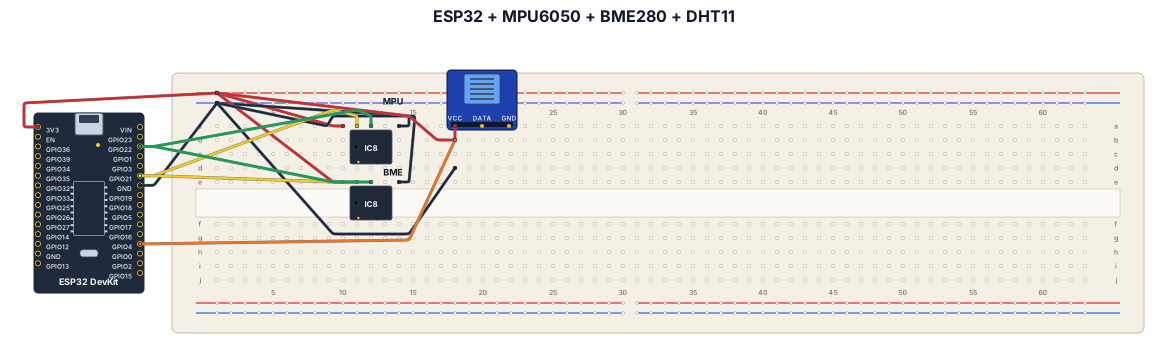
Esp32 MPU6050 BME280 DHT11
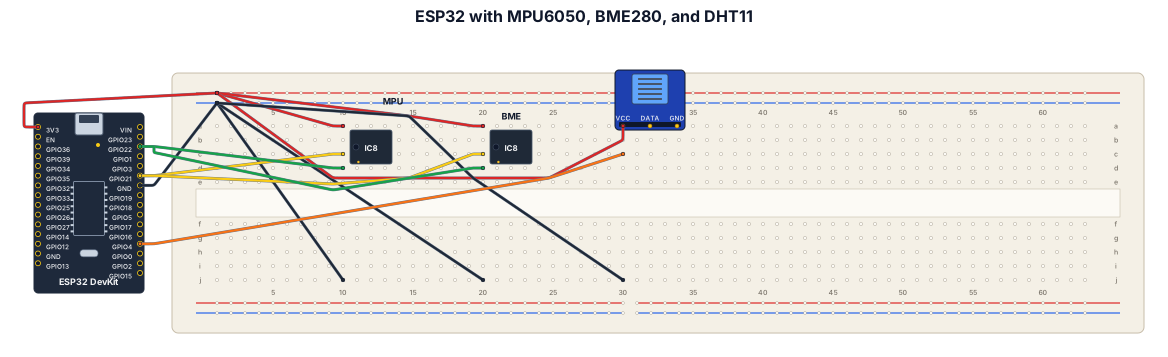
A breadboard wiring diagram for an Esp32.Showing connections for an MPU6050 with other environmental sensors like BME280,DHT11
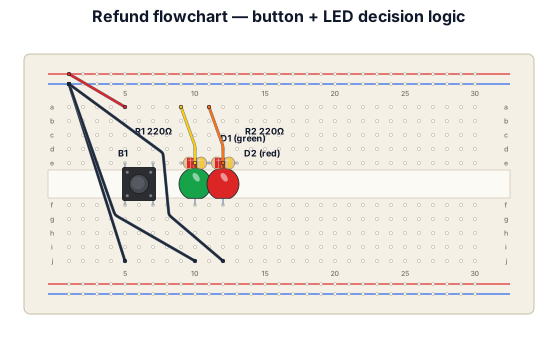
A flowchart for refunds
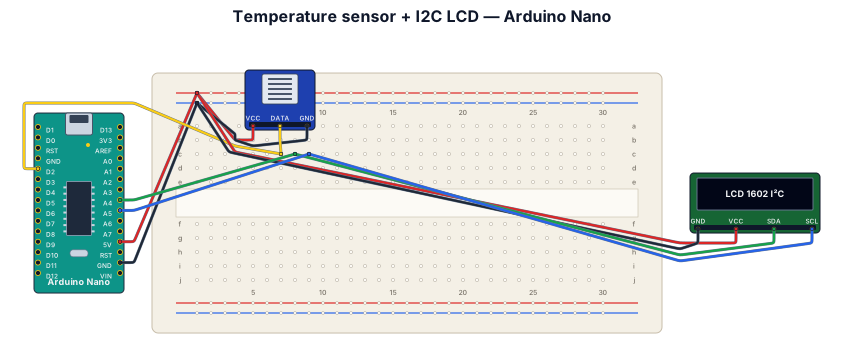
Temperature sensor with I2C LCD display on Arduino Nano
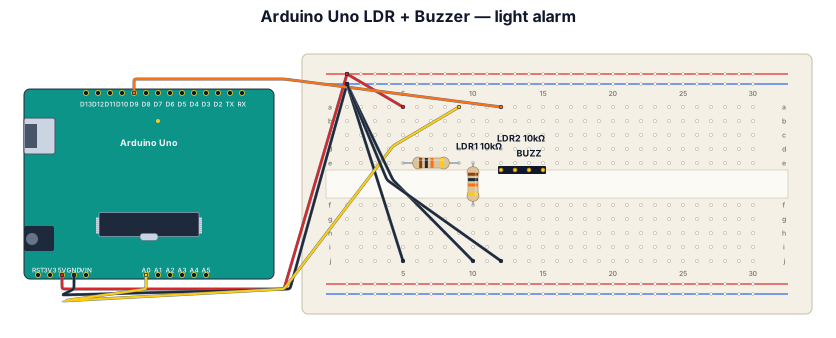
generate an arduino uno connected with a ldr and a buzzer if light not detected buzzer should buzz
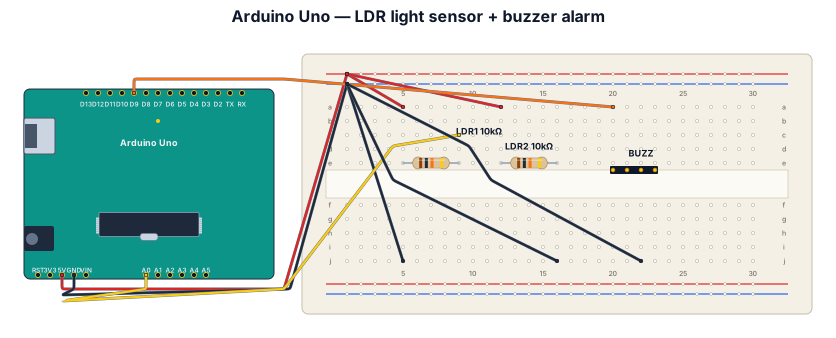
generate an ardiuno uno with a ldr sensor and buzzer if light is not detected the sound should buzz
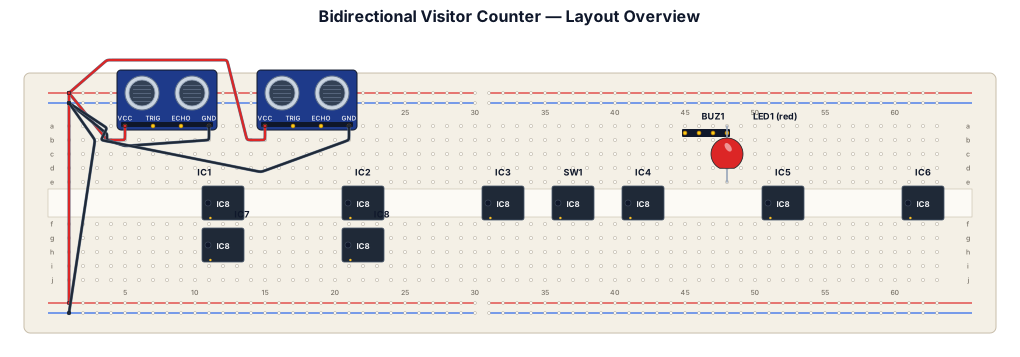
Create a clear, accurate, realistic breadboard wiring diagram for my Bidirectional Visitor Counter mini project, using ONLY the components in my list. Components: - 2 × LM393 IR obstacle sensor modules (OUT, GND, VCC) - 1 × 74LS74 dual D flip-flop IC - 1 × 74LS08 AND gate IC - 1 × 74LS32 OR gate IC - 1 × 74LS04 NOT gate IC - 2 × 74LS192 BCD up/down counter ICs - 2 × 74LS47 BCD-to-7-segment decoder ICs - 2 × common-anode 7-segment displays - 1 × 4-position DIP switch - 1 × 5V active buzzer - 1 × red LED - Suitable resistors, jumper wires, breadboard and regulated 5V DC supply Diagram requirements: 1. Show the actual solderless breadboard in a vertical orientation, matching my uploaded breadboard photo. 2. Place every IC across the breadboard's center trench, with the correct notch direction. 3. Label every IC pin number and signal name clearly. 4. Show each jumper wire connection from the exact source pin to the exact destination pin. 5. Label +5V and GND rails. 6. Show both IR sensors and their OUT, GND and VCC connections. 7. Show the entry/exit sensor-sequence logic using the 74LS74 and logic gates. 8. Connect both 74LS192 counters to the two 74LS47 decoder ICs and common-anode displays. 9. Include the room-capacity warning circuit using the DIP switch, red LED and buzzer. 10. Do not add Arduino, microcontrollers or any unlisted ICs. 11. Verify all connections against the correct manufacturer datasheets before drawing. Do not guess pin numbers or invent connections. 12. If the listed components are insufficient to implement any feature, clearly identify the missing components instead of pretending the circuit is complete. 13. Use readable labels, realistic breadboard rows, correct logic polarity and a clean educational electronics-lab style. Output: One complete, technically verified, pin-to-pin breadboard wiring diagram suitable for building and testing my college mini project.
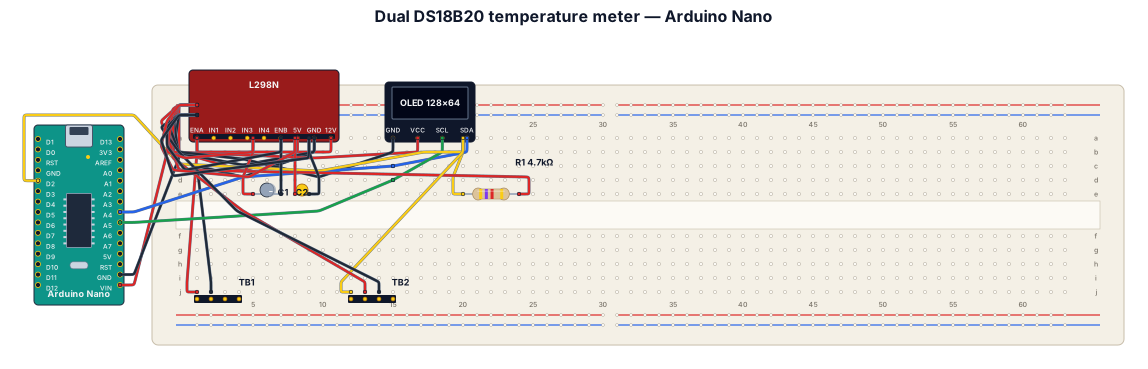
Design a dual temperature meter circuit for an automotive application. Include an Arduino Nano MCU, an MP1584 DC-DC step-down converter to step down 12V car power to 5V, a 0.96 inch I2C OLED display (128x64), and connections for two DS18B20 waterproof temperature sensors connected to digital pin D2 with a 4.7k ohm pull-up resistor between D2 and 5V. Add decoupling capacitors and terminal blocks for 12V power input and external sensor wiring
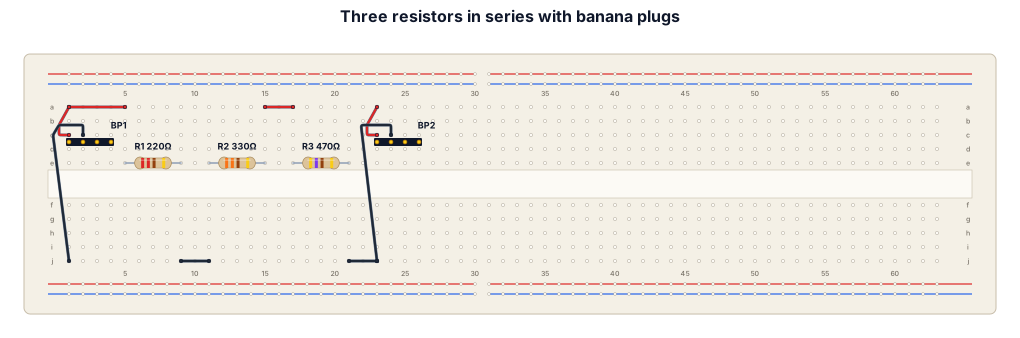
A breadboard wiring diagram for three resistors connected in series with large banana plug
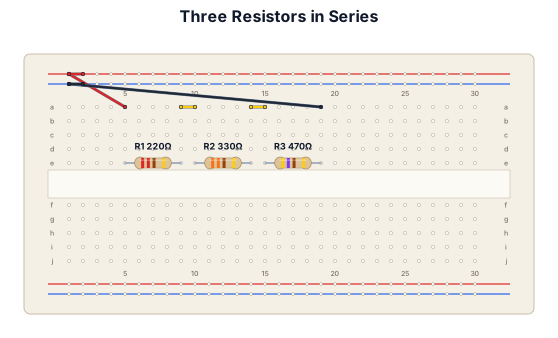
A breadboard wiring diagram for three resistors connected in series
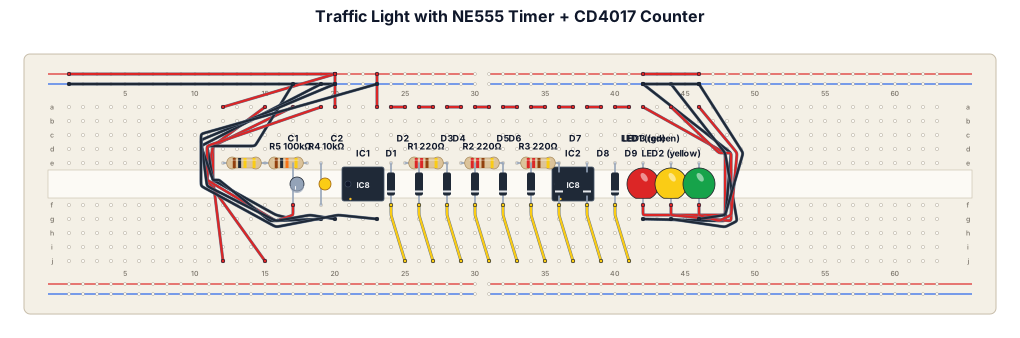
Generate breadboard connection of traffic light with timer with the components i have givenTRAFFIC LIGHT + TIMER PROJECT ICs: 1 × NE555 Timer IC 1 × CD4017 Decade Counter IC LEDs: 1 × Red LED 1 × Yellow LED 1 × Green LED Resistors: 3 × 220 Ω 1 × 10 kΩ 1 × 100 kΩ Capacitors: 1 × 10 µF 1 × 100 nF Diodes: 9 × 1N4148 Other: 1 × Breadboard Jumper wires 1 × 5–9 V DC power supply. Generate neat and proper breadboard connection
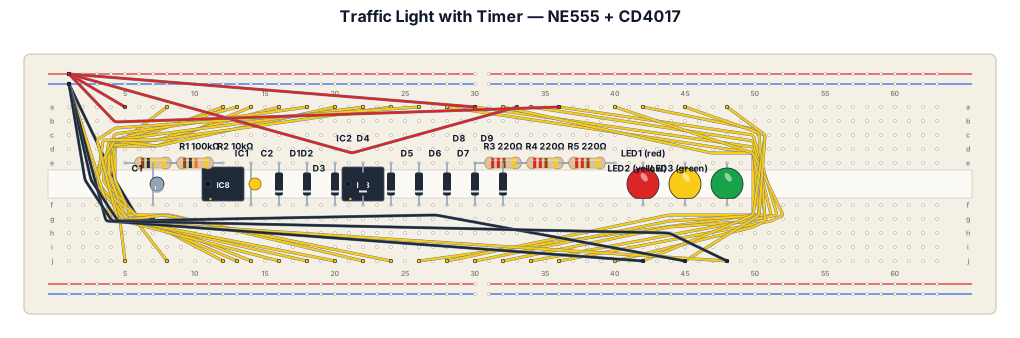
Generate breadboard connection of traffic light with timer with the components i have givenTRAFFIC LIGHT + TIMER PROJECT ICs: 1 × NE555 Timer IC 1 × CD4017 Decade Counter IC LEDs: 1 × Red LED 1 × Yellow LED 1 × Green LED Resistors: 3 × 220 Ω 1 × 10 kΩ 1 × 100 kΩ Capacitors: 1 × 10 µF 1 × 100 nF Diodes: 9 × 1N4148 Other: 1 × Breadboard Jumper wires 1 × 5–9 V DC power supply
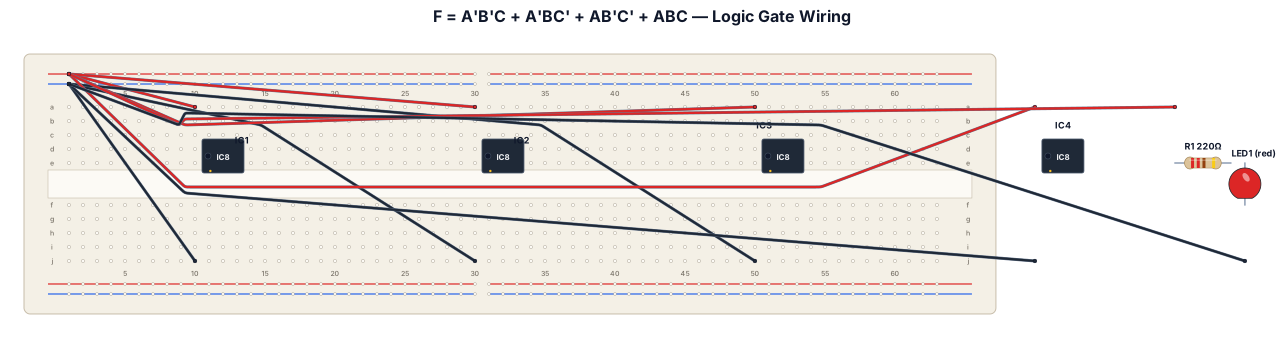
F = A'B'C + A'BC' + AB'C'+ ABC. Make a connections of breadboars for this logic gates. The Ic's are in order, NOT, AND, AND, OR with output LED