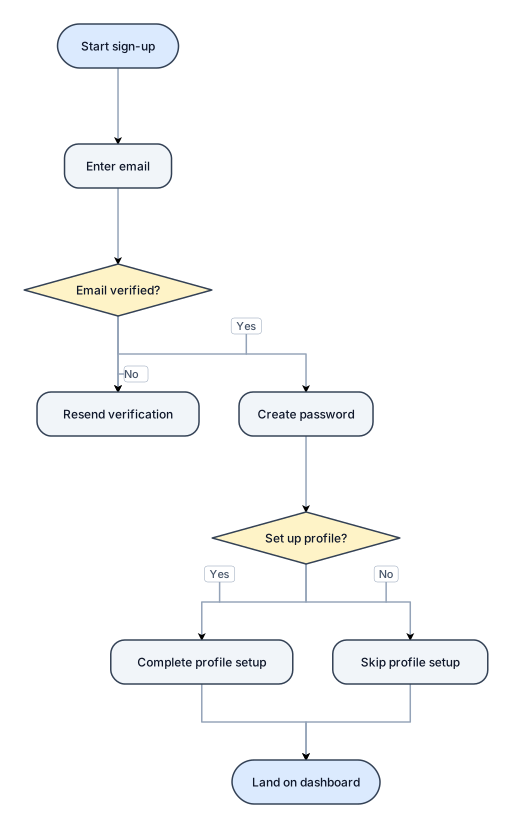
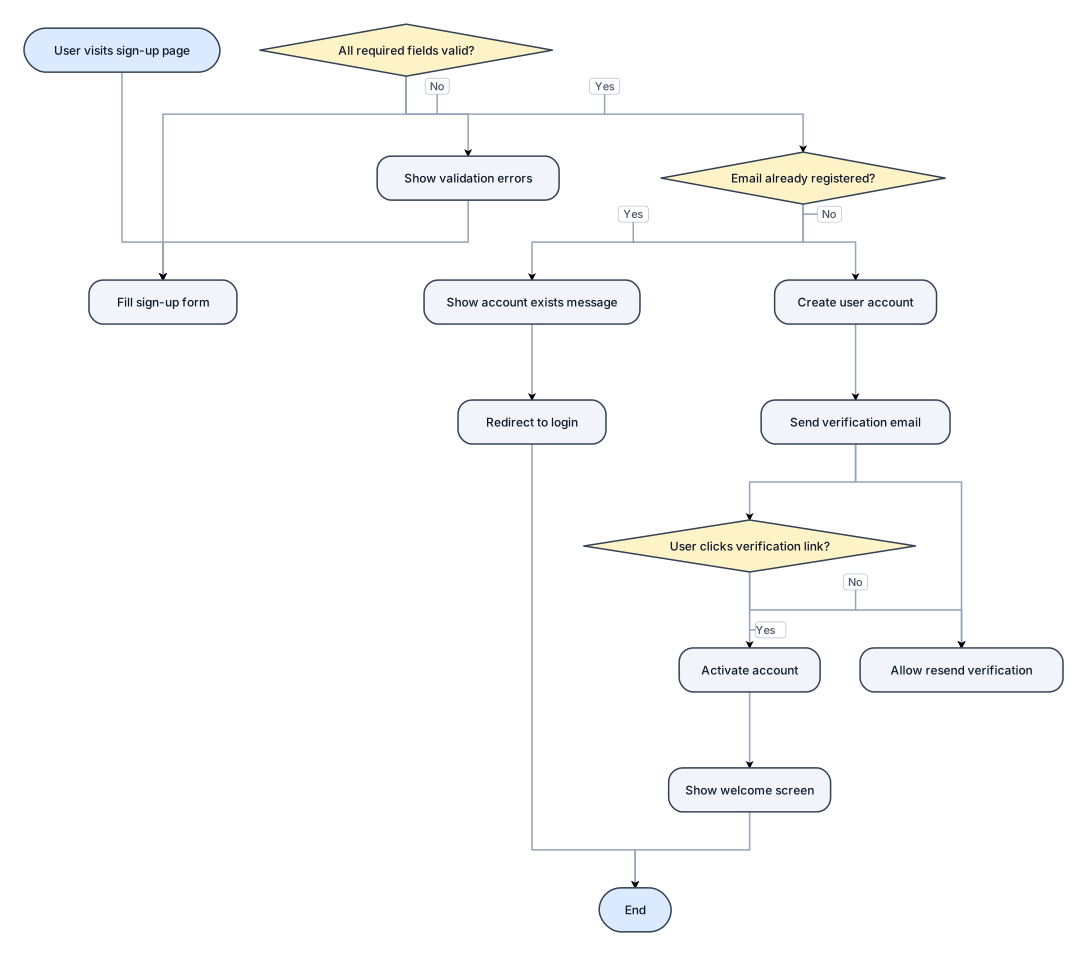
A flowchart for a user sign-up process: enter email, verify email, create password, optional profile setup, then land on the dashboard
NODE ARCHIVE · REAL DIAGRAM BRIEFS
Diagram Examples from Real Visitor Prompts
Browse eligible diagrams shared by FreeDiagram visitors, inspect the exact prompts, and build your own version.
Browse 3261 real creationsCOMMUNITY OUTPUTS · EXACT PROMPTS
Flowchart
Showing 1–24 of 85. No stock examples or system defaults. Choose a tool, study a real result, then reopen its prompt as your starting point.
![Flowchart example: flowchart TD A["Food-101 Dataset"] --> B["Select 10 Food Categories"] B --> C["Image Preprocessing"] C --> D["Data Augmentation"] D --> E["Train / Val](https://psvtykrtciekraoilfux.supabase.co/storage/v1/object/public/gallery-assets/freediagram/feed/55faef78-a251-49fd-94ff-6c443b9e18f2.svg)
flowchart TD A["Food-101 Dataset"] --> B["Select 10 Food Categories"] B --> C["Image Preprocessing"] C --> D["Data Augmentation"] D --> E["Train / Validation / Test Split"] E --> F["Pretrained ResNet-50"] F --> G["Transfer Learning"] G --> H["Fine-Tuning"] H --> I["Food Category Prediction"] I --> J["Model Evaluation"] J --> K["Accuracy, Precision, Recall, F1"] J --> L["Confusion Matrix and ROC Curve"]
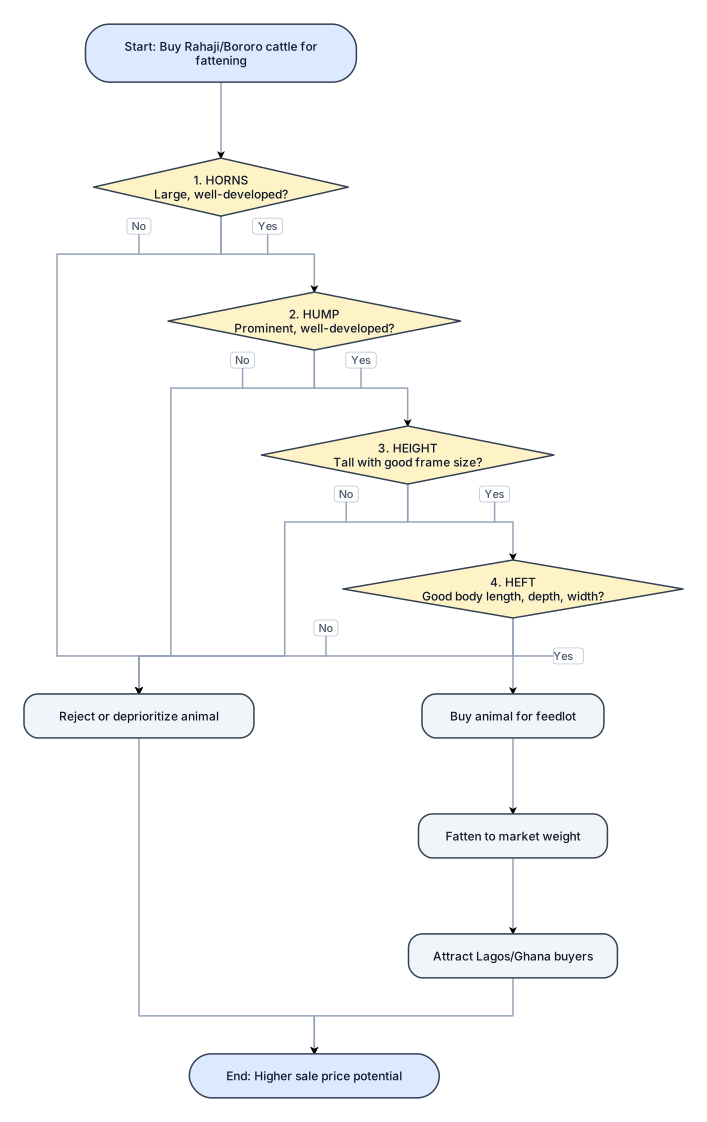
🐂 THE FOUR Hs TO LOOK OUT FOR WHEN BUYING RAHaji/BORORO CATTLE FOR FATTENING! 📢 Attention, Feedlot Operators and Cattle Fatteners in Lagos and Ghana! Do you know that when customers come to buy your fattened Rahaji/Bororo cattle, they look beyond the animal's weight? In the cattle markets of Lagos and Ghana, buyers can have very specific preferences. Horns, humps, height and overall body bulk can influence an animal's appeal and the price a buyer is willing to pay. If you want to buy cattle that will attract buyers after fattening, pay attention to these FOUR Hs! 🐂 1. HORNS Look for animals with large, well-developed horns. For buyers who value the traditional Rahaji/Bororo appearance, impressive horns can make an animal more attractive and desirable. 🐂 2. HUMP A prominent, well-developed hump is another feature many buyers appreciate. When selecting your animals, pay attention to the size and development of the hump. 🐂 3. HEIGHT Tall animals with good frame size can stand out in the market. Consider the animal's height and overall skeletal development when selecting cattle for your feedlot. 🐂 4. HEFT Heft refers to the animal's overall bulk, body capacity and muscular development. Look for cattle with good body length, depth and width, as well as the potential to develop substantial weight during fattening. 💡 THE SMART FEEDLOT OPERATOR KNOWS: Buying cattle for fattening is not just about finding animals at the right price. It is also about understanding what your target customers want to buy.
A flowchart for a user sign-up process: enter email, verify email,Draw a formal Data Flow Diagram Level 0 titled “Data Flow Diagram Level 0 of CSLM-IDE”. Use standard DFD notation: one central process bubble numbered 0, an external entity rectangle, and labelled arrows. External entity: Developer. Central process: CSLM-IDE. Show these data flows: - Developer → CSLM-IDE: Source Code, Language Selection, Conversion Request, File Commands. - CSLM-IDE → Developer: Converted Code, AI Assistance, Validation Messages, Execution Output. - CSLM-IDE ↔ Local File System: Open, Read, Save and Update Files. Keep the diagram simple and uncluttered. Use standard DFD conventions, a white background and readable labels. Do not include internal subprocesses at Level 0 or depict the AI model as a separate Level 0 process. Include only the data flows relevant to the proposed system. create password, optional profile setup, then land on the dashboard
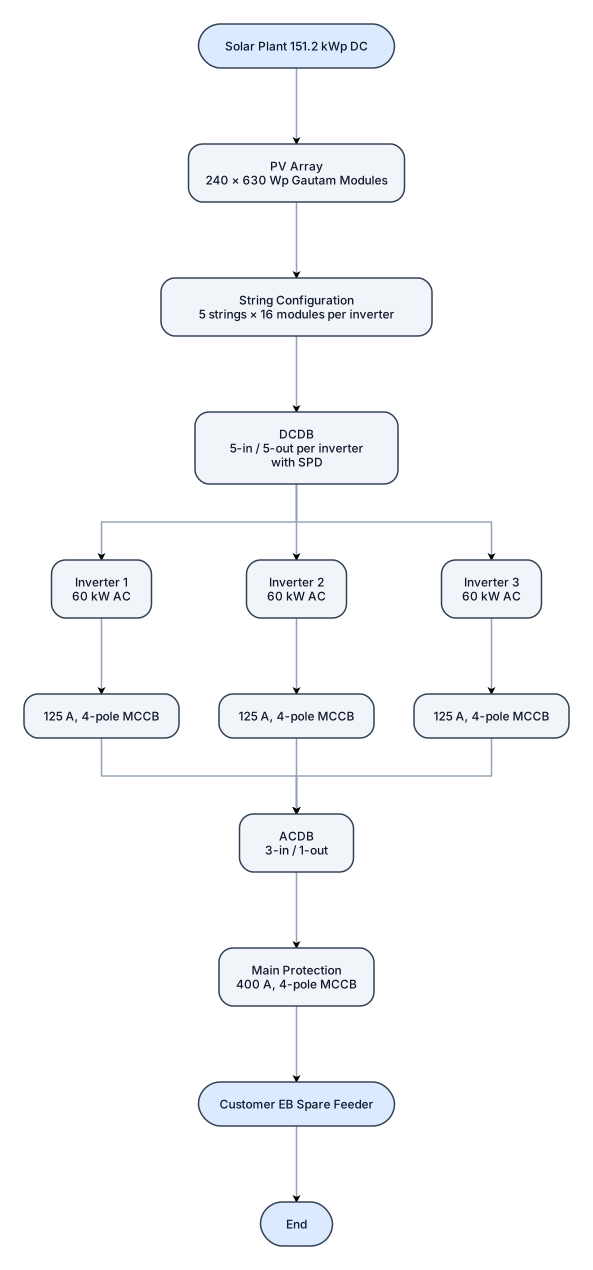
A flowchart for solaR PLANT PV capacity: 151.2 kWp DC Inverter capacity: 3 × 60 kW = 180 kW AC - make evvo PV modules: 240 × 630 Wp Gautam String configuration: 5 strings × 16 modules per inverter DCDB: 5-in / 5-out per inverter with spd ACDB: 3-in / 1-out Main protection: 400 A, 4-pole MCCB Inverter protection: 125 A, 4-pole MCCB per inverter Output: Customer EB spare feede
A flowchart for a user sign-up process: PV capacity: 151.2 kWp DC Inverter capacity: 3 × 60 kW = 180 kW AC - make evvo PV modules: 240 × 630 Wp Gautam String configuration: 5 strings × 16 modules per inverter DCDB: 5-in / 5-out per inverter with spd ACDB: 3-in / 1-out Main protection: 400 A, 4-pole MCCB Inverter protection: 125 A, 4-pole MCCB per inverter Output: Customer EB spare feede

Assemble parts, move to QC, pass move to shipping fail more to quarantine
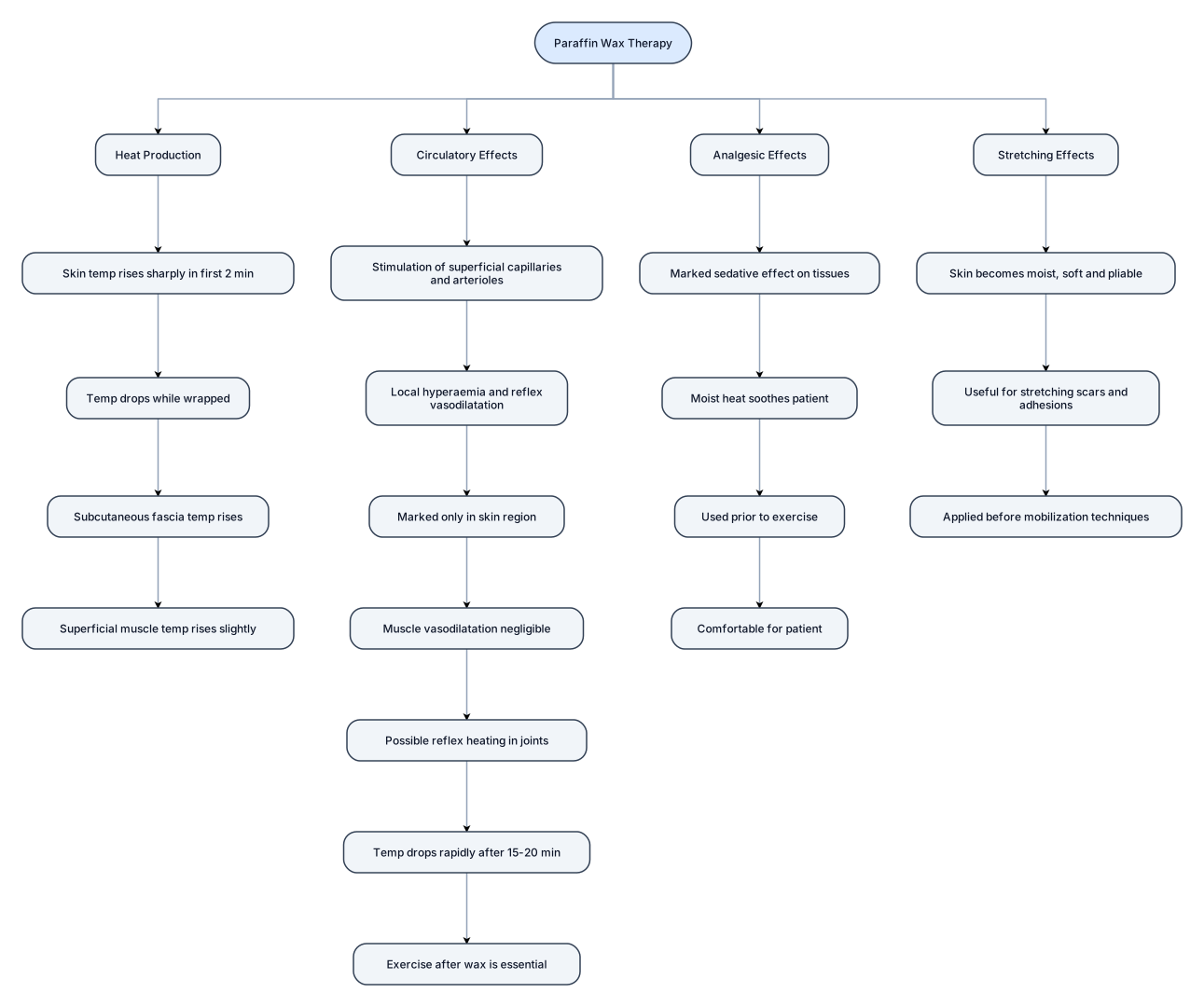
**PHYSIOLOGICAL RESPONSES TO PARAFFIN**\ **WAX THERAPY**\ **Heat Production: There is a marked increase in skin**\ **temperature in the first two minutes, upto 120—130C.**\ **This drops, while in the wax wrapping, to an increase**\ **of about 80C at the end of 30 minutes. [n the**\ **subcutaneous fascia, there is an increase of 50C at the**\ **end of the treatment. In the superficial muscles, there**\ **in only about 20—30C rise in temperature at the end of**\ **treatment.**\ **Circulatory Effects: Stimulation Of superficial**\ **apillaries and arterioles causes local hyperaemia and**\ **reflex vasodilatation. This is marked only in the region**\ **of the skin. The hyperaemia is due to the response of**\ **the skin to its function of heat regulation. The effects of**\ **vasodilatation in the muscles are negligible, but there**\ **may be some reflex heating in the joints. Skin and**\ **subcutaneous tissue temperature drops rapidly after**\ **15—20 min, reducing vasodilatation. Exercise after wax**\ **is essential to increase muscle circulation. and to use**\ **the sedative effect of heat to obtain more range of**\ **movement and muscle strength.**\ **Analgesic Effects: The most important effect of wax is**\ **its marked sedative effect on the tissues. The moist**\ **heat is remarkably soothing to the patient. It is this**\ **effect that is used prior to exercise, in the treatment of**\ **superficially placed joints. It is very comfortable for the**\ **patient.**\ **Stretching Effects: Wax leaves the skin moist, soft and**\ **pliable. •IhiS is useful for stretching scars and**\ **adhesions before applying mobilization techniques. ispe flowchart banado image ek achi si**
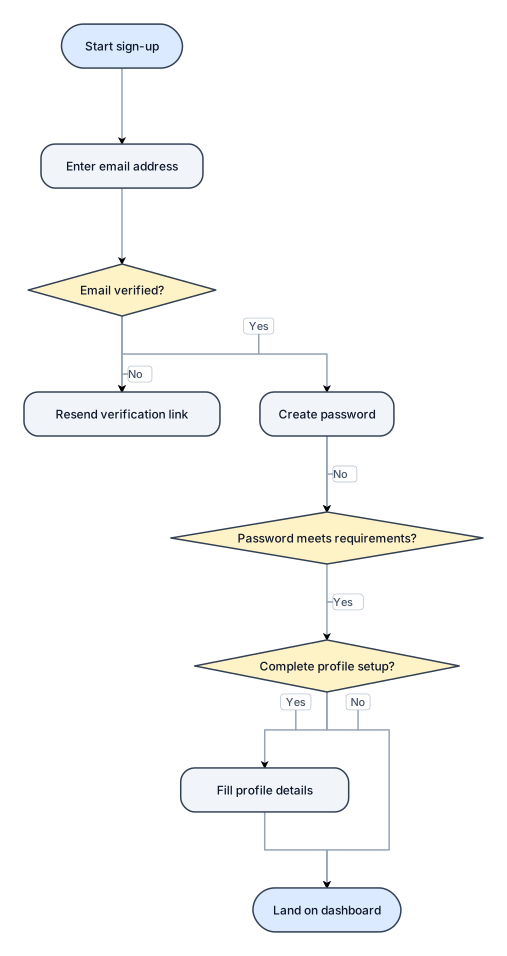
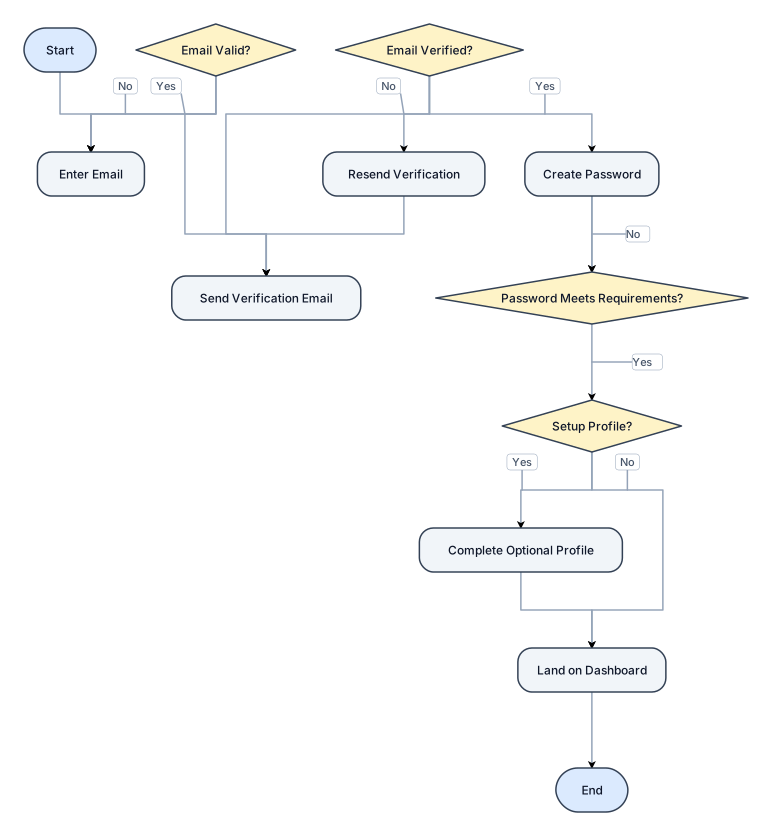
A flowchart for a user sign-up process: enter email, verify email, create password, optional profile setup, then land on the dashboard
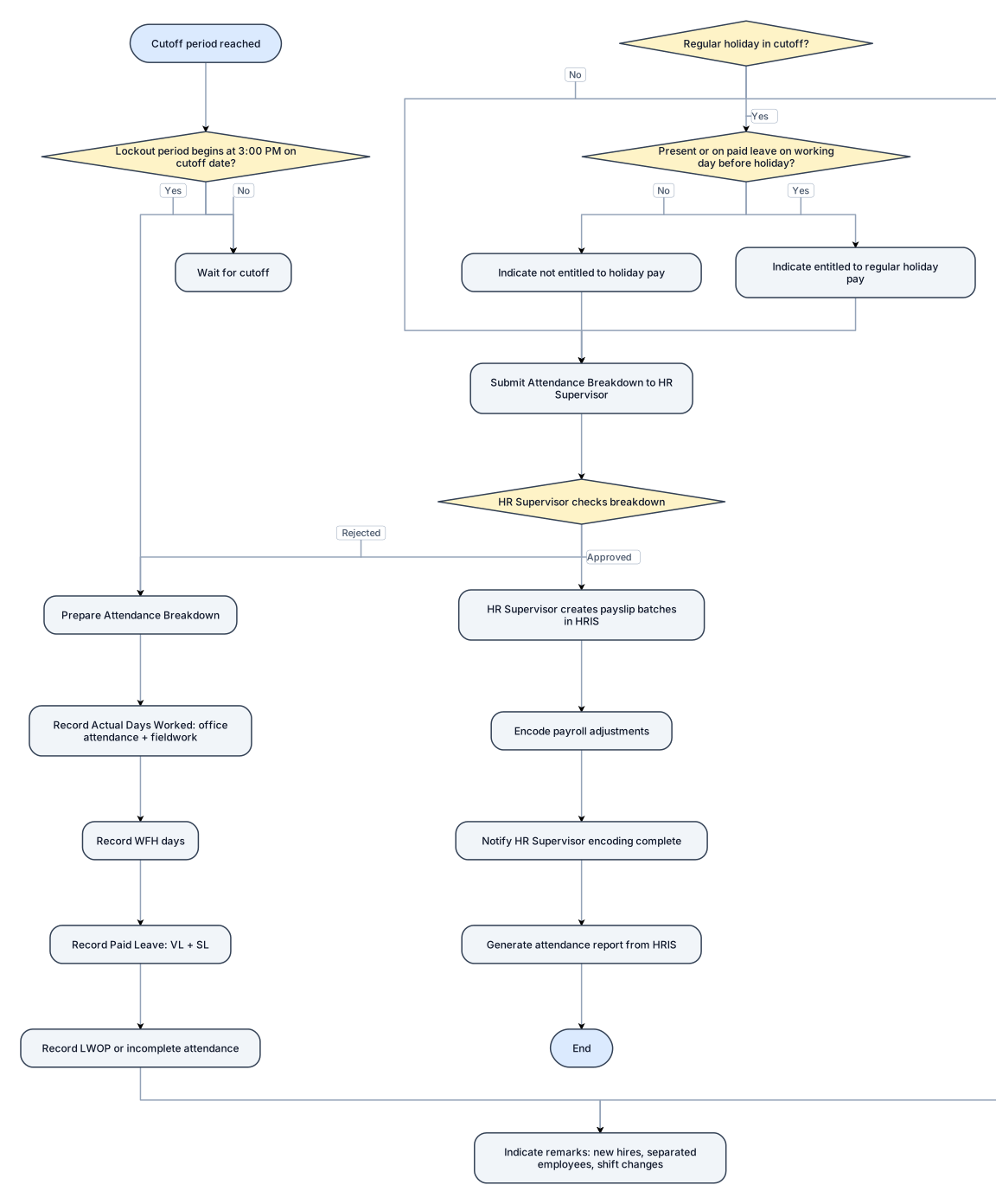
A flowchart for timekeeping process Timekeeping for Rank & File Employees 1. Cutoff Period: The timekeeping cutoff is twice a month. 2. Lockout Period: The approval lockout period begins at 3:00 PM on the day the cutoff date. 3. Prepare Attendance Breakdown: Prepare a summary of actual days worked, WFH, paid leave, and leave without pay (LWOP) based on data from HRIS. • Actual Days Worked: Record the total days of office attendance and fieldwork. • WFH: Record the total number of work-from-home days. • Paid Leave: Record the total days of vacation leave (VL) and sick leave (SL). • LWOP: Record the total days of leave without pay or incomplete attendance. • Remarks: Indicate any new hires, separated employees, or changes in shift schedules. • Regular Holiday: If the cutoff includes a regular holiday, indicate whether the employee is entitled to holiday pay. Note: Employees who are present or on paid leave on the working day immediately preceding a regular holiday are entitled to regular holiday pay. 4. Submit for Checking: Submit the Attendance Breakdown to the HR Supervisor for checking. 5. Create Payslip Batches: The HR Supervisor creates the payslip batches in HRIS. 6. Encode Payroll Adjustments: Once the payslip batches have been created, encode the payroll adjustments. Notify the HR Supervisor once encoding is complete. 7. Generate Attendance Report: Generate the attendance report from HRIS.
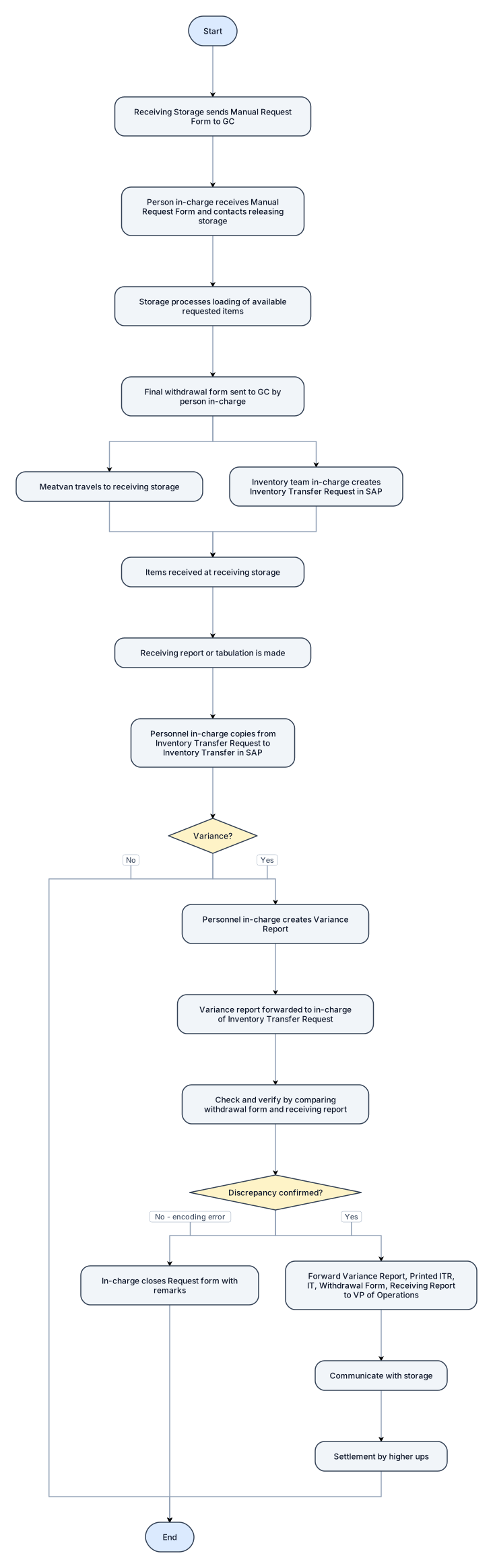
Make me Process Flow: Inventory Transfer (Storage to Tulip Commissary) 1: Receiving Storage will send a Manual Request Form to the appropriate GC. 2: Person in-charge will receive the Manual Request Form and will contact the releasing storage to process the request. 3: Storage will now process the loading of available requested items. 4: Final withdrawal form from the releasing storage will be sent to the GC by the person in charge in the storage. 5: Simultaneously, the meatvan will now travel to the receiving storage and the inventory team in-charge will create Inventory Transfer Request in the SAP. 6: When Items are received in the receiving storage, a receiving report or tabulation is made. 7: The personnel in-charge will now "copy from" the Inventory Transfer Request to Inventory Transfer in SAP. 8: If there's no variance, the process ends. If there's a variance, a variance report will be created by the personnel incharge of the Inventory Transfer. 9: The Variance report will be forwarded to the in charge of the Inventory Transfer Request. 10: A checking and verification will be made by comparing the withdrawal form and receiving report. If variance is confirmed to be encoding error and no actual variance is found, incharge of Inventory Transfer Request will close the Request form with remarks. If discrepancy is confirmed, the in charge will forward the Variance report to the VP of operation, with the Printed Inventory Transfer Request, Inventory Transfer, Withdrawal form, Receiving report to be communicated with the storage. 11: Settlement will be done by them, the higher ups
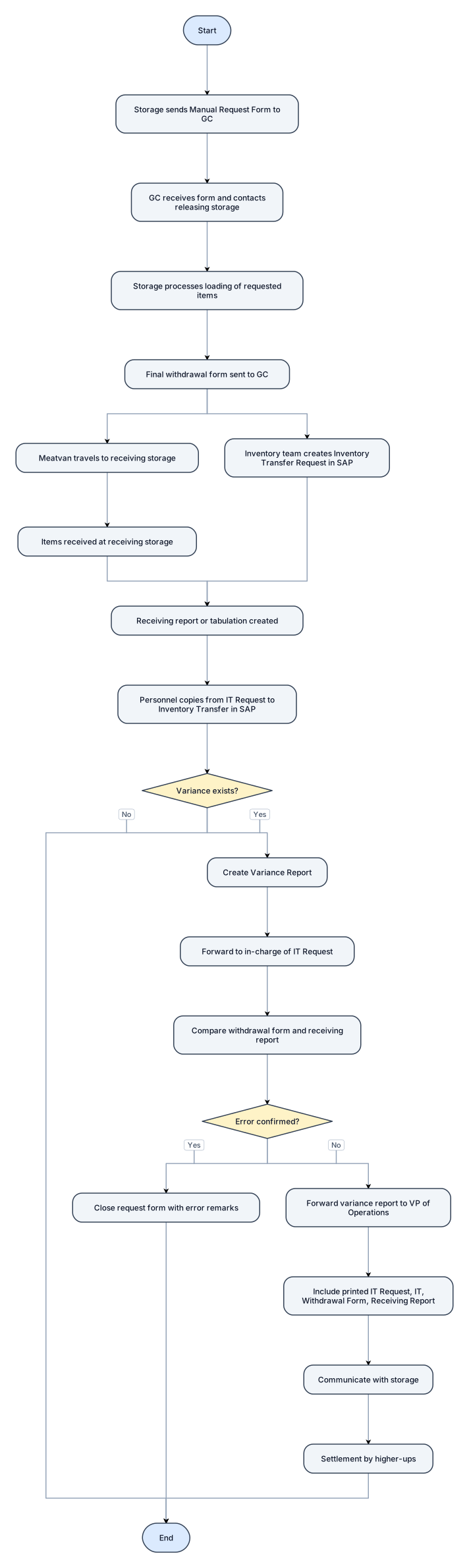
Make me Process Flow: Inventory Transfer (Storage to Tulip Commissary) 1: Receiving Storage will send a Manual Request Form to the appropriate GC. 2: Person in-charge will receive the Manual Request Form and will contact the releasing storage to process the request. 3: Storage will now process the loading of available requested items. 4: Final withdrawal form from the releasing storage will be sent to the GC by the person in charge in the storage. 5: Simultaneously, the meatvan will now travel to the receiving storage and the inventory team in-charge will create Inventory Transfer Request in the SAP. 6: When Items are received in the receiving storage, a receiving report or tabulation is made. 7: The personnel in-charge will now "copy from" the Inventory Transfer Request to Inventory Transfer in SAP. 8: If there's no variance, the process ends. If there's a variance, a variance report will be created by the personnel incharge of the Inventory Transfer. 9: The Variance report will be forwarded to the in charge of the Inventory Transfer Request. 10: A checking and verification will be made by comparing the withdrawal form and receiving report. If error is confirm, incharge of Inventory Transfer Request will close the Request form with the error remarks. If discrepancy is confirmed, the in charge will forward the Variance report to the VP of operation, with the Printed Inventory Transfer Request, Inventory Transfer, Withdrawal form, Receiving report to be communicated with the storage. 11: Settlement will be done by them, the higher ups
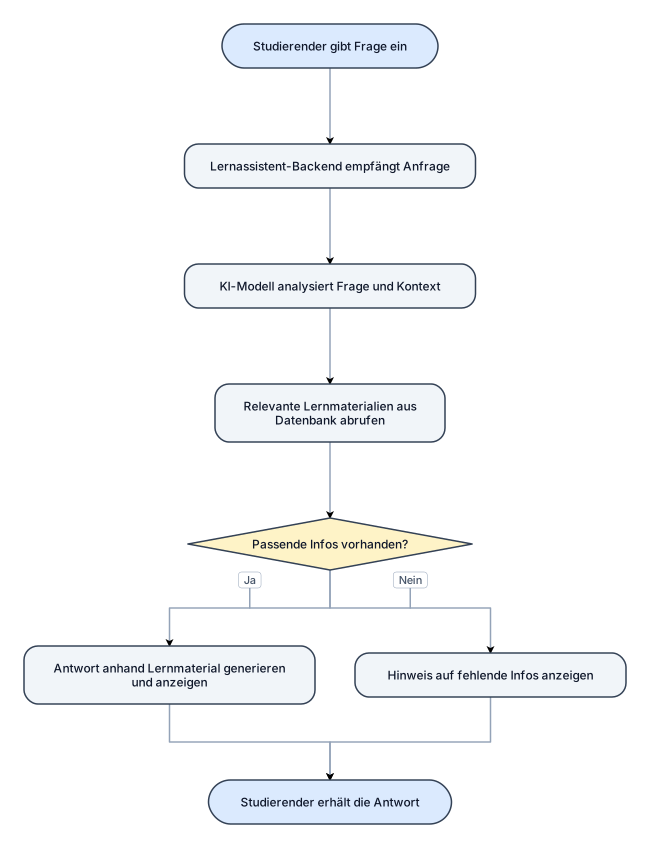
start: der student gibt eine Frage ein. der lern assisstent backend empfängt die Anfrage, KI-Modell analysiert Frage und Kontext,Relevante Lernmaterialien aus der Datenbank abrufen,passende infos vorhanden? ja ; Antwort anhand Lernmaterial generieren und anzeigen, nein ;Hinweis auf fehlende Infos anzeigen, ende : Studierender erhält die Antwort
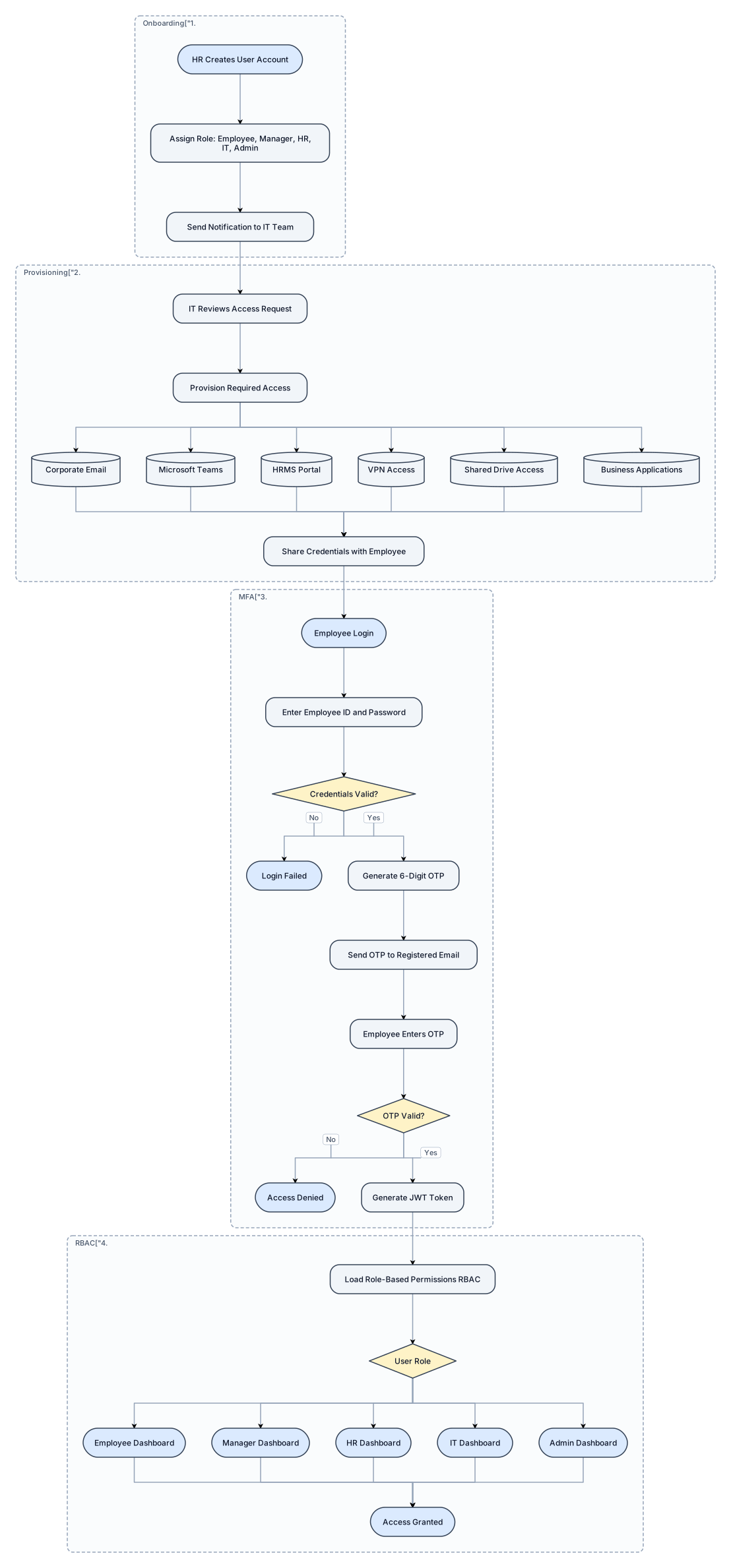
Create a professional enterprise HRMS workflow flowchart with modern software architecture style. Start Process: HR Creates User Account Then: Assign Role (Employee, Manager, HR, IT, Admin) Then: Send Notification to IT Team Then: IT Reviews Access Request Then: Provision Required Access: - Corporate Email - Microsoft Teams - HRMS Portal - VPN Access - Shared Drive Access - Business Applications Then: Share Credentials with Employee Then: Employee Login Then: Enter Employee ID and Password Decision: Credentials Valid? If No: Login Failed If Yes: Generate 6-Digit OTP Then: Send OTP to Registered Email Then: Employee Enters OTP Decision: OTP Valid? If No: Access Denied If Yes: Generate JWT Token Then: Load Role-Based Permissions (RBAC) Decision: User Role Route to: - Employee Dashboard - Manager Dashboard - HR Dashboard - IT Dashboard - Admin Dashboard End: Access Granted i want to digram in one page and proper size and proper way Design Requirements: - Professional enterprise architecture diagram - Clear decision diamonds - Rounded process boxes - Group sections: 1. User Onboarding 2. IT Provisioning 3. MFA Authentication 4. Role-Based Access Control (RBAC) - High-quality presentation style - Suitable for management and stakeholder review - Include icons for HR, IT, Email, Teams, MFA, JWT, and Dashboards

Create a professional enterprise HRMS workflow flowchart with modern software architecture style. Start Process: HR Creates User Account Then: Assign Role (Employee, Manager, HR, IT, Admin) Then: Send Notification to IT Team Then: IT Reviews Access Request Then: Provision Required Access: - Corporate Email - Microsoft Teams - HRMS Portal - VPN Access - Shared Drive Access - Business Applications Then: Share Credentials with Employee Then: Employee Login Then: Enter Employee ID and Password Decision: Credentials Valid? If No: Login Failed If Yes: Generate 6-Digit OTP Then: Send OTP to Registered Email Then: Employee Enters OTP Decision: OTP Valid? If No: Access Denied If Yes: Generate JWT Token Then: Load Role-Based Permissions (RBAC) Decision: User Role Route to: - Employee Dashboard - Manager Dashboard - HR Dashboard - IT Dashboard - Admin Dashboard End: Access Granted i want to digram in one page and proper size and proper way Design Requirements: - Professional enterprise architecture diagram - Blue and white corporate theme - Clear decision diamonds - Rounded process boxes - Left-to-right layout - Group sections: 1. User Onboarding 2. IT Provisioning 3. MFA Authentication 4. Role-Based Access Control (RBAC) - High-quality presentation style - Suitable for management and stakeholder review - Include icons for HR, IT, Email, Teams, MFA, JWT, and Dashboards
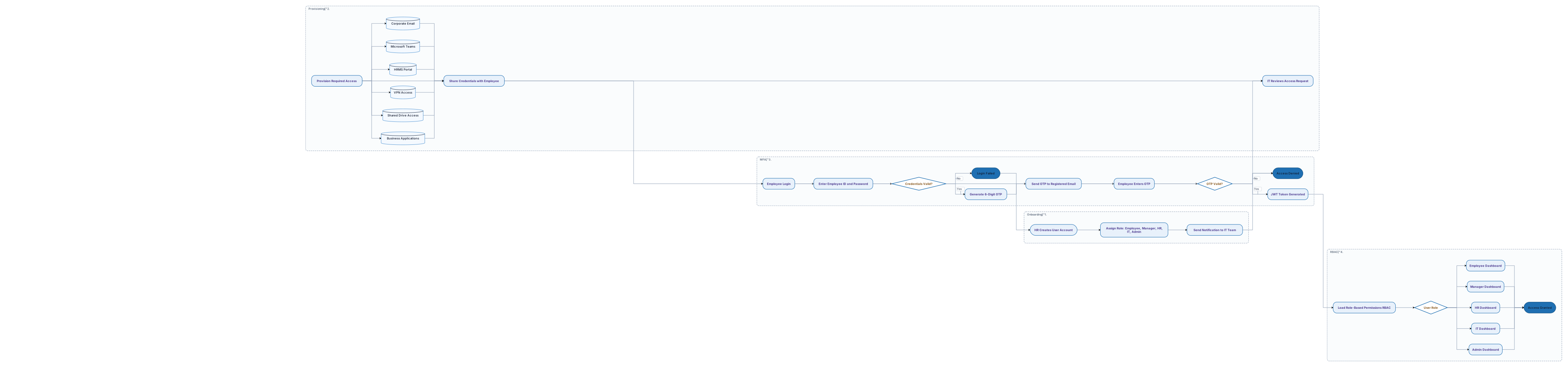
Create a professional enterprise HRMS workflow flowchart with modern software architecture style. Start Process: HR Creates User Account Then: Assign Role (Employee, Manager, HR, IT, Admin) Then: Send Notification to IT Team Then: IT Reviews Access Request Then: Provision Required Access: - Corporate Email - Microsoft Teams - HRMS Portal - VPN Access - Shared Drive Access - Business Applications Then: Share Credentials with Employee Then: Employee Login Then: Enter Employee ID and Password Decision: Credentials Valid? If No: Login Failed If Yes: Generate 6-Digit OTP Then: Send OTP to Registered Email Then: Employee Enters OTP Decision: OTP Valid? If No: Access Denied If Yes: Generate JWT Token Then: Load Role-Based Permissions (RBAC) Decision: User Role Route to: - Employee Dashboard - Manager Dashboard - HR Dashboard - IT Dashboard - Admin Dashboard End: Access Granted Design Requirements: - Professional enterprise architecture diagram - Blue and white corporate theme - Clear decision diamonds - Rounded process boxes - Left-to-right layout - Group sections: 1. User Onboarding 2. IT Provisioning 3. MFA Authentication 4. Role-Based Access Control (RBAC) - High-quality presentation style - Suitable for management and stakeholder review - Include icons for HR, IT, Email, Teams, MFA, JWT, and Dashboards
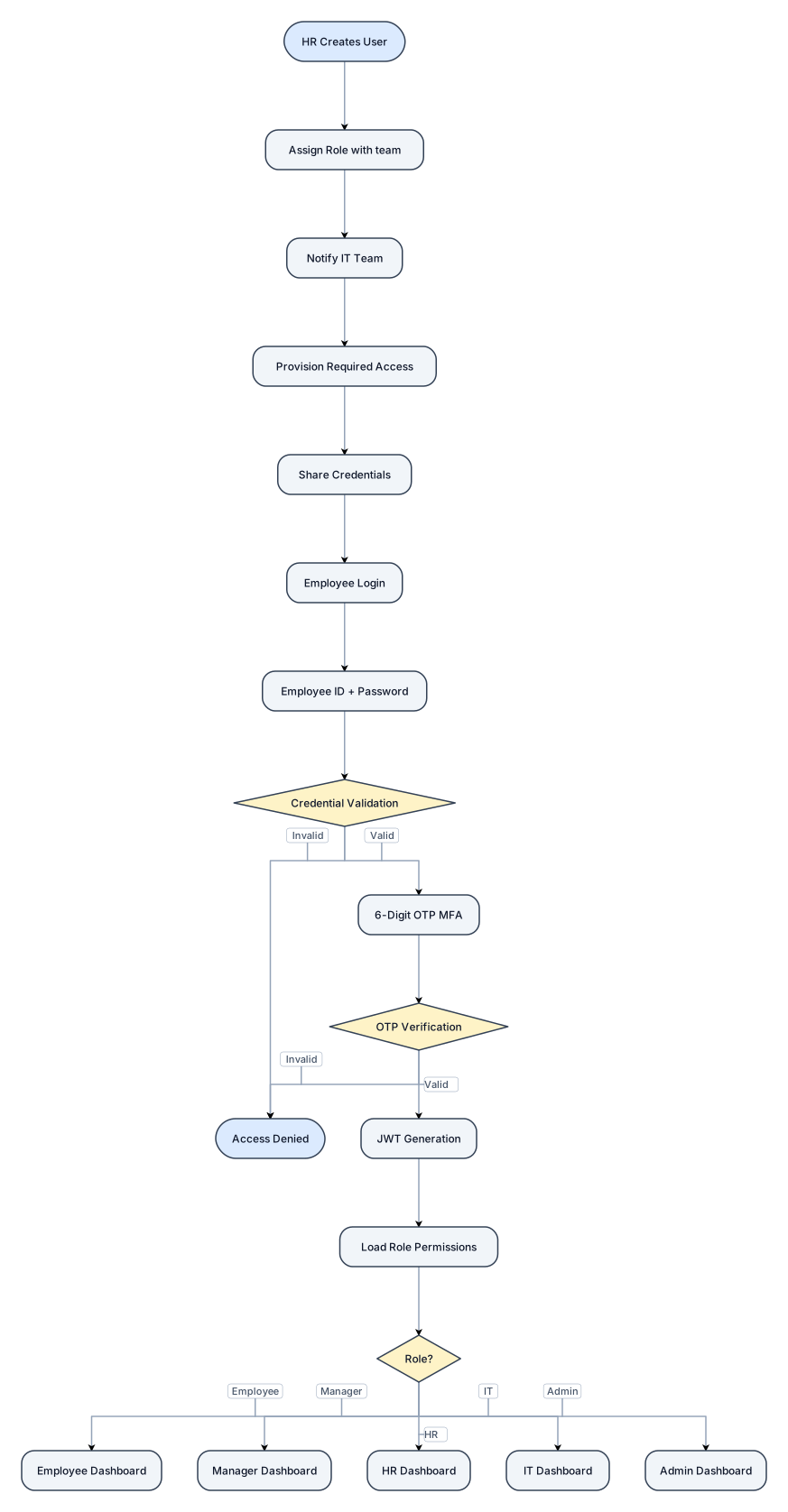
HR Creates User ↓ Assign Role with team ↓ Notify IT Team ↓ Provision Required Access ↓ Share Credentials ↓ Employee Login ↓ Employee ID + Password ↓ Credential Validation ↓ 6-Digit OTP (MFA) ↓ OTP Verification ↓ JWT Generation ↓ Load Role Permissions ↓ Employee / Manager / HR / IT / Admin Dashboard
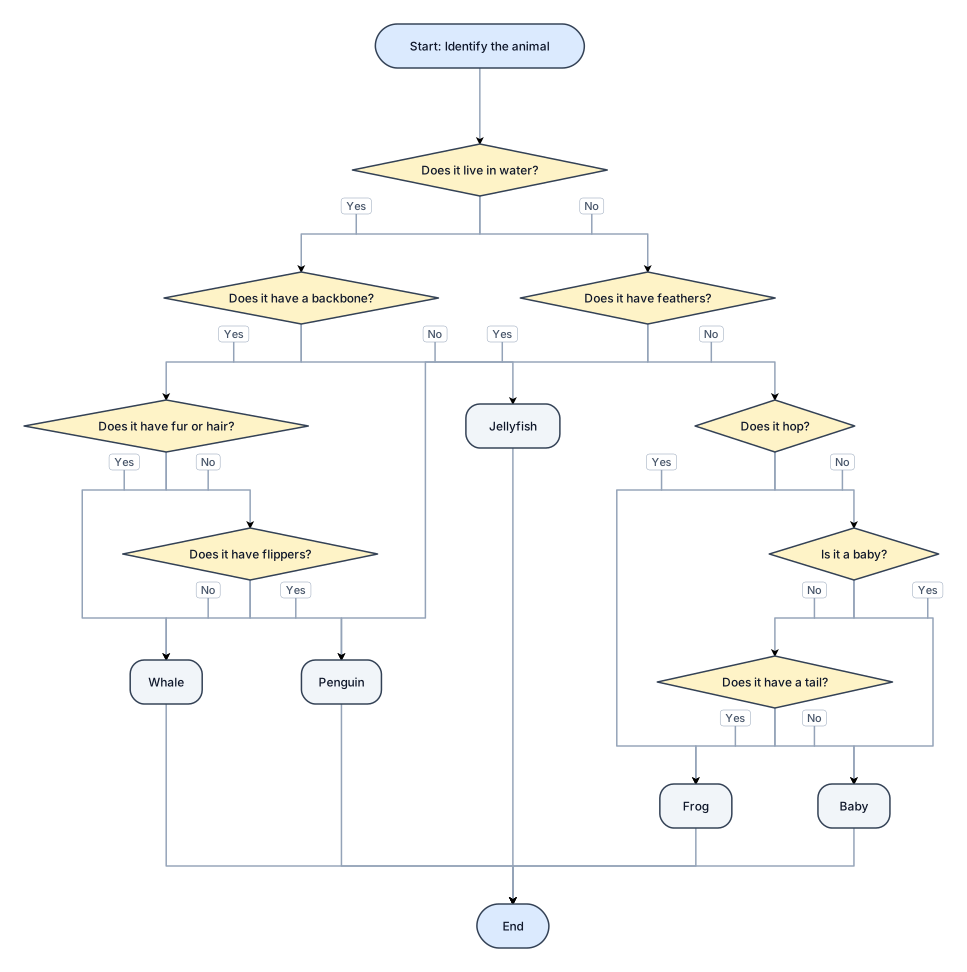
dichotomous followchart but with whale,frogs,baby,penguin,jellyfish, chanhe questions please
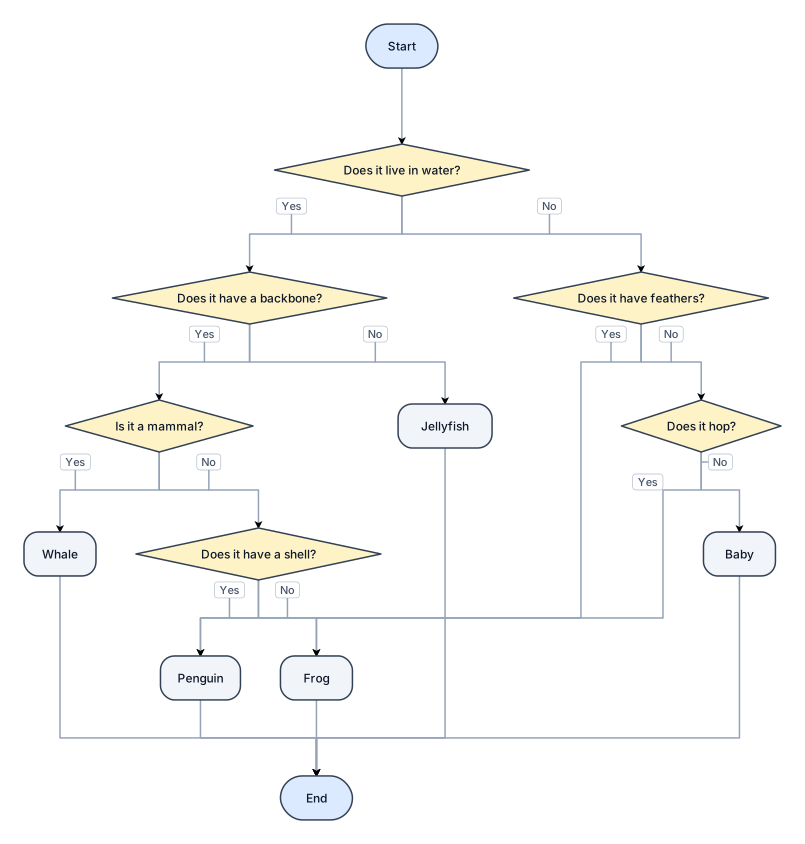
dichotomous followchart but with whale,frogs,baby,penguin,jellyfish,

flowchart with, frogs,whale,jellyfish,penguin,baby for science noo
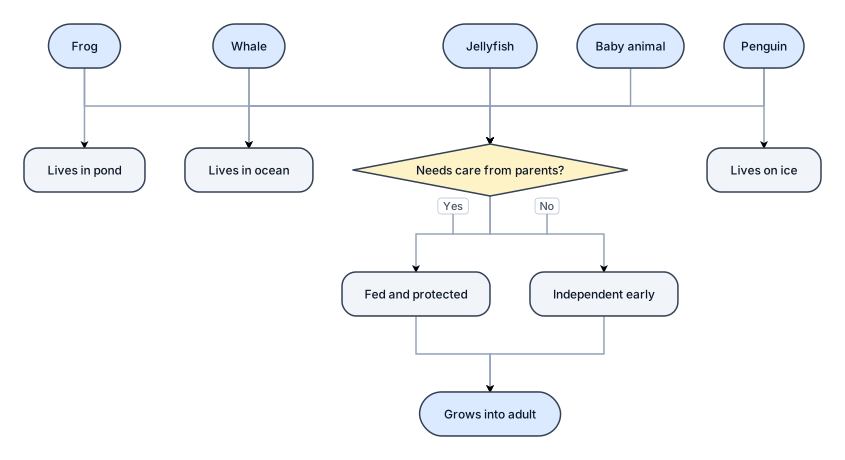
flowchart with, frogs,whale,jellyfish,penguin,baby for science

A content-approval workflow: draft, review, revise, approve, publish1. CONSTRUCCIÓN DE CASA DE 1 PISO (Resp: Ing. Residente) 1.1 CIMENTACIÓN Y OBRAS PRELIMINARES (Resp: Maestro Mayor de Obra) 1.1.1 Limpieza y Replanteo (Resp: Topógrafo) 1.1.2 Excavación de Zanjas (Resp: Operador Maquinaria) 1.1.3 Vaciado de Concreto (Resp: Albañiles) 1.2 ESTRUCTURA Y ALBAÑILERÍA (Resp: Maestro Albañil) 1.2.1 Paredes y Muros (Resp: Albañiles) 1.2.2 Columnas y Vigas (Resp: Fierreros) 1.2.3 Techado de la Cubierta (Resp: Técnico Techador) 1.3 INSTALACIONES TÉCNICAS M.E.P. (Resp: Supervisor de Instalaciones) 1.3.1 Red de Plomería (Resp: Maestro Plomero) 1.3.2 Red Eléctrica (Resp: Técnico Electricista) 1.4 ACABADOS Y ENTREGA FINAL (Resp: Supervisor de Acabados) 1.4.1 Friso y Pintura (Resp: Pintor) 1.4.2 Colocación de Pisos (Resp: Ceramista) 1.4.3 Limpieza e Inspección (Resp: Capataz)

CONSTRUCCIÓN DE CASA DE 1 PISO (Resp: Ing. Residente) 1.1 CIMENTACIÓN Y OBRAS PRELIMINARES (Resp: Maestro Mayor de Obra) 1.1.1 Limpieza y Replanteo (Resp: Topógrafo) 1.1.2 Excavación de Zanjas (Resp: Operador Maquinaria) 1.1.3 Vaciado de Concreto (Resp: Albañiles) 1.2 ESTRUCTURA Y ALBAÑILERÍA (Resp: Maestro Albañil) 1.2.1 Paredes y Muros (Resp: Albañiles) 1.2.2 Columnas y Vigas (Resp: Fierreros) 1.2.3 Techado de la Cubierta (Resp: Técnico Techador) 1.3 INSTALACIONES TÉCNICAS M.E.P. (Resp: Supervisor de Instalaciones) 1.3.1 Red de Plomería (Resp: Maestro Plomero) 1.3.2 Red Eléctrica (Resp: Técnico Electricista) 1.4 ACABADOS Y ENTREGA FINAL (Resp: Supervisor de Acabados) 1.4.1 Friso y Pintura (Resp: Pintor) 1.4.2 Colocación de Pisos (Resp: Ceramista) 1.4.3 Limpieza e Inspección (Resp: Capataz)

A flowchart for a user sign-up process: enter email, verify email, create password, optional profile setup, then land on the dashboard1. CONSTRUCCIÓN DE CASA DE 1 PISO (Resp: Ing. Residente) 1.1 CIMENTACIÓN Y OBRAS PRELIMINARES (Resp: Maestro Mayor de Obra) 1.1.1 Limpieza y Replanteo (Resp: Topógrafo) 1.1.2 Excavación de Zanjas (Resp: Operador Maquinaria) 1.1.3 Vaciado de Concreto (Resp: Albañiles) 1.2 ESTRUCTURA Y ALBAÑILERÍA (Resp: Maestro Albañil) 1.2.1 Paredes y Muros (Resp: Albañiles) 1.2.2 Columnas y Vigas (Resp: Fierreros) 1.2.3 Techado de la Cubierta (Resp: Técnico Techador) 1.3 INSTALACIONES TÉCNICAS M.E.P. (Resp: Supervisor de Instalaciones) 1.3.1 Red de Plomería (Resp: Maestro Plomero) 1.3.2 Red Eléctrica (Resp: Técnico Electricista) 1.4 ACABADOS Y ENTREGA FINAL (Resp: Supervisor de Acabados) 1.4.1 Friso y Pintura (Resp: Pintor) 1.4.2 Colocación de Pisos (Resp: Ceramista) 1.4.3 Limpieza e Inspección (Resp: Capataz)