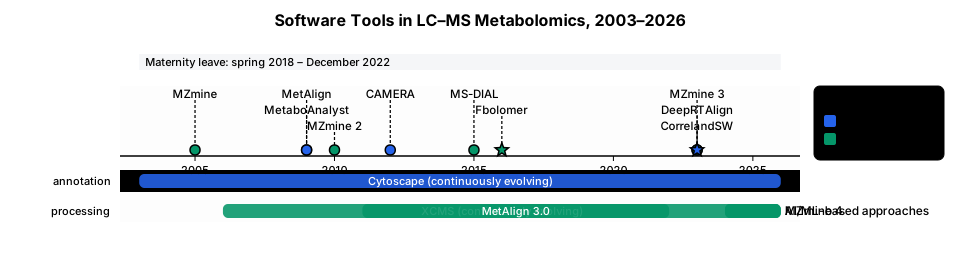
A clean, elegant scientific timeline of the main software tools used in LC–MS metabolomics, from 2003 to 2026.Clearly highlight that I was on maternity leave from spring 2018 to December 2022. Include two main groups: 1. Data processing & alignment: MZmine (2005) → MZmine 2 (2010) → MZmine 3 (2023) → MZmine 4 (2024+) → XCMS (2006, continuously evolving) → MetAlign (2009) → MetAlign 3.0 (2011/12 completed 2022) → MS-DIAL (2015) → Fbolomer (2016–2018) → DeepRTAlign (2023) → recent AI/ML-based approaches. 2. Annotation, relationships & visualisation: Cytoscape (from2003, continuously evolving) → MetaboAnalyst (2009) → CAMERA (2012) → CorrelandSW (development 2023–2026). Fbolomer development was completed in spring 2018, while CorrelandSW development began in 2023 and was completed in spring 2026. Use British English, a horizontal timeline, clean academic/publication-quality design, minimal decoration and clearly distinguish the different functional groups. Highlight Fbolomer and CorrelandSW as my research milestones.
Diagram Examples from Real Visitor Prompts
Browse eligible diagrams shared by FreeDiagram visitors, inspect the exact prompts, and build your own version.
Browse 3343 real creationsAll visitor creations
Showing 3193–3216 of 3343. No stock examples or system defaults. Choose a tool, study a real result, then reopen its prompt as your starting point.
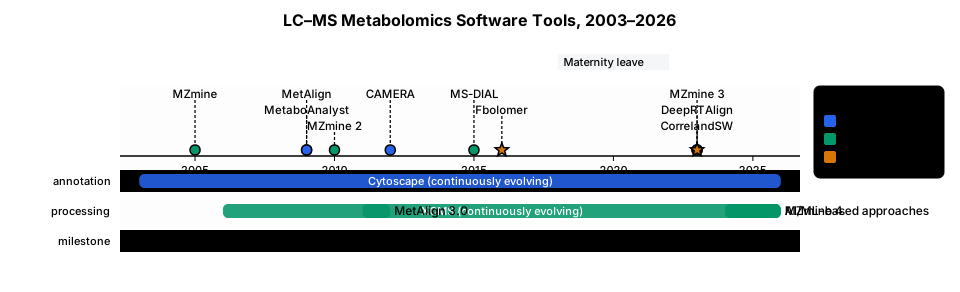
A clean, elegant scientific timeline of the main software tools used in LC–MS metabolomics, from 2003 to 2026. Include two main groups: 1. Data processing & alignment: MZmine (2005) → MZmine 2 (2010) → MZmine 3 (2023) → MZmine 4 (2024+) → XCMS (2006, continuously evolving) → MetAlign (2009) → MetAlign 3.0 (2011/12) → MS-DIAL (2015) → Fbolomer (2016–2018) → DeepRTAlign (2023) → recent AI/ML-based approaches. 2. Annotation, relationships & visualisation: Cytoscape (from2003, continuously evolving) → MetaboAnalyst (2009) → CAMERA (2012) → CorrelandSW (development 2023–2026). Clearly highlight that I was on maternity leave from spring 2018 to December 2022: Fbolomer development was completed in spring 2018, while CorrelandSW development began in 2023 and was completed in spring 2026. Use British English, a horizontal timeline, clean academic/publication-quality design, minimal decoration and clearly distinguish the different functional groups. Highlight Fbolomer and CorrelandSW as my research milestones.
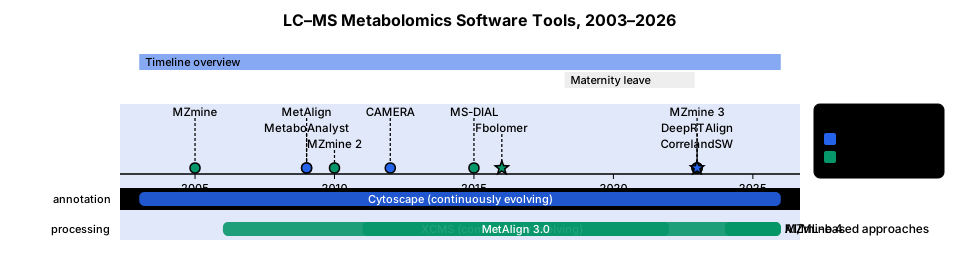
A clean, elegant scientific timeline of the main software tools used in LC–MS metabolomics, from 2003 to 2026. Include two main groups: 1. Data processing & alignment: MZmine (2005) → MZmine 2 (2010) → MZmine 3 (2023) → MZmine 4 (2024+) → XCMS (2006, continuously evolving) → MetAlign (2009) → MetAlign 3.0 (from 2011/12-finished 2022) → MS-DIAL (2015) → Fbolomer (2016–2018) → DeepRTAlign (2023) → recent AI/ML-based approaches. 2. Annotation, relationships & visualisation: Cytoscape (from2003, continuously evolving) → MetaboAnalyst (2009) → CAMERA (2012) → CorrelandSW (development 2023–2026). Clearly highlight that I was on maternity leave from spring 2018 to December 2022: Fbolomer development was completed in spring 2018, while CorrelandSW development began in 2023 and was completed in spring 2026. Use British English, a horizontal timeline, clean academic/publication-quality design, minimal decoration and clearly distinguish the different functional groups. Highlight Fbolomer and CorrelandSW as my research milestones.
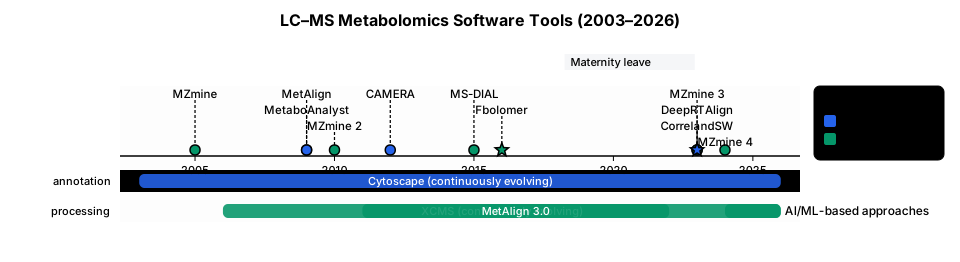
A clean, elegant scientific timeline of the main software tools used in LC–MS metabolomics, from 2003 to 2026. Include two main groups: 1. Data processing & alignment: MZmine (2005) → MZmine 2 (2010) → MZmine 3 (2023) → MZmine 4 (2024+) → XCMS (2006, continuously evolving) → MetAlign (2009) → MetAlign 3.0 (2011/12-finished 2022) → MS-DIAL (2015) → Fbolomer (2016–2018) → DeepRTAlign (2023) → recent AI/ML-based approaches. 2. Annotation, relationships & visualisation: Cytoscape (from2003, continuously evolving) → MetaboAnalyst (2009) → CAMERA (2012) → CorrelandSW (development 2023–2026). Clearly highlight that I was on maternity leave from spring 2018 to December 2022: Fbolomer development was completed in spring 2018, while CorrelandSW development began in 2023 and was completed in spring 2026. Use British English, a horizontal timeline, clean academic/publication-quality design, minimal decoration and clearly distinguish the different functional groups. Highlight Fbolomer and CorrelandSW as my research milestones.
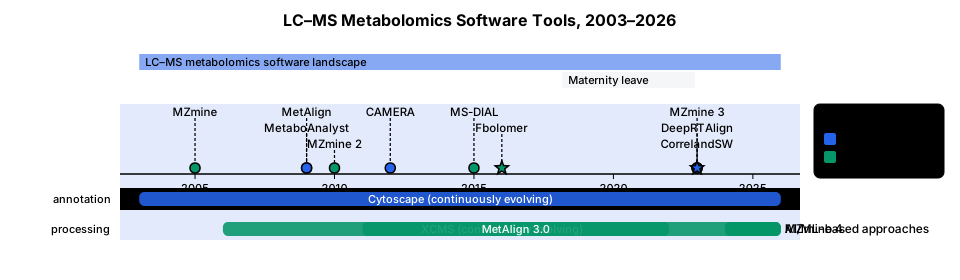
A clean, elegant scientific timeline of the main software tools used in LC–MS metabolomics, from 2003 to 2026. Include two main groups: 1. Data processing & alignment: MZmine (2005) → MZmine 2 (2010) → MZmine 3 (2023) → MZmine 4 (2024+) → XCMS (2006, continuously evolving) → MetAlign (2009) → MetAlign 3.0 (2011/12-finished 2022) → MS-DIAL (2015) → Fbolomer (2016–2018) → DeepRTAlign (2023) → recent AI/ML-based approaches. 2. Annotation, relationships & visualisation: Cytoscape (2003, continuously evolving) → MetaboAnalyst (2009) → CAMERA (2012) → CorrelandSW (development 2023–2026). Clearly highlight that I was on maternity leave from spring 2018 to December 2022: Fbolomer development was completed in spring 2018, while CorrelandSW development began in 2023 and was completed in spring 2026. Use British English, a horizontal timeline, clean academic/publication-quality design, minimal decoration and clearly distinguish the different functional groups. Highlight Fbolomer and CorrelandSW as my research milestones.
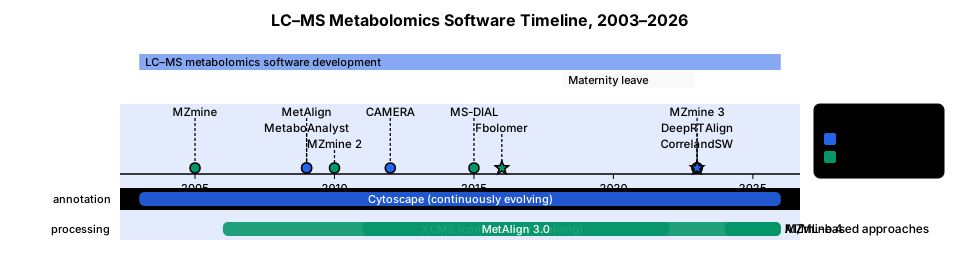
A clean, elegant scientific timeline of the main software tools used in LC–MS metabolomics, from 2003 to 2026. Include two main groups: 1. Data processing & alignment: MZmine (2005) → MZmine 2 (2010) → MZmine 3 (2023) → MZmine 4 (2024+) → XCMS (2006, continuously evolving) → MetAlign (2009) → MetAlign 3.0 (2011/12)finished 2022 → MS-DIAL (2015) → Fbolomer (2016–2018) → DeepRTAlign (2023) → recent AI/ML-based approaches. 2. Annotation, relationships & visualisation: Cytoscape (2003, continuously evolving) → MetaboAnalyst (2009) → CAMERA (2012) → CorrelandSW (development 2023–2026). Clearly highlight that I was on maternity leave from spring 2018 to December 2022: Fbolomer development was completed in spring 2018, while CorrelandSW development began in 2023 and was completed in spring 2026. Use British English, a horizontal timeline, clean academic/publication-quality design, minimal decoration and clearly distinguish the different functional groups. Highlight Fbolomer and CorrelandSW as my research milestones.
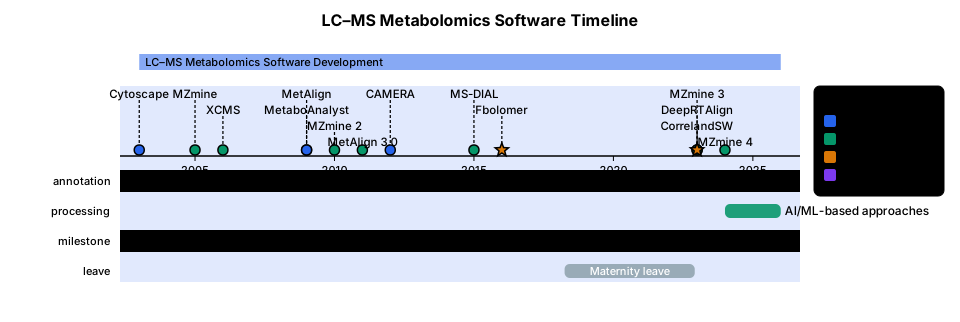
A clean, elegant scientific timeline of the main software tools used in LC–MS metabolomics, from 2003 to 2026. Include two main groups: 1. Data processing & alignment: MZmine (2005) → MZmine 2 (2010) → MZmine 3 (2023) → MZmine 4 (2024+) → XCMS (2006, continuously evolving) → MetAlign (2009) → MetAlign 3.0 (2011/12) → MS-DIAL (2015) → Fbolomer (2016–2018) → DeepRTAlign (2023) → recent AI/ML-based approaches. 2. Annotation, relationships & visualisation: Cytoscape (2003, continuously evolving) → MetaboAnalyst (2009) → CAMERA (2012) → CorrelandSW (development 2023–2026). Clearly highlight that I was on maternity leave from spring 2018 to December 2022: Fbolomer development was completed in spring 2018, while CorrelandSW development began in 2023 and was completed in spring 2026. Use British English, a horizontal timeline, clean academic/publication-quality design, minimal decoration and clearly distinguish the different functional groups. Highlight Fbolomer and CorrelandSW as my research milestones. maternity leave could be shown on timeline similarly as cytoscape... but different color
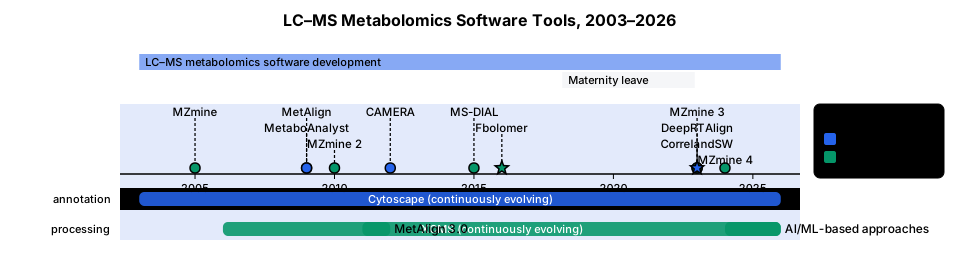
A clean, elegant scientific timeline of the main software tools used in LC–MS metabolomics, from 2003 to 2026. Include two main groups: 1. Data processing & alignment: MZmine (2005) → MZmine 2 (2010) → MZmine 3 (2023) → MZmine 4 (2024+) → XCMS (2006, continuously evolving) → MetAlign (2009) → MetAlign 3.0 (2011/12) → MS-DIAL (2015) → Fbolomer (2016–2018) → DeepRTAlign (2023) → recent AI/ML-based approaches. 2. Annotation, relationships & visualisation: Cytoscape (2003, continuously evolving) → MetaboAnalyst (2009) → CAMERA (2012) → CorrelandSW (development 2023–2026). Clearly highlight that I was on maternity leave from spring 2018 to December 2022: Fbolomer development was completed in spring 2018, while CorrelandSW development began in 2023 and was completed in spring 2026. Use British English, a horizontal timeline, clean academic/publication-quality design, minimal decoration and clearly distinguish the different functional groups. Highlight Fbolomer and CorrelandSW as my research milestones.

Create a DFD Level 1 for BloomSense AI, an AI-based pollination risk prediction and decision-support system. Use standard DFD symbols. Include Farmer and Weather API as external entities and MongoDB Database as the data store. Break the system into five processes: 1.0 Data Collection, 2.0 Data Preprocessing, 3.0 Pollination Risk Prediction, 4.0 Recommendation Generation, 5.0 Results & Alerts. Show clear labeled data flows: Crop Details, Flowering Stage, Field Data, Weather Data, Processed Data, Pollination Risk Score, Recommendations, and Alerts. Arrange the diagram in a clean left-to-right flow, with minimal colors, white background, readable labels, and professional academic formatting suitable for a university project report.
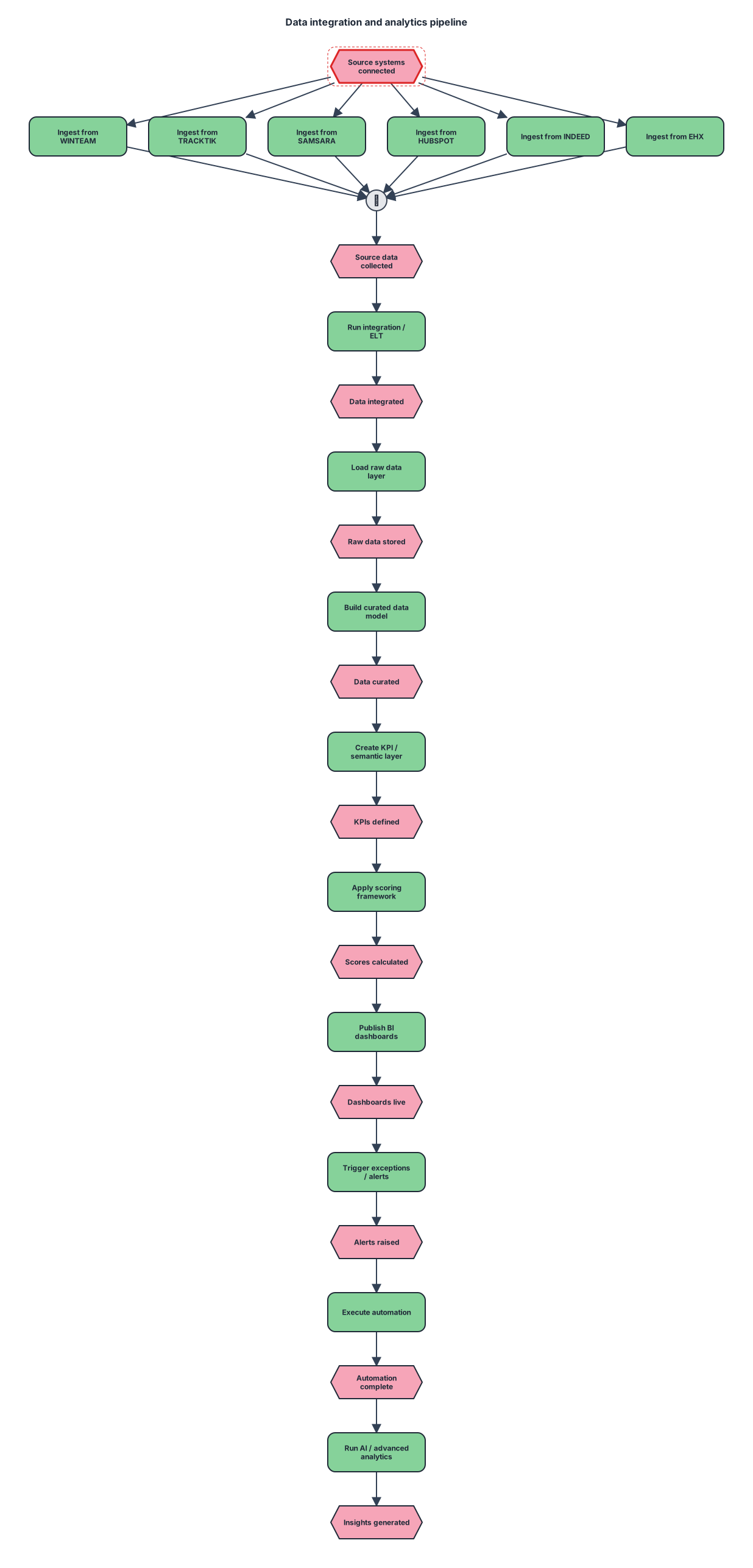
An event-driven process chain for WINTEAM TRACKTIK SAMSARA │ │ │ HUBSPOT INDEED EHX │ │ │ └───────────┼───────────┘ ▼ INTEGRATION / ELT │ ▼ RAW DATA LAYER │ ▼ CURATED DATA MODEL │ ▼ KPI / SEMANTIC LAYER │ ▼ SCORING FRAMEWORK │ ▼ BI DASHBOARDS │ ▼ EXCEPTION / ALERTS │ ▼ AUTOMATION │ ▼ AI / ADVANCED ANALYTICS
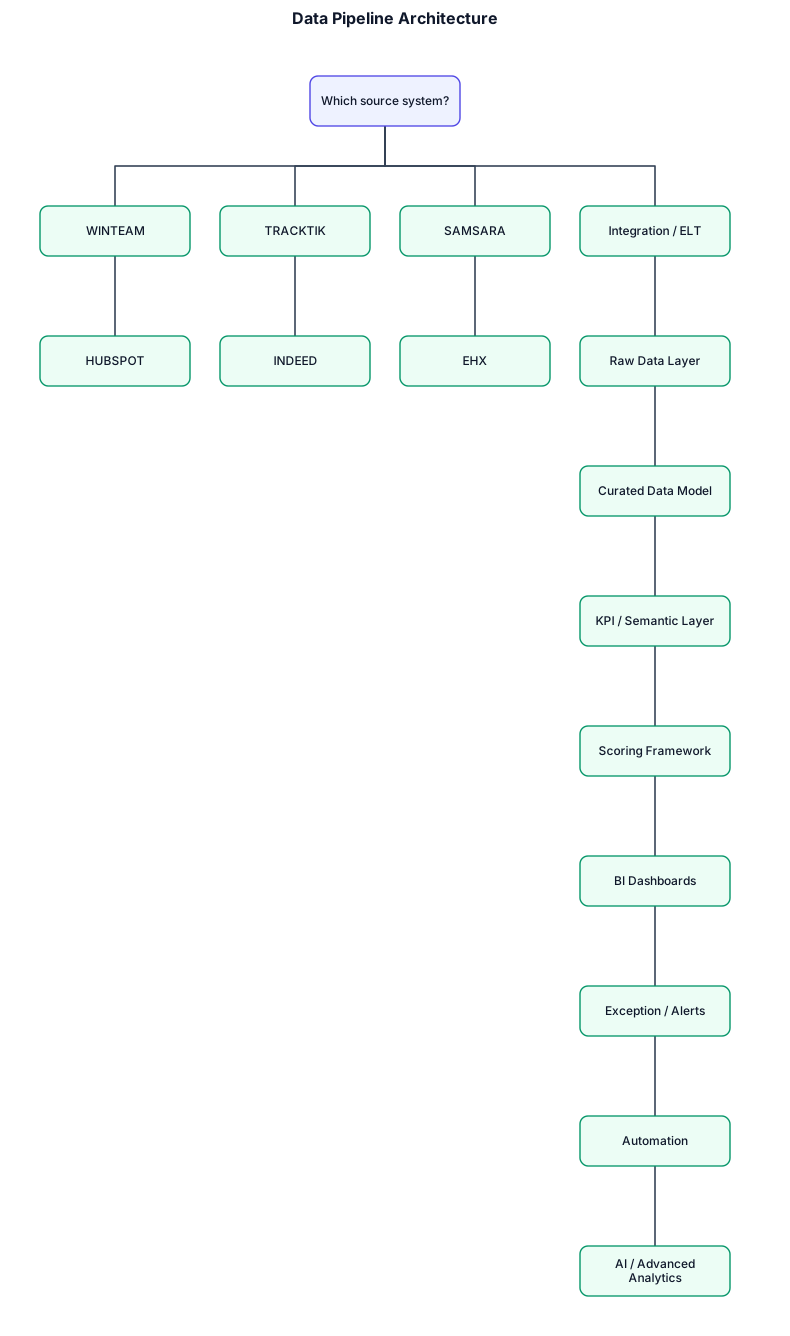
A decision tree for WINTEAM TRACKTIK SAMSARA │ │ │ HUBSPOT INDEED EHX │ │ │ └───────────┼───────────┘ ▼ INTEGRATION / ELT │ ▼ RAW DATA LAYER │ ▼ CURATED DATA MODEL │ ▼ KPI / SEMANTIC LAYER │ ▼ SCORING FRAMEWORK │ ▼ BI DASHBOARDS │ ▼ EXCEPTION / ALERTS │ ▼ AUTOMATION │ ▼ AI / ADVANCED ANALYTICS
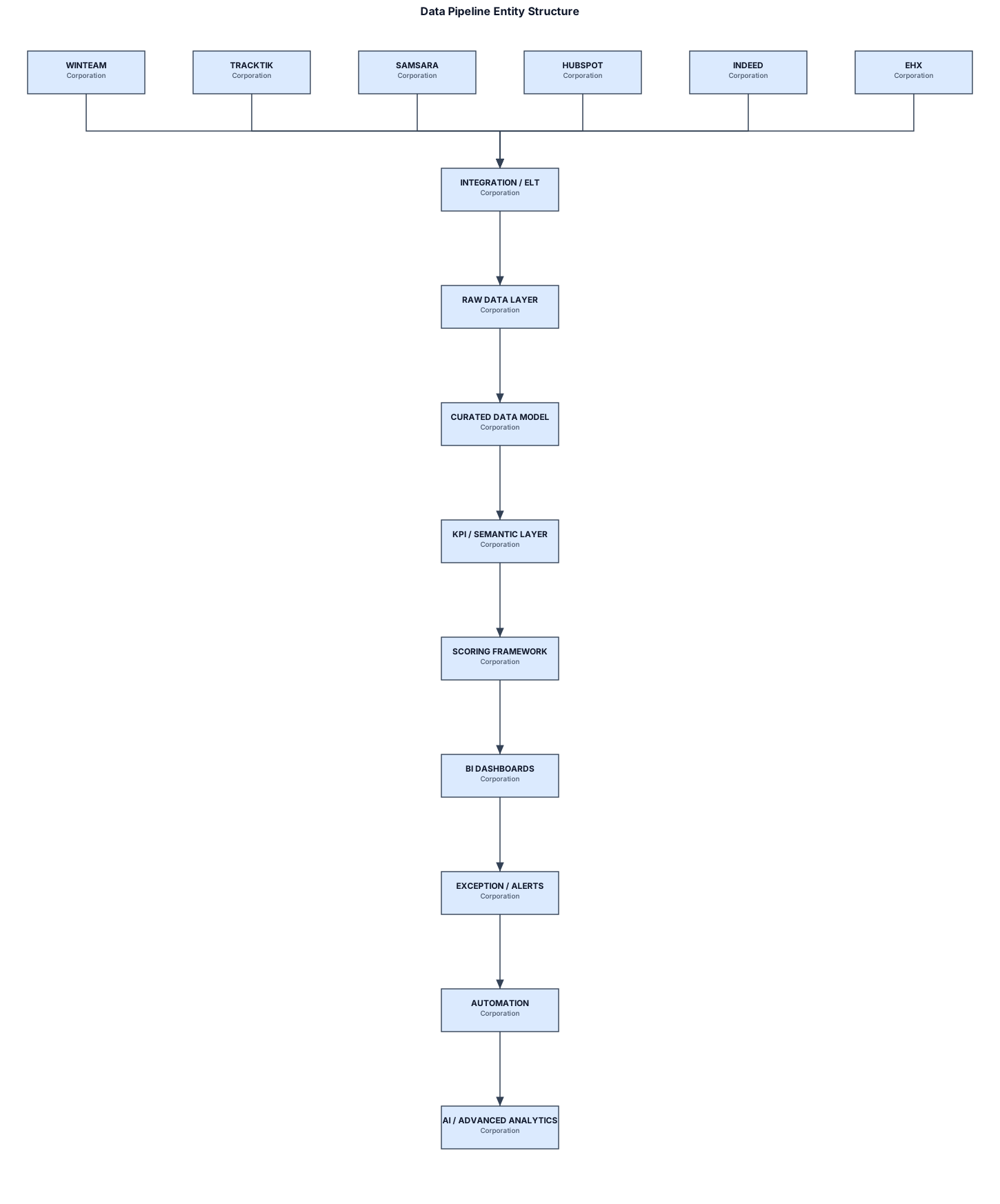
A legal entity structure for WINTEAM TRACKTIK SAMSARA │ │ │ HUBSPOT INDEED EHX │ │ │ └───────────┼───────────┘ ▼ INTEGRATION / ELT │ ▼ RAW DATA LAYER │ ▼ CURATED DATA MODEL │ ▼ KPI / SEMANTIC LAYER │ ▼ SCORING FRAMEWORK │ ▼ BI DASHBOARDS │ ▼ EXCEPTION / ALERTS │ ▼ AUTOMATION │ ▼ AI / ADVANCED ANALYTICS
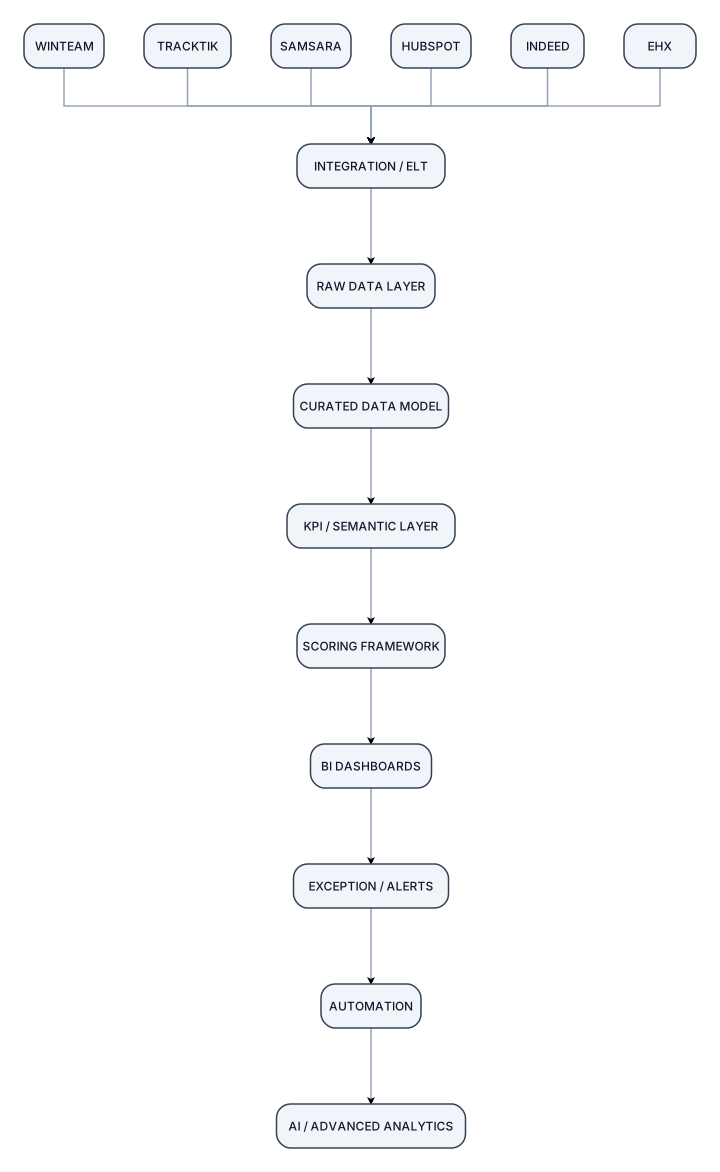
WINTEAM TRACKTIK SAMSARA │ │ │ HUBSPOT INDEED EHX │ │ │ └───────────┼───────────┘ ▼ INTEGRATION / ELT │ ▼ RAW DATA LAYER │ ▼ CURATED DATA MODEL │ ▼ KPI / SEMANTIC LAYER │ ▼ SCORING FRAMEWORK │ ▼ BI DASHBOARDS │ ▼ EXCEPTION / ALERTS │ ▼ AUTOMATION │ ▼ AI / ADVANCED ANALYTICS
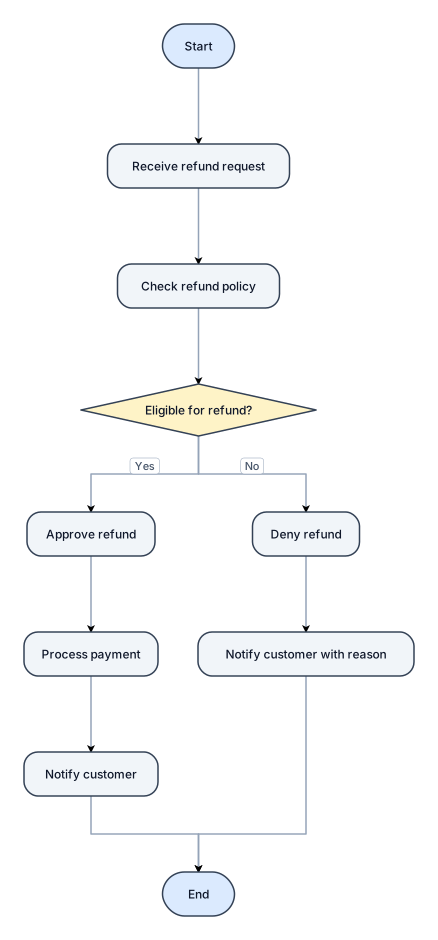
A flowchart for handling a customer refund request, with approve and deny paths

An org chart for a 30-person startup with a CEO, CTO, CMO, and VP of Sales at the top — then engineering, product, marketing, and sales teams below with their leads
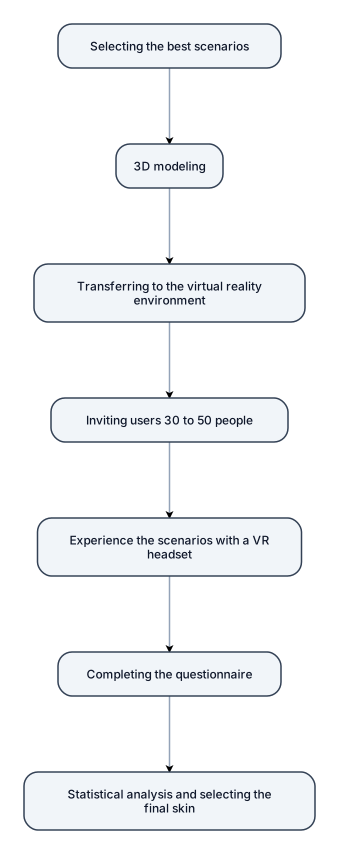
1-Selecting the best scenarios 2-3D modeling 3-Transferring to the virtual reality environment 4-Inviting users (30 to 50 people) 5-Experience the scenarios with a VR headset 6-Completing the questionnaire 7-Statistical analysis and selecting the final skin
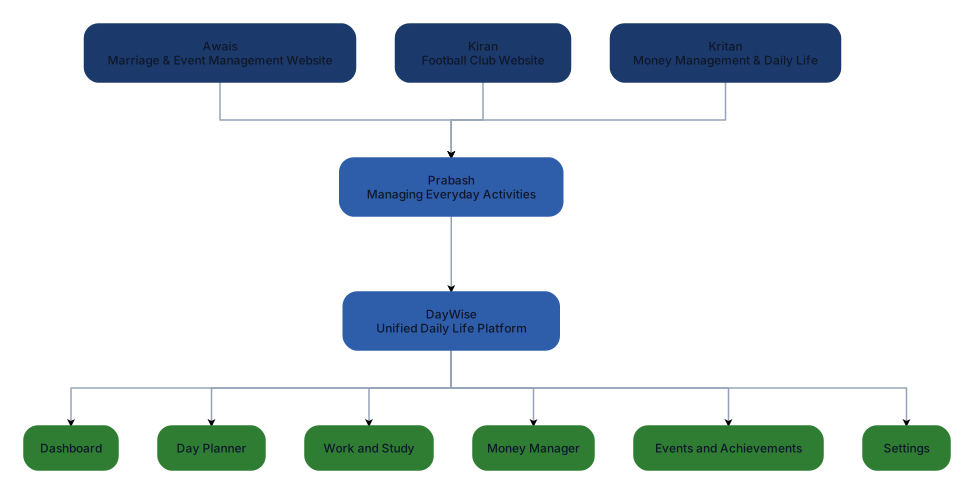
Create a professional academic flowchart showing the development of our DayWise project idea. Start with three team members and their initial ideas. Awais suggested a marriage and event management website. Kiran suggested a football club website for managing football activities and available grounds. Kritan suggested a website focused on money management and daily life. Prabash then combined these ideas with his own idea of managing everyday activities into one platform called DayWise. Show DayWise leading to its main features: Dashboard, Day Planner, Work and Study, Money Manager, Events and Achievements, and Settings. Use simple rounded rectangles, clear arrows, a white background, and navy, blue and green colours. Make it suitable for a university coursework report.
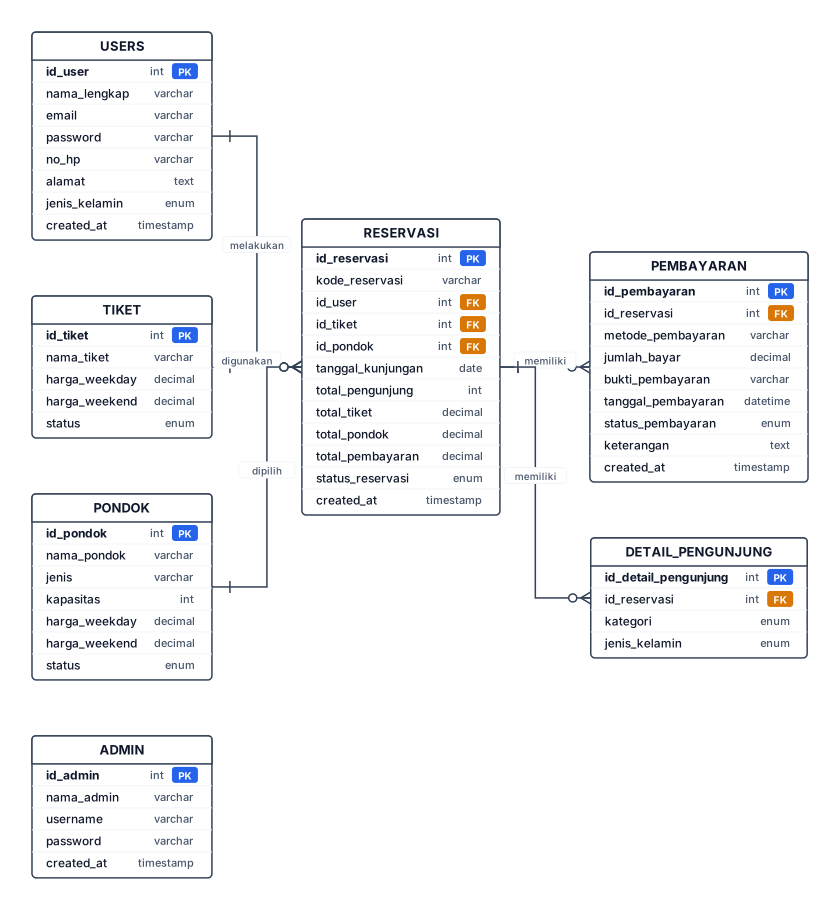
erDiagram USERS ||--o{ RESERVASI : melakukan TIKET ||--o{ RESERVASI : digunakan PONDOK ||--o{ RESERVASI : dipilih RESERVASI ||--o{ PEMBAYARAN : memiliki RESERVASI ||--o{ DETAIL_PENGUNJUNG : memiliki USERS { int id_user PK varchar nama_lengkap varchar email varchar password varchar no_hp text alamat enum jenis_kelamin timestamp created_at } TIKET { int id_tiket PK varchar nama_tiket decimal harga_weekday decimal harga_weekend enum status } PONDOK { int id_pondok PK varchar nama_pondok varchar jenis int kapasitas decimal harga_weekday decimal harga_weekend enum status } RESERVASI { int id_reservasi PK varchar kode_reservasi int id_user FK int id_tiket FK int id_pondok FK date tanggal_kunjungan int total_pengunjung decimal total_tiket decimal total_pondok decimal total_pembayaran enum status_reservasi timestamp created_at } PEMBAYARAN { int id_pembayaran PK int id_reservasi FK varchar metode_pembayaran decimal jumlah_bayar varchar bukti_pembayaran datetime tanggal_pembayaran enum status_pembayaran text keterangan timestamp created_at } DETAIL_PENGUNJUNG { int id_detail_pengunjung PK int id_reservasi FK enum kategori enum jenis_kelamin } ADMIN { int id_admin PK varchar nama_admin varchar username varchar password timestamp created_at }
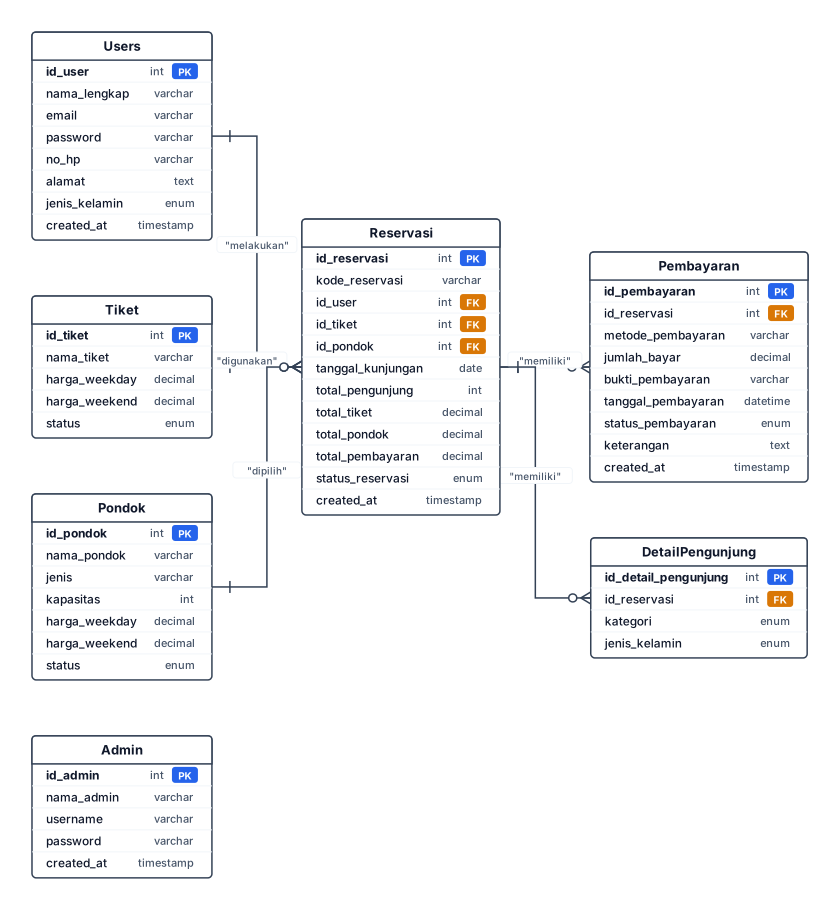
classDiagram class Admin { +id_admin : int +nama_admin : varchar +username : varchar +password : varchar +created_at : timestamp } class Users { +id_user : int +nama_lengkap : varchar +email : varchar +password : varchar +no_hp : varchar +alamat : text +jenis_kelamin : enum +created_at : timestamp } class Tiket { +id_tiket : int +nama_tiket : varchar +harga_weekday : decimal +harga_weekend : decimal +status : enum } class Pondok { +id_pondok : int +nama_pondok : varchar +jenis : varchar +kapasitas : int +harga_weekday : decimal +harga_weekend : decimal +status : enum } class Reservasi { +id_reservasi : int +kode_reservasi : varchar +id_user : int +id_tiket : int +id_pondok : int +tanggal_kunjungan : date +total_pengunjung : int +total_tiket : decimal +total_pondok : decimal +total_pembayaran : decimal +status_reservasi : enum +created_at : timestamp } class Pembayaran { +id_pembayaran : int +id_reservasi : int +metode_pembayaran : varchar +jumlah_bayar : decimal +bukti_pembayaran : varchar +tanggal_pembayaran : datetime +status_pembayaran : enum +keterangan : text +created_at : timestamp } class DetailPengunjung { +id_detail_pengunjung : int +id_reservasi : int +kategori : enum +jenis_kelamin : enum } Users "1" --> "0..*" Reservasi : melakukan Tiket "1" --> "0..*" Reservasi : digunakan Pondok "1" --> "0..*" Reservasi : dipilih Reservasi "1" --> "0..*" Pembayaran : memiliki Reservasi "1" --> "0..*" DetailPengunjung : memiliki
Why Choose a Level 3 UPPA Course Online? Nowadays, learners need flexibility, and that's exactly what our Level 3 Award in Understanding Principles and Practices of Assessment course provides. Rather than taking fixed classroom sessions, you can learn remotely while the learning materials, assessments, and tutor support are available online. Some important benefits of the Level 3 UPPA course online are: Flexible Study Schedule With learning remotely, you can study around your work, family and personal commitments. You can study at your own pace, in your own time, at a time that fits your schedule, no matter whether it's night, weekend, or specific hours of the day. Dedicated Tutor Support/Career Focused Skills A good online course will give you direction on your learning path. Tutors can help you with assignments, give feedback on them, and answer your questions at any time. Another benefit is the focus on career ready skills as our assessor course is geared towards helping you acquire assessor skills and knowledge that are directly relevant in the assessment industry, and thus equips learners for real-life educational situations.
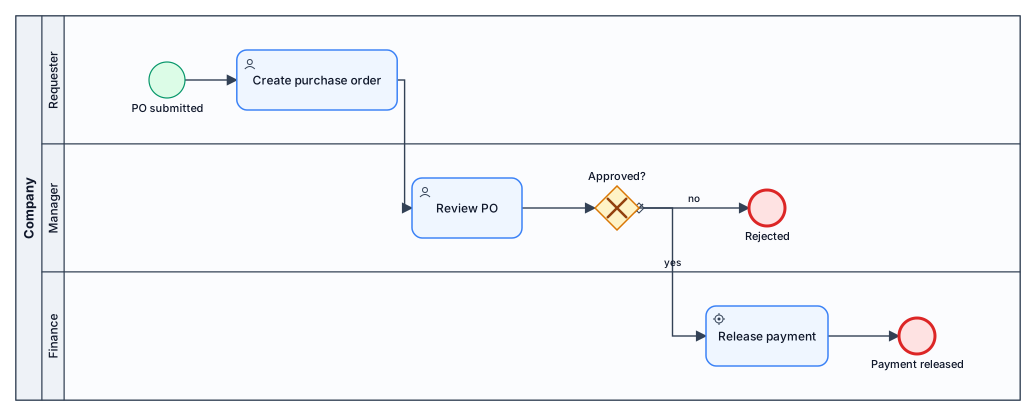
A BPMN diagram of a purchase-order approval process across three lanes: requester submits a PO, manager reviews and approves or rejects, finance releases payment
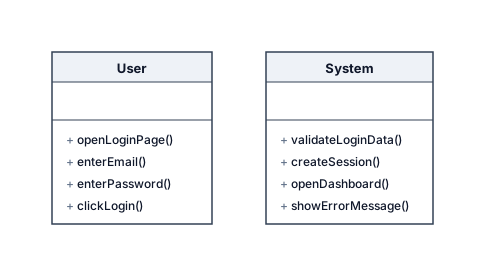
Swimlanes:Create a UML Activity Diagram for Login. Swimlanes: - User - System Flow: Start User opens Login page User enters Email and Password User clicks Login System validates login data Decision: Login valid? Yes: System creates session System opens Dashboard End No: System shows "Email atau Password salah" User returns to Login page User enters Email and Password again
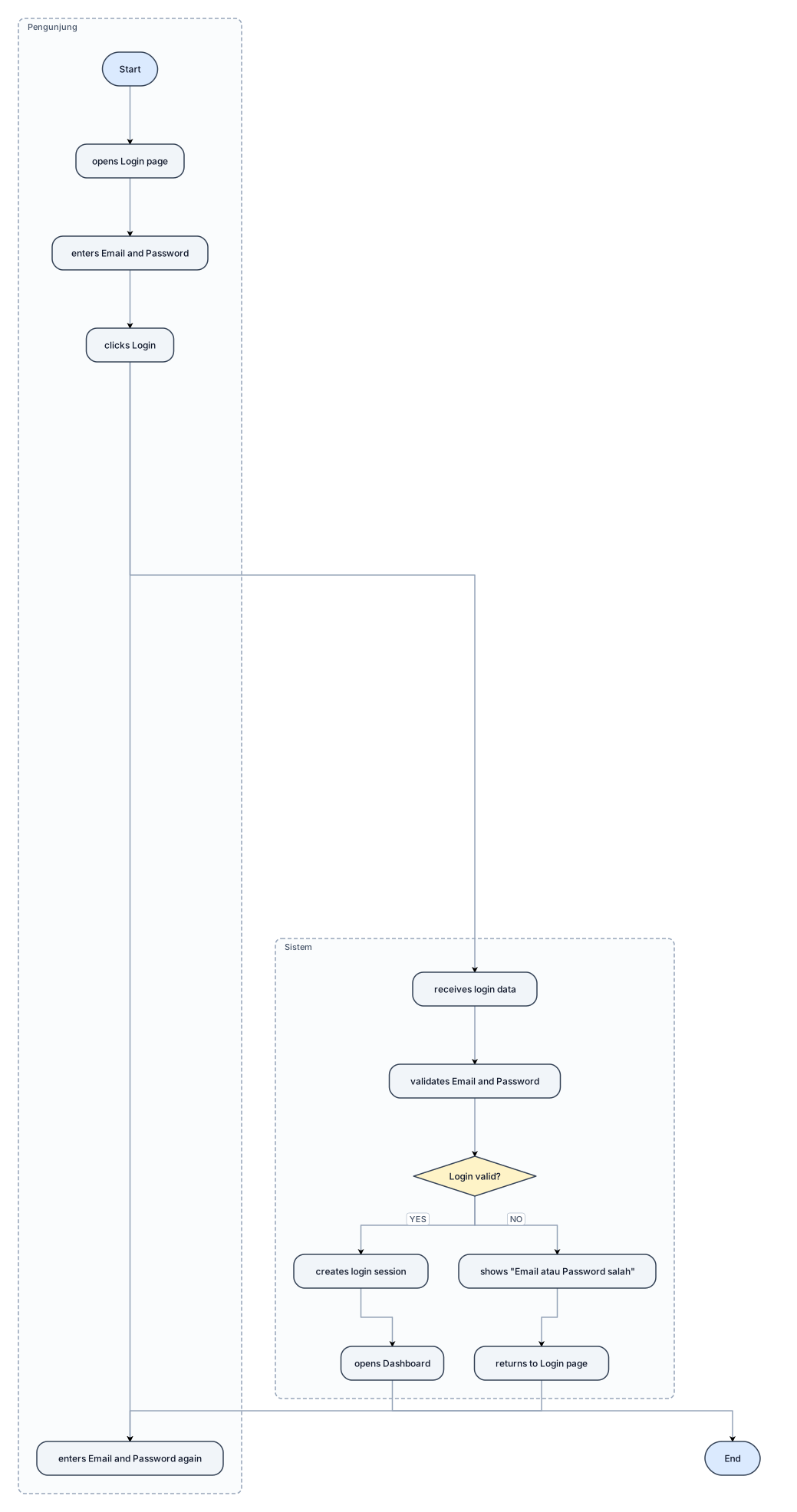
Use 2 vertical swimlanes: Pengunjung | Sistem Keep the diagram compact and horizontal where possible. Flow: Start Pengunjung opens Login page Pengunjung enters Email and Password Pengunjung clicks Login Sistem receives login data Sistem validates Email and Password Decision: Login valid? YES: Sistem creates login session Sistem opens Dashboard End NO: Sistem shows "Email atau Password salah" Pengunjung returns to Login page Pengunjung enters Email and Password again
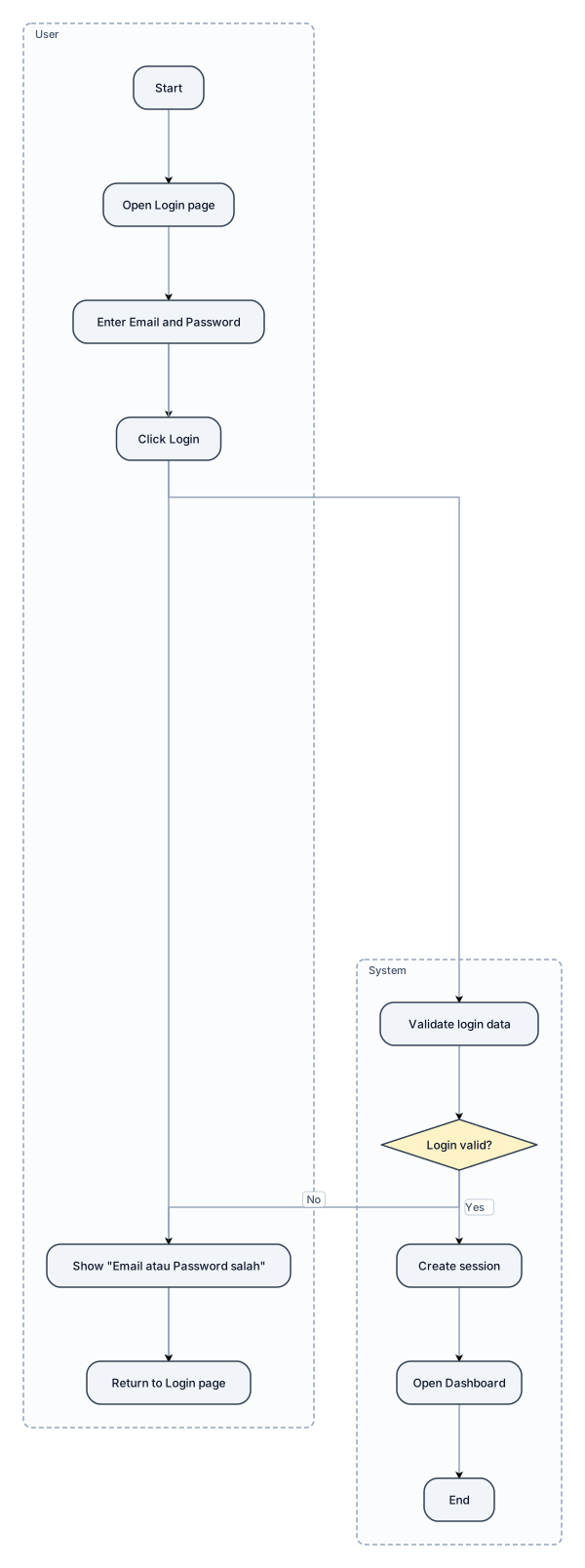
Swimlanes: - User - System Flow: Start User opens Login page User enters Email and Password User clicks Login System validates login data Decision: Login valid? Yes: System creates session System opens Dashboard End No: System shows "Email atau Password salah" User returns to Login page User enters Email and Password again