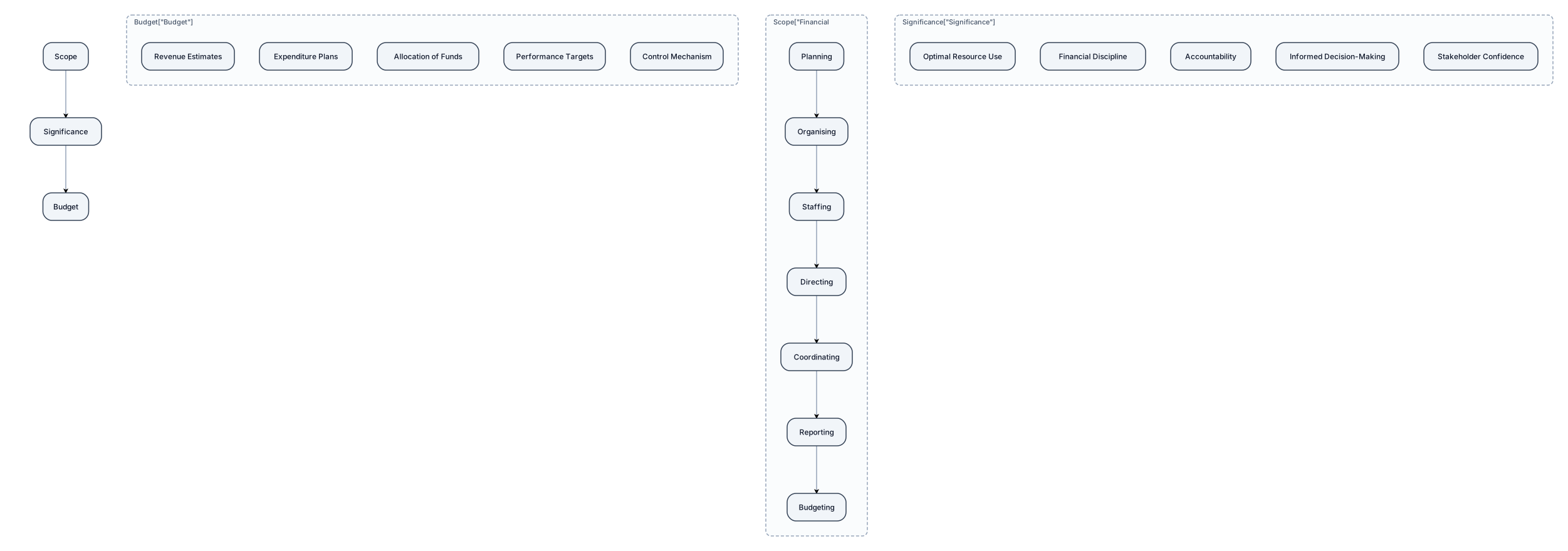
financial administration, meaning Scope and significance, Budget
NODE ARCHIVE · REAL DIAGRAM BRIEFS
Diagram Examples from Real Visitor Prompts
Browse eligible diagrams shared by FreeDiagram visitors, inspect the exact prompts, and build your own version.
Browse 3261 real creationsCOMMUNITY OUTPUTS · EXACT PROMPTS
Main diagram studio
Showing 25–48 of 1256. No stock examples or system defaults. Choose a tool, study a real result, then reopen its prompt as your starting point.

accounting chart cashflow outflow
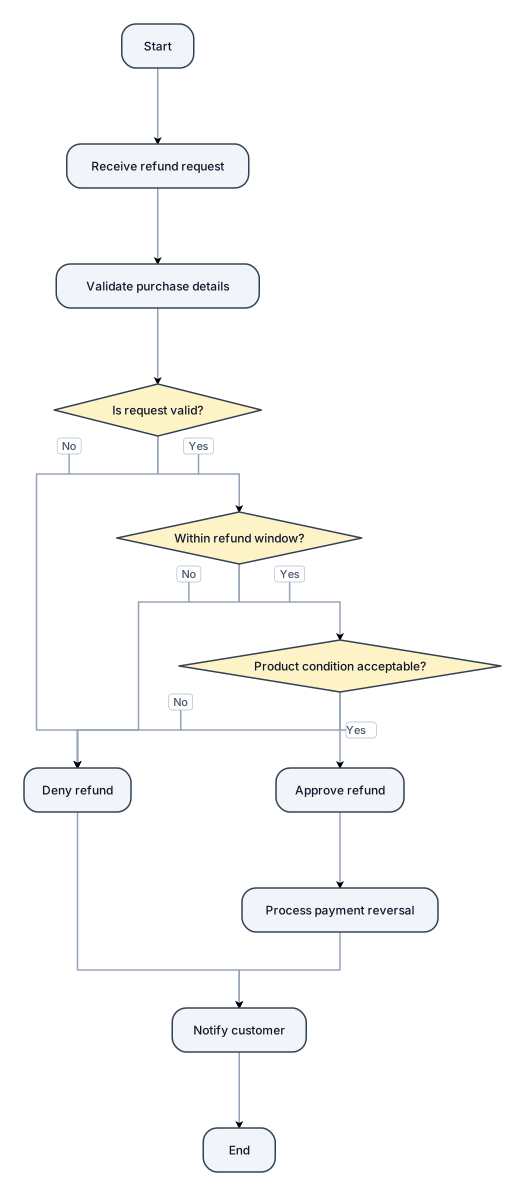
A flowchart for handling a customer refund request, with approve and deny paths

Financial Administration
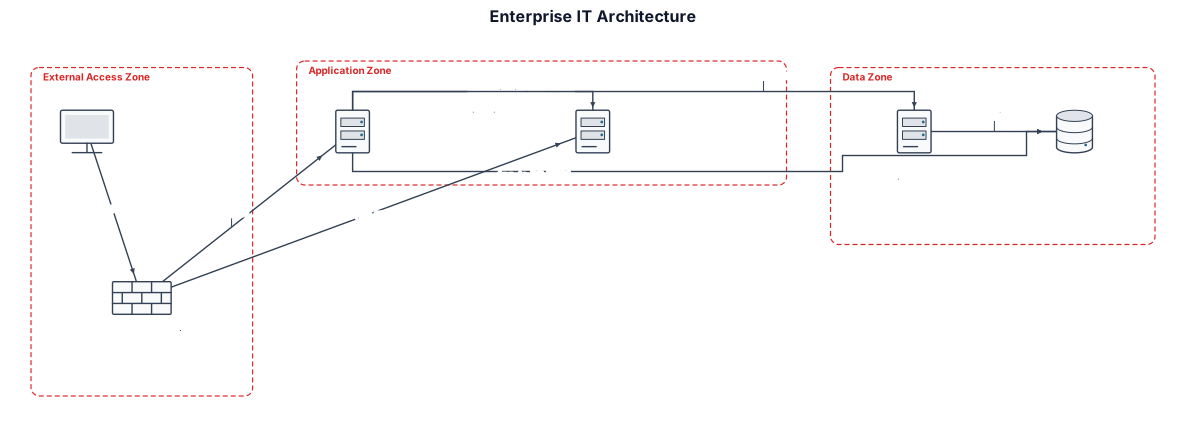
External Users access the system through HTTPS port 443. Frontend Security Server 2 acts as a Reverse Proxy. VM-01: Application Server, 8 vCPU, 8 GB RAM, 300 GB storage. VM-02: Data Ingestion Server, 8 vCPU, 16 GB RAM, 300 GB storage. VM-03: Database Server, 8 vCPU, 16 GB RAM, 500 GB storage. VM-04: Keycloak SSO Server, 8 vCPU, 8 GB RAM, 300 GB storage. Use Ubuntu Server 24.04 LTS for all VMs. Show HTTPS traffic, authentication flow, application-to-database connections, and data ingestion flow. Group components into External Access Zone, Application Zone, and Data Zone. Use a clean enterprise IT architecture style with clear labels, directional arrows, and a legend. Do not invent IP addresses, ports, or connections that are not specified. Mark unspecified details as TBD.
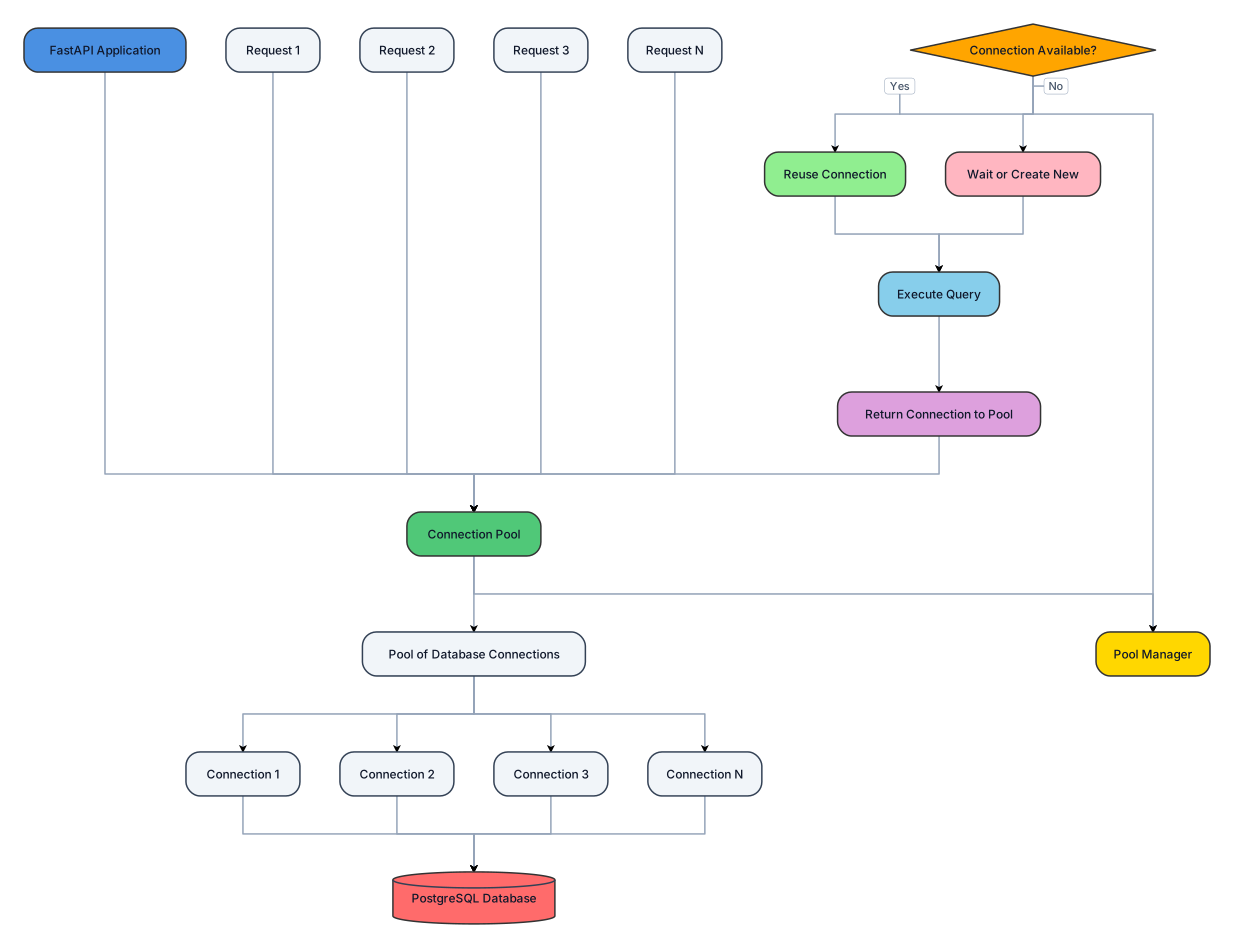
explain about the db connection pooling in fast api's psql
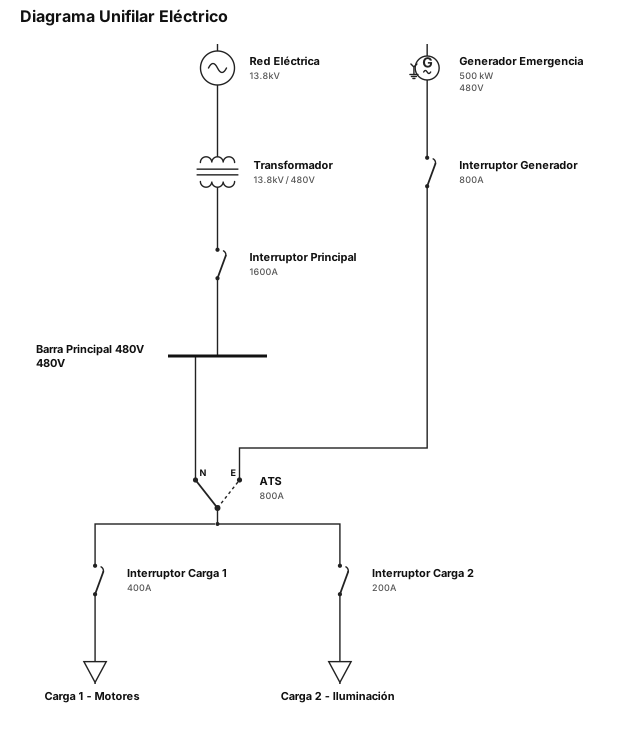
diagrama unifilar electrico
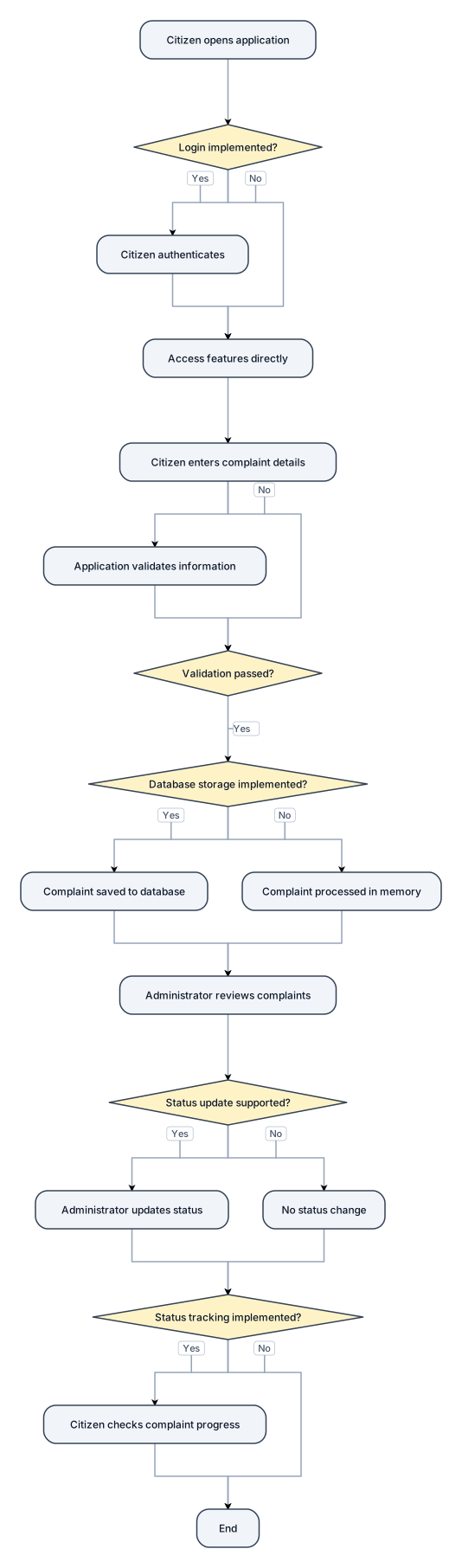
### 1. Introduction The Smart Complaint and Civic Issue Management System is designed to provide a digital platform for reporting and managing civic issues. It aims to organize the complaint-handling process by allowing citizens to report problems and enabling authorized administrators to review complaints. ### 2. Working Principle **Step 1: User Access** The citizen opens the application and accesses the available features. If login functionality is implemented, the citizen authenticates using the supported credentials. **Step 2: Complaint Submission** The citizen enters the required complaint details, such as the description, category, and location, according to the fields available in the application. **Step 3: Information Validation** The application checks the submitted information according to its implemented validation rules. **Step 4: Complaint Storage** If database storage is implemented, the complaint details are saved so that they can be retrieved later. **Step 5: Administrative Review** The administrator reviews submitted complaints through the administrative interface, if available. **Step 6: Status Update** The complaint status is updated by an authorized administrator if the application supports this functionality. **Step 7: Status Tracking** The citizen can check the complaint's progress if the application includes a status-tracking feature. ### 3. Conclusion The system provides a structured approach to civic complaint management. Its actual capabilities depend on the features implemented in the prototype. The drawings and working principle should accurately represent the developed system.

Create a clean, black-and-white technical diagram titled: "FIG. 3 — COMPLAINT STATUS LIFECYCLE" Show complaint statuses in a horizontal sequence using rectangular boxes connected by directional arrows: Submitted → Under Review → In Progress → Resolved → Closed Use a plain white background, thin black outlines, clear directional arrows, and readable labels. Keep the design simple and suitable for an academic patent-drawing assignment. Do not include decorative graphics, colours, shadows, or unnecessary icons. Only include statuses that are supported by the actual application. If the application uses different statuses, use those instead.
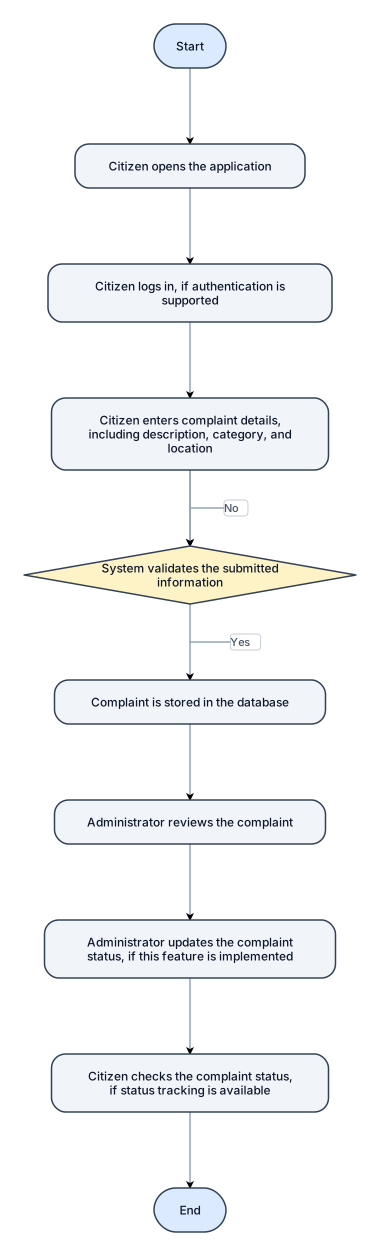
Create a clean, black-and-white technical flowchart titled: "FIG. 2 — WORKING FLOWCHART OF SMART COMPLAINT AND CIVIC ISSUE MANAGEMENT SYSTEM" Show the following steps in order using simple flowchart shapes and directional arrows: 1. Start 2. Citizen opens the application 3. Citizen logs in, if authentication is supported 4. Citizen enters complaint details, including description, category, and location 5. System validates the submitted information 6. If information is valid, the complaint is stored in the database 7. Administrator reviews the complaint 8. Administrator updates the complaint status, if this feature is implemented 9. Citizen checks the complaint status, if status tracking is available 10. End Use a decision diamond for validation, with Yes and No arrows. The No arrow should return to the complaint details step for correction. Use a white background, black outlines, readable text, and a professional engineering-diagram layout. Avoid decorative graphics and colours. Make the diagram suitable for an academic patent-drawing assignment.
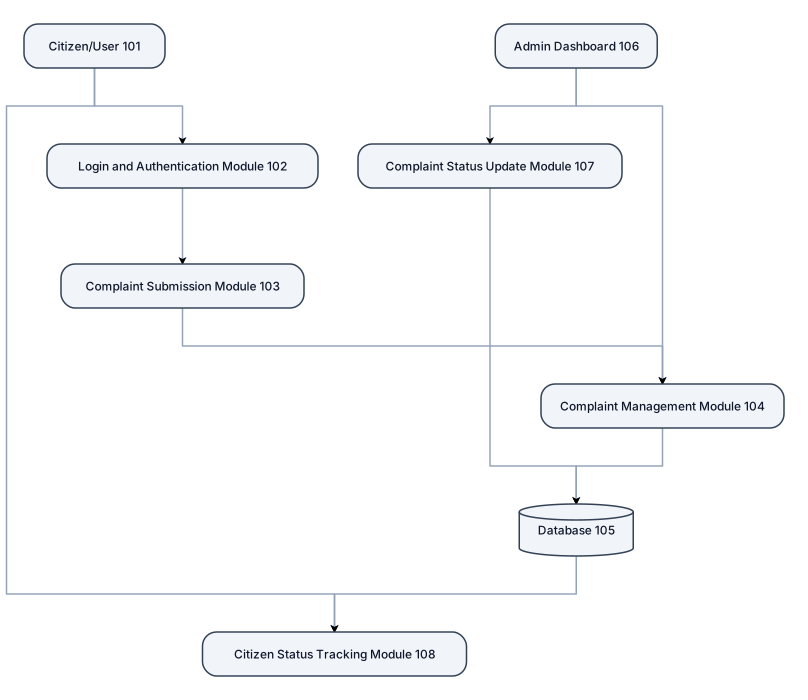
Create a professional black-and-white patent-style technical drawing for a project titled "Smart Complaint and Civic Issue Management System". FIG. 1 — OVERALL SYSTEM ARCHITECTURE Include the following components in separate rectangular boxes with clear directional arrows: 1. Citizen/User (101): The user who reports civic problems. 2. Login and Authentication Module (102): Handles user login and authentication. 3. Complaint Submission Module (103): Allows citizens to submit complaints with a description, category, and location. 4. Complaint Management Module (104): Processes and manages submitted complaints. 5. Database (105): Stores complaint records and related information. 6. Admin Dashboard (106): Allows administrators to view, review, and manage complaints. 7. Complaint Status Update Module (107): Updates complaint progress. 8. Citizen Status Tracking Module (108): Allows citizens to check the status of their complaints. Show the workflow using directional arrows: Citizen/User → Login and Authentication → Complaint Submission → Complaint Management → Database. Connect the Admin Dashboard to Complaint Management and show the administrator updating the complaint status. Connect the status tracking module to the stored complaint information so that citizens can view the latest status. Drawing requirements: * Plain white background. * Black outlines and black text only. * Simple rectangular boxes and clear directional arrows. * Consistent spacing and alignment. * Reference numerals next to all components. * No decorative graphics, gradients, shadows, or unnecessary icons. * Use readable technical labels and a clean engineering drawing layout. * Keep the diagram suitable for an academic patent-drawing assignment. * Export the final diagram as a high-resolution PNG or PDF.

Create a minimalist, elegant DNA double helix diagram suitable for a fine-line tattoo, encoding the hidden message “SHONE MEE PAPA” using DNA codons. Exact DNA sequence (5′ → 3′): TCA CAT TAG AAT GAA | ATG GAA GAG | CCG GCT CCA GCA The TAG codon represents pyrrolysine (O) using the specialised genetic code, rather than its usual STOP meaning. Illustrate a scientifically accurate, right-handed DNA double helix with all 36 base pairs, correct complementary bases (A–T, C–G), and antiparallel strands. Use fine cobalt-blue lines with subtle golden-yellow accents, a clean white background and a graceful vertical composition. Keep the design simple, balanced and tattoo-friendly, with no unnecessary decorations. The message should remain hidden within the DNA structure. Important: Preserve the exact nucleotide sequence and codon order. Include a small separate reference showing how the codons spell SHONE MEE PAPA.
EXPLAIN SOCIO ECONOMIC CONDITIONS OF INDIAN MUSLIMS LIKE ITS THE JUCIEST TEA EVER AND DRAW to make it more clear
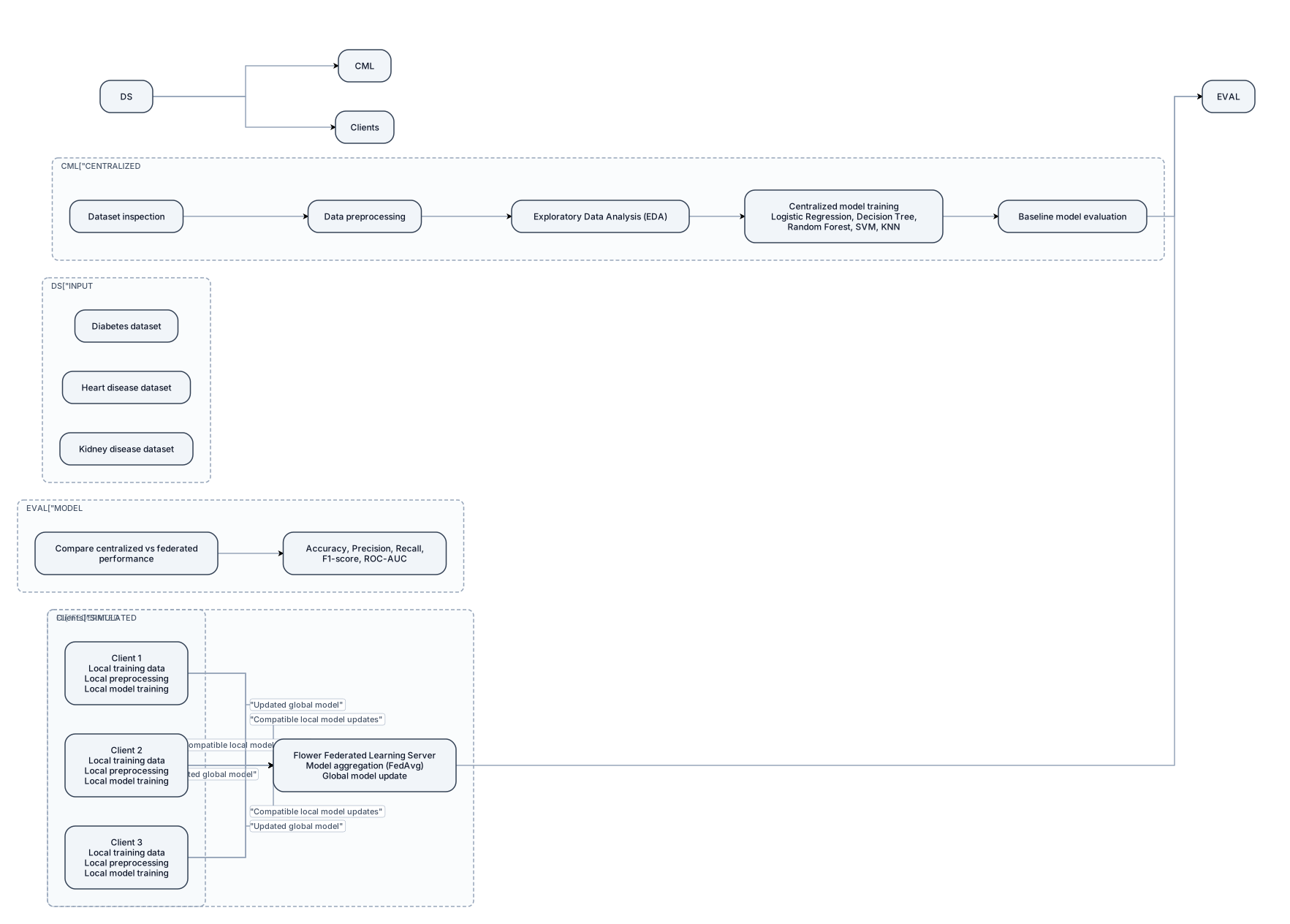
Create a professional, academic-level system architecture diagram for a B.Tech major project titled "Privacy-Preserving Healthcare Data Mining Using Federated Learning." Use a clean white background, readable labels, simple shapes, and a left-to-right layout suitable for a university project report. Include the following components: 1. INPUT DATASETS - Diabetes dataset - Heart disease dataset - Kidney disease dataset 2. CENTRALIZED MACHINE LEARNING WORKFLOW - Dataset inspection - Data preprocessing - Exploratory Data Analysis (EDA) - Centralized model training using Logistic Regression, Decision Tree, Random Forest, SVM, and KNN - Baseline model evaluation 3. FEDERATED LEARNING CLIENTS - Show three simulated clients. - Each client has local training data, local preprocessing, and local model training. - Raw training records must remain with their respective clients. - Label the clients as simulated clients, not real hospitals. 4. FEDERATED LEARNING SERVER - Label the server "Flower Federated Learning Server." - Show compatible local model updates being sent from clients to the server. - Show model aggregation using Federated Averaging (FedAvg), provided the chosen model supports this method. - Show the updated global model being returned to the clients. 5. MODEL EVALUATION - Compare centralized and federated model performance. - Include accuracy, precision, recall, F1-score, and ROC-AUC where appropriate. Use directional arrows to show the data and model-update flow. Clearly distinguish raw training data from model updates. Do not include encryption, differential privacy, CNN-LSTM, or other techniques as implemented components. Add the caption: "Figure: Preliminary System Architecture of the Proposed Federated Learning Framework." Keep the diagram uncluttered, technically accurate, and easy to read when inserted into a Word report.
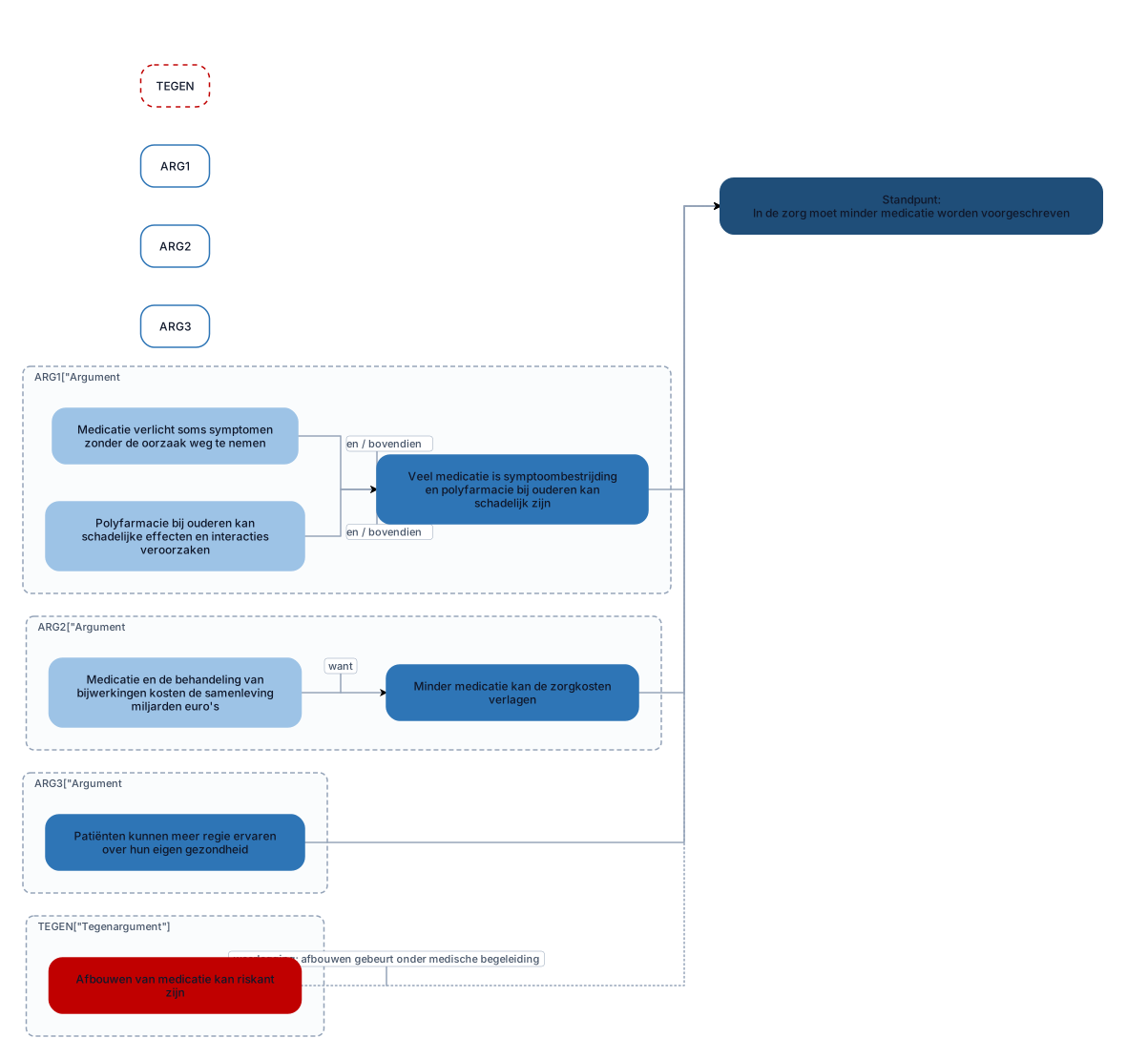
Maak een professioneel Nederlands argumentatieschema voor een schoolbetoog met de titel "Minder medicatie in de zorg". Zet bovenaan het standpunt: "In de zorg moet minder medicatie worden voorgeschreven." Plaats daaronder drie afzonderlijke hoofdargumenten: Argument 1 (nevenschikkend): Veel medicatie is symptoombestrijding en polyfarmacie bij ouderen kan schadelijk zijn. Subargument 1a: Medicatie verlicht soms symptomen zonder de oorzaak weg te nemen. Subargument 1b: Polyfarmacie bij ouderen kan schadelijke effecten en interacties veroorzaken. Verbind 1a en 1b met "en / bovendien". Argument 2 (onderschikkend): Minder medicatie kan de zorgkosten verlagen. Subargument 2.1: Medicatie en de behandeling van bijwerkingen kosten de samenleving miljarden euro's. Verbind dit subargument met argument 2 via "want". Argument 3 (enkelvoudig): Patiënten kunnen meer regie ervaren over hun eigen gezondheid. Geen subargumenten. Voeg onderaan een apart onderdeel toe met tegenargumenten en weerleggingen: Tegenargument: Afbouwen van medicatie kan riskant zijn. Vormgeving: Standpunt bovenaan. Drie hoofdargumenten naast elkaar. Subargumenten direct onder het bijbehorende argument. Duidelijke pijlen en verbindingswoorden. Verschillende kleuren voor standpunt, argumenten, subargumenten en tegenargumenten. Alle tekst in het Nederlands. Maak het diagram overzichtelijk, passend op 1 landscape-pagina en exporteerbaar Verzin geen aanvullende argumenten of feiten.

Maak een professioneel Nederlands argumentatieschema voor een schoolbetoog met de titel "Minder medicatie in de zorg". Zet bovenaan het standpunt: "In de zorg moet minder medicatie worden voorgeschreven." Plaats daaronder drie afzonderlijke hoofdargumenten: Argument 1 (nevenschikkend): Veel medicatie is symptoombestrijding en polyfarmacie bij ouderen kan schadelijk zijn. Subargument 1a: Medicatie verlicht soms symptomen zonder de oorzaak weg te nemen. Subargument 1b: Polyfarmacie bij ouderen kan schadelijke effecten en interacties veroorzaken. Verbind 1a en 1b met "en / bovendien". Argument 2 (onderschikkend): Minder medicatie kan de zorgkosten verlagen. Subargument 2.1: Medicatie en de behandeling van bijwerkingen kosten de samenleving miljarden euro's. Verbind dit subargument met argument 2 via "want". Argument 3 (enkelvoudig): Patiënten kunnen meer regie ervaren over hun eigen gezondheid. Geen subargumenten. Voeg onderaan een apart onderdeel toe met tegenargumenten en weerleggingen: Tegenargument: Zonder medicatie worden chronisch zieken niet goed behandeld. Weerlegging: Minder medicatie betekent niet geen medicatie; het gaat om kritischer voorschrijven. Tegenargument: Afbouwen van medicatie kan riskant zijn. Weerlegging: Met individuele beoordeling en goede begeleiding kan medicatie verantwoord worden afgebouwd. Vormgeving: Standpunt bovenaan. Drie hoofdargumenten naast elkaar. Subargumenten direct onder het bijbehorende argument. Duidelijke pijlen en verbindingswoorden. Verschillende kleuren voor standpunt, argumenten, subargumenten en tegenargumenten. Alle tekst in het Nederlands. Maak het diagram overzichtelijk en exporteerbaar als PNG of PDF. Verzin geen aanvullende argumenten of feiten.
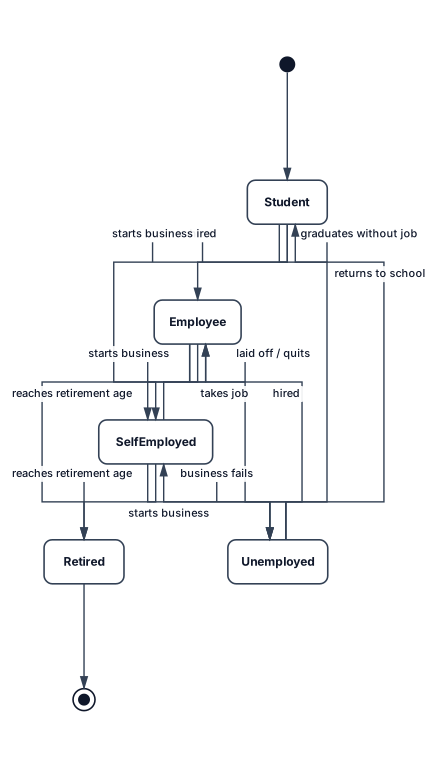
The objective of the exercise is to describe the different states of a person’s professional life and the corresponding transitions. For example, a person may be a student, an employee, unemployed, self-employed, or retired. At the beginning of their professional life, a person is a student. Do not consider simultaneous activities, such as being both an employee and self-employed at the same time. 1. Construct the corresponding state-transition diagram.
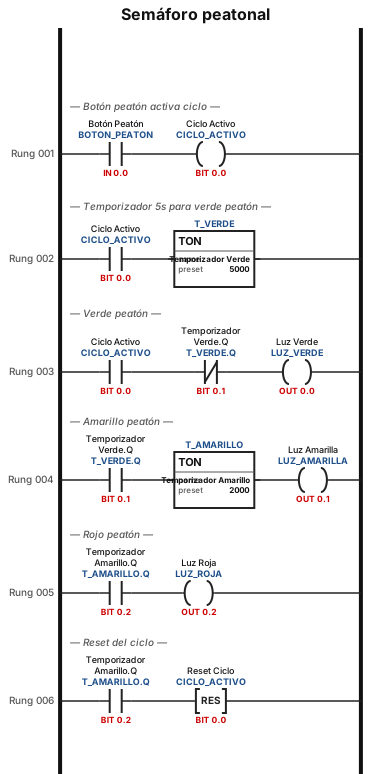
puedes darme el esquema leader de un semaforo?
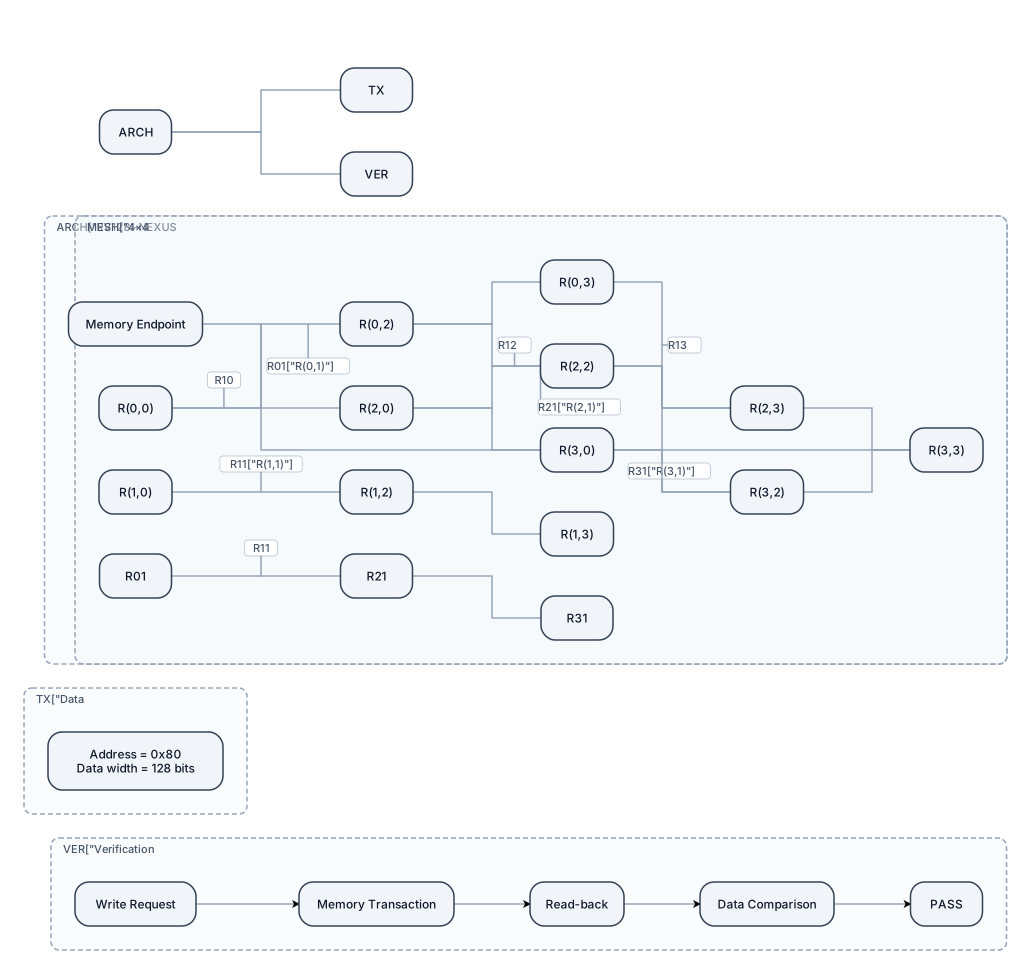
Create a detailed, professional IEEE-style technical architecture diagram for RV128I-NEXUS, a 128-bit datapath system with a synchronous 4×4 mesh Network-on-Chip. Design requirements: 1. Use a wide landscape canvas with a clean white background, dark navy outlines, teal data paths, and subtle amber highlights. 2. Place a precise 4×4 mesh of 16 routers in the center. Label every router R(0,0) through R(3,3). 3. Draw horizontal and vertical links between adjacent routers, with clear bidirectional connections. 4. Highlight the memory endpoint at coordinate (3,3). 5. Add a compact transaction annotation: Address = 0x80; Data width = 128 bits. 6. Show the verified test sequence as a separate flow: Write request → Memory transaction → Read-back → Data comparison → PASS. 7. Organize the composition into clearly separated architecture, data transaction, and verification sections. 8. Use consistent spacing, readable technical typography, clean orthogonal connectors, and a professional semiconductor research-paper aesthetic. 9. Avoid generic clip art, 3D effects, unnecessary decorative elements, and oversized text. 10. Make the figure suitable for an IEEE research paper and export it as a high-resolution PNG or SVG. Accuracy constraints: Do not invent processor cores, routing algorithms, interfaces, or hardware connections. Do not imply complete verification of all routers or routes. Show only implementation details supported by the RTL and simulation evidence. Treat the transaction flow as the tested case, not proof of exhaustive mesh verification.
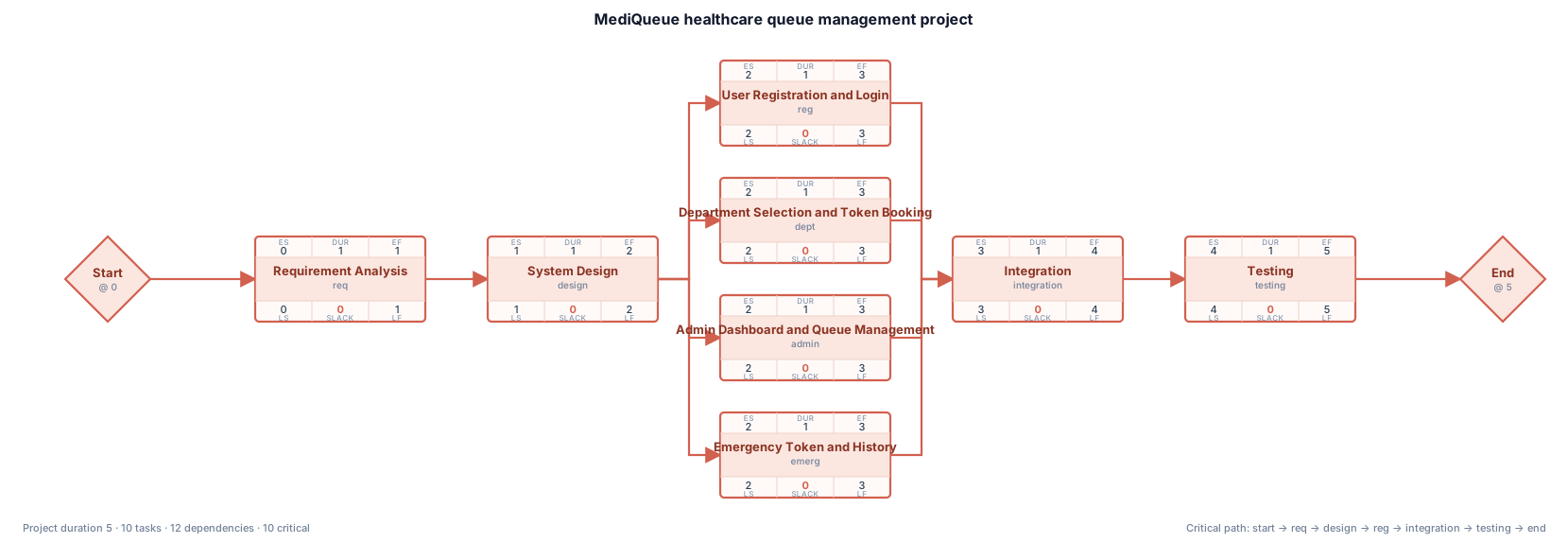
Create a proper PERT chart for the MediQueue healthcare queue management project. Use a network diagram with activity nodes connected by arrows. Show these activities and dependencies: Start → Requirement Analysis → System Design. After System Design, create four parallel branches: User Registration and Login; Department Selection and Token Booking; Admin Dashboard and Queue Management; Emergency Token and History. Connect all four branches to Integration. Then show Integration → Testing → End. Use arrows to show dependencies, a white background, simple rectangular boxes, minimal pastel colors and readable labels. Do not invent activity durations, project duration, or critical path. No decorative graphics or extra text.
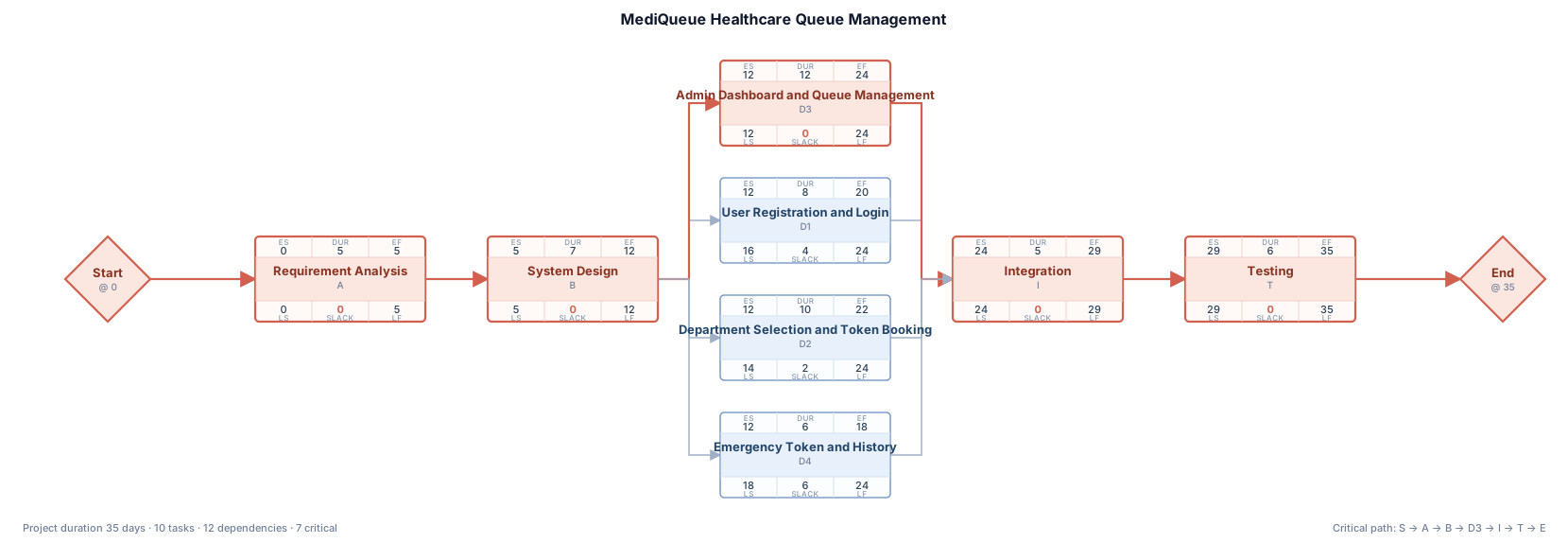
Create a proper PERT network diagram for the MediQueue healthcare queue management project. Use a left-to-right network layout with separate rectangular activity nodes connected by directional arrows. Show this dependency sequence: Start → Requirement Analysis → System Design → Development → Integration → Testing → End. Under Development, show parallel activities: User Registration and Login; Department Selection and Token Booking; Admin Dashboard and Queue Management; Emergency Token and History. Connect all four development activities to Integration, then continue to Testing and End. Use a clean white background, thin dark arrows, minimal pastel colors, readable labels, no decorative icons, no extra text, and no large title. Make the result suitable for a college project report.
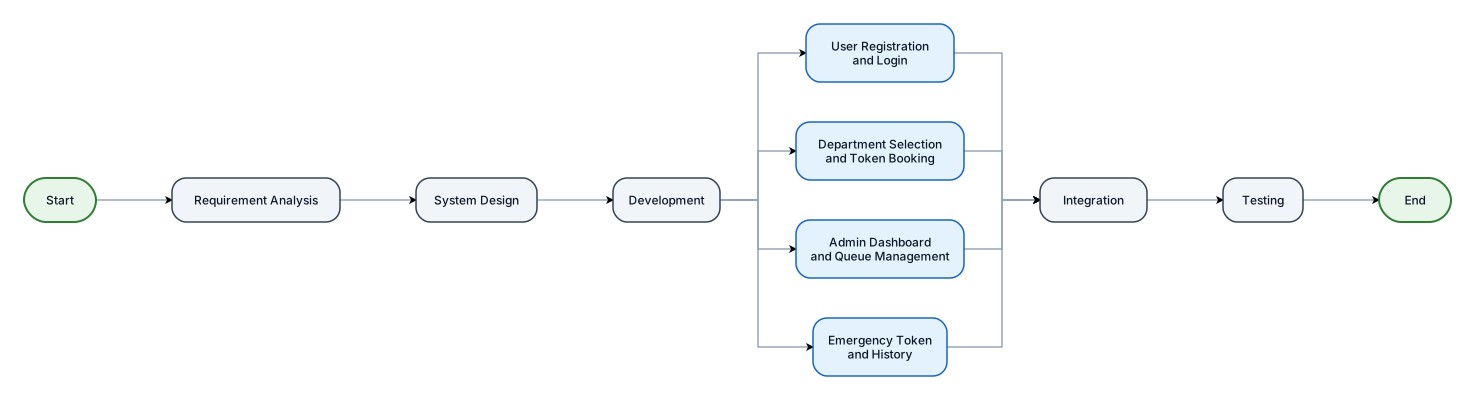
Create a proper PERT network diagram for the MediQueue healthcare queue management project. Use a left-to-right network layout with separate rectangular activity nodes connected by directional arrows. Show this dependency sequence: Start → Requirement Analysis → System Design → Development → Integration → Testing → End. Under Development, show parallel activities: User Registration and Login; Department Selection and Token Booking; Admin Dashboard and Queue Management; Emergency Token and History. Connect all four development activities to Integration, then continue to Testing and End. Use a clean white background, thin dark arrows, minimal pastel colors, readable labels, no decorative icons, no extra text, and no large title. Make the result suitable for a college project report.

Create a simple and professional PERT chart for a TYBSc Computer Science project named MediQueue, a healthcare queue management system. Show the activities in this order: Start → Requirement Analysis → System Design and Database Planning → User Registration and Login → Department Selection and Token Booking → Admin Dashboard and Queue Management → Emergency Token and History → Integration → Testing → End. Use clear arrows, neat rectangular boxes, minimal pastel colors, a white background, and readable English labels. Keep the diagram suitable for a college project report. Do not add explanations or extra headings.
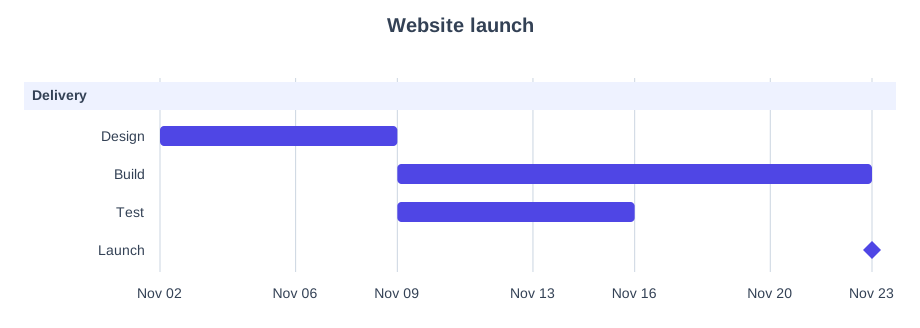
gantt chart for a 4-week website launch: design week 1, build weeks 2-3, test week 3, launch week 4