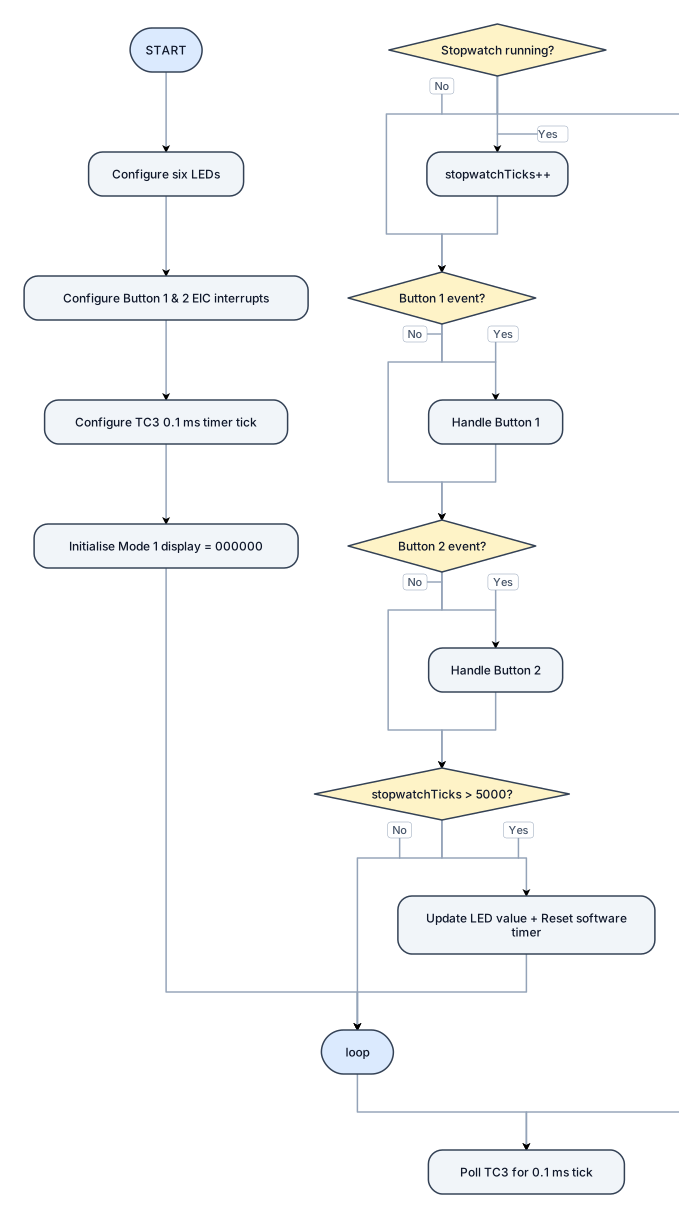
START | Configure six LEDs | Configure Button 1 & 2 EIC interrupts | Configure TC3 0.1 ms timer tick | Initialise Mode 1 display = 000000 | loop() | Poll TC3 for 0.1 ms tick | Stopwatch running? ├─ Yes → stopwatchTicks++ └─ No | Button 1 event? ├─ Yes → handle Button 1 └─ No | Button 2 event? ├─ Yes → handle Button 2 └─ No | stopwatchTicks > 5000? ├─ Yes → Update LED value + Reset software timer └─ No → loop()
NODE ARCHIVE · REAL DIAGRAM BRIEFS
Diagram Examples from Real Visitor Prompts
Browse eligible diagrams shared by FreeDiagram visitors, inspect the exact prompts, and build your own version.
Browse 3261 real creationsCOMMUNITY OUTPUTS · EXACT PROMPTS
Flowchart
Showing 25–48 of 85. No stock examples or system defaults. Choose a tool, study a real result, then reopen its prompt as your starting point.
![Flowchart example: • [ ] 等待 Emma 發出稽核受查問卷 email,依問卷整理所需資料 • [ ] 依資產編號至會計系統查詢取得日期與入帳日期,注意兩者不一致時須特別標注 • [ ] 等待 Emma 發出稽核受查問卷 email,依問卷整理所需資料 • [ ] 依資產編號至會計系統查詢取得日期與入帳日期,注意](https://psvtykrtciekraoilfux.supabase.co/storage/v1/object/public/gallery-assets/freediagram/feed/be327056-7cff-4edf-9184-c218e9feee52.svg)
• [ ] 等待 Emma 發出稽核受查問卷 email,依問卷整理所需資料 • [ ] 依資產編號至會計系統查詢取得日期與入帳日期,注意兩者不一致時須特別標注 • [ ] 等待 Emma 發出稽核受查問卷 email,依問卷整理所需資料 • [ ] 依資產編號至會計系統查詢取得日期與入帳日期,注意兩者不一致時須特別標注 • [ ] 空氣測漏機設備驗收單尚未完成(尾款未付),待完成後補齊三家報價單與驗收單 • [ ] 紙本單據(收貨報費等)請秀貞蓋配徵章後,再請書畫簽名 • [ ] 稽核期間注意設備是否有送外維修,須記錄相關期間 • [ ] 以 email 提供 2026 年 9 月資產清冊電子檔給稽核單位 • [ ] 盤點報表列印(1 頁縮印 2 張)備齊紙本供稽核 ________________________________________ 稽核背景與時程 • 每年 10 月 稽核單位會針對固定資產(廠房、設備維修盤點)進行稽核 • 稽核人員會從會計系統抓取去年起的相關資料,不足再往前追溯 • 流程啟動點:等 Emma 發出受查問卷 email,依問卷整理資料 ________________________________________ 文件準備原則 • 電子檔:僅需提供 9 月份資產清冊電子檔(mail 給稽核單位);紫色單據亦只需電子檔 • 紙本:其餘文件(移撥單、盤點清冊、收貨報費等)均須提供紙本 • 紙本印製方式:1 頁縮印 2 張 • 若資產有 01、02 等多頁,一併提供 ________________________________________ 資產查核流程 • 複製資產船票號碼至系統查詢,確認起訂頁與入帳月份 • 注意取得日期與入帳日期不一致的情況,須另行說明 • 如為長虹廠房租賃等合約,確認是否有錄入系統 • 收貨報費紙本:請秀貞蓋章 → 再請書畫簽名,說明「請簽名」即可 • 若有送外維修的設備,須特別注意該期間的記錄 ________________________________________ 固定資產盤點作業 • 稽核單位會提供盤點計畫 • 需備齊盤點清冊:確認每一單位人員皆已填寫,並核對下列簽名欄位: o 單位主管 o 單位經辦 o 人事經辦 • 盤點結果與差異分析:需附差異說明及相關單號,表單縮印後提供紙本
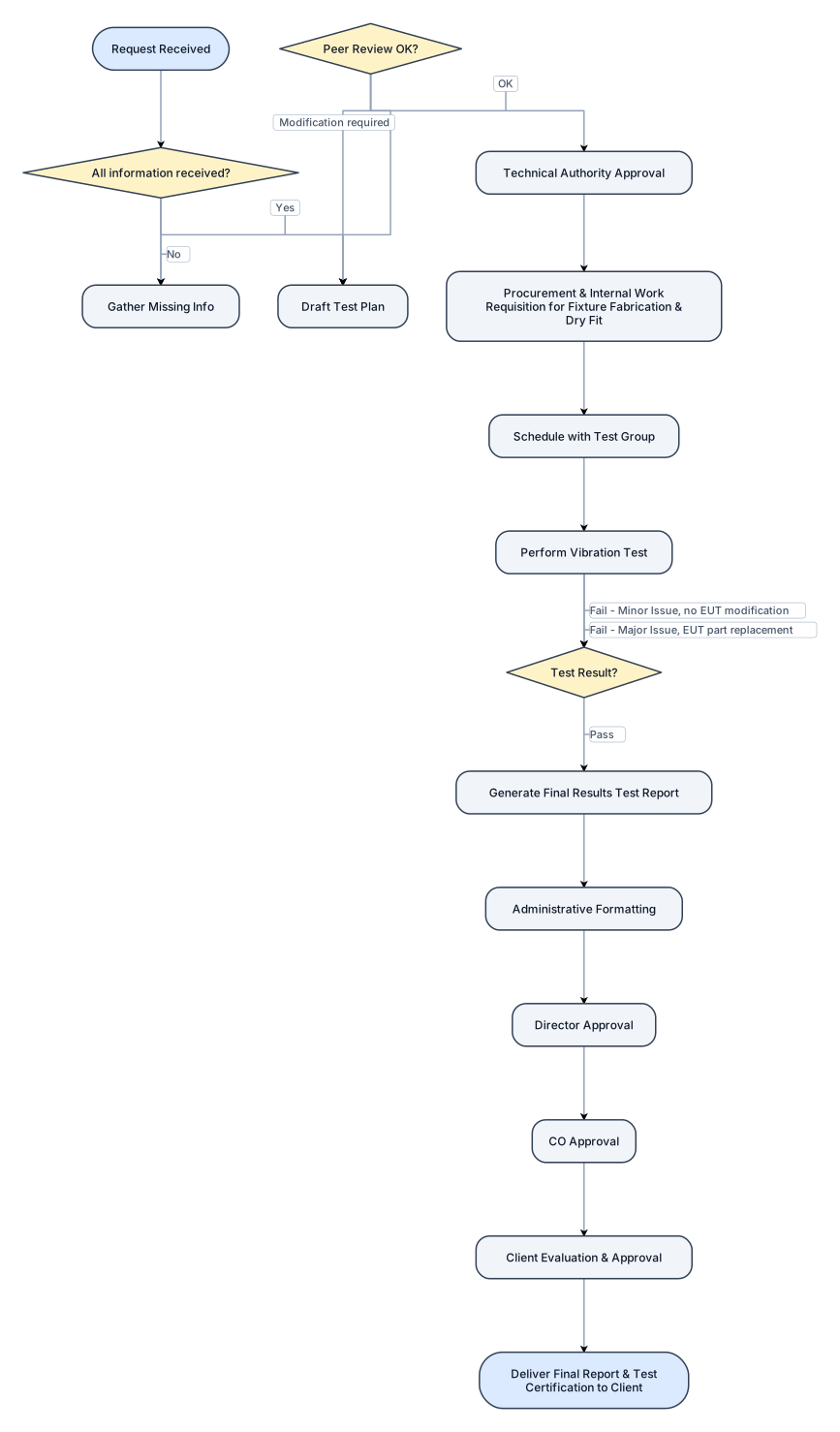
Create a flowchart for a Vibration Testing Process based on MIL-STD-167-1A: 1. Start with "Request Received", 2. if all information rx * yes go to 3 *if not all information rx go to "Gather Missing Info" then comme back to step 2. 3. Move to "Draft Test Plan" (incorporating Purpose, MIL-STD-167-1A, Requirements, Setup, Conduct, and Acceptance Criteria). 4. Pass through "Peer Review" *if ok then continue next step *if modificaion required come back to step 3. 5.and "Technical Authority Approval". 5. Proceed to "Procurement & Internal Work Requisition for Fixture Fabrication & Dry Fit". 6. Move to "Schedule with Test Group" 7. "Perform Vibration Test". 7. Add a Decision Node after testing: * If PASS: Go to step 8 "Generate Final Results Test Report". * If FAIL (Minor Issue - no EUT modification): Restart from the last test portion. * If FAIL (Major Issue - EUT part replacement): Restart testing completely.from step 7 8. From "Generate Final Results Test Report", loop through the Approval Pipeline: * Administrative Formatting -> Director Approval -> CO Approval -> Client Evaluation & Approval. 8. End with "Deliver Final Report & Test Certification to Client".
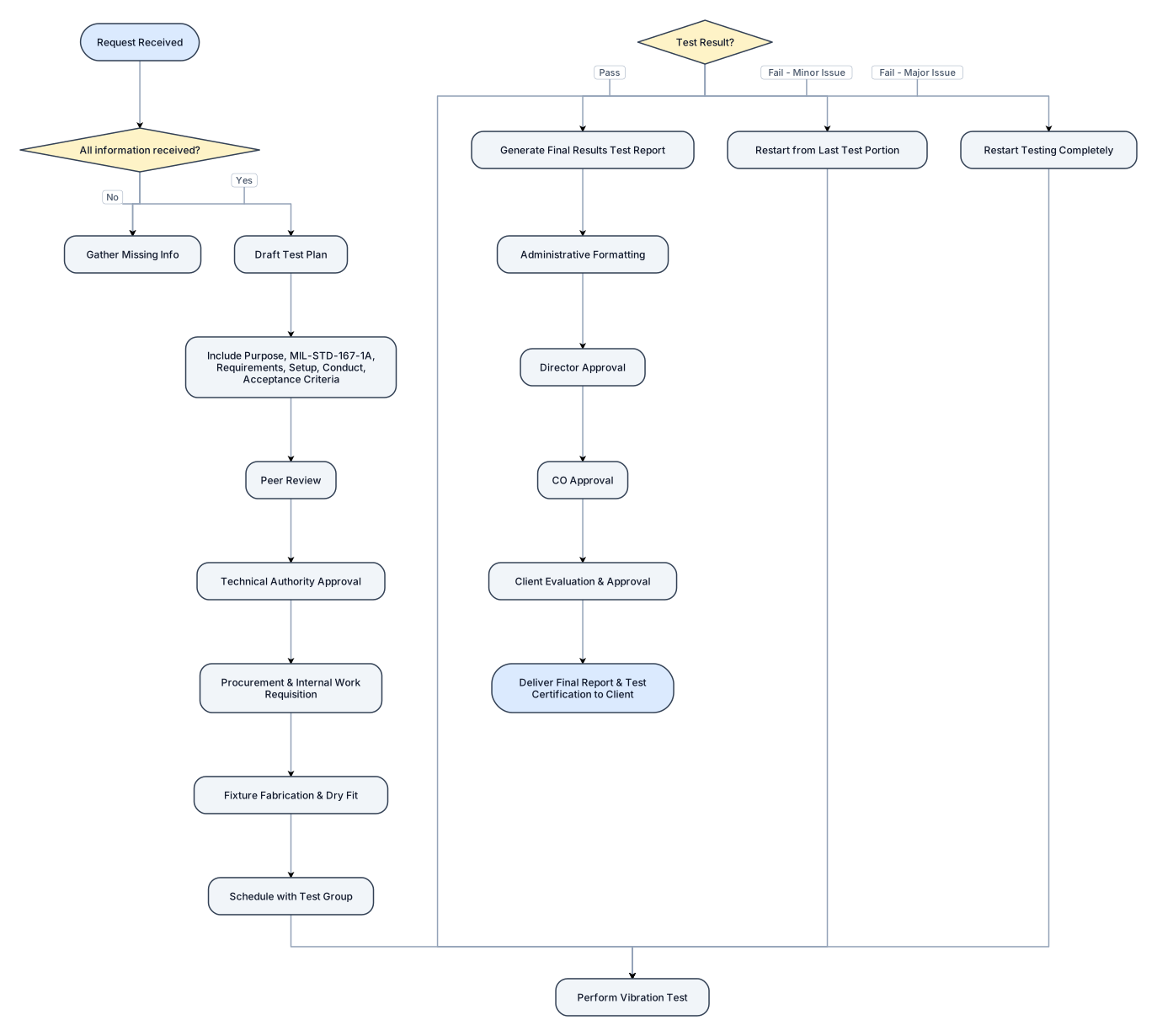
Create a flowchart for a Vibration Testing Process based on MIL-STD-167-1A: 1. Start with "Request Received", 2. if all information rx * yes go to 3 *if not all information rx go to "Gather Missing Info" then comme back to step 2. 3. Move to "Draft Test Plan" (incorporating Purpose, MIL-STD-167-1A, Requirements, Setup, Conduct, and Acceptance Criteria). 4. Pass through "Peer Review" and "Technical Authority Approval". 5. Proceed to "Procurement & Internal Work Requisition for Fixture Fabrication & Dry Fit". 6. Move to "Schedule with Test Group" and "Perform Vibration Test". 7. Add a Decision Node after testing: * If PASS: Go to "Generate Final Results Test Report". * If FAIL (Minor Issue - no EUT modification): Restart from the last test portion. * If FAIL (Major Issue - EUT part replacement): Restart testing completely. 7. From "Generate Final Results Test Report", loop through the Approval Pipeline: * Administrative Formatting -> Director Approval -> CO Approval -> Client Evaluation & Approval. 8. End with "Deliver Final Report & Test Certification to Client".
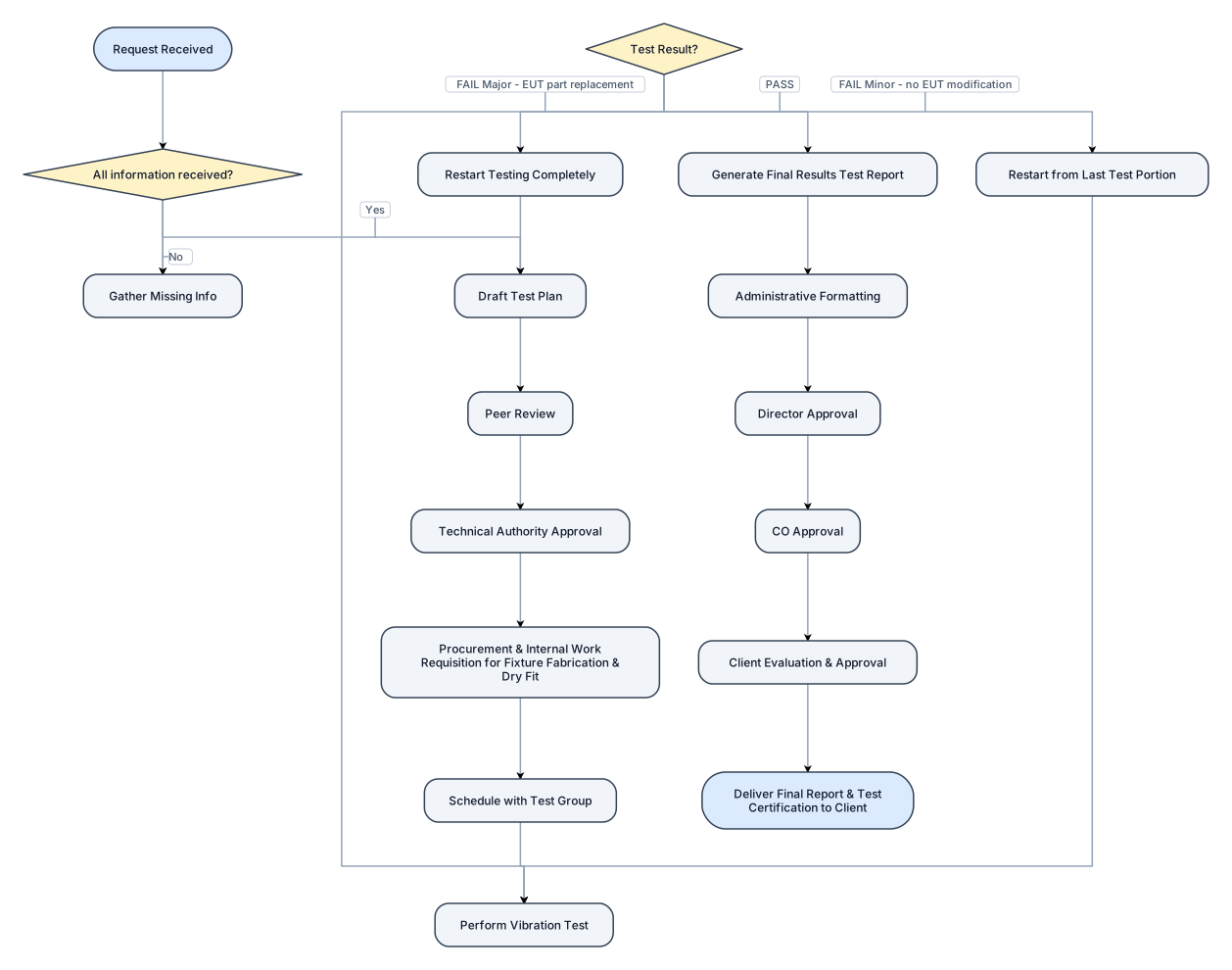
Create a flowchart for a Vibration Testing Process based on MIL-STD-167-1A: 1. Start with "Request Received", 2. if all information rx go to 3 if not all information rx "Gather Missing Info" then if all rx continue to step 3. 3. Move to "Draft Test Plan" (incorporating Purpose, MIL-STD-167-1A, Requirements, Setup, Conduct, and Acceptance Criteria). 4. Pass through "Peer Review" and "Technical Authority Approval". 5. Proceed to "Procurement & Internal Work Requisition for Fixture Fabrication & Dry Fit". 6. Move to "Schedule with Test Group" and "Perform Vibration Test". 7. Add a Decision Node after testing: * If PASS: Go to "Generate Final Results Test Report". * If FAIL (Minor Issue - no EUT modification): Restart from the last test portion. * If FAIL (Major Issue - EUT part replacement): Restart testing completely. 7. From "Generate Final Results Test Report", loop through the Approval Pipeline: * Administrative Formatting -> Director Approval -> CO Approval -> Client Evaluation & Approval. 8. End with "Deliver Final Report & Test Certification to Client".
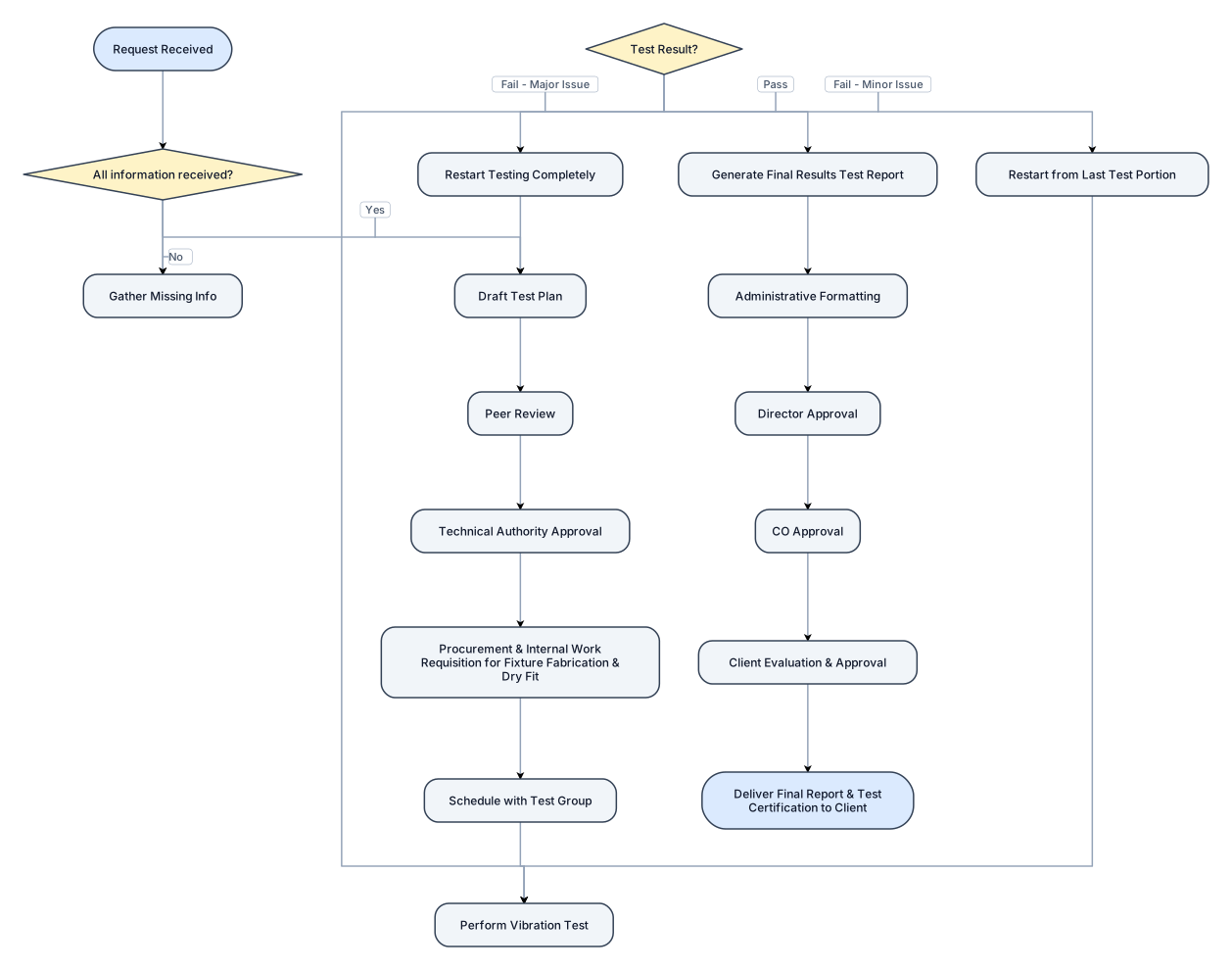
Create a flowchart for a Vibration Testing Process based on MIL-STD-167-1A: 1. Start with "Request Received", 2. if all information rx go to 3 if not all information rx "Gather Missing Info". 3. Move to "Draft Test Plan" (incorporating Purpose, MIL-STD-167-1A, Requirements, Setup, Conduct, and Acceptance Criteria). 4. Pass through "Peer Review" and "Technical Authority Approval". 5. Proceed to "Procurement & Internal Work Requisition for Fixture Fabrication & Dry Fit". 6. Move to "Schedule with Test Group" and "Perform Vibration Test". 7. Add a Decision Node after testing: * If PASS: Go to "Generate Final Results Test Report". * If FAIL (Minor Issue - no EUT modification): Restart from the last test portion. * If FAIL (Major Issue - EUT part replacement): Restart testing completely. 7. From "Generate Final Results Test Report", loop through the Approval Pipeline: * Administrative Formatting -> Director Approval -> CO Approval -> Client Evaluation & Approval. 8. End with "Deliver Final Report & Test Certification to Client".
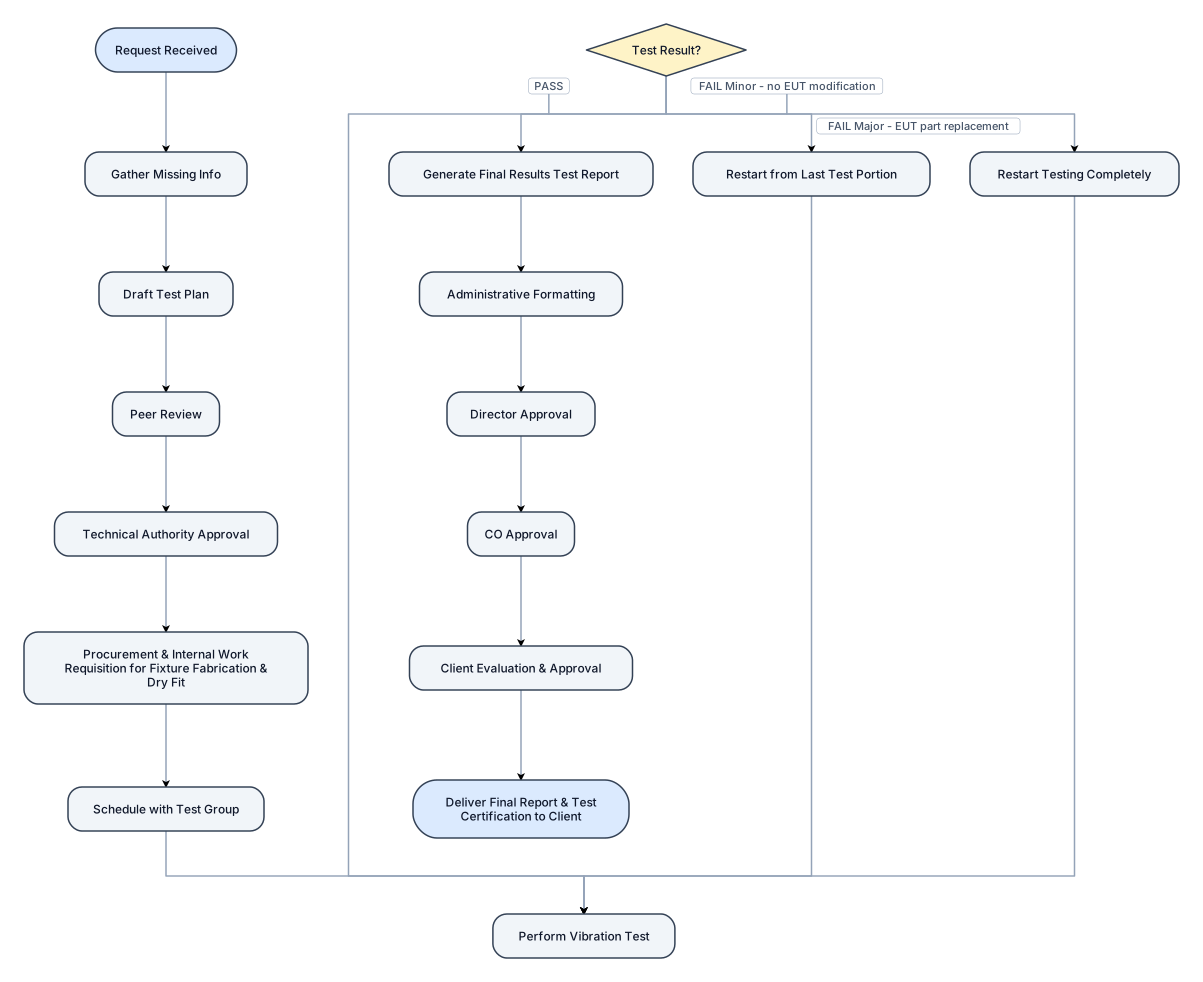
Create a flowchart for a Vibration Testing Process based on MIL-STD-167-1A: 1. Start with "Request Received", then "Gather Missing Info". 2. Move to "Draft Test Plan" (incorporating Purpose, MIL-STD-167-1A, Requirements, Setup, Conduct, and Acceptance Criteria). > 3. Pass through "Peer Review" and "Technical Authority Approval". > 4. Proceed to "Procurement & Internal Work Requisition for Fixture Fabrication & Dry Fit". > 5. Move to "Schedule with Test Group" and "Perform Vibration Test". 6. Add a Decision Node after testing: * If PASS: Go to "Generate Final Results Test Report". * If FAIL (Minor Issue - no EUT modification): Restart from the last test portion. * If FAIL (Major Issue - EUT part replacement): Restart testing completely. 7. From "Generate Final Results Test Report", loop through the Approval Pipeline: * Administrative Formatting -> Director Approval -> CO Approval -> Client Evaluation & Approval. 8. End with "Deliver Final Report & Test Certification to Client".
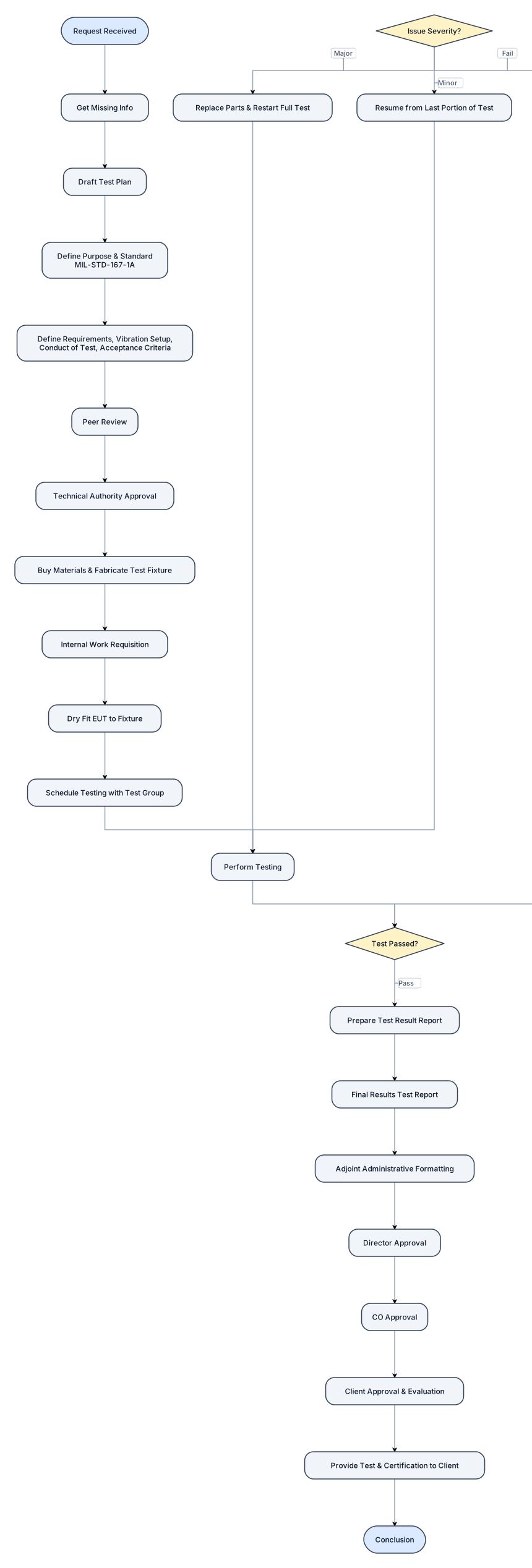
Request Received Get missing info Draft Test Plan • Purpose: To test the equipment under test the adequacy • Standard use: Mil-Standard-167-1A • Requirements • Vibration Setup • Conduct of Test • Acceptance Criteria Peer Review Technical authority approval Perform Test • Buy materials to fabricate test fixture • Internal Work Requisition: purpose is to provide information to shop personnel to fabricate and proceed to dry fit the equipment Under Test unto the test fixture. • Schedule testing with Test Group • Perform testing • Pass • goes to next step – test result report. • Failed Minor issue that can be solve without modification of the EUT can continue from the beginning of the last portion of test made. If major issue that need toreplace part of the equipment will need to restart perform test complety Final Results test Report if test pass Submission of report • To adjoint administrative for formatting. • Then to director for approval • To CO for approval • The client for approval and evaluation of the document. • Complete test and certification is provide to client. Conclusion
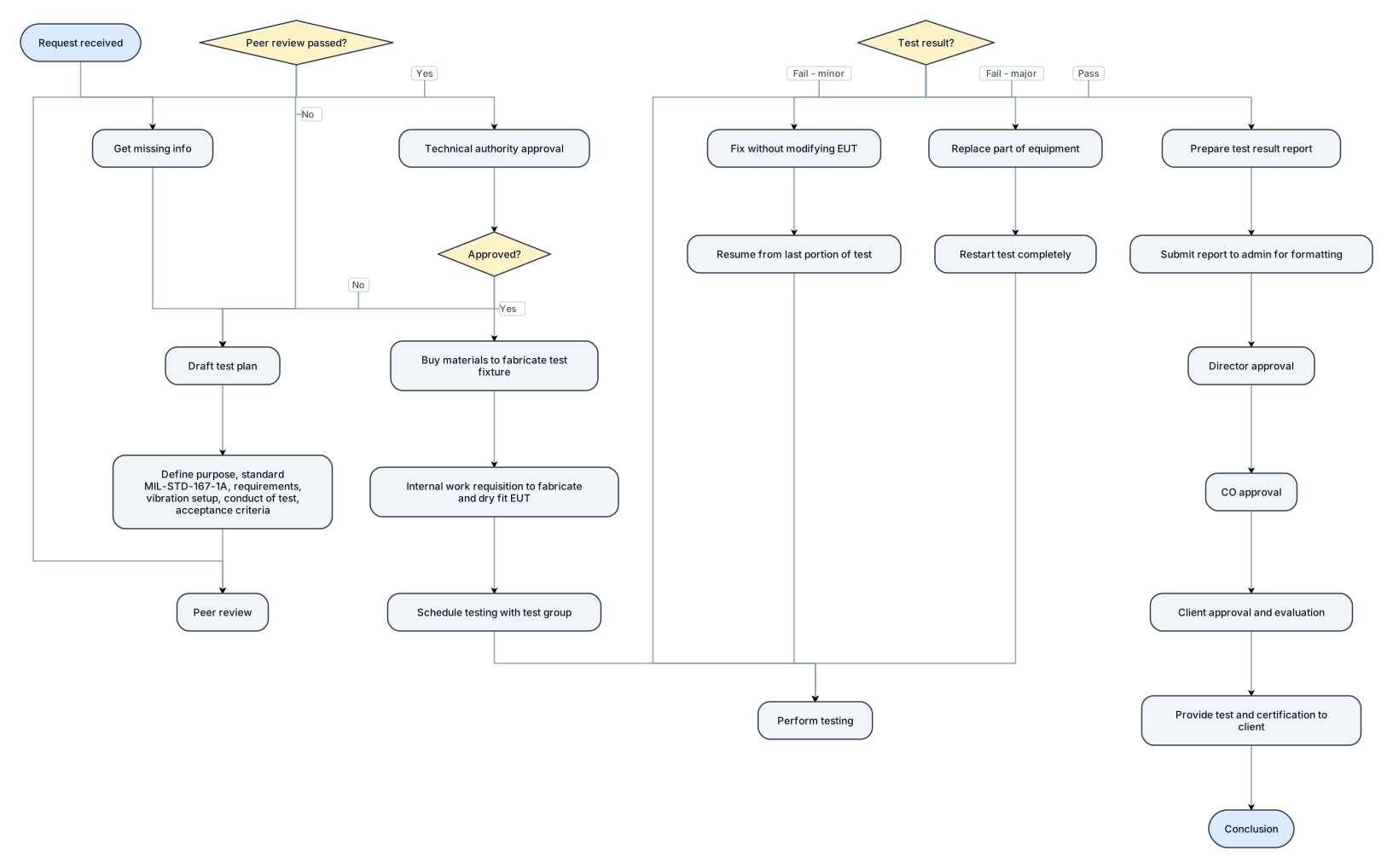
Request Received Get missing info Draft Test Plan • Purpose: To test the equipment under test the adequacy • Standard use: Mil-Standard-167-1A • Requirements • Vibration Setup • Conduct of Test • Acceptance Criteria Peer Review Technical authority approval Perform Test • Buy materials to fabricate test fixture • Internal Work Requisition: purpose is to provide information to shop personnel to fabricate and proceed to dry fit the equipment Under Test unto the test fixture. • Schedule testing with Test Group • Perform testing • Pass • goes to next step – test result report. • Failed • Minor issue that can be solve without modification of the EUT can continue from the beginning of the last portion of test made. • If major issue that need toreplace part of the equipment will need to restart perform test complety Final Results test Report if test pass Submission of report • To adjoint administrative for formatting. • Then to director for approval • To CO for approval • The client for approval and evaluation of the document. • Complete test and certification is provide to client. Conclusion
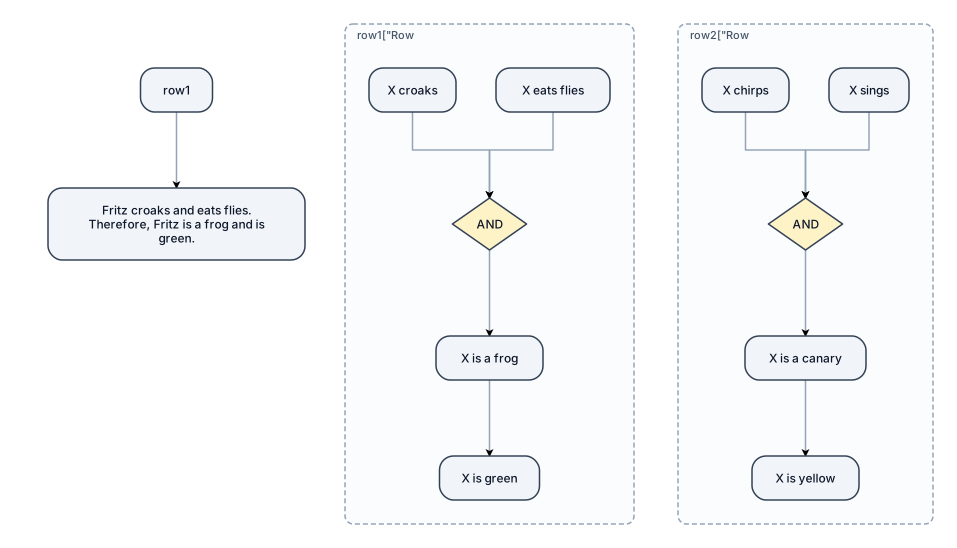
Draw a clean AND–OR inference graph for a forward-chaining problem. Use labeled nodes and arrows, with two separate horizontal rows. Row 1: “X croaks” and “X eats flies” must BOTH connect to an “AND” node. Connect “AND” → “X is a frog” → “X is green”. Row 2: “X chirps” and “X sings” must BOTH connect to another “AND” node. Connect “AND” → “X is a canary” → “X is yellow”. Below the first row, add: “Fritz croaks and eats flies. Therefore, Fritz is a frog and is green.” The second row represents a general rule, not a proven conclusion about Tweety. Use a white background, black text, and clear arrows. Do not add OR nodes, extra rules, or electronic gate symbols.
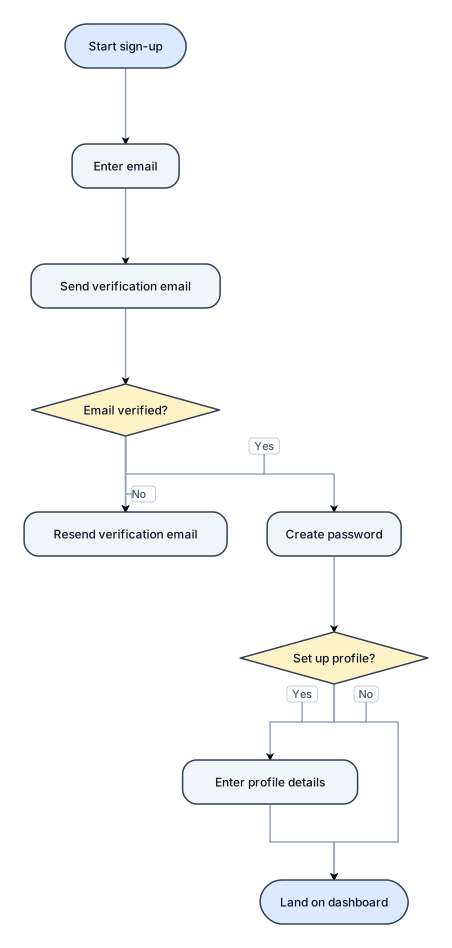
A flowchart for a user sign-up process: enter email, verify email, create password, optional profile setup, then land on the dashboard
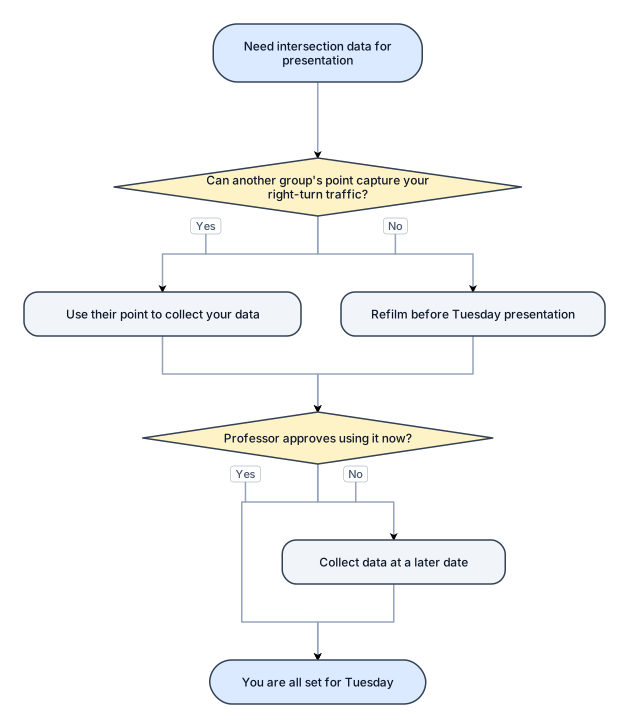
The idea isn't trying to use another intersections data as your own It is to see if another groups point catches your right turn traffic to use for your data! If you are not able to find that then you will need to refilm for the presentation on Tuesday But if Professor says you can collect it at a later date and use what you have now for your presentation then you will be all set!
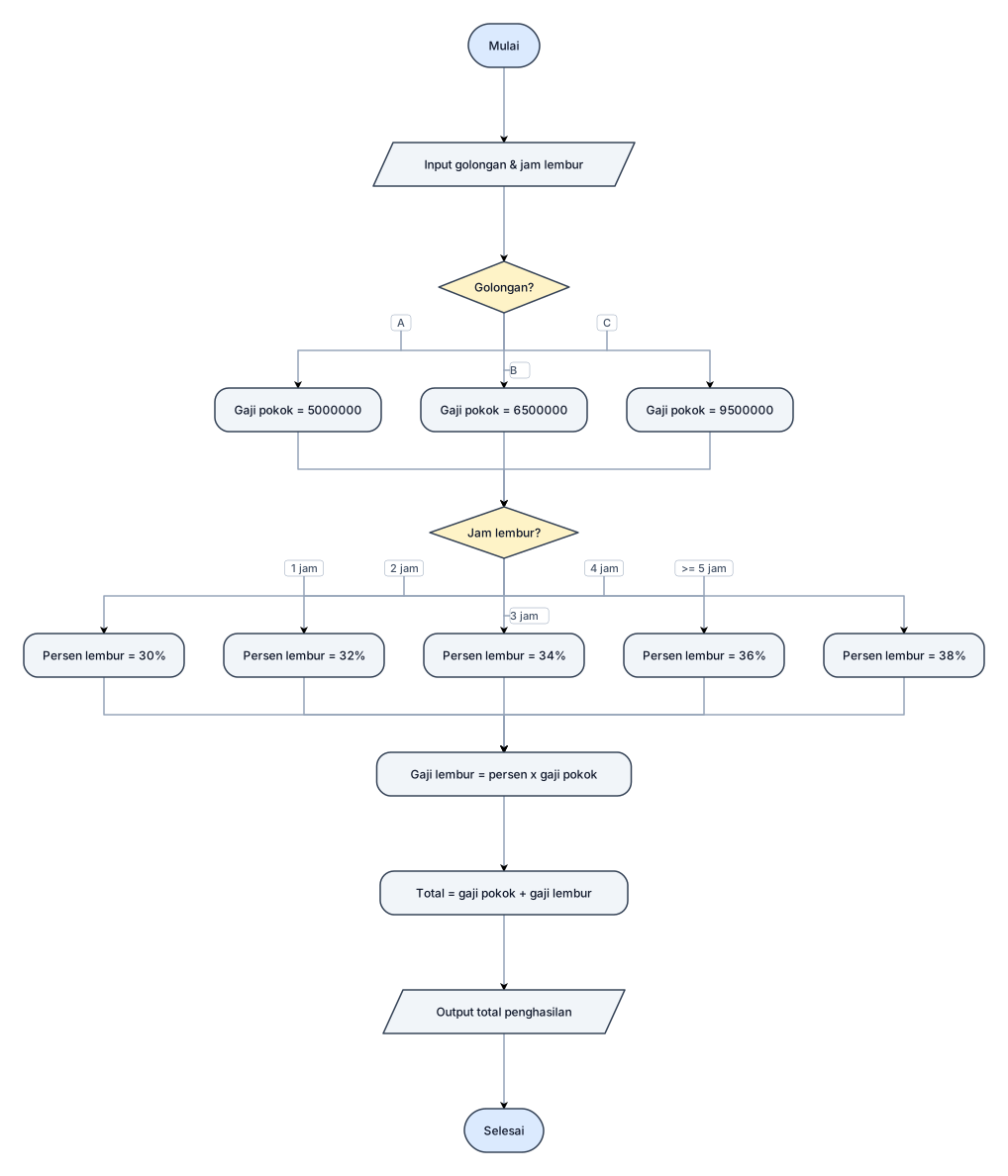
Pada sebuah perusahaan terdapat tiga golongan karyawan: Golongan A : Gaji Pokok Rp5.000.000 Golongan B : Gaji Pokok Rp6.500.000 Golongan C : Gaji Pokok Rp9.500.000 Ketentuan gaji lembur: Lembur 1 jam → 30% dari gaji pokok. Lembur 2 jam → 32% dari gaji pokok. Lembur 3 jam → 34% dari gaji pokok. Lembur 4 jam → 36% dari gaji pokok. Lembur ≥ 5 jam → 38% dari gaji pokok. Input: Golongan karyawan Jumlah jam lembur Output: Total penghasilan = Gaji Pokok + Gaji Lembur
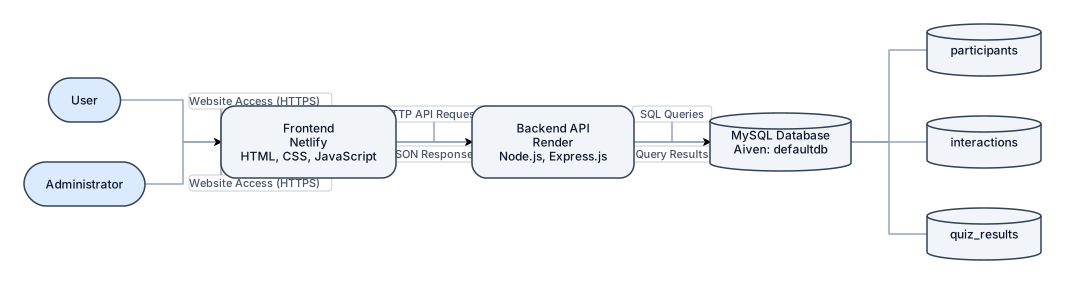
Draw a system architecture diagram for SafeSphere: User and Administrator → Frontend (Netlify: HTML, CSS, JavaScript) ↔ Backend API (Render: Node.js, Express.js) ↔ MySQL Database (Aiven: `defaultdb`). Database tables: `participants`, `interactions`, `quiz_results`. Label arrows: Website Access (HTTPS), HTTP API Requests, JSON Responses, SQL Queries, Query Results. White background, landscape layout, clear arrows. No direct frontend-to-database connection.
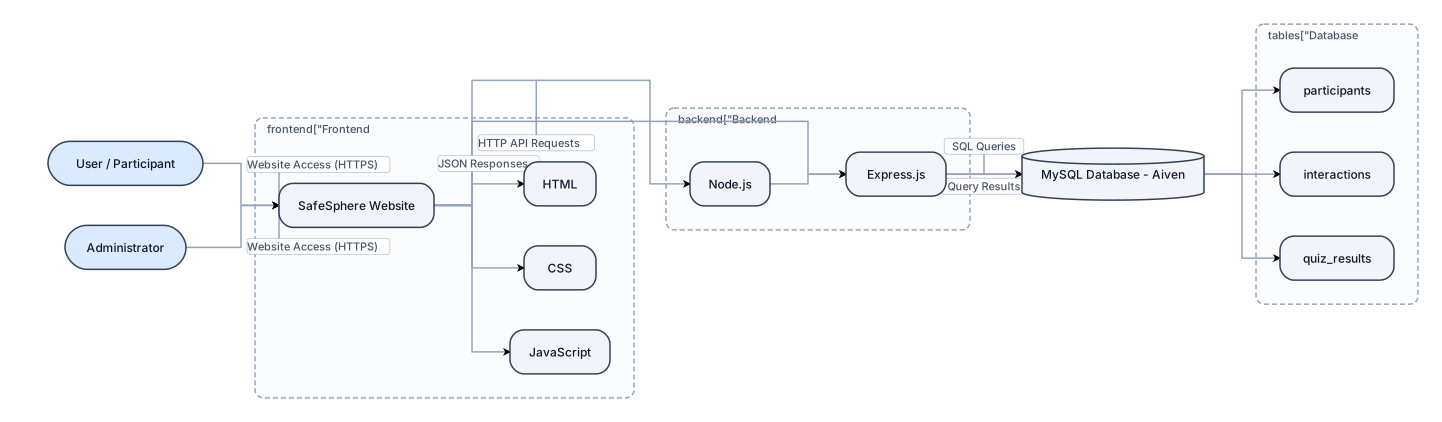
Create a simple landscape system architecture diagram titled “Figure 4.1: System Architecture of SafeSphere”. Show three main components connected from left to right: 1. **Frontend (Netlify):** SafeSphere Website, HTML, CSS, JavaScript. 2. **Backend API (Render):** Node.js, Express.js. 3. **MySQL Database (Aiven):** Database `defaultdb`, tables: `participants`, `interactions`, `quiz_results`. Add User/Participant and Administrator on the left, both connected to the Frontend with arrows labelled “Website Access (HTTPS)”. Connect Frontend ↔ Backend API with two arrows: “HTTP API Requests” and “JSON Responses”. Connect Backend API ↔ MySQL Database with two arrows: “SQL Queries” and “Query Results”. Use white background, clear boxes, a database cylinder, readable text, and neat arrows. The frontend must connect to the database only through the backend. Add the caption “Figure 4.1: System Architecture of SafeSphere”.
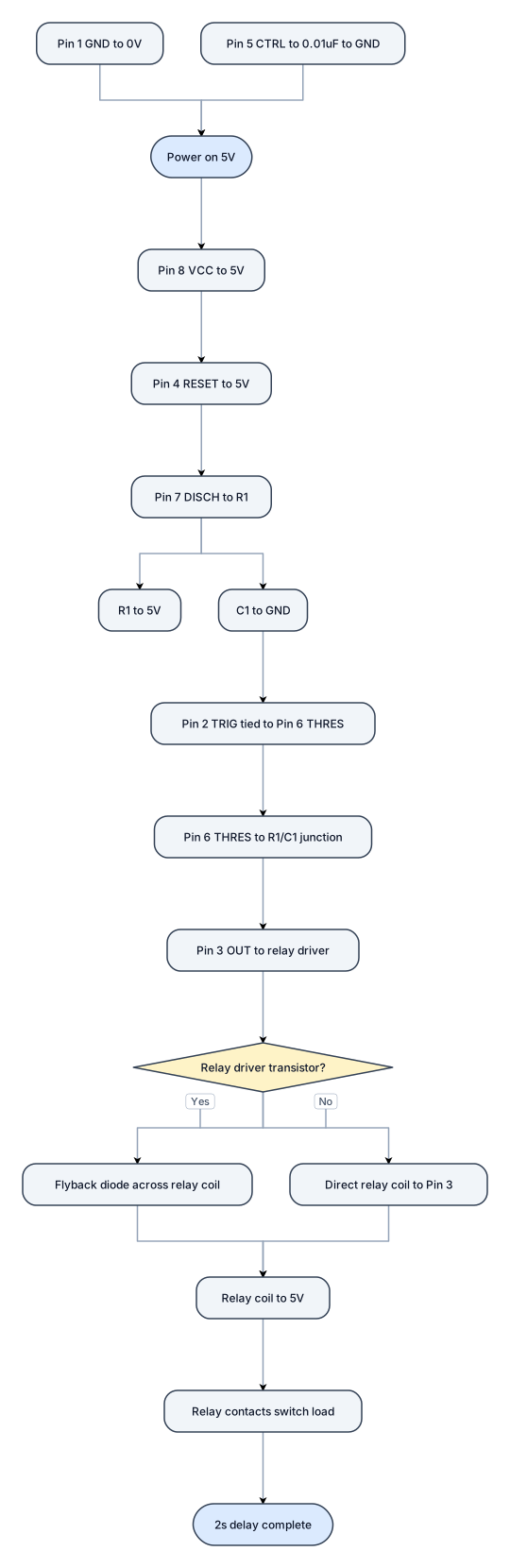
5V NE555 timer, 2 second delay, relay output, show all pin numbers.”
![Flowchart example: Revise this script flowchart LR DEV["👨💻 Développeur"] DEV --> IDE["VS Code"] subgraph MACHINE["💻 Machine"] subgraph DOCKER["🐳 Docker"] subgraph D](https://psvtykrtciekraoilfux.supabase.co/storage/v1/object/public/gallery-assets/freediagram/feed/b7f6e13b-318a-480c-bbf3-108038c0de75.svg)
Revise this script flowchart LR DEV["👨💻 Développeur"] DEV --> IDE["VS Code"] subgraph MACHINE["💻 Machine"] subgraph DOCKER["🐳 Docker"] subgraph DEVCONT["📦 Dev Container"] TOOLS["🛠️ Outils\nNode / Python / Git..."] CODE["📂 Projet monté"] end DB["🗄️ Database"] CACHE["⚡ Redis"] end end IDE <--> DEVCONT DEVCONT --> DB DEVCONT --> CACHE
![Flowchart example: flowchart LR DEV["👨💻 Développeur"] DEV --> IDE["VS Code"] subgraph MACHINE["💻 Machine"] subgraph DOCKER["🐳 Docker"] subgraph DEVCONT["📦 Dev Cont](https://psvtykrtciekraoilfux.supabase.co/storage/v1/object/public/gallery-assets/freediagram/feed/3f70da47-0704-4a6c-b6b8-646e1b5743e9.svg)
flowchart LR DEV["👨💻 Développeur"] DEV --> IDE["VS Code"] subgraph MACHINE["💻 Machine"] subgraph DOCKER["🐳 Docker"] subgraph DEVCONT["📦 Dev Container"] TOOLS["🛠️ Outils\nNode / Python / Git..."] CODE["📂 Projet monté"] end DB["🗄️ Database"] CACHE["⚡ Redis"] end end IDE <--> DEVCONT DEVCONT --> DB DEVCONT --> CACHE
![Flowchart example: flowchart TB DEV["👨💻 Développeur"] DEV --> IDE["VS Code"] subgraph DOCKER["🐳 Docker / environnement local"] APP["📦 Dev Container\nNode + outils"]](https://psvtykrtciekraoilfux.supabase.co/storage/v1/object/public/gallery-assets/freediagram/feed/ac9b43ff-7177-432d-ab9d-b10fed52f4db.svg)
flowchart TB DEV["👨💻 Développeur"] DEV --> IDE["VS Code"] subgraph DOCKER["🐳 Docker / environnement local"] APP["📦 Dev Container\nNode + outils"] DB["🗄️ PostgreSQL"] REDIS["⚡ Redis"] end IDE <--> APP APP --> DB APP --> REDIS
![Flowchart example: flowchart LR IDE["🖥️ VS Code"] subgraph HOST["💻 Ton ordinateur"] PROJECT["📁 mon-projet"] DOCKER["🐳 Docker"] end subgraph CONTAINER["📦 Dev Contain](https://psvtykrtciekraoilfux.supabase.co/storage/v1/object/public/gallery-assets/freediagram/feed/3d03eec5-39fc-4a4d-9152-77ce435b6318.svg)
flowchart LR IDE["🖥️ VS Code"] subgraph HOST["💻 Ton ordinateur"] PROJECT["📁 mon-projet"] DOCKER["🐳 Docker"] end subgraph CONTAINER["📦 Dev Container"] ENV["Node + npm + Git + outils"] WORKSPACE["📂 /workspaces/mon-projet"] end PROJECT <-->|"volume / bind mount"| WORKSPACE IDE <-->|"connexion"| CONTAINER DOCKER --> CONTAINER
![Flowchart example: flowchart LR A["💻 Ton PC"] --> B["🐳 Docker"] B --> C["📦 Dev Container"] C --> D["🛠️ Node / Python / Java"] C --> E["📚 Dépendances"] C --> F["🔧 O](https://psvtykrtciekraoilfux.supabase.co/storage/v1/object/public/gallery-assets/freediagram/feed/21461df3-a217-4d51-9f15-983613409fab.svg)
flowchart LR A["💻 Ton PC"] --> B["🐳 Docker"] B --> C["📦 Dev Container"] C --> D["🛠️ Node / Python / Java"] C --> E["📚 Dépendances"] C --> F["🔧 Outils"] C --> G["⚙️ Config"] C <--> H["📁 Ton projet"] H --> I["💻 VS Code / IDE"]
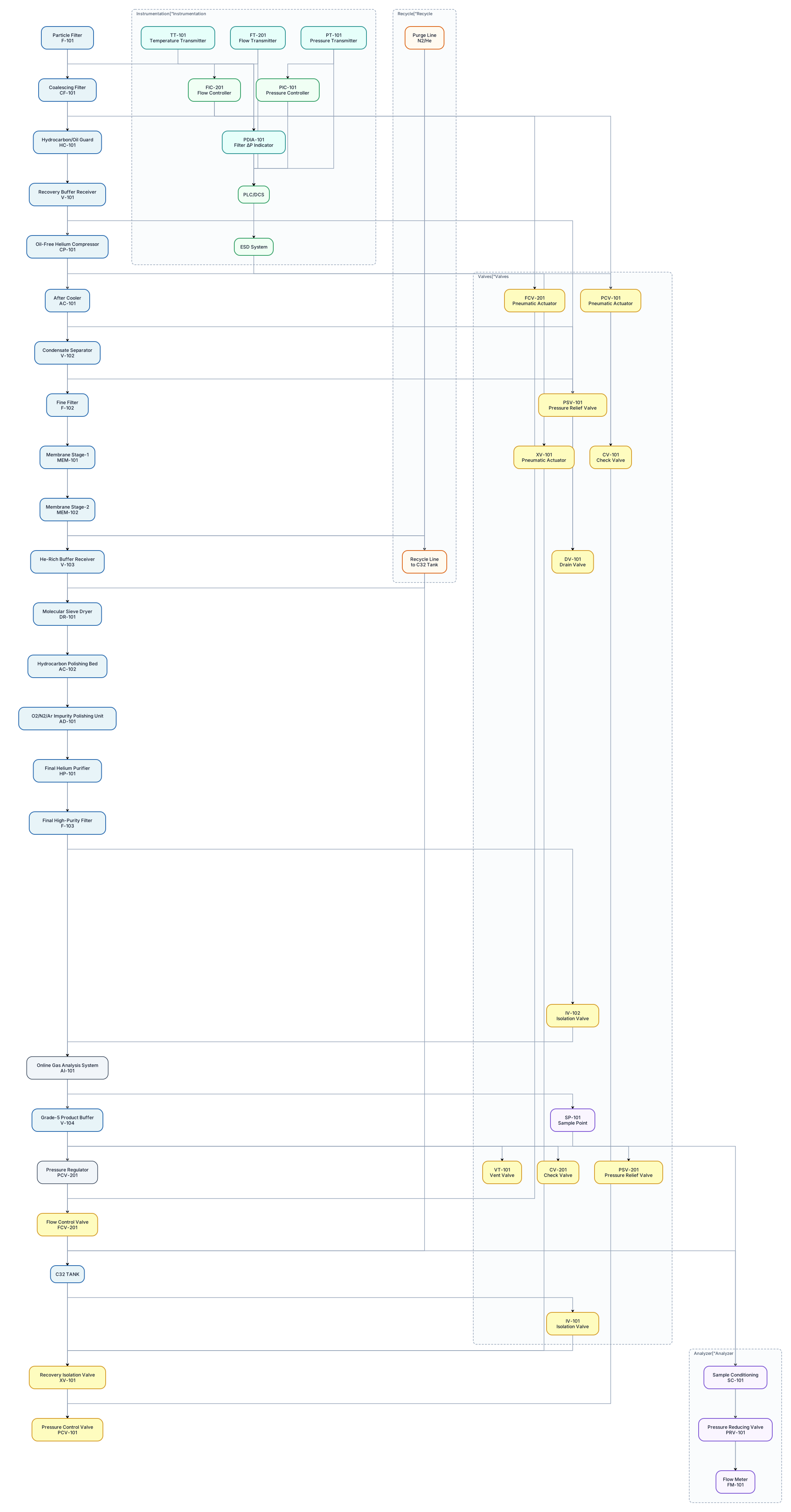
Use standard ISA-style P&ID conventions and show: - equipment tags - valve tags - instrument tags - process lines - flow direction arrows - control loops - pressure transmitters - temperature transmitters - flow transmitters/controllers - pressure control valves - isolation valves - check valves - pressure relief valves - filter differential pressure indication - drains/vents - sample points - analyzer sample conditioning - recycle lines - purge lines - emergency shutdown/interlock signals - PLC/DCS signal connections - pneumatic actuator connections where applicable. PROCESS SEQUENCE: C32 TANK → Recovery Isolation Valve XV-101 → Pressure Control Valve PCV-101 → Particle Filter F-101 → Coalescing Filter CF-101 → Hydrocarbon/Oil Guard HC-101 → Recovery Buffer Receiver V-101 → Oil-Free Helium Compressor CP-101 → After Cooler AC-101 → Condensate Separator V-102 → Fine Filter F-102 → Membrane Stage-1 MEM-101 → Membrane Stage-2 MEM-102 → He-Rich Buffer Receiver V-103 → Molecular Sieve Dryer DR-101 → Hydrocarbon Polishing Bed AC-102 → O2/N2/Ar Impurity Polishing Unit AD-101 → Final Helium Purifier HP-101 → Final High-Purity Filter F-103 → Online Gas Analysis System → Grade-5 Product Buffer V-104 → Pressure Regulator PCV-201 → Flow Control FCV-201 → C32 Tank.
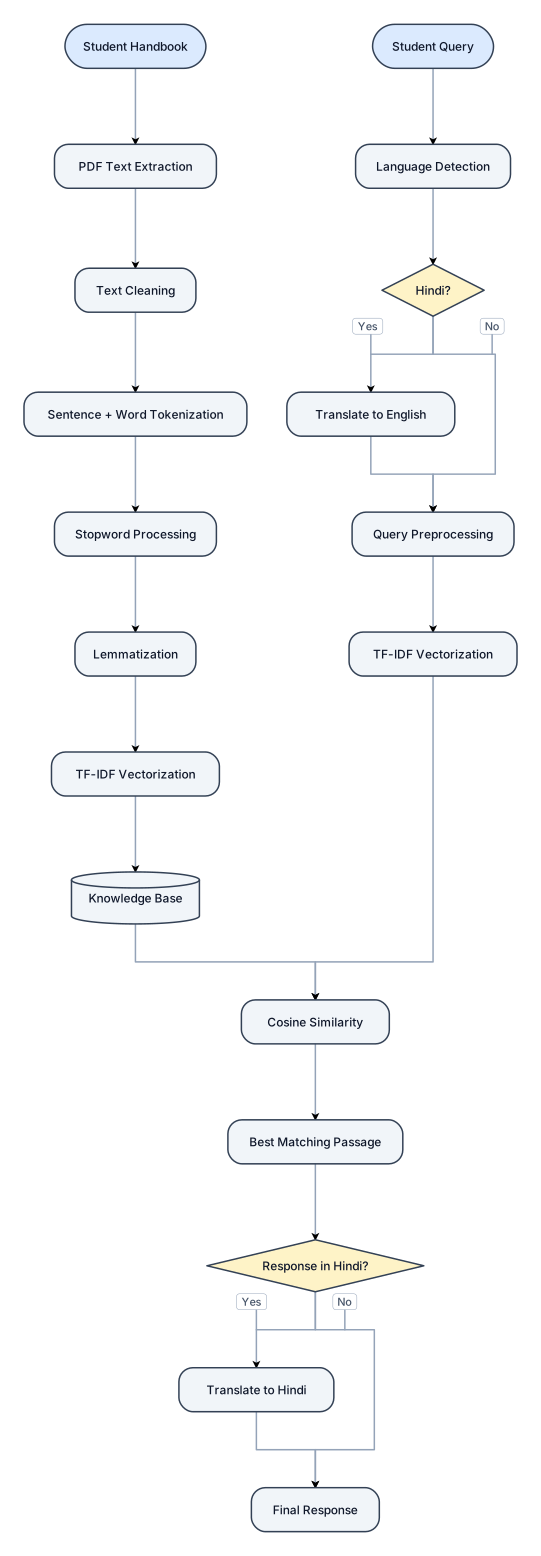
Student Handbook ↓ PDF Text Extraction ↓ Text Cleaning ↓ Sentence + Word Tokenization ↓ Stopword Processing ↓ Lemmatization ↓ TF-IDF Vectorization ↓ Knowledge Base Student Query ↓ Language Detection ↓ Hindi → English (if required) ↓ Query Preprocessing ↓ TF-IDF Vectorization ↓ Cosine Similarity ↓ Best Matching Passage ↓ English → Hindi (if required) ↓ Final Response
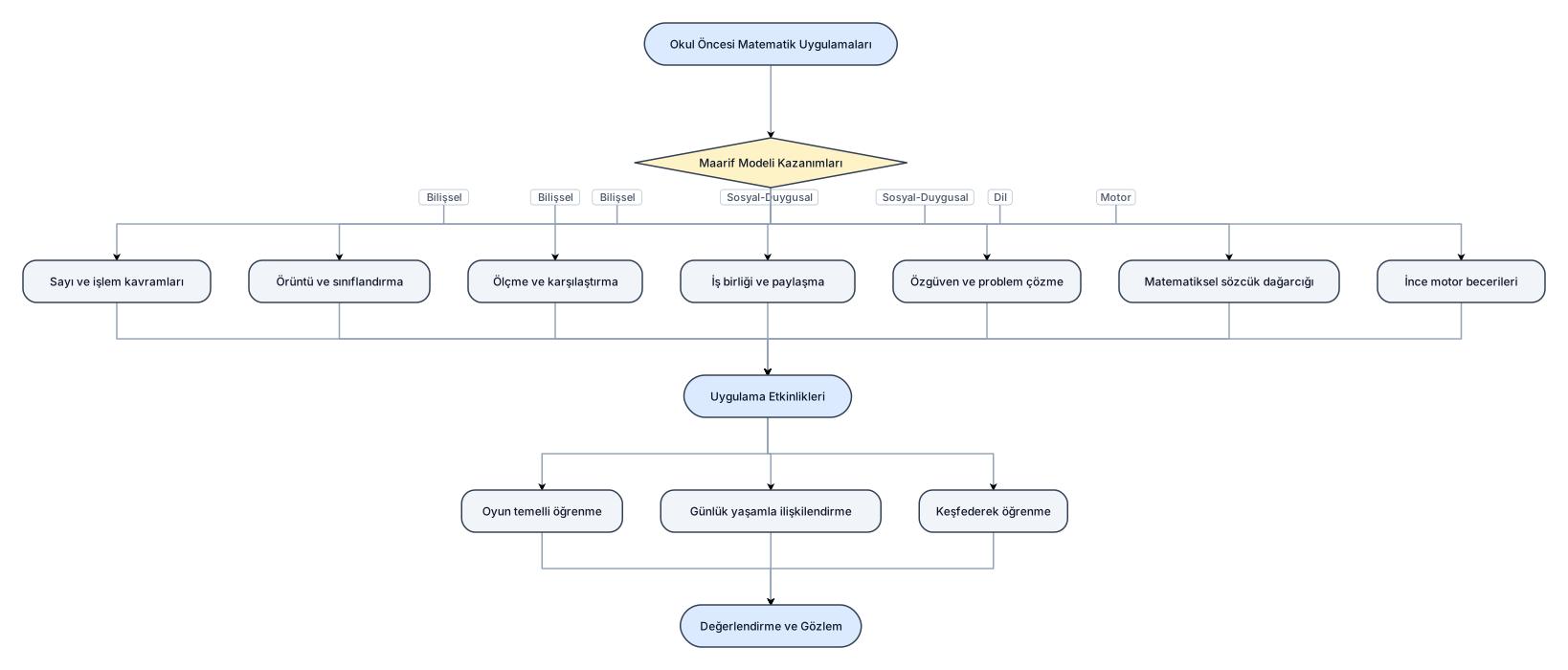
okulöncesinde matematik uygulamalarının,maarif modelinin kazanımları