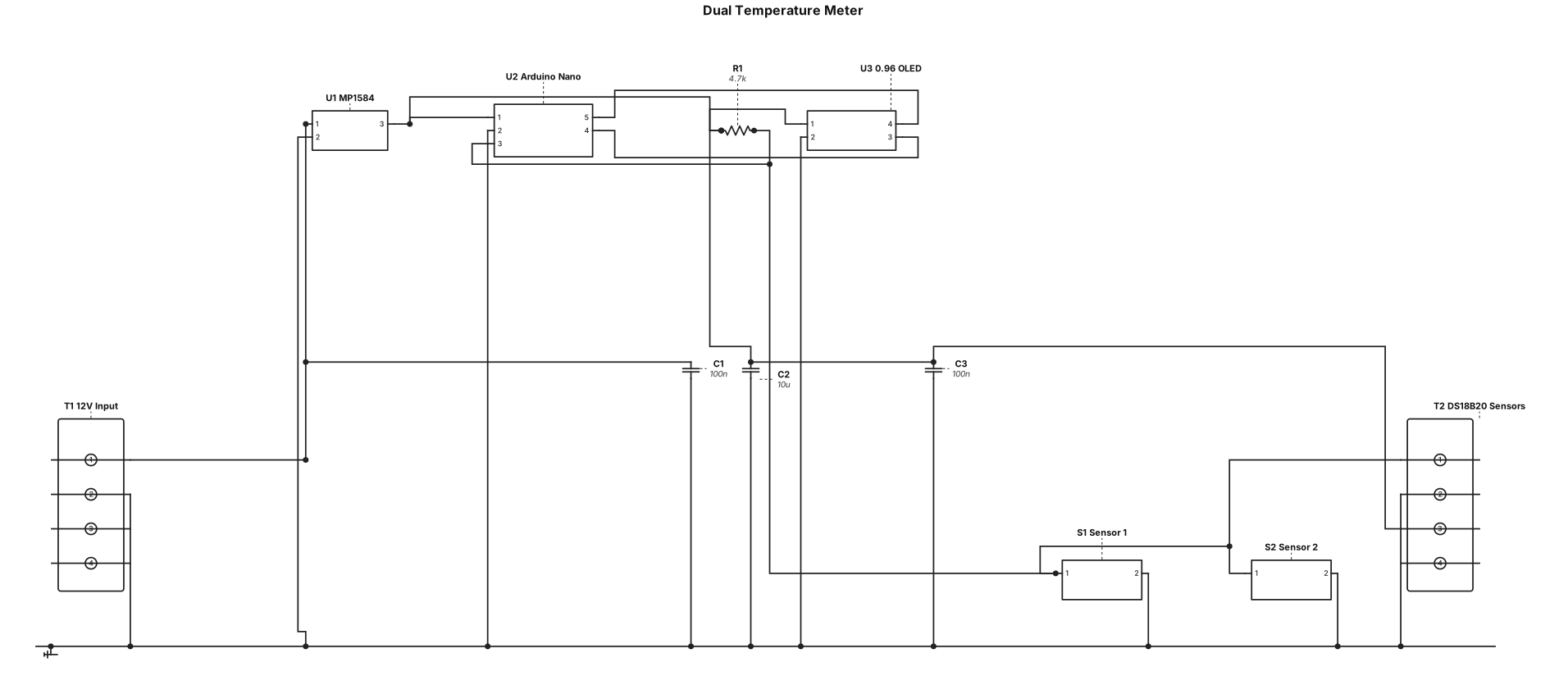
Design a dual temperature meter circuit for an automotive application. Include an Arduino Nano MCU, an MP1584 DC-DC step-down converter to step down 12V car power to 5V, a 0.96 inch I2C OLED display (128x64), and connections for two DS18B20 waterproof temperature sensors connected to digital pin D2 with a 4.7k ohm pull-up resistor between D2 and 5V. Add decoupling capacitors and terminal blocks for 12V power input and external sensor wiring
NODE ARCHIVE · REAL DIAGRAM BRIEFS
Diagram Examples from Real Visitor Prompts
Browse eligible diagrams shared by FreeDiagram visitors, inspect the exact prompts, and build your own version.
Browse 3276 real creationsCOMMUNITY OUTPUTS · EXACT PROMPTS
All visitor creations
Showing 553–576 of 3276. No stock examples or system defaults. Choose a tool, study a real result, then reopen its prompt as your starting point.
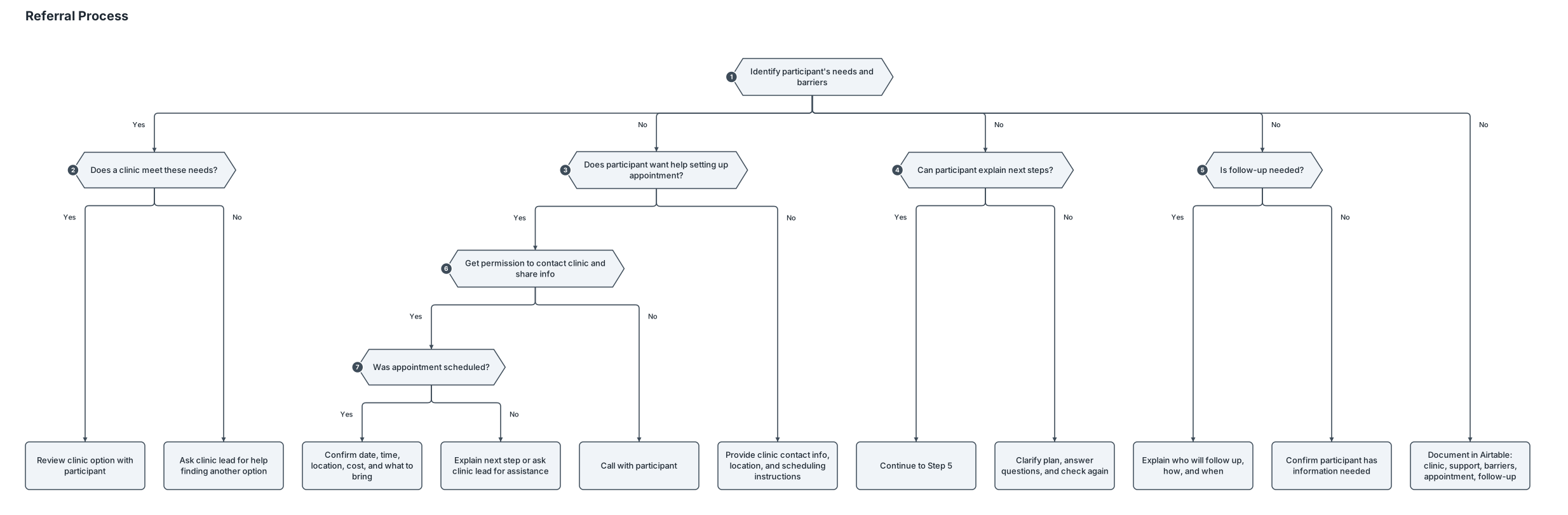
BEGIN REFERRAL │ ▼ 1. Identify the participant’s needs and barriers Consider cost/insurance, location, transportation, availability, language, accessibility, and scheduling needs. │ ▼ 2. Using the referral directory, is there a clinic that meets these needs? │ ├── YES → Review the clinic option with the participant. │ └── NO → Ask the clinic lead for help finding another option. Then return to Step 2. │ ▼ 3. Does the participant want help setting up the appointment? │ ├── YES → Get permission to contact the clinic and share the necessary │ information → Call with the participant. │ │ │ ▼ │ Was the appointment scheduled? │ ├── YES → Confirm the date, time, location, cost, │ │ and what the participant should bring. │ └── NO → Explain the next step or ask the clinic lead │ for assistance. │ └── NO → Provide the clinic’s contact information, location, and instructions for scheduling independently. │ ▼ 4. Can the participant explain what they need to do next? │ ├── YES → Continue to Step 5. │ └── NO → Clarify the plan, answer questions, and check again. │ ▼ 5. Is follow-up needed? │ ├── YES → Explain who will follow up, how, and when. │ └── NO → Confirm that the participant has the information needed. │ ▼ 6. Document the clinic selected, support provided, barriers, appointment details, and follow-up plan in Airtable. │ ▼ END
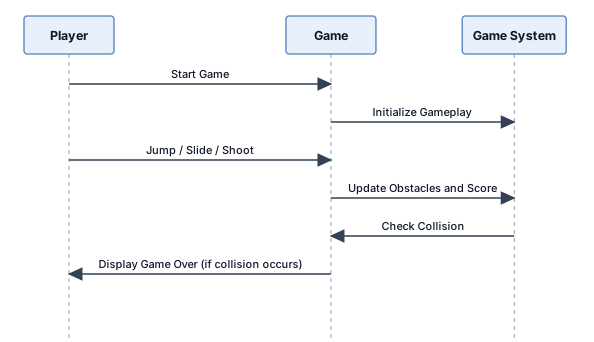
Create a SIMPLE UML sequence diagram for Jungle Escape gameplay. Include only 3 participants: 1. Player 2. Game 3. Game System Show these messages in order: Player → Game: Start Game Game → Game System: Initialize Gameplay Player → Game: Jump / Slide / Shoot Game → Game System: Update Obstacles and Score Game System → Game: Check Collision Game → Player: Display Game Over (if collision occurs) Use only three vertical lifelines and six message arrows. Use a simple black-and-white UML style with readable labels. Do not add extra participants, nested fragments, or complicated details.
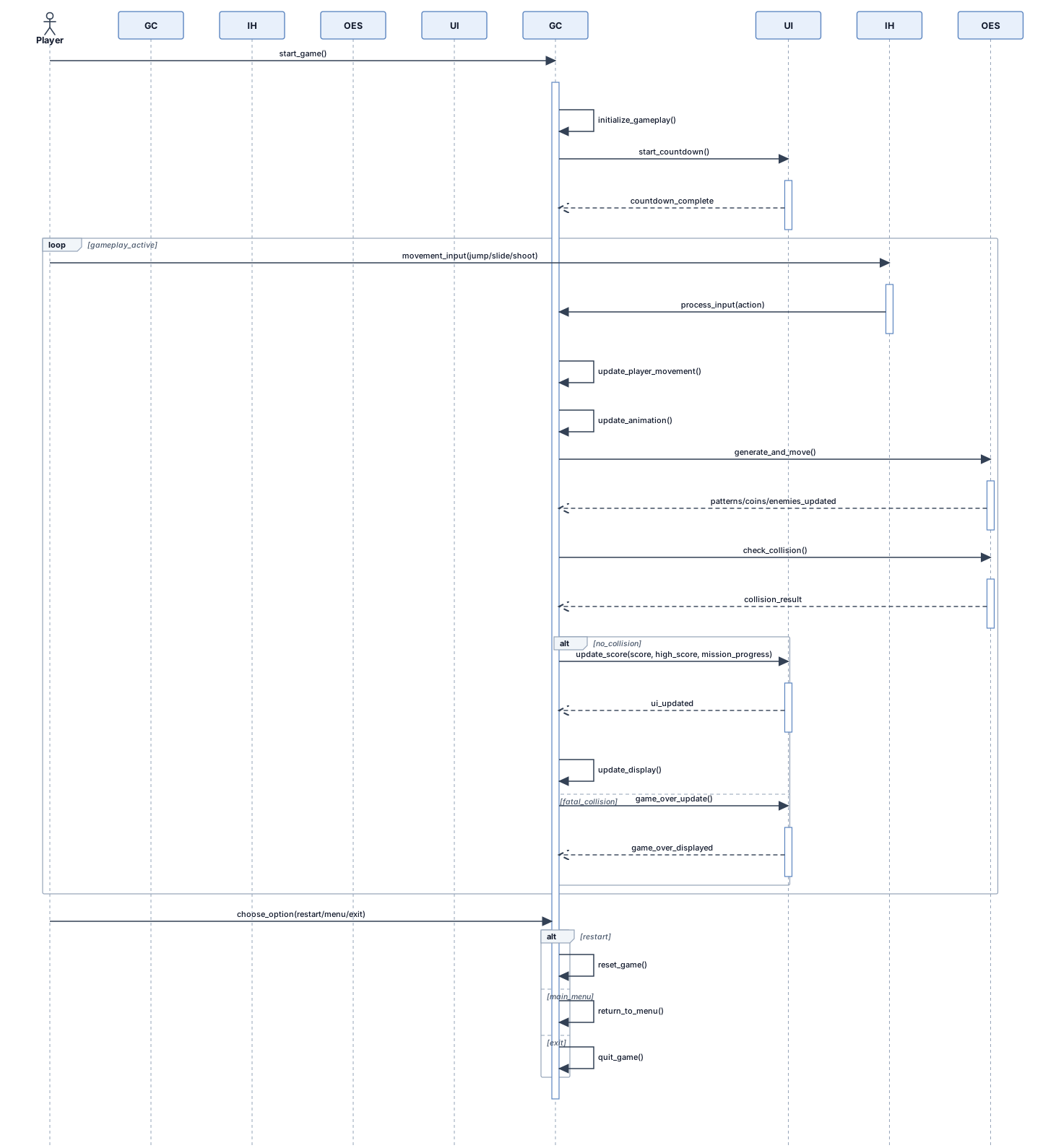
Create a medium-complexity UML Sequence Diagram for “Jungle Escape,” a 2D endless side-scrolling jungle runner game developed using Python and Pygame. Include these 5 participants from left to right: 1. Player 2. Game Controller 3. Input Handler 4. Obstacle and Enemy System 5. Score and Game UI Show the following interactions in chronological order: 1. Player requests to start the game. 2. Game Controller initializes gameplay and starts the countdown. 3. Player provides movement input such as jump, slide, or shoot. 4. Input Handler processes the player's input. 5. Game Controller updates player movement and animation. 6. Obstacle and Enemy System generates and moves obstacle patterns, coins, and enemies. 7. Game Controller requests collision checking. 8. Obstacle and Enemy System reports whether a collision occurred. 9. Score and Game UI updates the score, high score, and mission progress when appropriate. 10. Game Controller updates the displayed gameplay screen. 11. If a fatal collision occurs, Game Controller sends a game-over update to the UI. 12. The player chooses to restart the game, return to the main menu, or exit. Use vertical lifelines, activation bars, and labelled horizontal message arrows. Add a simple loop fragment around the repeated gameplay operations and an alternative fragment for gameplay continuing versus game over. Use a clean black-and-white UML style, readable text, and a landscape layout. Keep the interactions logically grouped and avoid unnecessary participants or deeply nested fragments. Note: This is a conceptual sequence diagram. Keep participant names consistent with the actual implementation and do not imply separate modules exist if the logic is handled within main.py.
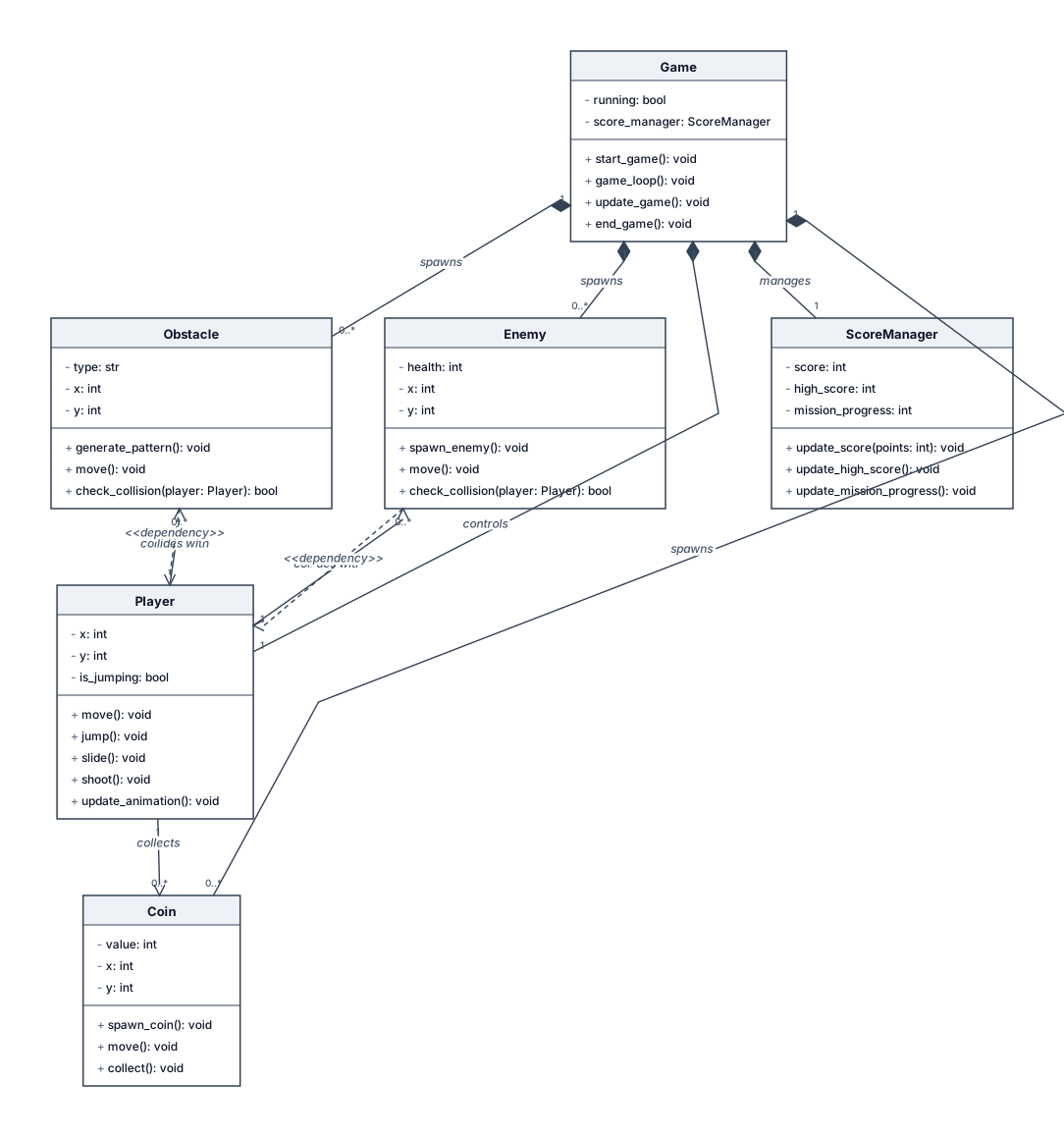
Create a medium-complexity UML Class Diagram for “Jungle Escape,” a 2D endless side-scrolling jungle runner game developed using Python and Pygame. Include these 6 main classes or components: 1. Game: start_game(), game_loop(), update_game(), end_game() 2. Player: move(), jump(), slide(), shoot(), update_animation() 3. Obstacle: generate_pattern(), move(), check_collision() 4. Coin: spawn_coin(), move(), collect() 5. Enemy: spawn_enemy(), move(), check_collision() 6. ScoreManager: update_score(), update_high_score(), update_mission_progress() Show 2–3 relevant attributes and methods in each class. Include relationships between Game and the other components, and show how the Player interacts with obstacles, coins, and enemies. Use association and dependency relationships where appropriate. Keep the diagram moderately detailed, with clear class boxes, readable text, and properly connected relationship lines. Use a clean black-and-white UML style suitable for a B.Tech final-year project report. Avoid unnecessary classes, excessive attributes, and complicated inheritance. Important: Present this as a conceptual class diagram. Do not imply that these are separate Python classes if the implementation uses functions and variables in main.py.
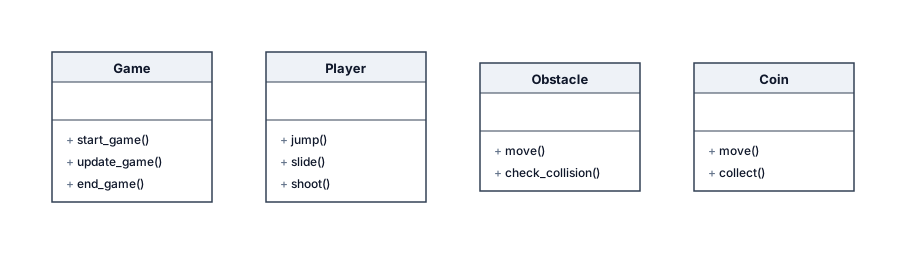
Create a SIMPLE UML class diagram for Jungle Escape, a 2D endless runner game made using Python and Pygame. Include only 4 classes: 1. Game — start_game(), update_game(), end_game() 2. Player — jump(), slide(), shoot() 3. Obstacle — move(), check_collision() 4. Coin — move(), collect() Show each class as a simple box containing its name and 2–3 methods. Connect the classes with basic relationship lines. Do not add extra classes, attributes, complex relationships, or explanations. Use a simple black-and-white student project style, landscape layout, and readable text.
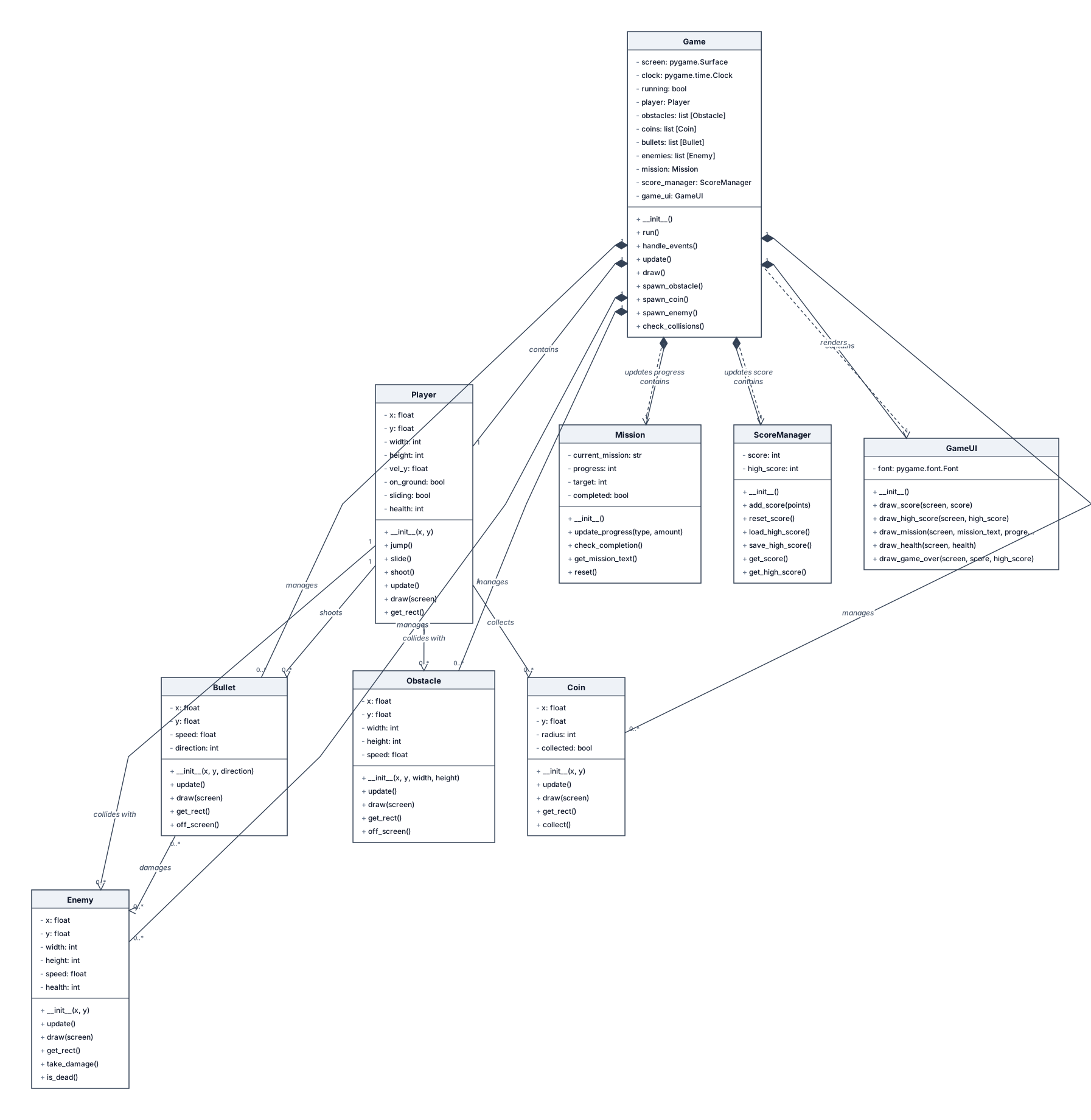
Generate a UML Class Diagram for “Jungle Escape,” a 2D endless side-scrolling jungle runner game developed using Python and Pygame. Include the main classes or modules: Game, Player, Obstacle, Coin, Bullet, Enemy, Mission, ScoreManager, and GameUI. Show relevant attributes, methods, and relationships between classes. Include player movement methods such as jump(), slide(), and shoot(); obstacle movement and collision detection; coin collection; enemy movement; score and high-score management; mission progress; and game interface updates. Use proper UML class boxes with three compartments for class name, attributes, and methods. Show associations, dependencies, inheritance only where justified, and multiplicity where appropriate. Use a clean black-and-white UML style on a white background. Do not invent methods or classes that are not appropriate for the implemented Python/Pygame project. Make the diagram readable and suitable for a B.Tech final-year project report.
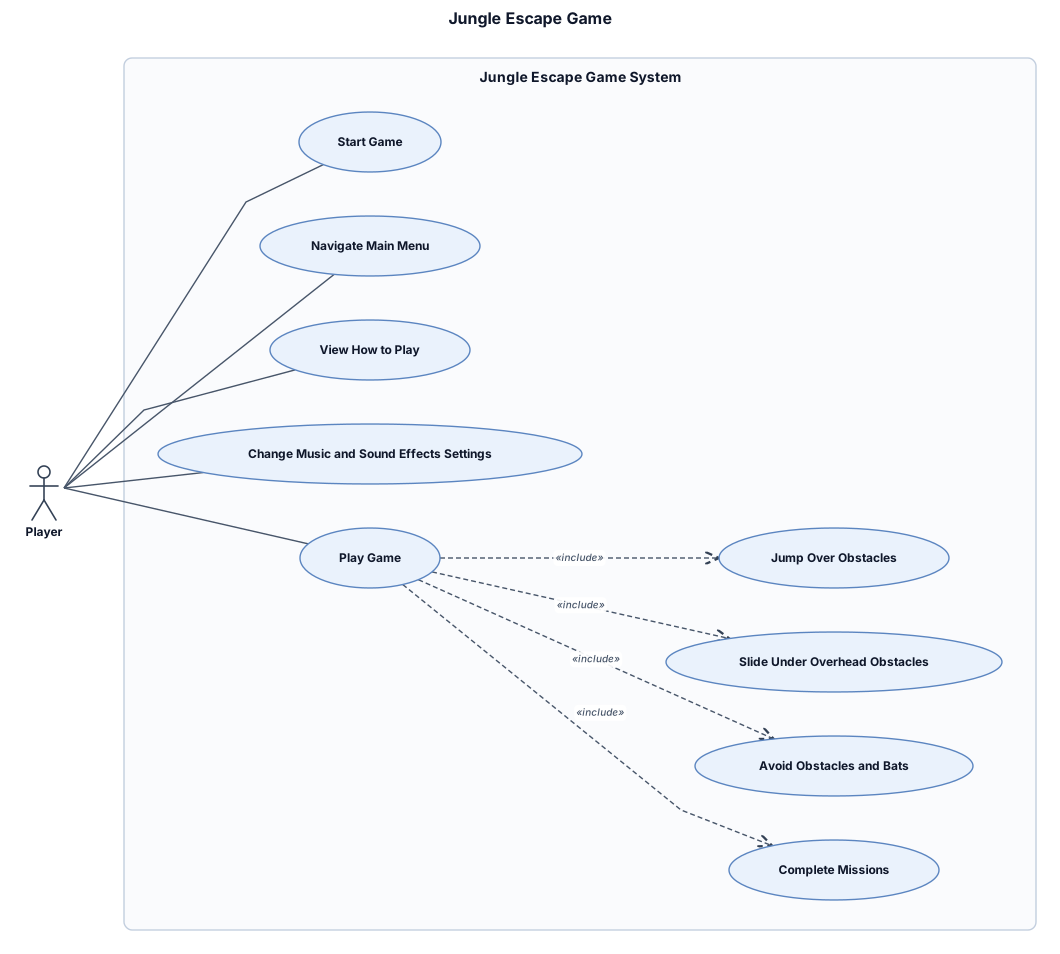
Create a UML Use Case Diagram for a 2D endless side-scrolling game called “Jungle Escape,” developed using Python and Pygame. Use a UML system boundary labelled “Jungle Escape Game System.” Include one primary actor outside the boundary called “Player.” Inside the system boundary, add these use cases: - Start Game - Navigate Main Menu - View How to Play - Change Music and Sound Effects Settings - Play Game - Jump Over Obstacles - Slide Under Overhead Obstacles - Avoid Obstacles and Bats - Complete Missions Connect the Player actor to the relevant use cases using UML association lines. Use a clean, formal black-and-white UML style, readable labels, a white background, and a landscape layout. Export the final diagram as a high-resolution PNG or SVG for a college project report.
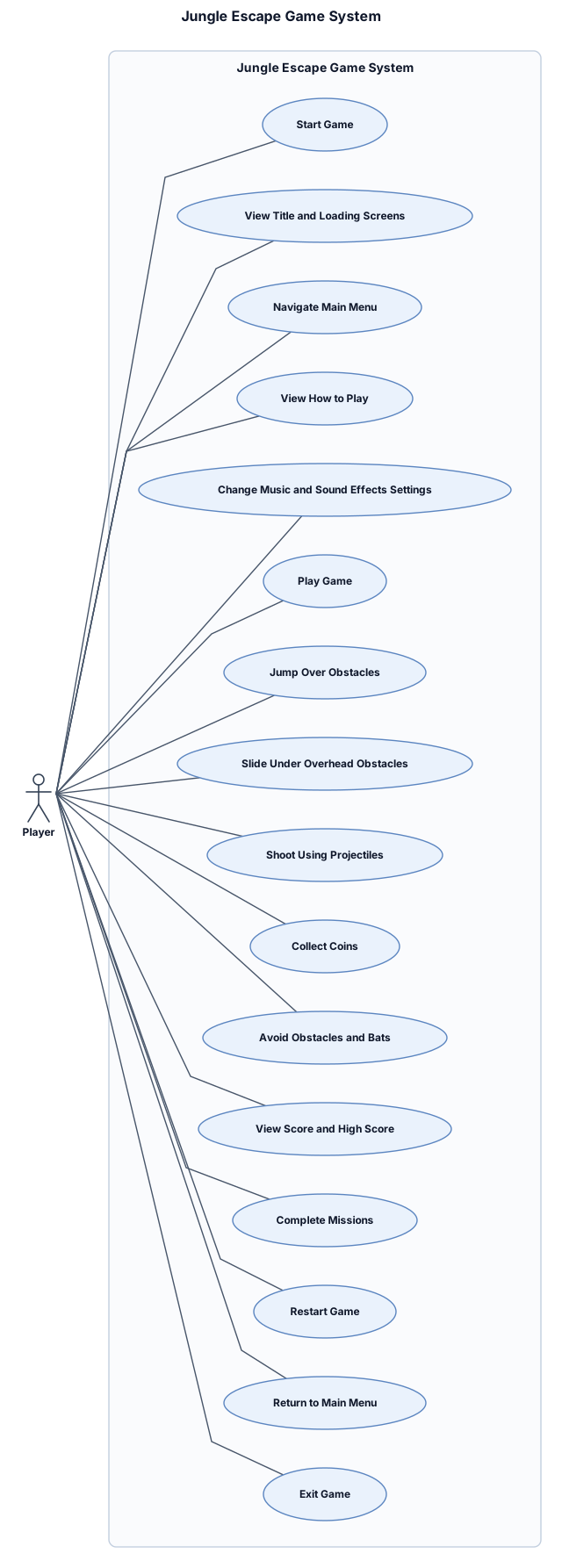
Create a UML Use Case Diagram for a 2D endless side-scrolling game called “Jungle Escape,” developed using Python and Pygame. Use a UML system boundary labelled “Jungle Escape Game System.” Include one primary actor outside the boundary called “Player.” Inside the system boundary, add these use cases: - Start Game - View Title and Loading Screens - Navigate Main Menu - View How to Play - Change Music and Sound Effects Settings - Play Game - Jump Over Obstacles - Slide Under Overhead Obstacles - Shoot Using Projectiles - Collect Coins - Avoid Obstacles and Bats - View Score and High Score - Complete Missions - Restart Game - Return to Main Menu - Exit Game Connect the Player actor to the relevant use cases using UML association lines. Use a clean, formal black-and-white UML style, readable labels, a white background, and a landscape layout. Export the final diagram as a high-resolution PNG or SVG for a college project report.
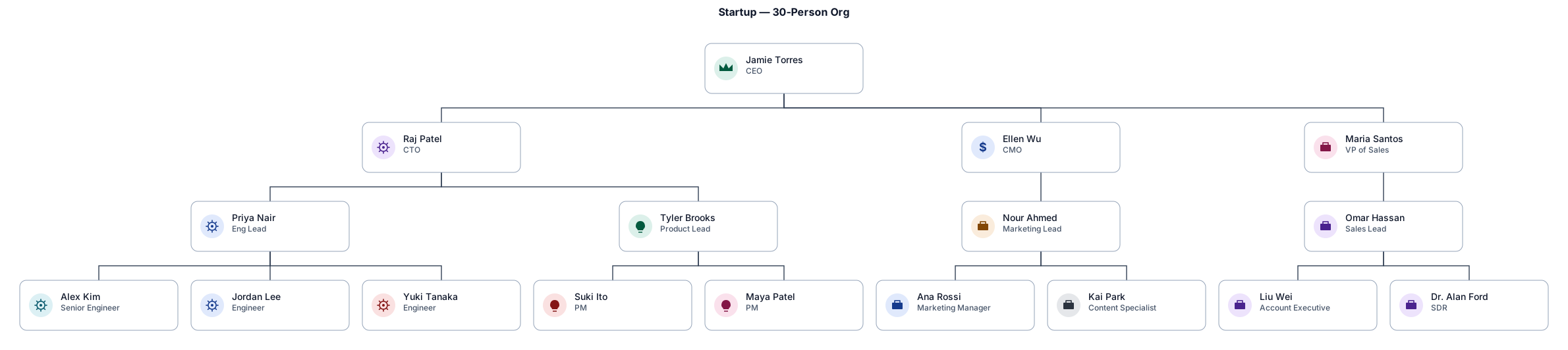
An org chart for a 30-person startup with a CEO, CTO, CMO, and VP of Sales at the top — then engineering, product, marketing, and sales teams below with their leads
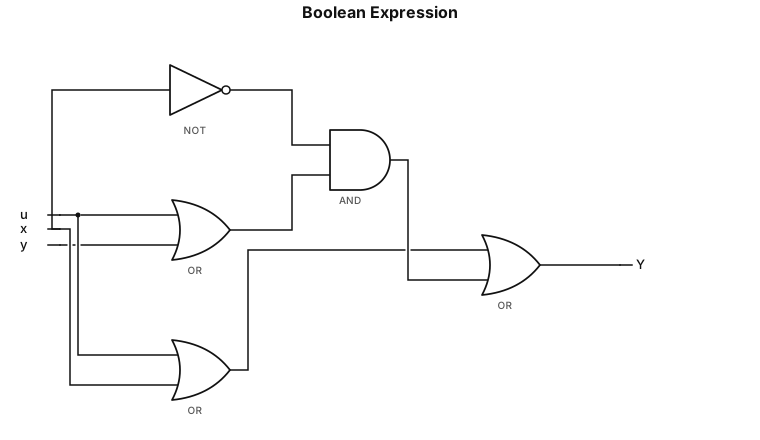
y= u+x+x'(u+y)
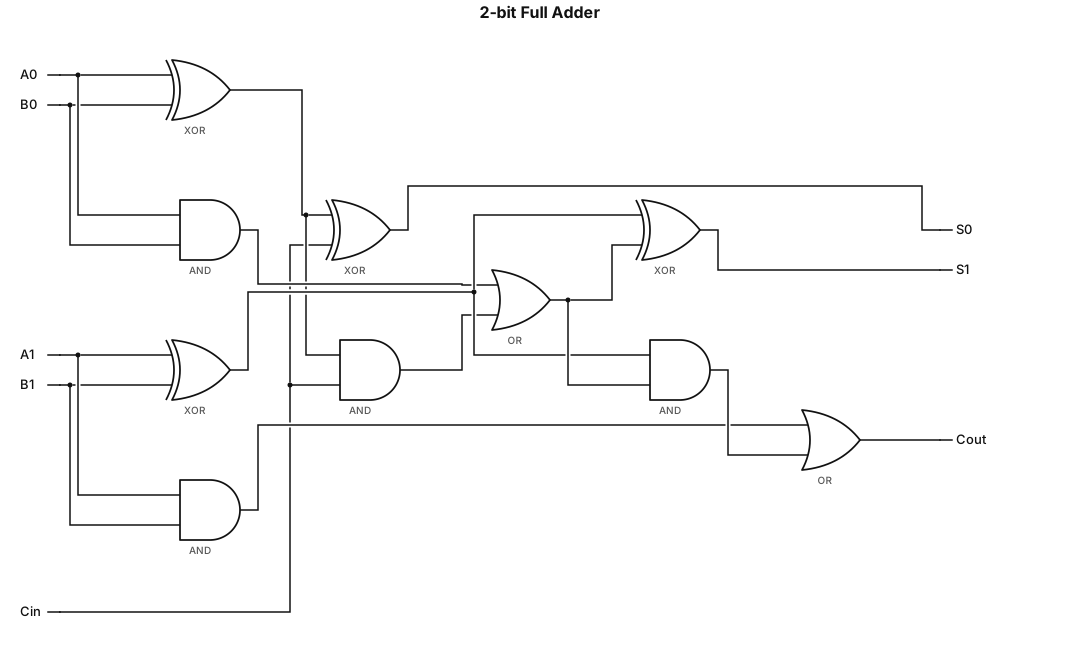
A logic gate circuit for a 2-bit full adder using AND, OR, and XOR gates with inputs A, B, and carry-in, and outputs sum and carry-outy= u+x+x'(u+y)
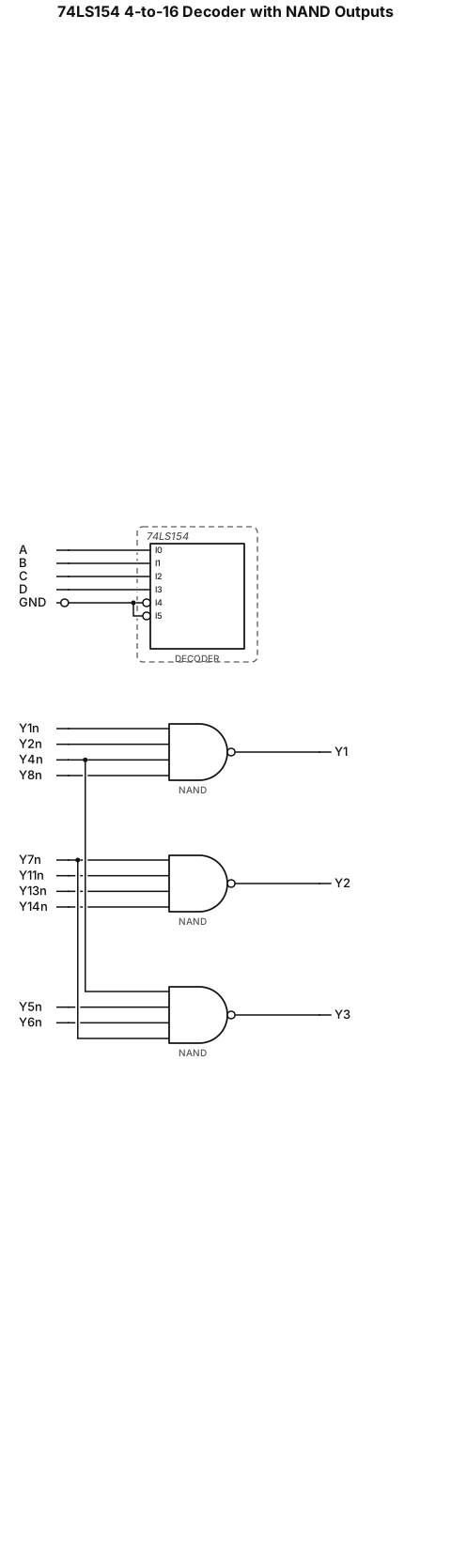
Digital logic diagram, chip 74LS154 4-to-16 decoder. Address input A3=A, A2=B, A1=C, A0=D. Enable pins SA' and SB' connect to GND. Decoder output Y1',Y2',Y4',Y8' connect to 4-input NAND gate, output Y1. Decoder output Y7',Y11',Y13',Y14' connect to second 4-input NAND gate, output Y2. Decoder output Y4',Y5',Y6',Y7' connect to third 4-input NAND gate, output Y3. Standard textbook circuit, black line, white background, neat wire.
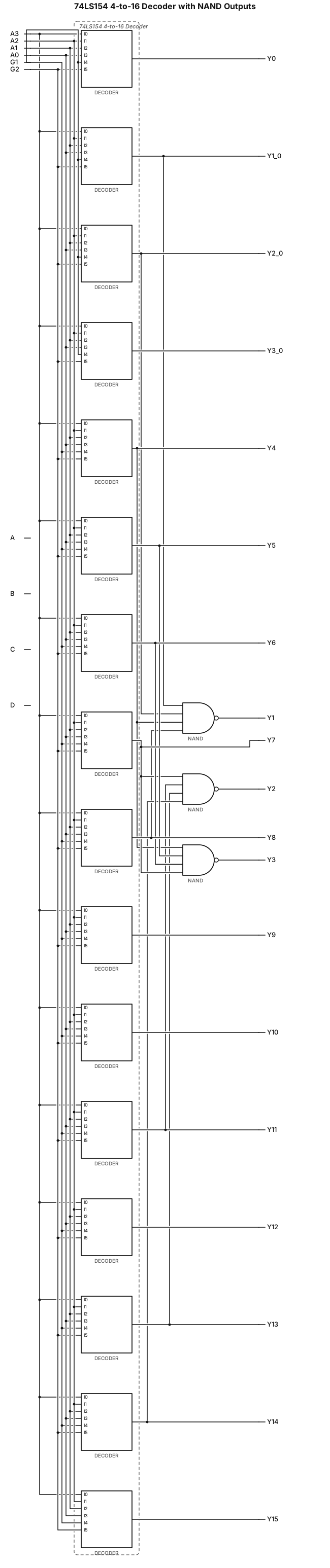
Draw digital logic circuit, include 74LS154 4-to-16 decoder chip. Input variables A,B,C,D connect to decoder address pins A3,A2,A1,A0. Chip enable pins G1 and G2 connect to ground(GND). Decoder output pins: Y1,Y2,Y4,Y8 connect to a 4-input NAND gate, gate output Y1. Y7,Y11,Y13,Y14 connect to second 4-input NAND gate, output Y2. Y4,Y5,Y6,Y7 connect to third 4-input NAND gate, output Y3. Standard IEEE circuit symbol, black lines on white background, neat straight wires, textbook style.
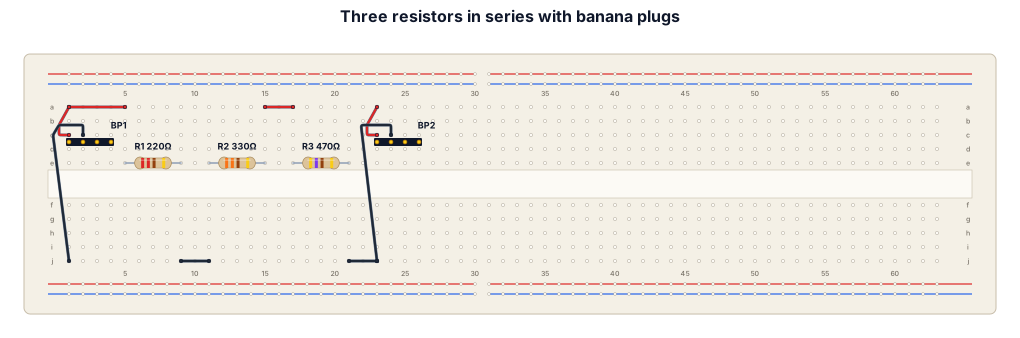
A breadboard wiring diagram for three resistors connected in series with large banana plug
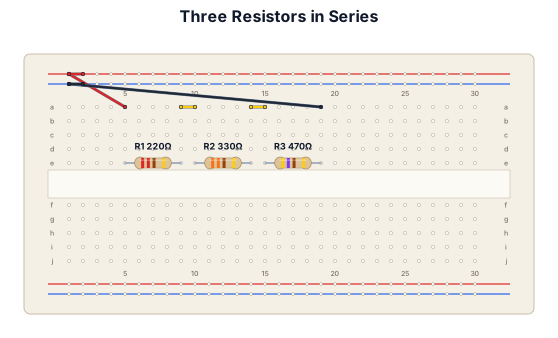
A breadboard wiring diagram for three resistors connected in series
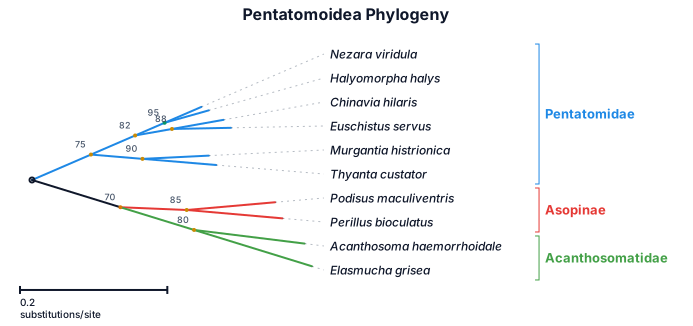
A phylogenetic tree of pentatomoidea
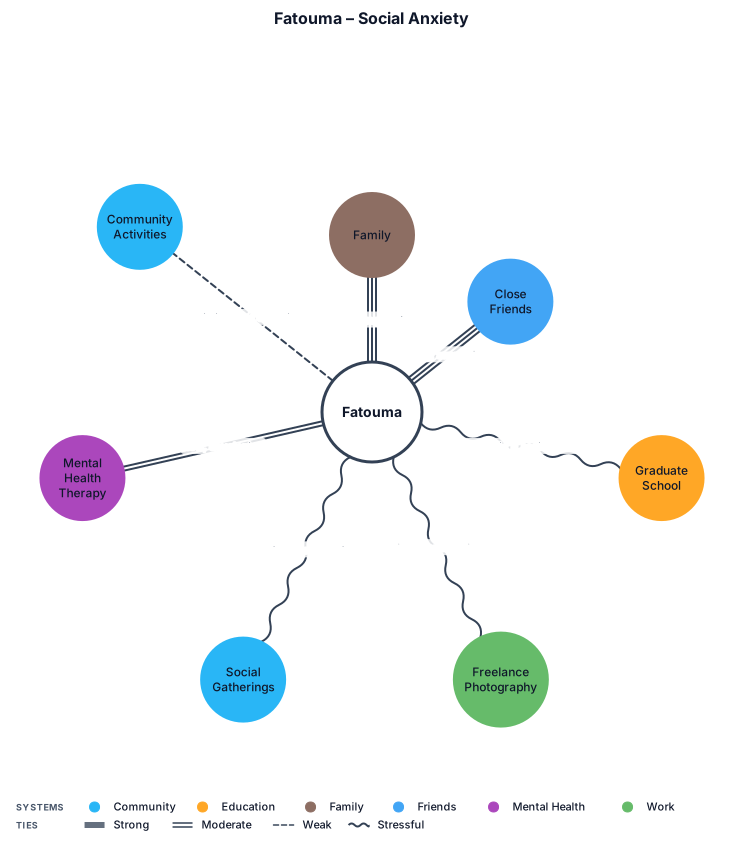
Fatouma – Social Anxiety Family: Strong, supportive relationship. Provides emotional support. Close Friends: Strong, supportive relationship. Important source of emotional support. Graduate School: Currently pursuing a master's degree. Social anxiety creates stress in academic and social situations. Freelance Photography: Stressful relationship due to anxiety when interacting with clients, attending events, and accepting public assignments. Social Gatherings: Stressful relationship. Fear of negative judgment and avoidance of social situations. Mental Health Therapy: New, developing supportive relationship. Community Activities: Limited connection due to social anxiety.
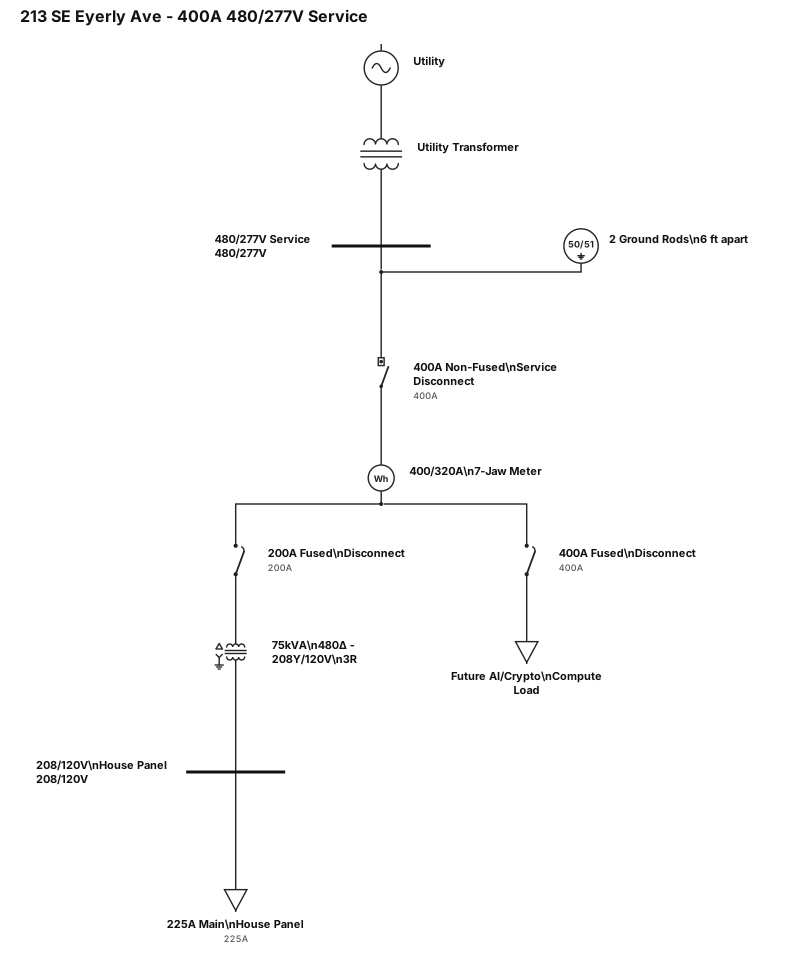
This is a residential property located at 213 SE Eyerly Avenue, Port St Lucie, FL. There will be a 400amp 480v/277 3 phase electrical service installed on the east wall. 2 2" rigid metal conduits with weatherheads penetrating the east roof overhang in a parallel flow configuration each containing 4 3/0 copper wires and connecting to a 400 amp non fused service disconnect mounted around the middle on the east wall. That disconnect will then feed a 400/320amp 7 jaw meter box located to its left with the same size and quantity wire and conduit. That meter box will then connect to one fused 400 amp disconnect and a 200 amp fused disconnect both of of which are located to its left. The 200amp disconnect will be fused appropriately for a 75kva 480 to 208wye 3r stepdown transformer and connected accordingly with the transformer then penetrating the outside wall and feeding a 225amp 208/120v located on the inside wall to power the house. The 400 amp panel will be for future use, specially for ai compute and crypto mining. 2 ground rods 6 feet apart connecting to the noon fused service disconnect
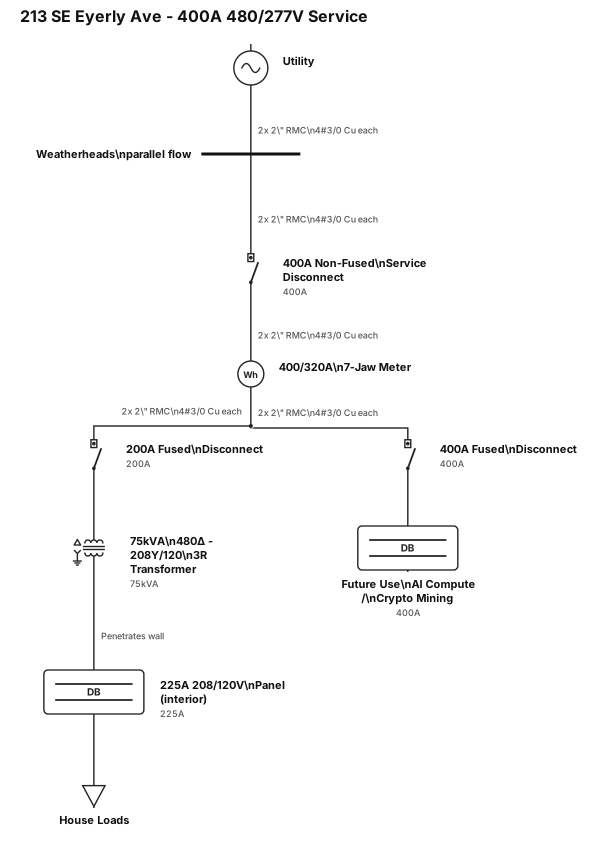
This is a residential property located at 213 SE Eyerly Avenue, Port St Lucie, FL. There will be a 400amp 480v/277 3 phase electrical service installed on the east wall. 2 2" rigid metal conduits with weatherheads penetrating the east roof overhang in a parallel flow configuration each containing 4 3/0 copper wires and connecting to a 400 amp non fused service disconnect mounted around the middle on the east wall. That disconnect will then feed a 400/320amp 7 jaw meter box located to its left with the same size and quantity wire and conduit. That meter box will then connect to one fused 400 amp disconnect and a 200 amp fused disconnect both of of which are located to its left. The 200amp disconnect will be fused appropriately for a 75kva 480 to 208wye 3r stepdown transformer and connected accordingly with the transformer then penetrating the outside wall and feeding a 225amp 208/120v located on the inside wall to power the house. The 400 amp panel will be for future use, specially for ai compute and crypto mining
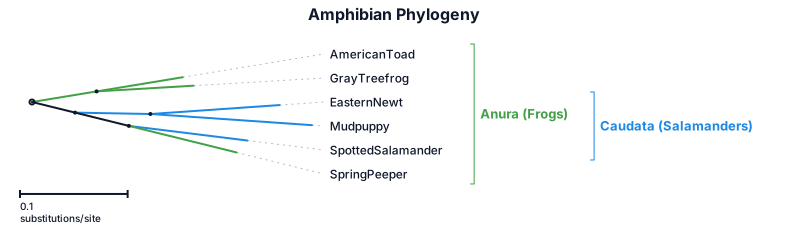
A phylogenetic tree of amphibians: american toad, eastern newt, gray treefrog, mudpuppy, spotted salamander, spring peeper (with branch lengths)
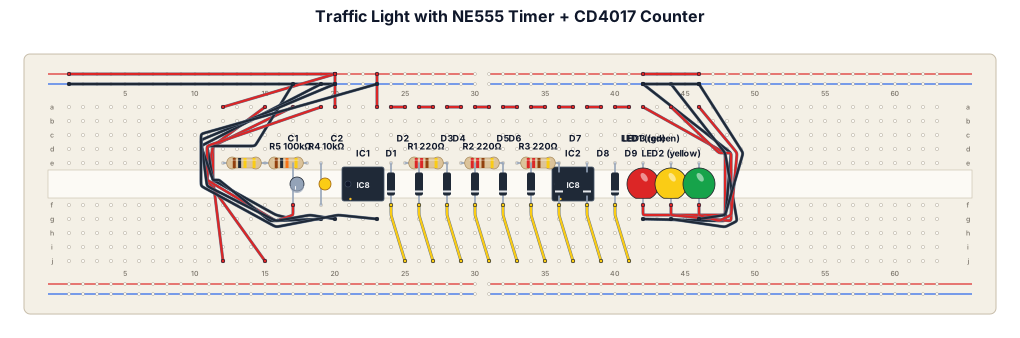
Generate breadboard connection of traffic light with timer with the components i have givenTRAFFIC LIGHT + TIMER PROJECT ICs: 1 × NE555 Timer IC 1 × CD4017 Decade Counter IC LEDs: 1 × Red LED 1 × Yellow LED 1 × Green LED Resistors: 3 × 220 Ω 1 × 10 kΩ 1 × 100 kΩ Capacitors: 1 × 10 µF 1 × 100 nF Diodes: 9 × 1N4148 Other: 1 × Breadboard Jumper wires 1 × 5–9 V DC power supply. Generate neat and proper breadboard connection
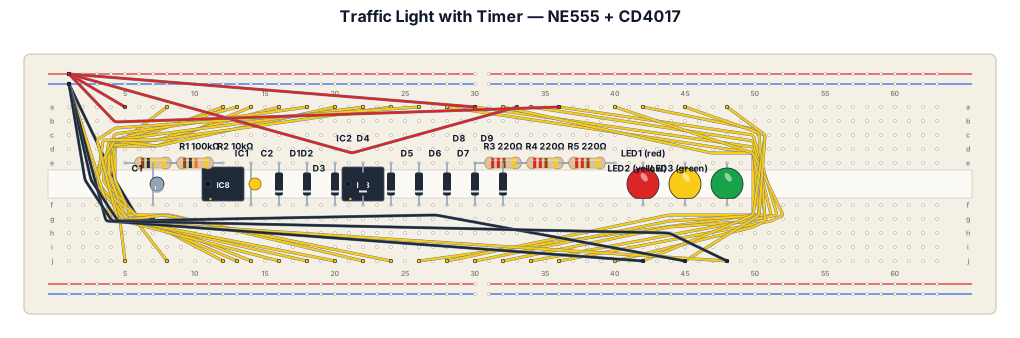
Generate breadboard connection of traffic light with timer with the components i have givenTRAFFIC LIGHT + TIMER PROJECT ICs: 1 × NE555 Timer IC 1 × CD4017 Decade Counter IC LEDs: 1 × Red LED 1 × Yellow LED 1 × Green LED Resistors: 3 × 220 Ω 1 × 10 kΩ 1 × 100 kΩ Capacitors: 1 × 10 µF 1 × 100 nF Diodes: 9 × 1N4148 Other: 1 × Breadboard Jumper wires 1 × 5–9 V DC power supply
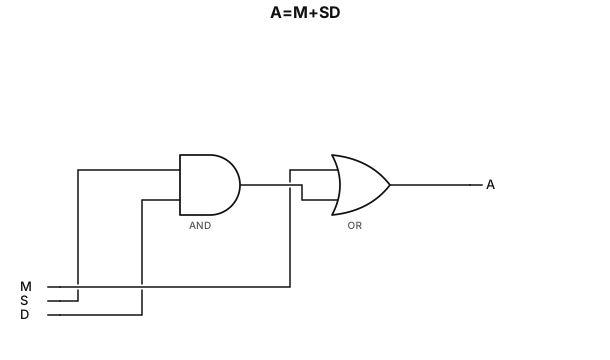
A=M+SD