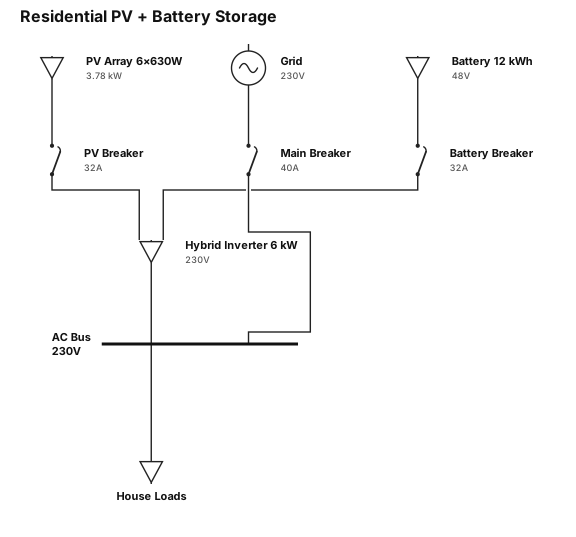
A single-line diagram for a: 1. 6 kW inverter ,single phase 2. 12kwh battery 3. 6 modules 630 W each
NODE ARCHIVE · REAL DIAGRAM BRIEFS
Diagram Examples from Real Visitor Prompts
Browse eligible diagrams shared by FreeDiagram visitors, inspect the exact prompts, and build your own version.
Browse 3295 real creationsCOMMUNITY OUTPUTS · EXACT PROMPTS
All visitor creations
Showing 1441–1464 of 3295. No stock examples or system defaults. Choose a tool, study a real result, then reopen its prompt as your starting point.
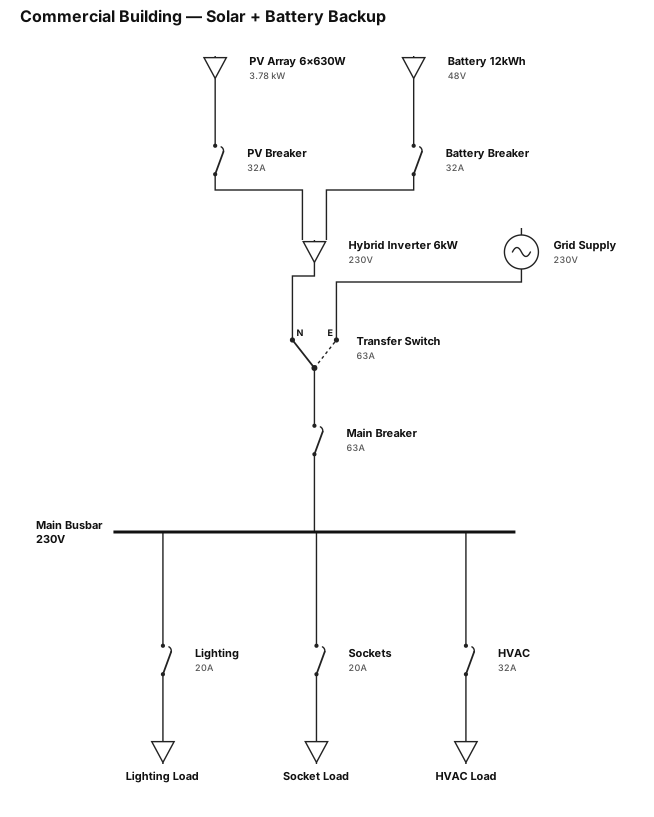
A single-line diagram for a commercial building: 6kW inverter, single phase. 12kwh battery. 6 modules 630W each
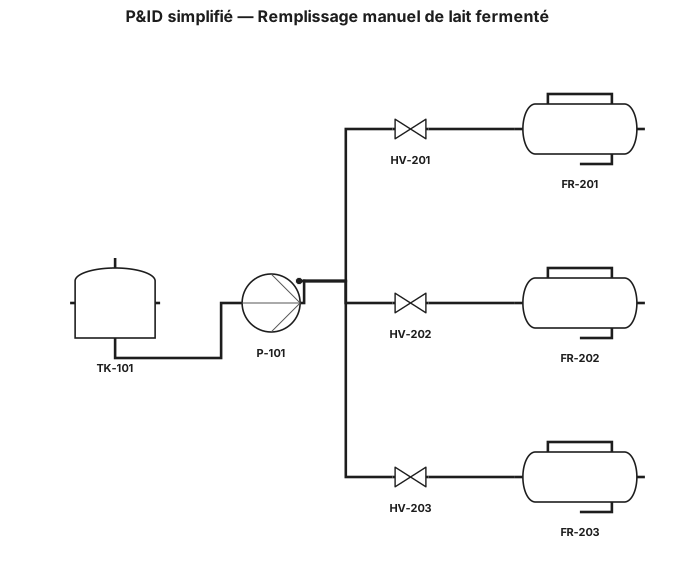
Le procédé commence par un réservoir de stockage contenant le lait fermenté à remplir. Le produit est transféré depuis le réservoir vers la station de remplissage à l’aide d’une pompe. La pompe assure l’acheminement du lait fermenté dans une conduite principale jusqu’à la zone de remplissage. À l’arrivée, la conduite principale se divise en plusieurs branches parallèles correspondant aux différents postes ou points de remplissage. Chaque branche est équipée d’une vanne manuelle permettant de contrôler l’écoulement du lait fermenté. L’ouverture de la vanne permet au produit de circuler vers le poste de remplissage, tandis que sa fermeture arrête l’écoulement. Dans le fonctionnement manuel actuel, l’opérateur ouvre et ferme manuellement les vannes et démarre ou arrête la pompe selon les besoins de remplissage. Il n’y a aucune automatisation, aucun capteur et aucun instrument de mesure sur le procédé. Merci de générer un diagramme P&ID simplifié représentant : Le réservoir de stockage La pompe La conduite principale Les branches de remplissage avec vannes manuelles Les postes de remplissage Les symboles normalisés (réservoir, pompe, vanne manuelle, tuyauterie) Une légende claire des symboles utilisés
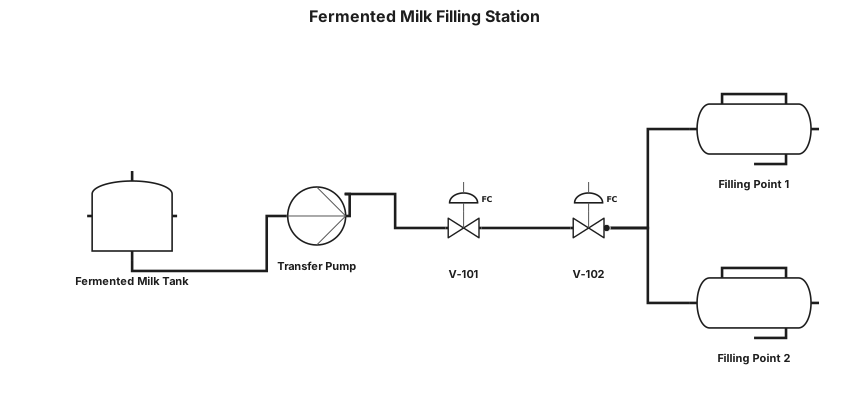
Create a simple P&ID (Piping and Instrumentation Diagram) for a fermented milk filling station. The process starts with a tank containing fermented milk. A pump is installed at the outlet of the tank and transfers the fermented milk to the filling station. After the pump, a main pipeline carries the fermented milk to the filling area. The pipeline is equipped with valves that control the flow of the fermented milk. When the valves are open, the fermented milk flows through the pipelines to the filling points. When the valves are closed, the flow of fermented milk is stopped. Clearly show the direction of the fermented milk flow using arrows. Sequence of the main elements: Fermented milk tank → Pump → Main pipeline → Valves → Filling points. Use simple and recognizable industrial symbols for the tank, pump, pipelines, and valves, in a standard P&ID style.
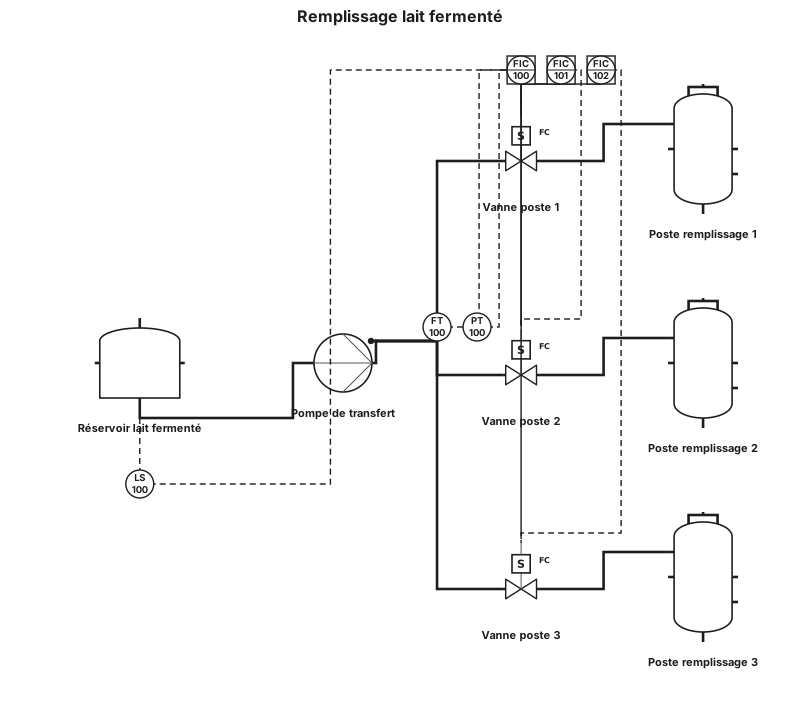
Le procédé commence par un réservoir contenant le lait fermenté à remplir. Le produit est transféré depuis le réservoir vers la station de remplissage à l’aide d’une pompe. La pompe assure l’acheminement du lait fermenté dans une conduite principale jusqu’à la zone de remplissage. À l’arrivée, la conduite se divise en plusieurs branches correspondant aux différents postes ou points de remplissage. Chaque branche est équipée d’une vanne permettant de contrôler l’écoulement du lait fermenté. L’ouverture de la vanne permet au produit de circuler vers le poste de remplissage, tandis que sa fermeture permet d’arrêter l’écoulement. Dans le fonctionnement manuel actuel, l’opérateur commande les vannes afin de contrôler l’arrivée du lait fermenté et réalise les opérations de remplissage. La pompe permet d’assurer le transfert du produit depuis le réservoir jusqu’aux points de remplissage. Dans le cadre du projet d’automatisation, l’objectif est de remplacer certaines opérations manuelles par une commande automatique. Les vannes et la pompe pourront être commandées par un automate programmable industriel (API/PLC), à partir des informations fournies par les capteurs. Le système permettra ainsi de contrôler le remplissage selon les conditions définies dans le cahier des charges.
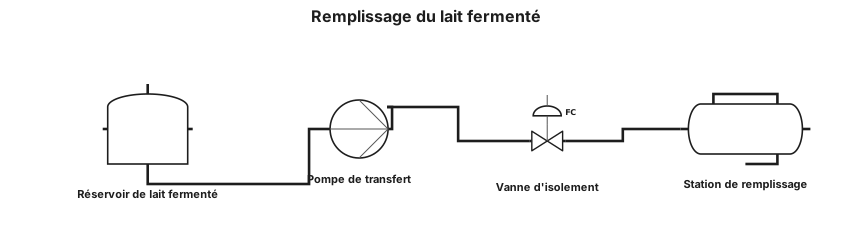
La lecture du P&ID commence au niveau du réservoir contenant le lait fermenté. Le lait fermenté est transféré depuis le réservoir par l’intermédiaire d’une pompe. La pompe assure l’acheminement du produit à travers une conduite jusqu’à la station de remplissage. Après la pompe, le lait fermenté circule dans la conduite principale jusqu’à la zone de remplissage. La conduite est équipée de vannes qui permettent de contrôler le passage du produit. Lorsque la vanne est ouverte, le lait fermenté circule dans la conduite et est dirigé vers le point de remplissage. Lorsque la vanne est fermée, l’écoulement du lait fermenté est interrompu. Le remplissage est ainsi réalisé par l’acheminement du lait fermenté depuis le réservoir jusqu’au point de remplissage à travers la pompe, la conduite et les vannes.
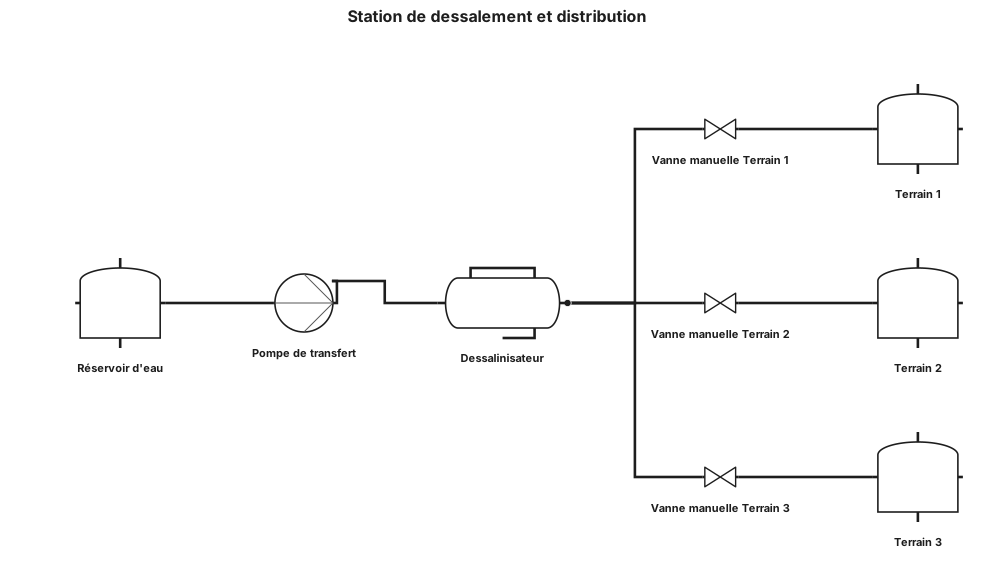
Le procédé commence par un réservoir d’eau qui constitue la source d’alimentation de la station. L’eau est aspirée depuis le réservoir par une pompe de transfert, puis refoulée vers le dessalinisateur afin d’assurer son remplissage. À la sortie du dessalinisateur, l’eau est dirigée vers une conduite principale de distribution. Cette conduite permet d’acheminer l’eau vers les différentes zones ou terrains concernés. La conduite principale est équipée de plusieurs vannes manuelles. Dans notre installation, trois vannes permettent de contrôler séparément l’alimentation des trois terrains. Chaque vanne peut être ouverte ou fermée manuellement par l’opérateur afin d’autoriser ou d’arrêter l’écoulement de l’eau vers le terrain correspondant. Ainsi, le fonctionnement actuel est principalement manuel : l’opérateur contrôle les vannes en fonction du terrain à alimenter. Lorsque la vanne correspondant à un terrain est ouverte, l’eau circule dans la conduite et alimente ce terrain. Lorsque la vanne est fermée, l’écoulement vers ce terrain est interrompu. Le P&ID représente donc la chaîne de circulation du fluide depuis le réservoir jusqu'aux terrains, en passant par la pompe, le dessalinisateur, la conduite principale et les différentes vannes de distribution.
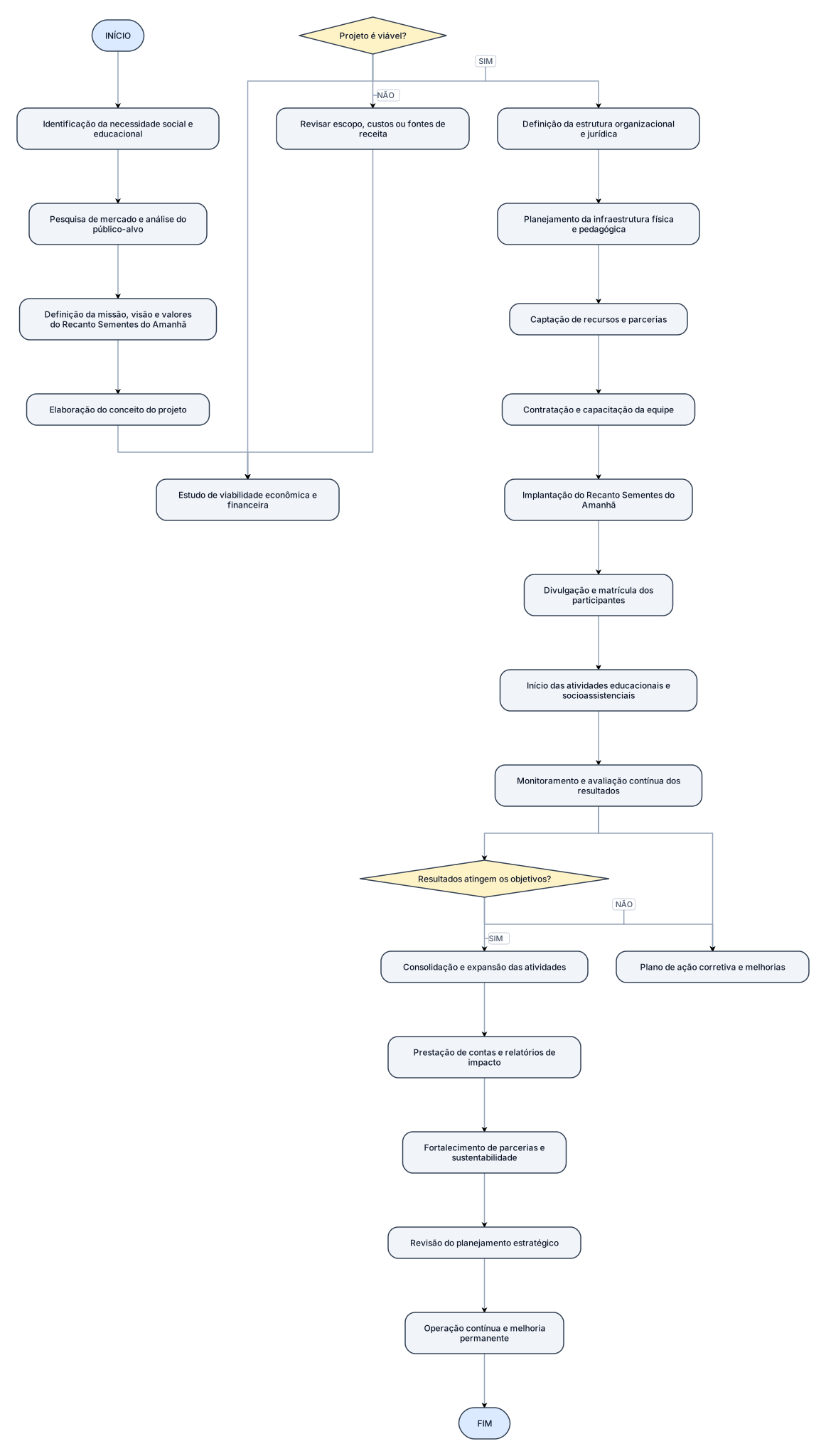
Crie uma IMAGEM DE UM FLUXOGRAMA COMPLETO, GRANDE, BONITO E PROFISSIONAL, com aparência de um trabalho elaborado no Canva, para um projeto de Plano de Negócios do curso Técnico em Administração. O nome do projeto é: RECANTO SEMENTES DO AMANHÃ NÃO RESUMA O PROJETO. NÃO RETIRE INFORMAÇÕES. O objetivo é representar visualmente TODO O PROJETO, desde a necessidade que originou a ideia até o funcionamento contínuo do Recanto. --- 1. PADRÃO VISUAL OBRIGATÓRIO O desenho precisa ser um FLUXOGRAMA TRADICIONAL, e não um mapa mental. Utilizar obrigatoriamente: OVAL Para: - INÍCIO - FIM RETÂNGULO Para: - processos - ações - atividades - etapas do projeto LOSANGO Para: - decisões - perguntas - caminhos SIM/NÃO PARALELOGRAMO Para: - entrada ou saída de informações, …
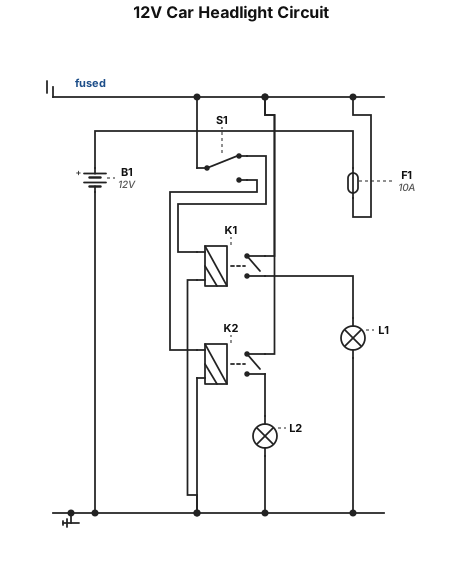
12V car headlight circuit using two relays. One relay controls low beam. One relay controls high beam. Show battery, fuse, high-low beam switch, two relays, headlights and ground. Label relay pins 30, 85, 86 and 87. Use a simple standard schematic..
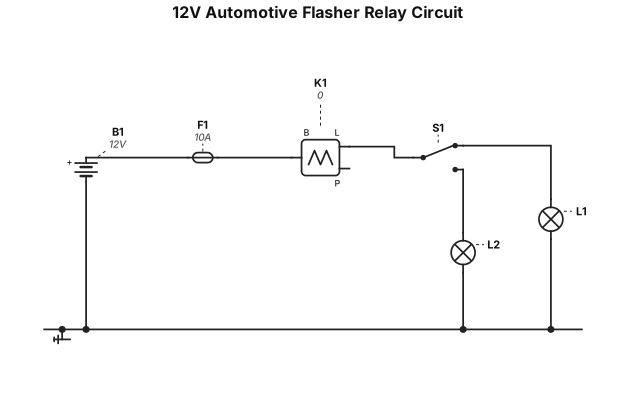
A 12V automotive flasher relay circuit. Show a 12V battery, fuse, flasher relay, turn signal switch, left and right indicator lamps, and ground. Use standard automotive schematic symbols. Clearly label relay terminals 30, 49, 49a and 31. Show the current path from the battery through the fuse and flasher relay to the turn signal switch and indicator lamps. Keep the schematic simple, clean and easy to read.
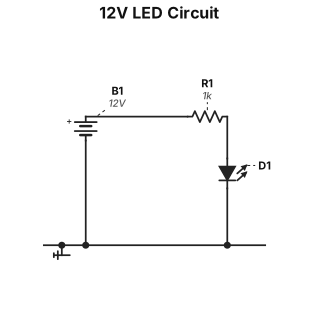
A 12V DC battery connected to a 1kΩ resistor and an LED in series. Show the battery, resistor, LED, polarity, and connection wires clearly.
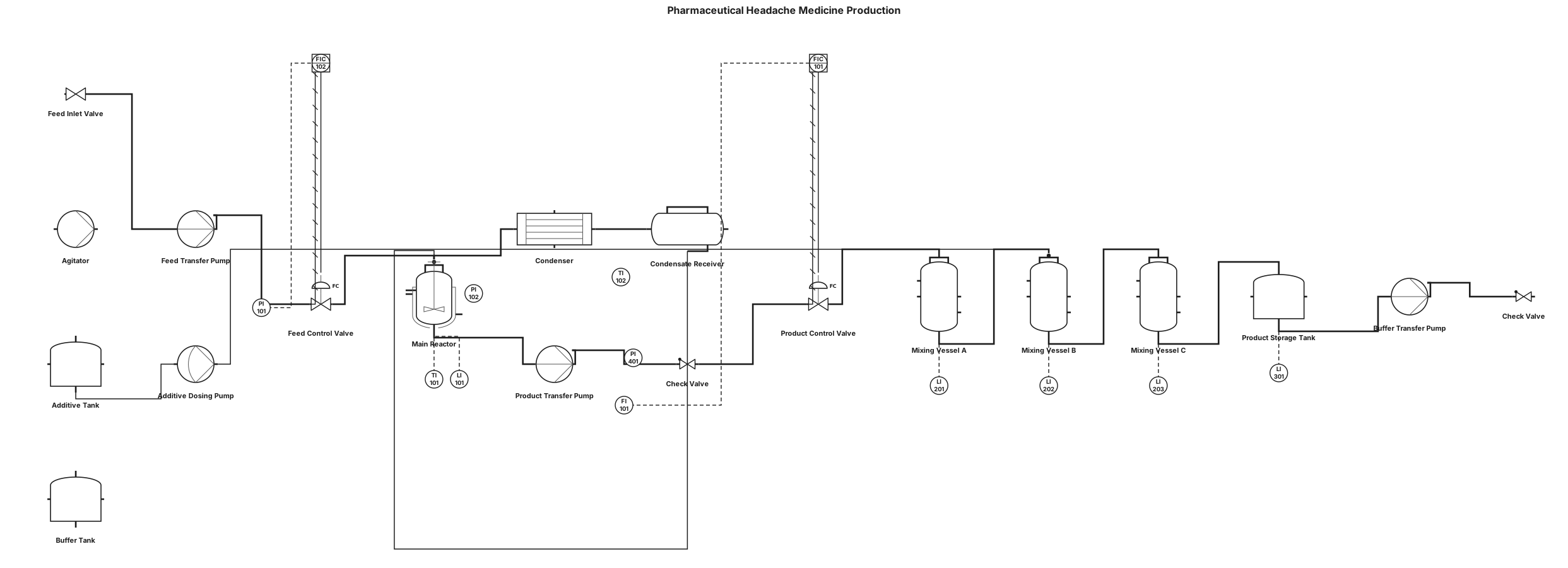
Create a detailed pharmaceutical manufacturing P&ID for a small-scale headache medicine production process. Use a professional engineering P&ID layout with ANSI/ISA-style symbols and equipment tags. Arrange the process generally from left to right. Main process: 1. Raw material feed enters from the left into a main vertical process vessel/reactor. 2. Connect the feed line through an inlet valve and transfer pump. 3. The main vessel has an agitator and level indication. 4. From the top of the main vessel, connect a vapor/product line to a horizontal heat exchanger or condenser. 5. Connect the condenser to a smaller downstream vessel and return/condensate line. 6. From the bottom outlet of the main vessel, use a pump and piping to transfer material to several downstream processing vessels. 7. Include several vertical mixing/storage vessels arranged horizontally along the bottom process line. 8. Include a larger vessel on the right side connected to the downstream process. 9. Add additional small tanks and transfer pumps on the far right. 10. Connect all equipment with process piping and clearly show the direction of flow. Include: - Tanks and vessels - Agitated reactor/mixing vessel - Centrifugal or transfer pumps - Heat exchanger/condenser - Process valves - Check valves where appropriate - Pressure indicators - Temperature indicators - Level indicators - Flow indicators/transmitters where appropriate - Control valves - Equipment identification tags such as R-101, T-101, P-101, E-101, V-101 - Clearly labeled inlet and outlet streams - Flow arrows - Instrument signal lines - Professional engineering spacing and alignment Make it look like a real pharmaceutical-process P&ID rather than a simple flowchart. Use a clean black-and-white technical drawing style and keep equipment labels readable.
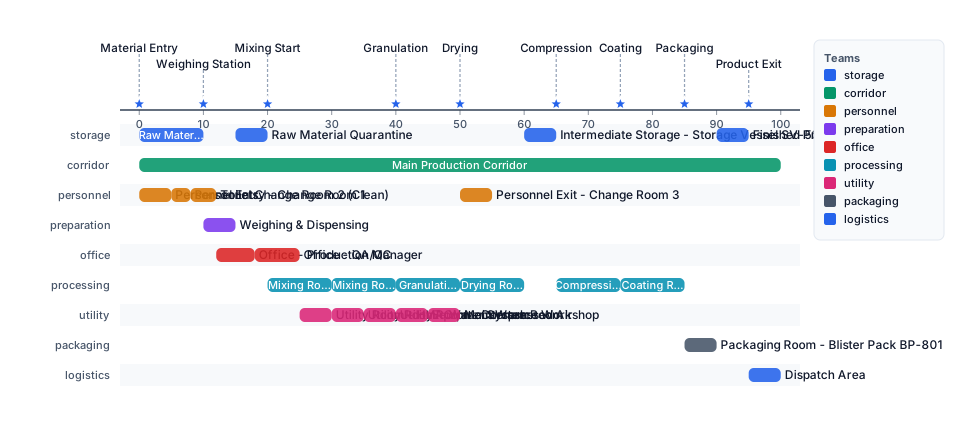
Create a professional pharmaceutical manufacturing facility floor plan. Design a rectangular single-story pharmaceutical production building divided into clearly labeled functional rooms. Layout: - Long rectangular building - Main production corridor through the center - Raw material preparation and storage rooms toward the left - Several processing and mixing rooms along the upper side - Granulation and other production rooms along the central production area - Packaging and finished-product areas toward the right - Personnel changing rooms, toilets, offices and utility rooms along the lower side - Clearly separated production and non-production areas Place appropriate pharmaceutical manufacturing equipment inside the production rooms, including: - Mixing tanks - Agitated vessels - Granulators - Drying equipment - Storage vessels - Pumps - Packaging equipment Show: - Room walls - Double doors and single doors - Door opening directions - Corridors - Material flow arrows - Personnel flow arrows - Equipment labels - Room names - Building dimensions - Clean technical CAD-style linework - Clear separation between rooms The final drawing should resemble a professional pharmaceutical factory engineering floor plan, with equipment shown in its actual physical position rather than a process-flow diagram.
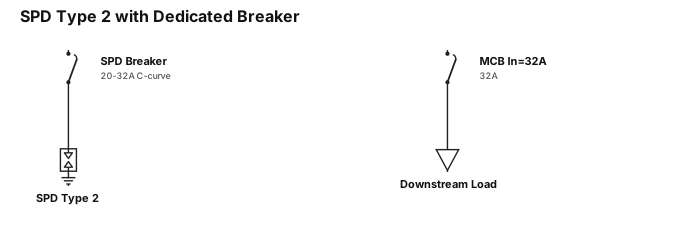
a single line diagram showing a spd type 2 connects via dedicated breaker (20–32 A C-curve). Downstream miniature circuit breaker ln=32A
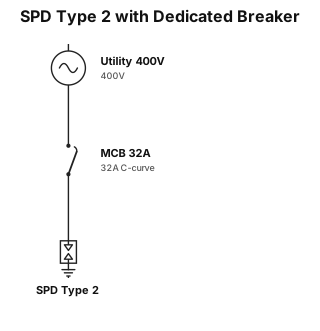
a single line diagram showing a spd type 2 connects via dedicated breaker (20–32 A C-curve), miniature circuit breaker ln=32A
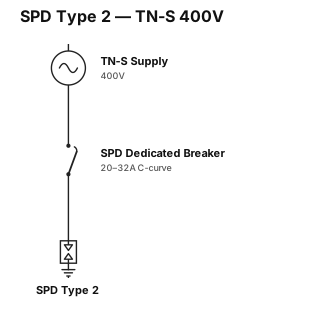
a single line diagram showing a spd type 2 connects via dedicated breaker (20–32 A C-curve), then a tn-s un=400V line
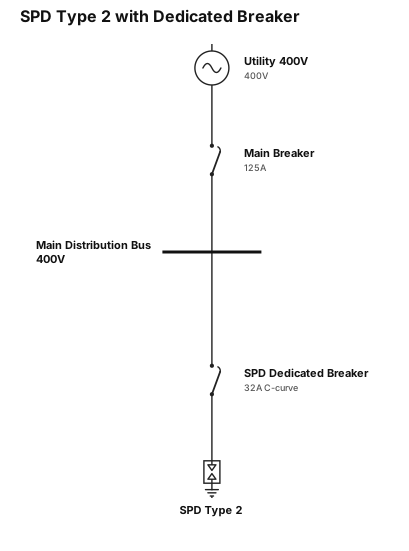
a single line diagram showing a spd type 2 connects via dedicated breaker (20–32 A C-curve)
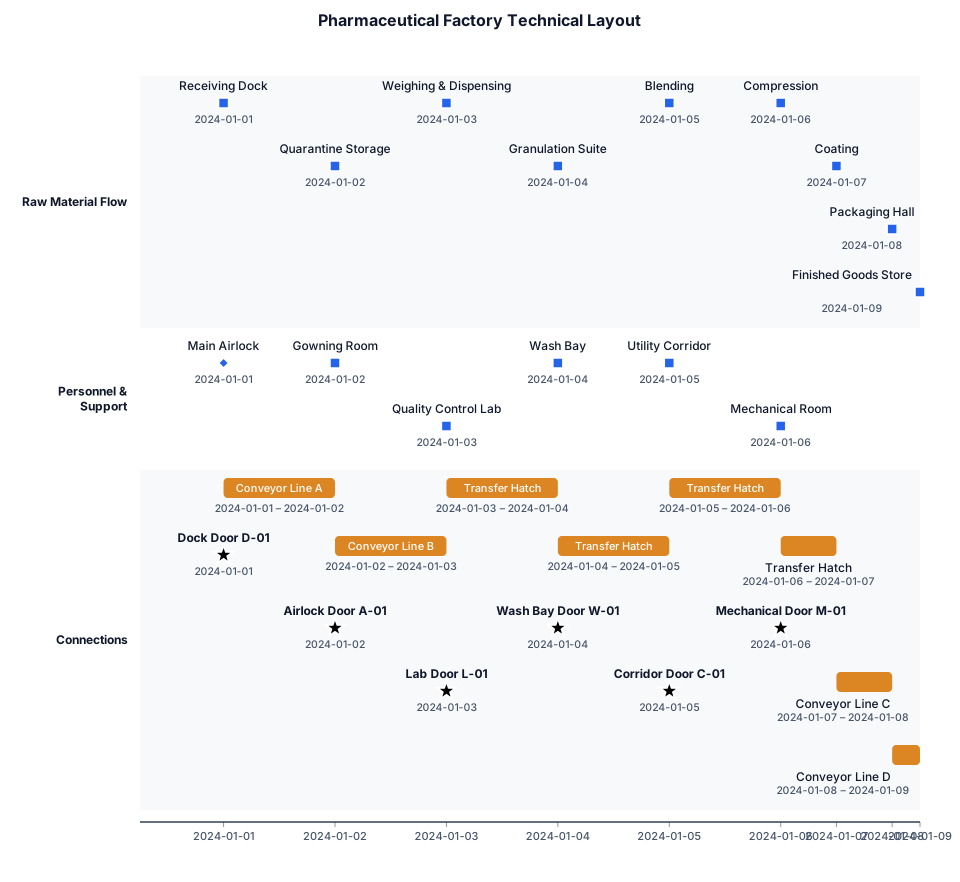
"Redraw this as a clean 2D pharmaceutical factory technical layout. Preserve the same room arrangement, equipment positions, walls, doors, labels, dimensions, and line connections. Use a professional black-and-white CAD drafting style. Make the output editable."
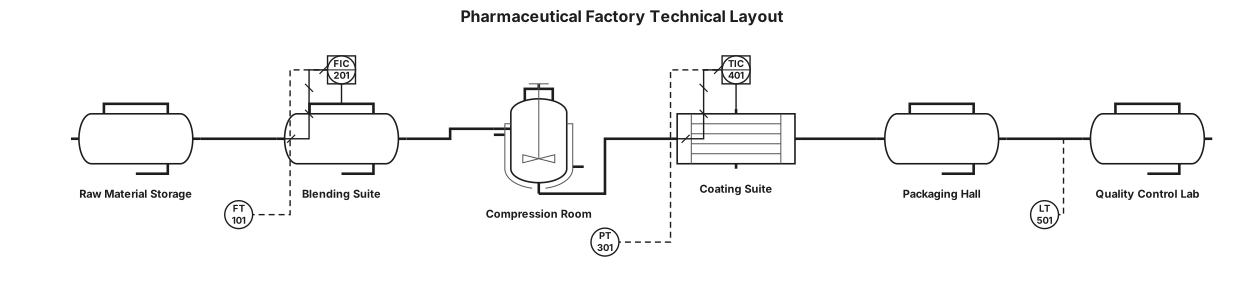
"Redraw this as a clean 2D pharmaceutical factory technical layout. Preserve the same room arrangement, equipment positions, walls, doors, labels, dimensions, and line connections. Use a professional black-and-white CAD drafting style. Make the output editable."
![Main diagram studio: 아래 텍스트 프로세스를 바탕으로 각 단계(2.1~2.9)의 흐름과 통제(Rule)가 한눈에 보이는 전문적인 순서도(Flowchart)를 그려줘[업무 순서도: PO 및 수주 등록 프로세스] START └─► Step 2.1: PO(또는 계약서) 검토 및 승인 ├─ 영업팀](https://psvtykrtciekraoilfux.supabase.co/storage/v1/object/public/gallery-assets/freediagram/feed/80df7b51-1888-4d7d-a846-bd53d35bd6cb.svg)
아래 텍스트 프로세스를 바탕으로 각 단계(2.1~2.9)의 흐름과 통제(Rule)가 한눈에 보이는 전문적인 순서도(Flowchart)를 그려줘[업무 순서도: PO 및 수주 등록 프로세스] START └─► Step 2.1: PO(또는 계약서) 검토 및 승인 ├─ 영업팀 담당자: PO 발주정보와 [최종견적서] 상 견적정보 일치 여부 비교 대사 ├─ 영업팀 담당자: PO(또는 계약서)에 [최종견적서] 첨부 후 경영본부장 보고 └─ 경영본부장: PO 발주정보와 [최종견적서] 정보 일치 확인 후 승인 └─► Step 2.2: 수수대상 관리 ├─ 영업팀 담당자: 계약된 프로젝트에 대한 PO를 근거로 [수주관리대장] 관리 └─ 영업팀 담당자: 계약된 프로젝트의 실물 PO(또는 실물 계약서) 취합 및 보관 └─► Step 2.3: 수주 등록 ├─ 영업팀 담당자: ERP 시스템 상 [수주관리 수주입력]에서 등록 └─ 결과: ERP 시스템 상 실물 PO 등록하면 PO마다 프로젝트 Code 부여됨 └─► Step 2.4: 작업지시서의 검토 및 승인 ├─ 영업팀 담당자: ERP 시스템 상 <영업관리>-<수주관리>-<수주입력> 항목에서 작업지시서 선택 후 제목/스펙 입력 및 결재 상신 ├─ 시스템 연동: 그룹웨어와 연동되어 '작업지시서' 생성 └─ 결재 라인: 영업그룹장 -> 영업관리그룹장 -> 경영본부장 순으로 결재 및 승인 └─► Step 2.5: IFRS 1115호 수익인식기준 검토 ├─ 회계그룹 담당자: 매출 프로젝트별로 매출유형 구분 및 [수익인식기준 체크리스트] 작성 └─ 회계그룹장: 실물 매출채권 전표 승인 시 체크리스트 작성 여부 검토 후 승인 └─► Step 2.6: 시스템 수주등록 비교 대사 ├─ 영업관리그룹 담당자: 실물 PO 바탕으로 [수주상태파일] 및 [월별고객별판매현황] 관리/매월 회계1팀 관련 파일 발송 ├─ 영업관리그룹 담당자: 매월 결산 시 두 파일을 바탕으로 수수 차이 확인 └─ 회계1팀 담당자: 전달받은 파일 근거로 비교 대사 후 ERP 상수 수주 누락 건 피드백 └─► Step 2.7: 수주등록 접근통제 (AC) └─ 통제 규칙: ERP 시스템 상 수수입력 권한은 영업팀 담당자에게만 부여 (권한 통제) └─► Step 2.8: 수주등록 시 거래처 제한 (AC) ├─ 영업팀 담당자: ERP 시스템 상 <매출관리>-<견적관리>-<견적입력> 항목에서 주문 등록 └─ 통제 규칙: 주문 등록 시 고유 번호로 거래처 기재 및 고객마스터 파일 내 거래처만 선택 가능 (임의 거래처 입력 불가) └─► Step 2.9: 확정작업지시서 발행 통제 (AC) ├─ 프로세스: 확정/수정 작업지시서 발행 시 수주내역 선택하여 수행 └─ 통제 규칙: 수주등록이 되어 프로젝트 Code가 부여된 수주 건만 "확정/수정 작업지시서" 발행 가능 END
![Main diagram studio: [업무 순서도: PO 및 수주 등록 프로세스] START └─► Step 2.1: PO(또는 계약서) 검토 및 승인 ├─ 영업팀 담당자: PO 발주정보와 [최종견적서] 상 견적정보 일치 여부 비교 대사 ├─ 영업팀 담당자: PO(또는 계약서)에 [최종견적서] 첨부 후](https://psvtykrtciekraoilfux.supabase.co/storage/v1/object/public/gallery-assets/freediagram/feed/0cab4a79-6d06-47b6-8ce8-9ee8ff8dc6b6.svg)
[업무 순서도: PO 및 수주 등록 프로세스] START └─► Step 2.1: PO(또는 계약서) 검토 및 승인 ├─ 영업팀 담당자: PO 발주정보와 [최종견적서] 상 견적정보 일치 여부 비교 대사 ├─ 영업팀 담당자: PO(또는 계약서)에 [최종견적서] 첨부 후 경영본부장 보고 └─ 경영본부장: PO 발주정보와 [최종견적서] 정보 일치 확인 후 승인 └─► Step 2.2: 수수대상 관리 ├─ 영업팀 담당자: 계약된 프로젝트에 대한 PO를 근거로 [수주관리대장] 관리 └─ 영업팀 담당자: 계약된 프로젝트의 실물 PO(또는 실물 계약서) 취합 및 보관 └─► Step 2.3: 수주 등록 ├─ 영업팀 담당자: ERP 시스템 상 [수주관리 수주입력]에서 등록 └─ 결과: ERP 시스템 상 실물 PO 등록하면 PO마다 프로젝트 Code 부여됨 └─► Step 2.4: 작업지시서의 검토 및 승인 ├─ 영업팀 담당자: ERP 시스템 상 <영업관리>-<수주관리>-<수주입력> 항목에서 작업지시서 선택 후 제목/스펙 입력 및 결재 상신 ├─ 시스템 연동: 그룹웨어와 연동되어 '작업지시서' 생성 └─ 결재 라인: 영업그룹장 -> 영업관리그룹장 -> 경영본부장 순으로 결재 및 승인 └─► Step 2.5: IFRS 1115호 수익인식기준 검토 ├─ 회계그룹 담당자: 매출 프로젝트별로 매출유형 구분 및 [수익인식기준 체크리스트] 작성 └─ 회계그룹장: 실물 매출채권 전표 승인 시 체크리스트 작성 여부 검토 후 승인 └─► Step 2.6: 시스템 수주등록 비교 대사 ├─ 영업관리그룹 담당자: 실물 PO 바탕으로 [수주상태파일] 및 [월별고객별판매현황] 관리/매월 회계1팀 관련 파일 발송 ├─ 영업관리그룹 담당자: 매월 결산 시 두 파일을 바탕으로 수수 차이 확인 └─ 회계1팀 담당자: 전달받은 파일 근거로 비교 대사 후 ERP 상수 수주 누락 건 피드백 └─► Step 2.7: 수주등록 접근통제 (AC) └─ 통제 규칙: ERP 시스템 상 수수입력 권한은 영업팀 담당자에게만 부여 (권한 통제) └─► Step 2.8: 수주등록 시 거래처 제한 (AC) ├─ 영업팀 담당자: ERP 시스템 상 <매출관리>-<견적관리>-<견적입력> 항목에서 주문 등록 └─ 통제 규칙: 주문 등록 시 고유 번호로 거래처 기재 및 고객마스터 파일 내 거래처만 선택 가능 (임의 거래처 입력 불가) └─► Step 2.9: 확정작업지시서 발행 통제 (AC) ├─ 프로세스: 확정/수정 작업지시서 발행 시 수주내역 선택하여 수행 └─ 통제 규칙: 수주등록이 되어 프로젝트 Code가 부여된 수주 건만 "확정/수정 작업지시서" 발행 가능 END
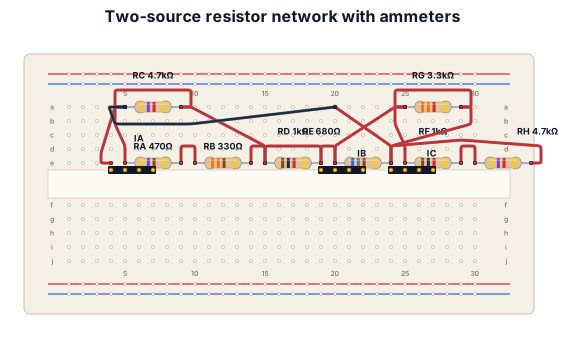
The circuit consists of two DC voltage sources, a 9 V source on the left and a 13 V source on the right, connected through several resistor branches. The 9 V source is connected to node A through ammeter Ia, while node A connects to node D through two parallel branches: one containing Ra = 470 Ω and Rb = 330 Ω in series, and another containing Rc = 4.7 kΩ. Between nodes B and D there is a branch containing Rd = 1 kΩ and ammeter Ib. On the right, node B connects to node C through two parallel paths: one containing Rg = 3.3 kΩ, and another containing Rf = 1 kΩ and Rh = 4.7 kΩ in series. Finally, node C connects through ammeter Ic, the 13 V source, and Re = 680 Ω back to node D, completing the circuit.
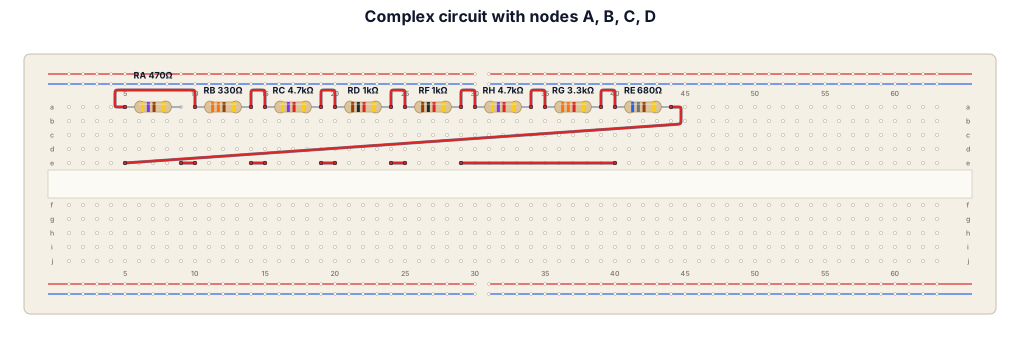
The circuit has four main points: A, B, C, and D. Starting at A, the current splits into two paths to D: one path goes through Ra (470 Ω) and then Rb (330 Ω) in series, while the other goes directly through Rc (4.7 kΩ). The 9 V source E1 and ammeter Ia connect between B and A. From B to D, there is a separate branch containing Rd (1 kΩ) and ammeter Ib in series. On the right, the current from B to C splits into two paths: one goes through Rf (1 kΩ) followed by Rh (4.7 kΩ), and the other goes through Rg (3.3 kΩ). Finally, from C, the current passes through ammeter Ic, the 13 V source E2, and Re (680 Ω) before reaching D. In other words, build the breadboard around the four common nodes A, B, C, and D, then connect each resistor, battery, and ammeter between the same nodes shown in the diagram. Do not use cables or wires connect them in a way that they would all be connected by the resistors, using the fact that the rows are vertically connected
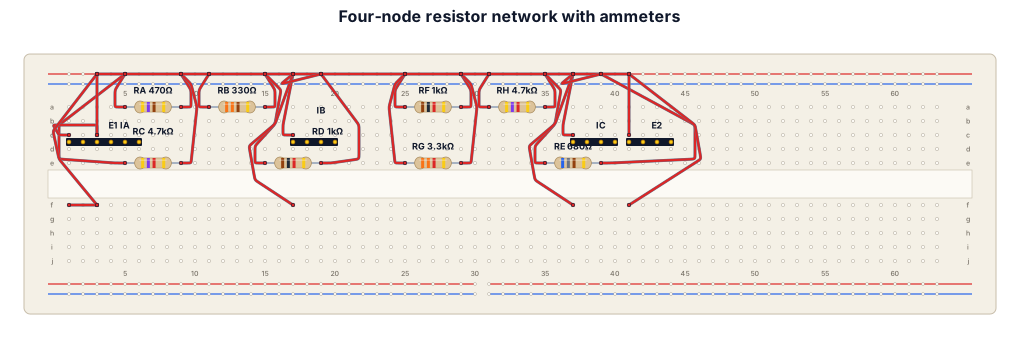
The circuit has four main points: A, B, C, and D. Starting at A, the current splits into two paths to D: one path goes through Ra (470 Ω) and then Rb (330 Ω) in series, while the other goes directly through Rc (4.7 kΩ). The 9 V source E1 and ammeter Ia connect between B and A. From B to D, there is a separate branch containing Rd (1 kΩ) and ammeter Ib in series. On the right, the current from B to C splits into two paths: one goes through Rf (1 kΩ) followed by Rh (4.7 kΩ), and the other goes through Rg (3.3 kΩ). Finally, from C, the current passes through ammeter Ic, the 13 V source E2, and Re (680 Ω) before reaching D. In other words, build the breadboard around the four common nodes A, B, C, and D, then connect each resistor, battery, and ammeter between the same nodes shown in the diagram.