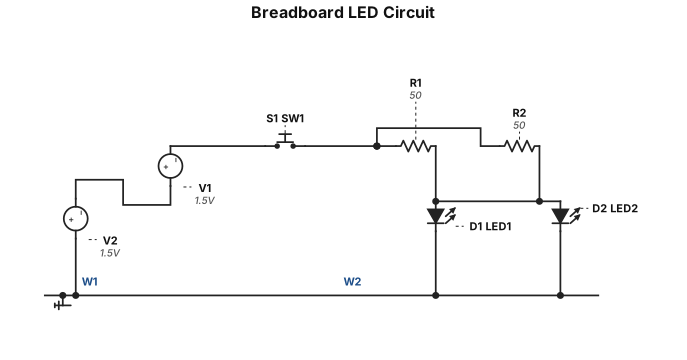
ブレッドボード上の回路 LED 赤 2 抵抗 50Ω 2 並列で接続 プッシュスイッチでON OFF バッテリー 1.5V 2 直列つなぎ バッテリーの配線図を直線で
NODE ARCHIVE · REAL DIAGRAM BRIEFS
Diagram Examples from Real Visitor Prompts
Browse eligible diagrams shared by FreeDiagram visitors, inspect the exact prompts, and build your own version.
Browse 3295 real creationsCOMMUNITY OUTPUTS · EXACT PROMPTS
All visitor creations
Showing 1465–1488 of 3295. No stock examples or system defaults. Choose a tool, study a real result, then reopen its prompt as your starting point.
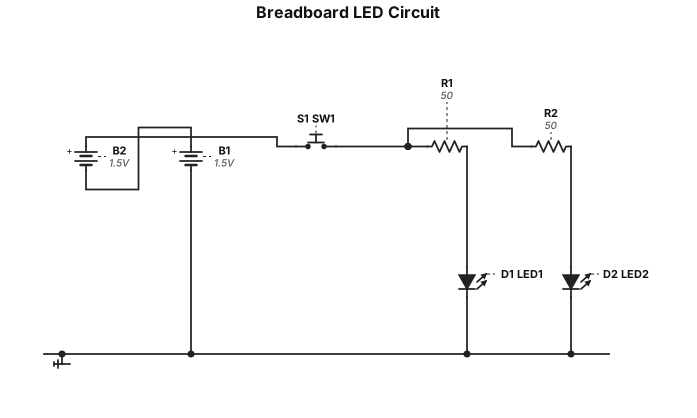
ブレッドボード上の回路 LED 赤 2 抵抗 50Ω 2 並列で接続 プッシュスイッチでON OFF バッテリー 1.5V 2 直列つなぎ
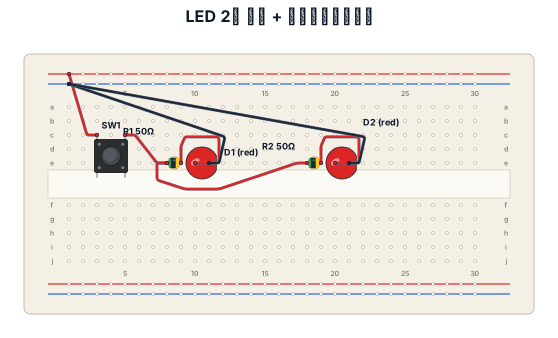
ブレットボード 1枚 この上に LED 赤 2 抵抗 50Ω 2 プッシュスイッチ 1 電源は別の電池ボックス1.5V 2 LEDはブレッドボード上で並列つなぎ 電池は電池ボックス内で直列つなぎ この条件で図を生成 もっと配線をシャープに生成 このブレッドボード配線を回路図で生成 抵抗は横配列ではなく縦配列 もっとシャープに配線をして ブレッドボードは2列ではなく1列のみ使用 プッシュスイッチ 4足 c3 c5 e3 e5 LED 1 アノードe10 カソードe11 LED 2 アノードe20 カソードe21 抵抗 1 e8e9 抵抗 2 e18e19 バッテリー 1.5v 直列つなぎ ブレッドボードの+ ー それぞれの極性に接続 必要に応じてジャンプワイヤーを使用 電源は片側だけ
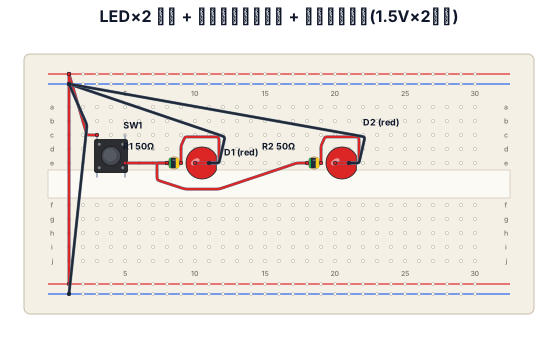
ブレットボード 1枚 この上に LED 赤 2 抵抗 50Ω 2 プッシュスイッチ 1 電源は別の電池ボックス1.5V 2 LEDはブレッドボード上で並列つなぎ 電池は電池ボックス内で直列つなぎ この条件で図を生成 もっと配線をシャープに生成 このブレッドボード配線を回路図で生成 抵抗は横配列ではなく縦配列 もっとシャープに配線をして ブレッドボードは2列ではなく1列のみ使用 プッシュスイッチ 4足 c3 c5 e3 e5 LED 1 アノードe10 カソードe11 LED 2 アノードe20 カソードe21 抵抗 1 e8e9 抵抗 2 e18e19 バッテリー 1.5v 直列つなぎ ブレッドボードの+ ー それぞれの極性に接続 必要に応じてジャンプワイヤーを使用
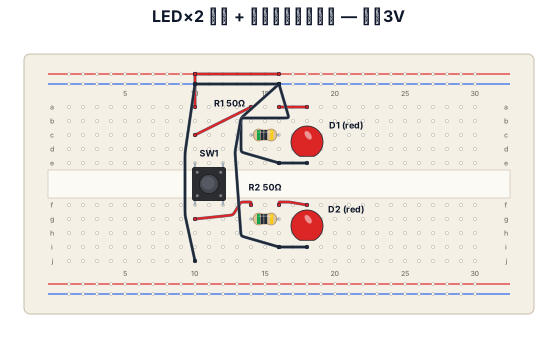
ブレットボード 1枚 この上に LED 赤 2 抵抗 50Ω 2 プッシュスイッチ 1 電源は別の電池ボックス1.5V 2 LEDはブレッドボード上で並列つなぎ 電池は電池ボックス内で直列つなぎ この条件で図を生成 もっと配線をシャープに生成 このブレッドボード配線を回路図で生成 抵抗は横配列ではなく縦配列 もっとシャープに配線をして ブレッドボードは2列ではなく1列のみ使用
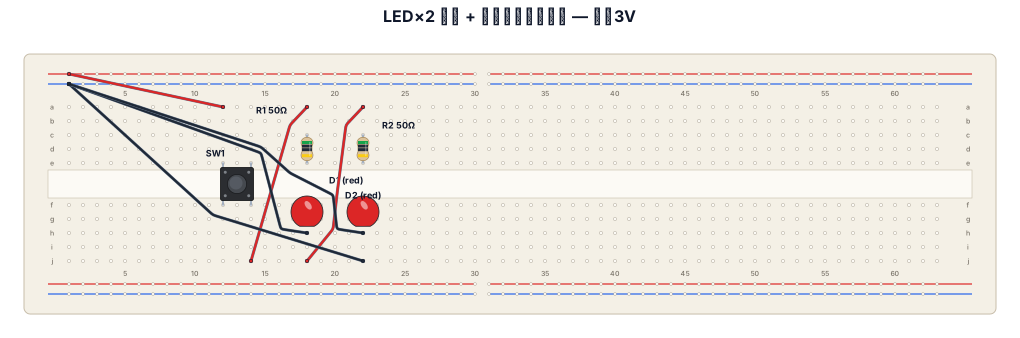
ブレットボード 1枚 この上に LED 赤 2 抵抗 50Ω 2 プッシュスイッチ 1 電源は別の電池ボックス1.5V 2 LEDはブレッドボード上で並列つなぎ 電池は電池ボックス内で直列つなぎ この条件で図を生成 もっと配線をシャープに生成 このブレッドボード配線を回路図で生成 抵抗は横配列ではなく縦配列 もっとシャープに配線をして
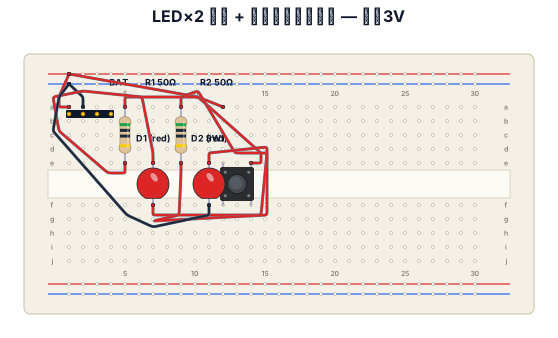
ブレットボード 1枚 この上に LED 赤 2 抵抗 50Ω 2 プッシュスイッチ 1 電源は別の電池ボックス1.5V 2 LEDはブレッドボード上で並列つなぎ 電池は電池ボックス内で直列つなぎ この条件で図を生成 もっと配線をシャープに生成 このブレッドボード配線を回路図で生成 抵抗は横配列ではなく縦配列
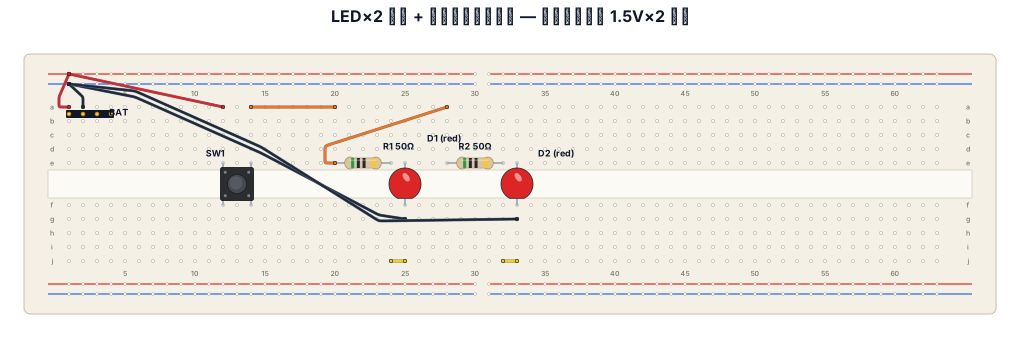
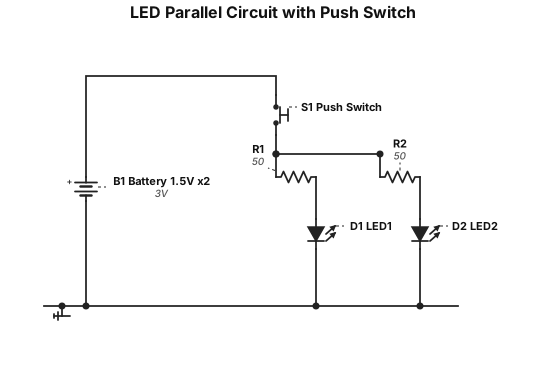
ブレットボード 1枚 この上に LED 赤 2 抵抗 50Ω 2 プッシュスイッチ 1 電源は別の電池ボックス1.5V 2 LEDはブレッドボード上で並列つなぎ 電池は電池ボックス内で直列つなぎ この条件で図を生成 もっと配線をシャープに生成 このブレッドボード配線を回路図で生成
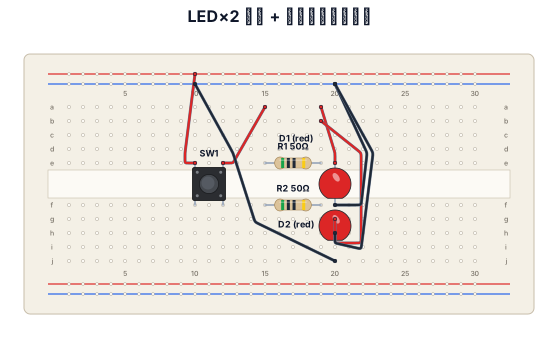
ブレットボード 1枚 この上に LED 赤 2 抵抗 50Ω 2 プッシュスイッチ 1 電源は別の電池ボックス1.5V 2 LEDはブレッドボード上で並列つなぎ 電池は電池ボックス内で直列つなぎ この条件で図を生成 もっと配線をシャープに生成
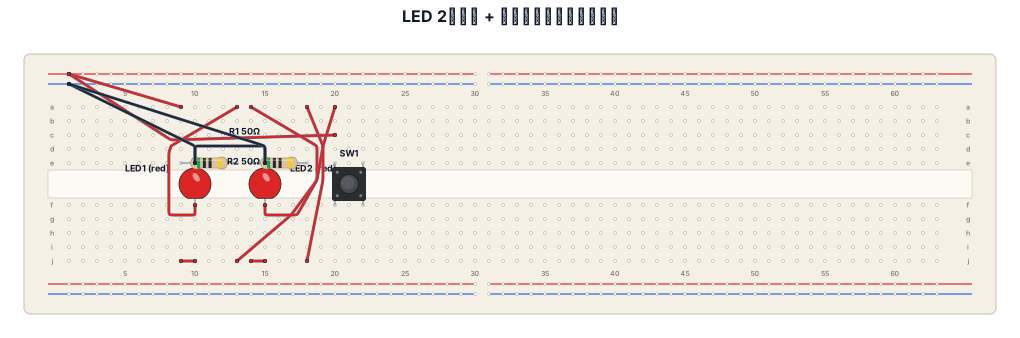
ブレットボード 1枚 この上に LED 赤 2 抵抗 50Ω 2 プッシュスイッチ 1 電源は別の電池ボックス1.5V 2 LEDはブレッドボード上で並列つなぎ 電池は電池ボックス内で直列つなぎ この条件で図を生成
Webデザインでは、最初にターゲットと目的を明確にしてから、必要な情報を整理します。情報量が多い場合は、見出し・本文・補足情報のように役割を分け、重要度に応じて文字サイズや余白に差をつけます。また、写真やイラストをただ配置するのではなく、視線の流れを意識してレイアウトを決め、最後にスマートフォンでも文字が読みやすく、ボタンが押しやすい状態になっているか確認します。
ブレッドボード1 乾電池1.5v2本 LED 赤 2 抵抗 50Ω 2 ジャンプワイヤー プッシュスイッチ LEDは並列つなぎで電池は直列つなぎ ブレッドボードの電極+ =にバッテリーを接続
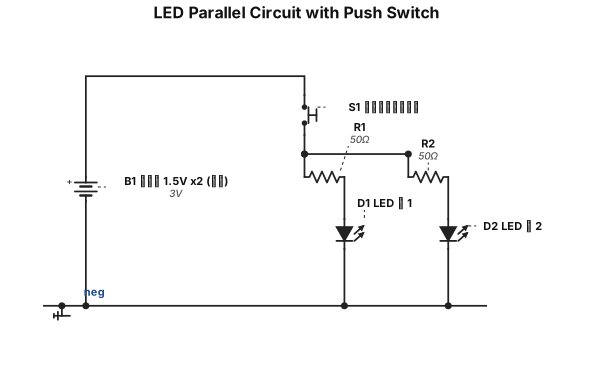
ブレッドボード1 乾電池1.5v2本 LED 赤 2 抵抗 50Ω 2 ジャンプワイヤー プッシュスイッチ LEDは並列つなぎで電池は直列つなぎ
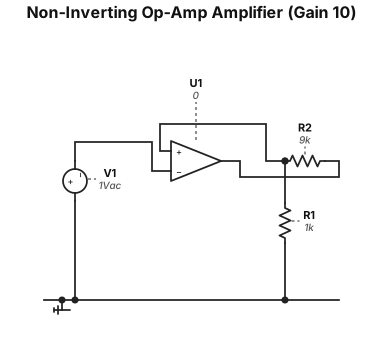
A circuit schematic of a non-inverting op-amp amplifier with a gain of 10
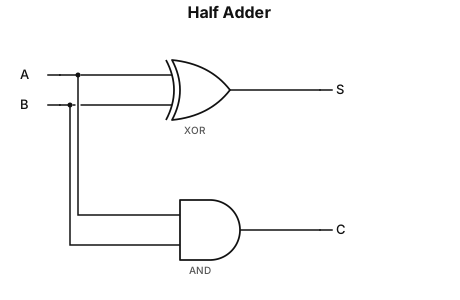
Create a clean digital logic circuit for a Half Adder. Inputs: A and B Outputs: S and C Use two separate gates: 1. A and B are connected to a 2-input XOR gate. Label the XOR gate output as S. Boolean expression: S = A XOR B 2. A and B are also connected to a 2-input AND gate. Label the AND gate output as C. Boolean expression: C = AB The same inputs A and B must branch and connect to both gates. Arrange the circuit neatly: - XOR gate on the upper path, output S - AND gate on the lower path, output C - Inputs A and B on the left - Outputs S and C on the right Use standard digital logic gate symbols, straight wires, black lines, white background, and a clean textbook-style circuit diagram.
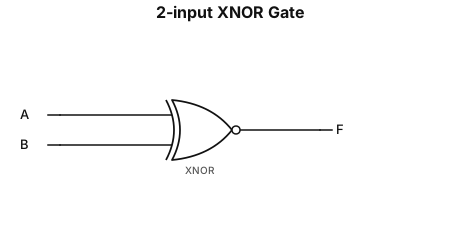
Create a clean digital logic circuit for a 2-input XNOR gate. Inputs: A and B Gate: 2-input XNOR gate Output: F Connect input A and input B directly to the XNOR gate. Connect the XNOR gate output to F. Display the Boolean expression exactly as: F = overline(A XOR B) Use ONE continuous horizontal bar above the entire expression A XOR B. The bar must cover the complete A XOR B expression. Do not put separate bars above A or B. Use a standard XNOR gate symbol, black lines, white background, straight horizontal input and output wires, and a clean textbook-style circuit diagram.
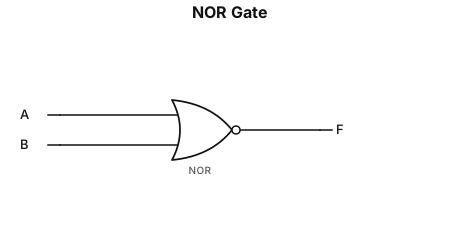
Create a clean digital logic circuit for a NOR gate. Inputs: A and B Gate: 2-input NOR gate Output: F Connect input A and input B to the NOR gate. Connect the NOR gate output to F. Display the Boolean expression exactly as: F = overline(A + B) Use ONE continuous horizontal bar above the entire expression A+B. The bar must cover both A and B and the plus sign. Do not put separate bars above A or B. Use a standard NOR gate symbol, black lines, white background, and a clean textbook-style circuit diagram.
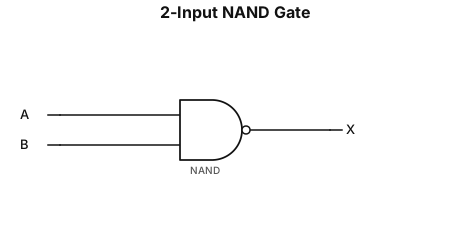
Create a clean digital logic circuit for a NAND gate. Inputs: A and B Gate: 2-input NAND gate Output: X Connect input A and input B to the NAND gate. Connect the NAND gate output to X. Display the Boolean expression as: X = AB with an overbar over the entire AB Use a standard NAND gate symbol, black lines, white background, and a clean textbook-style circuit diagram.
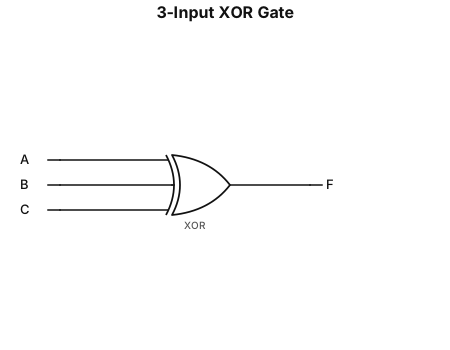
Create a 3-input XOR gate circuit. Inputs: A, B, C Gate: 3-input XOR Output: F Connect A, B, and C directly to the three inputs of the XOR gate. Label the output as F. Use a clean black-and-white digital logic circuit style.
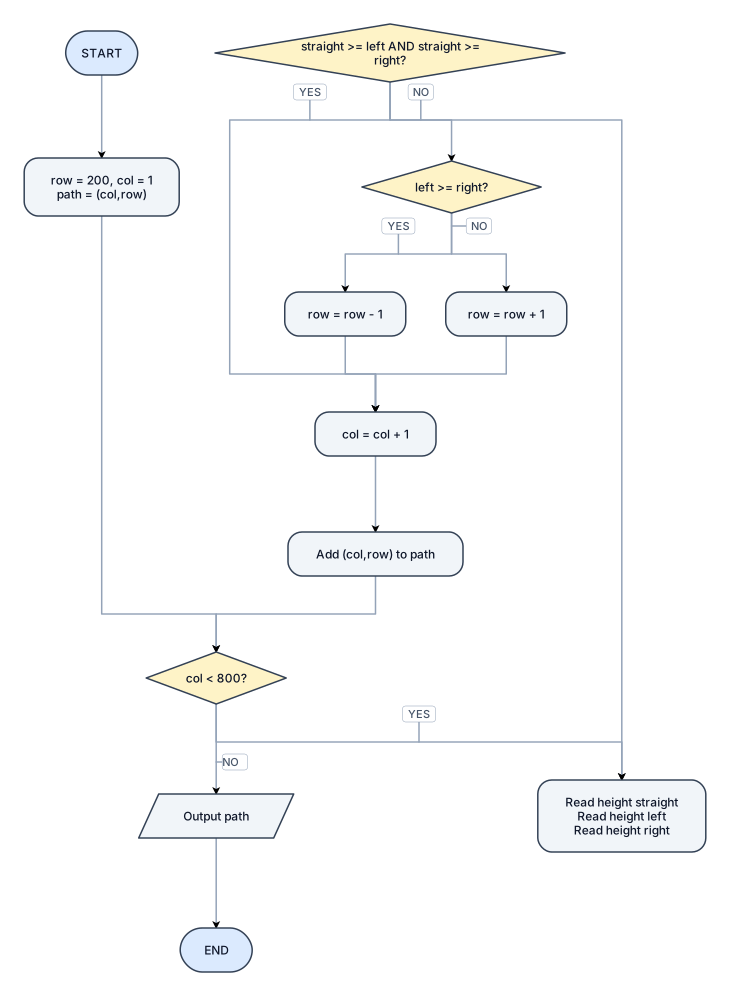
Create a standard programming flowchart, not a network graph. Use a top-to-bottom vertical layout with one main vertical flow in the center. Use only standard flowchart symbols and simple straight/orthogonal arrows. Do not add any extra steps. At the very top, place an oval labeled START. Directly underneath, place one rectangle labeled: row = 200, col = 1 path = (col,row) Directly underneath, place a decision diamond labeled: col < 800? The NO branch must go to the right into a parallelogram labeled: Output path From Output path, go downward to an oval labeled: END The YES branch from col < 800? must continue straight downward. Place one rectangle underneath containing exactly: Read height straight Read height left Read height right Underneath that rectangle, place a decision diamond labeled: straight >= left AND straight >= right? The YES branch must go downward/right and eventually join the main flow without changing the row. Do not create an extra box for the YES branch. The NO branch must go to another decision diamond labeled: left >= right? From this diamond: - YES goes to a rectangle labeled row = row - 1 - NO goes to a rectangle labeled row = row + 1 The three possible branches — straight, row = row - 1, and row = row + 1 — must all merge back into one single flow. After they merge, place a rectangle labeled: col = col + 1 Directly underneath, place another rectangle labeled: Add (col,row) to path From this rectangle, draw one arrow that loops back upward to the decision diamond: col < 800? Keep the diagram clean and compact. Use: - Oval for START and END - Rectangle for calculations - Diamond for decisions - Parallelogram for Output path - Label all decision branches clearly with YES and NO - Use a vertical top-down programming flowchart layout - Do not use a circular, tree, mind-map, or network layout - Do not rearrange the order of the steps - Do not add icons, colors, titles, or extra explanation
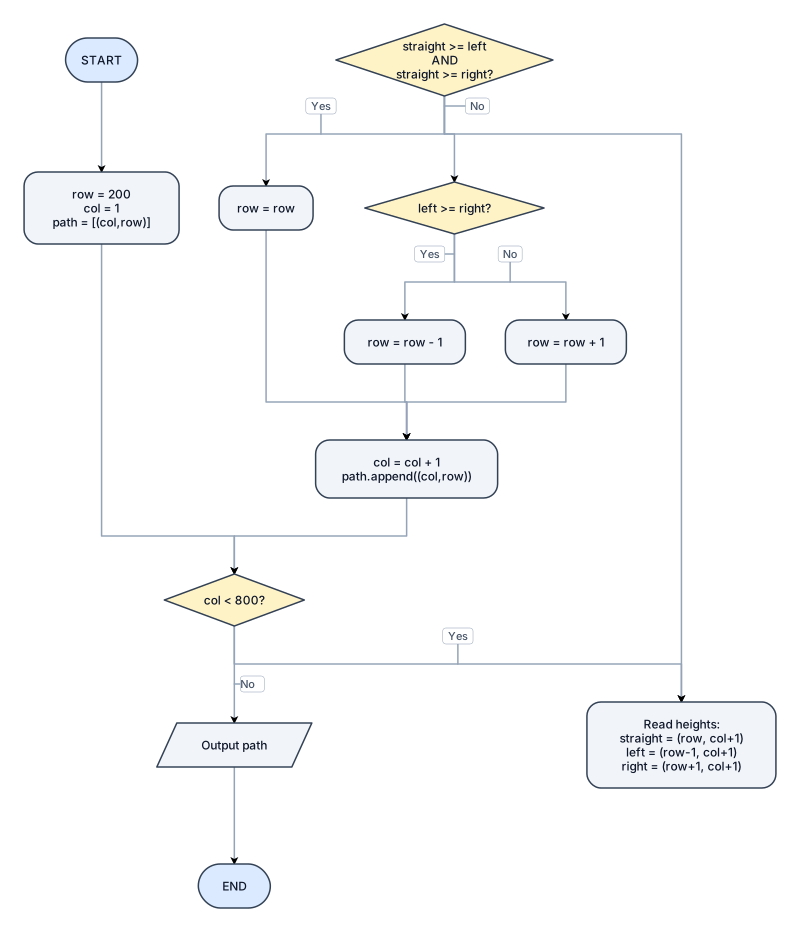
Create a programming flowchart for a route-planning algorithm. Start with START. Set row = 200 and col = 1 and store the starting coordinate in a path array. Check whether col < 800. If no, output the path and end. If yes, read the heights of the three possible next positions: straight at (row,col+1), left at (row-1,col+1), and right at (row+1,col+1). Check whether the straight height is greater than or equal to both the left and right heights. If yes, keep the same row. If no, check whether the left height is greater than or equal to the right height. If yes, set row = row - 1. Otherwise set row = row + 1. Then set col = col + 1, add the new (col,row) coordinate to the path, and loop back to check whether col < 800. Use standard flowchart symbols: oval for start and end, rectangles for calculations, diamonds for decisions, and a parallelogram for output.
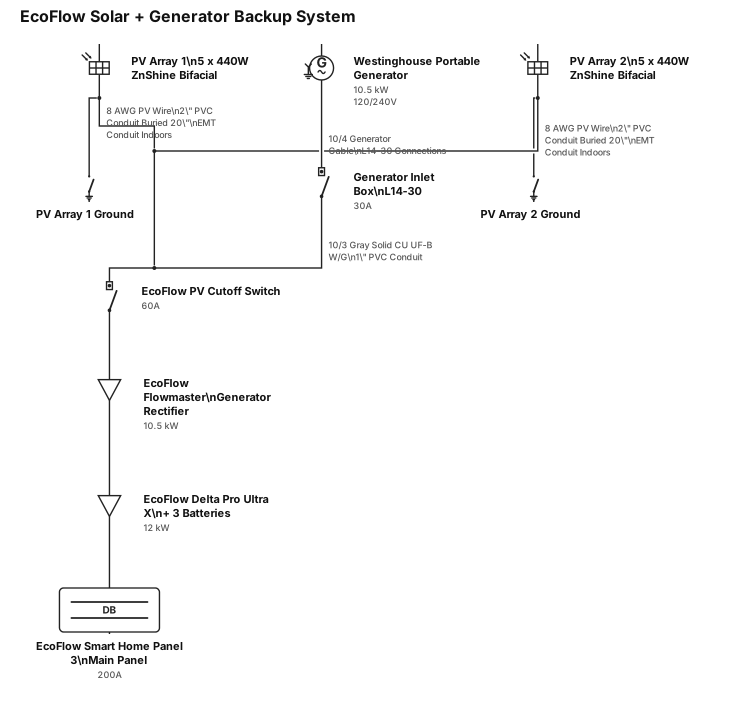
You are an expert electrician with 30 years of experience installing solar power. Create a single line electrical diagram used for permitting purposes for a system that has two solar panel installations that consists of 5 X 440 watt bifacial ZnShine solar panels each, grounded. The solar panels will be connected to the house using 8 gauge PV wiring within 2 inch PVC conduit buried 20 inches deep then enter the house and will continue in EMT conduit. There is also a Westinghouse portable generator capable of 10,500 watt, 30 amp power. The generator will enter the house through a generator inlet box connected by a 10/4 generator cable with L14-30 connections. The generator power will continue with 10/3 Gray Solid CU UF-B W/G Wire and be run through 1 inch PVC conduit then be connected to an EcoFlow PV cutoff switch. The solar panels also feed into the same Ecoflow PV cutoff switch. The generator and PV power then connect to an EcoFlow Flowmaster generator rectifier and then to an Ecoflow Delta Pro Ultra X with three batteries. This is then connected to an EcoFlow Smart Home Panel 3, which is the home's main panel. All EcoFlow components connect with the EcoFlow proprietary connections. Create the single line diagram to industry standards. By "industry standards" I mean the standard for single line diagrams, not electrical code standards. The output will be an image or diagram that I can download as a PDF file. Do not place text over the lines in the drawing.
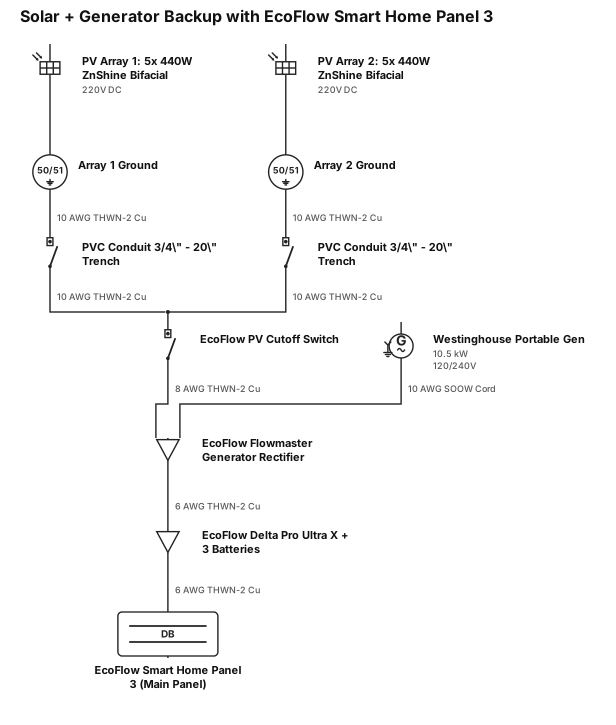
You are an expert electrician with 30 years of experience installing Create a single line electrical diagram used for permitting purposes for a system that has two solar panel installations that consists of 5 X 440 watt bifacial ZnShine solar panels each, grounded. There is also a Westinghouse portable generator capable of 10,500 watt, 30 amp power. The solar panels feed into an Ecoflow PV cutoff switch. The generator and PV power then connect to an EcoFlow Flowmaster generator rectifier and then to an Ecoflow Delta Pro Ultra X with three batteries. This is then connected to an EcoFlow Smart Home Panel 3, which is the home's main panel. Create the single line diagram to industry standards. By "industry standards" I mean the standard for single line diagrams, not electrical code standards. The output will be an image or diagram that I can download as a PDF file. Add in the gauge of the wire and what conduit will be used. Include that the PVC pipe from the solar arrays is to be buried in a trench 2o inches underground. Do not place text over the lines in the drawing.
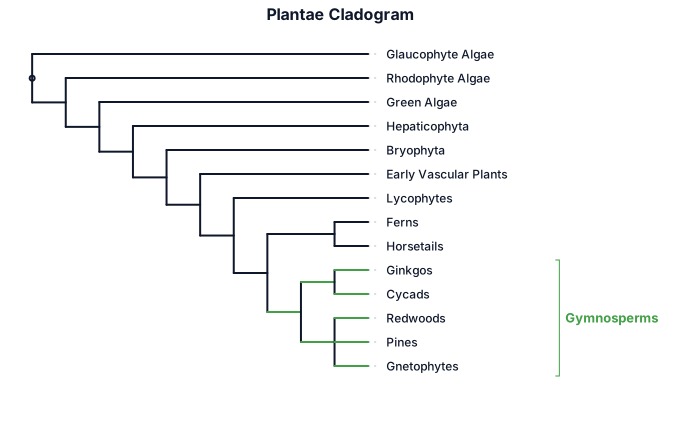
A cladogram with square branches of the plantae clade showing glaucophyte algae as an outgroup, then rhodophyte algae (red algae), then green algae - which are separate branches, then hepaticophyta (liverworts), bryophta (mosses), then early vascular plants, then lycophytes, then a branch that splits into ferns and horsetails, then a clade made up of the gymnosperms, and angiosperms. Within the gymnosperms there are two groups - the ginkos and cycads and another group the redwoods, pines and gnetophytes which originate in a polytomy. Then, please add the angiosperms as a sister taxon to the gymnosperms.