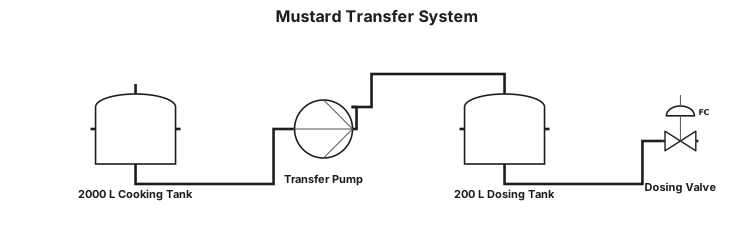
Create a simple P&ID diagram for a mustard transfer system. Show only: 2000 L mustard cooking tank Transfer pump on picture under tank 200 L intermediate dosing tank / hopper Dosing line from the 200 L tank to mustard cups Flow direction: 2000 L cooking tank → pump → 200 L intermediate dosing tank → dosing line → mustard cups.
NODE ARCHIVE · REAL DIAGRAM BRIEFS
Diagram Examples from Real Visitor Prompts
Browse eligible diagrams shared by FreeDiagram visitors, inspect the exact prompts, and build your own version.
Browse 3312 real creationsCOMMUNITY OUTPUTS · EXACT PROMPTS
All visitor creations
Showing 2065–2088 of 3312. No stock examples or system defaults. Choose a tool, study a real result, then reopen its prompt as your starting point.
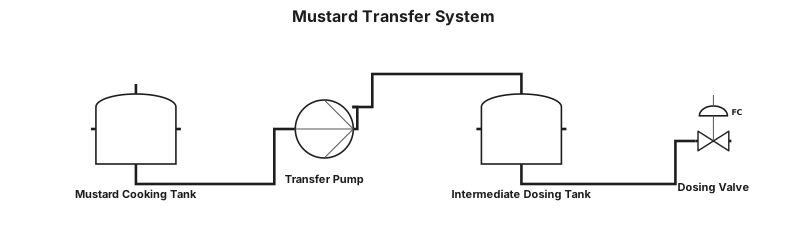
Create a simple P&ID diagram for a mustard transfer system. Show only: 2000 L mustard cooking tank Transfer pump under the tank 200 L intermediate dosing tank / hopper Dosing line from the 200 L tank to mustard cups Flow direction: 2000 L cooking tank → pump → 200 L intermediate dosing tank → dosing line → mustard cups.
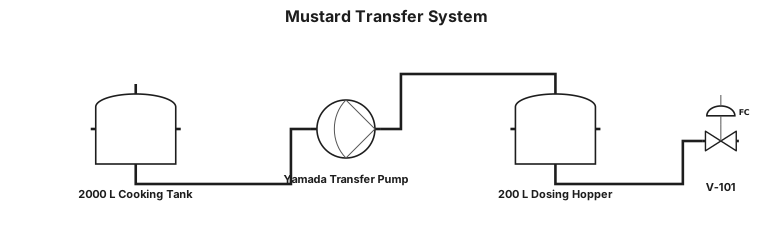
Create a simple P&ID diagram for a mustard transfer system. Show only: 2000 L mustard cooking tank Transfer pump Yamada 200 L intermediate dosing tank / hopper Dosing line from the 200 L tank to mustard cups Flow direction: 2000 L cooking tank → pump yamada → 200 L intermediate dosing tank → dosing line → mustard cups.
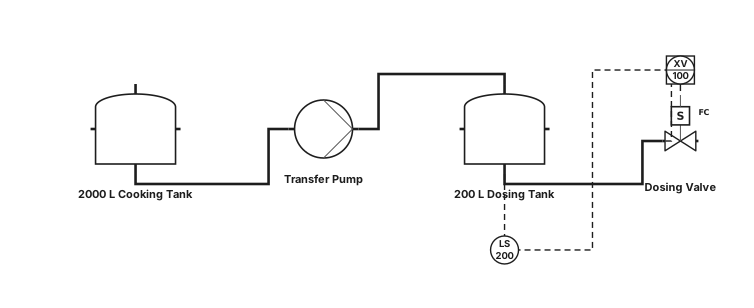
Create a simple P&ID diagram for a mustard transfer system. Show only: 2000 L mustard cooking tank Transfer pump 200 L intermediate dosing tank / hopper Dosing line from the 200 L tank to mustard cups Flow direction: 2000 L cooking tank → pump → 200 L intermediate dosing tank → dosing line → mustard cups.
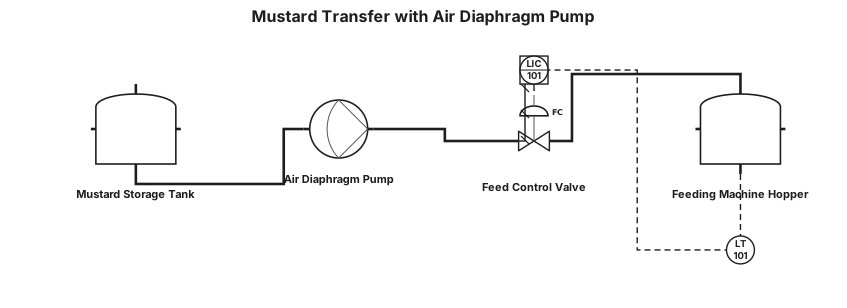
The air diaphragm pump for a mustard. From a tank 2000 liter to smaller feeding machine 200 liter that feeds the bottles on a conveyor belt
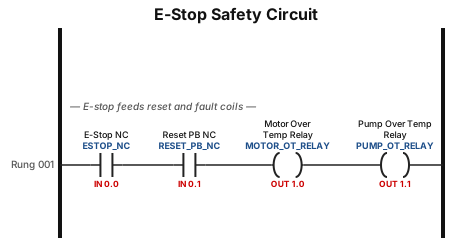
A NC e-stop that feeds four terminal blocks one goes to NC reset PB the two others feed the relay coils one for motor over temp the other coil is pump over temp
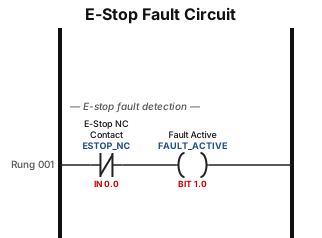
A NC e-stop that feeds a fault circuit

Draw a schematic showing an ESP32 microcontroller connected to two PZEM‑004T modules, a 4‑channel relay module, an OLED display, and a push button. Connections: ESP32 → Relay module: GPIO 5, 18, 19, 23 control IN1–IN4; relay VCC = 5 V; relay GND = common ground. ESP32 → PZEM #1: RX (GPIO 25) and TX (GPIO 26). ESP32 → PZEM #2: RX (GPIO 32) and TX (GPIO 33). ESP32 → OLED: SDA (GPIO 21), SCL (GPIO 22), VCC = 3.3 V, GND = common ground. ESP32 → Button: one side = GPIO 14, other side = GND. Power: External 5 V supply feeds ESP32 (VIN), relay module (VCC), and both PZEM modules. OLED powered by ESP32 3.3 V. All grounds joined at a common bus bar. AC wiring: AC Mains (240 V) connects to each PZEM’s L and N terminals for measurement. Each PZEM’s output (L OUT/N OUT) connects to the relay module COM terminals. Relay NO terminals connect to AC loads. Neutral shared directly between mains, PZEMs, and loads. Label the two PZEMs as Loop 1 and Loop 2. Show UART1 and UART2 communication lines between ESP32 and PZEMs.
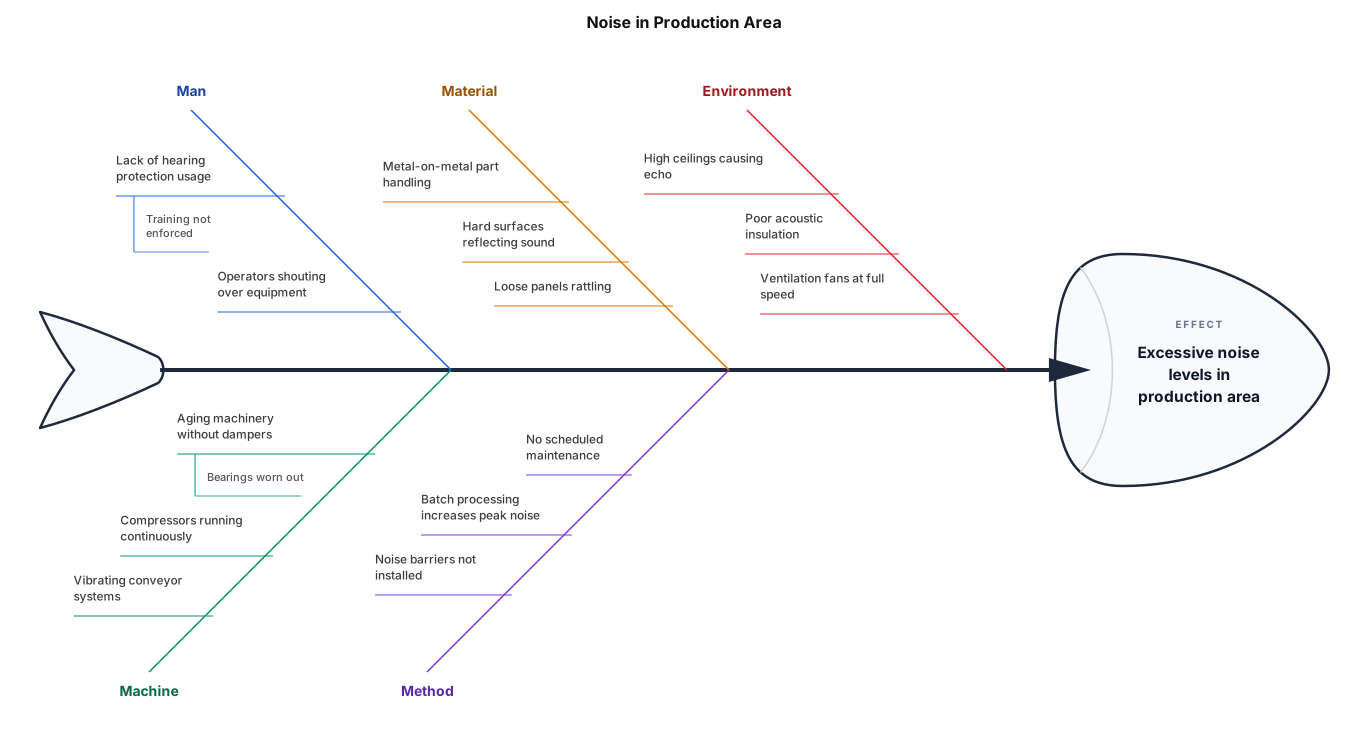
A fishbone diagram analysing noise in production area

A timing diagram for an I2C read transaction: SCL clock, SDA with START condition, 7-bit address byte, ACK bit, data byte, and STOP condition
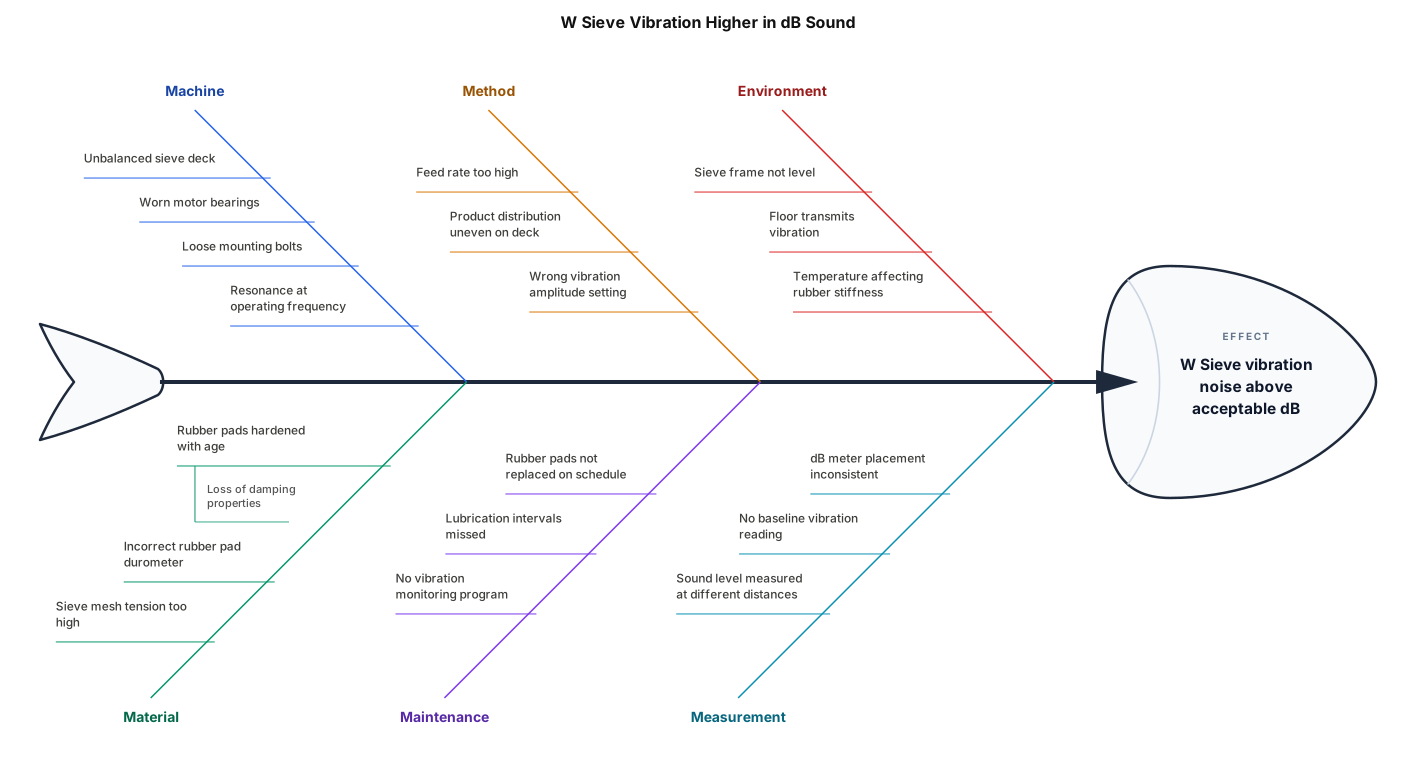
A fishbone diagram analysing why w sieve vibration higher in dB sound. one of the improvement i did was change the rubber pad of the w sieve.
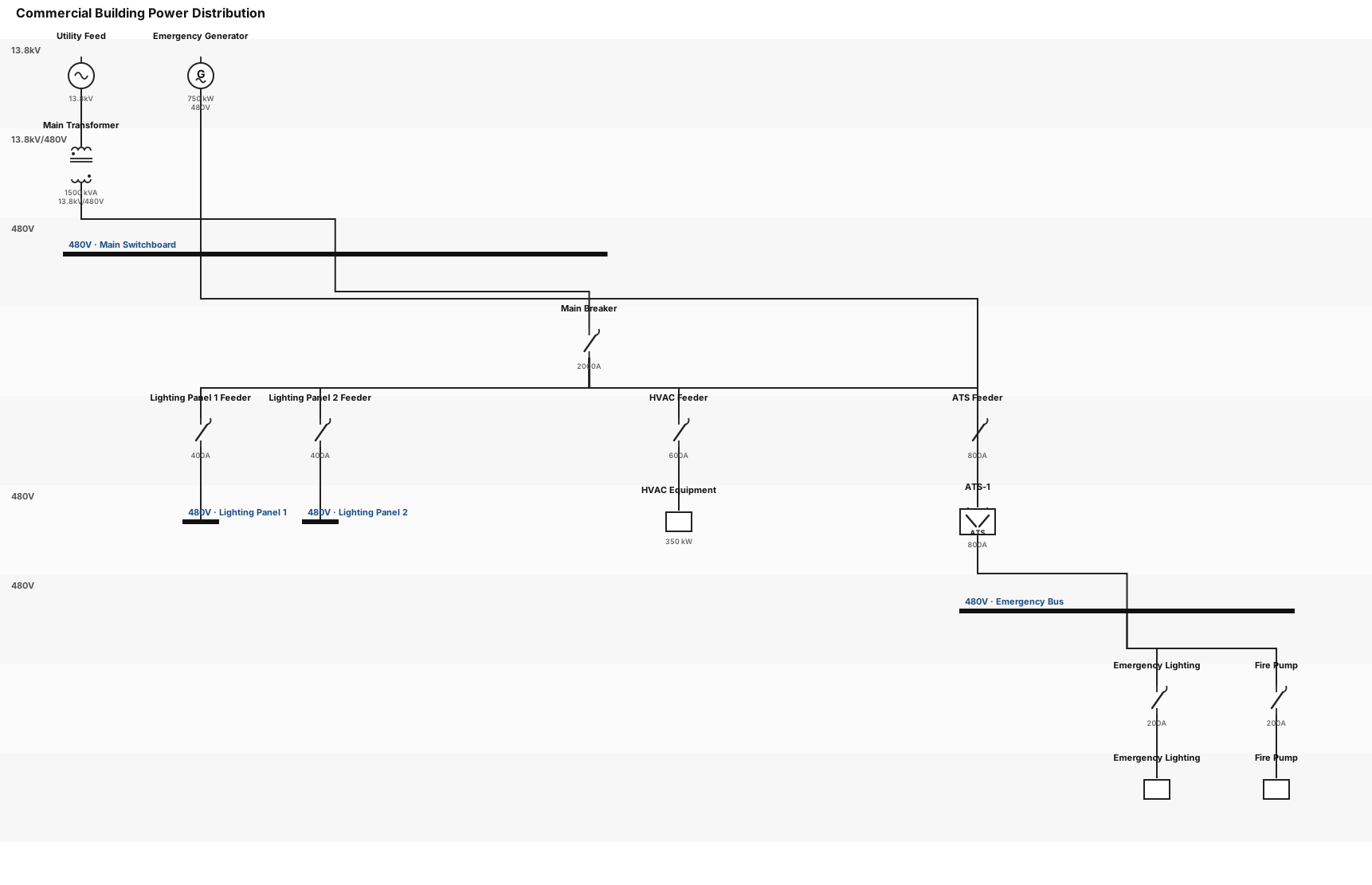
A single-line diagram for a commercial building: utility feed through a main transformer to a 480V switchboard, then to lighting panels, HVAC equipment, and an emergency generator with ATS
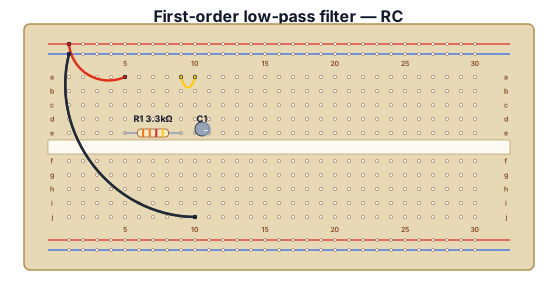
A first-order low-pass filter with a 3.3kOhm resistor and a 0.33uF capacitor.

Create a clean and simple flowchart for an e-commerce order process. The process starts when a registered user logs into their account. 1. User logs in. 2. User views the products. 3. User opens a product details page and selects the desired product variant. 4. The product stock is checked and the product is added to the shopping cart. 5. User views the shopping cart and can update it by changing quantities or removing products. 6. User clicks the order registration button. 7. User enters recipient information. 8. If the user has a valid discount code, the discount is applied. 9. User clicks the order and payment button. 10. User enters the payment page. 11. The payment is simulated and completed successfully. 12. The order and payment information are registered. 13. The product stock is updated and the user's shopping cart is emptied. 14. The order status changes to "Under Review". 15. The user can view the order and its status in the user panel. 16. The administrator can view and manage registered orders in the admin panel. 17. The process ends. Keep the flowchart simple and suitable for a university project report. Use clear rectangular process boxes, arrows, and a clean professional layout. Do not include detailed order statuses such as packaging, shipping, or delivered.
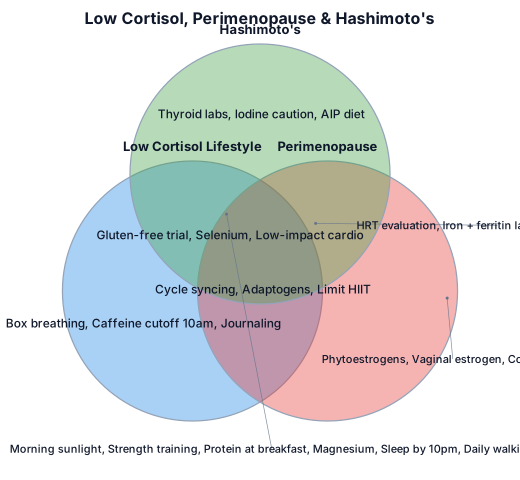
A three-set Venn diagram showing where the principles for a low cortisol life style, perimenopause, and hashimottos overlap. Have the center overlap with things to do that they have in common and in the center of that another circle of things to avoid that they have in common
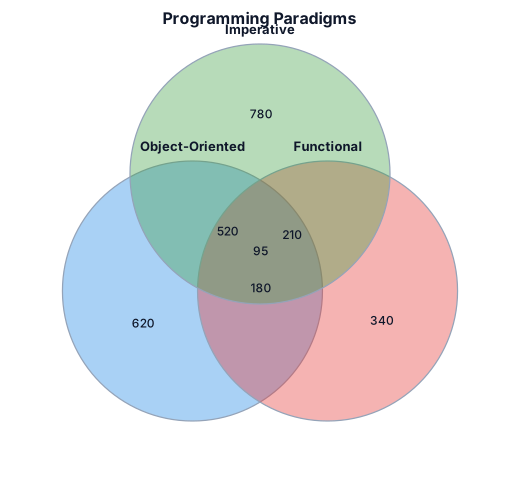
A three-set Venn diagram showing where object-oriented, functional, and imperative programming overlap
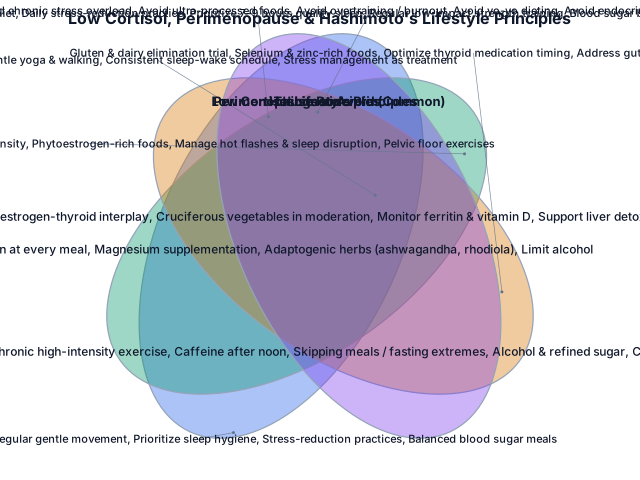
Make a ven diagram with one section listing principles for a low cortisol life style, another listing the principles for perimenopause, and another listing hashimottos principles. Have the center overlap with things to do that they have in common and in the center of that another circle of things to avoid that they have in common
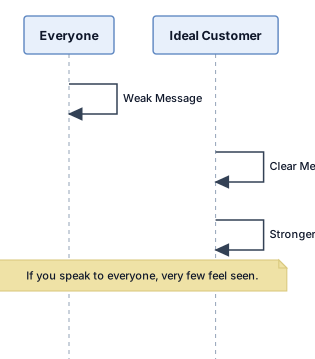
3) Who Are You Selling To? Use as: VISUAL Prompt: Style: Create a clean premium educational visual in 16:9 format for a business course video. Use a dark background, white text, blue accents, minimal layout, simple icons, modern infographic style, and make it very easy to understand at a glance. Keep text short and clear. Create a comparison diagram showing broad targeting versus specific targeting. Left side title: “Everyone” with a wide audience icon underneath and a label: “Weak Message”. Right side title: “Ideal Customer” with one highlighted customer icon and labels underneath: “Clear Message” and “Stronger Connection”. Use a clean visual contrast between trying to speak to everyone and speaking to one clear ideal customer. Add a footer line: “If you speak to everyone, very few feel seen.”
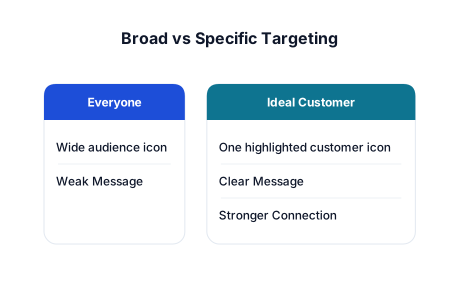
3) Who Are You Selling To? Use as: VISUAL Prompt: Style: Create a clean premium educational visual in 16:9 format for a business course video. Use a dark background, white text, blue accents, minimal layout, simple icons, modern infographic style, and make it very easy to understand at a glance. Keep text short and clear. Create a comparison diagram showing broad targeting versus specific targeting. Left side title: “Everyone” with a wide audience icon underneath and a label: “Weak Message”. Right side title: “Ideal Customer” with one highlighted customer icon and labels underneath: “Clear Message” and “Stronger Connection”. Use a clean visual contrast between trying to speak to everyone and speaking to one clear ideal customer. Add a footer line: “If you speak to everyone, very few feel seen.”
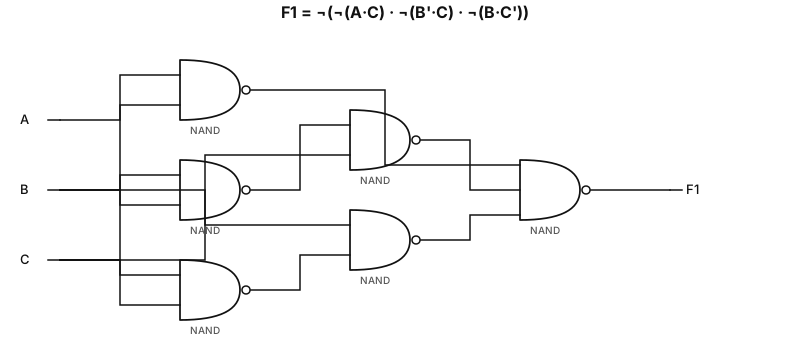
enera un diagrama de circuito lógico digital correspondiente exactamente a la siguiente función booleana: F₁ = ¬(¬(A·C) · ¬(B'·C) · ¬(B·C')) Construye el circuito utilizando únicamente compuertas NAND, respetando exactamente las negaciones de la expresión. Coloca las entradas A, B y C en el lado izquierdo. Para A·C, utiliza una compuerta NAND. Para B'·C, primero genera B' mediante una NAND usada como inversor y luego conecta B' y C a otra NAND. Para B·C', primero genera C' mediante una NAND usada como inversor y luego conecta B y C' a otra NAND. Conecta las tres salidas anteriores a una NAND final de 3 entradas, que produzca F₁. Coloca la salida F₁ en el extremo derecho. Todas las conexiones deben ser claras, ordenadas y horizontales. Usa símbolos estándar de compuertas lógicas digitales. No agregues compuertas que no sean necesarias. Coloca las etiquetas A, B, C, B', C' y F₁ claramente. El resultado debe parecer un diagrama de circuito de compuertas lógicas para una tarea universitaria, no una infografía. Fondo blanco, líneas negras/grises, símbolos limpios y texto perfectamente legible.
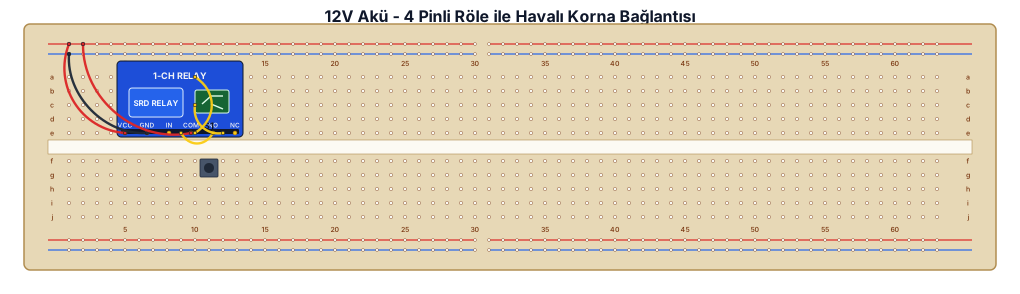
“12V aküden 4 pinli röle üzerinden havalı korna bağla. Rölede 30 akü +, 87 korna +, 85 şase, 86 düğmeden gelen + olacak şekilde şema çiz
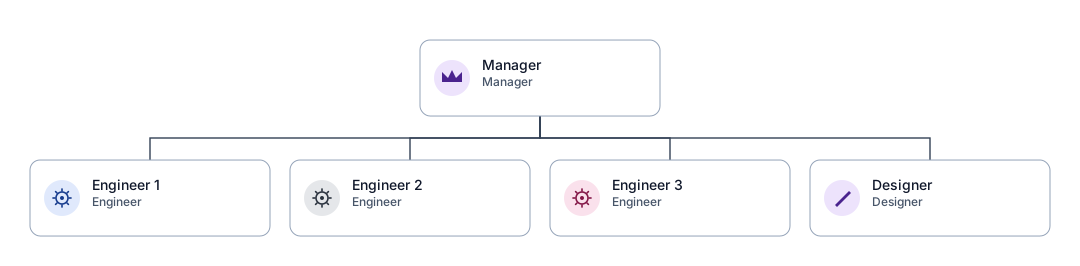
An org chart for a small team with a manager, three engineers, and a designer
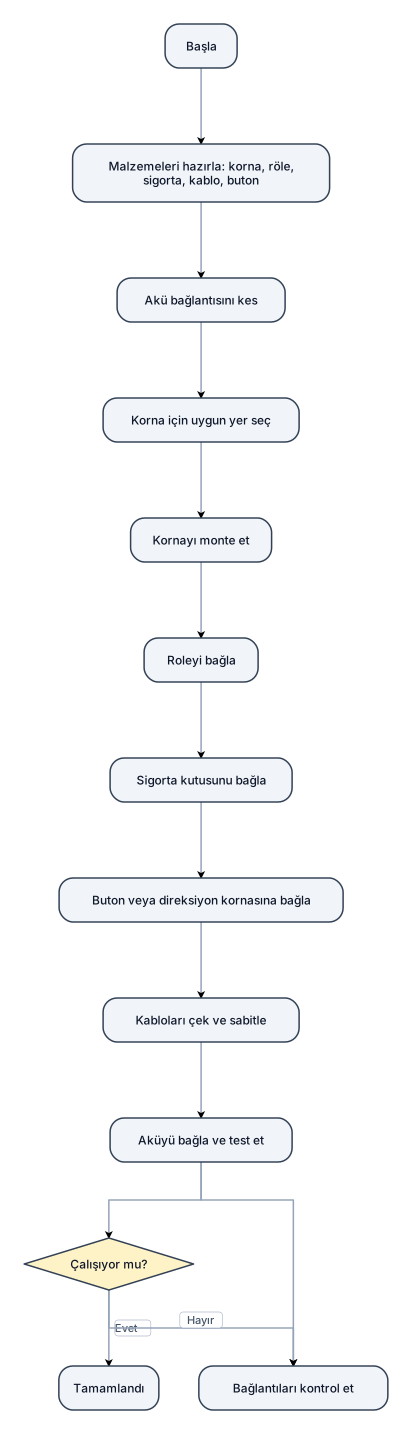
Arabaya korna baglamak
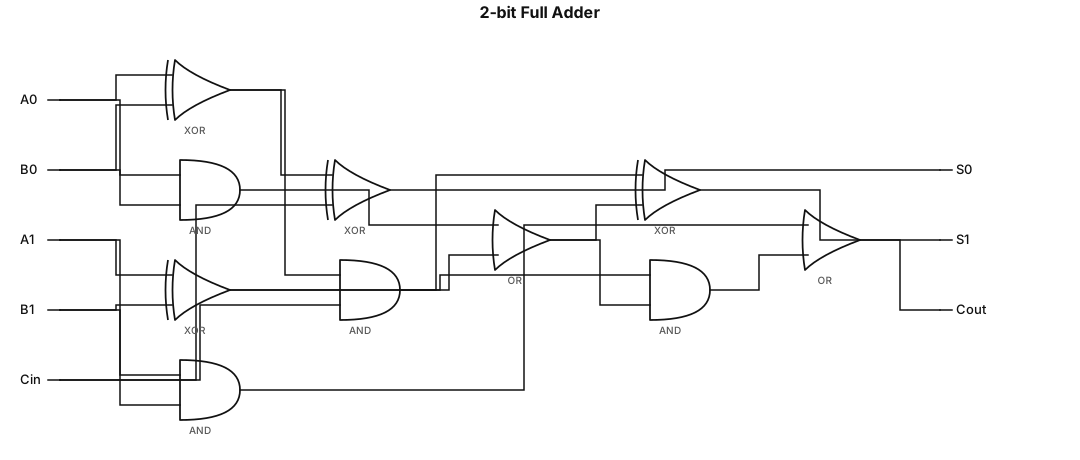
A logic gate circuit for a 2-bit full adder using AND, OR, and XOR gates with inputs A, B, and carry-in, and outputs sum and carry-out