![Main diagram studio: 1. Importance of Storages in Chemical Processing Units, Associated Safety Aspects & Accident Reduction [5 Marks] 1. Operational Importance: Bulk chemi](https://psvtykrtciekraoilfux.supabase.co/storage/v1/object/public/gallery-assets/freediagram/feed/2cc86c68-db08-4696-b214-0f3d238a0633.svg)
1. Importance of Storages in Chemical Processing Units, Associated Safety Aspects & Accident Reduction [5 Marks] 1. Operational Importance: Bulk chemical storage serves as the vital operational buffer in processing plants, stabilizing raw material feed rates and absorbing output surges. 2. Associated Storage Hazards: Bulk containment concentrates massive chemical potential energy, presenting severe risks of BLEVE (Boiling Liquid Expanding Vapor Explosion), VCE (Vapor Cloud Explosion), pool fires, and toxic gas release. 3. Inherent Safety Design: Selection of tank type dictated by True Vapour Pressure (TVP < 1.5 psia = Fixed Cone Roof; 1.5 to 11.1 psia = Floating Roof; > 11.1 psia = Pressure Vessels/Bullets). 4. Engineering Safeguards: 110% net dyke secondary containment, PVRVs (+2.5/-0.5 mbar), Nitrogen blanketing (O2 < 5%), High-High Level Switches (LAHH @ 95% interlocked to ESDVs), and earthing clamps (R < 10 Ohms). 5. Accident Reduction: Implementing automated interlocks, non-destructive testing (NDT), and strict Permit-to-Work (PTW) protocols reduces chemical storage accidents by over 90%.
Diagram Examples from Real Visitor Prompts
Browse eligible diagrams shared by FreeDiagram visitors, inspect the exact prompts, and build your own version.
Browse 3263 real creationsAll visitor creations
Showing 217–240 of 3263. No stock examples or system defaults. Choose a tool, study a real result, then reopen its prompt as your starting point.
Molecular basis of inheritance
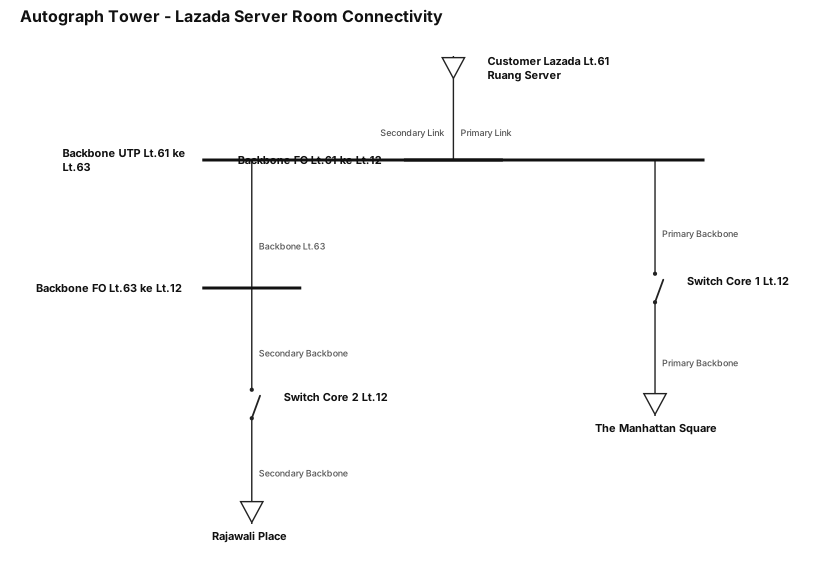
bisa tolong gambar single line diagram dalam bentuk gambar 1) Gedung Autograph tower 2) Customer Lazada di lantai 61 ruang server 3) Primary Link : dari customer di lantai 61 backbone Fiber Optic ke lantai 12 4) Secondary Link : dari customer di lantai 61 backbone UTP ke lantai 63 5) Primary Backbone lantai 61 ke lantai 12 menggunakan Fiber optic ke Switch Core 1 6) Secondary Backbone lantai 63 ke lantai 12 menggunakan Fiber optic ke Switch Core 2 7) Primary Backbone dari Switch Core 1 ke gedung The Manhattan Square 8) Secondary Backbone dari Switch Core 2 ke gedung Rajawali Place
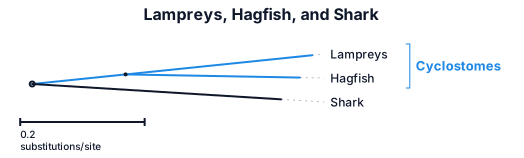
lampreys, hayfish, shark
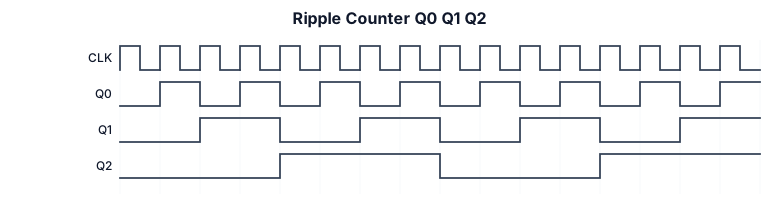
When sketching your timing diagram for 16 clock pulses, lay out four horizontal waveforms stacked vertically: CLK, Q 0 , Q 1 , and Q 2 . JPG CLK: A continuous clock pulse train with 16 distinct clock periods (square waves with uniform high and low durations). Q 0 (LSB): Changes state on every active edge (e.g., rising edge) of CLK. Has a frequency equal to CLK/2 (complete cycle every 2 clock pulses). Q 1 : Changes state whenever Q 0 has a falling edge (or when Q ˉ 0 goes active). Has a frequency equal to CLK/4 (complete cycle every 4 clock pulses). Q 2 (MSB): Changes state whenever Q 1 has a falling edge. Has a frequency equal to CLK/8 (complete cycle every 8 clock pulses, meaning it completes two full cycles across the 16 clock pulses). Note on Ripple Delay: Because this is a ripple counter, remember to show small propagation delays (slight offsets/skews) between the transition of Q 0 and the resulting toggle of Q 1 , as well as between Q 1 and Q 2 , illustrating the classic "ripple" effect characteristic of asynchronous counters.
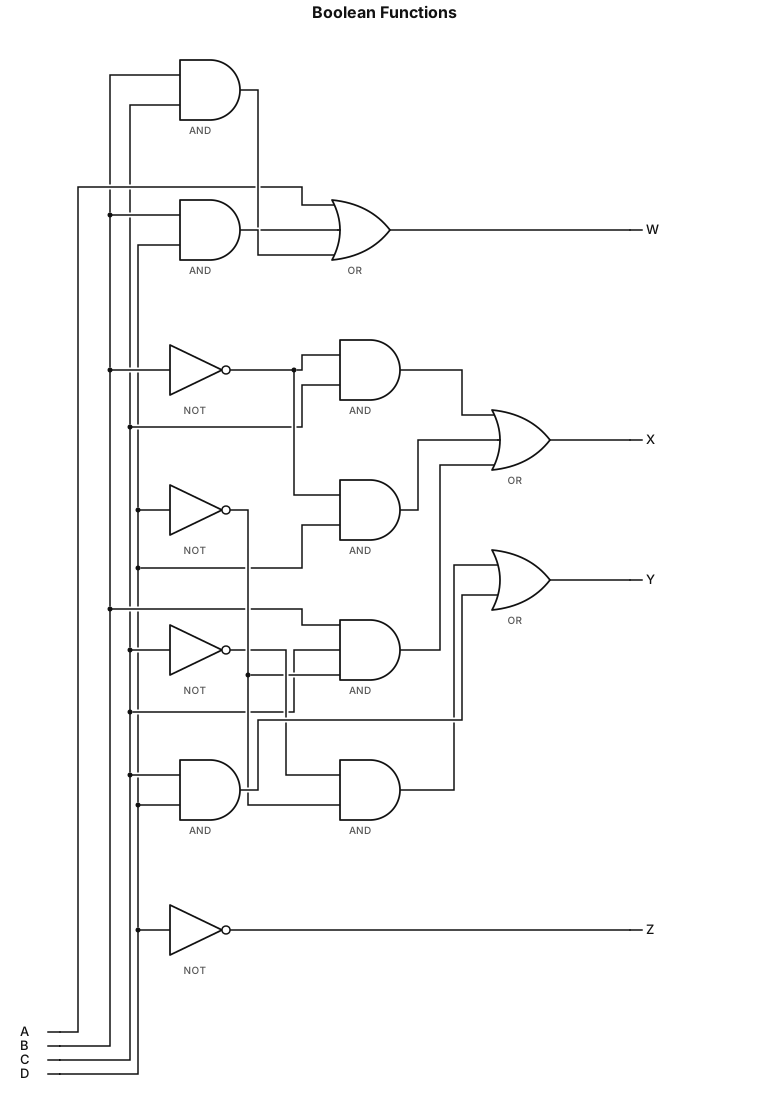
W=A+BC+BD;X=¯B C+¯B D+B¯C ¯D;Y=C'D'+CD; Z=¯D with 2 input gates
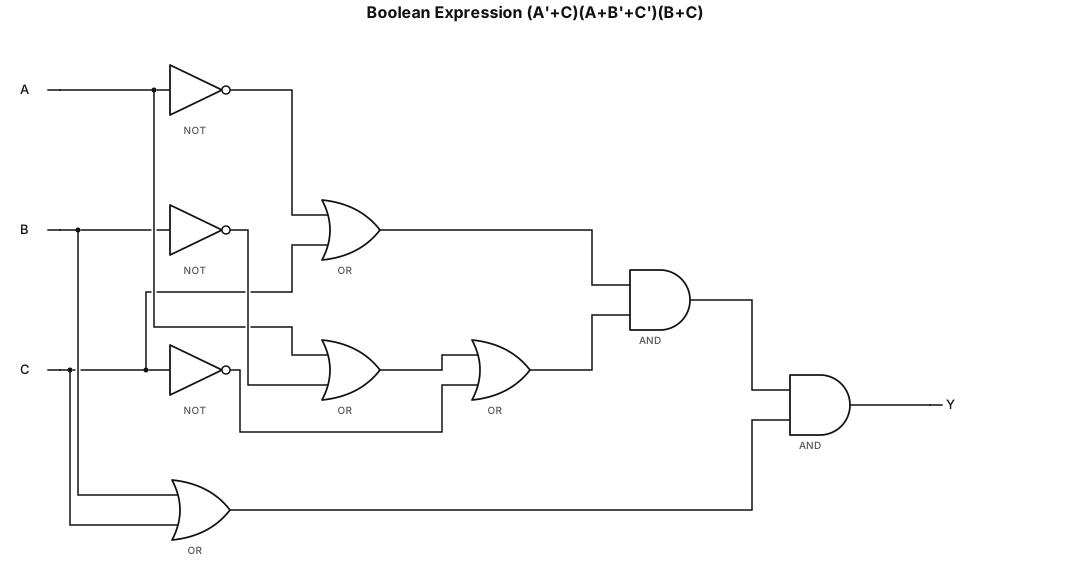
(A'+C)(A+B'+C')(B+C) with 2 input gates
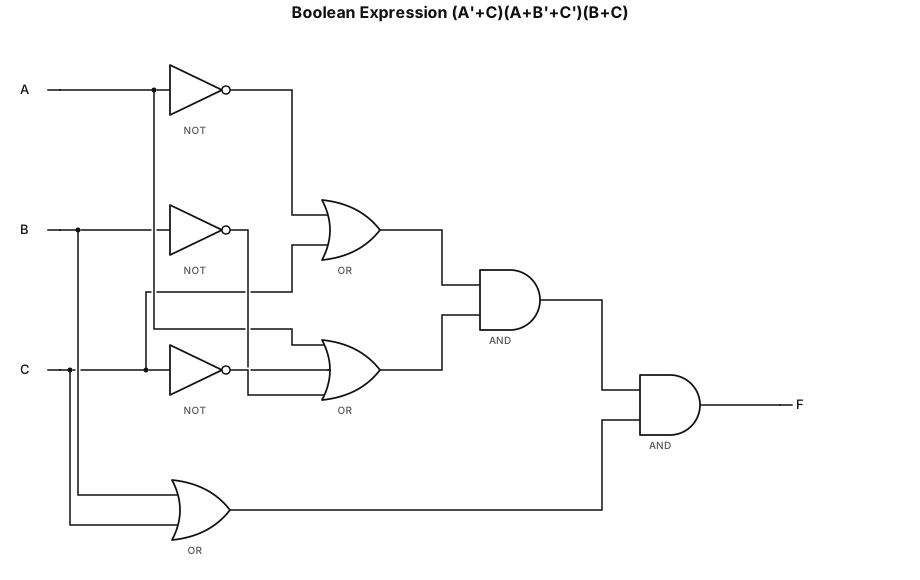
(A'+C)(A+B'+C')(B+C)
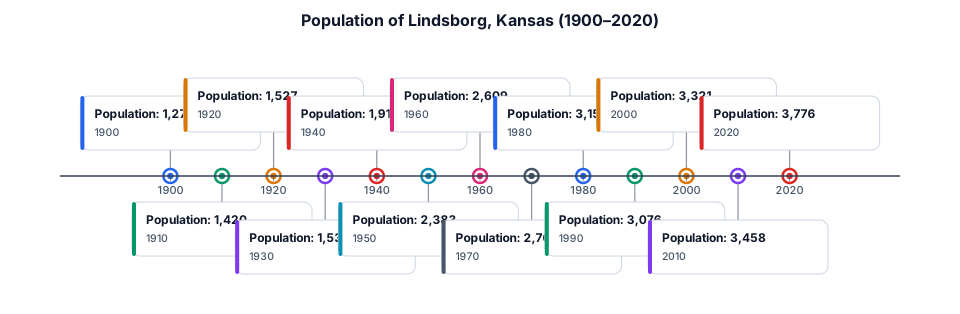
A timeline of the Population of Lindsborg Kansas from 1900-2020
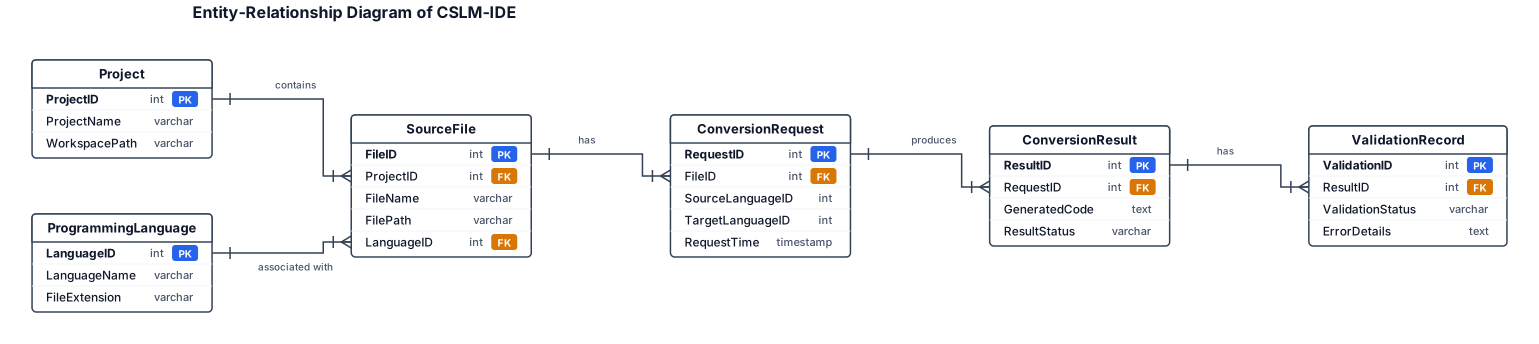
Design a conceptual Entity-Relationship Diagram titled “Entity-Relationship Diagram of CSLM-IDE”. Use standard ERD rectangles, relationship connectors and cardinality labels. Include these conceptual entities and attributes: - Project: ProjectID (PK), ProjectName, WorkspacePath. - SourceFile: FileID (PK), ProjectID (FK), FileName, FilePath, LanguageID (FK). - ProgrammingLanguage: LanguageID (PK), LanguageName, FileExtension. - ConversionRequest: RequestID (PK), FileID (FK), SourceLanguageID, TargetLanguageID, RequestTime. - ConversionResult: ResultID (PK), RequestID (FK), GeneratedCode, ResultStatus. - ValidationRecord: ValidationID (PK), ResultID (FK), ValidationStatus, ErrorDetails. Relationships: one Project contains many SourceFiles; one ProgrammingLanguage can be associated with many SourceFiles; one SourceFile can have multiple ConversionRequests; one ConversionRequest can produce one or more recorded results; each result can have validation records. Use clear primary-key and foreign-key notation. Label this as a proposed conceptual data model, not an assertion that a database with these tables already exists. White background, landscape layout and readable text.

Create a Level 1 Data Flow Diagram titled “Code Conversion Data Flow Diagram Level 1 in CSLM-IDE”. Use standard DFD notation and numbered processes. External entity: Developer. Processes: 1.0 Receive Source Code. 2.0 Select Source and Target Languages. 3.0 Prepare Conversion Request. 4.0 Generate Converted Code through the AI Conversion Service. 5.0 Display and Review Result. 6.0 Validate Output, if validation tools are available. Data stores: Workspace Files and Conversion History, only if implemented or explicitly proposed. Show the Developer supplying code and language choices, the conversion coordinator preparing a request, the AI service returning generated code, and the IDE presenting the result. Show validation feedback returning to the developer. Distinguish the AI service from data stores. Label all arrows. White background, neat landscape layout, no crossing arrows where avoidable.

Draw a formal Data Flow Diagram Level 0 titled “Data Flow Diagram Level 0 of CSLM-IDE”. Use standard DFD notation: one central process bubble numbered 0, an external entity rectangle, and labelled arrows. External entity: Developer. Central process: CSLM-IDE. Show these data flows: - Developer → CSLM-IDE: Source Code, Language Selection, Conversion Request, File Commands. - CSLM-IDE → Developer: Converted Code, AI Assistance, Validation Messages, Execution Output. - CSLM-IDE ↔ Local File System: Open, Read, Save and Update Files. Keep the diagram simple and uncluttered. Use standard DFD conventions, a white background and readable labels. Do not include internal subprocesses at Level 0 or depict the AI model as a separate Level 0 process. Include only the data flows relevant to the proposed system.
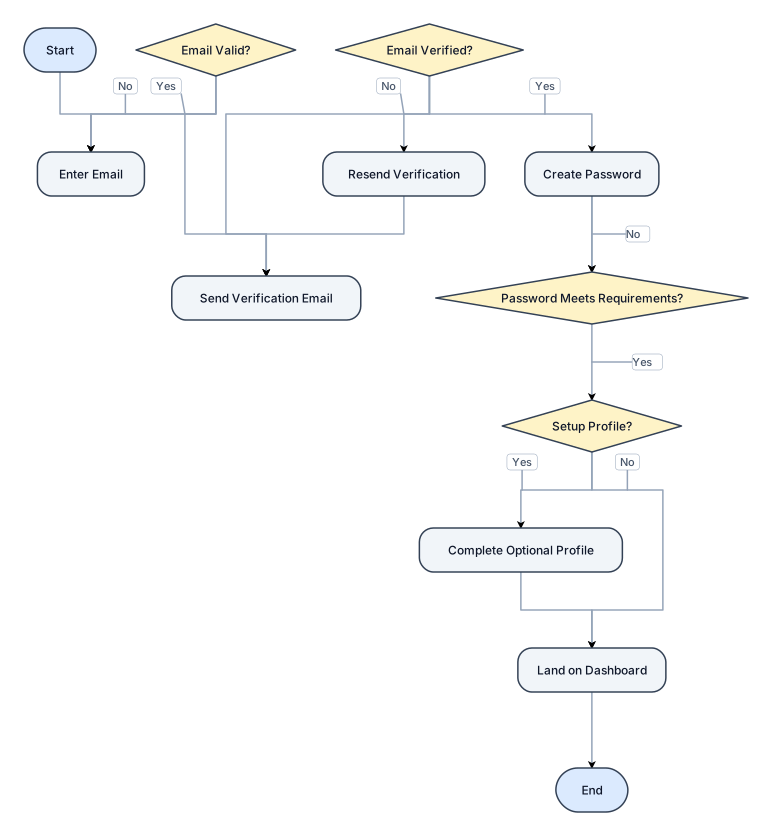
A flowchart for a user sign-up process: enter email, verify email,Draw a formal Data Flow Diagram Level 0 titled “Data Flow Diagram Level 0 of CSLM-IDE”. Use standard DFD notation: one central process bubble numbered 0, an external entity rectangle, and labelled arrows. External entity: Developer. Central process: CSLM-IDE. Show these data flows: - Developer → CSLM-IDE: Source Code, Language Selection, Conversion Request, File Commands. - CSLM-IDE → Developer: Converted Code, AI Assistance, Validation Messages, Execution Output. - CSLM-IDE ↔ Local File System: Open, Read, Save and Update Files. Keep the diagram simple and uncluttered. Use standard DFD conventions, a white background and readable labels. Do not include internal subprocesses at Level 0 or depict the AI model as a separate Level 0 process. Include only the data flows relevant to the proposed system. create password, optional profile setup, then land on the dashboard
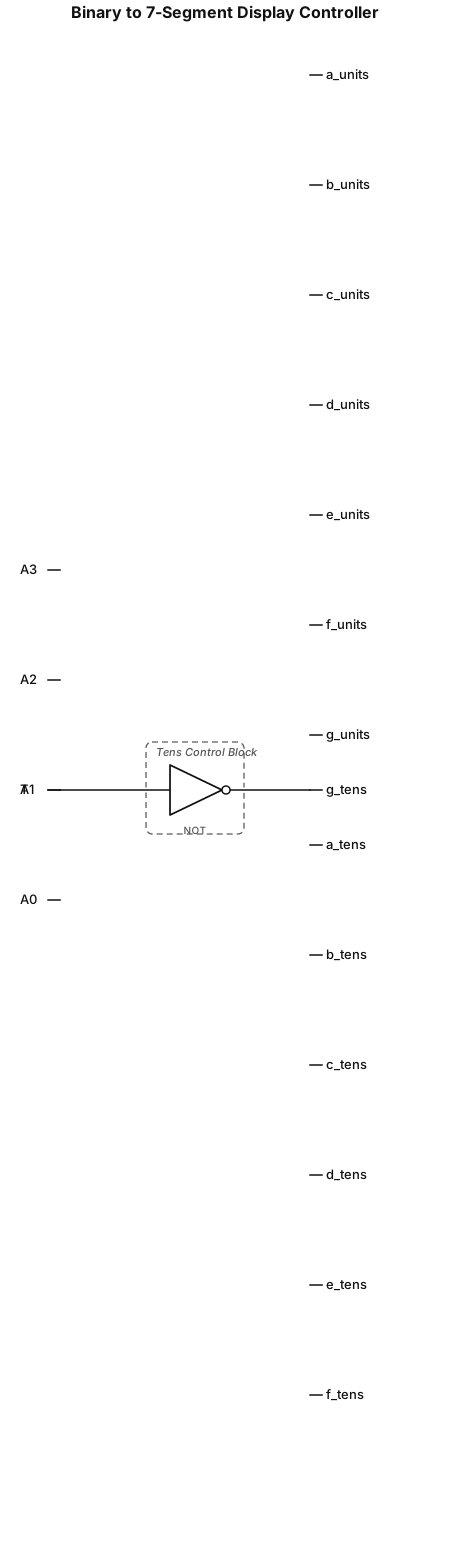
Inputs: 4 lines labeled A3, A2, A1, A0 on the left. Block 1 ('Binary to BCD Converter'): Uses AND, OR, and NOT gates to output a Tens bit (T) and four Units bits (U3, U2, U1, U0). Block 2 ('Units 7-Segment Decoder'): Takes U3-U0. Uses shared AND gates feeding into OR gates. Outputs a_units through g_units. Block 3 ('Tens Control Block'): Takes T. Uses NOT gates and fixed VCC/GND connections. Outputs a_tens through g_tens. Layout: Left-to-right flow, straight orthogonal lines, standard logic gate symbols (ANSI/IEEE), and clear text labels."
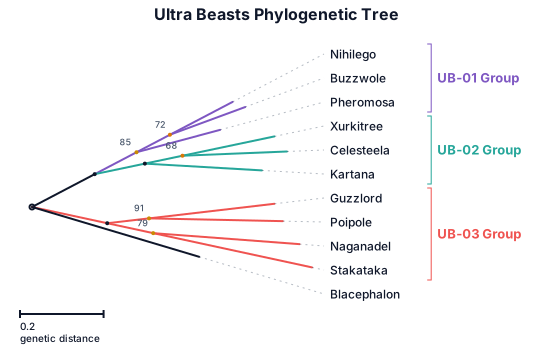
A phylogenetic tree of the Ultra Beasts from Pokémon.
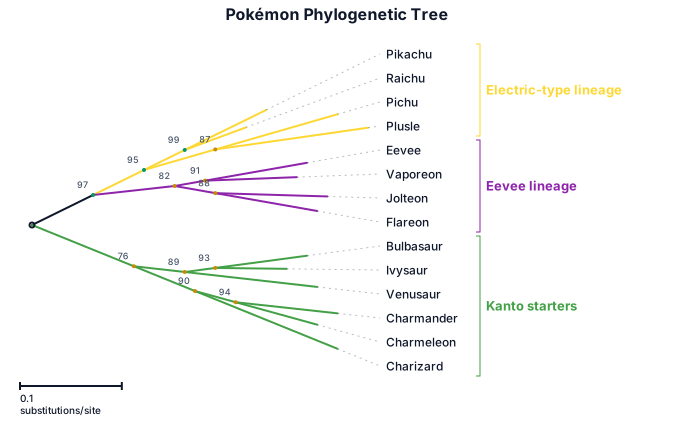
A phylogenetic tree of Pokémon, with branch lengths and bootstrap support values
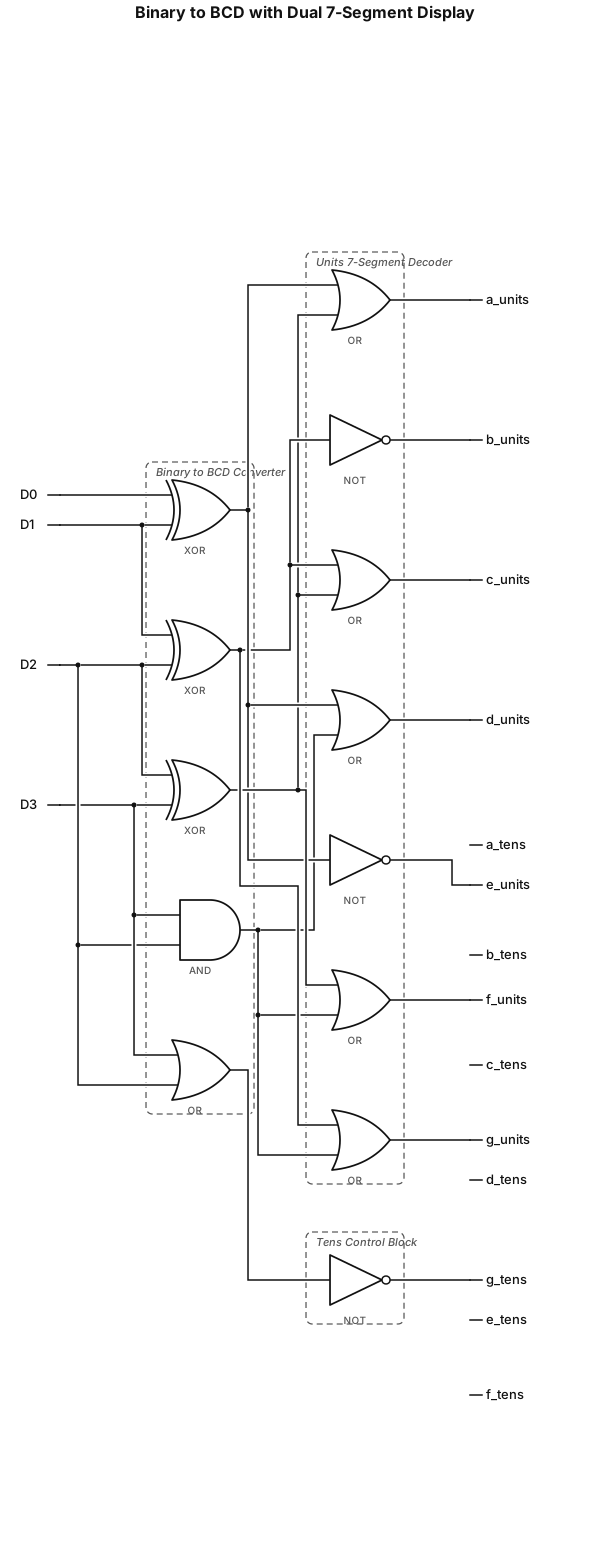
Design a circuit that takes a number from 0 to 15 and represents it using two 7 segment displays, the flow goes like this Input-> convertion from binary to BCD ->7segment decoder for the units and a control block for the decimal

USB CHARGER VBUS 5V/9V │ ▼ ┌─────────────────┐ │ INPUT PROTECTION│ │ ESD / OVP / CAP │ └────────┬────────┘ ▼ ┌─────────────────┐ │ CHARGER IC │ │ BUCK CONTROLLER │ └────────┬────────┘ │ MOSFET ON/OFF ▼ SW NODE PWM WAVEFORM │ ▼ ┌────────┐ │INDUCTOR│ └───┬────┘ ▼ OUTPUT CAPACITOR │ ▼ VPH / VSYS ~4V ┌──┴───┐ ▼ ▼ PMIC VBAT │ │ ▼ ▼ CPU/RAM BATTERY
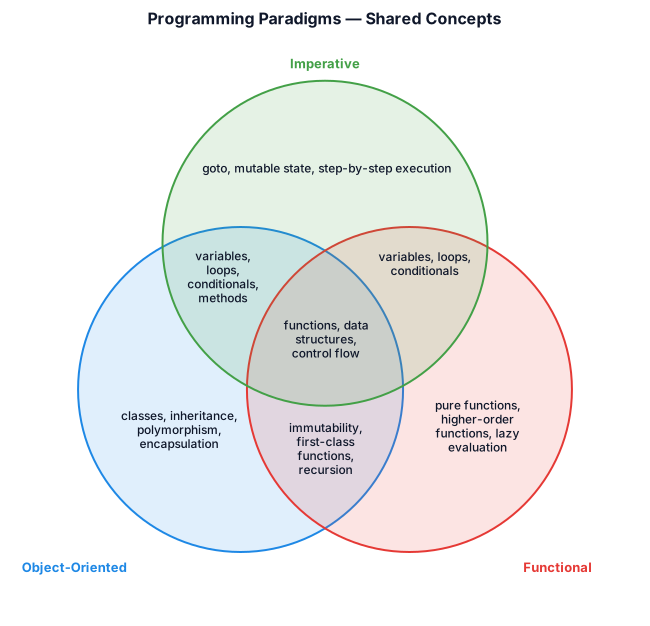
A Two Venn diagram comparing object-oriented, functional, and imperative programming — show shared concepts like variables and loops in the overlapping regions
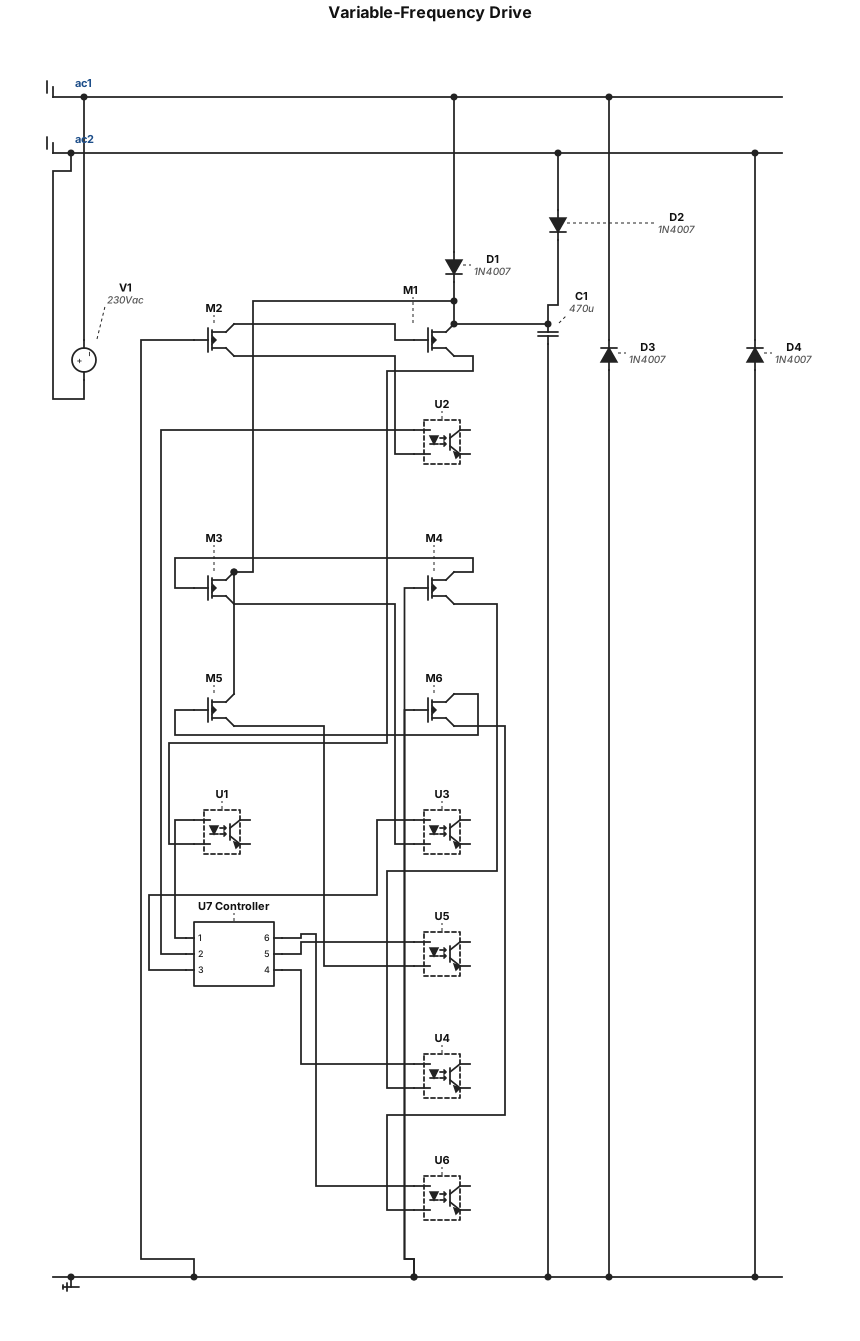
variable-frequency drive consists of a bridge rectifier , six N-channel MOSFETs , gate drivers, and optocouplers. A controller generates six PWM signals to control the switching of the MOSFETs.
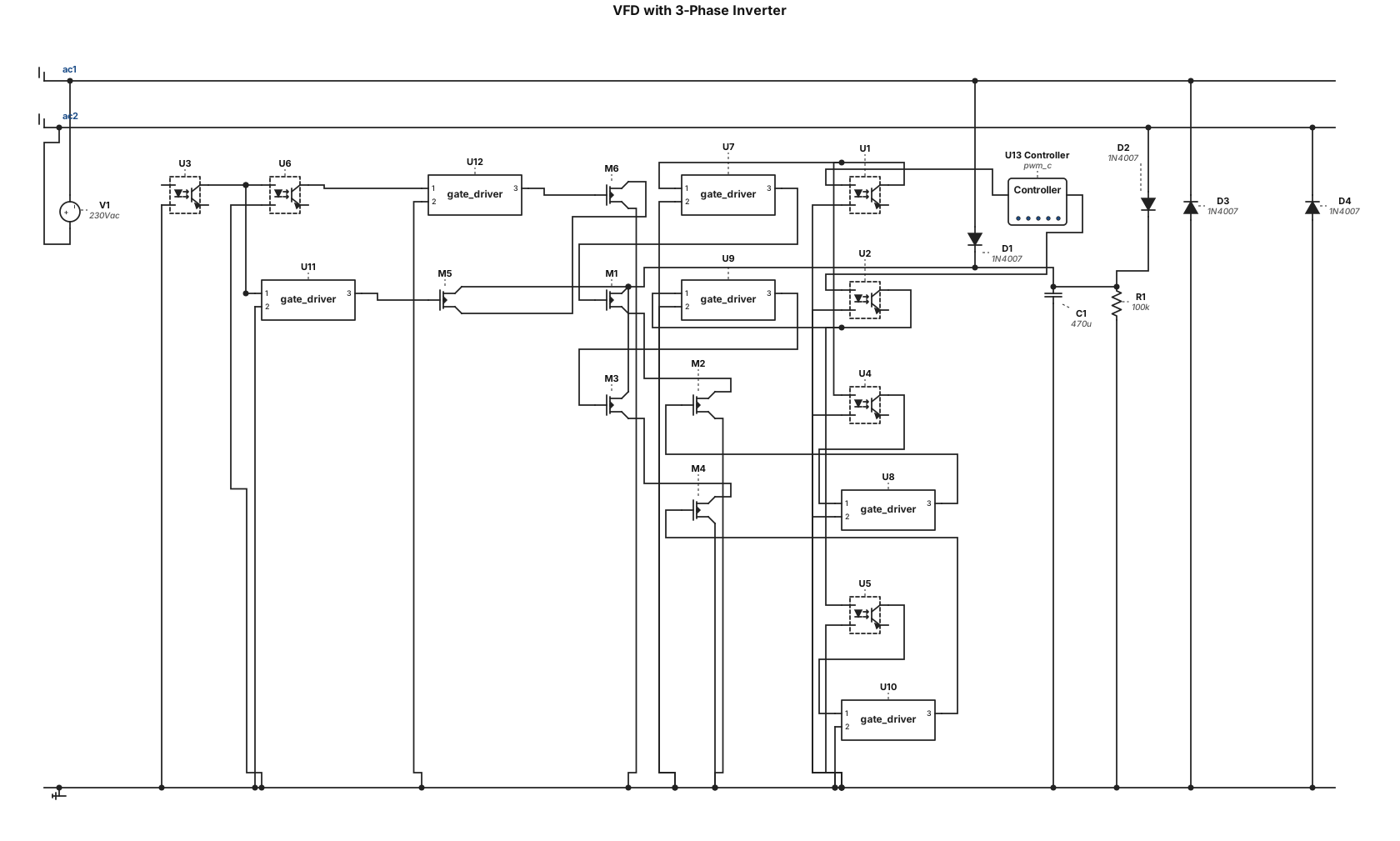
a vfd circuit with a bridge rectictifier , a six n-channel mosfets inverter bridge, gate drivers, optocouplers connected to a controller that outputs 3 pmw signals
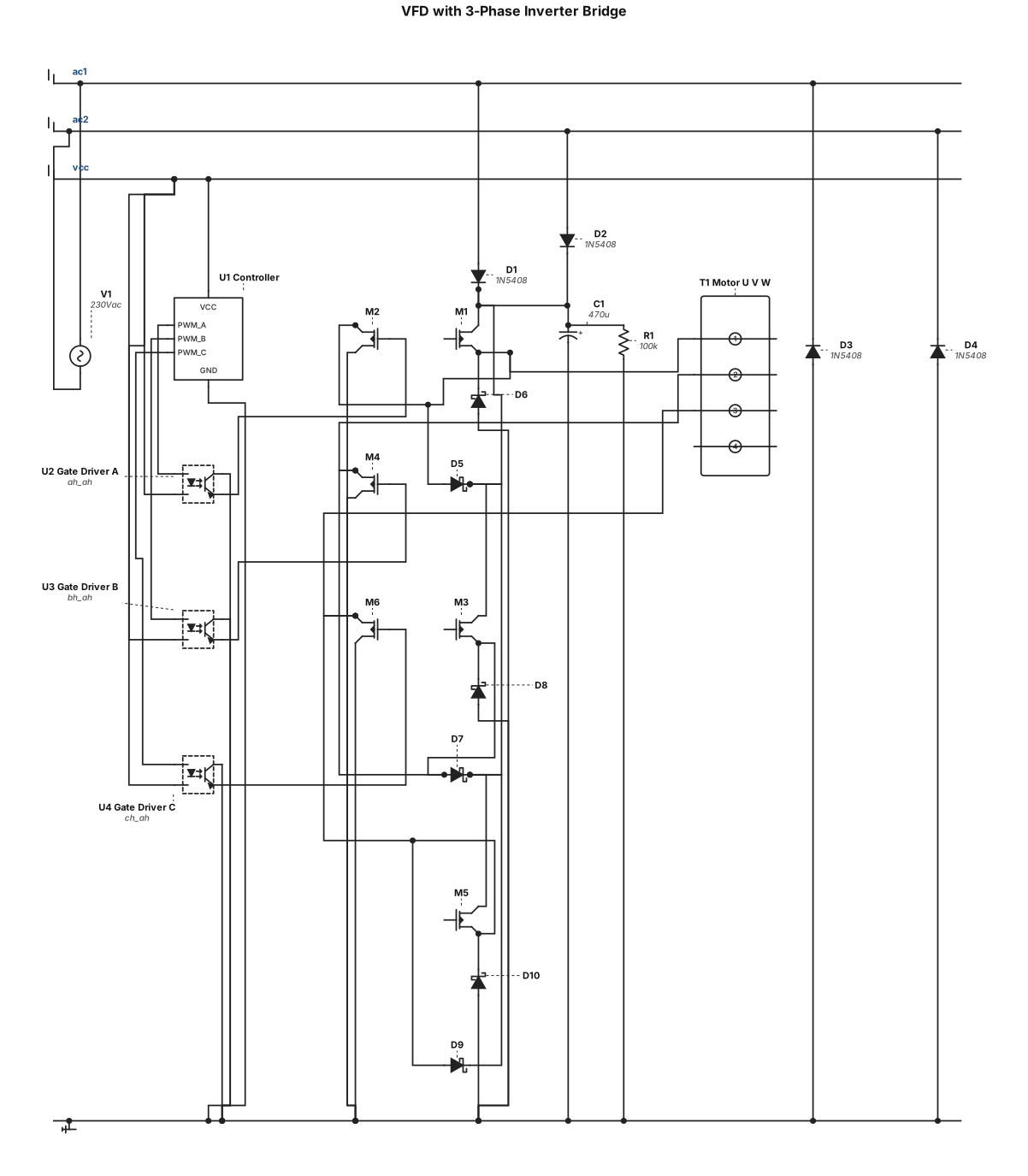
a vfd circuit with a bridge rectictifier , a six n-channel mosfets inverter bridge, gate drivers, optocouplers connected to a controller that outputs 3 pmw signals one per phase
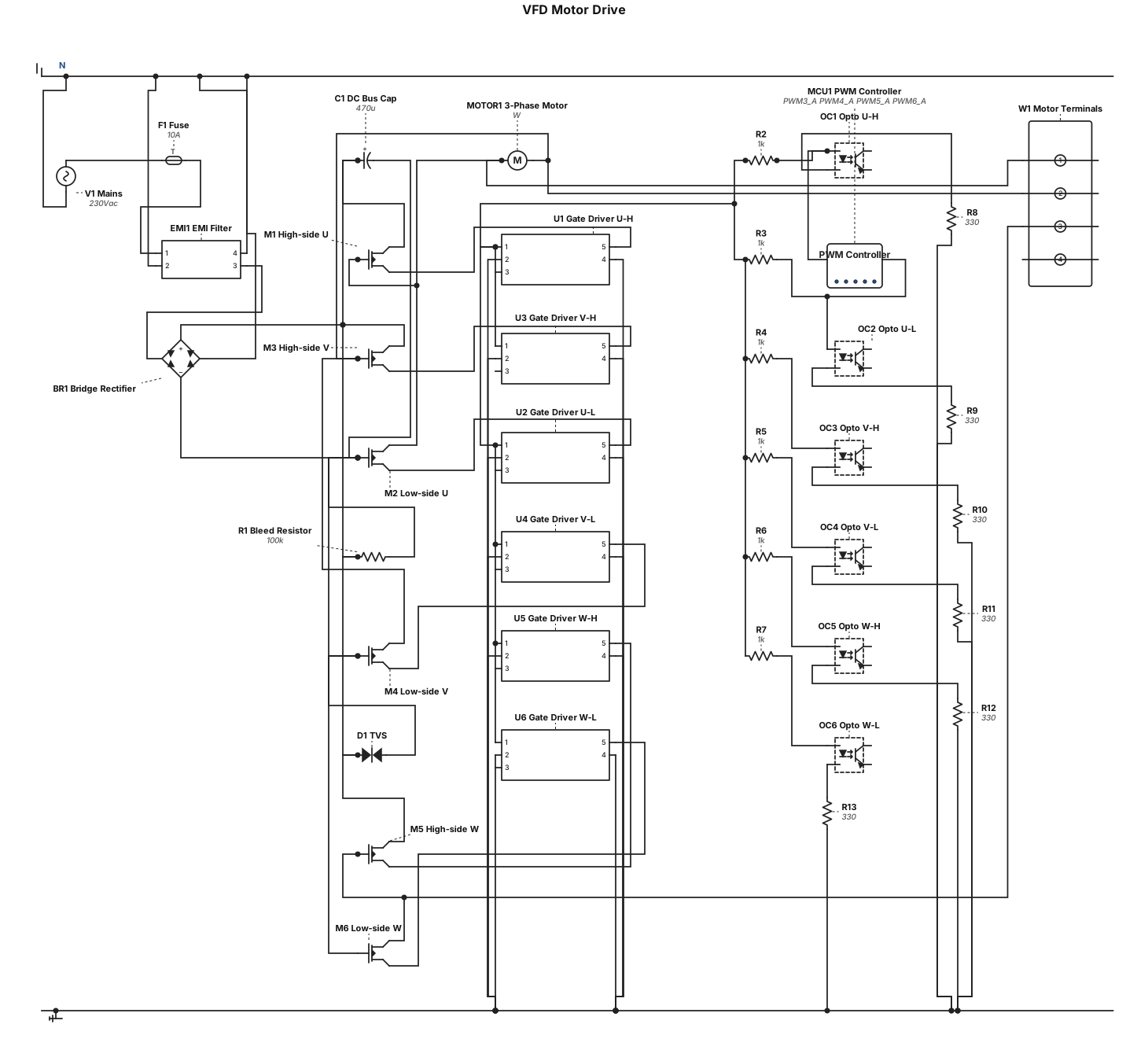
a vfd circuit with a bridge rectictifier , a six n-channel mosfets inverter bridge, gate drivers, optocouplers connected to a controller that outputs six pmw signals
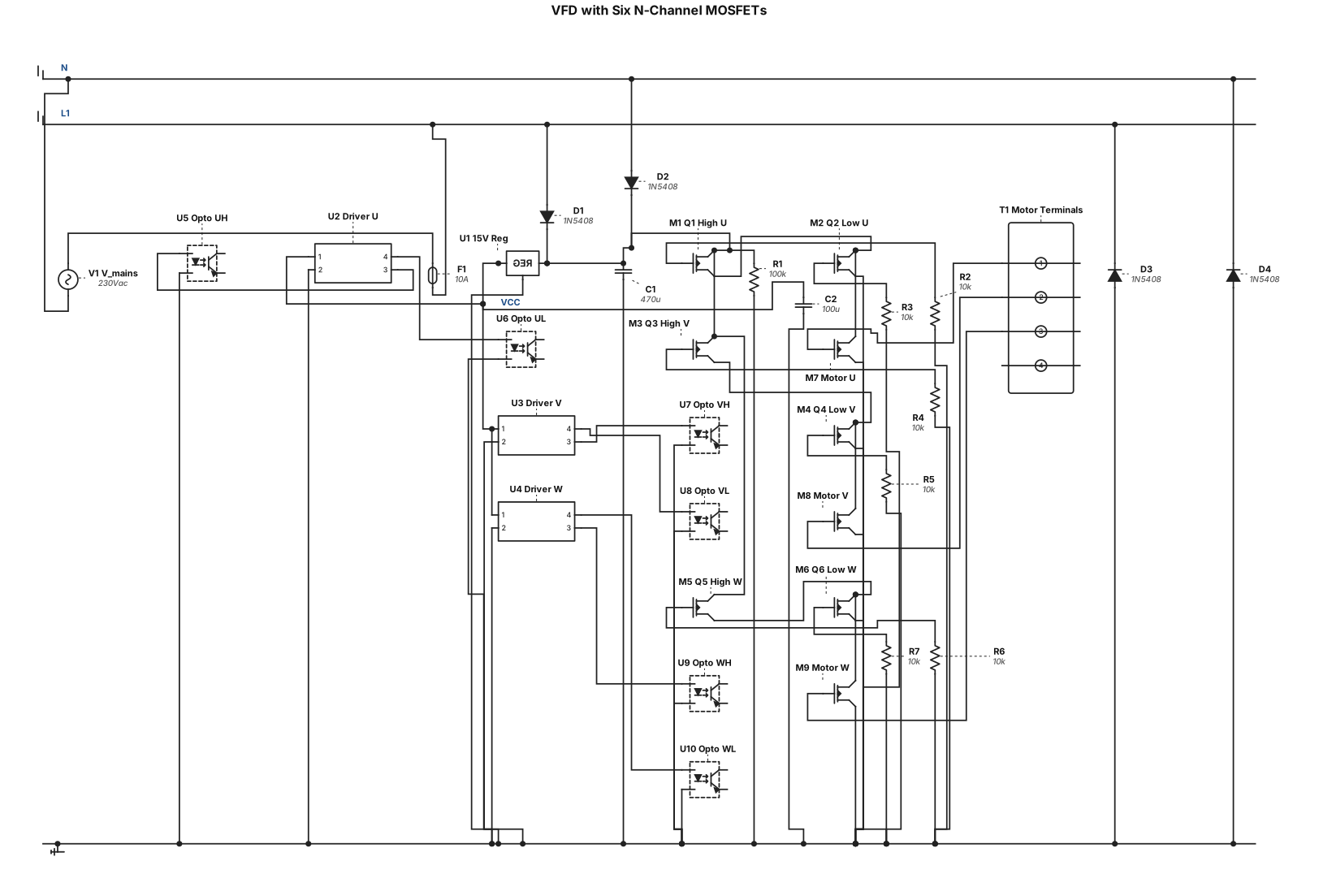
a vfd circuit with a six n-channel mosfets with a bridge rectictifier , gate drivers and optocouplers