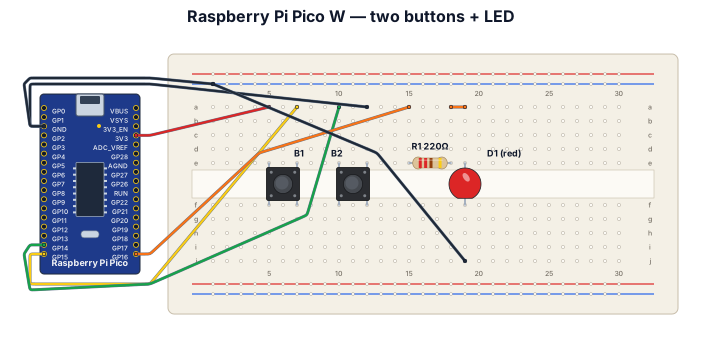
A breadboard wiring diagram for a Raspberry Pi Pico W microcontroller with two tactile push buttons and one external LED. Button 1 is wired between the 3.3V pin and GPIO 15. Button 2 is wired between the GND pin and GPIO 14. The external LED is connected to GPIO 16 through a 220-ohm resistor to GND.
NODE ARCHIVE · REAL DIAGRAM BRIEFS
Diagram Examples from Real Visitor Prompts
Browse eligible diagrams shared by FreeDiagram visitors, inspect the exact prompts, and build your own version.
Browse 3276 real creationsCOMMUNITY OUTPUTS · EXACT PROMPTS
All visitor creations
Showing 673–696 of 3276. No stock examples or system defaults. Choose a tool, study a real result, then reopen its prompt as your starting point.

Create a mind map in English titled “Factors Affecting Foreign Language Learning”. Add three main branches: Individual Factors (age, aptitude, cognitive abilities, learning strategies); Affective Factors (motivation, anxiety, interest, confidence); Sociocultural Factors (culture, social environment, interaction, teachers and classmates, learning context). Use different colors and clear labels.
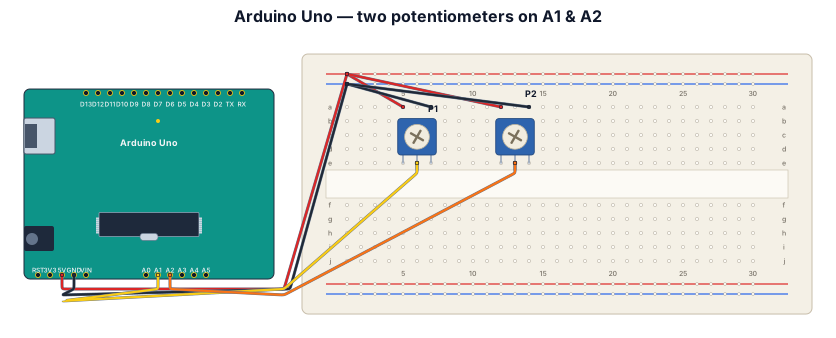
A breadboard wiring diagram for an Arduino Uno reading two potentiometers, one going to A1 one going to A2 both having 5V power and ground

A timing diagram for an I2C read transaction: SCL clock, SDA with START condition, 7-bit address byte, ACK bit, data byte, and STOP condition
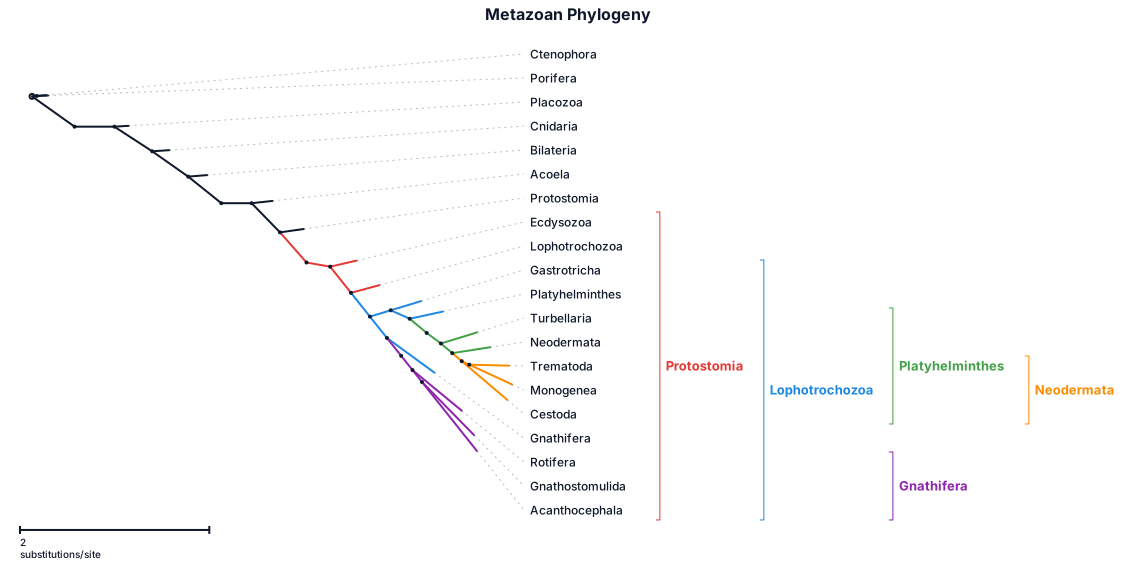
create a phylogenetic tree with cnetophora, porifera, cnidaria, placozoa, bilateria, protostomia, ecdysozoa, acoela, lophotrochozoa, gastrotricha, platyhelminthes, mollusca, gnathifera, rotifera, gnathostomulida, acanthocephala, turbellaria, neodermata, trematoda, monogenea, cestoda, mesozoa, dicymida, orthonectida, annelida

Create a professional Training Evaluation and Feedback Cycle Diagram for a student completing a GTU 2-Week SBTP 2026 training program focused on AI, Data Science and Agentic Systems. Include these five stages in a continuous feedback cycle: Training Participation – Participate in the assigned training modules and learning activities. Knowledge Assessment – Review understanding of AI concepts, tools, and technologies. Practical Application – Apply learned concepts to exercises and project-related activities. Feedback and Evaluation – Identify strengths, difficulties, and areas that require improvement. Improvement and Further Learning – Use the evaluation to guide future learning and skill development.
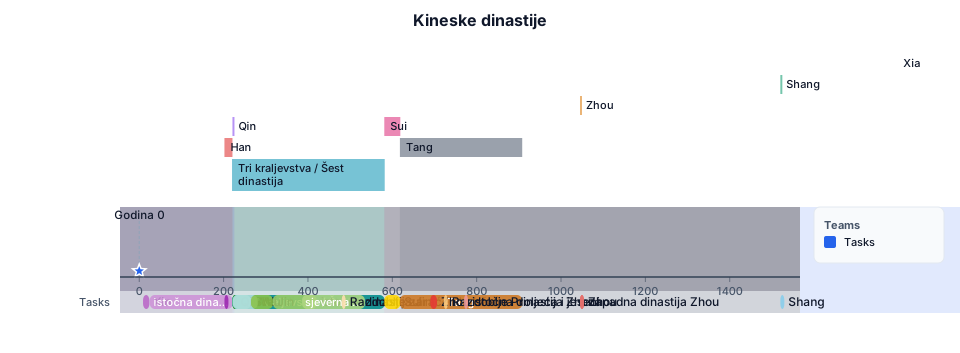
Xia oko 2000–1520 pr. Kr. - mustard yellow Shang oko 1520–1045 pr. Kr. - sky blue Zhou oko 1045–256 pr. Kr. - coral red; sub-periods of Zhou: zapadna dinastija Zhou(1045-771 pr. Kr.), istočna dinastija Zhou (770-256 pr. Kr.) - lighter shades of coral red; sub-periods of istočna dinastija Zhou: Razdoblje Proljeća i jeseni (722-481 pr. Kr.), Razdoblje zaraćenih država (480-222 pr. Kr.) - shades of peach Qin 221–207 pr. Kr. - forest green Han 202 pr. Kr. – 220 pos. Kr. - royal purple; sub-periods: zapadna dinastija Han (202 pr. Kr. - 9 pos. Kr.), Xin (9-23), istočna dinastija Han (25-220) - shades of lighter purple Tri kraljevstva / Šest dinastija(220-581) - dark turquoise; sub-periods1: Wei(220-264), Shu(221–263), Wu(222–280) - shades of lighter turquoise; sub-periods2: Jin(265-316), istočna dinastija Jin(317-420), sjeverna dinastija Wei(386-534) - shades of moss green Sui 581–618 pos. Kr. - sunny yellow Tang 618–907 pos. Kr. - ochre; Zhou(690-705) - bright red On top: timeline, then from top to bottom: Level 1: Xia, Shang, Zhou(1045-256 pr. Kr.), Qin, Tri kraljevstva / Šest dinastija, Sui, Tang Level 2: zapadna dinastija Zhou, istočna dinastija Zhou, zapadna dinastija Han, Xin, istočna dinastija Han; Wei Shu and Wu on top of each other; Zhou(690-705) Level 3: Razdoblje Proljeća i jeseni, Razdoblje zaraćenih država, Jin, istočna dinastija Jin, sjeverna dinastija Wei. A thin vertical line for year 0.
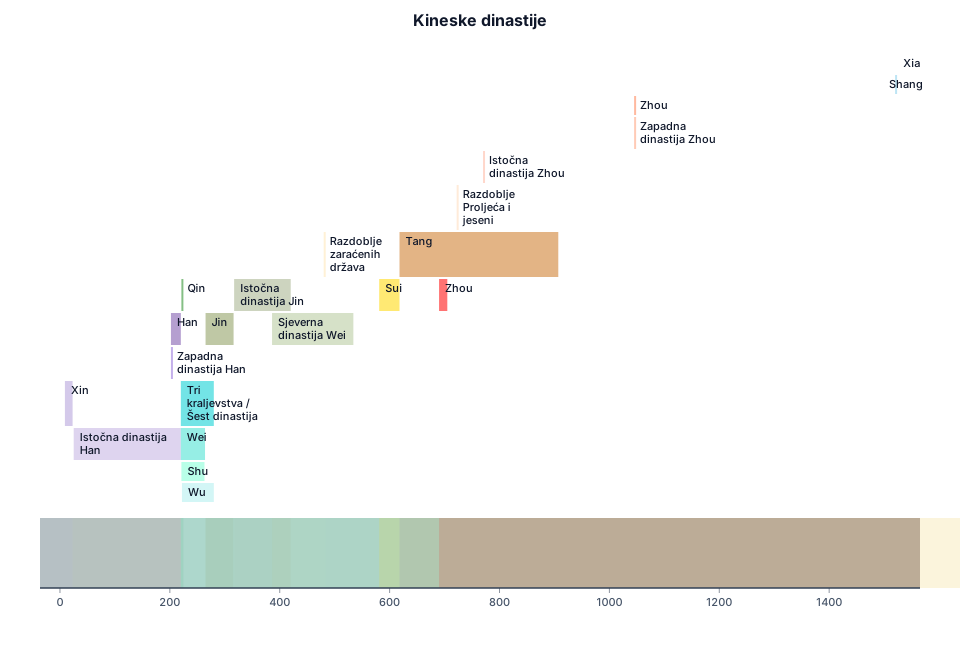
Xia oko 2000–1520 pr. Kr. - mustard yellow Shang oko 1520–1045 pr. Kr. - sky blue Zhou oko 1045–256 pr. Kr. - coral red; sub-periods of Zhou: zapadna dinastija Zhou(1045-771 or. Kr.), istočna dinastija Zhou (770-256 pr. Kr.) - lighter shades of coral red; sub-periods of istočna dinastija Zhou: Razdoblje Proljeća i jeseni (722-481 pr. Kr.), Razdoblje zaraćenih država (480-222 pr. Kr.) - shades of peach Qin 221–207 pr. Kr. - forest green Han 202 pr. Kr. – 220 pos. Kr. - royal purple; sub-periods: zapadna dinastija Han (202 pr. Kr. - 9 pos. Kr.), Xin (9-23), istočna dinastija Han (25-220) - shades of lighter purple Tri kraljevstva / Šest dinastija - dark turquoise; sub-periods1: Wei(220-264), Shu(221–263), Wu(222–280) - shades of lighter turquoise; sub-periods2: Jin(265-316), istočna dinastija Jin(317-420), sjeverna dinastija Wei(386-534) - shades of moss green Sui 581–618 pos. Kr. - sunny yellow Tang 618–907 pos. Kr. - ochre; Zhou(690-705) - bright red
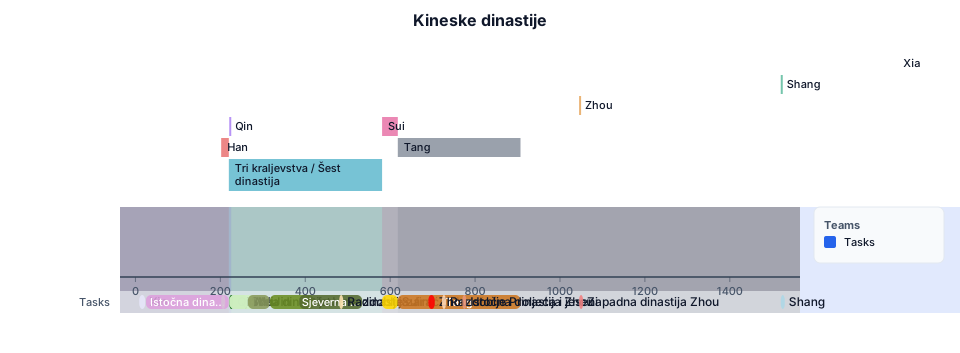
• Xia oko 2000–1520 pr. Kr. - Olive green-beige • Shang oko 1520–1045 pr. Kr. - light blue • Zhou oko 1045–256 pr. Kr. - soft red, sub-periods zapadna dinastija Zhou(1045-771 pr. Kr.), istočna dinastija Zhou(770-256 pr. Kr.) - shades of Coral; sub-periods Razdoblje Proljeća i jeseni(722-481 pr. Kr.), Razdoblje zaraćenih država(480-222 pr. Kr.) - shades of peach. • Qin 221–207 pr. Kr. - dark green • Han 202 pr. Kr. – 220 pos. Kr. - dark purple; sub-periods zapadna dinastija Han(202 pr. Kr.-9 pos. Kr.), Xin(9-23), istočna dinastija Han(25-220) - shades of light purple. • Tri kraljevstva / Šest dinastija (220-581) - jade green; sub-periods Wei(220-264), Shu(221-263), Wu(222-280) - shades of lighter jade green; sub-periods Jin(265-316), istočna dinastija Jin(317-420), sjeverna dinastija Wei(386-534) - shades of moss green. • Sui 581–618 pos. Kr. - sunny yellow • Tang 618–907 pos. Kr. - ochre; Zhou (690-705) - bright red
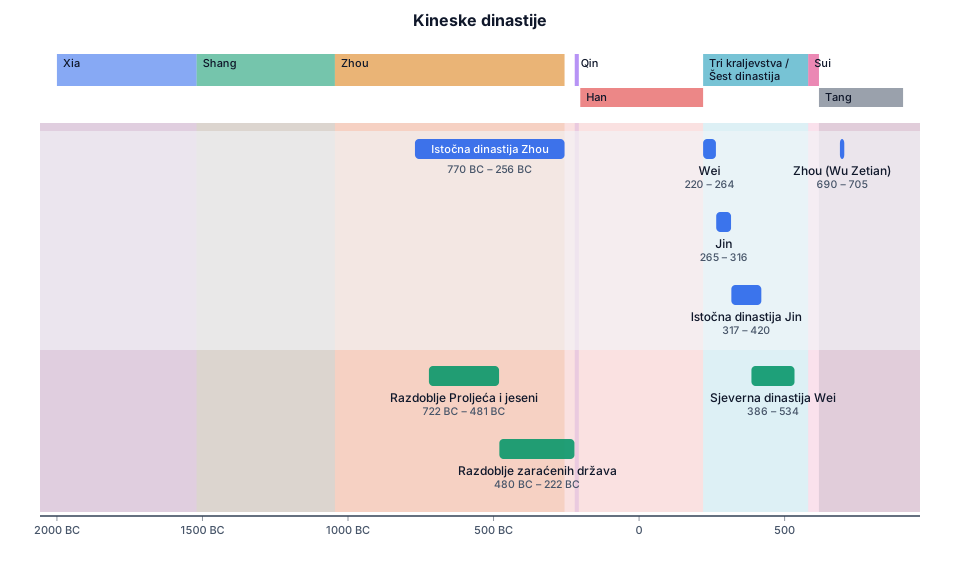
• Xia oko 2000–1520 pr. Kr. • Shang oko 1520–1045 pr. Kr. • Zhou oko 1045–256 pr. Kr., sub-periods istočna dinastija Zhou(770-256 pr. Kr.), Razdoblje Proljeća i jeseni(722-481 pr. Kr.), Razdoblje zaraćenih država(480-222 pr. Kr.). • Qin 221–207 pr. Kr. • Han 202 pr. Kr. – 220 pos. Kr. • Tri kraljevstva / Šest dinastija (220-581): Wei(220-264), Jin(265-316), istočna dinastija Jin(317-420), sjeverna dinastija Wei(386-534). • Sui 581–618 pos. Kr. • Tang 618–907 pos. Kr.; Zhou (690-705)
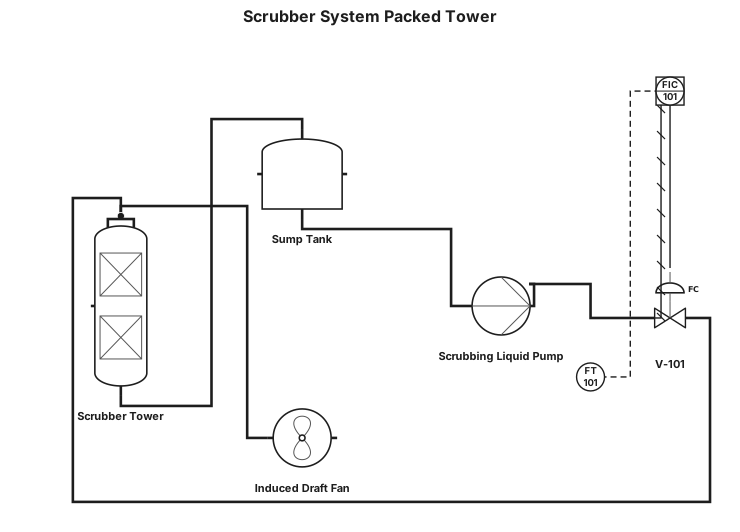
Scrubber system packed tower
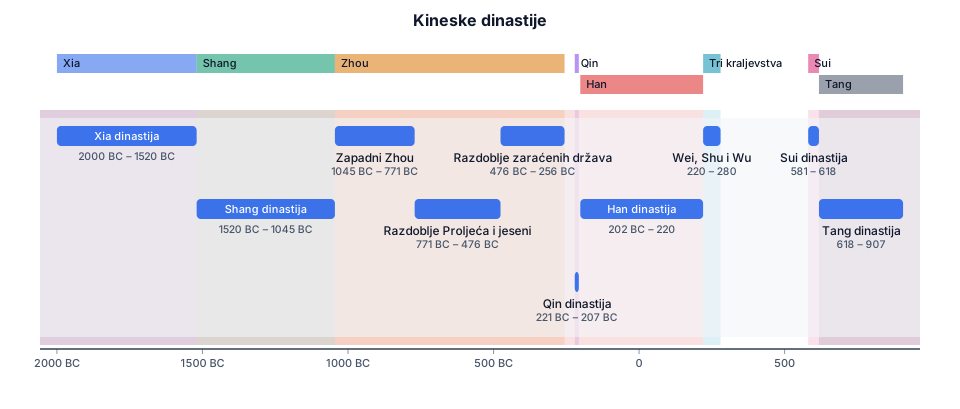
• Xia Dynasty (Xia oko 2000–1520 pr. Kr.) • Shang Dynasty (Shang oko 1520–1045 pr. Kr.) • Zhou Dynasty (Zhou oko 1045–256 pr. Kr.), along with sub-periods like the Western Zhou, Spring and Autumn period (Razdoblje Proljeća i jeseni), and the Warring States period (Razdoblje zaraćenih država). • Qin Dynasty (Qin 221–207 pr. Kr.) • Han Dynasty (Han 202 pr. Kr. – 220 pos. Kr.) • Three Kingdoms (Tri kraljevstva / Šest dinastija) including Wei, Shu, and Wu. • Sui Dynasty (Sui 581–618 pos. Kr.) • Tang Dynasty (Tang 618–907 pos. Kr.)
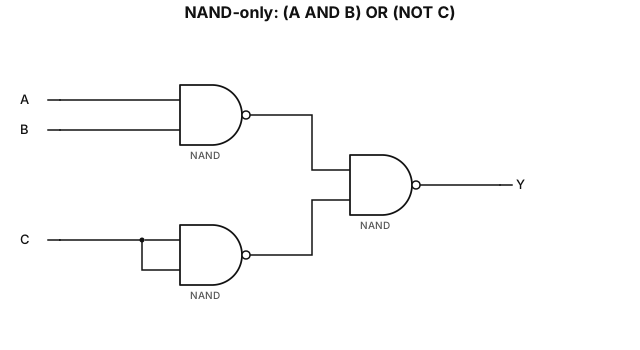
NAND-only implementation of the expression (A AND B) OR (NOT C)
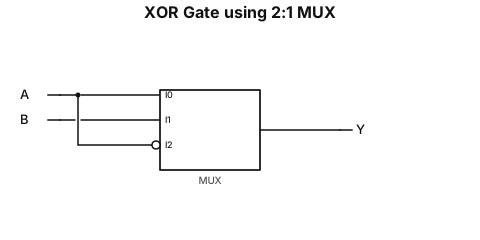
xor gate using 2:1 mux
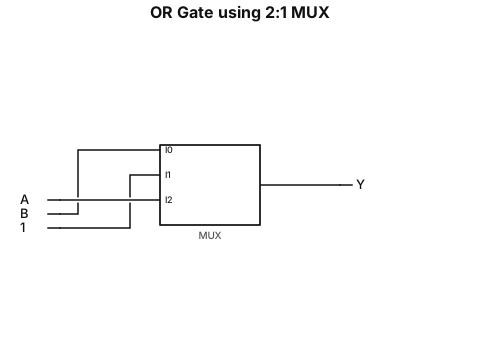
or gate using 2:1 mux
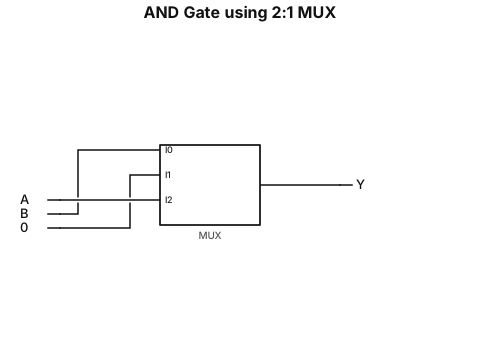
and gate using 2:1 mux with point the select line
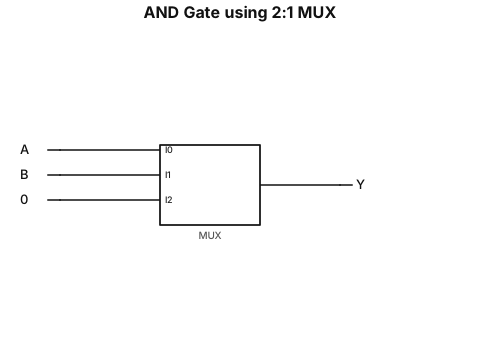
and gate using 2:1 mux with point the slect line
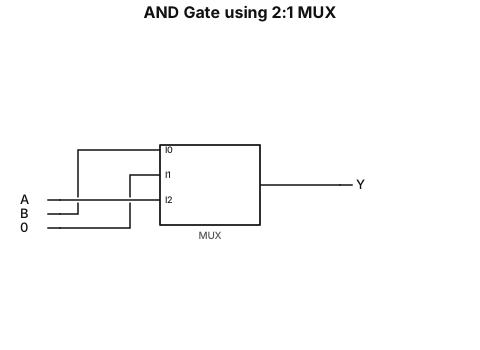
and gate using 2:1 mux
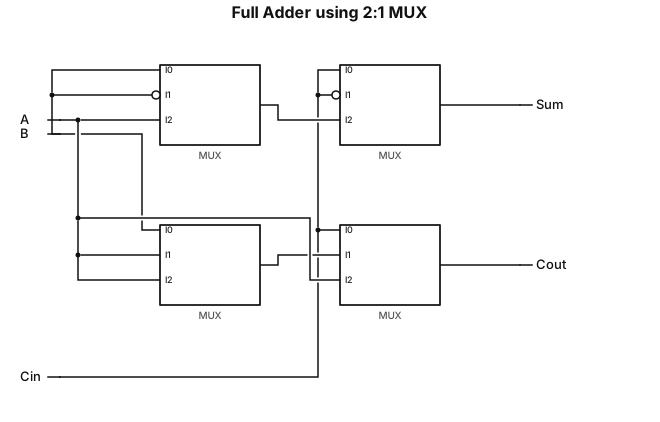
full adder using 2:1 mux with select line mention in down side
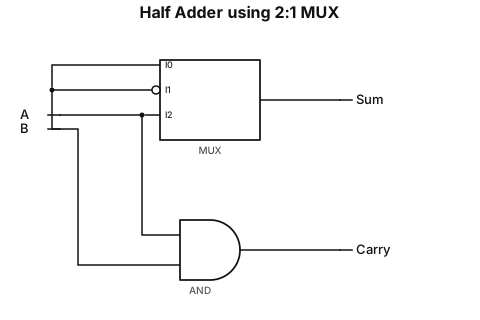
half adder using 2:1 mux with select line mention in down side
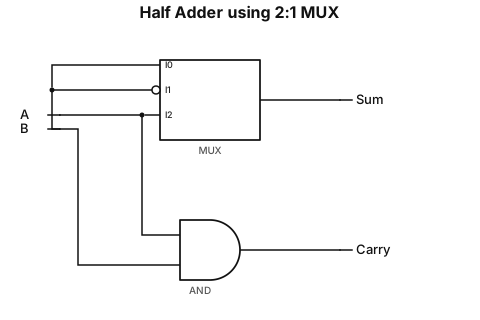
half adder using 2:1 mux with select line
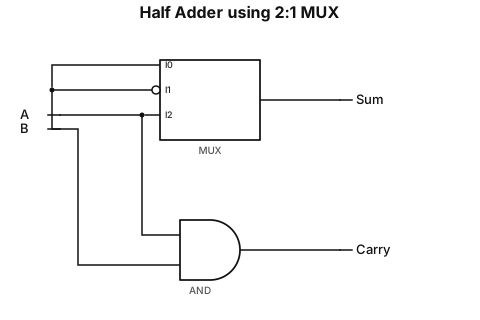
half adder using 2:1 mux
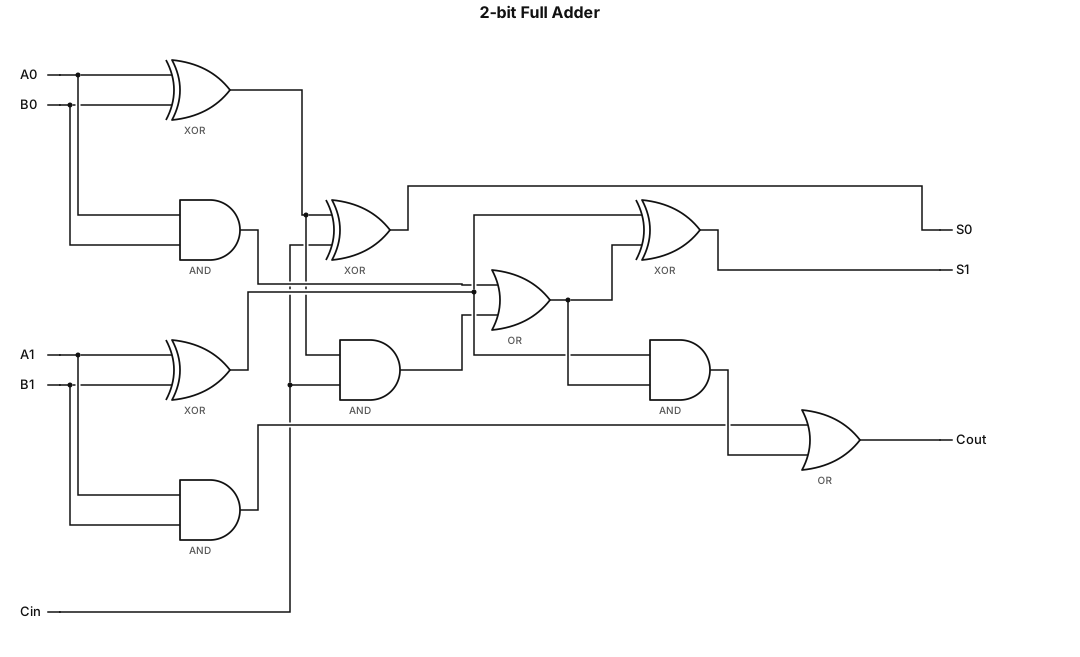
A logic gate circuit for a 2-bit full adder using AND, OR, and XOR gates with inputs A, B, and carry-in, and outputs sum and carry-out
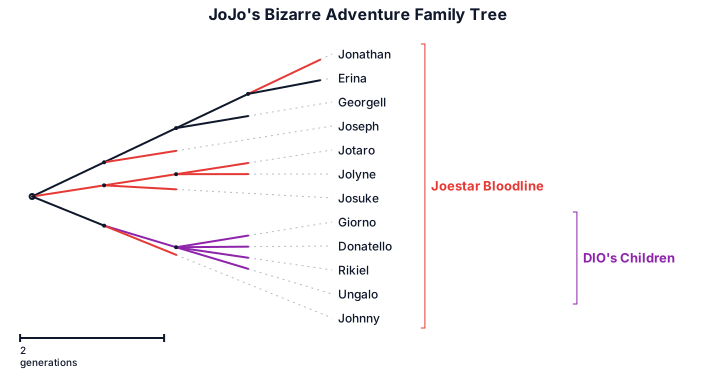
Family tree of all JoJo in Jojo's Bizzare Adventure