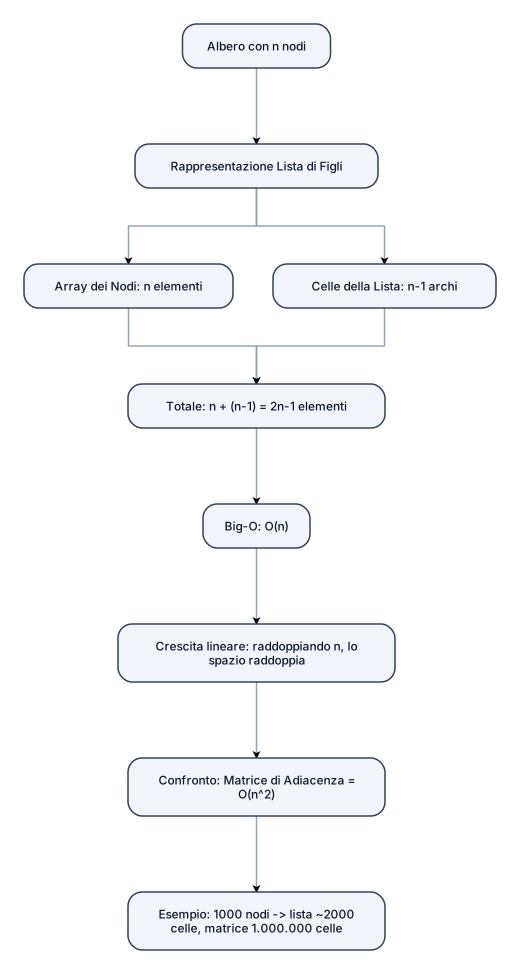
1. Il Problema: Contare gli elementi Dato un albero con n n nodi. Vogliamo calcolare lo spazio totale occupato usando la rappresentazione "Lista di Figli" (List of Children). 2. Da dove viene il calcolo 2 n − 1 2n−1? Array dei Nodi: Serve un array di dimensione n n per memorizzare i dati di ogni nodo. ( n n elementi) Celle della Lista: Ogni nodo (tranne la radice) è figlio di qualcuno. Ci sono esattamente n − 1 n−1 archi. Ogni arco richiede una cella nella lista concatenata. ( n − 1 n−1 elementi) Totale: n + ( n − 1 ) = 2 n − 1 n+(n−1)=2n−1 elementi totali. 3. Perché la slide dice O ( n ) O(n) e non O ( 2 n − 1 ) O(2n−1)? Definizione di Big-O: La notazione O ( n ) O(n) descrive il tasso di crescita, ignorando le costanti moltiplicative e i termini di ordine inferiore. Crescita Lineare: Se n n raddoppia, lo spazio raddoppia (circa). Il fattore "2" e il "-1" non cambiano la natura lineare della crescita. Conclusione: 2 n − 1 2n−1 è asintoticamente equivalente a O ( n ) O(n). 4. Confronto Visivo Lista di Figli: Cresce linearmente. Spazio = O ( n ) O(n). Matrice di Adiacenza: Cresce quadraticamente. Spazio = O ( n 2 ) O(n 2 ). (Esempio: con 1000 nodi, la lista occupa ~2000 celle, la matrice occupa 1.000.000 di celle).
Diagram Examples from Real Visitor Prompts
Browse eligible diagrams shared by FreeDiagram visitors, inspect the exact prompts, and build your own version.
Browse 3278 real creationsAll visitor creations
Showing 721–744 of 3278. No stock examples or system defaults. Choose a tool, study a real result, then reopen its prompt as your starting point.
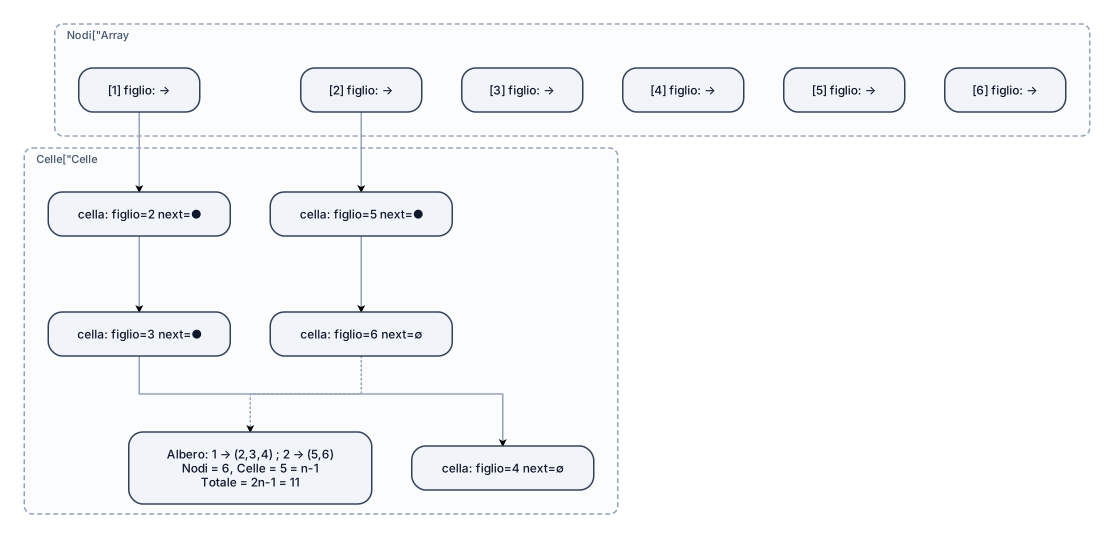
Perché la lista di figli occupa spazio O(n)? Ci sono n record dei nodi più n-1 celle di lista, una per ogni nodo tranne la radice. Totale 2n-1. non capisco ppuoi farmi una rappresentazion grafica per spiegarmelo meglio ?
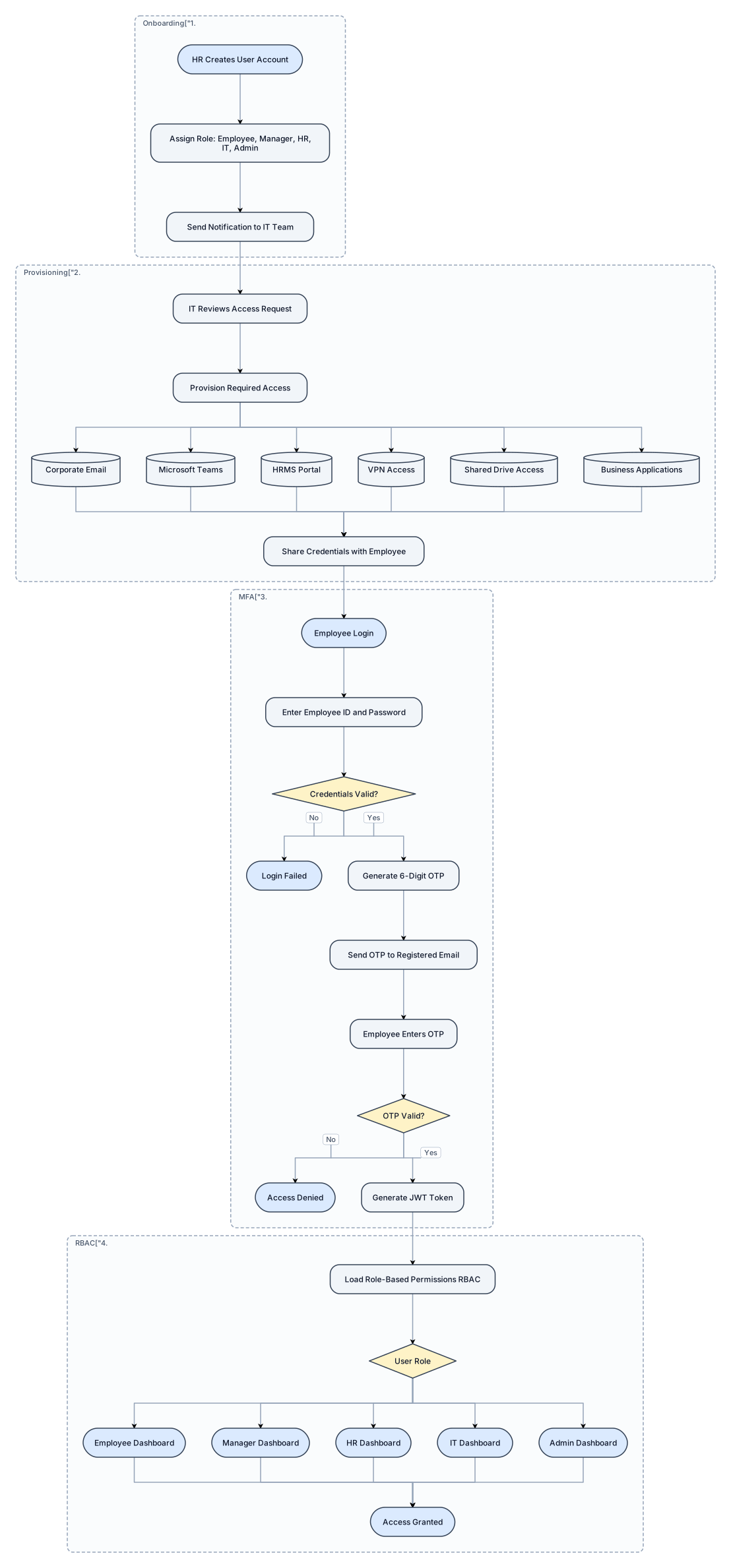
Create a professional enterprise HRMS workflow flowchart with modern software architecture style. Start Process: HR Creates User Account Then: Assign Role (Employee, Manager, HR, IT, Admin) Then: Send Notification to IT Team Then: IT Reviews Access Request Then: Provision Required Access: - Corporate Email - Microsoft Teams - HRMS Portal - VPN Access - Shared Drive Access - Business Applications Then: Share Credentials with Employee Then: Employee Login Then: Enter Employee ID and Password Decision: Credentials Valid? If No: Login Failed If Yes: Generate 6-Digit OTP Then: Send OTP to Registered Email Then: Employee Enters OTP Decision: OTP Valid? If No: Access Denied If Yes: Generate JWT Token Then: Load Role-Based Permissions (RBAC) Decision: User Role Route to: - Employee Dashboard - Manager Dashboard - HR Dashboard - IT Dashboard - Admin Dashboard End: Access Granted i want to digram in one page and proper size and proper way Design Requirements: - Professional enterprise architecture diagram - Clear decision diamonds - Rounded process boxes - Group sections: 1. User Onboarding 2. IT Provisioning 3. MFA Authentication 4. Role-Based Access Control (RBAC) - High-quality presentation style - Suitable for management and stakeholder review - Include icons for HR, IT, Email, Teams, MFA, JWT, and Dashboards

Create a professional enterprise HRMS workflow flowchart with modern software architecture style. Start Process: HR Creates User Account Then: Assign Role (Employee, Manager, HR, IT, Admin) Then: Send Notification to IT Team Then: IT Reviews Access Request Then: Provision Required Access: - Corporate Email - Microsoft Teams - HRMS Portal - VPN Access - Shared Drive Access - Business Applications Then: Share Credentials with Employee Then: Employee Login Then: Enter Employee ID and Password Decision: Credentials Valid? If No: Login Failed If Yes: Generate 6-Digit OTP Then: Send OTP to Registered Email Then: Employee Enters OTP Decision: OTP Valid? If No: Access Denied If Yes: Generate JWT Token Then: Load Role-Based Permissions (RBAC) Decision: User Role Route to: - Employee Dashboard - Manager Dashboard - HR Dashboard - IT Dashboard - Admin Dashboard End: Access Granted i want to digram in one page and proper size and proper way Design Requirements: - Professional enterprise architecture diagram - Blue and white corporate theme - Clear decision diamonds - Rounded process boxes - Left-to-right layout - Group sections: 1. User Onboarding 2. IT Provisioning 3. MFA Authentication 4. Role-Based Access Control (RBAC) - High-quality presentation style - Suitable for management and stakeholder review - Include icons for HR, IT, Email, Teams, MFA, JWT, and Dashboards
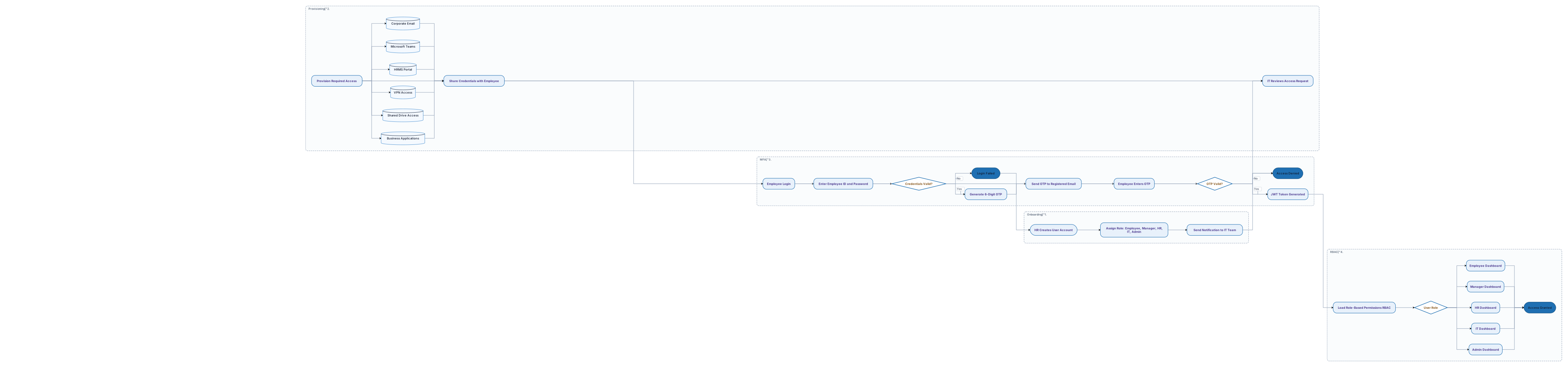
Create a professional enterprise HRMS workflow flowchart with modern software architecture style. Start Process: HR Creates User Account Then: Assign Role (Employee, Manager, HR, IT, Admin) Then: Send Notification to IT Team Then: IT Reviews Access Request Then: Provision Required Access: - Corporate Email - Microsoft Teams - HRMS Portal - VPN Access - Shared Drive Access - Business Applications Then: Share Credentials with Employee Then: Employee Login Then: Enter Employee ID and Password Decision: Credentials Valid? If No: Login Failed If Yes: Generate 6-Digit OTP Then: Send OTP to Registered Email Then: Employee Enters OTP Decision: OTP Valid? If No: Access Denied If Yes: Generate JWT Token Then: Load Role-Based Permissions (RBAC) Decision: User Role Route to: - Employee Dashboard - Manager Dashboard - HR Dashboard - IT Dashboard - Admin Dashboard End: Access Granted Design Requirements: - Professional enterprise architecture diagram - Blue and white corporate theme - Clear decision diamonds - Rounded process boxes - Left-to-right layout - Group sections: 1. User Onboarding 2. IT Provisioning 3. MFA Authentication 4. Role-Based Access Control (RBAC) - High-quality presentation style - Suitable for management and stakeholder review - Include icons for HR, IT, Email, Teams, MFA, JWT, and Dashboards
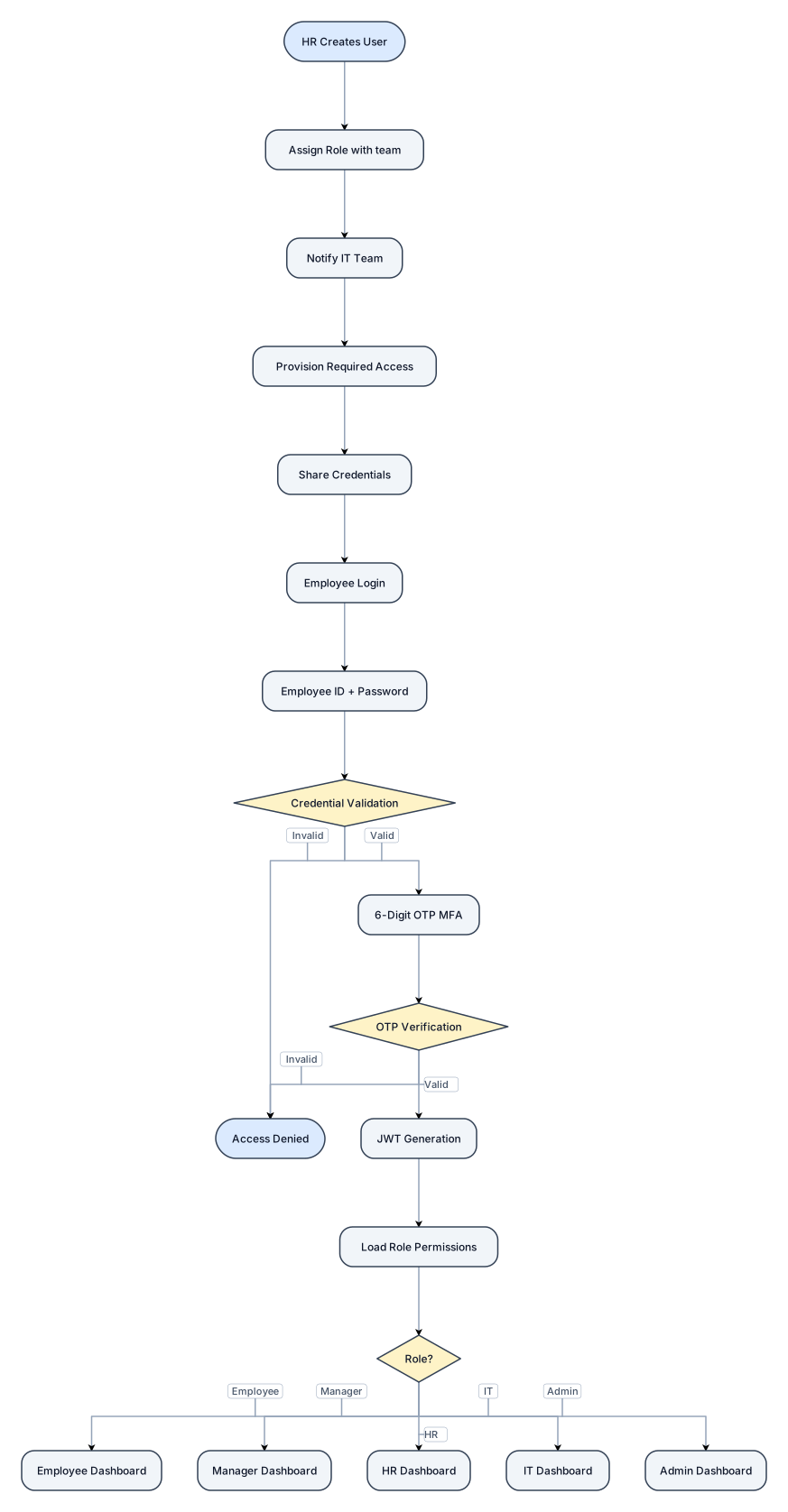
HR Creates User ↓ Assign Role with team ↓ Notify IT Team ↓ Provision Required Access ↓ Share Credentials ↓ Employee Login ↓ Employee ID + Password ↓ Credential Validation ↓ 6-Digit OTP (MFA) ↓ OTP Verification ↓ JWT Generation ↓ Load Role Permissions ↓ Employee / Manager / HR / IT / Admin Dashboard
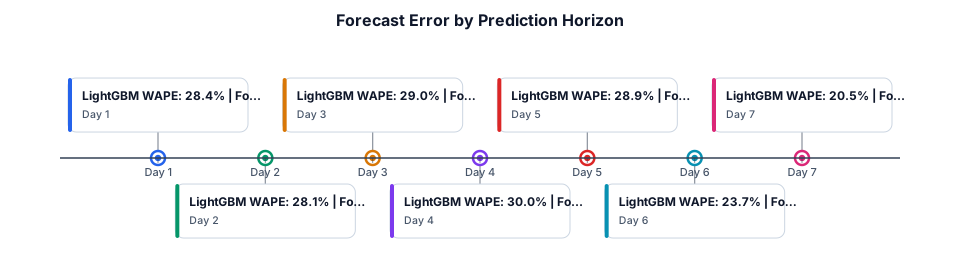
**Prompt for creating a chart in Excel or draw.io** Create a two-series line chart titled “Forecast Error by Prediction Horizon.” Use these exact values: | Forecast horizon | LightGBM WAPE | Four-week baseline WAPE | |---|---:|---:| | Day 1 | 28.4% | 34.5% | | Day 2 | 28.1% | 32.1% | | Day 3 | 29.0% | 33.0% | | Day 4 | 30.0% | 33.6% | | Day 5 | 28.9% | 33.7% | | Day 6 | 23.7% | 28.2% | | Day 7 | 20.5% | 24.1% | Place forecast horizon (Day 1–Day 7) on the horizontal axis and WAPE (%) on the vertical axis. Use two clearly distinguishable lines with point markers and a legend. Keep the background white and labels readable when printed at IEEE two-column size. Caption: “Daily WAPE across the seven-day recursive forecasting horizon, comparing LightGBM with the four-week seasonal baseline.” Do not add confidence intervals to this chart; these values represent point-forecast error.

**Prompt for creating a chart in Excel or draw.io** Create a horizontal bar chart titled “Comparison of Sales Forecasting Models.” Use these exact pooled holdout WAPE values: - LightGBM: 26.19% - XGBoost: 27.02% - CatBoost: 27.93% - Random Forest: 28.75% - Four-week seasonal mean: 31.39% - Linear regression: 34.39% - Seasonal naive: 36.62% - Support Vector Regression (SVR): 52.47% Put model names on the vertical axis and WAPE (%) on the horizontal axis, starting at zero. Display each value at the end of its bar. Label the chart “Lower is better.” Use a restrained, publication-friendly style with a white background, readable axis labels, and no 3D effects. Make LightGBM visually distinguishable but keep all other bars consistent. Add a note below the chart: “Results on the time-ordered holdout set; WAPE is weighted absolute percentage error.” Ensure the chart values and caption agree with the paper's results table.
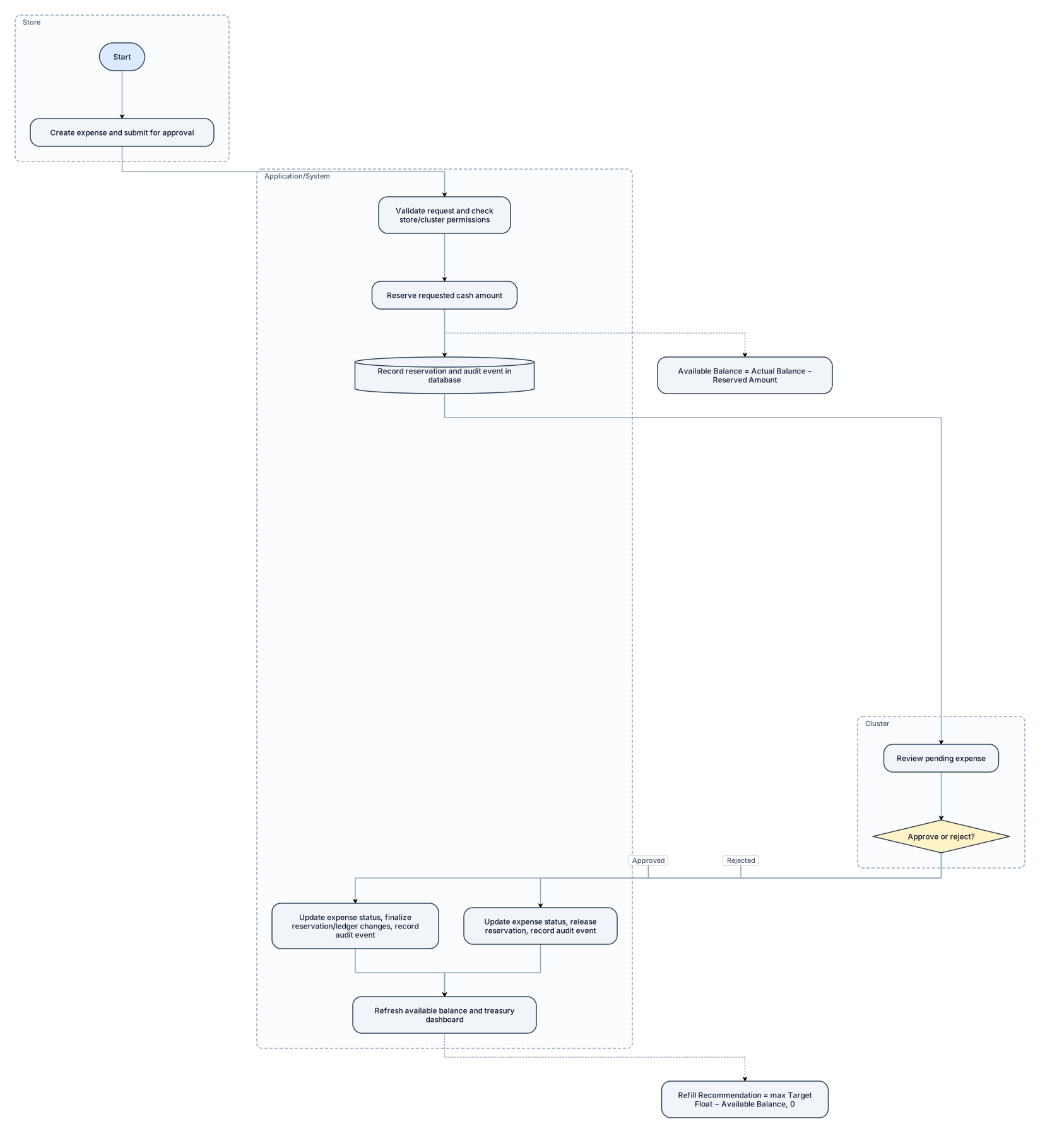
**Prompt for draw.io / diagrams.net** Create a three-lane swimlane diagram titled “Expense Approval and Treasury Control Workflow.” Use three horizontal swimlanes: - Store Manager - Application/System - Cluster Manager Show the following process: 1. Store Manager: Create an expense and submit it for approval. 2. Application/System: Validate the request and check the relevant store/cluster permissions. 3. Application/System: Reserve the requested cash amount when the expense is submitted. 4. Application/System: Record the reservation and audit event in the database. 5. Cluster Manager: Review the pending expense. 6. Add a decision diamond: “Approve or reject?” 7. Approval path: Update the expense status, finalize the appropriate reservation/ledger changes according to the implemented database procedure, and record the audit event. 8. Rejection path: Update the expense status, release the reservation, and record the audit event. 9. Application/System: Refresh available balance and treasury dashboard information. Add a small formula box: Available Balance = Actual Balance − Reserved Amount Add a second formula: Refill Recommendation = max(Target Float − Available Balance, 0) Use arrows crossing lanes to show responsibility. Label the two outcomes “Approved” and “Rejected.” Do not show a payment being executed unless the application actually executes one.
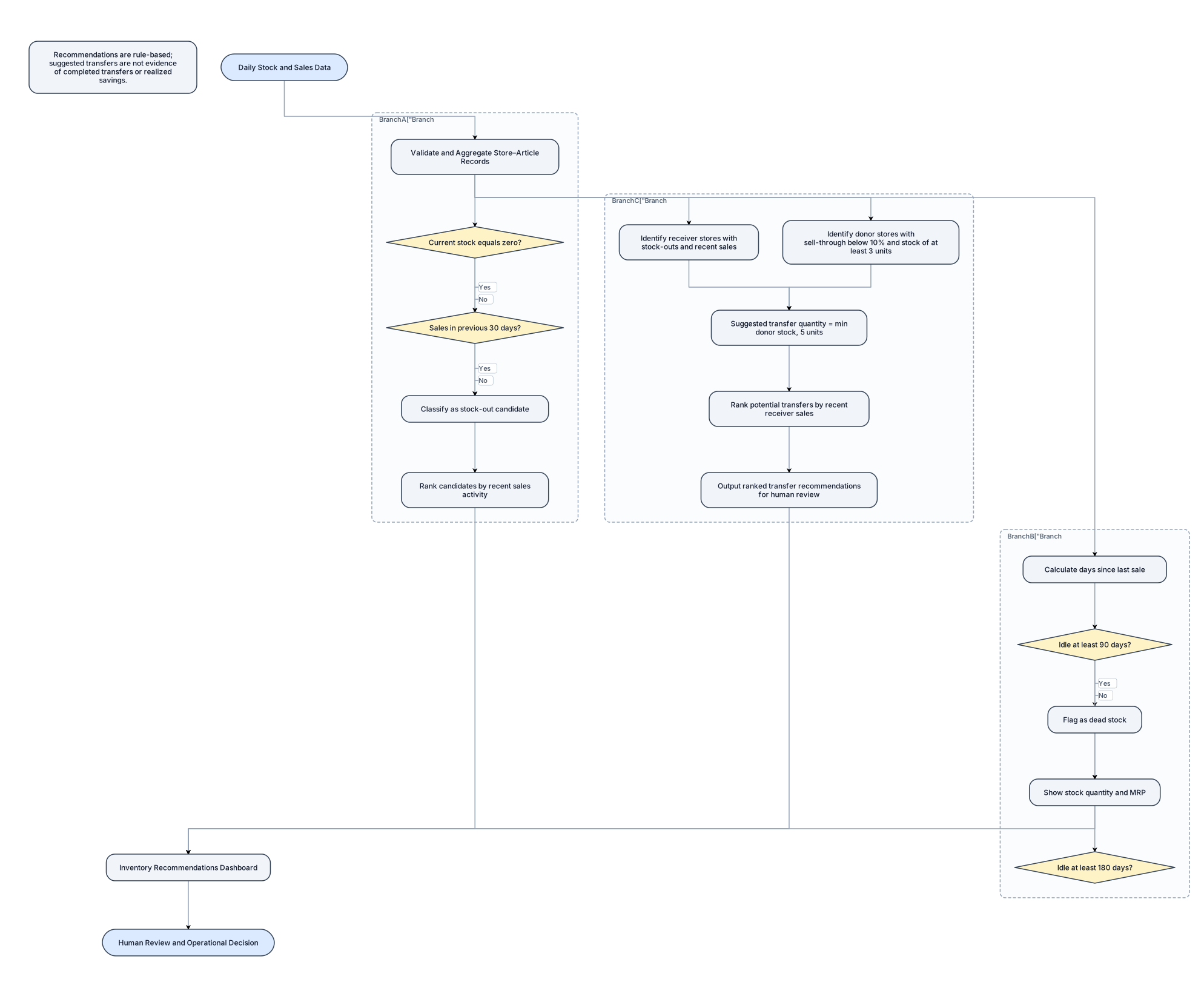
**Prompt for draw.io / diagrams.net** Create a black-and-white academic flowchart titled “Inventory Optimization Decision Workflow.” Start with “Daily Stock and Sales Data” and connect it to “Validate and Aggregate Store–Article Records.” Split into three parallel branches: Branch A — Stock-out candidates: - Check whether current stock equals zero. - Check whether sales occurred during the previous 30 days. - If both conditions hold, classify the item as a stock-out candidate. - Rank candidates by recent sales activity. Branch B — Dead stock: - Calculate the number of days since the item last sold. - If the item has been idle for at least 90 days, flag it as dead stock. - Show stock quantity and MRP as supporting information. - Separately distinguish items idle for at least 180 days. Branch C — Transfer recommendations: - Identify receiver stores with stock-outs and recent sales. - Identify potential donor stores with sell-through below 10% and stock of at least 3 units. - Calculate suggested transfer quantity as the minimum of donor stock and 5 units. - Rank potential transfers using recent receiver sales. - Output ranked transfer recommendations for human review. Merge the branches into “Inventory Recommendations Dashboard,” followed by “Human Review and Operational Decision.” Use diamonds for conditions, rectangles for processing, and arrows for flow. Include a note: “Recommendations are rule-based; suggested transfers are not evidence of completed transfers or realized savings.” Do not add approval rules that are not part of the implemented system.
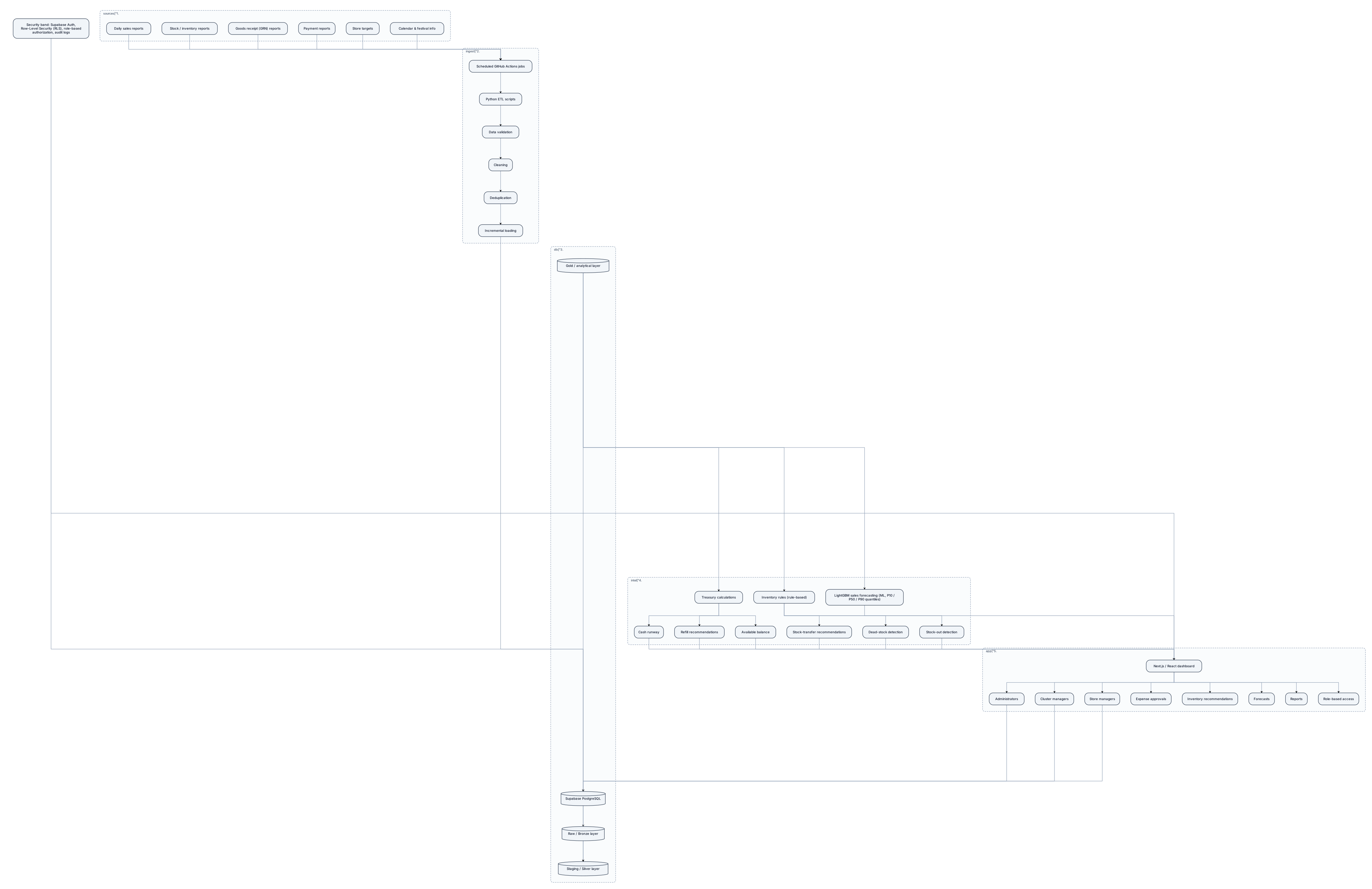
**Prompt for draw.io / diagrams.net** Create a clean, IEEE-paper-style system architecture diagram titled “AI-Based Smart Industrial Resource Optimization Platform Architecture.” Use a white background, simple rectangular boxes, thin black arrows, readable labels, and a landscape layout. Avoid decorative icons and gradients. Arrange the diagram in five horizontal layers: 1. **Data Sources:** Daily sales reports, stock/inventory reports, goods receipt (GRN) reports, payment reports, store targets, calendar and festival information. 2. **Data Ingestion and Processing:** Scheduled GitHub Actions jobs, Python ETL scripts, data validation, cleaning, deduplication, and incremental loading. 3. **Database and Data Layers:** Supabase PostgreSQL, Raw/Bronze layer, Staging/Silver layer, Gold/analytical layer. Connect them in sequence using arrows. 4. **Intelligence and Business Logic:** LightGBM sales forecasting with P10/P50/P90 prediction quantiles; inventory rules for stock-out detection, dead-stock detection, and stock-transfer recommendations; treasury calculations for available balance, refill recommendations, and cash runway. 5. **Application Layer:** Next.js and React dashboard, role-based access, reports, forecasts, inventory recommendations, and expense approvals. Show end users as store managers, cluster managers, and administrators. Place a separate security band across the database and application layers labelled “Supabase Auth, Row-Level Security (RLS), role-based authorization, and audit logs.” Use arrows to show data flowing from sources through processing and storage to intelligence and dashboards. Add a feedback arrow from user actions to the database where appropriate. Do not imply that inventory rules are machine-learning models. Label the forecasting component as machine learning and inventory decisions as rule-based logic.
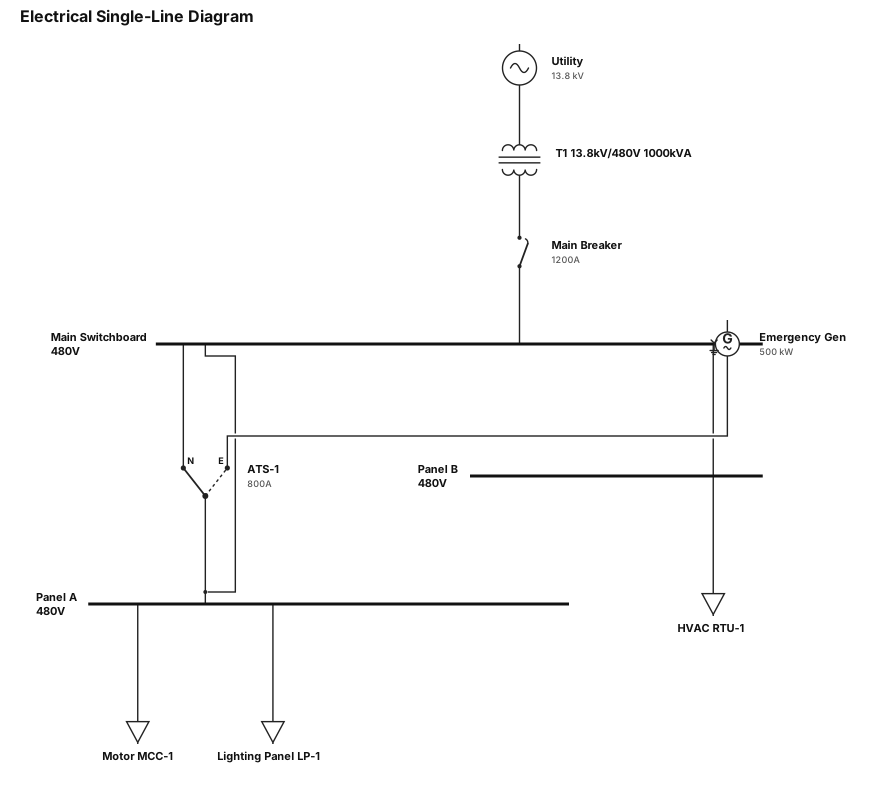
electrical single line diagram
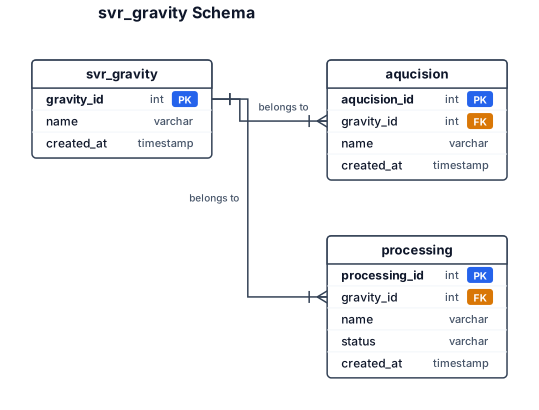
svr_gravity one to many aqucision and one to many processing
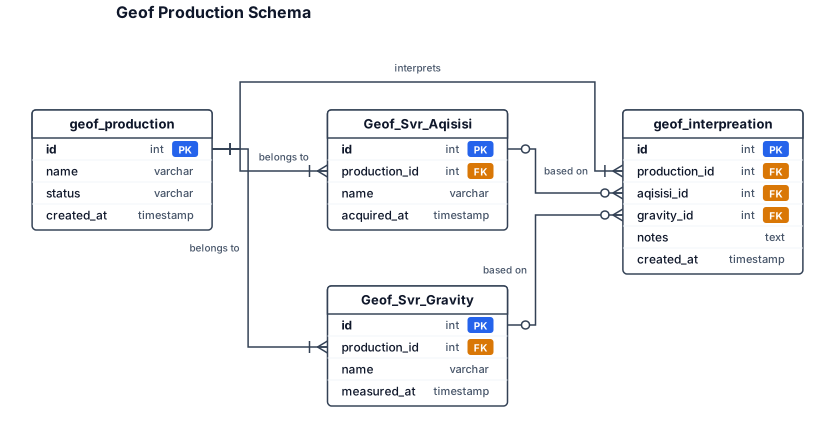
Geof_Svr_Aqisisi, Geof_Svr_Gravity, geof_production, geof_interpreation
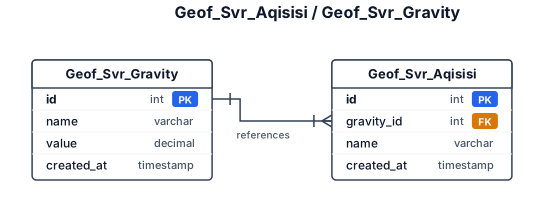
Geof_Svr_Aqisisi, Geof_Svr_Gravity
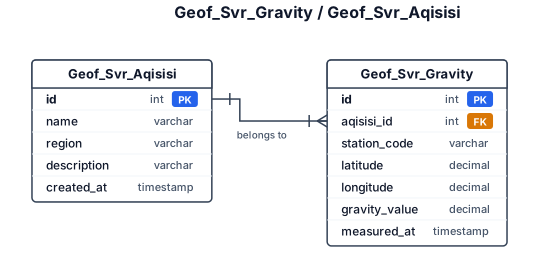
Geof_Svr_Gravity, geof_Svr_Aqisisi
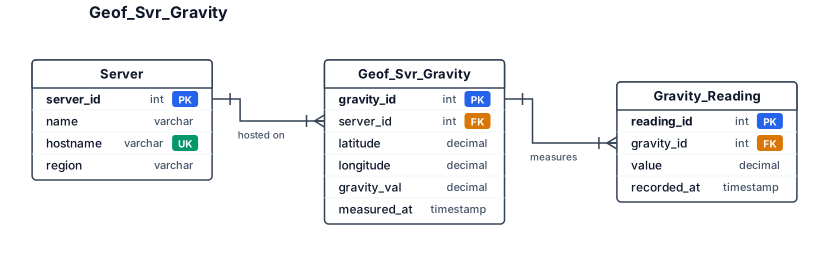
Geof_Svr_Gravity
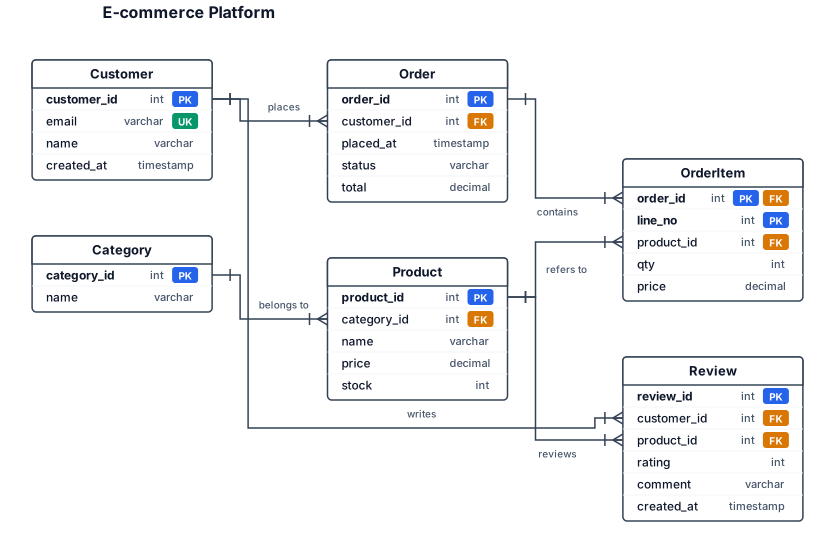
An ER diagram for an e-commerce platform with customers, orders, products, categories, and reviews — include primary keys and foreign key relationships
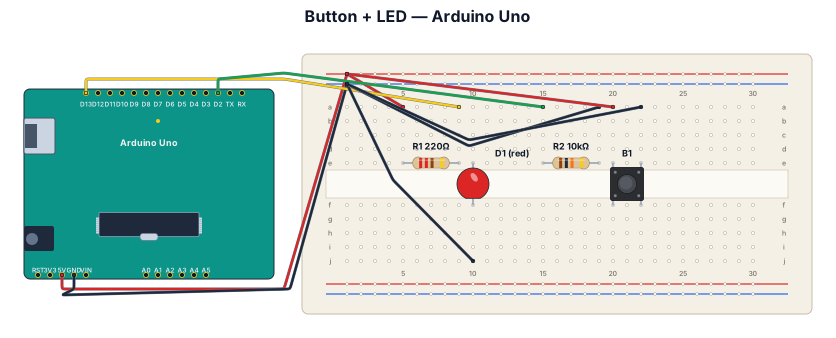
A breadboard wiring diagram for an Arduino Uno reading a button press and lighting an LED: button with pull-down resistor on D2, LED with 220-ohm resistor on D13
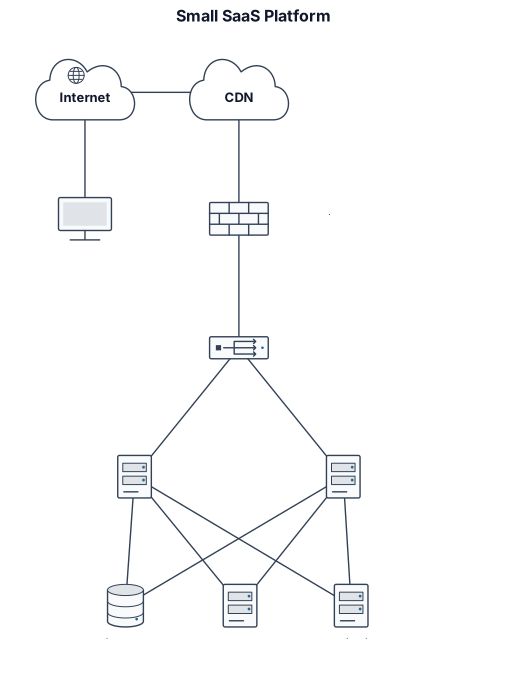
A network diagram for a small SaaS platform with users, CDN, load balancer, two app servers, private database, cache, and monitoring
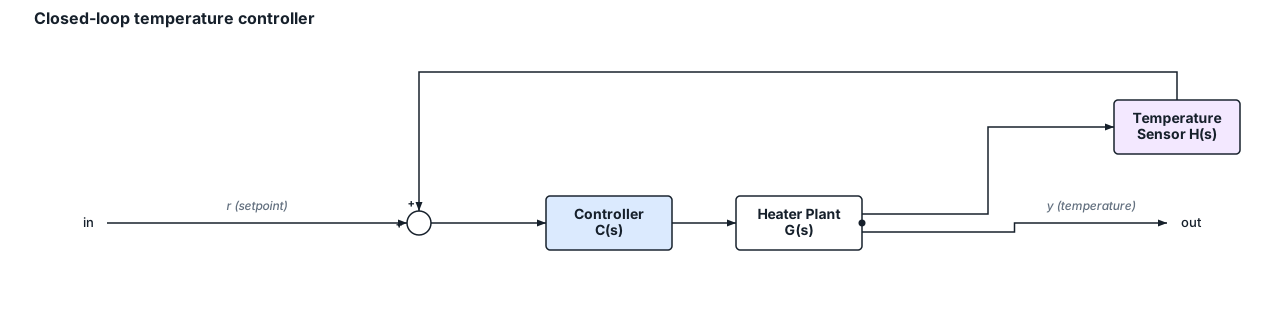
A control-systems block diagram of a closed-loop temperature controller with a plant, controller, and sensor feedback
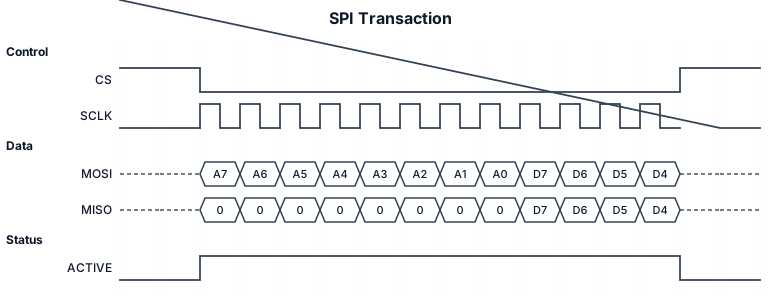
A timing/waveform diagram of an SPI transaction showing clock, MOSI, MISO, and chip-select
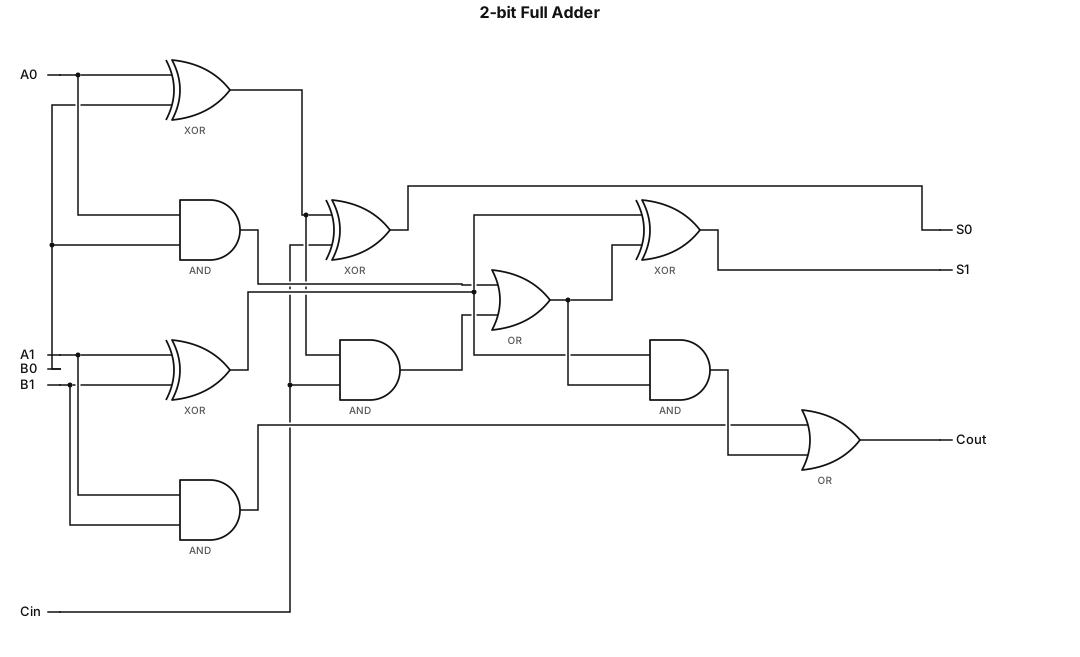
A logic gate circuit for a 2-bit full adder using AND, OR, and XOR gates
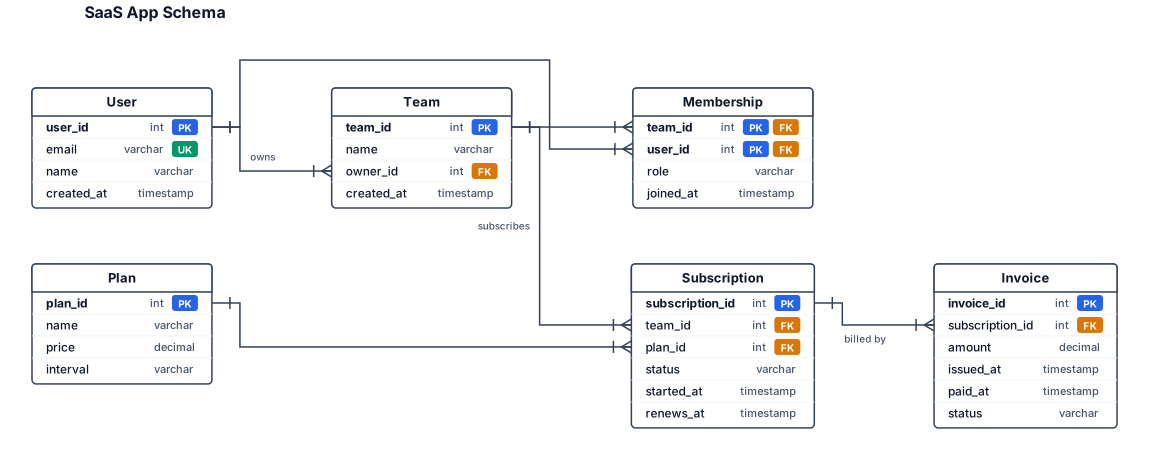
An entity-relationship diagram for a SaaS app with users, teams, subscriptions, and invoices