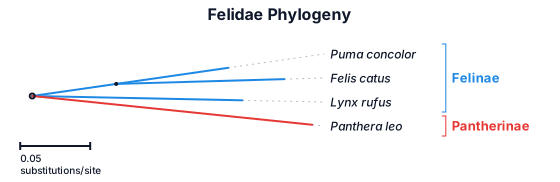
A phylogenetic tree showing puma concolor, house cats, lynxes, panthera
NODE ARCHIVE · REAL DIAGRAM BRIEFS
Diagram Examples from Real Visitor Prompts
Browse eligible diagrams shared by FreeDiagram visitors, inspect the exact prompts, and build your own version.
Browse 3261 real creationsCOMMUNITY OUTPUTS · EXACT PROMPTS
All visitor creations
Showing 73–96 of 3261. No stock examples or system defaults. Choose a tool, study a real result, then reopen its prompt as your starting point.
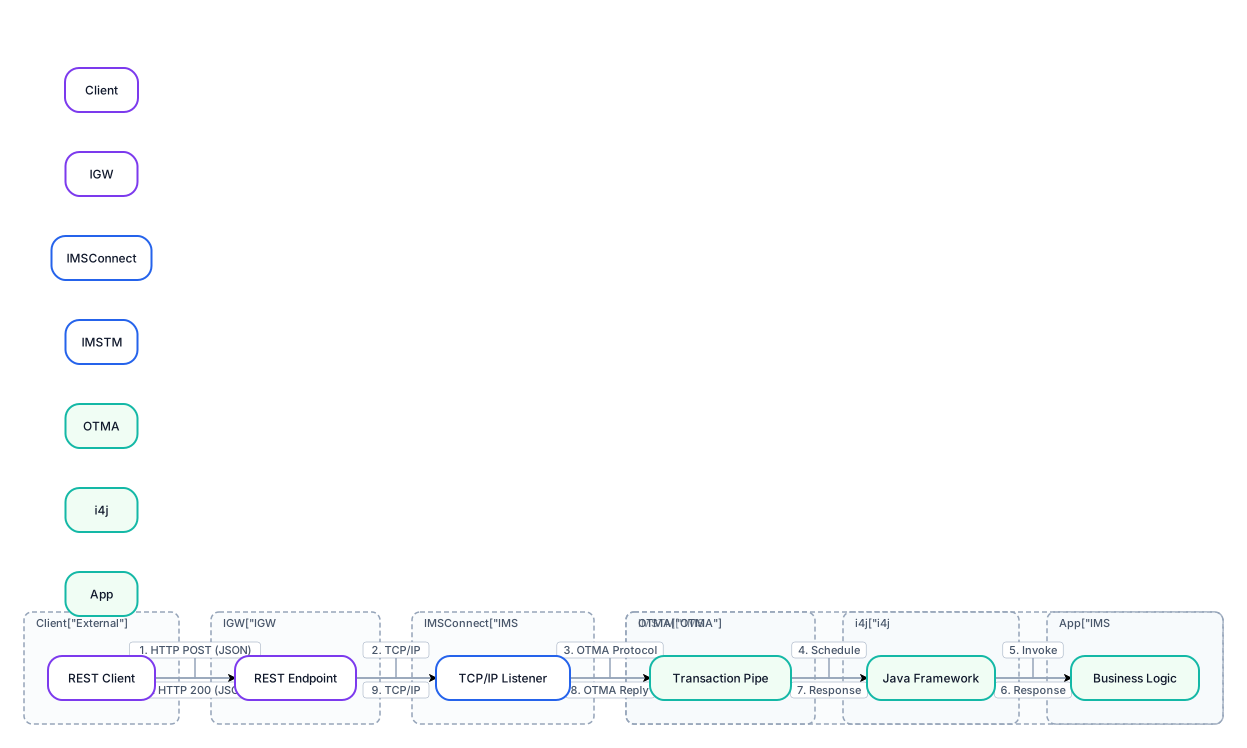
Create a professional 16:9 enterprise architecture diagram titled "IGW – REST to IMS Transaction Flow". Show these components from left to right: REST Client → IGW (Java REST API on Open Liberty) → IMS Connect → OTMA → IMS TM / JMP Region → i4j Framework → IMS Java Application. Use arrows to show the synchronous request moving from the REST client to the IMS application and the response returning along the same path in reverse, ending with an HTTP JSON response. Important: i4j runs inside the IMS Java application environment, not as a separate network service. IMS Connect communicates with IMS TM through OTMA. IGW communicates with IMS Connect over TCP/IP. Use a clean white background, rounded cards, simple icons, purple and blue accents, teal highlights, thin directional arrows, and readable labels. Keep the diagram technically accurate and uncluttered.

Create a professional system architecture diagram for a Student Interview Experience Portal. Arrange three rectangular layers vertically: 1. Presentation Layer: Web Browser, 12 HTML Pages, HTML5, CSS3, JavaScript. 2. Application Layer: Python Flask Server, 7 Route Modules, JWT Authentication Check, Analytics Service. 3. Data Layer: MySQL 8 Database, Automatic SQLite Fallback when MySQL is unavailable. Connect the Presentation Layer and Application Layer with a double-headed arrow labelled "HTTP Requests / JSON Responses". Connect the Application Layer and Data Layer with a double-headed arrow labelled "SQL Queries / Results". Use light blue, light green and light orange backgrounds respectively. Use a white canvas, clear labels, aligned boxes and a clean academic report style. Do not add any technologies or components not specified. Title: Student Interview Experience Portal — System Architecture.
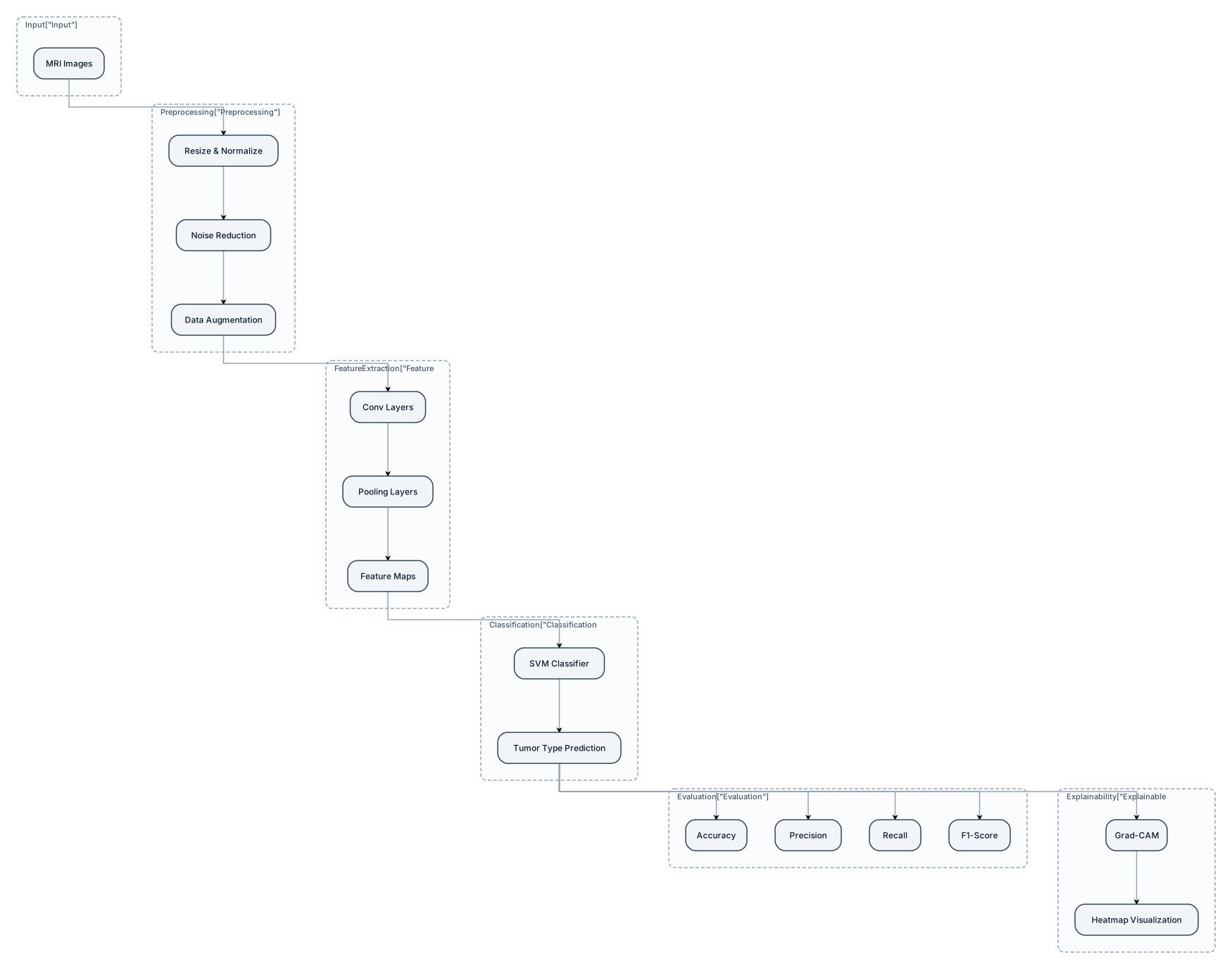
Abstract— Brain tumor classification using Magnetic Resonance Imaging (MRI) is essential for early detection and effective treatment planning. This paper proposes an explainable hybrid Deep Learning and Machine Learning framework for automated brain tumor classification. Initially, MRI images are preprocessed to improve image quality and consistency. A Convolutional Neural Network (CNN) is used to extract significant features from MRI images, while a Support Vector Machine (SVM) classifier utilizes these features to classify brain tumors. To improve model transparency, Gradient-weighted Class Activation Mapping (Grad-CAM) is incorporated to visualize the important regions influencing classification decisions. The proposed framework is evaluated using performance metrics such as accuracy, precision, recall, and F1-score. By combining automated feature extraction, machine learning-based classification, and explainable AI, this approach aims to improve classification reliability and provide interpretable predictions for supporting medical image analysis. Keywords: Brain Tumor Classification, MRI, Deep Learning, Machine Learning, CNN, SVM, Explainable Artificial Intelligence, Grad-CAM. NEEED WORK FLOW AND ARCTICTURE DIAGRAM
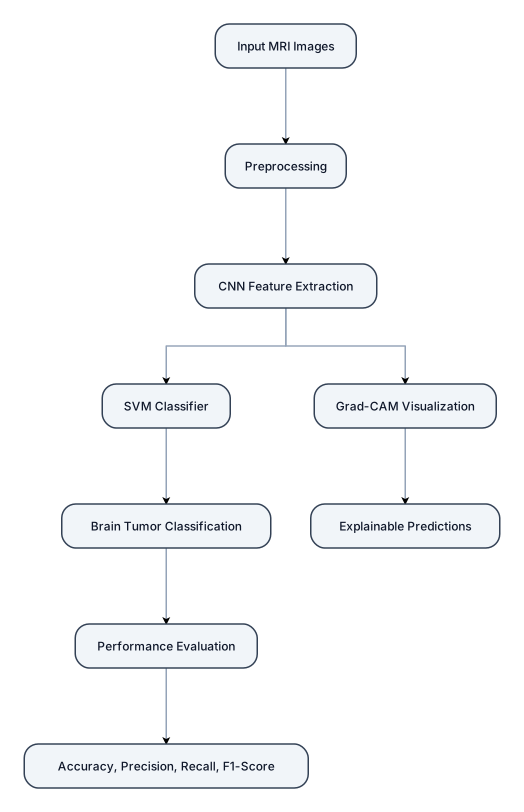
Abstract— Brain tumor classification using Magnetic Resonance Imaging (MRI) is essential for early detection and effective treatment planning. This paper proposes an explainable hybrid Deep Learning and Machine Learning framework for automated brain tumor classification. Initially, MRI images are preprocessed to improve image quality and consistency. A Convolutional Neural Network (CNN) is used to extract significant features from MRI images, while a Support Vector Machine (SVM) classifier utilizes these features to classify brain tumors. To improve model transparency, Gradient-weighted Class Activation Mapping (Grad-CAM) is incorporated to visualize the important regions influencing classification decisions. The proposed framework is evaluated using performance metrics such as accuracy, precision, recall, and F1-score. By combining automated feature extraction, machine learning-based classification, and explainable AI, this approach aims to improve classification reliability and provide interpretable predictions for supporting medical image analysis. Keywords: Brain Tumor Classification, MRI, Deep Learning, Machine Learning, CNN, SVM, Explainable Artificial Intelligence, Grad-CAM.
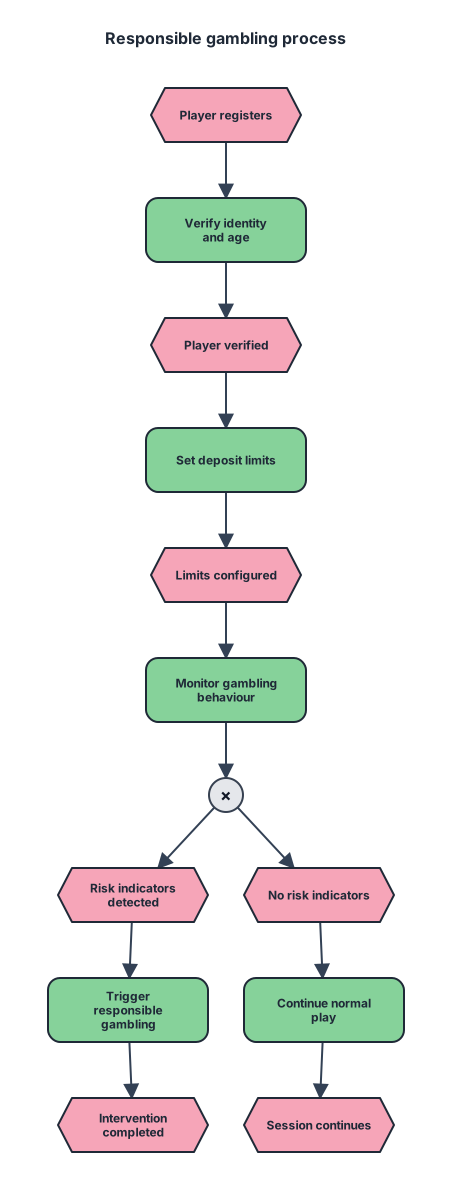
An event-driven process chain for responsible/safer gambling
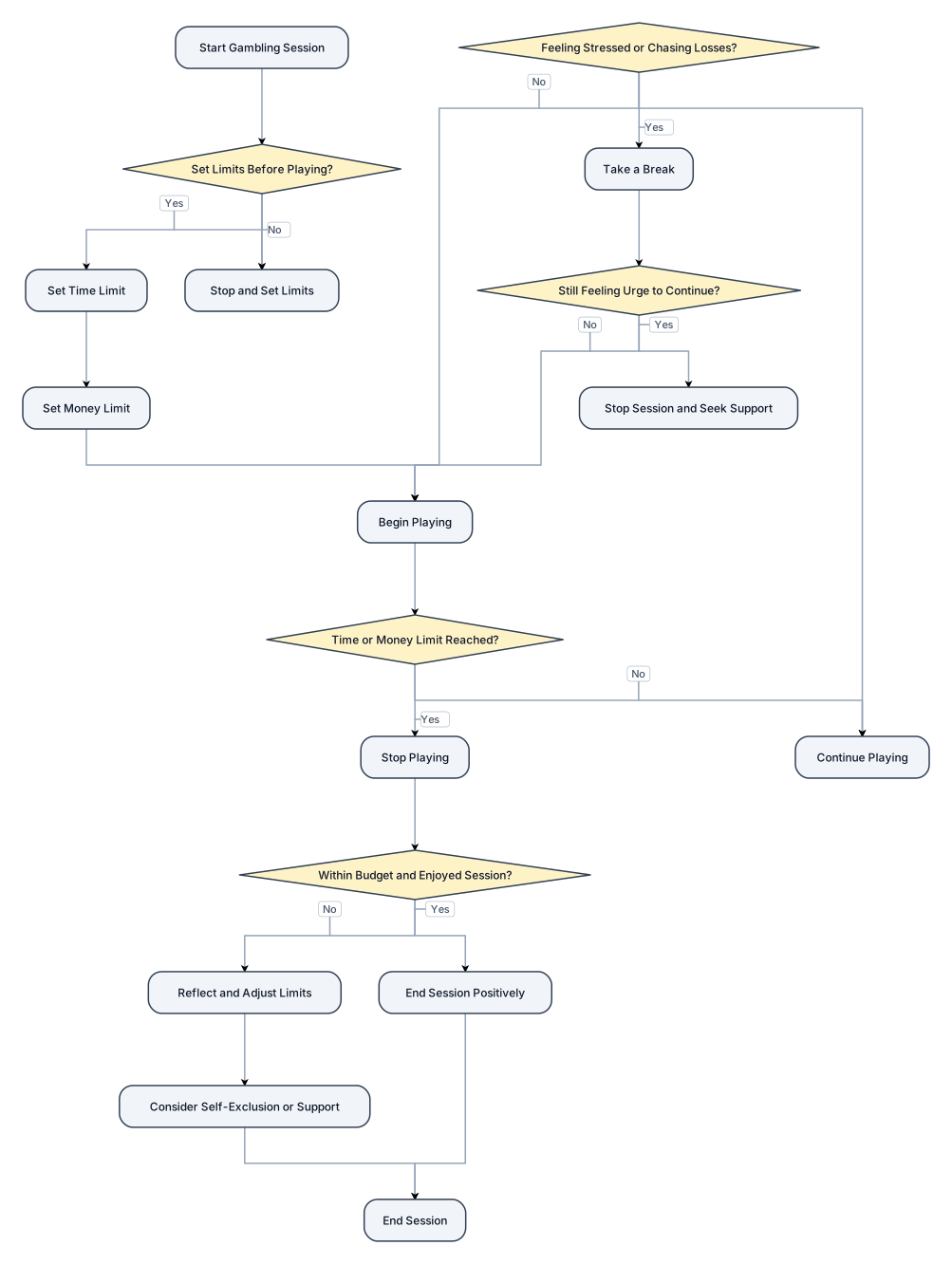
a flowchart for responsible gambling
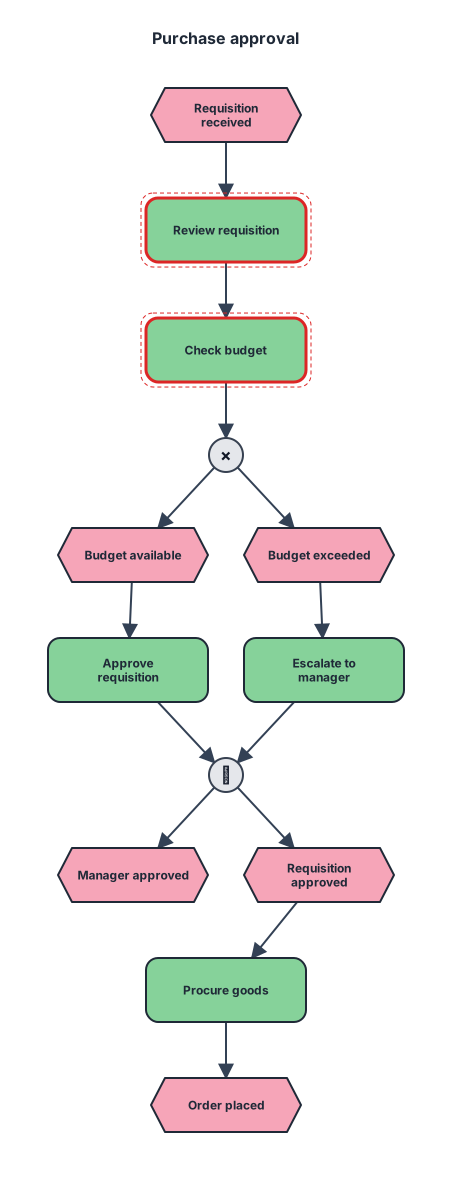
An event-driven process chain for purchase approval from requisition received through manager approval, procurement, and order placed

B. Data Flow Diagram (DFD – Level 1) The primary data flow in the system is: Customer Dataset → Data Preprocessing → Feature Engineering → Model Training and Evaluation → Saved Model → Streamlit Application → Churn Prediction and Explanation The explainability component uses model predictions and customer feature values to generate SHAP-based explanations, which are presented through the application interface.
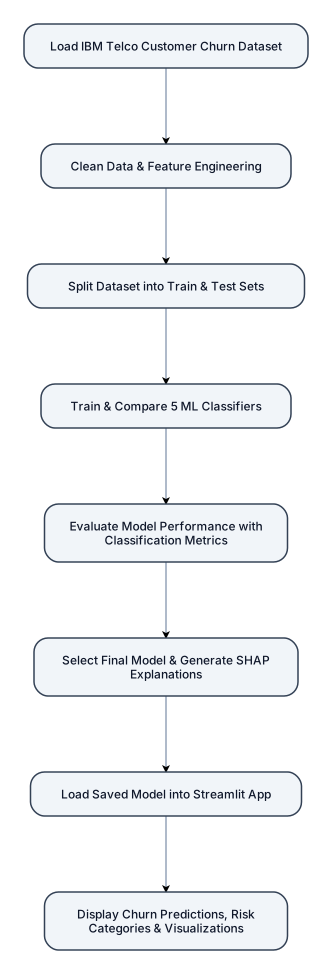
The workflow consists of the following stages: Load the IBM Telco Customer Churn dataset. Clean the data and perform feature engineering. Split the dataset into training and testing sets. Train and compare five machine learning classifiers. Evaluate model performance using appropriate classification metrics. Select the final model and generate SHAP explanations. Load the saved model into the Streamlit application. Display churn predictions, risk categories, and explanatory visualizations.
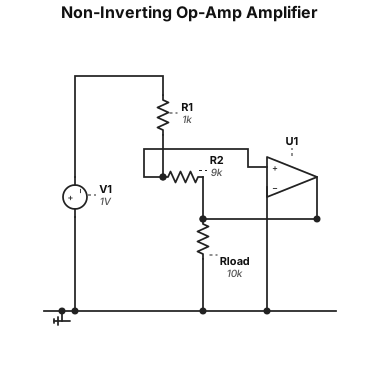
A non-inverting op-amp amplifier circuit with a gain of 10, using a 1 kΩ input resistor and a 9 kΩ feedback resistor
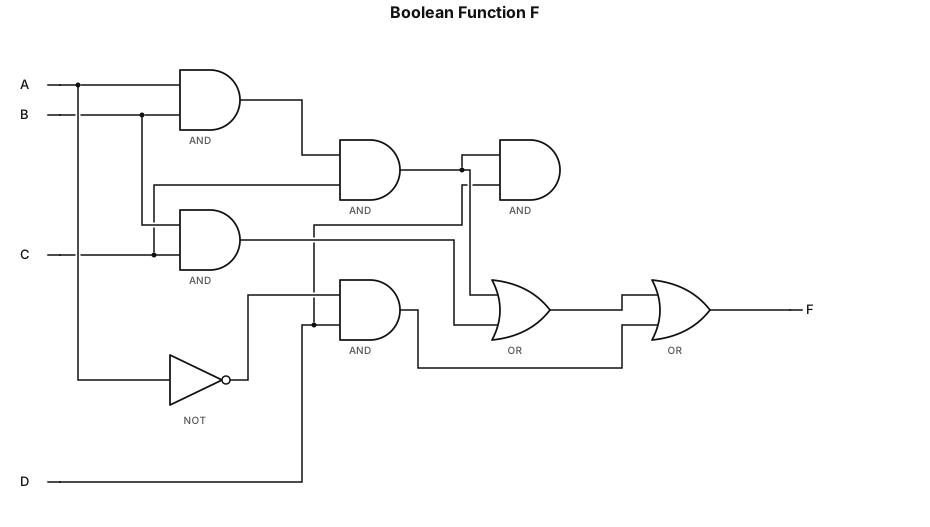
F=ABCD+BC+A'D
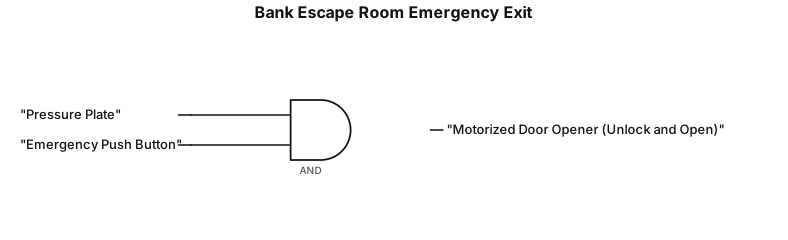
Create a simple, clearly labelled logic gate diagram titled "Bank Escape Room Emergency Exit". Show two inputs labelled "Pressure Plate" and "Emergency Push Button". Connect both inputs to a single AND logic gate. Connect the AND gate output to an output labelled "Motorized Door Opener (Unlock and Open)". Use standard logic gate symbols, clear connecting lines, a white background, and a clean school-assignment style. Ensure both inputs connect to the AND gate and the output connects to the motorized door opener.
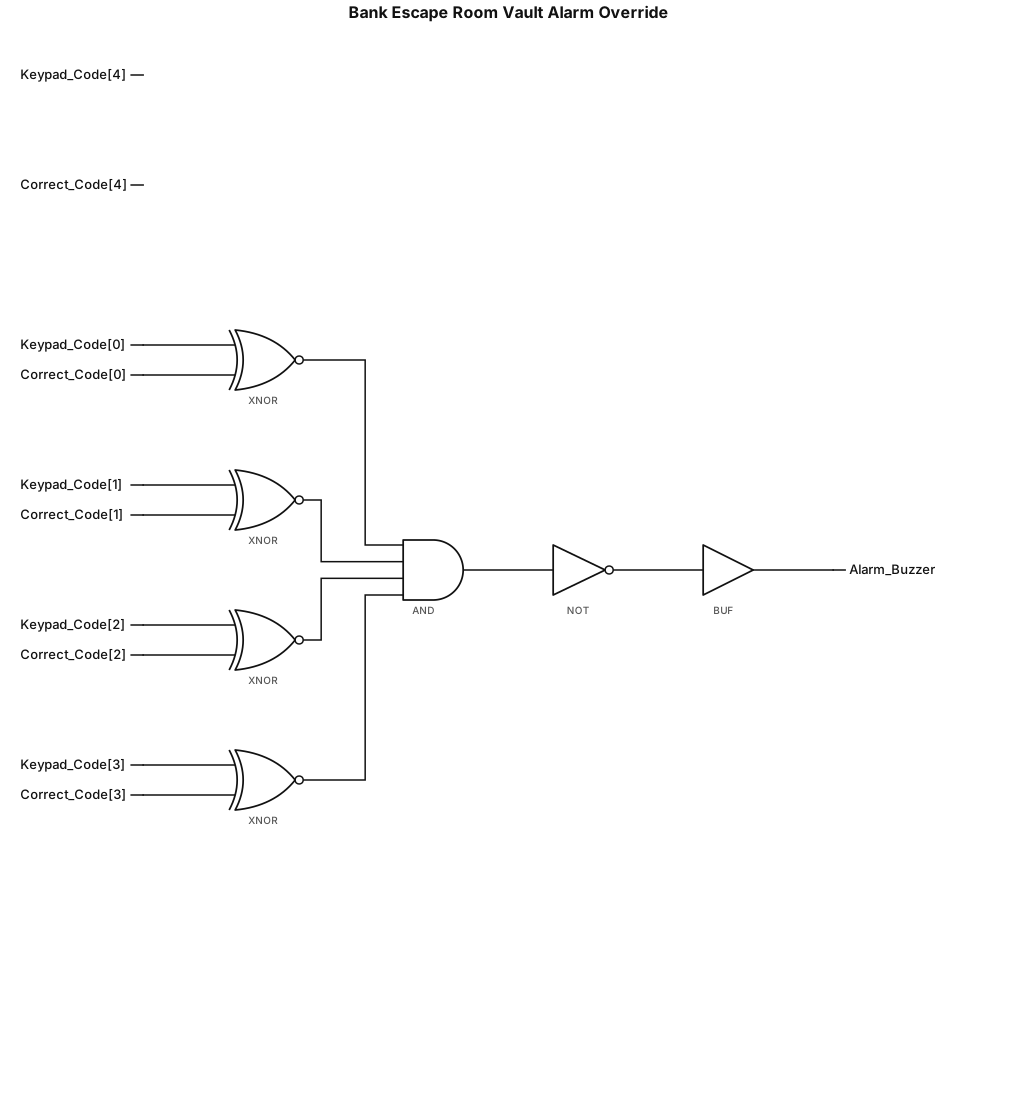
Create a simple, clearly labelled logic diagram titled "Bank Escape Room Vault Alarm Override". Show a Numeric Keypad input connected to a Code Comparator. The comparator checks whether the entered code matches the correct security code. Connect the comparator's "Code Correct" output to an alarm control circuit so that a correct code turns the Alarm Buzzer OFF. An incorrect code leaves the Alarm Buzzer ON. Use standard electronic symbols where appropriate, clear connecting lines, a white background, and a clean school-assignment style. Make sure the diagram accurately shows how entering the correct code disables the alarm.
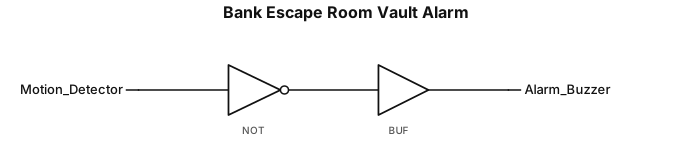
Create a simple, clearly labelled logic gate diagram titled "Bank Escape Room Vault Alarm". Show one input labelled "Motion Detector" connected to a NOT gate. Connect the NOT gate output to an output labelled "Alarm Buzzer". Use standard logic gate symbols, clear connecting lines, and a white background. The logic must be: - Motion detected (1) → NOT gate outputs 0 → Alarm OFF. - No motion detected (0) → NOT gate outputs 1 → Alarm ON. Make the diagram neat and suitable for a school assignment.

Create a simple, clearly labelled logic diagram titled "Bank Escape Room Vault Alarm". Show one input labelled "Motion Detector (Motion Detected)" connected by a line to an OR gate is not needed. Instead, use a direct connection from the motion detector to an output labelled "Alarm Buzzer (ON)". Use standard electronic diagram symbols, clear connecting lines, a white background, and a clean school-assignment style. Make sure the connection between the motion detector and the alarm buzzer is clearly visible.
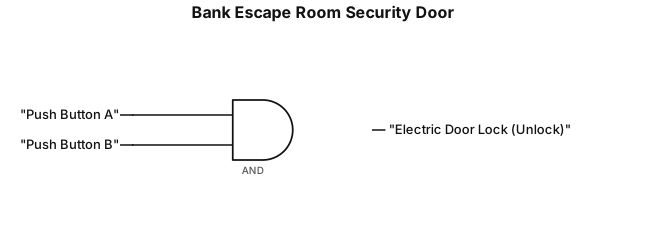
Create a simple, clearly labelled logic gate diagram for a bank escape room security door. Show two inputs labelled Push Button A and Push Button B. Connect both inputs to a single AND gate. Connect the AND gate output to an output labelled Electric Door Lock (Unlock). Use standard logic gate symbols, clear connecting lines, and a white background.
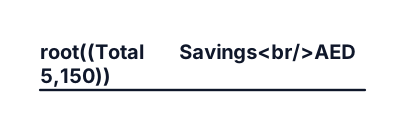
Total Savings AED 5,150 ╱ │ ╲ ╱ │ ╲ 🌿 Diesel 🌿 Loading 🌿 Man-hour AED 1500 AED 1800 AED 1200 │ ╱──────┴──────╲ ╱ ╲ 🌿 Air Bag 🌿 Overtime AED 700 AED 950 aro smart vabe cororate style baniye daw
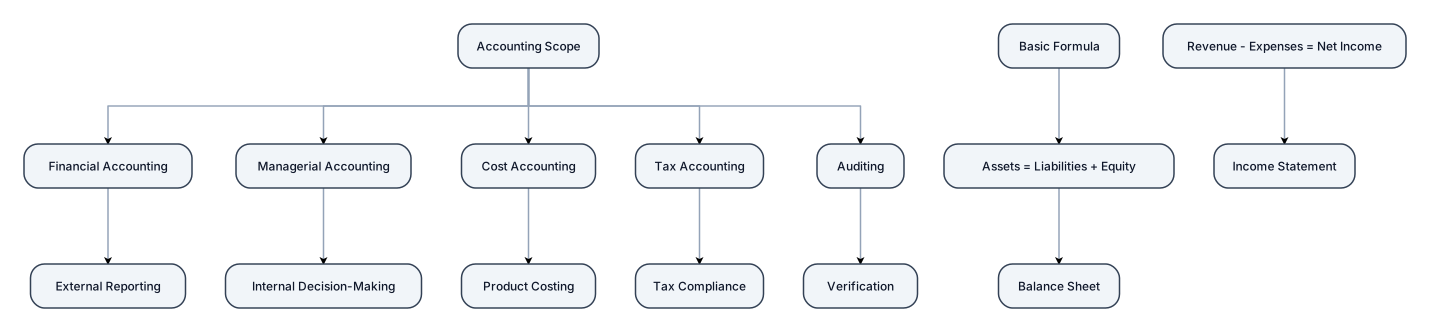
Accounting scope or basic formula
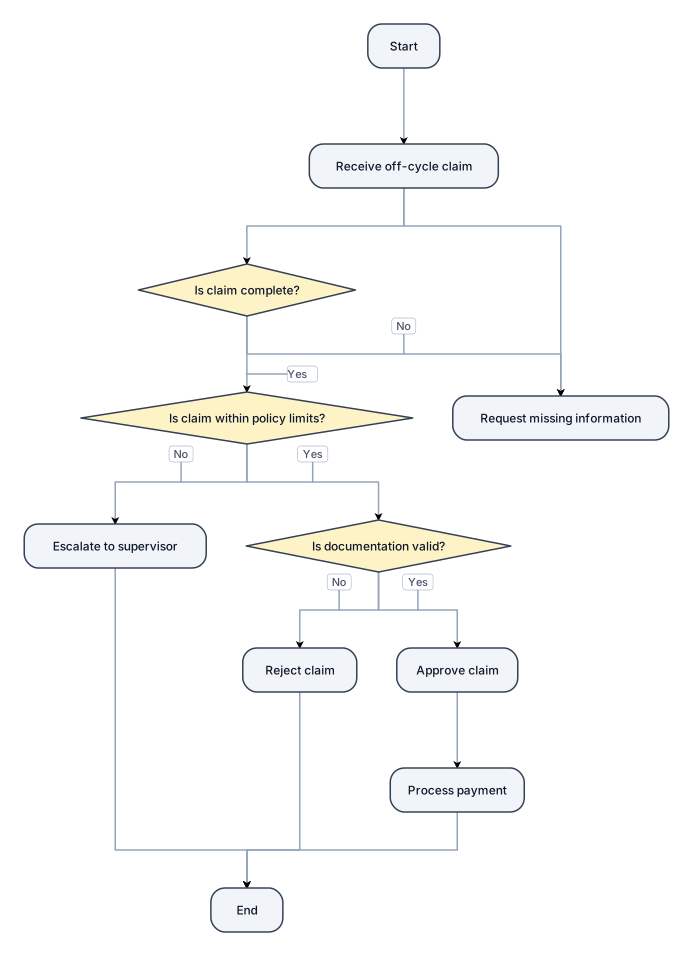
A flowchart for off-cycle claim checking
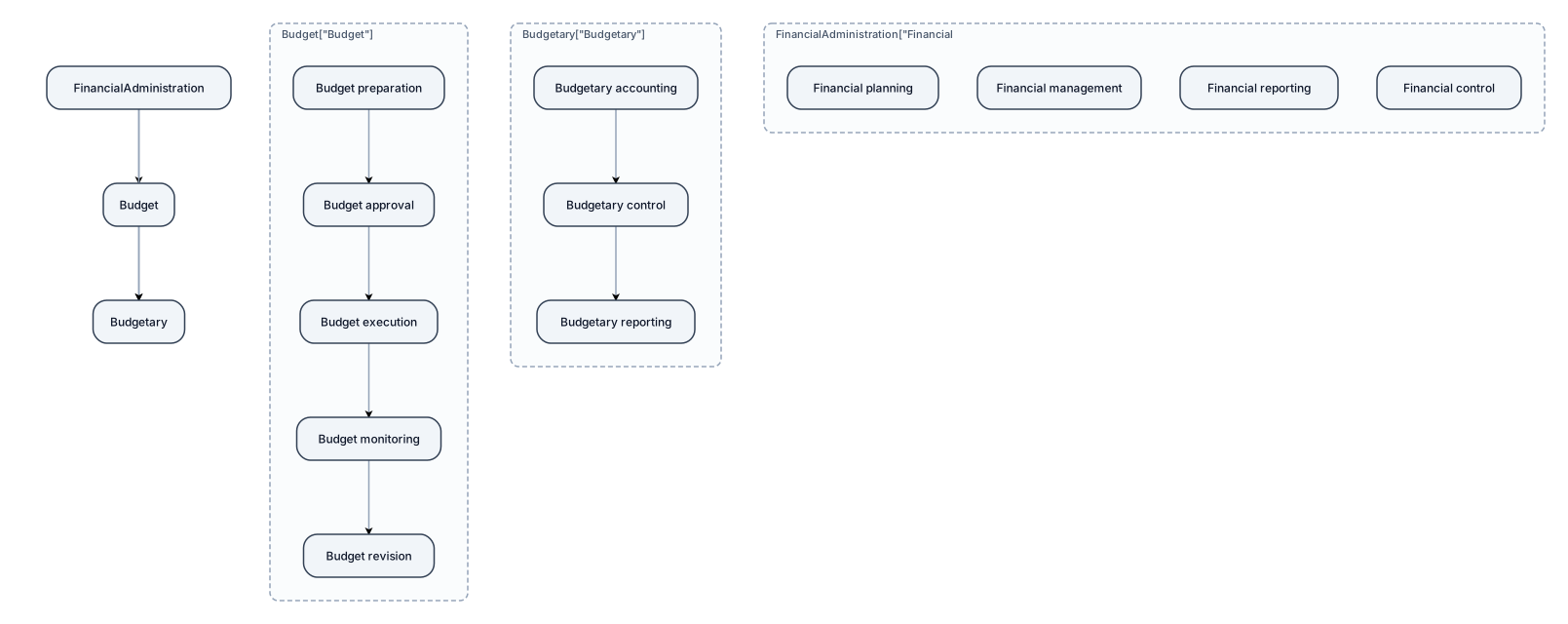
financial administration Budget Budgetary
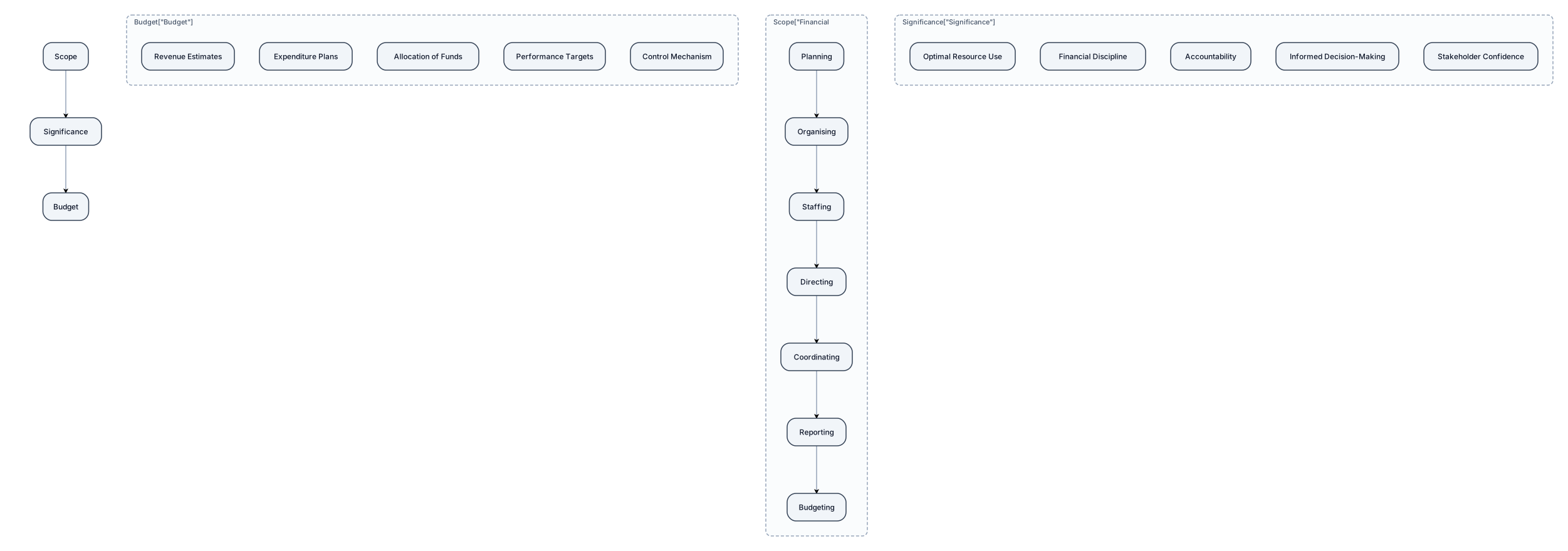
financial administration, meaning Scope and significance, Budget

accounting chart cashflow outflow
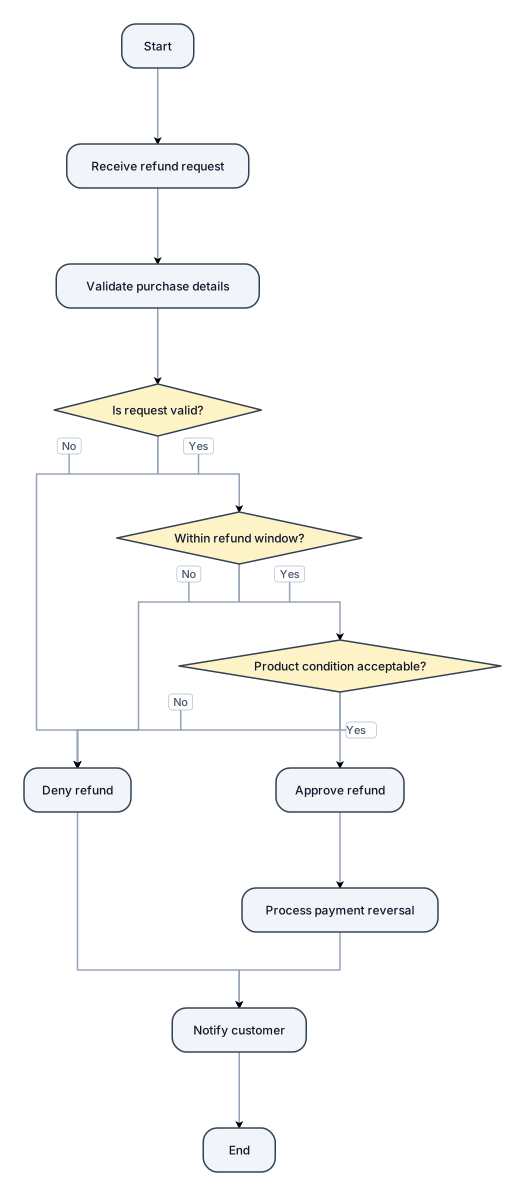
A flowchart for handling a customer refund request, with approve and deny paths