
Financial Administration
NODE ARCHIVE · REAL DIAGRAM BRIEFS
Diagram Examples from Real Visitor Prompts
Browse eligible diagrams shared by FreeDiagram visitors, inspect the exact prompts, and build your own version.
Browse 3261 real creationsCOMMUNITY OUTPUTS · EXACT PROMPTS
All visitor creations
Showing 97–120 of 3261. No stock examples or system defaults. Choose a tool, study a real result, then reopen its prompt as your starting point.
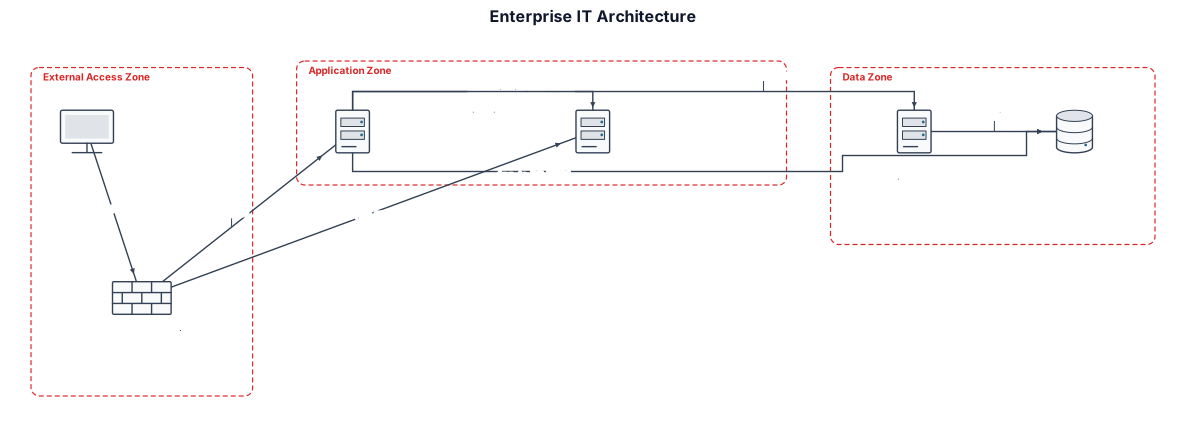
External Users access the system through HTTPS port 443. Frontend Security Server 2 acts as a Reverse Proxy. VM-01: Application Server, 8 vCPU, 8 GB RAM, 300 GB storage. VM-02: Data Ingestion Server, 8 vCPU, 16 GB RAM, 300 GB storage. VM-03: Database Server, 8 vCPU, 16 GB RAM, 500 GB storage. VM-04: Keycloak SSO Server, 8 vCPU, 8 GB RAM, 300 GB storage. Use Ubuntu Server 24.04 LTS for all VMs. Show HTTPS traffic, authentication flow, application-to-database connections, and data ingestion flow. Group components into External Access Zone, Application Zone, and Data Zone. Use a clean enterprise IT architecture style with clear labels, directional arrows, and a legend. Do not invent IP addresses, ports, or connections that are not specified. Mark unspecified details as TBD.
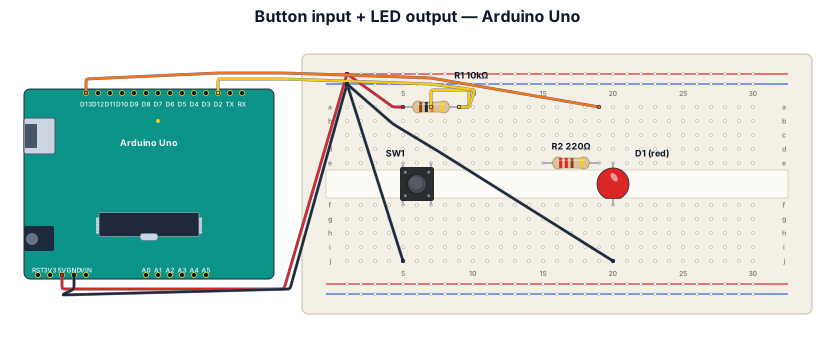
A breadboard wiring diagram for an Arduino Uno reading a button press and lighting an LED: button with pull-down resistor on D2, LED with 220-ohm resistor on D13
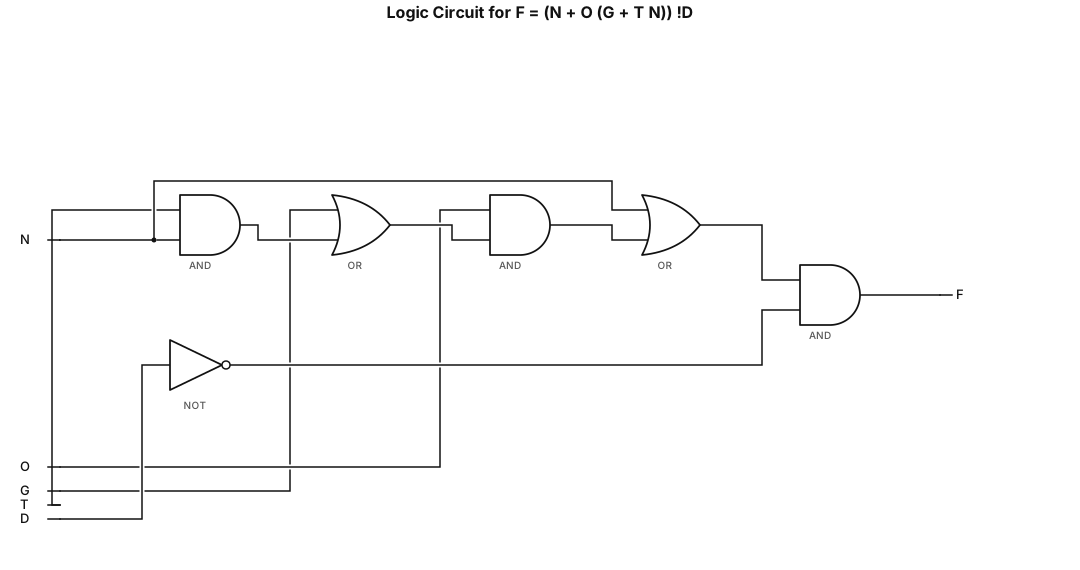
Draw the logic circuit diagram for F = (N + O (G + T N)) !D
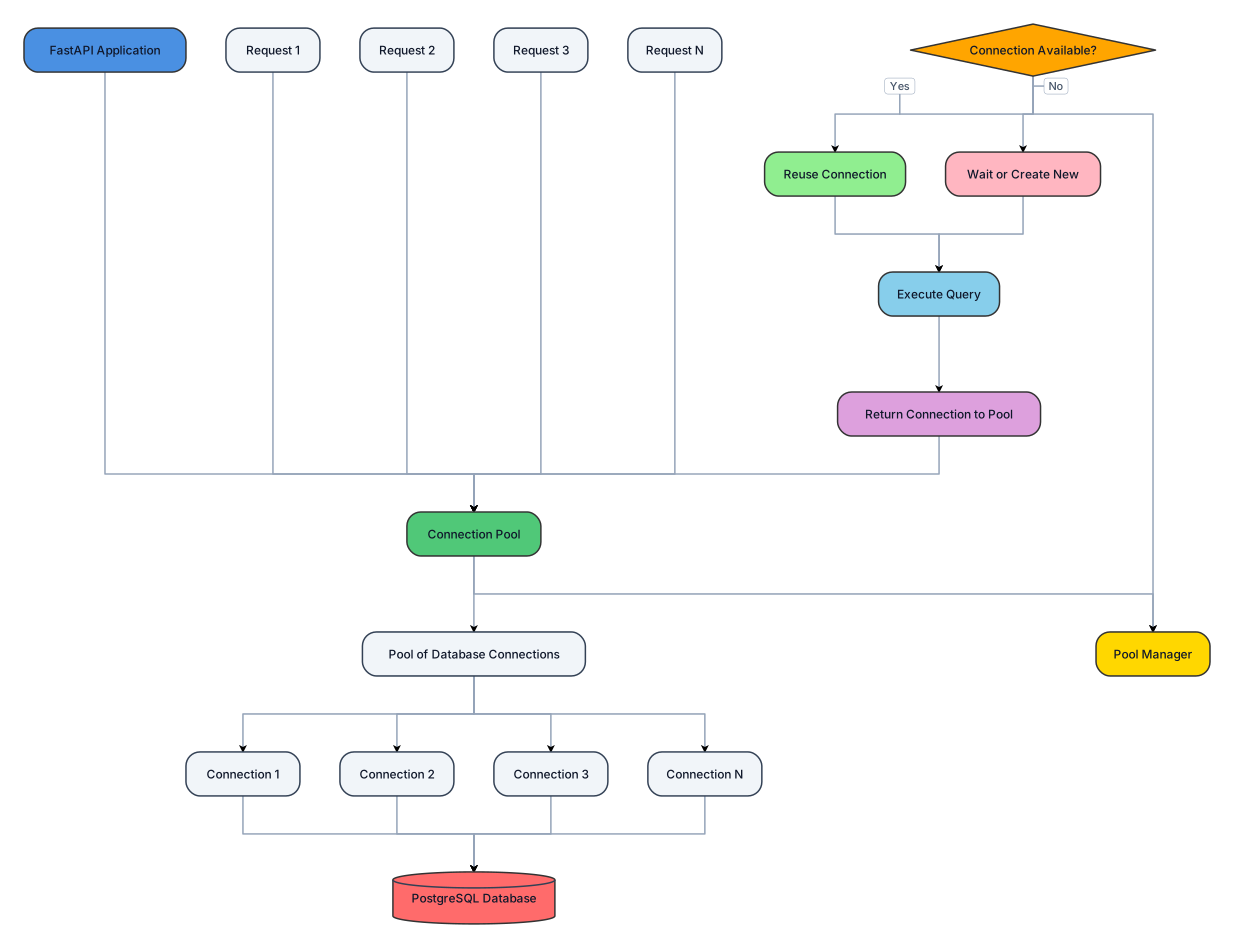
explain about the db connection pooling in fast api's psql
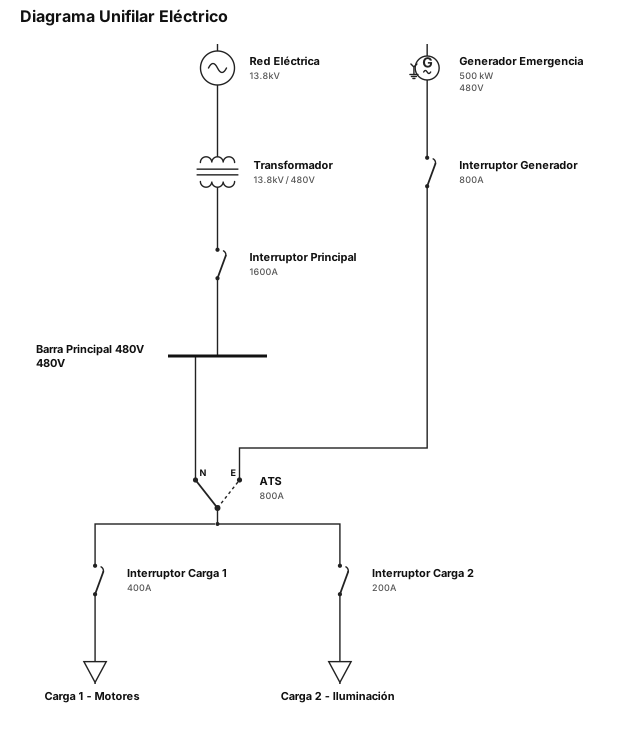
diagrama unifilar electrico
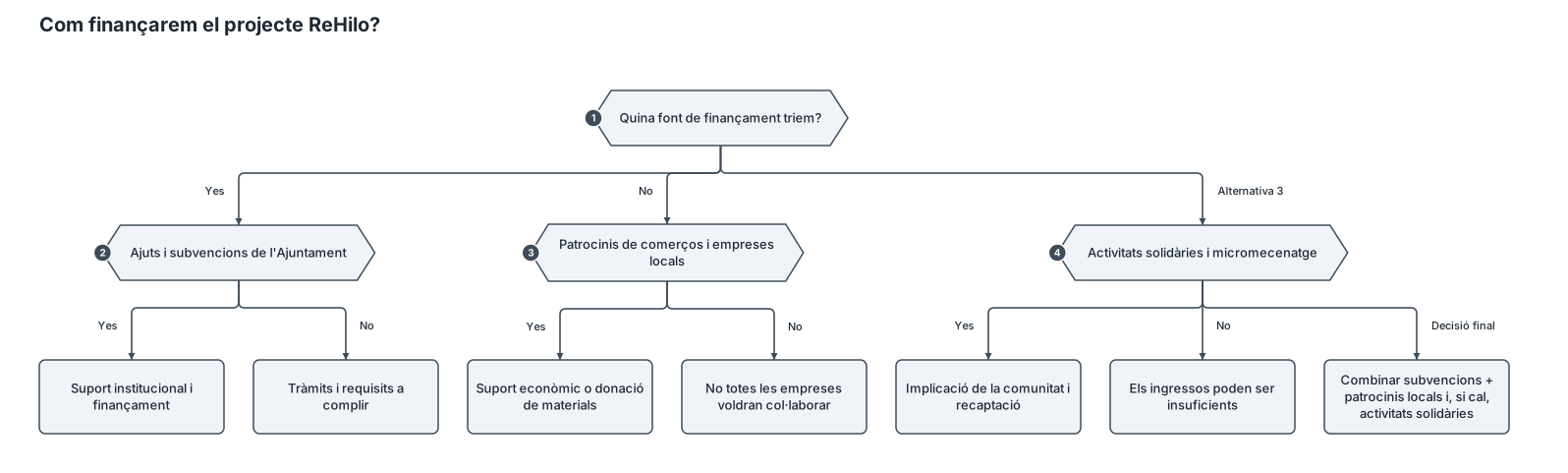
Crea un arbre de decisions visual, clar i ben organitzat en català sobre el projecte ReHilo, una desfilada de moda sostenible que uneix joves i persones grans mitjançant la reutilització de roba. **Pregunta principal:** Com finançarem el projecte? Divideix l’arbre en tres alternatives: 1. **Ajuts i subvencions de l’Ajuntament** - Avantatges: suport institucional i possibilitat d’obtenir finançament. - Inconvenients: tràmits i requisits per complir. 2. **Patrocinis de comerços i empreses locals** - Avantatges: suport econòmic o donació de materials. - Inconvenients: no totes les empreses voldran col·laborar. 3. **Activitats solidàries i micromecenatge** - Avantatges: implicació de la comunitat i recaptació de diners. - Inconvenients: els ingressos poden ser insuficients. **Decisió final recomanada:** combinar les subvencions de l’Ajuntament amb els patrocinis locals i, si cal, organitzar activitats solidàries. Afegeix connectors entre les opcions i la decisió final. Utilitza un disseny modern, sostenible i professional, amb tons verds i beix, icones de diners, comunitat i sostenibilitat. El text ha de ser breu, llegible i adequat per a un treball escolar.
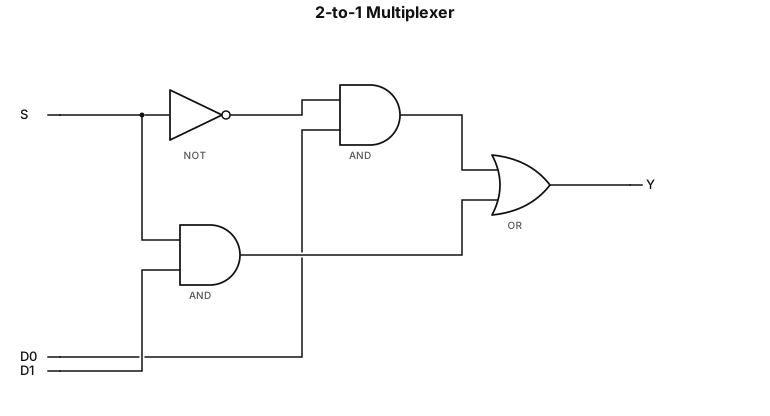
Draw one complete logic circuit diagram for a 2-to-1 multiplexer using only NOT gates, two-input AND gates, and a two-input OR gate. The circuit must have three inputs: S (select), D0 (data input 0), and D1 (data input 1). It must have one output, Y. Implement the Boolean expression: Y = (NOT S AND D0) OR (S AND D1) Connect S to a NOT gate to generate NOT S. Connect NOT S and D0 to the first two-input AND gate. Connect S and D1 to the second two-input AND gate. Connect the outputs of both AND gates to a two-input OR gate. The output of the OR gate must be labeled Y. Label all inputs, gates, wires, and the output clearly. Show all connections accurately in a single diagram. Do not add unnecessary gates.
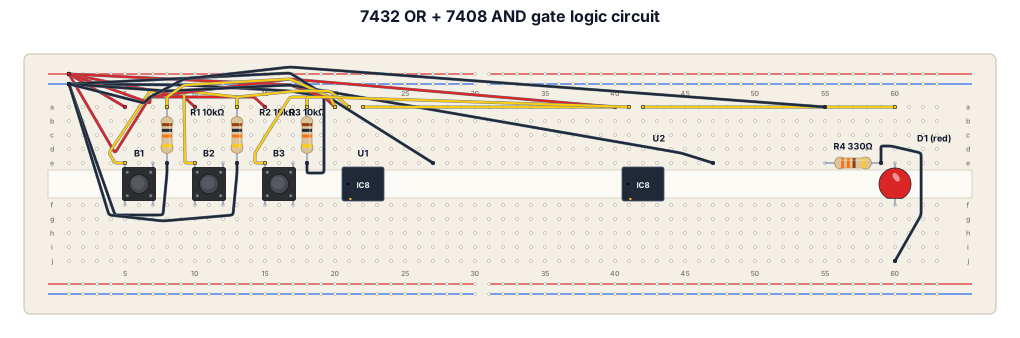
input of a 5V breadboard power module. Placing and Powering the ICs Insert the 7432 (OR gate) and 7408 (AND gate) ICs across the middle trench of the breadboard. Connect Pin 14 (top right) of both ICs to the 5V red rail. Connect Pin 7 (bottom left) of both ICs to the Ground negative rail. Wiring the Three Push Buttons Place the three buttons (Sensor A, Sensor B, and Enable) across the middle trench. Connect one leg of all three buttons directly to the 5V red rail. Connect the opposite leg of all three buttons to the Ground rail using 10kΩ resistors. The point between the button and this resistor is your signal output. Wiring the Logic Gates Connect Sensor A's signal to Pin 1 of the 7432 (OR gate). Connect Sensor B's signal to Pin 2 of the 7432. Connect a short wire from Pin 3 of the 7432 directly to Pin 1 of the 7408 (AND gate). Connect the Enable button's signal to Pin 2 of the 7408. Wiring the Output LED Connect a wire from Pin 3 of the 7408 to the long leg (anode) of your single LED. Connect the short leg (cathode) of the LED to the Ground rail using a 220Ω or 330Ω resistor.
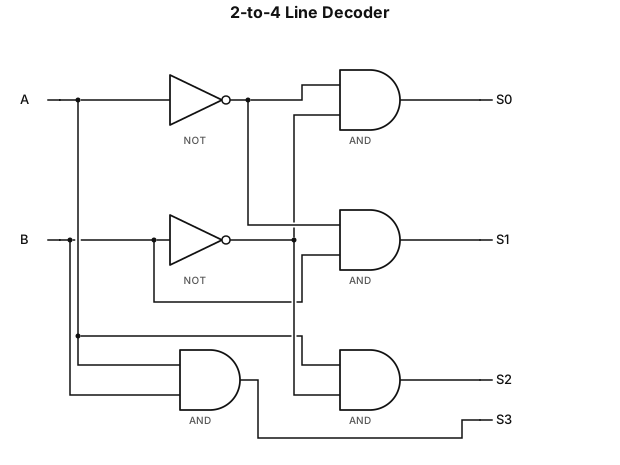
Draw one complete logic circuit diagram for a 2-to-4 line decoder, strictly using NOT gates and two-input AND gates. The circuit must have two inputs, A and B, and four outputs, S0, S1, S2, and S3. Use shared input lines A and B. Add NOT gates to generate NOT A and NOT B. Connect the signals to four separate two-input AND gates as follows: S0 = NOT A AND NOT B S1 = NOT A AND B S2 = A AND NOT B S3 = A AND B Each AND gate must produce exactly one output. Label all input lines, NOT gates, AND gates, and output lines clearly. Show all wires and connections accurately. The final result must be a single complete decoder circuit, not four separate diagrams. Do not omit any connections or add unnecessary gates.
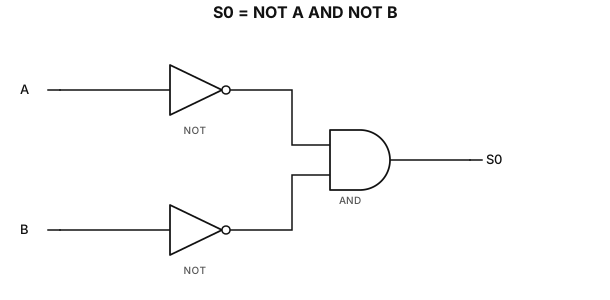
Draw the logic circuit diagram for S0 = NOT A AND NOT B, strictly using NOT gates and two-input AND gates. Inputs A, B; output S0.
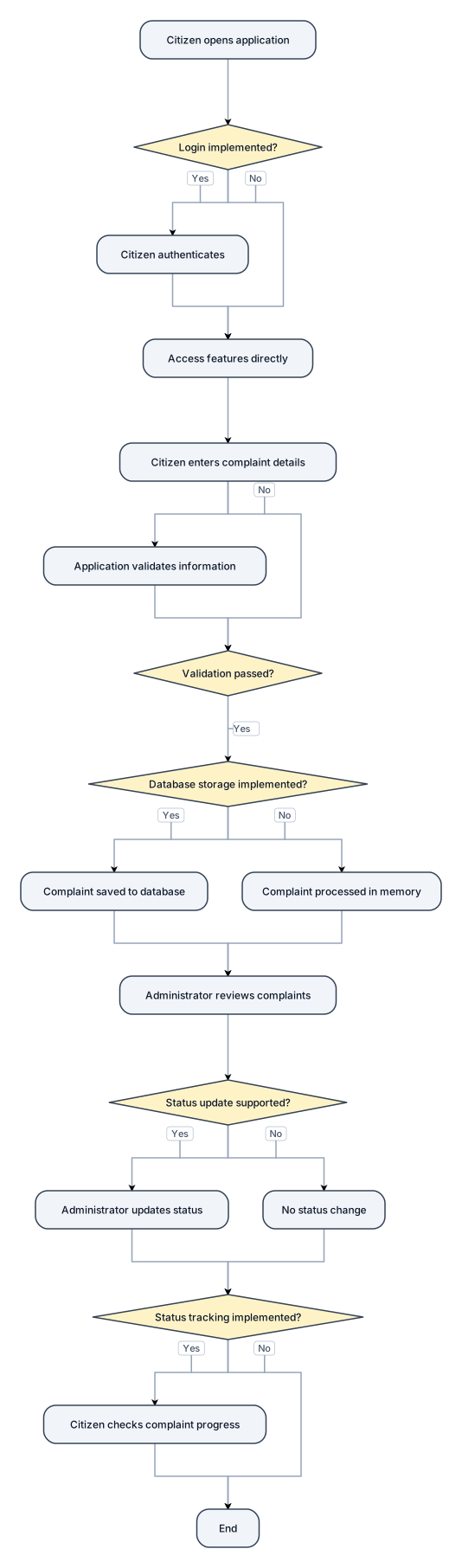
### 1. Introduction The Smart Complaint and Civic Issue Management System is designed to provide a digital platform for reporting and managing civic issues. It aims to organize the complaint-handling process by allowing citizens to report problems and enabling authorized administrators to review complaints. ### 2. Working Principle **Step 1: User Access** The citizen opens the application and accesses the available features. If login functionality is implemented, the citizen authenticates using the supported credentials. **Step 2: Complaint Submission** The citizen enters the required complaint details, such as the description, category, and location, according to the fields available in the application. **Step 3: Information Validation** The application checks the submitted information according to its implemented validation rules. **Step 4: Complaint Storage** If database storage is implemented, the complaint details are saved so that they can be retrieved later. **Step 5: Administrative Review** The administrator reviews submitted complaints through the administrative interface, if available. **Step 6: Status Update** The complaint status is updated by an authorized administrator if the application supports this functionality. **Step 7: Status Tracking** The citizen can check the complaint's progress if the application includes a status-tracking feature. ### 3. Conclusion The system provides a structured approach to civic complaint management. Its actual capabilities depend on the features implemented in the prototype. The drawings and working principle should accurately represent the developed system.

Create a clean, black-and-white technical diagram titled: "FIG. 3 — COMPLAINT STATUS LIFECYCLE" Show complaint statuses in a horizontal sequence using rectangular boxes connected by directional arrows: Submitted → Under Review → In Progress → Resolved → Closed Use a plain white background, thin black outlines, clear directional arrows, and readable labels. Keep the design simple and suitable for an academic patent-drawing assignment. Do not include decorative graphics, colours, shadows, or unnecessary icons. Only include statuses that are supported by the actual application. If the application uses different statuses, use those instead.
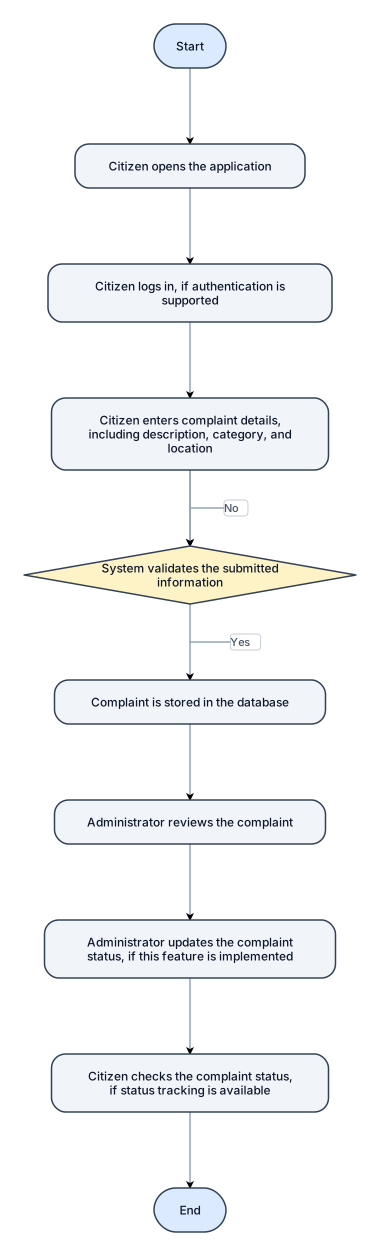
Create a clean, black-and-white technical flowchart titled: "FIG. 2 — WORKING FLOWCHART OF SMART COMPLAINT AND CIVIC ISSUE MANAGEMENT SYSTEM" Show the following steps in order using simple flowchart shapes and directional arrows: 1. Start 2. Citizen opens the application 3. Citizen logs in, if authentication is supported 4. Citizen enters complaint details, including description, category, and location 5. System validates the submitted information 6. If information is valid, the complaint is stored in the database 7. Administrator reviews the complaint 8. Administrator updates the complaint status, if this feature is implemented 9. Citizen checks the complaint status, if status tracking is available 10. End Use a decision diamond for validation, with Yes and No arrows. The No arrow should return to the complaint details step for correction. Use a white background, black outlines, readable text, and a professional engineering-diagram layout. Avoid decorative graphics and colours. Make the diagram suitable for an academic patent-drawing assignment.
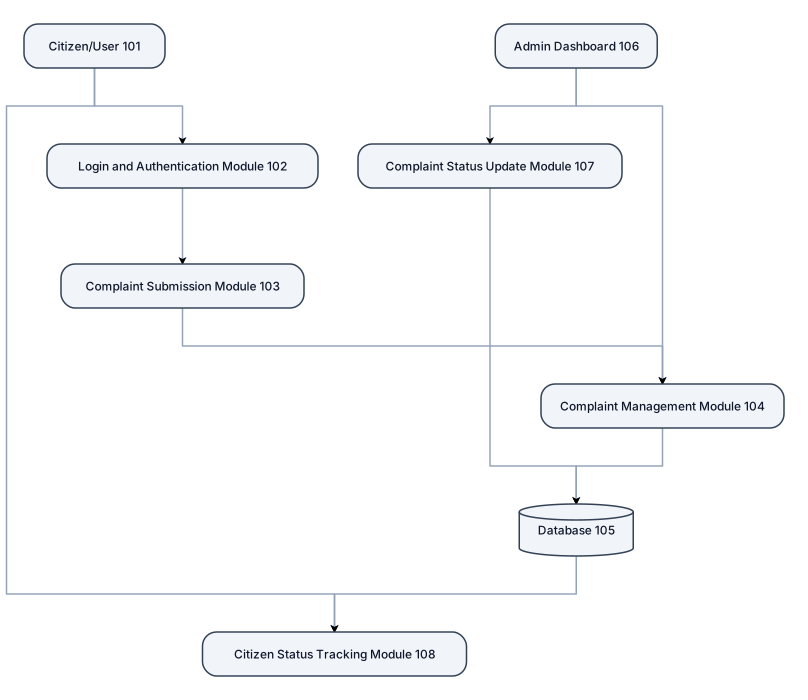
Create a professional black-and-white patent-style technical drawing for a project titled "Smart Complaint and Civic Issue Management System". FIG. 1 — OVERALL SYSTEM ARCHITECTURE Include the following components in separate rectangular boxes with clear directional arrows: 1. Citizen/User (101): The user who reports civic problems. 2. Login and Authentication Module (102): Handles user login and authentication. 3. Complaint Submission Module (103): Allows citizens to submit complaints with a description, category, and location. 4. Complaint Management Module (104): Processes and manages submitted complaints. 5. Database (105): Stores complaint records and related information. 6. Admin Dashboard (106): Allows administrators to view, review, and manage complaints. 7. Complaint Status Update Module (107): Updates complaint progress. 8. Citizen Status Tracking Module (108): Allows citizens to check the status of their complaints. Show the workflow using directional arrows: Citizen/User → Login and Authentication → Complaint Submission → Complaint Management → Database. Connect the Admin Dashboard to Complaint Management and show the administrator updating the complaint status. Connect the status tracking module to the stored complaint information so that citizens can view the latest status. Drawing requirements: * Plain white background. * Black outlines and black text only. * Simple rectangular boxes and clear directional arrows. * Consistent spacing and alignment. * Reference numerals next to all components. * No decorative graphics, gradients, shadows, or unnecessary icons. * Use readable technical labels and a clean engineering drawing layout. * Keep the diagram suitable for an academic patent-drawing assignment. * Export the final diagram as a high-resolution PNG or PDF.

Create a minimalist, elegant DNA double helix diagram suitable for a fine-line tattoo, encoding the hidden message “SHONE MEE PAPA” using DNA codons. Exact DNA sequence (5′ → 3′): TCA CAT TAG AAT GAA | ATG GAA GAG | CCG GCT CCA GCA The TAG codon represents pyrrolysine (O) using the specialised genetic code, rather than its usual STOP meaning. Illustrate a scientifically accurate, right-handed DNA double helix with all 36 base pairs, correct complementary bases (A–T, C–G), and antiparallel strands. Use fine cobalt-blue lines with subtle golden-yellow accents, a clean white background and a graceful vertical composition. Keep the design simple, balanced and tattoo-friendly, with no unnecessary decorations. The message should remain hidden within the DNA structure. Important: Preserve the exact nucleotide sequence and codon order. Include a small separate reference showing how the codons spell SHONE MEE PAPA.
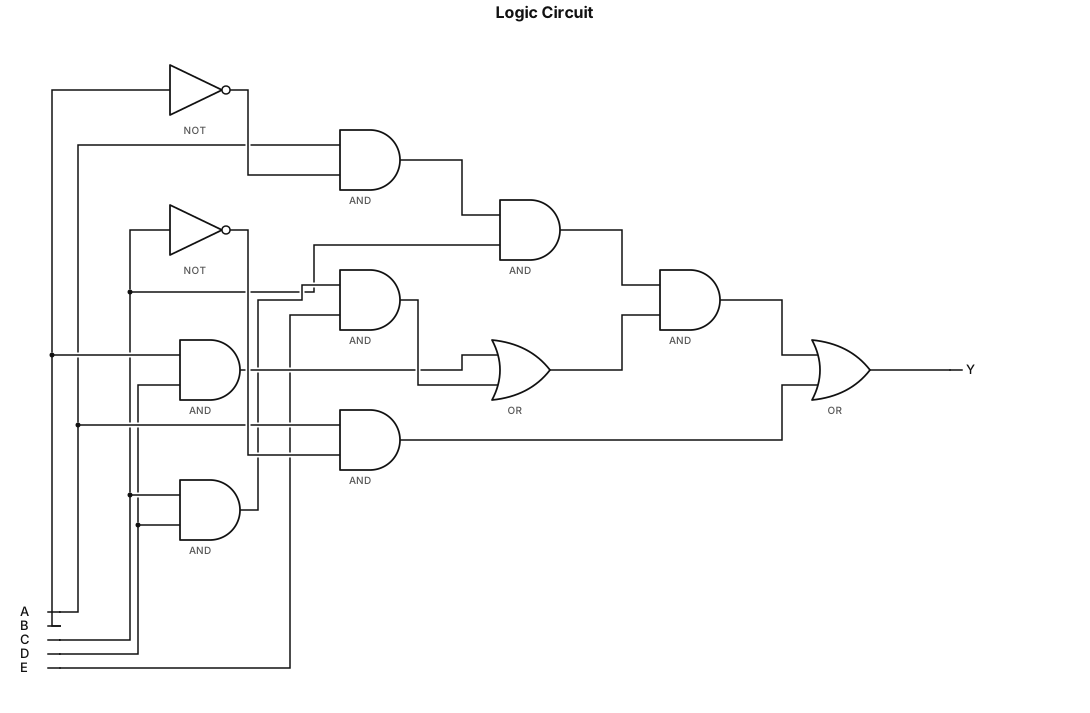
Draw the logic circuit diagram for A*B'*C*(B*D + C*D*E) + A*C'
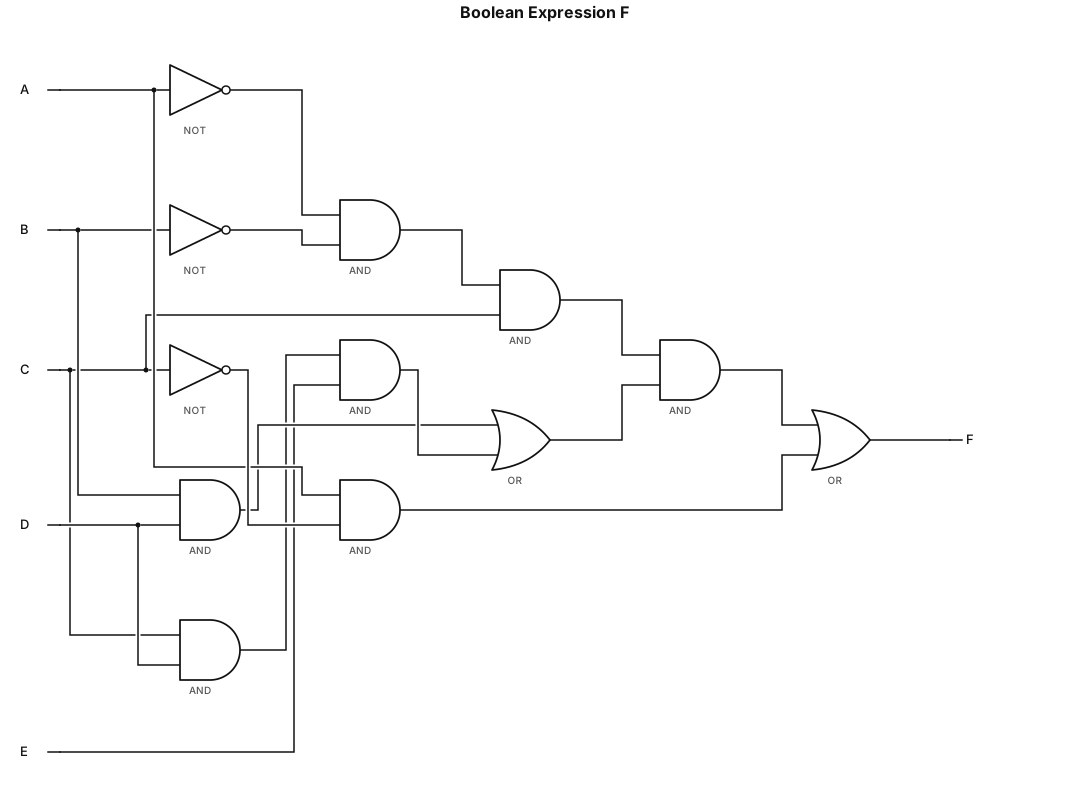
F = A'*B'*C*(B*D + C*D*E) + A*C'
![Flowchart example: flowchart TD A["Food-101 Dataset"] --> B["Select 10 Food Categories"] B --> C["Image Preprocessing"] C --> D["Data Augmentation"] D --> E["Train / Val](https://psvtykrtciekraoilfux.supabase.co/storage/v1/object/public/gallery-assets/freediagram/feed/55faef78-a251-49fd-94ff-6c443b9e18f2.svg)
flowchart TD A["Food-101 Dataset"] --> B["Select 10 Food Categories"] B --> C["Image Preprocessing"] C --> D["Data Augmentation"] D --> E["Train / Validation / Test Split"] E --> F["Pretrained ResNet-50"] F --> G["Transfer Learning"] G --> H["Fine-Tuning"] H --> I["Food Category Prediction"] I --> J["Model Evaluation"] J --> K["Accuracy, Precision, Recall, F1"] J --> L["Confusion Matrix and ROC Curve"]
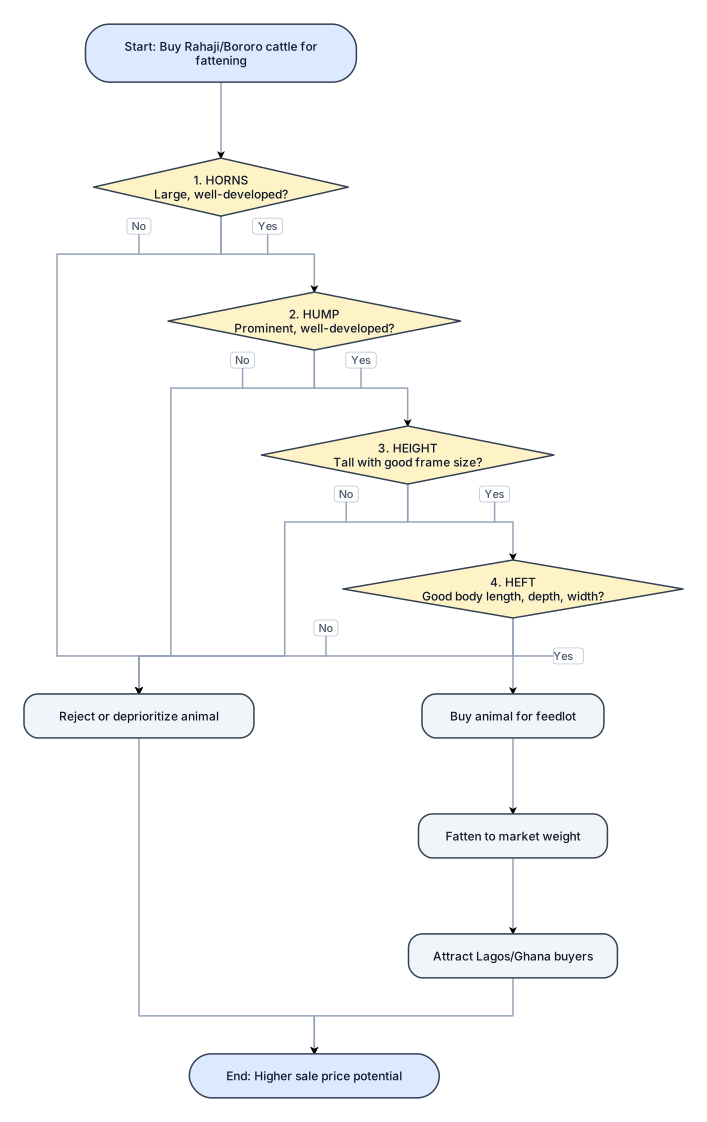
🐂 THE FOUR Hs TO LOOK OUT FOR WHEN BUYING RAHaji/BORORO CATTLE FOR FATTENING! 📢 Attention, Feedlot Operators and Cattle Fatteners in Lagos and Ghana! Do you know that when customers come to buy your fattened Rahaji/Bororo cattle, they look beyond the animal's weight? In the cattle markets of Lagos and Ghana, buyers can have very specific preferences. Horns, humps, height and overall body bulk can influence an animal's appeal and the price a buyer is willing to pay. If you want to buy cattle that will attract buyers after fattening, pay attention to these FOUR Hs! 🐂 1. HORNS Look for animals with large, well-developed horns. For buyers who value the traditional Rahaji/Bororo appearance, impressive horns can make an animal more attractive and desirable. 🐂 2. HUMP A prominent, well-developed hump is another feature many buyers appreciate. When selecting your animals, pay attention to the size and development of the hump. 🐂 3. HEIGHT Tall animals with good frame size can stand out in the market. Consider the animal's height and overall skeletal development when selecting cattle for your feedlot. 🐂 4. HEFT Heft refers to the animal's overall bulk, body capacity and muscular development. Look for cattle with good body length, depth and width, as well as the potential to develop substantial weight during fattening. 💡 THE SMART FEEDLOT OPERATOR KNOWS: Buying cattle for fattening is not just about finding animals at the right price. It is also about understanding what your target customers want to buy.
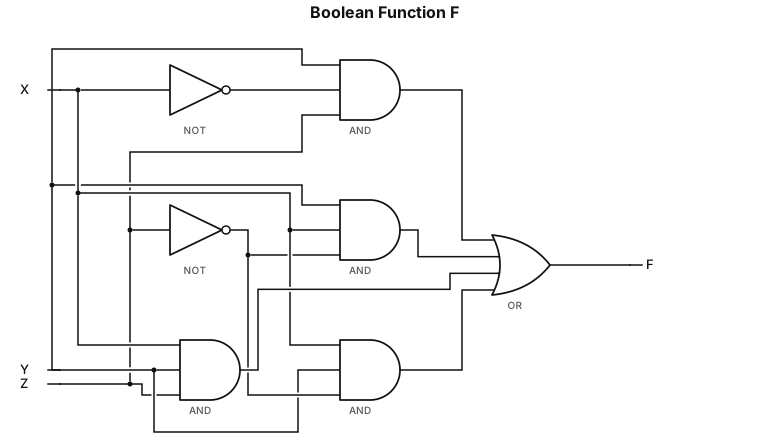
F = YX'Z + YXZ' + XYZ + XYZ'
F = Y(X'Z + XZ') + X(YZ + YZ')
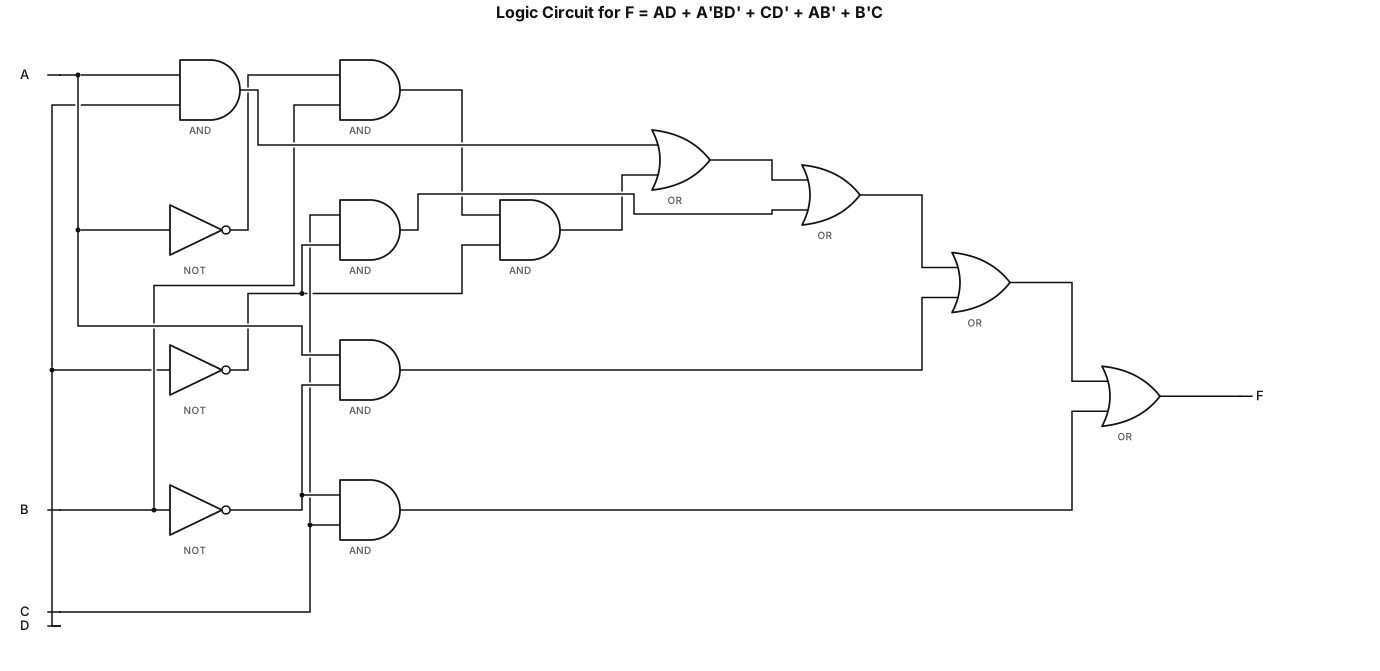
Draw the logic circuit diagram for F = AD+A'BD'+CD'+AB'+B'C
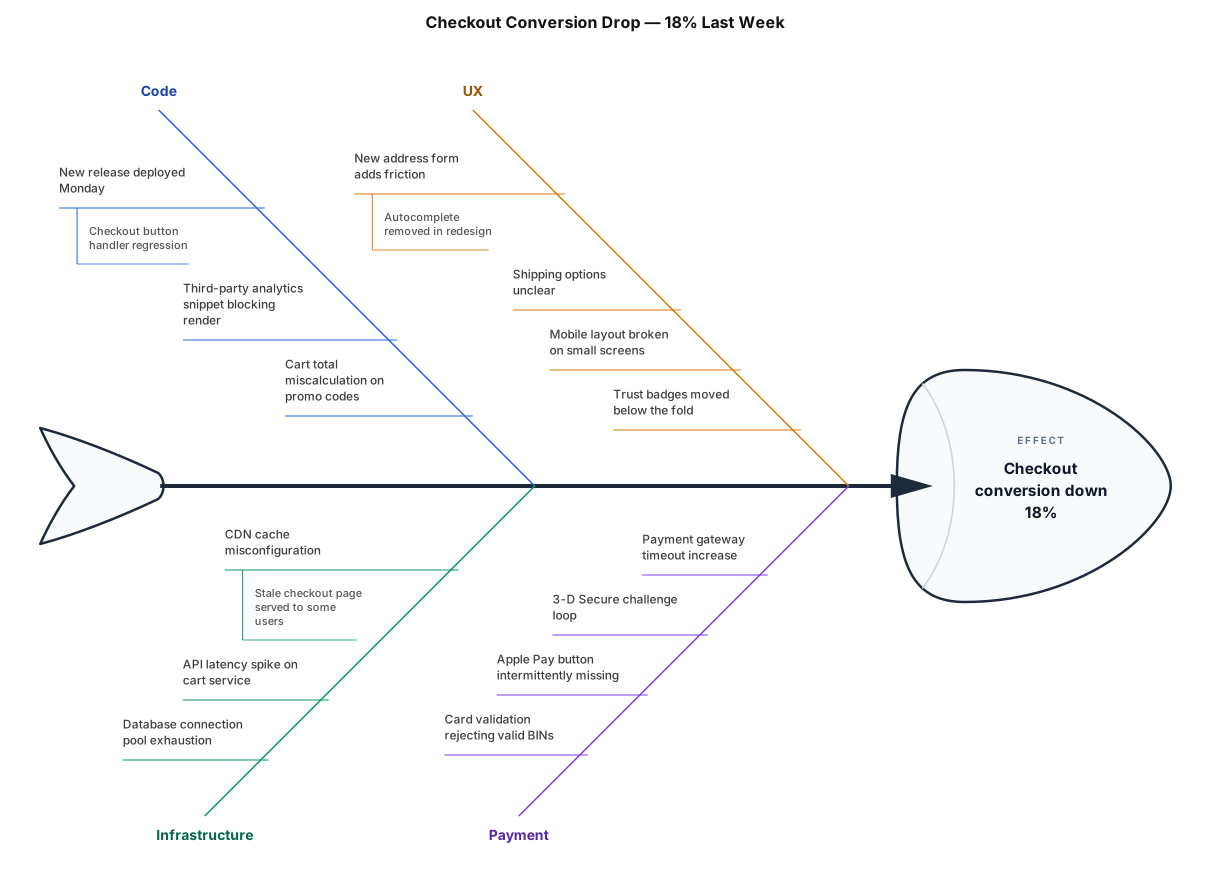
A fishbone diagram analysing why checkout conversion dropped 18% last week: categories for Code, Infrastructure, UX, and Payment