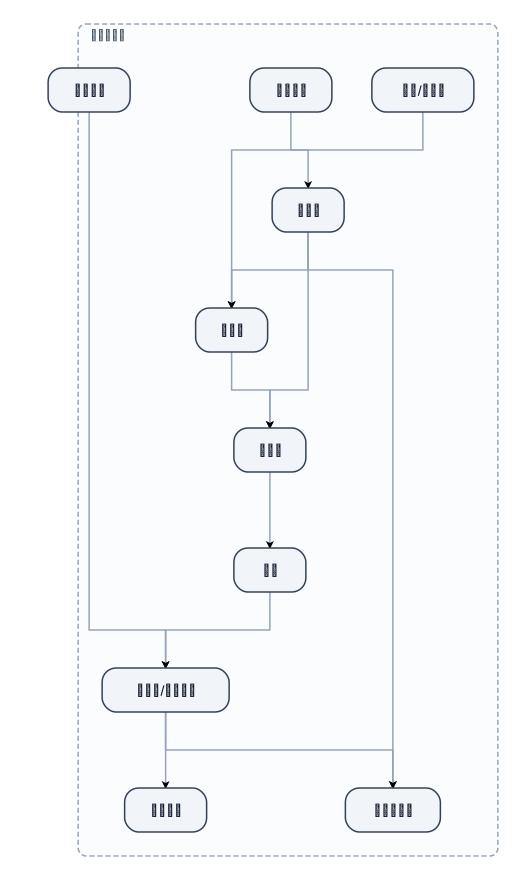
模具用模溫機流程
NODE ARCHIVE · REAL DIAGRAM BRIEFS
Diagram Examples from Real Visitor Prompts
Browse eligible diagrams shared by FreeDiagram visitors, inspect the exact prompts, and build your own version.
Browse 3288 real creationsCOMMUNITY OUTPUTS · EXACT PROMPTS
All visitor creations
Showing 1297–1320 of 3288. No stock examples or system defaults. Choose a tool, study a real result, then reopen its prompt as your starting point.
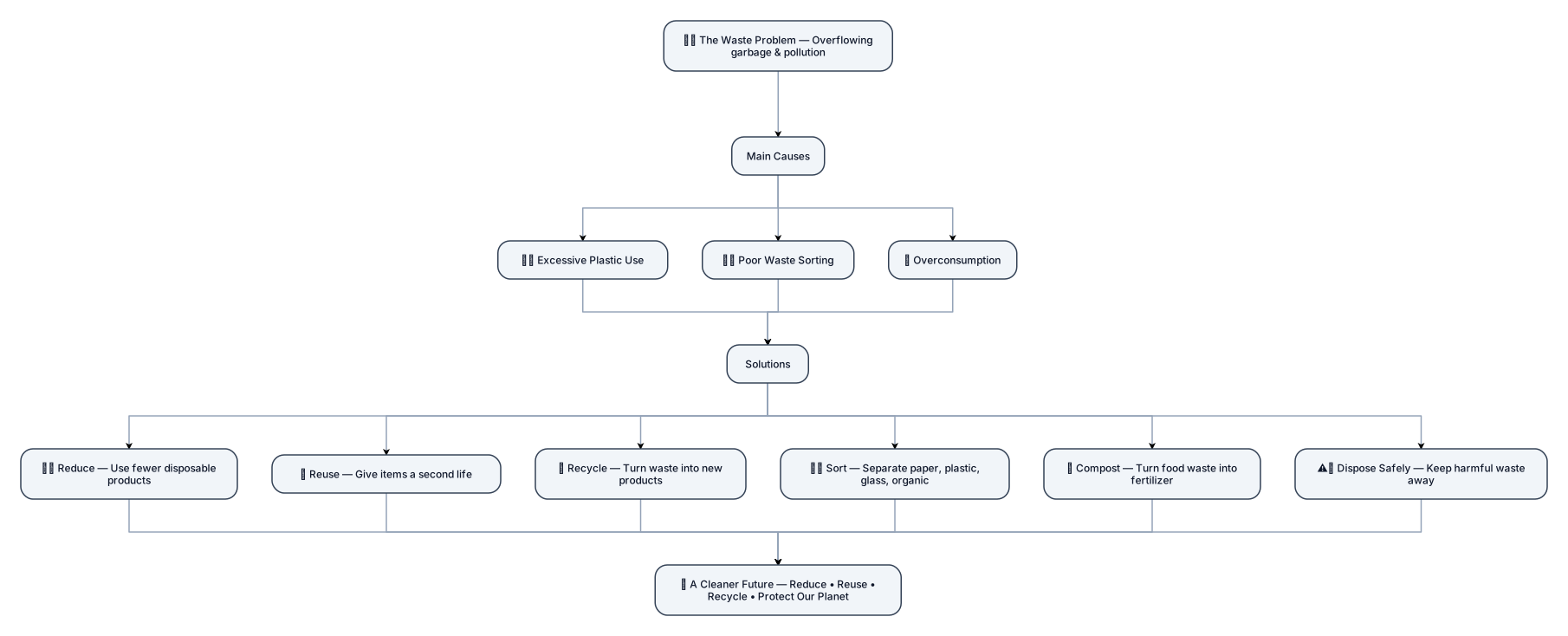
Design a professional, clean, and visually attractive educational infographic titled "Waste Management: Problems & Solutions". Use a clear vertical flowchart layout with a logical structure from top to bottom. 1. Main Problem: Put a large central section at the top titled "The Waste Problem", with a simple illustration of overflowing garbage and pollution. 2. Causes: Under it, create a section titled "Main Causes" with 3 organized cards: • Excessive Plastic Use • Poor Waste Sorting • Overconsumption 3. Solutions: Below the causes, create a large section titled "Solutions" with 6 equal-sized cards arranged neatly in a 2×3 grid: • Reduce — Use fewer disposable products. • Reuse — Give items a second life. • Recycle — Turn waste into new products. • Sort — Separate paper, plastic, glass, and organic waste. • Compost — Turn food waste into natural fertilizer. • Dispose Safely — Keep harmful waste away from the environment. 4. Final Result: At the bottom, add a highlighted green section titled "A Cleaner Future" with the message "Reduce • Reuse • Recycle • Protect Our Planet". Design requirements: Use a professional green, blue, and white color palette. Use consistent icons, clean typography, equal spacing, aligned elements, rounded cards, and clear visual hierarchy. Make the design look like a high-quality school science project. Avoid clutter, excessive text, random decorations, and overlapping elements. Make every section clearly separated and easy to understand at a glance. Use arrows to show the flow from Problem → Causes → Solutions → Cleaner Future. Do not make it look like a presentation slide; make it look like a polished infographic poster.

Create a modern, colorful infographic in English titled "Solutions to the Waste Problem." Place "Waste Problem" in the center, with six main solutions around it: Reduce Plastic Use, Sort Waste, Reuse Items, Recycle, Compost Organic Waste, and Safe Waste Disposal. Use clear icons, green and blue environmental colors, short easy-to-read descriptions, arrows connecting the ideas, and a clean layout suitable for a school project.
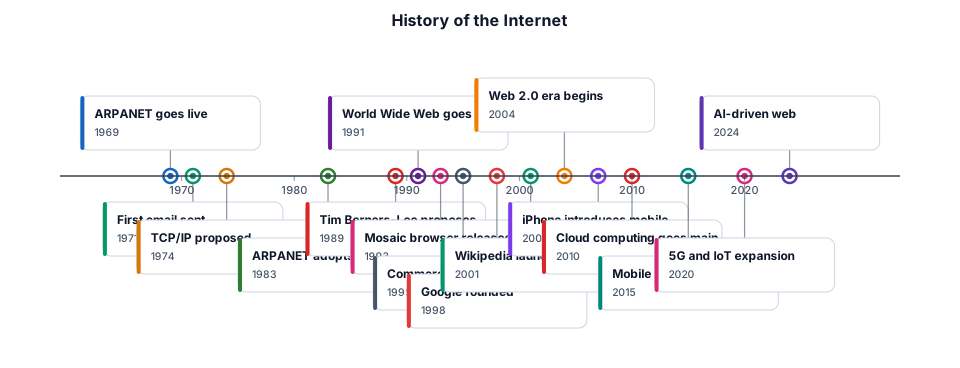
The history of the internet from ARPANET in 1969 to the modern web
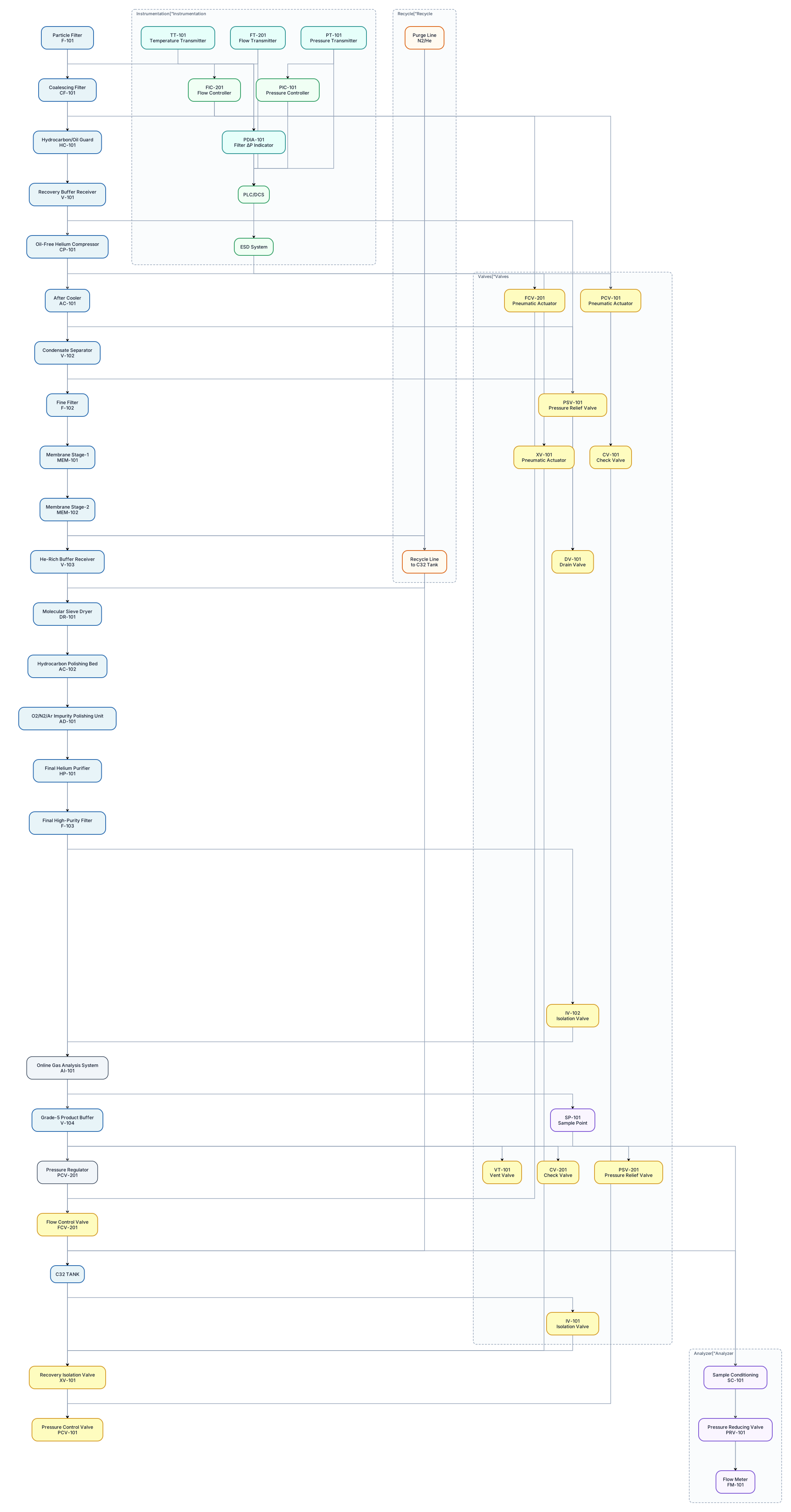
Use standard ISA-style P&ID conventions and show: - equipment tags - valve tags - instrument tags - process lines - flow direction arrows - control loops - pressure transmitters - temperature transmitters - flow transmitters/controllers - pressure control valves - isolation valves - check valves - pressure relief valves - filter differential pressure indication - drains/vents - sample points - analyzer sample conditioning - recycle lines - purge lines - emergency shutdown/interlock signals - PLC/DCS signal connections - pneumatic actuator connections where applicable. PROCESS SEQUENCE: C32 TANK → Recovery Isolation Valve XV-101 → Pressure Control Valve PCV-101 → Particle Filter F-101 → Coalescing Filter CF-101 → Hydrocarbon/Oil Guard HC-101 → Recovery Buffer Receiver V-101 → Oil-Free Helium Compressor CP-101 → After Cooler AC-101 → Condensate Separator V-102 → Fine Filter F-102 → Membrane Stage-1 MEM-101 → Membrane Stage-2 MEM-102 → He-Rich Buffer Receiver V-103 → Molecular Sieve Dryer DR-101 → Hydrocarbon Polishing Bed AC-102 → O2/N2/Ar Impurity Polishing Unit AD-101 → Final Helium Purifier HP-101 → Final High-Purity Filter F-103 → Online Gas Analysis System → Grade-5 Product Buffer V-104 → Pressure Regulator PCV-201 → Flow Control FCV-201 → C32 Tank.
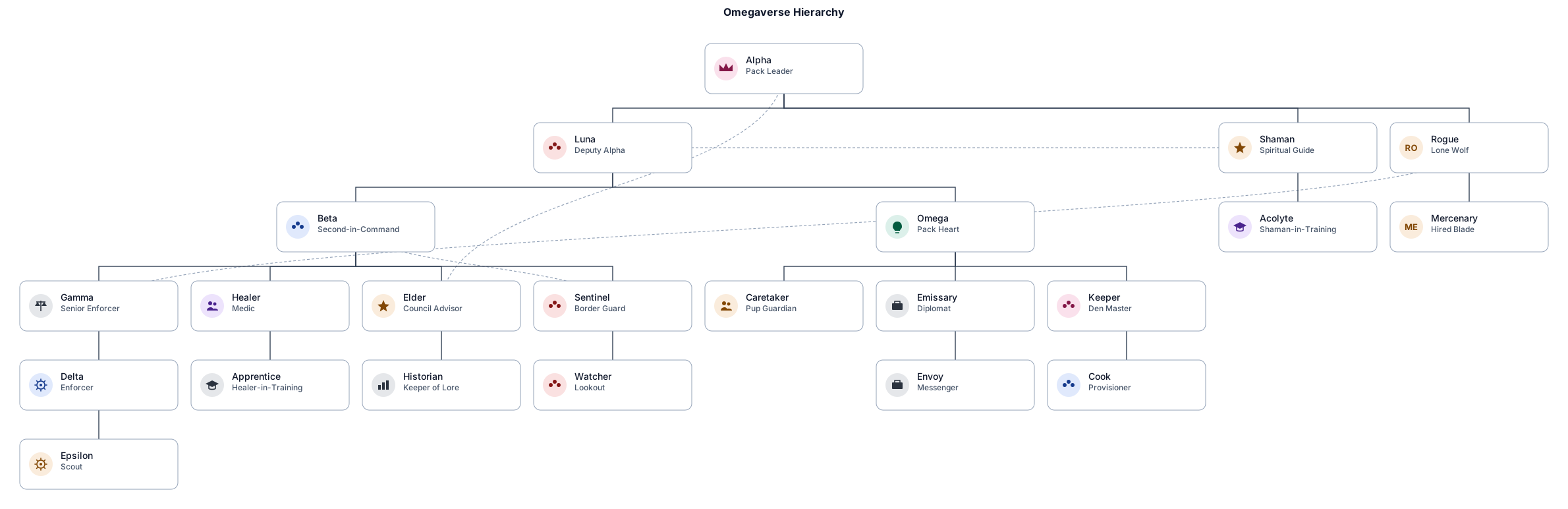
hierarchy for omegaverse, top to bottom (for example: Alpha / Luna — Deputy — Healer / Medic — etc) (make it accurate to omegaverse but add custom stuff too)
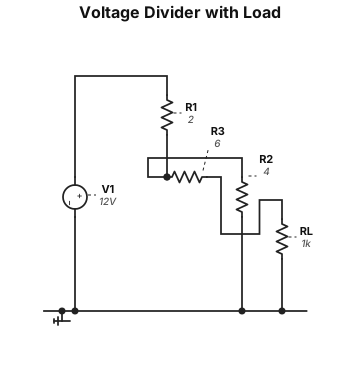
For the purposes of this question, use the following unambiguous circuit description: An ideal 12 V DC voltage source has its negative terminal connected to ground. Its positive terminal connects through a 2 Ω resistor to node A. A 4 Ω resistor connects node A to ground. A 6 Ω resistor connects node A to output node B. The load resistor R L connects node B to ground.
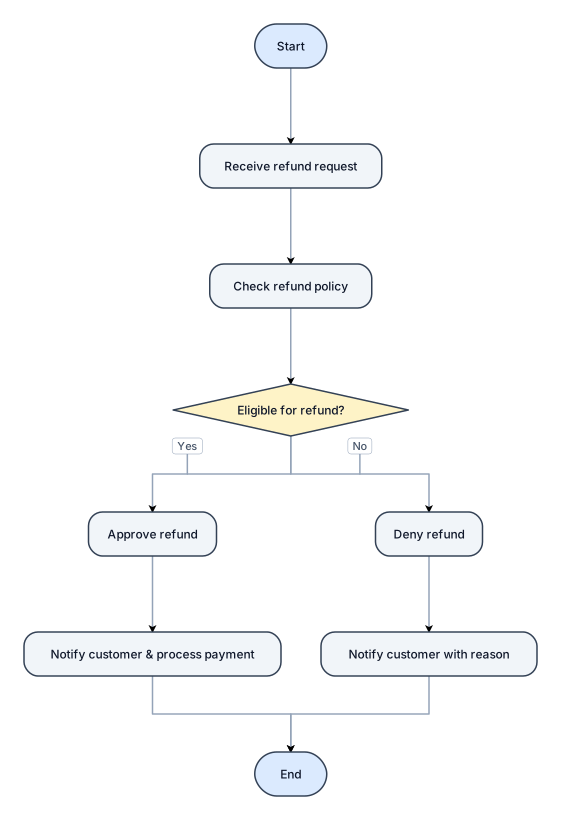
A flowchart for handling a customer refund request, with approve and deny paths
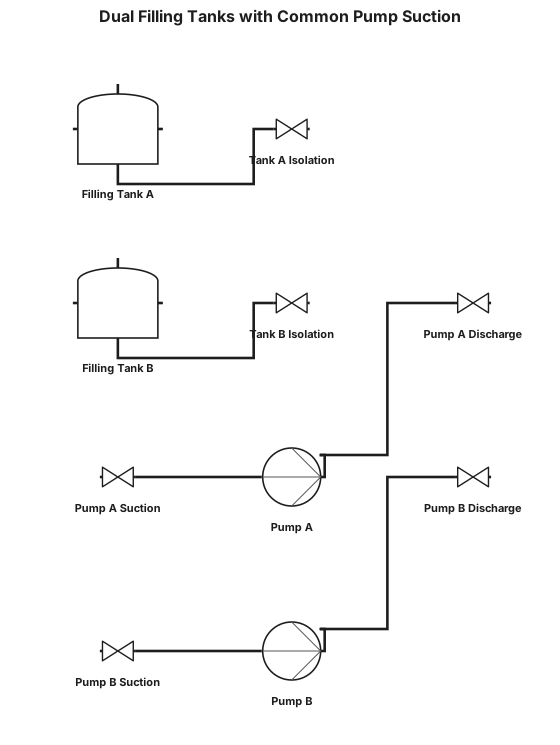
A P&ID for a two filling tanks connected to common header feeding into common suction for two centrifugal pumps which connect to a common line
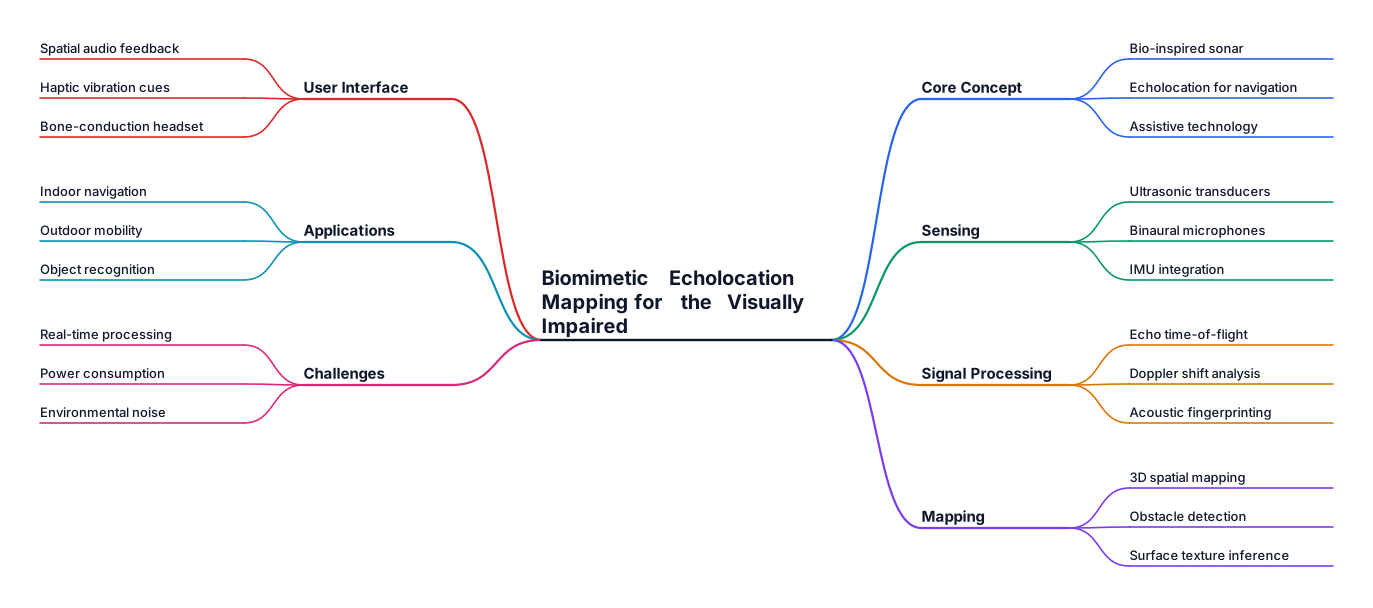
Biomimetic Echoloation Mapping for the Visually Impaired
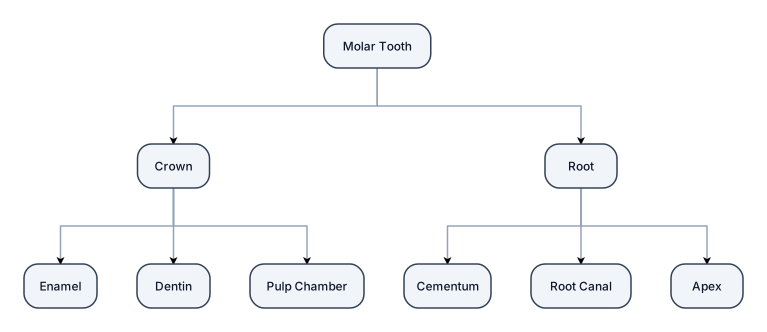
Cow me molar teeth ka image generate kro
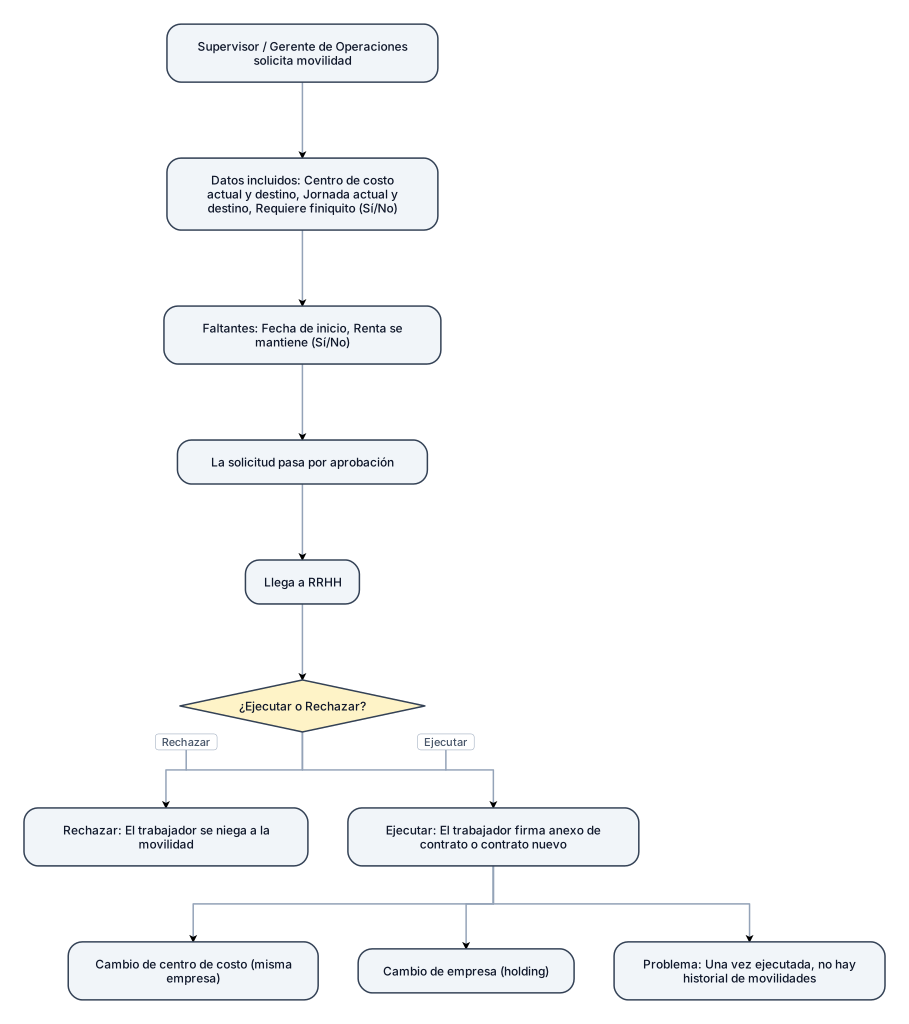
te cuento, hay una erp en mi trabajo y la idea es poder visulaizar lo que muestra cuando llegan movilidades para ejecutrar en RRHH. Te cuento, yo trabajo en un holding y por lo tamnto son muy comunes las movilidades entre empresas. Cabe destacar que dentro de las empresas hay centros de costos,por lo que a veces hay cambios de centro de costos en la misma empresa y cambios de empresa como te ddecia anteriormente. Cuando llega una movilidad, es cuando un supervisor o gerente de operaciones la solicita y pasa por un proceso de aprobacion. En esa solciitus va el centro de costo actual, el de destino, la jornada actual y la de destino y además va si requiere o no finiquito su movilidad,. Que me hace falta? que venga especificado la fecha en la cual comienza y si la renta se mantiene o no. Cuando me llega una movilidad yo tengo 2 opciones: ejecutar o rechazar. se rechaza cuando el viejito se niega a la movilidad y se ejecuta no ´se en que momento. Gnerealmente las ejecuto cuando el vijito firma el anexo de contratao o firma contrato en caso que corresponda pero lo malko es que una vezx que uno ejecuta no puedo mirar un historia de las movilidades que hice.
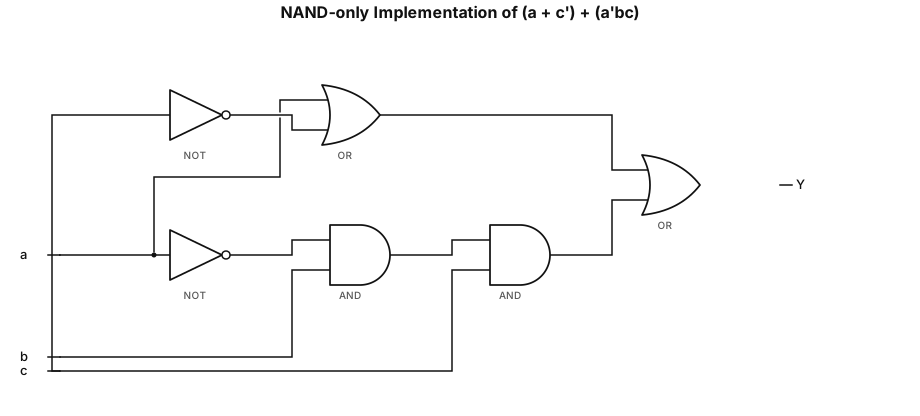
NAND-only implementation of the expression (a + c’) + (a’bc)
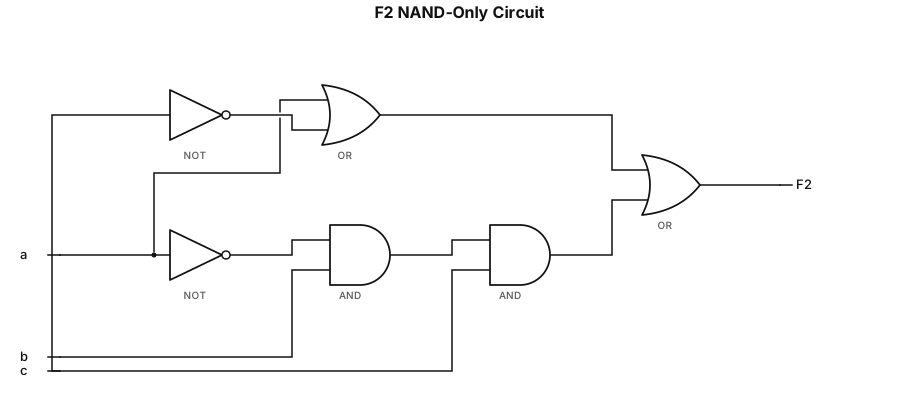
Convert the function F2(a, b, c) = (a + c’) + (a’bc) to a function with only two-input NAND gates using Demorgan’s and Involution laws. Draw the gate level circuit of the converted function
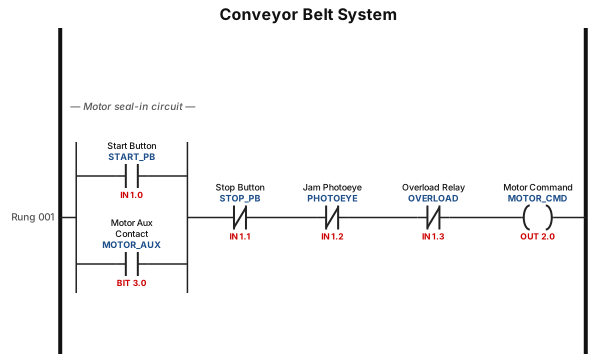
A ladder logic program for a conveyor belt system: start button seals in the motor, a photoeye stops the belt when a jam is detected, and an overload relay trips the circuit
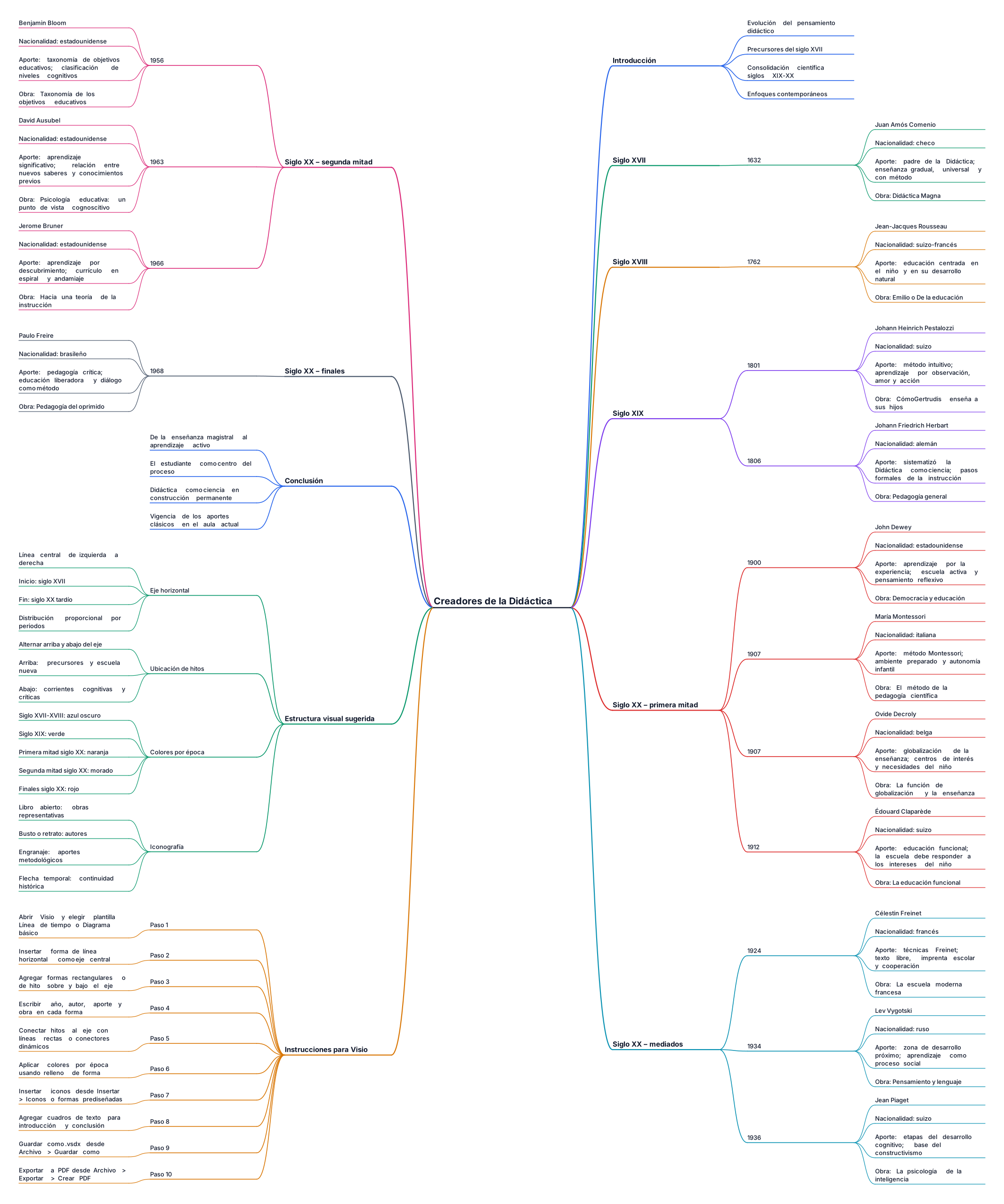
Actúa como docente experto en Didáctica y diseño instruccional. Necesito una línea de tiempo sobre la Unidad I – Tema 3: "Creadores de la Didáctica", para presentarla en la herramienta Visio (Microsoft Office) o, en su defecto, Creately. CONTEXTO ACADÉMICO - Nivel: universitario / formación docente. - Propósito: mostrar la evolución del pensamiento didáctico identificando a sus principales autores, sus aportes y el contexto histórico en que surgieron. - Fuente: contenido visto en la Unidad I, Tema 3 del curso. QUÉ DEBES ENTREGAR 1. Una lista de 8 a 12 hitos ordenados cronológicamente, desde los precursores (s. XVII) hasta la época contemporánea. Para cada hito incluye: - Año o periodo. - Nombre completo del autor (y nacionalidad). - Aporte principal a la Didáctica en una frase breve (máx. 20 palabras). - Obra representativa, si aplica. 2. Una breve introducción (3-4 líneas) y una conclusión (3-4 líneas) para colocar al inicio y al final de la línea de tiempo. 3. Sugerencia de estructura visual: cómo distribuir el eje horizontal, dónde colocar cada hito (arriba/abajo), colores por época o corriente, y tipo de iconografía. AUTORES DE REFERENCIA A CONSIDERAR (amplía si lo consideras necesario) Juan Amós Comenio, Juan Jacobo Rousseau, Johann Heinrich Pestalozzi, Johann Friedrich Herbart, John Dewey, María Montessori, Ovide Decroly, Édouard Claparède, Lev Vygotski, Jean Piaget, David Ausubel, Jerome Bruner, Célestin Freinet, Paulo Freire, Benjamín Bloom. FORMATO DE SALIDA - Tabla con columnas: Año | Autor | Aporte principal | Obra. - Orden estrictamente cronológico (del más antiguo al más reciente). - Redacción clara, académica y sin texto redundante. - Al final, un párrafo con instrucciones paso a paso para trasladar esa tabla a Visio (insertar formas, conectar con líneas, agregar texto y guardar como .vsdx o exportar a PDF). Responde en español.
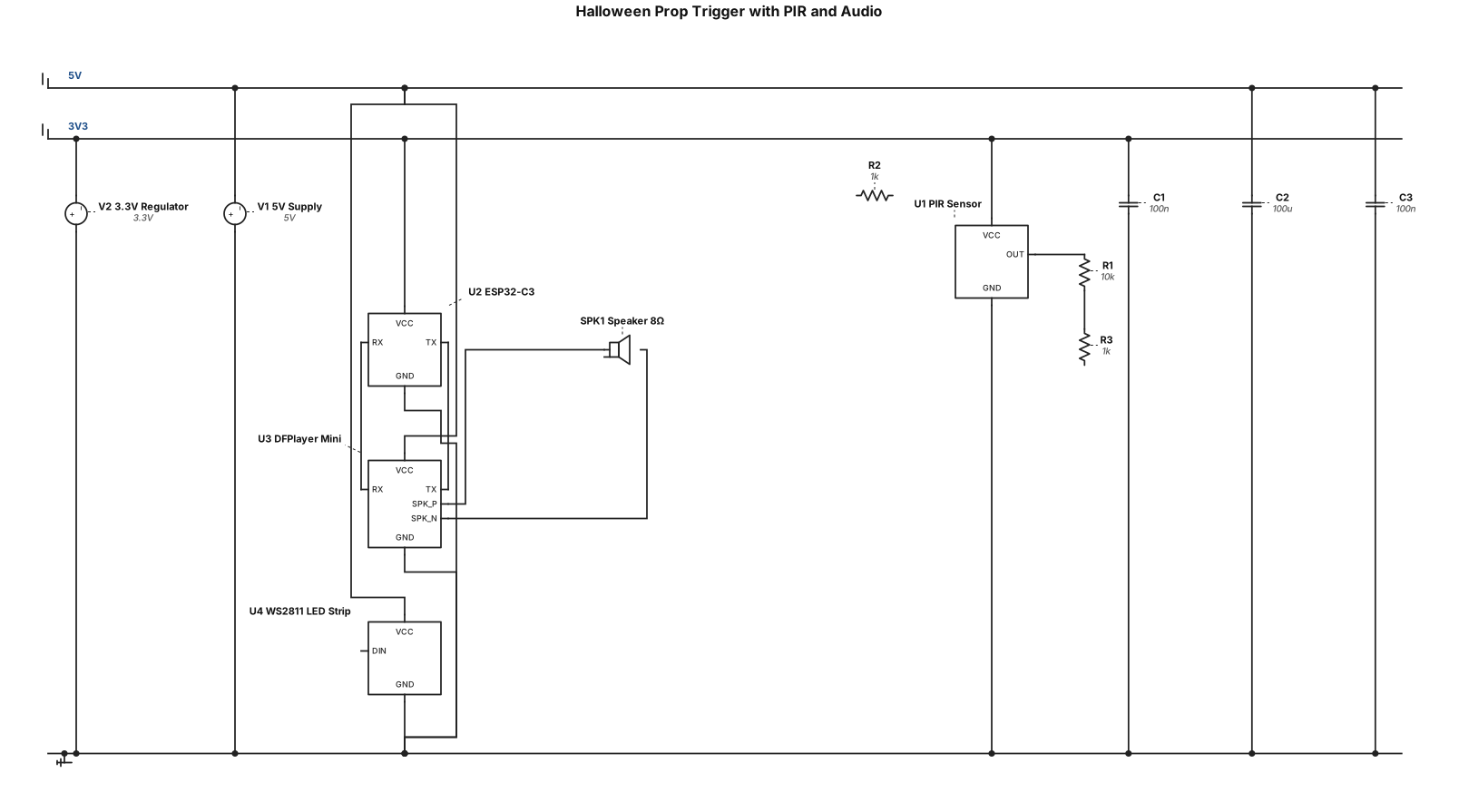
create a halloween prop trigger that uses a pir detector. When movement detected it should trigger a sound and light effect. Audio can be played from a dfplayer mini and you should use an esp32-c3. When the sound plays, some ws2811 leds shoud change from a red flowing mode to a white strobscope during playback.
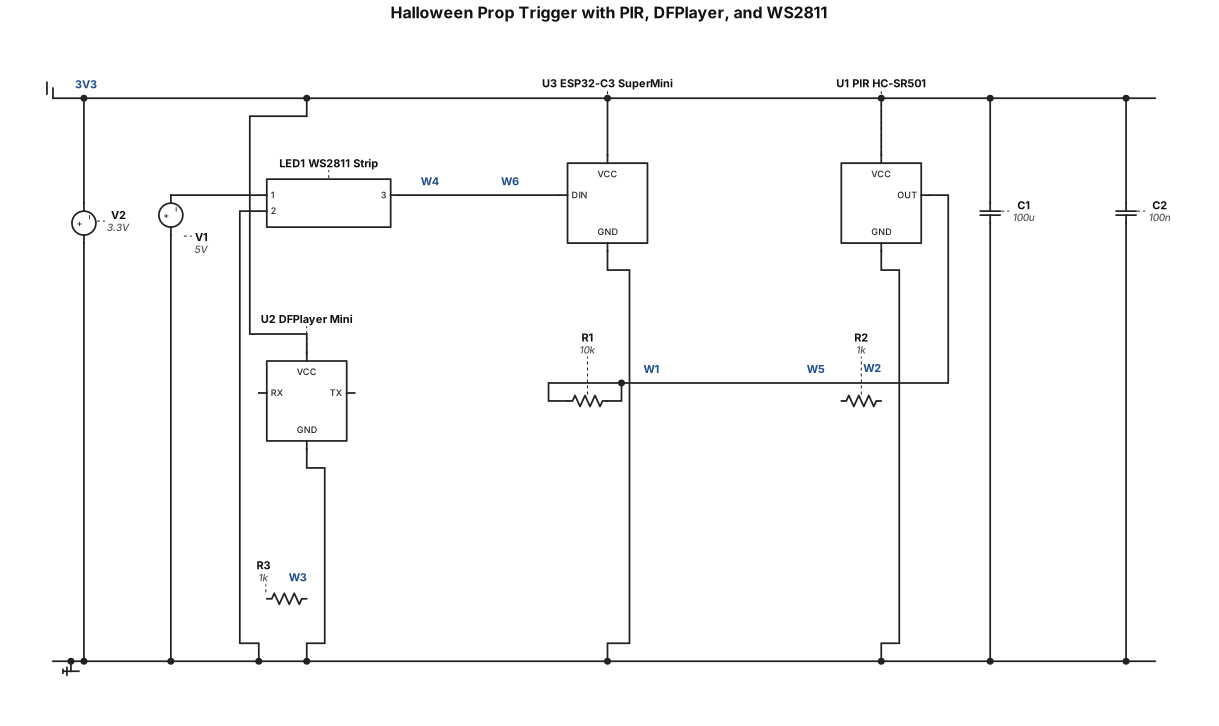
create a halloween prop trigger that uses a pir detector. When movement detected it should trigger a sound and light effect. Audio can be played from a dfplayer mini and you should use an esp32-c3-supermini. When the sound plays, some ws2811 leds shoud change from a red flowing mode to a white strobscope during playback.
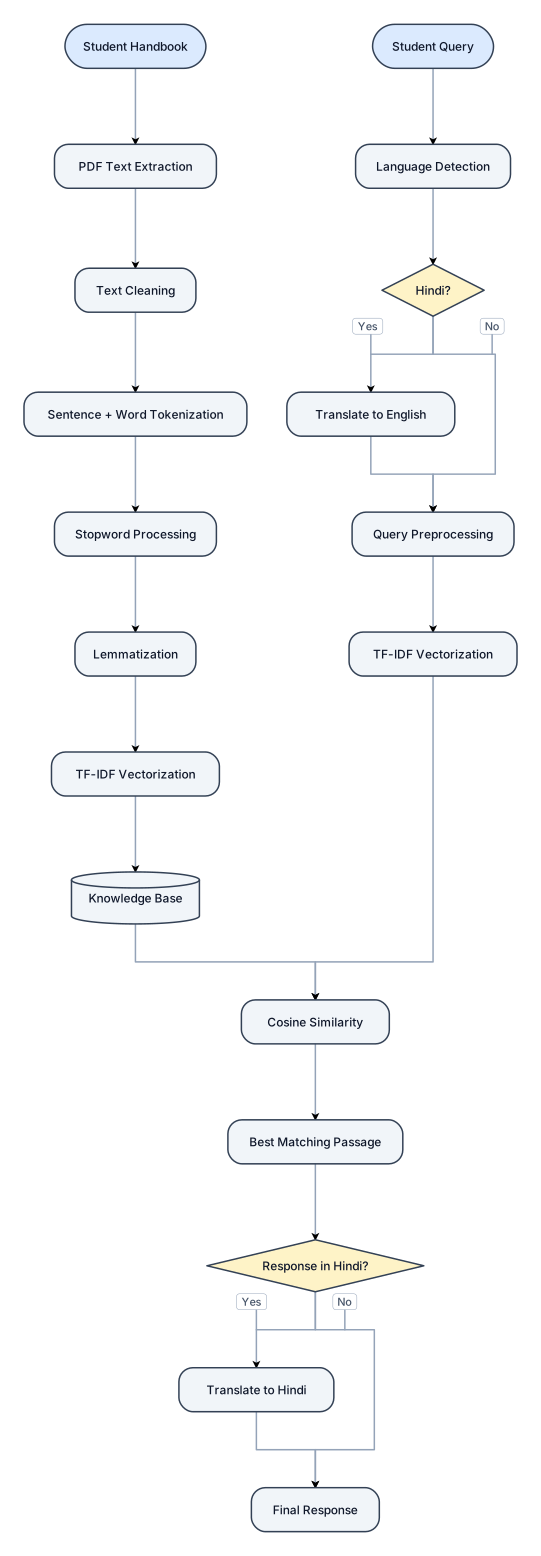
Student Handbook ↓ PDF Text Extraction ↓ Text Cleaning ↓ Sentence + Word Tokenization ↓ Stopword Processing ↓ Lemmatization ↓ TF-IDF Vectorization ↓ Knowledge Base Student Query ↓ Language Detection ↓ Hindi → English (if required) ↓ Query Preprocessing ↓ TF-IDF Vectorization ↓ Cosine Similarity ↓ Best Matching Passage ↓ English → Hindi (if required) ↓ Final Response
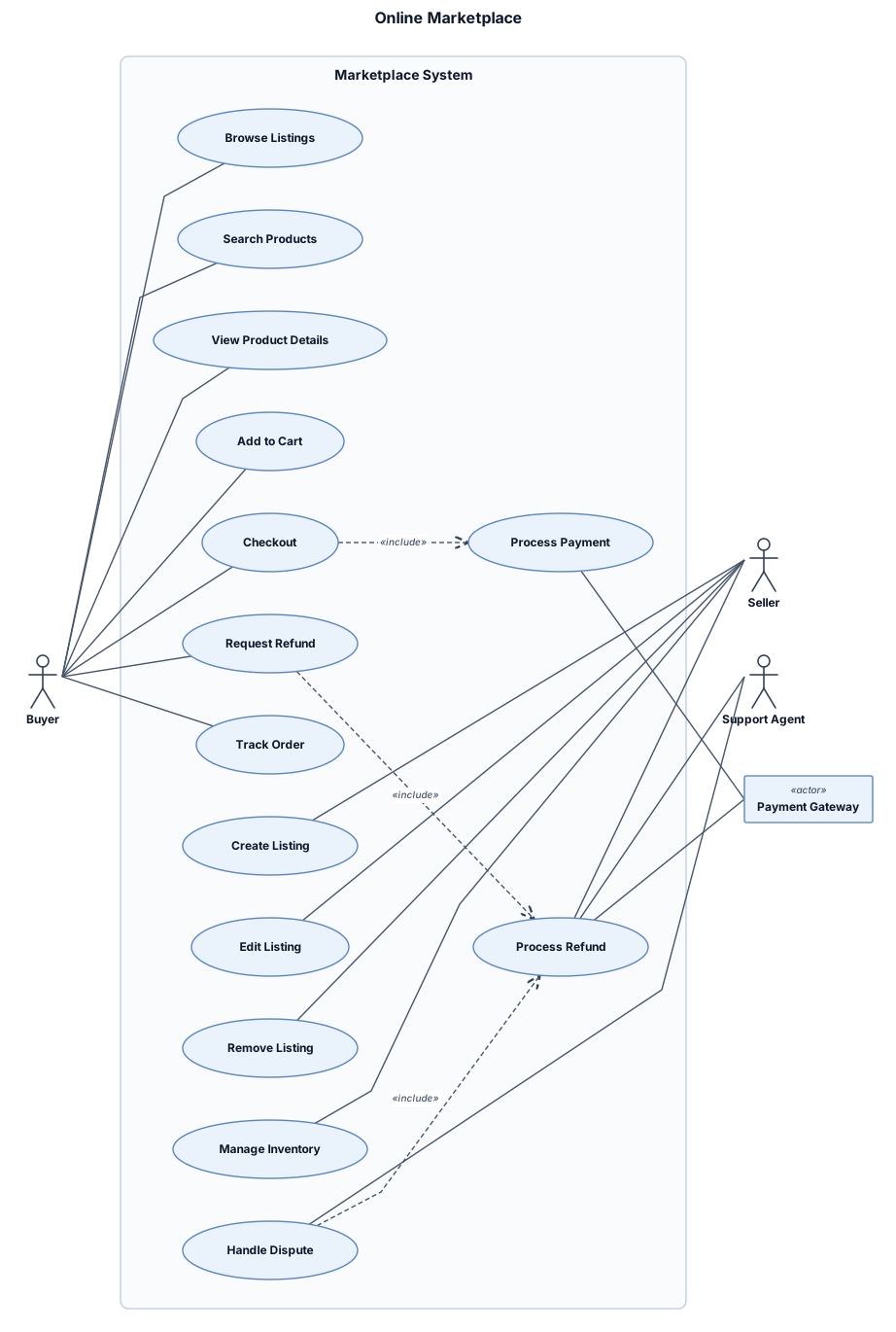
A UML use case diagram for an online marketplace with buyer, seller, support agent, payments, listings, checkout, and refunds
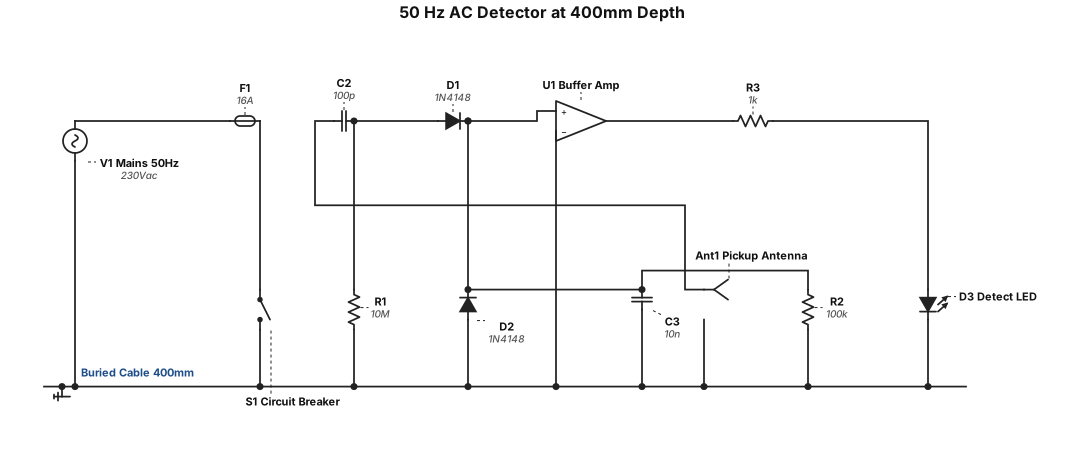
50 Hz AC detector at depth 400mm cable active no load
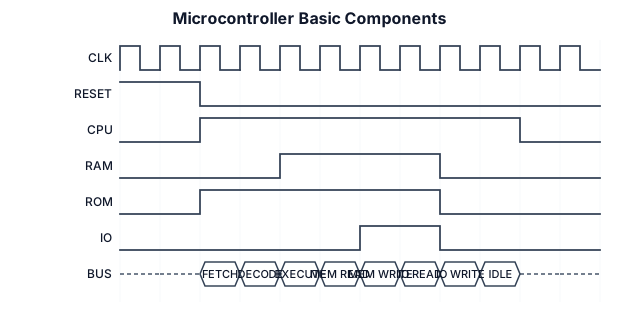
I sketch and label the basic components in a microcontroller
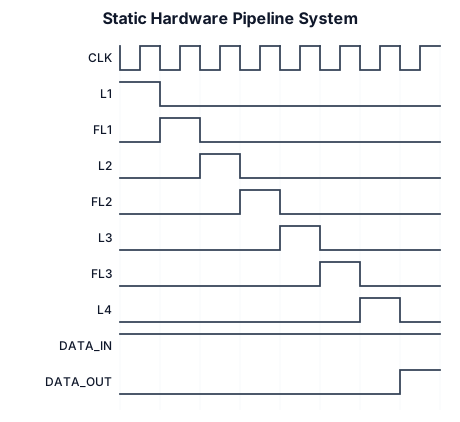
A clean, minimalist engineering schematic diagram of a static hardware pipeline system, on a plain solid white background. The diagram shows a horizontal sequence of four vertical black lines representing latches, labeled from left to right as 'L1', 'L2', 'L3', and 'L4'. Between the latches are rectangular boxes representing functional logic, labeled as 'FL1', 'FL2', and 'FL3'. Horizontal solid black arrows connect the blocks from left to right, showing data flow from 'data in' on the far left to 'data out' on the far right. A thin grey clock signal line labeled 'CLK' runs horizontally beneath the main path, with small inverted clock bubbles triggering the bottom of each latch. At the very bottom, dimension lines with arrows indicate propagation delays for each component precisely aligned vertically: 5ns under L1, 25ns under FL1, 5ns under L2, 30ns under FL2, 5ns under L3, 40ns under FL3, and 5ns under L4. At the top of the image, neat centered text reads: 'L : NGT-Triggered Latch' 'FL : Functional Logic (asynchronous circuit)' The entire image uses crisp vector style, black text, clean sans-serif font, sharp lines, and zero noise or gradient.

• Stage 1 (L1 + FL1): \(5\text{ ns} + 25\text{ ns} = 30\text{ ns}\) • Stage 2 (L2 + FL2): \(5\text{ ns} + 30\text{ ns} = 35\text{ ns}\) • Stage 3 (L3 + FL3): \(5\text{ ns} + 40\text{ ns} = 45\text{ ns}\)