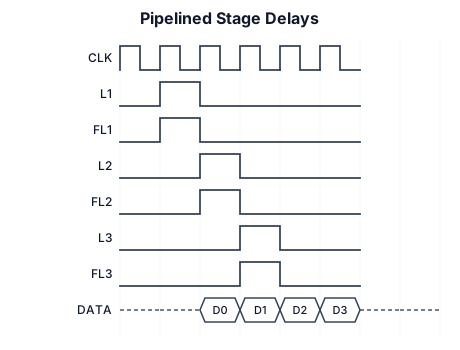
Stage 1 delay: L1 delay (5NS ) FL1 (25NS) Stage 2 delay: L2 delay(5NS) FL2 (30NS) Stage 3 delay: L3 delay (5NS) FL3 (40NS) DATA OUT
NODE ARCHIVE · REAL DIAGRAM BRIEFS
Diagram Examples from Real Visitor Prompts
Browse eligible diagrams shared by FreeDiagram visitors, inspect the exact prompts, and build your own version.
Browse 3288 real creationsCOMMUNITY OUTPUTS · EXACT PROMPTS
All visitor creations
Showing 1321–1344 of 3288. No stock examples or system defaults. Choose a tool, study a real result, then reopen its prompt as your starting point.
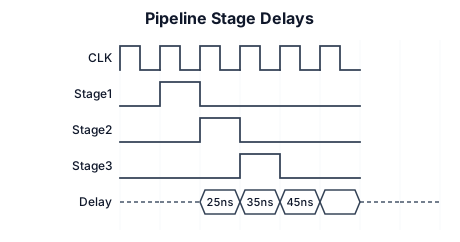
Stage 1 delay: L1 delay (5NS ) FL1 (25NS) Stage 2 delay: L2 delay + FL2 delay = 5 ns + 30 ns = 35 ns Stage 3 delay: L3 delay + FL3 delay = 5 ns + 40 ns = 45 ns (Bottleneck Stage)
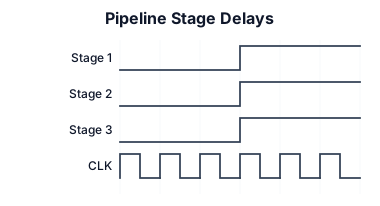
Stage 1 delay: L1 delay + FL1 delay = 5 ns + 25 ns = 30 ns Stage 2 delay: L2 delay + FL2 delay = 5 ns + 30 ns = 35 ns Stage 3 delay: L3 delay + FL3 delay = 5 ns + 40 ns = 45 ns (Bottleneck Stage)

FL1=25 FL2=30 FL3=40

A timing diagram for an I2C read transaction: SCL clock, SDA with START condition, 7-bit address byte, ACK bit, data byte, and STOP condition
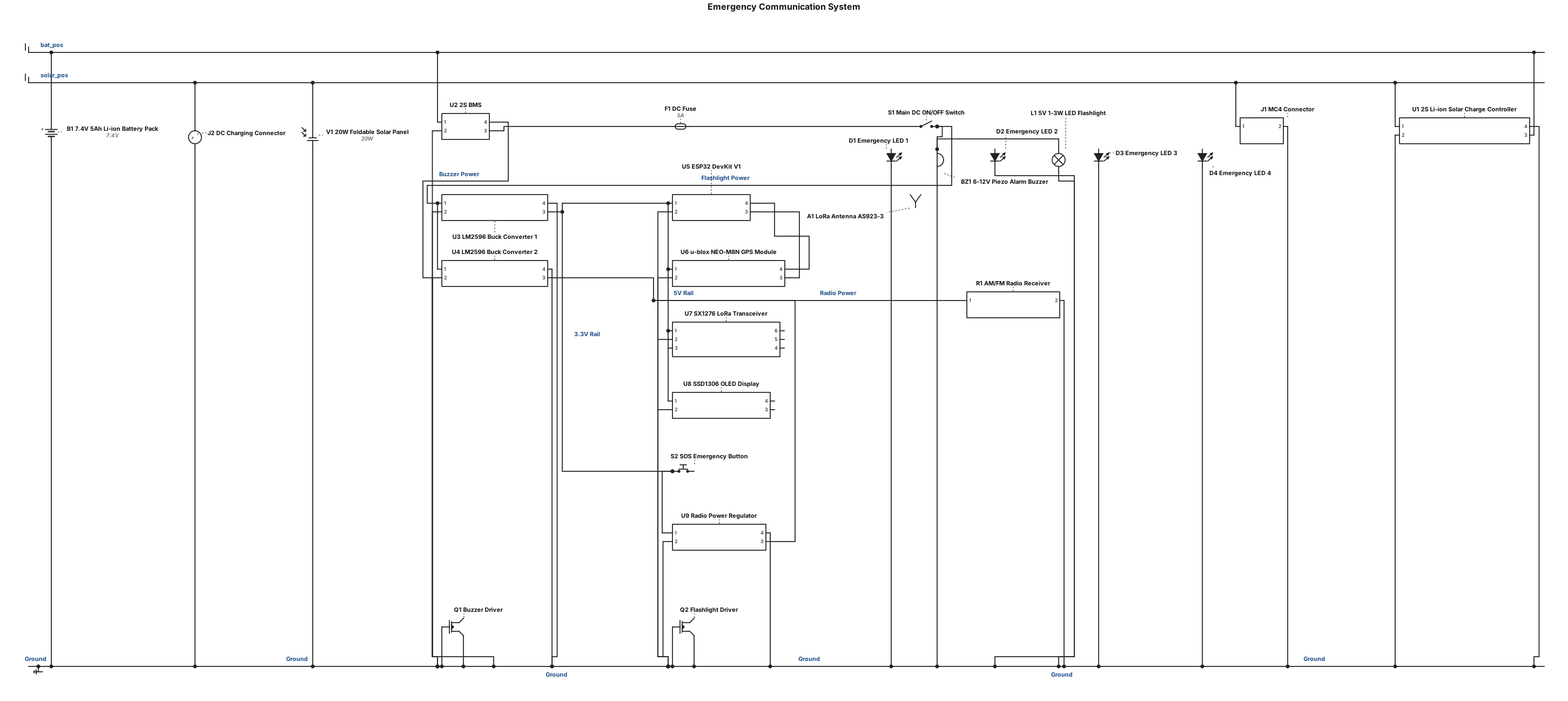
Power Management Subsystem Connect the 20 W external foldable solar panel to the MC4 connector pair, which wires into the panel-mount DC charging connector. Route the DC charging connector to the inputs of the 2S Li-ion solar charge controller. Connect the charge controller's battery terminals to the 7.4 V, 5 Ah Li-ion battery pack, which includes a 2S Battery Management System (BMS). Wire the battery's positive output in series with a DC fuse and the main DC ON/OFF switch. Distribute the switched battery power to the inputs of two LM2596 adjustable DC-DC step-down buck converters. These buck converters will provide the required regulated voltage for electronic components that cannot be directly supplied by the 7.4 V battery. Microcontroller and Data Connections Place the ESP32 DevKit V1 (3.3 V logic) as the central controller of the system. GPS Module: Connect the u-blox NEO-M8N module to the ESP32 using a UART/Serial interface. LoRa Transceiver: Connect the AS923-3-compatible SX1276-class LoRa module to the ESP32 using an SPI interface. Attach the frequency-compatible LoRa antenna to the transceiver using an external/SMA cable. OLED Display: Connect the 0.96-inch SSD1306 OLED display to the ESP32 using an I²C interface. Emergency Interfaces and Alerts SOS Button: Connect the momentary emergency push button to a designated digital input pin on the ESP32. Visual Indicators: Connect the four emergency LED indicator lights to ESP32 digital output pins. Alarm Buzzer: Wire the ESP32 control signal to the 6-12 VDC high-output piezo alarm buzzer. Flashlight: Connect the 5 V DC, 1-3 W compact LED flashlight to an appropriate switching or driver circuit controlled by the ESP32. AM/FM Radio: Wire the portable AM/FM radio receiver to the required regulated power line; this component operates as an independent emergency information function managed by its own tuning/volume knob.
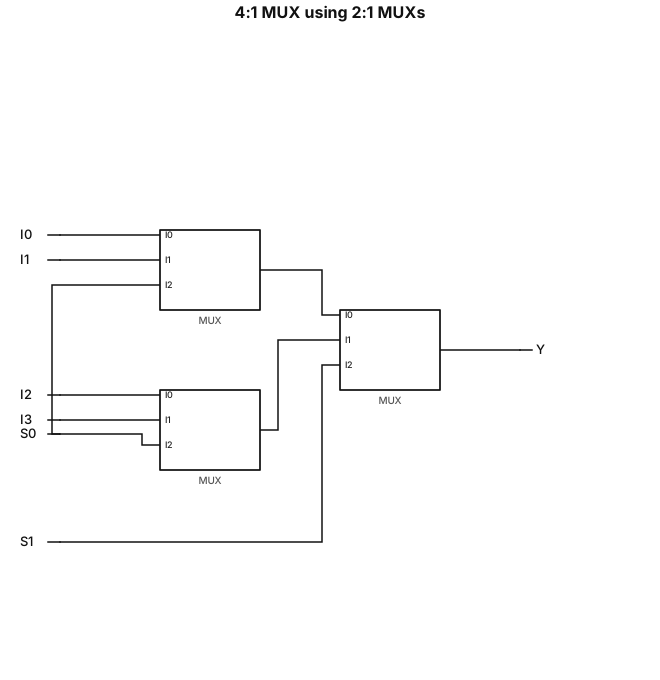
Design a 4:1 multiplexer using 2:1 multiplexers
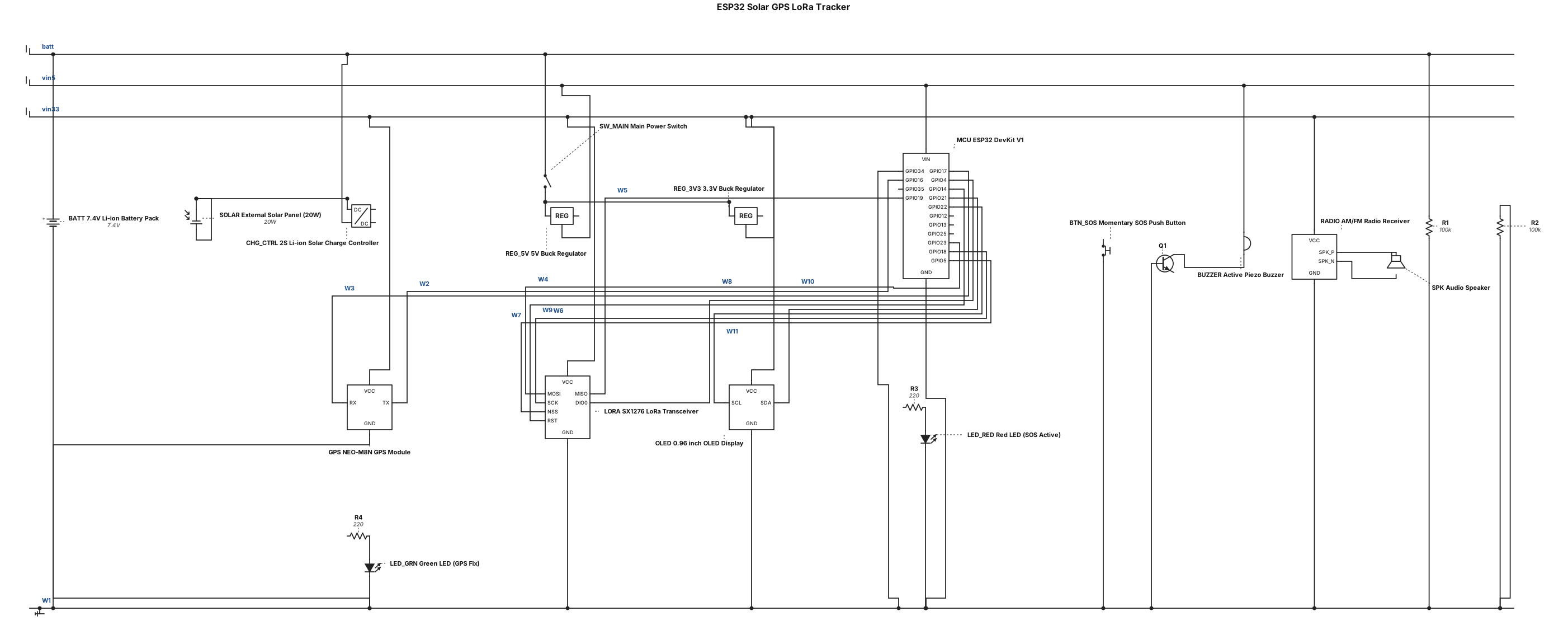
1. Main Controller Node ID: MCU Label: "ESP32 DevKit V1" 2. Power Management Subsystem Nodes: SOLAR: "External Solar Panel (20W)" CHG_CTRL: "2S Li-ion Solar Charge Controller (8.4V)" BATT: "7.4V Li-ion Battery Pack (with BMS)" SW_MAIN: "Main Power Switch (SPST)" REG_5V: "5V Buck Regulator" REG_3V3: "3.3V Buck Regulator" Power Connections: SOLAR connects to CHG_CTRL Input CHG_CTRL Output connects to BATT BATT connects to SW_MAIN SW_MAIN Output splits to REG_5V Input, REG_3V3 Input, and a "7.4V Rail" REG_5V Output connects to MCU "VIN" pin REG_3V3 Output connects to "3.3V Rail" (to power sensors) BATT (via voltage divider) connects to MCU analog pin (GPIO34) for "Battery Monitoring" 3. GPS Location Subsystem Node ID: GPS Label: "NEO-M8N GPS Module + Patch Antenna" Connections: Connect to 3.3V Rail and GND UART Data: GPS TX connects to MCU RX2 (GPIO16); GPS RX connects to MCU TX2 (GPIO17) 4. LoRa Communication Subsystem Node ID: LORA Label: "SX1276 LoRa Transceiver (AS923) + Antenna" Connections: Connect to 3.3V Rail and GND SPI Interface: Connect to MCU standard SPI pins (MOSI, MISO, SCK, CS/NSS) Control Lines: Connect LORA DIO0 and RST pins to MCU GPIOs (GPIO4 and GPIO14 respectively) 5. Display & Indicators Nodes: OLED: "0.96 inch OLED Display (SSD1306)" LED_RED: "Red LED (SOS Active)" LED_GRN: "Green LED (GPS Fix)" Connections: OLED: Connect to 3.3V Rail. I2C Data: SDA to MCU GPIO21, SCL to MCU GPIO22. LEDs: Connect to MCU GPIOs (GPIO12 and GPIO13) via current-limiting resistors to GND. 6. Inputs & Audio Subsystem Nodes: BTN_SOS: "Momentary SOS Push Button" BUZZER: "Active Piezo Buzzer" RADIO: "Independent AM/FM Radio Receiver" SPK: "Audio Speaker" Connections: BTN_SOS: Connect between MCU GPIO35 and GND (Internal pull-up enabled). BUZZER: Connect to MCU GPIO25 (via transistor driver circuit if needed) and 5V Rail/GND. RADIO: Powered by 3.3V Rail. Audio output connected to SPK. No microcontroller data connection required.
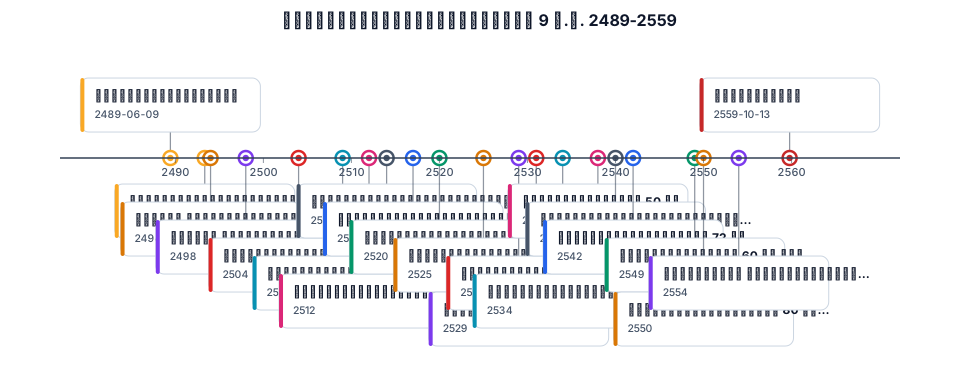
เหตุการณ์สำคัญรัชกาลที่ 9 พ.ศ.2489-2559
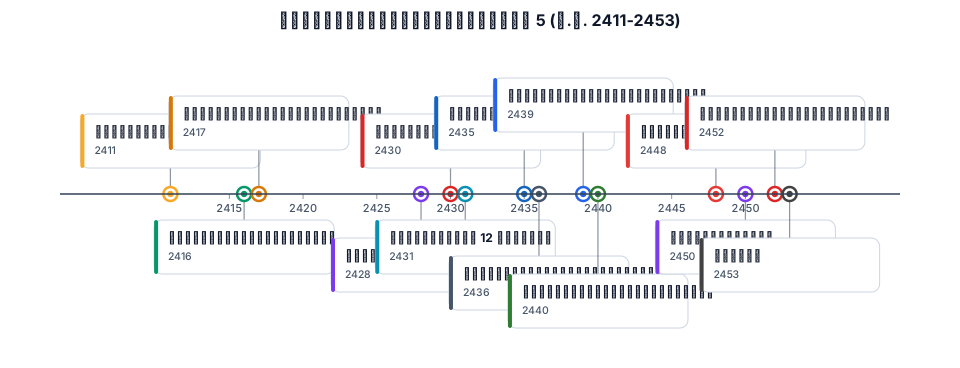
เหตุการณ์สำคัญรัชกาลที่ 5 พ.ศ.2411-2453
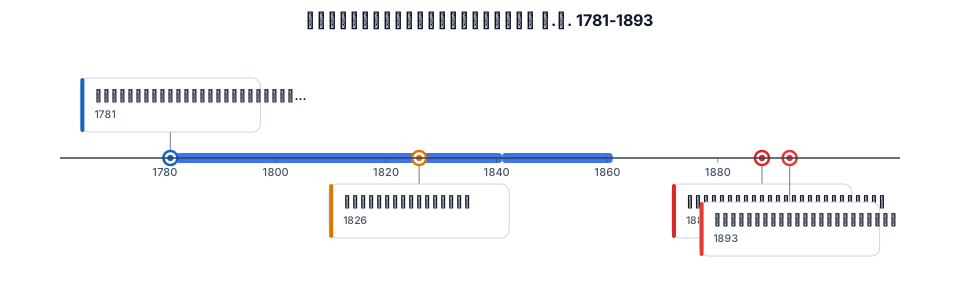
เหตุการณ์สำคัญสุโขทัย พ.ศ.1781-1893
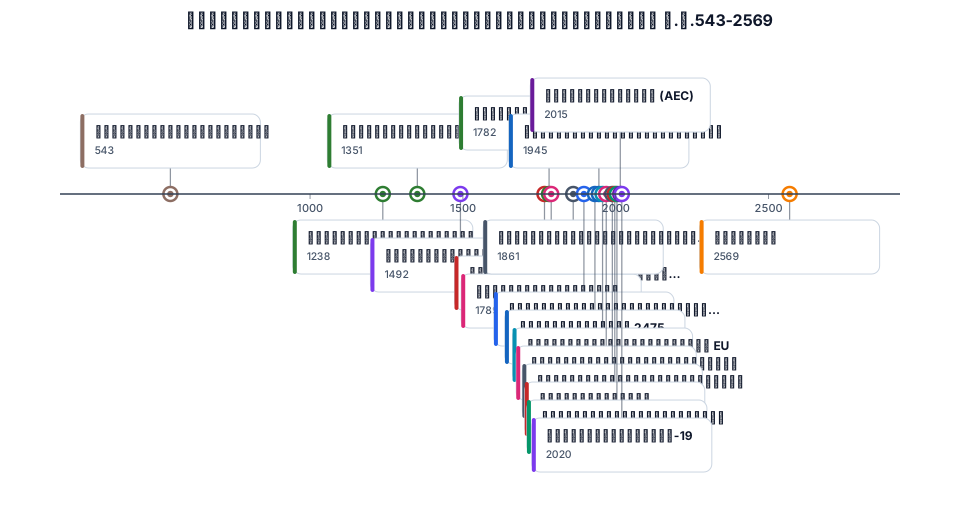
เหตุการณ์สำคัญของประวัติศาสตร์โลกและชาติไทย พ.ศ.543-2569
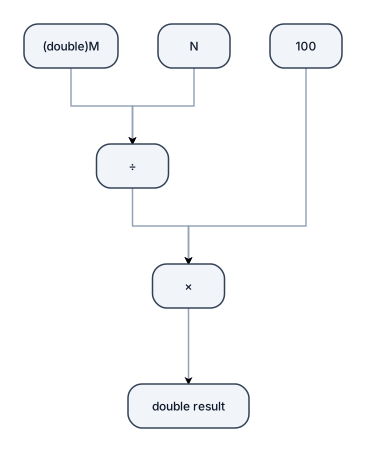
Дерево розбору виразу Для правильного дробового результату Вираз: (double)M / N * 100 Схема: * / \ / 100 (int) / / ÷ / \ M N int int │ ↓ double Точніше: (double)M │ ↓ double ────┐ │ ÷ │ N → double │ ↓ double │ × │ 100 → double │ ↓ double
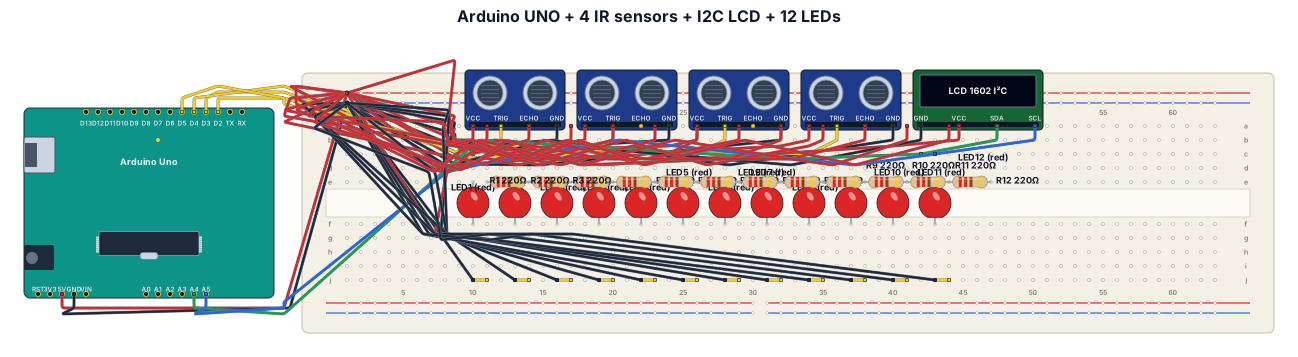
Arduino UNO + 4 IR sensors + 16x2 I2C LCD + 12 LEDs on a breadboard. IR OUT: D2, D3, D4, D5. LCD: SDA A4, SCL A5. Connect all VCC to 5V and all GND to GND. Show the actual breadboard, Arduino, and every wire clearly.
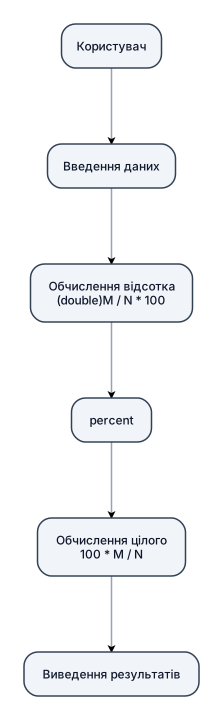
┌─────────────┐ │ Користувач │ └──────┬──────┘ │ N, M ↓ ┌──────────────────┐ │ Введення даних │ └────────┬─────────┘ │ ↓ ┌────────────────────────┐ │ Обчислення відсотка │ │ (double)M / N * 100 │ └──────────┬─────────────┘ │ ↓ ┌──────────┐ │ percent │ └────┬─────┘ │ ↓ ┌────────────────────────┐ │ Обчислення цілого │ │ 100 * M / N │ └──────────┬─────────────┘ │ ↓ ┌──────────────────┐ │ Виведення │ │ результатів │ └──────────────────┘ зроби тільки чорний текст та блоки, фон білий
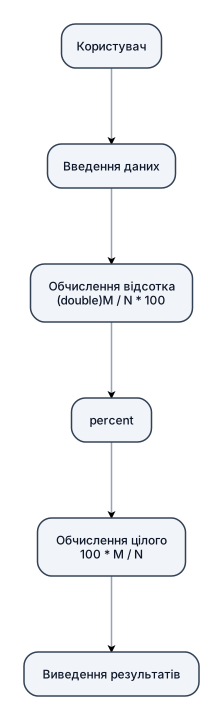
┌─────────────┐ │ Користувач │ └──────┬──────┘ │ N, M ↓ ┌──────────────────┐ │ Введення даних │ └────────┬─────────┘ │ ↓ ┌────────────────────────┐ │ Обчислення відсотка │ │ (double)M / N * 100 │ └──────────┬─────────────┘ │ ↓ ┌──────────┐ │ percent │ └────┬─────┘ │ ↓ ┌────────────────────────┐ │ Обчислення цілого │ │ 100 * M / N │ └──────────┬─────────────┘ │ ↓ ┌──────────────────┐ │ Виведення │ │ результатів │ └──────────────────┘
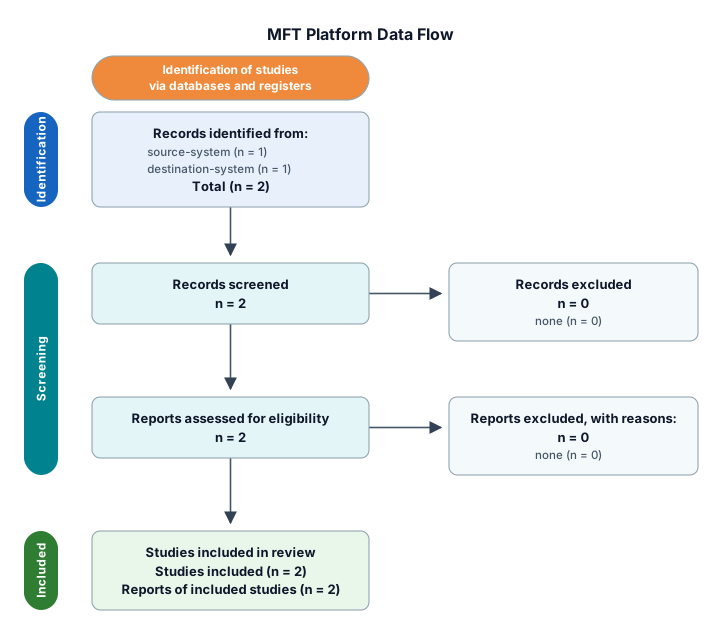
MFT Platform in the middle. left side of mftp platform source system -> network/firewall and right network/firewall destination system. attach database and store to mft platfrom
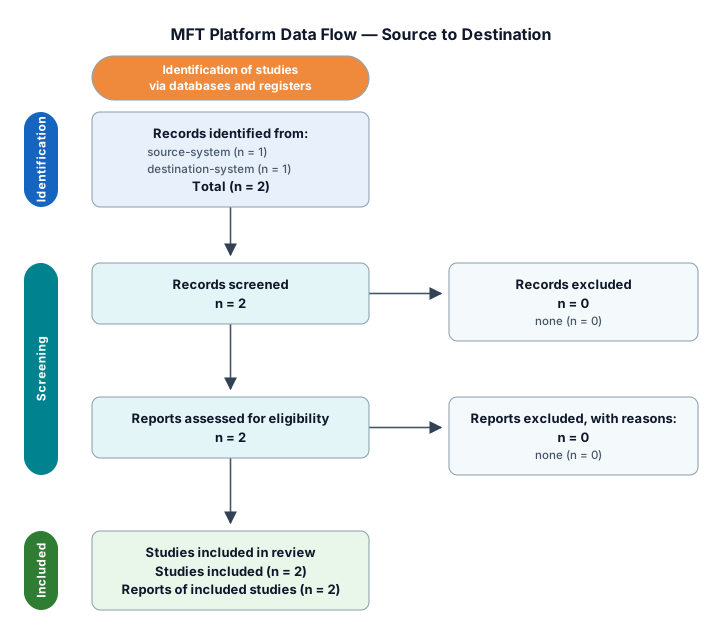
MFT Platform in the middle left side source system -> network/firewall and right network/firewall destination system. attach database and store to mft platfrom
Source System | v Network / Firewall | v MFT Platform | +---- Database | +---- Storage | v Network / Firewall | v Destination System MFT is the main system and put it in the middle
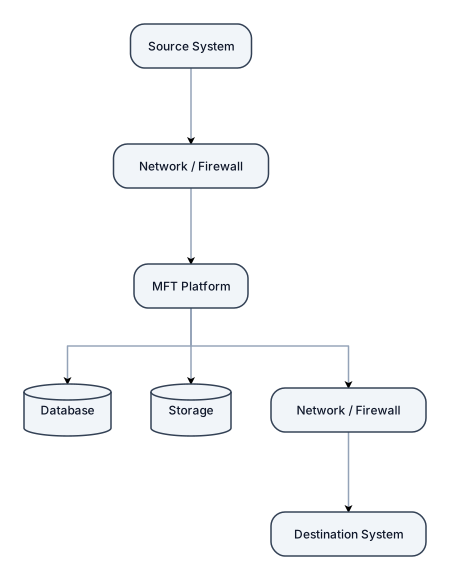
Source System | v Network / Firewall | v MFT Platform | +---- Database | +---- Storage | v Network / Firewall | v Destination System
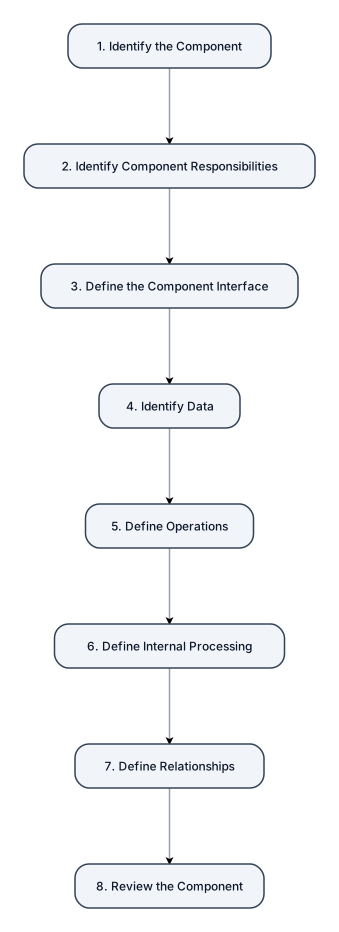
Create a professional academic process diagram showing the seven stages of component design in this order: Identify the Component → Identify Component Responsibilities → Define the Component Interface → Identify Data → Define Operations → Define Internal Processing → Define Relationships → Review the Component. Use a clean modern style, attractive colors, numbered stages, clear directional arrows, and make it suitable for a university presentation.
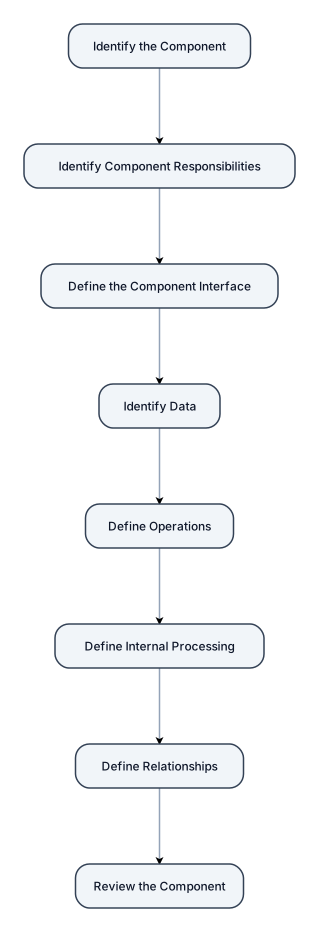
Identify the Component Identify Component Responsibilities Define the Component Interface Identify Data Define Operations Define Internal Processing Define Relationships Review the Component
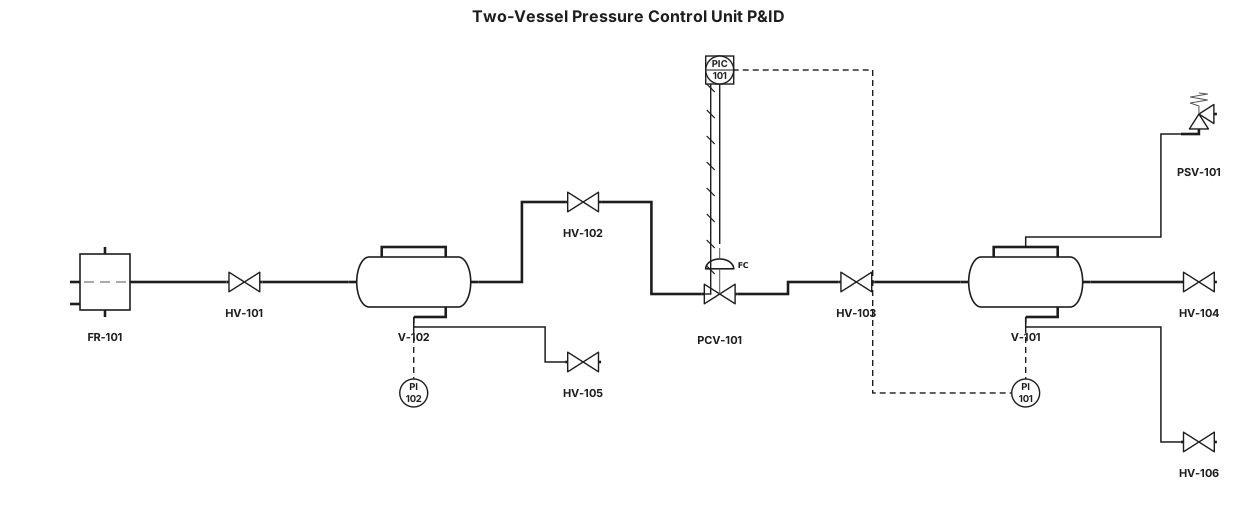
Create a professional P&ID (Piping and Instrumentation Diagram) for a two-vessel pressure control training unit based on the attached reference image. Use standard ISA/ISO P&ID symbols, black-and-white engineering drafting style, clean orthogonal piping, and clear equipment tags. Equipment and instrumentation to include: Two horizontal pressure vessels, one upper vessel tagged V-101 and one lower vessel tagged V-102. A pressure indicator/gauge on each vessel: PI-101 on V-101 and PI-102 on V-102. A pressure control/regulating valve in the connecting process line, tagged PCV-101. A pressure controller PIC-101 associated with the pressure-control loop, if automatic control is represented. An inlet air/gas line entering from the lower-left side. A filter/regulator assembly on the inlet line, tagged FR-101. Manual isolation valves on the inlet, vessel connections, and outlet. Bottom drain valves for both pressure vessels. A pressure relief/safety valve PSV-101 on the pressure vessel only if shown/confirmed by the reference equipment. Process piping connecting the two vessels and control components. Instrument signal lines should be dashed and process piping should be solid. Arrange the P&ID to resemble the physical layout in the reference image: upper pressure vessel above lower pressure vessel, pressure-control valve between/near the vessel connection, inlet equipment at lower left, pressure indicators mounted on the vessels, and process outlet on the right. Use standard ISA instrument bubbles and valve symbols. Do not draw the equipment as realistic red tanks; represent it as a conventional engineering P&ID. Include a legend for instrument abbreviations and a title: "Two-Vessel Pressure Control Unit P&ID". Do not add equipment that is not visible or reasonably implied by the reference image.
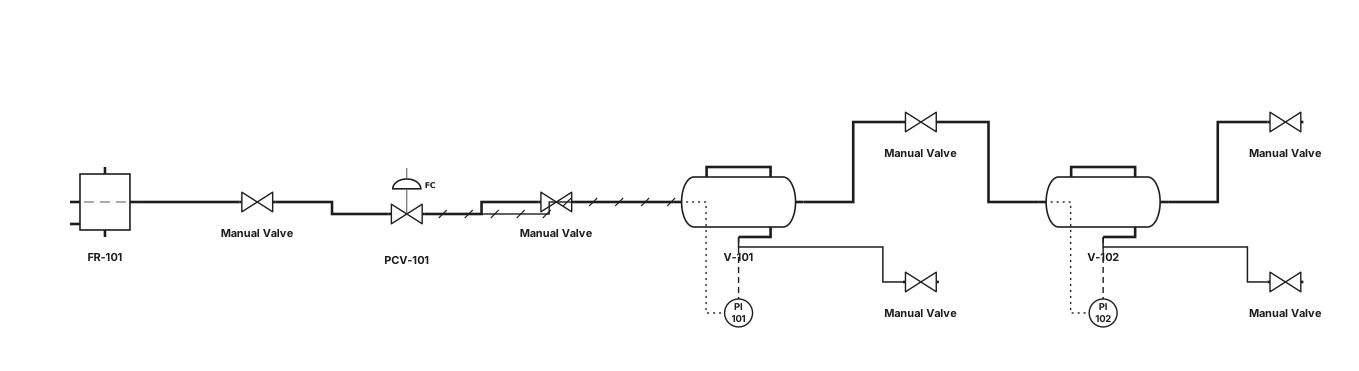
Create a standard ISA P&ID from the attached photograph of a two-vessel pressure control unit. Identify and represent only the visible process equipment: two horizontal pressure vessels, pressure gauges, inlet filter/regulator, manual valves, pressure regulating/control valve, process piping, and vessel drains. Use standard ISA symbols and tags V-101, V-102, PI-101, PI-102, FR-101 and PCV-101. Show the upper vessel above the lower vessel and reproduce the approximate physical piping arrangement shown in the photograph. Use solid process lines and dashed instrument signal lines. Do not invent flow connections, instruments, or safety valves that cannot be identified from the photograph. Produce a clean black-and-white engineering P&ID suitable for an academic report.