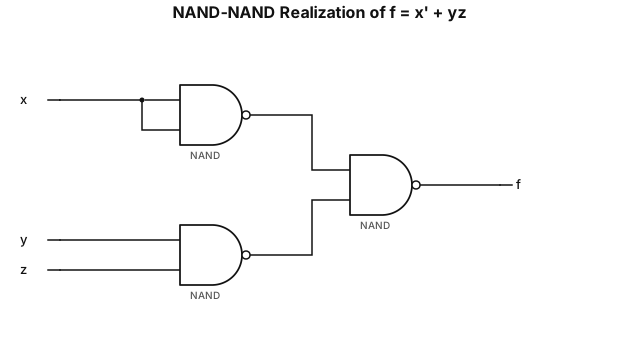
Design NAND- NAND realizations of the logic function f(x, y, z) = xbar + yz. Draw the circuit diagrams.
NODE ARCHIVE · REAL DIAGRAM BRIEFS
Diagram Examples from Real Visitor Prompts
Browse eligible diagrams shared by FreeDiagram visitors, inspect the exact prompts, and build your own version.
Browse 3311 real creationsCOMMUNITY OUTPUTS · EXACT PROMPTS
All visitor creations
Showing 1945–1968 of 3311. No stock examples or system defaults. Choose a tool, study a real result, then reopen its prompt as your starting point.
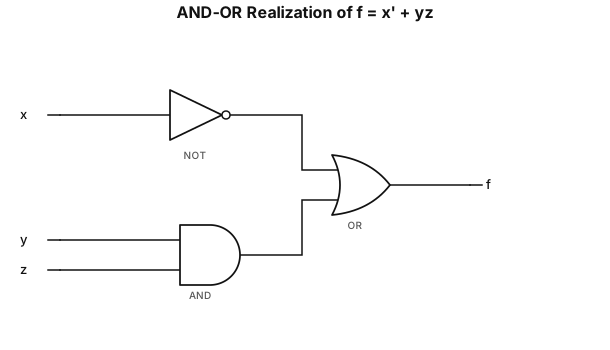
Design AND-OR realizations of the logic function f(x, y, z) = xbar + yz. Draw the circuit diagrams.
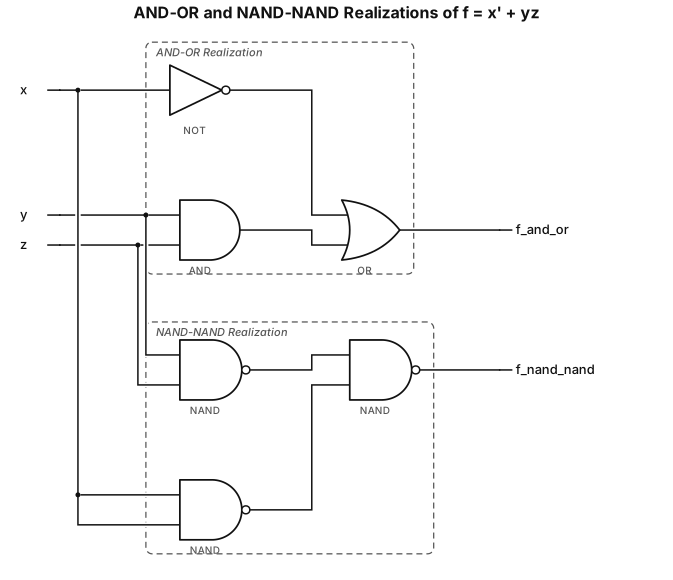
Design AND-OR and NAND-NAND realizations of the logic function f(x, y, z) = xbar + yz. Draw the circuit diagrams.
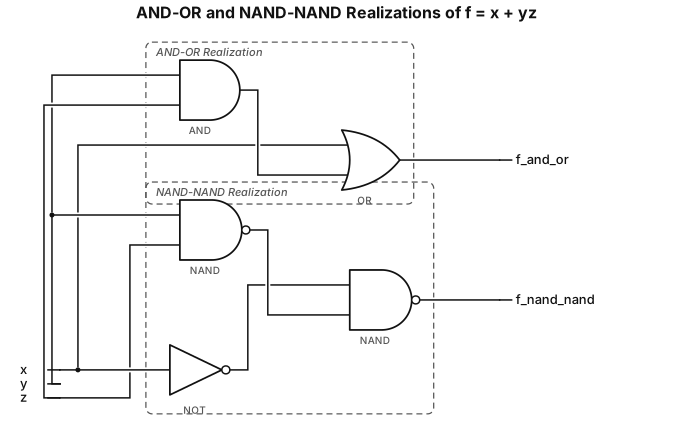
Design AND-OR and NAND-NAND realizations of the logic function f(x, y, z) = x + yz. Draw the circuit diagrams.
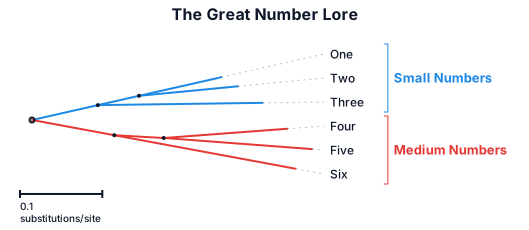
A phylogenetic tree of the great number lore
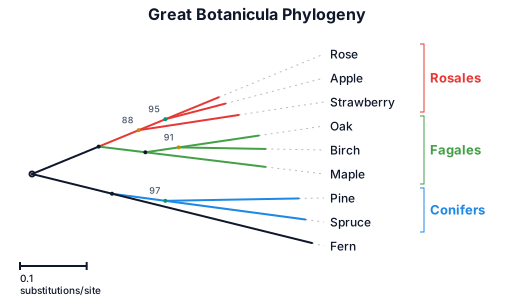
A phylogenetic tree of the great botanicula
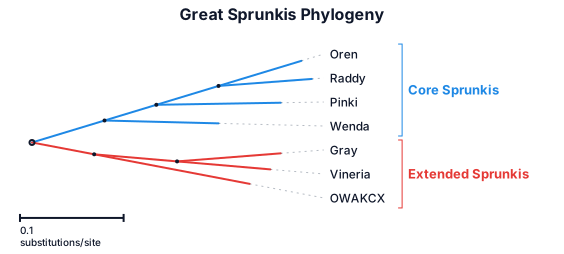
A phylogenetic tree of the great sprunkis: oren‚ raddy‚ pinki‚ wenda‚ gray‚ vineria‚ OWAKCX
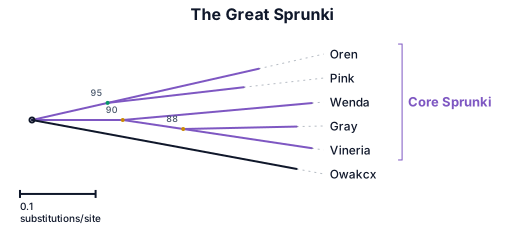
A phylogenetic tree of the great sprunki: Oren‚ pink‚ wenda‚ gray‚ vineria‚ owakcx
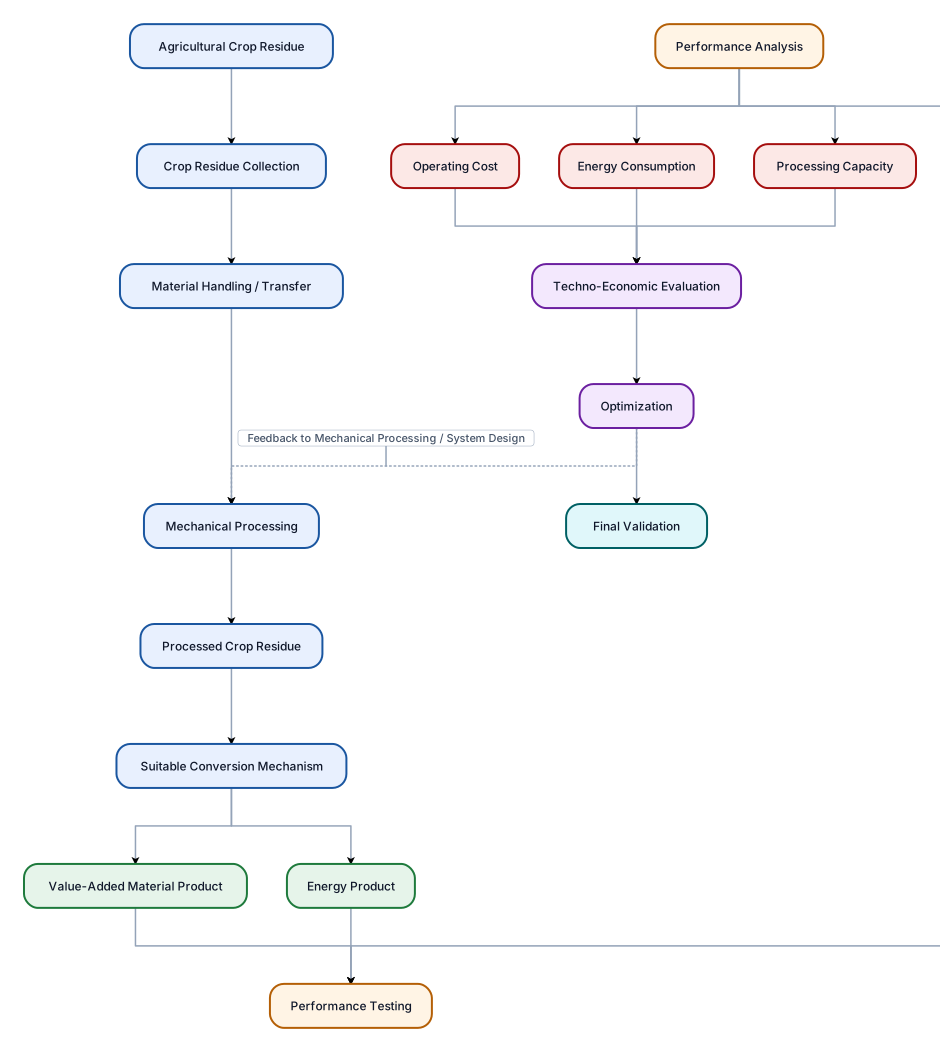
Create one large professional vertical flowchart for a Mechanical Engineering project about an integrated cost-effective mechanical system for collection, processing and conversion of agricultural crop residues into a useful energy or value-added product. The flow should be: Agricultural Crop Residue ↓ Crop Residue Collection ↓ Material Handling / Transfer ↓ Mechanical Processing ↓ Processed Crop Residue ↓ Suitable Conversion Mechanism ↓ Useful Energy / Value-Added Product ↓ Performance Testing ↓ Performance Analysis ↓ Techno-Economic Evaluation ↓ Optimization ↓ Final Validation After “Suitable Conversion Mechanism”, create two simple branches: 1. Energy Product 2. Value-Added Material Product Both branches should continue to Performance Testing. Under Performance Analysis, show three smaller connected boxes: - Processing Capacity - Energy Consumption - Operating Cost Show a feedback arrow from Optimization back toward the Mechanical Processing/System Design stage. Use a clean white background, dark readable text, light professional colours, rectangular boxes, clear arrows, and a neat academic engineering style. Make it a single large flowchart suitable for a college patent/project document. Do not add IoT, sensors, chemical treatment, ammonia extraction, hydrogen fuel cells, gasification, or other technologies not mentioned above. Do not assume that briquetting or pelletizing is the final conversion method.
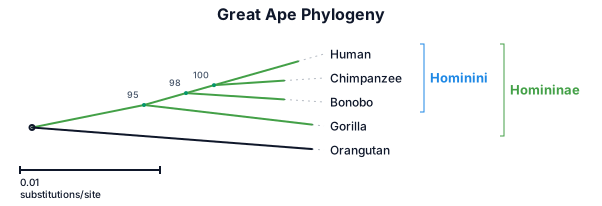
A phylogenetic tree of the great apes: humans, chimpanzees, bonobos, gorillas, and orangutans, with branch lengths and bootstrap support values‚ scallyrags
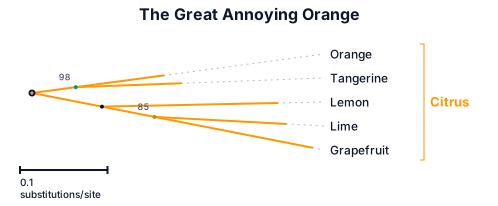
A phylogenetic tree of the great annoying orange
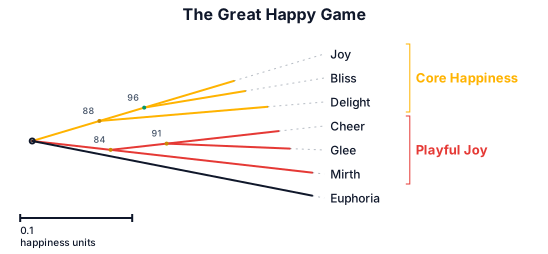
A phylogenetic tree of the great happy game
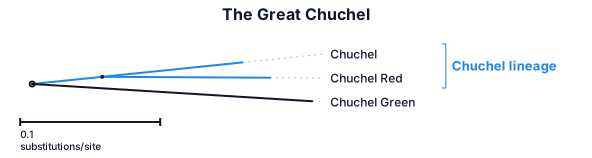
A phylogenetic tree of the great chuchel
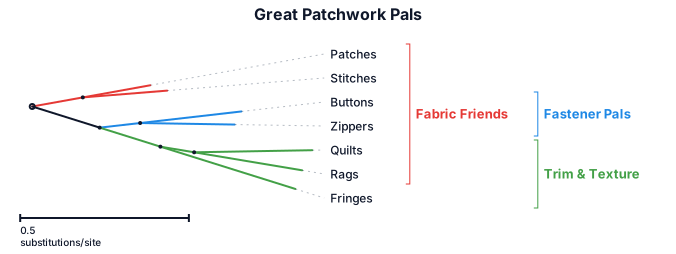
A phylogenetic tree of the great patchwork pals
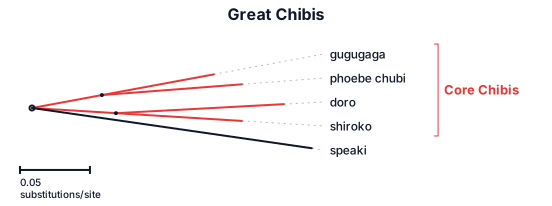
A phylogenetic tree of the great chibis: gugugaga‚ phoebe chubi‚ doro‚ shiroko‚ speaki
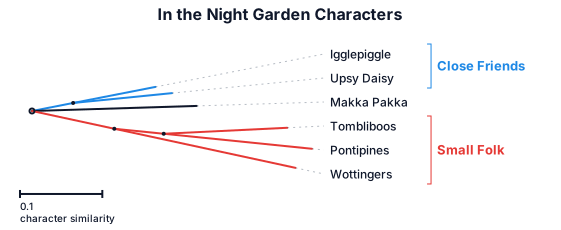
A phylogenetic tree of the great in the night garden
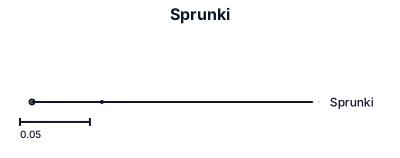
Sprunki

An org chart for a 30-person startup with engineering, product, sales, and operations teams
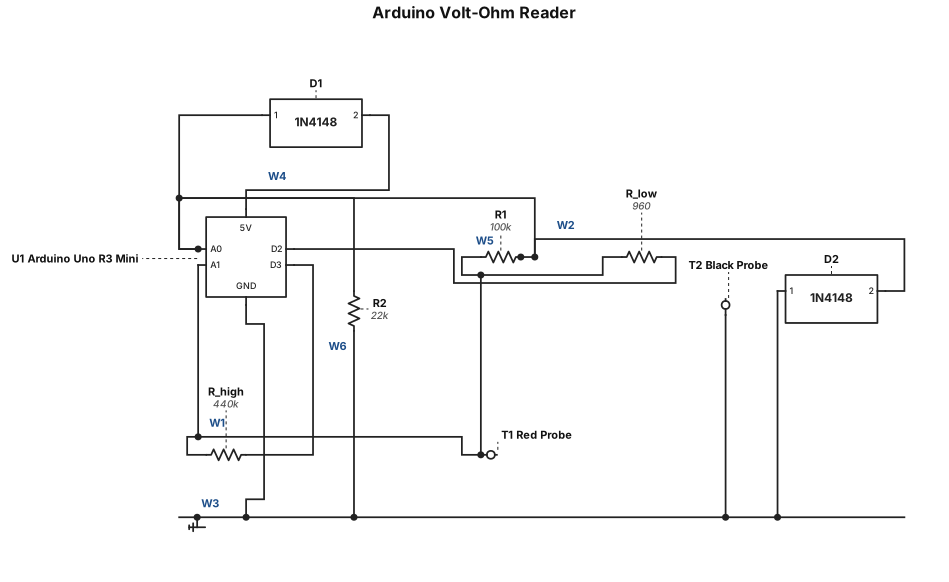
a volt and ohm reader for arduino uno r3 mini that has 2x100k resistors, 1x22k resistor, 1x1k resistor and 2x1N4148 diodes, like this: Step 0: Prepare and label your Arduino-side wires first Cut 6 short wires, solder one end of each into its confirmed hole (per the continuity check from before), and label the free end with a bit of tape so you never lose track: Wire "A0" Wire "A1" Wire "D2" Wire "D3" Wire "5V" Wire "GND" Do this one at a time, and re-check continuity from the Arduino header pin to the wire's free end after each solder joint — confirms you didn't just cold-solder it. Step 1: Build "Node P" — the probe/A1 junction (5 leads meet here) Twist these 5 things together tightly, then solder as one joint: Wire "A1" Red probe wire One leg of R1 (100k) One leg of R_low (your 960Ω) One leg of R_high (your twisted 220k+220k pair — treat both legs on this end as already joined into one lead) Step 2: Build "Node V" — the voltage divider midpoint (5 leads meet here) Twist and solder together: Wire "A0" R1's other leg (opposite end from Node P) One leg of R2 (22k) Diode 1's anode (the end without the stripe) Diode 2's cathode (the end with the stripe) ⚠️ Double-check diode orientation here specifically — this is the step most likely to cause a problem if flipped. Step 3: Build the "GND" node (4 leads meet here) Twist and solder together: Wire "GND" Black probe wire R2's other leg Diode 2's anode (no stripe) Step 4: Build the "5V" node (2 leads — simplest joint) Twist and solder together: Wire "5V" Diode 1's cathode (striped end) Step 5: Two simple 2-lead joints (no hub, just direct pairs) Wire "D2" + R_low's other leg (opposite end from Node P) — solder directly together Wire "D3" + R_high's other leg — solder directly together
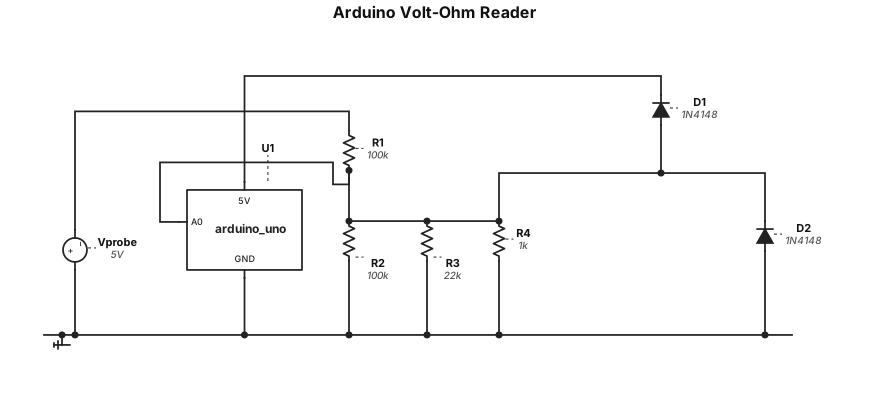
a volt and ohm reader for arduino uno r3 mini that has 2x100k resistors, 1x22k resistor, 1x1k resistor and 2x1N4148 diodes
![Main diagram studio: flowchart TB A["HEAT EXCHANGERS SYMBOLS"] B["A heat exchanger is an equipment which ensures heat transfer from one medium to another."] C["FIGURE 1.14](https://psvtykrtciekraoilfux.supabase.co/storage/v1/object/public/gallery-assets/freediagram/feed/f4c8356b-30a9-42d4-8398-f7f3baea9693.svg)
flowchart TB A["HEAT EXCHANGERS SYMBOLS"] B["A heat exchanger is an equipment which ensures heat transfer from one medium to another."] C["FIGURE 1.14 - HEAT EXCHANGERS SYMBOLS"] C --> H["Heat Exchanger Name"] C --> S["Symbol"] C --> P["Picture"] H --> H1["Shell and Tube Heat Exchanger"] S --> S1(("◎")) P --> P1["Shell and Tube Heat Exchanger"] H --> H2["Electrical Heater"] S --> S2(("⚡")) P --> P2["Electrical Heater"] H --> H3["Air Cooled Heat Exchanger"] S --> S3(("▥")) P --> P3["Air Cooled Heat Exchanger"] H --> H4["Furnace or Fired Heater"] S --> S4(("🔥")) P --> P4["Furnace or Fired Heater"] A --> B A --> C
![Main diagram studio: flowchart TB A["STORAGE TANKS SYMBOLS"] B["Storage tanks are vessels of different shapes used to store raw materials and final products in oil and gas](https://psvtykrtciekraoilfux.supabase.co/storage/v1/object/public/gallery-assets/freediagram/feed/7f4dffd3-b971-4b4d-8b91-3409d73cd6d8.svg)
flowchart TB A["STORAGE TANKS SYMBOLS"] B["Storage tanks are vessels of different shapes used to store raw materials and final products in oil and gas plants."] C["FIGURE 1.13 - STORAGE TANKS SYMBOLS"] C --> H["Tank Type Name"] C --> S["Symbol"] C --> P["Picture"] H --> H1["Horizontal Drum"] S --> S1(("━")) P --> P1["Horizontal Drum"] H --> H2["Horizontal Drum with Boot"] S --> S2(("━┻")) P --> P2["Horizontal Drum with Boot"] H --> H3["Vertical Drum"] S --> S3(("○")) P --> P3["Vertical Drum"] H --> H4["Sphere Tank"] S --> S4(("●")) P --> P4["Sphere Tank"] H --> H5["Cone Roof Tank"] S --> S5(("△")) P --> P5["Cone Roof Tank"] H --> H6["Floating Roof Tank"] S --> S6(("▱")) P --> P6["Floating Roof Tank"] A --> B A --> C
![Main diagram studio: flowchart TB A["COMPRESSORS SYMBOLS"] B["A compressor is a mechanical device that increases the pressure of a gas by reducing its volume."] C["FIGURE](https://psvtykrtciekraoilfux.supabase.co/storage/v1/object/public/gallery-assets/freediagram/feed/a3fdf30a-7f4a-4767-aa11-44b6fcfe7b06.svg)
flowchart TB A["COMPRESSORS SYMBOLS"] B["A compressor is a mechanical device that increases the pressure of a gas by reducing its volume."] C["FIGURE 1.12 - COMPRESSORS SYMBOLS"] C --> H["Compressor Type"] C --> S["Symbol"] C --> N["Compressor Name"] C --> P["Compressor Picture"] H --> H1["Centrifugal Compressor"] S --> S1(("◉")) N --> N1["Centrifugal Compressor"] P --> P1["Centrifugal Compressor"] H --> H2["Reciprocating Compressor<br/>With electric motor driver"] S --> S2(("↔")) N --> N2["Reciprocating Compressor"] P --> P2["Reciprocating Compressor<br/>+ Electric Motor"] H --> H3["Screw Compressor<br/>With electrical motor driver"] S --> S3(("⚙")) N --> N3["Screw Compressor"] P --> P3["Screw Compressor<br/>+ Electric Motor"] A --> B A --> C
![Main diagram studio: flowchart TB R["ROTATING EQUIPMENT SYMBOLS"] D["FIGURE 1.10 - DRIVERS SYMBOLS"] D --> DM["Electrical Motor"] DM --> MS(("M")) D --> ST["Steam Turbine"](https://psvtykrtciekraoilfux.supabase.co/storage/v1/object/public/gallery-assets/freediagram/feed/5d2a5646-82b5-4024-83ed-981f10f36b9a.svg)
flowchart TB R["ROTATING EQUIPMENT SYMBOLS"] D["FIGURE 1.10 - DRIVERS SYMBOLS"] D --> DM["Electrical Motor"] DM --> MS(("M")) D --> ST["Steam Turbine"] ST --> TS(("T")) P["FIGURE 1.11 - PUMPS SYMBOLS"] P --> CP["Centrifugal Pump"] CP --> CPS(("◯")) P --> PDP["Positive Displacement Pump"] PDP --> PDPS(("◉")) P --> SP["Sump Pump"] SP --> SPS(("○")) R --> D R --> P