![Main diagram studio: flowchart TB R["ROTATING EQUIPMENT SYMBOLS"] D["FIGURE 1.10 - DRIVERS SYMBOLS"] D --> DM["Electrical Motor"] DM --> MS(("M")) D --> ST["Steam Turbine"](https://psvtykrtciekraoilfux.supabase.co/storage/v1/object/public/gallery-assets/freediagram/feed/5d2a5646-82b5-4024-83ed-981f10f36b9a.svg)
flowchart TB R["ROTATING EQUIPMENT SYMBOLS"] D["FIGURE 1.10 - DRIVERS SYMBOLS"] D --> DM["Electrical Motor"] DM --> MS(("M")) D --> ST["Steam Turbine"] ST --> TS(("T")) P["FIGURE 1.11 - PUMPS SYMBOLS"] P --> CP["Centrifugal Pump"] CP --> CPS(("◯")) P --> PDP["Positive Displacement Pump"] PDP --> PDPS(("◉")) P --> SP["Sump Pump"] SP --> SPS(("○")) R --> D R --> P
NODE ARCHIVE · REAL DIAGRAM BRIEFS
Diagram Examples from Real Visitor Prompts
Browse eligible diagrams shared by FreeDiagram visitors, inspect the exact prompts, and build your own version.
Browse 3312 real creationsCOMMUNITY OUTPUTS · EXACT PROMPTS
All visitor creations
Showing 1969–1992 of 3312. No stock examples or system defaults. Choose a tool, study a real result, then reopen its prompt as your starting point.

Create a clean professional engineering worksheet titled "Rotating Equipment Symbols". Create TWO separate tables. FIGURE 1.10 — DRIVERS SYMBOLS Create a table with 3 columns: 1. Driver Name 2. Driver Symbol 3. Picture Add these rows: 1. Electrical Motor - Draw the standard P&ID/process engineering electrical motor symbol. - Add a simple technical picture of an electrical motor. 2. Steam Turbine - Draw the standard P&ID/process engineering steam turbine symbol. - Add a simple technical picture of a steam turbine. Label below the table: "Figure 1.10 Drivers Symbols" FIGURE 1.11 — PUMPS SYMBOLS Create a second table with 3 columns: 1. Pump Type Name 2. Pump Symbol 3. Pump Picture Add these rows: 1. Centrifugal Pump - Draw the standard P&ID/process engineering centrifugal pump symbol. - Add a simple technical picture of a centrifugal pump. 2. Positive Displacement Pump - Draw the standard P&ID/process engineering positive displacement pump symbol. - Add a simple technical picture of a positive displacement pump. 3. Sump Pump - Draw the standard P&ID/process engineering sump pump symbol. - Add a simple technical picture of a sump pump. Label below the table: "Figure 1.11 Pumps Symbols" STYLE: - Black and white only - White background - Professional process engineering textbook style - Accurate P&ID symbols - Thin clean black lines - Clear readable English text - Straight table borders - Center all symbols and pictures inside their cells - No colors - No decorative graphics - No 3D artistic effects - Make the layout suitable for copying into Microsoft Paint
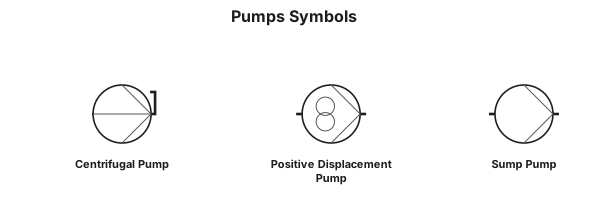
Draw Figure 1.11 "Pumps Symbols" as a professional black-and-white P&ID engineering diagram. Show these three pump types vertically: 1. Centrifugal Pump 2. Positive Displacement Pump 3. Sump Pump For each pump, draw its standard P&ID pump symbol next to the name. Use accurate engineering symbols, thin black lines, white background, centered layout, and clear labels. No colors, no 3D effects, no artistic style.

periodic table of elements
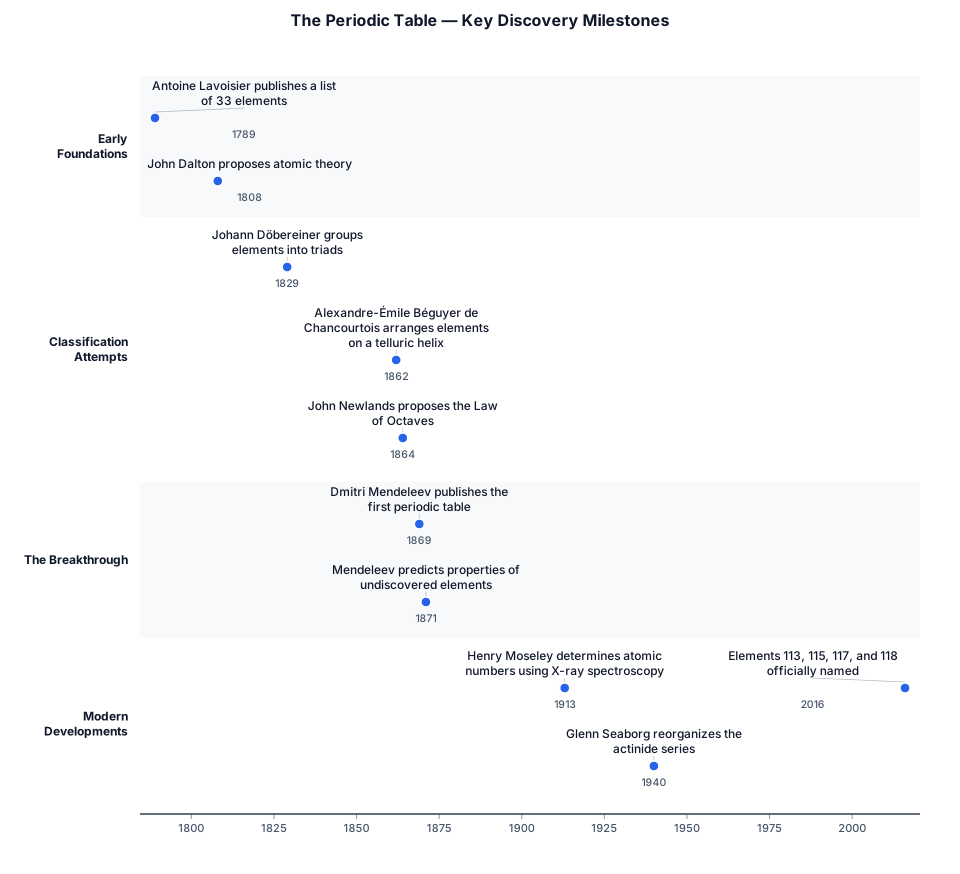
periodic table

Create a simple system architecture flowchart showing how a WordPress post is published from a Staging environment to a Production environment. The flow should include: Create/Edit Post → Click Publish to Production → Authenticate with Production → Validate Post Data → Check if Post Already Exists → If Yes, Update Post → If No, Create Post → Upload/Sync Images → Sync Resource Details → Publish Post → Return Success/Failure Status. Clearly separate Staging and Production environments and keep the diagram easy for a non-technical client to understand. i need digram to add in 1 slide for presentation
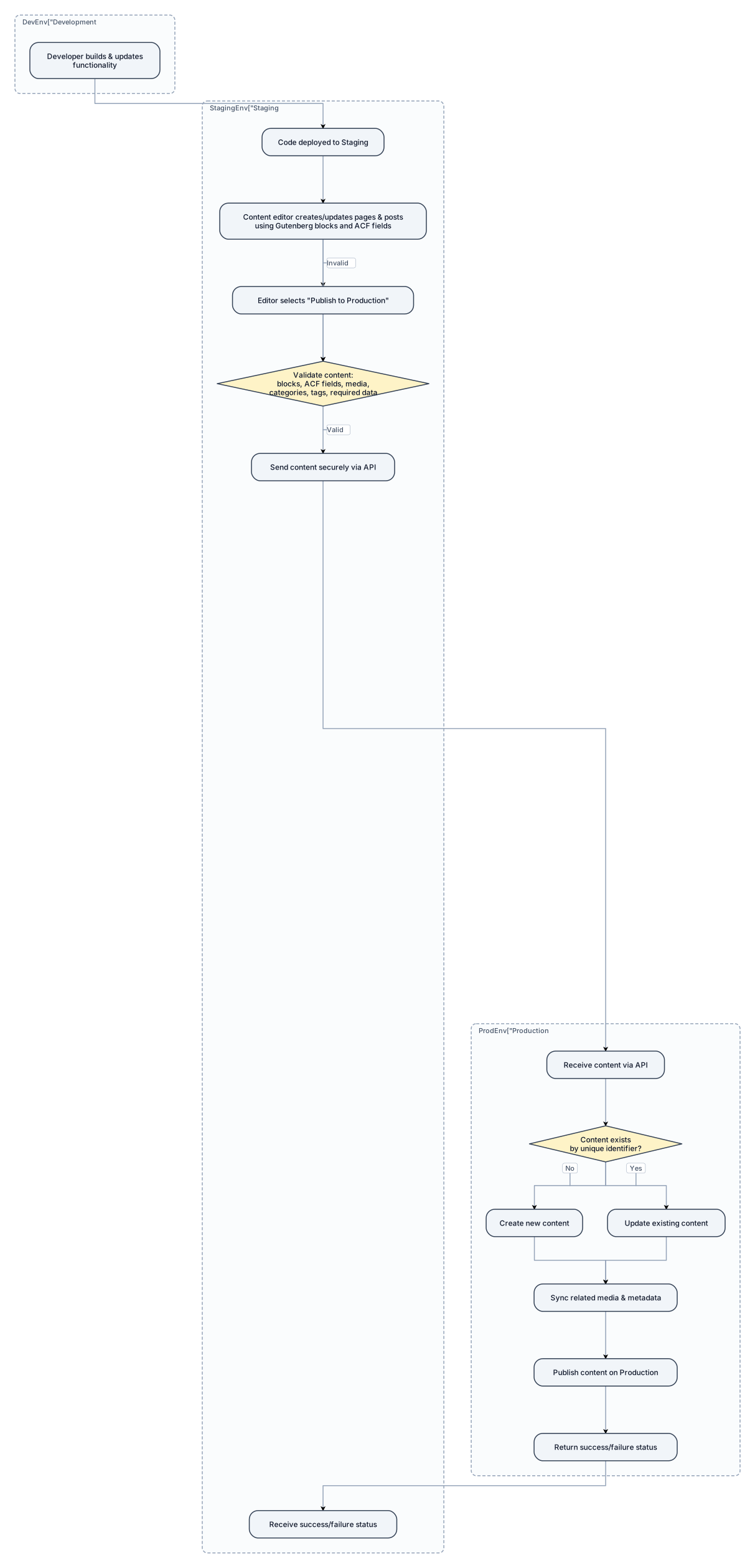
Create a simple, professional system flow diagram for a WordPress website built using ACF (Advanced Custom Fields) and Gutenberg blocks. The website has three environments: * Development * Staging * Production Show the typical content publishing workflow: 1. Developer builds and updates WordPress functionality in Development. 2. Code changes are deployed from Development to Staging. 3. Content editors create or update pages/posts in Staging using Gutenberg blocks and ACF fields. 4. The content editor selects a "Publish to Production" action. 5. The system validates the content, including Gutenberg blocks, ACF fields, featured images, media, categories, tags, and other required data. 6. The system securely sends the content to the Production WordPress website through an API. 7. Production checks whether the content already exists using a unique identifier. 8. If the content does not exist, create it. 9. If the content already exists, update it. 10. Sync related media and required metadata. 11. Publish the content on Production. 12. Return a success or failure status to the Staging environment. Clearly separate the Development, Staging, and Production environments. Show that code deployment and content publishing are two separate flows. Keep the diagram simple and understandable for both technical and non-technical stakeholders.
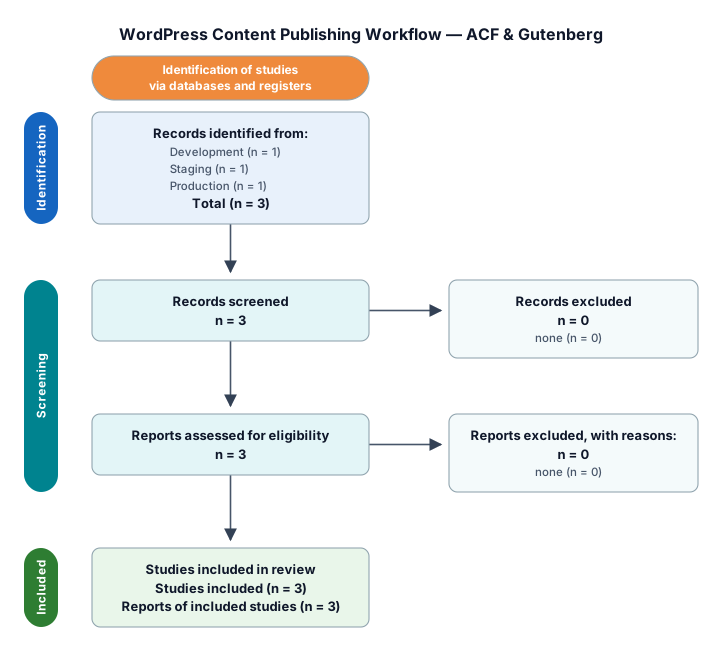
Create a simple, professional system flow diagram for a WordPress website built using ACF (Advanced Custom Fields) and Gutenberg blocks. The website has three environments: * Development * Staging * Production Show the typical content publishing workflow: 1. Developer builds and updates WordPress functionality in Development. 2. Code changes are deployed from Development to Staging. 3. Content editors create or update pages/posts in Staging using Gutenberg blocks and ACF fields. 4. The content editor selects a "Publish to Production" action. 5. The system validates the content, including Gutenberg blocks, ACF fields, featured images, media, categories, tags, and other required data. 6. The system securely sends the content to the Production WordPress website through an API. 7. Production checks whether the content already exists using a unique identifier. 8. If the content does not exist, create it. 9. If the content already exists, update it. 10. Sync related media and required metadata. 11. Publish the content on Production. 12. Return a success or failure status to the Staging environment. Clearly separate the Development, Staging, and Production environments. Show that code deployment and content publishing are two separate flows. Keep the diagram simple and understandable for both technical and non-technical stakeholders.
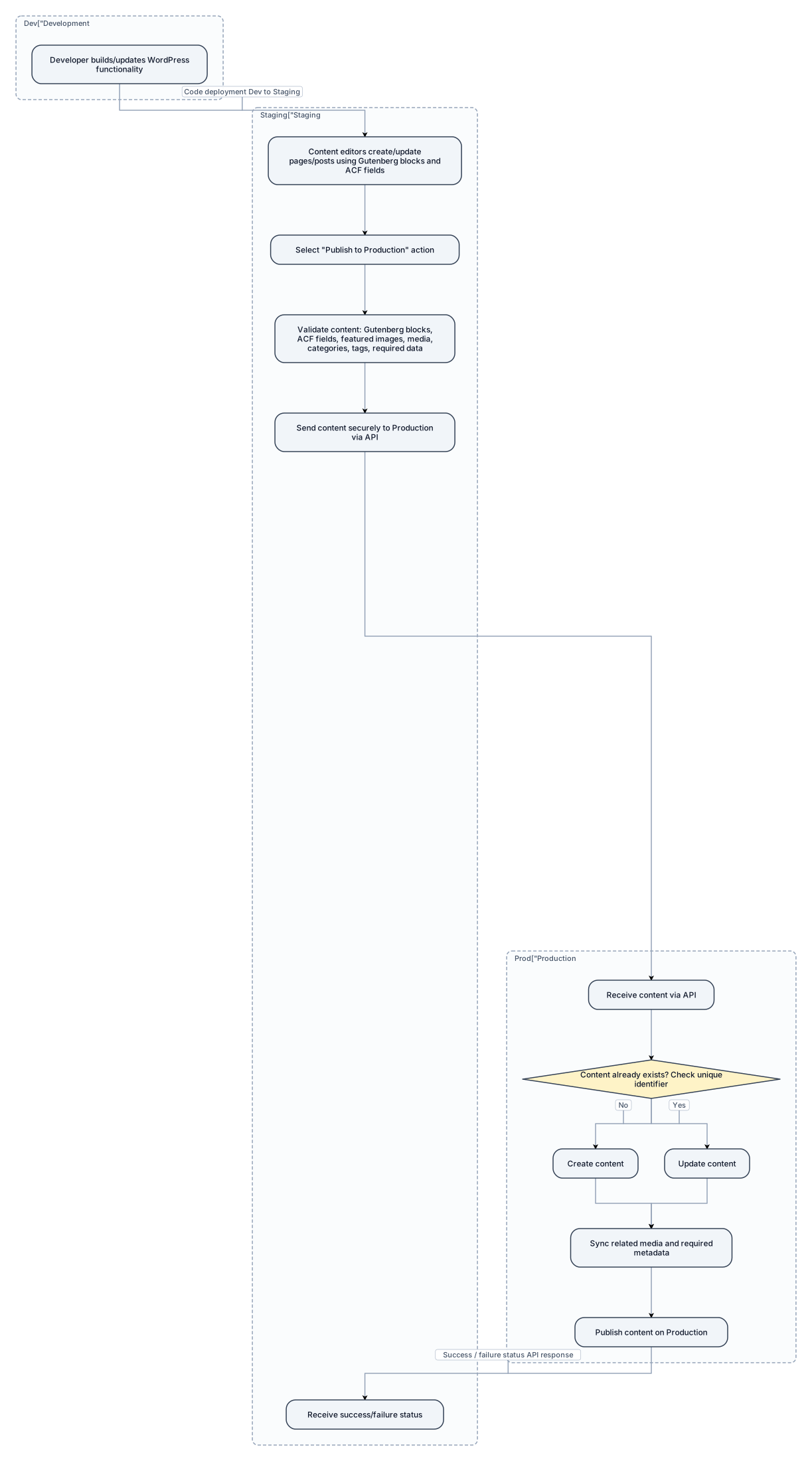
Create a simple, professional system flow diagram for a WordPress website built using ACF (Advanced Custom Fields) and Gutenberg blocks. The website has three environments: * Development * Staging * Production Show the typical content publishing workflow: 1. Developer builds and updates WordPress functionality in Development. 2. Code changes are deployed from Development to Staging. 3. Content editors create or update pages/posts in Staging using Gutenberg blocks and ACF fields. 4. The content editor selects a "Publish to Production" action. 5. The system validates the content, including Gutenberg blocks, ACF fields, featured images, media, categories, tags, and other required data. 6. The system securely sends the content to the Production WordPress website through an API. 7. Production checks whether the content already exists using a unique identifier. 8. If the content does not exist, create it. 9. If the content already exists, update it. 10. Sync related media and required metadata. 11. Publish the content on Production. 12. Return a success or failure status to the Staging environment. Clearly separate the Development, Staging, and Production environments. Show that code deployment and content publishing are two separate flows. Keep the diagram simple and understandable for both technical and non-technical stakeholders.
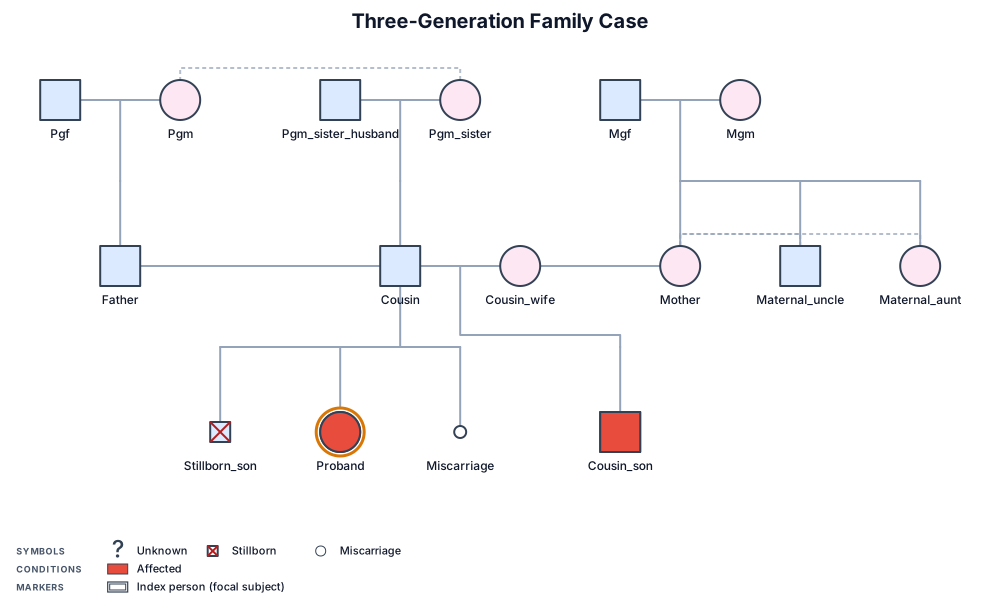
A three-generation genogram for a family case: grandparents on both sides, parents , 3 children: 1st - stillborn male, 2nd - affected female, 3rd - early misscariage; paternal grandmother has a sister; this sister has a healthy son; this son has an affected son; proband is the affected female; mother of the proband has a healthy sister and a healthy brother

Create a clean technical engineering drawing on a white background showing these pipe fitting symbols: 1. Union 2. Cross 3. Plug 4. Cap 5. 90° Elbow 6. 45° Elbow 7. Reducer 8. Flange in pipeline 9. Duplex inline strainer 10. Y-type strainer 11. Spectacle Blind – Open 12. Spectacle Blind – Closed Use simple black lines only, like a hand-drawn Microsoft Paint technical drawing. Each symbol must be clearly separated and labeled with its exact name. No colors, no 3D effects, no artistic styling. Make the symbols technically recognizable as standard process piping / P&ID fitting symbols. Arrange them neatly in rows.
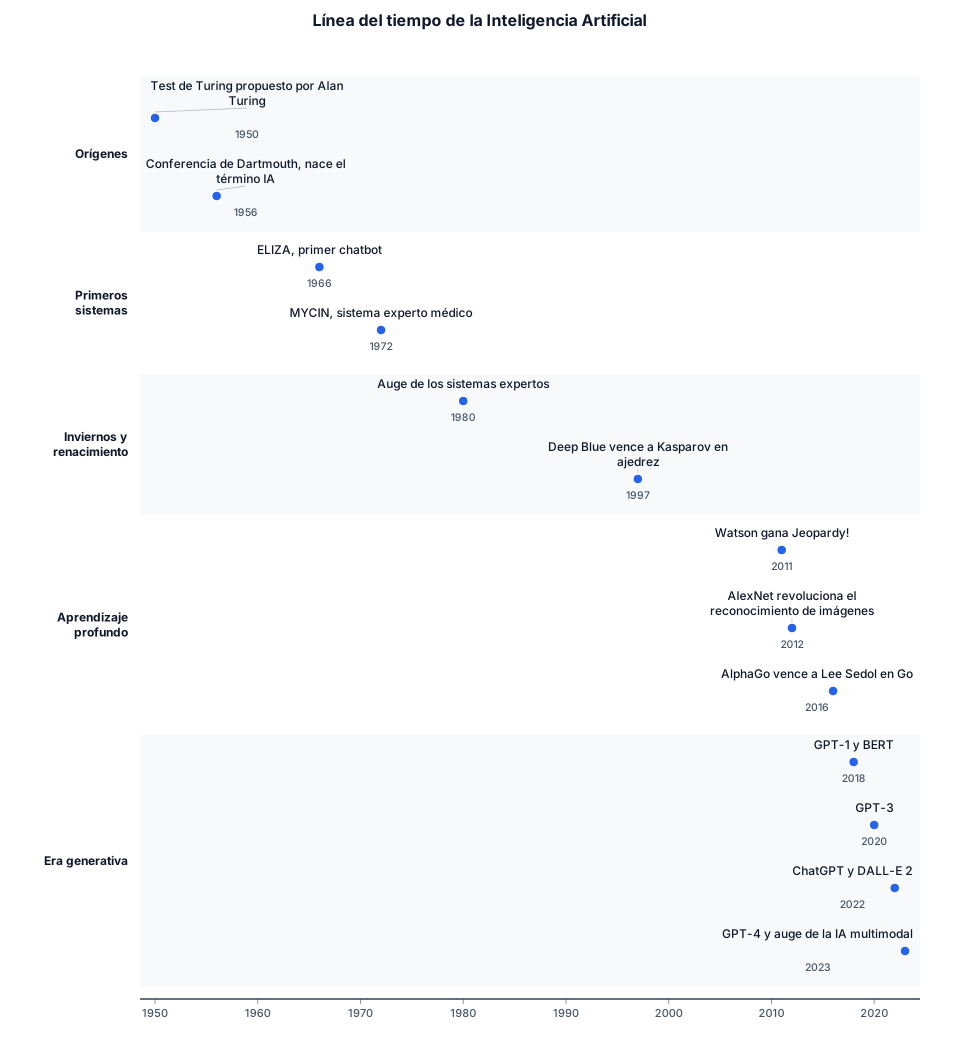
Quiero una línea del tiempo de la inteligencia artificial

Create a professional academic layered conceptual framework. Title: Layered Model: AI-Assisted Legal Reasoning and Human Review Create exactly three large horizontal layers stacked vertically. TOP LAYER: Human Judicial Review & Normative Justification MIDDLE LAYER: Explainable AI (XAI) Interface Divide the middle layer into three sections: 1. Feature Importance 2. Counterfactual Reasoning 3. Post-hoc Justification At the bottom of the middle layer show: Jurisdiction | Counterfactual | Procedural Fairness BOTTOM LAYER: Distributed AI Systems & Global Data Inside the bottom layer show: Multi-local Data Dispersion Algorithmic Legal Pluralism ARROWS: Three upward arrows must go from the bottom layer to: 1. Jurisdiction 2. Counterfactual 3. Procedural Fairness One upward arrow must connect: Explainable AI (XAI) Interface to Human Judicial Review & Normative Justification Add a small note near the top: Connecting Factors (domicile, place of harm) Use a clean academic style with navy blue, gold, grey and light blue. Use rectangular horizontal layers. Keep all text editable and clearly readable. The final output must be suitable for a research paper and exportable as SVG.
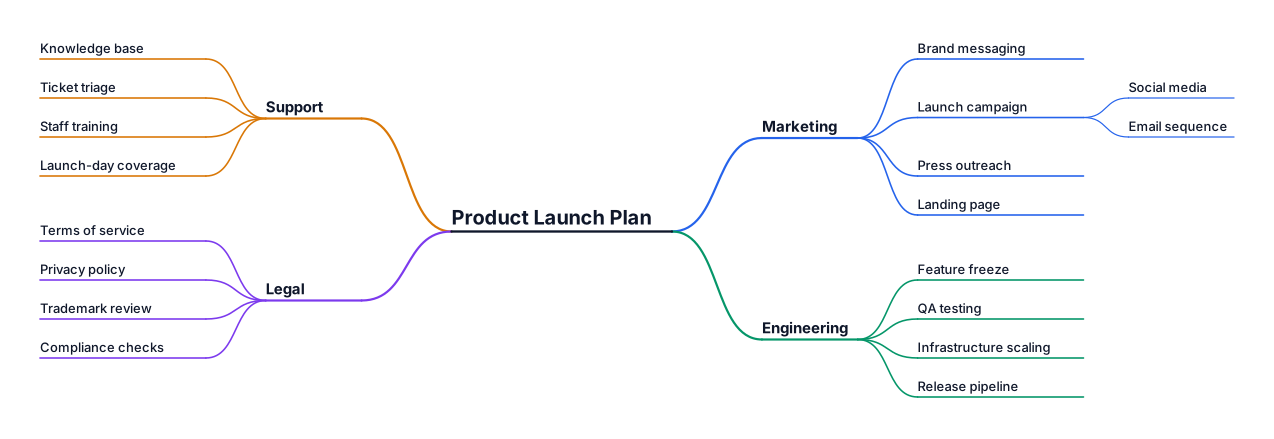
A mind map for planning a product launch, branching into marketing, engineering, support, and legal
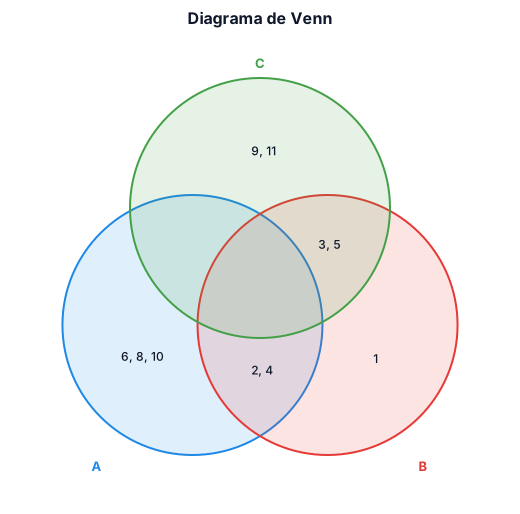
Crea un diagrama de Venn con los siguientes conjuntos A = {2,4,6,8,10} B = {1,2,3,4,5} C = {3,5,9,11}
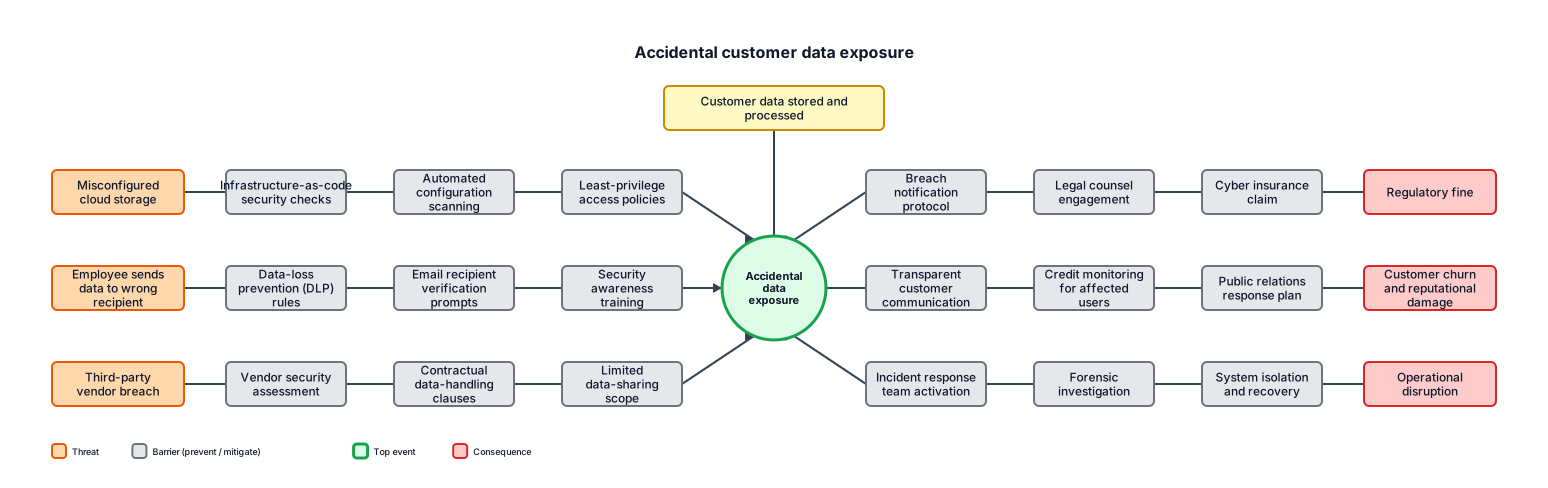
A bowtie analysis for accidental customer data exposure, including preventive controls, consequences, and recovery controls las 8 etapas del proceso de compra industrial al 2026.
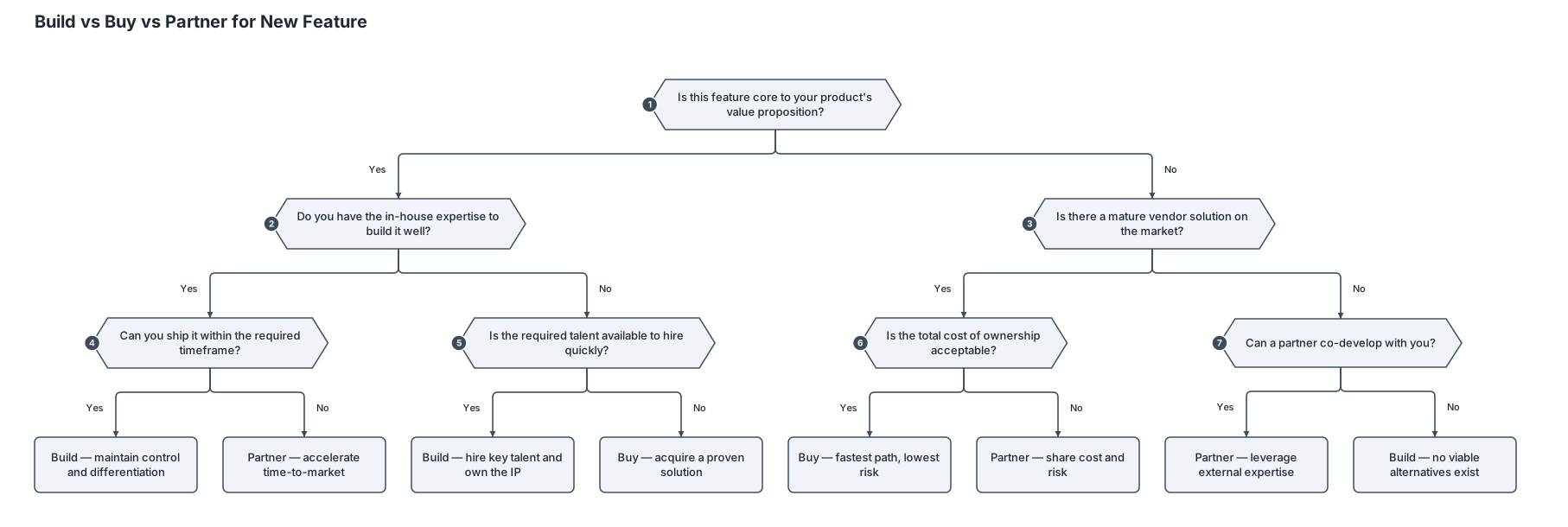
A decision tree for whether a startup should build, buy, or partner for a new feature
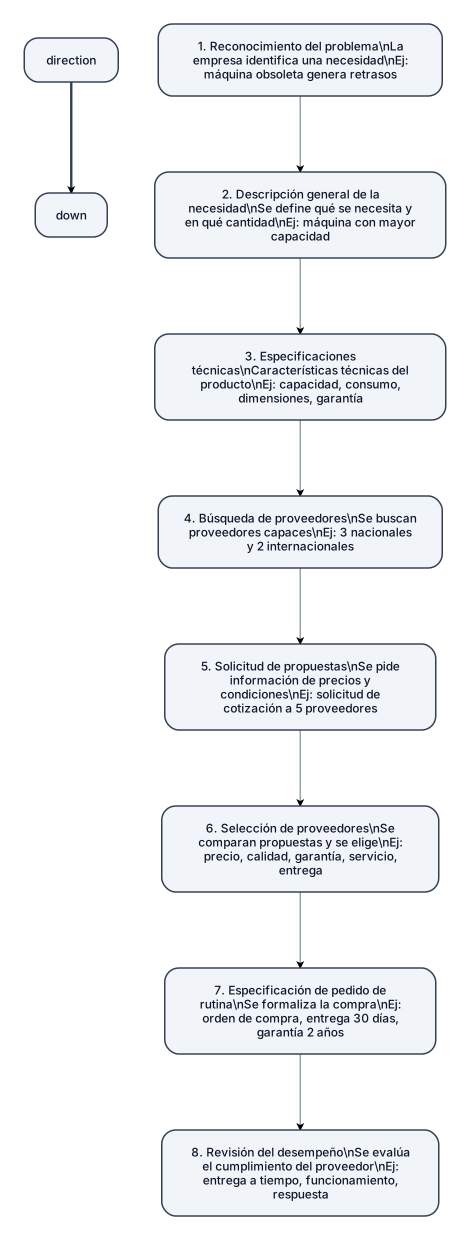
Haz un gráfico de “las 8 etapas del proceso de compra industrial al 2026” 1. Reconocimiento del problema: La empresa identifica una necesidad que debe resolver mediante una compra. Ejemplo 2026: una fábrica detecta que una máquina de producción está quedando obsoleta y genera retrasos. 2. Descripción general de la necesidad: Se define qué se necesita y en qué cantidad. Ejemplo: la empresa determina que necesita una máquina con mayor capacidad para aumentar su producción. 3. Especificaciones técnicas: Se establecen las características técnicas que debe cumplir el producto. Ejemplo: capacidad de producción, consumo eléctrico, dimensiones, materiales, garantía y nivel de automatización. 4. Búsqueda de proveedores: La empresa busca proveedores capaces de ofrecer el producto requerido. Actualmente puede utilizar directorios empresariales, contactos comerciales e Internet. Ejemplo: identifica tres proveedores nacionales y dos internacionales. 5. Solicitud de propuestas: Se solicita a los proveedores información sobre precios, características, entrega y condiciones de venta. Ejemplo: la empresa envía una solicitud de cotización a los cinco proveedores seleccionados. 6. Selección de proveedores: Se comparan las propuestas y se elige el proveedor o proveedores que cumplen con los requisitos establecidos. Ejemplo: se comparan precio, calidad, garantía, servicio técnico y tiempo de entrega. 7. Especificación de pedido de rutina: Se formaliza la compra indicando cantidades, especificaciones, precio, fecha de entrega, garantía y condiciones acordadas. Ejemplo: se emite una orden de compra por una máquina, estableciendo entrega en 30 días y garantía de dos años. 8. Revisión del desempeño: Después de la compra, la empresa evalúa si el proveedor cumplió con lo acordado. Ejemplo: se revisa si la máquina llegó a tiempo, funciona correctamente y si el proveedor respondió adecuadamente ante cualquier inconveniente.
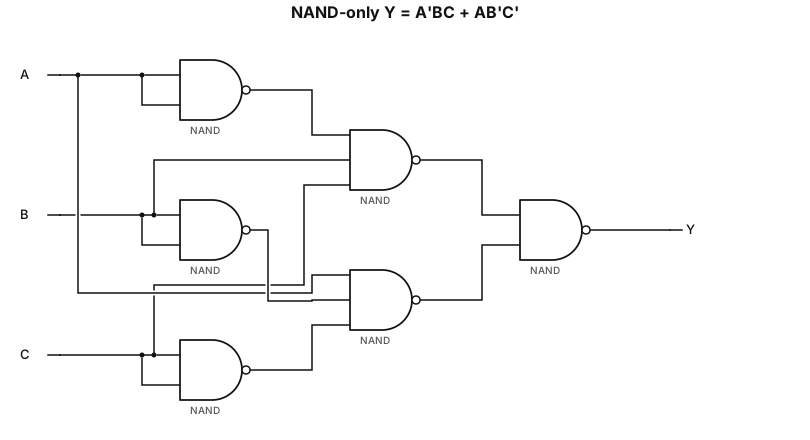
NAND-only implementation of Y = A'BC + AB'C'

“Crea una infografía ilustrada y académica sobre los tipos de mercados industriales. Incluye 6 categorías: mercado de productores, mercado de revendedores, mercado gubernamental, mercado de servicios, mercado agroindustrial y mercado internacional. Representa cada tipo con ilustraciones o íconos relacionados, por ejemplo fábricas, distribuidores, gobierno, hoteles, agricultura y comercio internacional. Usa un diseño moderno, limpio, profesional y colorido, con poco texto, títulos claramente visibles y formato horizontal para insertar en un documento de Word.”

Hazme una imagen ilustrativa sobre los tipos de mercados industriales

Hazme un gráfico sobre los tipos de mercados industriales
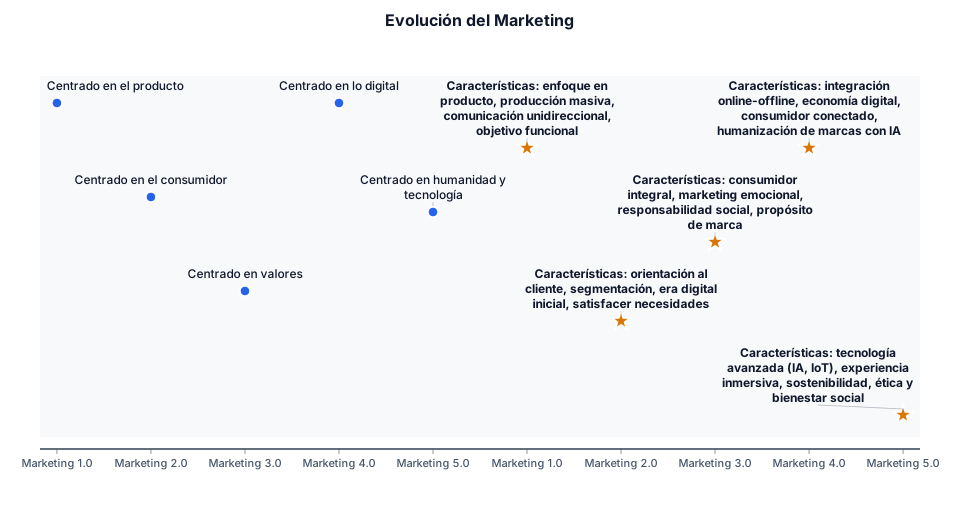
Haz una línea de tiempo de la evolución del marketing Marketing 1.0➡️ marketing 2.0 ➡️ marketing 3.0➡️ marketing 4.0 ➡️ marketing 5.0 Explicando por cómo se caracteriza cada uno y poniendo sus características enumeradas
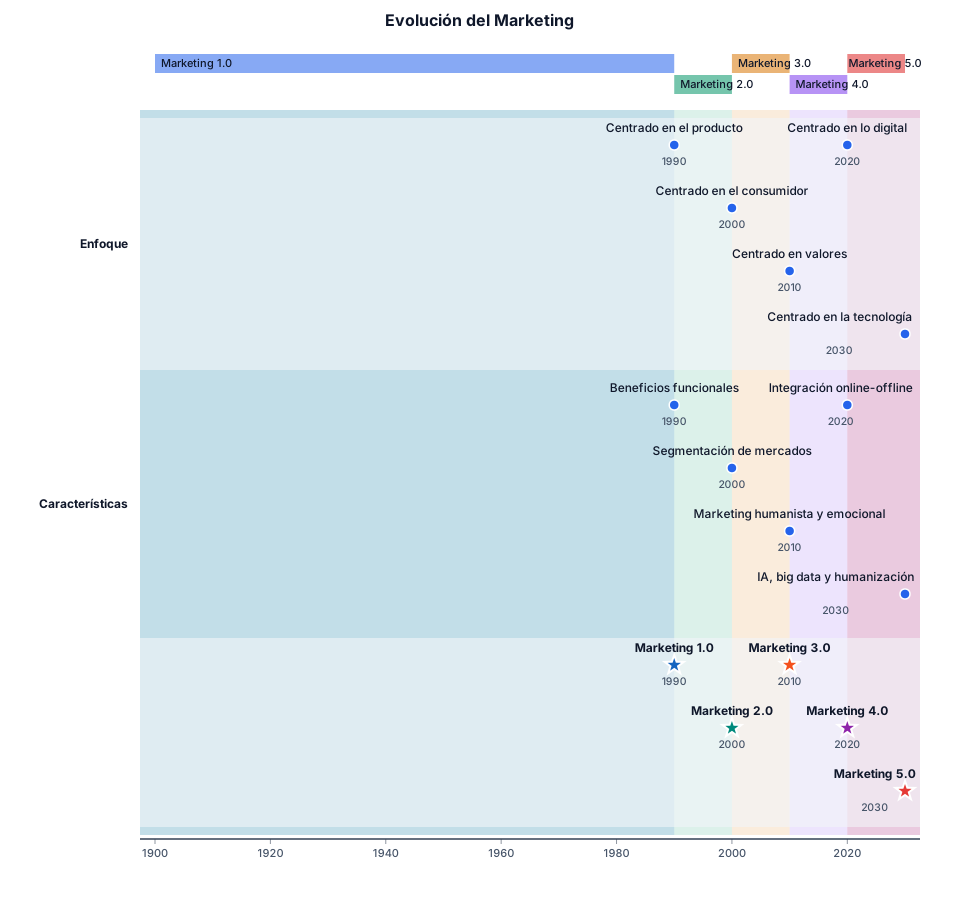
Haz una línea de tiempo de la evolución del marketing Marketing 1.0➡️ marketing 2.0 ➡️ marketing 3.0➡️ marketing 4.0 ➡️ marketing 5.0